What's inside
- Key Takeaways
- Quick Picks
- How We Chose These Picks
- The Casio CW-E60: A Real Disc Printer That Is Not an Inkjet
- Comparison
- How Does Inkjet Disc Printing Actually Work, When a Machine Has It?
- Dedicated Disc Tray, Multi-Purpose Tray, Add-On Tray: What Is the Difference?
- A Warning About Labels, Loose Trays and Other Impostors
- What Should You Look for in the Second-Hand Market for a Genuine Inkjet CD Printer?
- How Do Printable Coatings Differ, and Why Does the Difference Show in the Print?
- Why Did Manufacturers Build Disc Printing Into Inkjet Lines at All?
- A Short Glossary for Reading Disc-Printer Listings Without Being Fooled
- One Last Distinction: Printing a Disc Versus Printing for a Disc
- Common Mistakes
- Final Recommendation
- Frequently Asked Questions
- Related Guides
As an Amazon Associate I earn from qualifying purchases. This post may contain affiliate links at no extra cost to you.
widgetverdict.com is reader-supported. When you buy through links on our site, we may earn an affiliate commission.
Narrow the question and it gets harder, not easier. Ask for the best inkjet cd printers and you are no longer asking about disc printing in general — you are asking about one specific mechanism: liquid ink, laid by a moving head onto the coated face of a printable CD, through a guided tray, by a machine whose software composes artwork onto a ring. That mechanism produced the classic home disc-printing era, and it has now almost entirely left the current product lines. The proof is on this page. The six inkjets below are the machines a search for this term actually returns — serious Epson and Canon photo printers, wide-format models, a tank flagship — and not one of their listing titles states disc printing, names a disc tray, or mentions a CD. Every disc line in every spec box below therefore carries the same fixed wording: not stated in the listing title, verify with the manufacturer documentation.
Why publish a guide that begins by declining its own premise? Because the alternative guides — the ones that cheerfully rank these machines as CD printers on the strength of their photo engines — are how buyers end up with an excellent printer and an unprintable stack of CDs. This guide does the useful opposite. It explains the inkjet disc mechanism properly, so you know exactly what a genuine inkjet CD printer consists of: the tray, the printable coating, the colour count’s real contribution, the difference between a dedicated disc tray and a multi-purpose tray, and the layout software that maps art onto an annulus. It evaluates the six machines honestly as the photo and paper printers their titles describe, since several are worth buying for the work around a music collection. And it draws the contrast that defines the category’s edge: the Casio CW-E60, a genuine disc title printer that is not an inkjet at all but a thermal device, included here in prose only, without a link, to show what sits outside the inkjet definition.
Read with that map in mind and the page becomes a buyer’s instrument rather than a disappointment. You will leave knowing how to recognise a true inkjet disc printer when you meet one — in a manufacturer’s manual, in a specialist listing, in the second-hand market — and knowing precisely which claims should make you put your wallet away.
Key Takeaways
- None of the six inkjets here states disc printing in its listing title; every disc spec line reads “Not stated in the listing title — verify with the manufacturer documentation”.
- A genuine inkjet CD printer is a system: a disc tray or transport, inkjet-printable media with the right coating, and layout software that composes onto the printable ring.
- Colour count matters to disc faces as it does to photographs — six-colour engines render gradients and skin tones more smoothly than four- or five-colour ones — but no colour count creates disc capability.
- A dedicated disc tray and a multi-purpose paper tray are different mechanisms; a tray sold separately cannot add disc printing to a machine that lacks the path and the disc mode.
- The Casio CW-E60 prints titles on discs thermally, not by inkjet; it appears in this guide as a prose-only contrast and is deliberately not a linked pick.
- Verification lives in the manufacturer’s manual for the exact model code: look for a named disc tray, printable-disc media in the specifications, and a disc layout procedure.
Quick Picks
| Pick | Badge | Why it earns its place |
|---|---|---|
| Epson Expression Photo HD XP-15000 | Wide-format six-colour | Six-colour printing to 13 by 19 inches for photographers; its title states no disc function. |
| Epson Expression Photo XP-970 | Wide-format all-in-one | Six-colour wide-format print, scan and copy with memory card support; no disc claim in its title. |
| Epson EcoTank Photo ET-8550 | Tank flagship | Cartridge-free six-colour wide-format printing for creators; disc printing is not among its stated features. |
| Epson Expression Premium XP-7100 | Feeder-equipped photo all-in-one | Five-colour printing with an auto document feeder and borderless photos; its title is silent on discs. |
| Canon PIXMA TS8322 | Living-room photo all-in-one | Wireless photo printing with scanner and copier; nothing in its title mentions optical media. |
| Epson Artisan 1430 | Wide-format veteran | An earlier-generation wide-format colour inkjet; disc capability is not stated in its listing title. |
How We Chose These Picks
The method was to take the inkjet CD search seriously as a shopper experiences it. The results a buyer meets are photo inkjets — current flagships, wide-format specialists, all-in-ones — because the search engines of the world match inkjet confidently and CD loosely. Rather than invent a ranking of disc printers that the listings do not support, this guide assembles the representative machines of that real shelf, reads each title literally, and marks the disc line with the fixed wording wherever the title is silent. It is silent in all six cases, and the guide says so six times, because repetition of an unwelcome fact is better than a single footnote a hurried reader misses.
Judgement within the guide runs on two tracks. The first track evaluates each machine as the printer it states itself to be — colour count, format, functions, inputs, audience — because those stated qualities decide whether it deserves a place in a music lover’s home for sleeves, booklets, posters and photographs. The second track is educational and applies to the whole category: how the inkjet disc mechanism works, what its parts are called, how trays differ, how media coatings differ, and how a buyer verifies a genuine disc model in documentation. A reader who only needs the second track can skim the reviews and keep the teaching sections; a reader shopping for a paper printer gets both.
The Casio decision deserves its own sentence of method. The CW-E60 genuinely prints on discs — its title says so — but it does so thermally, producing titles rather than inkjet artwork. Including it as a linked pick in an inkjet guide would corrupt the category; excluding it entirely would hide the contrast that teaches the category’s boundary. So it is discussed in prose, unlinked, in its own section below. Category honesty sometimes looks like that: a real product, really relevant, deliberately kept outside the ranking.

Epson Expression Photo HD XP-15000 — Wide-format six-colour
Six colours is the XP-15000’s argument, and for disc-minded readers it is worth understanding what that argument would have meant in the disc era — and what it means now, on paper. An inkjet face, whether paper or printable disc coating, is built from droplets; extra ink colours beyond the basic set exist to fill the tonal steps where four-colour engines show banding, especially in skies, shadows and skin. Epson’s six-colour photo engines earned their reputation on exactly those gradients. The XP-15000 applies that engine to sheets up to 13 by 19 inches at up to 9.2 pages per minute, with automatic two-sided printing, aimed at photographers and home studios. On paper, that is a complete and credible proposition.
On discs, this listing promises nothing, and the review must be as complete in saying so as it is in praising the engine. The title states no disc printing, no tray, no printable-media support for optical discs. The spec box records the fixed wording. The historical wrinkle — that wide-format Epson photo lines of earlier generations were the very machines music enthusiasts once bought for their CD trays — makes the discipline more important, not less: a lineage is not a feature list, and each generation must be read on its own documentation. The manual for this exact model is where any disc question about it begins and ends.
What the XP-15000 offers a music household today is the print work around the discs: full-size sleeve artwork, posters of a favourite band’s photography, large prints for the listening room, and photographic output that justifies a six-colour engine every time it runs. Automatic two-sided printing covers the mundane documents of the same household without a second machine. If those jobs are your real jobs, the machine argues for itself eloquently. If your real job is ink on a CD, this listing is not evidence — and no honest review should let its eloquence about paper borrow authority it never claimed about discs.
Ownership practicalities are the wide-format usuals: a stable surface with room for large sheets to enter and exit, flat storage for big paper, and cartridge stocks kept ahead of projects. Studios that solve those logistics use machines like this constantly and well. The XP-15000 rewards exactly that kind of organised, print-serious home.
- Type: Wireless wide-format inkjet printer
- Colour system stated: 6-colour wide-format photo printing
- Speed stated: Up to 9.2 ppm
- Maximum size stated: 13 x 19 in.
- Duplex stated: Auto 2-sided printing
- Audience stated: Photographers and home studios
- Disc capability: Not stated in the listing title — verify with the manufacturer documentation
Strengths
- Six-colour output renders the gradients that make photographic printing worth doing at home.
- Wide format to 13 by 19 inches serves posters, sleeves and portfolio work.
- Automatic two-sided printing keeps everyday documents effortless.
Trade-offs
- No disc function is stated, despite its lineage in photo lines once associated with disc trays.
- Wide format requires space, large-paper storage and a stable surface.
- Cartridge use follows photographic volume, especially at large sizes.
Best for: photographers and studios printing their own work large, on paper. Not suited for: an inkjet CD printing purchase — this listing states no disc capability to support one.
Assess the XP-15000 as the wide-format photo printer it declares itself to be: check price on Amazon.

Epson Expression Photo XP-970 — Wide-format all-in-one
The XP-970 adds the all-in-one dimension to the wide-format six-colour formula: print, scan and copy, up to 8.5 pages per minute, USB and memory card support, aimed at creative projects. For a music household, the scan function is the sleeper feature. Collections are full of paper that is failing — original CD booklets foxing at the edges, handwritten track lists, gig flyers, photographs of the band before they were famous. A wide-format scanner-printer at one desk lets the keeper capture that paper large, restore it, and print renewed copies for the shelf while the originals retire to safer storage. That is archival work of real value, and it needs no disc claim to justify itself.
The disc line, predictably and properly, is the fixed wording. Six colours, wide format, creative projects — the title’s whole vocabulary is paper vocabulary. The temptation to read disc capability into a creative-projects machine should be recognised for what it is: the shopper’s hope doing the manufacturer’s talking. Epson’s documentation for the exact model code is the only place a disc tray could legitimately appear, and until it does, the XP-970’s role in a disc household is the role its title describes — the paper engine of the collection.
Within that role, the inputs matter. Memory card and USB support suit a keeper whose images live on cards and drives as much as on the network — the scanned booklet restored on a computer, the cover composed from archived photographs. The all-in-one loop of capture, print, judge and reprint happens at one desk without ferrying files between rooms. Creative projects, the title’s own phrase, is an accurate summary: this is a machine for people who make printed things, iteratively, at sizes that show their work properly.
Costs of ambition apply as usual. A wide-format all-in-one is a large object; its six colours are six cartridges to steward; its talents are wasted on a household that prints boarding passes. Buy it for a desk where sleeves, artwork and restored paper are genuinely produced, and it will look proportionate within a month.
- Type: Wireless all-in-one wide-format printer
- Colour system stated: 6-colour wide-format print
- Functions stated: Print, scan, copy
- Speed stated: Up to 8.5 ppm
- Inputs stated: USB and memory card support
- Audience stated: Creative projects
- Disc capability: Not stated in the listing title — verify with the manufacturer documentation
Strengths
- Scanning plus wide-format six-colour printing makes a complete restoration bench for collection paper.
- Memory card and USB inputs fit archive-and-camera workflows.
- All-in-one design keeps capture and output at a single desk.
Trade-offs
- Its title states no disc printing; creative-projects language is about paper.
- Size and ink stewardship are wasted on light, occasional printing.
- Wide paper needs flat storage the household must actually provide.
Best for: keepers and creators who scan, restore and print collection artwork at wide sizes. Not suited for: printing onto CDs, a capability absent from its stated features.
Consider the XP-970 for the creative paper bench it describes: check price on Amazon.

Epson EcoTank Photo ET-8550 — Tank flagship
The ET-8550 changes the ink economy while keeping the wide-format six-colour ambition: cartridge-free tank printing, print, scan and copy, up to 16 pages per minute, output to 13 by 19 inches, for creators and home studios. Tanks alter behaviour. The creator who proofs a sleeve design five times — adjusting colour, judging it at full size, printing again — is practising exactly the iteration that cartridge anxiety suppresses. In a disc household, that iteration applies to everything around the discs: covers, booklets, posters, the printed identity of a collection. A tank flagship is, in effect, permission to print drafts.
It is not permission to print discs, because the title grants no such thing. No disc printing is stated; no tray is named; the spec box carries the fixed wording. The ET-8550 is worth dwelling on here because it attracts a particular fallacy: the more a printer does, the more a shopper assumes it does. Breadth of paper features — tanks, six colours, wide format, all-in-one functions — is breadth within paper. The disc path is a separate piece of engineering that a feature list either includes or does not, and this one does not. Reading that correctly is the difference between a delighted studio and a baffled one.
As a studio machine, the ET-8550’s stated pace deserves a nod: up to 16 pages per minute is brisk for a photo-capable wide-format unit, and it keeps the machine credible for the documents and drafts of a working studio, not only its showcase prints. The all-in-one functions consolidate the desk. The tank system consolidates the supply cupboard into an occasional, planned refill rather than a recurring emergency. Creators who print weekly will feel those consolidations as a calmer working life.
Tank ownership asks its own disciplines in return: refills done methodically, the machine used regularly enough to keep an inkjet happy, and desk territory surrendered to a wide-format footprint. None of these is a hidden catch; they are the visible terms of the most capable paper printer in this guide, and they should be weighed as such — on paper’s merits, for paper’s jobs.
- Type: Wireless wide-format all-in-one tank printer
- Ink system stated: Cartridge-free, 6-colour
- Functions stated: Print, scan, copy
- Speed stated: Up to 16 ppm
- Maximum size stated: 13 x 19 in.
- Audience stated: Creators and home studios
- Disc capability: Not stated in the listing title — verify with the manufacturer documentation
Strengths
- Tank ink economics encourage the proof-and-reprint iteration creative work needs.
- Six-colour wide-format output covers showcase prints and collection artwork alike.
- Stated speed keeps it credible for a studio’s everyday documents too.
Trade-offs
- No disc capability is stated, regardless of how much else the machine does.
- Wide-format hardware claims wide-format space.
- Tank value only materialises with regular, substantial use.
Best for: creators printing large colour work on paper, frequently and iteratively. Not suited for: inkjet CD printing, which this listing does not claim in any particular.
Judge the ET-8550 on its studio paper strengths at its current listing: check price on Amazon.
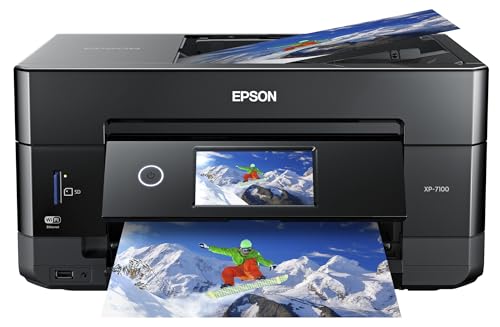
Epson Expression Premium XP-7100 — Feeder-equipped photo all-in-one
Five colours, an auto document feeder and borderless photo printing walk into the XP-7100’s title together, and the combination defines a home all-in-one with its feet in both of home printing’s worlds. The feeder world is paperwork: multi-page documents scanned as a stack, forms copied without a vigil at the glass. The photo world is borderless colour: prints that come out finished, without a white frame to trim. Speed is stated at up to 15.8 pages per minute, functions at print, scan and copy, and the audience at home and photo projects. A household whose music collection shares its desk with school and office paper will recognise this as the pragmatic centre of the market.
The disc entry is the fixed wording, for the now-familiar reason: the title never mentions a disc. Five colours would have served a disc face well in the tray era — the extra colour smooths exactly the mid-tones that dominate album artwork — and that conditional is precisely the trap this guide exists to disarm. Would-have-served is not a specification. A colour count is a property of the ink system; a disc tray is a property of the transport; the two properties coexist only in machines built with both, and this listing states only one of them.
Treat the XP-7100, then, as a candidate for the mixed household desk. Its feeder will be used weekly by anyone who scans documents in stacks; its borderless photos will front the collection’s frames and covers; its wireless design will serve every device in the house. Those are weekly virtues, and weekly virtues are what printers should be bought for. A disc capability that appears in no title and no spec box on this page cannot be a weekly virtue; it can only be a hope, and hopes make poor purchasing criteria.
One more angle is worth the ink: of all the machines here, the feeder-equipped all-in-one is the one whose absence a busy household feels fastest when it is gone. Scanning stacks by hand is the chore that teaches owners what a feeder was worth. If your household’s paper life includes that chore, weight the XP-7100’s stated feeder heavily — it is a documented feature, which in this guide is the highest compliment a feature can earn.
- Type: Wireless colour all-in-one inkjet
- Functions stated: Print, scan, copy
- Colour system stated: 5-colour print
- Speed stated: Up to 15.8 ppm
- Feeder stated: Auto document feeder
- Photo feature stated: Borderless photo printing
- Disc capability: Not stated in the listing title — verify with the manufacturer documentation
Strengths
- A document feeder plus borderless five-colour photos covers home paper’s two worlds.
- Wireless all-in-one design serves the whole household’s devices.
- Stated speed suits a busy mixed-use desk.
Trade-offs
- Its title states no disc function; five colours are an ink property, not a disc property.
- Cartridge costs follow the household’s photo volume.
- Variant folklore in long model families demands manual checks for any unstated feature.
Best for: mixed households scanning document stacks and printing borderless photos on one machine. Not suited for: an inkjet CD purchase, which would need a stated disc tray this listing does not offer.
Weigh the XP-7100 on its documented home strengths: check price on Amazon.

Canon PIXMA TS8322 — Living-room photo all-in-one
Canon’s entry is the domestic one: an all-in-one wireless inkjet photo printer with copier and scanner, finished in black. PIXMA photo machines are designed for rooms people live in, and the TS8322’s stated package follows that brief — photographs for the wall, documents for the household, scans and copies without a trip to a study. In a listening room, that domesticity is a genuine feature. The printer that lives where the music lives gets used for the collection’s paper: the sleeve reprint, the concert photograph, the copied setlist. Equipment placed in another room, however capable, serves those jobs at the cost of a journey, and journeys are where small printing jobs go to be postponed forever.
Its disc status is the fixed wording once more. The title’s vocabulary — photo printer, copier, scanner, wireless, black — contains no disc, no tray, no CD. Canon’s photo marketing is warm and persuasive, and warmth is not evidence. A reader who has followed this guide this far can predict the spec box before reaching it, which is rather the point: by the sixth machine, the discipline of reading titles literally should feel less like scepticism and more like literacy.
On its stated ground, the TS8322 competes as the friendly all-rounder. Scanning preserves the collection’s paper; copying handles the household’s forms; wireless photo printing serves everyone’s phones. It does not offer the wide format of the Epson flagships or a feeder’s stack handling, and it should not be priced as though it did. Its contest is the everyday one — which machine will this household enjoy living with — and on that ground a compact, good-looking photo all-in-one in the right room is a serious contender.
For the disc shopper, the TS8322’s lesson is the gentlest in the guide: a machine can be likeable, capable and entirely wrong for a job it never claimed. Let it be bought, if it is bought, for the room and the paper it was designed for.
- Type: All-in-one wireless inkjet photo printer
- Functions stated: Printer with copier and scanner
- Colour stated: Black
- Disc capability: Not stated in the listing title — verify with the manufacturer documentation
Strengths
- Photo printing with scan and copy covers a listening room’s everyday paper.
- A black, living-room design sits comfortably where collections are enjoyed.
- Wireless access serves the phones and laptops music households actually use.
Trade-offs
- No disc capability is stated anywhere in its title.
- No wide format or document feeder is stated for larger or stack-based jobs.
- Its value is everyday paper value and should be priced as such.
Best for: households wanting a friendly photo all-in-one in the room where life happens. Not suited for: printing CDs — the job is absent from everything its listing states.
See the TS8322 presented for its actual, domestic role: check price on Amazon.

Epson Artisan 1430 — Wide-format veteran
The Artisan 1430 closes the six as the veteran: a wireless colour wide-format inkjet, model code stated in its title, from the generation when home photo printing at large sizes was Epson’s flagship ambition. Veterans must be read differently from current models. Their titles are shorter, their marketing quieter, and their reputations — accumulated over years of owner discussion — louder than either. For the inkjet CD question, that reputation is a minefield, because the Artisan era overlaps the disc-tray era, and a decade of second-hand descriptions has blurred which exact variants did what, in which markets, with which bundled trays.
This guide’s treatment is the only safe one: the listing title states wide-format colour printing and no disc function, so the spec box carries the fixed wording, and any individual unit’s disc story must be settled by that unit’s own documentation. Note what that discipline protects. It protects the buyer from paying a disc premium for a paper printer. It also protects the seller’s genuinely disc-capable variant — if one is documented — from being doubted merely because its cousins were paper-only. Documentation cuts both ways, and fairly.
As a wide-format paper printer, the 1430’s questions are the veteran questions. Condition first: a wide-format inkjet’s health lives in its head and its transport, and a listing’s account of both deserves scrutiny. Consumables second: an older model’s ink supply should be confirmed as a going concern before the machine is bought, not after. Support third: drivers and documentation for your operating system, verified in advance. A well-kept, well-documented example can still print the listening room’s large artwork beautifully; the word documented does more work in that sentence than the word beautiful.
There is a fitting symmetry in ending the reviews here. The inkjet CD era and the Artisan era are the same era, and both now live in the same place: the documented second-hand market, where knowledge is the currency. This guide’s whole method — titles read literally, manuals consulted, folklore discounted — is the price of shopping there safely, for this machine above all.
- Type: Wireless colour wide-format inkjet
- Format stated: Wide-format printing
- Model code stated: C11CB53201
- Disc capability: Not stated in the listing title — verify with the manufacturer documentation
- Listing note: Earlier-generation model — condition and documentation decide its value
Strengths
- Wide-format colour printing serves large artwork, posters and sleeves.
- A long owner history means its paper behaviour is deeply documented by users.
- Wireless design suits a listening-room or studio desk.
Trade-offs
- No disc function is stated in its title, amid the heaviest folklore of any pick here.
- Veteran hardware demands checks on condition, ink supply and driver support.
- Wide format claims substantial space and paper storage.
Best for: buyers of documented wide-format paper printing who shop veteran hardware carefully. Not suited for: an inkjet CD purchase based on era or reputation — only a manual naming a disc tray could support that, and this title does not.
Inspect the Artisan 1430’s live listing with a veteran buyer’s checklist in hand: check price on Amazon.
The Casio CW-E60: A Real Disc Printer That Is Not an Inkjet
Every category is clarified by its boundary, and this category’s boundary has a name: the Casio CW-E60, a CD & DVD disc title printer. It is discussed here in prose, deliberately unlinked and outside the ranking, because it fails the guide’s defining test in an instructive way — it prints on discs genuinely, but it does not do so with inkjet. Its mechanism is thermal: a heated process transfers the title onto the disc surface, producing crisp identification text rather than a photographically printed face. No liquid ink, no droplets, no printable-coating partnership of the inkjet kind.
The distinction is not pedantry, because the outputs serve different ambitions. An inkjet disc face, on a true tray machine, is artwork: full-colour, full-face, photographic if the design is. A thermal title is identification: the album name, the date, the contents, set cleanly and permanently. Archives full of discs that need finding rather than admiring are honestly served by titles; a musician releasing a demo is not. Shoppers who understand which ambition is theirs can judge the Casio fairly — as a neat solution to the labelling problem that happens to share shelf space with, but not mechanism with, the inkjet machines in this guide.
Its presence also disciplines the language of the whole page. When a title printer is called a disc printer, the statement is true and incomplete; when an inkjet photo printer is called a CD printer, the statement is simply unsupported. This guide reserves its linked ranking for stated inkjet paper machines, its prose for the thermal contrast, and its recommendation, for anyone who needs inkjet on a disc, for the verification method that finds a genuine tray model in documentation. That three-way honesty is the most useful thing a thin category can offer.
Comparison
| Printer | Stated disc status | Colour system stated | Format stated | Honest role |
|---|---|---|---|---|
| Epson Expression Photo HD XP-15000 | Not stated in title | 6-colour | 13 x 19 in. | Photographer paper printing |
| Epson Expression Photo XP-970 | Not stated in title | 6-colour | Wide-format | Creative all-in-one paper bench |
| Epson EcoTank Photo ET-8550 | Not stated in title | 6-colour, tank | 13 x 19 in. | Studio paper work in volume |
| Epson Expression Premium XP-7100 | Not stated in title | 5-colour | Home sizes | Feeder-equipped home all-in-one |
| Canon PIXMA TS8322 | Not stated in title | Photo inkjet | Home sizes | Living-room photo all-in-one |
| Epson Artisan 1430 | Not stated in title | Colour inkjet | Wide-format | Veteran large-format paper prints |
Six rows, six identical disc entries — that uniformity is the finding of this guide, and the table does not dress it up. The columns that do vary sort the machines for their real contest: colour count for gradient quality, format for print size, ink system for running pattern. Buy on the varying columns, for paper. For discs, the table’s message is that your search must move to documentation and specialist equipment, not to a seventh row of the same shelf.
How Does Inkjet Disc Printing Actually Work, When a Machine Has It?
Begin with the disc, because the disc is half the mechanism. An inkjet-printable CD carries a matte coating formulated to receive water-based ink: droplets land, spread a controlled amount, and dry into the coating rather than sitting on plastic. Without that coating the same ink beads and smears, which is why ordinary discs can never be printed by any setting or patience. The coating defines a printable ring — from the outer rim inward to a stated inner diameter — and hub-printable media extends that ring closer to the centre hole, buying design space where titles like to live.
The printer’s half begins with transport. A printable disc cannot flex through rollers like paper, so a disc-capable inkjet carries it on a rigid tray that slides through a straight, guided path while the head makes its passes above the face. That tray is not an accessory in the casual sense; it is a component of a path engineered into the machine, with sensors and firmware that know a disc is present, know its diameter, and know where the printable ring begins and ends. This is why the tray question is binary in this guide: the path exists in the machine’s design, or nothing placed in the feed slot can substitute for it.
Software completes the system. Disc layout tools compose onto a circular template: artwork placed with the hole respected, titles curved or straight within the ring, inner and outer diameters set to match the media in the tray. The craft of a good disc face is mostly restraint — type large enough to read, critical content kept away from both edges of the ring, contrast that survives the coating’s matte finish. Owners of genuine tray machines learn that craft on test discs; everyone else should at least learn its vocabulary, because a listing that speaks it fluently — tray names, printable diameters, layout software — is describing a real feature, while a listing that speaks only of photo quality is describing paper.
Dedicated Disc Tray, Multi-Purpose Tray, Add-On Tray: What Is the Difference?
A dedicated disc tray is the component described above: shaped for one machine’s disc path, named in its manual, used only for discs. Its existence in a model’s documentation is the single most reliable sign that the model prints discs, which is why this guide’s verification method searches manuals for tray names rather than for marketing adjectives.
A multi-purpose tray is a different animal wearing a similar name. On many printers it is a paper tray variant — a feeder for thick media, envelopes or specialty sheets — whose purpose is paper handling, not optical media. The shared word tray causes real purchases to go wrong: a shopper reads that a model has a multi-purpose tray, pictures a disc riding in it, and buys a paper feature under a disc misunderstanding. Read tray claims by their documented media list. If the list names paper stocks and envelopes, the tray is for paper, whatever its name suggests to a hopeful eye.
The add-on tray, sold separately by third parties, is the third case and the one this guide warns about in every article of this cluster. Offered as a spare for a documented disc model, a replacement tray is legitimate and useful. Offered as an upgrade that bestows disc printing on a machine without a disc path, it is a shaped piece of plastic attached to an impossible promise, and feeding a rigid disc through an unintended path risks jamming and damage. The order of operations never reverses: capability first, documented in the manual; tray second, as its servant.
A Warning About Labels, Loose Trays and Other Impostors
Adhesive labels imitate inkjet disc printing from a distance: print a sheet on any inkjet, stick the circle on a CD, and the disc appears printed. Appearances deceive here in ways that matter. The label is paper on glue; it can lift, bubble and drift off-centre, and a spinning disc with a lifting label is a hazard to itself and to the drive playing it. Its ink, printed for paper, sits on a label that will age on a different schedule from the disc beneath. For a working copy that will be discarded in a year, some owners accept that bargain knowingly. For anything meant to last, this guide’s position is plain: a label is not an inkjet-printed disc, and it should never be sold or bought as one.
The loose tray warning bears repeating in an inkjet-specific form. Inkjet disc printing depends on the head passing at a controlled distance over a coated surface; a machine without the engineered path cannot hold that relationship, and no tray geometry compensates. If a seller’s pitch for a tray includes the phrase along the lines of unlocking a hidden feature, close the listing. Manufacturers document real features in manuals because owners need instructions; hidden features that only a third-party accessory can reveal are a story told to move plastic.
Finally, beware the borrowed photograph. Listings for paper printers in this category sometimes show a disc resting on the machine, leaning against it, or emerging suggestively from a slot. A photograph can stage any of those in thirty seconds. Documentation cannot be staged at all, which is why this guide keeps returning to it — the manual is the one artefact in the whole transaction that describes only what is true.
What Should You Look for in the Second-Hand Market for a Genuine Inkjet CD Printer?
Since current lines have largely abandoned the mechanism, the genuine inkjet CD printer now lives mainly in the second-hand and specialist markets, and shopping there is a documentary exercise before it is a financial one. Begin every candidate with its exact model code and its manual, and require the three documentary proofs this guide has used throughout: a disc tray named in the parts list, printable discs in the supported-media specification, and a layout or disc-printing procedure in the how-to chapters. A candidate that produces all three is a real inkjet disc printer whose only remaining questions are condition and completeness. A candidate that produces two is a story.
Completeness is the second-hand buyer’s special discipline, because a tray machine separated from its tray is a paper printer with a past. Ask whether the tray itself is included, whether it is the model’s own tray rather than a lookalike, and whether the layout software the manual describes is obtainable for your computer. Check the tray’s recess and registration features against the manual’s diagram; trays are model-specific precisely because the path is. A complete, documented unit — machine, own tray, obtainable software, manual in hand — is the purchase. Anything less should be priced as the paper printer it functionally is.
Condition questions follow the inkjet usuals, sharpened by age. Print heads in older machines live or die by their history of use and storage; a seller who can show the machine printing today is offering evidence, while a seller offering only assurances is offering weather. Ink supply for an older model should be confirmed as a going concern before money moves, since a disc printer without obtainable ink is a sculpture. None of these checks is exotic, and together they take less time than one disappointed return.
Finally, price the find against its actual competition. A documented tray machine competes with the title printer’s simplicity for archive work and with the publisher’s completeness for production work; it wins its middle ground — full-face artwork, at home, one disc at a time — when it is complete and working. Bought that way, with documents in hand and a test disc planned for its first evening, a second-hand inkjet CD printer is not a compromise. It is the category’s living form, kept alive by exactly the literacy this guide has tried to teach.
How Do Printable Coatings Differ, and Why Does the Difference Show in the Print?
Not all printable coatings are one substance with many labels. Coatings differ in how they receive droplets, how much ink they can hold before fine detail softens, and how their matte finish renders colour — which is why the same design can look subtly different on two brands of printable disc, and why experienced disc printers standardise on one media once a test disc approves it. A coating that drinks ink quickly tends to hold edges crisply; a slower surface can give richer saturation at the cost of patience in drying. Neither profile is a defect. Both are reasons the workflow sections of this cluster insist on a test disc per media type rather than a universal setting trusted blindly.
The practical consequence is a small media library, kept deliberately: the one or two printable discs your equipment and your eye have agreed on, bought consistently, stored properly, and reordered before the shelf empties. Chopping and changing media between batches reopens every settled question — drying time, colour behaviour, title legibility — at the moment a batch least needs new variables. Consistency of media is the cheapest form of print quality an inkjet disc workflow can buy, and it is bought with nothing more exotic than loyalty to a tested box.
Why Did Manufacturers Build Disc Printing Into Inkjet Lines at All?
The feature made perfect sense in its era, and remembering why protects buyers from sneering at it now. Home burning was a mass behaviour: families compiled albums, musicians duplicated demos, photographers delivered discs to clients, and every one of those discs needed a face. The inkjet makers already owned the two hard parts — a colour engine and a precision transport — and the disc tray was a modest extension of both, sold at a moment when the extension could headline a box. The feature’s disappearance tracks the behaviour’s disappearance, not any failure of the mechanism. Inkjet disc printing worked, demonstrably, for millions of discs; it simply outlived the mainstream habit that justified building it into mainstream machines.
That history carries a practical moral for today’s shopper. Because the mechanism was mature when it left the mainstream lines, the documented machines that remain in circulation are not prototypes or curiosities — they are finished tools from a finished era, with complete manuals, known media and known behaviour. A buyer who verifies one properly is not gambling on an experiment. They are adopting a mature technology at the moment of its specialisation, which is often the best moment to adopt anything: the documentation is complete, the weaknesses are all mapped, and the only remaining skill is the literacy to tell a genuine example from a paper printer wearing its era’s reputation.
A Short Glossary for Reading Disc-Printer Listings Without Being Fooled
Four phrases do most of the misleading in this category, and each deserves a translation. “Disc-friendly” means nothing documented; it is a mood, not a mechanism. “Tray included,” in a bundle, means a piece of plastic is in the box; it says nothing about whether the printer has the path the tray serves. “Photo disc quality,” when it appears, is a photograph phrase wearing a disc costume — quality language attached to a capability that has not been established. And “supports discs,” without a manual reference, is a claim in search of its evidence; the supported-media list is where support lives, and a phrase that cannot point there has not yet earned belief. Read listings with those translations in hand and their prose becomes transparent: the genuine claims point at documents, and the rest point at adjectives.
One Last Distinction: Printing a Disc Versus Printing for a Disc
Half the confusion in this category dissolves with a single preposition. Printing a disc means ink on the disc itself, and it demands the whole tray-and-coating system this guide has described. Printing for a disc — the sleeve, the booklet, the insert, the poster for the same release — is paper work, and the six machines above do it at levels from competent to superb. Sellers blur the preposition because the blur sells printers; buyers should keep it sharp, because sharpness is what stands between a music room equipped for its real work and a desk holding a magnificent paper printer next to a stack of CDs that are still, after all the spending, blank-faced.
Common Mistakes
Treating a colour count as a disc feature. Six colours improve gradients on any surface the machine prints; they say nothing about whether a disc can enter the machine. Ink system and disc transport are separate properties.
Confusing a multi-purpose paper tray with a disc tray. The shared word tray misleads weekly. A tray’s documented media list — paper stocks or printable discs — settles which kind it is.
Calling the Casio title printer an inkjet. Its thermal titles are genuinely useful and genuinely not inkjet. Guides that blur the mechanism teach buyers to expect artwork from a title machine.
Printing on ordinary, uncoated discs. Inkjet ink needs a printable coating to land in. On bare plastic it beads and smears regardless of the printer, and the mess is then blamed on the machine.
Buying an add-on tray as a conversion. A tray serves an existing disc path. It cannot create one, and forcing rigid media through an unintended path risks the printer.
Skipping the manual because the family name is familiar. Generations and regions differ in exactly this feature. The exact model code’s documentation is the only version that describes the machine on offer.
Final Recommendation
For inkjet CD printing as a mechanism, the honest recommendation is a method rather than a model: find a machine whose own manual names its disc tray, lists printable discs among its media and walks you through the layout software — then feed it coated, preferably hub-printable media, and learn the craft on test discs. None of the six linked machines in this guide makes that claim in its listing title, and this guide will not make it for them. What they offer, genuinely, is the paper life of a music collection at several levels of ambition: the XP-15000 and Artisan 1430 for wide photographic work, the XP-970 as a scanning creative bench, the ET-8550 for tank-fed studio volume, the XP-7100 for the feeder-equipped household, the TS8322 for the living room. And at the category’s edge stands the little Casio, thermal and unashamed, reminding every reader that a disc can be titled without a drop of ink — while the full inkjet face, when you truly need one, begins with documentation, not with hope.
Frequently Asked Questions
Do any of the six printers in this guide print on CDs?
None of their listing titles states disc printing, and this guide records the disc capability of all six as not stated in the listing title. If a specific model’s manual documents a disc tray, that documentation governs that model — check the exact code before buying for discs.
Why is the Casio CW-E60 not a linked pick here?
Because this guide is about the inkjet mechanism, and the Casio is a thermal disc title printer. It prints titles on discs by a different process, so it is discussed as a prose-only contrast rather than ranked among inkjet machines.
What is the difference between a disc tray and a multi-purpose tray?
A disc tray carries a printable disc through an engineered disc path and is named in a disc-capable model’s manual. A multi-purpose tray is a paper feeder for thick or specialty paper stocks. The shared word causes confusion; the documented media list for the tray settles which one a model has.
Can I print on a normal CD with the right printer settings?
No. Inkjet disc printing requires a disc with a printable coating; ordinary discs have bare plastic faces on which ink beads and smears. Media comes first: inkjet-printable discs, hub-printable if you want artwork close to the centre.
Does a six-colour printer produce better disc faces than a four-colour one?
On a genuine disc-capable machine, extra colours smooth gradients and skin tones on the disc face just as they do on photo paper. But colour count is an ink property, not a disc property — it improves a disc capability that must already exist; it never creates one.
How do I find a genuine inkjet CD printer today?
Search documentation, not adjectives. Take any candidate’s exact model code to the manufacturer’s support site, and require three things in its manual: a named disc tray, printable discs in the supported media, and a disc layout procedure. A model with all three is a real inkjet disc printer; a model missing them is a paper printer, whatever its listing implies.
Related Guides
For the full disc landscape — publishers, title printers and desktop machines together — begin with our overview of printers for printing CDs in the working sense, then compare it with the category survey in our guide to printers with CD and DVD printing. Readers whose interest is the tray itself, its kinds and its impostors, will find the mechanism examined in depth in our guide to printers with a CD tray.


