What's inside
- Key Takeaways
- Quick Picks
- How Did We Choose Mesh Systems for Houses With Several Floors?
- Why Does the Stairwell Kill Your Signal Between Floors?
- Wireless Backhaul or Wired Backhaul: Which Suits a Tall House?
- Which Band Does What When the Signal Has to Climb?
- What About the Basement Office and the Attic Conversion?
- The Six Mesh Systems, Floor by Floor
- How Do the Six Systems Stack Up Across Floors?
- How Much Do Your Floor and Wall Materials Change the Answer?
- How Should You Place Nodes in a Three-Storey House?
- How Can You Test Coverage Honestly Once the Nodes Are Placed?
- What Are the Common Mistakes When Meshing a Tall House?
- When Does a Fourth Node Help, and When Does It Hurt?
- Final Recommendation
- Frequently Asked Questions
- Related Guides
As an Amazon Associate I earn from qualifying purchases. This post may contain affiliate links at no extra cost to you.
widgetverdict.com is reader-supported. When you buy through links on our site, we may earn an affiliate commission.
Where to buy: each of the six mesh systems below links to its Amazon listing, and because pack configuration changes what lands in the box, the listing page — not this guide — is where you confirm exactly how many units a given option ships with before you pay.
A single powerful router parked beside the modem is the wrong tool for a house spread over two or three floors, and the search for the best routers for multifloor homes really starts with admitting why. Wi-Fi travels poorly through floor slabs, foil-backed insulation and the dense tangle of pipes and wiring that runs inside a stairwell wall. The signal that feels strong in the living room arrives at the top-floor bedroom weakened, and the top-floor bedroom is usually where someone is trying to join a video call or stream a film in bed. Mesh systems answer that geometry problem directly: several radios share one network name, and your phone or laptop hands itself to whichever node hears it best as you move through the house.
Every pick in this guide is a mesh system, though they are not all built the same way. Five of them ship as matched sets of identical or near-identical nodes. The NETGEAR Orbi RBK852 is the exception in shape: it pairs one dedicated router with one satellite extender, a two-piece design that suits a house where the internet enters at one end and the dead zone sits at the other. The rest spread three units across the floors. What separates them is backhaul — the hidden conversation between nodes that carries your traffic back to the modem — plus the generation of Wi-Fi each system speaks, the ports on each unit, and the square footage each manufacturer claims in its listing title. Those claimed coverage figures are the only coverage numbers used anywhere in this guide, and every one of them is lifted word-for-word from a manufacturer’s own listing title.
One warning before the picks: a stairwell is the classic dead zone in a multi-floor house, and no mesh kit fixes a bad layout. Nodes placed directly on top of each other, floor above floor, often talk through the slab at the worst possible angle. Nodes staggered — one near the stairs on the ground floor, one at the landing, one further along the top floor — build a staircase of signal that follows the same path you do. Placement advice runs through this whole guide because, in a tall house, where the nodes sit matters as much as which nodes you buy.
Key Takeaways
- Mesh beats a single router in a tall house because nodes placed on separate floors shorten every hop the signal has to make.
- Backhaul decides real-world speed between floors: a dedicated third band or a wired 2.5G link keeps node-to-node traffic off the bands your devices use.
- Stagger nodes around the stairwell instead of stacking them vertically; the landing is usually the strongest relay point in the house.
- Coverage figures in this guide are quoted only from listing titles, and they describe ideal conditions rather than a promise for thick-walled homes.
- Wi-Fi 7 systems add MLO and wider channels, but a well-placed Wi-Fi 6 kit still outperforms a badly placed newer one.
- Count the wired ports per node if any floor needs a cable — a desk, a TV or a games console pinned to Ethernet changes which kit fits.
Quick Picks
| Pick | Badge | Why it earns its place |
|---|---|---|
| TP-Link Deco 7 BE5000 WiFi 7 Mesh System | Wi-Fi 7 with wired backhaul ports | A 3-pack with two 2.5G ports per the listing, so floors can be linked by cable where the slab defeats wireless backhaul. |
| Amazon eero 6+ Mesh WiFi System | Simplest three-floor setup | A 3-pack rated in its title for gigabit plans and 75+ devices, with the most hands-off setup routine in this group. |
| NETGEAR Orbi RBK852 WiFi 6 Mesh System | Two-piece tri-band power | A router plus one satellite with a dedicated tri-band link between them, built for a house with one clear far-end dead zone. |
| ASUS ZenWiFi BT6 WiFi 7 Mesh (3-Pack) | Thick-wall Ethernet backhaul | Tri-band Wi-Fi 7 with two 10G ports and Ethernet backhaul the listing itself pitches at thick walls. |
| NETGEAR Orbi 370 WiFi 7 Mesh System (3-Pack) | Wi-Fi 7 at a calmer tier | Dual-band Wi-Fi 7 across a router and two satellites, with a 2.5 Gig port for a fast wired drop on one floor. |
| Tenda Nova MX12 AX3000 Mesh System (3-Pack) | Big claimed footprint, Wi-Fi 6 | The largest coverage figure in this group per its title, with EasyMesh, VPN and parental controls in a 3-pack. |
How Did We Choose Mesh Systems for Houses With Several Floors?
The first filter was architectural, not technical: only multi-unit mesh systems made the list, because a multifloor home is precisely the layout a lone router serves worst. From there we weighed the things that decide whether a tall house feels covered. Backhaul came first — whether nodes talk to each other on a dedicated band, share the bands your devices use, or can be wired together — because a satellite with a weak link to its router delivers weak internet no matter how strong its local signal looks on your phone. Port selection came second: a node with a 2.5G or 10G port can be wired back to the main unit or feed a wired desk, and that flexibility matters more with every floor you add.
Ownership cost formed a quieter third filter. A mesh system is a five-year appliance, and the difference between security features bundled outright — as the ZenWiFi BT6’s title states — and features that live behind a maker’s subscription changes the real price of the kit across its life. We did not exclude subscription-flavoured systems; the eero’s polish is partly funded that way, and plenty of households gladly pay for invisibility. But where a title named its software terms, we recorded them, and where it did not, the spec lists below tell you to verify rather than assume.
We also read each listing title the way a careful buyer should.
Coverage claims, device counts and headline speeds appear in this guide only where the title itself states them, attributed to the title rather than presented as our own measurements. Where a title stays quiet about a feature — a band count, a port speed, a security suite — the spec lists below say so in plain language instead of borrowing numbers from a sibling model. Six systems survived that discipline, spanning Wi-Fi 6, Wi-Fi 6-era tri-band and Wi-Fi 7 designs, so the right answer can be matched to the house rather than to the newest logo.
Why Does the Stairwell Kill Your Signal Between Floors?
Stand at the bottom of your stairs with a phone in your hand and watch the Wi-Fi indicator as you climb. In many houses it drops a bar on the landing and another at the top, even though you are only a few metres from the router as the crow flies. The reason is what the signal passes through on the way up. A floor slab is not air: it is timber joists, plasterboard, sometimes concrete, often foil-backed insulation board, and a web of heating pipes and electrical runs. Each layer absorbs and scatters radio energy, and the higher 5 GHz and 6 GHz bands — the fast ones — lose more of it than the slower 2.4 GHz band does. The stairwell concentrates the problem because the open void of the staircase is often wrapped in exactly those dense structural walls, so the natural path up the house is also a radio shadow.
There is a simple demonstration you can run tonight with the router you already own. Start a large download on a laptop beside the router and note the time it takes; repeat the identical download in the top-floor bedroom. The gap between those two numbers is the tax your floor plan levies, and it exists before any question of which internet plan you pay for. Most households blame the provider for that gap, upgrade the plan, and watch the top floor improve barely at all — because the bottleneck was never the feed arriving at the house, but the climb inside it.
Mesh works around this by refusing to make one radio do the whole climb.
A node on the ground floor hands traffic to a node near the landing, which hands it to a node along the top floor, and each hop is short and mostly travels through open air in the stairwell void rather than punching diagonally through slab after slab. This is why node placement is a design decision rather than an afterthought. Put the middle node where people naturally pause — the landing, the hallway table — and the chain follows the architecture. Bury it inside a closed cupboard under the stairs and you have rebuilt the original problem inside a more expensive network.
Wireless Backhaul or Wired Backhaul: Which Suits a Tall House?
Backhaul is the traffic between nodes, invisible to you but decisive for speed. In a dual-band system, the same two bands carry both your devices and the node-to-node conversation, so a busy top floor shares its airtime twice. Tri-band systems add a third radio that can be dedicated to backhaul, keeping the relay traffic separate — that is the design the Orbi RBK852 and the ZenWiFi BT6 use, and it is why tri-band kits historically held up better across floors. Wi-Fi 7 complicates the picture in a good way: Multi-Link Operation, named in the Deco 7 listing, lets a node use more than one band for its links at once, which can firm up a marginal hop between floors.
Wired backhaul removes the argument entirely. If your house has Ethernet runs — or you can face one cable run up the stairwell wall — connecting nodes by cable gives every floor the full speed of the main connection, and the wireless bands serve only devices. Two picks here are built with that in mind: the Deco 7 lists 2.5G ports explicitly for wired backhaul, and the ZenWiFi BT6 pairs its Ethernet backhaul with 10G ports. Even a single wired hop helps: wire the longest, weakest link in the chain — usually ground floor to top floor — and let wireless handle the short middle hop. When you shop, check the port count per node rather than per kit, because the satellite on the top floor needs its own jack if it is ever going to be wired.
Which Band Does What When the Signal Has to Climb?
Three radio bands appear across these six systems, and each behaves differently when a floor slab gets in the way. The 2.4 GHz band is the marathon runner: slow by modern standards, but its longer waves bend around obstacles and survive wall and floor materials better than anything else in the house. In a multifloor home it quietly carries smart plugs, thermostats and the distant top-floor tablet that only needs email and web pages. The 5 GHz band is where real work happens — video calls, large downloads, streamed films — and it is also the band that loses the most strength crossing each floor, which is why node spacing on 5 GHz backhaul has to be conservative.
The 6 GHz band, present in the Wi-Fi 6E generation and folded into Wi-Fi 7 designs, offers the cleanest air and the widest channels but the shortest useful reach through construction materials; in mesh systems it earns its keep as a short, fast backhaul lane between nearby nodes rather than as a band your phone uses three rooms away. Wi-Fi 7’s Multi-Link Operation, named in the Deco 7’s title, blurs these roles productively: instead of marrying one band per link, a node can hold a connection together across bands, leaning on 2.4 GHz resilience when 5 GHz fades at the top of the stairs. Understanding this division of labour explains the spec sheets below — tri-band systems are not faster in a headline sense so much as better organised, with each band assigned the job its physics suits.
What About the Basement Office and the Attic Conversion?
The two rooms that break multifloor networks are rarely bedrooms. The basement office sits below the ground-floor slab, often below ground level entirely, with the house’s densest services — water tanks, boilers, metal ducting — between it and the router. The attic conversion sits above everything, frequently behind fresh foil-backed insulation fitted during the conversion itself, which is close to a radio-proof lid. Both rooms share a trait: they are destinations, places where someone sits for hours on calls or coursework, so a marginal signal that a hallway tolerates becomes a daily frustration there.
The fix in both cases is to treat the room as a floor of its own. A node inside the basement office, fed by a wired run if the house permits or placed at the basement stairhead where it can hear the ground-floor unit through the open stair void, transforms the room’s experience more than any router upgrade. The attic usually responds to a node at the top landing aimed up the final short flight, rather than a node in the attic itself struggling to hear through the insulated ceiling from below. If only one of the six systems here can stretch to an extra satellite later, that expandability matters: the EasyMesh support in the Tenda listing and the matched-satellite ecosystems of the Orbi and Deco lines are the routes by which a three-node start becomes a four-node finish when the attic conversion gets built next year.
The Six Mesh Systems, Floor by Floor

TP-Link Deco 7 BE5000 WiFi 7 Mesh System — Wi-Fi 7 with a wired escape route
The Deco 7 is the pick for a multifloor house where you suspect wireless backhaul alone will not survive the floor slabs, because its listing leads with the fix: two 2.5G ports flagged for wired backhaul. Run one cable between floors — through the stairwell void, along a skirting line, wherever the house allows — and the two hardest-working nodes stop competing for airtime and simply pass traffic at wire speed. Leave the third node wireless, place it at the landing, and the chain has one strong wired spine and one short wireless hop, which is exactly the topology a three-storey house wants.
As a wireless system it is a dual-band Wi-Fi 7 design rated BE5000 in the title, with a 4-stream 5 Gbps figure, 240 MHz channels, MLO and AI-Roaming among the named features. MLO matters between floors because a node clinging to a weakening 5 GHz hop can lean on a second link instead of dropping to a crawl, and AI-Roaming is TP-Link’s steering that nudges your phone to the better node as you climb the stairs. The title claims coverage up to 6,600 sq. ft. for the 3-pack, and it names VPN support and HomeShield as the included software layer. Judge it as the flexible option: wireless where wiring is impossible, wired where the house gives you even one usable run.
- Wi-Fi standard: Wi-Fi 7, dual-band, BE5000 class per the listing title
- Claimed coverage: up to 6,600 sq. ft. (3-pack, as titled)
- Ports: 2 × 2.5G, listed for wired backhaul
- Named features: MLO, AI-Roaming, VPN support, HomeShield
- Unit count: 3-pack (Deco BE25)
Strengths
- 2.5G ports on the listing give a genuine wired-backhaul path between floors, not just a WAN jack.
- MLO directly addresses the marginal mid-stair hop that throttles lesser dual-band kits.
- AI-Roaming steering suits a house where people carry calls from floor to floor.
Trade-offs
- Dual-band design means wireless backhaul still shares bands with devices when no cable is run.
- The 6,600 sq. ft. figure is a title claim under ideal conditions; stone or concrete floors will shrink it.
- HomeShield’s deeper features sit in a software tier the title does not fully describe, so check the listing for what is included.
Best for: a three-storey house where one Ethernet run between floors is possible and the rest must be wireless. Not suited for: a home where every node must sit behind a closed door — the Deco units need open air around them to hold their inter-floor links.
See the wired-backhaul options on the Deco 7 BE5000 3-pack listing before deciding how many units your floors need.

Amazon eero 6+ Mesh WiFi System — The set-and-forget three-pack
The eero 6+ is the system you recommend to the relative whose house spans three floors and whose interest in networking ends at “the Wi-Fi works.” Its listing promises support for internet plans up to a gigabit and coverage up to 4,500 sq. ft. from the 3-pack, with 75+ devices connected — numbers that fit a typical family house where each floor holds a television, a couple of laptops and a drift of phones and smart plugs. Setup through the eero app is the most guided in this group, and the units are small enough to sit on a landing shelf without becoming furniture.
There is also a household-politics virtue to the eero approach in a multi-floor home: because every unit is identical and the app reports each node’s connection quality in plain language, the person who “does computers” in the family can diagnose a struggling top-floor satellite from downstairs, and a node unplugged by a cleaner announces itself instead of silently degrading the top floor for a week. In houses where the network must survive non-technical handling — rented floors, grandparents upstairs, teenagers rearranging bedrooms — that legibility is a feature, not a simplification to apologise for.
What you give up for that simplicity is visibility and hardware flexibility.
The eero philosophy hides the plumbing: you will not find the listing boasting about port counts or wired backhaul speeds, and the system’s decisions about which node serves which device happen without asking you. In a multifloor home that is often a fair trade — the app-led placement test during setup genuinely helps people stagger nodes around a stairwell instead of stacking them — but a household that wants to wire its top-floor satellite back to the router, or to pin a work desk to a specific node by cable, will feel the limits sooner than with the Deco or ASUS kits below.
- Wi-Fi standard: Wi-Fi 6 generation mesh (eero 6+)
- Claimed coverage: up to 4,500 sq. ft. (3-pack, as titled)
- Internet plans: supports plans up to a gigabit, per the title
- Device count: connect 75+ devices, per the title
- Port and backhaul detail: the listing title does not break out per-node port speeds — confirm the current hardware revision on the listing page if wired backhaul is essential to your layout
Strengths
- Guided setup with placement feedback is genuinely useful in a stairwell-and-landing layout.
- Small, identical units disappear onto shelves on each floor.
- Automatic updates keep a multi-node system patched without a maintenance routine.
Trade-offs
- Advanced settings are thin; tinkerers cannot shape the network the way the ASUS and TP-Link systems allow.
- The 4,500 sq. ft. claim is the smallest in this group, so sprawling floor plans may need extra units.
- Some eero features live behind the maker’s subscription tier, which the title does not itemise.
Best for: a family house over two or three floors where nobody wants to administer a network. Not suited for: a top-floor home office that must be wired to its node — the listing does not promise the port layout that plan needs.
The eero 6+ 3-pack listing shows the current unit configuration for multi-floor layouts.
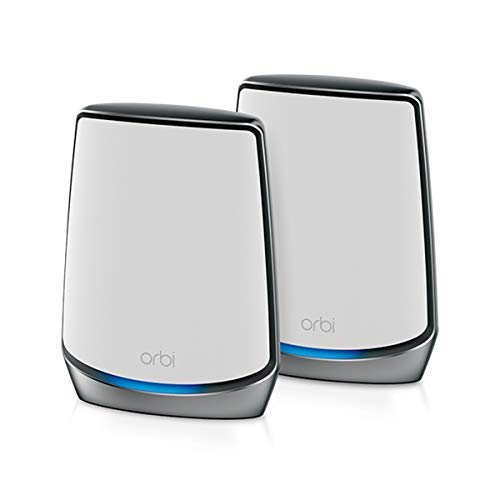
NETGEAR Orbi RBK852 WiFi 6 Mesh System — Two pieces, one dedicated link
The RBK852 breaks the three-identical-boxes pattern: one router and one satellite, joined by a tri-band design in which a dedicated 5 GHz link carries backhaul and nothing else. That architecture was built for a specific floor plan — the internet enters at one end of the house, the dead zone festers at the other, and a single strong relay bridges them. Place the router by the modem on the ground floor, the satellite upstairs near the landing, and the dedicated link does the climbing while the two remaining bands serve devices on each level. The title rates the pair at up to 5,000 sq. ft. and 100 devices, with AX6000 speeds up to 6 Gbps.
Because there are only two units, placement discipline matters more here than with a 3-pack. The satellite has to sit where it can still hear the router clearly — typically within one floor and a room or two horizontally — yet far enough upstairs to throw signal into the rooms that need it. In a long three-storey house the middle floor can end up served by spill from both units rather than by a node of its own, which is the honest limit of the format. Where the layout fits, though, the dedicated backhaul band gives this Wi-Fi 6 system a cross-floor consistency that dual-band kits of its generation struggle to match, and NETGEAR lists security features among the included items.
- Wi-Fi standard: Wi-Fi 6, tri-band, AX6000 (up to 6 Gbps per the title)
- Claimed coverage: up to 5,000 sq. ft. (router + 1 satellite, as titled)
- Device count: 100 devices, per the title
- Layout: one router plus one satellite extender — not a three-node set
- Included software: security features named in the title; the depth of the suite is not itemised there, so check the listing for the current terms
Strengths
- Dedicated tri-band backhaul keeps the inter-floor relay off the bands your devices use.
- Two substantial units cover a wide two-floor span without a third box to place.
- 100-device title rating suits a house full of smart-home hardware across floors.
Trade-offs
- No middle node for the middle floor; tall, long houses can strand the centre landing.
- Expanding later means buying matched Orbi satellites rather than any mesh unit.
- The satellite is a sizeable piece of hardware to find shelf space for upstairs.
Best for: a two-floor house, or a three-floor house with a compact footprint, where one relay point bridges modem and bedrooms. Not suited for: a long three-storey plan whose middle floor needs its own node — a 3-pack serves that shape better.
Check the satellite dimensions on the Orbi RBK852 listing against the upstairs spot you have in mind.
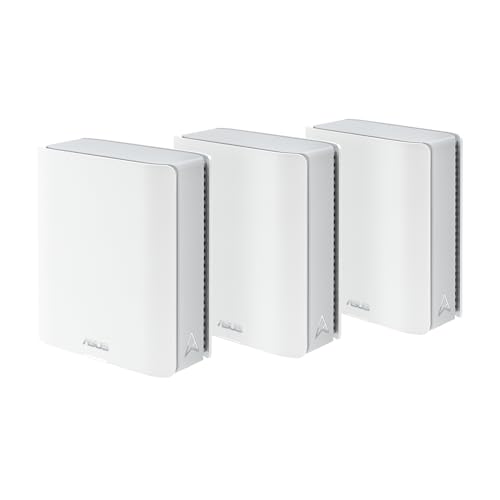
ASUS ZenWiFi BT6 WiFi 7 Mesh (3-Pack) — Built for thick walls
ASUS aims the ZenWiFi BT6 squarely at the hard version of this problem: its listing pairs Ethernet backhaul with the phrase “for thick walls,” which is as close as a title gets to naming the multifloor enemy. The system is tri-band Wi-Fi 7, so wireless backhaul gets its own lane, and if even that struggles through your slabs, the two 10G ports let you wire the backbone at speeds no home internet plan will trouble for years. The claimed coverage is the second-largest in this group at 7.6k sq. ft. for the 3-pack, and the listing mentions dual WAN — a second internet feed can stand by if the main one drops.
Dual WAN deserves a sentence of its own in a multifloor context, because tall houses are often shared houses — lodgers, adult children, a small business on the ground floor — and a standby connection, even a modest one, keeps every floor online when the main feed fails. The BT6’s two WAN paths listed in the title will not matter to a simple family install, but in a house that is also a workplace they convert an outage from a crisis into an inconvenience.
The software pitch is unusually ownership-friendly:
subscription-free network security and parental controls are named in the title, which matters in a house where the mesh will run for five years and subscription creep adds up. Custom SSIDs let you split bands or carve out a separate network name for the top-floor lodger, the guest room or a rack of smart bulbs that misbehave on a combined network. The BT6 asks more of its owner than the eero does — ASUS firmware rewards people who open the settings — but for a house whose walls defeat simpler kits, the combination of tri-band wireless backhaul, 10G wired backhaul and no-subscription security is the most complete answer in this guide.
- Wi-Fi standard: Wi-Fi 7, tri-band
- Claimed coverage: 7.6k sq. ft. (3-pack, as titled)
- Ports: 10G port × 2, per the title; dual WAN (×2 WAN listed)
- Backhaul: Ethernet backhaul, pitched in the title at thick walls
- Software: subscription-free network security, parental controls, custom SSIDs — all named in the title
Strengths
- Tri-band wireless backhaul plus 10G wired backhaul covers both the no-cable and cable-ready house.
- Security and parental controls without a subscription suit a long ownership horizon.
- Custom SSIDs help separate a work floor, a guest floor and smart-home clutter.
Trade-offs
- The 10G ports only pay off if your wiring, switch or NAS can use them; otherwise they are headroom.
- ASUS settings depth can overwhelm a buyer who wants the eero style of invisibility.
- Tri-band Wi-Fi 7 hardware sits at the premium end of this group.
Best for: a thick-walled or stone-built house over several floors, especially one with any Ethernet already in the walls. Not suited for: a small two-floor flat where its backhaul muscle and 10G ports would never be exercised.
The ZenWiFi BT6 listing details the port layout on each of the three units.

NETGEAR Orbi 370 WiFi 7 Mesh System (3-Pack) — Wi-Fi 7 in a dual-band frame
The Orbi 370 brings the Wi-Fi 7 badge into a three-piece Orbi layout — router plus two satellite extenders, per the title — while staying dual-band, and that combination defines both its appeal and its ceiling. Coverage is claimed at up to 6,000 sq. ft. with speeds up to 5 Gbps and 70 devices, and a 2.5 Gig port gives one node a fast wired connection, useful for tying the ground-floor router to a switch or giving the top-floor satellite a wired feed if a cable run exists. For a house whose floors are timber and plasterboard rather than concrete, dual-band Wi-Fi 7 with MLO-era radios can hold its links well, and three units give the middle floor a node of its own — the thing the two-piece RBK852 cannot do.
The honest caveat is airtime. Without a third band, backhaul shares the same two bands as every phone and television, so on the busiest evenings — one floor gaming, one floor streaming, someone uploading from the attic office — the relay traffic and device traffic negotiate for the same space. NETGEAR lists security features and easy setup among the system’s items, and the Orbi app experience is a known quantity for households upgrading from older Orbi kits. Read this pick as the middle path: newer Wi-Fi than the RBK852, more nodes than the RBK852, but a backhaul arrangement that asks the house to be reasonably kind.
- Wi-Fi standard: Wi-Fi 7, dual-band
- Claimed coverage: up to 6,000 sq. ft. (3-pack, as titled)
- Layout: router + 2 satellite extenders (RBE373)
- Speed and devices: up to 5 Gbps, 70 devices, per the title
- Ports: 2.5 Gig port named in the title; the full per-node port map is not broken out there — verify the satellite’s jacks on the listing if you plan to wire a desk upstairs
Strengths
- Three Wi-Fi 7 units give every floor its own node in a typical house.
- A 2.5 Gig port future-proofs the wired side for faster internet plans.
- Orbi’s setup routine is familiar and quick for a three-piece install.
Trade-offs
- Dual-band backhaul shares airtime with devices, the structural limit of this design.
- 70-device title rating is the lowest count in this group for very smart homes.
- Concrete-slab houses should look at the tri-band or wired-backhaul picks first.
Best for: a timber-framed three-floor house that wants Wi-Fi 7 and a node per floor without premium pricing pressure. Not suited for: a reinforced-concrete build where dual-band wireless backhaul must punch through slab after slab.
Review the satellite port layout on the Orbi 370 listing if a wired drop upstairs is part of your plan.

Tenda Nova MX12 AX3000 Mesh System (3-Pack) — The wide-claim Wi-Fi 6 option
The Nova MX12 leads this group on one number: its title claims up to 7,000 sq. ft. from the 3-pack, the largest footprint here alongside the ASUS, achieved with Wi-Fi 6 rather than 7. The AX3000 class and 2,976 Mbps figure in the title place it honestly — this is a workhorse system for houses where the internet plan is a few hundred megabits and the problem is purely geography: signal that must exist in the attic conversion, the basement office and the garden-facing back bedroom at once. Gigabit ports, VPN support and parental controls are all named in the listing, and EasyMesh compatibility means the system speaks the cross-brand mesh standard rather than locking you entirely into Tenda hardware for future expansion.
One more practical note for tall houses: the Nova MX12’s gigabit ports make wired backhaul a realistic weekend project rather than a theoretical one, since any spare Ethernet cable and a basic switch complete the job at gigabit speeds that still exceed most households’ internet plans. A single wired hop between the ground and middle floors converts the MX12 from a purely wireless chain into a hybrid, and hybrid layouts are where modest kits punch above their class. Budget the cable run as part of this purchase and the system’s real-world ceiling rises noticeably.
Temper the coverage claim the way you should temper all of them:
7,000 sq. ft. is a best-case figure, and a three-storey stone house will carve it down hard. What survives that discounting is still a sensible proposition — three Wi-Fi 6 nodes, staggered around the stairwell, will blanket a large ordinary house, and the money saved against Wi-Fi 7 kits can buy the Ethernet cable that wires the weakest hop. Tenda’s app and firmware are less polished than the big three brands here, and the title’s V4.0 note reminds you this line has been revised over time, so confirm the hardware version on the listing matches what the reviews you read were describing.
- Wi-Fi standard: Wi-Fi 6 mesh, AX3000 class (2,976 Mbps per the title)
- Claimed coverage: up to 7,000 sq. ft. (3-pack, as titled)
- Ports: gigabit ports, per the title
- Named features: EasyMesh, VPN support, parental controls
- Hardware note: V4.0 revision named in the title
Strengths
- Largest title-claimed footprint in this group at Wi-Fi 6 pricing territory.
- EasyMesh support softens brand lock-in when you add nodes later.
- VPN and parental controls are present without headline fanfare.
Trade-offs
- Gigabit ports cap wired backhaul at gigabit, fine today but with no headroom.
- Firmware polish and long-term update cadence trail TP-Link, ASUS and NETGEAR.
- The 7,000 sq. ft. claim needs the steepest real-world discount in this group.
Best for: a large, conventionally built house on a sub-gigabit plan where coverage area is the whole problem. Not suited for: a multi-gigabit internet plan — gigabit ports and an AX3000 ceiling waste the connection you are paying for.
Confirm the hardware revision on the Nova MX12 listing before ordering a 3-pack.
How Do the Six Systems Stack Up Across Floors?
| System | Wi-Fi | Units | Title-claimed coverage | Backhaul story |
|---|---|---|---|---|
| TP-Link Deco 7 BE5000 | Wi-Fi 7 dual-band | 3-pack | Up to 6,600 sq. ft. | Wireless with MLO, or wired via 2 × 2.5G ports |
| Amazon eero 6+ | Wi-Fi 6 generation | 3-pack | Up to 4,500 sq. ft. | Automatic wireless; port detail not stated in title |
| NETGEAR Orbi RBK852 | Wi-Fi 6 tri-band | Router + 1 satellite | Up to 5,000 sq. ft. | Dedicated third band between the two units |
| ASUS ZenWiFi BT6 | Wi-Fi 7 tri-band | 3-pack | 7.6k sq. ft. | Third band, or Ethernet backhaul with 10G ports |
| NETGEAR Orbi 370 | Wi-Fi 7 dual-band | Router + 2 satellites | Up to 6,000 sq. ft. | Shared dual-band wireless; one 2.5 Gig port |
| Tenda Nova MX12 | Wi-Fi 6 (AX3000) | 3-pack | Up to 7,000 sq. ft. | Wireless; gigabit ports if wired |
Read the coverage column as a ranking of manufacturer optimism as much as of hardware. The useful comparisons are structural: three of these systems can fall back on a wired backbone, two dedicate a whole radio band to the relay, and one — the eero — asks its software to sort everything out quietly. Match the structure to your house’s construction and the table mostly reads itself. Note also what the table cannot show: how each system behaves in month six, when firmware has matured and the novelty has worn off — which is why the placement and testing sections of this guide carry as much weight as the hardware comparison itself.
How Much Do Your Floor and Wall Materials Change the Answer?
Two houses with identical floor plans can need different mesh kits, and the difference is what they are built from. A modern timber-framed house with plasterboard internal walls is the friendly case: 5 GHz signals cross a floor with losses a well-spaced node chain absorbs easily, and even the dual-band systems in this guide hold their links. Add underfloor heating mats, foil-backed insulation boards or a concrete screed over the joists and the same floor becomes a far harder barrier — each metallic or dense layer reflects and absorbs, and the chain that worked on paper starts dropping its middle hop at busy hours.
Older construction raises the stakes again. Brick and stone internal walls, common in houses built before lightweight studwork, tax every hop; a reinforced concrete slab between floors is the hardest common case and the one where wired backhaul stops being an upgrade and becomes the plan. This is why the ZenWiFi BT6’s listing language about thick walls and Ethernet backhaul matters, and why the Deco 7’s 2.5G ports are worth more in a Victorian terrace than in a new-build. Before choosing, walk your own house with this in mind: note the bathroom and kitchen, whose tiles, mirrors and appliances cluster exactly where signals struggle, and plan node positions that route around those rooms rather than through them. The kit decision then follows the building, which is the order this guide has argued for from the start — architecture first, hardware second.
How Should You Place Nodes in a Three-Storey House?
Start at the modem and resist the urge to centre the main unit in the house; it must live where the internet enters, so the placement puzzle concerns the satellites. Put the first satellite one floor up and roughly above the router, but offset toward the stairwell — on a landing shelf or hallway table, out in the open, around waist to head height. Put the second satellite on the top floor, offset again in the opposite direction, so the three units form a gentle zigzag when viewed from the side rather than a vertical stack. Each hop then travels a short diagonal through open stairwell air instead of a long punch through slab.
Then test like a resident, not like an installer. Walk the top floor with a video call running and note where it stutters; stand in the basement doorway and load a large file. Move a satellite a single room along the hallway before you move it a whole floor — small shifts change which wall the signal crosses, and a node that hears the router through a doorway will outperform a closer node separated by a bathroom’s tiled, pipe-filled wall. Give the system an evening of ordinary use before finalising positions, because the dinner-hour load of televisions and calls reveals weak hops that a quiet afternoon speed test politely hides.
How Can You Test Coverage Honestly Once the Nodes Are Placed?
Forget the single speed test beside the router; it measures the one link in the house that was never in doubt. A useful test protocol for a multifloor install has four stations: the furthest top-floor corner, the basement or lowest occupied room, the landing where nodes hand over, and the garden-facing room whose external wall eats signal. At each station run the same test at the same busy hour — early evening, when neighbours’ networks crowd the air and your own house is streaming — and write the numbers down. You are not chasing a headline figure; you are looking for the station that collapses relative to the others, because that station tells you which hop to fix.
Calls are the second instrument. A speed test is a sprint, but a video call is a half-hour negotiation with jitter and brief dropouts, and it exposes a weak backhaul hop that raw throughput conceals. Take a call on the top floor while someone starts a large download downstairs; if voices smear or freeze, the inter-floor link is saturated or marginal, and the remedy is placement or a cable, not a different speed tier from your provider. Finally, retest a week later. Mesh systems adjust channels as the neighbourhood changes, and a layout that looked shaky on day one sometimes settles — while a layout that only worked on a quiet Sunday afternoon reveals itself by Friday.
What Are the Common Mistakes When Meshing a Tall House?
Stacking nodes directly above each other. It feels tidy and it is the worst geometry available: every hop crosses the maximum amount of floor slab at the steepest angle. Stagger them around the stairwell instead.
Believing the box coverage figure literally. Every square-foot number in this guide comes from a listing title measured under friendly conditions. Treat it as a comparison between kits, then size for your wall materials — stone, brick and concrete each tax the signal harder than timber and plasterboard.
Hiding satellites inside furniture. A node inside a closed cabinet under the stairs, or behind a television, starts its job with a self-inflicted handicap. Nodes are radios; they need open air on most sides.
Wiring the wrong hop. Households that run one cable often wire the shortest, easiest link. The cable earns its keep on the longest, weakest hop — usually the climb to the top floor.
Judging the install in the first ten minutes. Mesh systems settle: channels get chosen, steering learns, firmware updates land. Evaluate over a couple of evenings of real use before rearranging the house.
When Does a Fourth Node Help, and When Does It Hurt?
More nodes is not automatically better, and in a multifloor house an extra unit placed badly can make things worse by giving devices a nearer but weaker-linked satellite to cling to. A fourth node earns its place in three situations: a floor plate so long that one node cannot cover both ends, a converted outbuilding or garden room that behaves like an extra floor, and a floor built from materials so dense that it needs a node on each side of the barrier. In each case the new node shortens a specific hop that testing identified as the weak one.
It does not help when the real problem is backhaul saturation on a dual-band system, because the extra node adds its traffic to the same shared bands; nor when the internet plan itself is the ceiling, since no mesh distributes bandwidth the house does not have. The disciplined sequence is: place three nodes well, test at the four stations described earlier, live with the system for a week, and only then decide whether the evidence points to a fourth node, a cable run, or a different kit entirely. Every system in this guide can grow — matched satellites for the Orbi and Deco lines, EasyMesh additions for the Tenda — so starting with the standard pack size is a reversible decision, not a commitment.
Final Recommendation
For most multifloor homes, the TP-Link Deco 7 earns the first look: Wi-Fi 7 radios, a claimed 6,600 sq. ft. from three units, and 2.5G ports that let you wire the hardest hop the day the wireless link disappoints you. Houses built from sterner stuff — stone walls, concrete slabs — should step up to the ASUS ZenWiFi BT6, whose tri-band design and Ethernet backhaul were pitched by its own maker at exactly that problem. The household that wants to think about networking least should take the eero 6+ and let its setup routine place the nodes. Whichever kit you choose, spend your first evening staggering nodes around the stairwell rather than admiring them in a stack, because in a tall house the layout is half the product. A mesh chosen for its backhaul and placed with the staircase in mind will still feel fast on the top floor years from now, long after the headline speeds on the box have stopped meaning anything to anyone.
Frequently Asked Questions
How many mesh nodes does a three-storey house actually need?
Three is the working answer for most houses, and it is why 3-packs dominate this guide: one node per floor, staggered around the stairwell. Very small floor plates can manage with two units — the Orbi RBK852 pattern — while long or L-shaped floors may want a fourth node on the problem level rather than a more powerful kit overall.
Is Wi-Fi 7 worth it for a multifloor home, or is Wi-Fi 6 enough?
Wi-Fi 6 is enough for coverage alone, and a well-placed Wi-Fi 6 kit beats a badly placed Wi-Fi 7 one every time. Wi-Fi 7 earns its premium through MLO and wider channels, which firm up the inter-floor links and handle many simultaneous devices — worth it if your internet plan is fast and your floors are busy, optional if the plan is modest.
Can I mix a wired node and wireless nodes in one system?
Yes, and in a tall house you often should. The Deco 7 lists 2.5G ports for wired backhaul and the ZenWiFi BT6 is built around Ethernet backhaul, so wiring the longest hop while the short hop stays wireless is a supported, sensible topology rather than a hack. When you wire a node, place the remaining wireless nodes to serve the floors the cable cannot reach, and let the system re-settle for an evening before judging the change — steering behaviour shifts once a node’s backhaul becomes effectively instant, and devices that used to cling to a distant router will redistribute themselves across the nearer radios.
Why does my top floor still test slower than the ground floor?
Because every wireless hop costs airtime and signal, and the top floor sits at the end of the longest chain. A satellite can only pass on what it receives, so if its link to the floor below is marginal, its local speed test disappoints. Move the satellite toward the stairwell, or wire that hop, before blaming the kit.
Do the coverage figures in this guide come from testing?
No. Every square-foot figure quoted here is taken from the manufacturer’s own listing title, and we attribute it that way deliberately. Treat the numbers as a way to compare kits against each other, then discount for your wall materials — the thicker the construction, the steeper the discount.
Should the main unit go on the middle floor instead?
Sometimes, yes — if the internet feed can be extended there. A router on the middle floor of three halves the longest climb in both directions, and households whose modem sits in a ground-floor corner by the street sometimes gain more from relocating the entry point than from any kit in this guide. Where the feed cannot move, the staggered-node layout described above is the practical substitute.
Related Guides
Keep exploring with our guides to the best routers for remote work, the best smart TV routers and the best hotspot routers.


