What's inside
- Key Takeaways
- Quick Picks
- How We Chose These Picks
- Comparison
- How to Choose Among These Six
- Where Exactly Should the Projector Sit in a Bay?
- How Much Lag Does a Golf Simulator Actually Tolerate?
- What Should the Rest of the Bay Budget Cover?
- How Does the Simulation PC Change the Projector Decision?
- What Maintenance Does a Bay Projector Actually Need?
- Common Mistakes
- Final Recommendation
- Frequently Asked Questions
- Related Guides
As an Amazon Associate I earn from qualifying purchases. This post may contain affiliate links at no extra cost to you.
widgetverdict.com is reader-supported. When you buy through links on our site, we may earn an affiliate commission.
A golf simulator is the most demanding room a projector can be asked to serve, and the best golf simulator short throw projectors in this guide were chosen against that room’s specific physics. The projector must throw a large, bright picture across a short distance, because the hitting area occupies the middle of the space and a golfer’s backswing cannot share air with a light beam. It must survive the bay’s lighting, which exists for ball tracking and safe footing rather than for cinema contrast. And it must render a ball flight and a fairway with enough clarity that the simulation stays believable at the moment of impact. Short throw geometry is not a preference in this category; it is the admission ticket.
The six titles split into three temperaments. Two are gaming-bred short throw machines that name golf directly or by family — the Optoma GT2400HDR, whose title says Golf Simulation Ready, and the BenQ TH671ST, a low-lag home entertainment projector whose short throw and console gaming brief translate naturally to a bay. Two are institutional short throw lasers from ViewSonic, built for classrooms and business but specified — brightness, 0.5 throw, keystone range, 360-degree projection — in ways simulator builders have learned to value. One is a smart 4K model that names the golf simulator in its very product name. And one, the Optoma GT2000HDR, is an ultra-compact laser whose terse title leaves several simulator questions for the documentation to answer.
Brightness is the specification this category lives on, and the titles state it generously: 4,200 lumens on the GT2400HDR, 4,000 lumens on both ViewSonic models, 3,000 lumens on the BenQ, and 2,600 ANSI lumens on the smart 4K pick. Resolution runs the other way — mostly 1080p, one WXGA, one 4K claim — and this guide will argue that the ordering is correct. A simulator bay rewards light and geometry first, pixels second, because the picture is watched from a hitting mat several metres away, in motion, through the emotional filter of a shot just struck. The reviews judge each pick in that order, and flag honestly where a title’s silence — on lag figures, mostly — leaves a question open.
Key Takeaways
- Brightness leads the category: the Optoma GT2400HDR states 4,200 lumens, both ViewSonic picks state 4,000, the BenQ TH671ST states 3,000 and the smart 4K pick states 2,600 ANSI lumens.
- Two ViewSonic models print a 0.5 short throw figure in their titles — the only picks here quantifying throw — which lets a builder compute mounting distance directly.
- Resolution is mostly 1080p; the ViewSonic PS502W is WXGA, which is below Full HD and should be bought with that understood, while one pick claims 4K in its product name.
- No title in this guide prints a millisecond lag figure — low input lag and low latency are claimed in words — so simulator response should be judged as a whole-system figure.
- The smart 4K pick is the only one with Google TV, HDR10 and HDMI 2.1 ARC stated, making it the dual-purpose bay-and-cinema choice.
Quick Picks
| Pick | Badge | Why it earns its place |
|---|---|---|
| BenQ TH671ST Short Throw | Proven low-lag bay pick | A 3,000-lumen 1080p short throw with low input lag positioning, dual HDMI and a stated three-year warranty from an established gaming line. |
| Optoma GT2400HDR Short Throw Gaming Laser | Brightest simulator-ready pick | The guide’s highest stated brightness at 4,200 lumens, laser light source and golf simulation named outright in its title. |
| ViewSonic LSD400HD-ST Short Throw Laser Projector | Institutional laser pick | A 4,000-lumen laser with a stated 0.5 short throw, H/V keystone, 360 projection and Ethernet for fixed bay installations. |
| 4K Projector for Golf Simulator (2600 ANSI, Google TV) | Smart 4K dual-purpose pick | A golf-named 4K model with Google TV, auto focus, HDR10, MEMC and HDMI 2.1 ARC for bays that double as cinemas. |
| ViewSonic PS502W | WXGA workhorse pick | A 4,000-lumen WXGA short throw with dual HDMI, VGA and RS232 — bought for brightness and throw, with resolution understood as WXGA. |
| Optoma GT2000HDR Short Throw Laser | Ultra-compact laser pick | An ultra-compact short throw Full HD home laser whose brief title leaves brightness and lag figures to the documentation. |
How We Chose These Picks
A simulator projector is chosen the way simulator builders actually choose: throw distance first, because the mount position is dictated by the bay’s frame and the golfer’s swing plane; brightness second, because the bay is a lit working space; durability third, because a projector above a hitting area lives a harder life than one in a cinema; and only then resolution, smart features and sound. The six picks were assembled to give a builder a real choice at each of those steps — a gaming-line machine, a simulator-named machine, two institutional lasers with quantified throw, a smart dual-purpose model and a compact option for tight bays and portable setups.
Figures are quoted strictly from titles, and this category’s titles are unusually uneven in what they disclose. ViewSonic prints throw as a number; nobody else does, so no other throw figure appears in this guide. Brightness is printed by five of six, in two different units — plain lumens and ANSI lumens — which are kept in their own units and never merged. Lag is claimed in words by three titles and quantified by none, a gap the guide treats as the category’s open secret: in a simulator, the delay a player perceives runs from impact sensor through simulation software to the projector, and the projector’s share, while real, is one contributor among several. Builders who care should still ask each manufacturer for the figure; they should simply not expect the titles to provide it.
One resolution correction belongs up front. The ViewSonic PS502W is a WXGA projector — a widescreen resolution below Full HD — and its title says so plainly. It earns its place on brightness, throw and connectivity for bays where the simulation software renders at modest settings or the screen is a practice net rather than a cinema wall. Calling it a 1080p machine would be a disservice, and this guide does not. Similarly, the 4K pick’s claim lives in its product name with HDR10 and a smart platform around it; its imaging is discussed as titled, without embellishment in either direction.

BenQ TH671ST Short Throw — Proven low-lag bay pick
The TH671ST is the veteran of this guide: a 1080p short throw home entertainment projector from BenQ’s gaming-adjacent line, stating 3,000 lumens, low input lag positioning, auto vertical keystone, dual HDMI, a built-in speaker and console gaming among its purposes, all under a stated three-year warranty. Nothing in that list is exotic, and that is precisely its simulator appeal. A bay is a working environment — balls strike screens, mats shift, friends visit with laptops — and the projector that serves it best is often the one whose behaviours are known quantities, with a warranty long enough to cover the seasons a simulator actually gets used.
The brightness figure sits at the lower end of this guide’s stated range, and it sorts the rooms this pick suits. In a garage bay with the door closed and lights managed, 3,000 lumens across a typical impact screen produces a clear, confident picture. In a bright multi-purpose room — a bay sharing space with a gym or a workshop under full lighting — the ViewSonic and Optoma picks stating 4,000 lumens and above hold their contrast better. Short throw placement keeps the BenQ ahead of the hitting zone on a ceiling mount or high shelf, and auto vertical keystone forgives the small mounting imperfections that home bays accumulate, though builders should still mount square and let the keystone handle the final degree rather than the first ten.
Dual HDMI is the quiet workhorse feature: the simulation PC lives on one input permanently, while the second hosts a console or a streaming device for the bay’s second life as a games and film room. The built-in speaker covers commentary and menu sounds without an audio installation, which in a garage is often the whole requirement. Low input lag is claimed without a figure — the category’s recurring gap — and for simulation the practical reading is that BenQ built this machine for responsive play and the whole-system delay will be dominated by the launch monitor and software regardless. As a first-bay projector from a known line, with a warranty stated in the title itself, the TH671ST remains the conservative builder’s benchmark.
- Resolution stated: 1080p
- Brightness stated: 3,000 lumens
- Throw stated: Short throw
- Input lag: Claimed as low input lag in the title, with no figure given
- Setup stated: Auto vertical keystone
- Inputs stated: Dual HDMI
- Audio stated: Built-in speaker
- Warranty stated: 3 year warranty
Strengths
- A stated three-year warranty is rare reassurance for a machine living above a hitting area.
- Dual HDMI lets the simulation PC and a console coexist without cable swapping.
- Auto vertical keystone forgives the mounting drift home bays accumulate over seasons.
Trade-offs
- At 3,000 stated lumens it is the dimmest of the five picks that print a brightness figure.
- No millisecond lag figure is published in the title despite the low-lag positioning.
- It predates the laser generation, so its title makes no laser lifetime claim.
Best for: a first simulator bay in a light-managed garage, built around a simulation PC and a console. Not suited for: a bright multi-purpose room under full workshop lighting, where the 4,000-lumen picks hold the picture together better.
Look at the TH671ST listing on Amazon to confirm its current warranty terms: check price on Amazon.
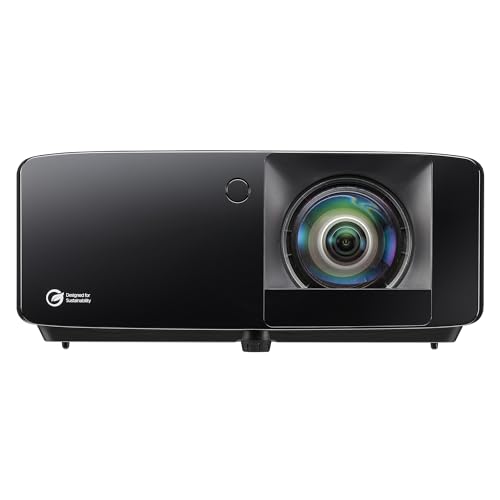
Optoma GT2400HDR Short Throw Gaming Laser — Brightest simulator-ready pick
The GT2400HDR is the only pick besides the smart 4K model whose title speaks to golfers directly: Golf Simulation Ready is printed in the listing, between the gaming claims, where a simulator builder cannot miss it. The specification wrapped around that phrase is the guide’s most bay-shaped: Full HD 1080p resolution, a stated 4,200 lumens — the highest brightness figure among the six titles — a laser light source, short throw geometry, and low input lag gaming positioning. Read as a simulator brief rather than a gaming brief, every element answers a bay requirement: light for a lit room, throw for a safe mount, laser for a machine that will run daily without lamp anxiety.
Brightness deserves its headline place. A simulator bay is lit for the launch monitor’s cameras and for the golfer’s footing, and that light lands on the impact screen as a contrast tax every projector must pay. Four thousand two hundred stated lumens pays it with headroom to spare at typical screen sizes, keeping the fairway’s greens distinguishable and the ball flight’s white line legible against a rendered sky. The laser source compounds the advantage across a season: no lamp dimming curve to chase, no replacement schedule interrupting a winter league, and consistent output from the first round to the five-hundredth.
The familiar caveat applies to its gaming claim — low input lag is asserted in words, and no millisecond figure appears in the title — and the simulator context softens it, since the perceived delay in a bay is a chain of sensor, software and display in which the projector is rarely the slowest link. Builders chasing the figure for console gaming in the same room should pull it from Optoma’s documentation, where the GT line’s gaming models publish their numbers. Judged on what its title does print, though, the GT2400HDR is the most purpose-aligned pick in this guide: the one machine whose author wrote the words golf simulation into the listing and then specified brightness like they meant it.
- Resolution stated: Full HD 1080p
- Brightness stated: 4,200 lumens
- Light source stated: Laser
- Throw stated: Short throw
- Use stated: Golf simulation ready; low input lag gaming (no figure given)
- HDR: Named in the model designation
- Platform: Not stated in the listing title — verify with the manufacturer documentation
- Speakers: Not stated in the listing title — verify with the manufacturer documentation
Strengths
- The stated 4,200 lumens leads this guide, holding contrast in lit simulator bays.
- Golf simulation readiness is claimed in the title itself rather than inferred from gaming specs.
- A laser source removes lamp replacement from a machine used daily.
Trade-offs
- Low input lag carries no published figure in the title for console gamers to rank.
- No smart platform is named, so the simulation PC or a streaming device does all content duty.
- Built-in audio goes undescribed in the title, pushing sound to an external solution.
Best for: a dedicated simulator bay with working light, where brightness and laser stamina decide the purchase. Not suited for: a bay that doubles as the household’s streaming cinema without a PC, since no platform is stated to run the apps.
Open the GT2400HDR listing on Amazon beside your bay’s dimensions: check price on Amazon.

ViewSonic LSD400HD-ST Short Throw Laser Projector — Institutional laser pick
ViewSonic sells the LSD400HD-ST to businesses and classrooms, and its title reads like a facilities manager’s checklist — which is exactly why simulator builders should read it twice. Bright 4,000 lumens. 1080p. Short throw laser. A stated 0.5 short throw figure, one of only two quantified throws in this guide, which converts directly into a mounting plan: the projector sits half a metre from the screen for every metre of picture width, comfortably ahead of any swing plane. H/V keystone — correction on both axes, not just vertical — for mounts that cannot sit perfectly square. Three-hundred-sixty-degree projection, meaning the unit can mount at any orientation the bay’s structure demands. HDMI, Ethernet and USB for a fixed installation that a network can manage.
The golf simulator mention sits in the title’s use list alongside business and classroom, and the institutional feature set explains why ViewSonic bothers: a simulator bay is a small fixed installation with a PC, a screen and a duty cycle closer to a classroom’s than a cinema’s. Ethernet matters more than it sounds — a wired network connection lets the bay’s projector join the same managed setup as the simulation PC, receive firmware attention without a ladder-and-remote ritual, and behave like infrastructure rather than an appliance. Lasers suit that life: long service intervals, consistent brightness across thousands of rounds, no lamp logistics for a machine mounted above a hitting area where access is awkward.
What the institutional brief omits is entertainment garnish, and buyers should register the absences plainly. No smart platform is named; the simulation PC is the content source, full stop. No gaming lag figure is given, and the title makes no low-lag claim at all — simulation response will rest on the PC and launch monitor, with the projector an unmeasured contributor that builders should query in the documentation if the number matters to them. No speaker claim appears either. The LSD400HD-ST is equipment, specified like equipment, and for a permanent bay build that temperament is a virtue: everything stated is something a builder can plan around, and nothing stated is decoration.
- Brightness stated: 4,000 lumens
- Resolution stated: 1080p
- Light source stated: Laser
- Throw stated: 0.5 short throw
- Correction stated: H/V keystone
- Mounting stated: 360 projection
- Connections stated: HDMI, Ethernet, USB
- Uses stated: Business, classroom, golf simulator
Strengths
- The stated 0.5 throw converts straight into a mounting plan ahead of the swing plane.
- H/V keystone plus 360-degree projection forgives structural mounting compromises.
- Ethernet suits a fixed bay installation managed alongside the simulation PC.
Trade-offs
- No lag claim of any kind appears in the title for response-critical builders to judge.
- No smart platform is stated, so all content arrives from the connected PC.
- Its institutional brief skips entertainment features a dual-purpose room might want.
Best for: a permanent bay installation where mounting flexibility, wired networking and laser stamina outrank entertainment features. Not suited for: a portable or part-time setup moved between rooms, since its whole design assumes a fixed, managed installation.
Review the LSD400HD-ST listing on Amazon for its installation accessories: check price on Amazon.

4K Projector for Golf Simulator (2600 ANSI, Google TV) — Smart 4K dual-purpose pick
This pick names its job in its product title — 4K Projector for Golf Simulator — and then specifies like a living-room machine that happens to work in a bay. Google TV with apps is the platform, the only smart system stated in this guide. Auto focus handles setup. HDR10 covers the dynamic range format. MEMC — motion estimation, motion compensation — smooths movement, a feature aimed at sports and film pans. Low latency is claimed for gaming. PC compatibility is stated outright, which matters more than it might appear: a simulator projector lives or dies by its handshake with the simulation computer, and this title is the only one that names the PC relationship directly. HDMI 2.1 ARC and Dolby Audio round out a specification written for a room with two lives.
The brightness figure needs its unit respected: 2,600 ANSI lumens, the lowest stated output in this guide, measured on the ANSI scale. In a controlled bay — door shut, lights dimmed for the round — that output across a standard impact screen is a workable proposition, and the 4K imaging gives the rendered course a fine-grained realism the 1080p picks cannot match at close inspection: individual grass textures, readable green contours, signage on a virtual clubhouse. In a bright multi-purpose room, though, the ANSI figure is the specification to respect — this is the pick most dependent on light discipline, and builders with sunlit garages should weigh the 4,000-lumen institutional models first.
Ceiling mountable is stated, which places it correctly in a bay — above and ahead of the golfer — and auto focus earns its keep every time the mount is nudged or the machine is taken down for a film night elsewhere. The dual-purpose case is genuinely this pick’s own: no other title here can run the household’s streaming apps natively, pass audio back through HDMI 2.1 ARC to a soundbar, and then take its turn above the hitting mat. A builder whose bay is also the family’s second cinema will find the specification reads like it was written for them; a builder with a dedicated, PC-driven bay will find the smart features surplus and the brightness figure the deciding constraint.
- Resolution stated: 4K (in product name)
- Brightness stated: 2,600 ANSI lumens
- Platform stated: Smart Google TV with apps
- Setup stated: Auto focus; ceiling mountable
- HDR stated: HDR10; MEMC motion processing
- Gaming stated: Low latency (no figure given); PC compatible
- Audio stated: Dolby Audio; HDMI 2.1 ARC
- Uses stated: Golf simulator, home theater and gaming
Strengths
- Google TV makes it the only pick that streams natively without the simulation PC.
- PC compatibility is stated outright, speaking directly to the simulator use case.
- HDMI 2.1 ARC and Dolby Audio give the dual-purpose room a proper sound route.
Trade-offs
- At 2,600 ANSI lumens it is the dimmest stated output here and needs a light-disciplined bay.
- Low latency is claimed without a figure, as with every gaming claim in this guide.
- An unbranded listing offers no model line history for a buyer to lean on.
Best for: a bay that doubles as the household’s second cinema, with lights controlled and a soundbar on ARC. Not suited for: a sunlit garage bay used at midday, where its stated ANSI output runs out of headroom first.
Check the 4K golf simulator listing on Amazon for its mount and screen bundles: check price on Amazon.

ViewSonic PS502W — WXGA workhorse pick
The PS502W’s review begins with the correction its title makes unavoidable: this is a WXGA projector. WXGA is a widescreen computer resolution that sits below Full HD — fewer pixels than the 1080p machines surrounding it in this guide — and a buyer who orders it expecting 1080p simulation will feel the difference in text legibility and fine course detail. ViewSonic prints WXGA in the title’s first line, to its credit, and this guide repeats it in the first line of the review for the same reason. Everything else about the pick explains why it earns a place despite the resolution: 4,000 stated lumens, a quantified 0.5 short throw, dual HDMI, and a connectivity panel — VGA, RS232, USB, speaker — drawn from the institutional world where this machine was born.
Consider where WXGA stops mattering. Simulation software is frequently run at modest rendering settings to hold frame rates on ordinary PCs, practice bays use nets and smaller screens where pixel density is not the binding constraint, and a lesson bay showing swing video and launch numbers in large type gains nothing from Full HD. In those rooms the PS502W’s virtues are the operative ones: brightness that survives working light, a throw figure a builder can plan a mount from, vertical keystone for the final alignment, and RS232 control for installations where the projector is switched by a system rather than a remote. It is the pick of the practice facility and the school golf programme as much as the home bay.
Dual HDMI mirrors the BenQ’s arrangement — simulation PC on one port, a second source on the other — while VGA keeps legacy laptops and older lesson equipment connectable, a small mercy institutional buyers appreciate and home buyers can ignore. A built-in speaker is stated, covering launch-monitor commentary and lesson audio without an installation. What the title does not claim is equally plain: no laser source is named, no gaming lag language appears, no smart platform exists here. The PS502W is a bright, short-throwing workhorse with a resolution ceiling its title states honestly, and a builder who buys it for the rooms described above will find it exactly as advertised.
- Resolution stated: WXGA (below Full HD)
- Brightness stated: 4,000 lumens
- Throw stated: 0.5 short throw
- Correction stated: Vertical keystone
- Inputs stated: Dual HDMI, VGA, RS232, USB
- Audio stated: Built-in speaker
- Uses stated: Business, classroom, conference room
- Light source: Not stated in the listing title — verify with the manufacturer documentation
Strengths
- Stated 4,000 lumens with a quantified 0.5 throw gives builders brightness and a mounting plan together.
- RS232 and VGA suit institutional bays with control systems and legacy lesson equipment.
- Its title states WXGA plainly, so the resolution ceiling is a known term of the purchase.
Trade-offs
- WXGA resolution shows in fine text and detailed course rendering beside the 1080p picks.
- No light source is named in the title, leaving running-cost questions to the documentation.
- No gaming or smart features are claimed, so the bay’s PC supplies everything.
Best for: a practice or lesson bay where brightness, throw and control connectivity matter more than Full HD detail. Not suited for: a premium home bay rendering courses at high settings on a large impact screen, where WXGA’s pixel ceiling will be visible on every hole.
See the PS502W listing on Amazon for its mounting and control options: check price on Amazon.

Optoma GT2000HDR Short Throw Laser — Ultra-compact laser pick
The GT2000HDR’s title is the shortest in this guide — ultra-compact short throw Full HD home laser projector — and like the nameplate pick in the previous guide, it trades on a family reputation. The GT line is Optoma’s gaming branch, the 2000 series its compact tier, and the HDR suffix signals high dynamic range support in the model designation. What the title establishes firmly is a useful core: Full HD resolution, short throw geometry, a laser light source, and an ultra-compact body. For simulator builders working in tight bays — a single garage stall, a garden studio, a spare room where the mount must share space with storage — a compact laser that sits close to the screen is a genuinely different proposition from the institutional boxes above it.
What the title withholds is the numbers a simulator builder most wants. No brightness figure, despite brightness being this category’s first question. No lag figure and no low-lag claim in words. No golf mention at all — the simulator case for this machine is inferential, built from its throw, its laser and its family, rather than stated. This guide makes that inference transparently and assigns the verification work where it belongs: Optoma’s documentation for this model publishes the figures the title omits, and a builder should read them before ranking the GT2000HDR against the GT2400HDR, whose title does the publishing for you. The two machines are natural rivals — same family, same throw class, same laser generation — separated mainly by how much of their specification their listings choose to reveal.
The compact body deserves a word in its own right, because bay mounts live awkward lives. A smaller, lighter projector is easier to mount securely above a hitting area, kinder to the ceiling structure of a garden studio, and simpler to take down for the room’s other duties. Laser longevity suits the duty cycle. If the documentation’s brightness figure lands in the same territory as its sibling’s class, the GT2000HDR becomes the tidy-bay alternative to the GT2400HDR’s headline brightness; if it lands lower, it becomes the spare-room and portable-bay option. Either way, the decision runs through the manual rather than the listing, and this review’s brevity on numbers is the honest reflection of a title that offers few.
- Resolution stated: Full HD
- Throw stated: Short throw
- Light source stated: Laser
- Form stated: Ultra-compact
- Positioning stated: Home projector
- HDR: Named in the model designation
- Brightness: Not stated in the listing title — verify with the manufacturer documentation
- Input lag and golf suitability: Not stated in the listing title — verify with the manufacturer documentation
Strengths
- An ultra-compact laser body suits tight bays and light-duty mounts above the hitting area.
- Full HD resolution with short throw covers the simulator core brief without excess.
- It comes from Optoma’s GT gaming family rather than an unbranded listing.
Trade-offs
- No brightness figure appears in the title, and brightness is this category’s first question.
- Golf suitability is inferred from family and geometry, not claimed in the listing.
- No lag language at all leaves response-critical builders dependent on the documentation.
Best for: a tight single-stall bay or garden studio needing a compact laser mounted close to the screen. Not suited for: a builder choosing on published figures alone, since this title publishes fewer than any rival here.
Read the GT2000HDR listing on Amazon together with its documentation before ranking it: check price on Amazon.
Comparison
| Projector | Resolution | Stated brightness | Throw as titled | Simulator signal |
|---|---|---|---|---|
| BenQ TH671ST | 1080p | 3,000 lumens | Short throw | Low input lag claim, console gaming brief |
| Optoma GT2400HDR | Full HD 1080p | 4,200 lumens | Short throw | Golf simulation ready, stated in title |
| ViewSonic LSD400HD-ST | 1080p | 4,000 lumens | 0.5 short throw | Golf simulator named among uses |
| 4K Golf Simulator model | 4K | 2,600 ANSI lumens | No figure in title | Golf simulator in product name; PC compatible |
| ViewSonic PS502W | WXGA | 4,000 lumens | 0.5 short throw | Institutional bay workhorse |
| Optoma GT2000HDR | Full HD | No figure in title | Short throw | Inferred from GT family and geometry |
Two columns do the deciding in this table. Brightness separates the lit-bay machines — the GT2400HDR and the ViewSonic pair at 4,000 lumens and above — from the light-disciplined rooms the BenQ and the smart 4K model serve. The throw column separates the plannable from the approximate: only the ViewSonic titles quantify throw at 0.5, so only their mounts can be positioned from the listing alone, while every other pick asks the builder to consult documentation for the equivalent figure. Resolution, the column buyers instinctively read first, is the table’s quietest story — a 4K claim, a WXGA honesty, and a broad 1080p middle that most bays will find entirely sufficient.
How to Choose Among These Six
Measure the bay before reading another specification. The distance from the intended mount to the impact screen, divided by the screen’s width, gives the throw ratio your room demands; a pick whose stated or documented throw matches that number will fill the screen from a safe position, and one that does not will force a compromise — a smaller picture, a mount inside the swing’s airspace, or keystone correction doing work it should not. The ViewSonic pair let you run this calculation from their titles alone at 0.5; for the other four, the documentation holds the figure, and obtaining it is the first task of a serious build.
Next, grade your light. A bay inside a house with blackout control can run any pick here, including the 2,600 ANSI lumen smart model, whose 4K detail then becomes a genuine asset. A garage with a translucent door panel or a garden studio with windows asks for the 4,000-lumen class and above. Then grade your use split. A dedicated bay fed by a simulation PC gains nothing from Google TV and should weight the institutional lasers and the GT2400HDR. A dual-purpose room gains everything from the smart 4K pick’s platform and ARC audio. A lesson or practice facility should look hard at the PS502W’s control connectivity and stop apologising for its WXGA panel, which its actual work will rarely expose.
Sound is the bay’s forgotten layer, and it is worth a paragraph before the unglamorous checks. A simulator’s audio is mostly confirmation — the strike’s thump comes from the real ball, while the projector’s channel carries commentary, ambient course sound and the software’s feedback tones. The BenQ and PS502W state built-in speakers, which cover that brief without any installation. The smart 4K pick’s Dolby Audio and HDMI 2.1 ARC exist for the room’s second life as a cinema, where a soundbar under the impact screen transforms film nights. Builders planning only simulation can leave audio at the built-in level with a clear conscience; builders planning double duty should route the ARC cable while the walls are open, because retrofitting it above a finished bay is nobody’s idea of a good Saturday.
Close with the unglamorous checks. Confirm the mount can hold the machine’s weight above a space where people swing metal clubs, and that the projector’s ventilation clears the bay’s frame and netting. Confirm the simulation PC’s output resolution and refresh match the projector’s stated intake, and that the HDMI run between them is short enough to carry the signal without drama — short throw’s hidden gift is that it usually is. And confirm the impact screen’s gain and size against the brightness you are buying, because the screen is half the optical system and the half most often under-bought.
Where Exactly Should the Projector Sit in a Bay?
The governing principle is that the beam and the backswing must never apply for the same airspace. In practice that means the projector mounts either above and slightly ahead of the golfer, close enough to the screen that the swing stays behind the light path, or — in taller bays — high enough that even a driver’s full arc passes beneath the beam. Short throw geometry exists to make the first arrangement possible: at the ViewSonic models’ stated 0.5 throw, a three-metre-wide picture needs the lens only a metre and a half from the screen, which places the machine roughly above the front edge of the hitting mat in most home bays, ahead of the golfer entirely.
Height interacts with keystone. A projector mounted above the screen’s centre must tilt down, and tilt is what keystone correction exists to absorb — the BenQ’s auto vertical keystone, the ViewSonic pair’s vertical and, on the laser model, horizontal correction. Every degree corrected is a small tax on sharpness and, on some machines, on the low-latency path, so the craft is to mount as square as the structure allows and correct only the residue. Ceiling joists, the bay frame’s crossbar and the screen’s own top rail all conspire against squareness; a mount with fine adjustment in two axes is worth more in this room than in any other the projector might serve.
How Much Lag Does a Golf Simulator Actually Tolerate?
More than a fighting game does, and less than a film does — and the reason is the chain. When a club strikes a ball, the launch monitor measures the strike, the software computes the flight, and the projector displays the result; the delay a golfer perceives is the sum of all three stages plus the rendering pipeline, and it registers as the pause between the thump of impact and the ball’s visible departure. Golfers tolerate a perceptible beat in that sequence because the real shot’s feedback — the feel of the strike — arrives instantly through the hands, and the visual flight is confirmation rather than the event itself. Simulation feels broken only when the pause grows long enough to disconnect cause from effect, a threshold measured in tenths of a second rather than the milliseconds competitive gamers count.
That is why no title in this guide prints a lag figure and the category survives the omission: the projector’s contribution is real but rarely decisive, and the claims that do appear — low input lag on the BenQ and the GT2400HDR, low latency on the smart 4K model — should be read as assurances of intent rather than measurements. Builders who also game seriously in the bay, with a console on the second HDMI, are the exception: for them the projector’s own figure matters in the usual way, and the documentation check recommended throughout this guide becomes a genuine purchase criterion rather than a diligence ritual.
What Should the Rest of the Bay Budget Cover?
The projector is one line in a build whose other lines routinely surprise first-time builders. The impact screen is the largest: a proper impact-rated screen absorbs full driver shots for years, presents a smooth, matte, high-gain surface to the projector, and costs accordingly — and it is the surface every brightness figure in this guide is implicitly measured against. A cheap substitute screen dims and wrinkles the picture of a 4,200-lumen machine into something a lesser projector on a proper screen would beat. The launch monitor is the second line, the enclosure and netting the third, and the mat — the surface a golfer’s joints meet for thousands of swings — the fourth.
Against that budget, the projector choice should be made with a sense of proportion. The difference between the picks here is real but bounded; the difference between a good screen and a poor one is visible on every shot. Builders are usually best served by choosing the projector whose throw and brightness fit the measured bay — the method this guide keeps returning to — and directing the money saved by not over-buying resolution into the screen and the mat, where it will be felt on every round rather than admired on a specification sheet.
How Does the Simulation PC Change the Projector Decision?
Every projector in this guide is, from the simulation software’s perspective, simply a monitor — and the PC’s capabilities quietly set the ceiling on what any of them can show. A modest PC rendering the course at 1080p to hold a smooth frame rate makes the 4K pick’s resolution theoretical, while a powerful machine rendering natively at high settings gives the WXGA PS502W more detail than its panel can display. The match matters more than the maximum: builders should spec the projector to the resolution and refresh the PC will actually sustain across a full round, not to the resolution the PC reaches in a menu screen. The smart 4K pick states PC compatibility outright; for the others, the HDMI input’s accepted signals live in the documentation, and a five-minute check there prevents the classic bay disappointment of a projector downscaling a signal the PC worked hard to produce.
Frame rate deserves its own sentence, because simulation smoothness is a safety feature for believability. A ball flight rendered in stuttering frames breaks the illusion more thoroughly than a softer resolution does, and motion processing like the smart pick’s stated MEMC exists to paper over exactly that gap — though purists should test it, since interpolation that flatters a film’s camera pan can smear a fast ball trace. The institutional ViewSonic models make no motion claims at all, trusting the PC to feed them clean frames, which is the professional arrangement: the projector as a faithful display, the computer as the author of everything on it. Decide which philosophy your build follows before choosing, because it determines whether features like MEMC and auto focus are assets or furniture.
What Maintenance Does a Bay Projector Actually Need?
Less than a cinema projector in one way and more in another. Less, because the laser picks here — the Optomas and the ViewSonic LSD400HD-ST — have no lamp to dim or replace, and their brightness on the five-hundredth round should resemble the first in a way lamp machines never promise. More, because a bay is a dusty, vibrating, ball-filled environment: filters and vents inhale mat fibres and chalk dust, mounts loosen a fraction with every nearby impact’s tremor through the structure, and the lens lives within range of the occasional wild hosel shot’s debris. A quarterly ritual — vents brushed, mount bolts checked, lens inspected, alignment verified against the screen’s corners — keeps a bay projector honest, and it takes less time than a single bucket of warm-up balls.
The warranty line in the BenQ’s title — three years, stated — reads differently in this light. Institutional models are built for duty cycles that assume daily hours, and their service ecosystems expect the machine to be maintained rather than replaced. Home builders borrowing those models inherit the durability but should also inherit the habit: a bay projector is infrastructure, and infrastructure rewards the owner who treats a Saturday-morning check as part of the sport. None of the titles here prints a laser lifetime figure, incidentally — the GT2400HDR’s sibling in the short throw guide states 30,000 hours for its own DuraCore line, but this guide assigns no borrowed numbers, and builders comparing longevity should pull each model’s rated hours from its documentation.
Common Mistakes
Mounting a long-throw projector in a simulator bay and discovering the swing crosses the beam. The six picks here are short throw for a reason; the geometry is the safety system, not a convenience.
Buying resolution before brightness. A 4K picture in a bright garage looks worse than a 1080p picture with lumens to spare, because contrast collapses before pixel counts matter. Grade the room’s light first.
Assuming WXGA and 1080p are neighbours. The PS502W’s title says WXGA, a resolution visibly below Full HD in text and fine detail. It is a fine workhorse bought knowingly and a disappointment bought carelessly.
Letting keystone correction do the mount’s job. Correction is for the last degree, not the first ten; a crooked mount corrected digitally costs sharpness on every shot and can disable the fastest picture modes.
Starving the screen to feed the projector. The impact screen is half the optical system. A mid-tier projector on a proper screen outperforms a flagship on a wrinkled substitute every round of the year.
Final Recommendation
For a dedicated bay with working light, the Optoma GT2400HDR is the most purpose-built pick here: golf readiness stated in its title, the guide’s highest brightness, and a laser source matched to daily use. For a permanent installation with structural mounting challenges, the ViewSonic LSD400HD-ST’s quantified throw, dual-axis keystone and Ethernet make it the builder’s instrument. The BenQ TH671ST remains the known-quantity first bay, the smart 4K model owns the dual-purpose room, the PS502W serves practice and lesson bays without apology, and the GT2000HDR waits on its documentation to claim the tight-bay niche. Choose by measured throw and graded light, in that order, and the simulation will feel like golf rather than like a projector demonstration.
Document the finished installation as you would a fitted kitchen: mount position, throw distance, screen size, the PC’s output settings and the projector’s picture mode, all in one note kept with the bay. A simulator earns its keep in February, when the course is closed and the bay is warm. Build the room so that nothing in it — beam, mount, screen or software — gives you a reason to skip the session, and the projector you chose by geometry will disappear into the game, which is the highest compliment this category can pay.
Frequently Asked Questions
Does the projector need to be directly above the hitting mat?
No — it needs to be where its throw figure and the swing plane agree, which in most home bays means ahead of the golfer and close to the screen, mounted high enough that the beam clears the follow-through. The stated 0.5 throw on the ViewSonic models makes that position easy to compute; for the other picks, the documentation’s placement chart gives the equivalent distances, and a test projection before drilling the mount is worth the ten minutes it takes.
Is 1080p enough for a golf simulator?
For most bays, yes. The picture is viewed from a hitting mat metres away, in motion, and the binding constraints are brightness and throw rather than pixel count — which is why five of these six titles sit at 1080p or below and still serve the category well. Builders rendering at high settings on very large screens are the ones who will feel the 4K pick’s advantage.
What throw ratio does a home bay usually need?
Short enough to place the projector ahead of the swing — the ViewSonic models in this guide state 0.5, meaning half a metre of distance per metre of picture width, which suits typical garage bays. Your room’s own number comes from dividing the mount-to-screen distance by the screen width; match the projector’s stated or documented throw to that figure.
Why does no pick here print an input lag figure?
Because simulator delay is a whole-system figure — launch monitor, software and display summed — and manufacturers of bay projectors claim responsiveness in words rather than milliseconds. The BenQ and Optoma GT2400HDR claim low input lag, the smart 4K model claims low latency; builders who need the number itself should take it from each manufacturer’s documentation.
Can one of these double as a home cinema projector?
The smart 4K pick is built for exactly that double life, with Google TV, HDR10 and HDMI 2.1 ARC stated. The BenQ, with its home entertainment brief, dual HDMI and built-in speaker, covers casual cinema duty in the bay. The institutional ViewSonic models will show whatever the PC sends them but bring no entertainment features of their own.
Should a simulator projector be laser or lamp based?
Three picks here state laser sources — both Optomas and the ViewSonic LSD400HD-ST — and the case in a bay is duty cycle: daily sessions, long total hours, and brightness that holds steady across seasons without a lamp dimming underneath the simulation. The BenQ and PS502W titles name no light source, so this guide assigns them none; a buyer weighing running costs should take each model’s source and rated hours from its documentation. As a rule of the room, the more the bay is used like infrastructure, the more the laser picks’ stamina earns its place in the budget.
How bright should a simulator projector be?
Grade it against your room rather than a universal number. The picks stating 4,000 lumens and above — the GT2400HDR and both ViewSonic models — hold contrast in lit working bays. The 3,000-lumen BenQ suits light-managed garages, and the 2,600 ANSI lumen smart model asks for a properly dimmed room in exchange for its 4K detail and platform.
One closing practical habit separates bays that stay calibrated from bays that drift: photograph the mount position and write the throw distance, screen size and keystone settings into the build notes before the first round. Mounts get bumped during net repairs and screen replacements, cables get swapped when a new PC arrives, and the builder who documented the original geometry restores it in minutes — while everyone else re-derives it with a tape measure, a ladder and rising frustration, usually on the evening guests are coming to play.
Related Guides
When the bay’s season ends and the projector comes outside, our guide to projectors for outdoor backyard movie nights covers the garden side of the category. Travelling golfers and holiday setups should look at our roundup of portable outdoor projectors that pack into a car. And for sessions powered entirely off-grid, our guide to portable projectors with built-in batteries compares the cable-free options.


