What's inside
- Key Takeaways
- Quick Picks
- How Did We Rank Chargers for a Phone That Sets Its Own Speed?
- What Is PPS, and Why Does Your Pixel Care?
- Why Won’t a 60W Charger Make Your Pixel Charge Faster?
- Which Pixel Charger Fits Your Routine?
- What Is GaN, and Does It Matter for a Phone Charger?
- How Should You Charge a Pixel Away From Home?
- How Do You Keep a Pixel Battery Healthy Across Years of Fast Charging?
- How Do Two-Device Households Actually Share Charging?
- Pixel Chargers Compared: Wattage, Ports and Cables
- How Do You Get Your Pixel’s Fastest Charge, Step by Step?
- What Mistakes Do Pixel Owners Make When Buying Chargers?
- How Do You Read a Charger Listing Without Being Fooled?
- What About Charging a Pixel Wirelessly or in a Car?
- What Should Owners of Older Pixels Expect From These Chargers?
- How Much Should You Spend, and Where Should the Money Go?
- Final Recommendation
- Frequently Asked Questions
- Related Guides
As an Amazon Associate I earn from qualifying purchases. This post may contain affiliate links at no extra cost to you.
**[widgetverdict.com] is reader-supported. When you buy through links on our site, we may earn an affiliate commission.**
A Pixel charges fastest when three things agree: a brick that speaks USB Power Delivery with PPS, a cable rated for the current, and the phone itself, which sets the ceiling no charger can raise. This guide to the best chargers for pixel phones compares six USB-C options — Google’s own 45W charger, a dual-port PPS GaN brick, a two-pack for households, a 30W value pick, a 45W unit with a long cable, and a 60W charger with the longest cable here — and it keeps one truth in view throughout: a bigger number on the brick does not push a Pixel past the rate the phone was built to accept.
All six are sold on Amazon, and only the first is made by Google. The other five are third-party chargers whose titles lean on PPS and PD 3.0 — the two protocols that matter for Pixel fast charging — and on the practical extras that decide daily life: a second port, a cable in the box, a cable long enough to reach a sofa, or a second brick for the office. Shop by your routine rather than by the wattage race, and remember that the flashlight-and-camera corner of your travel kit plays by entirely different rules, as Best Rechargeable CR123A Batteries and Chargers explains for small cells.
Key Takeaways
- Google’s 45W USB-C charger is the only first-party pick here and the reference point for guaranteed Pixel fast charging.
- PPS support is the feature that matters most in a third-party brick, because recent Pixels use it to negotiate their fastest charging rates.
- The phone sets the ceiling: the 60W pick will not charge a Pixel faster than the phone accepts — its extra headroom serves laptops and second devices.
- Five of the six picks include a cable, from 6 feet to a room-crossing 10 feet; the Google brick is charger only.
- The Superer is the two-device answer, with dual USB-C ports in a foldable GaN body; the 2-pack pick equips two rooms at once.
Quick Picks
| Pick | Badge | Why it earns its place |
|---|---|---|
| Google 45W USB-C Charger | Best official charger | Google’s own 45W USB-C power charger in Snow, built for Pixel phones and compatible with other USB-C devices. |
| Superer 45W Dual USB-C PPS Charger | Best for two devices | Dual USB-C ports, PPS and GaN in a compact foldable body, with a 6.6ft braided cable, claiming full-speed parity with the original. |
| 45W GaN Charger 2-Pack with Cable | Best household value | Two 45W GaN adapters with 6.6ft cables, PD 3.0 and PPS, covering Pixel generations from the 11 Pro XL back to the 6. |
| 30W USB-C Charger for Pixel | Best simple spare | A 30W wall charger with a 6ft USB-C cable, spanning Pixel 11 down to 6 generations, for bedside and travel duty. |
| 45W Pixel Charger with 6ft Cable | Best long-reach single | 45W with a 6ft USB-C to USB-C cable in the box and the widest stated Pixel span here, from the 11 series back to the 4. |
| 60W USB-C PD 3.0 PPS Charger | Best for phone plus laptop | 60W PD 3.0 with PPS and a 10ft cable, aimed across Pixel, Galaxy, iPhone and iPad Pro — headroom for bigger devices. |
How Did We Rank Chargers for a Phone That Sets Its Own Speed?
Protocol came before power. A Pixel’s fastest charging depends on USB Power Delivery with PPS — programmable power supply, the fine-grained voltage adjustment the phone uses to charge quickly without cooking itself — so titles naming PPS and PD 3.0 were read as the serious candidates, and the Google brick, designed by the phone’s maker for exactly this negotiation, anchors the list. Raw wattage was deliberately demoted: beyond the phone’s accepted rate, extra watts are not speed, they are merely capacity waiting for a hungrier device.
The second sort was completeness. A charger that arrives with its cable — five of these six do — can be judged as a system, while the Google brick asks you to supply a cable worthy of it. Cable length turned out to be a real dividing line rather than a spec-sheet filler: 6 feet is the honest minimum for a nightstand-to-bed reach, the 6.6ft braided cables add durability, and the 10ft cable on the 60W pick changes where in a room charging can happen at all. The third sort was household shape: the dual-port Superer for couples and travellers with two USB-C devices, the 2-pack for homes that charge in two rooms, and single bricks for everyone else.
Generation span closed the work. The titles here name Pixel families from the newest 11 series back to the 6, and one reaches to the 4; older Pixels charge perfectly well on USB-C PD but at their own older ceilings, and this guide says so rather than letting a title’s long list imply equal speed for every generation named.
What Is PPS, and Why Does Your Pixel Care?
USB Power Delivery negotiates in fixed steps — the charger offers set voltages and the phone picks one. PPS refines that conversation: the phone can request small voltage adjustments continuously, tuning the supply to exactly what its battery wants as the charge progresses. That precision is how recent Pixels reach their fastest rates efficiently, with less energy wasted as heat inside the phone. A brick without PPS can still charge a Pixel respectably through plain PD, but the phone’s top gear may stay locked, which is why PPS appears in the titles of the serious third-party picks here and why it should appear in your search criteria too.
Heat is the shadow side of the same story. Fast charging is a controlled negotiation partly because batteries age faster when hot, and the phone throttles its request when temperatures rise — in a hot car, under a pillow, during a gaming session on charge. Owners who see charging slow dramatically in those settings are watching protection work, not a charger failing. The charger’s contribution is to hold its side of the negotiation cleanly, which reputable PD/PPS bricks do and mystery bricks sometimes do not; that, more than any headline wattage, is the technical case for the Google original and for named-protocol third parties alike.
One more protocol note, for the mixed households: the same PPS conversation is spoken by Samsung’s fast-charging phones, which is why the 60W pick’s title can honestly list Galaxy models alongside Pixel and iPhone. A good PPS brick is close to a universal modern-phone charger; the differences that remain are ceilings, cables and taste.
Why Won’t a 60W Charger Make Your Pixel Charge Faster?
Because the phone is the boss of the session. A charger advertises capability; the phone requests what it is designed to take, and a Pixel’s request tops out at its own rated rate regardless of whether the brick could offer 45W, 60W or more. Plug the 60W pick into a Pixel and it will charge exactly as fast as the phone allows — which is to say, at full Pixel speed, with watts to spare. Those spare watts are not wasted money if your bag also holds a tablet or a USB-C laptop, or if a second device will share the brick’s capacity in spirit; they are wasted only if you bought them believing they would bend the phone’s own limits.
The mirror-image mistake is undersizing. A 30W brick — the value pick here — covers the full rate of some Pixel generations and comes close on others, while genuinely old 5W-era bricks and laptop ports of low output turn an overnight charge into an all-day one. The practical reading of this whole guide is therefore a matching exercise: know your Pixel generation’s appetite from its maker’s specification, buy a PPS brick at or modestly above it, and spend the rest of your attention on cables and placement, where daily satisfaction actually lives. Boat owners apply the same matching logic at larger scale in Best On-Board Marine Battery Chargers, and the stationary-battery version of the lesson fills Best LiFePO4 Battery Chargers — different hardware, same discipline of matching charger to battery rather than to hope.
Which Pixel Charger Fits Your Routine?
The official brick first, then the third-party field in order of versatility. Every pick charges every USB-C Pixel; they differ in ports, cables, packs and headroom.

Google 45W USB-C Charger — Best official charger
Google’s own 45W USB-C charger, in the Snow finish, is the pick against which the rest of this list quietly measures itself. It is the charger designed by the phone’s maker for the phone’s own fast-charging negotiation, and its title extends the welcome to Google products generally and other USB-C devices — earbuds, tablets and the like — without theatrics. Owners who keep a phone for four years and want one charging decision they never revisit usually land here, and the reasoning is sound: whatever a given Pixel generation requests, this brick was built to answer.
The omissions define its buyer. There is one port, so a second device queues behind the first, and the title names no included cable, so the box asks you to bring a USB-C cable worthy of 45W — a detail worth respecting, since an elderly or damaged cable can throttle the very speed the brick was bought for. Treat the Google charger as the anchor of a home setup: it lives at the main charging spot, feeds the phone at full negotiated speed, and lets cheaper spares cover the travel bag and the office drawer without anxiety.
- Output: 45W over USB-C, fast-charging, per Google’s title
- Maker: Google — the only first-party charger in this guide
- Colour: Snow
- Cable: none is named in the title, so pair it with a quality USB-C cable rated for fast charging
Strengths
- First-party match for Pixel fast charging
- 45W also serves tablets and other USB-C gear
- The set-and-forget choice across Pixel generations
Trade-offs
- Single port in a two-device world
- Cable not named as included
- Official pricing reflects the badge
Best for: a Pixel owner who wants the maker’s own charger as the home anchor. Not suited for: charging a phone and a tablet at the same moment, where the dual-port Superer below takes over. Order the Google 45W if your priority is certainty rather than versatility.

Superer 45W Dual USB-C PPS Charger — Best for two devices
The Superer makes the boldest claim in this guide — full speed, same as the original — and backs it with the right ingredients: 45W, dual USB-C ports, PPS, GaN construction, a compact foldable body and a 6.6ft braided cable in the box. The dual ports are the real story for most buyers. A Pixel and a pair of earbuds, a Pixel and a partner’s phone, a Pixel and a tablet: two-device households feel the single-port queue every evening, and this brick abolishes it, with the understanding that two devices charging together share the brick’s attention and neither should expect its solo best during the overlap.
GaN — gallium nitride — is the enabling technology for the size: it lets high-power chargers run smaller and cooler than older silicon designs, which is how 45W and two ports fit into a foldable travel-friendly brick. The braided 6.6ft cable deserves its mention too, since braided jackets survive bag life and desk edges better than plain ones, and 6.6 feet reaches the far side of most sofas. As a claim, “same as original” remains the seller’s wording; as a specification — PPS, PD-class power, honest cable — the Superer has assembled everything a third-party charger can assemble to make the claim plausible.
- Output: 45W total class, dual USB-C ports
- Protocol: PPS with GaN construction, per the title
- Body: compact and foldable for travel
- Cable: 6.6ft braided USB-C cable included
Strengths
- Two ports end the nightly charging queue
- PPS support targets Pixel fast charging directly
- Foldable GaN body plus a serious cable included
Trade-offs
- Simultaneous charging splits the available power
- Parity claim is the seller’s, not Google’s
- One cable included for a two-port brick
Best for: a Pixel plus a second USB-C device charged nightly from one outlet. Not suited for: two phones that both demand their absolute fastest rate at the same time. If your household queues for the charger, order the Superer and end the queue.
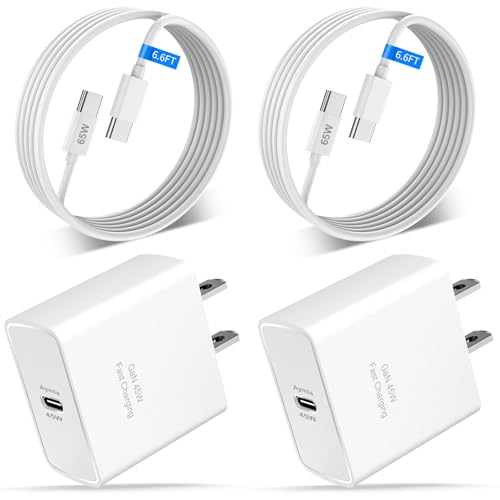
45W GaN Charger 2-Pack with Cable — Best household value
Two 45W GaN adapters, each with a 6.6ft cable, PD 3.0 and PPS, spanning Pixel generations from the 11 Pro XL and 10 Pro Fold back through the 6: this unbranded 2-pack is the logistics pick. Its insight is that most homes do not have a charging problem so much as a charging geography problem — the fast charger is always in the other room. A matched pair abolishes the geography: one lives at the bedside, one at the desk or in the travel bag, and the phone fast-charges wherever it lands without a brick being carried around the house like a ceremonial object.
Because the pair is identical, behaviour is predictable in both places, which sounds trivial until you have lived with a house full of mismatched bricks of unknown pedigree. The stated generation span is wide and honest about its boundaries — the newest flagships down to the Pixel 6 generation — and within that span, each phone will draw what it is built to draw. What the 2-pack cannot offer is a maker’s name to lean on: documentation and support are the unbranded tier’s usual thin offering, so the pair should be bought on its specification, tested on arrival in both locations, and treated as the household infrastructure it aspires to be.
- Output: 45W per adapter, two adapters in the pack
- Protocol: PD 3.0 and PPS, GaN adapters, per the title
- Cables: 6.6ft USB-C cables included with the adapters
- Stated span: Pixel 11 Pro XL, 10 Pro Fold, 9, 8 Pro, 8, 8a, 7, 7a and 6 families
Strengths
- Two rooms equipped in one purchase
- Full 45W PPS specification on both units
- Long cables included for real furniture distances
Trade-offs
- Unbranded documentation and support
- Single port per adapter
- Identical spares mean no dual-port option anywhere
Best for: a home that charges in two places and wants identical fast charging in both. Not suited for: a single-desk setup needing two ports from one brick. Buy the pair, station one in each room, and stop transporting chargers around your own house.

30W USB-C Charger for Pixel — Best simple spare
Thirty watts is the honest middle of Pixel charging: enough for the full rate of several generations and a brisk pace on the rest, in a simple white brick with a 6ft cable, spanning the Pixel 11 families down to the 6 in its title. This is the spare-charger pick — the one for the guest room, the work locker, the partner’s flat — where the requirement is a reliable, correctly-specced charge rather than a spec-sheet victory. Overnight, its 30W ceiling is invisible; a battery filled by morning does not care about the rate it slept through.
The daytime reading is equally fair. A half-hour top-up on 30W restores a substantial share of a Pixel battery — the fastest part of any charge curve is the beginning — so even flagship owners will find this brick more useful than its number suggests. What it will not do is match the 45W picks minute for minute on the newest phones, and its title’s long generation list should be read as compatibility, not equal speed. Buy it as infrastructure, keep expectations calibrated, and it will be the least regretted charger in the drawer.
- Output: 30W over USB-C
- Cable: 6ft USB-C cable included
- Colour: white
- Stated span: Pixel 11, 11 Pro XL and Fold, 10, 9, 8, 7 and 6 generations
Strengths
- Covers overnight charging for every Pixel completely
- Cable included at a useful 6ft length
- The natural second or third charger for a household
Trade-offs
- Newest Pixels charge faster on the 45W picks
- Single port, no foldable travel features claimed
- Unbranded tier documentation
Best for: a spare charging point where the phone sleeps or sits for hours. Not suited for: a flagship Pixel that must refuel at maximum speed between outings. Keep this 30W brick where the phone rests, and it will never once feel slow.

45W Pixel Charger with 6ft Cable — Best long-reach single
This 45W charger competes on completeness and reach: the brick plus a 6ft USB-C to USB-C cable, and the widest Pixel span in the guide, its title running from the 11 series and 10a back through the 9A, 8, 7, 6, 5 and 4, with Pixel Tablet and other Android phones named as well. That backward reach matters in real households, where a parent’s Pixel 5 and a teenager’s newest model share one kitchen charging spot, and a charger that serves both without negotiation drama is worth more than a narrower, prouder specification.
Six feet of cable is the other half of the argument. It is the difference between charging on the nightstand and charging in the bed, between the desk’s back edge and the sofa’s arm. Combined with 45W — full speed for the generations that accept it — the package reads as a considered answer to the two complaints owners actually voice: the charger is too slow, and the cable is too short. The title’s stray promise of charging “cold” is best read as a translation quirk rather than a feature; judge this pick on its watts, its cable and its span, which need no embellishment.
- Output: 45W over USB-C
- Cable: 6ft USB-C to USB-C cable included
- Stated span: Pixel 11 families back to the Pixel 4, plus Pixel Tablet and Android phones
- Format: single-port wall charger
Strengths
- Widest stated Pixel generation coverage here
- 45W pace with the cable included
- 6ft reach suits beds, sofas and deep desks
Trade-offs
- Single port for a multi-device household
- Older Pixels in the span charge at their own older ceilings
- Unbranded support tier
Best for: a mixed-generation Pixel household sharing one charging spot with a long reach. Not suited for: simultaneous two-device charging from the same brick. Order it for the kitchen counter or bedside where every Pixel in the family eventually lands.

60W USB-C PD 3.0 PPS Charger — Best for phone plus laptop
The 60W pick is the traveller’s consolidation play: PD 3.0 with PPS, a black brick with headroom above any phone’s appetite, and a 10ft USB-C cable — the longest in this guide by a wide margin — with a title spanning Galaxy flagships, iPhones, Pixel 10 and 11 Pro models and the iPad Pro. Read it correctly and it is not a Pixel charger with delusions; it is a one-brick travel kit for a bag that holds a phone and something bigger, where the phone takes what it needs and the tablet or laptop takes the rest of the brick’s capability on other nights.
That 10ft cable rewrites hotel-room geometry. Outlets hide behind beds and under desks in the world’s hotels, and ten feet turns nearly all of them into a nightstand charger without furniture rearrangement. At home it crosses a room from the only free outlet to the reading chair. The cautions are the usual ones, stated plainly: the Pixel will not charge one minute faster for the 60W badge, PPS serves the phones that speak it, and a cable this long deserves coiling discipline rather than life as a trip hazard. Judged as consolidation rather than speed, it is the most versatile object in the guide.
- Output: 60W, USB-C PD 3.0 with PPS
- Cable: 10ft USB-C cable included — the longest here
- Colour: black
- Stated span: Galaxy S26 to S24 Ultra families, iPhone generations, Pixel 11/10 Pro, iPad Pro
Strengths
- Headroom covers tablets and USB-C laptops on other nights
- 10ft cable solves hostile outlet placement anywhere
- PPS keeps Pixel and Galaxy fast charging intact
Trade-offs
- No Pixel speed benefit beyond the phone’s own ceiling
- Long cable is bulk to coil and carry
- Single brick still serves one device at a time
Best for: a traveller carrying a Pixel plus a tablet or USB-C laptop who wants one brick and a room-crossing cable. Not suited for: a buyer expecting a Pixel to charge faster than its maker designed it to. Pack this 60W unit when the trip’s outlets are unknown and the devices are several.
What Is GaN, and Does It Matter for a Phone Charger?
Gallium nitride is a semiconductor material that has quietly taken over the quality end of the charger market, and two picks here — the Superer and the 2-pack — name it in their titles. GaN components switch power more efficiently than traditional silicon, wasting less energy as heat, and that efficiency is what lets a 45W charger shrink to pocket size without cooking itself. For a phone owner the benefits are practical rather than exotic: a smaller brick for the travel bag, a cooler brick on the nightstand, and multi-port designs that would have been implausibly chunky a few years ago.
What GaN does not do is change the negotiation with the phone. A GaN brick and a silicon brick with the same PD/PPS specification charge a Pixel identically; the difference is size, heat and the design freedom the maker gains. That makes GaN a tiebreaker and a travel feature rather than a performance claim — worth having, especially in the dual-port Superer where two devices’ worth of heat must go somewhere, but never a reason to overlook a missing PPS line in a specification. Read titles in the right order: protocol first, wattage second, GaN third, colour last.
The heat point deserves one more sentence, because charger heat is widely misread. A warm brick is a working brick — conversion losses have to leave as warmth — and GaN merely reduces the total. Hot, as in uncomfortable to hold, is a different report, and it usually indicts the environment (a brick buried in bedding, a cabinet with no airflow) before it indicts the device. Give any charger in this guide air and a hard surface, and its temperature will stay in the boring range where chargers belong.
How Should You Charge a Pixel Away From Home?
Offices, cafés, airports and trains each impose their own geometry on charging, and the picks here divide naturally by venue. The office rewards permanence: the 2-pack’s second brick or the humble 30W spare lives in a drawer, charges during meetings, and removes the phone’s battery from your attention for eight hours a day. The café rewards speed and discretion — a compact PPS brick and a short session during one coffee can return a third of a battery, which is the difference between navigating home and rationing a dying phone through the evening.
Airports reward the long cable. Outlets in terminals are placed by people who did not intend you to sit beside them, and the 60W pick’s 10ft lead converts a pillar outlet into a seat-side charger without the hunched vigil over your phone. Trains reward the dual port, where one socket must serve phone and tablet through a long journey, and the Superer’s two ports share politely. In every venue the etiquette is the same: charge your own gear from your own brick, never unplug a stranger’s phone to make room, and treat a borrowed outlet as a favour rather than a utility.
Security deserves a line in a world of public USB ports. Charging from your own brick in a wall outlet keeps the data pins out of the conversation entirely, which is the simplest form of the old advice about unknown USB sockets. A personal charger is not just faster than the airport’s communal port; it is a boundary, and carrying one — any pick here fits a jacket pocket or bag corner — is the whole of the precaution.
How Do You Keep a Pixel Battery Healthy Across Years of Fast Charging?
Fast charging’s reputation for eating batteries is larger than its measured effect, and the Pixel’s own behaviour explains why: the phone, not the brick, controls the session, requesting aggressively when the battery is low and cool, and tapering as heat and fullness rise. The owner’s contribution is environmental. Keep the phone out of heat while it charges — off the sunny dashboard, out from under the pillow, away from the gaming session that heats it from the other side — and the battery’s chemistry ages at its designed pace rather than an accelerated one.
The second habit is to let the phone’s software help. Adaptive charging, which paces an overnight fill to finish near your alarm, exists because hours spent sitting at one hundred percent are the quiet cost of nightly charging; the feature pays that cost down without asking you to wake at dawn and unplug things. Battery health screens on recent models report capacity honestly, and a yearly glance at that number tells you more than any ritual. Owners who keep phones three or four years — the audience a good charger serves best — will find that ordinary care of this kind delivers a battery that still matches their day at the end of it.
What to skip: freezer tricks, full-discharge conditioning myths inherited from nickel-cadmium days, and anxiety about the occasional fast charge before a flight. Lithium batteries in modern phones are managed systems, and the management is good. Your job is heat, cables and a decent brick; the phone handles the electrochemistry.
How Do Two-Device Households Actually Share Charging?
The arithmetic of shared charging is where the dual-port Superer earns its review length. Two phones on one 45W-class brick do not each get 45W; they share, and the sharing is dynamic — a phone that is nearly full sips, leaving more for the emptier one. In practice, an evening’s overlap still fills both by bedtime, which is the outcome households actually want. The failure mode to avoid is stacking demands: two phones, a tablet and a laptop negotiating over one brick through a hub of adapters, where everything charges at the speed of the saddest negotiation.
Households solve this with zoning more than with hardware. A primary station — the Google anchor or the Superer — at the spot where phones sleep; satellite spares, the 30W or one half of the 2-pack, at desks and sofas; and a rule that bricks do not migrate. Migration is the true enemy: every charger carried to another room is a charger missing at midnight. The 2-pack’s identical twins are the anti-migration technology, and households that adopt the zoning pattern report the same discovery, that the charging problem was never wattage at all. It was geography, all the way down.
Pixel Chargers Compared: Wattage, Ports and Cables
| Charger | Rating | Ports | Cable in box | Maker |
|---|---|---|---|---|
| Google 45W USB-C | 45W | 1 USB-C | Not named in title | |
| Superer 45W Dual PPS | 45W | 2 USB-C | 6.6ft braided | Third-party |
| 45W GaN 2-Pack | 45W each | 1 per brick | 6.6ft with each | Third-party |
| 30W USB-C Charger | 30W | 1 USB-C | 6ft | Third-party |
| 45W with 6ft Cable | 45W | 1 USB-C | 6ft | Third-party |
| 60W PD 3.0 PPS | 60W | 1 USB-C | 10ft | Third-party |
Read the wattage column as capability, not as a promise made to your specific phone: the Pixel accepts what it accepts, and every brick at or above that line delivers the phone’s full speed. The columns that change daily life are ports and cable length.
How Do You Get Your Pixel’s Fastest Charge, Step by Step?
Start with the brick: PPS and PD, at or above your Pixel generation’s rated intake — the Google 45W is the guaranteed route, the PPS third parties here are the considered alternatives. Add the cable that came with the charger where one did, or a quality USB-C cable in good condition; cables are consumables, and a frayed or mystery cable is the most common hidden brake on charging speed. Plug into a wall outlet rather than a tired power strip or a laptop’s low-output port when speed matters, because the negotiation can only be as strong as the supply behind it.
Then give the phone its best conditions. Take off a heavy case if charging seems slow and warm, set the phone down rather than gaming on it mid-charge, and keep it out of sun and hot cars while it drinks. Check the lock screen’s charging indication after a minute: a Pixel that recognises a fast charger says so, and that message is your confirmation that brick, cable and phone have agreed. If the message claims a slow charge instead, change one variable at a time — cable first, then outlet, then brick — and the culprit will step forward within three swaps.
For overnight charging, relax everything above. Any pick in this guide fills a Pixel by morning, and the phone’s own adaptive charging features can pace the session to your alarm, which is kinder to the battery than a fast fill followed by hours at full. Speed is a daytime tool; nights are for the slow lane, and a household with both a 45W anchor and a 30W spare already owns the whole strategy.
What Mistakes Do Pixel Owners Make When Buying Chargers?
Chasing wattage leads the list: paying for 60W, 100W or more in the belief that the phone will drink deeper, when the phone’s own ceiling was reached two picks earlier. The second mistake is protocol blindness — buying a powerful brick that lacks PPS, then wondering why the flagship charges like it is 2019. Third is cable neglect: pairing an excellent new brick with the battered cable from a drawer, and blaming the brick. Fourth, and related, is judging a charger in the first sixty seconds, when every phone charges cautiously before the negotiation settles into its stride.
There is also a household-scale mistake: one good charger, five bad ones. The drawers of most homes hold a sediment of ancient low-power bricks that still fit the socket and still get used by guests, teenagers and the tired. A deliberate cull — keep the picks from a guide like this one, recycle the sediment — raises the average charge speed of the entire house more than any single premium purchase. Label the good bricks with their wattage in marker while you are at it; future you, in a dark hallway, will not want to read fine print.
How Do You Read a Charger Listing Without Being Fooled?
Phone-charger listings are a dialect worth learning. “Fast charger” alone means nothing — the words that carry information are the protocol names, PD and PPS, and the wattage attached to a single port rather than summed across several. A title that says 45W with PPS, as the serious picks here do, is making a checkable claim; a title that says “super fast” with no protocol is making a noise. Generation lists deserve the same literacy: a span from the newest flagship back to the Pixel 4 describes physical and protocol compatibility, and the older phones in it will charge at the ceilings of their era, a fact the honest listings in this guide state by implication and this guide states outright.
Cable claims hide in plain sight too. A cable’s length is printed proudly; its current rating rarely is, yet a cable is half the charging system. Where a pick includes its cable, as five of these six do, the pairing has at least been chosen by someone selling them as a unit. Where it does not — the Google brick — the responsibility transfers to you, and the correct response is a cable from a maker who prints ratings, kept with the brick permanently so the pairing is never improvised at midnight from a drawer of ancestors.
Finally, weigh the seller’s specificity as evidence. The listings mined for this guide name protocols, wattages, cable lengths and generation spans; that specificity is what allowed six genuinely different recommendations to be built from them. A listing that cannot tell you its own protocol has told you the most important thing about itself, and the correct response is to keep scrolling — the Pixel in your pocket negotiates too politely to complain, but its lock screen’s “charging slowly” message will file the complaint on its behalf.
What About Charging a Pixel Wirelessly or in a Car?
This guide covers wall chargers because the keyword asks for chargers and the wall is where Pixels do most of their drinking, but the same phone lives two other charging lives worth a paragraph each. Wirelessly, a Pixel charges on the open Qi standard — and the newest models join the magnetic Qi2 world — at rates below the wired ceiling, trading speed for the drop-and-go convenience that bedside routines love. The protocol lesson transfers intact: buy the named standard, feed the pad with an adequate adapter, and distrust adjectives.
In the car, the cigarette-lighter socket and the dashboard USB port are different species: the socket, through a proper USB-C PD car charger, can feed a Pixel at genuinely fast rates, while the dashboard port fitted for media often supplies a trickle meant for a phone that is merely staying awake. Commuters who navigate by phone learn this distinction in one winter week. The brick you choose for the car should be judged by the same protocol-first reading as the six here — PD and PPS named, wattage per port — and the wall chargers in this guide remain the home reference against which those cousins are chosen.
What Should Owners of Older Pixels Expect From These Chargers?
A Pixel 4, 5 or 6 in good health is still a daily phone for many people, and every pick here will charge it — the long generation spans in these titles are genuine. What changes with age is the ceiling and the battery behind it. Older generations were built with lower maximum rates, so the difference between the 30W spare and the 45W picks narrows or vanishes entirely on those phones; the 30W brick, bought as a spare for a flagship household, may be a full-speed charger for the older phone at the same kitchen counter. Matching charger to generation, rather than to the newest model in the house, is the frugal reading of this whole guide.
Age also rewrites the battery’s side of the bargain. A four-year-old battery holds less, charges to its “full” sooner, and may warm more readily, which the phone manages by tapering earlier — behaviour easily mistaken for a charger slowing down. The battery health picture on an older Pixel is a matter of total cycles and heat history, and no charger purchase reverses it; what a good PPS brick does is give the ageing battery the clean, negotiated charge it was designed for, rather than the blunt supply of an ancient brick from the sediment layer. Owners weighing a battery replacement against a new phone will find the phone charges identically on these picks either way, which at least removes one variable from the decision.
There is a hand-me-down virtue here too. When the flagship of two years ago becomes a teenager’s first phone or a parent’s upgrade, the chargers in this guide follow it without a second purchase — USB-C and PD have been the Pixel’s language for many generations, and that continuity is one of the platform’s quiet kindnesses. Buy PPS bricks once, keep their cables with them, and the household’s Pixel fleet, however its generations shuffle, charges at each phone’s honest best.
How Much Should You Spend, and Where Should the Money Go?
The economics of this category reward spending on the system rather than the headline. A household’s charging satisfaction is roughly the product of three modest things — one PPS brick of honest specification at the main station, cables that are long enough and young enough, and a spare that ends the nightly migration — and none of the three is expensive by phone-accessory standards. The failure pattern is the reverse allocation: one enormous flagship brick of triple-digit wattage, starved by an antique cable, carried from room to room like a relay baton. Every pick in this guide was chosen to make the sensible allocation easy, from the Google anchor down to the 30W spare, and the total cost of the sensible system is less than the cost of the theatrical one.
Durability is the other half of the ledger. Chargers fail at their cables and their prongs long before their electronics, so money spent on braided cables, foldable bodies and a maker’s build quality returns itself in years, while money spent on wattage beyond every device you own returns nothing at all. Buy the specification your phones speak, in the rooms where they sleep, with cables that reach — and then, the real luxury, stop thinking about chargers entirely for several years.
Final Recommendation
A note on timing before the verdict: charger purchases made in a panic — at an airport, with a phone at four percent — are the worst ones, because panic buys wattage and ignores protocol. Every reader who finishes this guide and orders calmly, for a phone currently charging fine on something, is buying from strength: the pick can be tested at leisure, the cable pairing settled, the spare stationed. The best time to fix a household’s charging is while it still works, and the second-best time is today, before the next trip makes the decision for you at airport prices and airport choice.
Buy the Google 45W if you want the question closed: it is the maker’s own answer, and it will serve this Pixel and the next. Buy the Superer if two devices share your evenings, the 2-pack if two rooms share your life, and the 45W long-cable pick if your household spans many Pixel generations around one socket. The 30W brick is the spare every drawer deserves, and the 60W with its 10ft cable is the traveller’s consolidation. What none of them will do is outrun the phone’s own design — and a guide that respects that ceiling, as this one has tried to, leaves you with chargers matched to reality rather than to a number on a box.
Frequently Asked Questions
Does my Pixel need PPS, or will any USB-C charger work?
Any USB-C PD charger will work in the sense of charging the phone; PPS is what unlocks the fastest rates on recent generations. If you only ever charge overnight, plain PD suffices. If daytime top-ups matter, choose a PPS brick — Google’s own or any PPS pick in this guide.
Why does my Pixel say “charging slowly” with a powerful charger?
Usually the cable or the source: a damaged or low-rated cable, a weak power strip, or a hot phone throttling itself. Swap the cable first, plug directly into the wall, let the phone cool, and watch the lock-screen message again after a minute.
Can I use the same charger for a Pixel and an iPhone?
Yes, with the right cable for each — USB-C for the Pixel, and whatever the iPhone’s port requires at its end. The 60W pick’s title explicitly spans both families. A PPS/PD brick is close to a universal modern charger; only the cable ends differ.
Is 30W enough for the newest Pixel?
Enough to charge it fully and to top it up usefully, but not to match the 45W picks minute for minute if the phone’s rated intake is higher. Overnight the difference vanishes; in a twenty-minute airport window it does not. Match the brick to the moment you actually face.
How long should a good USB-C cable last?
Years of gentle desk use, months of abusive bag life. Braided jackets, like the Superer’s and the 2-pack’s cables, resist the fraying that kills plain ones. Replace any cable that charges intermittently when wiggled — intermittency is the obituary of a cable, printed early.
Should I charge my Pixel to full every night?
The phone’s adaptive charging features exist precisely to make nightly charging gentle, pacing the fill to your wake time. Use them, keep the phone out of heat, and do not build rituals around percentages; convenience is a legitimate engineering goal, and modern battery management does the worrying for you.
Can I charge a Pixel with a laptop’s USB-C charger?
Generally yes — a USB-C laptop charger speaks Power Delivery, and the Pixel will negotiate a rate within its own limits, often a respectable one. The cautions are practical: the laptop brick may lack PPS, so the phone’s absolute top rate may stay out of reach, and borrowing the laptop’s only charger creates a household negotiation of its own. As an occasional solution it is sound; as a daily one, a dedicated pick from this guide is tidier.
My new charger worked fast for a week, then slowed down. Why?
Work through the variables in order of likelihood: the cable has begun to fail internally, the phone has been charging in a warmer spot or under a heavier case, or an update has changed the phone’s charging behaviour or its lock-screen reporting. Swap in a known-good cable and charge in a cool spot for one session; if speed returns, the cable was the story, and if it does not, the phone’s battery health screen is the next witness to interview.
Does the colour or finish of a charger matter?
Only to the person who looks at it daily — which, on a nightstand, is a legitimate consideration rather than a frivolous one. The Google brick’s Snow finish and the 60W pick’s black body will live in your peripheral vision for years. Electrically the finishes are identical in kind; buy the one your room prefers, and spend the analytical energy on protocol and cables instead.
Are foldable-prong chargers better for travel?
They pack flatter and spare other luggage the prongs’ punctures, which is why the Superer’s foldable GaN body is highlighted for travellers. Electrically they are identical to fixed-prong equivalents. The travel hierarchy that matters more runs: protocol, then cable length for hostile hotel outlets, then size — and foldable prongs are a pleasant fourth.
Why does charging slow down so much after about eighty percent?
That taper is the phone protecting its battery, not the charger running out of strength. A Pixel accepts its highest intake while the battery is comparatively empty, then steadily reduces the current it requests as the cells approach full, because pushing lithium cells hard near the top of their range accelerates wear and generates heat the thin body cannot shed. The practical consequence is that the picks in this guide differ most in the first half of a charge: a 45W PPS brick and a modest 30W unit can look surprisingly similar across the final twenty percent, since the phone, not the brick, is setting that pace. Judge a new charger by what it does between ten and sixty percent in a timed top-up, which is where its protocol support actually shows. It also means a charger that feels disappointing only near full is probably behaving exactly as designed, and swapping bricks to chase a faster finish misunderstands where the limit lives.
Can I charge a Pixel through a monitor or a USB-C dock?
Yes, provided the monitor or dock supplies USB-C Power Delivery on the port you use, and many do at phone-friendly levels even when their headline figure is aimed at laptops. The phone negotiates directly with whatever the dock offers, so a dock that passes through a reduced share of its own supply will charge the Pixel at that reduced rate rather than at the rate printed on a standalone brick. Two checks settle expectations before you rely on the arrangement at a desk: confirm the port is a power-delivering one rather than a data-only downstream socket, and watch the lock-screen wording during the first session, since charging rapidly there confirms the negotiation succeeded. PPS support through docks and monitors is inconsistent, so the absolute fastest Pixel rates may not survive the detour even when wattage looks ample on paper. As a permanent desk solution it is tidy and entirely sound; keep one dedicated PPS pick from this guide for the days when a fast turnaround, not tidiness, is the requirement.
Related Guides
The rest of the charging shelf: pocket-size cells in Best Rechargeable CR123A Batteries and Chargers, boat banks in Best On-Board Marine Battery Chargers, and stationary lithium power in Best LiFePO4 Battery Chargers.


