What's inside
- Key Takeaways
- Quick Picks
- How did we choose these picks?
- X570 or B550 for a twelve-core chip — where does the difference actually live?
- What does the 3900X ask of memory, cooling and the power supply?
- How does the 3900X’s chiplet design change what the board must do?
- What is this processor’s second career — and which boards suit it?
- The best 3900x motherboards, reviewed one by one
- What should you check when pairing this veteran chip with a board bought today?
- How do the six boards compare for twelve-core duty?
- How do you configure a 3900X board for sustained work?
- What mistakes do 3900X motherboard buyers keep making?
- Does the workstation specification cost this chip anything at gaming?
- Final Recommendation
- Frequently Asked Questions
- Related Guides
As an Amazon Associate I earn from qualifying purchases. This post may contain affiliate links at no extra cost to you.
widgetverdict.com is reader-supported. When you buy through links on our site, we may earn an affiliate commission.
Where to buy: all six boards below link to listings verified against our checked pool, with chipsets and socket confirmed against the manufacturers’ own model names. The processor at the centre of this guide is a veteran, so every pick is a board still buyable new with a live support page — not a museum piece from the chip’s launch window.
The best 3900x motherboards answer a question that has not changed since the Ryzen 9 3900X arrived: what does a twelve-core processor actually ask of the board beneath it? The 3900X was the chip that brought workstation core counts to the mainstream socket — twelve Zen 2 cores, twenty-four threads, a boost appetite that made it a rendering and compiling favourite — and it remains in heavy service in render boxes, home servers and second workstations long after its launch. Its demands are specific. It asks for power delivery that treats a sustained all-core load as the normal case rather than a stunt, for cooling around that power stage, and for a platform — X570 or B550 — whose PCIe 4.0 and memory behaviour let the rest of the machine keep the cores fed.
This guide compares six verified AM4 boards across both chipsets, judged by one standard above all: how each board behaves in the 3900X’s second hour of work, not its second minute. A board that boosts the chip beautifully through a benchmark and then quietly trims its clocks during a render is a board that has failed this processor’s entire reason for existing, and the reviews below are written to expose exactly that difference — along with the chipset fan question, the B550-versus-X570 lane arithmetic, and the memory configuration that Zen 2’s Infinity Fabric rewards.
Key Takeaways
- VRM quality is the headline specification for a twelve-core chip: heatsinked, multi-phase power delivery is what separates the picks from the pretenders.
- X570 offers PCIe 4.0 through the chipset as well as the processor; B550 offers it to the graphics card and first M.2 slot, which is enough for most builds.
- Early X570 boards cool the chipset with a small fan; B550 boards are passive. Both are manageable — know which you are buying.
- DDR4-3600 is the memory sweet spot for this processor, keeping the Infinity Fabric in its happiest 1:1 relationship.
- The 3900X at stock is a 105W-class chip that draws more under sustained all-core loads; buy the board and cooler for the sustained figure, not the box figure.
- Every pick supports the 3900X with mature, finished BIOS versions — verify the support list, then stop worrying.
Quick Picks
| Pick | Badge | Why it earns its place |
|---|---|---|
| ASRock X570 Taichi | Flagship power and features | The board that treats twelve cores as a starting point, not a ceiling. |
| ASUS ROG Strix X570-F Gaming | Premium all-rounder | Strong power, dual heatsinked M.2 and ASUS’s mature BIOS. |
| GIGABYTE X570 AORUS Elite | Value X570 | The chipset’s full lane story at the friendliest X570 position. |
| MSI MPG X570 Gaming Plus | Accessible X570 | PCIe 4.0 throughout with MSI’s approachable tuning layout. |
| ASUS ROG Strix B550-F Gaming WiFi II | Best B550 for this chip | Fanless chipset, WiFi 6E and a power stage that punches into X570 territory. |
| ASUS TUF Gaming B550-PLUS WiFi II | Stock-duty value | For 3900X builds that render in bursts rather than marathons. |
How did we choose these picks?
We began with the processor’s power profile and worked outward. The 3900X’s twelve cores, asked to work together for hours, draw sustained current that exposes every weakness in a board’s voltage regulation — undersized phases run hot, hot phases throttle, and the chip’s owner experiences it as a render that slows as it goes. So our first filter was power delivery with genuine heatsinking, verified from the boards’ designs rather than their marketing. Our second filter was thermal honesty around that power stage: fan headers and layout that let a case wash the VRM zone with air. Our third was the platform’s storage and lane story, because a twelve-core workstation accumulates fast drives the way a gaming rig accumulates titles.
The chipset split — four X570 boards, two B550 — reflects the two honest ways to house this chip. X570 launched alongside it and remains its native flagship platform, with PCIe 4.0 everywhere and the deepest multi-drive layouts. B550 arrived later, costs less, drops the chipset fan, and — in the two implementations chosen here — carries power stages strong enough for this processor’s sustained work, which is not true of B550 boards generally. We excluded the many B550 models whose VRMs are sized for six-core chips; putting a 3900X on one is the single most common mistake this guide exists to prevent, and we would rather explain the exclusion than pad the list.
Finally, every pick had to be a board a buyer can still purchase new from a verified listing with a living support page, because the 3900X’s owners are disproportionately people maintaining working machines — a dead support page is a real cost to exactly this audience.
X570 or B550 for a twelve-core chip — where does the difference actually live?
The difference lives in the lanes and in the launch dates, and understanding both prevents the two reflexive errors: assuming X570 is automatically necessary, or assuming B550 is automatically enough. X570’s chipset is itself a PCIe 4.0 device, so the board’s secondary slots, additional M.2 sockets and chipset-connected peripherals all run at the fast standard, fed by a PCIe 4.0 uplink to the processor. For a workstation with three NVMe drives and a capture or networking card, that bandwidth is real and usable. B550’s chipset uplink is PCIe 3.0, and its PCIe 4.0 comes from the processor alone — the graphics slot and the first M.2 slot, which are, for a great many builds, the only two places 4.0 speed is ever felt.
The launch-date difference cuts the other way. B550 boards were designed after the 3900X existed, by engineers who knew its power behaviour, and the better B550 implementations — the Strix and TUF in this guide — carry power stages and heatsinks that embarrass some early X570 boards. X570’s early designs, meanwhile, cool the chipset with a small fan, a component B550 simply does not have. The fan is not the scandal forum folklore makes of it — profiles keep it inaudible under ordinary loads, and it answers to a chipset doing genuinely more work — but a buyer choosing between a strong B550 and a weak X570 should choose the B550 every time, for this processor above all.
Price history adds a footnote the buyer can use: because B550 arrived later and sold in enormous volume, its stronger boards often sit closer in price to value X570 than the launch-era hierarchy would suggest, which is why this guide compares across the chipset line rather than treating it as a price ladder. Shop the six as six individual boards with six individual power stages, and let the chipset be what it properly is — a statement about lanes, not a rank.
So the chipset question resolves into a build question. Multiple fast drives and expansion cards: X570. A focused machine — one or two drives, one graphics card, twelve cores working — the strong B550 picks serve it completely, silently and for less. The reviews below mark which is which, pick by pick.
What does the 3900X ask of memory, cooling and the power supply?
Memory first, because Zen 2 has a preference worth honouring. The processor’s Infinity Fabric — the interconnect between its core complexes — runs in step with memory speed up to a point, and DDR4-3600 is where that relationship is happiest for most chips: fabric and memory in 1:1 step, latency at its best, and no lottery involved. Faster kits can work, with the fabric overclocked to match on a willing chip, but 3600 is the setting that rewards the owner every day rather than on benchmark night. Capacity should follow the workload the twelve cores imply: 32GB is the working minimum for a machine bought for rendering or compiling, and the four slots on every pick here let a 64GB future arrive as an addition rather than a replacement.
Cooling is the second half of the power story. Twelve cores under sustained load make heat at a rate the stock-class coolers of the era were never asked to handle, and the board can only deliver power the cooler can thermally afford. A substantial tower cooler or a liquid unit sized for sustained, not peak, dissipation is the correct partner — and case airflow across the motherboard’s power-stage heatsinks is part of the same system, because the VRM and the processor share the case’s air and its temperature ceiling. Boards with real heatsinks, which is to say all six picks, reward that airflow measurably.
Capacity deserves one more paragraph because this processor’s buyers underbuy it more than any other specification. Twelve cores exist to parallelise work, and parallel work eats memory in proportion to the threads it feeds — a render that splits across twenty-four threads wants assets resident for all of them, a compile farm wants its caches, a virtualisation host wants a pool to divide. A 3900X machine with 16GB is a sports car with a thimble for a fuel tank, and the four-slot layout shared by every pick in this guide is the platform’s standing invitation to start at 32GB and treat 64GB as a normal destination rather than an extravagance. Buy the first pair generously; the board has already made the second pair painless.
The power supply completes the triangle. The 3900X beside a workstation graphics card is not an exotic load, but it is a sustained one, and sustained loads are where marginal supplies age in dog years. A quality unit with headroom, the board’s CPU power connectors fully populated, and clean cabling to the VRM’s neighbourhood — these unglamorous provisions are what “a board for a twelve-core chip” actually cashes out to in the finished machine.
How does the 3900X’s chiplet design change what the board must do?
The 3900X is not one piece of silicon but a small committee: two core chiplets, each carrying six cores, coordinated by a separate I/O die that houses the memory controller and the PCIe lanes. That architecture explains several of this guide’s recurring themes. The memory controller living on its own die is why the Infinity Fabric — the interconnect stitching the committee together — has its own clock and its own relationship with memory speed, and why the DDR4-3600 configuration earns its section rather than a footnote. The dual-chiplet layout is also why the processor’s heat arrives in two concentrated neighbourhoods, and why cooler contact and case airflow matter more than a single temperature number suggests.
For the board, the committee design raises the value of two unglamorous virtues: clean power and patient firmware. Twelve cores across two chiplets change their collective appetite faster and more often than a monolithic chip’s, and the power stage’s job is to answer those changes without voltage sag the cores can feel — the engineering content behind this guide’s VRM refrain. Firmware patience is the memory side of the same story: training a four-slot board with a generous kit asks the BIOS to negotiate with two chiplets’ worth of demand, and the mature, finished BIOS versions on these six boards are the accumulated result of years of exactly that negotiation. A board whose firmware is still being written is a poor partner for a processor whose design is this settled; every pick here has finished its homework.
The chiplet design also explains the processor’s enduring efficiency story, which the board choice can either protect or squander. At partial load — the home lab idling between jobs, the workstation reading documents — the 3900X sips, because whole chiplets can rest. A board with its power settings left at sensible defaults preserves that behaviour; a board with every limit loosened in a burst of tuning enthusiasm teaches the machine to idle like it works. For a processor whose second career is measured in always-on months, the defaults are not a lack of ambition — they are the configuration the silicon was designed around, and this guide’s boards all honour them out of the box.
There is a practical consequence for builders moving the chip between boards — a common event in this processor’s second career. Settings do not travel: the fabric and memory configuration that sang on one board must be re-established on the next, ideally from the new board’s defaults upward. Owners who treat the transplant as a fresh negotiation, rather than a restore from memory, are the ones whose twelve cores behave identically in the new home.
What is this processor’s second career — and which boards suit it?
Few processors get a second career as distinct as this one’s. The 3900X’s first life was the flagship-adjacent gaming and creator chip; its second, unfolding now, is as the engine of the home lab, the render node, the virtualisation host and the workstation that a newer machine displaced from the desk but not from usefulness. Twelve threads-rich cores with modest idle manners are nearly a specification written for that duty, and it changes what the board beneath it should be: less about the last frame, more about uptime, remote behaviour and the grace to run headless for months.
Read the picks through that lens and the order shuffles interestingly. The TUF’s durability trim and the Gaming Plus’s approachable BIOS suit machines that will be serviced rarely and by whoever is nearest. The AORUS Elite’s front USB-C and Q-Flash suit a node that gets reimaged and re-roled. The Taichi’s expansion depth suits the lab that grows a second network card and a stack of drives. None of the six is wrong for the second career; they are wrong only for mismatched versions of it, which is why the reviews name duty cycles rather than declaring a single winner. A processor this long-lived deserves buying advice that thinks in years, and the board is where the years are actually stored.
One second-career provision deserves emphasis because it is free: ECC memory. Several AM4 boards in this class support ECC DDR4 in unbuffered form, and a home server or lab host that minds its data can value that above any gaming feature — check the specific board’s documentation if the duty calls for it, since support is a per-model property rather than a platform promise. It is the kind of specification that never appears in a launch review and dominates a five-year ownership, which is precisely the territory this guide was written to cover.
The best 3900x motherboards, reviewed one by one

ASRock X570 Taichi — Flagship power and features
The Taichi is the board ASRock built to prove it belonged in the flagship conversation, and for the 3900X it remains the guide’s ceiling-setter. Its power delivery was designed for the Ryzen 9 class as a native condition — this is a board from the processor’s own launch generation, specced by people who knew exactly what twelve Zen 2 cores draw at hour two — and it carries the heatsinking and layout to sustain that draw indefinitely. Around that core virtue, the Taichi stacks the X570 flagship repertoire: PCIe 4.0 across the board, generous M.2 provision, premium networking and connectivity, and a design language of machined metal and gear motifs that still looks like equipment rather than decoration.
For the workstation pattern this processor now usually serves, the Taichi’s depth is the point. A render box accumulates drives, a networking upgrade, a capture device; the board absorbs each without the lane negotiations lesser platforms impose. Its BIOS is ASRock’s full-strength implementation with the voltage and fabric controls a Zen 2 tuner expects — memory and Infinity Fabric tuning on this platform is a real, rewarding discipline, and the Taichi is the pick here that meets the tuner most completely.
Owners running the Taichi as a lab or render anchor report the quality this guide keeps circling: indifference. The board does not feature in their maintenance stories, their outage post-mortems or their upgrade regrets, because the categories it could have failed — power, storage, networking, firmware — were all bought outright on day one. Flagships are often accused of selling features nobody uses; the Taichi’s defence is that its features are mostly absences of failure, and those get used every hour.
The costs are the flagship’s usual ones, plus the era’s chipset fan, which the Taichi shares with its X570 siblings. Buyers whose 3900X lives a quieter life — bursty compiles, office-adjacent work — will not use half of what this board is, and the AORUS Elite below exists for them. But for the machine whose twelve cores are a livelihood, the Taichi is the board that never becomes the conversation about why the render slowed down, and that is the highest praise this guide dispenses.
- Socket / chipset: AMD AM4, X570
- Form factor: ATX
- Memory: DDR4, 4 slots
- Expansion: PCIe 4.0 x16 graphics slot, chipset PCIe 4.0, multiple M.2
- Networking: premium Ethernet and wireless provision
- Notable: flagship-class power delivery, chipset fan cooling
Strengths
- Power delivery built natively for the Ryzen 9 class
- The deepest storage and expansion story in this guide
- Full fabric and memory tuning controls for Zen 2
Trade-offs
- Flagship positioning for a processor many use more lightly
- Chipset fan, as with all X570 picks
- Feature depth a bursty workload will never touch
Best for: twelve-core workstations and render machines that run at full load for hours. Not suited for: light-duty 3900X builds, which overspend here.

ASUS ROG Strix X570-F Gaming — Premium all-rounder
The Strix X570-F is the premium pick for the owner who wants one board to be good at everything the 3900X does, without a flagship’s price of admission or a value board’s negotiations. Its power stage is sized for the Ryzen 9 class at sustained load — ASUS specced the Strix line for the processors that headline the platform, and the 3900X is precisely that — and its dual M.2 slots wear proper heatsinks, a detail that matters in a workstation whose drives work as long as its cores do. PCIe 4.0 runs throughout, courtesy of the X570 chipset, and the board’s Intel gigabit Ethernet and USB 3.2 Gen 2 provision cover the desk’s ordinary demands without theatre.
ASUS’s BIOS is the pick’s second argument, and for this processor it is not a cosmetic one. Zen 2 rewards owners who set the memory and fabric relationship properly, and the Strix’s firmware makes that discipline approachable: clear memory training, readable voltage pages, fan control that understands a workstation’s long plateaus rather than a gaming rig’s spikes. The board also carries the ROG line’s build confidence — this is hardware that feels assembled to be serviced and kept, which suits a processor entering its long second career.
There is also the matter of the second graphics card that creator machines sometimes carry — a display card beside a compute card, or a capture arrangement — and the Strix’s full ATX layout with the X570 chipset’s lanes handles that pattern more gracefully than any B550 board can. It is a minority requirement, but it is this processor’s home crowd that holds it, and the Strix’s combination of lanes, power and firmware polish is the guide’s most balanced answer to the creator brief in full.
Against the Taichi, the Strix concedes the last measure of expansion depth and flagship connectivity; against the AORUS Elite below, it asks more money for its polish and its firmware. The middle of a strong range is an honourable place, and for most 3900X owners who render seriously but not exclusively, it is the right one.
- Socket / chipset: AMD AM4, X570
- Form factor: ATX
- Memory: DDR4, 4 slots
- Expansion: PCIe 4.0 x16 graphics slot, dual M.2 with heatsinks
- Networking: Intel Gigabit Ethernet
- Notable: Aura Sync lighting, USB 3.2 Gen 2, chipset fan cooling
Strengths
- Sustained Ryzen 9 power delivery without flagship pricing
- Heatsinked dual M.2 for drives that work workstation hours
- The most approachable BIOS for Zen 2 memory and fabric tuning
Trade-offs
- Gigabit rather than 2.5-gigabit Ethernet
- Chipset fan, shared with the X570 class
- Expansion depth a step below the Taichi
Best for: serious mixed-use 3900X machines — gaming, rendering, creation in one box. Not suited for: maximum-expansion workstations, or buyers counting every dollar.
GIGABYTE X570 AORUS Elite — Value X570
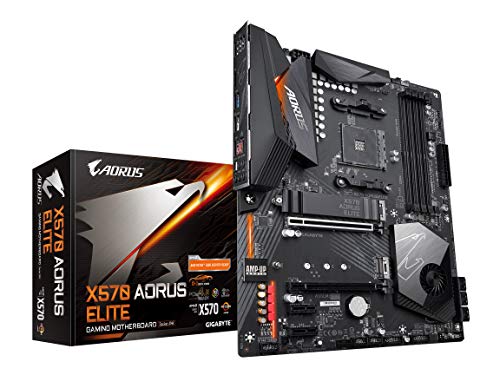
The AORUS Elite’s proposition is that the X570 chipset’s essential gifts — PCIe 4.0 everywhere, proper Ryzen 9 power delivery, the platform’s full storage story — do not require a flagship’s budget, and it makes that proposition convincingly. Gigabyte’s AORUS line built its name on power stages that punch at the tier above, and the Elite applies the lesson to this processor directly: the 3900X’s sustained draw is this board’s design case, its front USB Type-C acknowledges the modern case, its M.2 wears the line’s Thermal Guard heatsink, and its Realtek ALC1200 audio is a step above the class’s usual provision. It is the X570 board for the buyer who read the chipset section above, decided the lanes were worth having, and declined to fund the flagship’s jewellery.
In daily service the Elite’s character is competence without ceremony. Q-Flash keeps firmware updates processor-independent — genuinely useful on a platform where a board and a used 3900X may arrive from different directions — and the board’s RGB Fusion provision exists for owners who want it without organising the design around it. The chipset fan is present, as the class dictates, with profiles that keep it a non-issue in ordinary work.
Value boards earn a second look on the question of memory, because workstation memory is bought by the bucket: four slots, unglamorous and complete, with training behaviour that accepts large DDR4 kits at the speeds this processor prefers. The Elite’s long production life means its memory compatibility story is thoroughly explored in public — a genuine asset when the kit being installed is 64GB of whatever was on sale, which is how workstation memory is honestly bought.
Where it concedes is in the flagship’s depth charges: fewer of the extreme connectivity and overclocking ornaments, a BIOS that is functional rather than beloved. A 3900X workstation that needs the chipset’s bandwidth and the processor’s full sustained performance, and nothing it cannot name, will find this the most efficient purchase in the guide.
- Socket / chipset: AMD AM4, X570
- Form factor: ATX
- Memory: DDR4, 4 slots
- Expansion: PCIe 4.0 x16 graphics slot, M.2 with Thermal Guard heatsink
- Networking: Gigabit Ethernet (no onboard WiFi)
- Notable: front USB Type-C, Q-Flash, Realtek ALC1200 audio
Strengths
- Full X570 lane story at the class’s friendliest position
- Power delivery honestly sized for twelve sustained cores
- Front USB-C and heatsinked storage included
Trade-offs
- No WiFi onboard
- Flagship tuning depth trimmed away
- Chipset fan, as with the X570 class
Best for: value-led X570 workstations that need lanes and sustained power. Not suited for: wireless desks, or tuners who want the flagship’s full toolkit.

MSI MPG X570 Gaming Plus — Accessible X570
The Gaming Plus is X570 with the welcome mat out: the chipset’s full PCIe 4.0 layout, power delivery aimed at the Ryzen range’s upper half, and MSI’s gaming-board presentation, at the position where the chipset stops being a flagship indulgence. For the 3900X, its case rests on the same foundation as the Elite’s — this is a board from the processor’s own generation, designed when twelve cores were the headline, and its VRM and heatsinking were specced in that knowledge rather than adapted to it later. A 3900X at stock settings, working sustained loads in a case with real airflow, is this board’s home terrain.
MSI’s BIOS is the pick’s distinguishing comfort. Its layout is the most approachable in this guide for an owner new to a twelve-core machine — memory profiles, fan curves and the fabric settings are findable without a map — and that matters for the 3900X’s current population, many of whom inherited or bought the chip for a purpose (a render node, a compile box, a home lab) rather than for the hobby of tuning. The board asks less fluency of its owner than the Taichi does, and gives back a machine that behaves.
For the home-lab second career in particular, the Gaming Plus has an under-sung virtue: it is the board in this guide most likely to be already understood by whoever inherits the machine. MSI’s mainstream gaming boards are everywhere, their BIOS layout is the one forum answers assume, and a node built on one can be serviced by the collective knowledge of a million prior owners. In a machine whose value is uptime, that familiarity is a form of redundancy no specification sheet lists.
Its boundaries are tuning depth and trimmings. The committed Zen 2 overclocker will find the flagship boards’ voltage granularity missing, and the connectivity is a working set rather than a showcase. Within the brief it actually serves — twelve cores, stock manners, PCIe 4.0 throughout, no drama — the Gaming Plus is a complete answer, and the friendliest door into the X570 class.
- Socket / chipset: AMD AM4, X570
- Form factor: ATX
- Memory: DDR4, 4 slots
- Expansion: PCIe 4.0 x16 graphics slot, chipset PCIe 4.0, dual M.2
- Networking: Gigabit Ethernet (no onboard WiFi)
- Notable: USB 3.2 Gen 2, chipset fan cooling
Strengths
- Native-generation design for the Ryzen 9 class
- The most approachable BIOS in the guide
- Full chipset PCIe 4.0 at an accessible position
Trade-offs
- Tuning depth below the Taichi and Strix
- No onboard WiFi
- Working-set connectivity rather than premium provision
Best for: 3900X owners who want X570’s lanes without a tuner’s homework. Not suited for: committed overclockers, or wireless-first desks.

ASUS ROG Strix B550-F Gaming WiFi II — Best B550 for this chip
Now the case for leaving the launch chipset behind. The Strix B550-F is the B550 board we would trust with a 3900X’s sustained appetite, and the trust is specific: its power stage is the strongest in the B550 class this guide covers, built for the Ryzen range’s upper half rather than its middle, and it delivers that power under a passive chipset — no fan, because B550’s chipset does less and needs less. What the owner gives up against the X570 picks is chipset-side PCIe 4.0 for secondary devices; what the owner keeps is 4.0 where it is felt, at the graphics slot and the first M.2, plus WiFi 6E, 2.5-gigabit Ethernet and BIOS Flashback that the older boards above mostly lack.
That trade suits a recognisable machine: the focused 3900X workstation or flagship gaming build with one graphics card, one or two fast drives, and twelve cores that work hard in a room where silence is also a specification. The board’s fanless chipset and mature, late-generation BIOS — B550’s firmware story is finished and polished — make it the calmest ownership experience in this guide, and its memory support handles the DDR4-3600 configuration this processor loves without negotiation.
The Strix also answers the desk-placement question better than its X570 siblings: with WiFi 6E onboard and 2.5-gigabit wired networking, the machine it anchors is indifferent to where the router lives, which for a workstation that doubles as the household’s most powerful computer is a practical freedom. Add the fanless chipset in a room where the machine renders overnight, and the board’s modernities stop looking like luxuries and start looking like the specification of the room itself.
It is not the board for the expansion maximalist; the Taichi owns that brief. Nor is it the cheapest way to house the chip. It is the modern, quiet, fully-networked way, and for the many 3900X machines that are workstations by day and gaming rigs by night, it is the pick we would sign first.
- Socket / chipset: AMD AM4, B550
- Form factor: ATX
- Memory: DDR4, 4 slots
- Expansion: PCIe 4.0 x16 graphics slot, dual M.2
- Networking: WiFi 6E, 2.5Gb Ethernet
- Notable: fanless chipset, BIOS Flashback, HDMI 2.1 output
Strengths
- B550’s strongest power stage here — genuinely 3900X-capable
- Silent passive chipset and the guide’s best networking
- Latest, most polished firmware story on AM4
Trade-offs
- Secondary slots are chipset PCIe 3.0, not 4.0
- Premium B550 pricing close to value X570
- Two M.2 slots where X570 flagships offer more
Best for: focused, quiet 3900X workstations and flagship gaming builds. Not suited for: expansion-heavy builds that need chipset-side PCIe 4.0.

ASUS TUF Gaming B550-PLUS WiFi II — Stock-duty value
The TUF B550-PLUS earns the guide’s final place by being honest about a distinction the other picks blur: not every 3900X works marathons. A great many of these processors live in machines whose loads arrive in bursts — compiles that take minutes, exports that take ten, games that ask two cores to be brilliant rather than twelve to be busy. For that duty cycle, the TUF’s power stage, a step below the Strix’s but squarely in the competent class, runs the chip at stock settings without complaint, and the board returns the saving in the currency its line is known for: durability trim, WiFi 6, 2.5-gigabit Ethernet, BIOS Flashback and USB 3.2 Gen 2.
We state its condition plainly because the guide’s credibility is the condition: a 3900X destined for hours-long all-core rendering belongs on the boards above, where the power stages were specced for exactly that. The TUF under a sustained render in a warm case will protect itself the only way it can, by trimming the processor’s clocks — not a failure, but a mismatch between board and brief. Buyers should choose this pick with their workload’s shape in mind, and the ones whose shape is bursty will get a board that never gives them a reason to think about it again.
One more honest note in the TUF’s favour: bursty is not a synonym for light. A compile that pins twelve cores for eight minutes, repeated all day, is real work, and this board does it at full clocks because its power stage recovers between efforts in a way a marathon never permits. The distinction is thermal time, not effort — and the buyer who understands their own workload’s rhythm will find the TUF sized to it with surprising precision.
That is the TUF’s whole philosophy, and it is a respectable one to end the list on: the right board for the work actually done, bought at the price the work justifies, with the honesty about the boundary printed in the review rather than discovered in the render queue.
- Socket / chipset: AMD AM4, B550
- Form factor: ATX
- Memory: DDR4, 4 slots
- Expansion: PCIe 4.0 x16 graphics slot, dual M.2
- Networking: WiFi 6, 2.5Gb Ethernet
- Notable: BIOS Flashback, USB 3.2 Gen 2, fanless chipset
Strengths
- Full B550 features and networking at a value position
- Passive chipset and Flashback convenience
- Durability-first build for machines that get serviced
Trade-offs
- Power stage is the guide’s lightest — bursty duty, not marathons
- Sustained all-core rendering belongs on the picks above
- Secondary expansion is chipset PCIe 3.0
Best for: 3900X builds with bursty workloads — compiles, exports, gaming. Not suited for: hours-long rendering or folding-style sustained loads.
What should you check when pairing this veteran chip with a board bought today?
The pairing of an older flagship processor with a newly purchased board has its own short checklist, distinct from a fresh platform build, because the failure modes live in the gap between the parts’ ages. First, the stepping question: the 3900X existed in the market long enough that a board’s support for it is universal across these six picks, but the support list should still be read — it takes one minute and it closes the only compatibility question this build actually has. Second, the firmware direction of travel: a new board bought today ships with a late BIOS that certainly supports the chip, which inverts the usual risk — the danger is not an old board meeting a new processor, but an owner flashing backwards or sideways out of habit. Install the board as it arrives, verify, and only then consider whether any update is even relevant to a finished platform.
Third, the supporting cast’s ages deserve the same audit as the processor’s. DDR4 kits carried over from the chip’s first machine should be tested as a set in the new board before the build is declared finished, because memory that was stable under one board’s training is merely probably stable under another’s. The cooler, if carried over, needs its mounting hardware confirmed for the socket — AM4’s retention has been consistent, but a missing bracket has ended more build days than any electronic fault. And the power supply carried into a twelve-core machine should be judged by its years as well as its label; the second career asks for sustained loads, and supplies age out of exactly that virtue first.
None of this diminishes the pairing — it is, on the contrary, why the pairing is attractive. Every item on the checklist is knowable in advance, the platform’s documentation is complete, and the resulting machine’s behaviour has no surprises left in it. A new platform build buys novelty and accepts its unknowns; this build buys a known twelve-core quantity and spends its diligence on a checklist. For a workstation, that is the correct trade, and it is available only because both the processor and these boards finished becoming themselves years ago.
How do the six boards compare for twelve-core duty?
| Board | Chipset | Chipset PCIe | Chipset fan | WiFi | Best use for a 3900X |
|---|---|---|---|---|---|
| ASRock X570 Taichi | X570 | 4.0 | Yes | Yes | Flagship workstation |
| ASUS ROG Strix X570-F | X570 | 4.0 | Yes | No | Premium all-rounder |
| GIGABYTE X570 AORUS Elite | X570 | 4.0 | Yes | No | Value lanes and power |
| MSI MPG X570 Gaming Plus | X570 | 4.0 | Yes | No | Accessible X570 |
| ASUS ROG Strix B550-F WiFi II | B550 | 3.0 | No | Yes | Quiet focused build |
| ASUS TUF B550-PLUS WiFi II | B550 | 3.0 | No | Yes | Bursty-duty value |
How do you configure a 3900X board for sustained work?
Three settings decide whether the machine you assembled is the machine you specified. First, memory: install the kit as a matched pair in the slots the manual designates, enable its XMP profile, and confirm the Infinity Fabric is running in step — at DDR4-3600 that happens naturally on most boards, and it is worth the thirty seconds in the BIOS to verify rather than assume, because a fabric running out of step quietly taxes every core the processor owns. Second, power behaviour: leave the processor at stock limits for workstation duty. The 3900X’s stock configuration is already tuned by people who knew its silicon; the gains from loosening limits are small, the heat is not, and a board’s VRM lives longest inside the envelope it was specced for.
A note on monitoring, because sustained work deserves instruments: every board here exposes VRM and chipset temperatures to the operating system, and a workstation owner should look at them once under full load and file the numbers away. They are the machine’s baseline — the figures a future summer, a dust season or a failing fan will announce itself against. Owners who know their board’s normal VRM temperature under a render can diagnose a cooling problem from a single reading; owners who never looked will diagnose it from a shutdown, which is the same information delivered rudely.
Third, fans — plural, deliberate. Set curves for the case fans that answer to motherboard or VRM temperature where the BIOS allows, not only to the processor, so the power stage gets airflow when it works even if the cores are between tasks. On the X570 picks, check the chipset fan’s profile once and then forget it; the quiet and balanced profiles exist precisely so that the fan is a specification you read once rather than a sound you live with. Finish with a one-hour sustained load of your own real workload before the machine is trusted — a render, a compile, an export — watching clocks at the end rather than the beginning. That hour is the review your specific build writes for itself, and it is the only one that cannot be wrong.
What mistakes do 3900X motherboard buyers keep making?
The canonical mistake is buying a board by chipset tier for gaming and assuming it suits a twelve-core chip: the B550 and even X570 ranges contain boards whose power stages were designed around six-core processors, and a 3900X on one will run — until the first long render teaches the difference between running and serving. Read the power delivery, not the badge; this guide’s six were chosen because theirs answers the question. The second mistake is its mirror: assuming only a flagship will do, and overspending on expansion depth for a machine with one drive and one card, when the Strix B550-F or AORUS Elite would have served it identically.
There is a sixth mistake, quieter than the rest: judging the finished machine by its first minute. A 3900X build’s truth is thermal and temporal — clocks at hour two, VRM temperatures at hour three, a render queue cleared overnight. Buyers who benchmark the unboxing and never instrument the work will misread a throttling board as a weak processor and a strong board as an ordinary one. The one-hour test in our setup section exists because this processor, more than most, is a long-distance athlete being judged by sprinters.
Third, memory bought by headline speed alone: a kit far beyond DDR4-3600 whose fabric cannot follow buys latency it never advertises, while a matched 3600 pair in the correct slots is the configuration the silicon was dreaming of. Fourth, treating the chipset fan as either a scandal or an irrelevance rather than a setting — check its profile, keep its intake dust-free, and it returns to the non-issue it is on four of these six boards. Fifth, forgetting that a used or long-owned 3900X may meet a board whose shipped BIOS predates its stepping: verify the support list, use the Flashback or Q-Flash routes where fitted, and the oldest trap in the AM4 book stays shut.
Finally, a word about how long to keep the whole arrangement. The AM4 platform’s finished state means the machine built from this guide will not be upgraded so much as maintained — and that is a feature for a workstation, whose value compounds with every month it simply works. The boards chosen here were selected for that horizon: finished firmware, published documentation, power stages with margin, and makers whose support pages for this generation remain open for business. Buy once, configure carefully, monitor the baseline numbers, and a twelve-core machine assembled from a veteran processor and a board from this list should measure its service in years of unremarkable uptime — the highest state a workstation can aspire to.
Does the workstation specification cost this chip anything at gaming?
It is a fair suspicion: a guide that keeps talking about renders and compile farms might be steering a gaming processor into a grey suit. The suspicion can be retired. The 3900X was a gaming flagship in its day, and the board qualities this guide prizes — sustained power delivery, memory run at its fabric-friendly best, PCIe 4.0 to the card — are the same qualities a gaming machine wants, merely justified in a different vocabulary. A board that holds twelve cores at full stretch for a render holds two cores at boost for a game without noticing the appointment. Nothing in the Taichi’s or Strix’s specification taxes a frame; the gaming-specific boards of the era differed in lighting and audio garnish, not in the physics of feeding this processor.
If anything, the workstation lens improves the gaming machine. The memory discipline — matched pair, correct slots, fabric in step — is worth more frames on Zen 2 than any gaming-branded feature, because this architecture’s gaming performance is unusually sensitive to memory latency. The cooling discipline matters in the same direction: a case plumbed to wash the VRM zone also feeds the graphics card cooler air. And the one-hour sustained-load test this guide recommends doubles as the perfect gaming stability trial, since a machine that survives an hour of rendering will survive any evening of play. Buy the workstation board, set the memory properly, and the 3900X’s second career can absolutely include its first one after hours.
Final Recommendation
For the 3900X working as it was meant to — hours at full stretch — the ASRock X570 Taichi is the board that never enters the post-mortem, and the Strix X570-F is its premium all-round understudy. Value belongs to the AORUS Elite on X570 and, for the focused and quiet machine, to the Strix B550-F, the rare B550 we endorse for this chip without a caveat about duty. The Gaming Plus is the friendly door into the class, and the TUF is the honest pick for bursty work. Twelve cores was a workstation’s promise made to a mainstream socket; the board’s whole job is to keep that promise at hour two, and these six are the ones still keeping it.
Frequently Asked Questions
Does the 3900X need X570, or is B550 genuinely enough?
Genuinely enough — on the right B550 boards. The processor’s PCIe 4.0 for the graphics card and first drive comes from the chip itself, and strong B550 implementations like the Strix in this guide power its twelve cores at sustained load without complaint. X570 earns its place when you need PCIe 4.0 on additional slots and drives, not because the processor demands the badge.
What memory speed should I pair with the 3900X?
DDR4-3600 as a matched pair is the configuration this processor rewards most reliably, keeping the Infinity Fabric in its 1:1 step. Faster kits can work when the fabric follows, but the gain is small and chip-dependent; capacity matters more for this processor’s workloads — 32GB as the working floor for rendering and compiling, with four slots on every pick here leaving room to grow.
Is the X570 chipset fan a reliability problem?
It is a component to be aware of rather than a verdict on the platform. On the boards here, fan profiles keep it inaudible in ordinary work, and keeping its intake free of dust is ordinary maintenance. Owners who prefer no fan on principle are served by the two B550 picks, which is one of the reasons both chipsets are in this guide.
Can these boards run the 3900X with Precision Boost Overdrive?
The boards expose AMD’s tuning controls to varying depths — the Taichi and Strix most completely — but our workstation advice is to run this processor at stock limits, where its sustained behaviour is already strong. PBO’s gains on a twelve-core Zen 2 are modest against its heat, and the board you bought for longevity will thank you for the restraint.
How much power supply does a 3900X workstation need?
Size it for the sustained combination, not the processor alone: the chip at full all-core load, the graphics card at its working draw, and the drives and fans as a rounding allowance, then add headroom so the supply cruises rather than strains. Every board here takes standard ATX power with CPU connectors that should be fully populated for this processor. A quality unit in that arrangement will outlast the platform — which, for this processor’s second career, is rather the point.
I am buying a used 3900X — what should I check on the board side?
The board’s CPU support list for the chip’s exact stepping, and the BIOS version that support requires. Prefer a board with a CPU-free update feature — Flashback on the ASUS picks, Q-Flash on the Gigabyte — so firmware never becomes a hostage to the processor lottery. Then run a sustained load in the first days, while every return window is still open.
Related Guides
Explore the rest of the AM4 story with our companion guides: best 5900x motherboards for this chip’s Zen 3 successor and its higher demands, best 5600x motherboards for the six-core gaming end of the same socket, and best 100 dollar motherboards to see what the platform looks like at its strictest budget.
Related guides
- Best 14-Inch High-End Laptops: Flagships From Apple, Lenovo, ASUS and LG
- Best 15 Laptops Under $1000: Six 15-Inch Machines That Spend the Budget Honestly
- Best Battery NiMH Chargers: Six Units That Understand the Chemistry
- Best 3D Printers With Auto Leveling: Beds That Set Themselves, Ranked by How Much Else They Calibrate