What's inside
- Key Takeaways
- Quick Picks
- How Did We Choose These Six Chargers?
- Why Does PPS Matter More Than Raw Wattage for Galaxy Phones?
- What Should You Check Before Replacing Your Current Charger?
- Which Charger Fits Which Android Phone Best?
- How Do the Six Chargers Compare on Ports, Output and Portability?
- What Mistakes Slow Down Android Charging Most Often?
- How Should You Set Up a Faster Charging Routine?
- How Does Fast Charging Treat a Battery Over Two or Three Years?
- Which Charging Setup Suits a Shared House, a Dorm Room or a Workshop?
- What Do Charging Speed Claims Actually Mean in Minutes?
- How Can You Tell Whether a Charger Is Genuinely Delivering Its Best Rate?
- When Does a Second Charger Beat a Better Charger?
- What Should Travellers Pack Alongside a Fast Charger?
- How Often Should a Good Charger Need Replacing?
- Final Recommendation
- Frequently Asked Questions
- Related Guides
As an Amazon Associate I earn from qualifying purchases. This post may contain affiliate links at no extra cost to you.
widgetverdict.com is reader-supported. When you buy through links on our site, we may earn an affiliate commission.
Where to buy: each charger reviewed here points to a checked Amazon listing, and Samsung’s own brick, two Anker designs, a UGREEN triple-port block, a Belkin travel piece and one unbranded twin-pack between them cover single-phone speed, laptop crossover and spare-room duty.
Finding the best android fast chargers sounds simple until you notice that Android is not one charging standard but several living under one connector. A Galaxy phone hunts for Programmable Power Supply voltages to unlock its Super Fast Charging tier, a Pixel leans on plain USB Power Delivery and behaves politely with almost any competent brick, and older OnePlus or Motorola hardware may expect proprietary behaviour that none of the universal chargers in this roundup can fully reproduce. The six picks below are all USB-C Power Delivery chargers, chosen because PD plus PPS is the combination that serves the widest spread of current Android phones honestly.
Wattage alone will not tell you whether your phone actually charges quickly. A 65W brick that lacks PPS can leave a Galaxy crawling at a basic rate, while a modest 45W unit with the right voltage steps can fill that same phone at its advertised pace. Cable quality matters just as much, because a tired cable from a drawer can throttle an excellent charger, and heat management decides whether the first ten minutes of speed survive to minute forty. This guide works through those layers in order, then reviews each charger on its own terms.
Key Takeaways
- PPS support is the single feature that separates a genuinely fast Galaxy charger from a merely powerful one.
- Forty-five watts is the practical ceiling for most flagship Android phones; extra wattage only helps when a laptop or tablet joins the session.
- GaN construction keeps high-output bricks small enough for pockets and crowded power strips.
- Multi-port chargers divide their headline wattage between devices, so the per-port figure is the number that counts.
- A bundled cable removes the most common bottleneck, since many slow-charging complaints trace back to the cord, not the brick.
- Buying two moderate chargers for two rooms often beats buying one flagship brick that keeps travelling between them.
Quick Picks
| Pick | Badge | Why it earns its place |
|---|---|---|
| Samsung 45W USB-C Fast Charging Wall Charger | The native Galaxy choice | Samsung’s own 45W adapter with a 1M cable in the box, tuned for Super Fast Charging on Galaxy phones and tablets. |
| Anker Nano 65W GaN II USB-C Charger | The laptop crossover | Sixty-five watts with PPS in a foldable GaN II body that can run a MacBook Pro or a Galaxy at full pace. |
| UGREEN Nexode 65W USB-C GaN Charger | The three-port desk hub | Three ports and a GaN II chip let one compact block feed a phone, a tablet and a laptop in rotation. |
| Belkin 45W Dual USB-C GaN Wall Charger | The travel pair charger | Dual USB-C ports, PD 3.1 and PPS with foldable prongs, sized for couples or two-device travellers. |
| Anker 45W USB-C Fast Charger (2-pack) | The two-room answer | Two 45W Anker blocks, each with a 5ft cable, so the bedroom and the kitchen stop arguing over one charger. |
| 45W USB-C Fast Charger 2-Pack (unbranded) | The spare-drawer twin pack | An unbranded pair of 45W blocks with 6ft cables aimed squarely at Galaxy owners who lose chargers. |
How Did We Choose These Six Chargers?
We started from the phones people actually carry. Galaxy S-series owners need PPS and enough wattage to reach the 45W tier Samsung advertises for its larger models. Pixel owners need clean USB PD behaviour and a charger that does not negotiate oddly at low battery percentages. Everyone else with a USB-C Android handset needs a brick that will still be useful when the next phone arrives, which pushed us toward GaN designs, foldable prongs and outputs comfortably above the 25W baseline that now feels slow.
Every pick had to be a wall charger rather than a power bank or a car accessory, because the bedside and the desk are where fast charging earns its keep. Bundled cables scored well, not because cables are exciting, but because a charger shipped without one invites the buyer to pair it with whatever frayed cord is nearest. Brand accountability mattered too: five of the six come from makers with established warranty channels, and the sixth is included openly as an unbranded value pick, labelled that way wherever it appears so nobody mistakes it for something it is not.
We also weighted port count against honesty of output. A three-port 65W charger is a fine thing for a family charging shelf, but only if the buyer understands that plugging in a laptop and a phone together splits that total. Single-port chargers were judged on sustained behaviour and plug design instead. Readers who prefer cable-free charging should look at our guide to best android wireless chargers after this one, because the trade-offs there are about convenience rather than raw pace.
Why Does PPS Matter More Than Raw Wattage for Galaxy Phones?
Programmable Power Supply is a USB PD extension that lets the charger adjust voltage and current in fine steps while the phone and brick talk to each other continuously. Samsung’s Super Fast Charging 2.0 tier depends on it. Without PPS, many Galaxy models fall back to a much slower profile even when the charger on the wall could theoretically deliver far more power, which is why a hulking laptop brick sometimes charges a Galaxy more slowly than Samsung’s own smaller adapter. The negotiation happens in the first seconds after plugging in, and if the voltage steps the phone requests are not on offer, the session settles at the fallback rate for the entire charge.
Pixels take a simpler path. Google’s phones accept standard PD at up to their stated input, so almost every charger in this roundup serves them well, and the differences between picks come down to size, ports and cables. Other Android brands sit scattered between those poles. Motorola’s TurboPower phones charge respectably on PD bricks without reaching their proprietary peak, and OnePlus owners should expect solid but not headline speed from any universal charger, since the fastest OnePlus rates rely on the company’s own system. None of that makes these six chargers poor choices for those phones; it simply means the honest promise is fast universal charging, not brand-specific maximums.
There is also a battery-health angle worth understanding. Phones taper their intake aggressively as the battery fills, so the difference between a 45W and a 25W session is mostly visible in the first half hour. A charger that can hold its negotiated rate without heating the phone excessively will feel faster in daily life than a nominally stronger unit that triggers thermal throttling. GaN transistors help here by wasting less energy as heat inside the brick itself, which is one reason the technology dominates this list.
What Should You Check Before Replacing Your Current Charger?
Start with the phone’s own charging screen. Most Android phones report the charging mode in words: a Galaxy will say Super Fast Charging when the negotiation succeeds, and anything less tells you the current brick or cable is the limit. Check the cable next, ideally by swapping in the newest USB-C cable you own and watching whether the reported mode changes. Cables rated for higher current carry an internal marker that chargers can read, and a basic cable can cap an otherwise capable setup without any visible sign of damage.
Then look at where the charger will live. A bedside charger benefits from a longer cable and a plug that does not block the neighbouring socket. A travel charger benefits from foldable prongs and enough output to double as a laptop supply, reducing the total kit in the bag. A family charging station benefits from ports, even at the cost of per-device speed. Naming the location first prevents the common pattern of buying a technically excellent charger that fits none of the places it will actually be used.
Finally, count your devices honestly. If a tablet and wireless earbuds also need feeding, a single-port brick creates a nightly queue. The UGREEN and Belkin picks exist for that household. If your life is one phone and one laptop, the Anker Nano’s single strong port is cleaner. And if your charging happens on the road or off grid, the companion guide to best flexible solar chargers covers the panel side of that problem, while drivers may want the in-car options reviewed alongside this guide.
Which Charger Fits Which Android Phone Best?
Galaxy owners should begin with the Samsung brick or either 45W twin pack, because those are the combinations most directly aimed at Samsung’s charging tiers. The Samsung adapter is the reference implementation: when a Galaxy reports its fastest mode, this is the hardware it was tested against. Pixel owners can shop the whole list freely and should choose on size and ports. Laptop owners who want one brick for everything should look hardest at the two 65W GaN models, since 45W units will run many ultrabooks slowly or not at all under load.
Households mixing brands benefit from the multi-port picks. A Belkin or UGREEN block on a hallway shelf can serve a Galaxy, a Pixel and a pair of earbuds across an evening without anyone unplugging anyone else. The trade is peak speed: shared output means the first device plugged in rarely keeps the full headline figure once siblings join. For overnight charging that trade is invisible. For a frantic twenty minutes before leaving the house, a dedicated single-port charger still wins, which is why several homes sensibly own both types.

Samsung 45W USB-C Fast Charging Wall Charger — The native Galaxy choice
Samsung’s own 45W adapter is the charger Galaxy owners buy when they stop experimenting. The listing describes a Super Fast Charging wall charger supplied with a 1M USB-C cable, model EPTA845, in black, intended for phones, tablets and other USB-C devices. That bundled cable is not a footnote: it guarantees the cord half of the partnership is rated for the job, removing the most common reason a new charger disappoints on its first evening. Plug it into a compatible Galaxy and the phone’s own fastest charging mode is the expected result, with no menu diving or guesswork.
The single port is both the strength and the boundary of this design. All 45W is reserved for one device, so a Galaxy tablet or phone receives the charger’s full attention, and there is no output-splitting arithmetic to learn. The body is larger than the GaN rivals in this roundup, a reminder that this is an earlier, more conventional design, and it will occupy real space in a travel pouch. At a desk or bedside where it stays plugged in for months, that size stops mattering within a day.
Owners of non-Samsung phones should still respect what this brick does well. It speaks standard USB-C PD alongside Samsung’s tiers, so a Pixel or a USB-C tablet charges properly from it, and the first-party cable is a genuinely useful spare. What it will not do is charge two things at once or shrink for a pocket. Treat it as the reference charger for a Samsung household’s main charging spot, and let smaller GaN units handle travel.
- Output: 45W USB-C
- In the box: wall charger plus 1M USB-C cable
- Model: EPTA845
- Ports: one USB-C
- Colour: black
Strengths
- First-party tuning means a compatible Galaxy reaches its intended Super Fast Charging behaviour without negotiation surprises.
- The included 1M cable is rated for the charger’s output, ending the cable lottery that undermines so many upgrades.
- Full output is always available to the single connected device, with no sharing rules to memorise.
Trade-offs
- One port means a tablet and a phone still take turns on busy nights.
- The body is bulkier than the GaN chargers reviewed alongside it.
- Buyers paying for Samsung tuning gain little if no Samsung device lives in the house.
Best for: Galaxy owners wanting the charger Samsung itself specifies for its fastest wired tier.
Not suited for: a traveller requiring one tiny brick to feed a phone and a laptop from the same plug.
See Samsung’s 45W charger on Amazon if your Galaxy is still sipping power from an ageing 15W brick.
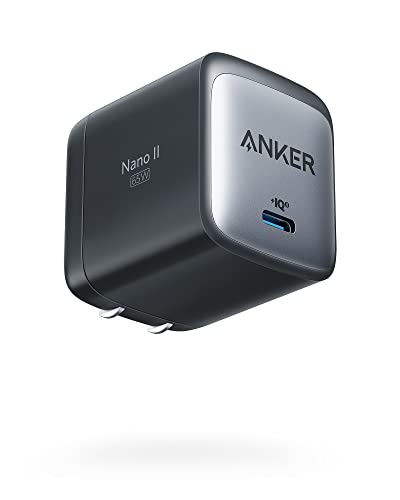
Anker Nano 65W GaN II USB-C Charger — The laptop crossover
The Anker Nano takes the opposite design brief from Samsung’s brick: maximum useful output in minimum volume. Its listing describes a 65W GaN II charger with PPS, a foldable form, and compatibility stretching from Galaxy and Pixel phones to iPads and MacBook Pro laptops. That PPS detail is what elevates it above generic laptop bricks for Android duty, because a Galaxy plugged into the Nano can request the fine-grained voltage steps it wants rather than settling for a fallback profile.
In practice this is the charger for the person whose bag contains a laptop and a phone and who refuses to carry two power supplies. Sixty-five watts runs most ultrabooks properly while they work, and the same brick then fills a phone at full speed in the evening. The foldable plug keeps the prongs from snagging bag linings or scratching a laptop lid in transit. It is a single-port design, so the laptop and phone still queue, but each gets the complete output when its turn comes.
Anker’s GaN II implementation keeps the enclosure notably compact for the wattage, and the build feels dense rather than hollow. Heat under sustained laptop load is present, as it is with every small high-output charger, yet the unit is designed for exactly that duty cycle. Buyers whose laptops demand more than 65W under heavy load should check their machine’s requirements, because a workstation-class laptop will still want its own larger supply.
- Output: 65W USB-C with PPS
- Technology: GaN II
- Plug: foldable
- Ports: one USB-C
- Stated device range: phones, tablets and laptops including MacBook Pro models
Strengths
- PPS support means Galaxy phones get proper fast charging, not just whatever a laptop profile happens to offer.
- One brick genuinely covers both a 65W-class laptop and any current Android phone.
- Foldable prongs and a compact GaN body make it the easiest pick here to carry daily.
Trade-offs
- No cable is bundled according to the listing, so the cord budget lands on the buyer.
- A single port forces sequencing when the laptop battery and the phone both run low together.
- Laptops needing well above 65W will treat it as a slow top-up rather than a main supply.
Best for: commuters and students who want one small brick to run a laptop by day and a Galaxy or Pixel by night.
Not suited for: a family shelf expecting three devices to draw power at the same moment.
Look at the Anker Nano 65W on Amazon if your current setup involves two chargers fighting for one bag pocket.

UGREEN Nexode 65W USB-C GaN Charger — The three-port desk hub
UGREEN’s Nexode answers the household problem rather than the pocket problem. The listing describes a 65W charger block with three ports, a GaN II chip and a foldable plug, aimed at phones from Apple and Samsung, Pixel handsets, MacBook laptops, Dell XPS machines and iPads. Three ports on a 65W budget means this unit is really a small charging station: one device can take a large share, or the total can be spread across a phone, a tablet and earbuds in whatever order the evening demands.
The discipline required is arithmetic. Connect a laptop alone and it receives a serious supply. Add a phone and the split changes, and add a third device and everything slows further. UGREEN publishes distribution figures for its multi-port chargers, and buyers should glance at them before assuming the headline number applies per port. For overnight and desk duty the sharing is painless, because hours are plentiful. For a rapid top-up before a flight, unplug the siblings and let one device have the brick.
Physically the Nexode stays surprisingly tidy for a triple-port unit, and the foldable plug keeps it travel-viable even though its natural home is a fixed shelf or desk. The black finish and squared design sit comfortably among laptops and monitors. As a single purchase that civilises a whole household’s charging habits, it is the most flexible object in this roundup.
- Total output: 65W shared
- Ports: three (USB-C and USB-A mix per listing imagery and description)
- Technology: GaN II chip
- Plug: foldable
- Colour: black
Strengths
- Three ports end the nightly negotiation over whose phone gets charged first.
- A lone connected laptop still receives a genuinely useful share of the 65W total.
- Foldable prongs keep a desk-first charger usable on trips without a second purchase.
Trade-offs
- Per-device speed falls as ports fill, which surprises buyers who read only the headline wattage.
- No bundled cable is listed, so three ports may require buying cords to populate them.
- It is larger than the single-port Nano despite the same headline output.
Best for: a shared desk or hallway shelf feeding a rotating cast of phones, tablets and laptops.
Not suited for: a buyer expecting a full 65W delivered independently to every connected device.
Check the UGREEN Nexode 65W on Amazon when one wall socket has to serve the whole household.

Belkin 45W Dual USB-C GaN Wall Charger — The travel pair charger
Belkin’s compact dual-port charger is built for two-device lives. The listing describes a 45W compact block with dual USB-C, PD 3.1 and PPS support, foldable prongs and a travel orientation covering iPhone, Galaxy, Pixel, iPad, Chromebook and Nintendo Switch 2. That combination of two modern ports and both PD 3.1 and PPS is unusually complete for the size, and it makes the Belkin the natural pick for couples travelling together or solo travellers carrying a phone plus a tablet.
Two ports on 45W means neither device gets a flagship solo rate when both are connected, but both get respectable modern charging, which is the correct trade for hotel rooms with one reachable socket. Used alone, a single Galaxy or Pixel receives the full output and charges at the pace this guide is about. The foldable prongs and compact GaN body disappear into a wash bag or a jacket pocket, and Belkin’s retail presence in airports and electronics stores makes a forgotten unit easier to replace mid-trip than most rivals here.
At home the Belkin works as a secondary charger rather than a main station: two ports suit a bedside where a phone and earbuds, or two partners’ phones, charge overnight. Buyers wanting to run a laptop should look at the 65W picks instead, because 45W shared across two ports leaves little for a hungry computer. Within its intended brief, though, the balance of size, standards and ports is hard to fault.
- Total output: 45W
- Ports: two USB-C
- Standards named in listing: PD 3.1, PPS
- Plug: foldable prongs
- Form: compact GaN travel block
Strengths
- Dual USB-C ports with PPS cover two modern phones properly from one socket.
- PD 3.1 support gives it a longer useful life as phone charging standards evolve.
- Compact body and folding prongs suit carry-on travel better than any other dual-port option here.
Trade-offs
- Sharing 45W between two devices means neither sees solo flagship speed while both are plugged in.
- Laptop owners get, at best, light-duty charging rather than a full replacement supply.
- The listing does not bundle a cable, so travellers need to pack their own pair.
Best for: couples and two-device travellers who need both phones charging from a single hotel socket.
Not suited for: a desk setup expecting a laptop and a phone to charge quickly at the same time.
View the Belkin 45W dual charger on Amazon if one socket abroad has been causing arguments.

Anker 45W USB-C Fast Charger (2-pack) — The two-room answer
This Anker offering solves a geography problem. The listing describes a two-pack of 45W USB-C charger blocks, each including a 5ft USB-C cable, aimed at iPhone, iPad and Galaxy devices including the S24 Ultra. Two identical chargers change behaviour in a way one better charger cannot: the bedroom unit stays in the bedroom, the kitchen or office unit stays put, and the daily hunt for wherever the charger was last seen quietly ends.
Each block delivers 45W on its own, which is the full Galaxy tier and ample for Pixels and tablets, so neither location is the slow location. The 5ft cables are a thoughtful length for reaching from a socket behind furniture to a nightstand surface, longer than the token cables bundled with many phones. Anker’s build quality and support channels apply to both units, which matters when a product’s job is to be forgotten in two separate rooms for years.
The compromise is specialisation. Neither block folds its prongs into quite the travel-first shape of the Nano, and there are no extra ports for guests. Buyers who travel constantly might prefer one Nano plus one of these at home. As a straightforward cure for the one-charger household, though, the arithmetic of this pack is compelling: two proper fast chargers, two proper cables, no decisions left.
- Pack contents: two 45W USB-C charger blocks
- Cables: 5ft USB-C cable included with each
- Output per block: 45W
- Ports per block: one USB-C
- Stated fit: iPhone, iPad and Galaxy ranges
Strengths
- Two complete charger-and-cable sets permanently end the single-charger household shuffle.
- Each unit delivers the full 45W tier rather than splitting a shared budget.
- The 5ft cables reach awkward sockets behind beds and sofas without strain.
Trade-offs
- Single-port blocks still charge one device at a time in each location.
- The design prioritises home duty over pocket-friendly travel dimensions.
- Households needing USB-A for legacy devices must look at the multi-port picks instead.
Best for: households tired of relocating one charger between bedroom and living space every day.
Not suited for: a minimalist traveller carrying a single bag and counting every gram.
See Anker’s 45W two-pack on Amazon when the second room in your home deserves its own fast charger.

45W USB-C Fast Charger 2-Pack (unbranded) — The spare-drawer twin pack
This pick is unbranded, and we label it that way deliberately. The listing describes a two-pack of 45W USB-C fast charging blocks, each with a 6ft cable, aimed at a long roll of Galaxy models from the S21 through the S26 Ultra generation, plus recent iPhones. On paper the formula matches the Anker pack above: two chargers, generous cables, the 45W tier Galaxy phones want. The difference is accountability: there is no established brand name standing behind the listing, and that should shape where these units are used.
Sensible roles for an unbranded twin pack are spares and low-stakes locations: a guest room, a workshop bench, a travel kit that might get left in a hotel, a teenager’s school bag. The 6ft cables are the longest bundled in this roundup and genuinely useful across wide desks and dorm rooms. For a primary charger that will run unattended beside a bed for years, many buyers will reasonably prefer the Samsung, Anker or Belkin names, and this guide’s ordering reflects that judgement.
None of that makes the pack a poor buy at its tier. Galaxy owners who lose chargers at a heroic rate may find two adequate 45W units more useful than one premium block, and the listing’s stated compatibility covers the phones most likely to need them. Read the listing details carefully, confirm the pack contents match the description on arrival, and treat the pair as capable spares rather than heirloom hardware.
- Pack contents: two 45W USB-C blocks (unbranded)
- Cables: 6ft cable with each block per the listing
- Output per block: 45W
- Ports per block: one USB-C
- Stated fit: Galaxy S and Note ranges plus recent iPhones
Strengths
- The longest bundled cables in this roundup reach across dorm desks and wide sofas easily.
- Two full 45W blocks cover a spare location and a main location in one purchase.
- Stated Galaxy compatibility spans many generations, suiting households with older handsets.
Trade-offs
- Unbranded provenance means warranty and support expectations should stay modest.
- Buyers cannot lean on a maker’s published charging-curve testing the way they can with Samsung or Anker.
- It duplicates the Anker pack’s concept without that brand’s track record behind it.
Best for: Galaxy owners who want long-cable spares for guest rooms, bags and benches.
Not suited for: a buyer seeking one trusted primary charger with established brand support.
Browse the unbranded 45W twin pack on Amazon if cable length matters more to you than a famous logo.
How Do the Six Chargers Compare on Ports, Output and Portability?
| Charger | Output | Ports | Cable bundled | Natural home |
|---|---|---|---|---|
| Samsung 45W | 45W | 1 USB-C | Yes, 1M | Main Galaxy charging spot |
| Anker Nano 65W | 65W | 1 USB-C | No | Laptop bag |
| UGREEN Nexode 65W | 65W shared | 3 | No | Family desk or shelf |
| Belkin 45W Dual | 45W shared | 2 USB-C | No | Travel kit |
| Anker 45W 2-pack | 45W each | 1 per block | Yes, 5ft each | Two rooms at once |
| Unbranded 45W 2-pack | 45W each | 1 per block | Yes, 6ft each | Spares and guest spaces |
Read the table by lifestyle rather than by numbers. Solo output crowns the Nano for mixed laptop and phone duty, while shared output crowns the Nexode for group duty, and the two twin packs win on the unglamorous metric of simply being present where charging happens. Drivers who spend their charging time behind a wheel will find a different set of trade-offs in our guide to best apple car chargers, where the socket itself moves at motorway speed.
What Mistakes Slow Down Android Charging Most Often?
Pairing a new fast charger with an ancient cable is the champion error. The phone negotiates with the whole chain, and the weakest link sets the pace, so a charger upgrade that reuses a five-year-old cord can produce no improvement at all. The second error is buying on headline wattage without checking for PPS, which leaves Galaxy owners wondering why a powerful laptop brick underperforms a smaller Samsung unit. A third is charging through a thick case with a loose cable connection that intermittently drops and renegotiates, silently stretching a charge across an entire evening.
Heat is the fourth culprit. Charging a phone under a pillow, in direct sun or while gaming heavily invites thermal throttling that no charger can override. Fifth, buyers often blame the brick for slow charging that is actually the phone’s own battery-protection setting limiting overnight rates by design. Before replacing hardware, check whether an optimised-charging toggle is doing exactly what it promised to do. Sixth, multi-port owners sometimes plug the phone into the weakest port of a shared charger; port order matters on several designs in this category, and the manual’s diagram is worth thirty seconds.
How Should You Set Up a Faster Charging Routine?
Place the strongest single-port charger where your most urgent charging happens, usually near the door or the desk where twenty-minute top-ups occur. Put shared or twin-pack units where time is plentiful, such as bedrooms. Keep one known-good cable paired with each charger and resist borrowing them for other duties, because cable drift is how good setups quietly degrade. Once a month, glance at the phone’s reported charging mode when you plug in; a change from the fastest wording to a lesser one is an early warning that a cable or port needs attention.
Travellers should build a small permanent kit rather than raiding home chargers before each trip: the Belkin or the Nano, two cables, and a note of which hotels tend to hide sockets behind furniture. Households with children should favour the twin packs, accepting that chargers will migrate and occasionally vanish. In every case the goal is boring reliability: the same charger in the same place delivering the same fast session every day.
How Does Fast Charging Treat a Battery Over Two or Three Years?
Every few months a reader asks whether using the fastest charger will wear a phone battery out early, and the honest answer sits between the two loud camps. Lithium batteries age through heat, through time spent at very high charge levels, and through sheer cycle count. Fast charging mainly adds heat during the early part of a session, and phone makers know this, which is why every modern Android handset manages its own intake curve: rapid while the battery is low and cool, gentler as charge and temperature climb. The charger does not force power into the phone; it answers requests the phone makes, and the phone stops asking for peak rates long before the battery is full.
Daily habits matter more than the choice between the picks in this guide. A phone that fast-charges on a ventilated desk, then spends the day between roughly a fifth and four-fifths charge, lives an easy life. A phone that charges under bedding, plays demanding games while plugged in, and sits at full charge on a warm windowsill ages faster on any charger, including a slow one. If long-term capacity is your priority, use the phone’s own battery-protection settings for overnight sessions, which cap or slow the final stretch, and reserve full-speed charging for the daytime top-ups where its benefit is real.
There is also a practical middle path many owners adopt without thinking about it: the fastest charger lives where urgency lives, and a modest older charger handles the nightstand. Nothing in this roundup forbids that arrangement. The twin packs even encourage it, because two rooms rarely have identical needs. What we would avoid is the opposite extreme of hunting for obscure ultra-high-wattage bricks that promise proprietary speeds for phones that cannot use them. The extra heat and cost buy nothing the phone will accept.
Cable care belongs in the battery conversation too. A cable with a damaged connector can create intermittent contact, and a phone that connects, disconnects and renegotiates dozens of times in a session spends that session warmer and less efficient than it should. Inspect the cables paired with your fastest charger every few months. Fraying near the plug, a connector that wiggles in the port, or a phone that only charges at certain cable angles are all signs to retire the cord before it makes a good charger look guilty.
Which Charging Setup Suits a Shared House, a Dorm Room or a Workshop?
A shared house runs on diplomacy. The Nexode on a hallway shelf works because it converts charging from a private scramble into a public utility: three ports, first come first served, and enough total output that nobody’s phone is still empty at breakfast. Label the cables if your household is large, because identical black cords wander. Put the Samsung brick in the room of the Galaxy owner who cares most about speed, and let the twin-pack Anker cover the room where guests and partners land. That distribution, bought once, ends most charging friction a family actually experiences.
A dorm room is a different problem: few sockets, many devices, and furniture arranged by optimism rather than by electricians. Long cables are the dorm superpower, which is why the unbranded pack’s 6ft cords and the Anker pack’s 5ft cords earn their keep there despite very different pedigrees. A power strip with surge protection, one multi-port charger, and cables long enough to reach a bunk or a desk turns a socket behind a wardrobe into a workable station. Students should also keep one charger permanently in the backpack, because the library dash with a dying phone is a rite of passage nobody needs to repeat weekly.
A workshop, garage or garden office rewards robustness over elegance. Dust, temperature swings and the occasional knock argue for the cheaper twin pack as the sacrificial unit and for keeping the premium GaN bricks indoors. Charging in those spaces is usually opportunistic — a phone topping up while its owner works — so the full 45W tier matters more than port count. Whichever pick lives out there, mount the cable so it cannot fall into a sink, a parts washer or a puddle of anything, and check the plug pins for corrosion once a season.
An office desk, finally, is where the laptop crossover picks justify themselves. The Nano or the Nexode can sit behind a monitor for months, feeding the work laptop and whichever phone arrives with its owner. Desk workers who hot-desk should favour the Nano for its pocketable size, while those with a permanent station can exploit the Nexode’s ports for a tablet and earbuds as well. The principle across all four settings is identical: match the charger’s shape to the room’s behaviour, not to a spec sheet ranking.
What Do Charging Speed Claims Actually Mean in Minutes?
Manufacturers love percentage claims — a phone reaching half charge in a stated number of minutes — and those figures are measured in the friendliest possible conditions: a cool room, a low battery, the screen off and the maker’s own charger. Real sessions differ. A phone that is warm from navigation, or one downloading a large update while charging, will trail the laboratory figure noticeably. Expect the picks in this guide to transform the first half hour of charging compared with an old 15W brick, and expect far smaller differences across a full overnight session, because every phone tapers as it fills regardless of the hardware attached.
The most useful personal test takes one evening. Note the battery percentage when you plug in at your usual time, use the phone normally for half an hour of charging, and note the percentage again. Repeat with the new charger. That pair of numbers, from your phone, your cable and your rooms, predicts your experience better than any reviewer’s bench. If the improvement is small, the cable or the phone’s own settings are the likely ceiling, and the sections above explain how to find which one.
How Can You Tell Whether a Charger Is Genuinely Delivering Its Best Rate?
Your phone already owns the diagnostic tool you need. On a Galaxy, the lock screen and the battery settings page name the charging mode in plain language, and the estimated time to full appears beside it. On a Pixel, the lock screen reports rapid charging when the negotiated rate qualifies. Those two readouts, checked ten seconds after plugging in, tell you more than any LED colour on a charger body. If the wording disappoints, change exactly one variable at a time: first the cable, then the port on a multi-port unit, then the socket, because a switched-off or loose wall outlet has embarrassed more troubleshooting sessions than anyone admits.
Temperature is the second readout, and your hand is the instrument. A charger body that is warm during a fast session is behaving normally; a phone that becomes uncomfortably hot deserves a pause, a removed case and a cooler room. Thick rugged cases trap heat around the battery, and several owners in reader mail solved mysterious slow charging simply by popping the case off for the evening top-up. Wireless charging pads, covered in the companion guide, add their own heat considerations, which is one reason wired fast charging remains the reference method for a battery that needs filling quickly and kindly.
Third, watch behaviour across the session rather than in its first minute. A healthy setup shows the fastest progress early, then a graceful slowdown as the battery passes its middle. A setup that crawls from the very start has a negotiation problem, usually PPS absence or a cable cap. A setup that starts brilliantly and stalls halfway often has a heat problem. Naming which pattern you see points straight at the fix, and it is why this guide keeps returning to the same trio of suspects: standards, cables and temperature.
Finally, remember that charging speed is a system property, not a charger property. The phone’s battery size, its software settings, its temperature, the cable, the port choice and the brick all vote. The six picks here were chosen to make the brick’s vote a strong one for the widest range of Android phones, but a five-minute audit of the rest of the chain is what turns a good purchase into a visibly faster daily routine. Do that audit once, label what belongs where, and fast charging becomes the kind of technology you stop thinking about entirely, which is the highest compliment home electronics can earn.
When Does a Second Charger Beat a Better Charger?
Charging problems in real homes are usually location problems wearing a technical disguise. The phone dies in the kitchen because the only fast charger lives beside the bed. The tablet is empty at the sofa because its charger migrated to a child’s room in March and never returned. A single superb brick cannot be in two rooms, and the minutes lost to hunting for it exceed the minutes any wattage upgrade could save. That is the honest logic behind both twin packs in this roundup, and it is why we rank them as serious picks rather than as budget filler beneath the famous names.
There is a threshold where the logic reverses. If your one charging location is also your work desk, and a laptop shares the socket, then quality and output at that single point matter more than duplication elsewhere. The Nano exists for that desk. Likewise, a frequent flyer gains more from one excellent travel brick than from two adequate home units, which is the Belkin’s argument. The skill is recognising which household you actually run. Count how many times in the last week a device waited for a charger, and where it waited. The answers draw the shopping list by themselves.
Guests deserve a thought in this calculation as well. A spare charger in the room visitors sleep in is a small hospitality that people remember, and it protects your own primary setup from being borrowed into oblivion. The unbranded pack, with its long cables and modest expectations, is almost purpose-built for that drawer. Keep the receipt, test both units on arrival, and then let them serve quietly in the rooms where a missing charger would otherwise become your problem at midnight.
What Should Travellers Pack Alongside a Fast Charger?
A fast charger abroad is only as useful as the plug and cable ecosystem around it. Within one country, the Belkin or Nano plus two cables covers nearly every situation a phone owner meets, and adding a compact power bank handles the hours away from sockets. Across borders, plug shapes change while USB-C stays mercifully constant, so the travel-adapter roundup elsewhere in this batch is the natural companion reading. Hotel rooms reward long cables because sockets hide behind headboards and desks, and airport charging corners reward speed because the time available is measured in boarding announcements.
Pack one cable more than you think you need. Cables are the component most often left in hotel rooms, borrowed by seatmates and damaged by bag zips, and a spare weighs almost nothing. Keep the spare in a different pocket from the main cable so a single loss cannot strand both. If your travel includes a car, remember that the vehicle’s own USB ports are usually slow; a proper 12V adapter from the car-charger category transforms a hire car’s console into a genuinely fast charging point between meetings, trailheads or family visits.
How Often Should a Good Charger Need Replacing?
A quality wall charger has no moving parts and no consumable chemistry, so its lifespan is measured in years and usually ends through loss, physical damage or a change in the phones it serves rather than through wear. The warning signs of genuine decline are a plug that sits loosely in sockets, a body that grows hotter than it once did at the same task, a phone that renegotiates its charging mode repeatedly during one session, and any visible cracking around the prongs or the cable port. Any of those earns a retirement, because a charger is a mains-powered device and cosmetic tolerance should be low.
Standards evolve slowly enough that a PPS-equipped PD charger bought today should serve the next two or three phones its owner carries. That longevity is an argument for buying the right tier once — the Samsung for a Galaxy household, the Nano for a laptop bag — rather than cycling through the cheapest available brick every year. When a phone upgrade arrives, test the existing charger against the new handset’s reported charging mode before buying anything; half the time the old brick already speaks the new phone’s language fluently.
One last habit separates satisfied owners from frustrated ones: they test a new charger on the day it arrives, while returning it is still effortless. Plug in at a low battery percentage, confirm the phone reports its fastest mode, leave it for twenty minutes and confirm the percentage climbed the way the mode promised. That small ceremony catches mismatched cables, wrong ports and the occasional defective unit at the only moment when fixing them costs nothing but a walk to a returns desk.
Keep the packaging and the listing details for whichever pick you choose until that first test is done, and photograph the phone’s charging screen if you ever need to discuss performance with the maker’s support team. A screenshot of the reported mode, paired with the cable and charger in frame, turns a vague complaint into a solvable case.
That record also helps months later, when a cable swap or a software update quietly changes behaviour and you need a trustworthy memory of how the setup performed when everything was new and working exactly as intended.
Final Recommendation
Galaxy owners should start with Samsung’s own 45W adapter for the main charging spot and add the Anker twin pack when a second room starts complaining. Laptop carriers should take the Nano and be done with the two-brick era. Families should take the Nexode, travellers the Belkin, and anyone furnishing spares should weigh the unbranded pack’s long cables against its lack of a brand name with eyes open. For a Galaxy on a desk in Ohio, the right charger is the one that speaks PPS fluently and is still plugged in where you left it.
Frequently Asked Questions
Will a 65W charger damage a phone that only accepts 45W?
No. USB PD is a negotiated system: the phone requests what it can accept and the charger supplies no more than that. An oversized charger simply has headroom the phone never uses, which is why one 65W brick can safely serve both a laptop and a phone on different occasions.
Why does my Galaxy not show its fastest charging mode with a laptop charger?
Many laptop chargers omit PPS, the fine-grained voltage adjustment Samsung’s fastest tier requires. The phone then falls back to a standard PD profile and charges at a reduced rate despite the brick’s high headline wattage. A PPS-equipped charger such as the Nano or Samsung’s own adapter resolves the mismatch.
Does cable length change charging speed?
Length alone is not the issue; cable rating and condition are. A well-made 6ft cable rated for the current involved charges as quickly as a short one, while a damaged or low-rated cable of any length can cap the session. Bundled cables from the packs in this guide are matched to their chargers, which removes the guesswork.
Is GaN worth caring about in a phone charger?
GaN transistors let a charger deliver high output from a smaller, cooler-running body. The practical benefit is portability and comfort on crowded power strips rather than extra speed. For a bedside brick that never moves, GaN is a pleasant extra; for anything that travels, it is close to essential.
Can these chargers handle tablets as well as phones?
Yes. Every pick speaks USB-C PD, which tablets from Samsung, Google and Apple all accept. Larger tablets charge fastest from the 45W and 65W single-port picks; on shared-port models, give the tablet the strongest port and let smaller devices take the remainder.
Should I replace a working 25W charger?
Only if your phone supports a faster tier and your routine includes short charging windows. Overnight, a 25W charger and a 45W charger both deliver a full battery by morning. The upgrade pays for itself in rushed mornings, airport layovers and mid-day rescues, not in slow overnight sessions.
Related Guides
Continue with best android wireless chargers for cable-free nightstand options, best flexible solar chargers for charging beyond the reach of a wall socket, and best apple car chargers for the in-vehicle side of the same problem.


