What's inside
- Key Takeaways
- Quick Picks
- How did we choose these picks?
- What makes the 5900X harder to house than its core count suggests?
- X570 or strong B550 — which flagship architecture suits this chip?
- How does the 5900X differ from the 3900X it replaced — and why does the board brief change?
- What do storage and networking owe the creator half of this chip?
- The best 5900x motherboards, reviewed one by one
- What do the power supply and case owe this processor?
- How do the six flagship boards compare side by side?
- How do you tune a 5900X board — and how far should you go?
- What mistakes do 5900X motherboard buyers keep making?
- How long does a 5900X build remain the right answer?
- Final Recommendation
- Frequently Asked Questions
- Related Guides
As an Amazon Associate I earn from qualifying purchases. This post may contain affiliate links at no extra cost to you.
widgetverdict.com is reader-supported. When you buy through links on our site, we may earn an affiliate commission.
Where to buy: the six boards reviewed below are drawn from listings we verified one by one against the manufacturers’ model names and chipsets. Every pick carries finished, mature firmware for Ryzen 5000 — this processor’s boards are chosen from the platform’s completed catalogue, not its early drafts.
The best 5900x motherboards serve the most demanding mainstream processor AMD put on the AM4 socket. The Ryzen 9 5900X is a twelve-core Zen 3 flagship with a dual identity no lesser chip has to reconcile: it is a workstation engine that renders and compiles at near-HEDT pace, and simultaneously one of its generation’s finest gaming processors, whose high boost clocks feed competitive frame rates. That duality defines its motherboard brief. The board must deliver workstation-grade power — sustained, cool, unflinching — while also supporting the boost behaviour and tuning culture, Precision Boost Overdrive and Curve Optimizer, that 5900X owners use to coax the silicon’s best single-core manners from it. A board that does only one of those jobs has done half the assignment.
This guide compares six verified AM4 boards — the X570 flagship class and the two B550 implementations strong enough to stand beside them — judged on sustained power delivery, boost headroom, memory and fabric tuning depth, and the cooling ecosystem around the socket. It is deliberately not the same guide as our 3900X roundup with the names changed: the 5900X boosts higher, heats denser, tunes deeper and games harder than its predecessor, and the boards below are ranked by how completely they serve that specific character.
Key Takeaways
- Premium VRM design is the price of admission: the 5900X’s sustained all-core loads and aggressive boost both draw on the same power stage.
- X570 brings PCIe 4.0 throughout the board; the strongest B550 boards match its processor-side speed and add silence, at the cost of chipset-side lanes.
- Curve Optimizer and PBO support separate the enthusiast boards from the merely adequate — the flagship picks expose the full toolkit.
- DDR4-3600 is the reliable memory configuration; faster kits chase the fabric ceiling and should be bought as an experiment, not a foundation.
- The 5900X ships without a cooler and concentrates heat in two chiplets — cooling is a board-adjacent purchase that decides real performance.
- Every pick runs the chip at stock superbly; they separate on tuning depth, expansion and how much thermal margin they hold in reserve.
Quick Picks
| Pick | Badge | Why it earns its place |
|---|---|---|
| ASRock X570 Taichi | Flagship without compromise | Power, lanes and tuning depth for owners who use the whole processor. |
| ASUS ROG Strix X570-F Gaming | Premium all-rounder | The balanced flagship — strong power, polished BIOS, heatsinked storage. |
| ASUS ROG Strix B550-F Gaming WiFi II | Best B550 for this chip | Fanless chipset, WiFi 6E and a power stage that belongs in the X570 conversation. |
| GIGABYTE X570 AORUS Elite | Value X570 | The chipset’s full bandwidth and honest Ryzen 9 power at the friendly position. |
| MSI MPG X570 Gaming Plus | Accessible X570 | PCIe 4.0 throughout with the guide’s most approachable tuning BIOS. |
| ASUS TUF Gaming B550-PLUS WiFi II | Stock-duty B550 value | For owners who run the flagship at stock and spend the saving on cooling. |
How did we choose these picks?
Three gates, in order. The first was power delivery with genuine thermal margin — not the ability to run the 5900X, which dozens of boards possess, but the ability to run it at sustained all-core load in a warm room without the VRM becoming the machine’s thermostat. Boards were assessed on their phase designs and heatsinking as documented by their makers, and the many AM4 boards specced around six- and eight-core processors were excluded regardless of their other charms. The second gate was tuning depth: the 5900X’s ownership culture is built on Precision Boost Overdrive and per-core Curve Optimizer work, and a board for this processor should expose those tools completely and legibly, with the voltage granularity the discipline requires.
The third gate was platform completeness for a flagship’s entourage — PCIe 4.0 storage in depth, networking that suits a workstation, fan and pump headers for the serious cooling this chip demands, and firmware that finished maturing years ago. Within those gates we kept the two honest architectures: X570, the launch flagship chipset with 4.0 everywhere and a small fan as its toll, and B550 in its two strongest implementations, which trade chipset lanes for silence and modern networking. The TUF is included with its condition stated in its review — it is the stock-settings pick, and its presence is a deliberate acknowledgement that not every flagship owner tunes.
A word about what we left out, because the omissions are the selection’s spine. The AM4 catalogue is full of boards that list this processor on their support pages while carrying power stages designed for the Ryzen 5 class; they are absent here not because they fail to boot the chip, but because booting was never the brief. Equally absent are the halo-tier boards above the Taichi, whose additional ornament — extreme overclocking theatre, showcase materials — serves a hobby this processor’s owners practise in smaller numbers than the marketing suggests. Six boards that all clear the real bar, at six honest positions, is the guide the flagship’s actual buyers need.
We also required buyability: verified listings, live support pages, finished BIOS. A flagship processor maintained for years deserves boards whose documentation will outlive the build’s first configuration, and all six qualify.
What makes the 5900X harder to house than its core count suggests?
Heat density and boost ambition. The 5900X’s twelve cores live on two chiplets, and Zen 3’s design pushes those cores to higher clocks than its predecessor managed — which means more power concentrated in less silicon area, removed through the same socket footprint. The processor’s temperature behaviour is famously spiky: single-core boosts arrive in bursts that a cooler must absorb without drama, while all-core loads settle into a sustained draw that tests the board’s power stage and the case’s airflow simultaneously. A board-and-cooling combination that handles only one of those patterns — the burst or the plateau — will show its limit in the other’s territory.
Boost is the second half of the story, and it is why this guide talks about power delivery in a gaming context at all. Precision Boost is an opportunist: it spends whatever thermal and electrical headroom the platform offers, moment by moment. A board whose VRM runs cool and whose limits are set generously gives the algorithm more to spend, and the processor repays it in sustained clocks — in games as much as in renders. This is the sense in which a premium motherboard genuinely makes this specific processor faster, a claim that is marketing fog for most chips and plain mechanism for this one. The flagship picks below are the boards that give the algorithm the largest budget.
There is a measurement consequence owners should know before they judge any board here: this processor’s temperatures at light load look alarming to anyone raised on earlier chips, because a single boosting core in a small chiplet runs hot by design and by the sensor’s placement. The number that matters is behaviour under your actual workload — sustained clocks, plateau temperatures, a render queue cleared on schedule — and every board in this guide was chosen against that standard rather than against an idle desktop screenshot. Judge the platform the way the processor works, in plateaus and patterns, and the flagship’s temperament resolves from alarming into merely ambitious.
Curve Optimizer completes the character sketch. Zen 3’s per-core voltage tuning lets a patient owner lower each core’s voltage curve, cutting heat and buying boost in a single motion — the rare tuning discipline that pays in both directions. It is also, not coincidentally, the feature that most separates the boards here: the flagships expose it with per-core granularity and the supporting controls, the value picks expose it adequately, and the difference between those experiences is a real part of what the premium buys.
X570 or strong B550 — which flagship architecture suits this chip?
The answer turns on what surrounds the processor. X570’s chipset carries PCIe 4.0 to the board’s secondary slots and storage, so a 5900X workstation with three fast NVMe drives, a high-speed network card or a capture device runs everything at the full standard; its toll is the chipset fan, audible to no one in a working room and present nonetheless. The two B550 picks invert the trade: the graphics card and first drive get their processor-direct PCIe 4.0, everything else rides the chipset’s 3.0 link, and in exchange the board is fanless and — in the Strix’s case — carries WiFi 6E and 2.5-gigabit networking the older flagships lack.
The decision can be made even simpler for one common buyer: the owner replacing a failed or outgrown board under an existing 5900X, with the rest of the machine — drives, card, memory, case — already chosen by history. That buyer’s question is purely which board restores the machine at its highest level for the money on the table, and the answer is the Strix B550-F for a standard complement of parts, or the AORUS Elite when the drive count has already grown past two. Restoration is the least romantic purchase in computing, and it deserves the guide’s most direct answer.
For the focused flagship build — one card, two drives, twelve cores working — the Strix B550-F is not a compromise but arguably the modern answer, and its power stage was designed with this processor class explicitly in mind. For the expanding workstation, the X570 flagships remain the architecture of record. The TUF stands slightly apart from the comparison: it is the value route for the owner whose 5900X will live at stock, and its B550 chipset is almost incidental to that judgement — the same advice would apply to any board of its power class, and its review states the boundary in full.
A note on buying these boards in this era, since several are launch-generation designs still in production: prefer sellers who can confirm the board’s firmware generation or accept returns gracefully, not because support for this processor is in doubt — it is universal across the six — but because a flagship build deserves a calm first week. The Flashback and Q-Flash features on the ASUS and Gigabyte picks make even the firmware question self-service, and the mature production runs mean the boards arriving today carry the platform’s finished BIOS as their factory state.
Memory unites the architectures rather than dividing them. Both chipsets serve DDR4 through the processor’s own controller, both reward the DDR4-3600 configuration, and both host the fabric-tuning experiment for owners inclined to chase the ceiling near 3800. Buy capacity for the workstation half of the chip’s life — 32GB as the floor, 64GB as the comfortable destination — as a matched pair first and a second pair later, on any pick here.
How does the 5900X differ from the 3900X it replaced — and why does the board brief change?
Owners cross-shopping our two Ryzen 9 guides deserve the comparison made explicit, because the processors share a core count and almost nothing else about their demands. The 3900X’s Zen 2 cores split their cache between two complexes per chiplet, which made memory latency the older chip’s tax and raw sustained power its board’s whole brief. The 5900X’s Zen 3 design unified each chiplet’s cores around one large cache, lifting gaming performance dramatically — and in doing so, it changed the board’s job description. Sustained power still matters, but it now shares the headline with boost behaviour: the newer chip’s clocks are more ambitious, more temperature-sensitive and more responsive to the headroom the board and cooler provide.
That is why this guide talks about tuning where the 3900X guide talked about endurance. Curve Optimizer exists because Zen 3’s boost algorithm rewards owners who shape its voltage behaviour; the older chip’s tuning culture was a footnote by comparison. It is also why the cooling sections here are written more urgently — the same twelve cores in denser, faster silicon produce a harder thermal problem in a smaller area. A board that served a 3900X honourably will serve a 5900X too, but the ranking changes: features that were garnish for the older chip — granular voltage control, VRM thermal margin measured in boost clocks — are substance for this one, and the picks were ordered with that reordering in mind.
One continuity is worth keeping: the memory discipline. Both generations reward the fabric-in-step configuration at DDR4-3600, both punish careless slot population, and both prefer two large sticks to four ambitious ones at the top speeds. The owner upgrading from one Ryzen 9 to the other can carry the memory, the configuration knowledge and — if they chose from the stronger end of either guide — the board itself. That continuity is the AM4 platform’s closing argument, and these two processors are its finest exhibits.
What do storage and networking owe the creator half of this chip?
A flagship processor’s entourage deserves its own accounting, because the 5900X’s creator half generates data at a rate the gaming half never approaches. Video timelines want scratch storage that reads at NVMe speed all day; render outputs and project archives accumulate in terabytes; and the machine that creates in the morning is often the machine that uploads, backs up and shares in the afternoon. The board’s storage depth — how many M.2 slots, at what speed, under what heatsinks — is therefore a creator specification before it is a gaming one, and it is the dimension on which the X570 flagships most clearly justify themselves to this processor’s owners.
Heatsinks on those slots are not decoration in this context. A drive writing a render cache for an hour lives at sustained temperatures where unheatsinked NVMe storage throttles itself into ordinariness, and the picks that wear proper M.2 heatsinks — the Strix X570-F and AORUS Elite among them — are making a workstation promise the spec sheet understates. Networking follows the same logic: 2.5-gigabit wired on the B550 picks suits the NAS-and-backup pattern of a creator desk, WiFi 6E suits the desk that cannot be wired, and the gigabit-only X570 boards are the one place the older flagships show their age — worth knowing if the machine’s second job is moving footage.
None of this outranks the power stage; it surrounds it. The correct reading of this guide’s priorities is a hierarchy — power first, because everything depends on it; tuning second, because this processor uniquely rewards it; storage and networking third, because the creator’s working day is built from them. A buyer who funds the hierarchy in that order will find the finished machine has no weak organ, only specialisations.
The best 5900x motherboards, reviewed one by one

ASRock X570 Taichi — Flagship without compromise
The Taichi is the board for the 5900X owner who intends to use the entire processor — the renders, the boosts, the tuning toolkit, the expansion — and wants the platform to disappear as a topic. Its power delivery was engineered for the Ryzen 9 class as its native condition, with the heatsinking to hold sustained all-core loads at the plateau this chip’s workstation half lives on, and its BIOS exposes the full Zen 3 tuning repertoire: PBO with its limits and scalars, per-core Curve Optimizer, fabric and memory controls with the granularity the ceiling-chasers require. Around that core, the X570 chipset delivers PCIe 4.0 to the board’s full storage and slot complement, so the flagship’s entourage never queues for bandwidth.
The ownership character matches the specification. This is a board built like equipment — substantial heatsinks, a layout that assumes large coolers and larger graphics cards, connectivity in the flagship register — and it behaves like equipment: the machine built on it becomes a fixed point that other components rotate around. For the dual-identity workload that defines this processor, that fixed-point quality is the product. The creator who renders all morning and games all evening on one machine is asking the board to be two machines’ foundations, and the Taichi is the pick that signs both contracts without reading the fine print aloud.
There is a longevity argument specific to this board that flagship buyers should hear: because the Taichi was specced at the platform’s ceiling, it has the least to apologise for as the machine around it evolves — faster storage standards the chipset already speaks, memory kits at the fabric’s ceiling, the strongest graphics cards the slot will ever host. A board bought at the ceiling ages by standing still while everything else rises to meet it, and in a platform with no successor coming, that is the only kind of future-proofing that was ever real.
Its costs are position and the chipset fan it shares with its class. Owners who will not tune, will not expand and will not render at length are buying depth they will never sound, and the guide offers them honest cheaper doors below. But as the complete answer to this processor’s complete brief, the Taichi stands alone in this list, and it earns the flagship word the old way — by making it unnecessary to think about the motherboard again.
- Socket / chipset: AMD AM4, X570
- Form factor: ATX
- Memory: DDR4, 4 slots
- Expansion: PCIe 4.0 x16 graphics slot, chipset PCIe 4.0, multiple M.2
- Networking: premium Ethernet and wireless provision
- Notable: full PBO and Curve Optimizer toolkit, chipset fan cooling
Strengths
- Sustained Ryzen 9 power with the guide’s deepest tuning controls
- PCIe 4.0 across the whole board for a flagship’s entourage
- Built and documented like long-service equipment
Trade-offs
- Flagship positioning for depth some owners never use
- Chipset fan, as with all X570 picks
- Over-specified for a stock, single-drive build
Best for: full-brief 5900X owners — rendering, tuning and expansion in one machine. Not suited for: stock-only builds on a disciplined budget.

ASUS ROG Strix X570-F Gaming — Premium all-rounder
The Strix X570-F is the flagship for the owner who wants the premium experience without the flagship’s last measure of extremity. Its power stage is specced for the Ryzen 9 class at sustained load, its dual M.2 slots wear real heatsinks — a workstation courtesy that matters when the drives share the processor’s long hours — and its BIOS is the pick’s quiet masterpiece: ASUS’s firmware makes the Zen 3 toolkit, PBO and Curve Optimizer included, as approachable as that discipline gets, with memory training that treats fast DDR4 kits as a routine rather than a negotiation. PCIe 4.0 runs throughout via the X570 chipset, and the board’s Intel gigabit Ethernet and USB 3.2 Gen 2 cover the working desk’s needs.
In the dual-identity machine, the Strix’s balance shows. The gaming half gets a board whose boost headroom and memory behaviour flatter the processor’s clocks; the workstation half gets sustained power and storage that keeps up; the owner gets one BIOS to learn and a support trail as deep as the platform offers. It is also, among the X570 picks, the board whose finish and documentation best suit a machine that will be shown as well as used — the creator-desk flagship, rather than the rack-room one.
The Strix also handles the processor’s spikiest behaviour with particular grace, because ASUS’s fan and pump control on this board understands ramp delays — the small mercy that stops a cooling system from announcing every boost burst the chip makes. In a dual-identity machine that renders in a home office, acoustic manners are a working specification, and this board’s firmware treats them as one. It is a small paragraph in a flagship review, and it will matter every single day the machine is used.
Against the Taichi it concedes the final increment of expansion and tuning extremity; against the B550 Strix below, it trades silence and WiFi 6E for the chipset’s lanes. The middle of this guide’s top tier is a considered place, and for the majority of flagship owners — serious about both halves of the chip, moderate about both extremes — it is the recommendation we would defend first.
- Socket / chipset: AMD AM4, X570
- Form factor: ATX
- Memory: DDR4, 4 slots
- Expansion: PCIe 4.0 x16 graphics slot, dual M.2 with heatsinks
- Networking: Intel Gigabit Ethernet
- Notable: Aura Sync lighting, USB 3.2 Gen 2, chipset fan cooling
Strengths
- Ryzen 9 sustained power with the most approachable flagship BIOS
- Heatsinked storage for workstation-hour drives
- Balance across the chip’s gaming and creator halves
Trade-offs
- Gigabit rather than 2.5-gigabit Ethernet
- Chipset fan, shared with its class
- A step below the Taichi in expansion depth
Best for: premium dual-identity builds that value polish alongside power. Not suited for: maximum-expansion workstations or silent-build absolutists.

ASUS ROG Strix B550-F Gaming WiFi II — Best B550 for this chip
The Strix B550-F is the modern answer to the flagship question, and its case begins with a fact the X570 boards cannot match: it was designed after the 5900X existed, by engineers speccing a power stage for this exact processor class, on a chipset that needs no fan. The result is the strongest B550 implementation in this guide — power delivery that holds the twelve Zen 3 cores at sustained load and gives Precision Boost its headroom, PCIe 4.0 where the processor provides it, WiFi 6E and 2.5-gigabit Ethernet that postdate the X570 flagships’ networking, and BIOS Flashback for firmware work without a processor installed. In a focused build, nothing about this board reads as the alternative to anything.
The tuning story survives the chipset change intact, which surprises buyers who assume B550 means a reduced toolkit: PBO and Curve Optimizer are processor-and-firmware features, and ASUS’s BIOS on this board exposes them in full. The fabric-and-memory ceiling game plays identically. What the owner surrenders is strictly the chipset’s lane wealth — secondary devices at PCIe 3.0 — and for the machine with one graphics card and two drives, that surrender is theoretical in the purest sense: there is no workload in the build that can detect it.
One more constituency should recognise itself here: the small-form-factor dreamer who settled for ATX. The Strix B550-F’s combination — flagship power, no chipset fan, current networking — is the specification compact builders covet, delivered in the size that can actually cool the processor it serves. The 5900X in a small case is a thermal negotiation this guide does not recommend; in a mid-tower on this board, it is a machine with no negotiations left. Sometimes the modern answer is simply the one that lets the flagship breathe.
Choose the Strix B550-F when the flagship machine is a finished composition rather than a growing organism — the creator-gamer’s single, complete PC, in a room where the fanless chipset is worth real money at 2 a.m. It is the pick that proves this guide’s recurring thesis: for this processor, the board’s power stage is the specification, and the chipset letter is an expansion detail.
- Socket / chipset: AMD AM4, B550
- Form factor: ATX
- Memory: DDR4, 4 slots
- Expansion: PCIe 4.0 x16 graphics slot, dual M.2
- Networking: WiFi 6E, 2.5Gb Ethernet
- Notable: fanless chipset, BIOS Flashback, HDMI 2.1 output
Strengths
- Flagship-class power stage with a silent, passive chipset
- The guide’s best networking — WiFi 6E and 2.5Gb wired
- Full PBO and Curve Optimizer support in a polished BIOS
Trade-offs
- Secondary slots and storage ride the chipset’s PCIe 3.0 link
- Two M.2 slots where X570 flagships offer more
- Premium B550 pricing near value X570
Best for: focused flagship builds — one card, two drives, complete performance. Not suited for: expansion-heavy workstations needing chipset PCIe 4.0.
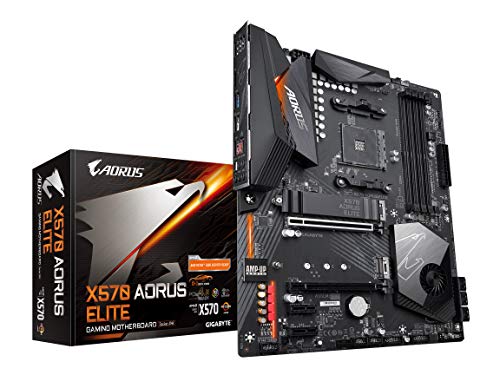
GIGABYTE X570 AORUS Elite — Value X570
The AORUS Elite brings the flagship chipset within a working budget’s reach, and for the 5900X it does so without the concession that would disqualify it: the power delivery is honestly specced for the Ryzen 9 class. Gigabyte’s AORUS line built its reputation on exactly that refusal to let the value model go hungry, and the Elite applies it here — sustained twelve-core loads are its design case, the X570 chipset gives the whole board PCIe 4.0, the front panel gains a USB Type-C the older flagships forgot, and the M.2 wears the line’s Thermal Guard heatsink. Q-Flash keeps firmware updates independent of the processor lottery, which on a mature platform is the update method that always works.
The board’s character is the working flagship: Realtek ALC1200 audio a step above the class norm, RGB Fusion present for owners who want it and ignorable for those who do not, and a BIOS that covers the Zen 3 toolkit — PBO, Curve Optimizer, fabric controls — in Gigabyte’s functional dialect. The tuner fluent in that dialect loses nothing; the tuner raised on ASUS’s pages will spend one evening learning the accent, which is the entire cost of the translation.
The Elite also earns a note on memory, because creator memory is bought in bulk and installed without ceremony: four slots with training behaviour that accepts large kits at the fabric-friendly speeds, documented across years of public ownership. A 64GB workstation configuration is a purchase, not a project, on this board — and for the buyer whose alternative was a flagship priced by its lighting, that plainness is the feature the workload actually ordered.
What the Elite does not buy is the flagship’s depth of ornament — the extra display outputs for diagnostics, the last connectivity graces, the heaviest heatsink furniture. A 5900X workstation whose brief is bandwidth and sustained power, priced by someone who reads specifications rather than shrouds, will find this the most efficient flagship purchase in the guide.
- Socket / chipset: AMD AM4, X570
- Form factor: ATX
- Memory: DDR4, 4 slots
- Expansion: PCIe 4.0 x16 graphics slot, M.2 with Thermal Guard heatsink
- Networking: Gigabit Ethernet (no onboard WiFi)
- Notable: front USB Type-C, Q-Flash, Realtek ALC1200 audio
Strengths
- Full X570 bandwidth with honest Ryzen 9 power delivery
- The flagship chipset at its friendliest position
- Front USB-C and heatsinked storage included
Trade-offs
- No WiFi onboard
- Tuning presentation functional rather than polished
- Chipset fan, as with the X570 class
Best for: value-led flagship workstations that need lanes and sustained power. Not suited for: wireless desks, or owners who want the flagship’s full ornamentation.

MSI MPG X570 Gaming Plus — Accessible X570
The Gaming Plus is the X570 class with the door held open: the chipset’s full PCIe 4.0 layout, power delivery from the Ryzen 9’s own launch generation, and the most approachable BIOS in this guide, at the position where the chipset’s benefits stop requiring a flagship’s faith. For the 5900X owner whose tuning ambitions are real but recreational — PBO enabled, a Curve Optimizer pass on a free weekend, memory at its fabric-friendly best — MSI’s layout is the friendliest classroom here, and the board’s power stage holds the processor’s stock and lightly tuned behaviour without ever becoming the story.
For the second-machine pattern this processor increasingly enters — the displaced flagship becoming the household’s render and lab node — the Gaming Plus has the same familiarity dividend we praised in our 3900X guide: MSI’s mainstream BIOS is the one the internet’s answers assume, and a node built on it can be serviced by collective knowledge rather than by its original builder. Uptime machines value that redundancy in a way spec sheets never capture.
That last clause carries the pick’s honest boundary. The committed ceiling-chaser — the owner chasing fabric records and per-core curves into the silicon’s last millivolt — will find the flagship boards’ granularity and thermal margin worth their premium, and this guide will not pretend otherwise. The Gaming Plus serves the larger population: owners who want the chipset’s lanes, the processor’s full stock performance and a sane tuning toolkit, in a board whose manual reads like it was written for them.
USB 3.2 Gen 2, dual M.2 and the chipset’s expansion depth complete a specification that has aged gracefully into its role. In a guide of flagships, the Gaming Plus is the one that remembers most owners buy a processor to use it — and it gets out of that use’s way with unusual grace.
- Socket / chipset: AMD AM4, X570
- Form factor: ATX
- Memory: DDR4, 4 slots
- Expansion: PCIe 4.0 x16 graphics slot, chipset PCIe 4.0, dual M.2
- Networking: Gigabit Ethernet (no onboard WiFi)
- Notable: USB 3.2 Gen 2, chipset fan cooling
Strengths
- The friendliest BIOS for a first flagship build
- Full chipset PCIe 4.0 at an accessible position
- Launch-generation power design for the Ryzen 9 class
Trade-offs
- Tuning depth below the Taichi and Strix X570-F
- No onboard WiFi
- Extreme overclocking belongs on the flagships
Best for: first-time 5900X owners who want X570’s lanes and a sane toolkit. Not suited for: committed ceiling-chasers or wireless-first desks.

ASUS TUF Gaming B550-PLUS WiFi II — Stock-duty B550 value
The TUF closes the list under a condition we state as plainly as its price advantage: this is the pick for the 5900X that will live at stock settings. Its power stage is a competent step below the Strix B550-F’s — entirely sufficient for the processor’s stock sustained behaviour in a case with honest airflow, and not the board we would choose for loosened power limits, aggressive PBO or a warm room’s summer render queue. Within that stated envelope, the TUF returns remarkable value: WiFi 6, 2.5-gigabit Ethernet, USB 3.2 Gen 2, BIOS Flashback, a fanless chipset, and ASUS’s durability-line build, in a full ATX layout that gives the flagship’s cooling the room it needs.
The stock-settings owner is a larger and more sensible constituency than tuning culture admits. The 5900X at stock is already the complete processor this guide describes — the dual-identity flagship — and an owner who pairs it with strong cooling, fast memory at the reliable configuration, and this board’s honest power will extract effectively all of it, indefinitely. The money the TUF returns against the Strix is, not coincidentally, roughly the money that upgrades the cooler from adequate to excellent — and for this heat-dense processor, that trade has a genuine claim to being the smartest in the guide.
There is a cooling corollary that completes the TUF’s logic and should be printed wherever this pick is considered: the saving it returns only becomes performance if it is actually spent on the cooler and case airflow, rather than absorbed by the general budget. A TUF with an excellent cooler will out-serve a Strix with a mediocre one for this processor, every day of the year — the board is the pick for the buyer disciplined enough to complete the trade it proposes.
Buy it with the condition understood and it will never be discussed again, which is the TUF line’s entire promise. Buy it intending to tune later and you have bought the upgrade conversation twice — the one outcome this guide exists to prevent.
- Socket / chipset: AMD AM4, B550
- Form factor: ATX
- Memory: DDR4, 4 slots
- Expansion: PCIe 4.0 x16 graphics slot, dual M.2
- Networking: WiFi 6, 2.5Gb Ethernet
- Notable: BIOS Flashback, USB 3.2 Gen 2, fanless chipset
Strengths
- Complete B550 features and networking at a value position
- Silent chipset and full ATX room for serious cooling
- Frees budget for the cooler this processor rewards
Trade-offs
- Stock settings are its brief — PBO headroom is limited
- Sustained tuned loads belong on the picks above
- Secondary expansion rides the chipset’s PCIe 3.0 link
Best for: stock-settings 5900X builds that invest the saving in cooling. Not suited for: tuners, or sustained all-core work in warm, sealed cases.
What do the power supply and case owe this processor?
A flagship build’s supporting cast is part of its performance specification, and the 5900X makes the point more forcefully than most processors. The power supply first: the chip’s tuned all-core draw beside a flagship graphics card is a sustained, serious load, and the supply should be chosen for that plateau with headroom above it — a quality unit whose efficiency and acoustics are rated at the machine’s working load, not its idle. Every board here takes standard ATX power, and the flagship picks provide the CPU power connections that a tuned twelve-core chip can actually use; populate them fully. A supply that sags under the plateau does not announce itself as a supply problem — it announces itself as instability that gets blamed on the board, the memory and the tuning, in that order, for weeks.
The case is the second half of the thermal contract. This processor’s heat arrives dense and spiky, the graphics card beside it exhausts into the same air, and the board’s VRM heatsinks — substantial on the flagship picks — are designed to be washed by a deliberate front-to-back airflow path. A sealed, decorative case converts every board in this guide into a warmer, slower version of itself; a mesh-front case with a planned fan layout lets the Taichi be a Taichi. Fan control then finishes the job: curves with ramp delays, set in the BIOS of any pick here, so the cooling answers the plateau rather than chasing every boost spike with an audible opinion.
None of this is exotic, and all of it is cheaper than the processor. The recurring tragedy of flagship builds is a four-figure silicon budget breathing through a case chosen for its photograph — and the board, blameless, holding the thermometer. Buy the air first; the boards in this guide have already bought everything else.
How do the six flagship boards compare side by side?
| Board | Chipset | Chipset PCIe | Chipset fan | WiFi | Best use for a 5900X |
|---|---|---|---|---|---|
| ASRock X570 Taichi | X570 | 4.0 | Yes | Yes | Full flagship brief |
| ASUS ROG Strix X570-F | X570 | 4.0 | Yes | No | Premium all-rounder |
| ASUS ROG Strix B550-F WiFi II | B550 | 3.0 | No | Yes | Focused flagship build |
| GIGABYTE X570 AORUS Elite | X570 | 4.0 | Yes | No | Value lanes and power |
| MSI MPG X570 Gaming Plus | X570 | 4.0 | Yes | No | Accessible X570 |
| ASUS TUF B550-PLUS WiFi II | B550 | 3.0 | No | Yes | Stock-duty value |
How do you tune a 5900X board — and how far should you go?
Begin at stock, and measure before touching anything: a full-load render time, a gaming session’s sustained clocks, the VRM and processor temperatures at plateau. That baseline is the instrument every later change is judged against, and owners who skip it end up tuning by folklore. The first and most rewarding step is memory — the matched pair at DDR4-3600 with the fabric in step — because it lifts every workload the chip owns and costs no heat. The second step is Curve Optimizer, applied per core in small decrements with stability tested under varied load, not just the heaviest one: its gift is lower voltage at the same clocks, which the boost algorithm converts into higher sustained clocks, and it is the one tuning discipline that makes the machine simultaneously faster and cooler.
Document as you go. Tuning state is invisible knowledge — which cores took which curve values, which limits were raised, which BIOS version the stable configuration was proven on — and the owner who writes it down owns a machine that can be restored after any firmware update or CMOS mishap in minutes. The flagship boards all offer profile storage in the BIOS itself; use it, and keep the paper copy anyway. A tuned 5900X is a small work of engineering, and engineering without documentation is just a rumour the machine tells about itself.
PBO’s limits are the third step, and the one to take with the most respect for the board beneath. Raising the power and current ceilings gives the algorithm a larger budget, and the flagship picks — Taichi, Strix X570-F, Strix B550-F — hold the resulting sustained draw as a matter of design. On the value picks, modest limit adjustments are the prudent ceiling. Know when to stop: the final few percent of this processor’s performance costs disproportionate heat and tuning evenings, and a workstation that must be trusted on Monday morning is worth more than a benchmark that peaks on Sunday night. The board you chose decides how much of that road is open; the baseline you measured decides how much of it was worth travelling.
What mistakes do 5900X motherboard buyers keep making?
The expensive mistake is buying by core count alone — assuming any board that lists Ryzen 9 support will serve a flagship, when support lists describe booting, not sustaining. The boards that throttle a 5900X rarely advertise the fact; they reveal it at minute forty of a render, which is why this guide’s first gate was thermal margin rather than feature count. The second mistake is the tuner’s mirror image: paying for flagship tuning depth and then running stock forever, a premium spent on a toolkit that stays shrink-wrapped — the TUF and Gaming Plus exist in this guide precisely to give that owner an honest, cheaper door.
There is a sixth mistake, and it is made in the first hour: judging the build by a benchmark’s peak instead of the workload’s plateau. This processor’s entire character — boost that spends headroom, power that sustains, heat that concentrates — expresses itself over time, and a board chosen or condemned on a ninety-second score has been measured in the one currency the flagship does not trade in. Run the real workload for a real hour before forming the verdict; the boards in this guide were selected to be judged exactly that way, and they welcome it.
Third, cooling treated as an accessory rather than a specification: this processor ships without a cooler, concentrates its heat in two small chiplets, and converts thermal headroom into clock speed by design — an underbought cooler is a performance downgrade purchased at full price. Fourth, memory bought for its headline speed, chasing fabric ceilings the individual chip may not reach, when the reliable DDR4-3600 configuration plus capacity would have served every workload better. Fifth, filling all four slots with a fast kit and blaming the board when training compromises — on this platform, two larger sticks remain the reliable route to both speed and stability at the top configurations.
How long does a 5900X build remain the right answer?
Longer than the platform’s age suggests, because the machine’s two halves age at different speeds and both were bought near their ceilings. The workstation half — twelve fast cores, generous memory, PCIe 4.0 storage — is bounded by workloads that grow slowly; a render pipeline or compile farm that this processor serves today will be served on the same terms for years, and the boards here were chosen for exactly that horizon of unremarkable uptime. The gaming half ages faster, as gaming always does, but it ages through the graphics card — the one component every pick here lets you replace without touching the platform — while the processor’s own contribution, feeding frames at high refresh, remains above the threshold where it becomes the story.
That is the mature platform’s final gift: the upgrade conversation shrinks to a single component at a time. Storage grows into the X570 boards’ spare slots. Memory doubles into the empty pair of slots every pick provides. The card is replaced on its own schedule. The board — the component whose replacement means rebuilding the machine — is the one thing that never needs to enter the conversation, provided it was bought with the margin this guide keeps describing. Buy the board once, at the level of your intentions, and the 5900X’s long second act plays out as a series of small, single-component decisions rather than a platform funeral. For a flagship, that is the correct way to grow old.
Final Recommendation
The ASRock X570 Taichi is the complete answer — the board for the owner who will render, tune and expand on one flagship machine and never revisit the decision. The Strix X570-F is its premium all-round alternative, and the Strix B550-F is the modern, silent answer for the focused build that needs no chipset lanes. Value wears two faces here: the AORUS Elite for the buyer who needs X570’s bandwidth, and the TUF for the stock-settings owner who would rather the saving became cooling. The Gaming Plus holds the door for first-time flagship builders. The 5900X was AM4’s argument that a mainstream socket could do everything; these six boards are the ones that let it finish making that argument — choose the one whose headroom matches your intentions, and the processor will do the rest at full voice.
Frequently Asked Questions
Does the 5900X really need a premium motherboard?
It needs a premium power stage more than it needs premium features. Dozens of boards will boot and run this processor; the ones in this guide sustain its all-core loads and boost behaviour without the VRM becoming the limit. If your use is light and bursty, the honest value picks here serve it fully — the premium buys sustained margin and tuning depth, and you should buy exactly as much of both as your workload uses.
Is B550 enough for a 5900X, or is X570 required?
B550 is enough on the right implementations — the two ASUS boards here prove it, with power stages designed for this class and full tuning support. What B550 cannot give is PCIe 4.0 on the chipset’s own slots and storage. Decide by your expansion list: one card and two drives, B550 serves completely; a growing workstation, X570 earns its place.
What memory configuration suits the 5900X best?
DDR4-3600 as a matched pair, with the Infinity Fabric running in step — the configuration that balances latency, bandwidth and total reliability on Zen 3. Capacity should follow the workstation half of the chip’s life: 32GB as the working floor, 64GB for heavy creation and virtualisation. Faster kits are an experiment for owners who enjoy the fabric-tuning process, not a foundation to build on.
What cooler should I pair with the 5900X on these boards?
A serious one. The processor ships without a cooler, concentrates heat in two chiplets, and converts thermal headroom directly into sustained clock speed — so a large tower cooler or a quality liquid unit is not an indulgence but part of the performance specification. Every board here has the headers and fan control to run such cooling properly; give the VRM zone case airflow as well, since board and processor share the same air.
Can I carry my 5900X over from a weaker board and keep my settings?
Carry the processor and the memory; re-derive the settings. Memory and fabric configuration should be re-established from the new board’s defaults, and any Curve Optimizer values should be re-validated rather than transcribed, because two boards’ voltage delivery differs enough at the margins to matter to a tuned chip. The work is an evening, and it buys the certainty that the new platform’s behaviour is its own — which is the entire reason for the upgrade.
Is Curve Optimizer worth the effort on these boards?
For owners who enjoy one careful evening of tuning, yes — it is the rare adjustment that lowers voltage and heat while raising sustained boost, and the flagship picks expose it with per-core control. Apply it in small steps, test stability under varied loads rather than only the heaviest, and keep notes: the settings are per-processor, and the owner who documents them owns them for the board’s whole life.
Related Guides
Read the rest of the socket’s story in our companion guides: best 3900x motherboards for this flagship’s twelve-core predecessor and its workstation brief, best 5600x motherboards for the six-core gaming end of the same platform, and best 2080 ti compatible motherboards if a veteran flagship card shares the build with this processor.


