What's inside
- Where to Buy
- Key Takeaways
- Quick Picks
- How We Chose These Picks
- Comparison
- How to Choose an Epson WorkForce Printer
- Wide Format or Standard Width: Which Paper Path Fits Your Office?
- How Much Do Feeder and Tray Numbers Change an Office’s Week?
- Why Does Fax Survive in the WorkForce Range?
- What Should the First Month With a WorkForce Printer Look Like?
- Common Mistakes When Buying an Epson WorkForce Printer
- Final Recommendation
- Frequently Asked Questions
- Related Guides
As an Amazon Associate I earn from qualifying purchases. This post may contain affiliate links at no extra cost to you.
widgetverdict.com is reader-supported. When you buy through links on our site, we may earn an affiliate commission.
Where to Buy
Epson’s WorkForce Pro range is unusually legible — the titles print speeds, feeder sizes and tray capacities — so the six listings below can be compared on stated facts from the first click. The Epson WorkForce Pro WF-4820 is the compact starting point; open its page to check price on Amazon before weighing the larger trays of the WF-4830. Wide-format buyers go straight to the WF-7840 or its sibling the WF-7820, while the WF-7310 states the widest print of all, up to 13 x 19 inches. The WF-4833 closes the set with the only stated touchscreen, at 4.3 inches. Each name opens its own listing — match the WF number exactly, because in this range a single digit rearranges the feeder and the trays.
Offices shopping for the best epson workforce printers are choosing inkjet on purpose: colour documents at business pace, all-in-one functions as standard, and paper handling that treats a working week as the unit of measure. The WorkForce Pro titles reward that deliberateness. Five of the six state the same headline speed — up to 25 ppm — so pace is not the contest here. The contest is paper: automatic document feeders of 35 or 50 sheets, trays of 250 or 500, and a wide-format branch that prints pages no ordinary office machine can physically accept.
That makes this guide a study in paper paths. Every pick prints, and the five all-in-ones with itemised functions scan, copy and fax; every pick prints two-sided automatically. What changes from model to model is how much paper the machine holds, how much it feeds unattended, and how wide a sheet it swallows. Read the reviews in that order — capacity, feeder, format — and the range sorts itself with unusual clarity.
A note on the inkjet fact itself, since some office buyers arrive with an old prejudice in hand. Business inkjet in this class is not the home inkjet of memory: these are machines whose titles compete on feeder sizes and ream-scale trays, built to be an office’s paper department rather than a desk accessory. The reviews judge them on exactly those office terms — what they hold, what they feed, what they finish two-sided — because those are the terms on which a working week will judge them too.
Key Takeaways
- Five titles state up to 25 ppm; the WF-4833 states no speed, so none is quoted for it.
- Paper capacity splits the range: 250 sheets stated on the WF-4820, 500 sheets on the WF-7840, WF-4830 and WF-7310, and unstated on the WF-7820.
- Document feeders split it again: 35 sheets on the WF-4820, 50 sheets on the WF-7840, WF-4830, WF-4833 and WF-7820.
- Three picks are wide-format — WF-7840, WF-7310 and WF-7820 — and the WF-7310 states the maximum print size in the guide: up to 13 x 19 inches.
- The WF-4833 is the only title stating a touchscreen, at 4.3 inches, and the only one listing its two-sided ability across print, copy, scan and fax.
Quick Picks
| Pick | Badge | Why it earns a place |
|---|---|---|
| Epson WorkForce Pro WF-4820 | The compact office starter | Up to 25 ppm with a 35-sheet ADF, auto two-sided printing and a 250-sheet tray. |
| Epson WorkForce Pro WF-7840 | Wide format, full trays | Wide-format all-in-one with a 50-sheet ADF and a stated 500-sheet capacity. |
| Epson WorkForce Pro WF-4830 | The 500-sheet standard size | Up to 25 ppm, 50-sheet ADF and 500-sheet capacity without going wide-format. |
| Epson WorkForce Pro WF-7310 | Widest stated print | Wide-format printing up to 13 x 19 inches with a 500-sheet stated capacity. |
| Epson WorkForce Pro WF-4833 | The touchscreen model | A 4.3-inch colour touchscreen with a 50-page ADF and 500-sheet capacity. |
| Epson WorkForce Pro WF-7820 | Wide format, lighter trays | Wide-format print, scan, copy and fax at up to 25 ppm with a 50-sheet ADF. |
How We Chose These Picks
The WorkForce Pro range divides along one physical line — standard width against wide format — and the shortlist honours it with three machines on each side. Standard-width offices print letters, invoices and reports; wide-format offices add spreadsheets that deserve a tabloid page, posters, plans and proofs. A guide that mixed the two without marking the boundary would fail both readerships, so every review below states its machine’s format in the first paragraph and the comparison table keeps a column for it.
Inside each half, paper handling did the ranking, because Epson’s titles make it rankable. Tray capacity is stated on four machines, feeder size on five, and those two numbers govern how a business printer feels across a month: how often someone stands at it with a ream, how large a scanning batch can be left unattended. The WF-4820’s smaller figures are not hidden or apologised for — they define its compact tier — and the 500-sheet machines earn their places by exactly the arithmetic their titles print.
Speed was treated as a constant, not a contest. Five titles state up to 25 ppm in identical words, so this guide quotes the figure where printed and declines to rank machines by a number they share. The sixth title, the WF-4833, states no speed at all; its review says so and builds its case on the touchscreen and paper handling its title does state. That asymmetry — five stated speeds, one silence — is preserved in every table and spec box below.
Functions closed the selection. Fax survives across this range in a way it no longer does in laser line-ups, and the itemised titles state print, scan, copy and fax as a set — a reminder that Epson builds these for offices whose document life still includes the fax number on the letterhead. The WF-7310’s title, by contrast, bills the machine as an all-in-one wide-format printer while itemising only its printing; its review reports that precisely, crediting the wide print it states and flagging the rest for the listing page.
One more consideration shaped the final order of the six: none of them is a photo printer in disguise, and none is a tank machine. WorkForce Pro is Epson’s cartridge business line, built for offices that print documents in colour at volume and accept a cartridge routine as the price of that pace and paper handling. Readers whose hearts are set on refillable tanks will find Epson’s other family in the low-ink-cost guide linked at the foot of this page; readers who need an office paper department, with feeders and trays sized in the titles themselves, are in the right range here.
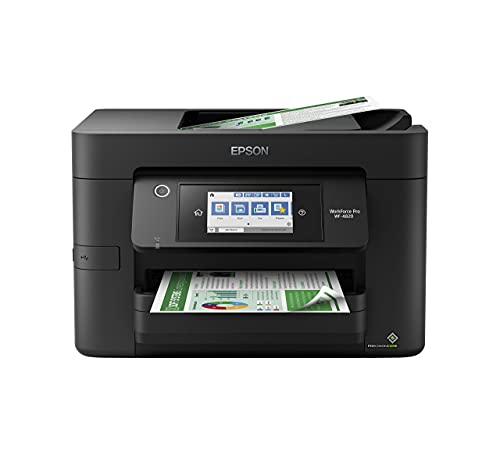
Epson WorkForce Pro WF-4820 — The compact office starter
The WF-4820 is the range in its most compact complete form: a wireless colour all-in-one inkjet stating print, scan, copy and fax, up to 25 ppm, a 35-sheet automatic document feeder, auto two-sided printing and a 250-sheet tray, pitched by its title at small offices. Nothing in that list is a compromise phrase. It is the full WorkForce recipe at the size where the recipe starts, for the office that wants the whole document cycle without giving the printer its own postcode.
The 35-sheet feeder is the number to think with. Scanning and copying in a small office arrive in bundles — a contract, a set of invoices, a week’s receipts — and a 35-sheet ADF swallows those bundles whole, unattended, while its owner does something else. Offices whose bundles run larger should note the 50-sheet feeders elsewhere in this guide; offices whose bundles look like a dozen pages at a time will never find this feeder’s ceiling, and will enjoy the smaller machine that houses it.
The 250-sheet tray plays the same role on the output side. Half a ream is a working rhythm of days-to-weeks between refills for a small office, and auto two-sided printing stretches each load further on reports and drafts. Add the stated 25 ppm — the range’s shared pace, printed in this title as in four others — and the WF-4820 describes a machine that asks little of a room and returns the complete office routine.
Who it suits is the small office in its first serious printer purchase, and the home office graduating from a consumer all-in-one: fax still present, feeder honestly sized, tray honestly stated. It is also the natural pick where desk depth is measured and found wanting for the wide-format branch. Buyers should simply know which side of the two paper numbers their office lives on — bundles above 35 sheets, or trays emptied weekly — because those are the only two doors out of this pick and into its larger siblings.
There is a completeness argument that closes this review. Many compact all-in-ones quietly drop fax or shrink the feeder to a token; this title drops nothing, stating all four functions and both paper figures in full. For a small office, that completeness is the value — one machine, no workarounds, no second device on a shelf waiting for the job the main printer could not do.
- Type: Wireless colour all-in-one inkjet printer
- Functions: Print, scan, copy, fax
- Speed: Up to 25 ppm, as stated in the listing title
- Document feeder: 35-sheet ADF, as stated in the listing title
- Duplex: Auto 2-sided printing stated
- Paper capacity: 250-sheet tray, as stated in the listing title
- Intended use: Small offices, per the listing title
Strengths
- The complete four-function set in the range’s compact tier.
- A 35-sheet ADF covers ordinary office scanning bundles unattended.
- Stated 25 ppm matches the pace printed across the range.
Trade-offs
- Its 250-sheet tray is half the capacity stated on the 500-sheet models.
- The 35-sheet feeder is the smallest stated in this guide.
- Standard width only — no wide-format printing is claimed.
Best for: a small office whose scanning bundles fit in 35 sheets and whose desk is compact. Not suited for: an office that scans 50-page bundles daily, because the stated feeder ceiling of 35 sheets would split every bundle into two runs.
Picture this machine’s week: invoices out in the morning, a signed agreement scanned and faxed before lunch, a two-sided report run in the afternoon, and a tray refilled somewhere around Thursday. Nothing in that week strains a single stated figure, which is the definition of a correctly sized office printer — and the WF-4820’s title, unusually among printers, prints every figure needed to check the fit before the box is opened.

Epson WorkForce Pro WF-7840 — Wide format, full trays
Wide format is a physical promise: the machine accepts paper that ordinary printers cannot, and everything about the WF-7840’s title is scaled to keep that promise at business volume. It is a wireless all-in-one wide-format inkjet stating print, scan, copy and fax, up to 25 ppm, auto two-sided printing, a 50-sheet document feeder and a 500-sheet capacity, pitched at businesses. The wide page is the headline; the trays and feeder are what make the headline usable every day rather than once a quarter.
Why an office goes wide deserves spelling out, because the buyers are specific. Spreadsheets that collapse into illegibility on a letter page breathe on a tabloid sheet. Plans, posters, menus, proofs and presentations gain a size where detail can be checked with eyes rather than zoom. A business that prints such pages even weekly currently outsources them or prints them tiled and taped; a wide-format all-in-one brings them in-house, at the same stated 25 ppm as its standard-width siblings.
The 500-sheet capacity matters more on a wide machine than a standard one, because wide paper is bought and stored deliberately — an office does not keep it in a drawer by accident. A tray system that holds a serious stock, paired with a 50-sheet feeder for the scanning side, describes a machine intended to be the office’s paper department entire: wide originals in through the feeder, wide prints out of the tray, ordinary letters handled in between without ceremony.
Its costs are physical and should be budgeted honestly. A wide-format all-in-one occupies wide-format desk space, with a lid and paper path sized for sheets beyond the everyday, and a small room will feel it. The title states no maximum print dimension — that figure belongs to the WF-7310’s title below — so a buyer whose wide work is defined by an exact sheet size should confirm the WF-7840’s maximum on its listing against the model code before ordering.
Who it suits is the business whose wide pages are routine: the design-adjacent office, the property firm with plans, the restaurant group with menus, the school office with posters. For them the WF-7840 is not an upgrade but a consolidation — the wide printer, the scanner, the copier and the fax retiring into one stated specification. Offices that print wide twice a year should keep the print shop’s number and buy standard width instead.
- Type: Wireless all-in-one wide-format inkjet printer
- Functions: Wide-format print, scan, copy, fax
- Speed: Up to 25 ppm, as stated in the listing title
- Document feeder: 50-sheet ADF, as stated in the listing title
- Duplex: Auto 2-sided printing stated
- Paper capacity: 500-sheet capacity, as stated in the listing title
- Maximum print size: Not stated in the listing title — verify with the manufacturer documentation
Strengths
- Wide-format printing joins the full four-function set.
- A stated 500-sheet capacity matches the range’s largest trays.
- The 50-sheet feeder handles wide-office scanning bundles.
Trade-offs
- The title states no maximum print dimension to plan exact sheet sizes by.
- Wide-format hardware demands wide-format desk space.
- Offices that rarely print wide pay for a paper path they seldom use.
Best for: a business printing tabloid-size spreadsheets, posters or plans every week. Not suited for: wide work specified to an exact sheet size, because this title claims wide format without printing a dimension — the WF-7310 states up to 13 x 19 inches.
Judge the WF-7840 by the errand it abolishes. Every office that prints wide knows the trip: the file on a stick, the print shop across town, the proof collected and corrected and carried again. A machine with this title’s paper handling moves that whole loop onto the office’s own desk, at business pace and business capacity — and for the offices that made that trip weekly, the abolition pays for the desk space many times over.

Epson WorkForce Pro WF-4830 — The 500-sheet standard size
If the WF-4820 is the recipe at compact scale, the WF-4830 is the same recipe at full office scale — and its title changes exactly the two numbers that define scale. Wireless colour all-in-one, print, scan, copy and fax, up to 25 ppm, auto two-sided: all shared. Then the feeder rises to 50 sheets and the paper capacity to 500, and the pitch stays with small offices, which tells you Epson expects plenty of small offices to need the larger paper path.
Five hundred sheets is a full ream, and a full ream changes the emotional texture of an office printer. Refilling stops being a weekly chore and becomes an occasional one; the printer is simply always ready, the way a kettle is always full in a well-run kitchen. For an office whose printing arrives in bursts — the end-of-month run, the mailing, the report season — that readiness is the difference between a machine that absorbs the burst and one that interrupts it twice for paper.
The 50-sheet feeder compounds the same readiness on the way in. Fifty pages is a serious bundle: a full contract with exhibits, a month of invoices, an application file. Fed once and scanned unattended, it converts an hour of page-turning into a background task. Offices digitising archives or processing paperwork at volume will read that number as the headline of this title, above the shared 25 ppm that every sibling also claims.
Who it suits is the standard-width office with volume: too much paper for the WF-4820’s trays, no need for the wide branch’s paper path. It is, deliberately, the least exotic machine in this guide — no touchscreen is stated, no wide format, no record figures — and that plainness is its recommendation. The gap between it and the WF-4833 below is a screen and a model digit; the gap between it and the WF-4820 is the arithmetic of paper, which most offices should let decide.
There is a buying principle embodied here worth stating once: in business printers, capacity is kindness. Every specification that lets the machine be left alone longer — the ream-sized tray, the fifty-page feeder, the automatic two-sided printing — returns minutes to people whose jobs are not printing. The WF-4830’s title is a small manifesto for that principle at standard width, and offices that have suffered a needy printer will recognise each stated number as a past annoyance answered.
- Type: Wireless colour all-in-one inkjet printer
- Functions: Print, scan, copy, fax
- Speed: Up to 25 ppm, as stated in the listing title
- Document feeder: 50-sheet ADF, as stated in the listing title
- Duplex: Auto 2-sided printing stated
- Paper capacity: 500-sheet capacity, as stated in the listing title
- Intended use: Small offices, per the listing title
Strengths
- A stated 500-sheet capacity holds a full ream between refills.
- The 50-sheet feeder takes whole contract-sized bundles unattended.
- All four functions and auto two-sided printing are stated.
Trade-offs
- Standard width only — wide pages are beyond its paper path.
- No touchscreen is stated, unlike the WF-4833.
- Its stated pace matches, but does not beat, the compact WF-4820.
Best for: a standard-width office whose weekly volume empties a 250-sheet tray too often. Not suited for: an office that prints tabloid-size pages, because no wide-format capability appears in this title at all.
Set the WF-4830 beside its smaller sibling and the range’s logic becomes a ruler an office can measure itself against: count the sheets in a week’s scanning bundles, count the days a tray load survives, and the correct model announces itself in the office’s own numbers. Few printer ranges permit so clean a self-diagnosis from their titles alone, and this guide simply hands the reader the ruler.

Epson WorkForce Pro WF-7310 — Widest stated print
One figure in this title outranks every other number in the guide: wide-format printing up to 13 x 19 inches. The WF-7310 is billed in its title as a wireless all-in-one wide-format inkjet printer, and the itemised facts are printing facts — up to 25 ppm, auto two-sided, a 500-sheet capacity, pitched at businesses. Thirteen by nineteen is super-tabloid territory: posters with margins, plans with legible detail, proofs that show a design at something like its intended presence.
Honesty about this title’s shape is required, and this guide gives it a full paragraph. The title calls the machine an all-in-one, yet unlike its siblings it does not itemise scan, copy or fax among its stated details, and it names no document feeder. A buyer for whom scanning is essential should treat those functions as unconfirmed here — the spec box records them as not stated — and either confirm them on the listing against the model code or choose the WF-7840, whose title itemises the full wide-format function set. What the WF-7310 indisputably states is the widest print in the range, at full business capacity.
That print size deserves its own imagination. A 13 x 19 sheet holds a tabloid page plus the crop marks and bleed a designer actually needs, or a poster that reads across a room, or a plan that a meeting can gather around without passing it hand to hand. Businesses that produce such pages — studios, architects, event organisers, schools with display ambitions — currently pay print-shop prices and print-shop timelines for them. This machine’s proposition is to bring the largest page in the building in-house.
The supporting numbers keep the proposition serious. A stated 500-sheet capacity means the wide paper stock is held in business quantity, auto two-sided printing is claimed for the sizes where it applies, and the up-to-25 ppm pace matches the range. Wide printing at toy capacity would be a novelty; wide printing at a ream’s capacity, in a title pitched at businesses, is a department.
Who it suits is the print-led wide user: the office whose wide work is output, not input — posters out, plans out, proofs out — and whose scanning life is modest or handled elsewhere. It is the specialist of this set, and its review has deliberately spent as long on what its title does not say as on what it does, because specialists are bought on exact fits. Measure your largest regular sheet; if it ends at 13 x 19, this title was written for you.
- Type: Wireless wide-format inkjet printer, billed as all-in-one in the listing title
- Maximum print size: Up to 13 x 19 inches, as stated in the listing title
- Speed: Up to 25 ppm, as stated in the listing title
- Duplex: Auto 2-sided printing stated
- Paper capacity: 500-sheet capacity, as stated in the listing title
- Intended use: Businesses, per the listing title
- Scan, copy and fax details: Not stated in the listing title — verify with the manufacturer documentation
- Document feeder: Not stated in the listing title — verify with the manufacturer documentation
Strengths
- Up to 13 x 19 inches is the widest stated print in this guide.
- A stated 500-sheet capacity holds wide stock in business quantity.
- Stated 25 ppm and auto two-sided printing match the range’s pace.
Trade-offs
- Scan, copy and fax are not itemised in the title despite its all-in-one billing.
- No document feeder size is stated.
- Its wide specialisation is wasted on letter-only offices.
Best for: a business printing posters, plans or proofs at up to 13 x 19 inches every week. Not suited for: a scanning workflow sized by a guaranteed feeder capacity, because this title prints no ADF figure — the WF-7840 states a 50-sheet feeder with its wide format.
Every range has one machine that exists for a single glorious capability, and the discipline of a good guide is to celebrate it without smuggling in the rest of a specification. The WF-7310 prints the biggest page here, on the biggest stated tray, at the family pace. If the biggest page is your office’s recurring need, that sentence is a complete buying case; if it is not, the sentence is a complete reason to buy a sibling instead.

Epson WorkForce Pro WF-4833 — The touchscreen model
The WF-4833’s title leads with an interface: a 4.3-inch colour touchscreen, the only display stated anywhere in this guide. Around it, the stated package is the full office set — wireless all-in-one, auto two-sided print, copy, scan and fax, a 50-page document feeder and a 500-sheet paper capacity. Note the two-sided phrasing, the most thorough in the range: where siblings state auto two-sided printing, this title extends the automatic habit across the copying and scanning side of the machine’s life as well.
A touchscreen on a business printer is not decoration; it is where the machine’s manners live. Walk-up copying, scanning to destinations, faxing and status checks all happen at that panel, performed by whoever is standing there, including the colleague who has never installed a driver in their life. A 4.3-inch colour screen is large enough for those interactions to be legible at arm’s length, and in a shared office the panel — not the specification sheet — is the part of the printer most people will ever touch.
The paper figures match the WF-4830’s full-size standard: 50 pages through the feeder, 500 sheets in the trays. The divergence between the two models is therefore unusually clean to describe — this one adds the stated touchscreen and the broader two-sided phrasing, and its title, in exchange, states no print speed. This guide quotes none for it. An office that plans around a ppm figure should verify it on the listing; an office that plans around people walking up to a machine will find the trade legible.
Who it suits is the people-facing office: reception-adjacent printing, shared workrooms, teams where the printer serves staff who did not choose it and should not need training to use it. The touchscreen collapses the distance between intention and job — copy this, scan that, fax those — into taps at the machine itself. Offices run by one expert who prints everything for everyone gain less; the screen’s value scales with the number of different hands the printer serves.
There is a small lesson in range design tucked into this model. Epson could have printed a speed in this title and omitted the screen, as its siblings do; instead the title spends its words on the interface and the paper, the two things a shared office feels hourly. Read as a signal of intent, the WF-4833 is the range’s hospitality model — specified for the moment a person meets the machine, not only for the documents that leave it.
- Type: Wireless all-in-one printer
- Display: 4.3-inch colour touchscreen, as stated in the listing title
- Functions: Print, copy, scan and fax, with auto 2-sided stated
- Document feeder: 50-page ADF, as stated in the listing title
- Paper capacity: 500-sheet paper capacity, as stated in the listing title
- Print speed: Not stated in the listing title — verify with the manufacturer documentation
- Format: Standard width — no wide-format claim in the title
Strengths
- The only stated touchscreen in the guide, at a usable 4.3 inches.
- Auto two-sided is stated across print, copy, scan and fax.
- Full-size paper handling: 50-page feeder, 500-sheet capacity.
Trade-offs
- No print speed is stated in the title — the only pick without one.
- Standard width only; wide pages belong to the 7000-series picks.
- A screen’s value fades in a one-operator office.
Best for: a shared office where many different people walk up and copy, scan or fax unaided. Not suited for: a purchasing process scored on stated pages per minute, because this listing prints no speed figure to score.
Stand in front of this machine as a new employee would: no driver, no instructions, a document in hand and a meeting in ten minutes. The 4.3-inch screen is the difference between that moment going well and becoming a request for help. Printers are shared infrastructure, and the WF-4833’s title is the only one here that budgets words for the humans on the near side of the glass — a priority its buyers will feel long after speed figures are forgotten.

Epson WorkForce Pro WF-7820 — Wide format, lighter trays
The WF-7820 is the wide branch’s second all-in-one, and its title draws a precise line between itself and the WF-7840. Wireless all-in-one wide-format inkjet, print, scan, copy and fax, up to 25 ppm, auto two-sided printing, a 50-sheet document feeder, pitched at small offices and businesses: the functions and the feeder match its wide sibling exactly. What the title does not state is a paper capacity — and in a range where four titles print one, that silence is this model’s defining boundary.
Read generously, the WF-7820 is the wide machine for offices whose wide work is occasional but real: the monthly poster, the quarterly plan, the spreadsheet that deserves a big sheet when the partners meet. Such offices need the wide paper path and the full function set; they do not empty trays at the rate that makes a stated 500-sheet capacity the deciding fact. The 50-sheet feeder still covers their scanning bundles whole, and the shared 25 ppm pace means wide pages arrive at business speed rather than as a special event.
Read strictly — as this guide reads every title — the missing capacity figure must be confirmed on the listing before an office with heavy volume commits. Paper capacity is the specification that governs refill rhythm, and a buyer whose week is measured in reams should not guess it. The honest comparison stands like this: the WF-7840 states its 500 sheets; the WF-7820 states its functions and feeder and leaves the tray to the listing page. Both are wide, both are complete all-in-ones on paper — the difference is which facts their titles guarantee.
Who it suits is the small office crossing into wide work for the first time, where the wide capability is the purchase and tray capacity is a detail the listing can settle. It also suits the business adding a second, wide-capable machine beside a standard-width workhorse that already carries the volume — in that partnership, the WF-7820’s job is breadth, not bulk, and its stated feeder and functions are exactly the parts that must not be missing.
There is a maturity in a range that offers the same wide all-in-one at two levels of paper commitment. It acknowledges that wide-format need and paper volume are independent variables — an office can need big pages without needing big trays — and it prices the distinction into two model numbers. The WF-7820 is the wide door at the lighter commitment, and offices that know their own refill rhythm will know whether the door fits.
- Type: Wireless all-in-one wide-format inkjet printer
- Functions: Wide-format print, scan, copy, fax
- Speed: Up to 25 ppm, as stated in the listing title
- Document feeder: 50-sheet ADF, as stated in the listing title
- Duplex: Auto 2-sided printing stated
- Intended use: Small offices and businesses, per the listing title
- Paper capacity: Not stated in the listing title — verify with the manufacturer documentation
- Maximum print size: Not stated in the listing title — verify with the manufacturer documentation
Strengths
- Wide format with the complete four-function set stated.
- The 50-sheet feeder matches the largest stated in this guide.
- Stated 25 ppm keeps wide pages at business pace.
Trade-offs
- No paper capacity is stated in the title.
- No maximum print dimension is stated in the title.
- Heavy-volume offices must verify tray figures before committing.
Best for: a small office adding wide-format printing without departmental paper volume. Not suited for: a refill rhythm that depends on a guaranteed tray size, because this listing states no sheet count — the WF-7840 states 500.
Close the wide branch with the pairing this guide has built: two wide all-in-ones, identical in stated functions, feeder and pace, divided by one guaranteed number. That is not a flaw in the range; it is the range working as ranges should, letting an office buy exactly the paper commitment it can measure in its own week. The WF-7820’s buyers are the ones who measured and found breadth, not bulk, at the top of their list.
Comparison
| Pick | Format | Stated speed | ADF | Paper capacity |
|---|---|---|---|---|
| Epson WorkForce Pro WF-4820 | Standard | Up to 25 ppm | 35-sheet | 250-sheet |
| Epson WorkForce Pro WF-7840 | Wide format | Up to 25 ppm | 50-sheet | 500-sheet |
| Epson WorkForce Pro WF-4830 | Standard | Up to 25 ppm | 50-sheet | 500-sheet |
| Epson WorkForce Pro WF-7310 | Wide — up to 13 x 19 in. | Up to 25 ppm | Not stated in the listing title | 500-sheet |
| Epson WorkForce Pro WF-4833 | Standard | Not stated in the listing title | 50-page | 500-sheet |
| Epson WorkForce Pro WF-7820 | Wide format | Up to 25 ppm | 50-sheet | Not stated in the listing title |
Paper is the whole argument of this table, and it resolves into a grid an office can locate itself on in seconds. Standard width runs down the WF-48xx rows, wide format down the WF-7xxx rows; capacity climbs from the WF-4820’s 250 sheets to the 500 stated four times; feeders sit at 35 once and 50 everywhere they are stated. Speed, the column buyers usually read first, is the least informative on the page — a shared figure with one honest blank.
The two blanks deserve their moment. The WF-4833’s missing speed and the WF-7820’s missing capacity are printed here as gaps rather than filled from sibling titles, because the WF numbers are close enough that borrowed figures would look plausible and be wrong. Confirm those two cells on the respective listings, against the model codes, and the table becomes a complete decision instrument.
How to Choose an Epson WorkForce Printer
Settle format before everything. Measure the largest page your office prints in an ordinary month. If it is a letter or a legal sheet, the standard-width WF-48xx machines are your field and wide format is a distraction. If a tabloid spreadsheet, poster or plan appears monthly, the field flips to the WF-7xxx branch, and the only remaining wide question is whether your largest sheet needs the WF-7310’s stated 13 x 19 ceiling.
Size the paper path next, with your own counts. Time a tray: how many days does a load last your office, and how large is the biggest scanning bundle anyone carries to the machine? The titles in this guide state both numbers for most models — 250 or 500 sheets, 35 or 50 feeder pages — so the arithmetic can be done exactly rather than by feel. Offices are reliably wrong about their volume in the optimistic direction; count a real week.
Weigh the walk-up experience third. A printer used by its owner-operator through a computer driver lives a different life from one used by a roomful of people at its panel. The WF-4833’s stated 4.3-inch touchscreen is the only interface claim in this guide, and shared offices should weigh it heavily; single-operator offices can let it go and buy on paper figures alone.
Close with the function audit. Fax is stated across the itemised titles here, which suits offices whose letterheads still carry a fax number; the WF-7310’s title itemises printing only, so scanning-dependent buyers should either verify it on the listing or take the WF-7840’s fully itemised wide set. Every machine in this guide prints two-sided automatically — that box, at least, needs no checking.
Wide Format or Standard Width: Which Paper Path Fits Your Office?
The wide question is really a question about three documents: the spreadsheet that will not fit, the poster that must be read across a room, the plan that a meeting gathers around. If your office produces any of them monthly, standard width taxes you every time — pages tiled and taped, detail shrunk past legibility, or the print-shop errand with its drive and its queue. The wide branch of this range exists to retire that tax, and its stated capacities show Epson expects the retirement to be permanent, not occasional.
Standard width answers with economics of space. The WF-48xx machines occupy ordinary desk territory, use the paper every office already stocks, and state the same 25 ppm pace as their wide siblings. An office whose largest page is a legal sheet gains nothing from a wide paper path except the path’s footprint. The honest test is documentary, not aspirational: open last month’s print history in your mind and find the page that needed to be bigger. If it is not there, it is not a requirement.
Between the branches sits one asymmetry worth knowing. Wide machines print ordinary pages without complaint, so the wide branch can serve as an office’s only printer; standard machines can never serve the wide day. That asymmetry tempts buyers to over-buy width as insurance. Resist it unless the wide day is already on the calendar — desk space is also a monthly cost, and it is charged whether or not the wide page ever arrives.
How Much Do Feeder and Tray Numbers Change an Office’s Week?
More than speed does, which is why this guide ranks by them. A stated 25 ppm shared by five machines cannot differentiate a working week; a feeder that takes 50 pages against one that takes 35 changes every scanning session that crosses the boundary, and a 500-sheet tray against a 250 changes the refill rhythm of the whole office. Paper handling is where business printers keep their promises or break them, because paper is the part of printing that involves people’s hands.
Do the bundle arithmetic for your own office. A 42-page contract is one unattended run on a 50-sheet feeder and two runs — with a wait, a reload and a reassembly of the digital file — on a 35-sheet feeder. Multiply by the contracts in a month and the feeder figure becomes an hours figure. Tray arithmetic is quieter but similar: every refill is an interruption with a paper wrapper, and halving their frequency is a genuine, if unglamorous, productivity feature.
The numbers also protect against the opposite error. A two-person office whose largest bundle is a dozen pages gains nothing from the largest feeder and tray in this guide except the desk space they occupy. Capacity should be bought the way insurance is bought — against the largest plausible week, not the largest imaginable one — and Epson’s titles, to their credit, print the figures that make that calibration possible.
Why Does Fax Survive in the WorkForce Range?
Because offices are ecosystems, and some species in them still fax. Healthcare, law, property, government and trades all contain counterparties whose workflows — and occasionally whose regulations — run through a fax number, and a business printer that cannot speak to them exports the problem to a subscription service or a colleague’s machine. Epson’s itemised titles state fax as a matter of course alongside print, scan and copy, treating it not as nostalgia but as one of the four ways paper enters and leaves an office.
The practical point for buyers is to audit rather than assume. Count the faxes your office sent and received last quarter — not the ones you remember, the ones in the log. If the count is zero and the letterhead no longer prints the number, fax is a free feature you may ignore in every title here. If the count is weekly, it is a requirement, and the WF-7310’s un-itemised title becomes a verification task while its siblings’ stated fax becomes a quiet deciding fact.
There is also a contingency argument that small offices understand instinctively. The day the internet connection fails is the day a fax-capable machine on a phone line becomes the office’s only working channel to the outside world. Not every office needs that insurance, and this guide will not sell it as a headline — but in a range where fax is stated almost everywhere, the offices that value it can collect it without paying a specialist premium.
What Should the First Month With a WorkForce Printer Look Like?
Begin with the paper, because this range is bought on paper. Load the tray with the office’s ordinary stock, run the two-sided report that represents a normal week, and watch whether the stated pace and the auto duplex habit match the rhythm the office expected. Then test the feeder with the largest real bundle the office produces — not a synthetic stack, the actual contract or invoice run — because that single test validates the figure the purchase was sized by.
Week two belongs to the people. Every person who will walk up to the machine should perform their own job at it once: a copy, a scan, a fax where the office still faxes. Shared printers fail socially before they fail mechanically, usually in the small gap between what the regular operator knows and what everyone else was never shown. On the touchscreen model that gap closes fastest, but even the panel-less machines repay ten minutes of guided first use per person.
By the end of the month, the office should know its two governing numbers from experience rather than from this guide: how many days a tray load truly lasts, and how large the biggest regular scanning bundle truly is. Write them on a card and keep it with the paper stock. When the next printer decision arrives — years from now, or next quarter for the second office — those two numbers, measured rather than remembered, will choose the model more accurately than any review, including this one.
Common Mistakes When Buying an Epson WorkForce Printer
Choosing by the model number’s size. The WF-78xx machines are not faster than the WF-48xx — five titles state the same 25 ppm. The 7000 branch is wider, not quicker, and buying it for pace buys the wrong thing.
Ignoring the feeder until the first big scan. A 35-sheet ADF and a 50-sheet ADF feel identical until a 42-page bundle arrives. Offices should size the feeder to their largest regular scanning job, counted in pages.
Assuming wide format states its maximum size. Only the WF-7310’s title prints a dimension — up to 13 x 19 inches. The other wide titles claim the format without the figure; exact sheet needs must be confirmed on their listings.
Treating the WF-7310 as a fully itemised all-in-one. Its title bills an all-in-one but itemises printing. Scanning-dependent buyers should verify its functions on the listing or choose the WF-7840, whose title itemises all four.
Forgetting the desk. Wide-format all-in-ones occupy wide-format space, lid swing included. Measure the shelf and the clearance above it before the wide branch’s paper promise becomes a furniture problem.
Final Recommendation
Standard-width offices should choose by paper arithmetic: the WF-4820 where bundles are small and desks are compact, the WF-4830 where a ream-sized tray and a 50-sheet feeder match the week’s real volume, and the WF-4833 where many hands use the machine and its stated touchscreen earns its place. Wide-format offices should choose by their largest sheet and their scanning life: the WF-7310 for print-led work up to a stated 13 x 19 inches, the WF-7840 for the fully itemised wide all-in-one with 500 stated sheets, and the WF-7820 where wide capability matters more than guaranteed tray capacity.
The WorkForce range’s titles are honest enough to choose from, which is rarer than it should be — so do the office the courtesy of counting its own bundles and trays before ordering, and the machine whose stated numbers match those counts will still be the right machine when the second ream goes in.
Frequently Asked Questions
Are all six WorkForce printers the same speed?
Five titles state up to 25 ppm in identical terms: the WF-4820, WF-7840, WF-4830, WF-7310 and WF-7820. The WF-4833’s title states no speed, so this guide quotes none for it — verify the figure on its listing if pace matters to your office.
Which WorkForce models print wide format?
Three: the WF-7840, the WF-7310 and the WF-7820. Only the WF-7310’s title states a maximum size — wide-format printing up to 13 x 19 inches. The other two claim wide format without printing a dimension.
What is the difference between the WF-4820 and the WF-4830?
Paper handling, as their titles state it. The WF-4830 raises the document feeder from 35 to 50 sheets and the paper capacity from 250 to 500 sheets. Functions, stated speed and two-sided printing are the same across both titles.
Which model should a shared office with many walk-up users choose?
The WF-4833 is the candidate: it is the only title here stating a touchscreen — 4.3 inches, in colour — alongside a 50-page feeder and 500-sheet capacity. Walk-up copying, scanning and faxing happen at that panel.
Do these printers fax?
The itemised titles state fax as part of the function set: the WF-4820, WF-7840, WF-4830, WF-4833 and WF-7820. The WF-7310’s title bills an all-in-one wide-format printer but itemises printing only, so its fax capability should be confirmed on the listing.
Is a WorkForce Pro an inkjet or a laser printer?
An inkjet — the itemised titles say so in words, describing wireless colour all-in-one inkjet printers. The range is Epson’s business inkjet line, which is why its titles compete on document feeders, tray capacities and two-sided paper handling rather than on toner. Offices choosing between this range and a colour laser are choosing between two printing technologies that both serve business documents; the WorkForce case rests on all-in-one completeness and wide-format options within one family.
What separates the WF-7840 from the WF-7820?
One guaranteed number. Both titles state wide format, all four functions, up to 25 ppm and a 50-sheet feeder. The WF-7840 additionally states a 500-sheet paper capacity; the WF-7820’s title states no capacity, so its tray figure must be confirmed on the listing.
Related Guides
Inkjet all-in-ones are one answer to the office document problem; shared institutional printing is another, surveyed in the best printers for churches, where tabloid bulletins and weekly volume set the requirements. Buyers whose deliberations keep returning to toner stamina should compare the best high-yield laser printers built around low-cost monochrome printing and large paper capacity. And readers planning the room around the printer — the projector at its centre — will find the natural companion in the best long-throw projectors for large rooms, auditoriums and venue installations, where Epson’s other office machines take their turn.
Related guides
- Best 4K Monitors for MacBook Pro: USB-C Panels With Real Power Delivery
- Best Routers for Remote Work: VPN Gateways, Travel Routers and Home Wi-Fi That Holds a Call
- Best Sim Racing Monitors: Ultrawide Cockpits From 34-Inch OLED Speed to the 49-Inch Wrap
- Best Acer Laptops for School: Six Picks for Pupils, Backpacks and Homework


