What's inside
- Where to Buy
- Key Takeaways
- Quick Picks
- How We Chose These Picks
- Comparison
- How to Choose a High-Yield Laser Printer
- Why Don’t These Titles Print Their Toner Yields?
- Paper Capacity or Cartridge Yield: Which Interruption Matters More?
- How Should an Office Audit Its Own Volume Before Buying?
- Common Mistakes When Buying a High-Yield Laser Printer
- Final Recommendation
- Frequently Asked Questions
- Related Guides
As an Amazon Associate I earn from qualifying purchases. This post may contain affiliate links at no extra cost to you.
widgetverdict.com is reader-supported. When you buy through links on our site, we may earn an affiliate commission.
Where to Buy
High-yield printing is a war against interruption, and the six listings below fight it with paper capacity, low-cost positioning and enterprise stamina. The Brother HL-6210DW states the largest paper numbers in the guide — a 520-sheet tray plus a 100-sheet multipurpose feed — so open its page to check price on Amazon first. Its enterprise sibling, the Brother HL-L6310DW, leads with low-cost printing, while the Brother HL-L6400DW carries the tersest title in the set. HP answers with the LaserJet Pro 4001n and the LaserJet Enterprise M611x, and the Canon imageCLASS MF465dw II is the all-in-one of the group, with the only stated speed: 42 ppm. Match every model code on its listing page — in this class, a suffix is a specification.
Buyers hunting for the best high yield laser printers want the cartridge to stop being a calendar event. High-yield printing means each toner cartridge carries a large page capacity, so replacements arrive rarely, cost less per page, and stop interrupting the month. An honesty rule governs this entire guide, stated now and kept throughout: page-yield figures appear only where a listing title prints them — and in this set, no title prints a yield number at all. What the titles do state is the supporting cast of the high-yield life: a 520-sheet tray here, low-cost printing positioned there, expandable and large paper capacities, enterprise tiers. The reviews build the high-yield case from those stated facts and from the class of cartridge each machine’s family is built around, without inventing a single page count.
That restraint matters because yield is the easiest number in printing to exaggerate and the hardest for a buyer to verify at the shelf. Page yields depend on coverage, and coverage depends on what an office actually prints. A guide that printed confident yields for six machines whose own titles print none would be manufacturing certainty. This one instead teaches the buyer to read the signals that are printed — capacity, positioning, tier — and to take the exact cartridge yields from the listing page of the exact model code, where they belong.
All six machines here are monochrome in their stated briefs or their model families’ plain reading, and that is no accident of the shortlist. High-yield economics live where pages are text: dense, repeatable, produced by the thousand. Colour volume exists, but its cartridge arithmetic is a different guide’s subject. An office whose counted month is black text on white paper — most offices, on most months — is standing in exactly the territory these six titles were written for.
Key Takeaways
- No title in this set states a toner page yield; yields are recorded as not stated throughout, and the high-yield case is argued from stated capacity and positioning.
- The Brother HL-6210DW states the largest paper figures: a 520-sheet tray and a 100-sheet multipurpose feed, with Gigabit Ethernet and dual-band wireless.
- The Canon imageCLASS MF465dw II states the only speed — 42 ppm — and is the set’s all-in-one, with print, copy, scan, fax and expandable paper capacity.
- The Brother HL-L6310DW is the only title that positions itself on low-cost printing, at Enterprise tier with large paper capacity stated.
- The HP LaserJet Enterprise M611x carries the departmental monochrome brief: duplex, automatic two-sided printing and Ethernet stated.
Quick Picks
| Pick | Badge | Why it earns a place |
|---|---|---|
| Brother HL-6210DW | Biggest stated trays | A 520-sheet tray and 100-sheet multipurpose feed, duplex, Gigabit Ethernet and dual-band wireless. |
| Brother HL-L6400DW | The minimal title | A workgroup laser name with the tersest title in the set — every figure to be confirmed on its listing. |
| Brother HL-L6310DW | Low-cost Enterprise | Enterprise monochrome with low-cost printing and large paper capacity stated in its title. |
| HP LaserJet Pro 4001n | Wired Pro monochrome | Fast black-and-white positioning with mobile printing and Ethernet connectivity stated. |
| Canon imageCLASS MF465dw II | All-in-one at 42 ppm | Print, copy, scan and fax at a stated 42 ppm, with expandable paper capacity. |
| HP LaserJet Enterprise M611x | The departmental engine | Enterprise monochrome with duplex, automatic two-sided printing and Ethernet stated. |
How We Chose These Picks
A high-yield shortlist cannot be ranked by yield numbers its titles refuse to print, so this set was built from the architecture around the cartridge. Machines were chosen whose titles state the infrastructure of uninterrupted volume: paper capacity large enough that the tray is not the bottleneck, enterprise or workgroup positioning that signals a high-capacity cartridge ecosystem, duplex to halve the paper side of the ledger, and connectivity fit for shared duty. Six machines across Brother, HP and Canon cover that architecture from three directions.
Brother takes three places because its titles speak this guide’s language most directly — one machine states a 520-sheet tray and a 100-sheet multipurpose feed, another states low-cost printing and large paper capacity at Enterprise tier, and the third, the HL-L6400DW, is included precisely because its title states almost nothing: a well-known workgroup name whose presence lets this guide demonstrate, honestly, what a buyer must verify when a title is a name and nothing more. Its review is the shortest on stated facts and the longest on method, deliberately.
HP’s pair divides by tier as HP always divides: a Pro for the wired small office and an Enterprise machine for the department. Canon’s single entry is the set’s all-in-one and its only stated speed, included because high-yield buyers who also scan — and many volume offices do — deserve one fully itemised multifunction option rather than five printers and an apology.
Every review follows the same evidence contract: toner yield is recorded as not stated wherever the title omits it, which is everywhere; capacity and speed are quoted only where printed; and the high-yield argument is made qualitatively, from cartridge class and machine tier, in language a buyer can re-verify on the listing page of the exact code. A guide about economical printing should model economical claims.

Brother HL-6210DW — Biggest stated trays
Paper capacity is the yield nobody talks about, and this title talks about it in numbers: a monochrome duplex wireless laser printer with a 520-sheet tray, a 100-sheet multipurpose feed, Gigabit Ethernet and dual-band wireless. Five hundred and twenty sheets is more than a ream in the main tray — a load measured in weeks for most offices — and the multipurpose feed adds a second, flexible path for the envelopes, labels and letterhead that should never require emptying the main tray to print.
The pairing of the two feeds is the working heart of the machine. High-volume printing fails in small ways: the tray empties mid-run, the special stock needs a tray swap, the job waits while someone finds paper. A 520-sheet main tray pushes the first failure weeks apart; a 100-sheet multipurpose feed abolishes the second entirely, giving odd stock a permanent home. Together they describe a printer designed to be loaded rarely and used constantly, which is the paper-side definition of the high-yield life.
Connectivity is stated with the same completeness: Gigabit Ethernet for the wired office, dual-band wireless for everywhere else, duplex for the two-sided default. A shared volume machine must be reachable by the whole office on whichever network the building runs, and this title equips it for both. No speed is printed, and no toner yield — the spec box records both silences — so the case rests on capacity and connection, which for a machine bought to be left alone is arguably the correct case.
Who it suits is the office whose printing is a river rather than a series of puddles: steady monochrome volume, mixed stock, several users, and a strong preference for a printer that is refilled with paper monthly and thought about never. It is print-only in its stated brief — no scan or copy appears — so offices needing a scanner should read the Canon review below before deciding that capacity outranks functions.
There is a philosophy in a 520-sheet tray that deserves one sentence of respect: it treats human attention as the scarcest consumable in the office. Toner gets the headlines in high-yield discussions, but every tray refill is also a small tax on someone’s morning, and this Brother’s title pays that tax down to a monthly minimum. Buyers who have managed a busy office’s printer will read the two capacity figures as the most humane numbers in this guide.
- Type: Brother monochrome duplex wireless laser printer (HL-6210DW)
- Main tray: 520-sheet tray, as stated in the listing title
- Multipurpose feed: 100-sheet, as stated in the listing title
- Duplex: Stated in the listing title
- Connectivity: Gigabit Ethernet and dual-band wireless stated
- Toner yield: Not stated in the listing title — verify with the manufacturer documentation
- Print speed: Not stated in the listing title — verify with the manufacturer documentation
Strengths
- A stated 520-sheet tray is the largest paper figure in this guide.
- The 100-sheet multipurpose feed gives special stock a permanent path.
- Gigabit Ethernet plus dual-band wireless covers wired and wireless offices.
Trade-offs
- No toner yield is stated — cartridge capacity must be confirmed on the listing.
- No print speed is printed in the title.
- Print-only in its stated brief; no scan or copy is claimed.
Best for: a shared office printing steady monochrome volume on mixed stock. Not suited for: a workflow scheduled around a guaranteed pages-per-minute figure, because this title prints no speed at all — the Canon below states 42 ppm.
Load this machine once, properly, and its argument becomes clear over the following month: the tray light stays dark, the multipurpose feed swallows the odd jobs, and the printer recedes into the office’s furniture where volume machines belong. High-yield ownership is mostly the absence of events, and no title in this guide budgets for that absence more concretely than 520 plus 100.
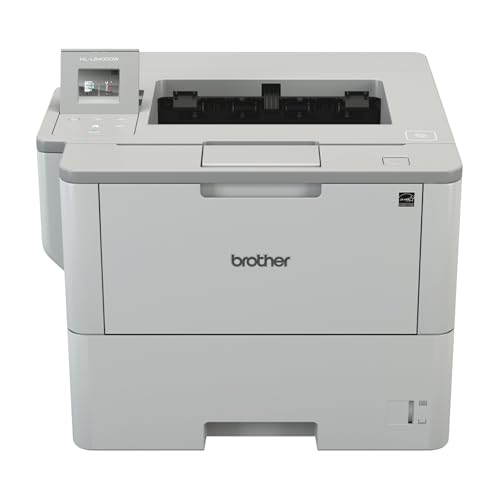
Brother HL-L6400DW — The minimal title
This review begins with an admission no other review in the guide must make: the title states a name and a category, and nothing else. HL-L6400DW Laser Printer. No speed, no capacity, no duplex claim, no connectivity, no yield. Everything a buyer would normally weigh must be confirmed on the listing page and in the manufacturer’s documentation for this exact code, and this guide will not fill the silence with the model’s reputation, however established that reputation may be in workgroup printing.
Why include such a machine at all? Because buyers will meet it. The HL-L6400DW name circulates in offices as a byword for a serious monochrome workgroup printer, and a high-yield guide that omitted it would leave its readers to evaluate that reputation alone, without a framework. So the framework is the review: what to verify, in what order, before this name becomes a purchase. Think of the paragraphs that follow as the checklist this guide applies quietly to every pick, printed in full for the one pick whose title forces the issue.
Verify yield first, since yield is the guide’s subject. On the listing, find the cartridge ecosystem for this exact code: the standard and high-capacity cartridge options and their manufacturer-stated yields, read as the manufacturer’s own figures under their test conditions. Verify paper capacity second — tray sizes and expansion options — because a high-yield cartridge behind a small tray merely moves the interruption from toner to paper. Verify duplex and connectivity third, in the listing’s words, not in the suffix’s suggestion.
Who it suits, on the evidence available here, is the buyer whose organisation already knows this model — the office standardising on a name its IT history trusts, purchasing through channels where the full specification is on the purchase order rather than the marketplace title. A first-time buyer comparing cold should treat the other five reviews, with their stated facts, as the working shortlist, and admit this machine only after the listing supplies the numbers its title withholds.
There is a strange integrity in a title that refuses to sell. It makes no promise it cannot be held to, and it transfers the entire burden of proof to the documentation, where specifications properly live. This guide honours that transfer by making it visible — and notes, for the record, that of the six machines here, this is the only one whose every spec line below carries the same sentence, because that sentence is the only honest content its title provides.
- Type: Brother laser printer (HL-L6400DW), as stated in the listing title
- Toner yield: Not stated in the listing title — verify with the manufacturer documentation
- Print speed: Not stated in the listing title — verify with the manufacturer documentation
- Paper capacity: Not stated in the listing title — verify with the manufacturer documentation
- Duplex: Not stated in the listing title — verify with the manufacturer documentation
- Connectivity: Not stated in the listing title — verify with the manufacturer documentation
- Colour: Not stated in the listing title — verify with the manufacturer documentation
Strengths
- An established workgroup name that standardising offices already know.
- Its bare title makes no claim a buyer cannot hold it to.
- It anchors the verification method this guide applies to every pick.
Trade-offs
- The title states no specification of any kind — everything needs listing confirmation.
- No stated yield in a guide where yield is the subject.
- Cold comparison shoppers get no stated facts to compare.
Best for: an organisation standardising on a known workgroup model through its own specification channels. Not suited for: a shortlist built from stated specifications alone, because this title offers a name and a category — and no stated fact beyond them.
Let this machine stand in the guide as the control experiment. Strip a title of every number and every claim, and what remains is the buyer’s actual job, undressed: find the cartridge yields, find the capacities, find the connections, in documents that can be held to account. The other five reviews do that job on stated evidence; this one shows the job itself, and an office that learns it here will never buy a printer on a surname again.

Brother HL-L6310DW — Low-cost Enterprise
Two phrases carry this title, and both speak this guide’s language. The HL-L6310DW is a Brother Enterprise monochrome laser printer with low-cost printing, wireless networking and large paper capacity, Works with Alexa. Low-cost printing is a positioning claim — the title prints no yield and no cost figure, and this guide invents neither — but as positioning it is unique in this set: the only manufacturer here that spends title words on the cost of the page rather than the speed of it. For a high-yield shortlist, that is the most relevant promise a title can make without numbers.
Large paper capacity, likewise stated without a figure, pairs with the Enterprise tier to describe the machine’s intent: a departmental monochrome printer whose trays and cartridge ecosystem are scaled so that neither paper nor toner interrupts often. The buyer must confirm both quantities on the listing — capacity in sheets, yield in the manufacturer’s cartridge figures — but the direction of the design is stated plainly enough to shortlist by, which is more than the HL-L6400DW’s title offers and exactly what this guide asks of a title.
Wireless networking is its stated connection, with Alexa compatibility for voice-era offices. No Ethernet is named, an honest boundary for wired departments to note: the HL-6210DW above states Gigabit Ethernet explicitly, and a department standardising on wired connections should weigh that stated fact. Duplex, notably, is also unstated in this title’s words, though the Enterprise monochrome class implies the expectation — implication, however, is not evidence, and the spec box records it as not stated for listing confirmation.
Who it suits is the cost-conscious department: the office that has done its page counts, knows its cost per page to the decimal, and wants a machine whose own manufacturer positions it on that axis. Such offices exist in every sector where printing is a budget line with a name — education, healthcare administration, logistics — and for them, a title that leads with low-cost printing at Enterprise tier is speaking directly, in the only vocabulary that matters to them.
There is a discipline in evaluating this machine that mirrors the machine’s own pitch. Do not buy its positioning; verify it. Take the model code to the listing, read the high-capacity cartridge’s stated yield and its price relationship to the standard cartridge, and let that arithmetic confirm or deny the title’s promise. If the numbers honour the words, this Brother is the high-yield argument made by its own maker — the strongest kind of case this guide can present.
- Type: Brother Enterprise monochrome laser printer (HL-L6310DW)
- Running-cost positioning: Low-cost printing, as stated in the listing title
- Paper capacity: Large paper capacity stated, figure not printed in the title
- Connectivity: Wireless networking stated; Works with Alexa
- Toner yield: Not stated in the listing title — verify with the manufacturer documentation
- Print speed: Not stated in the listing title — verify with the manufacturer documentation
- Duplex: Not stated in the listing title — verify with the manufacturer documentation
- Ethernet: Not stated in the listing title — verify with the manufacturer documentation
Strengths
- Low-cost printing is stated positioning — unique in this set.
- Enterprise tier with large paper capacity stated.
- Wireless networking suits departments without wired drops.
Trade-offs
- Neither the yield nor the capacity is given a figure in the title.
- Duplex and Ethernet are not stated in the title’s words.
- Its cost promise must be verified in cartridge figures on the listing.
Best for: a department that buys printers on cost per page and verifies cartridge arithmetic before ordering. Not suited for: a wired network standardised on Ethernet at every station, because this title names wireless networking only — the HL-6210DW states Gigabit Ethernet.
Every set of near-siblings has one machine that argues in the buyer’s own units. Departments think in cost per page the way drivers think in fuel per mile, and this Brother’s title is the only one here fluent in that unit. Fluency is not proof — the cartridge figures must still be read — but a manufacturer willing to headline running cost has at least agreed to be judged by it, and that agreement is worth a shortlist place in any honest high-yield guide.

HP LaserJet Pro 4001n — Wired Pro monochrome
HP’s entry at the Pro tier states its shape in the family’s customary shorthand: monochrome laser printer, fast black-and-white printing, mobile printing, Ethernet connectivity, fast printing. The pace is positioned twice and numbered never, as HP titles in this programme consistently behave — so the planning facts a high-yield buyer can take from the title are the wired connection and the monochrome discipline, and the rest must be verified at the listing with the model code in hand.
Within a high-yield guide, the 4001n’s role is the honest baseline: the Pro monochrome machine against which the capacity statements of the Brothers and the tier statement of the Enterprise HP are measured. Its title claims no large tray, no low-cost positioning, no expandable capacity — and a buyer should therefore not assume them. What it offers is the LaserJet Pro proposition itself: a wired, shared, black-and-white engine from the line that defined the category, bought through a listing where the cartridge ecosystem for this exact code can be read in full.
Ethernet, stated, is the high-yield-relevant fact in the title, and it deserves its reasoning. Yield is a property of cartridges; uptime is a property of connections. A volume machine that drops off a wireless network interrupts work as surely as an empty cartridge, and a wired Pro on a fixed network address removes that failure mode for the offices that can cable it. Mobile printing, also stated, keeps the phones in the building able to feed it — the two ends of a modern office’s document flow, both covered in five title words.
Who it suits is the wired small office whose volume is real but whose needs are uncomplicated: text, two-sided where the office sets it, shared by a team, fed by a cartridge routine the listing will specify. Buyers needing duplex as a stated guarantee should note that this title — the n model, against its dn sibling elsewhere in this programme — does not claim two-sided printing in words, and the spec box records that precisely. In HP’s suffix language that letter is the whole story, and this guide reads suffixes as clues while insisting on words as evidence.
There is a place in every honest guide for the machine that represents the standard configuration, neither maximised for capacity nor positioned on cost. The 4001n is that machine here: the Pro monochrome reference point. Offices that discover, while reading the Brothers’ stated trays, that their own volume is steadier and smaller than they feared may end their search at this reference point — with the listing’s cartridge figures checked, as every pick in this guide demands.
- Type: HP LaserJet Pro monochrome laser printer (4001n)
- Output: Black-and-white printing, positioned as fast in the listing title
- Connectivity: Ethernet connectivity and mobile printing stated
- Toner yield: Not stated in the listing title — verify with the manufacturer documentation
- Paper capacity: Not stated in the listing title — verify with the manufacturer documentation
- Duplex: Not stated in the listing title — verify with the manufacturer documentation
- Print speed (numeric): Not stated in the listing title — verify with the manufacturer documentation
Strengths
- Ethernet connectivity anchors it as a stable shared machine.
- Mobile printing covers the building’s phones and tablets.
- The Pro monochrome reference point of the set — a standard configuration, honestly stated.
Trade-offs
- No capacity or low-cost claim appears in the title.
- Duplex is not stated in the title’s words on this n model.
- Speed is positioned as fast but never numbered.
Best for: a wired small office wanting the standard Pro monochrome configuration. Not suited for: a two-sided printing policy that must be guaranteed in the title, because this model does not claim duplex in words — the Enterprise M611x below states automatic two-sided printing outright.
Judge the 4001n the way its title asks to be judged: as infrastructure. Wired, monochrome, shared, fed by a known cartridge family — its virtues are the absence of surprises, and in a volume office, surprise is the true consumable. The high-yield buyer who values a quiet month over a maximal specification will understand exactly what this unadorned HP title is offering.
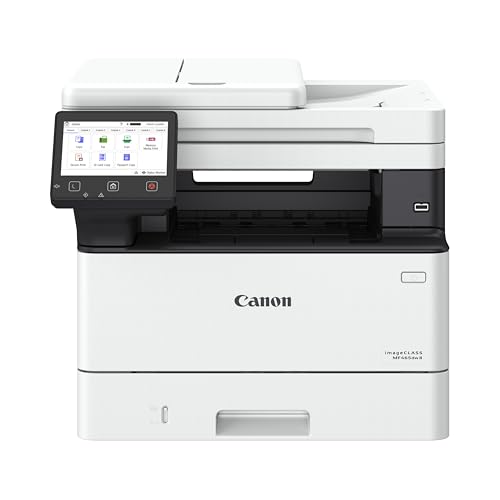
Canon imageCLASS MF465dw II — All-in-one at 42 ppm
Canon writes the most complete title in this set, and completeness begins with the only stated speed in the guide: a monochrome wireless duplex laser printer with print, copy, scan and fax, expandable paper capacity, at 42 ppm. Forty-two pages per minute is a figure an office can schedule around, and it arrives attached to the set’s only all-in-one — the one machine here that digests paper as well as producing it, which in a volume office is half the document story.
Expandable paper capacity is the high-yield phrase to underline. Where other titles state a fixed tray or a vague largeness, Canon states a direction: the paper supply can grow. Volume offices change — a department absorbs another team, a seasonal peak becomes permanent — and a machine whose capacity expands with the workload postpones the replacement conversation by years. The title gives no sheet figures, so the base and expanded capacities must be read on the listing; but the stated expandability itself is a design commitment few titles in this programme make.
Duplex is stated in the machine’s own name-line — wireless duplex laser printer — and the four functions are itemised without abbreviation. Fax’s presence will divide readers exactly as it should: offices in fax-retaining industries gain a complete station; offices that buried fax years ago gain a function they will never open, housed in a machine whose other stated facts — the pace, the expandability, the scanning — still make its case without it.
Who it suits is the volume office that scans its output’s mirror image: the paperwork-heavy practice where documents arrive on paper, are copied, filed, faxed and reprinted, and where one machine at a stated 42 ppm can stand at the centre of that circulation. It is also the natural pick for the buyer who wants stated facts — this title provides more of them than any other in the set — and who reads a manufacturer’s willingness to print numbers as a character reference.
There is a generational note in the name itself: the II marks a second iteration, a design revised rather than replaced. Offices buy such iterations gladly, because the cartridge and capacity ecosystem around them tends to be understood, stocked and documented. In a guide built on verifying manufacturer figures, a machine whose title arrives with its speed printed and its capacity described as expandable is practising the same honesty this guide preaches — and earns its place partly on that shared discipline.
- Type: Canon imageCLASS monochrome wireless duplex laser printer (MF465dw II)
- Functions: Print, copy, scan, fax
- Speed: 42 ppm, as stated in the listing title
- Duplex: Stated in the listing title
- Paper capacity: Expandable paper capacity stated; figures not printed in the title
- Connectivity: Wireless stated
- Toner yield: Not stated in the listing title — verify with the manufacturer documentation
- Ethernet: Not stated in the listing title — verify with the manufacturer documentation
Strengths
- A stated 42 ppm is the only speed figure in this guide.
- Expandable paper capacity lets the tray story grow with the office.
- The complete four-function set in a high-yield-class machine.
Trade-offs
- Capacity figures themselves are not printed — base and expanded sizes need the listing.
- No toner yield is stated in the title.
- No Ethernet connection is named in the title.
Best for: a paperwork-heavy office that prints, scans, copies and faxes at volume from one machine. Not suited for: a capacity plan written in exact sheet counts, because this title states expandability without printing a single tray figure.
Close Canon’s case with the rhythm its title implies: paper in through a feeder, paper out at forty-two pages a minute, trays that can be enlarged when the office enlarges, and a cartridge routine the listing will quantify. Among six machines arguing for the high-yield life, this one argues with the most verbs and the only clock — and offices that run on circulation, not just output, will hear it clearly.

HP LaserJet Enterprise M611x — The departmental engine
The second HP in this set wears the Enterprise badge, and its title completes the departmental checklist in the family’s terse style: monochrome laser printer, duplex, fast black-and-white printing, automatic two-sided printing, Ethernet connectivity. Readers of this programme’s church guide met its close sibling, the M611dn, in a parish office; the M611x carries the same stated engine-room brief — wired, two-sided, monochrome, Enterprise — into the departmental settings where high-yield questions are asked most sharply.
High-yield logic at department scale is mostly about defaults. Automatic two-sided printing, stated twice in this title’s phrasing, is a default that halves the paper ledger of an entire floor without a single memo. Ethernet is a default of presence: the machine is simply always there, at its address, for every desk’s queue. An Enterprise monochrome printer’s contribution to economy is not a spectacular cartridge figure quoted in a title — none is quoted here — but the accumulation of unremarkable, correctly defaulted days.
The title’s silences define the verification work, as they do across this guide. No yield, no capacity, no numeric speed is printed; the department buyer must take the code to the listing and the manufacturer’s documentation, where Enterprise specifications are properly itemised, and read the high-capacity cartridge story in the manufacturer’s own figures. This guide’s contribution is the shortlist logic: if a department’s profile is monochrome, wired and two-sided, this machine’s stated shape matches it before any number is consulted.
Who it suits is the floor, the corridor, the shared station outside a row of offices — the placement where a printer’s users are strangers to it and its only relationships are with the network and the supplies cupboard. Small offices should resist the tier’s gravity: the Pro 4001n above states a similar working shape for a smaller stage, and Enterprise headroom bought for five people is budget that could have bought the cartridge stock instead.
Departments standardise for a reason that belongs in an honest guide: one code, one cartridge story, one behaviour, repeated at every station, makes support a memory instead of a research project. The M611x’s title is written for that standardising buyer — configuration facts, no decoration — and its high-yield credentials will be established, as this guide keeps insisting, in the cartridge figures of its exact code, read by the people who will sign for the stock.
- Type: HP LaserJet Enterprise monochrome laser printer (M611x)
- Duplex: Duplex and automatic two-sided printing both stated
- Output: Black-and-white printing, positioned as fast in the listing title
- Connectivity: Ethernet connectivity stated
- Toner yield: Not stated in the listing title — verify with the manufacturer documentation
- Paper capacity: Not stated in the listing title — verify with the manufacturer documentation
- Print speed (numeric): Not stated in the listing title — verify with the manufacturer documentation
- Wireless: Not stated in the listing title — verify with the manufacturer documentation
Strengths
- Enterprise tier for departmental standardisation.
- Automatic two-sided printing stated — the paper ledger halved by default.
- Ethernet anchoring for a shared floor station.
Trade-offs
- No yield or capacity figure is printed in the title.
- Monochrome only, and print-focused in its stated brief.
- No wireless or mobile printing is stated.
Best for: a department standardising its floors on one wired, two-sided monochrome machine. Not suited for: a five-person office that would pay Enterprise tier for headroom it cannot use, because the Pro 4001n states the smaller stage’s version of the same working shape.
End the reviews where departments live: at the station by the lift, printing other people’s documents all day, two-sided by default, refilled on a rhythm the facilities team can set a calendar by. That rhythm — cartridge, paper, calendar — is the high-yield life at scale, and the M611x’s title, for all its terseness, specifies the machine built to keep it.
Comparison
| Pick | Functions | Stated speed | Paper capacity from title | Yield from title |
|---|---|---|---|---|
| Brother HL-6210DW | Not stated in the listing title | 520-sheet tray + 100-sheet multipurpose feed | Not stated in the listing title | |
| Brother HL-L6400DW | Not stated in the listing title | Not stated in the listing title | Not stated in the listing title | |
| Brother HL-L6310DW | Not stated in the listing title | Large capacity stated, no figure | Not stated in the listing title | |
| HP LaserJet Pro 4001n | Not stated in the listing title | Not stated in the listing title | Not stated in the listing title | |
| Canon imageCLASS MF465dw II | Print, copy, scan, fax | 42 ppm | Expandable stated, no figure | Not stated in the listing title |
| HP LaserJet Enterprise M611x | Not stated in the listing title | Not stated in the listing title | Not stated in the listing title |
This is the most honest table in the programme, because its last column is uniformly empty of figures — and uniformly truthful. Not one of these six titles prints a toner yield, so not one cell invents one. What the table can compare is the architecture around the missing number: one machine’s trays are stated to the sheet, one machine’s capacity is stated as expandable, one as large, and three titles leave capacity to the listing entirely. High-yield shopping, done honestly, begins exactly there.
The single stated speed deserves its footnote: Canon’s 42 ppm stands alone, which does not make the Canon the fastest machine here — it makes it the only machine whose maker printed a pace in its title. Departments comparing these six should assemble the missing figures from the six listings, code by code, and only then let speed and yield enter the decision. This table’s discipline is the method; the listings supply the data.
How to Choose a High-Yield Laser Printer
Begin at the cartridge, but begin on the listing page. For each shortlisted code, find the high-capacity cartridge option and the manufacturer’s stated yield for it, then set that figure against your office’s counted monthly pages. The quotient — cartridges per year — is the high-yield question reduced to one number, and it can only be computed from figures the titles in this guide decline to print. Any seller who computes it for you from memory is selling, not informing.
Size the paper path second, from stated facts where they exist. The HL-6210DW’s 520-plus-100 arrangement is the benchmark in this set: enough that paper stops being a weekly event. Canon’s stated expandability answers a different office — the one whose volume is growing — while Brother’s Enterprise large-capacity phrasing and the three silent titles must be quantified on their listings before they can be compared. Refill rhythm is a real cost; count it in interruptions per month, not sheets per tray.
Fix the defaults third. Duplex stated in a title — on the HL-6210DW, the Canon and the M611x — means two-sided printing can be the office’s standing habit, halving the paper ledger without willpower. Where duplex is unstated, as on the 4001n and the two remaining Brothers, treat it as a listing question of the first importance, because retrofitting a paper habit is harder than buying one.
Close with tier and connection, matched to constituency. Pro for the wired team, Enterprise for the department, wireless where the building demands it — Gigabit Ethernet stated once in this set, wireless networking stated on the Canon and the L6310DW. A high-yield machine is a five-year fixture of an office’s economy; its connections decide whether year five’s network still admits it, and its cartridge ecosystem decides what every one of those years costs.
One last discipline belongs to the order itself: buy the machine and its first high-capacity cartridge together, and file the cartridge’s stated yield where the office keeps its counted month. That pairing turns the purchase into a measured experiment from day one — when the cartridge finally ends, the office will know its true pages-per-cartridge under its own coverage, a figure no listing could have given it, and every future consumable decision becomes arithmetic instead of opinion.
Why Don’t These Titles Print Their Toner Yields?
Partly because yield is a laboratory figure with conditions attached, and titles are written for the shelf rather than the laboratory. A cartridge’s page count depends on the coverage of the pages printed — a manufacturer’s yield assumes a standard page that no real office prints — so printing the number in a title invites a comparison the number cannot honestly support. The manufacturers in this set have, whether by caution or by habit, left yield to the documentation, and this guide follows them there rather than pretending the shelf told a fuller story.
Partly, too, because high-yield is a system property, not a cartridge property. The same machine yields differently in an office printing dense reports than in one printing sparse letters; the same cartridge lasts differently behind a duplex default than behind single-sided habits. What a title can honestly state is the system’s shape — capacity, tier, duplex, low-cost positioning — and the six titles here state those things in varying measure. The buyer completes the calculation with their own coverage, which no title could have known.
The practical lesson is a reading habit: treat any yield figure quoted away from the manufacturer’s documentation for the exact cartridge code as marketing until verified. This guide has modelled the stricter habit on every page — yield recorded as not stated six times out of six — not because the figures do not exist, but because they exist somewhere specific, and that somewhere is the listing and the cartridge box, not a review’s imagination.
Paper Capacity or Cartridge Yield: Which Interruption Matters More?
Offices feel the two interruptions differently. A paper refill is a two-minute errand, visible and schedulable; a toner replacement is rarer, costlier and occasionally a procurement event involving budgets and deliveries. Intuition says the cartridge matters more — and at the level of money, it does. But interruption frequency writes the office’s daily experience, and a small tray behind a giant cartridge produces a machine that is cheap per page and constantly asking for paper, which staff experience as a needy printer whatever the ledger says.
The HL-6210DW’s title is the only one here that answers the paper side in figures, and its 520-sheet main tray deserves to be read as a yield figure in its own right: the yield of a loading. Canon’s expandability answers the same side by growth rather than by number. A balanced high-yield purchase weighs both yields — pages per cartridge from the listing, days per tray-load from the title or the listing — and refuses to maximise one while ignoring the other.
There is also a human asymmetry worth planning around. Paper can be refilled by anyone, mid-job, without consequence. Toner, in many offices, is a named person’s responsibility with a budget attached. Machines that stretch both intervals — the direction every title in this set gestures toward — reduce both the anyone-errands and the someone’s-budget events, and that double quiet is the actual product a high-yield buyer is purchasing.
How Should an Office Audit Its Own Volume Before Buying?
Count for one ordinary month, from the machines themselves where counters exist and from paper purchasing where they do not. Reams in, divided by working days, gives pages per day with embarrassing accuracy; split the count by machine if the office has several, and note the month’s peak week separately. Most offices discover two things: their volume is lower than their anxiety suggests, and their peaks are sharper than their averages — both of which argue for capacity headroom rather than raw speed.
Then translate pages into the two currencies of this guide. Pages per month divided by a cartridge’s manufacturer-stated yield gives cartridges per year — the consumable budget in one line. Days per tray-load, from the capacity figures, gives interruptions per month — the attention budget in one line. A machine is high-yield for your office when both lines come out small against your counts, and the titles in this set provide half the inputs while the listings, checked code by code, provide the rest.
Keep the audit. Printer purchases recur on a five-year rhythm, and the office that files its counted month can repeat this entire evaluation in an afternoon next time, from evidence rather than folklore. The audit habit, more than any single machine in this guide, is what separates organisations whose printing costs stay low from those whose costs are a recurring surprise with a toner cartridge attached.
Common Mistakes When Buying a High-Yield Laser Printer
Believing a yield figure nobody printed. No title in this set states a toner yield. Figures quoted from memory, forums or sibling models are not specifications — verify the high-capacity cartridge’s yield in the manufacturer’s documentation for the exact code.
Maximising the cartridge and ignoring the tray. A giant cartridge behind a small tray still interrupts weekly. The stated benchmark here is the HL-6210DW’s 520-sheet tray plus its 100-sheet multipurpose feed.
Assuming duplex from a suffix. The 4001n’s title does not state two-sided printing, whatever its family suggests. Buy duplex where the title or the listing states it in words.
Buying Enterprise tier for a team of four. Tier should follow headcount. A department’s standardisation benefits are real and a small office will never collect them; the Pro tier exists for its stage.
Skipping the volume audit. High-yield is a ratio between a machine and an office’s counted pages. Without the count, every capacity and yield figure is a guess wearing a number’s clothing.
Final Recommendation
For stated paper capacity, the Brother HL-6210DW stands alone: 520 sheets in the tray, 100 in the multipurpose feed, duplex and both serious connections — the high-yield architecture with its numbers printed. For stated pace and functions, the Canon MF465dw II is the complete package at 42 ppm with expandable capacity and all four functions. For cost positioning, the Brother HL-L6310DW’s low-cost Enterprise brief deserves verification first. The HP pair divide by tier — Pro 4001n for the wired team, Enterprise M611x for the department — and the HL-L6400DW remains the standardiser’s known name, to be bought through specification channels rather than from its title.
The closing advice of a guide that refused to invent a single yield is the method itself: take the exact code to the listing, read the high-capacity cartridge’s own figures, divide by your counted month — and let that one honest quotient, not a headline, choose the machine.
Frequently Asked Questions
What makes a laser printer high-yield?
A cartridge ecosystem built around high-capacity toner: each cartridge carries a large page yield, so replacements are rare and the cost per page falls. In this guide the case is argued from stated architecture — paper capacity, enterprise tier, low-cost positioning — because no title here prints a yield figure.
Why does this guide not quote pages per cartridge?
Because none of the six listing titles states a yield. Quoting figures from elsewhere would attach unverified numbers to exact model codes. The manufacturer’s documentation and the listing page for each code are where those figures can be read and held to account.
Which printer here states the largest paper capacity?
The Brother HL-6210DW: a 520-sheet tray and a 100-sheet multipurpose feed, both printed in its title. The Canon states expandable capacity without figures, and the Brother HL-L6310DW states large capacity without figures.
Which is the fastest printer in this set?
The only stated speed belongs to the Canon imageCLASS MF465dw II at 42 ppm. The other five titles print no speed, so this guide ranks none of them by pace.
Do all six print two-sided?
Duplex is stated in the titles of the HL-6210DW, the Canon MF465dw II and the HP M611x. It is not stated in the titles of the HL-L6400DW, the HL-L6310DW or the HP 4001n, whose spec boxes record it as not stated for listing confirmation.
Should a high-yield buyer keep a spare cartridge on the shelf?
Yes — one, bought when the installed cartridge is half spent rather than when it runs dry. High-yield cartridges lengthen the interval between orders, which paradoxically makes the empty moment easier to miss; a single spare on the shelf converts a procurement emergency into a routine re-order. Date the box when it arrives, rotate it into the machine when the current cartridge ends, and order its replacement the same week. The system works because the interval is long: there is always time, provided somebody uses a fraction of it.
Is the HL-L6400DW a bad printer?
Its title simply carries no evidence either way — a name and a category. This guide includes it as the standardiser’s known model and sets out the verification its purchase requires: cartridge yields, capacities, duplex and connectivity, all from the listing and manufacturer documentation for the exact code.
Related Guides
An office that prints at this volume usually presents at volume too, and the rooms where those documents are shown have their own guides. For the boardroom or hall at the end of the corridor, start with the best long-throw projectors for large rooms, auditoriums and venue installations. Organisations equipping training spaces and event venues should compare the best commercial laser projectors built for professional installation. And the meeting room where printed reports meet their audience on screen is served by the best HDR projectors for bright, detailed presentation and film — each chosen, like the printers above, by reading exactly what its listings state.


