What's inside
- Where to Buy
- Key Takeaways
- Quick Picks
- How We Chose These Picks
- Comparison
- How to Choose a Long Throw Projector
- How Far Back Can a Long Throw Projector Actually Sit?
- Why Does Throw Distance Change the Projector You Should Buy?
- Laser or Lamp for a Projector Nobody Can Reach Easily?
- What Should a Venue Check Before Drilling the Ceiling Mount?
- How Does a Long Throw Image Behave in a Room With Windows?
- Common Mistakes When Buying a Long Throw Projector
- Final Recommendation
- Frequently Asked Questions
- Related Guides
As an Amazon Associate I earn from qualifying purchases. This post may contain affiliate links at no extra cost to you.
widgetverdict.com is reader-supported. When you buy through links on our site, we may earn an affiliate commission.
Where to Buy
Each of the six projectors below links to its Amazon listing from its name, in this box, in the Quick Picks table and in its review heading. Start with the Epson PowerLite L530U if your room is a large hall — its listing page shows the live figure. The Epson PowerLite L735U and the Epson PowerLite L520W are the ceiling-mountable pair in the middle of the range, and Amazon carries today’s price for both. For a bright presentation room, pull up the BenQ MH760 page next. The Panasonic PT-VMZ51 brings a laser light source at 5,200 lumens, while the Epson PowerLite L200W is the wireless long-throw option — confirm the current cost on its listing before you compare it with the rest.
Finding the best long throw projectors starts with a tape measure, not a brightness chart. A long-throw lens is built to sit far behind the audience — at the back of an auditorium, on a ceiling mount above the last row, in a projection booth or a rear equipment shelf — and still land a correctly sized, focused image on a screen at the front of the room. That distance is the entire point. It keeps the projector, its fan noise and its heat away from the people watching, it keeps presenters from casting shadows across their own slides, and it lets a single large screen serve a room whose seating runs deep rather than wide.
The opposite end of the family deserves naming so nobody orders the wrong geometry. Ultra-short-throw projectors sit inches from the wall and fire upward at a steep angle; short-throw models work from a few feet out. Both are excellent in small classrooms and living rooms, and both are wrong for a hall where the only sensible mounting point is twenty or thirty feet from the screen. Every pick in this guide is a long-throw or standard long-distance installation model, chosen because its listing describes large rooms, auditoriums, venue work or ceiling mounting at distance.
Brightness figures in this guide are the numbers the manufacturers print in their own listing titles, and they are reported that way — as claims attached to a listing, not as measurements taken in a lab. Where a title gives a lumen figure, the review repeats it and attributes it to that title. Where a title stays silent on brightness, resolution or throw ratio, the spec box records the silence with the standard not-stated wording instead of borrowing a number from a sibling model. Epson alone sells several PowerLite L-series variants whose names differ by one digit, so the full model string in each heading is the string to match at checkout.
Key Takeaways
- Four of the six picks are Epson PowerLite L-series 3LCD models; the BenQ MH760 is a 1080p business projector and the Panasonic PT-VMZ51 is a WUXGA LCD laser model.
- Only two titles print a lumen figure: the BenQ MH760 at 5,000 lumens and the Panasonic PT-VMZ51 at 5,200 lumens, both as stated in their listings.
- Two Epson titles state a 16:10 aspect ratio and ceiling-mountable design — the L735U and the L520W.
- The PowerLite L200W is the only pick whose title names built-in wireless with Miracast, and it is described as a laser projector.
- No title in this set prints a numeric throw ratio, so mounting distance must be confirmed against manufacturer documentation for every pick.
Quick Picks
| Pick | Badge | Why it earns a place |
|---|---|---|
| Epson PowerLite L530U | Large-room anchor | A long throw 3LCD model whose listing names large rooms, auditoriums and venue installations outright. |
| Epson PowerLite L735U | Ceiling-mount 16:10 | Long throw 3LCD in a 16:10 frame, described as ceiling mountable for permanent halls. |
| Epson PowerLite L520W | Second ceiling option | Another 16:10 long throw 3LCD Epson built for ceiling mounting in larger spaces. |
| BenQ MH760 | Lights-on presentations | 1080p with 5,000 lumens for lights-on presenting, LAN control and keystone correction. |
| Panasonic PT-VMZ51 | Laser at WUXGA | WUXGA LCD laser projection at 5,200 lumens in a white installation body. |
| Epson PowerLite L200W | Wireless long-throw | WXGA long-throw laser with built-in wireless and Miracast for cable-light rooms. |
How We Chose These Picks
Geometry came first. A candidate only stayed on the list if its listing title or model family placed it at the far end of a room: the words long throw appear in four of the six titles, and the remaining two — the BenQ MH760 and the Panasonic PT-VMZ51 — are installation-class machines whose brightness and control features suit distant mounting in large venues. Compact desktop projectors, ultra-short-throw interactive units and home-cinema models tuned for a coffee table were all cut, however strong their other numbers looked.
Title verification ran second, and it was strict. Every specification in every review below traces back to words printed in that pick’s own listing title. That rule thinned the brightness story considerably: four of the six titles print no lumen figure at all, so those reviews discuss placement, format and mounting instead of inventing a brightness tier. It also means throw ratio — the single most useful number for planning a long-throw install — appears in no title here, and the guide says so openly rather than estimating distances the listings never promised.
Room type did the final sorting. The set had to cover the places long-throw machines actually work: the auditorium, the lecture hall, the large meeting room with lights on, the house of worship with a rear balcony mount, and the training space where a presenter walks the front of the room all day. Brightness for lights-on presenting, LAN control for a managed network, wireless casting for rooms where running a cable is impractical — each surviving pick answers at least one of those real briefs, and most answer two.
One quieter filter sat underneath the rest: serviceability at distance. A projector mounted at the back of a hall is a ladder job every time it needs attention, so models from installation lines with network control, ceiling-mount designs and laser light sources earned preference over lamp-based portables. The list below is what survived when geometry, title honesty and room fit were all applied at once.

Epson PowerLite L530U — Large-room anchor
The L530U is the pick whose listing says the quiet part out loud: Epson describes it as a long throw 3LCD projector for large rooms, auditoriums and venue installations. That sentence is the whole brief for this category. If your screen sits at the front of a hall and your mounting point sits at the back of it, this is the model in the set that was named for exactly that arrangement, and its review can therefore skip the hedging the other picks require about intended placement.
Three-chip 3LCD architecture carries its own practical meaning for venue work. Colour and white output travel together in a 3LCD design, which matters when the image is a mix of video, slides and stage lighting rather than a darkened cinema picture. A venue projector spends its life fighting ambient light from windows, house lights and exit signs, and a design built around balanced colour output suits that fight better than one tuned for a blacked-out room.
Who it suits is therefore easy to describe: the facilities manager equipping a school auditorium, the AV volunteer at a large church, the conference centre replacing an ageing installed unit on an existing rear mount. The common thread is a fixed screen, a distant mount and an audience measured in rows. The title prints no lumen figure, no resolution and no throw ratio, so a buyer planning around a specific screen size must pull those figures from Epson’s documentation for this exact model before committing — the listing title alone will not carry that calculation.
Installation planning dominates ownership here. At long throw distances, a small error in mount position becomes a large error in image size, and lens position relative to the screen’s centre line decides how much correction the setup needs. Walk the room before ordering: confirm the rear mount point, the cable run back to the lectern or booth, and the power outlet situation at the mounting end, because a projector at the back of a hall is only as good as the infrastructure someone remembered to install beside it.
- Technology: 3LCD, long throw
- Intended spaces (from title): large rooms, auditoriums, venue installations
- Brightness: Not stated in the listing title — verify with the manufacturer documentation
- Resolution: Not stated in the listing title — verify with the manufacturer documentation
- Throw ratio: Not stated in the listing title — verify with the manufacturer documentation
- Mounting: Not stated in the listing title — verify with the manufacturer documentation
Strengths
- The listing names auditoriums and venue installations as its intended work.
- 3LCD colour architecture suits mixed slides, video and lit rooms.
- It anchors the set as the purpose-described large-room model.
Trade-offs
- No lumen figure is printed in the listing title.
- No resolution is printed in the listing title.
- Throw ratio must be confirmed from manufacturer documentation before mounting.
Best for: a fixed auditorium or large venue with a rear mounting point and a screen at the opposite end. Not suited for: a room where the projector must sit within two metres of the screen, because a long throw lens overshoots that distance entirely.
Think about the second year of ownership as well as the first. An installed venue projector becomes part of the building: the person who runs it may not be the person who bought it, and the handover notes matter. Record the mount position, the cable routes and the remote’s location in the venue’s own documentation, and keep the model string — PowerLite L530U — in that record, because Epson’s L-series contains near-identical names and a future replacement ordered from memory alone can easily arrive as the wrong variant.

Epson PowerLite L735U — Ceiling-mount 16:10
The L735U’s title is shorter than its sibling’s and says two precise things: long throw 3LCD, in a 16:10 frame, ceiling mountable. The 16:10 aspect ratio is the detail to dwell on. It is taller than the 16:9 of broadcast video, and that extra vertical room is exactly what presentation content wants — a slide with a title bar and a footer, a spreadsheet with more visible rows, a document page that shows another paragraph before scrolling. Rooms built around documents rather than films feel the difference daily.
Ceiling mountable, printed in the title, signals a permanent installation rather than a projector that travels between rooms on a cart. Permanent mounting changes the buying maths: the mount, the cable run and the electrician’s visit are part of the purchase, and in exchange the room gains an always-aligned image that nobody has to set up, focus or apologise for before a meeting. For a lecture hall or a boardroom with a fixed screen, that trade is usually the correct one.
As with the L530U, the title withholds brightness, resolution and throw ratio, and the spec box below preserves those gaps rather than filling them from the wider PowerLite range. A 16:10 frame also asks a question of your screen: a 16:9 screen will show this projector’s taller image with unused bands or a cropped fit, so screen and projector aspect should be decided together, ideally before either is ordered.
Suits institutions standardising a room: the university lecture space, the training centre, the municipal meeting hall. The buyer is typically outfitting several similar rooms and values a mount-once, run-for-years unit over a portable that wanders. If your room instead needs to reconfigure weekly — tables moving, screen positions changing — a fixed ceiling unit fights the room rather than serving it, and the wireless L200W further down this guide fits that life better.
- Technology: 3LCD, long throw
- Aspect ratio: 16:10
- Mounting: ceiling mountable
- Brightness: Not stated in the listing title — verify with the manufacturer documentation
- Resolution: Not stated in the listing title — verify with the manufacturer documentation
- Throw ratio: Not stated in the listing title — verify with the manufacturer documentation
Strengths
- The 16:10 frame shows more of a document or slide at once.
- Ceiling mounting is stated in the title, suiting permanent rooms.
- Long throw placement keeps fan noise behind the audience.
Trade-offs
- A 16:10 image mismatches a 16:9 screen without bands or cropping.
- Brightness is not printed in the listing title.
- Permanent mounting makes repositioning a tools-and-ladder job.
Best for: a lecture hall or meeting room with a fixed screen, a ceiling mount and document-heavy content. Not suited for: a multi-purpose room whose screen position changes weekly, because a ceiling-fixed long throw unit cannot follow the furniture.
One planning note belongs to this pick specifically. A 16:10 projector rewards a matching 16:10 screen more than most upgrades reward matching anything, because the gain — extra visible rows on every slide, every day — compounds across every session the room ever hosts. If the budget forces a choice between a brighter unit on a mismatched screen and this format matched properly, the matched format is the one occupants will still be thanking in year three, long after the brightness argument is forgotten.

Epson PowerLite L520W — Second ceiling option
The L520W shares its title structure with the L735U — long throw 3LCD, 16:10, ceiling mountable — and a fair question is why both belong in one guide. The answer is how institutions actually buy. A facilities team equipping several rooms rarely orders a single model blind; it shortlists near-siblings, compares their full documentation side by side, and standardises on the one whose detailed specifications fit its screens. Keeping both Epson ceiling models visible, with their title-level similarities stated plainly, mirrors that real process better than pretending one of them does not exist.
What the title establishes is the shared platform: 3LCD colour, a long throw lens for rear or ceiling placement at distance, the taller 16:10 working frame, and a body designed to be mounted rather than carried. What the title does not establish is equally clear — no brightness figure, no named resolution, no throw ratio — and any comparison between this model and the L735U must therefore happen in the manufacturers’ documentation, where the differentiating numbers actually live.
The buyer for this pick is planning a room, not a purchase. Screen size and aspect, ceiling height, mount position, ambient light from windows that cannot be blacked out — those decisions come first, and the projector is chosen to fit the answers. A long throw unit in a 16:10 frame suits the classic presentation room: screen on the short wall, seating in rows, presenter at a lectern near the screen, projector silent above or behind the back row.
There is also a portfolio argument. Organisations that already run Epson PowerLite projectors in other rooms gain from staying inside the family: remotes, menu logic and maintenance habits transfer between rooms, and the person who services one unit effectively services all of them. The L520W’s value is partly that familiarity — a known platform in the format a presentation room wants — and buyers new to the brand should weigh the same point in reverse when comparing it against the BenQ and Panasonic picks below.
- Technology: 3LCD, long throw
- Aspect ratio: 16:10
- Mounting: ceiling mountable
- Brightness: Not stated in the listing title — verify with the manufacturer documentation
- Resolution: Not stated in the listing title — verify with the manufacturer documentation
- Throw ratio: Not stated in the listing title — verify with the manufacturer documentation
Strengths
- Same proven 16:10 long throw format as its ceiling-mount sibling.
- 3LCD suits presentations and video in normally lit rooms.
- Fits organisations already standardised on the PowerLite family.
Trade-offs
- The title does not differentiate it numerically from the L735U.
- No brightness figure is printed in the listing title.
- Detailed comparison requires manufacturer documentation for both models.
Best for: an organisation adding a 16:10 ceiling room to an existing fleet of Epson PowerLite installations. Not suited for: a purchase decision that must rest on the listing page alone, because this title prints neither brightness nor throw figures.
Treat the ordering conversation accordingly. Ask the supplier to confirm, in writing and against the full model string, the figures the title omits — brightness, native resolution, throw range and lens shift — and keep that confirmation with the room’s records. That single habit protects the purchase better than any comparison chart, because long-throw installations fail on geometry and paperwork far more often than they fail on picture quality once the image is finally on the wall.

BenQ MH760 — Lights-on presentations
The BenQ MH760 is the one pick in this guide whose title reads like a presentation room’s shopping list. It states 1080p resolution, 5,000 lumens for lights-on presentations, LAN control for network infrastructure, and keystone correction for flexible setup. Each of those phrases maps to a real annoyance in working rooms: slides washed out by ceiling lights, a projector nobody can manage without climbing to it, an image that arrives trapezoidal because the mount could not sit perfectly square.
The 5,000-lumen figure is BenQ’s number as printed in its listing title, and the framing around it — for lights-on presentations — tells you the design intent. This is not a dark-room cinema machine that tolerates some light; it is a business projector built on the assumption that the lights stay up, people take notes, and faces remain visible across a table. Full HD resolution matches that brief: text at presentation sizes stays legible from the back of a mid-size room, and video calls render faces at a natural scale.
LAN control deserves its paragraph. A projector wired into the building network can be monitored, scheduled and troubleshot from an IT desk rather than from a ladder, and in a fleet of rooms that capability is the difference between a managed estate and a collection of surprises. Keystone correction is the humbler feature and the more double-edged one: it rescues an imperfect mount, but correcting geometry digitally always costs a little resolution, so it belongs in the setup toolkit rather than in the permanent plan.
Suits the corporate and education workhorse role: the meeting room that hosts six sessions a day, the training space where presenters plug in and expect a picture, the school hall that doubles for assemblies and evening events. Its absence of a stated long throw label is worth noting honestly — the title does not use those words — but its brightness, control set and installation features place it squarely in the distant-mount, large-room class this guide covers, and buyers should confirm its throw figures in BenQ’s documentation against their room’s dimensions.
- Resolution: 1080p
- Brightness: 5,000 lumens (as stated in the listing title)
- Intended use (from title): lights-on presentations
- Control: LAN control for network infrastructure
- Correction: keystone for flexible setup
- Technology: Not stated in the listing title — verify with the manufacturer documentation
Strengths
- 5,000 lumens, stated in the title, targets rooms where lights stay on.
- LAN control lets IT manage the unit across the building network.
- 1080p keeps presentation text legible at distance.
Trade-offs
- The title does not label the unit long throw or state a throw ratio.
- Keystone correction costs resolution when used heavily.
- Panel technology is not named in the listing title.
Best for: a managed meeting or training room where lights stay on and IT wants network control of the projector. Not suited for: a darkened home cinema, because a lights-on business design spends its budget on brightness and control rather than cinema contrast.
Before you finalise this one, do the arithmetic the title cannot do for you: check the current figure on its Amazon listing, then confirm throw distance and screen size against BenQ’s own documentation for the MH760, because a 1080p image stretched across a very large screen from a very long throw will soften no matter how bright it is. Matched to the right room size, though, this is the most completely described pick in the guide — the one whose title alone lets a buyer write the purchase justification.
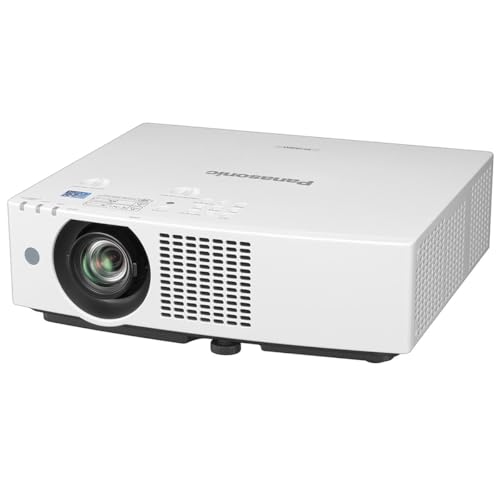
Panasonic PT-VMZ51 — Laser at WUXGA
Panasonic’s PT-VMZ51 brings the two specifications that installation buyers ask about first: a laser light source and WUXGA resolution, with a brightness figure of 5,200 lumens printed in the title. WUXGA — 1920 by 1200 — is the widescreen workhorse resolution of the presentation world, taller than Full HD and native to the 16:10 screens that business content prefers. A laser source removes the lamp-replacement cycle from the maintenance calendar, which matters most exactly where long-throw projectors live: on mounts that require effort to reach.
The LCD designation in the title places this Panasonic in the same broad family as the Epson 3LCD picks — multi-panel LCD projection with strong colour output for lit rooms — while the laser engine distinguishes it from lamp-based predecessors. For a venue that runs long hours, a lecture theatre in near-continuous daytime use or a visitor attraction running a loop, the combination of laser longevity and 5,200 stated lumens is the practical core of the offer.
The white body is a small detail with real consequences. Ceiling-mounted against a white ceiling, a white projector nearly disappears; in a heritage interior or a bright modern hall, that discretion is sometimes the deciding factor between two otherwise equal bids. The title gives no throw ratio and no lens details, so — as with every pick here — the geometry check happens in Panasonic’s documentation, matched against the room’s measured mount distance and screen width.
Suits institutions that think in maintenance cycles: universities, museums, corporate campuses, houses of worship with daily use. The buyer profile is a planner who counts total cost across years — lamp changes avoided, service visits reduced, brightness that does not fade the way an ageing lamp fades. A casual user projecting films on weekends would be paying for an installation discipline they will never exercise, and the home-focused guides linked below serve that reader better.
- Resolution: WUXGA
- Technology: LCD, laser light source
- Brightness: 5,200 lumens (as stated in the listing title)
- Colour: white body
- Throw ratio: Not stated in the listing title — verify with the manufacturer documentation
- Lens shift: Not stated in the listing title — verify with the manufacturer documentation
Strengths
- Laser source removes routine lamp replacement from a hard-to-reach mount.
- WUXGA gives presentation content more height than Full HD.
- 5,200 lumens is stated plainly in the listing title.
Trade-offs
- No throw ratio is printed in the listing title.
- Lens shift is not mentioned in the listing title.
- Its installation discipline is wasted on occasional weekend use.
Best for: a lecture theatre, museum or large meeting space in daily use, mounted far from the screen and serviced on a schedule. Not suited for: a portable setup carried between rooms, because a laser installation unit earns its keep fixed in one place for years.
When you price this Panasonic, look at its Amazon page for the live number and then think in cost per year rather than cost per purchase. A laser installation projector amortises across a long service life in a fixed room; the honest comparison is against the lamp changes, call-outs and brightness fade of the cheaper unit it replaces. Rooms that run projectors as infrastructure — which is to say, exactly the rooms long throw exists for — are where that arithmetic consistently favours machines built like this one.

Epson PowerLite L200W — Wireless long-throw
The L200W closes the set with the feature the other five titles never mention: built-in wireless with Miracast. Epson describes it as a 3LCD WXGA long-throw laser projector, and that combination — laser source, long throw placement, cable-free casting — describes a specific modern room: the one where presenters arrive with laptops and phones, where the projector lives at the back or on the ceiling, and where running an HDMI cable the length of the room was quoted, sighed at, and quietly dropped from the project plan.
WXGA resolution is the honest compromise in the specification. It is widescreen and entirely adequate for slides, documents and video at presentation sizes, while sitting a step below the WUXGA of the Panasonic and the 1080p of the BenQ for fine detail. In a room whose content is bullet points, spreadsheets and the occasional video, that step is rarely visible from the seats; in a room projecting detailed drawings or small-type dashboards, it can be, and those buyers should weight the BenQ and Panasonic reviews more heavily.
Miracast casting changes the social geometry of a meeting. The presenter is no longer tethered to the cable’s end of the table; a second contributor can throw a screen up without a handover cable; a teacher can project from wherever in the classroom the teaching is actually happening. Wireless has failure modes — network quality, device compatibility, the occasional renegotiation at the worst moment — so rooms that adopt it should keep one wired input ready as the unglamorous backup that saves the important meeting.
Suits schools and flexible offices best: spaces reconfigured often, presenters rotating hourly, technology expected to simply accept whatever device walks in. The laser source suits the same rooms, because a projector used by everyone is maintained by no one in particular, and removing lamp changes removes the most common way such units quietly die. Its title states no brightness figure, so well-lit rooms with large screens should verify output in Epson’s documentation before assuming this convenience pick can fill their wall.
- Technology: 3LCD, laser, long-throw
- Resolution class: WXGA
- Wireless: built-in wireless with Miracast
- Brightness: Not stated in the listing title — verify with the manufacturer documentation
- Throw ratio: Not stated in the listing title — verify with the manufacturer documentation
- Mounting: Not stated in the listing title — verify with the manufacturer documentation
Strengths
- Built-in wireless and Miracast free presenters from the cable position.
- Laser source suits shared rooms with no single owner.
- Long throw placement keeps the unit clear of the teaching space.
Trade-offs
- WXGA shows less fine detail than the WUXGA and 1080p picks.
- Casting depends on network quality and device compatibility.
- Brightness is not printed in the listing title.
Best for: a classroom or flexible meeting room where many presenters connect wirelessly and the projector mounts at the back. Not suited for: a room projecting fine technical drawings at large sizes, because WXGA resolution will soften small detail across a long throw.
If this is your pick, spend the saved cable money on the network instead. A casting projector is only as reliable as the wireless it rides on, so a room that adopts the L200W should test its access point under a full audience’s worth of devices before the first important session. Do that, keep a wired fallback coiled in the lectern, and check the live figure on the Amazon listing when you order — this model regularly closes the guide’s argument, because convenience that survives contact with a real Monday morning is worth more than a specification that only shines in a brochure.
One last venue habit separates good installations from lucky ones: a commissioning photograph. Once the image is aligned, focused and sized, photograph the screen from the back row, the middle and the front, and file those pictures with the room’s records alongside the mount measurements. A year later, when someone swears the picture used to be bigger, brighter or straighter, the photographs settle the argument in seconds and tell the technician whether the projector drifted, the screen moved, or memory is simply being generous.
Comparison
| Pick | Format | Brightness (title) | Mounting / placement | Standout from title |
|---|---|---|---|---|
| Epson PowerLite L530U | 3LCD, long throw | Not stated in the listing title | Large rooms, auditoriums | Named for venue installations |
| Epson PowerLite L735U | 3LCD, 16:10 | Not stated in the listing title | Ceiling mountable | Taller 16:10 working frame |
| Epson PowerLite L520W | 3LCD, 16:10 | Not stated in the listing title | Ceiling mountable | PowerLite fleet consistency |
| BenQ MH760 | 1080p | 5,000 lumens | Network-managed rooms | LAN control, keystone |
| Panasonic PT-VMZ51 | WUXGA LCD laser | 5,200 lumens | Fixed installation | Laser source, white body |
| Epson PowerLite L200W | WXGA 3LCD laser | Not stated in the listing title | Long throw, wireless rooms | Built-in wireless, Miracast |
Read the table by room rather than by ranking. The three Epsons with silent brightness figures are venue and ceiling machines whose real numbers live in their documentation; the BenQ and Panasonic print their lumens and aim at managed, daily-use spaces; the L200W trades resolution for connection freedom. A shortlist written from your room’s measurements will pick its row quickly.
Notice what no row can give you: a throw ratio. Six installation projectors, and not one title prints the figure that decides whether the image fits the screen from the mount you have. That absence is the single most important fact in this comparison, and it is why every review above sends you to manufacturer documentation before money moves.
How to Choose a Long Throw Projector
Measure the room before reading another specification. You need three numbers: the distance from the only sensible mounting point to the screen, the screen’s width, and the ceiling height if a mount is involved. Those three figures, checked against a manufacturer’s throw documentation, eliminate most wrong purchases in this category within ten minutes. A projector that cannot fill your screen from your mount is not a bargain at any brightness.
Decide next how the room is lit during real use. Lights-on presenting — note-taking, video calls, faces visible — demands the brightness class the BenQ and Panasonic titles advertise, with figures stated by their manufacturers in the listings. A hall that can genuinely darken for films and ceremonies can trade some of that output for other virtues. Be honest about the windows: a west-facing glass wall at four in the afternoon defeats more projectors than any specification gap.
Match resolution to content, not to fashion. Slides and documents live happily at WXGA and thrive at WUXGA’s extra height; mixed presentation and video suits 1080p; fine detail — CAD, medical imagery, dense dashboards — punishes every step down. The audience’s distance matters as much as the pixel count, because a back row twenty metres away forgives what a front row at four metres never will.
Finally, plan the unglamorous layer: control and connection. LAN control if IT manages the room, wireless casting if presenters rotate, a wired input kept in reserve regardless, and a maintenance story — laser source or lamp plan — that matches how often anyone can realistically reach the mount. Long throw projectors are infrastructure. Buy them the way you would buy the room’s lighting: for the decade, not for the demo.
How Far Back Can a Long Throw Projector Actually Sit?
Farther than most buyers expect, and that is the point of the category — but the usable distance depends on the lens, and no title in this guide prints a throw ratio to calculate from. In general terms, long throw lenses are designed for the projector to sit well behind the audience, commonly at distances where standard lenses would produce an image far too large for the screen. The exact range for any of these six models lives in its manufacturer’s documentation, expressed as a ratio of distance to image width.
The practical method is to work backwards from the screen. Fix the screen size the room needs — large enough for the back row to read the smallest text you will ever show — then take the room’s available mounting distance and divide one by the other. That gives the throw ratio your lens must deliver. Compare it with the documented range of each candidate, and reject any model whose range does not include your number with room to spare at both ends, because mounts rarely land at the theoretically perfect spot.
Remember the costs that travel with distance. A longer throw means the light spreads across a longer path and the image’s brightness per unit area depends ever more heavily on the projector’s output and the screen’s surface. It also means the cable run, the power supply and the service access all live at the far end of the room. None of that argues against long throw — it argues for planning it as a system, which is what separates an installation from a purchase.
Why Does Throw Distance Change the Projector You Should Buy?
Because the lens is not interchangeable after the fact on models like these, and the lens decides the geometry of everything else. Two projectors with identical brightness and resolution can be opposite purchases if one fills your screen from twelve metres and the other needs seven. Buyers who shop by lumens first and geometry second end up with keystone correction doing permanent violence to their image, or with a screen size dictated by wherever the projector happened to fit.
Distance also changes who the projector serves. A rear-mounted long throw unit keeps the presenter at the front free of shadows, keeps fan noise behind the audience’s ears, and keeps the equipment out of reach of curious hands in public venues. Those are operational virtues that never appear in a specification table, yet venue managers rank them above almost everything that does. The room’s workflow — who presents, who watches, who maintains — should be audible in the buying decision.
And distance changes the failure modes. At long throw, alignment errors magnify, vibrations from a ceiling structure show on screen, and a slightly sagging mount announces itself as a slowly drifting trapezoid. Rigid mounting, a proper ceiling structure check and a focus check after the building has warmed up are the unglamorous rituals that keep a long throw installation looking intentional rather than improvised.
Laser or Lamp for a Projector Nobody Can Reach Easily?
Two picks in this guide state a laser light source in their titles — the Panasonic PT-VMZ51 and the Epson PowerLite L200W — and the laser argument is strongest exactly where long throw projectors live: mounted high, mounted far, mounted where a lamp change means ladders, downtime and possibly a hired technician. A laser source removes the lamp from the maintenance schedule and holds its output more steadily across its service life, which suits venues that cannot schedule darkness around a bulb.
The counterweight is honesty about what titles do not say. None of the six titles prints a light-source lifespan figure, so this guide will not quote hour counts for any pick. Buyers comparing laser against lamp models should pull the rated life from manufacturer documentation for the exact model, and weigh it against the room’s real annual hours — a hall used six hours a week ages its projector very differently from a lecture theatre used sixty.
For lamp-based or unspecified models, the planning question is simply whether the room has a maintenance story: who changes the lamp, at what interval, with what access equipment, and what the room does while the work happens. If nobody can answer those questions, the laser picks in this guide are not a luxury upgrade — they are the difference between a projector that is maintained and one that is merely owned.
Sound belongs in the same plan, oddly enough. A projector at the back of the room sits near nobody’s ears, which is a virtue, but its speakers — where a model has any worth using — are equally far from the audience. Long throw rooms should budget for room audio fed from the source end, not the projector end: ceiling speakers or a lectern-side system that places sound where the listeners are. Deciding this alongside the projector, rather than after the first muffled session, keeps the installation a single project with a single disruption instead of a season of small corrections.
What Should a Venue Check Before Drilling the Ceiling Mount?
Structure comes before hardware. A ceiling mount is only as trustworthy as what it anchors into, and a long throw projector plus its mount concentrates real weight at a single point above an audience. In a commercial hall that means confirming joists or concrete, not plasterboard, and in many jurisdictions it means a qualified installer rather than a volunteer with a drill. The cost of that professionalism is trivial beside the cost of the alternative, and venues should treat the mount inspection as part of the projector purchase rather than an optional extra.
Position deserves the same rigour. The mount point decides the throw distance, which decides whether the lens can fill the screen, so the ceiling should be marked only after the geometry has been calculated from the manufacturer’s documentation and tested, ideally with a temporary projection from a ladder or scaffold at the intended spot. Buildings also move: heating cycles, foot traffic on a floor above and door slams all transmit vibration, and a mount that looks rigid in an empty morning hall can shimmer during a full evening event. A short test under realistic conditions catches what a tape measure cannot.
Cabling routes belong in the same survey. Signal, power and network each need a path from the lectern or booth to the mount, and the tidiest moment to discover a blocked ceiling void is before the projector is on site. Fire regulations in public venues can dictate cable types and containment, another reason the survey belongs to professionals. Finish with access: the mount position should let a technician reach the unit with the ladders the venue actually owns, at a height its insurance actually permits.
How Does a Long Throw Image Behave in a Room With Windows?
Ambient light is the long throw projector’s permanent opponent, and windows are its strongest source. Sunlight does not merely brighten a room; it lands unevenly, so one corner of the screen washes out while the rest holds, and no brightness figure in any listing title can fully defeat a low sun aimed at the screen wall. The first defences are architectural: blinds that actually close, a screen position that avoids direct sun, and scheduling that keeps critical presentations out of the worst hour when the room allows it.
Brightness is the second defence, and it is where the stated figures in this guide earn their keep. The BenQ MH760’s 5,000 lumens and the Panasonic PT-VMZ51’s 5,200 lumens, both as printed in their titles, describe machines designed for lit-room work. The Epson picks whose titles stay silent on output may match or exceed those figures, but a buyer equipping a glass-walled hall cannot plan on silence — those rooms should shortlist from documented figures, obtained in writing, every time.
The third defence is content discipline. Presenters in bright rooms should design for the room: larger type, stronger contrast between text and background, fewer photographs asked to carry fine detail. A long throw system chosen well and used with that discipline looks deliberate and professional; the same hardware fed with pale slides at small sizes looks broken, and the audience will blame the projector for what was really a design decision made in a dark office the night before.
Common Mistakes When Buying a Long Throw Projector
Shopping by brightness before geometry. A bright projector that cannot fill your screen from your mount is the wrong projector. Throw documentation first, lumen figures second.
Confusing long throw with ultra-short throw. They are opposite geometries. An ultra-short-throw unit at the back of a hall and a long throw unit against the screen wall both produce expensive nonsense.
Assuming a sibling model’s numbers. The PowerLite L-series names differ by single digits and their specifications differ by more. Every figure must come from documentation for the exact model string.
Forgetting the infrastructure at the mount. Power, signal cable and network all have to reach the back of the room. Discovering their absence after the projector arrives turns an installation day into a renovation.
Skipping the screen in the budget. A long throw image lands on whatever surface awaits it. A proper screen matched in aspect — 16:10 for the 16:10 picks — returns more picture quality than a model tier upgrade.
Final Recommendation
For a named-purpose venue install, the Epson PowerLite L530U is the guide’s anchor: its listing describes the auditorium job directly. Ceiling rooms built around documents should compare the L735U and L520W in their full documentation and standardise on one. Managed rooms that present with lights on will find the BenQ MH760’s stated 5,000 lumens and LAN control the most complete brief in the set, while daily-use venues that think in maintenance cycles belong with the Panasonic PT-VMZ51’s laser WUXGA combination. Rooms where presenters rotate and cables cannot run should take the L200W and invest in their wireless instead.
Measure your hall’s mount distance and screen width tonight, on paper, before any of these listings gets your money — a long throw projector is the one purchase in the building that geometry either blesses completely or ruins completely, and no return window is long enough to forgive a lens that never fitted the room.
Frequently Asked Questions
What is the difference between long throw and standard throw?
Both sit in the room rather than against the wall, but a long throw lens is designed for greater distances, producing a correctly sized image from well behind the audience. Standard throw suits mid-room placement. The practical test is your mounting distance divided by your screen width, checked against the lens range in the manufacturer’s documentation.
Can a long throw projector work in a small room?
Generally it is the wrong tool: from a short distance, a long throw lens produces an image too small for the wall, wasting the room’s potential screen size. Small rooms are served by standard or short throw models, and tiny ones by ultra-short-throw designs that sit against the wall.
Why do so many titles omit brightness and throw ratio?
Installation projectors are often sold through integrators who work from full specification documents, so marketplace titles summarise rather than specify. That is precisely why this guide records the gaps instead of filling them: the figures exist, but they live in manufacturer documentation tied to the exact model string.
Is 3LCD or laser more important for a venue?
They answer different questions. 3LCD describes the imaging architecture and its colour behaviour in lit rooms; laser describes the light source and its maintenance profile. The strongest venue picks combine a suitable architecture with a light source whose servicing matches how reachable your mount is.
Do I need a special screen for long throw?
You need a screen matched in aspect ratio to the projector — 16:10 for the 16:10 Epson picks — and sized for your back row’s reading distance. Surface choice follows the room’s light: brighter rooms benefit from screens designed to reject ambient light, a decision worth taking with the installer before the projector is ordered.
Should a venue keep a spare projector or a service contract instead?
For a room that hosts revenue or examinations, downtime planning matters more than a second unit gathering dust. A service agreement with response times written into it, plus a documented fallback — a portable projector that can sit on a table and cover an emergency session at reduced size — protects the calendar better than a spare installation unit nobody has aligned. Small venues with one critical room should at minimum record the exact model string, mount position and settings of the installed unit, so a replacement can be ordered and configured in days rather than reconstructed from memory under pressure.
Related Guides
Venues equipping larger spaces should continue with our roundup of the best commercial laser projectors for large venues and managed installations, where laser light sources take centre stage. Rooms that also show film content will want the HDR shortlist of the best hdr projectors for tone-mapped movie and presentation work. And buyers still deciding between imaging technologies should read the head-to-head guide to the best dlp and lcd projectors, compared by colour, motion and maintenance before the mount is drilled.


