What's inside
- Where to Buy
- Key Takeaways
- Quick Picks
- How We Chose These Picks
- Comparison
- How to Choose a Commercial Laser Projector
- How Many Lumens Does a Large Venue Actually Need?
- Why Are Venues Replacing Lamp Fleets With Laser Now?
- What Should an Integrator Confirm Before a Commercial Order?
- How Do Rental and Staging Buyers Judge This Class Differently?
- What Happens to a Commercial Projector at the End of Its Service Life?
- How Should a Venue Test a Commercial Projector Before Signing Off?
- Common Mistakes When Buying Commercial Laser Projectors
- Final Recommendation
- Frequently Asked Questions
- Related Guides
As an Amazon Associate I earn from qualifying purchases. This post may contain affiliate links at no extra cost to you.
widgetverdict.com is reader-supported. When you buy through links on our site, we may earn an affiliate commission.
Where to Buy
All six machines below are professional installation models, and each name links to its Amazon listing. The flagship is the Epson 16,000-lumen 3LCD laser projector — open its page for the current commercial figure. The ViewSonic LS900WU follows at 6,000 lumens with full lens shift, and Amazon lists today’s cost for it. The Panasonic pair comes next: the Panasonic PT-VMZ61 at 6,200 lumens and the Panasonic PT-VMZ71 at 7,000 lumens in black. The ViewSonic LSD600W is the flexible DLP installer at WXGA, while the Panasonic PT-RW930LWU closes the set as the high-output DLP unit — verify its live price on the listing before shortlisting.
Shopping for the best commercial laser projectors is an exercise in matching output to architecture. These are not projectors that travel in a padded bag or perch on a boardroom table for an afternoon. They are installed — bolted to ceiling structures in auditoriums, flown above stages, built into lecture theatre booths and museum galleries — and then expected to run for years with nothing more demanding than an occasional filter check and a network ping from the AV desk. The laser light source is what makes that expectation reasonable, and it is the shared thread through all six picks here.
Laser changes the commercial calculation in three concrete ways. First, the lamp-replacement cycle disappears: no bulb budget line, no ladder visit every few thousand hours, no brightness cliff as a lamp ages toward its swap date. Second, output holds steadier across the source’s life, so a venue calibrated in January still looks calibrated in November. Third, laser engines tolerate orientations and duty cycles — portrait signage, tilted installation, long daily hours — that shorten a lamp’s life or void its warranty. For a facilities budget, those three facts routinely outweigh a higher purchase figure.
Every brightness number in this guide is the figure its manufacturer printed in the listing title, reported as a listing claim rather than a lab measurement. One title here is unusually terse — the Epson flagship’s listing describes the machine only as a 16,000-lumen 3LCD large venue laser projector by Epson, with no model code printed — and this guide follows that discipline strictly: no model name has been invented for it, and buyers should confirm the exact unit’s identity and documentation with the seller before a commercial order of that size. Where titles stay silent on resolution, lens or throw, the spec boxes record the silence plainly.
Key Takeaways
- Stated brightness spans 6,000 to 16,000 lumens across the six titles, with the Epson large-venue flagship at the top.
- Three picks are LCD-family machines (the Epson and two Panasonic VMZ models) and two are DLP (the ViewSonic LSD600W and the Panasonic PT-RW930LWU); the LS900WU title does not name its imaging technology.
- WUXGA resolution is stated for the ViewSonic LS900WU and both Panasonic VMZ models; the LSD600W is WXGA.
- The ViewSonic LS900WU is the alignment specialist: horizontal and vertical lens shift plus keystone are all named in its title.
- The ViewSonic LSD600W lists the widest installation toolkit: 1.3x optical zoom, four-corner adjustment, 360-degree projection and LAN control.
Quick Picks
| Pick | Badge | Why it earns a place |
|---|---|---|
| Epson 16,000-Lumen 3LCD Laser Projector | Large-venue flagship | 16,000 lumens of 3LCD laser output, described by Epson for large venues. |
| ViewSonic LS900WU | Alignment specialist | 6,000 lumens, WUXGA, networkable, with horizontal and vertical lens shift. |
| Panasonic PT-VMZ61 | Mainstream venue laser | WUXGA LCD laser at 6,200 lumens in a white installation body. |
| Panasonic PT-VMZ71 | Brighter VMZ step | WUXGA LCD laser at 7,000 lumens in black for darker venues and booths. |
| ViewSonic LSD600W | Flexible installer | WXGA DLP laser at 6,000 lumens with 360-degree projection and LAN control. |
| Panasonic PT-RW930LWU | High-output DLP | A DLP professional unit whose title abbreviates its output as 10000L. |
How We Chose These Picks
Laser was the entry ticket, applied without exceptions: every candidate had to be a laser projector by its own listing title or by the model line the title names. That single rule removed the entire lamp-based commercial catalogue, including several brighter-on-paper units, because the guide’s premise is that commercial buyers in this class are purchasing a maintenance profile as much as an image. A venue that prefers lamp economics will find those machines elsewhere; here, the light source is settled so the comparison can move to output, format and installation craft.
Brightness tiers structured the shortlist. Commercial laser work divides naturally into the roughly 6,000-lumen class that serves large meeting rooms, lecture spaces and houses of worship; the 7,000-lumen step for bigger or brighter halls; and the five-figure class for auditoriums, arenas and rental staging. The six picks cover each tier at least once, so a buyer can locate their room’s class first and argue within it, rather than comparing machines designed for different buildings.
Installation features did the final sorting, because commercial projectors succeed or fail on alignment and control. Lens shift, zoom range, corner correction, network control and orientation freedom each appear in at least one title here, and each maps to a real installer headache: a mount that cannot sit on the screen’s centre line, a column in the wrong place, a venue network that expects every device to report for duty. Models whose titles promised nothing but lumens had to be exceptional in output to survive, and exactly one — the terse Panasonic flagship of its line — did.
Documentation honesty ran underneath everything. Commercial orders are large, tax-relevant and hard to reverse, so this guide treats a title’s silence as a task for the buyer, not a gap for the writer to fill. Every spec box below distinguishes what the listing states from what must be confirmed, and the Epson flagship review models that discipline most sharply of all.

Epson 16,000-Lumen 3LCD Laser Projector — Large-venue flagship
Begin with what the listing actually says, because it says less than listings usually do: a 16,000-lumen 3LCD large venue laser projector, by Epson. No model code is printed in the title, and this review will not supply one from guesswork. What those few words establish is still substantial — this is the highest stated output in the guide by a wide margin, it uses 3LCD imaging, its light source is laser, and Epson positions it for large venues. Buyers in this class are accustomed to working from integrator quotations and full datasheets, and this listing demands exactly that workflow.
Sixteen thousand lumens, as a manufacturer-stated figure, belongs to a particular world: the arena concourse, the exhibition hall, the very large auditorium, the rental fleet that stacks and blends projectors across screens too wide for any single unit. In such spaces brightness is not a luxury for image pop; it is the admission price for visibility under house lighting that cannot be dimmed for safety or broadcast reasons. A machine in this output class also implies infrastructure — serious power, serious mounting, professional alignment — and a venue shopping at this tier should already have an integrator in the conversation.
The 3LCD architecture matters at this scale for the same reason it matters in smaller venues: colour output that keeps pace with white output, so saturated stage visuals, branding and video hold their intensity instead of washing toward pastel when the lumens climb. Laser adds the commercial virtues described in the introduction — no lamp cycle, steadier output across the service life, tolerance for demanding schedules.
Who it suits: the professional buyer with a documented requirement. That buyer should treat this listing as the start of a procurement, not the end of one — confirm the exact model identity, lens options, warranty terms and service network with the seller in writing before funds move, and have the integrator verify throw and lens compatibility against the venue’s measured geometry. A purchase at this level made on a marketplace title alone would be malpractice in any facilities department, and the guide says so plainly because the title itself gives an honest buyer no other responsible path.
- Brightness: 16,000 lumens (as stated in the listing title)
- Technology: 3LCD, laser light source
- Intended use (from title): large venue
- Model code: Not stated in the listing title — verify with the manufacturer documentation
- Resolution: Not stated in the listing title — verify with the manufacturer documentation
- Lens and throw: Not stated in the listing title — verify with the manufacturer documentation
Strengths
- 16,000 stated lumens is the highest output in this guide by far.
- 3LCD colour architecture suits branding, stage visuals and video at scale.
- Laser source removes lamp servicing from a very hard-to-reach class of mount.
Trade-offs
- The title prints no model code, so identity must be confirmed with the seller.
- Resolution and lens data are absent from the listing title.
- Its output class demands professional mounting, power and alignment.
Best for: an arena, exhibition hall or very large auditorium buying through an integrator with documented requirements. Not suited for: any room under roughly two hundred seats, where 16,000 stated lumens would overwhelm the screen and the budget alike.
Handle the buying conversation like the commercial transaction it is. Ask for the datasheet, the lens chart and the warranty document; ask who services the unit in your region and what a loaner arrangement looks like during a failure in event week. If the answers arrive promptly and in writing, the listing’s brevity is a quirk. If they do not, walk away — at this output class, the documentation is part of the product, and a seller who cannot produce it is telling you something the lumen figure cannot.

ViewSonic LS900WU — Alignment specialist
The LS900WU’s title is a model of how commercial listings should read: 6,000 lumens, professional WUXGA, networkable laser projection, with horizontal and vertical lens shift and keystone, aimed at large venues. Nearly every phrase answers an installer’s question. WUXGA gives presentation and data content its preferred taller frame. Networkable promises the AV desk a managed device rather than a remote-only appliance. And the lens shift pair — horizontal as well as vertical — is the feature that rescues real rooms, where the mount lands where the structure allows, rarely where the screen’s centre line wishes it were.
Lens shift deserves emphasis because it is the honest way to correct placement. Shifting the lens moves the image without degrading it, while keystone correction — also present here, usefully, for fine adjustment — reshapes the image digitally and spends resolution to do it. A projector offering generous shift in both axes lets the installer put the mount on a beam, a column line or an existing position from a previous installation, then align optically. In retrofit work, which is most commercial work, that freedom is worth more than a few hundred extra lumens.
At 6,000 stated lumens, the LS900WU sits in the guide’s mainstream commercial tier: large meeting spaces, lecture halls, houses of worship, hotel function rooms. Those venues share a profile — screens in the four-to-six-metre class, some ambient light to fight, content split between data, text and video — and WUXGA laser output at this level is the industry’s settled answer to it. The title does not name the imaging technology, so the spec box records that gap rather than assigning the unit to a camp.
Suits the professional installer and the venue standardising across several rooms. The network management, the alignment toolkit and the mainstream output tier all point the same way: this is a fleet machine, bought in multiples, serviced centrally, and expected to disappear into the building’s routine. A one-off buyer for a single small room can find the same laser virtues in the lighter picks below without paying for shift range they will never use.
- Brightness: 6,000 lumens (as stated in the listing title)
- Resolution: WUXGA
- Light source: laser
- Alignment: horizontal and vertical lens shift, keystone
- Control: networkable
- Technology: Not stated in the listing title — verify with the manufacturer documentation
Strengths
- Two-axis lens shift aligns optically from off-centre mounts.
- WUXGA suits data, text and presentation content in large rooms.
- Networkability fits centrally managed AV estates.
Trade-offs
- Imaging technology is not named in the listing title.
- 6,000 lumens is the mainstream tier, not a bright-hall ceiling.
- Shift range figures must be confirmed in manufacturer documentation.
Best for: a lecture hall, worship space or function venue whose mount cannot sit on the screen’s centre line. Not suited for: a small meeting room under twenty seats, where its installation toolkit and output class exceed the room’s needs entirely.
Installers should still verify the shift percentages and throw range against ViewSonic’s documentation for the LS900WU before promising a client that an existing mount position will work — shift is generous, not infinite, and the time to discover its limit is at the quotation stage. Get that confirmation, and this is the pick in the guide whose title most completely describes the machine a professional is actually buying.

Panasonic PT-VMZ61 — Mainstream venue laser
Panasonic’s PT-VMZ61 states its essentials in nine words: WUXGA, LCD, laser, 6,200 lumens, white. That is the mainstream commercial formula executed by one of the installation industry’s longest-standing names. The LCD architecture delivers the colour-forward image that lit rooms reward, the laser source delivers the maintenance profile commercial buyers now expect, and WUXGA frames business and education content at its native working shape.
The 6,200-lumen figure, as printed in the title, places this model a step above the 6,000-lumen pair elsewhere in the guide — a marginal difference on paper that in practice reflects product-line positioning more than a visible gap. Buyers comparing within this tier should decide on the surrounding system: lens options, control compatibility with an existing estate, service arrangements. Panasonic’s deep installed base in education and corporate venues means many AV teams already speak its menu language and stock its mounts, and that familiarity is a legitimate commercial argument.
The white finish suits the ceilings of classrooms, offices and modern worship spaces, where a white unit against a white ceiling draws no eye at all. The title offers no lens shift, zoom or network claims, so those lines in the spec box carry the not-stated wording — not because the machine lacks such features in reality, but because this guide reports titles, and a buyer for whom shift or network control is decisive should confirm them in Panasonic’s documentation before ordering.
Suits the institution refreshing an ageing lamp fleet room by room: the university teaching building, the corporate campus, the school district standardising its halls. The purchase logic is fleet logic — common parts, common remotes, common service visits — and a mainstream-tier laser from a major installation brand is the lowest-drama way to execute it. Single-room buyers with unusual geometry should compare the ViewSonic picks, whose titles promise alignment tools this one leaves undocumented.
- Resolution: WUXGA
- Technology: LCD, laser light source
- Brightness: 6,200 lumens (as stated in the listing title)
- Colour: white body
- Lens shift: Not stated in the listing title — verify with the manufacturer documentation
- Network control: Not stated in the listing title — verify with the manufacturer documentation
Strengths
- WUXGA LCD laser is the settled mainstream formula for lit venues.
- 6,200 stated lumens covers large rooms and moderate ambient light.
- White finish disappears against typical institutional ceilings.
Trade-offs
- No alignment features are claimed in the listing title.
- Network control is not mentioned in the listing title.
- Within-tier rivals state richer installation toolkits in their titles.
Best for: an institution standardising lecture and meeting rooms on one mainstream laser platform. Not suited for: a mount position far off the screen’s axis, unless Panasonic’s documentation confirms the shift range your geometry requires.
When you request the quotation, ask for the full installed figure — mount, lens if the room needs a variant, network configuration and commissioning — rather than the projector alone. Commercial laser purchases live or die on the completeness of that number, and a mainstream machine like this one is frequently the anchor of a multi-room programme where a small per-room surprise multiplies into a budget problem. Pinned down properly, the PT-VMZ61 is the guide’s steady fleet choice.

Panasonic PT-VMZ71 — Brighter VMZ step
The PT-VMZ71 is the VMZ61’s argument continued at higher output: WUXGA, LCD, laser, and 7,000 lumens as stated in the title, this time in a black body. The step from 6,200 to 7,000 stated lumens is the line’s way of serving the next room size up — the larger hall, the brighter atrium-adjacent space, the screen that grew when the venue was refurbished while the projector budget stayed in the same family. Staying inside one product family while climbing a tier is a deliberate strategy: mounts, menus, control codes and service relationships all carry over.
Black is the correct finish for the rooms this tier often serves. Theatre-adjacent venues, darkened auditoria, media spaces and booths all prefer equipment that vanishes against dark ceilings and rigging, and a black projector also shows less grime in industrial or stage environments where dust is a fact of life. Finish sounds cosmetic until the first time a white box glows above a stage during a blackout scene; venues that alternate between lit meetings and dark performance should weigh the colour choice as a functional one.
As with its sibling, the title confines itself to the core specification — resolution, technology, source, output, colour — and leaves lens, shift and control details to Panasonic’s documentation. The spec box below mirrors that. Buyers stepping up within the VMZ family should confirm that the lens and throw characteristics documented for this model match the room that outgrew the smaller unit, because a brighter projector behind the same geometry problem is still the same geometry problem.
Suits venues whose rooms grew — literally or in ambition. A hall that added seats and a wider screen, a worship space that began streaming services and discovered its old output tier could not hold the image under broadcast lighting, a lecture theatre whose windows defeat the mainstream class at midday: those are the natural homes of a 7,000-lumen family step. Rooms still comfortable at the 6,000 tier gain little here beyond headroom, and headroom unused for a decade is budget that could have bought the better screen.
- Resolution: WUXGA
- Technology: LCD, laser light source
- Brightness: 7,000 lumens (as stated in the listing title)
- Colour: black body
- Lens shift: Not stated in the listing title — verify with the manufacturer documentation
- Throw ratio: Not stated in the listing title — verify with the manufacturer documentation
Strengths
- 7,000 stated lumens steps up a full brightness tier within one family.
- Black finish suits dark venues, booths and stage environments.
- WUXGA LCD laser keeps the mainstream formula intact at higher output.
Trade-offs
- Alignment and control features are not stated in the listing title.
- The extra output is wasted in rooms the smaller tier already serves.
- Throw figures require confirmation in manufacturer documentation.
Best for: a larger or brighter hall stepping up from the 6,000-lumen class while keeping one product family. Not suited for: a standard meeting room already well served at 6,000 lumens, where the surplus output buys nothing visible.
Pricing this step is a useful discipline in commercial buying. Compare the installed cost of the VMZ71 against the VMZ61 for your exact room, then ask what the difference purchases in your building: a screen size you can actually use, a lighting state you can actually keep, a streaming picture that actually holds. If the room cannot name one of those gains, the smaller unit plus a better screen is usually the wiser programme — and the fact that both sit in one family makes that an easy conversation to have with a supplier.

ViewSonic LSD600W — Flexible installer
No title in this guide lists more installation craft than the LSD600W’s. It states WXGA resolution, laser light, 6,000 lumens and DLP imaging, then continues: dual HDMI, 1.3x optical zoom, horizontal and vertical keystone, four-corner adjustment, 360-degree projection, LAN control and ceiling mounting. Read as an installer’s diary, every item answers a past bad day — the mount two feet off centre, the screen that is not quite rectangular to the room, the signage job that needed the projector rolled onto its side, the client whose network team insists on managing every device.
The 360-degree projection claim is the headline for creative work. A laser DLP engine that can be oriented freely opens floor projection, tilted signage, museum interactives and exhibition stands — the growing edge of commercial projection where the image is an architectural element rather than a rectangle on a wall. Four-corner adjustment serves the same world, letting each corner of the image be pulled into place on imperfect surfaces and off-axis mounts.
WXGA is the deliberate trade inside the specification. It is a step below the WUXGA of the Panasonic pair and the LS900WU, and for dense data or small text at large sizes that step is real. For signage, worship lyrics, presentation decks, video and the creative orientations this machine courts, WXGA at 6,000 stated lumens is a coherent balance — resolution spent where the audience can see it, flexibility spent where the installer needs it. DLP imaging brings its own character: strong contrast and motion handling, with the colour behaviour discussed in the DLP-versus-LCD guide linked at the foot of this page.
Suits installers facing imperfect rooms and imaginative briefs: retail spaces, exhibitions, houses of worship with awkward architecture, rental companies whose next venue is never the shape of the last one. The dual HDMI inputs and LAN control keep it credible as an ordinary venue machine too, which is the point — flexibility that only serves exotic jobs is a rental niche, while flexibility bolted onto a mainstream 6,000-lumen laser is a tool that earns its keep every week.
- Resolution: WXGA
- Technology: DLP, laser light source
- Brightness: 6,000 lumens (as stated in the listing title)
- Zoom: 1.3x optical zoom
- Correction: horizontal and vertical keystone, 4-corner adjustment
- Orientation and control: 360-degree projection, LAN control, dual HDMI, ceiling mount
Strengths
- The widest installation toolkit stated in any title in this guide.
- 360-degree orientation freedom serves signage and creative projection.
- LAN control and dual HDMI keep it practical for ordinary venues.
Trade-offs
- WXGA resolves less fine detail than the WUXGA picks.
- Keystone and corner correction spend resolution when used heavily.
- No lens shift is claimed, so alignment relies on correction tools.
Best for: an installer facing off-axis mounts, tilted signage or exhibition work at 6,000 lumens. Not suited for: a data-heavy lecture room projecting dense spreadsheets, where WUXGA resolution serves the content better.
A practical note for buyers comparing this ViewSonic with its LS900WU sibling above: the choice is alignment philosophy. The LS900WU shifts its lens and preserves every pixel; the LSD600W corrects digitally and goes anywhere. Rooms with one fixed, nearly right mount belong to the first philosophy. Buildings full of compromises, columns and creative briefs belong to the second — and honest installers will admit most real buildings are the second kind.
Panasonic PT-RW930LWU — High-output DLP
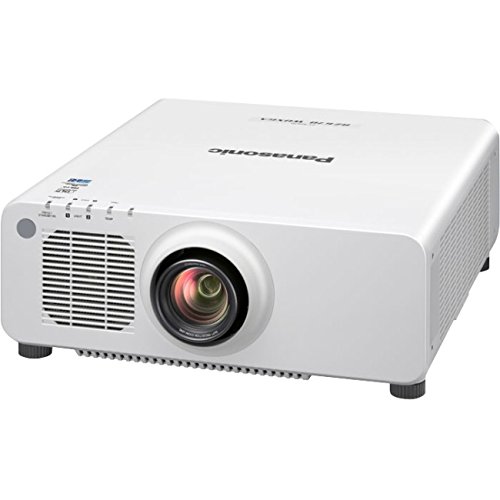
The shortest title in the guide belongs to one of its most serious machines: PT-RW930LWU, DLP, professional, with output abbreviated as 10000L. That terseness is itself information. Listings written for the professional channel assume a buyer who recognises the model family, works from datasheets and orders through integrators; they do not court casual browsers, and neither does this review. The output abbreviation reads as 10,000 lumens in the convention of the category, placing the unit in the guide’s high-output class alongside — though below — the Epson flagship.
DLP imaging at this output level serves a distinct commercial world: large venues, rental and staging, simulation and control environments where single-chip DLP’s contrast, uniformity discipline and long-duty behaviour are valued. A professional unit in the 10,000-lumen class is typically lens-planned rather than lens-fixed in spirit — the installation is engineered around the room, the screen gain and the ambient light budget, and the projector is specified as one component of that system.
Everything beyond technology and output must come from Panasonic’s documentation for this exact model, and the spec box below is deliberately sparse to make that point visible. Resolution, lens options, shift range, control protocols — none are stated in the title, and a commercial buyer should obtain all of them, in writing, as part of the quotation. That is not a criticism of the machine; it is the normal procurement standard for its class, applied evenly.
Suits the professional channel: rental fleets, staging companies, very large fixed venues with integrator support. It does not suit a first-time commercial buyer shopping without technical help, because the listing gives that buyer almost nothing to evaluate and the machine’s class assumes engineering support around it. Such buyers are better served by the fully described LS900WU or the mainstream Panasonic pair, where the titles themselves carry enough information to begin a sensible conversation.
- Technology: DLP, professional class
- Brightness: stated in the listing title as 10000L
- Model: PT-RW930LWU
- Resolution: Not stated in the listing title — verify with the manufacturer documentation
- Lens and shift: Not stated in the listing title — verify with the manufacturer documentation
- Light source: Not stated in the listing title — verify with the manufacturer documentation
Strengths
- High-output DLP class for very large venues and staging work.
- A professional-channel model from a major installation manufacturer.
- Output tier sits between the mainstream picks and the flagship Epson.
Trade-offs
- The title states almost nothing beyond technology and output.
- Light source type is not confirmed by the listing title.
- Evaluation requires full manufacturer documentation and integrator support.
Best for: a staging company or very large venue buying through the professional channel with engineering support. Not suited for: a first-time buyer without an integrator, because the listing alone cannot support an informed decision at this class.
Treat this pick as a reminder of how the top of the commercial market actually works. Above a certain output, projectors stop being products and become components; the buying skill shifts from comparing listings to writing requirements and interrogating datasheets. If your venue is entering that world for the first time, the correct purchase may be the integrator first and the projector second — and this Panasonic, properly documented and properly installed, is exactly the kind of machine that rewards doing it in that order.
Budget holders should also decide, at purchase time, who owns the projector’s calendar: the person who books the room, the team that maintains the building, or the AV desk that fields the midnight calls. Commercial machines fail organisationally when ownership is vague — filters uninspected because two departments each assumed the other had climbed the ladder. Naming the owner in the asset record, beside the settings and the service contact, costs one sentence at commissioning and quietly prevents the most common maintenance failure in the entire category: everybody’s projector becoming nobody’s job.
Comparison
| Pick | Brightness (title) | Resolution | Technology | Standout from title |
|---|---|---|---|---|
| Epson 16,000-Lumen Laser | 16,000 lumens | Not stated in the listing title | 3LCD laser | Large-venue flagship output |
| ViewSonic LS900WU | 6,000 lumens | WUXGA | Not stated in the listing title | H/V lens shift, networkable |
| Panasonic PT-VMZ61 | 6,200 lumens | WUXGA | LCD laser | Mainstream white venue body |
| Panasonic PT-VMZ71 | 7,000 lumens | WUXGA | LCD laser | Brighter tier, black body |
| ViewSonic LSD600W | 6,000 lumens | WXGA | DLP laser | 360 projection, 4-corner, LAN |
| Panasonic PT-RW930LWU | 10000L (title abbreviation) | Not stated in the listing title | DLP | Professional high-output class |
The table sorts itself into three conversations. The mainstream tier — LS900WU, VMZ61, LSD600W — argues about alignment philosophy and resolution at 6,000 stated lumens. The VMZ71 steps that conversation up a brightness class. The Epson flagship and the Panasonic RW930LWU belong to the engineered-installation world, where the table’s empty cells are filled by datasheets and integrator quotations rather than listings.
Every brightness figure above is a manufacturer’s listing claim. Commercial buyers comparing across brands should remember that measurement conventions differ, and that the honest comparison happens in documented specifications and, for large orders, in a shootout on the venue’s own screen. The table’s job is to place each machine in its tier, not to declare a winner by arithmetic.
One more commercial habit deserves copying from the best-run venues: a six-month image audit. Twice a year, the owner projects the same test slide and the same photograph used at commissioning, views them from the same three seats, and compares them with the photographs filed at sign-off. Laser output drifts slowly, which is precisely why drift goes unnoticed without a reference; the audit catches a dimming screen, a shifted mount or a changed room — new paint, new blinds, new lighting — while the correction is still a service visit rather than a complaint from the front row.
Keep the audit photographs honest by using the same camera position and the same room lighting each time, and by storing the projector’s own reported hours beside them. Numbers plus pictures give the next budget conversation something rare in facilities management: evidence that a machine is aging gracefully, or proof that its replacement belongs in this year’s plan rather than next year’s emergency.
How to Choose a Commercial Laser Projector
Start with the screen and the light, in that order. Screen width, screen gain and the room’s ambient light during real use determine the output class a venue needs; the projector is then chosen to serve that number with headroom for the source’s whole life. Buying the other way round — a projector first, a screen to match the leftover budget — produces the washed-out halls everyone has sat through. If the calculation is new to you, an integrator’s site survey is the cheapest line in the entire project.
Choose the imaging technology by content. Data, text and colour-critical branding in lit rooms lean toward the LCD-family picks; high-contrast video, staging and creative orientation work lean toward the DLP picks. Both camps in this guide are laser-lit and commercially serious, so the decision can be made on image character and installation features rather than on maintenance fears that laser has retired.
Interrogate the installation toolkit next. Where must the mount go, and can the lens reach the screen from there? Is the mount on the centre line, making shift a luxury, or off it, making shift a necessity? Does the venue need orientation freedom, corner correction, network management, or all three? The titles in this guide answer those questions unevenly — which is why the answers must be assembled before the order, from documentation, not discovered from a ladder.
Close with the commercial layer: warranty terms for installed use, service network reach, expected duty cycle against the documented source life, and the total installed cost including mount, lens variants, cabling and commissioning. A commercial laser projector is a ten-year building decision wearing a product’s clothing. Buy the decade, document the decision, and the machine will repay the rigour every day it simply works.
How Many Lumens Does a Large Venue Actually Need?
Fewer than the largest number on this page, for most venues — and more than the smallest, for the difficult ones. The requirement grows with screen size and ambient light together: a six-metre screen in a blacked-out auditorium can thrive at the mainstream tier, while a four-metre screen in a glass atrium may defeat it. That is why this guide organises by tier rather than by winner. The 6,000-lumen class serves the majority of large rooms; 7,000 serves bigger or brighter ones; five figures serve arenas, exhibitions and rooms where light cannot be negotiated with.
Headroom is the professional habit worth copying. A laser source holds its output far better than a lamp, but screens age, rooms get brighter as lighting is upgraded, and content grows more ambitious. Specifying one tier above today’s strict calculation — where the budget allows — is how venues avoid re-buying the projector when the hall is refurbished in year four. The VMZ family’s two steps exist precisely to make that judgement call cheap to act on.
Finally, distrust any single-number comparison across brands. Stated lumens are manufacturer claims under each maker’s measurement practice, and the guide reports them as listing claims for that reason. For orders at the flagship tiers, the professional standard is a documented comparison or a demonstration on the venue’s own screen, with the venue’s own content, at the venue’s worst lighting hour. Anything less is buying a number, not an image.
Why Are Venues Replacing Lamp Fleets With Laser Now?
The trigger is usually a maintenance ledger, not an image upgrade. A fleet of lamp projectors consumes bulbs, filters, ladder time and goodwill in a steady drip, and each failure arrives unscheduled — mid-lecture, mid-service, mid-event. Laser removes the most failure-prone consumable from the system and converts projector maintenance from an emergency discipline into a scheduled inspection. For estates teams measured on room uptime, that conversion alone justifies the replacement programme.
Consistency is the second argument, quieter but compounding. A venue that calibrates a laser installation can trust the calibration across a season; a lamp fleet drifts unit by unit as each bulb ages at its own rate, so identical rooms slowly stop looking identical. Universities and hotel groups that sell visual consistency across spaces notice the drift in photographs and complaints long before they notice it in specifications.
The third argument is capability. Laser engines tolerate the orientations and schedules that modern venues increasingly demand — portrait signage in a lobby, a tilted exhibition piece, a gallery loop running twelve hours a day. Lamp warranties and lamp physics both resist that world. Venues are not replacing fleets because laser is fashionable; they are replacing them because the buildings changed first, and the light source had to follow.
What Should an Integrator Confirm Before a Commercial Order?
Geometry, in writing: throw distance against lens options, shift range against the real mount position, screen size against the room’s farthest seat. Then light: the venue’s ambient levels at the worst hour, the screen gain those levels demand, and the output tier that serves them with headroom. Then infrastructure: power at the mount, network drops, control protocol compatibility with the room’s existing system, and rigging certification where the unit hangs above people.
Commerce, also in writing: the exact model identity behind any terse listing, warranty terms for the intended duty cycle, service response commitments, and the complete installed price. The Epson flagship’s review in this guide shows why the identity question matters — a listing can carry a famous brand and a huge lumen figure while printing no model code at all, and a professional buyer’s response is not suspicion but procedure: datasheet first, then quotation, then order.
And finally, commissioning: who aligns, who calibrates, who photographs the finished image and signs it off, and who owns the settings file afterwards. Commercial projection fails socially as often as technically — a perfect installation whose settings are lost to a factory reset by a well-meaning volunteer is a failure the paperwork could have prevented. The venues that run these machines well treat documentation as part of the installation, and they are not being bureaucratic. They are being experienced.
How Do Rental and Staging Buyers Judge This Class Differently?
A rental fleet lives a harder life than any fixed installation: cases, trucks, unfamiliar venues, mounts improvised from truss, and a different screen every weekend. Buyers for that world weight the specification sheet differently. Robustness and setup speed rise to the top — generous correction tools, tolerant geometry, controls a technician can drive at speed in the dark. That is why the flexible ViewSonic LSD600W, with its corner adjustment and orientation freedom, reads like a rental-minded machine even though its output tier is mainstream, and why the professional Panasonic at 10000L belongs to fleets that carry engineering knowledge with them from venue to venue.
Fixed venues, by contrast, can optimise for a single geometry and then never touch it again, which is why lens shift — the LS900WU’s speciality — matters more to them: the correction is made once, optically, and holds for a decade. Rental buyers also think in redundancy, carrying a backup unit whose absence from a fixed venue’s budget would look like waste. Neither perspective is wrong; they are answers to different failure costs. A dark screen at a ticketed event costs a refund queue. A dark screen in a lecture hall costs a rescheduled class. The buying pattern follows the cost.
Both worlds agree on documentation, for once. A fleet manager needs datasheets to match units across jobs and to brief freelance technicians; a facilities manager needs them to write the tender that bought the machine. The terse titles in this guide — the Epson flagship and the RW930LWU — are therefore not obstacles to either buyer so much as reminders that this class was never sold on listings in the first place.
What Happens to a Commercial Projector at the End of Its Service Life?
Planning the exit at the moment of purchase sounds morbid and saves real money. Laser installation units are capital equipment: they appear on asset registers, depreciate on schedules, and eventually need disposal routes that handle optics, electronics and mounting hardware responsibly. Venues that recorded the model identity, purchase date and service history at installation — the same documentation discipline this guide keeps recommending — find the end-of-life conversation straightforward, because the paperwork the disposal contractor and the finance office ask for already exists.
The mount usually outlives the machine, which is a planning opportunity. A venue that chose a standard mounting pattern and documented its position can treat the eventual replacement as a unit swap measured in hours, while a venue with a bespoke, undocumented rig faces a fresh engineering project at the worst possible moment — when the old projector has just failed. Buying the current machine with its successor in mind is the last form of the total-cost thinking that laser economics already demands.
There is also a second life to consider. A commercial unit retired from a main hall for fading output or outdated inputs may serve for years in a rehearsal room, a foyer signage role or a training space with gentler demands. Estates that cascade equipment this way routinely extract a third more service from a fleet than the original plan assumed — one more reason the mainstream tiers in this guide, bought in families, repay their buyers longer than the specification sheet promises.
How Should a Venue Test a Commercial Projector Before Signing Off?
Commissioning is the step that separates installations from deliveries, and it deserves a checklist rather than a glance. Project the venue’s own hardest content first: the smallest text the room ever shows, the darkest video scene, the brand slide whose colours everyone recognises. View each from the farthest seat and from the side seats, at the lighting state the room actually uses, including the worst hour identified during the survey. An image that survives that tour will survive the calendar.
Then test the operations, not just the optics. Switch sources the way a nervous presenter will. Power the unit from the room’s control system, not the remote in the installer’s hand. Kill and restore power to confirm the machine returns to its assigned state, and run the network checks the AV desk will rely on at midnight before an event. Record every setting that produced the accepted image, photograph the screen from three seats, and file both with the asset record — the same closing ritual recommended in this guide’s long throw companion, because the two categories share one building and one discipline.
Sign-off should name the people as well as the numbers: the installer who aligned it, the venue operator who accepted it, and the service contact for the first year. When something drifts in month nine, that single page of names and settings turns a blame conversation into a fifteen-minute correction, which is the entire commercial case for treating a projector as infrastructure rather than as a very bright appliance.
Common Mistakes When Buying Commercial Laser Projectors
Buying lumens before geometry. Output cannot rescue a lens that cannot fill the screen from the mount. Throw and shift documentation comes first in every professional workflow.
Ordering a flagship from a terse listing. A title with no model code is a starting point for procurement, never the whole of it. Confirm identity, lens and warranty in writing.
Ignoring the room’s worst lighting hour. Venues are specified at their average and judged at their worst. Measure ambient light when the sun and the house lights conspire, not on a quiet morning.
Spending the screen budget on the projector. An undersized or low-quality screen wastes more image than a tier of lumens buys back. The two are one system and should be budgeted as one.
Forgetting who services the mount. Laser removes lamp changes, not gravity. Access, rigging inspection and a service relationship remain part of ownership at height.
Final Recommendation
Most commercial buyers should start in the mainstream tier and justify any move upward. The ViewSonic LS900WU is the alignment-safe choice for managed venues, the Panasonic PT-VMZ61 the steady fleet standard, and the LSD600W the flexible installer’s tool for imperfect rooms and creative orientations. The PT-VMZ71 earns its step when the hall is genuinely larger or brighter. Above that, the Panasonic PT-RW930LWU and the Epson 16,000-lumen flagship belong to engineered installations bought through integrators with datasheets in hand — which is not a reservation about the machines, but the correct way to buy anything in their class.
If your venue remembers one line from this guide, make it the procurement rule: at commercial scale the documentation is part of the product, so a projector you cannot fully document is a projector you have not finished buying — finish the paperwork, and the laser will do the rest for years.
Frequently Asked Questions
How long does a commercial laser projector last compared with a lamp model?
Laser sources are designed for far longer service than lamps and hold their output more steadily, which is why venues adopt them for hard-to-reach mounts. No title in this guide prints a lifespan figure, so exact rated life for any pick must come from its manufacturer documentation, weighed against your room’s real annual hours.
Is 6,000 lumens enough for a house of worship?
For most worship spaces with screens in the mainstream size range and controllable light, the 6,000-lumen class in this guide is the settled choice. Larger sanctuaries, wide screens or strong window light push the calculation toward the 7,000-lumen VMZ71 tier, and a site survey settles the question better than any general rule.
What does networkable or LAN control actually buy a venue?
Central management: the AV team can monitor status, schedule power, catch faults and adjust settings across many rooms from one desk, instead of visiting each mount with a ladder and a remote. In a fleet of rooms it converts projector care from a walking route into a dashboard.
Can these projectors run in portrait or tilted orientations?
Only where the title says so. The ViewSonic LSD600W explicitly lists 360-degree projection; the other titles make no orientation claim, so any tilted or portrait installation must be confirmed against the manufacturer’s documentation for that model before it is promised to a client.
Why does the Epson flagship listing have no model name?
The listing title simply describes the machine generically — output, technology, class and brand — without a model code. This guide reports it exactly that way and invents nothing. Commercial buyers should confirm the unit’s identity and documentation with the seller in writing before ordering.
Related Guides
Venues planning distant mounts should pair this shortlist with our guide to the best hdr projectors for venues that also screen film and broadcast content, where tone mapping joins brightness in the brief. Buyers weighing imaging technologies will find the full argument in the best dlp and lcd projectors, compared for colour, contrast and upkeep. And organisations standardising on one brand’s ecosystem should finish with the best epson business projectors for offices, classrooms and meeting spaces, where the same discipline is applied at room scale.


