What's inside
- Where to Buy
- Key Takeaways
- Quick Picks
- How We Chose These Picks
- Comparison
- How to Choose an HDR Projector
- Why Does HDR Look Washed Out on Some Projectors?
- HDR10, HDR10+ and HLG: Which One Does Your Content Use?
- How Much Does the Screen Matter for HDR Projection?
- How Should You Set Up an HDR Projector in Its First Week?
- Does Gaming Change Which HDR Projector You Should Buy?
- What Will HDR Projection Look Like in This Room in Five Years?
- Common Mistakes When Buying an HDR Projector
- Final Recommendation
- Frequently Asked Questions
- Related Guides
As an Amazon Associate I earn from qualifying purchases. This post may contain affiliate links at no extra cost to you.
widgetverdict.com is reader-supported. When you buy through links on our site, we may earn an affiliate commission.
Where to Buy
Each projector below links to its Amazon listing from its name. The gaming-leaning opener is the BenQ TK710 — its page carries the live figure. Next come the two Epson theatre machines: the Epson Home Cinema LS11000 with HDR10+ in its title, and the Epson Home Cinema 5050UB, a long-running pixel-shift favourite whose listing shows today’s cost. The BenQ TK705i adds built-in Google TV for rooms that want streaming without a separate box. The JVC LX-NZ30B is the laser model with auto tone mapping, and the BenQ W4100i closes the set as the colour-calibrated flagship — confirm its current price on Amazon before deciding between it and the Epson pair.
Assembling the best hdr projectors means resisting the label on the box long enough to ask what kind of HDR each machine actually promises. High dynamic range is not one feature but a family of formats and tone-mapping behaviours: HDR10 is the baseline every pick here supports in some form, HDR10+ adds scene-by-scene metadata, and HLG serves broadcast content. A projector also has to map that wide-range signal down to the brightness a projector can physically produce, and how intelligently it performs that mapping matters more than the badge that announces the format.
This guide therefore reads each listing title the way a contract should be read. Where a title names HDR10+, the review says HDR10+. Where a title names only HDR10 — or, in the case of the Epson 5050UB, simply says the projector comes with HDR — the review claims nothing beyond those words. Formats a title does not mention are not borrowed from a brand’s reputation, a sibling model or a review elsewhere. Projector buyers have been burned by assumed specifications more often than by any defect, and HDR, with its alphabet of near-identical badges, is where assumptions go to thrive.
Brightness frames the whole conversation, and the figures quoted here are the manufacturers’ numbers as printed in their titles. Projectors cannot reach the peak brightness of a good television, so HDR on a projector is an exercise in tone mapping: preserving highlight detail and shadow gradation inside a smaller range without flattening the picture into grey politeness. The six machines below approach that exercise from different directions — laser and lamp, DLP and 3LCD, gaming speed and cinema colour — and the reviews keep those directions distinct.
Key Takeaways
- HDR10+ is named in three titles: the Epson LS11000, the BenQ TK705i and the BenQ W4100i. The BenQ TK710 names HDR10, and the JVC LX-NZ30B names HDR10 and HLG.
- The Epson 5050UB title says only “with HDR” — no specific format is claimed for it anywhere in this guide.
- Stated brightness runs from 2,500 lumens (LS11000) to 3,300 lumens (LX-NZ30B), all as printed in the listing titles.
- Four picks are 4K or 4K PRO-UHD designs; laser light sources appear in the TK710, LS11000 and LX-NZ30B titles.
- The BenQ W4100i is the colour specialist: Rec. 709, 100% DCI-P3 and factory calibration are all stated in its title.
Quick Picks
| Pick | Badge | Why it earns a place |
|---|---|---|
| BenQ TK710 | Fast HDR gaming | 4K HDR laser at 3,200 lumens with HDR10, 4ms input lag and a 240Hz refresh rate. |
| Epson Home Cinema LS11000 | Laser theatre with HDR10+ | 4K PRO-UHD laser, HDR10+, motorised lens shift and focus, 120Hz. |
| Epson Home Cinema 5050UB | Pixel-shift classic | 4K PRO-UHD 3LCD with HDR and advanced pixel-shift processing at 2,600 lumens. |
| BenQ TK705i | Streaming built in | 4K HDR at 3,000 lumens with Google TV, HDMI 2.1, MEMC and HDR10+. |
| JVC LX-NZ30B | Auto tone mapping | 4K HDR laser at 3,300 lumens with auto selection for HDR10 and HLG. |
| BenQ W4100i | Calibrated colour flagship | 4K HDR at 3,200 lumens, 100% DCI-P3, HDR10+, factory calibrated, 4-way lens shift. |
How We Chose These Picks
HDR had to be claimed, not implied. Every candidate’s listing title was read for its exact HDR wording, and the shortlist was built so the set demonstrates the format ladder honestly: baseline HDR10, HDR10+ where a title names it, HLG where a title names it, and one respected machine — the 5050UB — whose title makes only the general HDR claim, included precisely so readers can see what that difference in wording looks like and decide how much it matters to them.
Home use set the frame. These are projectors for living rooms and dedicated theatres, not auditoriums, so brightness in the 2,500-to-3,300 stated-lumen band is the expected territory and installation features were judged by domestic standards: lens shift for a shelf or ceiling mount that cannot sit dead centre, streaming built in for rooms without a separate player, input lag for the growing number of theatre rooms that double as gaming rooms. Commercial machines were excluded however strong their output, because their HDR behaviour is rarely the point of them.
Light source and imaging technology were balanced deliberately across the set. Laser appears three times, with its steadier output and absent lamp changes; the 3LCD Epsons bring their colour-forward character; the DLP-based BenQ and JVC models bring their contrast and motion reputations. No single technology was allowed to sweep the list, because HDR tone mapping interacts with each differently and readers deserve the comparison made visible rather than settled for them in advance.
Finally, each pick had to offer a distinct answer to the question of what HDR is for. Cinema purity, gaming speed, streaming convenience, broadcast compatibility, calibrated colour — six machines, six emphases. A guide whose picks all chase the same virtue in slightly different boxes helps nobody choose, so overlap was treated as a defect and engineered out at the shortlist stage.

BenQ TK710 — Fast HDR gaming
The TK710’s title reads like a negotiation between two audiences that rarely share a projector: film viewers and competitive players. For the first group it offers 4K HDR with a laser light source at 3,200 lumens and HDR10 named outright. For the second it prints the numbers players actually scan for — 4ms input lag and a 240Hz refresh rate — figures that belong on gaming monitors, transplanted into a home entertainment projector. BenQ even repeats the refresh claim twice in the title, as if to make sure the gaming audience does not miss it.
The laser source matters to both audiences. For film, it holds output steady across years of evening sessions instead of dimming on a lamp’s schedule. For gaming, it removes the warm-up and replacement anxieties of a lamp in a machine that may run long daily hours. Lens shift and a 1.3x zoom, both stated, give the placement flexibility a living room demands, since few rooms offer a mount exactly where the lens wants to be. eARC support, also named, lets the projector pass full-quality audio back to a sound system — the correct modern arrangement for a room where the projector is the hub.
Honesty about formats: this title claims HDR10, and only HDR10. It does not name HDR10+ or HLG, so buyers whose libraries lean on HDR10+ discs or streaming should weigh the picks below that do claim it. What the TK710 offers instead is the strongest speed specification in the guide wrapped around a credible HDR10 cinema picture, and for the household whose theatre room hosts game nights as often as film nights, that trade is not a compromise — it is the correct priority order.
Suits the dual-purpose room best: a family theatre where a console lives permanently beside the disc player, where 4K HDR films play on Friday and fast games on Saturday. The 3,200 stated lumens give it more ambient-light tolerance than the dimmer cinema purists below, suiting rooms that cannot fully darken. A dedicated blacked-out theatre chasing the deepest tone mapping should keep reading toward the Epson LS11000 and the BenQ W4100i.
- Resolution and HDR: 4K HDR, HDR10
- Brightness: 3,200 lumens (as stated in the listing title)
- Light source: laser
- Gaming: 4ms input lag, 240Hz refresh rate
- Optics and audio: lens shift, 1.3x zoom, eARC support
- Warranty: 3 year warranty (as stated in the listing title)
Strengths
- 4ms input lag and 240Hz are exceptional figures in a 4K HDR projector.
- Laser output at 3,200 lumens suits rooms that cannot fully darken.
- Lens shift and 1.3x zoom ease real-world placement.
Trade-offs
- HDR10+ is not claimed in the listing title.
- HLG is not claimed in the listing title.
- Its speed-first balance will not out-cinema the calibrated picks below.
Best for: a living-room theatre that splits its hours between 4K HDR films and fast console or PC gaming. Not suited for: a viewer whose collection is built on HDR10+ discs, because this title claims HDR10 only.
Ownership note for the dual-purpose household: set up two picture presets on day one, one for film and one for games, rather than living in a single compromise mode. The TK710’s specification invites exactly that discipline — the lag and refresh figures only appear when the machine is asked for them — and households that do the ten minutes of setup are the ones still praising the purchase when the next console arrives.

Epson Home Cinema LS11000 — Laser theatre with HDR10+
The LS11000 is Epson’s laser statement in the home cinema line, and its title carries the format claim this guide’s readers are hunting: HDR10+, named explicitly. Around it, the specification assembles the dedicated-theatre brief — 4K PRO-UHD resolution, a laser light source, 3-chip 3LCD imaging, 2,500 lumens of colour and white brightness as Epson prints the figure, a dynamic contrast figure printed as 1.2 Mill:1, motorised lens shift and focus, and a 120Hz refresh capability.
Motorised optics deserve their moment. In a dedicated theatre, the projector is typically mounted once, high and far, and every adjustment after that is either a ladder trip or a remote command. Motorised shift and focus turn calibration into a from-the-seat ritual, and they make small refinements — the seasonal refocus, the new screen, the slightly moved mount — painless enough to actually happen. Projectors with manual optics tend to be adjusted once and forgiven forever; motorised ones stay correct.
The 2,500-lumen figure is the lowest in this guide, and in context it is a positioning statement rather than a weakness. Epson is describing a machine for a controlled-light theatre, where output is spent on contrast and tone mapping rather than on fighting windows. Paired with HDR10+’s scene-by-scene metadata, the LS11000’s promise is gradation: skies that band less, highlights that roll off instead of clipping, shadow detail that survives. Buyers with bright multi-purpose rooms should read that promise carefully and compare the higher-output picks before deciding.
Suits the dedicated theatre owner — the room with a door, dark walls and a seating plan — who watches films and prestige television and wants the format support and the laser permanence to match the room’s intent. The 120Hz capability gives gaming a respectable foothold without pretending to the TK710’s esports figures. This is the connoisseur’s pick in the set, and its review makes no apology for the specialisation.
- Resolution and HDR: 4K PRO-UHD, HDR10+
- Technology: 3-chip 3LCD, laser light source
- Brightness: 2,500 lumens of colour and white brightness (as stated in the listing title)
- Contrast: dynamic contrast printed as 1.2 Mill:1 in the listing title
- Optics: motorised lens shift and focus
- Refresh: 120Hz
Strengths
- HDR10+ is claimed explicitly in the listing title.
- Motorised lens shift and focus make calibration a seated task.
- Laser 3LCD suits a dedicated theatre’s long service life.
Trade-offs
- 2,500 stated lumens is the lowest figure in this guide.
- Its virtues assume a light-controlled room to appear at all.
- HLG is not claimed in the listing title.
Best for: a dedicated, light-controlled home theatre screening HDR10+ films and series. Not suited for: a bright open-plan living room used in daylight, where 2,500 stated lumens cannot hold an HDR image against the windows.
If this is your machine, budget the room before the projector: the LS11000 rewards darkness the way a sports car rewards good tarmac. Blackout treatment, a screen matched to its throw, and seating placed inside its sweet geometry will return more picture quality than any setting buried in its menus. Owners who build the room around it describe the combination as the closest a projector in this set comes to the cinema’s own discipline — light admitted only when the film asks for it.
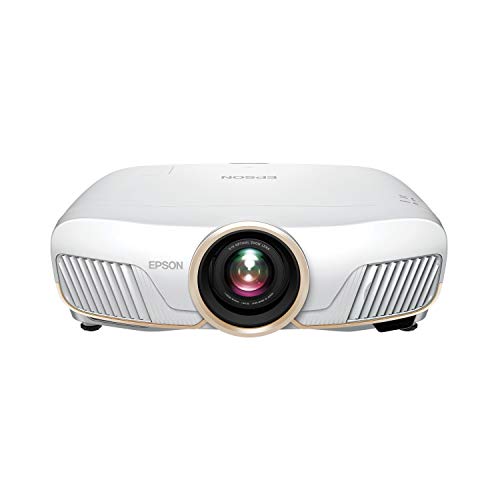
Epson Home Cinema 5050UB — Pixel-shift classic
The 5050UB has been the home theatre benchmark of its class for years, and its title is a study in older, plainer language: a 4K PRO-UHD 3-chip 3LCD projector with HDR, 2,600 lumens of colour and white brightness, and advanced pixel-shift processing for home theatre movie projection. Note the HDR wording, because this guide insists on it: the title says HDR, without a number or a plus. No specific HDR format is claimed for this pick anywhere in these pages, and buyers for whom HDR10+ support is a hard requirement should choose accordingly.
What the title does support is the machine’s enduring formula. Pixel-shift processing is Epson’s route to a 4K-class image from its PRO-UHD platform, and the 5050UB’s reputation rests on how completely that image serves film: deep, calm, and free of the artefacts that give pixel-shifting a bad name in lesser implementations. The 3LCD architecture delivers the colour and white brightness in equal stated measure — 2,600 lumens of each — which is the Epson way of promising that saturated scenes keep their punch.
Context matters for a model of this vintage. It predates the laser wave represented elsewhere in this guide, and its title makes no laser claim; ownership therefore includes the lamp discipline its newer rivals have retired. In exchange, it offers one of the most thoroughly understood projectors in the category — a machine whose behaviour in real theatres has been documented by a generation of owners, with no surprises left to discover. For many buyers that known-quantity status is itself the feature.
Suits the film-first traditionalist: a dedicated or semi-dedicated theatre, a diet of discs and high-quality streams, and a preference for a proven platform over a newer badge. It suits less well the buyer assembling a format checklist — HDR10+ streaming, broadcast HLG, gaming figures — because its title promises none of those specifically, and this guide will not pretend otherwise on its behalf.
- Resolution and HDR: 4K PRO-UHD, HDR (format not specified in the listing title)
- Technology: 3-chip 3LCD
- Brightness: 2,600 lumens colour and white brightness (as stated in the listing title)
- Processing: advanced pixel-shift processing
- Intended use (from title): home theatre movie projection
- Light source: Not stated in the listing title — verify with the manufacturer documentation
Strengths
- A proven pixel-shift theatre platform with a long owner track record.
- Equal stated colour and white brightness supports saturated film scenes.
- 3LCD imaging avoids single-chip colour artefacts entirely.
Trade-offs
- No specific HDR format is named in the listing title.
- No laser light source is claimed in the listing title.
- Newer picks claim gaming and streaming features its title omits.
Best for: a film-first theatre owner who values a proven pixel-shift platform over format checklists. Not suited for: a purchase that requires HDR10+ support confirmed in writing, because this title claims HDR without naming a format.
The fair way to judge the 5050UB in 2026 is against its own brief. It was built to project films beautifully in a darkened room, and judged on that brief it remains formidable; judged on badges it never claimed, it looks dated in ways that say more about the judging than the machine. Readers building a theatre around discs and a dark room should audition it seriously. Readers building around streaming formats should take its silence as the answer and move down the page.

BenQ TK705i — Streaming built in
The TK705i represents the newest idea in this guide: the projector as a self-contained streaming device. Its title leads with 4K HDR home entertainment at 3,000 lumens, then lists Google TV built in, HDMI 2.1, Bluetooth, MEMC motion processing, HDR10+ by name, auto image adjustment, and a screen size claim of 150 inches, with a three-year warranty closing the list. This is a machine designed for the room that does not want a rack of boxes — the projector arrives, connects to Wi-Fi, and starts behaving like the smart television it is replacing.
HDR10+ in the title matters because streaming is where HDR10+ lives most widely; a built-in Google TV platform feeding an HDR10+-capable engine is a coherent pairing, each half justifying the other. MEMC — motion estimation and compensation — serves sport and fast content by smoothing motion, a feature film purists will switch off and football households will leave on permanently, and the honest review notes both reactions without refereeing them. Auto image adjustment continues the theme: this projector expects to be set up by its owner in an ordinary room, and it automates the fiddly parts accordingly.
HDMI 2.1 and Bluetooth round out the modern brief — the first for current consoles and high-bandwidth sources, the second for the wireless speakers and headphones that apartment living increasingly demands. At 3,000 stated lumens it sits comfortably in the guide’s brightness middle, tolerant of the semi-lit living rooms where streaming projectors actually work, while the 150-inch screen claim in the title should be read as a maximum geometry statement, with picture quality at that size governed by the usual laws of light spread across area.
Suits the streaming-first household upgrading from a television: one device, one remote, films and series and sport from the ceiling. It suits less the collector with a rack of players and a calibrated separate audio system, who gains little from built-in platforms — though even that buyer should note the HDR10+ claim and the warranty length, both of which compete with the guide’s more traditional flagships.
- Resolution and HDR: 4K HDR, HDR10+
- Brightness: 3,000 lumens (as stated in the listing title)
- Platform: Google TV built in
- Connections: HDMI 2.1, Bluetooth
- Processing and setup: MEMC, auto image adjustment
- Screen claim: 150 inches (as stated in the listing title); 3 yr warranty
Strengths
- Google TV built in removes the separate streaming box entirely.
- HDR10+ is claimed explicitly in the listing title.
- Auto image adjustment suits owner-installed living rooms.
Trade-offs
- MEMC motion smoothing divides film audiences and often gets disabled.
- A 150-inch image spreads 3,000 lumens thin in anything but darkness.
- HLG is not claimed in the listing title.
Best for: a streaming-first living room replacing a large television with one self-contained device. Not suited for: a purist disc theatre with separate calibrated sources, where the built-in platform adds nothing the rack does not already do better.
Practical counsel for the streaming household: connect the TK705i to the strongest Wi-Fi position in the home, or wire it if the room allows, because a 4K HDR stream is only as steady as the network feeding it. The projector has done its part — platform, format support and auto-setup all in one box — and the remaining variable in the room is the unglamorous one nobody puts on a specification sheet.

JVC LX-NZ30B — Auto tone mapping
JVC’s LX-NZ30B carries the most complete HDR sentence in any title in this guide. It states 4K HDR home theatre projection at 3,300 lumens — the highest figure here — from a BLU-Escent laser phosphor light source with a 20,000-hour lamp life as printed, auto selection for HDR10 and HLG, auto tone mapping, and an HDMI input supporting 18Gbps 4K signals. Each clause earns its place. The dual-format auto selection means the machine recognises whether the incoming signal is disc-style HDR10 or broadcast-style HLG and responds without the owner entering a menu. Auto tone mapping then does the interpretive work that decides whether HDR looks glorious or merely bright.
Tone mapping is the right place for a buyer’s attention, because it is where projector HDR is actually won. A projector cannot reproduce the full range of an HDR master; it must compress that range intelligently, scene by scene, preserving the relationships the colourist built. A manufacturer that prints auto tone mapping in its title is claiming that intelligence as a headline feature, and JVC’s heritage in home theatre projection — a name associated with contrast and film reproduction for decades — gives the claim a context the other brands’ marketing cannot borrow.
The laser phosphor source with its stated 20,000-hour life completes the ownership picture: the brightest pick in the guide is also built for the longest unattended service, which suits the way home theatres are actually used — intensely, in the evenings, for years, by people who do not want a maintenance relationship with their projector. The 18Gbps HDMI specification, printed in the title, confirms full-bandwidth 4K signal handling for current sources.
Suits the film-and-broadcast household: discs in HDR10, sport and documentaries arriving in HLG, one machine expected to handle both without supervision. It is the guide’s most format-complete pick for viewers whose content genuinely mixes sources. Buyers who specifically need HDR10+ should note its absence from this title and weigh the BenQ W4100i or Epson LS11000, whose titles claim it — the guide’s discipline cuts in every direction equally.
- Resolution and HDR: 4K HDR, auto select for HDR10 and HLG
- Brightness: 3,300 lumens (as stated in the listing title)
- Light source: BLU-Escent laser phosphor
- Stated life: 20,000-hour lamp life (as printed in the listing title)
- Processing: auto tone mapping
- Input: HDMI supporting 18Gbps 4K (as stated in the listing title)
Strengths
- Both HDR10 and HLG are named, with automatic selection between them.
- Auto tone mapping is claimed as a headline feature in the title.
- 3,300 stated lumens is the highest brightness figure in this guide.
Trade-offs
- HDR10+ is not claimed in the listing title.
- The stated life figure uses lamp-life wording for a laser source.
- Streaming platforms are not mentioned in the listing title.
Best for: a theatre mixing HDR10 discs with HLG broadcast content, wanting both handled automatically. Not suited for: a household committed to HDR10+ streaming as its main format, because this title does not claim that format.
When you audition this JVC, test it with the rudest material you own: a dark film scene with a single bright window, a broadcast nature documentary, a concert with stage lighting against black. Auto tone mapping shows its quality exactly there, in the transitions lesser processing turns to mush or glare. If those scenes hold their detail at both ends of the range, you are looking at the guide’s most complete HDR argument — and the current figure on its Amazon listing is the last thing to check before it becomes your theatre’s engine.

BenQ W4100i — Calibrated colour flagship
The W4100i closes the guide with the colourist’s specification. Its title states 4K HDR smart home theatre projection at 3,200 lumens, then spends its remaining words on colour and craft: Rec. 709 coverage, 100% DCI-P3, HDR10+ named outright, factory calibration, Netflix on Android TV, a four-way lens shift, three-year warranty and 3D support. That is a manifesto in listing form — this machine competes on the accuracy of what it shows, not merely the size or the brightness of it.
One hundred percent DCI-P3, as printed in the title, is the cinema colour gamut claim that matters for HDR film content, because HDR masters are graded in that space; a projector that covers it fully can show the saturation the colourist intended instead of a polite approximation. Factory calibration extends the promise from capability to delivery: the unit is claimed to arrive already adjusted, which for most owners is the difference between accurate colour existing in their home and accurate colour existing in theory. Rec. 709 coverage anchors the standard-definition and broadcast side of the library.
Four-way lens shift — horizontal as well as vertical, by the plain reading of the title — gives this flagship the placement freedom the Epson LS11000 achieves with motors, here in manual form, and the Android TV platform with Netflix answers the streaming question without surrendering the machine’s cinema-first identity. The 3D support, rarely printed in modern titles, will matter to exactly the collectors who still maintain a 3D shelf, and for them its presence in the title is a decisive filter no other pick in this guide passes.
Suits the colour-led theatre: an owner who notices when a grade is wrong, who watches films as they were timed, and who wants the calibration claim in writing on the listing. It is also the guide’s most complete single-box answer — format support, colour coverage, streaming, placement freedom — for a buyer who prefers one flagship decision to a series of compromises. Rooms that cannot darken will still tax its 3,200 stated lumens less than the dimmer Epson pair, making it the flagship that tolerates ordinary houses best.
- Resolution and HDR: 4K HDR, HDR10+
- Brightness: 3,200 lumens (as stated in the listing title)
- Colour: Rec. 709, 100% DCI-P3 (as stated in the listing title)
- Calibration: factory calibrated
- Platform and optics: Netflix Android TV, 4-way lens shift, 3D support
- Warranty: 3 yr warranty (as stated in the listing title)
Strengths
- 100% DCI-P3 coverage matches the space HDR films are graded in.
- Factory calibration promises accuracy out of the box, in the title.
- HDR10+, streaming and four-way shift complete a flagship brief.
Trade-offs
- HLG is not claimed in the listing title.
- Its colour virtues need a reasonably dark room to be visible.
- Input lag and refresh figures for gaming are not stated in the title.
Best for: a colour-led home theatre wanting calibrated DCI-P3 HDR10+ film reproduction from one flagship. Not suited for: a competitive gaming room, because this title prints no input lag or high-refresh figures to build that case on.
Let the calibration claim set your setup behaviour: resist the urge to retune this projector on its first evening. Live with the factory settings through a week of varied material — a modern HDR release, an older Rec. 709 favourite, a broadcast evening — and adjust only what still bothers you after that honest trial. Machines bought for accuracy deserve to be judged at their most accurate, and the W4100i’s title is a written promise that its most accurate state is the one it arrives in.
One ownership detail unites all six picks: keep the firmware and the streaming apps current, and re-verify the HDR signal after any major update in the chain. Format handling lives partly in software now — a platform update can change which HDR variant a service sends, and a receiver update can reset a passthrough setting to a safer, duller default. The household that re-checks the projector’s signal display after updates will never spend a month wondering why films look flatter than they used to; the household that does not will blame the projector for a checkbox three devices upstream.
Write that verification habit into the household’s routine the way venues write their audits into a calendar: after any new device joins the chain, after any big software update, and at the start of each season’s viewing, one known HDR scene and one glance at the signal display. It takes less time than making popcorn, and it protects the entire investment — projector, screen, darkened room and all — from the quietest and most common failure in modern home cinema, which is not a broken machine but a misconfigured handshake nobody noticed for a month of slightly disappointing films.
Keep a note of the scene you use — film, timestamp, format — somewhere in the room itself. Future you, holding a new remote in a rearranged system, will be grateful that past you left a fixed reference instead of a vague memory of how good things used to look.
Comparison
| Pick | HDR claimed in title | Brightness (title) | Light source | Standout from title |
|---|---|---|---|---|
| BenQ TK710 | HDR10 | 3,200 lumens | Laser | 4ms lag, 240Hz, eARC |
| Epson LS11000 | HDR10+ | 2,500 lumens | Laser | Motorised shift and focus, 120Hz |
| Epson 5050UB | HDR (format not specified) | 2,600 lumens | Not stated in the listing title | Advanced pixel-shift processing |
| BenQ TK705i | HDR10+ | 3,000 lumens | Not stated in the listing title | Google TV, HDMI 2.1, MEMC |
| JVC LX-NZ30B | HDR10 and HLG | 3,300 lumens | Laser phosphor | Auto tone mapping, 20,000-hour stated life |
| BenQ W4100i | HDR10+ | 3,200 lumens | Not stated in the listing title | 100% DCI-P3, factory calibrated |
The HDR column is the guide in miniature. Three titles claim HDR10+, one claims HDR10 with gaming speed attached, one claims the HDR10-and-HLG broadcast pairing, and one claims HDR in general terms. None of those wordings is a defect; each is a different promise, priced and engineered differently, and the reader who matches the promise to their own library has understood the category better than any single-number ranking could teach them.
Brightness, by contrast, clusters tightly — 2,500 to 3,300 stated lumens — because these are all home machines working in rooms that can darken. The spread that matters is not output but intent: the dimmest pick is the dedicated-theatre specialist, the brightest is the format-complete JVC, and the gaming and streaming picks sit between, trading peak cinema discipline for versatility in ordinary rooms.
How to Choose an HDR Projector
Inventory your library before your room. List the sources you actually watch — discs, two or three streaming services, broadcast sport, a console — and note which HDR format each one sends. That list, written honestly, eliminates half this guide in a minute: HDR10+ households shortlist three picks, broadcast households gravitate to the JVC, disc traditionalists can consider the 5050UB on its other virtues. Format regret is the most common HDR disappointment, and it is entirely preventable at this step.
Judge your room next, without optimism. HDR needs darkness the way coffee needs water; a projector asked to tone-map a wide-range signal in a bright room spends its whole budget surviving. If the room cannot darken, favour the higher stated outputs here and accept a good picture rather than a reference one. If it can darken fully, the dedicated picks — LS11000 and W4100i — convert that darkness into gradation and colour that brighter generalists cannot match.
Decide what else the room does. Gaming brings input lag and refresh into the brief, and only the TK710’s title answers with numbers. Streaming without a separate player brings platforms into the brief, answered by the TK705i’s Google TV and the W4100i’s Android TV. A room that only ever shows films can ignore both columns and buy purely on tone mapping and colour — the simplest brief, and the one the classic theatre picks serve best.
Finally, plan the signal chain. HDR is a chain of handshakes — source, cable, receiver, projector — and the weakest link quietly downgrades the picture to standard range while every badge on every box still says HDR. Confirm each device in your chain supports the format you are buying for, and test with known HDR material in the first week, checking the projector’s own signal information display rather than trusting that a bright picture means an HDR one.
Why Does HDR Look Washed Out on Some Projectors?
Usually because tone mapping is compressing a very bright master into a modest projector range, and doing it timidly. If the mapping protects highlights too cautiously, the whole image sits in a grey middle; if it is fed a standard-range signal while the projector expects HDR — a handshake failure somewhere in the chain — the result is the classic pale, flat picture owners describe as broken. The first diagnostic is always the projector’s signal readout: confirm the incoming signal actually is the HDR format you intended before adjusting a single picture setting.
Room light is the second cause, and the least admitted. HDR’s effect lives in the ratio between the brightest and darkest parts of the scene; ambient light raises the darkest parts, and the ratio — the entire effect — collapses. A mid-grey room makes a reference projector look ordinary, which is why this guide keeps returning to darkness as the cheapest HDR upgrade available. Blackout curtains routinely outperform a model tier.
The third cause is settings drift: a dynamic mode engaged for sport and forgotten, a tone mapping option changed during an experiment, a streaming app sending a different format than the disc player did. Machines like the JVC LX-NZ30B, with automatic format selection and tone mapping claimed in the title, exist to reduce exactly this class of quiet self-sabotage — the projector notices what arrived and adjusts, instead of relying on the owner remembering what they changed last month.
HDR10, HDR10+ and HLG: Which One Does Your Content Use?
HDR10 is the universal baseline — the format of UHD discs and the common denominator of streaming — and every pick in this guide claims at least HDR in terms that include it, with the TK710 and LX-NZ30B naming HDR10 outright. If your viewing is discs and mainstream streaming, HDR10 support plus good tone mapping covers your library, and the format question can retire early in favour of colour, contrast and room questions.
HDR10+ adds dynamic metadata: instructions that vary scene by scene rather than once per film, letting a projector’s tone mapping make finer decisions. It appears in the titles of the LS11000, TK705i and W4100i. Its value depends on your sources sending it — certain streaming services and discs do — which is why the inventory step in the choosing section comes first. Buying HDR10+ for a library that never sends it is harmless but pointless; missing it for a library built on it is a decade of slightly wrong pictures.
HLG is the broadcast format, designed for live television — sport, concerts, national events — and in this guide only the JVC LX-NZ30B names it. Households whose HDR viewing is substantially broadcast should treat that title line as a headline, not a footnote. Everyone else can file HLG as a future-proofing nicety, present in one pick, absent from the others’ titles, and decisive only for the viewers it actually serves.
How Much Does the Screen Matter for HDR Projection?
More than the projector’s badge count. A screen is the surface where tone mapping becomes visible: its gain decides how bright highlights can appear, its uniformity decides whether gradation survives, and its colour neutrality decides whether a factory-calibrated projector like the W4100i delivers its promised accuracy or an approximation tinted by the wall. Projecting HDR onto a random painted wall is the category’s most common false economy — the signal arrives in high dynamic range and lands on a surface with none.
Size is the second half of the screen decision, and it trades directly against HDR impact. The same lumens spread across a larger image produce a dimmer one, with less highlight headroom for tone mapping to work with. The TK705i’s title claims a 150-inch capability; capability and wisdom are different quantities, and most rooms will see better HDR from these machines at more moderate sizes where brightness per unit area stays healthy. Choose the screen for the HDR you want, not the wall you have.
Ambient-light-rejecting screens deserve a mention for the rooms that cannot fully darken: they claw back contrast by refusing light from above and the sides, and for living-room HDR they can matter more than the choice between two of this guide’s mid-brightness picks. They are a room decision, not an accessory, and they belong in the same budget conversation as the projector itself.
How Should You Set Up an HDR Projector in Its First Week?
Begin with verification, not adjustment. Play a film you know well in the HDR format your source claims to send, then open the projector’s information display and confirm the signal arriving matches the claim — format, resolution and colour space. This five-minute ritual catches the silent downgrades that account for most disappointing first impressions: the streaming tier that does not include HDR, the receiver passing standard range, the cable negotiating downward. Every later judgement depends on this one being right, because you cannot evaluate tone mapping on a signal that never arrived.
Resist calibration enthusiasm for the first several sessions. Watch a varied diet at the machine’s intended settings — a bright modern release, a dark thriller, a broadcast evening, a game if the room plays them — and note what genuinely bothers you, in writing, rather than reaching for sliders mid-scene. Most new owners discover that what bothered them on night one was an unfamiliar picture style, not an incorrect one, and that the settings they almost changed were the ones the manufacturer had chosen most carefully.
Finish the week with the room, not the projector. Watch the same dark scene at three lighting states — full blackout, the lamp you actually read by, the room as it is on a family evening — and learn what each state costs the image. That knowledge sets the household’s habits: which viewings deserve the full cinema ritual and which are fine as casual television at scale. An HDR projector integrated into real routines gets used for a decade; one guarded by ceremony gets used for premieres and resented the rest of the year.
Does Gaming Change Which HDR Projector You Should Buy?
Completely, because gaming adds two specifications that film never asks about. Input lag — the delay between a controller input and the picture responding — decides whether fast games feel connected or underwater, and refresh rate decides how much motion information the panel can show. In this guide only the BenQ TK710 prints figures for both, 4ms and 240Hz, which is why its review frames it as the dual-purpose pick rather than a cinema machine with a gaming footnote. The other titles’ silence on lag is not evidence of poor performance; it is evidence that the figure must be researched elsewhere before a gaming room commits.
HDR interacts with gaming in its own way. Games implement HDR unevenly, console settings add another layer of handshakes, and a tone mapping system tuned for film can behave oddly with a game’s static bright interface elements. Households that game seriously should test their own console on any candidate during the return window, playing the title they know best, because familiarity is the only reliable lag detector most players own. A projector that feels right with your hands on the controller is right, whatever a forum says.
The practical settlement in most homes is the split this guide already maps: one machine that does film and games credibly in a shared room, or a film-first machine whose owner games elsewhere. The TK710 exists for the first household. The LS11000 and W4100i exist for the second. Confusion only arises when a buyer asks one purchase to be both households at once — and the titles in this guide, read literally, are unusually clear about which is which.
What Will HDR Projection Look Like in This Room in Five Years?
The formats will keep their names while the implementations quietly improve, which is the strongest argument for buying tone mapping quality and colour coverage now rather than chasing each year’s badge revision. A projector that maps HDR10 intelligently and covers the DCI-P3 space fully — the W4100i’s printed claims — will still be showing films correctly when streaming platforms have rearranged their format loyalties twice. A projector bought for a badge its library barely uses will feel dated for reasons that were visible on purchase day, printed in its own title.
Light sources set the other half of the five-year picture. The laser picks in this guide promise steadier output across that span, which matters for HDR more than for standard content: tone mapping is calibrated against a brightness the machine can actually sustain, and a dimming source quietly uncalibrates the whole arrangement. Lamp ownership is not a failure — the 5050UB’s generation proved that — but it is a schedule, and buyers should enter it with the replacements budgeted rather than discovered.
Rooms evolve too, usually toward more light rather than less: open-plan conversions, bigger windows, brighter evenings. The buyer who chooses a mid-brightness pick with some headroom, and who treats the screen as part of the system from the start, owns the projector most likely to survive its own home’s renovations. Five-year thinking is not pessimism about technology. It is respect for the fact that a ceiling-mounted machine becomes part of the house, and houses change more slowly and more expensively than gadgets do.
Common Mistakes When Buying an HDR Projector
Assuming a format the title never names. HDR, HDR10, HDR10+ and HLG are different promises. This guide claims only what each title prints, and your purchase should be made on the same discipline.
Judging HDR in a bright showroom or living room. Ambient light collapses the contrast HDR exists to create. Audition in darkness, or accept that you have not auditioned HDR at all.
Ignoring the signal chain. One standard-range link — an old cable, a receiver setting, a streaming tier — silently downgrades everything downstream. Verify the format at the projector’s own display.
Buying maximum screen size first. Every added inch spreads the same lumens thinner and taxes tone mapping. HDR rewards restraint in size more than any other picture mode.
Retuning a calibrated machine on night one. Factory-calibrated and auto-tone-mapping picks deserve a week at their intended settings before the owner starts improving them into a worse picture.
Final Recommendation
Match the format promise to the library and the machine chooses itself. HDR10+ households should decide between the Epson LS11000’s motorised, dedicated-theatre discipline, the BenQ TK705i’s self-contained streaming convenience, and the W4100i’s calibrated DCI-P3 colour — three genuinely different answers to the same format. Mixed disc-and-broadcast homes belong with the JVC LX-NZ30B and its auto-everything HDR handling. Gaming theatres take the TK710 and its speed figures. Disc traditionalists who prize a proven film platform over badges will find the 5050UB waiting patiently, exactly as described, no more and no less.
Whatever you choose, darken the room before you judge it — HDR is a promise made between a signal and a surface in the dark, and the owner who controls the light will think every projector in this guide is better than the owner who does not.
Frequently Asked Questions
Can a projector really do HDR justice compared with a television?
It does a different justice. A television wins on peak brightness; a projector wins on scale, and its tone mapping trades the smaller range for gradation across an image several times larger. In a dark room, most viewers find the projector’s HDR more cinematic; in a bright room, the television wins outright, which is why room control dominates this guide’s advice.
Is HDR10+ worth requiring when I buy?
Only if your sources send it. Check your streaming services and disc library first. If HDR10+ titles are a real share of your viewing, three picks in this guide claim it in their titles; if they are not, tone mapping quality and colour coverage will affect every film you watch, while the missing format affects none of them.
What is pixel-shifting, and is the 5050UB really 4K?
Pixel-shifting moves a lower-native-resolution image rapidly to build a 4K-class picture, and Epson markets the result as 4K PRO-UHD. The honest summary is that the 5050UB produces a highly regarded 4K-class film image by that method; viewers who require native 4K by definition should read each title’s exact wording and choose accordingly.
Why does one pick claim only HDR with no format?
Because that is what its listing title says. The Epson 5050UB title uses the general term, so this guide reports the general term and declines to upgrade it by assumption. Buyers who need a specific format guaranteed should treat the titles that name one as their shortlist.
Do I need special cables for HDR projection?
You need cables rated for the bandwidth your format and resolution require, kept reasonably short, and a chain in which every device supports the format. The JVC LX-NZ30B’s title even specifies its 18Gbps HDMI capability — a reminder that the connection is part of the specification, not an afterthought.
Related Guides
Readers torn between imaging technologies should continue with the best dlp and lcd projectors, compared on colour behaviour, motion and upkeep, since HDR tone mapping rides on those foundations. Brand-focused buyers will find the business and home range surveyed in the best epson business projectors for offices and classrooms. And JVC devotees can go deeper with the best jvc home theater projectors, from D-ILA flagships to laser models, where the marque’s full theatre line is weighed on its own terms.


