What's inside
- Key Takeaways
- Quick Picks
- How Did We Choose These 6 GPU Motherboards?
- What Is a Six-GPU Rig Actually Good for Now?
- How Do PCIe Lanes Work When Six Cards Share One Board?
- Our Six Picks in Detail
- How Do the Six Compare Side by Side?
- How Do You Bring Six Cards Up Without Losing a Weekend?
- What Mistakes Do Multi-GPU Builders Keep Making?
- How Should You Think About Power, Heat and Running Costs?
- Which Workloads Scale Across Six Cards — and Which Quietly Do Not?
- How Do You Buy a Legacy-Platform Board Safely?
- Open Frame, Case or Rack — Where Should Six Cards Live?
- When a Card Disappears — A Short Troubleshooting Field Guide
- Could a Normal Motherboard With Splitters Do the Same Job?
- Final Recommendation
- Frequently Asked Questions
- Related Guides
As an Amazon Associate I earn from qualifying purchases. This post may contain affiliate links at no extra cost to you.
widgetverdict.com is reader-supported. When you buy through links on our site, we may earn an affiliate commission.
Where to buy: verified Amazon links accompany the ASRock and Biostar boards in this guide — five genuine manufacturer designs in total — and the sixth entry, a celebrated mining board outside the verified pool, appears as a prose-only pick, letting you weigh the entire class with clear eyes before any money moves.
Let us begin with the sentence most guides in this category avoid: if you are shopping for the best 6 gpu motherboards in 2026 expecting to mine your way to profit, the honest answer is that the gold rush ended, and any guide promising otherwise is selling you the shovel story after the river ran dry. Ethereum, the coin that built this entire product class, stopped being mineable with graphics cards when it moved to proof of stake, and the smaller coins that remain rarely repay the electricity a six-card rig drinks. So why does this guide exist, and why do these boards still sell? Because a motherboard that can run six graphics cards stably is useful for more than mining ever was: local AI experimentation with several accelerators, rendering nodes, scientific computing on a budget of used hardware, folding and research workloads, and the large installed base of existing rigs whose owners need replacement boards to keep working hardware alive.
Read this guide in that spirit. The six picks are real multi-GPU boards — five from the BTC lines that ASRock and Biostar engineered specifically for dense graphics card populations, plus the ASUS board that defined the genre — judged on the things that matter now: PCIe lane layout and slot spacing, power delivery design for sustained multi-card loads, BIOS support for above-4G decoding and multi-GPU initialisation, chipset and CPU platform costs, and the simple question of whether a board designed in the mining era still earns a place in a modern multi-GPU build. Six cards is the class sweet spot: large enough to be a serious compute node, small enough for one power supply, one frame and one mortal’s troubleshooting patience.
Key Takeaways
- GPU mining profitability collapsed after Ethereum’s move to proof of stake; buy these boards for compute, rendering or AI, not promised mining income.
- Six-GPU boards divide their PCIe lanes from the chipset as much as the CPU — bandwidth per card is modest, which suits compute workloads that transfer data rarely.
- Above-4G decoding and multi-GPU BIOS support separate boards that boot six cards calmly from boards that fight you for a weekend.
- Power design is the real engineering: extra PCIe power connectors on the board stabilise risers and slots under sustained load.
- Platform age matters — these boards use older Intel chipsets, so budget for a compatible low-power CPU rather than a flagship.
- Riser quality and frame layout cause more multi-GPU failures than the motherboard itself ever will.
Quick Picks
| Pick | Badge | Why it earns its place |
|---|---|---|
| ASRock H110 Pro BTC+ | The genre classic | Thirteen slots of mining-era engineering with onboard power and reset buttons, the board that defined dense GPU rigs. |
| ASRock Q270 Pro BTC+ | The business-grade revision | Q270 chipset stability and the same generous slot count for builders who value uptime over novelty. |
| Biostar TB360-BTC Pro | The newer-platform pick | 8th and 9th generation Intel support with twelve slots, the freshest CPU options in this class. |
| Biostar TB360-BTC D+ | The compact rig board | Eight full-length slots arranged for direct card mounting in a purpose-built compact layout. |
| Biostar TB560-BTC Pro | The latest-chipset option | B560 platform support for 10th and 11th generation Intel CPUs, the youngest foundation here. |
| ASUS B250 Mining Expert | The famous name | Nineteen slots and legendary status, covered prose-only as the genre’s historical benchmark. |
How Did We Choose These 6 GPU Motherboards?
We restricted the field to boards from established manufacturers that were engineered for multi-GPU populations from the first sketch — the BTC lines and their peers — and excluded the anonymous no-name boards that flood marketplaces with unverifiable lane claims. That single filter removes most of the risk in this category, because a genuine BTC board brings a BIOS written to initialise many cards at once, diagnostic LEDs or buttons placed for open-frame rigs, and power connectors positioned where riser cables actually run. Every linked pick is a verified listing of the real manufacturer’s board, which matters doubly in a market where famous model names are borrowed by imitators.
We then spread the six across the class’s real remaining demand. Two ASRock boards represent the LGA1151 mining heartland at its most proven and its most businesslike. Three Biostar boards trace the platform’s evolution toward newer Intel generations, because the CPU you can still buy sensibly is a genuine buying factor now that these chipsets are legacy. The ASUS appears prose-only as the benchmark the genre is remembered by, included for orientation rather than purchase. Deliberately absent: any claim about earnings. Where a board’s virtues are described, they are described as engineering — stability, layout, support — because in 2026 that is what a multi-GPU board is actually for.
What Is a Six-GPU Rig Actually Good for Now?
Local AI work is the liveliest modern answer. Experimenters running language models, image generation and fine-tuning jobs discover quickly that consumer cards pool their memory awkwardly but their compute willingly, and a frame holding four to six used cards becomes a personal compute cluster for workloads that would otherwise rent cloud time by the hour. The economics invert the mining story: the value is not coins sold but subscriptions and rentals avoided, and the work is bursty rather than continuous, which is kinder to both hardware and electricity bills. Rendering is the second honest use — Blender and other render engines scale across cards nearly linearly, and a six-card node built from previous-generation hardware can out-render a single flagship for scene work while costing less to assemble from the used market.
Research and contribution computing form the third: protein folding, mathematics projects and university workloads that distribute work across whatever GPUs volunteer. Fourth comes the unglamorous truth that many of these boards will be bought as replacements — an existing rig, already framed, wired and understood, loses its motherboard, and the rational purchase is the same class of board to bring the hardware back without redesigning anything. Finally, there remains a small, knowing mining readership mining speculatively or heating a space with the waste warmth, eyes open about the arithmetic. This guide serves them the same engineering honesty; it simply refuses to dress speculation as income.
What six cards are not good for deserves equal clarity. Gaming uses one card, two at most in legacy titles, and six cards contribute nothing to frame rates — a gaming buyer belongs in our standard motherboard guides. Video editing timelines lean on one strong card and fast storage. And any workload that needs cards talking to each other constantly at full bandwidth — serious multi-GPU model training with tight coupling, for instance — will find these boards’ lane arrangements a ceiling, because their slots share chipset bandwidth by design. Know which family your workload belongs to before the frame arrives.
How Do PCIe Lanes Work When Six Cards Share One Board?
A graphics card in a normal PC sits in a slot wired for sixteen lanes of PCIe bandwidth connected to the CPU. Six cards cannot each have sixteen — desktop platforms offer a few dozen lanes in total — so multi-GPU boards divide: the CPU’s lanes feed one or two slots generously, and the chipset contributes its own lanes, typically one per additional slot, through its uplink to the processor. The BTC boards in this guide are explicit about the arrangement: many slots wired for a single lane each. One lane of PCIe 3.0 carries roughly a gigabyte per second, which sounds meagre until you examine what the workloads actually move. Mining moved almost nothing — small jobs out, results back. Rendering sends a scene once and receives frames. AI inference loads a model and then computes internally for long stretches. For these, a lane per card is a rational engineering trade, not a swindle.
The trouble begins when a buyer’s workload does not match that profile. Moving large datasets between cards constantly, or expecting workstation-style behaviour from every slot simultaneously, exposes the shared chipset uplink as the bottleneck it is. Two BIOS settings govern whether six cards even appear: Above 4G Decoding, which lets the system address many large memory-mapped devices, must be enabled; and the board’s slot configuration often needs setting to Gen1 or Gen2 speeds for riser stability, a counterintuitive step — slowing the link down — that resolves more multi-GPU boot failures than any other single change. CSM and legacy settings, onboard device disabling to free resources, and integrated graphics handling round out the ritual. The boards chosen here document these settings for multi-card use because their makers expected the question; a gaming board pressed into six-card service often cannot answer it at all.
Risers are the other half of the lane story. In an open frame, most cards connect through powered USB-style riser cables that carry one lane each, and riser quality varies from excellent to fire-adjacent. The boards below mitigate with extra onboard power connectors that stiffen the slot power the risers draw, but no motherboard can redeem a bad riser. Budget for reputable risers, replace any that run hot or flaky, and understand that when a six-card rig misbehaves, the statistical culprit order is riser, power, then BIOS settings — with the board itself an honourable fourth.
Our Six Picks in Detail

ASRock H110 Pro BTC+ — The genre classic
If one board is the image in the hobby’s mind when “mining motherboard” is spoken, it is this one: thirteen PCIe slots in a row along an elongated PCB, an Intel H110 chipset driving a modest LGA1151 processor, and a layout that assumes from the first glance that the board will live on an open frame surrounded by risers. ASRock built in the details that rig builders actually use — onboard power and reset buttons for a board that will never see a case’s front panel, additional 4-pin power connectors to stiffen slot power delivery, and a BIOS whose multi-GPU behaviour was tested by a generation of builders before you. For a six-card brief it offers something quietly valuable: headroom. Populate six slots and seven remain, so spacing cards for airflow is a layout choice rather than a Tetris problem.
The platform’s age is the honest counterweight. H110 pairs with 6th and 7th generation Intel CPUs — processors that are now bought used or from remaining stock, chosen for low power draw rather than performance, which suits a compute rig whose CPU mostly supervises. Memory support is DDR4 at modest speeds, entirely adequate for the board’s duties. Owners stepping into this board today should expect a mature, documented experience: every BIOS quirk it owns has a forum thread, every riser combination a precedent. As a replacement board for an existing LGA1151 rig or the foundation of a used-parts compute node, it remains the class’s reference point — the one against which claims of “just as good” are measured and usually found optimistic.
- Chipset: Intel H110, LGA1151 (6th/7th gen)
- Slots: 13 PCIe (1 × x16, 12 × x1)
- Memory: DDR4, dual channel
- Rig features: onboard power/reset buttons, extra slot power connectors
- Form factor: ATX, elongated layout
Strengths
- Slot abundance lets six cards breathe with room to spare
- Immense community knowledge for every BIOS and riser question
- Purpose-built power design for sustained multi-card loads
Trade-offs
- Oldest platform here; CPUs are used-market purchases
- H110 chipset offers minimal modern connectivity
- Overkill in slot count if six cards is truly your ceiling
Best for: replacement boards for existing rigs and used-parts compute nodes. Not suited for: buyers wanting a current-generation CPU platform.

ASRock Q270 Pro BTC+ — The business-grade revision
The Q270 variant of ASRock’s BTC+ design takes the same thirteen-slot generosity and bolts it to Intel’s business-class Q270 chipset, a pairing aimed at operators who ran rigs as infrastructure rather than as experiments. Q270 brings a more enterprise-flavoured feature set and stability reputation from its life in corporate desktops, and ASRock’s implementation keeps the mining-era essentials — the slot row, the extra power connectors, the onboard controls — while presenting them in the board equivalent of a suit. For the modern buyer, its appeal is continuity with slightly better breeding: an LGA1151 rig that needs a replacement board, or a small render/AI node where the builder values a chipset with a conservative, well-documented character.
In practice the two ASRock boards are siblings, and choosing between them is choosing a chipset philosophy. The H110 board is the folk classic, cheaper in its ecosystem and documented by a thousand hobbyist threads; the Q270 board is the same idea from the business catalogue, historically aimed at fleet buyers, with vPro-era platform features that a GPU rig mostly ignores but whose presence speaks to the board’s intended uptime. Either will initialise six cards with the calm their BIOS was written for. Buy the Q270 when its listing is the cleaner one available — genuine, verified, complete with its accessories — because in this legacy market, condition and authenticity of the specific board in front of you outweigh the modest specification daylight between the two ASRock designs.
- Chipset: Intel Q270, LGA1151 (6th/7th gen)
- Slots: 13 PCIe in the BTC+ arrangement
- Memory: DDR4, dual channel
- Character: business-chipset stability focus
- Form factor: ATX
Strengths
- Business-class chipset with a stability-first reputation
- Same thirteen-slot headroom as the classic BTC+
- Suits always-on nodes where uptime is the metric
Trade-offs
- Shares the LGA1151 platform’s used-CPU reality
- Business features like vPro go unused in GPU rigs
- Specification daylight over the H110 sibling is modest
Best for: always-on compute nodes and rig replacements valuing stability. Not suited for: buyers chasing the newest platform at any cost.

Biostar TB360-BTC Pro — The newer-platform pick
Biostar spent the mining era as the other serious name in rig boards, and the TB360-BTC Pro carries that lineage onto Intel’s B360 chipset, opening the door to 8th and 9th generation Core processors — CPUs a generation or two younger than the ASRock boards accept, easier to source new-old-stock, and slightly more efficient at the supervisory work a rig asks of them. Twelve PCIe slots cover the six-card brief twice over, and Biostar’s implementation keeps the genre’s disciplines: reinforced power delivery for the slot row, a BIOS with multi-GPU initialisation in mind, and a layout drawn for open frames. It is the pick for the builder who accepts the legacy-platform reality of this class but wants its youngest mainstream chapter from the LGA1151 story.
The ownership proposition is about friction avoided. A newer chipset means memory and CPU shopping with fewer caveats, drivers that remained current longer, and a board whose production run is closer to the present — a real consideration when capacitors and solder joints age whether we use them or not. Biostar’s documentation for multi-card setup is written by a company that answered mining support tickets for years, and it shows in the specificity of its slot and BIOS guidance. Against the ASRock classics it concedes a slot and some folklore; against the field it offers the most sensible balance of platform youth and proven multi-GPU intent in the LGA1151 world. For a fresh six-card compute build assembled from today’s markets, this is where we would start.
- Chipset: Intel B360, LGA1151 (8th/9th gen)
- Slots: 12 PCIe
- Memory: DDR4, dual channel
- Character: youngest LGA1151 option in this guide
- Form factor: ATX
Strengths
- 8th/9th gen CPU support eases parts sourcing
- Twelve slots double the six-card requirement
- Biostar’s long multi-GPU documentation experience
Trade-offs
- Still a legacy platform by 2026 standards
- One slot fewer than the ASRock BTC+ boards
- Smaller community folklore than the H110 classic
Best for: fresh six-card compute builds on the youngest LGA1151 base. Not suited for: builders already holding 6th/7th gen parts.
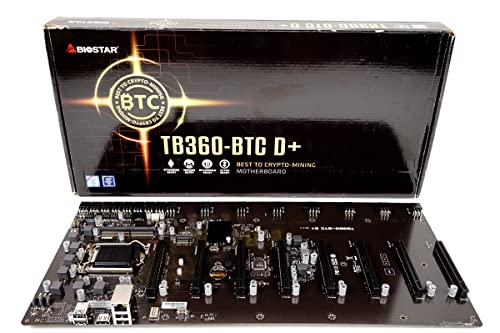
Biostar TB360-BTC D+ — The compact rig board
The D+ takes a different physical philosophy from everything else in this guide. Instead of a row of single-lane slots expecting risers, it arranges eight full-length PCIe slots with spacing intended for graphics cards mounted directly on the board, in a compact server-style layout — a design that trades the open-frame sprawl for a dense, engineered node. Direct mounting deletes the riser from the reliability equation entirely, which anyone who has troubleshot a six-card rig at 2 a.m. will recognise as a profound mercy: the most failure-prone component class in the genre simply leaves the build. The B360 chipset brings the same 8th and 9th generation CPU support as its Pro sibling.
Direct mounting imposes its own disciplines, and the board expects you to honour them. Cards must be chosen for the spacing — reference-style blower cards, which exhaust heat out of the case rather than into their neighbours, are the natural citizens of this layout, and thick multi-fan gaming cards will not physically coexist in adjacent slots. Airflow becomes a designed system, with intake and exhaust planned, rather than the open frame’s casual abundance. Power delivery is engineered for the concentrated load. What you receive in exchange is the most appliance-like six-card node in this guide: a board that can live in a proper enclosure, in a rack-adjacent space, in an office corner — places an open riser frame cannot politely go. For render and AI nodes that must share space with humans, that civility is the entire argument, and it is a strong one.
- Chipset: Intel B360, LGA1151 (8th/9th gen)
- Slots: 8 full-length PCIe, spaced for direct mounting
- Layout: compact, enclosure-friendly
- Cooling assumption: blower-style cards and planned airflow
- Form factor: compact ATX-class
Strengths
- Direct card mounting eliminates riser failures
- Enclosure-friendly density suits offices and shared spaces
- Same newer CPU support as the TB360 Pro
Trade-offs
- Thick open-air gaming cards cannot sit adjacently
- Airflow must be designed, not assumed
- Eight slots cap expansion below the slot-rich boards
Best for: tidy render and AI nodes in human spaces. Not suited for: builds using fat triple-fan cards from a gaming PC.

Biostar TB560-BTC Pro — The latest-chipset option
The TB560-BTC Pro is where the BTC lineage meets the youngest Intel platform in this guide: the B560 chipset, supporting 10th and 11th generation Core processors on LGA1200. That generational step matters for a 2026 buyer more than any slot count. The CPUs are newer, more efficient and far easier to buy with confidence; the platform’s memory and storage support is a step closer to contemporary; and the board itself is the most recent production design here, which counts when a board may run continuously for years. Twelve PCIe slots preserve the family talent, and Biostar’s multi-GPU BIOS experience carries over intact. If the assignment is “six graphics cards, new build, parts I can still source like a normal person,” this board is the guide’s answer.
Its modernity has a second, quieter benefit: resale and reuse. An LGA1200 platform with DDR4 remains intelligible to the broader used market, and a B560 board at the heart of a compute node today can retire into lesser duties tomorrow with its dignity intact. The caveats are the class’s caveats — lanes per slot remain modest by design, the board expects the Above-4G and link-speed rituals described earlier, and its youth means a thinner layer of folklore than the H110 classic enjoys. None of that outweighs the platform argument for a fresh build. The genre’s engineering matured across these five boards; the TB560 is simply the one whose surrounding ecosystem has aged least, and for most new six-card projects that is the deciding fact.
- Chipset: Intel B560, LGA1200 (10th/11th gen)
- Slots: 12 PCIe
- Memory: DDR4, dual channel
- Character: youngest platform in this guide
- Form factor: ATX
Strengths
- 10th/11th gen CPU support is easiest to source in 2026
- Newest production design for long continuous service
- Twelve slots with mature multi-GPU BIOS behaviour
Trade-offs
- Less community folklore than the mining-era classics
- Per-slot bandwidth remains modest, as the class dictates
- LGA1200 is itself a closed chapter for future CPUs
Best for: new six-card compute builds wanting the youngest platform. Not suited for: owners replacing a board inside an existing LGA1151 rig.
ASUS B250 Mining Expert — The famous name
No history of this category is complete without the Mining Expert, the board that announced how seriously a top-tier manufacturer took the mining boom: nineteen PCIe slots, a B250 chipset, triple power-supply connections with a startup sequencing feature, and a POST interface that showed the state of every slot on screen. It was part motherboard, part manifesto, and it remains the genre’s most recognisable artefact. We cover it prose-only, without a purchase link, because it sits outside the verified pool for this guide — and because its honest role in 2026 is as a benchmark of the era rather than a recommendation. Its platform is the oldest here, its slots outnumber any sane six-card brief threefold, and the examples circulating now have lived hard lives.
Its inclusion serves buyers as a calibration tool. When a listing elsewhere invokes the Mining Expert’s legend to sell an anonymous board, you now know what the genuine article actually was: a specific ASUS design with specific power engineering, not a generic compliment. And if you already own one — many survive — the guidance elsewhere in this guide applies to it fully: it will run a six-card compute node with the same BIOS rituals, the same riser discipline and the same honest workload economics. Fame, in motherboards as elsewhere, is a poor substitute for fit; the five linked boards above each beat it for a defined modern purpose, which is exactly what a benchmark is for.
- Chipset: Intel B250, LGA1151 (6th/7th gen)
- Slots: 19 PCIe — the genre’s record of its era
- Power: support for multiple PSUs with sequenced startup
- Status: historical benchmark, covered without a link
- Form factor: ATX
Strengths
- Legendary slot count and multi-PSU engineering
- Slot-state POST diagnostics ahead of its time
- Surviving examples still serve existing owners well
Trade-offs
- Oldest platform in this guide
- Used examples have typically lived demanding lives
- Nineteen slots answer a question six-card buyers never ask
Best for: existing owners and category historians. Not suited for: new builds, where the five linked boards serve better.
How Do the Six Compare Side by Side?
| Pick | Platform | Slots | Defining idea |
|---|---|---|---|
| ASRock H110 Pro BTC+ | LGA1151, 6th/7th gen | 13 | The proven classic |
| ASRock Q270 Pro BTC+ | LGA1151, 6th/7th gen | 13 | Business-chipset stability |
| Biostar TB360-BTC Pro | LGA1151, 8th/9th gen | 12 | Younger LGA1151 |
| Biostar TB360-BTC D+ | LGA1151, 8th/9th gen | 8 full-length | Direct-mount density |
| Biostar TB560-BTC Pro | LGA1200, 10th/11th gen | 12 | Youngest platform |
| ASUS B250 Mining Expert | LGA1151, 6th/7th gen | 19 | The historical benchmark |
Two columns decide most purchases: platform, because it dictates your CPU shopping, and mounting philosophy, because the D+ board’s direct-mount density is a different machine from the riser frames the others expect. Slot count, beyond six plus breathing room, is the least important number on the page — a truth the genre’s marketing never volunteered.
How Do You Bring Six Cards Up Without Losing a Weekend?
The professional method is incremental, and its boredom is its virtue. Build the board on a bench with CPU, one stick of memory and integrated graphics first; enter the BIOS and set the multi-GPU configuration before any card arrives — Above 4G Decoding enabled, PCIe link speeds set to Gen1 or Gen2 for riser work, onboard devices you will not use disabled, boot display directed to the integrated GPU so the screen never depends on a card you are troubleshooting. Update the BIOS if the manufacturer lists multi-GPU fixes, reading the notes rather than the version number. Only when the bare board boots reliably do cards enter, one at a time, with a boot and a device check between each. The builder who adds six cards at once and meets a black screen owns six suspects; the builder who adds them singly owns, at worst, one.
Power discipline runs alongside. Calculate the rig’s full-load draw honestly — six cards under compute load, plus platform overhead — and keep sustained draw comfortably within the supply’s rating, remembering that a supply run at its edge ages loudly and dies early. Feed the board’s auxiliary PCIe power connectors as its manual directs; they exist to keep slot and riser power stiff under combined load. If the design calls for a second supply, use the sequenced or synchronised startup method the board or a proper adapter provides rather than improvising with paperclips as a lifestyle. Cable-gauge and connector quality matter at these currents: warm connectors are information, and the correct response is to stop and fix, not to note it and continue.
Software bring-up mirrors the hardware patience. Install the operating system and drivers with the cards present but the workload absent; confirm every card enumerates, reports sane temperatures and holds its clocks under a short, watched load test, one card’s fans at a time if the software allows. Set fan curves and power limits deliberately for the workload — compute nodes often run best with cards power-limited modestly, trading a sliver of throughput for large gains in heat, noise and longevity. Only then install the actual workload, and keep the first full run supervised. A rig brought up this way tends to stay up; a rig rushed tends to introduce you to every lesson in this section personally, at night, in order.
What Mistakes Do Multi-GPU Builders Keep Making?
The founding mistake is financial rather than technical: building a six-card rig on a profitability promise copied from a previous era’s video. The hardware in this guide is good; the arithmetic that once justified it is gone, and no motherboard restores it. Buy for workloads whose value you control — renders delivered, models run, research contributed — and the rig is an asset; buy for speculative income and it is a wager wearing a motherboard’s clothes. The second mistake is platform blindness: ordering a board before confirming which CPUs it accepts and whether you can still buy one sensibly. In a legacy class, the CPU, memory generation and board are a single purchase decision, not three.
Technical classics follow. Skipping the one-card-at-a-time bring-up converts a ten-minute diagnosis into a weekend. Buying the cheapest risers on the marketplace installs the failure before the first boot. Ignoring the board’s auxiliary power connectors starves slots precisely when all six cards load together, producing instability that masquerades as driver trouble. Mounting thick gaming cards in a direct-mount board, or starving an open frame of intake air in a hot room, cooks hardware that specification sheets said was compatible. And the quietest mistake: running a continuous multi-kilowatt-hour habit without ever reading the electricity tariff — compute has a running cost, and honest builders price it into the project from the start rather than discovering it on a quarterly bill.
How Should You Think About Power, Heat and Running Costs?
Six graphics cards under sustained compute load draw as much power as a small space heater, and they convert essentially all of it into heat in one room. That sentence, fully absorbed, prevents most multi-GPU disappointments. Begin with the electrical supply: a rig drawing well over a kilowatt continuously deserves a circuit that is not simultaneously feeding a kettle and a microwave, and in older housing the honest move is to know which outlets share a breaker before the rig teaches you. Power supplies should be sized so the rig’s sustained load sits in the efficient, quiet middle of the unit’s range rather than at its screaming edge, and the difference between a reputable unit’s rating and a bargain unit’s optimism is measured, eventually, in stability.
Heat is the second budget. A room gains the rig’s entire wattage as warmth — welcome in a January workshop, oppressive in a July bedroom. Open frames radiate into the room and rely on the room itself as the cooling system; the direct-mount D+ design concentrates exhaust where ducting or a case’s airflow can carry it away deliberately. Either way, plan the heat’s destination as consciously as the power’s origin. Cards themselves live longer and boost steadier when their intake air is cool, so spacing on riser frames and blower choices in dense boards are thermal decisions wearing mechanical clothes. Dust, the silent third party, accumulates fastest exactly where fans work hardest; a rig intended to run for months needs a cleaning rhythm, because a felted heatsink quietly converts a stable node into a throttling one.
Running costs close the loop. Multiply the rig’s measured draw — measure it at the wall with an inexpensive meter rather than trusting component arithmetic — by your tariff and by the hours you truly intend to run, and write the monthly figure into the project plan. For bursty render and AI work the number is usually a pleasant surprise; for continuous operation it is a serious line item that deserves the same respect as the hardware budget. Builders who do this arithmetic in advance keep their rigs for years. Builders who skip it meet the number anyway, later and with worse feelings.
Which Workloads Scale Across Six Cards — and Which Quietly Do Not?
Parallelism has a personality, and matching it to the hardware is the intellectual core of this entire category. Workloads that scale beautifully share a shape: many independent jobs, each fitting on one card, with modest data movement between them. Rendering separate frames of an animation is the archetype — frame 114 does not care about frame 115, so six cards simply finish the queue six times sooner, and render engines have supported this pattern for years. Batch image generation, offline video transcode queues, password-audit and scientific parameter sweeps share the shape. Folding and distributed research were designed for it from first principles, slicing work into units sized for exactly this kind of volunteer hardware.
The awkward middle ground is single large jobs that can be split with effort. Training or fine-tuning a model across several consumer cards works, and the local-AI community’s tooling improves monthly, but the cards cooperate through frameworks that tolerate the modest interconnect these boards provide; expectations should be set at “a capable personal cluster” rather than “a datacentre in a frame.” Inference for one user is simpler — a model lives on one card or is sharded with the understanding that bandwidth sets the ceiling. The workloads that genuinely do not scale are the tightly coupled ones: simulations where every card must exchange state with every other at every step, and anything whose software simply assumes one GPU. A five-minute investigation of your specific software’s multi-GPU behaviour, before purchase, is worth more than any specification in this guide.
There is also a human scaling limit worth naming. Each card is a driver entry, a temperature to watch, a fan that will someday be the loud one. Six is the class sweet spot partly because one person can hold a six-card rig’s whole state in their head — which card runs warm, which riser was replaced in March, which slot prefers Gen1. Beyond it, rigs become administration. The boards here can host more; the guide’s six-card brief is a judgement about sustainable ownership as much as about hardware.
How Do You Buy a Legacy-Platform Board Safely?
Every board in this guide belongs to a platform Intel has finished with, which changes the buying craft. New stock exists but circulates alongside used boards, refurbished boards and boards of creative provenance, and the buyer’s first skill is verification: purchase the genuine manufacturer’s product from a listing that names it exactly, check the board on arrival against the maker’s photographs — slot layout, silkscreen, connector placement — and be suspicious of any deal whose discount has no explanation. The linked picks in this guide are verified listings for precisely this reason; in a category where famous names are borrowed, the listing’s authenticity is a specification.
Inspect a used or new-old-stock board like a mechanic, not a fan. Capacitors should stand flat and uncrowned; PCIe slot contacts should be bright and unbent; the socket’s pins — the most fragile acreage on any Intel board — deserve a magnified look before the CPU goes anywhere near them, because one bent pin converts a bargain into a sculpture. Ask after the board’s previous life if the seller permits: a board that supervised a render node and a board that ran three summers in a garage mining operation have had different decades, whatever the calendar says. Keep the accessories question explicit too — I/O shields, SATA cables and manuals are small things that become errands when absent.
Finally, stage the whole platform purchase as one decision. Board, compatible CPU, DDR4 memory and an adequate power supply should be chosen together, with the CPU’s generation checked against the chipset twice — the three LGA sockets across these six picks look similar in listings and accept nothing in common. Buyers who assemble the platform on paper first, then order once, avoid the particular misery of a beautiful board waiting a month for the one processor generation it speaks to.
Open Frame, Case or Rack — Where Should Six Cards Live?
The classic answer is the open frame: a skeleton of aluminium extrusion that holds the board flat, the power supply beside it and six cards upright on risers like toast in a rack. Its virtues are thermal honesty and access — every connector reachable, every card swappable in minutes, heat rising away unimpeded. Its costs are presence and vulnerability: an open rig is a machine exposed, gathering dust directly onto its boards, radiating its fan noise into the room without mediation, and presenting curious fingers, pets and spilled drinks with opportunities a case would deny. Frames belong in workshops, spare rooms and dedicated corners where the rig is infrastructure rather than furniture.
The enclosed alternative exists precisely for shared spaces, and in this guide it wears the D+ board’s face: direct-mounted cards in a case with deliberate airflow, blower cards exhausting at the rear, intake filtered against dust. Density rises and service slows — a card swap becomes a small ceremony — but the machine gains the right to live in an office, a studio or a living room without apologising. Purpose-built mining cases with rows of case fans occupy the middle ground, enclosing a riser layout at the cost of considerable noise. The deciding question is social as much as thermal: who shares air with this machine? Answer that honestly and the housing chooses itself, after which the board choice in this guide follows — riser boards for frames, the D+ for enclosures.
Whichever housing you choose, give the rig a stable, level, non-flammable surface, clearance on every side its airflow touches, and a power feed you would trust with a heater — because thermally and electrically, that is the appliance you have built. Cable management in a rig is not vanity; a loom resting against a card’s backplate is a heat and chafing problem on a schedule. Ten minutes with zip ties at build time is the cheapest reliability in the entire project.
When a Card Disappears — A Short Troubleshooting Field Guide
Every multi-GPU owner eventually boots to five cards where six slept, and the calm sequence matters more than any single trick. First, establish whether the missing card is missing from the operating system entirely or merely from the workload — a card visible to the system but idle in the application is a software configuration story, not a hardware one. Second, reseat the obvious: the riser’s connections at both ends and the card in its riser, with power fully off, because vibration and thermal cycling walk connectors out over months. Third, swap the riser with a known-good spare before suspecting the card — the field’s statistics are unambiguous about which component fails most, and a spare riser kit is the multi-GPU owner’s equivalent of a spare tyre.
If the card still hides, move it to a slot that currently works. A card that appears in the good slot was innocent — the original slot, its riser or its power feed is the story. A card that stays invisible everywhere it travels has told you its own news. BIOS settings enter the diagnosis after hardware exoneration: confirm Above 4G Decoding survived any BIOS reset, confirm link speeds still match the riser plan, and check whether a recently added device consumed resources the sixth card needed. Power closes the loop — a supply ageing out of its promises often first confesses under full load by dropping the furthest card, so test with the workload running, not at idle, before declaring the mystery solved. Worked in this order, nearly every disappearance resolves within the hour, and the rig’s journal — you are keeping one, after the bring-up section’s advice — gains the entry that makes the next occurrence a five-minute affair.
Could a Normal Motherboard With Splitters Do the Same Job?
Every multi-GPU forum eventually hosts the question, because PCIe splitter cards that turn one slot into four are cheap and the arithmetic looks tempting: take a gaming board, add splitters, host six cards, save the difference. The honest answer is that it can work, sometimes, for some workloads, and that the saving buys a specific kind of fragility. Splitters depend on PCIe bifurcation support in the BIOS — a feature many consumer boards omit or implement partially — and on the chipset lanes behind the donor slot being arranged exactly as the splitter expects. When the stars align, the system boots and computes; when they do not, the failure modes are intermittent in the way that consumes weekends, because the board, the splitter and the BIOS were never tested together by anyone.
The BTC boards in this guide exist as the tested alternative to that improvisation. Their makers validated the slot population as the product’s central promise, wrote the BIOS around it, and published the settings. For a hobbyist whose project is the rig itself, the splitter path is a legitimate adventure and the forums will welcome the write-up. For a builder whose project is the work the rig performs — the renders, the models, the research — the dedicated board’s premium is payment for the troubleshooting already done. Decide which project you are actually running, and the choice between this guide’s boards and the improviser’s path makes itself without rancour in either direction.
Final Recommendation
Choose by platform and by room. For a new build, the Biostar TB560-BTC Pro’s LGA1200 foundation is the easiest ecosystem to buy into now, with the TB360-BTC Pro as its LGA1151 counterpart for 8th and 9th generation parts. For replacements inside existing rigs, the ASRock pair remain the faithful answers, the Q270 for stability-first operators and the H110 Pro BTC+ as the documented classic. If the node must live politely among people, the TB360-BTC D+ and a set of blower cards build the only genuinely civilised machine here. And let the ASUS stand as the reminder of what this class was — engineering in service of a boom that ended — while your own build serves the workloads that remain: rendering, local AI, research and the satisfaction of hardware fully used. Buy the board for the work you can name, and six cards will earn their electricity.
Frequently Asked Questions
Can I still make money mining with six GPUs?
Realistically, no — not as a plan. The major mineable coins of the GPU era have gone, and what remains rarely covers electricity at household tariffs, let alone hardware costs. Anyone who mines now does so speculatively or for the waste heat, with open eyes. This guide recommends these boards for compute workloads whose value does not depend on coin prices.
Will six GPUs make my games faster?
No. Modern games use one graphics card, and multi-GPU gaming support has effectively ended. Six cards serve parallel compute — rendering batches, AI workloads, distributed research — where independent jobs run side by side. A gaming buyer should spend the same money on one excellent card and a standard motherboard.
Why do these boards have so many single-lane slots?
Because desktop platforms have limited lanes, and the target workloads — mining historically, batch compute today — move little data per card once loaded. One lane each lets a board host many cards for parallel work. Workloads needing constant high-bandwidth card-to-card traffic are the wrong fit and belong on workstation platforms.
What CPU should I pair with a six-GPU board?
The humblest compatible one that is easy to source: the CPU supervises rather than computes in these rigs, so a low-power dual or quad core of the board’s supported generation is the classic choice. Check the pick’s chipset — the boards here span three Intel generations, and the CPU must match the socket exactly.
Do I need a special power supply?
You need an honest one, sized with headroom over the rig’s true full-load draw, from a maker whose ratings mean something. Some boards support multiple supplies for very large rigs. Connect the board’s auxiliary PCIe power inputs as directed, use quality cables, and treat any warm connector as a stop-and-fix signal.
Are risers really that unreliable?
Risers are the most failure-prone part of an open-frame rig, varying wildly in quality because they are cheap, unbranded and electrically busy. Buy reputable ones, keep spares, and replace any that misbehave rather than coaxing them. Alternatively, the TB360-BTC D+ in this guide removes risers from the design entirely by mounting cards directly.
Can I mix different graphics card models on one board?
For the workloads this guide recommends, yes — batch rendering, research computing and most local AI tools happily assign work to dissimilar cards, with throughput simply following each card’s ability. Mixing becomes awkward only where software insists on identical devices or where driver generations diverge so far that one installation cannot serve both. When in doubt, check your specific application’s multi-GPU notes; the board itself is agnostic, and that indifference is one of the class’s quiet strengths for builders assembling nodes from the used market’s variety.
How many watts does a six-GPU rig actually draw?
It depends entirely on the cards and the workload, but the honest planning method is to sum each card’s realistic sustained draw under your workload — not its peak specification — add the platform’s share, and then keep that total comfortably inside the power supply’s rating with headroom for transients. Measure the finished rig at the wall with a plug-in meter during its heaviest real job; that single number, multiplied by your tariff and your intended hours, is the rig’s true running cost and the figure your project plan should carry.
Related Guides
Round out the build with our guides to the best 3D printer motherboards, the best $100 PC cases and the best motherboards for modern gaming PCs.



[…] building with our guides to the best motherboards for gaming PCs, the best 6 GPU motherboards and the best PC cases under a hundred […]