What's inside
- Key Takeaways
- Quick Picks
- How Did We Choose Headsets for Shared Classroom Use?
- Why Does the Microphone Matter More Than the Speakers Here?
- Which Connector and Design Fits Your School’s Devices?
- Classroom Headsets With Microphones Compared by Connector and Controls
- How Should a Teacher Set Up a Headset Lesson That Actually Works?
- What Mistakes Do Schools Make When Buying Classroom Headsets?
- How Do You Keep a Shared Fleet Alive for Years?
- How Do Headsets Affect Fairness in Reading and Language Assessment?
- What Should Special Education and Speech Services Look For?
- How Does a Language Lab Use Headsets Differently From a Classroom?
- What Belongs in a School’s Headset Procurement Plan?
- How Should Headsets Be Handled During Standardised Testing?
- What About Libraries, Media Centres and After-School Programmes?
- How Do You Teach Thirty Children to Care for Shared Equipment?
- What Should a Parent Buying One Headset for Home Learning Choose?
- How Will the USB-C Transition Play Out in Schools?
- What Does a Good Pilot Test Look Like in Practice?
- How Should Volume Be Managed for Young Listeners?
- Why Do These Old Designs Keep Winning School Tenders?
- What Happens When a Headset Model Is Discontinued Mid-Fleet?
- How Do Headsets Support Early Readers Differently From Older Students?
- What Should IT Staff Check Before a District-Wide Rollout?
- How Do Headsets Fit Into a School’s Sustainability Reporting?
- What Does the First Week With a New Fleet Teach?
- How Should Teachers Handle the Student Who Always Breaks Headsets?
- A Note on Teachers’ Own Headsets
- How Do You Budget When Enrolment Itself Is Moving?
- One More Test: The Substitute Teacher Day
- And a Word on Storage Furniture
- Closing Perspective: The Headset as Classroom Furniture
- A Brief Note on Sound and Focus in Busy Rooms
- One Last Check Before the Order Goes In
- And Remember the Spare Drawer
- Final Recommendation
- Frequently Asked Questions
- Related Guides
As an Amazon Associate I earn from qualifying purchases. This post may contain affiliate links at no extra cost to you.
widgetverdict.com is reader-supported. When you buy through links on our site, we may earn an affiliate commission.
Where to buy: classroom headsets are institutional purchases as much as personal ones, so the picks below are the durable wired models schools buy repeatedly — each sold singly here, with the fleet and multipack conversation handled honestly in the text.
The best headsets with mics for classroom setting share a personality: wired, tough, simple enough for a seven-year-old to use and a teacher to troubleshoot, with a microphone that makes a child’s voice clear to the software listening on the other side. Classrooms use headsets for reading assessments, language learning, speech practice, testing and video lessons, and in every case the educational value rides on two unglamorous things — whether the microphone captures a quiet young voice accurately, and whether the headset survives being shared by thirty children across a school year. The six models here are the education market’s long-serving answers: two Logitech staples and a trio of Cyber Acoustics classroom specialists, plus an Andrea Communications design built around its noise-cancelling microphone.
The great dividing line in this group is the plug. The Logitech H111 uses a 3.5mm jack, the universal socket found on tablets, Chromebooks, laptops and older machines alike. The rest use USB in two flavours — USB-A on the H390, both Cyber Acoustics AC-5008A and AC-4006, and the Andrea — and USB-C on the Cyber Acoustics AC-5014, matching the port direction of newer laptops and tablets. Choosing a classroom fleet is therefore first an inventory exercise: count your devices’ ports before you count your headsets, because a brilliant headset on the wrong connector is a donation to the cupboard.
A note on packs: schools commonly buy these models in classroom multipacks, and one pick — the Cyber Acoustics AC-5008A — is the single-unit version of a line that also sells in bulk for schools. We list the single unit as the pick so the model can be evaluated on its merits; the bulk conversation belongs in your procurement plan, and we discuss it openly below rather than pretending a class set arrives one headset at a time.
Key Takeaways
- Connector comes first: 3.5mm for universal fit, USB-A for the installed base, USB-C for newer fleets.
- Every pick is wired — no batteries, no pairing, nothing to charge before a lesson.
- Noise-cancelling microphones matter because classrooms are loud and children’s voices are quiet.
- In-line volume and mute controls let teachers manage a room without touching thirty computers.
- Several picks use substantial recycled plastic content, stated by their makers.
- Buy for shared use: durability, cleanability and replaceable simplicity beat features.
Quick Picks
| Pick | Badge | Why it earns its place |
|---|---|---|
| Logitech H111 | The universal 3.5mm staple | A stereo headset with a noise-cancelling mic and the jack that fits nearly every school device. |
| Logitech H390 USB Headset | The USB-A veteran | A long-serving wired USB-A headset with a noise-cancelling microphone for PC-based work. |
| Cyber Acoustics AC-5008A | The classroom-controls pick | USB-A with in-line volume and mute, built for classroom or home and made with 60% recycled plastic. |
| Cyber Acoustics AC-4006 | The K-12 durability pick | A USB-A stereo headset designed and messaged specifically for K-12 classrooms. |
| Cyber Acoustics AC-5014 USB-C | The USB-C fleet pick | USB-C connection for PC, Mac, tablets and phones, with in-line volume and mute controls. |
| Andrea Communications NC-255VM | The microphone specialist | An on-ear USB headset built around Andrea’s noise-cancelling microphone technology. |
How Did We Choose Headsets for Shared Classroom Use?
We applied the fleet test: imagine thirty units arriving in September and ask what February looks like. That favoured wired models exclusively — a charged battery is a lesson plan waiting to fail — and connectors matched to real school device fleets rather than to novelty. Microphone quality was judged by purpose: these headsets feed reading software, language apps and video calls that must understand children, whose voices are higher, quieter and less consistent than the adults most headsets are designed around. A noise-cancelling boom that rejects the classroom’s ambient roar while catching a small voice at close range is the core technology of the whole category.
Controls came next. In-line volume and mute, present on several picks, are classroom management tools disguised as conveniences: a teacher can walk a row and correct levels without opening a single settings panel, and a student can mute before coughing into a recording. Finally, we valued institutional honesty — makers who state their recycled content, design for K-12 explicitly, and sell the same model for years, because a school standardising on a headset needs next year’s replacements to match this year’s fleet. Teachers coordinating larger groups under noise will recognise a cousin problem in Best Wireless Walkie Talkies With Headsets, where earpiece clarity carries the same burden outdoors.
Why Does the Microphone Matter More Than the Speakers Here?
In most headset categories the listener is the customer; in a classroom, the listener is often software. Reading assessments score a child’s fluency from the microphone’s capture, language apps judge pronunciation from it, and speech-to-text tools transcribe from it. A muddy microphone does not merely sound bad — it marks a child wrong. That is why every pick here carries a noise-cancelling microphone and why boom position deserves a place in the first lesson of the year: a mic at the corner of the mouth, a finger’s width away, captures the voice and rejects the room, while a mic left pointing at the ceiling captures the room and apologises for the voice.
The speakers still matter — a child must hear the prompt clearly to answer it — but classroom audio content is speech, not cinema, and every pick here reproduces speech comfortably. Spend your evaluation time where the educational risk lives: record a quiet student reading at normal effort, play it back, and judge whether the words arrive intact. That thirty-second test predicts a year of assessment accuracy better than any specification.
Which Connector and Design Fits Your School’s Devices?
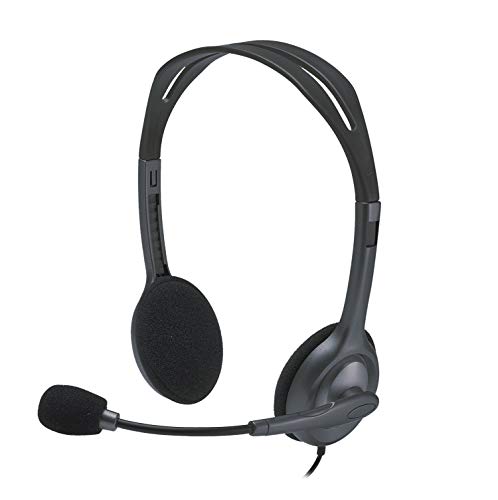
Logitech H111 — The universal 3.5mm staple
The H111 is the headset equivalent of the pencil: a stereo design with a noise-cancelling microphone, an adjustable headband and a single 3.5mm jack that plugs into nearly everything a school owns — tablets, Chromebooks, laptops, desktops and the mixed archaeology of a real device cupboard. That universality is its superpower in institutions where the fleet spans a decade of procurement. A teacher can move an H111 from a tablet cart to a desktop without an adapter, a thought, or a ticket to IT.
The trade is the analogue world’s informality: a 3.5mm connection carries no in-line digital controls story and depends on the device’s own volume settings, and very new tablets that dropped the jack entirely are outside its world. But for the mixed fleets most schools actually run, the H111’s simplicity is the feature. It is also the natural home-learning pick, because the same jack waits on the family laptop. Buy it where universality outranks standardisation.
- Connector: 3.5mm audio jack
- Microphone: noise-cancelling, adjustable boom
- Fit: adjustable headband, stereo ear cups
- Compatibility: multi-device per the listing
Strengths
- One jack serves the whole mixed device fleet.
- Dead simple for young students to use.
- Moves between school and home devices freely.
Trade-offs
- Jack-less newest tablets cannot host it.
- No in-line volume or mute controls.
- Analogue quality depends on the device’s audio.
Best for: a school with a mixed-age device fleet needing one headset model that plugs into everything.
Not suited for: a newly standardised USB-C-only fleet, because the 3.5mm plug would need adapters at every seat.
The H111’s simple specification is set out on its Amazon listing.

Logitech H390 USB Headset — The USB-A veteran
The H390 has been the default wired USB headset in offices and schools for so long that its silhouette is a genre. For classrooms, its virtues are the digital connection’s consistency — USB audio behaves the same on every PC, bypassing flaky analogue jacks — and a noise-cancelling microphone that generations of teachers have trusted for calls and recordings. Padded comfort matters in its context too: older students in longer lab sessions, language classes and exam practice wear a headset for extended stretches where the H111’s lighter build can start to press.
USB-A is its boundary. A fleet that has moved to USB-C-only laptops strands the H390 behind adapters, which in a classroom means behind losses and breakage. Schools with a stable Windows or Chromebook USB-A estate, though, can standardise on the H390 with the confidence of a model that will still be sold, identically, when replacements are needed in three years — a procurement virtue that flashier models rarely offer.
- Connector: USB-A wired
- Microphone: noise-cancelling design
- Use: PC-based lessons, calls and meetings
- Fit: padded headband and ear cups
Strengths
- USB audio is consistent across every PC.
- Padded fit suits longer lab sessions.
- A model schools can re-order identically for years.
Trade-offs
- USB-C-only devices need adapters.
- Padding absorbs more classroom grime over time.
- Less universal than the 3.5mm H111.
Best for: a PC-lab school standardising on USB-A for assessments and language software.
Not suited for: a tablet-first primary school, because USB-A hosts are scarce among its devices and adapters vanish weekly.
See the H390’s long-standing specification on its Amazon page.

Cyber Acoustics AC-5008A — The classroom-controls pick
The AC-5008A is designed from the classroom outward: USB-A connection, in-line volume and mute controls on the cable, and construction using 60% recycled plastic as stated by the maker. The in-line controls are the headline for teachers — a student can be muted before a recording, a too-loud prompt can be tamed at the cable rather than in a settings menu, and the teacher’s row-walk becomes an audio management pass. Cyber Acoustics builds for the education channel specifically, and this model’s line also appears in school multipacks; the pick here is the single unit, which suits evaluation purchases, replacements and home learners matching the school model.
That multipack context deserves the honest framing the brief demands: a school equipping a grade level will likely buy this family in bulk through education channels, and should — the single listing is how a teacher tests the model, replaces a casualty, or sends the same headset home with a student for remote days. Either way, the hardware virtues are identical: controls where small hands and busy teachers can reach them, and a build intended to be bought by the dozen.
- Connector: USB-A wired
- Controls: in-line volume and mute
- Materials: 60% recycled plastic per the maker
- Audience: classroom or home per the listing
Strengths
- In-line mute serves recording lessons perfectly.
- Education-channel design and multipack lineage.
- Recycled content supports school sustainability goals.
Trade-offs
- USB-A only, so newer fleets need the C sibling.
- In-line pod is one more part small hands can fiddle with.
- Single-unit buying is poor economics at fleet scale.
Best for: a teacher equipping a USB-A classroom who wants mute and volume control at every seat.
Not suited for: a school standardising on USB-C devices this year, because its connector generation has already moved to the AC-5014’s world.
The AC-5008A’s controls are detailed on its Amazon listing.

Cyber Acoustics AC-4006 — The K-12 durability pick
The AC-4006 speaks the plainest language in the group: a USB-A stereo headset with a microphone, made with 60 percent recycled plastic, described by its maker as durable and designed for crisp communication in K-12 classrooms or at home. That explicit K-12 framing matters because it signals design priorities a general headset does not share — surviving backpacks, shared bins, daily disinfection wipes and the occasional drop from desk height onto hard floors. In a category where the buyer is an institution, a maker who designs for the institution’s actual abuse profile is worth more than a longer feature list.
Against its sibling, the AC-4006 is the simpler proposition: where the AC-5008A adds in-line controls, the AC-4006 concentrates on the headset itself. Schools choosing between them should ask a management question — do our lessons need seat-level mute and volume, or do our teachers run audio from the device? — and let the answer, not habit, pick the model. Either way the family resemblance keeps a mixed fleet coherent for spares and replacements.
- Connector: USB-A wired
- Audience: K-12 classrooms or home per the listing
- Materials: 60 percent recycled plastic stated
- Design: durability-led stereo headset with mic
Strengths
- Purpose messaged and built for K-12 sharing.
- Simple design leaves little to break or mis-set.
- Family spares coherence with sibling models.
Trade-offs
- No in-line controls for seat-level management.
- USB-A limits it to the older port estate.
- Plain styling will not excite older students.
Best for: a district buying durable, simple USB-A headsets for shared elementary and middle-school fleets.
Not suited for: a language lab whose lessons depend on per-seat mute discipline, because the controls that define that workflow live on the AC-5008A instead.
The AC-4006’s education specification is on its Amazon page.

Cyber Acoustics AC-5014 USB-C — The USB-C fleet pick
The AC-5014 is the family’s answer to the port transition: a USB-C headset for PC, Mac, tablets and phones, with in-line volume and mute controls and the same 60% recycled plastic construction. As schools refresh fleets, USB-C has become the port that survives across device classes — the same connector on the new Chromebook, the teacher’s laptop and the tablet cart — and a headset that follows the port inherits that universality for the next procurement cycle. The in-line controls carry over the AC-5008A’s classroom management virtues into the new connector world.
Buying USB-C headsets for a mixed fleet still needs an adapter plan for the USB-A stragglers, and schools mid-transition often run both siblings — AC-5008A on the old cart, AC-5014 on the new — which the shared design language makes painless for students moving between rooms. For a school buying fresh today with devices from the last few years, this is the natural standard-bearer of the group.
- Connector: USB-C wired
- Controls: in-line volume and mute
- Compatibility: PC, Mac, tablets and phones stated
- Materials: 60% recycled plastic per the maker
Strengths
- USB-C matches the newest cross-device fleets.
- In-line controls preserve classroom management.
- Sibling coherence eases mixed-fleet transitions.
Trade-offs
- Older USB-A devices need adapters.
- Small USB-C plugs are easier for young hands to bend.
- Fleet pricing still favours bulk channels.
Best for: a school refreshing to USB-C devices that wants one headset standard for the next cycle.
Not suited for: a school whose estate is entirely USB-A desktops, because every seat would run an adapter the AC-5008A makes unnecessary.
Check the AC-5014’s device list on its Amazon listing.

Andrea Communications NC-255VM — The microphone specialist
Andrea Communications built its name on microphone technology for speech recognition, and the NC-255VM carries that heritage into an on-ear USB headset with a noise-cancelling microphone and in-line volume and mute controls. In classroom terms, this is the pick for the use case where capture quality is the curriculum: speech practice, reading fluency software, dictation and language assessment, where the software’s judgement of a child depends entirely on the microphone’s discrimination between a small voice and a loud room. Andrea’s noise-cancelling pedigree is the reason this model persists in education catalogues alongside larger brands.
The on-ear fit differs from the over-ear cups elsewhere in the group — lighter on the head, less isolating, quicker to put on and take off in short activity rotations. Students who find full cups hot or enclosing across a long assessment may prefer it; students in genuinely loud rooms may miss the cups’ passive shelter. It is the specialist’s trade, and schools running speech-heavy programmes should audition this model first rather than last.
- Connector: USB wired connection
- Microphone: noise-cancelling, speech-focused design
- Controls: in-line volume and mute
- Fit: on-ear stereo design
Strengths
- Microphone pedigree serves speech software best.
- On-ear lightness suits shorter activity rotations.
- In-line controls support teacher-managed sessions.
Trade-offs
- On-ear fit isolates less in loud rooms.
- Specialist brand means fewer fleet discounts.
- USB connection skips jack-only tablets.
Best for: a speech, language or reading-fluency programme where microphone capture decides the results.
Not suited for: a noisy open-plan learning space, because the on-ear design admits more of the room than the cupped models shut out.
The NC-255VM’s microphone story is told on its Amazon page.
Classroom Headsets With Microphones Compared by Connector and Controls
| Pick | Connector | In-line controls | Best classroom role |
|---|---|---|---|
| Logitech H111 | 3.5mm jack | Not stated in the listing | Mixed fleets and tablets |
| Logitech H390 | USB-A | See listing for layout | PC labs and longer sessions |
| Cyber Acoustics AC-5008A | USB-A | Volume and mute | Managed classroom seats |
| Cyber Acoustics AC-4006 | USB-A | Device-managed | Shared K-12 fleets |
| Cyber Acoustics AC-5014 | USB-C | Volume and mute | New-generation fleets |
| Andrea NC-255VM | USB | Volume and mute | Speech and language work |
The table reduces the decision to its honest skeleton: your devices’ ports choose the column, your lesson style chooses the controls, and the microphone chooses itself by what your software must understand. Households setting up a single learner at home can cross-check the listening side with Best Headsets to Use With TV, where personal-volume headsets solve the evening version of the same clarity problem.
How Should a Teacher Set Up a Headset Lesson That Actually Works?
Stage the routine before the content. Headsets live in a numbered bin or hang on numbered hooks, each matched to a seat or a student, because a headset whose home is known gets returned, untangled and inspected by habit. The first lesson of the year teaches three physical skills: how to wear the band so the boom reaches the mouth’s corner, how to find mute and volume by touch, and how to coil the cable loosely rather than wrapping it around the cups — the single habit that decides whether a fleet survives to spring. Then run a thirty-second recording test on every seat: each child reads one sentence, the teacher spot-checks three playbacks, and faulty units are swapped before they can corrupt an assessment.
During the lesson, the in-line controls earn their keep. Agree the signals in advance — mute light etiquette, volume norms, hands-up instead of shouting across the room with a live mic — and the technology disappears into the teaching. Pilots learning a louder discipline follow the same principle in Best Headsets for Flight Training: master the audio routine on the ground so it never competes with the lesson in the air.
What Mistakes Do Schools Make When Buying Classroom Headsets?
Buying the connector they wish they had tops the list — a USB-C fleet purchase for a school whose devices are still USB-A, or a case of 3.5mm headsets for tablets that quietly dropped the jack. Count ports on the actual carts, not the procurement plan. The second mistake is evaluating with an adult voice in a quiet office; the product’s real test is a shy eight-year-old in a room of thirty, so pilot with children, in class, on the actual software. Third, schools underbuy: a fleet sized exactly to enrolment has no answer for the headset that fails on assessment morning, and a small buffer of spares is cheaper than a rescheduled test window.
Fourth, hygiene gets forgotten until the first illness wave — shared headsets need a wipe-down protocol, and models should be chosen partly on how their surfaces tolerate it. Fifth, buyers chase wireless for tidiness and inherit charging rotas, pairing failures and batteries dying mid-assessment; the wired picks here are not a compromise but the professional consensus for shared fleets. Finally, schools forget the home link: when remote days happen, a student whose home device matches the school headset’s connector has a working lesson, and one whose does not has an excuse.
How Do You Keep a Shared Fleet Alive for Years?
Treat headsets as a managed asset with a small system around them. Number every unit, log faults against numbers, and retire casualties for parts rather than letting them circulate as the class’s least-loved spares. Inspect cables monthly at the two failure points — the plug and the cup entry — because classroom cables die by bending, not by age. Store headsets hanging or binned loosely, never under books in a cupboard, and keep one lesson a year for re-teaching the coiling habit to new students. Budget a modest annual replacement line so casualties are swapped without a procurement drama; a fleet maintained this way delivers the same model, the same controls and the same microphone behaviour to every cohort, which is exactly what assessment fairness wants.
How Do Headsets Affect Fairness in Reading and Language Assessment?
An assessment is only fair if every child is heard under the same conditions. When one seat’s headset has a tired microphone and the next seat’s is fresh, the software is effectively grading two different instruments. That is why fleet discipline — same model, same boom position taught, same recording test before the window opens — is an equity practice and not merely tidiness. Teachers preparing for a fluency assessment should run the thirty-second sentence check on every seat the week before, swap any unit whose playback sounds thin or distant, and keep two tested spares in the room on the day. The children will never know this happened, which is the point: the technology’s job in assessment week is to be beneath notice.
The same logic governs pronunciation scoring in language software. A noise-cancelling microphone that rejects the room’s hum gives the quietest child the same hearing the loudest child gets, and that levels a playing field that raw classroom acoustics tilt badly. Schools investing in language platforms should treat the headset fleet as part of the platform’s cost, because the platform cannot hear better than the microphone allows.
What Should Special Education and Speech Services Look For?
Speech and language specialists work at the category’s sharp end: their sessions are one-to-one, their recordings document progress, and their students may have voices that are quieter, less consistent or harder for software to parse. For that work, microphone discrimination is the whole purchase — the Andrea NC-255VM’s speech-focused design exists for this desk — and a specialist should audition candidate headsets with their own caseload’s recordings rather than with a colleague’s confident adult voice. Fit flexibility matters too: on-ear designs that sit lightly may suit students who cannot tolerate full cups, while a cupped model may help another student shut out a busy resource room. The fleet standard that serves the general classroom is the starting point for specialist rooms, not the verdict; let the specialist’s own sessions arbitrate.
How Does a Language Lab Use Headsets Differently From a Classroom?
The language lab is the classroom headset’s ancestral home: rows of students listening, repeating, recording and conversing in pairs while the teacher monitors from a console. Lab use intensifies every demand — sessions are longer, speaking is continuous rather than occasional, and the microphone works as hard as the speakers all period. Padded comfort, like the H390’s, earns its place across a double period; in-line mute becomes the student’s privacy button between exercises; and consistency across seats matters because students rotate through the room across the day. Schools reviving lab-style teaching on ordinary computers inherit the same requirements in lighter form, which is why the models in this roundup — several born for exactly that world — transfer so naturally.
What Belongs in a School’s Headset Procurement Plan?
A plan, rather than a purchase, has five lines. The standard model, chosen by connector and pilot-tested with children. The fleet quantity, set at enrolment plus a buffer for casualties and growth. The replacement rhythm, a small annual line that keeps the fleet’s average age young. The storage and hygiene system — bins, hooks, wipes, a numbering scheme — bought with the headsets, not improvised after. And the review date, when the connector question gets asked again against the device fleet the school owns by then. Schools that write those five lines once find headset buying becomes a boring annual renewal; schools that skip them re-run an emergency purchase every September, usually at the worst prices and with the assessment window already open.
How Should Headsets Be Handled During Standardised Testing?
Testing rules in many jurisdictions specify or restrict headset features — a volume control may be required, a Bluetooth radio almost always forbidden, recording capability scrutinised. The wired, simple models in this roundup sit comfortably inside typical testing rules precisely because they do so little beyond audio: no radios, no storage, no surprises for a proctor. Schools should still confirm their test vendor’s current requirements each cycle, prepare the fleet a week early with the recording check, and hold tested spares in the room. A headset failure during a high-stakes window is a logistics story, not a technology story, and logistics is decided in advance.
What About Libraries, Media Centres and After-School Programmes?
Shared public spaces inside a school use headsets harder and supervise them less. A library’s listening station headsets are worn by every year group, left on desks, and expected to work for the next child without a teacher’s setup ritual. That environment argues for the simplest, toughest end of this roundup — the H111’s universal plug for mixed public devices, or the AC-4006’s K-12 build — and for tethering or sign-out systems that keep the fleet from migrating. After-school programmes add the home-compatibility question: a student continuing a reading app at home benefits when the programme’s model matches a connector the family owns, which is one more quiet argument for the 3.5mm staple in community-facing roles.
How Do You Teach Thirty Children to Care for Shared Equipment?
Make the care routine part of the technology curriculum rather than a nagging soundtrack. Children who understand that the microphone hears better when the boom is placed kindly, that cables break from wrapping rather than from use, and that the next reader deserves a clean headset will mostly do the right thing when the routine is short, modelled and consistent. Give the fleet a visible home and a two-minute end-of-lesson ritual — mute, coil loosely, hang or bin by number — and inspect it as a class job on Fridays. Schools are formation machines; a headset fleet is simply one more place where the formation shows, and teachers consistently report that the classes with the tidiest headset routine are the classes whose assessments run smoothest, because both come from the same habit of taking shared tools seriously.
What Should a Parent Buying One Headset for Home Learning Choose?
Start by matching the school’s connector if you can — continuity between classroom and kitchen table is worth more than any feature — and ask the teacher which model the school uses, because many children work better with the familiar. If there is no school standard to match, choose by the home device: a tablet with a jack points to the H111, a family laptop with USB-A to the H390 or a Cyber Acoustics model, a new USB-C machine to the AC-5014. Then teach the same boom-position lesson the classroom teaches, and run the same thirty-second reading test. Home headsets live gentler lives than fleet units, so a single purchase should last years of homework, calls with grandparents and the occasional recorded masterpiece.
How Will the USB-C Transition Play Out in Schools?
Slowly, and then all at once in the refresh year. Device fleets turn over on multi-year cycles, so most schools will run mixed USB-A and USB-C estates for a long middle period — exactly the world the Cyber Acoustics sibling models are shaped for, letting a school hold one design language across two connector generations. The planning mistake is buying a full fleet of the outgoing connector in the last year before a device refresh, or of the incoming connector while the old devices still dominate the carts. The procurement plan’s review date exists to catch that timing: ask the connector question annually, buy the connector the devices actually present, and let the transition happen cart by cart rather than by decree.
What Does a Good Pilot Test Look Like in Practice?
Choose two candidate models, buy five of each, and put them in the same classroom for a fortnight of real lessons — reading groups, a language session, one recorded assessment. Brief the teacher to log three things only: any seat where the software struggled to hear, any unit that broke or misbehaved, and any moment the controls helped or hindered the lesson’s flow. Ask the students one question at the end — which headset would you pick tomorrow? — because comfort verdicts from the actual wearers predict breakage and care better than adult handling does. Then standardise on the winner for the fleet order, keep the pilot units as the first spares, and file the log with the procurement plan so next cycle’s committee inherits evidence instead of opinions.
How Should Volume Be Managed for Young Listeners?
Classroom headsets sit on young ears for cumulative hours, so volume deserves a deliberate policy rather than thirty individual experiments. Set a classroom norm during setup week: device volume at a fixed starting point, in-line controls used within a taught range, and a simple rule that if a student needs to shout over their own headset, something is wrong and a hand goes up. Teachers should spot-check levels during the row-walk — a prompt audible across the room from a child’s headset is a prompt set too loud — and software with its own level limiting should have that feature enabled at deployment. Comfort and concentration both improve at moderate levels, and the habit of moderate listening is itself a small curriculum worth teaching.
Why Do These Old Designs Keep Winning School Tenders?
Because schools buy outcomes across years, and these designs have a decade of outcomes behind them. A model that has survived ten cohorts has been drop-tested by experts no laboratory employs. Its failure modes are known, its replacements are stocked, its controls are already in the muscle memory of every teacher who trained on it. Novelty, by contrast, arrives unproven in exactly the dimensions schools care about — the third term, the thirtieth child, the assessment morning. That is not an argument against ever changing standards; the USB-C transition is a real change with a real reason. It is an argument for changing on evidence gathered by pilots, at the pace of device fleets, and for treating a boring, durable headset with the respect a school gives any other proven teaching tool.
What Happens When a Headset Model Is Discontinued Mid-Fleet?
It happens to every institution eventually, and the defences are boring ones: keep the buffer stock real rather than theoretical, standardise on makers with education channels who telegraph their roadmaps, and when a successor model appears, pilot it in one classroom before mixing it across the fleet. Mixed fleets are manageable when the successor shares the connector and control layout — one more reason the sibling families in this roundup are structured as they are — and chaotic when a school buys whatever is discounted that term. The fleet’s consistency is worth more than any single purchase’s saving, because consistency is what teachers’ routines and assessments’ fairness are built on.
How Do Headsets Support Early Readers Differently From Older Students?
Early readers work in short, intense bursts: a phonics game, a recorded sentence, a teacher listening back. Their headsets must survive being put on backwards, worn as hats and dropped mid-celebration, and the controls must be findable by small fingers that are still learning fine motor patience — one reason simple models dominate primary fleets. Older students invert the demands: longer sessions, subtler comfort needs, self-consciousness about appearance, and software that asks more of the microphone in discussion and language work. A district buying across that span should expect the primary standard and the secondary standard to differ — durability and simplicity below, comfort and capture above — while keeping the connector logic unified so devices and headsets can still migrate between buildings when enrolments shift.
What Should IT Staff Check Before a District-Wide Rollout?
Compatibility at scale is a different animal from compatibility at a desk. IT should verify that the chosen model’s USB audio presents itself cleanly to the district’s device management — no driver surprises, no per-machine fiddling — and that volume behaviour is consistent across the operating systems in the fleet, because a headset that is loud on one platform and faint on another generates helpdesk tickets that look like hardware faults. Test the mute behaviour against the district’s actual software stack, including the assessment platform, since a mute that the software ignores is a privacy incident waiting for a name. And confirm the obvious at scale: thirty headsets plugged into one cart’s charging-era USB hubs draw power and enumerate devices in ways a single test unit never reveals. An afternoon of fleet-scale testing in the IT office prevents a semester of classroom-scale surprises.
How Do Headsets Fit Into a School’s Sustainability Reporting?
Several picks here state substantial recycled plastic content — the Cyber Acoustics models at 60% — and schools with sustainability commitments can count a fleet purchase honestly toward them, provided the claim is the maker’s stated figure and reported as such. Durability is the larger sustainability story, though: a headset that serves five cohorts displaces four replacements, and the wired simplicity of this whole category avoids a battery waste stream entirely. Procurement teams writing green reports should capture both numbers — the stated recycled content and the fleet’s measured service life from the fault log — because together they turn a routine purchase into documented practice.
What Does the First Week With a New Fleet Teach?
Which seats have device problems masquerading as headset problems, which students need the boom-position lesson twice, and whether the storage home you designed survives contact with a real Friday afternoon. Schedule a ten-minute review at the end of that week: swap the units the log flags, adjust the bin or hook layout while the friction is fresh, and re-teach the one habit — almost always cable coiling — that the class has collectively decided to skip. Fleets are not installed, they are settled, and the settling week is when a teacher’s small corrections decide whether the system runs itself by October or needs rescuing by November.
How Should Teachers Handle the Student Who Always Breaks Headsets?
Every fleet has one, and the pattern is usually instruction-shaped rather than malice-shaped: a child who wraps the cable tight because nobody showed them the loose coil, who yanks the plug by its wire because the grip point was never pointed out, who wears the band at its stop until it snaps. The fleet answer is a personal tutorial, a seat near the storage home where habits are visible, and — quietly — assignment of the fleet’s sturdiest unit rather than its most fragile. Schools that treat breakage as data also learn from it: if casualties cluster on one model or one classroom’s storage layout, the system is confessing something. Blame is cheap and teaches nothing; the log, the tutorial and the layout change fix fleets.
A Note on Teachers’ Own Headsets
This roundup equips students, but the teacher’s headset deserves one paragraph of its own. A teacher demonstrating software, recording feedback or joining a remote parent meeting needs the same microphone clarity with adult-session comfort, and often benefits from wearing the fleet model itself — modelling the boom position and controls the class is learning, and keeping one procurement line for the whole room. Where a teacher’s duties include long video calls, the padded H390 pattern is the usual staff-room choice within this group. Either way, buy the teacher’s unit from the same standard as the fleet: spares, familiarity and fairness all argue for one family at every desk in the room.
How Do You Budget When Enrolment Itself Is Moving?
Growing schools should buy the standard model in tranches matched to class formation rather than gambling on projections, keeping the buffer percentage constant as numbers rise; shrinking schools should resist the temptation to let the fleet age out unevenly, because a two-tier fleet — new headsets in one room, tired ones in another — creates visible inequity between classes sitting the same assessments. The standard model’s long market life, a trait every pick here shares, is what makes tranche buying safe: this September’s units and next September’s are the same headset, so the fleet grows or holds without fragmenting into incompatible generations that no storage system can civilise.
One More Test: The Substitute Teacher Day
Judge your fleet by its worst staffing day. When a substitute teacher walks in, the headset system should explain itself: numbered units in an obvious home, a one-page card in the bin lid covering distribution, the recording check and collection, and controls a stranger can describe to children without a manual. If your fleet passes the substitute test, it is genuinely institutional — knowledge lives in the system, not in one teacher’s head. If it fails, the fix is documentation and layout, not new hardware, and it costs an afternoon rather than a budget line.
And a Word on Storage Furniture
The fleet’s home shapes its fate more than any specification. Hanging hooks keep cables untangled and units aired but consume wall; lidded bins stack and travel between rooms but can trap moisture and encourage throwing rather than placing; charging-cart-style cubbies suit device-paired fleets where headset and tablet live together. Choose the furniture with the headsets in the same purchase conversation, measure it against the actual classroom’s wall and floor plan, and label it before the first unit arrives. A fleet with a designed home looks cared for, and equipment that looks cared for gets cared for — the most reliable durability feature in this entire category is that virtuous circle.
Closing Perspective: The Headset as Classroom Furniture
It helps to file these purchases mentally beside desks and whiteboards rather than beside gadgets. Furniture is bought for cohorts, maintained by routine, replaced on cycles and judged by whether anyone notices it at all. A classroom headset fleet that reaches that state — present everywhere, discussed nowhere, fair to every child who speaks into it — has achieved everything this category promises. Choose the model your devices dictate, run it with the small disciplines this guide describes, and the headsets will repay the school the way good furniture does: silently, daily, for years.
A Brief Note on Sound and Focus in Busy Rooms
Teachers often notice that headset time is the quietest time in a classroom day, and the mechanism is simple: thirty children listening at personal volume through cups stop competing with each other’s audio, and the room’s total noise falls even as each child hears more clearly. That calm is a genuine educational dividend of the fleet — reading groups can run at conversational level a metre from a maths group — and it depends on headsets that seal reasonably and microphones that do not force children to raise their voices to be understood. Buy for that calm and you are buying attention itself, the scarcest resource any classroom manages.
One Last Check Before the Order Goes In
Walk the actual route the headsets will live: stand at the device cart, name its ports out loud, walk to the storage wall, picture the bin or hooks, then sit in the smallest student’s chair and mime the whole lesson — on, boom placed, mute found, recording made, coil, home. Any step that requires imagination to complete is a step the order has not yet solved. Solve those on paper now, while solving is free, and the fleet’s first term will feel less like a launch and more like a routine the room always had.
And Remember the Spare Drawer
Every fleet plan in this guide assumes a small reserve: two or three tested units beyond the roster, kept with the assessment spares rather than in general circulation. That drawer is the difference between a broken headset being a shrug and being a story. Stock it at purchase time, replenish it from the annual replacement line, and never let it be quietly absorbed into everyday use — reserves exist for the mornings when everything is at stake and one cable decides otherwise.
Final Recommendation
Let your device inventory cast the first vote. Mixed fleets and tablet carts belong to the Logitech H111’s universal jack; established USB-A estates should choose between the H390’s padded endurance, the AC-5008A’s in-line classroom controls and the AC-4006’s K-12 simplicity; fleets refreshing to USB-C should standardise on the AC-5014. Where the programme is speech itself — fluency, language, dictation — audition the Andrea NC-255VM first and let its microphone argue its case on a real child’s voice. Whichever model wins, buy a small buffer beyond enrolment, number the fleet, and teach the coiling habit in week one: in this category, the headset that survives is the curriculum that works.
Frequently Asked Questions
Wired or wireless for a classroom fleet?
Wired, for shared fleets. A wired headset is always charged, never needs pairing, costs less to replace, and behaves identically on every device. Wireless has a place for a teacher’s own headset, but thirty shared wireless units create a charging and management burden no lesson plan survives gracefully.
How do we stop headsets spreading germs between students?
Assign headsets to individual students where numbers allow, wipe ear cups and booms between users where they do not, and store units aired rather than sealed in a warm bin. Smooth, simple surfaces — a virtue of the education models here — tolerate that routine best.
Why does the reading software keep mishearing my students?
Usually the microphone, not the child. Check boom position first — corner of the mouth, close — then room noise, then the headset itself. A noise-cancelling boom placed correctly transforms recognition accuracy; a headset dangling around a neck defeats any software.
Should we buy single headsets or classroom multipacks?
Multipacks for fleet purchases, singles for evaluation and replacements. Several models here, the Cyber Acoustics line especially, are sold both ways; use a single unit to pilot the model with real students, then buy the fleet in bulk through education channels.
What is the fairest way to test two models before standardising?
Run both in the same classroom, on the same software, with the same children for a fortnight, and log three things: recognition accuracy on quiet voices, faults or complaints, and teacher time spent troubleshooting. The model that wins that fortnight wins the fleet.
Can students use these for video calls and remote days?
Yes — every pick here was designed with calls and online lessons in its brief, and the connector logic is the same at home as at school. A child whose home device matches the school model’s plug simply continues the routine.
Related Guides
Continue along the headset shelf: Best Wireless Walkie Talkies With Headsets for outdoor team communication, Best Headsets to Use With TV for home listening, and Best Headsets for Flight Training for the loudest classroom of all — a training cockpit.


