What's inside
- Where to Buy a Case That Still Has the Big Bay
- Key Takeaways
- Quick Picks
- How Did We Sort Stated Bays From Silent Titles?
- Why Would Anyone Still Need a 5.25-Inch Bay?
- How Do You Verify a Bay When the Title Stays Silent?
- Six Bay-Era Cases, With the Evidence Labeled
- What Should You Put in the Bay Besides an Optical Drive?
- How Should You Set Up a Ripping Station Around the Bay?
- What Should You Do If the Bay Turns Out Missing on Arrival?
- How Do You Choose Between an Optical Drive and a Bay Dock?
- Confirmed Bays Versus Silent Titles: The Six Compared
- How Do You Fit and Cable an Optical Drive Properly?
- Which Bay-Buying Mistakes Waste the Most Money?
- Final Recommendation
- Frequently Asked Questions
- Related Guides
As an Amazon Associate I earn from qualifying purchases. This post may contain affiliate links at no extra cost to you.
widgetverdict.com is reader-supported. When you buy through links on our site, we may earn an affiliate commission.
Where to Buy a Case That Still Has the Big Bay
The best pc cases with 5.25 bays have become a scavenger hunt, because the external drive bay that once anchored every tower front has vanished from fashionable design. Yet plenty of builders still need one: for an optical drive that rips a music collection, a Blu-ray drive feeding a home theater PC, a hot-swap dock, a fan controller, or a reservoir faceplate. Every case in this guide links to a checked Amazon listing, and this article is unusually strict about evidence, as the next paragraph explains.
Three picks here state the 5.25-inch or ODD bay outright in their listing titles: the Zalman T8, the Zalman T6, and the Cooler Master Elite 500 ODD. The other three are long-running designs whose titles stay silent about the bay, and we label them exactly that way in their spec boxes rather than dressing a reputation up as a confirmation. If the bay is the whole reason for your purchase, the stated three are the safe order; the silent three are homework with instructions attached.
Key Takeaways
- Only three picks state a 5.25-inch or ODD bay in their listing titles: Zalman T8, Zalman T6, and Cooler Master Elite 500 ODD.
- The Fractal Focus G, Thermaltake Versa H21, and Cooler Master N200 titles say nothing about the bay; verify with manufacturer documentation before buying any of them for a drive.
- An ODD bay also hosts hot-swap docks, fan controllers, and storage drawers, so the bay earns its keep after the optical drive era too.
- Zalman carries the stated-bay field almost alone among current gaming-styled towers, which says plenty about where case design has gone.
- Check bay count, not just bay presence: a single bay forces a choice between an optical drive and any second bay device.
- Front-panel style and bay access fight each other; every glass-front fashion case is a case that deleted this feature.
Quick Picks
| Pick | Badge | Why it earns a place |
|---|---|---|
| Zalman T8 ATX Mid Tower Gaming PC Case, 5.25 ODD Bay, RGB Strip, Black | RGB Lighting Strip with Control Button, 1x 120mm Fan, USB 3.0, 240mm Radiator & 295mm GPU Support, Compact ATX Computer Case | Best stated-bay gaming tower | The bay is printed right in the title, alongside an RGB strip, a 120mm fan, and support for a 240mm radiator and 295mm card. |
| Zalman T6 ATX Mid-Tower Desktop PC Case, 120mm Fan Preinstalled, 5.25 ODD | Pre-Installed 120mm Fan, 5.25 ODD Support, USB 3.0, Patterned Mesh Design, mATX ITX for Gaming Workstation, Black | Best stated-bay all-rounder | A patterned-mesh ATX tower whose title confirms 5.25 ODD support and board flexibility down to mATX and ITX. |
| COOLER MASTER Case Elite 500 ODD, 2USB3.2,1x 5.25 5X 2.5 2X Combo 2.5″/3.5″ | Best storage-flexible bay case | One 5.25 bay, five 2.5-inch mounts, and two combo 2.5/3.5 positions spelled out in the title — a storage ledger, not a slogan. |
| Fractal Design Focus G – Mid Tower Computer Case – ATX – High Airflow – USB 3.0 – Window Side Panel – Black | High-airflow veteran; title silent on the bay | A respected high-airflow ATX tower with a window side panel — included here with its title’s silence about any 5.25 bay stated plainly. |
| Thermaltake Versa H21 SPCC ATX Mid Tower Computer Chassis CA-1B2-00M1NN-00 | Steel budget veteran; title silent on the bay | An SPCC steel ATX chassis from Thermaltake’s long-lived Versa line, carrying the same honest asterisk about its unmentioned bay. |
| Cooler Master N200 – Mini Tower Computer Case with Fully Meshed Front Panel and mATX/Mini-ITX Support | Meshed mini tower; title silent on the bay | A fully meshed front mini tower for mATX and mini-ITX boards — the small-footprint member of the silent-title three. |
How Did We Sort Stated Bays From Silent Titles?
Evidence discipline ran this guide. A pick could only be described as having a 5.25-inch bay if its listing title said so in words — 5.25 ODD Bay, 5.25 ODD support, or a bay count spelled out in the model description. That rule put the two Zalmans and the Cooler Master Elite 500 ODD in the confirmed tier without argument, and it is the same rule we would want applied to us if we were the ones spending money on a drive enclosure.
The second tier exists because experienced builders will ask about these models anyway. The Fractal Focus G, Thermaltake Versa H21, and Cooler Master N200 are veteran designs from the era when external bays were ordinary, and readers hunting a bay will encounter them in every search. Rather than pretend they do not exist, we include them with their titles’ silence stated in plain language and a verification step spelled out, so the risk sits in the open instead of hiding behind a confident tone.
Beyond the bay itself, we weighed what the bay costs. A case that keeps an external bay usually keeps a plainer front, a steel-and-plastic build, and older interior conventions. Those are acceptable trades for a ripping station or a workshop PC and poor ones for a glass showcase. Each review below names which side of that trade its case lands on.
We also checked each candidate for the trap this category hides best: a title that mentions 5.25 only as an internal dimension or a converted bay. Internal 3.5-inch mounts adapted upward are not an external bay, and a case whose only 5.25 reference described an internal adapter did not enter the confirmed tier. The distinction is pedantic right up until a buyer’s optical drive has nowhere to go.
Why Would Anyone Still Need a 5.25-Inch Bay?
The strongest modern reason is a music and film library that exists on discs. Ripping a CD collection to lossless files, or archiving family DVDs before the media degrades, needs a full-size optical drive, and full-size drives need this bay. External USB drives exist, yet they clutter a desk, draw power through a cable, and throttle large ripping sessions in ways an internal SATA drive simply does not. For a dedicated media project measured in hundreds of discs, the internal drive in a proper bay remains the grown-up tool.
The second reason is that the bay outlived its original tenant. A 5.25-inch opening accepts hot-swap hard drive docks that turn backup rotation into a tray swap, fan controllers with physical dials, card-reader and USB hub faceplates, small storage drawers, and even reservoir mounts for water cooling. Builders who think of the bay as a modular front slot rather than an optical relic find uses for it in file servers, workshop machines, and test rigs that change hardware weekly.
The third reason is repair culture. A bay-fronted tower is easy to service, easy to find parts for, and indifferent to fashion cycles. For a PC expected to serve a decade in a school, a small business, or a family room, that indifference is a feature. The newest case designs optimize for a product photograph; the designs in this guide optimize for the tenth year of ownership.
How Do You Verify a Bay When the Title Stays Silent?
Start with the manufacturer’s own product page for the exact model name and revision, and find the specifications table rather than the marketing gallery. Bay counts live in that table, usually expressed as external 5.25-inch entries in the drive bay row. If the table lists the bay, you have your answer from the only source that outranks a marketplace title. Save a screenshot or the page itself in case the listing and the box disagree on arrival.
Next, look at photographs of the front panel with a skeptic’s eye. A genuine external bay shows as a removable blanking plate with seams on the front face, sized like the short side of a paperback book. A smooth, unbroken front — however many drive-sized rectangles the rendering suggests — means the bay was deleted in that revision. Model lines get revised quietly, and a case famous for a bay in 2016 can lose it in a later production run wearing the same name.
Finally, ask the seller a direct question through the listing’s question channel and keep the answer with your order records. ‘Does this exact unit include one external 5.25-inch bay?’ admits a yes or a no, and a written yes becomes leverage if a bay-less revision arrives. This three-step habit — documentation, photographs, written confirmation — takes ten minutes and converts a gamble into a verified purchase.
If the bay hunt ends in surrender and a compact build beckons instead, Best PC Cases That Come With Fans covers enclosures that arrive with their cooling fitted, several of which skip the external bay entirely.
Radiator room rather than drive room is the priority in Best PC Cases for Custom Water Cooling, where the front of the case is given over to airflow and glass instead of expansion slots.
And builders speccing a flagship machine around an E-ATX board will find the scale they need in Best PC Cases for High-End Builds, even though those towers have largely abandoned the big bay as well.
Six Bay-Era Cases, With the Evidence Labeled
Badges mark the confirmed tier plainly. Where a badge says the title is silent, believe it, and run the verification steps from the guide section before ordering that case for a drive.

Zalman T8 ATX Mid Tower Gaming PC Case, 5.25 ODD Bay, RGB Strip, Black | RGB Lighting Strip with Control Button, 1x 120mm Fan, USB 3.0, 240mm Radiator & 295mm GPU Support, Compact ATX Computer Case — Best stated-bay gaming tower
The T8 leads this guide because it removes the doubt. Its listing title names the 5.25 ODD bay directly, in a current gaming-styled ATX mid tower with an RGB lighting strip and a control button to run it. That combination — a modern-looking case that did not delete the bay — is precisely what most readers typing this search are hoping still exists, and Zalman is one of the few makers still bothering to build it.
The rest of the specification suits a mainstream build honestly. One 120mm fan is preinstalled, USB 3.0 serves the front panel, radiator support reaches 240mm, and graphics cards up to 295mm fit per the title. That is a mid-range gaming or family PC envelope: a sensible processor, a dual-fan card, an optical drive up front, and no part of the build fighting another for space.
Treat the single included fan as a starting point rather than a cooling solution. A second intake fan is a cheap, obvious upgrade once the build is running, and the case’s compact ATX frame will thank you for it during summer gaming. The RGB strip’s control button keeps lighting independent of motherboard software, which older boards and Linux systems will appreciate more than any app-based ecosystem.
For the reader whose actual question is ‘can I still buy a new gaming case with an optical bay,’ the T8 is the shortest answer in this article: yes, it is in the title, and the rest of the box is a competent modern mid tower rather than a museum piece.
Living with the T8 means treating its single fan as the foundation of a cooling plan rather than the plan itself. Add one intake fan in the first month and the case settles into the mainstream gaming role its specification describes, with the optical drive up front doing the job no other case in a modern shortlist can do at all. For ripping projects, position the tower where its tray clears the desk edge fully — a small, practical courtesy that bay ownership teaches quickly.
- Form factor: ATX mid tower, compact, black
- External bay: 5.25 ODD bay stated in the listing title
- Included fan: 1x 120mm fan, plus RGB lighting strip with control button
- Radiator support: 240mm per the title
- Graphics card support: up to 295mm; front USB 3.0
Strengths
- Bay confirmed in the title, so no verification gamble is required
- Gaming styling and RGB strip keep it current-looking on a desk
- 240mm radiator and 295mm card support cover mainstream builds
Trade-offs
- One included fan leaves cooling headroom to a later purchase
- Single stated bay forces a choice between drive and dock devices
- Compact frame gives large flagship cards no room at all
Best for: mainstream gaming and family builds that need one confirmed optical bay without giving up a current-styled tower
Not suited for: builds planning two bay devices at once, since only one 5.25-inch bay is stated
Check the Zalman T8 listing on Amazon — the bay is in the title, so confirm the rest of the spec against your parts.
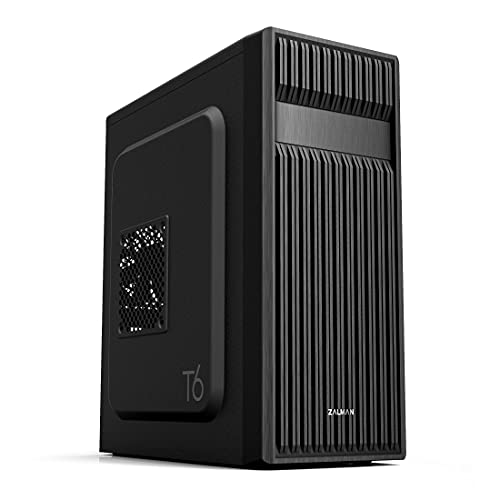
Zalman T6 ATX Mid-Tower Desktop PC Case, 120mm Fan Preinstalled, 5.25 ODD | Pre-Installed 120mm Fan, 5.25 ODD Support, USB 3.0, Patterned Mesh Design, mATX ITX for Gaming Workstation, Black — Best stated-bay all-rounder
The T6 is the T8’s plainer, more utilitarian sibling, and for many bay hunters it is the better buy. Its title confirms 5.25 ODD support outright, wraps the front in a patterned mesh design that breathes more freely than a lighting strip panel, and notes compatibility reaching down to mATX and ITX boards inside the ATX frame. A preinstalled 120mm fan and USB 3.0 complete a specification aimed at work as much as play — Zalman itself names gaming workstations in the title.
Mesh at the front changes the thermal story versus its sibling. Air reaches the intake fan without negotiating a decorative panel, which suits a machine that will rip discs for hours, transcode the results, and then run a game on the same hardware. Workstation-leaning builds also tend to accumulate drives over time, and a tower with an honest bay plus internal storage room ages more gracefully than a sealed showpiece.
The styling will not win a beauty contest against glass, and the review should not pretend the patterned mesh tries to. What it offers instead is indifference to fingerprints, tolerance for workshop dust that wipes off, and a front that can be opened for the drive without admiring one’s reflection. For a PC that lives under a desk earning its keep, those are the right priorities in the right order.
Between the two Zalmans, choose the T6 when airflow and board flexibility matter more than lighting, and the T8 when the desk display matters more than the mesh. Both carry the essential credential in their titles, which is why they sit at the top of this guide while more famous names sit below with asterisks.
The T6’s board flexibility pays an unexpected dividend in a bay build: when the machine’s purpose changes — gaming rig to file server, workstation to ripping station — the same tower accepts the replacement board in any of the three common sizes. Bay-era cases were built for long, changing service, and the T6’s specification honors that tradition more completely than its gaming-styled sibling. It is the pick most likely to still be in service, doing something useful, a decade from now.
- Form factor: ATX mid-tower, also fits mATX and ITX boards
- External bay: 5.25 ODD support stated in the listing title
- Included fan: 120mm fan preinstalled
- Front design: patterned mesh, USB 3.0
- Positioning per title: gaming workstation, black
Strengths
- Bay support confirmed in the title, no documentation hunt needed
- Patterned mesh front breathes better than decorative panels
- Accepts ATX, mATX, and ITX boards for flexible rebuilds
Trade-offs
- Utilitarian styling will not satisfy showcase builders
- Single preinstalled fan is a beginning, not a cooling plan
- No radiator figure is stated in the title to plan liquid cooling around
Best for: workstation and mixed-use builds that need a confirmed bay, mesh airflow, and freedom to reuse smaller boards later
Not suited for: liquid cooling plans needing a stated radiator size, because the T6 title does not publish one
See the Zalman T6 listing on Amazon and note the ODD support line in its title before checkout.

COOLER MASTER Case Elite 500 ODD, 2USB3.2,1x 5.25 5X 2.5 2X Combo 2.5″/3.5″ — Best storage-flexible bay case
Cooler Master’s Elite 500 ODD wears its storage arithmetic in its title like an inventory sheet: one 5.25 bay, five 2.5-inch positions, and two combo positions accepting 2.5 or 3.5-inch drives. For a builder assembling a home server, a backup station, or a media PC with a disc drive and a small crowd of SSDs, that explicitness is gold. No PSU is included, as the full listing notes, so the build budget should carry a supply from the start.
The single 5.25 bay is the confirmed article here, matching the Zalmans on evidence while beating them on internal storage choreography. A typical Elite 500 build writes itself: optical drive in the bay for ripping, a pair of SSDs in mirrored or tiered roles, one large 3.5-inch disk in a combo position for the archive, and front USB 3.2 connectivity for the external drives that visit occasionally. Few modern cases narrate a storage plan that clearly.
Cooler Master’s Elite line has always been the company’s utility drawer, and the compromises follow that brief. Expect functional steel, straightforward panels, and an interior arranged for drives rather than for photographs. Cable artistry is the builder’s own problem to solve with ties and patience, and tempered glass admirers should look at the gaming towers instead. This case’s audience measures a chassis in bays and mounts, and by that measure it is the richest entry in the guide.
One caution belongs in bold mental type: the combo positions force choices, since a combo slot holding a 3.5-inch drive cannot simultaneously hold its 2.5-inch alternative. Count your actual drives, add the one you will buy next year, and confirm the arithmetic still fits before ordering. Storage cases punish optimistic counting more than any other kind.
Plan the Elite 500’s drive layout on paper before the first screw, because seven internal positions plus a bay invite a sprawl that cabling must survive. A sane map: operating system on one 2.5-inch SSD, a mirrored pair for working data, one large 3.5-inch disk in a combo position for the archive, and the remaining mounts left empty as the build’s future. Empty bays are not waste in a storage case; they are the reason the case was bought.
- External bay: 1x 5.25, stated in the listing title
- Internal storage: 5x 2.5-inch plus 2x combo 2.5″/3.5″ positions
- Front connectivity: 2x USB 3.2 per the title
- Power supply: none included
- Color: black
Strengths
- Full storage layout is published in the title itself
- Confirmed 5.25 bay plus seven internal drive positions
- Combo bays flex between SSD speed and HDD capacity
Trade-offs
- No power supply in the box, so budget one separately
- Utility styling and cable work are functional, not showy
- Combo positions force either-or choices as drive counts grow
Best for: home server, backup, and media builds juggling an optical drive, several SSDs, and at least one big spinning disk
Not suited for: builders expecting a power supply in the box, since the listing states none is included
Open the Cooler Master Elite 500 ODD listing on Amazon and count your drives against its published bay list.
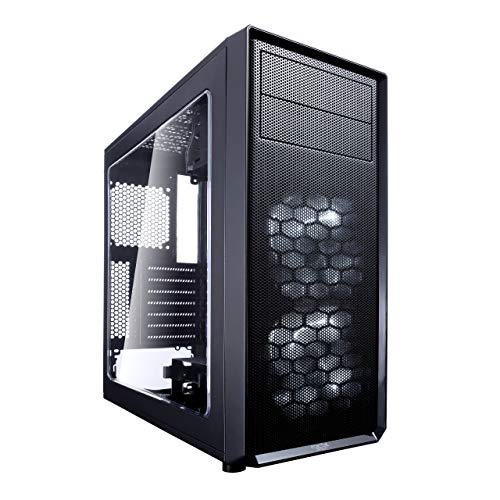
Fractal Design Focus G – Mid Tower Computer Case – ATX – High Airflow – USB 3.0 – Window Side Panel – Black — High-airflow veteran; title silent on the bay
The Focus G is the case readers most often expect to find in a bay guide, because it comes from the era and the brand — Fractal Design — associated with practical, airflow-first towers. Its listing title promises high airflow, USB 3.0, an ATX frame, and a window side panel. What it does not do, anywhere in that title, is mention a 5.25-inch bay, and this guide will not upgrade a reputation into a specification.
That silence is exactly why the verification section exists. The Focus G has been produced across years in which case fashion turned hard against external bays, and marketplace listings recycle old copy. Before buying this case for an optical drive, find the current specifications table on Fractal Design’s own documentation and look for the external bay row. If the table confirms the bay for the current revision, the Focus G becomes a genuinely attractive answer: proven airflow, a window for the build, and Scandinavian design discipline.
Judged purely as a tower, the appeal is real. High airflow is in the title because the front is built to breathe, and the window side panel shows a tidy build without demanding a lighting ecosystem. For a builder whose bay need is soft — a drive that might migrate to an external enclosure without tears — the Focus G’s all-round quality could outweigh the paperwork chore.
But if the bay is the purchase, hold the line: documentation first, order second. The confirmed three above this pick exist precisely so that nobody has to gamble, and the Focus G’s presence here is a service to readers who will meet it in search results and deserve an honest label rather than an omission.
If the documentation check confirms the Focus G’s bay, one more check follows naturally: confirm the current revision’s front fan and radiator layout at the same sitting, since a long-lived model’s paperwork rewards a single careful read. Fractal Design’s documentation is among the clearest in the industry, which makes this pick’s homework the lightest of the silent three. Do the reading, and the Focus G can be bought with nearly the same confidence as the stated tier.
- Form factor: ATX mid tower, black
- Front character: high airflow design, USB 3.0
- Side panel: window
- External bay: the listing title does not mention any 5.25-inch bay — check the manufacturer’s own documentation for the current revision before buying it for a drive
- Brand line: Fractal Design Focus series
Strengths
- High-airflow front design from a respected case maker
- Window side panel shows the build without full glass fashion
- Long-running model with deep community build knowledge
Trade-offs
- Bay presence is unconfirmed by the title and needs documentation checks
- Revisions over a long production life can change front features
- Window panel shows dust and cable shortcuts alike
Best for: airflow-first builders willing to confirm the bay in Fractal Design’s documentation before ordering, who value the tower either way
Not suited for: anyone needing the bay guaranteed on delivery day, since this title offers no such statement
Read the Fractal Design Focus G listing on Amazon, then verify the bay in the manufacturer’s documentation before buying.
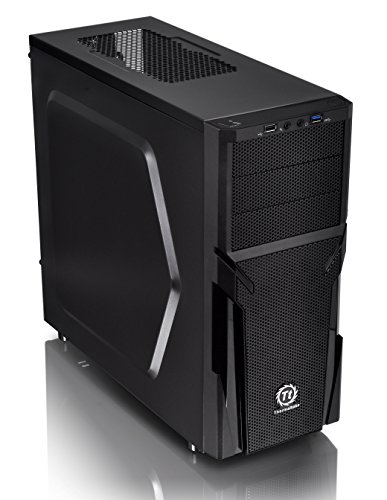
Thermaltake Versa H21 SPCC ATX Mid Tower Computer Chassis CA-1B2-00M1NN-00 — Steel budget veteran; title silent on the bay
The Versa H21’s title is the shortest in this guide: SPCC steel, ATX mid tower, a model number. It reads like a parts-bin label because that is essentially what the Versa line has always been — Thermaltake’s workhorse chassis family, sold for years into offices, schools, and budget gaming builds. Nothing in those few words mentions a 5.25-inch bay, so the H21 enters this guide under the same labeled uncertainty as the Focus G.
Context explains why bay hunters keep landing on it. The Versa generation was designed when external bays were standard furniture on a tower front, and the H21’s long production life means thousands of units, reviews, and forum builds describe its front layout. That history is a lead worth following through the manufacturer’s documentation — and it is still a lead, not a confirmation, because long-lived models are exactly the ones that receive quiet mid-life revisions.
As a chassis proposition, SPCC steel construction is the story: durable, repairable, indifferent to the scratches that would ruin a glass panel’s day. For a workshop PC, a school lab refresh, or a small business fleet build, a steel box that shrugs off a decade of handling has a value that spec sheets underrate. The model number in the title, CA-1B2-00M1NN-00, is your friend here — search documentation by that exact string rather than by the Versa name alone.
Buy the H21 with eyes open and it can be the cheapest sensible route to a bay-era tower; buy it on assumption and it can be a steel lesson in verification. The steps in this guide’s how-to section were written for precisely this listing, and they take less time than repacking a return.
Fleet buyers should note the H21’s quiet superpower: sameness. A steel chassis that stays in production for years lets a school or business standardize on one box, one set of spares, and one technician’s learned familiarity across dozens of machines. That operational value never appears in a consumer spec sheet, yet it is exactly why models like this outlive prettier rivals. Verify the bay per unit batch, document the finding, and the fleet logic does the rest.
- Form factor: ATX mid tower chassis, model CA-1B2-00M1NN-00
- Construction: SPCC steel per the listing title
- External bay: the title is silent about external bays — confirm the 5.25-inch provision in Thermaltake’s documentation for this exact model number
- Brand line: Thermaltake Versa series
- Front details: not itemized in the title; check documentation
Strengths
- SPCC steel build shrugs off years of handling and moves
- Long production history means abundant parts and build references
- Exact model number in the title makes documentation searches precise
Trade-offs
- Title confirms almost nothing beyond size and material
- Bay status must be established before any drive purchase
- Workhorse styling offers nothing to showcase builders
Best for: fleet, school, and workshop builders who will verify the bay by model number and value steel durability over detail
Not suited for: anyone needing bay certainty from the listing itself, which this terse title does not provide
Check the Thermaltake Versa H21 listing on Amazon, then search its model number in Thermaltake’s documentation.

Cooler Master N200 – Mini Tower Computer Case with Fully Meshed Front Panel and mATX/Mini-ITX Support — Meshed mini tower; title silent on the bay
The N200 shrinks the bay question down to mini tower scale. Its title advertises a fully meshed front panel and support for mATX and mini-ITX boards, a combination that made it a fixture of compact office and home builds for years. Like the two veterans above it, the title makes no mention of a 5.25-inch bay, and it receives the same treatment here: included for its relevance to the search, labeled for its silence.
The meshed front is the N200’s enduring virtue. A compact case lives or dies by intake area, and a front that is essentially all grille gives small fans an easy life and keeps modest processors and integrated graphics cool without exotic cooling. For a ripping station built on a compact board — exactly the sort of machine this search often ends up assembling — that breathing room pairs naturally with an optical drive, provided the bay verifies.
Verification for the N200 follows the same path: Cooler Master’s documentation for the model, a look at front-panel photographs for a bay blanking plate, and a written answer from the seller if doubt survives. The model’s age cuts both ways — documentation and community knowledge are deep, yet marketplace stock can span production eras. The ten minutes of checking are the price of admission for any veteran design.
If the bay confirms, the N200 becomes the compact answer in this guide: small footprint, honest mesh, board flexibility across the two small formats. If it does not, the confirmed Zalman T6 accepts mATX boards too and states its bay support outright, which is the fallback this guide recommends without hesitation.
The N200’s mesh front gives it one more role the others cannot fill as gracefully: a compact NAS or home server conversion, where a small board, a couple of drives, and constant gentle airflow matter more than any display quality. If its bay verifies, the same box covers the optical archiving station role too. Few cases in this guide stretch across that many second lives, which is the veteran designs’ recurring argument for their continued existence.
- Form factor: mini tower for mATX and mini-ITX boards
- Front panel: fully meshed per the listing title
- External bay: nothing about a 5.25-inch bay appears in this listing title — establish it from Cooler Master’s documentation before relying on it
- Brand line: Cooler Master N series
- Cooling character: mesh-led intake for compact builds
Strengths
- Fully meshed front suits compact builds that run warm
- Takes both mATX and mini-ITX boards in a small footprint
- Deep documentation and community history ease verification
Trade-offs
- Bay unconfirmed by the title, as with the other veterans here
- Mini tower size limits card and cooler choices versus ATX picks
- Older design language predates modern front-panel connectors
Best for: compact-board builders who want a small meshed tower and will confirm its bay through Cooler Master’s documentation first
Not suited for: mATX builders needing a guaranteed bay in a small case, for whom the title-confirmed Zalman T6 is the safer order
Look at the Cooler Master N200 listing on Amazon and run the documentation check before counting on its bay.
What Should You Put in the Bay Besides an Optical Drive?
A hot-swap dock is the bay device that most often out-earns the optical drive it replaced. Backup discipline fails when it requires opening a case; a tray in the front turns a bare drive into a backup medium you slide in on Friday and store in a drawer on Monday. For photographers and video editors, the same dock shuttles project drives between machines without enclosures multiplying on the desk.
Fan controllers with physical dials sound retro until a render farm or a home server needs its noise floor changed at 2 a.m. without opening software. Card reader faceplates serve a similar honesty: photographers emptying SD cards daily prefer a front slot at desk height to a dongle behind the machine. None of these devices can exist in a sealed-front case, which is why the bay’s defenders describe it as a expansion philosophy rather than a drive size.
Plan the bay device and the internal layout together. A hot-swap dock wants a free SATA port and a power lead routed to the front; a fan controller wants fan cables long enough to reach its knobs. Cases like the Elite 500 ODD, with their storage arithmetic published, make that planning easy. The bay is only as useful as the cabling behind it, so leave slack, label the leads, and the front slot will keep earning its space for years.
How Should You Set Up a Ripping Station Around the Bay?
A bay bought for a disc library deserves a workflow that honors the project’s scale. Rip in batches sorted by shelf order, verify each batch’s files before the discs go back, and keep a simple log — artist, title, date, destination folder — because a library of thousands of tracks without a log becomes a second project of its own. The drive in the bay is the fast part; the discipline around it is what finishes the archive.
Storage planning follows the same logic. Lossless audio and disc images grow faster than intuition suggests, so the Elite 500’s internal positions or a planned external archive should be mapped before the first hundred discs, not discovered at the five hundredth. A ripping station that runs out of destination space mid-project stalls exactly when its rhythm was best.
Finally, give the station an endpoint. A bay project succeeds when the shelves are empty of unripped discs and the drive’s job changes — to dock duty, to occasional playback, to rest. Builders who define that finish line at the start choose the right case, the right drive, and the right amount of storage, which is why this guide keeps returning to the same advice: decide what the bay is for, in writing, before it is bought.
What Should You Do If the Bay Turns Out Missing on Arrival?
Do not build first and argue later. Photograph the unopened box, the front panel as received, and the listing’s bay claim, then contact the seller with the model and revision details before a single screw turns. A case installed, scratched, and filled with components is a case whose return becomes a negotiation; a case documented in its packaging is a straightforward correction, whichever way the seller resolves it.
This is also where the verification homework pays its dividend in reverse: if you followed the documentation steps and the seller confirmed the bay in writing, that record settles the conversation quickly. If the purchase was a deliberate gamble on a silent title, the same photographs still help — but the lesson lands differently, and the confirmed tier in this guide will look better on the second order.
How Do You Choose Between an Optical Drive and a Bay Dock?
Count the discs first. A household with shelves of CDs, DVDs, or Blu-rays has a standing argument for the optical drive, because ripping projects run for months and the drive earns its bay daily. A household whose discs are already ripped — or were never owned — gets more from a hot-swap dock, which turns the same opening into a backup and data-shuttle station that serves the machines the household actually uses now.
The honest answer for many builders is sequential rather than exclusive: the optical drive first, while the library migration is alive, and the dock later, when the bay’s tenant can change. Bay devices swap in minutes with the cabling lessons from this guide’s how-to section, so the case decision outlasts the device decision. Buy the confirmed bay; let its occupant evolve with your shelves.
Whichever device leads, leave the second device’s cabling in place when you install the first. A spare SATA data lead and power connector, routed and tied behind the bay, turn a future swap into a five-minute job instead of a rebuild. Bay ownership rewards exactly this kind of small foresight, compounded over years.
Confirmed Bays Versus Silent Titles: The Six Compared
The honest way to read this table is as two guides stapled together: three cases whose titles guarantee the feature you searched for, and three respected designs whose paperwork you must read first. Both groups can end in a good purchase; only the first group can end in a certain one.
Notice that certainty and quality are different axes. The Focus G may be the finest tower here as a tower, and it still sits below two Zalmans for this particular keyword, because the keyword is a bay, and a bay unconfirmed is a bay unpurchased.
| Pick | Badge | Defining trait |
|---|---|---|
| Zalman T8 | Best stated-bay gaming tower | Title-confirmed 5.25 ODD bay in a gaming-styled ATX tower |
| Zalman T6 | Best stated-bay all-rounder | Title-confirmed ODD support with mesh front and three board sizes |
| Cooler Master Elite 500 ODD | Best storage-flexible bay case | One confirmed 5.25 bay with five 2.5-inch and two combo mounts |
| Fractal Design Focus G | High-airflow veteran; title silent on the bay | High-airflow veteran whose title makes no bay claim at all |
| Thermaltake Versa H21 | Steel budget veteran; title silent on the bay | SPCC steel workhorse; documentation decides its bay story |
| Cooler Master N200 | Meshed mini tower; title silent on the bay | Fully meshed mini tower; bay rests on documentation, not title |
Notice the pattern in the confirmed tier: two Zalmans and a Cooler Master utility model. The bay’s survival is not a broad industry position but a niche defended by a few product lines that never deleted it, which is why this search feels like archaeology even when the products are current. The confirmed three are not leftovers; they are the standing inventory of an idea the mainstream abandoned.
The silent three, read generously, show what the bay era’s best general-purpose cases looked like — airflow veterans, steel workhorses, meshed mini towers. Their presence here with asterisks attached is the guide keeping faith with readers who will meet them in the wild and deserve a label that matches the evidence.
How Do You Fit and Cable an Optical Drive Properly?
Slide the drive into the bay from the front after removing the blanking plate, and fix it with screws on both sides where the rails allow; a drive fixed on one side only will buzz against the chassis every time it spins up to full speed. Keep the drive’s face flush with the surrounding panel, because a recessed face looks broken and a proud face catches on everything that passes the desk.
Cabling is one SATA data lead to the motherboard and one SATA power lead from the supply, and both deserve routing thought. Keep the data cable out of the intake fan’s path, give the power lead enough slack that the drive can slide out for service without unplugging half the build, and avoid bending either connector sideways in its socket. Bay devices reward the same slack discipline when they replace the drive later.
Test before the side panel goes on: power up, confirm the drive appears in the BIOS or device list, and run a full disc read to check for vibration noise at speed. A drive that rattles at spin-up needs its screws revisited now, not after the build is photographed and the tools are put away. Then set your ripping or playback software to use the drive and enjoy the unfashionable competence of a bay that still works.
While the drive is out on the bench during installation, copy its exact model and serial details into the build log. Optical drives outlive the builds around them and migrate from case to case across a decade; the log entry written today is what lets a future build — perhaps in the next bay case this guide’s readers buy — welcome the drive as a known quantity instead of a mystery device.
Finish with the software side of the ritual: set your ripping or burning application to verify after writing, and store finished discs away from the tower’s exhaust warmth. The bay’s mechanical work ends at the tray; the archive’s survival is a media habit, and a verified, properly stored disc is the entire point of keeping this format alive.
Which Bay-Buying Mistakes Waste the Most Money?
Trusting a case’s reputation instead of its current documentation. Models live for years and lose features quietly between revisions. The three silent-title picks in this guide are the standing example: famous names, plausible bays, and titles that promise nothing. Ten minutes with the manufacturer’s specifications table settles what reputation cannot.
Confusing internal 3.5-inch bays with the external 5.25-inch bay. They differ in size, position, and purpose. A case can bristle with internal drive mounts and still offer no external opening for an optical drive. Read bay listings by their external count first, as the Elite 500 ODD’s title models well.
Buying the drive before confirming the bay. The sequence matters because the drive is useless without its home. Confirm the case, receive the case, look at the bay with your own eyes, and only then order the optical drive or dock that will live in it.
Forgetting SATA ports and power leads in the count. An optical drive consumes a motherboard SATA port and a supply lead like any other device. A board whose ports are already committed to four storage drives has no room for the disc drive the bay was bought for.
Assuming a bay means a modern front panel too. Bay-era cases often carry older front connectivity. If USB Type-C or high-speed front ports matter to the build, verify them as separately as the bay itself rather than assuming a current case in every respect.
Final Recommendation
If the bay is non-negotiable, order from the confirmed tier and sleep well: the Zalman T8 for a gaming-styled tower, the Zalman T6 for mesh airflow and board flexibility, and the Cooler Master Elite 500 ODD when the build is really a storage system wearing a PC’s clothes. The three veteran designs below them remain worth their verification homework for builders who prize their other qualities, provided the paperwork gets read before the card gets charged.
One last piece of sequencing advice ties the whole guide together: let the case arrive before the drive, the drive before the discs come down from the shelf, and the verification habit before all of it. The bay rewards patience at exactly the points where modern case buying trains impatience, which may be the deepest reason its remaining defenders speak of it with such loyalty.
And when the first disc spins up in a new tower in this decade — tray sliding out of a front panel the fashion industry declared finished — the small ceremony of it will explain, better than this guide can, why a standardized hole in the front of a computer refuses to die.
The 5.25-inch bay survived three decades because a standardized hole in the front of a computer is a genuinely good idea; check the title, check the documentation, and your next tower can keep that idea alive for another decade of discs, docks, and dials.
Frequently Asked Questions
What is a 5.25-inch bay used for today?
Mostly optical drives for ripping and playback, but also hot-swap hard drive docks, fan controllers, card reader faceplates, and small storage drawers. The bay is a standardized front opening, and any device built to that width can live in it. That flexibility is why the format persists in workstation and server-adjacent builds long after gaming cases abandoned it.
How can I tell if a case really has the bay?
Trust evidence in this order: the listing title stating the bay, the manufacturer’s specifications table for the exact model and revision, photographs showing a removable blanking plate on the front, and a written answer from the seller. Three picks in this guide pass on the title alone; the other three require the documentation step, and their reviews say so openly.
Will a laptop-style slim optical drive fit the bay?
Not directly. Slim drives belong to a smaller format and need an adapter bracket to sit in a 5.25-inch opening, while standard desktop optical drives fit natively. Most builders are better served by a proper desktop drive in the bay: faster ripping, a sturdier tray, and no bracket improvisation behind the front panel.
Does an optical drive still make sense with streaming everywhere?
For media you own on discs, yes — a ripped lossless library plays without subscriptions, regional locks, or a service delisting your favorite album. The bay also serves data duties streaming never touches: archival discs, software on physical media, and drive docks. The question is not whether discs are fashionable but whether your shelves hold any, and for many households they hold hundreds.
Can I add a bay to a case that lacks one?
Not cleanly. The opening, mounting points, and front-panel structure are part of the chassis, and cutting steel to improvise them trades a tidy build for sharp edges and a voided sense of safety. External USB optical drives are the sane retrofit; the internal bay is a buy-it-with-the-case feature, which is the entire reason guides like this one exist.
Why do so few new cases offer the bay?
Fashion and airflow both pushed against it: glass fronts photograph better, and an unbroken front simplifies radiator and fan layouts. Makers followed the larger market. The bay survives where function outranks photography — utility lines like Cooler Master’s Elite and Zalman’s T series — and this guide exists to point at exactly those survivors.
Can I use a 5.25-inch bay for extra storage instead of a drive?
Yes. Storage drawers, hot-swap docks, and multi-drive cages all exist in the 5.25-inch format, converting the opening into anything from a backup-drive shuttle to a small parts drawer. The bay is best understood as a standardized front slot; the optical drive is merely its most famous tenant, and for many modern builds the dock is the more useful occupant.
Do these cases also hold modern SSDs and large graphics cards?
The confirmed gaming towers here state their modern credentials in their titles — the Zalman T8 lists a 240mm radiator and 295mm graphics card support, and the Elite 500 ODD lists five 2.5-inch SSD positions. The veteran designs should be checked model by model in their documentation, since their eras predate current card lengths. A bay does not disqualify a case from modern duty, but each specification must be verified on its own evidence.
Related Guides
Keep reading: Best PC Cases That Come With Fans · Best PC Cases for Custom Water Cooling · Best PC Cases for High-End Builds


