What's inside
- Where to Buy
- Key Takeaways
- Quick Picks
- How We Chose These Picks
- Comparison
- How to Choose a Laptop With a DVD Drive
- External or Built-In DVD Drive: Which Is Actually Better?
- Why Did Laptops Stop Including DVD Drives?
- What Should You Check Before Buying an Older Laptop With a Built-In Drive?
- Common Mistakes When Buying a Laptop With a DVD Drive
- Final Recommendation
- Frequently Asked Questions
- Related Guides
As an Amazon Associate I earn from qualifying purchases. This post may contain affiliate links at no extra cost to you.
[SITE_DOMAIN] is reader-supported. When you buy through links on our site, we may earn an affiliate commission.
Where to Buy
Six listings follow, and in this guide the words external and built-in matter more than any brand name, so read each title as carefully as this page does. The HP 17.3 with External DVD Drive leads the set as the modern machine with a USB drive in the box, so check price on Amazon for its 16GB and 512GB configuration. The HP Student Laptop with DVD Drive listing shows today’s figure for the rose-gold build with its free bundled drive, while the Dell Inspiron 15 5000 DVD-RW page carries the current price of a previous-era machine with the drive built in. The HP 17.3 Touch DVD-Writer listing details the other built-in survivor, the Dell Latitude E6420 page shows the figure for the oldest laptop in this guide by a wide margin, and the HP 17.3 FHD Laptop listing closes the set in its richer 32GB and 2TB external-drive configuration — see that page before choosing between the two HP bundles.
Anyone searching for the best affordable laptops with dvd drive deserves the correction before the recommendations, so here it is in the first breath: no current mainstream laptop has a built-in optical drive. The tray disappeared from modern designs years ago, and it is not coming back. What the market actually offers a disc owner in 2026 is two different things wearing one search phrase — modern laptops bundled with a separate external USB DVD drive in the box, and older laptops from the era when the drive was built in, still listed and still sold. This guide contains both kinds, labels each one every time it appears, and asks to be judged on whether the labelling was honest.
The split runs through the six like this. Two HP listings — a 17.3-inch business machine and a 14-inch student machine in rose gold — are current laptops that include an external CD/DVD drive as part of the package; a third HP listing, the same 17.3-inch family in a richer configuration, does the same at higher capacity. The other three are the survivors: a Dell Inspiron 15 5000 with a built-in DVD-RW drive and a 1TB spinning hard drive, an HP 17.3-inch touchscreen with a built-in DVD-Writer, and a Dell Latitude E6420 whose DVD-Writer sits beside a processor from the early 2010s. Those three are old machines, and the reviews will call them old machines — useful for defined purposes, bought with open eyes, and never dressed up as current models.
Why would anyone still want the drive at all? Because discs persist where streaming never arrived: shelves of family DVDs, software and backup discs from the pre-cloud decades, music collections waiting to be ripped, installation media for older programs, archives in offices and churches and schools that were burned to disc and never migrated. For those owners, the question is not whether the drive is fashionable. It is whether the laptop in front of them can read the shelf — and whether the drive is inside the machine, in the box beside it, or missing entirely while the listing’s headline trades on the ambiguity. That ambiguity is what this guide exists to remove.
Key Takeaways
- Premise correction: no current mainstream laptop has a built-in optical drive. Today’s listings are either modern laptops with an external USB drive bundled, or older models that still have one built in.
- Three picks are modern HP laptops with an external CD/DVD drive in the box — two configurations of the 17.3-inch Ryzen 5 machine and a 14-inch student model.
- Three picks are older machines with built-in drives: the Dell Inspiron i5567 (DVD-RW), the HP 17.3 Touch (DVD-Writer) and the Dell Latitude E6420 (DVD-Writer).
- The Latitude E6420 is a genuinely old business laptop — a second-generation-era Core i5 with 4GB of DDR3 and a 320GB hard drive — and is framed as a utility purchase, not a modern one.
- The external-drive route has a hidden virtue: one USB drive serves every computer in the house and lives in a drawer between uses.
- Operating systems split by era: the modern HP bundles run Windows 11 Pro; the built-in survivors run Windows 10 Home as listed.
Quick Picks
| Pick | Badge | Why it earns a place |
|---|---|---|
| HP 17.3 with External DVD Drive | Modern bundle, standard trim | Ryzen 5 7430U, 16GB of memory, a 512GB SSD and an external CD/DVD drive included. |
| HP Student Laptop with DVD Drive | Student bundle | A 14-inch anti-glare HD laptop with 16GB of memory and a free CD/DVD drive in the package. |
| Dell Inspiron 15 5000 DVD-RW | Built-in survivor | An older Inspiron i5567 with a built-in DVD-RW drive and a 1TB hard drive. |
| HP 17.3 Touch DVD-Writer | Built-in, big screen | A 17.3-inch HD+ touchscreen with a built-in DVD-Writer and a numeric keypad. |
| Dell Latitude E6420 | The veteran | An early-2010s business laptop with a built-in DVD-Writer, bought for utility. |
| HP 17.3 FHD Laptop | Modern bundle, rich trim | The same external-drive HP formula with 32GB of memory and a 2TB SSD. |
How We Chose These Picks
The selection rule for this guide was a single test applied to every candidate: does the listing actually put a working DVD drive in the buyer’s hands, and does its title say how? Listings that used disc language to describe a software bundle, a media slot or nothing at all were excluded. Listings passed in two honest forms — a drive physically built into the machine, stated in the title as DVD-RW or DVD-Writer, or a drive physically included in the box, stated as external or free — and the reviews preserve that distinction in every paragraph, because it is the distinction the whole category blurs.
Era honesty was the second rule. The built-in survivors are older machines, and their ages are legible in their own titles: the Inspiron’s i5-7200U and Windows 10, the big HP’s 10th-generation i5 and Windows 10, the Latitude’s i5-2520M, DDR3 memory and 320GB hard drive, which place it in the early 2010s. Those details are printed in the spec boxes without cosmetic surgery. A guide that hid them would be selling nostalgia as novelty, and the buyers most likely to be hurt by that trick — disc owners replacing a beloved old machine — are the readers this page most owes the truth.
The modern bundles were held to a different audit: is the underlying laptop good enough to recommend if the drive were ignored? Both HP families pass that test on their own specifications, which is why the richer 17.3-inch configuration appears here as it did in this site’s 17-inch guide, judged there on screen size and here on its bundle. A weak laptop with a drive in the box would not have been listed at any configuration.
Finally, a note on what is not here. No current premium laptop was bent into the category by pretending an accessory ecosystem equals a feature, and no listing was included on the strength of the word DVD appearing somewhere in its bullet points. Six listings survived the audit. Three are modern machines with a drive beside them; three are old machines with a drive inside them; and the rest of this page is an argument about which of those two honest shapes fits a given shelf of discs.

HP 17.3 with External DVD Drive — Modern bundle, standard trim
This is the configuration most disc owners should look at first, because it refuses to make them choose between a modern laptop and their shelf. The underlying machine is a current HP 17.3-inch laptop: an AMD Ryzen 5 7430U, 16GB of memory, a 512GB SSD, a 17.3-inch FHD display the title rates at 250 nits, a webcam and Windows 11 Pro, sold for business and student use with an Office lifetime licence — and an external CD/DVD drive included in the package. The drive is a USB companion, not a tray in the chassis, and everything good and bad about this pick flows from that sentence.
The good is considerable. An external drive reads and burns the household’s discs exactly as a built-in one would, then detaches. It can serve the other computers in the house, including the ones bought without any thought of discs. It can be replaced on its own if it fails, upgraded on its own if needs change, and left in a drawer for the long stretches when streaming and downloads carry the household’s media life. A generation of buyers was taught to see the external drive as the consolation prize; in a house with three computers and one shelf of DVDs, it is arguably the better design.
The modern machine underneath deserves its own assessment, because a bundle is only as good as its laptop. Sixteen gigabytes is this site’s comfortable standard, the Ryzen 5 7430U is a capable current processor for office, school and media work, and Windows 11 Pro gives the machine the managed-work licence the survivors below cannot offer. The 512GB SSD is the standard storage figure of the affordable class; the richer configuration of this same machine, reviewed last on this page, exists precisely for buyers who want the same bundle with that ceiling removed.
The compromises are the external drive’s own terms. It occupies a USB port and a patch of desk while it works, it is one more object to store and find, and a household that plays discs daily — a film every evening from a physical shelf — will feel the plugging and unplugging as a small daily tax where a built-in tray would have been invisible. Buyers should also confirm the drive’s exact type and the licence wording on the listing at checkout, because bundle listings reward the same digit-for-digit reading this guide applies everywhere.
It suits the mainstream disc owner: the family digitising a DVD shelf, the small business with disc archives, the student whose course materials still arrive on disc. It is the modern answer to the category’s question, in its standard trim — and the review to measure the others against.
- Processor: AMD Ryzen 5 7430U
- Memory: 16GB RAM
- Storage: 512GB SSD
- Display: 17.3-inch FHD, 250 Nits
- Included: External CD/DVD Drive, Office Lifetime License (per listing title)
- Operating system: Windows 11 Pro
- Drive type: External USB drive included in the box — not built into the chassis
- Numeric keypad: Not stated in the listing title — verify with the manufacturer documentation
Strengths
- A current, well-specified laptop whose disc ability arrives in the same box.
- The external drive can serve every computer in the household.
- Windows 11 Pro and 16GB of memory keep the machine current for years.
Trade-offs
- The drive takes a USB port and desk space while in use.
- Daily disc users will feel the plug-in routine a built-in tray avoids.
- 512GB of storage, where the richer configuration of this machine offers 2TB.
Best for: a family or small firm digitising a disc collection on a modern, long-lived laptop. Not suited for: a film-every-night household that plays physical discs daily, because an external drive’s plug-in routine taxes exactly that habit.
There is a broader point this pick makes about the whole category, and it deserves its own paragraph: the bundle is not a trick. A modern laptop plus a drive in the box is a legitimate, often superior answer to a real need — provided the listing says external in plain words, as this one does, and provided the buyer reads it.

HP Student Laptop with DVD Drive — Student bundle
The second modern bundle shrinks the idea to student size. HP’s listing describes a laptop for student and business use with a free CD/DVD drive in the package, 16GB of memory, 128GB of eMMC storage, an Intel 4-core processor, a 14-inch anti-glare HD display with Intel UHD Graphics, and Windows 11 Pro, finished in rose gold. The drive, again, is an included external companion rather than a built-in tray — the title’s word is free, and the honest reading of the bundle is a laptop with a drive beside it, aimed at the school-and-coursework end of the disc world.
Sixteen gigabytes of memory is this pick’s surprise, and it deserves to be noticed before the storage figure starts an argument. In a guide where lean machines carry 8GB, a student laptop with 16GB has memory headroom its processor class rarely gets, and for the coursework rhythm — browser, documents, a call, a disc-based course resource open beside them — that headroom is the difference between a machine that keeps up and one that asks its owner to close things. Whoever configured this bundle understood that memory, not storage, is what a student feels hourly.
The 128GB of eMMC is the counterweight, and it must be read as plainly as the drive wording. eMMC is the modest storage standard of budget machines, and 128GB is a cloud-shaped figure: Windows, its updates, coursework and a working set of files fit; a local media library does not. For the disc owner this has a particular irony worth naming — a household ripping its DVD shelf to files will fill 128GB almost immediately, and should plan an external drive of the storage kind, or choose the 17.3-inch bundles above and below, whose SSDs are four and sixteen times this size.
The rest of the title is well aimed at its reader. An anti-glare HD screen suits classrooms and bright rooms better than a glossy panel would. Windows 11 Pro at this end of the market is a genuine inclusion for school and small-business management. The rose gold finish is a matter of taste that the listing states proudly and this review simply records. And the Intel 4-core processor, unnamed beyond its core count, is the specification to verify on the listing if the exact chip matters to the purchase — the spec box records the silence rather than filling it.
It suits the student whose course still ships discs, the school-shaped household, and the buyer who wants the disc question settled in the same order as a light, portable laptop. It does not suit the archivist, whose project is measured in terabytes of ripped media, and the next three reviews — the built-in survivors — exist for a different kind of buyer again.
- Processor: Intel 4-Core Processor (model not named in the title)
- Memory: 16GB Memory
- Storage: 128GB eMMC
- Display: 14-inch Anti-Glare HD
- Graphics: Intel UHD Graphics
- Colour: Rose Gold
- Included: Free CD/DVD Drive (external, per bundle listing)
- Operating system: Windows 11 Pro
- Drive type: External drive included in the box — not built into the chassis
Strengths
- 16GB of memory gives a student machine unusual multitasking headroom.
- A disc drive is included, settling the course-materials question in one order.
- An anti-glare screen and Windows 11 Pro suit classrooms and managed use.
Trade-offs
- 128GB of eMMC fills almost immediately if discs are ripped to local files.
- The processor is described only as 4-core in the title.
- An HD display, where the 17.3-inch bundles offer FHD.
Best for: a student or school household whose coursework still arrives on disc. Not suited for: a DVD-ripping archivist, because 128GB of eMMC cannot hold the library the ripping would create.
Between the two modern HP bundles, the choice is a size-and-storage question wearing a disc costume. Both settle the drive the same way. The 17.3-inch machines settle the desk; this one settles the school bag — and asks only that its storage be respected as the cloud-shaped figure it is.

Dell Inspiron 15 5000 DVD-RW — Built-in survivor
Now the survivors, and the first of them is the most coherent of the three. The Dell Inspiron 15 5000, model i5567-1836GRY, is a previous-era laptop with the era’s signature specification: a 15.6-inch HD display, an Intel i5-7200U at 2.50GHz, 8GB of DDR4 memory, a 1TB hard drive spinning at 5400rpm, Bluetooth 4.2, Windows 10 Home — and a DVD-RW drive built into the chassis. Nothing about that list is current, and this review will not pretend otherwise. What it is, is complete: a machine from the last generation of laptops designed around the disc, for buyers whose lives still are.
The built-in drive is the entire case, so it should be stated precisely. A DVD-RW in the tray reads the shelf and burns back to it — backups, archives, discs for relatives and offices whose world still runs on polycarbonate. No USB port is spent, no accessory is stored or lost, and the machine that results is self-contained in the way its era intended. For a household replacing an ageing disc-era laptop with another of the same kind — same habits, same shelf, same software world — that self-containment is a genuine continuity that no bundle can quite replicate.
The era’s costs are equally precise, and they are the review’s duty to enumerate. A 5400rpm spinning hard drive is the slowest storage in this guide by a wide margin; the machine will boot, load and copy at the pace its decade set, and buyers accustomed to SSDs will feel every one of those pauses. The HD display is the modest resolution of its class and time. Windows 10 Home, as listed, is the previous operating system generation, and buyers should consider its support horizon as part of the purchase rather than discovering it afterwards. The i5-7200U was a respectable chip in its day, and its day is the point.
Who, then, is this for? The disc-first household whose workload is genuinely light — documents, browsing, the shelf — and whose alternative is not a modern laptop but no replacement at all. The workshop, office corner or community hall that needs a machine fluent in discs and indifferent to fashion. The buyer maintaining compatibility with disc-era software and habits, who values that the new old machine asks nothing new of them. It is not for a buyer who wants a main laptop for the next six years of modern work, and the modern bundles at the top of this page exist for that buyer.
Condition and configuration deserve the final word, because listings for machines of this era reward care. Match the model code i5567-1836GRY on the listing, read the condition wording as carefully as the specification, and confirm the drive’s presence in the exact unit offered. A survivor bought accurately is a tool; a survivor bought on a headline is a lottery ticket.
- Processor: Intel i5-7200U, 2.50GHz
- Memory: 8GB DDR4
- Storage: 1TB 5400rpm hard drive
- Display: 15.6-inch HD
- Optical drive: DVD-RW, built into the chassis
- Wireless: Bluetooth 4.2
- Model: i5567-1836GRY
- Operating system: Windows 10 Home 64
Strengths
- A built-in DVD-RW drive that reads and burns with no accessory at all.
- A 1TB hard drive holds a large local archive by the era’s standards.
- A self-contained disc-era machine for households replacing one like it.
Trade-offs
- A 5400rpm spinning drive is the slowest storage in this guide.
- Windows 10 Home and an HD display mark its previous-era design.
- The i5-7200U belongs to an older processor generation.
Best for: a disc-first household or community desk replacing an ageing disc-era laptop for light work. Not suited for: a buyer wanting a main laptop for years of modern work, because its storage speed, display and operating system all belong to the previous era.
The Inspiron earns its place in this guide by being the honest version of a nostalgic purchase. It does not hide its decade. Buyers who share that decade’s habits will find it fluent; buyers who do not should let its clarity talk them into the modern bundles instead.
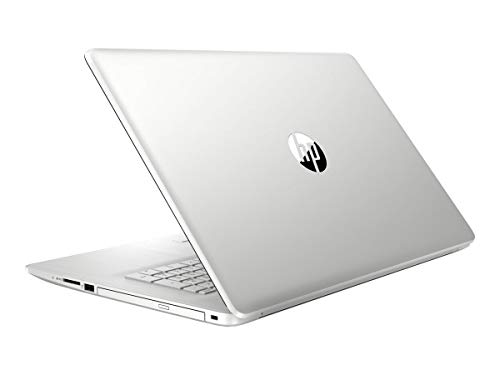
HP 17.3 Touch DVD-Writer — Built-in, big screen
The second survivor is the big one: an HP 17.3-inch HD+ touchscreen laptop with a 10th-generation Intel Core i5, 8GB of memory, a 256GB SSD, a numeric keypad, Windows 10 Home — and a DVD-Writer built in. It is the only pick in this guide that combines the three things its era’s buyers wanted at once: the largest screen class, a touch display, and an optical drive in the tray. For a household whose disc life is also its film life, watched at a kitchen table on a big screen, the combination has a logic that survives its decade.
The touchscreen deserves a fair reading. On a 17.3-inch machine of this era, touch serves the media-and-family pattern — tapping through a film library, scrolling recipes, signing the occasional document — rather than any tablet ambition, and the HD+ resolution sits between the HD of the Dell survivor and the FHD of the modern bundles. The numeric keypad, stated in the title, serves the figure-work that big HP laptops have always courted. As a piece of furniture for a family’s shared desk, the specification is coherent in a way that only looks dated when it is mistaken for a current model, which this review is careful not to do.
The 256GB SSD is the interesting middle figure of the survivors. Unlike the Dell’s spinning drive, it gives this HP the boot and load behaviour of the SSD era, which will make the machine feel noticeably younger than its operating system suggests. Against that, 256GB is the smallest SSD in this guide, and a household ripping its shelf to local files will outgrow it — the same archivist’s warning as the student bundle, at double the capacity and with the same conclusion. The 8GB of memory is the era’s standard and the light workload’s adequate figure.
Windows 10 Home, as listed, carries the same support-horizon consideration as the Dell’s, and buyers should weigh it as part of the purchase. The 10th-generation Core i5 is the newest processor among the three survivors, which is a relative statement the review will make exactly once and in those words. This machine is the youngest of the old — a late example of the built-in era, with an SSD and a big touch panel softening its age, and a drive in its tray that no current HP offers at any specification.
It suits the family whose shared laptop is also the disc player, the big-screen household replacing a similar machine, and the buyer who wants the built-in experience with the least era shock available in this guide. Read the listing’s condition and configuration wording with the same care as the Dell’s, match the DVD-Writer’s presence to the exact unit, and the purchase is an informed one.
- Processor: 10th Gen Intel Core i5
- Memory: 8GB Memory
- Storage: 256GB SSD
- Display: 17.3-inch HD+ Touchscreen
- Optical drive: DVD-Writer, built into the chassis
- Keyboard: Numeric Keypad
- Operating system: Windows 10 Home
- Weight: Not stated in the listing title — verify with the manufacturer documentation
Strengths
- A built-in DVD-Writer on the guide’s biggest touchscreen.
- An SSD keeps boot and load times in the modern-feeling range.
- A numeric keypad serves the figure work big laptops are bought for.
Trade-offs
- 256GB is the smallest SSD in this guide for a ripping household.
- Windows 10 Home, with the support horizon that implies.
- HD+ resolution sits below the modern bundles’ FHD panels.
Best for: a family whose shared big-screen laptop doubles as the household disc player. Not suited for: a ripping archivist building a local library, because 256GB of storage fills long before a serious shelf is digitised.
Of the three survivors, this HP asks the least adjustment from a modern buyer — an SSD, a big screen, a familiar shape — while still delivering the one thing the modern market will not: a drive in the tray. That combination is its whole case, and for the right household it is enough.

Dell Latitude E6420 — The veteran
The Latitude E6420 must be introduced without any varnish at all: it is a business laptop from the early 2010s, and its title says so in every line. A 14-inch LED notebook with an Intel Core i5-2520M at 2.50GHz, 4GB of DDR3 memory, a 320GB hard drive, a built-in DVD-Writer, Intel HD 3000 graphics and Bluetooth. By the standards of every other page in this batch of guides, that specification is a museum label. It appears in this guide because the category it serves — a working laptop with a built-in optical drive, at the lowest rung of the market — still has real buyers, and those buyers deserve a review that respects them enough to be blunt.
Bluntness first, then. Four gigabytes of DDR3 and a spinning 320GB drive define a machine for the lightest of tasks: playing and burning discs, running the era’s software, serving as a dedicated station for one job. Intel HD 3000 graphics belong to a period before modern video expectations. The operating system story for a machine of this age must be verified on the listing itself, because the title does not carry the modern Windows story the other picks tell, and a buyer should know exactly what software world they are purchasing into. Nothing in this paragraph is a criticism of the E6420 in its day — the Latitude line was the backbone of corporate computing, built to be deployed by the thousand and serviced for years. It is a criticism of pretending its day is this one.
What, then, is the honest case? A dedicated disc station. There are workshops, small offices, churches, studios and households where a shelf of discs meets exactly one recurring job — playing training media, burning archives, running a legacy program whose world is optical — and where a simple, repairable, business-built machine that does that job and nothing else is a rational purchase. The Latitude’s era built machines that could be opened, fixed and kept, and a buyer with that maintenance mindset gets a tool whose DVD-Writer is not a feature among many but the centre of a small, defined universe.
The conditions of a fair purchase are stricter here than anywhere in this guide. Read the listing’s condition wording as the first specification, because machines of this age are sold in states that vary enormously. Confirm the drive works, the battery’s state is described, and the included software and charger are named. Treat the purchase as buying a used-era tool with a job to do, priced by that job, rather than as buying a laptop in the modern sense — because in the modern sense, the six-figure question of whether it will run a buyer’s current software world has an answer the buyer must establish before, not after, the order.
It suits the utility buyer: the disc station, the legacy-software keeper, the tinkerer who maintains old machines as a pleasure. It suits no one as a main computer in 2026, and this guide would be failing its readers if the review ended on any other sentence than that one, stated as plainly as the title states the specifications.
- Processor: Intel Core i5-2520M, 2.50GHz
- Memory: 4GB DDR3
- Storage: 320GB HDD
- Display: 14-inch LED
- Graphics: Intel HD 3000 Graphics
- Optical drive: DVD-Writer, built into the chassis
- Wireless: Bluetooth
- Operating system: Not stated in the listing title — verify with the manufacturer documentation
Strengths
- A built-in DVD-Writer in a business-built, serviceable chassis.
- A defined utility tool for disc and legacy-software stations.
- The Latitude line’s era reputation for repairable, deployable hardware.
Trade-offs
- An early-2010s specification: 4GB DDR3 and a 320GB spinning drive.
- Intel HD 3000 graphics predate modern video expectations.
- Condition and included items vary and must be verified on the listing.
Best for: a dedicated disc or legacy-software station in a workshop, office corner or studio. Not suited for: use as a main computer in 2026, because its processor, memory and graphics all belong to the early 2010s.
The E6420 closes the survivors with the guide’s premise in its purest form. The built-in drive did not fade away; it aged in place, attached to machines like this one. Buyers who need exactly that ageing tool can buy it honestly. Everyone else now knows why the modern bundles exist.

HP 17.3 FHD Laptop — Modern bundle, rich trim
The final pick is the first pick’s family in its richest dress, and the guide places it last so the comparison is unavoidable. This HP 17.3-inch listing pairs the same external CD/DVD drive bundle and Office lifetime licence with an AMD Ryzen 5 7430U described as 6-core, a 250-nits IPS display, a webcam and Wi-Fi 6 under Windows 11 Pro — and then raises the specification to 32GB of memory and a 2TB SSD. Readers of this site’s 17-inch guide met this machine there, judged on screen and capacity; here it is judged on the bundle, and the bundle at this capacity tells a different story.
Capacity changes what the drive is for. On the standard configuration, the external drive is a reading device for a shelf. With 2TB of internal storage behind it, the same drive becomes an ingestion device: a household can rip its entire DVD and CD collection to local files — legally, its own discs, for its own use — and hold the result on the machine with room to spare, alongside the photo library and the documents. Thirty-two gigabytes of memory keeps that archivist’s workflow — ripping, organising, playing back, backing up — running in parallel without the machine asking for mercy. This is the configuration for the buyer whose disc project is measured in shelves, not in discs.
Nothing else in the specification drops a level to pay for that capacity. The Ryzen 5 7430U is the same capable processor as the standard trim’s, the 250-nits IPS panel is the same stated display, and Windows 11 Pro is the same licence. The premium over the first review buys exactly two things — memory and storage — and the guide’s consistent advice applies: those are the two things whose absence is felt daily and whose presence is felt for years. A buyer whose disc life is occasional should save the difference and take the standard trim without a flicker of doubt.
The external drive’s terms apply unchanged, because they are the category’s terms: a USB port and a patch of desk while it works, a drawer while it does not, and a device that can serve the household’s other computers on its days off. At this configuration the buyer should also perform the bundle audit with extra care — match the 32GB and 2TB figures in the listing digit for digit, confirm the drive’s inclusion in the exact offer, and read the licence wording as printed. Rich configurations of bundled listings are where careless reading costs the most.
It suits the archivist household, the small firm digitising a media library, and the buyer who wants the modern bundle with every ceiling removed. Placed beside the survivors, it is also the guide’s closing argument made physical: everything the built-in era offered — a big screen, a working drive, a machine that holds a life’s media — is available in a current laptop, provided the drive is allowed to sit beside the machine rather than inside it.
- Processor: AMD Ryzen 5 7430U (6-core)
- Memory: 32GB RAM
- Storage: 2TB SSD
- Display: 17.3-inch FHD, 250 Nits IPS
- Included: External CD/DVD Drive, Office Lifetime License (per listing title)
- Wireless: Wi-Fi 6 (Wifi6)
- Operating system: Windows 11 Pro
- Drive type: External USB drive included in the box — not built into the chassis
Strengths
- 32GB of memory and a 2TB SSD turn the bundled drive into an archiving tool.
- The same modern platform and Pro licence as the standard trim.
- A stated 250-nits IPS panel, a figure most titles in this class omit.
Trade-offs
- The drive remains external, with the plug-in routine that involves.
- Occasional disc users pay for capacity their habit will never touch.
- Bundle configurations demand digit-for-digit verification at checkout.
Best for: an archivist household or firm digitising shelves of discs onto one modern machine. Not suited for: an occasional disc user, because the standard trim of this same bundle serves that life without the capacity premium.
Two configurations of one bundle bookend this guide’s modern camp, and the distance between them — memory and storage, nothing else — is the cleanest illustration on the page of how this category should be bought: choose the laptop first, confirm the drive’s form in writing, and let capacity follow the size of the shelf.
Comparison
| Pick | Drive form | Processor | Memory / Storage | Operating system |
|---|---|---|---|---|
| HP 17.3 with External DVD Drive | External, included | AMD Ryzen 5 7430U | 16GB / 512GB SSD | Windows 11 Pro |
| HP Student Laptop with DVD Drive | External, included (free) | Intel 4-Core | 16GB / 128GB eMMC | Windows 11 Pro |
| Dell Inspiron 15 5000 DVD-RW | Built-in DVD-RW | Intel i5-7200U | 8GB DDR4 / 1TB HDD | Windows 10 Home |
| HP 17.3 Touch DVD-Writer | Built-in DVD-Writer | 10th Gen Intel Core i5 | 8GB / 256GB SSD | Windows 10 Home |
| Dell Latitude E6420 | Built-in DVD-Writer | Intel i5-2520M | 4GB DDR3 / 320GB HDD | Not stated in the listing title |
| HP 17.3 FHD Laptop | External, included | AMD Ryzen 5 7430U | 32GB / 2TB SSD | Windows 11 Pro |
The second column is the table’s reason to exist. Three externals, three built-ins, and a clean generational line between them: every modern machine carries its drive beside it, and every machine with a drive inside it is old. A buyer who absorbs that single pattern can read any listing in this category — on this site or anywhere else — and know within seconds which of the two honest shapes is being offered, and which questions to ask next.
The storage column tells the era story in numbers. The modern camp runs on SSDs from 512GB to 2TB, with the student bundle’s eMMC as its one modest figure. The survivors run on a 256GB SSD and two spinning hard drives, one of them a terabyte and the other 320GB. Speed, capacity and age travel together in this category, and the buyer who wants a built-in drive is accepting the whole convoy, not just the tray.
How to Choose a Laptop With a DVD Drive
Choose the drive’s form before anything else, because it decides the era of everything else. If the drive must be inside the machine — because the laptop will serve as a self-contained disc station, because accessories get lost in your household, because the shelf is used daily — then accept, in writing and in advance, that the machine will be an older one, with an older operating system story and older storage, and choose among the survivors by how much of that era you can live with. If the drive can sit beside the machine, the entire modern market opens, and the choice becomes an ordinary laptop purchase with a bundle attached.
Second, define the disc job in hours and discs. Playing a film monthly, ripping a shelf once, burning a weekly archive and running a disc-based course are four different jobs wearing one phrase. The monthly player needs any pick on this page. The one-time ripper needs storage behind the drive — the richer HP bundle, or an external storage plan. The weekly burner needs a drive that writes, which the survivors’ DVD-RW and DVD-Writer labels state and the bundles’ wording should be checked for on the listing. The course student needs the drive to simply be in the box on the first day, which is the student bundle’s whole design.
Third, audit the laptop as if the drive did not exist. Memory, storage type, operating system and screen decide the machine’s daily life and its remaining years, and they are where the survivors ask their real price. A buyer who would not accept a 5400rpm hard drive or 4GB of memory in any other guide should not accept them here because a tray is attached — unless the disc job is so specific, and so central, that the machine is honestly a disc station with a screen. That purchase exists, this guide respects it, and it should be made under its true name.
Finally, read the listing the way this guide read them: drive form in the title, configuration in digits, condition in plain words, licence and bundle contents as printed rather than as hoped. In a category built on an ambiguity, the careful reader is not being fussy. The careful reader is the only kind of buyer the category cannot disappoint.
External or Built-In DVD Drive: Which Is Actually Better?
For most households in 2026, the external drive is the better tool, and the case is practical rather than nostalgic. It works with every computer in the house, not just the one it was bought with. It can be replaced alone when it fails, borrowed by a relative, stored in a drawer for the months it is not needed, and retired without retiring a laptop. The modern machines it accompanies are faster, better supported and longer-lived than any built-in survivor, so the disc capability rides on a platform that will still be receiving updates when the shelf is finally digitised.
The built-in drive keeps two honest advantages. It is always there — no finding, no plugging, no port surrendered — which matters to the daily disc user and to the fixed station where the laptop never moves. And it belongs to machines built in an era of serviceable, self-contained design, which a certain kind of owner values as a philosophy. Those advantages are real, and they are purchased with the survivors’ era costs. The verdict this guide offers is therefore a sentence with a condition: external, unless the disc job is daily or the station is fixed — in which case built-in, bought with the era accepted in full.
Why Did Laptops Stop Including DVD Drives?
Because the media moved and the machines followed. Streaming took the film shelf, downloads and cloud storage took the software box and the backup routine, and USB storage took the file transfer the burned disc used to perform. As the tray’s daily work evaporated, its costs remained — thickness, weight, moving parts, a large hole in a chassis engineers wanted for batteries — and one by one the makers deleted it. The deletion was not a conspiracy against disc owners; it was the market noticing that most laptops spent their whole lives never opening the tray.
The consequence, though, is the market this guide describes: a minority with real disc needs served by bundles and survivors rather than by current designs. That minority’s needs did not evaporate with the majority’s — archives are still on discs, courses still ship them, families still own shelves of them — which is why the listings in this guide exist and why they deserve honest labelling. A technology can be finished as a standard and unfinished as a need, and the DVD drive is the clearest example in modern computing of exactly that condition.
What Should You Check Before Buying an Older Laptop With a Built-In Drive?
Condition, stated in the listing’s own words, before specification. Machines of the survivors’ eras are sold in widely varying states, and the drive itself is a mechanical part whose health matters to this purchase more than to any other. Confirm that the listing describes the drive as present and working in the exact unit offered, that the battery’s state and the included charger are named, and that the operating system and its licence are what the title and listing together actually say — in the Latitude’s case, a detail the title leaves to the listing entirely.
Then check the support horizon with the same seriousness. The survivors run Windows 10 Home as listed, and a buyer should understand what that means for updates across the years they intend to keep the machine, because a disc station that must also browse the modern web carries obligations a purely offline station does not. Offline, a survivor’s horizon is simply its hardware’s health. Online, the software calendar joins the negotiation, and a buyer who plans for that distinction in advance will not be surprised by it later. None of these checks requires expertise — they require only that the listing be read as a contract, which in this category it is.
Common Mistakes When Buying a Laptop With a DVD Drive
Reading a bundle headline as a built-in drive. The modern HP picks include an external drive in the box. That is a good offer stated honestly — provided the buyer reads the word external before the word drive.
Buying a survivor as a main computer. The Inspiron, the big HP touch and above all the Latitude are era machines. As disc stations they are tools; as a household’s only modern computer they are a compromise renewed daily.
Forgetting the storage behind the ripping plan. Digitising a shelf creates files by the terabyte. The 128GB student bundle and the 256GB survivor cannot hold the library their drives can read.
Skipping the condition wording on older listings. With survivors, condition is a specification. Drive health, battery state and included items vary by unit and are knowable only from the listing itself.
Assuming any DVD drive also burns. The survivors state DVD-RW and DVD-Writer in their titles. For the bundles, confirm the included drive’s writing ability on the listing if burning is part of the job.
Final Recommendation
Most disc owners should buy modern and let the drive ride along: the standard HP 17.3 bundle for the mainstream shelf, the richer configuration of the same machine for the archiving project, and the student bundle where the disc job is coursework and the machine must travel. Choose a survivor only when the built-in form itself is the requirement — the Dell Inspiron for the self-contained disc-era replacement, the HP 17.3 Touch for the family’s big-screen disc player, and the Latitude E6420 strictly as a utility station, bought as the early-2010s tool its title honestly describes.
The shelf of discs in your home is not an embarrassment to be apologised for; it is an archive with a format, and the right laptop — modern bundle or honest survivor, chosen with the drive’s form read in plain words — will keep that archive alive for exactly as long as you need it to.
Frequently Asked Questions
Do any new laptops still have a built-in DVD drive?
No current mainstream model does, which is the premise this guide corrects in its opening paragraphs. The built-in picks here are older machines from the era when trays were standard; every modern pick achieves the same result with an external drive included in the box.
Is an external DVD drive as good as a built-in one?
For reading and, where the drive supports it, burning discs, yes — the work is identical. The differences are practical: an external drive uses a USB port and desk space while working, but it can serve several computers and be replaced on its own. Daily disc users are the ones who feel the trade most.
Can these laptops play Blu-ray discs?
None of the six titles claims Blu-ray capability — the drives named are CD/DVD drives, DVD-RW and DVD-Writer units. Buyers with a Blu-ray shelf should treat that as a separate accessory purchase and not assume any pick here covers it.
Which pick is best for ripping a large DVD collection?
The richer HP 17.3 configuration, because ripping is a storage project as much as a drive project: its 2TB SSD and 32GB of memory hold and process the library the drive reads. Confirm the included drive’s writing and reading specifications on the listing before starting a large project.
Is the Dell Latitude E6420 worth buying?
As a dedicated disc or legacy-software station, bought with its early-2010s specification understood, it can be. As a main computer, no — and its review says so in those terms. Its value is entirely in the narrowness of the job it is hired for.
What does DVD-RW mean compared with DVD-Writer?
Both wordings, as used in the survivors’ titles, describe drives that read and write DVDs — RW names the rewritable disc format the drive handles. The practical check is the same for every pick: confirm reading and writing behaviour for the exact drive in the listing if burning is part of your job.
Related Guides
Readers who arrived here through an archive usually own another one — a camera shelf beside the disc shelf — and the neighbouring guides serve that second archive. Start with the best beginner bridge cameras, the one-lens class for people digitising a photographic past, then compare the best bridge cameras with viewfinder, for shooters who prefer an eye-level window when they work through old subjects, and finish with the best bridge super zoom cameras, the long-lens class for people who keep their media physical and their subjects distant.
Related guides
- Best 4K Monitors for MacBook Pro: USB-C Panels With Real Power Delivery
- Best Routers for Remote Work: VPN Gateways, Travel Routers and Home Wi-Fi That Holds a Call
- Best Sim Racing Monitors: Ultrawide Cockpits From 34-Inch OLED Speed to the 49-Inch Wrap
- Best Acer Laptops for School: Six Picks for Pupils, Backpacks and Homework


