What's inside
- Where to Buy Headsets Built for Transcription Listening
- Key Takeaways
- Quick Picks
- How Did We Choose the Best Noise Cancelling Headsets for Transcribing?
- What Makes Transcription Listening Different From Ordinary Listening?
- The Six Picks in Detail
- How Does a Foot Pedal Fit Into the Headset Decision?
- How Do You Set Up a Transcription Station for Accuracy?
- Transcription Headsets Compared: Cords, Cups and Listening Endurance
- How Does Transcription Work Change What Comfort Means?
- What Should a Transcription Service Buy for a Whole Team?
- Can These Headsets Serve Students and Occasional Transcribers?
- How Do Difficult Recordings Separate Good Listening Gear From Ordinary Gear?
- What Is the Sensible Upgrade Path for a Transcriptionist?
- How Should a Home-Based Transcriptionist Arrange the Listening Corner?
- What Mistakes Do People Make Buying Transcription Headsets?
- Final Recommendation
- Frequently Asked Questions
- Related Guides
As an Amazon Associate I earn from qualifying purchases. This post may contain affiliate links at no extra cost to you.
[widgetverdict.com] is reader-supported. When you buy through links on our site, we may earn an affiliate commission.
Where to Buy Headsets Built for Transcription Listening
All six picks in this best noise cancelling headsets for transcribing guide are sold through Amazon, and the product names in the Quick Picks table and the detailed reviews link to their listings. Transcription gear rewards a particular kind of pre-purchase honesty: these are listening instruments for people who type what they hear, most of them without microphones, and they should not be confused with the call-and-meeting headsets elsewhere on this site. If your desk work is mostly being heard rather than hearing, our guide to Best Noise-Canceling Mic Headsets covers the other direction of the conversation.
The search for the best noise cancelling headsets for transcribing needs one clarification before any product is discussed. Transcriptionists use the phrase differently from callers: what they need cancelled is the room around the recording — the office, the household, the street — so that the recorded voice stands alone and every syllable can be caught the first or second time, not the seventh. That clarity, worn comfortably for hours, working alongside the foot pedal and software that drive professional transcription, is the standard this guide buys to. The six picks come from the two names that dominate the discipline: Spectra, with two computer transcription headsets, and ECS, whose WordSlinger, WordMaster, WordSmith and WordHear-O cover over-head, around-ear, in-ear and under-chin listening.
Notice what unites all six of them: none chases entertainment, all respect the long session, and each declares its working details — cord length, sound card, wearing style — in its title, because working transcriptionists shop by exactly those unglamorous details.
Key Takeaways
- For transcription, noise control means isolating the recording from your room — through fit and seal — so dictation stays clear at lower volumes.
- These are listening instruments: most have no microphone, because the transcriptionist’s tools are ears, keyboard and foot pedal.
- ECS models state their working specs in their titles: 7-foot cords and external sound cards that keep listening consistent across computers.
- Wearing style is a professional decision — over-head, around-ear, in-ear and under-chin each suit different listeners and different days.
- Foot pedal workflows pair with computer-connected headsets; choose the connection — USB or 3.5mm — that your existing station is built around.
- Medical and legal dictation, named in the ECS titles, is the accuracy benchmark the whole category is judged against.
- Test any candidate against your single most difficult current file and count the replays; that number predicts ownership better than any feature list.
Quick Picks
| Headset | Badge | Why it made the list |
|---|---|---|
| Spectra SP-USB Transcription Headset | USB transcription listening with volume at hand | USB transcription headset with headset-side volume control from a specialist brand. |
| Spectra SP-PC Transcription Headset | Stereo computer transcription from the same specialist | Stereo computer listening for interview-heavy caseloads and multi-speaker files. |
| ECS WordSlinger USB Transcription Headset | Seven-foot cord and external sound card for dictation desks | External sound card, 7 ft cord and padded wear for professional dictation desks. |
| ECS WordMaster USB Transcription Headset | Around-ear padded flagship for medical and legal work | Around-ear padded version of the ECS formula for immersive long sessions. |
| ECS WordSmith USB Transcription Headset | In-ear alternative with silicone tips for listeners who dislike headbands | In-ear silicone-tip design with spare tips included, for headband refusers. |
| ECS WordHear-O Transcription Headset | Under-chin listening for glasses wearers and quick sessions | Under-chin 3.5mm classic for glasses wearers and interrupted office rhythms. |
How Did We Choose the Best Noise Cancelling Headsets for Transcribing?
The shortlist was restricted to purpose-built transcription equipment, because the discipline’s requirements — sustained clarity, long-session comfort, workstation compatibility — are not the requirements of music or gaming, and general headphones serve transcriptionists poorly in ways that only appear at hour three. Within that restriction, picks were chosen for declared working details: connection type, cord length where stated, sound-card arrangements, and wearing style. The field divides neatly into Spectra’s two computer headsets and ECS’s four-model range, and the guide presents both families whole so that buyers can choose a wearing style inside a philosophy rather than comparing slogans.
Every claim in the reviews traces to a listing title. Where a title states a cord length or a sound card, the review builds on it. Where a title is brief — the WordHear-O states style and connection only — the review says what that brevity means and declines to invent the rest. Transcription is a profession built on not inventing what was not said; this guide holds itself to the same standard.
What Makes Transcription Listening Different From Ordinary Listening?
Repetition and consequence. Ordinary listening hears a sentence once and forgives its ambiguities; transcription listening hears a sentence as many times as accuracy demands and forgives nothing, because the written record is the product. That changes the equipment’s job in three ways. Clarity outranks beauty — a headset that flatters music may smear the consonants a transcriptionist lives by. Endurance outranks features — the headset is worn for the whole working day, beside a foot pedal that keeps the hands free and the ears on duty. And consistency outranks novelty — professionals build learned familiarity with how their equipment presents voices, and gear that sounds the same on every machine protects that familiarity. Readers whose work is the mirror image — speaking to be heard — will find the microphone-side philosophy in Best Wireless Call Center Headsets.
The Six Picks in Detail

Spectra SP-USB Transcription Headset — USB transcription listening with volume at hand
Transcription is listening practised as a profession, and the Spectra SP-USB was designed for nothing else whatsoever. Its title is short because the job is specific: a USB transcription headset with volume control. No microphone is promised, because a transcriptionist does not talk to the recording — they interrogate it, replaying a mumbled phrase six times, riding the volume up for a whisper and down for a laugh, for hours at a stretch. A headset built for that daily interrogation puts the volume control within easy reach and connects by USB to the computer where the transcription software lives.
The USB connection matters to the workflow in a way outsiders miss. Transcription happens inside software — the player, the word processor, and very often a foot pedal working alongside, pausing and rewinding the audio while both hands stay on the keyboard. A USB headset joins that ecosystem cleanly as the computer’s listening device, and the transcriptionist’s whole station — pedal under the desk, keyboard under the hands, headset on the ears — operates as one instrument. Anything that removes a step from that loop is worth money; anything that adds one is a tax paid hundreds of times a day.
Volume control on the headset itself is the detail the title chooses to name, and working transcriptionists will nod. Dictated audio varies wildly — one speaker leans into the microphone, the next dictates from across a room — and the listener who must reach for a software slider or a system setting for every change loses the thread of the sentence they are typing. A control at hand keeps the adjustment inside the rhythm of the work.
Spectra is a transcription-world name rather than a consumer electronics one, and that narrow specialisation is the pick’s character. This headset will not be reviewed by gaming channels or sold as a lifestyle object. It exists for people who type what they hear for a living, and its presence at the head of this guide is a statement of intent: transcription gear is its own discipline, with its own correct answers.
Buyers should note what the title does not claim — no cord length, no cushion description, no sound-card detail of the kind the ECS models below state proudly. The SP-USB’s pitch is focus: USB, transcription, volume control. For a workstation being assembled around pedal-driven software, that focus is a perfectly rational place to start.
A second virtue appears once the SP-USB is installed: it disciplines the workstation. Because the headset is a dedicated listening device rather than a general-purpose gadget, it tends to stay at the transcription desk, connected, ready — not borrowed for a video call or carried off in a laptop bag. Transcriptionists who protect their station’s completeness protect their own setup time, and a specialist headset quietly enforces that boundary in a way dual-purpose gear never does.
Mini spec box
- Connection in title: USB transcription headset
- Control in title: Volume control
- Brand: Spectra — transcription specialist
- Role: Listening headset for transcription work
Strengths
- Purpose-built for transcription rather than adapted from call or gaming gear
- Headset-mounted volume control matches the constant level changes of dictation
- USB connection joins pedal-and-software transcription stations cleanly
Trade-offs
- Title states few comfort details, so long-session fit is hard to judge in advance
- No microphone — it is a listening instrument only
- Specialist channel means fewer casual retail sightings
Best for: transcriptionists building a USB workstation around pedal-controlled software.
Not suited for: workers who also need a microphone for calls in the same headset.

Spectra SP-PC Transcription Headset — Stereo computer transcription from the same specialist
The SP-PC is Spectra’s stereo computer transcription headset, and its relationship to the SP-USB above is best understood as two different doors into the same room. Where the SP-USB leads with its USB connection and volume control, the SP-PC leads with stereo — the two-channel listening that lets a transcriptionist separate voices in an interview recording, place a speaker in space, and catch the quieter participant whom a mono feed would bury under the louder one.
Stereo is not a luxury in transcription work; it is evidence handling of the most practical kind. Interviews, focus groups, depositions and panel recordings routinely place speakers in different channels or at different distances, and a transcriptionist’s accuracy — the product being sold — depends on attributing words to the right person. A stereo headset preserves the spatial clues the recording engineer captured. Type the wrong speaker’s name often enough and no amount of typing speed rescues the transcript’s value.
The computer in the title is the other commitment. This headset belongs to the PC-based workflow: software player, foot pedal alongside, document on screen. Spectra’s specialisation shows in the absence of distraction — nothing in the title courts gamers, callers or streamers. A buyer assembling a second workstation, or replacing the headset at an established one, gets a tool whose entire design conversation was about their job and nothing else.
Choosing between the two Spectras is a matter of which detail your station lacks. If your software and pedal setup handles playback beautifully but your listening device is a borrowed pair of earbuds, either model transforms the work; the USB model adds its stated volume control, while the SP-PC’s stereo identity suits interview-heavy caseloads. Firms equipping several transcriptionists often standardise on one and keep the other as the alternate for staff who prefer it — fit and listening taste are personal even in a professional discipline.
As with its sibling, the title stays silent on cord length and cushion specifics, so the honest advice is to trial one unit through a full working week before equipping a team. Transcriptionists develop strong, justified preferences, and a week of real dictation settles questions no listing can.
Interview transcription deserves one more sentence, because it is where stereo quietly earns its fee. Difficult recordings — overlapping speakers, a quiet respondent against a confident interviewer — are where transcripts are won and lost, and where clients decide whether to send the next file. A listener equipped to separate those voices spatially produces the transcript that keeps the account. The SP-PC’s unglamorous stereo identity is, in that light, a business development tool.
Mini spec box
- Connection implied by title: Computer transcription headset (PC)
- Audio in title: Stereo
- Brand: Spectra — transcription specialist
- Role: Listening headset for computer-based transcription
Strengths
- Stereo listening preserves speaker placement in interviews and panels
- Specialist design keeps the focus entirely on transcription work
- A natural alternate standard alongside the SP-USB for team workstations
Trade-offs
- Title does not state a volume control, unlike the SP-USB
- Cord and cushion specifics are not stated in the listing title
- Listening-only design — no microphone for calls or meetings
Best for: transcriptionists whose caseload is heavy on interviews and multi-speaker recordings.
Not suited for: buyers wanting one headset that also handles calls and meetings.
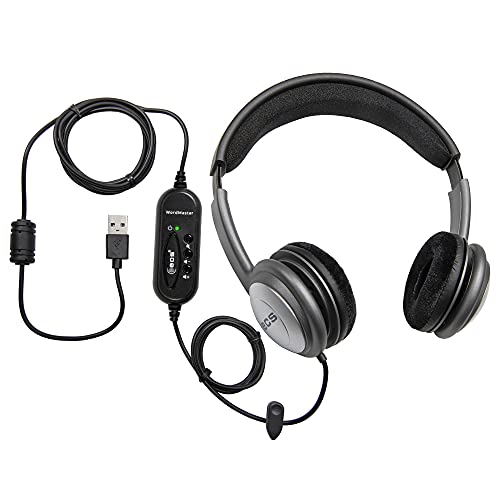
ECS WordSlinger USB Transcription Headset — Seven-foot cord and external sound card for dictation desks
ECS — Executive Communication Systems — builds equipment for the dictation industry, and the WordSlinger is its USB transcription headset in full professional dress. The title states the details working transcriptionists actually shop by: a 7 ft cord, an external sound card, a padded headband and ear cups, superior audio clarity as the design goal, and medical and legal dictation as the home territory. Each of those phrases corresponds to a lesson the dictation industry learned the hard way over decades.
The external sound card is the intellectually interesting feature. A transcription headset with its own sound card carries its audio processing with it, rather than depending on whatever audio hardware happens to be inside the computer. The practical result is consistency: the headset sounds like itself on the office desktop, the home laptop and the replacement machine IT delivers after a failure on a deadline morning. For a professional whose accuracy depends on learned listening — knowing exactly how a given speaker’s mumble presents through their equipment — that consistency is a working asset, not a gadget.
Seven feet of cord is the second lesson worth pausing on. Transcription desks are ecosystems: the pedal sits under the desk, the computer may sit beside or below it, and the transcriptionist shifts position across a long day. A generous cord reaches the machine without strain and leaves slack for movement, instead of tugging at the ears every time the chair turns. Padded headband and ear cups complete the long-session brief properly — transcription is measured in hours of continuous wear, and padding is what hour four feels like.
Medical and legal dictation, named in the title, are the accuracy-critical fields: terminology-dense, deadline-driven, and unforgiving of a misheard word. A headset marketed into those fields is claiming clarity as its professional reputation. Buyers in general transcription get the same clarity with less at stake per word; buyers inside those fields get equipment designed by people who know exactly what a wrong word costs.
Against the Spectras, the WordSlinger is the more explicitly specified machine — cord length, sound card and padding all stated. Against its own WordMaster sibling below, the difference is emphasis within the same philosophy. It is the roundup’s most complete statement of what a dedicated transcription headset should declare.
The WordSlinger’s cord length also interacts with the foot pedal in a way worth picturing. The pedal lives on the floor; the transcriptionist’s feet work it constantly while the hands type. A headset cord that is too short turns every shift of the chair into a tug shared between ears and machine. Seven feet dissolves that negotiation. It is the kind of specification that only an industry building for its own daily reality would think to print in a title, and its presence there is a credential in itself.
Mini spec box
- Cord stated in title: 7 ft cord
- Audio in title: External sound card; superior audio clarity claimed
- Comfort in title: Padded headband and ear cups
- Fields in title: Medical and legal dictation
- Connection: USB, over-head design
Strengths
- External sound card makes the listening consistent across different computers
- 7 ft cord stated in the title suits real desks with pedals and floor-standing PCs
- Padded headband and cups address the hour-four reality of transcription work
Trade-offs
- Professional specification comes with a professional-tier positioning
- Wired USB design ties the listener to the workstation, as intended
- No microphone — accuracy here is a listening discipline only
Best for: medical, legal and professional transcriptionists who work across more than one computer.
Not suited for: casual listeners who transcribe occasionally and need no dedicated kit.

ECS WordMaster USB Transcription Headset — Around-ear padded flagship for medical and legal work
The WordMaster is the WordSlinger’s sibling with the emphasis shifted to the ears themselves: an over-head USB transcription headset with padded around-ear cups, a 7-foot cord, an external sound card, and superb audio clarity aimed at transcribing medical and legal dictation. If the WordSlinger’s story is consistency across machines, the WordMaster’s story is immersion in the file — an around-ear seal that wraps the listener in the recording and keeps the office outside it.
Around-ear design changes transcription in two practical ways. First, the seal softens the room — the colleague’s phone call, the office printer, the household beyond the door — so the recording’s quiet passages need less volume and the listener’s ears fatigue more slowly. Second, padded around-ear cups distribute pressure across a larger area than on-ear designs, which long-session listeners often find decisive by mid-afternoon. Transcription is a marathon measured in audio hours, and the WordMaster is specified like endurance equipment.
The shared ECS inheritance remains: the 7-foot cord that respects real desk geometry, and the external sound card that keeps the listening signature constant from machine to machine. A transcriptionist who moves between a clinic office and a home workstation hears the same presentation of the same dictation style in both places, which protects the learned familiarity that accuracy is built on. Medical and legal work, again named in the title, supplies the context: these are fields where the listener may replay a single phrase a dozen times, and where the equipment’s clarity is quite literally part of the professional’s duty of care.
How should a buyer choose between the two ECS models? By the ears. Listeners who prefer a lighter, on-top wearing feel and listeners who work in quiet rooms may favour the WordSlinger pattern; listeners in noisier spaces, or who simply know they prefer an enclosing cup, should take the WordMaster. ECS offering both patterns around the same audio philosophy is a sign of a manufacturer that understands its users are individuals with different heads.
For the professional transcriptionist equipping a primary workstation for years of daily service, the WordMaster is this guide’s most complete around-ear answer by a clear margin.
Around-ear listening has one more transcription-specific benefit: it makes the listener’s own environment boring. Transcription accuracy decays with distraction long before it decays with fatigue, and a seal that demotes the office to a murmur defends the thread of a difficult sentence. Professionals who bill by the audio hour are, in effect, billing for sustained attention; the WordMaster’s padded enclosure is attention infrastructure, purchased once and used on every file.
Mini spec box
- Design in title: Over-head, padded around-ear
- Cord stated in title: 7-foot cord
- Audio in title: External sound card; superb audio clarity claimed
- Fields in title: Medical and legal dictation
- Connection: USB transcription headset
Strengths
- Padded around-ear seal softens the room and spreads pressure for long sessions
- External sound card keeps dictation sounding consistent across machines
- 7-foot cord and USB connection fit established pedal-driven workstations
Trade-offs
- Enclosing cups can feel warmer than on-ear designs in summer
- Dedicated listening tool — no microphone for calls
- Professional-tier positioning for a single-purpose instrument
Best for: full-time medical and legal transcriptionists who prefer an around-ear fit.
Not suited for: listeners who dislike enclosing earcups or work in hot rooms.

ECS WordSmith USB Transcription Headset — In-ear alternative with silicone tips for listeners who dislike headbands
Not every transcriptionist can abide a headband pressing through a long day, and the WordSmith exists for the rest. ECS’s third model in this guide is an in-ear USB transcription headset: ear buds with silicone ear tips, a 7-foot cord, an external sound card, and three extra pairs of ear tips included, aimed at medical and legal dictation. It keeps the professional audio philosophy of its ECS siblings and changes only the wearing geometry — which, for the many listeners it serves, changes everything.
The in-ear case rests on comfort of a specific kind. Some listeners find any headband oppressive across an eight-hour day; others wear hairstyles, head coverings or hearing equipment that headbands fight with. Silicone tips seal gently inside the ear, isolating the recording from the room by proximity rather than by clamping, and the near-weightlessness of buds removes the headband’s pressure from the day entirely. The three extra pairs of tips in the title are not a bonus trinket — tips are the wear item of in-ear listening, and a professional product ships with its spares included.
Isolation by seal has a transcription-specific virtue: the recording sits close and clear at lower volumes, because the room’s competition is physically excluded. Quiet dictation passages — the whispered aside, the speaker who turns away from the microphone — arrive with less struggle. The external sound card maintains the ECS consistency story across computers, and the 7-foot cord keeps the desk geometry honest, pedal and all.
The trade-offs are the in-ear form’s own. Some listeners find buds fatiguing inside the ear over very long sessions even as others find headbands worse; only personal trial settles it, which is why ECS offering the same philosophy in three wearing styles is so useful. Buds are also easier to misplace than a headset on a stand, and shared workstations suit headbands better for hygiene reasons, though personal tips largely answer that.
For the transcriptionist who has endured headbands for years without ever once liking them, the WordSmith is not a compromise pick. It is the professional tool finally shaped like their preference.
The spare tips deserve a final practical note: fit is accuracy. A silicone tip that seals properly presents the recording at its clearest; a worn or wrong-sized tip leaks bass, admits the room and quietly taxes every replay. That ECS ships three extra pairs signals a manufacturer who expects the headset to be used long enough to wear its tips out — and who would rather the spares be in the user’s drawer than in a re-order queue when a deadline is running.
Mini spec box
- Design in title: In-ear ear bud style
- Included in title: Silicone ear tips, 3 extra pair of ear tips
- Cord stated in title: 7-foot cord
- Audio in title: External sound card; superior comfort and audio clarity claimed
- Fields in title: Medical and legal dictation
Strengths
- In-ear silicone seal delivers clarity at lower volumes without headband pressure
- Three extra pairs of ear tips included — the wear item ships with spares
- Same external-sound-card consistency as the ECS headband models
Trade-offs
- In-ear fit divides opinion; some listeners fatigue over very long sessions
- Small buds are easier to misplace than a headset on a stand
- Shared workstations are less natural for in-ear designs
Best for: medical and legal transcriptionists who dislike headbands and prefer in-ear listening.
Not suited for: shared workstations where headsets pass between several listeners daily.
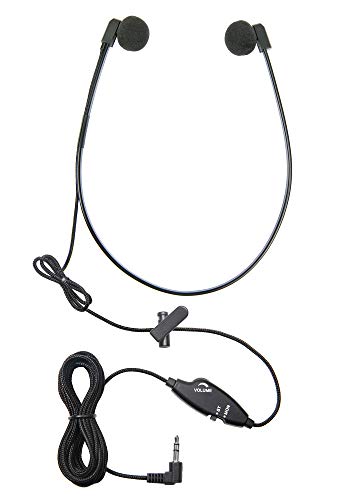
ECS WordHear-O Transcription Headset — Under-chin listening for glasses wearers and quick sessions
The WordHear-O closes the guide with the oldest wearing style in the dictation business: under the chin, where it all began. ECS’s under-chin transcription headset with a 3.5mm connection revives the stethoscope-style design that secretarial pools used for decades, in which the earpieces hang from a light band worn beneath the chin rather than over the head. It looks unusual to modern eyes at first glance. To its many devotees — and they are numerous in transcription — every other design is the unusual one.
The under-chin case is entirely practical, not nostalgic in the slightest. Nothing crosses the top of the head, so hairstyles survive the working day untouched — a consideration generations of transcriptionists have valued more than any specification. Glasses wearers escape the earcup-versus-temple-arm pressure that makes over-ear headsets ache by noon. And the headset goes on and comes off in one motion, dozens of times a day, which suits the interrupted rhythm of transcription work in an office where colleagues, phones and doorbells all claim pieces of the listener’s attention.
The 3.5mm connection defines its station: this headset plugs into the standard audio jack — on a computer, a dedicated transcription machine or a playback device — rather than joining the USB ecosystem of its siblings. Workstations built around traditional dictation equipment, and listeners who value a connection that any device of the last several decades can accept, are its natural home. In a guide where its ECS siblings carry external sound cards and USB plugs, the WordHear-O represents the analogue end of the same professional family.
Honesty about the title’s brevity matters here as elsewhere: no cord length, clarity claim or field specialisation is stated, so buyers should expect the classic under-chin experience rather than the specified extras of the WordSlinger line. What is stated — the style and the connection — is exactly what its buyers shop for, and they shop for it deliberately.
For the transcriptionist whose headband headsets all end up in a drawer by ten o’clock, the WordHear-O is the profession’s traditional answer, still in production because the need it answers never went away.
There is a generational footnote the WordHear-O carries proudly. Under-chin headsets were the sound of the twentieth-century typing pool, and their survival into the USB era’s catalogue — from a dictation specialist, no less — testifies that wearing comfort is not a fashion cycle. New transcriptionists occasionally discover the style after exhausting the headband options and describe the same relief their predecessors did. Some designs persist because they were first; this one persists because it works.
Mini spec box
- Design in title: Under chin style
- Connection in title: 3.5mm
- Brand: ECS — dictation industry specialist
- Role: Transcription headset
Strengths
- Under-chin style leaves hairstyles untouched and suits glasses wearers
- Fastest on-and-off of any design here, matching interrupted office rhythms
- 3.5mm connection fits computers and traditional dictation playback equipment
Trade-offs
- Title states no cord length or sound-card features, unlike its ECS siblings
- Under-chin fit is unfamiliar to listeners raised on headbands
- No USB connection for software-centric modern workstations
Best for: transcriptionists who prefer under-chin wear and listeners with glasses or headband fatigue.
Not suited for: buyers building a USB-based workstation around pedal software.
How Does a Foot Pedal Fit Into the Headset Decision?
New transcriptionists sometimes shop for the headset and the pedal as strangers, then discover they are one instrument. The pedal controls playback — play, pause, rewind — under the foot, so the hands never leave the keyboard and the ears never leave the recording. The headset’s part in that loop is to be the computer’s chosen listening device, connected the way the station is built: USB for the software-centric stations most professionals now run, which describes the Spectras and three of the ECS models, or 3.5mm where the station centres on traditional playback equipment, which is the WordHear-O’s home.
Cord length, stated at seven feet across the ECS range, is the pedal’s silent partner: the machine, the pedal and the listener form a triangle, and the cord must span it without tension. When you assemble or refresh a station, lay out that triangle first and let it arbitrate between models. A headset that fights the geometry will be cursed hourly; one that fits it disappears, which is the highest praise workstation equipment can earn. Meeting-focused buyers furnishing a second desk role can compare philosophies in Best Corded Headsets for Online Meetings.
How Do You Set Up a Transcription Station for Accuracy?
Begin with the recording at its worst, not its best. Take the most difficult file in your current caseload — the distant speaker, the overlapping interview — and use it as the setup reference. Set listening volume on the quiet passages, since those decide your replay count, and confirm that loud passages stay comfortable without adjustment. Position the headset or tips exactly as you will wear them at hour five, not as they feel in minute one, and run the pedal through its full routine while listening for any cord tug or connection crackle.
Then type a full page without stopping. Setup problems announce themselves as friction inside that page: a volume control too far away, a cushion heating up, a cord crossing the keyboard. Fix the friction now, in the setup hour, rather than paying for it across every file that follows. Professionals revisit this ritual whenever any element of the station changes — new machine, new room, new headset — because accuracy is a property of the whole station, never of one component.
Transcription Headsets Compared: Cords, Cups and Listening Endurance
| Headset | Connection | Microphone | Defining trait | Cord |
|---|---|---|---|---|
| Spectra SP-USB | USB | Listening only | Volume control on headset | Not stated in title |
| Spectra SP-PC | Computer (PC) | Listening only, stereo | Stereo speaker separation | Not stated in title |
| ECS WordSlinger | USB | Listening only | External sound card | 7 ft stated |
| ECS WordMaster | USB | Listening only | External sound card, around-ear | 7-foot stated |
| ECS WordSmith | USB | Listening only, in-ear | External sound card, spare tips | 7-foot stated |
| ECS WordHear-O | 3.5mm | Listening only, under-chin | Classic under-chin style | Not stated in title |
The table’s most instructive column is the one full of absences: no microphones anywhere, because transcription is listening. The real choices arrange themselves around it — USB or 3.5mm for the station you own, a stated cord and sound card or a specialist’s minimalism, and above all a wearing style your own head can live with for a working day. Notice too how much information the ECS titles volunteer compared with the field generally; in a profession that sells accuracy, specification honesty is a form of it.
How Does Transcription Work Change What Comfort Means?
Comfort in ordinary headphone reviews means the first twenty minutes. In transcription it means hour six of day four, with a deadline at five. The failure modes are slow: a headband hotspot that becomes a headache, an earcup that heats until the listener keeps lifting it and losing the sentence, an in-ear tip that turns a mild awareness into a constant grievance. This is why the ECS range’s variety is a professional feature rather than catalogue sprawl — the correct response to slow, personal failure modes is a choice of geometries, trialled honestly, not a single anointed design.
Professionals also plan comfort across the day rather than within the hour: alternating between two wearing styles, where the budget allows, rests different pressure points and extends total listening endurance. A WordMaster for the morning’s deep work and a WordHear-O for the afternoon’s interrupted office hours is not indulgence; it is how listeners who bill by the audio hour protect the instrument they bill with — their attention.
What Should a Transcription Service Buy for a Whole Team?
Standardise the audio philosophy, diversify the fit. A service that issues one ECS model to every chair will learn that a fifth of its staff quietly hate the wearing style, and hated equipment produces slower, error-prone work. The grown-up pattern is a house standard in two or three wearing styles sharing the same connection and sound-card approach, so training, spares and support stay simple while heads stay happy. Keep the alternate styles in the same drawer as the standard, priced into the programme from the start.
Then measure what matters: replays per audio hour, turnaround per file, and error rates on difficult recordings, before and after the equipment change. Transcription is one of the few knowledge-work disciplines where equipment quality shows up in countable output within a fortnight. A service that runs those numbers will never again buy headsets by catalogue photograph.
One more household of buyers deserves naming: the firms that still run dictation through dedicated playback machines rather than computers. The WordHear-O’s 3.5mm connection keeps that world equipped, and its presence in a modern catalogue is a reminder that professional audio retires slowly and honourably. If your office’s workflow is built on such machines, buy for the station you have; the guide’s USB majority is not a verdict on your setup, only a map of where the industry’s centre of gravity now sits.
Can These Headsets Serve Students and Occasional Transcribers?
Yes, with expectations set by volume. A student transcribing research interviews, a journalist typing up recordings, a paralegal handling occasional dictation — all benefit from the clarity-first design of this category, and the Spectra models in particular suit workstations that mix transcription with ordinary computer life. The honest dividing line is hours: below a few hours a week, any of these picks is a luxury that will nonetheless be enjoyed; above that threshold, the dedicated design stops being a luxury and becomes the difference between sustainable work and a sore, slow approximation of it.
Occasional users should also note the second-hand virtue of specialist gear: it holds its purpose. A transcription headset bought for a dissertation remains exactly right for the next project, the next job, the colleague who borrows the station. General gadgets drift between roles and end up master of none; these tools wait patiently in their drawer for the work they were built for.
How Do Difficult Recordings Separate Good Listening Gear From Ordinary Gear?
Easy recordings flatter every headset; the catalogue of difficulty is where this category earns its existence. The distant dictator who turns away mid-sentence. The interview recorded in a café, where the respondent’s answer competes with crockery. The deposition where two professionals talk over each other at the exact moment the record matters most. On files like these, the transcriptionist’s tools are replay discipline and listening clarity, and the second is bought, not wished for.
Clarity in practice means consonants surviving at low volume, quiet passages staying intelligible without the loud passages punishing the ears, and a presentation stable enough that the listener’s learned familiarity with a regular speaker’s habits can do its work. The external sound cards and speech-first designs in this guide aim at precisely that profile. A buyer with a difficult caseload should test with their single worst current file — the one that made them rewind forty times — and count replays on the candidate headset against their present one. That count is the review that matters, written in the only currency the profession respects.
What Is the Sensible Upgrade Path for a Transcriptionist?
Upgrade in the order the work complains. If replays cluster on quiet passages, listening clarity is the bottleneck and the headset is the correct purchase. If the hands keep leaving the keyboard, the pedal and software arrangement wants attention before any headset will help. If accuracy is fine but the day ends in a headache, wearing style is the bottleneck — and the answer is a different geometry from this guide, not a louder version of the current one.
The encouraging truth is that transcription stations improve in compounding steps. Each element — pedal discipline, software fluency, a headset matched to the listener — removes a small tax from every file, and the taxes were being paid hundreds of times a week. Professionals who audit their station once a year, component by component, stay measurably faster than equally skilled typists who treat the station as furniture. This guide covers the listening component; the habit of auditing is the buyer’s to keep.
How Should a Home-Based Transcriptionist Arrange the Listening Corner?
Home transcription inherits the profession’s requirements and adds a household. The listening corner should be the room’s quietest seat — away from the kitchen’s appliances and the street-facing wall — with the door’s behaviour understood: a closed door is the cheapest acoustic upgrade in the building. The station’s triangle of machine, pedal and chair should be arranged once, deliberately, with cords routed so that nothing crosses the pedal’s territory or the chair’s wheels. Seven feet of cord, where a model states it, buys the freedom to place the computer where the room wants it rather than where a short cable dictates.
Household diplomacy is the second arrangement. A transcriptionist deep in a difficult file is functionally in another building, and a visible signal — headset on, door closed, a note during deadline hours — protects both the work and the relationships. The equipment in this guide supports that diplomacy by being unmistakably professional: a dedicated headset on the head reads as ‘at work’ to a household in a way that earbuds never quite manage.
Finally, schedule the difficult files for the house’s quiet hours where deadlines allow. Even the best-sealing headset in this guide works less hard at seven in the morning than at seven in the evening, and professionals quietly organise their queues around that fact.
What Mistakes Do People Make Buying Transcription Headsets?
The first is buying entertainment headphones for professional listening and discovering at hour three that beauty and clarity are different virtues. The second is ignoring wearing style — choosing the technically admired model in a fit the listener cannot endure, then watching it migrate to a drawer. The third is forgetting the station: a headset whose connection or cord fights the pedal-and-computer geometry taxes every file. The fourth is chasing the loudest headset rather than the clearest, when volume is cheap and intelligibility is the entire product. And the fifth is equipping a team with one model and no alternates, when the ECS range itself demonstrates that professionals’ ears legitimately differ.
Final Recommendation
Choose by wearing style first and station second, and this category resolves itself. Around-ear listeners doing professional dictation should take the WordMaster; over-head listeners who move between machines, the WordSlinger with its external sound card; in-ear listeners, the WordSmith and its spare tips; under-chin traditionalists and glasses wearers, the WordHear-O. Spectra’s pair serve computer-based stations with specialist simplicity — the SP-USB where headset-side volume control matters, the SP-PC where stereo separation of speakers is the daily challenge. Equip the listener honestly, run the difficult-file test before committing any money, and the replays per page will fall measurably within the first week — which is the only scoreboard transcription has ever kept.
A closing reflection on the discipline itself is warranted in a guide this specialised. Transcription looks, from outside, like typing. From inside, it is applied listening under oath-like obligations: the record must say what was said, neither tidied nor interpreted. Equipment serves that obligation humbly — by making the said thing hearable, repeatedly, comfortably, identically, until the typist is certain. The six headsets in this guide were chosen because their makers understand the humility of the task. None performs; all serve. That is the correct character for tools whose work product is someone else’s words.
Buyers new to the profession sometimes apologise for caring this much about a headset. Veterans never do. They know the arithmetic: a small clarity advantage, multiplied by every phrase of every file of a career, is the difference between a transcriptionist who is booked solid and one who is merely available.
Budget for the station, not the headset, when you total the purchase: the pedal you may already own, the software you already license, and the headset that completes the triangle. Priced as a station, even the professional ECS models are modest — the whole listening apparatus costs less than a single day of a professional’s billed output, and it serves for years of files. That arithmetic, more than any review, explains why working transcriptionists equip themselves properly without agonising.
Frequently Asked Questions
Why do transcription headsets have no microphone?
Because the job is one-directional. The transcriptionist listens to recordings and types them; nothing they say enters the product. Removing the microphone removes weight, cost and a failure point, and lets the entire design budget serve listening clarity and wearing endurance. If your work mixes transcription with calls, keep a separate call headset rather than compromising both jobs in one device.
What does an external sound card actually do for transcription?
It moves the audio conversion into the headset’s own hardware, so the listening sounds consistent regardless of which computer the headset is plugged into. Professionals build learned familiarity with how voices present through their equipment; a sound card that travels with the headset protects that familiarity across office, home and replacement machines.
How long a cord do I need at a transcription desk?
Enough to span the triangle of computer, pedal position and chair movement without tension — which is why the ECS titles state seven feet. Measure your own station before buying: where the machine sits relative to where you sit decides whether a given cord is freedom or a leash. Slack you never notice is the correct amount.
Can I use a transcription headset with a foot pedal?
Yes — that is the standard professional arrangement. The pedal drives the playback software while the headset serves as the computer’s listening device, keeping hands on the keyboard throughout. USB models suit software-centric stations; the 3.5mm WordHear-O suits stations built around traditional playback equipment. Confirm your software’s audio settings point at the headset once, and the station behaves.
Which wearing style is best for all-day transcription?
The one your head votes for after a full day, which is why this guide presents four. Around-ear seals best and spreads pressure; over-head is the balanced default; in-ear removes headband pressure entirely; under-chin leaves hair and glasses alone and changes in a second. Trial the style, not just the model — listeners quit styles, not specifications.
Do transcription headsets work for online meetings?
They can play the meeting’s audio, but with no microphone you would be a silent participant unless another mic serves you. Transcription headsets are deliberately single-purpose. Desks that mix meetings with transcription do best with two tools — a call headset for talking days and a transcription headset for listening days — rather than one compromise worn for both.
How do I clean and maintain transcription ear cushions and tips?
Wipe cushions with a barely damp cloth and let them dry fully before the next session; replace silicone tips when they lose their seal or their softness, which is why the WordSmith ships spares. Keep the headset on a stand or hook rather than in a drawer tangle, and inspect cords at the earcup entry — the flex point where transcription headsets eventually fail.
Can I transcribe from a laptop’s built-in speakers instead?
You can, and beginners do, but the costs compound silently: the room hears your confidential dictation, you hear the room instead of the recording’s quiet passages, and replay counts climb because laptop speakers blur exactly the consonants that decide words. Medical and legal material in particular should never be played aloud in a shared space. A headset is a confidentiality device as much as a clarity device.
What volume should I transcribe at?
The lowest volume at which quiet passages stay intelligible through your chosen headset — and no higher. Louder is not clearer; beyond the point of intelligibility, extra volume only fatigues the ears that your income depends on. If you find yourself raising the level hour by hour, the problem is fit, seal or room noise, and it should be fixed at that level rather than out-shouted.
How long do transcription headsets typically last in daily service?
Years, with the wear items deciding the calendar: cushions compress, tips perish, cords flex at their entry points. The designs here anticipate that — padding that can be refreshed, tips shipped as spares, cords long enough to avoid strain. A headset retired for a tired cushion rather than failed electronics has been maintained, not outlived, and professionals budget accordingly.
Is stereo or mono better for transcription?
Stereo, whenever the recording offers it, because speaker placement is information — especially in interviews and panels. Much dictation is effectively single-channel, and there stereo simply does no harm. The SP-PC’s stereo identity makes it the guide’s natural suggestion for interview-heavy caseloads, while single-speaker dictation is served equally by every pick here.
Are these headsets suitable for listening to interviews and focus groups?
Yes, and the stereo SP-PC is the guide’s nod to exactly that work. Multi-speaker recordings reward headsets that preserve the spatial separation between voices, and all six picks prioritise speech clarity over musical presentation. For very difficult recordings, pair the headset with your software’s playback controls and the pedal — the station, as always, is the instrument.
Related Guides
For the speaking side of the desk, see Best Noise-Canceling Mic Headsets; for untethered queue work, Best Wireless Call Center Headsets; and for meeting-first plug-in gear, Best Corded Headsets for Online Meetings.


