What's inside
- Key Takeaways
- Quick Picks
- How We Chose These Picks
- What Actually Happens Where the Fibre Meets Your Home?
- How Fast a WAN Port Does Your Fibre Plan Actually Need?
- What Should You Ask Your Provider Before Buying Anything in This Guide?
- How Does a Fast Fibre Line Change What Your Home Network Should Be?
- How Do Fibre Households Grow Into Whole-Home Coverage?
- The Six Fibre Picks in Detail
- Which of These Routers Belongs Behind Which Kind of Fiber Jack?
- What Happens to Your Smart Home When the Router Changes?
- How Should You Swap a Provider Router for One of Your Own?
- How Should You Test a New Fibre Router Before You Declare Victory?
- What Mistakes Do Fibre Router Buyers Keep Making?
- Which Fibre Setup Fits a Flat, a Family House and a Home Business?
- Final Recommendation
- Frequently Asked Questions
- Related Guides
As an Amazon Associate I earn from qualifying purchases. This post may contain affiliate links at no extra cost to you.
widgetverdict.com is reader-supported. When you buy through links on our site, we may earn an affiliate commission.
Where to buy: One pick in this guide is a genuine fibre gateway and the other five are routers that sit behind one, so the reviews keep those roles separate and link each model under its exact name — an Archer AX73 and an Archer AX55 are cousins, not twins, and the Zyxel is a different species altogether.
Start with the truth this whole category blurs: a router does not terminate fibre. The glass strand entering your home ends at an ONT — an optical network terminal, sometimes built into a provider gateway — which converts light into an ordinary Ethernet signal. Only after that conversion does a router do its familiar work. So the honest search for the best fiber optic routers splits in two. If your provider lets you use a combined gateway that replaces its terminal, exactly one pick in this guide, the Zyxel C3510XZ, is that device. For everyone else, the question is which router deserves to sit behind the ONT, with a WAN port fast enough not to strangle the line you are paying for.
That second question is where most fibre money is wasted. A gigabit router behind a multi-gig fibre plan is a toll booth collecting speed you already bought. A superb router behind a modest plan is a sports car in a school zone. The five routers gathered behind the Zyxel here — from TP-Link, Amazon’s eero line, GL.iNet and ASUS — span the sensible range: gigabit-class mesh simplicity, AX5400 capacity, an AX3000 with proper VPN tooling, an OpenWrt-flavoured compact unit, and a WiFi 6 ASUS with an extendable mesh future. Read the Zyxel’s review first if your provider is CenturyLink-style gateway territory; read the rest as a contest for the shelf beside your ONT. Either way, you will finish this guide knowing which side of the optical conversion your purchase belongs on — and that single piece of clarity is worth more than any speed figure printed on any box in this category, because it is the difference between a network built on the right device and an expensive lesson in how fibre actually enters a home.
Key Takeaways
- A router does not terminate fibre — the ONT does. Only the Zyxel C3510XZ here is a true fibre gateway.
- For everyone else, the router’s WAN port speed is the fibre question: gigabit ports cap gigabit-and-above plans.
- The Zyxel listing states it works for fibre internet, will not work with DSL, and names CenturyLink compatibility.
- Mesh simplicity (eero 6+), raw capacity (Archer AX73) and VPN depth (Archer AX55, GL.iNet Flint) are the three directions the behind-ONT picks diverge.
- None of the five behind-ONT picks claims a multi-gig WAN in its listing title — plan accordingly if your fibre exceeds a gigabit.
- Keep the provider’s ONT; replace or bypass the provider’s router functions, not the optical terminal itself.
Quick Picks
| Pick | Badge | Why it earns its place |
|---|---|---|
| Zyxel C3510XZ Fiber Gateway WiFi 6E Router | The true fibre gateway | A combined gateway modem/router for fibre internet, gigabit Ethernet, CenturyLink-compatible per its listing. |
| TP-Link AX5400 WiFi 6 Router (Archer AX73) | Capacity behind the ONT | The largest WiFi 6 headline here, built for streaming households on fast gigabit fibre. |
| Amazon eero 6+ Mesh WiFi Router | Mesh simplicity for gigabit plans | Supports plans up to a gigabit, covers 1,500 square feet per unit, connects 75+ devices. |
| TP-Link AX3000 WiFi 6 Router with VPN | VPN-equipped all-rounder | Archer AX55 with EasyMesh, VPN client and server, HomeShield, OFDMA, MU-MIMO and USB 3.0. |
| GL.iNet Flint (GL-AX1800) WiFi 6 Router | OpenWrt-flavoured control | Five gigabit ports, up to 120 devices, OpenVPN and WireGuard for the tinkering household. |
| ASUS RT-AX3000S Dual-Band WiFi 6 Router | Extendable ASUS option | AiMesh future, Instant Guard, parental scheduling and built-in VPN behind any ONT. |
How We Chose These Picks
The shortlist was built around the premise in the introduction, because pretending otherwise produces the category’s usual nonsense. One slot was reserved for a genuine gateway device — a unit that speaks to the fibre network itself — and the Zyxel C3510XZ fills it, with a listing that says fibre, says not-DSL, and names its provider ecosystem. The other five slots went to routers a fibre household would realistically place behind an ONT, chosen to diverge: capacity, mesh, VPN depth, open firmware, ecosystem longevity. Six identical gigabit boxes would have been a disservice dressed as thoroughness.
Every specification below traces to a listing title. That discipline bites hardest on WAN speeds: several titles say gigabit, none of the five behind-ONT titles claims a 2.5G or 10G WAN, and we refuse to upgrade them in prose. If your plan is faster than a gigabit, that silence is the most important sentence in this guide, and the FAQ returns to it. Where titles are silent on other details — the Zyxel’s WiFi 6E band layout beyond its name, port counts on the ASUS — the reviews flag the gap with this article’s own wording rather than borrowing numbers from sibling models.
There is a rental-versus-ownership calculation under this whole category that deserves daylight. Provider gateways often arrive with a monthly equipment charge, and a customer-owned router or gateway pays for itself against that charge over a horizon most households can calculate on one hand. But the arithmetic is not the whole decision: owning the box means owning its firmware updates, its replacement when it dies, and the first round of every support conversation. Households that love control buy; households that love a single phone number rent; and the honest middle path — own the router, keep the provider’s ONT — is exactly the arrangement five of these six picks are built for, which is why the category’s centre of gravity sits there.
We also weighed the ownership layer fibre households actually meet: the provider’s app versus the router’s app, who handles firmware, and what happens on moving day. A router you own travels to the next address and the next provider; a gateway tied to one provider’s ecosystem, like the Zyxel, is a deeper commitment, and its review treats it that way.
What Actually Happens Where the Fibre Meets Your Home?
Follow the light. The fibre strand runs from the street cabinet to a small box on your wall — the ONT — where photons become Ethernet packets. From that box, a single cable carries your full plan speed to whatever routes your home. If the provider installed a combined gateway, the ONT and the router share one case and one power supply, which is convenient and also why replacing provider routers confuses people: you can replace the routing half’s job, but the optical half must remain, or be replaced by a gateway built for that provider’s network, which is the Zyxel’s entire proposition.
Three installation shapes cover most homes. In the first, the provider’s ONT is separate and its router function is basic; you plug your own router’s WAN port into the ONT and retire the provider box’s Wi-Fi — the happiest arrangement, and the one the five behind-ONT picks assume. In the second, the provider supplies a combined gateway you cannot fully remove; you disable its wireless, or place your router in its DMZ or access-point mode, and accept a compromise. In the third, the provider supports customer gateways on its fibre network — the CenturyLink pattern the Zyxel names — and a device like the C3510XZ takes the whole job. Knowing which shape your home has is worth one phone call before any purchase in this guide, because it decides whether you are shopping for a gateway or for a router at all.
VLAN tagging and PPPoE credentials are the two technical footnotes that ambush fibre upgrades. Some providers require the router to tag its WAN traffic or to log in with account credentials; mainstream routers, including the brands here, generally expose those settings, but the listing titles do not enumerate them. Nothing in the listing title settles this, so the maker’s own documentation is the authority to check before you retire the provider’s box.
How Fast a WAN Port Does Your Fibre Plan Actually Need?
Match the port to the plan, with one eye on the plan’s future. On fibre at or below a gigabit — still the majority of homes — every pick in this guide can accept the full line, and your choice should be made on Wi-Fi, ports and software instead. The eero 6+ states its ceiling in its title with unusual honesty: it supports internet plans up to a gigabit. Treat that sentence as the template for reading the whole category — a router’s plan ceiling is a specification, not an insult, and buying within it is competence, not compromise.
Above a gigabit, the arithmetic turns strict. The router needs a WAN port rated beyond gigabit and LAN ports to match for wired devices, or the excess speed evaporates at the front door. None of the five behind-ONT listings here claims such a port, and the Zyxel’s title speaks of gigabit Ethernet. Households on multi-gig fibre should therefore read this guide as the gigabit-and-below shortlist, and look to multi-gig specialists — several appear in our best asus wireless routers rundown, whose flagship models carry 2.5G and 10G ports — rather than asking these six to be something their listings do not claim.
Latency deserves its paragraph too, because fibre’s reputation for responsiveness is earned at the line and can be squandered at the router. A fibre connection’s raw ping is typically excellent; what households feel as lag is usually queueing — a big upload saturating the path while a game or call waits behind it. Modern routers counter with smarter queue management, and the WiFi 6 generation’s scheduling discipline helps on the wireless hop as well. You will not find queue features enumerated in these listing titles, which is precisely why the testing section below insists on trying your real evening load: latency under load is a behaviour to witness, not a spec to read.
Do not forget upload. Fibre’s quiet glory is symmetric or near-symmetric upload on many plans, and creators, home workers and camera-heavy homes feel it daily. Upload passes through the same WAN port and the same router queues, so a router that arbitrates busy traffic gracefully — the WiFi 6 models here with OFDMA-era scheduling — protects your video calls while the house backs itself up. Speed tests measure the line; evenings measure the router.
What Should You Ask Your Provider Before Buying Anything in This Guide?
One short conversation with your provider prevents nearly every failed fibre upgrade, and it is worth having before the boxes arrive. Ask whether your terminal is a separate ONT or a combined gateway, and whether the gateway can be bridged or replaced. Ask whether customer-owned gateways are supported on your plan at all — the question that decides the Zyxel’s fate at your address — and if so, whether a specific model list exists. Ask whether your connection needs PPPoE credentials or a VLAN tag when a third-party router connects, and write the answers down verbatim; installers’ memories are not documentation.
Ask also about the unglamorous logistics. Is there an equipment rental charge you will stop paying, and what is the return process and deadline for the provider’s unit? If the line fails with your own gateway in place, what does support need from you before they will test the line? And if you are mid-contract on a plan upgrade to multi-gig, ask when it lands — because, as the WAN section established, that date can move your entire shortlist from this guide’s gigabit tier to the multi-gig shelves. Five minutes of questions, one page of notes, and the purchase that follows is the first fibre upgrade most households get right the first time.
How Does a Fast Fibre Line Change What Your Home Network Should Be?
Fibre quietly relocates the bottleneck, and households that understand the move spend better. With cable or DSL, the line was the limit and the router merely served it; with gigabit fibre, the line outruns most Wi-Fi in most rooms, and the network inside the house becomes the product. That is why this guide spends its energy on radios, ports and placement rather than on the line itself. A fibre household should think of its spending as buying distribution: the capacity to carry a gigabit from the wall box to a desk, a sofa and a garden office, simultaneously, without the parts of the house taking turns.
Symmetric upload, where your plan offers it, changes habits too. Cloud backup stops being an overnight negotiation and becomes a background fact; a home business can host its own storage and reach it at fibre speeds through the VPN servers on picks like the Archer AX55; security cameras can keep their footage at home instead of renting cloud space. Each of those uses leans on the router’s steadiness under mixed load rather than its peak — one more reason the reviews weigh arbitration and tooling alongside the headline class. Fibre does not just make the old network faster; it makes a more ambitious network possible, and the router is where that ambition is either funded or starved.
How Do Fibre Households Grow Into Whole-Home Coverage?
The ONT’s location is chosen by the installer, not by your Wi-Fi, and it is usually a corner, a cupboard or a garage wall — which is why so many fibre homes with superb lines have dreadful far-room wireless. The growth paths from that starting point are the three represented in this guide. The mesh path, embodied by the eero 6+, adds nodes until the house is covered, accepting the gigabit ceiling as the price of simplicity. The ecosystem path — EasyMesh on the Archer AX55, AiMesh on the ASUS — grows a single-router purchase into a system one node at a time, keeping one app and one set of rules. And the wired path, available to any home with Ethernet runs or the will to add one, hangs an access point or a wired node exactly where the dead zone lives, which remains the fastest coverage money can buy.
Choose the path by the house’s fabric. Timber and plasterboard forgive wireless mesh; brick, stone and foil-lined insulation argue for wired backhaul wherever a cable can be persuaded to go. Whichever path you take, the ONT stays where it is and the router or primary node earns the most central position the cabling allows. Fibre households sometimes assume the line’s quality excuses the network’s geography. It does not — light is fast, but it still has to cross your hallway as radio, and radio obeys the same walls it always did.
The Six Fibre Picks in Detail
The gateway comes first, because it answers a different question from the other five. After it, the behind-ONT routers run from capacity to control.

Zyxel C3510XZ Fiber Gateway WiFi 6E Router — The true fibre gateway
The Zyxel C3510XZ is the only device in this guide that can honestly be called a fibre router without an asterisk. Its listing describes a gigabit Ethernet gateway modem/router for fibre internet, states plainly that it will not work with DSL, and names CenturyLink compatibility. That trio of claims defines a specific product: a combined unit that terminates the fibre service through the provider’s arrangement and routes the home in the same box, for households on that provider’s network who want to own their gateway rather than rent the provider’s.
The buying logic is therefore different from every other review here. You do not choose the Zyxel for its Wi-Fi — the listing’s WiFi 6E branding in its product name promises modern tri-band-class wireless, though the title text itself dwells on the gateway role — you choose it to consolidate: one device, one power supply, one management surface, no ONT-plus-router stack, and no monthly equipment rental line on the bill. The cautions are equally specific. A gateway is married to its provider ecosystem in a way a behind-ONT router is not; if you move to a different fibre provider, this box may not follow you. And provider support boundaries blur with customer-owned gateways — when the line fails, expect to prove the fault is not your box. For the right CenturyLink fibre household, those are fair trades for ownership and simplicity.
- Role: combined gateway modem/router for fibre internet
- Explicit limits: will not work with DSL, per the listing
- Provider: CenturyLink compatibility named
- Ethernet: gigabit Ethernet stated
- Wireless: WiFi 6E in the product name; band detail beyond that — nothing in the listing title settles this, so the maker’s own documentation is the authority to check
- Mesh support: not claimed in the listing title
Strengths
- The only genuine fibre-terminating gateway in this guide.
- One-box consolidation ends ONT-and-router clutter and rental fees.
- The listing’s DSL warning and provider naming make its fit unusually clear.
Trade-offs
- Provider-tied in a way behind-ONT routers are not; portability is limited.
- Gigabit Ethernet caps multi-gig fibre plans at the gateway.
- Support finger-pointing is a real risk with customer-owned gateways.
Best for: a CenturyLink fibre household wanting to own one combined gateway instead of renting.
Not suited for: a household on another provider, on DSL, or likely to switch fibre providers soon.
If that provider fit describes your home, the Zyxel C3510XZ listing on Amazon is the rare gateway page worth reading line by line.

TP-Link AX5400 WiFi 6 Router (Archer AX73) — Capacity behind the ONT
Behind an ONT, the Archer AX73’s job description writes itself: take a fast gigabit fibre line and distribute it to a houseful of streaming devices without the evening wobble. Its listing pitches dual-band gigabit WiFi 6 in the AX5400 class for streaming and long-range coverage — the largest wireless capacity in this guide — and on fibre the pairing makes sense, because fibre households skew heavy: the line invites 4K streams, game downloads and cloud backups that a lesser router’s airtime discipline would queue into mush.
Read in the fibre context, the AX73’s limits are as clear as its strengths. Its ports are gigabit class, so it is the right partner for gigabit fibre and the wrong one for multi-gig fibre — a distinction its listing never blurs, even if category marketing elsewhere does. Long-range positioning helps the classic fibre layout, where the ONT often lands in a utility corner and the router must reach across the home from wherever the cable run allows. For the gigabit fibre family that streams like a small cinema, this is the capacity pick; households whose fibre outruns a gigabit should take the hint in the WAN section above and shop the multi-gig tier instead. Buyers still on the fence between band layouts will find the wider field in our best dual band routers comparison useful context.
- Wireless: dual-band WiFi 6, AX5400 class
- Ports: gigabit class stated — suited to gigabit fibre plans
- Positioning: streaming and long-range coverage per the listing
- Role in this guide: behind-ONT router; it does not terminate fibre
- VPN and mesh detail: nothing in the listing title settles this, so the maker’s own documentation is the authority to check
- USB: not stated in the listing title
Strengths
- The deepest WiFi 6 airtime here for stream-heavy fibre homes.
- Long-range tuning suits awkward ONT placements.
- An honest gigabit identity — no multi-gig pretence.
Trade-offs
- Gigabit ports trim any plan above a gigabit.
- The title is quiet on VPN and mesh specifics.
- Dual-band only; no 6 GHz lane for near-router flagships.
Best for: a gigabit fibre household whose evenings are a streaming pile-up.
Not suited for: a multi-gig fibre plan or a buyer needing a true gateway device.
Gigabit fibre streamers can check the Archer AX73 on Amazon — its spec and a gigabit line are well matched.

Amazon eero 6+ Mesh WiFi Router — Mesh simplicity for gigabit plans
The eero 6+ writes the most honest title in this guide: a mesh WiFi router that supports internet plans up to a gigabit, covers up to 1,500 square feet, connects 75+ devices, sold as a 1-pack. Every number there is a boundary as much as a boast, and for fibre households the plan ceiling is the one to underline. On gigabit fibre, the eero proposition is simplicity as a feature: buy one unit for a flat, add units as the house demands, and let the mesh handle the topology while the app handles the humans.
That simplicity is a genuine philosophy, not a lack. eero’s system manages channels, updates and roaming itself, which suits the large class of fibre buyers who upgraded their line for work and streaming and have no interest in administering a network. The 75+ device rating acknowledges the modern smart home’s quiet multitude, and the 1-pack format here is the starter unit of a system that grows node by node. The trade-offs ride along: tinkerers will find fewer dials than the GL.iNet or TP-Link picks offer, wired ports on mesh units are modest by design, and the gigabit ceiling is absolute — a multi-gig line deserves different hardware. For the flat or house on gigabit fibre that wants the network to disappear, no pick here disappears more gracefully.
- Role: behind-ONT mesh router unit (1-pack)
- Plan support: internet plans up to a gigabit, stated
- Coverage: up to 1,500 square feet per unit
- Devices: 75+ connections stated
- Expansion: mesh system — additional units extend coverage
- Wired port count: nothing in the listing title settles this, so the maker’s own documentation is the authority to check
Strengths
- The clearest plan-ceiling statement in the category — no overselling.
- Mesh growth by single units matches how homes actually expand.
- Set-and-forget management suits non-technical households.
Trade-offs
- The gigabit plan ceiling is a hard boundary.
- Fewer manual controls than the enthusiast picks here.
- Full-house coverage means buying more units over time.
Best for: a gigabit fibre flat or house that wants mesh simplicity and honest ceilings.
Not suited for: a multi-gig plan, or a tinkerer who wants manual control of everything.
Simplicity seekers can start with the eero 6+ listing on Amazon and add nodes only where the walls demand them.

TP-Link AX3000 WiFi 6 Router with VPN — The VPN-equipped all-rounder
The Archer AX55 — for that is the model its listing names — is the most completely specified behind-ONT router here: dual-band AX3000 WiFi 6, EasyMesh, VPN clients and server, HomeShield, OFDMA, MU-MIMO, USB 3.0, and a designed-for-security sign-off. Read that VPN line twice, because it runs both ways: as a client, the router can route household traffic through a VPN service; as a server, it lets you reach your home network from outside — the two directions fibre households with home offices and travel schedules actually use, present in one mid-tier box.
EasyMesh gives the AX55 the expansion path the AX73’s title leaves unstated, HomeShield layers TP-Link’s security and controls (check the listing for which elements are subscription tiers), and USB 3.0 covers the light storage-sharing jobs that refuse to die. AX3000 capacity sits a class below the AX73, which is the honest exchange: this model trades raw airtime for tooling. On a gigabit fibre line feeding a working household — calls by day, streams by night, a VPN tunnel to the office in between — that exchange will suit more homes than the spec sheet suggests. It remains, like all five, a gigabit-ported router for gigabit-class fibre.
- Wireless: dual-band AX3000 WiFi 6 with OFDMA and MU-MIMO
- VPN: clients and server both stated
- Mesh: EasyMesh supported
- Security: HomeShield named in the listing
- USB: USB 3.0 port stated
- WAN speed beyond gigabit: not claimed — nothing in the listing title settles this, so the maker’s own documentation is the authority to check
Strengths
- Two-way VPN is the most complete remote-access story among the routers here.
- EasyMesh plus USB 3.0 make it the best-equipped mid-tier package.
- AX3000 with OFDMA handles the working household’s mixed load calmly.
Trade-offs
- Less wireless headroom than the AX73 for streaming pile-ups.
- HomeShield’s premium layers may sit behind a subscription — verify on the listing.
- Gigabit-class ports, like every behind-ONT pick here.
Best for: a gigabit fibre home office that needs VPN in both directions and mesh options.
Not suited for: a multi-gig plan or a household chasing maximum streaming capacity.
Home workers should read the Archer AX55’s Amazon listing for its VPN wording — it is the detail that sells this router.
GL.iNet Flint (GL-AX1800) WiFi 6 Router — OpenWrt-flavoured control
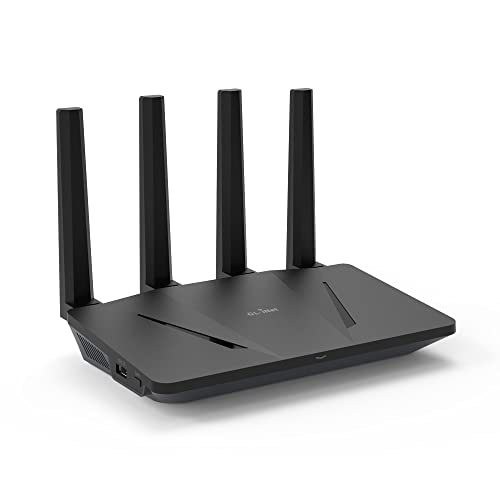
GL.iNet’s Flint brings a different culture to the fibre shelf. Its listing describes a dual-band gigabit WiFi 6 router with five 1G Ethernet ports, support for up to 120 devices, and OpenVPN plus WireGuard — the signature of a brand built on open firmware, where VPN is not a feature tier but the family trade. Five gigabit ports is a generous wired bench for the class, and 120 devices is the largest device rating in this guide, aimed at the smart-home-dense household whose plugs and sensors outnumber its people twenty to one.
Behind a fibre ONT, the Flint suits the owner who treats the router as a small server: WireGuard tunnels that perform, per-device routing decisions, a firmware ecosystem with community depth. Its AX1800 wireless class is the modest part of the package — the radios serve a normal home fine, but a streaming-maximalist household should look at the AX73 — because GL.iNet spent the budget on ports, VPN and openness instead. For the tinkerer on gigabit fibre, and especially for anyone whose work or travel life runs through WireGuard, that is exactly the right spending pattern. Households wanting a managed, hands-off experience should note the contrast with the eero and choose their culture deliberately.
- Wireless: dual-band WiFi 6, AX1800 class
- Ports: five 1G Ethernet ports stated
- Devices: up to 120 stated in the listing
- VPN: OpenVPN and WireGuard named
- Mesh branding: nothing in the listing title settles this, so the maker’s own documentation is the authority to check
- Role: behind-ONT router; it does not terminate fibre
Strengths
- WireGuard plus OpenVPN depth is the enthusiast high-water mark here.
- Five gigabit ports and a 120-device rating suit wired, gadget-dense homes.
- Open-firmware culture rewards owners who like to shape their network.
Trade-offs
- AX1800 wireless is the smallest class among the behind-ONT picks.
- The hands-on philosophy is a mismatch for set-and-forget buyers.
- Gigabit ports cap it, like the rest, at gigabit fibre.
Best for: a gigabit fibre tinkerer who lives in WireGuard and wires most devices.
Not suited for: a hands-off household or a streaming-first family wanting maximum airtime.
Tinkerers can explore the Flint’s listing on Amazon — its VPN and port lines tell the whole story at a glance.

ASUS RT-AX3000S Dual-Band WiFi 6 Router — The extendable ASUS option
The ASUS RT-AX3000S enters this fibre guide carrying the ecosystem argument. Its listing states dual-band WiFi 6 in the AX3000 class, extendable design, Instant Guard, parental control scheduling, built-in VPN and AiMesh compatibility. Behind an ONT, those software traits translate into a specific ownership story: the router you install beside the fibre terminal today can become a node in a larger AiMesh system when the house grows, and its security and controls arrive without the subscription meter running — the standing ASUS pattern its sibling models also follow.
Instant Guard deserves its fibre-context sentence: it tunnels your phone back home over the router’s VPN when you use public Wi-Fi, which for a fibre household means the tunnel’s home end rides your fast, symmetric line — reaching your files and your network from a hotel feels noticeably less like the dial-up tribute act it becomes on slow-upload connections. AX3000 capacity matches the Archer AX55’s class while the philosophies diverge — TP-Link’s HomeShield world versus ASUS’s AiMesh world — and that ecosystem choice, more than any benchmark, is the real decision between them. Port details sit outside the title, so wired-heavy buyers should verify the bench in ASUS’s documentation before ordering.
- Wireless: dual-band WiFi 6, AX3000 class
- Mesh: AiMesh compatible, extendable per the listing
- Extras: Instant Guard stated
- Controls: parental control scheduling included
- VPN: built-in VPN support stated
- Port speeds and counts: nothing in the listing title settles this, so the maker’s own documentation is the authority to check
Strengths
- AiMesh gives the clearest long-term expansion path in this guide.
- Instant Guard over a fast fibre upload is genuinely pleasant to use.
- Scheduled parental controls and built-in VPN round out a complete household package.
Trade-offs
- Port specifics require a documentation check before a wired-heavy purchase.
- AX3000 capacity trails the AX73’s streaming headroom.
- Gigabit-class positioning, like the other behind-ONT picks.
Best for: a gigabit fibre household choosing the ASUS ecosystem with mesh growth in mind.
Not suited for: a multi-gig plan, or a desk needing a verified deep port bench today.
Ecosystem buyers can weigh the RT-AX3000S on Amazon against the AiMesh future they actually plan to build.
Which of These Routers Belongs Behind Which Kind of Fiber Jack?
The comparison in this category starts with role, not speed. One pick terminates fibre for one provider’s customers; five route behind a terminal for everyone’s. Inside the five, the axes are capacity (AX73), simplicity (eero), tooling (AX55), openness (Flint) and ecosystem (ASUS). The table keeps to listing-stated facts and states the role column in words nobody can misread.
| Model | Role | Class | Defining trait |
|---|---|---|---|
| Zyxel C3510XZ | True fibre gateway | WiFi 6E gateway | Fibre modem/router, CenturyLink named, not for DSL |
| Archer AX73 | Behind-ONT router | WiFi 6 AX5400 | Streaming capacity, long-range pitch |
| eero 6+ | Behind-ONT mesh unit | Mesh WiFi | Plans up to a gigabit, 1,500 sq. ft., 75+ devices |
| Archer AX55 | Behind-ONT router | WiFi 6 AX3000 | VPN client and server, EasyMesh, USB 3.0 |
| GL.iNet Flint | Behind-ONT router | WiFi 6 AX1800 | 5 x 1G ports, 120 devices, WireGuard |
| ASUS RT-AX3000S | Behind-ONT router | WiFi 6 AX3000 | AiMesh, Instant Guard, scheduling |
Notice the honesty gradient in the table’s plan ceilings: eero prints its gigabit ceiling, the TP-Link pair print gigabit port classes, the Zyxel prints gigabit Ethernet. The fibre market’s fog comes from elsewhere — from shoppers assuming a router with fibre in its name terminates fibre. After this guide, you will not be one of them: the gateway question is settled by role, and the router question by the speed of the port facing the ONT.
What Happens to Your Smart Home When the Router Changes?
A fibre upgrade day has a hidden guest list: every smart bulb, plug, camera and speaker in the house knows the old network, and they will all have opinions about the new one. The single most valuable trick in this guide is also the simplest — set the new router’s network name and password identical to the old ones, and the entire menagerie rejoins silently while you drink your coffee. The exception is the deliberate fresh start: if your old password has been shared with half the street, a new name and a quiet afternoon of re-pairing buys a genuinely cleaner network, and a guest network for visitors ensures it stays that way.
Static addresses and port rules are the other inheritance to plan. A NAS, a camera system or a home server that other devices find by address should have that address reserved in the new router’s settings on day one, before anything goes looking for it. Households running a VPN server — the AX55 and Flint buyers, most likely — should export or note the old configuration before the swap. None of this is difficult; all of it is easier at a desk with the old router still running than at midnight with the old router in a return box. Fibre swaps reward the household that treats the router change as a migration, not a replacement.
How Should You Swap a Provider Router for One of Your Own?
Work in an order that keeps the household online. First, photograph or note the current setup: which box is the ONT, which is the router, what cables run where, and any credentials or VLAN settings your provider publishes for customer routers. Second, if your provider gateway is combined, log in and look for bridge mode, IP passthrough or at least the option to disable its Wi-Fi; if your provider supports customer gateways outright and you bought the Zyxel, follow its provider-specific setup with the old unit still powered nearby as a fallback. Third, connect the new router’s WAN to the ONT (or the bridged gateway), power-cycle in order — terminal first, router second — and give the line several minutes to renegotiate before judging anything.
Then rebuild deliberately: same network name and password as before, if you want every gadget to rejoin without a household-wide re-pairing ceremony, or a fresh name if you prefer a clean client list. Update firmware, set a new admin password, and run your speed tests wired first — a wired test isolates the line from the Wi-Fi, so you learn whether any shortfall lives in the fibre or the air. Keep the provider’s box in a cupboard for a month before returning it; the household that can roll back in five minutes troubleshoots calmly. If the new connection must also survive outages, this is the moment to plan the cellular reserve described in our best lte routers guide, while the cabling is still in your hands.
How Should You Test a New Fibre Router Before You Declare Victory?
Test in the order that isolates faults. Begin wired, laptop to router, router to ONT: that number is the line and the router’s routing, unmediated by radio, and on a gigabit plan it should sit close to the plan’s promise at a quiet hour. Then test wireless in the router’s room, which measures the radios at their best, and finally in your two worst rooms, which measure your life. Write the four numbers down. A shortfall in the first test is a provider or configuration conversation; a shortfall only in the last is placement or coverage, and it will not be fixed by arguing with the fibre company.
Then test behaviour, not just speed. Start the household’s real evening — streams, a call, a backup — and walk the house with the call running. Note where it frays. Check that the VPN, the guest network and any parental schedules you configured actually engage, because features verified on setup day are features that exist, and features assumed are fiction. Live with the setup for a week before returning the provider’s equipment or drilling anything permanent. Fibre installs fail quietly more often than loudly: a router that reboots at 3 a.m., a node that sulks after updates. A week of ordinary life is the only review period that catches the quiet failures, and every pick in this guide deserves to be judged by it.
What Mistakes Do Fibre Router Buyers Keep Making?
The founding mistake is the premise this guide opened with: buying a router expecting it to plug into the fibre itself, then meeting the ONT. The second is the toll-booth error — a gigabit router strangling a multi-gig plan, or its mirror image, an expensive multi-gig router idling behind a basic plan. The third is retiring the provider’s combined gateway entirely when only its routing should have been bypassed, leaving the household with no optical terminal at all and a support call nobody enjoys.
There is also a timing mistake specific to fibre: swapping the router on the same day the line is installed, then being unable to tell whether a fault belongs to the new line, the new terminal or the new router. Let a fresh fibre installation run on the provider’s equipment for a few days first, learn its honest speeds wired and wireless, and only then introduce your own router into a system whose behaviour you already know. Diagnosis is a comparison; give yourself a baseline to compare against, and every later change becomes a one-variable experiment instead of a three-variable argument.
Fourth comes credential amnesia: swapping boxes without recording PPPoE logins, VLAN tags or the provider’s customer-router requirements, turning a twenty-minute upgrade into a weekend. Fifth is testing only over Wi-Fi in the far bedroom and blaming the line for what placement did. Fibre is the most forgiving internet technology most homes will ever have — fast, symmetric, steady — and nearly every bad fibre experience is a small, fixable mismatch between the line, the terminal and the router asked to serve it.
Which Fibre Setup Fits a Flat, a Family House and a Home Business?
The flat on gigabit fibre is the simplest portrait: one good router, centrally placed, ends the discussion. The Archer AX55 or the ASUS RT-AX3000S covers it with tooling to spare, the eero 6+ covers it with the least thought, and the Zyxel covers it only in the specific provider-owned-gateway sense. Flats should resist mesh entirely — a second node in 700 square feet is furniture, not infrastructure.
The family house adds the coverage problem and the contention problem simultaneously, which is why its answer splits: the Archer AX73 if one strong box can see the whole house, the eero system or an EasyMesh or AiMesh growth path if it cannot. The home business is the third portrait and the most demanding: symmetric fibre, a VPN server for the road, a wired desk that never negotiates, and a failover plan for the day the van meets the cabinet. That household should read the AX55’s two-way VPN and the Flint’s WireGuard depth as its headline features, wire everything that sits still, and treat the router not as an appliance but as the premises’ front door — because for a business run from home, that is literally what it has become.
Final Recommendation
If you are a CenturyLink fibre customer who wants to own the gateway itself, the Zyxel C3510XZ is the one honest answer in this category, bought with its provider fit verified first. Everyone else should shop the behind-ONT five by temperament: the Archer AX73 for streaming capacity on gigabit fibre, the eero 6+ for mesh simplicity within its stated gigabit ceiling, the Archer AX55 for two-way VPN and EasyMesh tooling, the GL.iNet Flint for open-firmware control and a deep port bench, and the ASUS RT-AX3000S for the AiMesh ecosystem and Instant Guard.
And if your fibre plan outruns a gigabit, take this guide’s recurring hint as its final gift: your shortlist lives in the multi-gig tier, not here. That is not a failure of this guide but its boundary, drawn where the listings themselves draw it. A shortlist that pretended gigabit routers were multi-gig routers would sell six households a bottleneck and call it an upgrade. The fibre in your wall deserves better arithmetic than that, and so does the money you are about to spend serving it. The best fiber optic routers are not the ones with fibre in the marketing — they are the ones whose role and ports match the line in your wall, chosen with the ONT’s quiet existence firmly in mind.
Frequently Asked Questions
Can I plug a normal router directly into the fibre cable?
No. The fibre strand must end at an ONT or a provider-compatible gateway, which converts the optical signal to Ethernet. Five of the six picks here connect to that Ethernet output; only the Zyxel C3510XZ is itself a fibre gateway, and only for the provider ecosystem its listing names.
Will these routers work with my gigabit fibre plan?
Yes — gigabit is exactly the tier this shortlist serves. The eero 6+ states support for plans up to a gigabit, the TP-Link and GL.iNet models state gigabit-class ports, and the Zyxel states gigabit Ethernet. On a gigabit line, choose among them by Wi-Fi, features and ecosystem rather than by port anxiety.
What if my fibre plan is faster than one gigabit?
Then none of these six is your router: you need a WAN port rated 2.5G or 10G, with LAN ports to match, and no listing here claims one. Multi-gig models exist in other shortlists of ours; buying a gigabit router for a multi-gig line simply donates the excess speed back to the provider.
Does the Zyxel gateway work with any fibre provider?
Its listing names CenturyLink compatibility and fibre internet generally, and states it will not work with DSL. Gateway compatibility is provider-specific in practice — provisioning systems differ — so confirm your provider accepts this model on your plan before ordering, and keep the provider unit until the Zyxel is live and stable.
Does a better router improve fibre latency for gaming and calls?
It can protect it, which is the honest framing. The line’s raw latency is set by the provider’s network; the router’s contribution is queue discipline when the household is busy, keeping a game or call from waiting behind a cloud backup. Wire the gaming machine where possible, let the router’s scheduling do its work on the wireless hop, and judge by a busy evening rather than a quiet speed test. Players who wire their machine and keep the household’s bulk uploads scheduled for quiet hours routinely find that a mid-tier router on fibre outperforms, in felt responsiveness, a flagship router on a congested lesser line — the glass does the heavy lifting, and the router’s job is simply not to waste it, and every model in this guide, honestly matched to its plan tier, can be trusted with exactly that responsibility in a real household, through the weekday calls, the weekend streams and the overnight backups alike, provided the wired test on installation day confirmed the line beneath it is healthy and delivering what the contract promises in both directions, at busy hours as faithfully as at dawn, which is the standard a fibre household should hold every part of its network to, from the strand in the street to the phone in the furthest bedroom of the house, where the signal has crossed two floors and three walls to arrive at the pillow before sleep, where a final episode streams while the rest of the dark house quietly backs itself up to the cloud without waking anyone sleeping soundly in it tonight or any other quiet single night of the year.
Should I return my provider’s router after installing my own?
Only the routing half of the arrangement is yours to retire. If the provider’s box is a separate ONT, it stays. If it is a combined gateway you have bridged, it usually stays too, doing only the optical job. If you replaced it with a supported customer gateway like the Zyxel, follow the provider’s return process — after a stable month, not on installation day.
Why is my fibre speed slower over Wi-Fi than the plan I pay for?
Because Wi-Fi, not fibre, is the bottleneck in most rooms: band, distance, walls and client age all tax the wireless hop. Test wired at the router to see the line’s true speed; if wired matches the plan, the fix is placement, a mesh node, or a higher-capacity router — the line itself is innocent.
Do I need a special Ethernet cable between the ONT and the router?
For gigabit fibre, the Cat5e or Cat6 cable most homes own is entirely sufficient, and the run between ONT and router can be long enough to let the router live centrally rather than beside the terminal — a placement upgrade that costs one cable. Multi-gig households should use Cat6 as a minimum on the fast links, but nothing in this gigabit shortlist demands exotic cabling.
Can I use one of these routers with cable or DSL instead of fibre?
The five behind-ONT routers do not care what feeds their WAN port — cable modem, DSL gateway in bridge mode or fibre ONT all present the same Ethernet hand-off, which is part of their portability charm. The Zyxel is the exception in both directions: it is built for fibre and its listing states it will not work with DSL.
Related Guides
Keep reading with the best asus wireless routers for multi-gig port options, the best dual band routers across brands, and the best lte routers for building a cellular failover beside your fibre line.