What's inside
- Key Takeaways
- Quick Picks
- How Did We Judge Cases That Are Meant to Be Looked At?
- Why Do Dual-Chamber Designs Dominate the Clear-Case Market?
- How Much Does Glass Actually Cost You in Cooling?
- How Does Each Contender Compare on View, Fans and Fitted Extras?
- What Do First-Time Clear-Case Builders Get Wrong?
- How Should You Plan a Build Order Inside a Panoramic Case?
- Why Does Lighting Look Different in Photographs Than in Your Room?
- How Does a Clear Case Change Upgrades Two Years Later?
- What Should You Measure Before Any of These Cases Arrives?
- How Do You Keep a Glass Build Quiet as Well as Cool?
- Why Does the Room Around the Case Deserve a Vote?
- What Does a Sensible Cleaning and Care Rhythm Look Like?
- How Should You Choose Between the Two Lian Li Cases and the Four Value Cases?
- What Happens When a Glass Build Has to Move House?
- Why Do Showcase Builds Hold Their Appeal Longer Than Spec Sheets Suggest?
- What Should You Do in the First Evening After the Panels Go On?
- Final Recommendation
- Frequently Asked Questions
- Related Guides
As an Amazon Associate I earn from qualifying purchases. This post may contain affiliate links at no extra cost to you.
widgetverdict.com is reader-supported. When you buy through links on our site, we may earn an affiliate commission.
Where to buy: each enclosure below links to a checked Amazon listing; two Lian Li panoramic designs for the showcase builders, a MUSETEX case arriving with six ARGB fans fitted, a darkFlash dual-chamber tower with a 330-degree view, a RAIDMAX case that even bundles a power supply, and a FOIFKIN case with seven fans and a 270-degree outlook between them span the clear-case market from gallery piece to first build.
The best clear pc cases are bought with the eyes and justified with the thermals, and any honest guide has to serve both motives. A panoramic glass case turns a build into furniture: the graphics card, the cooling, the cable work and the lighting become part of the room. But glass is not mesh, and a case that displays beautifully while strangling its own fans will punish every component inside it on a warm evening. The six picks here were chosen because each one negotiates that tension in a different, defensible way — through dual-chamber layouts that hide the hot mess, through generous pre-installed fan counts, or through sheer internal volume.
Vocabulary matters in this category. Clear can mean a single tempered-glass side panel, a two-panel corner view, or the pillar-free panoramic designs that wrap the front and side into one continuous outlook. The listings below use their own degree figures — 270, 330, three-panel glass — and the reviews take those claims at face value as descriptions of the viewing geometry while judging the practicalities that follow: where the air enters, where the cables hide, which radiators fit, and what a first-time builder will curse at midnight.
Key Takeaways
- Panoramic glass sells the view; airflow design decides whether the view is worth its thermal price.
- Dual-chamber layouts hide cables and power supplies behind the motherboard tray, which is why they dominate this list.
- Pre-installed fans change the true cost of a case more than any other bundled feature.
- Back-connect motherboard support appears across these picks and rewards builders who plan for it from the start.
- Radiator and graphics-card clearances in the listings are the dimensions to check before ordering, not after.
- A clear case is a commitment to cable management, because every shortcut remains visible forever.
Quick Picks
| Pick | Badge | Why it earns its place |
|---|---|---|
| Lian Li O11 Vision Compact ATX Mid Tower | The gallery standard | Three-panel glass, back-connect support and hidden AIO routing in Lian Li’s compact dual-chamber design. |
| Lian Li O11D Mini V2 ATX Mid Tower | The compact panoramic | Pillar-free glass and ventilated airflow in a smaller O11, with fans left for the buyer to choose. |
| MUSETEX K2 ATX Mid Tower Gaming PC Case | The fans-included build | Six PWM ARGB fans pre-installed behind full-view dual tempered glass, with a Type-C front panel. |
| darkFlash DY460 ATX Mid Tower PC Case | The wide-angle tower | A 330-degree panoramic dual-chamber case with four ARGB PWM fans and room for a 400mm graphics card. |
| RAIDMAX i812 ATX Mid Tower PC Case | The bundled-power option | Panoramic glass, three ARGB fans and an included 750W 80+ power supply for one-box builders. |
| FOIFKIN F600 PC Case (Black) | The seven-fan value | Seven PWM ARGB fans pre-installed behind 270-degree panoramic glass with Type-C connectivity. |
How Did We Judge Cases That Are Meant to Be Looked At?
We weighted four things. First, the quality of the view itself: how much of the build is visible, from how many angles, and whether pillars, thick bezels or tinted glass interrupt it. Second, the thermal plan: fan positions, mesh areas, radiator support and whether the case’s airflow story survives contact with a hot graphics card. Third, the building experience: cable channels, back-connect support, radiator access and the little mercies like removable panels that decide whether assembly feels like craft or combat.
Fourth, honest total cost. A case shipped without fans is not cheaper than a case shipped with seven until the fans are bought, and a case bundled with a power supply must be judged as a system. The picks divide naturally on that axis: the Lian Li pair sell design and let the buyer choose cooling, while MUSETEX, darkFlash, RAIDMAX and FOIFKIN arrive with much of the cooling — and in one case the power — already decided. Builders comparing internal components rather than enclosures will find the rest of this batch’s guides, including best android fast chargers, concerned with smaller glass-free problems.
We also respected the category’s aesthetic spread. Not every clear case wants to be a minimalist gallery; the RAIDMAX wears an ARGB stripe down its front like a signature, and the MUSETEX and FOIFKIN lean into gaming colour. A guide that only praised restraint would fail the many builders for whom the light show is precisely the point.
Why Do Dual-Chamber Designs Dominate the Clear-Case Market?
Because they solve the clear case’s oldest embarrassment: the cables. In a conventional tower, the power supply, its cable bundle and the drive cages share the visible space with the components people actually want to see, and glass exposes the untidiness mercilessly. A dual-chamber case moves the power supply and cable runs into a second compartment behind or beside the motherboard tray, leaving the glass chamber as a clean stage containing the board, the graphics card, the cooler and the fans. The view improves not because anything was added, but because everything ugly was given somewhere else to live.
The layout brings practical gifts beyond tidiness. A wide second chamber swallows cable slack that would otherwise be sculpted for an hour, gives thick radiator hoses room to turn, and often lets the power supply breathe from its own vent rather than competing with the graphics card for air. The costs are width and weight: dual-chamber cases are broader than traditional towers, and a desk or floor space measured for a slim case may refuse them. Measure the footprint before falling in love with the photographs.
Back-connect motherboards extend the same philosophy. With their connectors moved to the rear of the board, the visible chamber loses most of its remaining cable crossings, and several picks here explicitly support such boards. Builders planning a back-connect build should confirm their chosen case and board together, because the cut-outs must align with the board’s connector positions; the listings that advertise support are the safe starting points.
How Much Does Glass Actually Cost You in Cooling?
Less than folklore claims, provided the case was designed by people who understood the assignment. Glass itself is inert; the question is where the air enters and leaves. Panoramic cases typically draw air through side or bottom intakes near the glass and exhaust through the top and rear, and the better designs in this list provide ventilated panels and fan positions that make that path real rather than theoretical. A case with three fan positions and glass everywhere else will run hotter than a mesh box, and no review should pretend otherwise, but modern components inside a well-fanned panoramic case operate comfortably within their limits for gaming and creation workloads.
The honest risk group is sustained, all-core, all-day rendering or compute work in a warm room, where every degree of intake restriction compounds across hours. Builders in that group should favour the picks with the most pre-installed fans and the clearest radiator support, consider the top radiator as a primary exhaust, and monitor temperatures during the first long session rather than assuming the worst or the best. Everyone else — gamers, streamers, general creators — will find the thermal price of the view to be a handful of degrees, paid gladly for a machine that looks like it was built on purpose.
Dust is the glass tax nobody mentions. A clear case advertises its dust the way a black car advertises rain spots, and intakes without filters will paint the interior grey across a season. Prefer the picks whose listings mention filtration or accessible panels, keep the case off carpet where possible, and schedule a gentle interior clean into the same routine as the desk itself. The view is the product; maintenance is the subscription.

Lian Li O11 Vision Compact ATX Mid Tower — The gallery standard
The O11 Vision Compact is the case this category is measured against. Its listing describes a compact dual-chamber ATX case in black, model O11VPX, with three-panel glass, back-connect support, hidden AIO tube routing and an included 360mm top mesh. Each phrase is a considered answer to a known complaint: the three glass panels create the wraparound view, the back-connect support serves the newest motherboards, the hidden tube routing keeps liquid-cooling hoses from scribbling across the display, and the top mesh gives the exhaust somewhere honest to go.
Lian Li’s O11 lineage has been refined across many generations, and the Compact’s appeal is that maturity concentrated into a smaller footprint than the full-size Vision. Building in it is a planned experience: the chamber layout tells you where everything belongs, and the finished machine reads as a deliberate composition rather than as components stored in a box. This is the case for the builder whose desk is visible from the living room and whose standards are set by the best showcase builds online.
Understand its economics before ordering. Premium Lian Li cases are typically bought as canvases, with fans and cooling chosen separately to match the build’s colour and acoustic goals, so the sticker is the beginning of the budget rather than the end. Buyers who want everything in one box should look at the MUSETEX or FOIFKIN below. Buyers who want the reference view, and who enjoy choosing each fan, will find the Vision Compact the most satisfying object in this guide.
- Layout: dual-chamber ATX mid tower
- Glass: three-panel
- Motherboard note: back-connect support per the listing
- Cooling note: hidden AIO tube routing, 360mm top mesh included
- Colour: black, model O11VPX
Strengths
- The three-panel view is the cleanest stage for a showcase build in this roundup.
- Hidden AIO routing keeps liquid cooling visually silent.
- Back-connect support future-proofs the case for the newest board designs.
Trade-offs
- Fans are the buyer’s project and budget, not a bundled convenience.
- Its premium positioning prices it above the fan-included rivals.
- The dual-chamber width demands a desk measurement before ordering.
Best for: showcase builders who choose every fan and hose route deliberately.
Not suited for: a first-time builder wanting cooling and lighting settled inside the box.
See the Lian Li O11 Vision Compact on Amazon if the build is meant to be looked at daily.
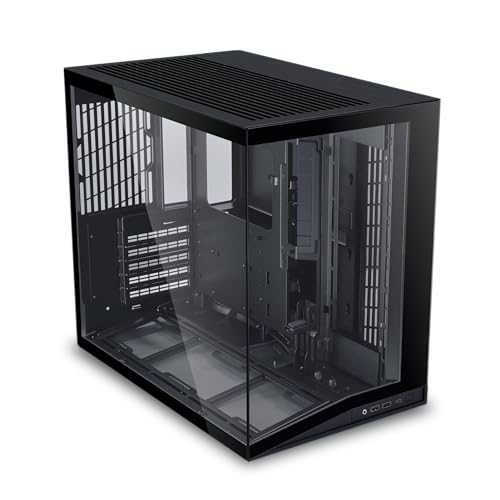
Lian Li O11D Mini V2 ATX Mid Tower — The compact panoramic
The O11D Mini V2 shrinks the O11 idea toward smaller desks and smaller rooms while keeping its soul. The listing describes a compact ATX mid-tower in black with no fans included, a panoramic design with pillar-free glass, ventilated airflow, adjustable I/O and clean cable management. Pillar-free is the operative phrase: removing the corner post between front and side glass turns two windows into one continuous outlook, and the effect on a finished build is closer to an aquarium than to a cabinet.
Ventilated airflow in the listing signals Lian Li’s awareness that a smaller panoramic case must work harder for its temperatures, and the Mini V2’s fan and radiator provisions are where a buyer should spend their reading time on the product page, matching them against the intended graphics card and cooler. Adjustable I/O is a small mercy that matters in real rooms, letting the front connections sit where the desk arrangement prefers rather than where the factory assumed.
Like its larger sibling, this case arrives without fans, which is either a flaw or an invitation depending on the builder. For upgraders transplanting an existing, matched fan set, it is perfect economy. For first-time builders, the fan-included picks below will look friendlier once the full basket is priced. As a compact stage with an unobstructed view, though, the Mini V2 has no direct rival in this six.
- Layout: compact ATX mid tower
- Glass: panoramic, pillar-free
- Fans: none included, stated in the listing
- Features: ventilated airflow, adjustable I/O
- Colour: black
Strengths
- Pillar-free glass gives the most continuous view per litre in this guide.
- Compact dimensions suit smaller desks without surrendering ATX boards.
- Adjustable I/O adapts the case to the room rather than the reverse.
Trade-offs
- Cooling hardware is entirely the buyer’s responsibility and expense.
- Compact chambers reward patient cable work more than large ones do.
- Radiator choices narrow as the footprint shrinks, so planning is mandatory.
Best for: space-conscious builders wanting an unobstructed panoramic stage.
Not suited for: a buyer counting on included fans to finish the build this weekend.
Look at the O11D Mini V2 on Amazon when desk depth is the binding constraint.

MUSETEX K2 ATX Mid Tower Gaming PC Case — The fans-included build
MUSETEX takes the opposite commercial approach from Lian Li: the K2 arrives with the light show already installed. Its listing describes an ATX case with six PWM ARGB fans pre-installed, a Type-C mid-tower design with full-view dual tempered glass, in black, model K2. Six fans is not a token gesture; it is a complete airflow and lighting plan, wired and mounted, which collapses the most fiddly hour of a first build into simply connecting the motherboard headers.
PWM control matters because it lets the motherboard govern fan speed by temperature, keeping the machine quiet at the desktop and busy under load, while ARGB gives the builder per-fan colour control through the usual motherboard ecosystems. The full-view dual glass shows that lighting to full effect, and the Type-C front connection keeps the case current with modern boards and devices. For a gaming build whose owner wants the finished look on day one, the K2’s proposition is unusually complete.
The trade is choice. Pre-installed fans are the maker’s fans, with the maker’s acoustic and aesthetic character, and enthusiasts with strong preferences will always prefer to specify their own. The K2 also competes on value rather than on the gallery minimalism of the Lian Li pair, wearing its gaming identity openly. Judged as the fastest route from a pile of components to a glowing, breathing machine, it is the most pragmatic pick in this roundup.
- Layout: ATX mid tower
- Fans: six PWM ARGB pre-installed
- Glass: full-view dual tempered glass
- Front panel: Type-C included
- Colour: black, model K2
Strengths
- Six fitted fans remove the cooling-budget surprise entirely.
- PWM and ARGB together give control over both noise and colour.
- Dual glass shows the lighting plan the fans were installed to create.
Trade-offs
- Fan character is chosen for you, which purists will want to override eventually.
- Its gaming styling is bolder than the gallery cases in this guide.
- Buyers should confirm fan hub and header requirements against their board.
Best for: first-time and value-minded builders wanting a complete glowing build immediately.
Not suited for: a minimalist seeking a silent, light-free workstation aesthetic.
Check the MUSETEX K2 on Amazon if the fans should arrive already fitted.
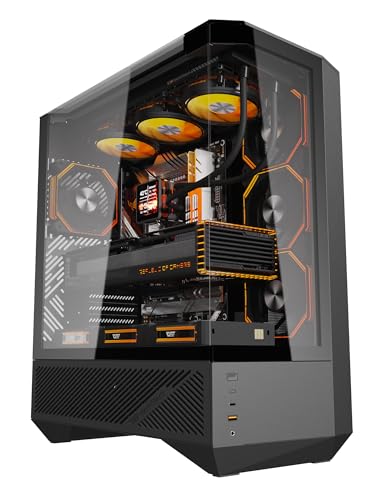
darkFlash DY460 ATX Mid Tower PC Case — The wide-angle tower
darkFlash quotes the widest viewing figure in this guide. The listing describes the DY460 as an ATX full tower in its own wording — while the product name calls it a mid tower, a discrepancy buyers should note and resolve against the dimensions on the product page — with four ARGB PWM fans, a 330-degree panoramic glass design, a dual-chamber layout, back-connect ATX support, four INF34 fans, a top 360mm radiator position, 400mm of graphics-card clearance and USB-C at 10Gbps. That is a dense specification, and most of it points the same way: a big, airy stage for large components.
The 400mm GPU clearance deserves emphasis because flagship graphics cards have grown into furniture themselves, and a case that swallows them without negotiation protects the build’s upgrade path for years. The top 360mm radiator position suits serious liquid cooling, and four fitted ARGB PWM fans give the case a working airflow plan on arrival, with room to grow. Back-connect support aligns it with the Lian Li pair on the newest motherboard trend.
Its size is its caveat. Whether the tower is ultimately classed as mid or full, the DY460’s dual-chamber panoramic format occupies real space and asks for a confident desk or floor plan. Builders with the room, and with a large graphics card to display, will find its combination of view, clearance and included fans the most expansive in this roundup.
- Glass: 330-degree panoramic
- Layout: dual-chamber, back-connect ATX support
- Fans: four ARGB PWM (INF34) included
- Clearance: 400mm graphics card, top 360mm radiator
- Front connection: USB-C 10Gbps per the listing
Strengths
- Four hundred millimetres of GPU room future-proofs the largest cards.
- Four fitted fans and a 360mm radiator position give cooling a head start.
- The widest quoted viewing angle turns big builds into room features.
Trade-offs
- The listing’s mid-tower and full-tower wording conflict, so verify dimensions directly.
- Its footprint is the least forgiving here for small desks.
- Large glass area means a larger dusting and cleaning commitment.
Best for: builders with a flagship graphics card and the space to display it.
Not suited for: a cramped desk needing the smallest panoramic footprint available.
View the darkFlash DY460 on Amazon when the graphics card is the centrepiece.

RAIDMAX i812 ATX Mid Tower PC Case — The bundled-power option
RAIDMAX does something none of the other five attempt: it puts a power supply in the box. The listing describes the Infinita i812 as a panoramic gaming case with an innovative tempered-glass showcase, an ARGB LED stripe on the front panel, three 120mm ARGB fans pre-installed, an included 750W 80+ power supply and 240mm AIO support. For a builder assembling a complete machine from scratch, that bundle collapses two purchases into one decision and guarantees the case and supply arrive as a matched pair.
The showcase styling is unapologetically theatrical, with the front ARGB stripe giving the case a signature visible even before the side glass is considered. Three fans and 240mm radiator support describe a mid-range cooling plan appropriate to the mainstream and upper-midrange builds such a bundle usually houses. The included supply’s 750W and 80+ description suits that same class of build, and buyers planning an extreme graphics card should study the supply’s detailed specifications on the product page with the same care they would give a standalone unit.
That last point is the honest caveat of any bundle: a power supply is a long-lived, safety-relevant component, and its inclusion is a convenience to be verified rather than a detail to be assumed. Read its full specification, confirm its connectors match the intended graphics card, and the i812 becomes what it aims to be — the fastest one-box route in this guide from an empty desk to a lit, panoramic machine.
- Layout: ATX mid tower, panoramic showcase glass
- Fans: three 120mm ARGB pre-installed
- Power supply: 750W 80+ included per the listing
- Cooling: 240mm AIO support
- Styling: ARGB LED stripe front panel
Strengths
- The bundled power supply simplifies a from-scratch build into one purchase.
- Three fitted ARGB fans and a front light stripe deliver the look immediately.
- Panoramic glass keeps the showcase promise of the category.
Trade-offs
- The bundled supply’s full specification must be checked against high-end cards.
- Radiator support tops out at 240mm, below the 360mm picks here.
- Its theatrical styling will divide taste more than the gallery cases do.
Best for: from-scratch builders wanting case, fans and power settled together.
Not suited for: an enthusiast bringing an existing premium power supply to the build.
See the RAIDMAX i812 on Amazon if one box should start the whole build.

FOIFKIN F600 PC Case (Black) — The seven-fan value
FOIFKIN out-fans everything else in this guide. The listing describes the F600 as an ATX mid-tower gaming case with seven PWM ARGB fans pre-installed, 270-degree panoramic glass and Type-C connectivity, in black. Seven fans is a statement of intent: the airflow plan is not merely included, it is emphatic, and a builder who would otherwise spend an evening mounting and cabling a fan set can spend that evening installing games instead.
The 270-degree glass figure places the F600’s view between a conventional two-panel design and the widest panoramic rivals, which is a sensible place for a value-focused case to stand: most of the wraparound effect, at a friendlier tier. PWM control keeps the seven fans governable by the motherboard rather than running as a fixed chorus, and ARGB ties their colour to the rest of the build’s lighting. Type-C on the front panel completes a specification that reads like a checklist of what mainstream builders asked for this year.
FOIFKIN lacks the decades-deep recognition of Lian Li, and its long-term documentation and support are correspondingly thinner propositions. What it offers instead is completeness per purchase that the premium names deliberately withhold. For a first panoramic build whose owner values a finished, brightly cooled machine over brand heritage, the F600 is the easiest arithmetic in this roundup.
- Layout: ATX mid tower
- Fans: seven PWM ARGB pre-installed
- Glass: 270-degree panoramic
- Front panel: Type-C
- Colour: black, model F600
Strengths
- Seven fitted fans give the most complete out-of-box airflow here.
- The 270-degree view delivers most of the panoramic effect at a value tier.
- PWM governance keeps a large fan count acoustically manageable.
Trade-offs
- Brand documentation and support are thinner than the established names offer.
- Seven fans mean seven contributions to the cable picture behind the tray.
- Its view stops short of the pillar-free and 330-degree designs.
Best for: value-focused builders wanting maximum fitted cooling behind panoramic glass.
Not suited for: shoppers who prize maker heritage and deep documentation above completeness.
Browse the FOIFKIN F600 on Amazon when the fan count settles arguments in your house.
How Does Each Contender Compare on View, Fans and Fitted Extras?
| Case | View | Fans included | Notable extra | Back-connect |
|---|---|---|---|---|
| Lian Li O11 Vision Compact | Three-panel glass | Chosen by buyer | Hidden AIO routing, top mesh | Yes |
| Lian Li O11D Mini V2 | Pillar-free panoramic | None | Adjustable I/O | Check listing |
| MUSETEX K2 | Full-view dual glass | 6 ARGB PWM | Type-C front | Check listing |
| darkFlash DY460 | 330-degree panoramic | 4 ARGB PWM | 400mm GPU clearance | Yes |
| RAIDMAX i812 | Panoramic showcase | 3 ARGB | 750W power supply included | Check listing |
| FOIFKIN F600 | 270-degree panoramic | 7 ARGB PWM | Type-C front | Check listing |
Read the table as two philosophies. The Lian Li column entries sell architecture and let the builder finish the specification; the remaining four sell completeness at descending degrees of theatre. Neither philosophy is wrong, and mixing them up is the only real error: a buyer who wanted completeness and bought a canvas will feel the fan bill, while a buyer who wanted a canvas and bought completeness will feel the itch to replace fans within a year. Readers furnishing the rest of a desk setup may enjoy the smaller glass in our guide to best android wireless chargers, where the screens are pocket-sized by comparison.
What Do First-Time Clear-Case Builders Get Wrong?
Cable management is the first lesson, learned in public. In a steel case, a lazy cable run is a private shame; behind panoramic glass it is interior decoration. Budget the time and the ties to route cables as if they were components, because visually they are. The second lesson is fan direction: with this many intakes and exhausts available, one reversed fan can quietly fight the whole plan, so check arrows before the panels go on and temperatures after the first gaming session.
Third, builders forget the room. A panoramic case placed with its glass against a wall wastes the purchase, while one placed in direct afternoon sun becomes a small greenhouse with a graphics card inside. Fourth, they buy the case before the components and discover the radiator or the card does not fit the stage chosen for it; the clearance figures in these listings exist to be checked against a parts list, in writing, before money moves. Fifth, they peel the protective film, build beautifully, and then notice a fingerprint sealed on the inside of the glass — a rite of passage best avoided with gloves and patience at the final panel.
How Should You Plan a Build Order Inside a Panoramic Case?
Work from the least accessible component outward. Fit the power supply and route its main cables while the chambers are empty, mount the motherboard with its cooler hardware prepared, and install radiators before the graphics card claims the visual centre and the physical elbow room. Connect the front-panel and fan wiring while you can still see the headers without a torch and a mirror. Save the graphics card and the final cable dressing for last, because they are the visible layer and every earlier shortcut will otherwise be framed by them.
Photograph the build before the glass goes on. The photograph is a maintenance map for the day a fan is replaced or a drive added, and it is also the honest record of your cable work before dust and time begin their commentary. Then fit the panels, stand back, and judge the machine the way a visitor will: from the chair, from the doorway, and in the evening light the room actually uses.
Why Does Lighting Look Different in Photographs Than in Your Room?
Product photographs are taken in darkened studios by people who light computers for a living, and they flatter every case in this guide equally. In a real room, daylight competes with ARGB, tinted glass deepens colours, and a rainbow fan profile that looked theatrical online can look exhausting beside a sofa. Plan the lighting the way you would plan a lamp: choose a palette that suits the room’s ordinary hours, prefer the motherboard’s software control so scenes can change with the machine’s job, and remember that the off switch is also a lighting feature. The panoramic cases reward restraint most, because their glass shows everything, including excess.
Uniformity is the detail that separates a composed build from a collection of lit parts. Fans, memory, cooler and graphics card each bring their own diodes and their own idea of the colour blue. Where the case includes fans, as four of these six do, those fans set the visual key for the rest of the build; choose the remaining components’ lighting to harmonise with them, or commit fully to deliberate contrast. Builders who care about this layer should also care about the hub and header arithmetic behind it, because seven ARGB devices need somewhere to plug in, and that arithmetic belongs in the plan before the parts arrive.
How Does a Clear Case Change Upgrades Two Years Later?
It makes them more enjoyable and more demanding in equal measure. Swapping a graphics card in a panoramic dual-chamber case is a pleasure: access is generous, the result is immediately visible, and the new card becomes the room’s new centrepiece. The demanding half is consistency. A replacement component in a clashing colour, a cooler with a different lighting dialect, or a cable run dressed less carefully than the original all announce themselves through the glass. Owners of clear cases tend to upgrade more thoughtfully, sometimes more slowly, and their machines tend to look intentional for longer as a result.
Space decisions made at purchase echo here too. The DY460’s 400mm clearance and 360mm radiator position are, in effect, pre-paid upgrade freedom. The compact Lian Li designs trade some of that freedom for their footprint, which is a fair trade when it is chosen knowingly. Before ordering any of the six, write down the largest card and cooler you might plausibly buy during the case’s life, and check them against the listing’s figures. A case is the longest-lived component in most builds; it will meet several generations of the parts inside it.
What Should You Measure Before Any of These Cases Arrives?
Measure the destination, not the product photographs. Dual-chamber panoramic cases are wider than the towers many desks were arranged around, and their glass deserves clearance on the viewing sides rather than a wall inches away. Measure the desk depth, the floor space if the machine will live below, and the route the case will travel from the front door, because a large glass tower and a narrow staircase landing are a combination best negotiated on paper first. Note where the nearest sockets sit, since a showcase build usually wants its cables as invisible from behind as its components are visible from the front.
Measure the components with equal honesty. Graphics-card length and thickness, cooler height or radiator dimensions, and the power supply’s length all have hard numbers in these listings or in their full specifications, and a build plan that lists them in one place prevents the classic discovery that a flagship card and a front radiator cannot occupy the same case at the same time. Builders planning back-connect boards should add the board’s connector map to that list and compare it with the case’s cut-outs while both can still be changed with a click rather than with a returns label.
How Do You Keep a Glass Build Quiet as Well as Cool?
Glass does not absorb sound the way a padded steel panel can, so a panoramic build’s acoustic character is set almost entirely by its fans and its fan curves. PWM control, which four of these cases build in through their included fans and which the Lian Li pair leave to the buyer’s chosen fans, is the main tool: a curve that idles slowly, rises reluctantly and reserves full speed for genuine load will keep a gaming machine civilised in a shared room. Place the case on a surface that does not resonate, keep cables clear of fan blades, and treat any new rattle as a loose screw announcing itself early rather than as a personality trait.
Pump noise joins the list in liquid-cooled builds. The Vision Compact’s hidden AIO routing helps visually, but the pump’s note is governed by its mounting and its speed profile, and a few minutes spent tuning that profile at the end of the build pays out across every quiet evening that follows. Silence, like the view, is a designed outcome in this category rather than an accident.
Why Does the Room Around the Case Deserve a Vote?
A clear case is the rare computer component that functions as decor, and decor succeeds or fails in context. In a bright room, a black panoramic build reads as a deliberate dark accent and its lighting stays a evening pleasure rather than a daytime argument with the sun. In a small room, the DY460’s scale can dominate; in a large one, the Mini V2 can look lost on a long desk. Builders who photograph their intended desk and look at it honestly before ordering make better choices than builders who shop against studio backdrops.
Household context matters too. Glass and toddlers, glass and enthusiastic dogs, glass and a desk chair that swings wide on a hard floor — none of these combinations is forbidden, but each argues for placement thought: the case elevated, set back, or turned so its strongest panel faces the room and its most vulnerable corner faces the wall. A machine this visible will be touched, admired and occasionally bumped, and a five-minute placement plan is what separates a showcase from an insurance claim.
What Does a Sensible Cleaning and Care Rhythm Look Like?
Monthly, briefly, and without drama. The exterior glass takes a microfibre cloth and nothing abrasive; the interior needs intervention only when dust becomes visible at conversational distance, which in a filtered case on a desk may be twice a year and in an unfiltered case on carpet may be monthly. Work with the machine off and unplugged, support fans with a finger while air moves dust away from them, and never let a vacuum’s nozzle wander near a board. The dual-chamber designs here help by concentrating the dust story in the visible chamber, where it can be judged at a glance.
Filters, where fitted, are the rhythm’s most important instrument: a filter rinsed or tapped clean on schedule protects everything behind it, while a neglected filter becomes the restriction that quietly raises temperatures across a summer. Add the filter check to an existing household rhythm — the same morning as the houseplants or the coffee machine’s descaling — and the showcase will look showroom-honest for years rather than for the first brave month. Builders who also maintain outdoor kit will recognise the rhythm from our guide to best flexible solar chargers, where a wiped panel and a wiped case turn out to be cousins in the same religion of upkeep.
How Should You Choose Between the Two Lian Li Cases and the Four Value Cases?
Ask what you enjoy. If the build itself is the hobby — the choosing, the routing, the slow perfection of a visible machine — the Lian Li pair will repay their premium in hours of satisfaction and in a finished object that stands comparison with the best photography in the hobby. The Vision Compact is the fuller expression; the Mini V2 is the same idea disciplined by a smaller desk. Neither apologises for arriving without fans, because their buyers regard fan selection as part of the authorship.
If the finished machine is the hobby and the build is the toll paid to reach it, the value four invert the bargain. MUSETEX and FOIFKIN hand you a lit, cooled stage on day one; darkFlash hands you the biggest stage of the six with its cooling started; RAIDMAX hands you a power supply as well and asks only that you verify it like an adult. There is no hierarchy of virtue between those temperaments, and this guide’s ordering is by approach rather than by worth. Name your temperament honestly and the shortlist shortens itself.
Whichever temperament you bring, reserve an hour at the end of the build that belongs to nobody’s checklist: panels on, room lit as it will be in the evening, chair where you will actually sit. Look at the machine as its audience rather than as its mechanic. That hour is when a clear case justifies itself or asks for one more adjustment — a cable rerouted, a colour cooled, a fan curve softened — and it is far better spent then than discovered across the following month of small dissatisfactions.
What Happens When a Glass Build Has to Move House?
It travels like the furniture it has become. Keep the original box and foam if storage allows, because no improvised packaging protects panoramic glass as well as the moulded protection it arrived in. Remove the graphics card for any journey longer than a room-to-room carry, since its weight works on its slot and bracket with every bump in the road, and support the case upright in the vehicle rather than laying the glass under a load. Builders who move often — students, renters, the professionally itinerant — should weigh this paragraph heavily, and may find the compact Mini V2’s smaller glass acreage a practical mercy.
At the destination, give the machine an inspection before its first power-on: panels seated, card reseated if it travelled installed, cables still homed, and no screw or standoff liberated into the chamber during transit. Five minutes of looking prevents the particular heartbreak of a build that survived the motorway and failed at the desk.
Why Do Showcase Builds Hold Their Appeal Longer Than Spec Sheets Suggest?
Because the pleasure they provide is renewed by looking, and looking happens every day. A faster benchmark is enjoyed on the day it is run; a beautiful machine is enjoyed on the day it is built and on the ordinary Tuesday two years later when its owner glances across the room. That is the economic soul of this category, and it explains why builders who began with a value case so often end with a gallery case: the F600 and K2 teach their owners how much of the hobby’s joy is visual, and the Lian Li pair exist to serve that joy at its most refined.
None of which excuses a case that cooks its contents or fights its builder. The six here were chosen to keep the visual promise and the engineering promise in the same object, each at its own tier and temperament. Choose the one whose compromises you will enjoy living inside — literally, since you will be looking into it for years — and the category will reward you in the currency it actually deals in.
That currency is attention, and it is spent whether you budget it or not. A clear case will draw the eye of everyone who enters the room, including yours, on days when the machine is working and on days when it is merely sitting in the light. Buy the case whose interior you would still choose to compose carefully — cables dressed, colours agreed, components placed like furniture in a room you love — because that composition, renewed every time you glance at it, is what the money was actually for.
Compose it well and the case disappears as a product and remains as a place — the small, lit room inside your room where the machine lives. That transformation, from purchase to place, is the test every pick in this guide was silently set, and each of the six can pass it in the hands of the builder it was designed for.
What Should You Do in the First Evening After the Panels Go On?
Run the machine through its real life rather than through a synthetic ordeal. Play the game you actually play, render the project you actually render, and watch temperatures and fan behaviour with the panels fitted and the room at its ordinary warmth. A showcase build that stays composed under its owner’s genuine workload has passed the only examination that matters, and any adjustment it needs — a fan curve lifted here, an intake fan added there — will announce itself honestly under real load rather than under a benchmark chosen to frighten.
Then set the lighting for the room’s evening, save the profile, and stop. The temptation to keep tuning a visible machine is endless, because every adjustment can be seen, and part of owning a clear case happily is declaring the composition finished. Finished is a feature: it returns the machine to its job and its owner to theirs, with the glass quietly doing the work it was bought for in the background of ordinary days.
Background is the right word to end on. The best clear case does not demand attention every hour; it rewards attention whenever it is given, and otherwise sits in the room like a well-chosen piece of furniture that happens to contain a computer. Judge the six here by that standard — sustained, unforced pleasure in looking, matched with temperatures and noise you can forget — and the choice between gallery and value, between canvas and completeness, becomes a matter of temperament rather than of right and wrong.
Temperament, honestly named, rarely leads a builder astray in this category. The specifications in the listings — glass geometry, fan counts, clearances, radiator positions — are the vocabulary for expressing it, and the reviews above have translated each pick into that vocabulary as faithfully as the listings allow. What remains is the simplest step in the whole guide: picture the finished machine in your own room, in your own light, and notice which of the six you are already imagining there.
Trust that imagination more than any ranking, including this one. A case is lived with at eye level for years, and the builder who chooses the view they genuinely want — then verifies its clearances, its cooling plan and its total cost with the listings open — has understood everything this guide was trying to teach.
Verification, in this category, takes twenty minutes and a tape measure. Imagination takes a lifetime of looking. Give both their due, in that order, and then build the machine you pictured with the patience its glass will reward every single day it sits in your room.
Patience is the final specification, and it is the only one no listing can supply. Bring it to the cable runs, to the fan arrows, to the last wipe of the glass, and the case you chose will look less like a product you bought and more like a standard you set.
Standards, once set in glass, have a way of raising the rest of the room around them. Desks get tidier, cables elsewhere get dressed, and the build becomes the household’s small argument that functional things deserve to be beautiful as well as fast.
Beautiful and fast is an achievable combination; the six enclosures above are the proof at six different budgets of effort. All that remains is to pick the proof that belongs on your desk and to build into it as if the whole room will be watching, because with a clear case, it will be.
Watching, in this sense, is a compliment the room pays the builder. Earn it deliberately, with the measurements done and the temperament named, and the compliment will still be being paid when the components inside the glass have been replaced twice over.
Twice over is not an exaggeration in this category; cases outlive builds the way bookcases outlive books. Choose the bookcase for the library you intend to keep, and the library will take care of itself.
And if the library is games, light and colour, let it be that without apology; a case that makes its owner smile on entry is doing serious work.
Serious work, quietly done, behind glass.
That is the whole brief, fulfilled.
Final Recommendation
Choose the O11 Vision Compact for the definitive gallery build, the Mini V2 when the gallery must fit a smaller desk, and the DY460 when a flagship card needs the widest stage. Choose the K2 or the F600 when the build should glow the day it is assembled, with the F600’s seven fans settling the value argument, and choose the RAIDMAX when a bundled power supply turns one box into a whole project. In a studio flat in Manchester, the right case is the one whose view you still enjoy in month thirteen and whose fans you stopped thinking about in week one.
Frequently Asked Questions
Do panoramic glass cases run hotter than mesh cases?
Generally a little, because glass cannot pass air and the intake path must be designed around it. The picks here compensate with fan counts, ventilated panels and radiator positions, and for gaming and creation workloads the difference is a few degrees rather than a problem. Sustained rendering in a hot room is the scenario that deserves the most cooling headroom.
What does back-connect support actually change?
Back-connect motherboards place their power and data connectors on the rear face of the board, so cables emerge behind the tray instead of crossing the visible chamber. A case with the right cut-outs is required to use one. The result is the cleanest possible glass view, at the cost of choosing board and case as a matched pair.
Are pre-installed ARGB fans worth paying for?
For most builders, yes: they remove a separate purchase, an hour of mounting and the risk of mismatched lighting. Enthusiasts who already own preferred fans, or who prioritise silence above spectacle, will still favour the fan-free Lian Li designs and specify cooling themselves.
How do I keep the inside of the glass clean?
Build with clean, dry hands or gloves, and wipe the inner faces as the final step before fitting each panel. Afterwards, a microfibre cloth on the outside handles daily life, and the interior needs attention only during component changes. Fingerprints sealed inside at build time are the ones that linger, so the last five minutes matter.
Is the RAIDMAX bundled power supply enough for a modern build?
Its listing describes a 750W 80+ unit, a capacity class that suits mainstream and upper-midrange builds. Before committing a high-end graphics card to it, verify the supply’s full specification and connector set on the product page, exactly as you would when buying a standalone unit.
Which case here suits a first build best?
The MUSETEX K2 and FOIFKIN F600 ask the least of a newcomer, because cooling and lighting arrive installed and the remaining job is components and cables. The darkFlash suits a first build with large ambitions, while the Lian Li pair reward experience — or a patient beginner who enjoys specifying every part.
Related Guides
For the rest of the charging and power shelf, see best android fast chargers, best android wireless chargers and best flexible solar chargers.
Related guides
- Best 17 Laptops: The Complete Tier-by-Tier Guide to Big-Screen Machines
- Best 4K Monitors for MacBook Pro: USB-C Panels With Real Power Delivery
- Best Routers for Remote Work: VPN Gateways, Travel Routers and Home Wi-Fi That Holds a Call
- Best Sim Racing Monitors: Ultrawide Cockpits From 34-Inch OLED Speed to the 49-Inch Wrap


