What's inside
- Key Takeaways
- Quick Picks
- How Were These Six Chosen for Shooter Play?
- Why Do Footsteps Decide More Rounds Than Gunshots?
- What Does Virtual Surround Really Add in a Ranked Match?
- How Much Does the Microphone Matter When Callouts Win Rounds?
- How Should You Set Up In-Game Audio for Competitive Play?
- Where Do the Six Sit on a Footstep-First Scorecard?
- What Do Shooter Players Most Often Get Wrong When Buying?
- How Do You Train Your Ears to a New Headset?
- How Should Console Shooter Players Read This List Differently?
- How Do Different Shooter Genres Change What You Need?
- What Should a Shooter Headset Cost You in Habits, Not Money?
- How Do You Care for a Headset That Trains Daily?
- Why Do Teams Sound Different From Solo Queues Through the Same Headset?
- What Changes When You Play at a Desk Versus on a Sofa?
- How Should Beginners Spend Their First Month With a Shooter Headset?
- Final Recommendation
- Frequently Asked Questions
- Related Guides
As an Amazon Associate I earn from qualifying purchases. This post may contain affiliate links at no extra cost to you.
widgetverdict.com is reader-supported. When you buy through links on our site, we may earn an affiliate commission.
Where to buy: Amazon carries all six headsets compared here, and the FPS shortlist divides into five wired designs built for zero-lag certainty and one wireless flagship whose title actually names first-person shooters as its tuning target.
The best gaming headsets for first person shooters are judged by a harsher standard than any other category in this guide series. A shooter headset is a sensor before it is a speaker: it must place a footstep to your left rear honestly, keep a reload audible underneath an explosion, separate a teammate’s callout from the gunfire it describes, and do all of that for hours without pressing your head into a headache that costs the last rounds of the night. General gaming headsets can chase bass and spectacle. Shooter headsets chase information, and the six titles below were read with that single priority, checking what each one actually claims about drivers, surround processing, microphones, and connections rather than what its marketing photographs imply.
The field is strong and varied. Logitech’s G Pro X leads with the professional’s toolkit: Blue VO!CE microphone processing, DTS 7.1 surround, 50mm drivers, a USB DAC, spare memory foam pads, and a carrying bag in the title itself. The HyperX Cloud III answers with the largest stated microphone capsule here, a 10mm unit its title calls ultra-clear, inside a durable frame with three cable connections. EKSA’s E1000 is the USB surround specialist with a noise cancelling microphone and RGB lighting. Turtle Beach’s Recon 50 is the lightweight veteran with a removable microphone and in-line controls. Razer’s BlackShark V2 Pro is the wireless exception, with pro-tuned FPS audio profiles named in its title, a seventy-hour stated battery, and a detachable microphone. Logitech’s G432 closes the list with its own DTS surround implementation and a flip-to-mute boom at the accessible end. Players who wear their headset all day should cross-check this list against best comfortable gaming headsets, because the most informative headset in the world still loses rounds if it hurts by midnight.
Key Takeaways
- Three picks carry named surround processing: the G Pro X with DTS 7.1, the EKSA E1000 with 7.1 surround, and the G432 with its DTS headphone processing.
- The Razer BlackShark V2 Pro is the only wireless pick and the only title naming pro-tuned FPS audio profiles.
- The HyperX Cloud III states the largest microphone capsule here, a 10mm unit, inside a memory foam, durable-frame build.
- Three picks use 50mm drivers where a size is stated: the G Pro X, the BlackShark V2 Pro, and the G432.
- Five of the six are wired, reflecting how competitive players still treat latency and reliability.
- Removable or detachable microphones appear on the Recon 50 and the BlackShark V2 Pro, useful for players who also travel with their headset.
Quick Picks
| Pick | Badge | Why it earns its place |
|---|---|---|
| Logitech G Pro X Wired Gaming Headset | The professional’s toolkit | Blue VO!CE processing, DTS 7.1, 50mm drivers, a USB DAC, spare memory foam pads, and a bag, all named in one title. |
| HyperX Cloud III Wired Gaming Headset | The voice-first pick | An ultra-clear 10mm microphone, memory foam, a durable frame, and USB-C, USB-A, and 3.5mm connections. |
| EKSA E1000 USB Gaming Headset | The USB surround pick | 7.1 surround sound over USB with a noise cancelling microphone, aimed at PC and PlayStation console play. |
| Turtle Beach Recon 50 Gaming Headset | The lightweight veteran | 40mm speakers, a removable microphone, in-line controls, and a lightweight build with a PC splitter cable included. |
| Razer BlackShark V2 Pro Wireless Headset | The wireless FPS pick | Pro-tuned FPS profiles, seventy stated battery hours, a detachable microphone, and memory foam earcups without a cable. |
| Logitech G432 Wired Gaming Headset | The accessible DTS pick | Logitech’s DTS surround processing, 50mm drivers, USB and 3.5mm connections, and a flip-to-mute microphone for PC play. |
How Were These Six Chosen for Shooter Play?
Every pick had to argue its case in shooter terms from its own title. Driver information counted where stated, because driver size and tuning shape how footsteps and gunshots separate. Named surround processing counted, but as a presentation to audition rather than a guaranteed advantage, since experienced players divide honestly on virtual surround in ranked play. Microphone quality counted heavily, because a shooter headset’s second job is carrying callouts, and titles that specified capsule size, processing, or noise cancelling earned more trust than titles that merely mentioned a mic exists. Connection counted for latency and reliability, which is why wired designs dominate this list and why the single wireless pick had to justify itself with an explicitly FPS-tuned brief.
Platform honesty was enforced the same way as elsewhere in this series: a pick is described as serving exactly the machines its title names. That discipline produces some asymmetries worth noticing. The EKSA’s title speaks to PC and PlayStation consoles without naming Xbox. The G432’s title names PC alone. The G Pro X spans PC, Xbox, PS5, and PS4. None of that is a defect; it is a map, and a shooter player shopping for a specific machine should read it as one. Readers building a two-machine desk should also consult best headsets for pc and ps5, where connection switching gets its own examination.
Why Do Footsteps Decide More Rounds Than Gunshots?
Gunshots are loud, brief, and usually directional enough that almost any headset renders them adequately. Footsteps are the opposite: quiet, repetitive, and information-dense, carrying surface, distance, pace, and intent in a sound most headsets are tempted to bury under bass. A shooter mix puts footsteps in the midrange and upper midrange, exactly where driver control and restrained low-end tuning pay off. This is why the category’s serious titles talk about driver construction and tuning profiles rather than bass response, and why the BlackShark V2 Pro’s pro-tuned FPS profiles are a meaningful claim: a profile tuned for shooters typically trims the low end and lifts the bands where steps and reloads live.
Players can test any headset in this guide with a simple laboratory: a quiet custom match, a friend walking patterns around you at known distances, eyes closed. Note the distance at which steps become audible, whether left and right stay honest behind you, and whether a second sound, a reload or a voice line, erases the steps entirely. A headset that passes that test in your actual game is worth more than any specification, and the test takes ten minutes. Run it during the return window, on the settings you will actually use, because surround modes and equaliser presets change the results dramatically.
What Does Virtual Surround Really Add in a Ranked Match?
Three of these titles name surround processing, and they do not all mean the same thing by it. The G Pro X offers DTS 7.1 through its USB DAC path, the E1000 builds 7.1 surround into its USB connection, and the G432 carries the DTS headphone variant of the same idea. All are virtual: two drivers persuading your ears that sound arrives from around a room. Done well, the effect adds front-to-back discrimination that plain stereo struggles with, particularly for sounds above and below your position in games mixed with verticality in mind. Done poorly, or simply mismatched to your ears, it smears the precise left-right image you trained on for years.
The professional consensus, such as it is, treats surround as a per-game, per-player audition rather than a default. Enable it for a week of your main title, then disable it for a week, and let your own round results and comfort vote. The G Pro X makes that experiment easy because its DAC and stereo paths coexist in one purchase. The E1000 commits you to its USB surround presentation as its core identity. The G432’s Headphone:X 2.0 is the accessible route into the same experiment. What none of them can do is rescue poor positioning: surround tells you where a sound is, and your own movement decides whether that information arrives in time to matter.
How Much Does the Microphone Matter When Callouts Win Rounds?
In team shooters, the microphone is a weapon system. A callout delivered late, muffled, or buried under keyboard noise is information your team does not have, and rounds turn on exactly that margin. The titles here attack the problem three ways. The Cloud III specifies hardware, a 10mm capsule with an ultra-clear billing, which gathers more of your voice’s body at the source. The G Pro X specifies processing, Blue VO!CE filters that level and clarify your voice in real time, the broadcast approach. The E1000 specifies noise cancelling, defending your voice against the room around you. Each is a legitimate philosophy, and the right one depends on whether your weakness is a thin voice, an untreated room, or a loud household.
Mute mechanics belong in the same discussion, because a callout channel also needs silence on demand. The G432’s flip-to-mute boom turns muting into a reflex gesture. The detachable designs, the Recon 50 and the BlackShark V2 Pro, solve a different problem, letting the headset become headphones for travel or media. The disciplined player drills whichever mechanism they own until it is muscle memory, and tests their delivered voice with teammates rather than trusting microphone monitoring, which flatters everyone. Your squad hears the truth; ask them.
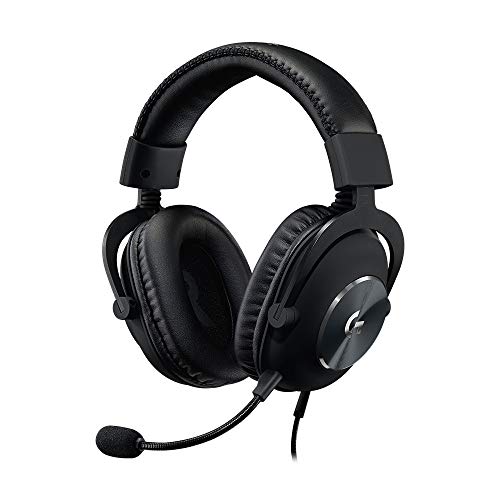
Logitech G Pro X Wired Gaming Headset — The professional’s toolkit
The G Pro X title is a checklist written by people who outfit tournament players: a detachable boom microphone with Blue VO!CE processing, DTS 7.1 surround, 50mm drivers, both USB and 3.5mm connections, spare memory foam pads in the box, a USB DAC, and a carrying bag, for PC, Xbox, PS5, and PS4. No other title in this guide packs as much shooter-relevant equipment into its own description. The spare pads alone signal intent: a headset expected to be worn daily, sweated in, and maintained rather than replaced, the way professional gear is treated in every other sport.
Blue VO!CE is the headline for team players, applying real-time filters that keep a voice present and intelligible without shouting, while the DAC path gives PC players the surround processing and equalisation control that a bare 3.5mm plug cannot. The detachable boom converts the headset into respectable headphones for the journey home, and the bag makes that journey a designed event rather than a bag-pocket gamble. Its compromises are the wired ones, plus a complexity tax: this toolkit rewards a player who will spend twenty minutes setting up profiles and filters, and quietly wastes its talents on a player who will not. For the ranked regular who treats audio as equipment, it is the most complete answer in this guide.
- Drivers: 50mm, as titled
- Surround: DTS 7.1 via the included USB DAC path
- Microphone: detachable boom with Blue VO!CE processing
- In the box, per the title: spare memory foam pads, USB DAC, carrying bag
- Connections: USB and 3.5mm
- Platforms named: PC, Xbox, PS5, PS4
Strengths
- The deepest shooter toolkit here, from voice processing to spare pads to a DAC.
- Detachable boom and a bag make it travel like professional equipment.
- Four named platforms cover nearly every shooter’s home.
Trade-offs
- Its features reward setup time that casual players may never invest.
- Wired only, so the wireless freedom of the Razer is absent by design.
- The DAC’s processing benefits live mainly on the PC side of its platform list.
Best for: a ranked regular who will tune voice filters and surround profiles and wear the same headset for seasons. Not suited for: a plug-and-play player who wants competitive audio with zero configuration.
The G Pro X listing on Amazon itemises the box contents, and that inventory is the fastest way to understand its professional positioning.

HyperX Cloud III Wired Gaming Headset — The voice-first pick
The Cloud III’s title leads with connections and comfort, USB-C, USB-A, and 3.5mm, memory foam, a durable frame, but its shooter credential is the microphone: a 10mm capsule described as ultra-clear, the largest stated microphone in this guide. In a category where most titles say a mic exists and move on, specifying its size is a claim about voice body and presence, the qualities that make a callout land through gunfire. For the player who shot-calls, who IGLs a stack, whose voice is the team’s coordination layer, that specification is the headline and the rest is supporting cast.
The supporting cast is strong. Three connection types make one headset serve a PC by USB, a PS5, and an Xbox Series X or S setup without adapters or second purchases, and the memory foam plus durable frame combination is HyperX’s long-proven formula for headsets that survive daily ranked life. What the title does not claim is equally instructive: no surround processing is named, so the Cloud III’s positional story is an honest stereo image, which many competitive players actively prefer for its unprocessed precision. Judge it as the voice-and-versatility pick: the clearest stated microphone, the broadest cable story, and a stereo presentation that refuses to decorate the information.
- Microphone: a 10mm capsule the title describes as ultra-clear
- Connections: three wired paths, USB-C, USB-A, and a 3.5mm plug
- Build: memory foam with a durable frame
- Surround processing: none named in the listing title; the presentation is stereo unless your platform adds its own
- Platforms named: PC, PS5, PS4, Xbox Series X and S
- Connection type: wired, in all three modes
Strengths
- The largest stated microphone capsule here serves shot-callers and streamers.
- Three cable connections make it the most versatile wired pick across machines.
- An unprocessed stereo image suits players who distrust virtual surround.
Trade-offs
- No named surround mode for players who audition and love the effect.
- Driver size is not stated in the title, frustrating specification-led comparisons.
- All that versatility still ends in a cable, every session, on every platform.
Best for: a shot-caller whose voice leads a team and whose headset must serve PC and both consoles. Not suited for: a surround enthusiast determined to play inside a virtualised soundstage.
Look at the Cloud III listing on Amazon for the microphone details first, because that capsule is the reason it anchors this guide’s voice argument.

EKSA E1000 USB Gaming Headset — The USB surround pick
The E1000 commits to a single clear proposition: USB connection, 7.1 surround sound, a noise cancelling microphone, and RGB lighting, for PC, PS4 and PS5 consoles, and laptops, with call centre use named in the same breath as gaming. That last detail is more relevant than it looks. A headset designed to satisfy call centre voice standards brings a microphone discipline that pure gaming models sometimes skip, and its noise cancelling aims at exactly the environment most home players actually inhabit: a room with a television, a fan, a family, and a life happening behind the chair.
USB as the sole stated connection is both the design’s strength and its boundary. On PC and the named PlayStation consoles, USB delivers the surround processing as designed, with digital consistency that a 3.5mm plug through a controller cannot guarantee. The same commitment excludes Xbox entirely from the title’s platform list, and shooter players on Microsoft’s consoles should take that at face value rather than hoping an adapter redeems it. RGB lighting is the honest garnish: it spends nothing you need in a wired design and pleases players whose setup has a visual theme. For a PC-first shooter player who wants surround and a cancelling microphone in one USB device, the E1000 states its case without decoration.
- Connection: USB, the only connection named in the title
- Surround: 7.1 surround sound
- Microphone: noise cancelling
- Lighting: RGB
- Platforms named: PC, PS4, PS5, laptops, call centre use
- Xbox support: not named in the listing title, and this guide does not assume it
Strengths
- USB surround arrives as designed on PC and the named PlayStation consoles.
- A noise cancelling microphone suits loud, lived-in rooms.
- Call centre positioning signals microphone discipline beyond gaming norms.
Trade-offs
- Xbox players are outside its stated platform list entirely.
- A single USB connection offers no 3.5mm fallback for other devices.
- Driver specifications are not given in the title for comparison shoppers.
Best for: a PC or PlayStation shooter player in a noisy household who wants USB surround and voice isolation together. Not suited for: an Xbox player, since the title’s platform list does not include that family at all.
The E1000 listing on Amazon spells out its USB surround path, which is the feature to verify against your own machine before ordering.

Turtle Beach Recon 50 Gaming Headset — The lightweight veteran
The Recon 50 has been the entry point into serious shooter audio for a generation of players, and its title explains the longevity: wired multiplatform design, 40mm speakers, a removable microphone, in-line controls, a lightweight build, a PC splitter cable in the box, and a platform list sweeping PC, PS5, PlayStation generally, PS4, and the Xbox Series machines and Xbox One. Nothing in that list is exotic. Everything in it is what a first competitive headset actually needs, which is the design’s whole philosophy: spend on the essentials, state them plainly, and fit every machine a young player might own.
In-line controls deserve more respect than they get in premium company. Volume and mute on the cable, reachable without a menu or a keyboard shortcut, are the controls a mid-round player can actually use, and the removable microphone turns the headset into ordinary headphones for school, travel, and media without a boom announcing its gaming origins. The 40mm speakers are the smallest stated here, and honesty requires noting that larger-driver rivals offer more scale; the counterpoint is that shooter information lives in clarity rather than scale, and the Recon’s lightweight frame keeps that clarity wearable for long first seasons. As the accessible, everything-included starting point of this guide, it remains stubbornly easy to recommend.
- Speakers: 40mm, as titled
- Microphone: removable
- Controls: in-line, on the cable
- Build claim: lightweight
- In the box, per the title: PC splitter cable
- Platforms named: PC, PS5, PS4, Xbox Series X and S, Xbox One
Strengths
- The broadest platform sweep here at the accessible end of the guide.
- In-line controls put volume and mute under your fingers mid-round.
- A removable microphone converts it to everyday headphones instantly.
Trade-offs
- The 40mm speakers concede driver scale to the 50mm designs.
- No surround processing is named in the title.
- Its simplicity means no voice processing or DAC refinements to grow into.
Best for: a first competitive headset for a player whose machines span PC and both console families. Not suited for: a specification maximalist who wants named surround and the largest drivers in one purchase.
Check the Recon 50 listing on Amazon for the splitter and control details, since its value story is written in its inclusions.

Razer BlackShark V2 Pro Wireless Headset — The wireless FPS pick
Every wireless headset in a shooter guide must answer the latency sceptic, and the BlackShark V2 Pro’s title answers with specialisation instead: pro-tuned FPS audio profiles, named outright, on a wireless design with a stated seventy-hour battery, a detachable microphone, 50mm drivers, noise-isolating memory foam earcups, and a platform list of PC, PS5, Switch 2, and Bluetooth 5.2 for the rest of life. FPS profiles are the significant phrase. A general wireless headset tunes for everything; this one publishes profiles tuned for the genre this guide is about, which means the footstep bands and the callout clarity were design targets rather than happy accidents.
Seventy hours changes the wireless psychology completely. At that endurance, charging becomes a monthly errand rather than a session risk, and the cable-free desk stays cable-free through entire ranked weeks. The detachable microphone and noise-isolating foam cups give it a travel and media life the wired picks manage less gracefully, and Bluetooth extends it to phones without touching the gaming connection. Its boundaries are stated plainly too: Xbox is absent from the title’s platform list, and wireless ownership always carries the small, permanent tax of eventually charging and eventually ageing batteries. For the PC or PlayStation competitor who has been waiting for a wireless headset that speaks shooter as its first language, this title is that sentence.
- Audio profiles: pro-tuned FPS profiles, stated in the listing title
- Connection: wireless, plus Bluetooth 5.2
- Battery: seventy hours, as stated
- Drivers: 50mm
- Microphone: detachable
- Platforms named: PC, PS5, Switch 2
Strengths
- FPS-tuned profiles make shooter information the design’s stated priority.
- Seventy stated hours removes charging from weekly consciousness.
- Detachable mic and isolating foam cups serve travel and media as well as ranked play.
Trade-offs
- Xbox is not named among its platforms.
- Wireless latency, however small, remains a philosophical objection for some wired loyalists.
- Battery ageing is a long-term certainty the wired picks never face.
Best for: a PC or PS5 competitor who wants FPS tuning and genuine wireless freedom in one headset. Not suited for: an Xbox Series player, because that platform does not appear in this title’s list.
The BlackShark V2 Pro listing on Amazon explains its FPS profiles in depth, and that explanation is the heart of its claim on this guide.

Logitech G432 Wired Gaming Headset — The accessible DTS pick
The G432 brings the guide’s surround conversation down to an accessible tier without surrendering its essentials: DTS Headphone:X 2.0 processing, 50mm audio drivers, USB and 3.5mm connections, a flip-to-mute microphone, and PC compatibility stated plainly. For the PC shooter player who wants to audition virtual surround, keep a full-size driver, and retain the option of a plain analogue connection for other devices, this is the efficient package, Logitech’s surround technology without the G Pro X’s professional toolkit pricing logic.
Flip-to-mute is this model’s social signature, the boom-rotating gesture that competitive players drill until it is reflex, and it suits the G432’s role as a first serious PC headset: everything about it teaches good habits. The dual connection matters for the same reason, letting the USB path carry the DTS processing at the desk while the 3.5mm plug serves a laptop or a handheld elsewhere. The title’s platform honesty is narrow, PC is the named home, and console players should look to the G Pro X or the Cloud III instead of stretching this listing beyond its words. Within its stated brief, the G432 is the guide’s reminder that shooter information does not require flagship spending, only the right features chosen deliberately.
- Surround: DTS Headphone:X 2.0
- Drivers: 50mm audio drivers
- Connections: USB and 3.5mm
- Microphone: flip-to-mute boom
- Platforms named: PC
- Connection type: wired, both paths
Strengths
- DTS Headphone:X 2.0 at an accessible tier makes the surround experiment affordable.
- Full 50mm drivers match the flagship picks’ stated size.
- Flip-to-mute builds the right muting reflex from the first season.
Trade-offs
- The title names PC only, so console households must look elsewhere in this guide.
- No spare pads, DAC extras, or bag: the toolkit is deliberately leaner than the G Pro X.
- Voice processing like Blue VO!CE is not claimed here.
Best for: a PC player entering competitive shooters who wants surround, big drivers, and a flip-to-mute boom in one efficient package. Not suited for: a console-first household needing PlayStation or Xbox named in the title.
The G432 listing on Amazon details its DTS implementation, which is the feature a PC buyer should compare against the G Pro X’s DAC path.
How Should You Set Up In-Game Audio for Competitive Play?
Before blaming or praising any headset, set the game up honestly. Choose the audio preset your title actually offers for headphones or competitive play rather than the television preset, which mixes for a room and buries footsteps accordingly. Set dynamic range to the narrower, night-mode style option if your hearing tires, or the full range if your room is quiet and your headset handles peaks cleanly, and understand that this single menu choice changes footstep audibility more than most hardware swaps. Turn off any bass-boost style enhancement during your first weeks; you are training your ears to the information bands, and decoration can wait until the training holds.
Then calibrate with a partner. Have a teammate walk set patterns in a custom lobby while you call out directions blind, and adjust the game’s mix and your headset’s profile until your calls match reality at the distances your maps demand. If your pick has profiles or processing, the G Pro X’s DAC settings, the Razer’s FPS profiles, the surround modes on the EKSA and G432, audition each in that same lobby rather than in a menu demo, because the lobby is where the feature will live or die. Ten disciplined minutes here outperform a month of vague impressions, and they convert your purchase from a hope into a tuned instrument.
Where Do the Six Sit on a Footstep-First Scorecard?
| Headset | Surround or profile claim | Drivers | Microphone story |
|---|---|---|---|
| Logitech G Pro X | DTS 7.1 via DAC | 50mm | Blue VO!CE detachable boom |
| HyperX Cloud III | None named; stereo | Not stated in title | 10mm ultra-clear capsule |
| EKSA E1000 | 7.1 surround over USB | Not stated in title | Noise cancelling |
| Turtle Beach Recon 50 | None named | 40mm speakers | Removable, in-line controls |
| Razer BlackShark V2 Pro | Pro-tuned FPS profiles | 50mm | Detachable |
| Logitech G432 | DTS Headphone:X 2.0 | 50mm | Flip-to-mute boom |
The scorecard’s lesson is that shooter excellence arrives by different roads. Three picks buy processing, surround or tuned profiles, and stake their claim on presentation. Two buy voice, the Cloud III’s capsule and the G Pro X’s filters, and stake theirs on the callout. The Recon buys reach, platforms and controls and lightness, and stakes its claim on being present and correct everywhere. None of these roads is the whole truth, which is why serious players describe their headset the way they describe their sensitivity settings: as a tuned preference, defended by results rather than by specifications alone.
What Do Shooter Players Most Often Get Wrong When Buying?
The commonest error is shopping for bass. Explosions feel impressive in a demo and footsteps pay the rent in a match, and a headset tuned to thrill the first will often smother the second. The second error is treating surround as a checkbox rather than an audition, enabling it permanently without ever comparing a week of plain stereo, which for many players in many games remains the more precise image. Third, buyers undervalue the microphone until they join a serious stack, then discover their callouts arrive thin, late in clarity, or wrapped in room noise, a flaw no driver upgrade can repair.
Fourth, players buy across their platform’s silence, assuming a famous model must support their console when its title does not name it; the EKSA and the Razer here are excellent headsets that do not claim Xbox, and the G432 claims PC alone. Fifth, wireless sceptics dismiss the category on latency folklore while wireless romantics ignore battery ageing entirely, and both miss the actual question, which is whether a specific stated design, like the BlackShark’s seventy-hour FPS-tuned package, fits a specific player’s habits. Read titles, audition processing, test with teammates: the boring disciplines are the competitive ones.
How Do You Train Your Ears to a New Headset?
A new headset changes your auditory map, and the first week with it will feel worse before it feels better, because your brain keeps consulting the old map. Shorten the adjustment by playing your most familiar map first, where you already know what every sound should be, and let the discrepancies teach you the new presentation safely. Keep your settings frozen during this week; changing profiles daily restarts the learning each time and convinces players that headsets are inconsistent when the variable was actually them. Note your blind-call accuracy in the calibration lobby every few days, and watch it climb past your old headset’s baseline, usually within a fortnight.
Volume discipline belongs to ear training too. Louder is not clearer past a modest point; it is merely louder, with fatigue accumulating interest. The isolating designs here, the Razer’s foam cups and the sealed wired builds, let you hold a lower, sustainable level while keeping footsteps above the room’s noise floor. Players who protect their hearing keep their edge longer into the evening and longer into their careers, and the headset that helps them do it is a performance feature disguised as a health one. Players who move between a desk PC and a console should plan that training once per platform, since mixes differ; the cross-platform picks in best folding gaming headsets face a lighter version of the same retraining whenever they travel.
How Should Console Shooter Players Read This List Differently?
Console players should start from the platform column rather than the feature column, because their machines decide which connections and processing paths are even available. The G Pro X names both console families and brings its toolkit to each through the connections it lists. The Cloud III’s three cables make it the console diplomat, serving PS5 and Xbox Series machines from one purchase. The Recon 50 covers everything named at the accessible tier. The EKSA serves PlayStation consoles by USB and passes Xbox by. The Razer serves PS5 wirelessly and leaves Xbox to others. The G432 stays home on PC. That is not a ranking; it is a seating chart, and sitting in the right seat matters more than the menu.
Console players should also weigh the controller’s role. A 3.5mm headset lives or dies by the controller connection, which is convenient, social, and limited in processing. USB paths on console can carry more of a headset’s designed processing. Neither is automatically superior for shooters; the lobby test described earlier decides, on your console, with your game, using your ears. What console players must not do is import PC reviews wholesale, because a headset’s surround path, microphone processing, and even volume behaviour can differ between its PC and console lives. This guide has kept the two lives separate wherever titles allowed, and your testing should too.
How Do Different Shooter Genres Change What You Need?
Not all shooters ask the same questions of a headset. Tactical shooters, with their slow rounds and decisive footsteps, reward exactly the information discipline this guide prizes: quiet backgrounds, honest direction, callouts that arrive intact. Arena and hero shooters add verticality and chaos, layers of simultaneous sound where separation matters as much as direction, and where a headset that keeps five audio events distinct earns its keep. Battle royale titles stretch the timeline, long quiet looting phases punctuated by distant engagements, which rewards comfort and the ability to catch a far-off shot’s direction across a map’s whole soundscape. The same six headsets serve all three genres, but they serve them in different orders of virtue.
Match your main title honestly. The tactical player should weight the lobby test and the microphone sections of this guide most heavily, and look hardest at the G Pro X and Cloud III. The arena player should weight separation under load, auditioning surround modes in the busiest fights rather than the quietest lobbies. The battle royale player should weight the wearing experience across three-hour sessions and the wide, calm stereo or profile presentation that keeps distant information legible, where the Razer’s tuned profiles and seventy-hour wireless life stop being luxuries. Genre honesty prevents the commonest disappointment in this category, which is buying another genre’s perfect headset.
What Should a Shooter Headset Cost You in Habits, Not Money?
Every pick here charges a habit tax, and counting it prevents buyer’s remorse better than any feature list. The G Pro X charges setup time and profile maintenance. The Cloud III charges cable management across three connection types. The EKSA charges platform loyalty, since its USB world is PC and PlayStation. The Recon charges the humility of owning the accessible pick while friends buy flagships, and repays it in inclusion and simplicity. The Razer charges a charging routine, however monthly, and the long game of battery ageing. The G432 charges platform narrowness, a PC-only life lived efficiently.
None of these taxes is hidden; each is printed in its title’s own terms, which is why this guide keeps returning to those titles as the contract. The players who stay satisfied for years are not the ones who found a headset without taxes. They are the ones who read the tax schedule in advance, recognised their own habits in it, and chose the levy they would pay gladly. Choose yours the same way, and the headset stops being a purchase you second-guess and becomes equipment you maintain, like a mouse you trust or a sensitivity you no longer think about.
How Do You Care for a Headset That Trains Daily?
Competitive headsets live hard: daily hours, travel to LANs, booms swung hundreds of times, cables coiled by tired hands at midnight. Wipe the earcups after long sessions, because sweat is the enemy of foam and of the seal the foam provides. Coil cables loosely and never around the headset itself, since the plug joint is where wired picks in this guide will eventually fail if they fail anywhere. Use the G Pro X’s spare pads as intended, rotating them when the fitted pair flattens, rather than hoarding them in a drawer while comfort quietly degrades. Detach the detachable booms for travel instead of letting them ride exposed, and let the Razer’s battery rest at a healthy charge between tournament weeks rather than empty in a bag.
Inspect monthly with the same seriousness you give your aim training. A fraying cable, a boom that no longer holds its position, a pad seam opening at the flex point: each is a small, cheap problem this month and a mid-season failure next month. The headsets in this guide are built to be maintained, several of them carrying spares and bags in their titles as an invitation to do exactly that. Accept the invitation, and your shooter headset’s second season will sound like its first.
Why Do Teams Sound Different From Solo Queues Through the Same Headset?
Solo queue audio is mostly the game: footsteps, gunfire, the map’s own weather. Team audio adds four human voices, each with its own microphone quality, room, and volume discipline, layered over the same game mix. A headset that shines solo can stumble in a stack if its presentation crowds the voice band, because your teammates’ callouts live in the same midrange as the footsteps you are hunting. This is why the voice-forward designs in this guide, the Cloud III’s capsule, the G Pro X’s processing, the EKSA’s cancelling, matter more as your play becomes more organised, and why the calibration lobby test should always include your actual squad talking over actual gunfire, not a silent friend walking patterns.
Set the chat mixer as a team decision rather than a personal default. Agree on a balance where callouts sit clearly above game sound during rounds and can be ridden down during clutch spectating, and revisit it whenever a teammate changes headsets, because their new delivered level changes your mix even though your own equipment never moved. Squads that treat audio as shared infrastructure, headsets, mixers, mute discipline and all, develop the eerie coordination that opponents mistake for talent. It is not talent. It is four people who can hear each other, which in this genre is most of the battle.
What Changes When You Play at a Desk Versus on a Sofa?
Shooter players split into two physical tribes. Desk players sit close, lean in, and live inside their monitor’s near field, where a wired headset’s cable is invisible and its connection stability absolute. Sofa players play at distance, often on a television, where the cable becomes a landscape feature and wireless stops being a luxury. This guide’s five wired picks all assume, to different degrees, the desk tribe’s geometry, and their virtues, DACs, profiles, in-line controls, are desk virtues. The BlackShark V2 Pro is the bridge, carrying FPS tuning into the sofa tribe’s territory without asking it to surrender distance.
Console shooter players should notice that the controller softens this divide: a 3.5mm headset plugged into the pad in your hands is effectively wireless at sofa distance, since the radio link lives in the controller you already hold. That is why the Recon 50 and the Cloud III’s analogue path remain such durable console answers despite being wired on paper. The honest summary is that wired and wireless describe where the cable ends, not whether one exists in your life, and the right question is always which arrangement your room, your chair, and your machine make invisible. Invisibility, in the end, is what every pick in this guide is selling: audio that disappears, leaving only information.
How Should Beginners Spend Their First Month With a Shooter Headset?
Beginners should resist the two temptations of the first month: copying a professional’s settings wholesale, and changing something after every bad evening. A professional’s profile encodes their ears, their game version, and their room, none of which are yours. Instead, spend week one on defaults and familiar maps, week two on the single experiment your headset headlines, surround on the DTS and EKSA picks, profiles on the Razer, voice setup on the G Pro X and Cloud III, and weeks three and four simply playing, with settings frozen, while your auditory map rebuilds itself around the new presentation.
Keep one small notebook habit: after each session, write a single line about what you heard better or worse. A month of those lines is a personal review more valuable than any guide, including this one, because it records your ears in your game in your room. Players who do this stop churning equipment, because they can see their own learning curve on paper and stop blaming hardware for its early pages. The headset you already own, understood deeply, outperforms the headset you keep almost buying, and the first month is where that understanding is either built or postponed forever.
Final Recommendation
For the complete professional toolkit, the G Pro X remains the benchmark: voice processing, DAC surround, spare pads, and a bag in one wired package. For the player whose voice leads the team, the Cloud III’s stated 10mm microphone and three-cable versatility make it the shot-caller’s instrument. For USB surround in a noisy room on PC or PlayStation, the EKSA E1000 states its case cleanly. For a first competitive headset that fits every machine in the house, the Recon 50 is still the honest starting line. For wireless freedom with the genre named in its tuning, the BlackShark V2 Pro stands alone here. And for PC players who want DTS surround and full-size drivers without the flagship toolkit, the G432 is the efficient answer. Tune it in the lobby, drill the mute until your hand finds it without your eyes, give your ears the fortnight they need to learn the new presentation, and then let your callouts do the rest, round after round, season after season, on every map your game adds, every patch that reshapes its soundscape, and every squad you join along the way.
Frequently Asked Questions
Is virtual surround actually better for shooters?
Sometimes, for some players, in some games. It can add front-to-back and height discrimination, and it can also smear a stereo image you already read perfectly. Three picks here offer named surround or tuned profiles, the G Pro X, E1000, G432, and the Razer’s FPS profiles, and the only honest verdict comes from auditioning each in your own main title for a week at a time.
Why are most competitive headsets here wired?
Wired connections remove latency questions, pairing, and batteries from the competitive equation, which is why five of the six picks are wired. The exception, the BlackShark V2 Pro, justifies itself with FPS-tuned profiles and a seventy-hour stated battery rather than asking for faith.
Does driver size decide footstep clarity?
No. Tuning decides more than diameter. The 50mm picks here offer scale, but the Recon 50’s 40mm speakers have served competitive beginners for years because clarity in the information bands is a tuning choice. Use the blind lobby test rather than the spec sheet to judge your own ears.
Which microphone here is best for shot-calling?
By title, the Cloud III’s 10mm ultra-clear capsule is the largest stated microphone, while the G Pro X’s Blue VO!CE processing offers the most voice refinement, and the EKSA’s noise cancelling defends against loud rooms. Shot-callers in quiet rooms should favour the first two; shot-callers in busy households should weigh the third.
Can I use the EKSA E1000 or the Razer on Xbox?
Their titles do not name Xbox, and this guide does not assume compatibility a listing does not claim. Xbox shooter players should choose from the G Pro X, Cloud III, or Recon 50, whose titles name the platform explicitly.
How long does it take to adjust to a new shooter headset?
Most players need one to two weeks of frozen settings on familiar maps before the new presentation feels native and blind directional calls match or beat the old headset. Changing profiles daily restarts that learning, so patience is a performance setting.
Do I need a separate headset for streaming my shooter sessions?
Not at first, and possibly not ever. A headset microphone that carries callouts cleanly will carry commentary respectably, and the voice-forward picks here, the G Pro X with its processing and the Cloud III with its large capsule, were practically designed to graduate into broadcast duty. Streamers who outgrow a headset microphone usually do so for audience expectations rather than intelligibility, and by then the headset itself remains their monitoring tool. Buy for your matches first and let the audience inherit the benefits. If your channel grows to the point where a dedicated microphone earns its desk space, every wired pick here keeps serving as the monitor you hear the game through, so nothing about the upgrade wastes the purchase.
How do I stop my headset from picking up my keyboard?
Start with geometry: position the boom closer to the corner of your mouth and slightly below the breath line, so your voice arrives louder relative to everything else and the microphone’s own directionality can reject the desk. Then use the tools your pick provides, the EKSA’s noise cancelling, the G Pro X’s voice filters, or your platform’s noise suppression, in that order. Mechanical keyboards under a sensitive boom will always be audible at some level; the goal is a voice so clearly on top of the mix that the keyboard becomes texture rather than interference.
Should I use my headset’s surround for films too?
You can, and many players enjoy the widened presentation for films and story games. Just keep the competitive calibration separate: the settings that flatter a film’s score are not automatically the settings that place a footstep honestly, and profiles exist so each activity can have its own.


