What's inside
- Key Takeaways
- Quick Picks
- How We Chose These Picks
- Side-by-Side Comparison
- How to Choose a 32-Inch Monitor with Speakers
- How Loud Are Built-In Monitor Speakers, Honestly?
- Is 1080p on a 32-Inch Screen Too Blurry for Work?
- Can a Smart Monitor Replace a Television in a Small Room?
- Common Mistakes
- Final Recommendation
- Frequently Asked Questions
- Related Guides
As an Amazon Associate I earn from qualifying purchases. This post may contain affiliate links at no extra cost to you.
[SITE_DOMAIN] is reader-supported. When you buy through links on our site, we may earn an affiliate commission.
Six listings sit behind the names in this roundup, each one a live Amazon page where the full seller specification, the port diagram and the current price wait for your inspection. That page visit matters more than usual in this category, because a monitor’s speakers live or die by details the headline rarely carries — how many drivers, where they fire, whether a headphone jack backs them up — and because 32-inch panels divide sharply between 4K and 1080p glass that looks identical in a thumbnail.
Anyone hunting the best 32 inch computer monitors with speakers is usually trying to delete something from a desk: the soundbar that crowds the keyboard, the Bluetooth speaker that needs charging, the cable nest behind the screen. The six picks here all promise sound from inside the frame, and every one of them states its speakers in its own listing title — the ASUS VP327Q lists Speakers outright, the ViewSonic VA3209M names dual speakers, LG’s 32UR500K-B specifies a built-in speaker pair, the LG 32UP83AK-W and the smart LG 32U701SB-B each claim a built-in speaker, and the Sceptre U325W-UPT advertises build-in speakers in those words. No pick in this guide asks you to take its audio on faith from a reviewer’s memory.
What separates them is everything around the sound. Four are 4K UHD panels at 3840×2160 and one of those, LG’s 32U701SB-B, is a smart monitor running webOS with its own streaming brain. The ViewSonic alone stays at 1080p, trading pixel density for an IPS panel and an office brief. Refresh rates, where titles state them, run from 60Hz to 70Hz — this is a work-and-media class, not a gaming one — and the stands range from tilt-only to the LG 32UP83AK-W’s tilt, height and pivot travel in a white finish.
Set expectations for the audio itself before the reviews. Built-in monitor speakers are engineered for voices first: calls, meetings, tutorials, news, podcasts and the dialogue track of a film. They do that work well enough that most desks never miss the soundbar. What they will not do, on any panel in this guide, is reproduce the low end of music or a game’s explosions with physical weight — there is no room inside a slim frame for the drivers that takes. Buy these screens to declutter a working desk, and judge their sound as a genuinely useful instrument rather than a hi-fi substitute.
Key Takeaways
- Every pick states its speakers in its own listing title — dual speakers on the ViewSonic, a built-in speaker pair on the LG 32UR500K-B, single built-in speaker claims on the LG 32UP83AK-W, LG 32U701SB-B and Sceptre, and Speakers named outright on the ASUS.
- Four picks are 4K UHD at 3840×2160; the ViewSonic VA3209M is the lone 1080p panel, aimed at office work where text size beats density.
- The LG 32U701SB-B is a smart monitor on webOS 26 with AI Sound Pro and 4K upscaling — the only pick that streams without a computer attached.
- The LG 32UP83AK-W adds USB Type-C with 60W power delivery and a height-and-pivot stand, the laptop-desk specification of the group.
- Stated refresh rates sit between 60Hz and 70Hz where titles quote them; this is a work and media class, and fast gaming belongs to other guides.
Quick Picks
| Pick | Badge | Why it earns a place |
|---|---|---|
| ASUS VP327Q | 4K with HDR-10 | 3840×2160, 99 percent sRGB and HDR-10 with speakers, Adaptive-Sync and a VESA mount. |
| ViewSonic VA3209M | 1080p office clarity | An IPS panel with dual speakers and HDMI plus VGA for desks that prize big, easy text. |
| LG 32UR500K-B | Speaker pair, borderless | 4K HDR10 with a built-in speaker x2 arrangement, two HDMI inputs and a borderless design. |
| LG 32UP83AK-W | USB-C laptop hub | 4K IPS with USB-C 60W power delivery and a tilt, height and pivot stand in white. |
| Sceptre U325W-UPT | 70Hz and four inputs | 4K at 70Hz with two DisplayPort and two HDMI inputs and 100 percent sRGB coverage. |
| LG 32U701SB-B | The smart monitor | webOS 26, AI Sound Pro and 4K upscaling on a 4K panel that streams on its own. |
How We Chose These Picks
The entry ticket was non-negotiable: the listing title itself had to state speakers. Plenty of 32-inch monitors carry sound in practice or in a sibling model, but a guide answering this particular search has no business guessing — so each pick below was admitted only when its own title named speakers, dual speakers or a built-in speaker, and each review repeats the title’s exact claim so you can see which model promises what. Where a title says a built-in speaker in the singular and another says a speaker pair, the reviews preserve that difference instead of smoothing it into a generic claim about the whole group.
Resolution was the second sort, and it split the field five-to-one. The 4K panels share 3840×2160 but diverge in everything else — HDR support, colour coverage, refresh, smart features — while the ViewSonic’s 1080p panel is a deliberate inclusion for the large population of office desks where 32 inches of Full HD means big, restful text and an undemanding signal for older computers. Its review makes the density trade plainly rather than apologising for it.
Connections were read literally from titles. Two HDMI inputs on the LG 32UR500K-B, two DisplayPort and two HDMI on the Sceptre, USB-C with 60W power delivery on the LG 32UP83AK-W, VGA surviving on the ViewSonic for legacy machines — these are the facts that decide whether a monitor fits an existing desk, so they are quoted as stated and never rounded into a vague claim of generous connectivity. Where a title does not state a port, the spec lists say so.
Stands and eye care closed the selection. A 32-inch screen is a large object to have at the wrong height, so the tilt-only stands are flagged as such, the LG 32UP83AK-W’s full travel is credited, and the flicker and blue-light features named in titles — ASUS’s Flicker Free and Blue Light Filter, LG’s Flicker Safe and Reader Mode — are recorded for the readers whose working day is measured in hours of screen time.

ASUS VP327Q — 4K, HDR-10 and speakers in one office-ready frame
The VP327Q is the straightforward centre of this guide: a 32-inch 4K UHD panel at 3840×2160, with speakers named in the title, 99 percent sRGB coverage, HDR-10 support and Adaptive-Sync, wrapped in a design that adds Flicker Free operation, a blue light filter, VESA wall mounting and a tilting stand. Nothing in that list is exotic, and that is the point — this is the monitor for a desk that wants the full modern checklist discharged by a single purchase, with sound included so the desk stays clear.
The 4K resolution at this size is the working heart of it. Spread across 32 inches, 3840×2160 gives you four Full HD workspaces’ worth of pixels in one continuous surface, so a spreadsheet, a document and a browser can share the screen at readable sizes, and text keeps the crisp edges that 1080p at this diagonal cannot manage. The 99 percent sRGB figure speaks to colour reliability for the standard web and office gamut — photographs and presentations render as their creators intended — while HDR-10 support lets compatible video use a wider brightness range than a plain SDR panel offers.
Adaptive-Sync is the quiet surprise in an office specification. It exists to smooth frame delivery, and while this is no gaming panel, the same smoothing flatters video playback and any light play the desk sees after hours. The eye-care pair — flicker-free backlight behaviour and a blue light filter — addresses the end-of-day fatigue that dominates long desk sessions. The stand tilts and stops there, so your chair height or a riser must meet the screen, or the VESA mount takes over; ASUS at least states the mount in the title, which makes arm-shopping a certainty rather than a gamble. For a one-screen desk that wants 4K clarity and call-ready sound without a second purchase, pull the VP327Q’s listing up on Amazon and check the price against the 4K rivals below — its case rests on covering every base at once.
Who it suits, concretely, is the home-office worker whose day alternates documents with video calls and who is tired of a separate speaker occupying the exact spot where papers need to land. The speakers cover the calls, the density covers the documents, and the panel’s size means a second screen becomes optional rather than necessary.
There is a second, quieter audience: the photographer-adjacent worker — the estate agent cutting listing photos, the teacher assembling slides, the shopkeeper editing product shots — for whom 99 percent sRGB is the difference between colours that merely look plausible and colours that publish correctly. That figure does not make the VP327Q a proofing monitor, and nobody should retire a calibrated display for it, but it lifts everyday visual work out of the guesswork zone where screens disagree with phones and printers. Pair that with 4K density and the panel becomes the sensible centre of a desk that does a little of everything and specialises in nothing, which describes most desks more honestly than the marketing categories do. The Adaptive-Sync support even forgives the occasional evening of light gaming without demanding a second screen for the purpose, provided expectations stay at the level the specification sets.
- Size and resolution: 32-inch, 4K UHD 3840×2160
- Speakers: stated in the listing title
- Colour: 99 percent sRGB
- HDR: HDR-10
- Sync: Adaptive-Sync
- Inputs: HDMI, DisplayPort
- Eye care: Flicker Free, Blue Light Filter
- Mount and stand: VESA wall mount, tilt
- Refresh rate: Not stated in the listing title — verify with the manufacturer documentation
Strengths
- Full 4K density at 32 inches keeps text crisp across a large working surface.
- HDR-10 and 99 percent sRGB cover media and colour-ordinary work in one panel.
- VESA mounting is stated outright, rescuing the tilt-only stand for arm users.
Trade-offs
- The stand tilts only, with no height adjustment for taller or standing desks.
- No USB-C input is stated, so laptop users run video and power on separate cables.
- Refresh rate goes unstated in the title, which keeps fast gaming outside its brief.
Best for: a single-screen home office that wants 4K text, HDR-10 video and call-ready speakers from one purchase.
Not suited for: a standing desk needing height travel from the bundled stand, or a laptop desk built around one USB-C cable.
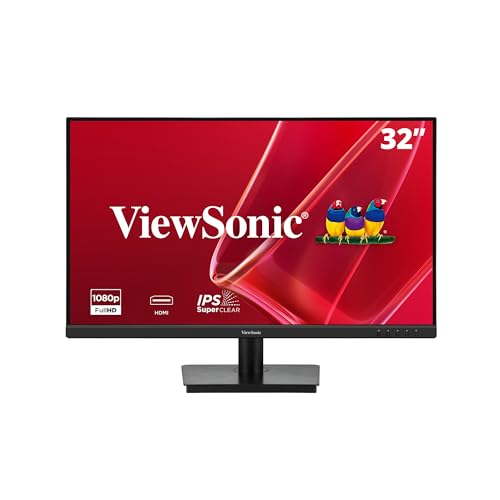
ViewSonic VA3209M — Dual speakers on a 1080p IPS office panel
ViewSonic’s VA3209M is the deliberate exception in this guide, and its title is candid about it: a 32-inch 1080p IPS computer monitor with a frameless design and dual speakers, sold for home office, desktop and laptop use across work, study and daily tasks. Dual speakers — the title’s own words — put it in the stronger half of this group for audio intent, and the IPS panel keeps the picture consistent when the screen is viewed from the side of a desk rather than squarely from its chair.
The 1080p resolution needs its honest paragraph. At 32 inches, Full HD pixels are large, and a reader who works at close range on dense documents will see softer letter edges than any 4K rival here produces. In exchange, everything on screen is big without scaling tricks, older computers drive the panel without strain, and the many workers whose eyes prefer large text get exactly that. ViewSonic aims the model at study and daily tasks, and judged on that brief — video lessons, calls, email, web research, family administration — the density is a reasonable trade rather than a defect.
Connections underline the office intent: HDMI for current machines and VGA for the long tail of older desktops and laptops that still populate spare rooms and small offices. The frameless design keeps the panel’s edges slim for a tidier desk and for pairing with a second screen later. Sound from dual speakers covers the spoken content this desk lives on — meetings, lectures, tutorials — without a peripheral in the way. If your workload is words spoken and written rather than pixels counted, the VA3209M’s Amazon page is worth a look and its price is worth checking against the 4K models, because you would be paying those models for density your day may never use.
Think of it as the monitor for the household’s shared desk: homework in the afternoon, a parent’s video call in the evening, a streamed lecture at night. Big text forgives tired eyes, the speakers forgive a missing soundbar, and the panel forgives an ageing computer — a combination the sharper screens below do not attempt.
The study angle in ViewSonic’s own description deserves respect, because education is where this specification quietly excels. Recorded lectures are spoken content with slides — dual speakers carry the voice, the large 1080p picture keeps slide text legible without zooming, and the student is not squinting at a laptop screen across a bedroom. Language learners, trainees working through certification videos and anyone following a cooking tutorial on a kitchen-adjacent desk all live in that same spoken-and-shown world. The frameless edges help when the household later adds a second screen for a two-display study setup, since slim bezels are what make pairs look intentional rather than accumulated. None of this requires the panel to be sharp in the 4K sense; it requires it to be clear, loud enough and undemanding, and on those three measures the VA3209M is the most coherent budget of abilities in this guide.
- Size and resolution: 32-inch, 1080p Full HD
- Panel: IPS
- Speakers: dual speakers, per listing title
- Design: frameless
- Inputs: HDMI, VGA
- Intended use per title: home office, work, study, daily tasks
- HDR: Not stated in the listing title — verify with the manufacturer documentation
Strengths
- Dual speakers are stated explicitly, the clearest audio claim in the group alongside the LG pair.
- HDMI plus VGA covers both new laptops and legacy desktops without adapters.
- IPS viewing angles suit a shared family or office desk viewed from several seats.
Trade-offs
- 1080p at 32 inches renders text visibly softer than the 4K picks at close range.
- No DisplayPort or USB-C appears in the title, limiting modern docking setups.
- The frameless styling cannot disguise that this is a work panel, not a media showcase.
Best for: shared home-office and study desks where big text, dual speakers and VGA coverage matter daily.
Not suited for: close-range dense document work, or a desk whose machines connect only by DisplayPort or USB-C.

LG 32UR500K-B — A built-in speaker pair behind a borderless 4K frame
LG’s 32UR500K-B states its audio arrangement more precisely than most: a built-in speaker x2, a pair, inside a 32-inch 4K UHD panel at 3840×2160 with HDR10, a borderless design, two HDMI inputs and a DisplayPort. The borderless framing matters on a desk this size — the picture runs close to the physical edge of the object, so the monitor reads as a window rather than a machine — and the twin HDMI inputs acknowledge that a modern desk screen serves a computer and something else, a console or a work laptop, in the same week.
HDR10 on a 4K panel at this tier is a media feature first: films and streamed video mastered with HDR metadata get a wider spread between their darkest and brightest passages than SDR allows. Reader Mode and Flicker Safe, both named in the title, pull the other direction toward long reading sessions — Reader Mode shifts the colour temperature toward paper, and Flicker Safe addresses the backlight behaviour that contributes to eye fatigue. OnScreen Control is LG’s software for arranging windows and settings from the desktop rather than through a joystick menu, a small mercy that 32-inch owners use more than they expect.
The stand goes unmentioned in the title beyond the panel itself, so assume the basics and verify travel on the listing if your desk height is unusual; the speaker pair, by contrast, is the headline and it is stated plainly. For a media-leaning desk — work by day, streamed film by night, a console on the second HDMI — this is the most balanced of the LG trio here. Visit its Amazon listing and check the price while noting the two HDMI ports, since that second input is the feature rival 4K panels most often make you miss.
One more angle deserves air: a borderless 4K screen is also the natural upgrade path for a two-monitor household consolidating into one. The pixel count replaces a pair of Full HD screens with room to spare, the speaker pair replaces the speakers those screens never had, and the second HDMI keeps the console that used to own the television’s spare input. Consolidation only works when nothing essential is lost, and this LG’s title reads like it was written by someone checking that list.
The OnScreen Control software plays a part in that consolidation that is easy to underrate. Splitting one large screen into useful window zones is what turns raw pixels into a workflow, and doing it from a mouse-driven utility rather than by dragging corners for a week is the difference between a panel that feels organised and one that feels merely big. Readers coming from two physical monitors will recognise the habit they are replacing: each half of this screen can behave like a former monitor, except the halves share one stand, one power lead and one speaker pair. The borderless frame completes the illusion, because nothing about the object’s edges interrupts the sense of a single continuous workspace. Desks that tried dual screens and hated the bezel, the cables and the doubled everything are this model’s natural constituency.
- Size and resolution: 32-inch, 4K UHD 3840×2160
- Speakers: built-in speaker x2, per listing title
- HDR: HDR10
- Design: borderless
- Inputs: 2x HDMI, DisplayPort
- Software: OnScreen Control
- Eye care: Reader Mode, Flicker Safe
- Refresh rate: Not stated in the listing title — verify with the manufacturer documentation
Strengths
- A speaker pair is stated in the title, not a single unspecified driver.
- Two HDMI inputs plus DisplayPort cover a PC, a laptop and a console without swapping cables.
- Borderless design and HDR10 suit a desk that doubles as the evening’s screen.
Trade-offs
- Stand adjustment is not described in the title, so ergonomic travel needs verifying.
- No USB-C is stated, keeping single-cable laptop docking out of reach.
- Colour coverage figures are not quoted in the title for colour-critical buyers.
Best for: a work-and-media desk with two HDMI sources that wants its sound built into a borderless 4K frame.
Not suited for: a one-cable USB-C laptop setup, or colour-critical work that needs published gamut figures before purchase.
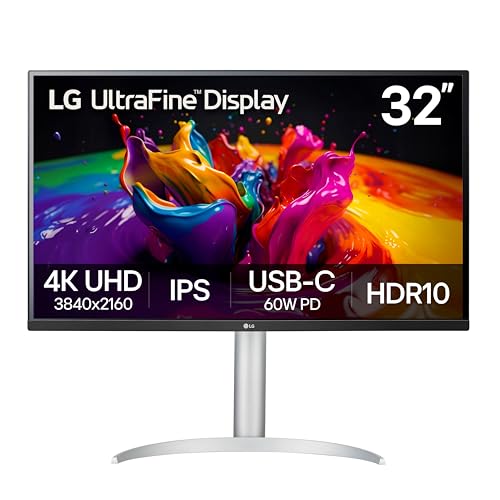
LG 32UP83AK-W — USB-C power delivery and a full-travel stand in white
The 32UP83AK-W is the laptop owner’s pick in this group, and its title reads like a docking station’s: a 32-inch 4K UHD IPS panel at 3840×2160 and 60Hz, with HDR10, a built-in speaker, HDMI and DisplayPort, and a USB Type-C connection carrying 60W power delivery, all on a stand that tilts, adjusts for height and pivots, finished in white. The USB-C figure is the one to underline. Sixty watts of power delivery means one cable can carry the picture from a laptop and charge that laptop at a working rate, which is the single-cable desk that the other five picks here cannot offer.
The stand deserves equal billing. Height travel and pivot on a 32-inch screen are not luxuries — a panel this large at the wrong height is a neck problem scheduled daily — and pivot lets the screen rotate to portrait for documents and code, a mode the 4K resolution makes genuinely useful because a rotated 2160-pixel width still shows a full page at sharp density. The white finish is a deliberate aesthetic choice that suits bright rooms and the pale desks that dominate home offices now, where a black slab can dominate the wall behind it.
Reader Mode returns for long text sessions, HDR10 covers media, and the built-in speaker — stated in the singular in the title — handles calls and spoken content while the laptop’s own speakers rest. Judge the 60Hz rate plainly: it is the office standard, entirely adequate for documents, calls and film, and it is not a gaming specification. The buyer this serves keeps a laptop as their only computer and wants the desk to become a workstation when the cable clicks in and a clear surface when it comes out. Open the 32UP83AK-W’s Amazon page and check the price with your laptop’s charging wattage beside you, because the 60W figure in the title is the number that decides whether the one-cable promise holds for your machine.
There is a household angle too: a white, height-adjustable screen with its own speaker is the monitor most easily shared between two people of different heights working different shifts at the same desk. The stand remembers nothing, but it moves in seconds, and the single cable means the second person’s laptop inherits the whole setup — screen, sound and charge — without a drawer of adapters changing hands.
Pivot deserves its own moment, because buyers routinely underestimate it until they try it. Rotated to portrait, a 32-inch 4K panel becomes a towering document column: a full contract page at readable size with the next page already arriving below it, a code file that shows an entire module without folding, a social feed or a set of flight options in their native vertical form. Writers, lawyers, developers and anyone who proofreads long documents discover that the portrait mode is not a gimmick but a second monitor hiding inside the first, and it costs nothing beyond the seconds the rotation takes. Landscape returns just as quickly for film and spreadsheets. Among these six picks, only this LG states the full tilt, height and pivot set in its title, which is why the review keeps returning to the stand: on a screen this size, the stand is half the product, and this is the one that behaves like it.
- Size and resolution: 32-inch, 4K UHD 3840×2160
- Panel: IPS
- Refresh rate: 60Hz
- Speakers: built-in speaker, per listing title
- HDR: HDR10
- Inputs: HDMI, DisplayPort, USB Type-C with 60W power delivery
- Stand: tilt, height and pivot adjustable
- Finish: white
- Eye care: Reader Mode
Strengths
- USB-C with 60W power delivery is the only true one-cable laptop connection in this guide.
- Height and pivot travel on the bundled stand is the strongest ergonomic package here.
- Pivot to portrait at 4K makes a genuine second mode for documents and code.
Trade-offs
- 60Hz is an office rate; fast gaming is outside the specification.
- A laptop needing more than 60W to charge at full speed will drain slowly under heavy load.
- The speaker claim is singular in the title, a step behind the stated pairs elsewhere here.
Best for: a laptop-only desk that wants one USB-C cable to deliver picture, sound and 60W of charge to a height-adjustable 4K screen.
Not suited for: a high-wattage gaming laptop expecting full-speed charging over the same cable, or any desk chasing refresh rates above 60Hz.

Sceptre U325W-UPT — 70Hz, four video inputs and 100 percent sRGB
Sceptre’s U325W-UPT Series entry pushes two numbers its rivals leave alone: a 70Hz refresh rate on its 32-inch 4K UHD panel, and a four-input connection set of two DisplayPort and two HDMI ports. Add 100 percent sRGB coverage and build-in speakers — the title’s own spelling of a claim this guide verified before admitting the pick — and the result is a 4K screen in machine black that courts the desk with several machines attached and a slight smoothness edge over the 60Hz office standard.
The 70Hz figure deserves proportion. It is not a gaming rate and Sceptre does not dress it as one; it is a ten-hertz step that makes scrolling, window movement and video feel marginally smoother than 60Hz, the kind of difference noticed in the first week and then absorbed into normal. The input count is the more durable advantage. Two DisplayPort connections is genuinely unusual — most panels offer one — so a desktop and a second PC, or a PC and a capture setup, can both take the better connection while two HDMI ports absorb a laptop and a console. Four machines, one screen, no cable swapping: that is this monitor’s working identity.
The 100 percent sRGB claim edges past the ASUS’s 99 percent on paper and speaks to the same audience of presentation, photo-casual and design-adjacent work where the standard gamut is the deliverable. Speakers built in keep the multi-machine desk from needing an audio switcher for calls and alerts. Nothing in the title describes the stand, so plan to verify its travel, and no USB-C is stated for the laptop crowd. For the desk that is really a small fleet of computers sharing one big screen, go to the Sceptre’s Amazon listing and check the price — the port count is the argument, and no other pick in this guide makes it.
Consider also the meeting-room and workshop versions of that fleet idea. A bench screen that a technician plugs into whichever machine is on the table, a family desk where a desktop, a work laptop and a console rotate, a small studio where a render box and an editing station share one good panel — all of these live or die by input count, and all of them are poorly served by the single-DisplayPort pattern most 4K monitors follow. The Sceptre is built for the rotation, speakers and all.
The machine black finish and the series badging tell you Sceptre expects this panel to be bought by people who read specification tables for fun, and that audience should also notice what the 70Hz rate does to the machine count in practice: when several computers share a screen through the day, the one delivering smoother motion quietly becomes the favourite, and peripherals migrate toward it. There is a fairness point buried in the specification too. Nothing here is theatrical — no curve, no smart platform, no lighting — so the money in this monitor sits in panel, ports and colour coverage, the three things a working screen cannot fake. Buyers who find the smart LG’s platform superfluous and the white LG’s laptop focus beside the point will recognise the U325W-UPT as the adult in the room: a screen that assumes you own computers, plural, and would like them all to look their best on one shared window.
- Size and resolution: 32-inch, 4K UHD 3840×2160
- Refresh rate: 70Hz
- Speakers: build-in speakers, per listing title
- Colour: 100 percent sRGB
- Inputs: 2x DisplayPort, 2x HDMI
- Finish: Machine Black
- Model note: U325W-UPT Series, listed as 2026
- USB-C: Not stated in the listing title — verify with the manufacturer documentation
Strengths
- Two DisplayPort and two HDMI inputs is the deepest connection set among these 4K picks.
- 70Hz gives everyday motion a small, real edge over the 60Hz standard.
- Full 100 percent sRGB coverage is stated in the title for colour-ordinary work.
Trade-offs
- Stand adjustment goes undescribed in the title, so ergonomics need checking on the listing.
- No USB-C is stated, so laptops cannot dock or charge through this panel.
- 70Hz still sits far below any gaming panel’s rate for competitive play.
Best for: a multi-machine desk — desktop, second PC, laptop and console — sharing one 4K screen with speakers.
Not suited for: a single-laptop desk built around USB-C docking, or any setup that needs the stand’s travel confirmed by the title alone.

LG 32U701SB-B — The smart monitor that streams without a computer
The 32U701SB-B is the pick that changes the category: a 32-inch smart 4K UHD monitor running webOS 26, with a 60Hz HDR10 panel at 3840×2160, DCI-P3 90 percent colour, a built-in speaker enhanced by AI Sound Pro, 4K upscaling and LG Switch, over HDMI and USB-A with a tilt stand. The webOS brain means this screen streams films, shows and music on its own — no computer, no stick, no console required — which makes it as much a small television for a studio flat or spare room as it is a monitor for a desk.
AI Sound Pro is the audio headline and it is specific to this pick: LG’s processing applied to the built-in speaker, aimed at clarifying dialogue and balancing streamed content, the exact material a smart monitor exists to play. The 4K upscaling claim works the same territory from the picture side, sharpening lower-resolution streams toward the panel’s native count. DCI-P3 90 percent colour is a cinema-leaning gamut figure, wider than the sRGB claims elsewhere in this guide, and it suits the streaming brief. LG Switch handles the monitor side of the bargain, LG’s utility for splitting the screen and switching control between connected machines.
The compromises are a smart platform’s usual ones. The panel is a 60Hz tilt-stand screen, so ergonomic range and motion performance stay ordinary, and a smart system carries its own interface, accounts and updates where a dumb monitor simply shows a picture. USB-A rather than USB-C is the stated peripheral connection, so the laptop-docking story belongs to the 32UP83AK-W above. What this pick owns is independence: a room with Wi-Fi and a wall socket gets a complete entertainment and light-work screen. If that room is yours, the 32U701SB-B’s Amazon page is where to check the price — and to confirm which streaming services the current webOS build carries before it becomes your only screen.
Think about who else lives at this intersection. A student in a single room, a guest room that doubles as an office, a kitchen-adjacent family desk, a rental where mounting a television is forbidden but a monitor on a stand is furniture — each of these needs a screen that is a television when the laptop closes and a monitor when it opens. Two separate devices would cost more, crowd more and argue over the same chair; this LG is the one-device answer, with the speaker story to match.
The upscaling claim is worth one more sentence of respect, because a smart screen spends much of its life showing material that was never mastered in 4K — older series, news streams, family videos, the long tail of the internet. A panel that merely displays those sources at their native softness wastes its own resolution for half its working hours; processing that lifts them toward the panel’s capability is what makes a 4K smart monitor feel like an upgrade rather than a magnifying glass for compression artefacts. Combined with HDR10 for the material that does arrive mastered, the picture story is coherent in both directions. The honest reservation remains the platform itself: a smart system ages by software support rather than by panel life, so the screen’s streaming prime is finite in a way its monitor prime is not — a fact to accept with open eyes rather than discover in year four.
- Size and resolution: 32-inch, Smart 4K UHD 3840×2160
- Platform: webOS 26
- Refresh rate: 60Hz
- HDR: HDR10
- Colour: DCI-P3 90 percent (Typ.)
- Speakers: built-in speaker with AI Sound Pro, per listing title
- Processing: 4K upscaling, LG Switch
- Inputs: HDMI, USB-A
- Stand: tilt
Strengths
- webOS streaming makes it a complete screen with no computer attached.
- AI Sound Pro is the only processed-audio claim in this guide, aimed squarely at dialogue.
- DCI-P3 90 percent colour is the widest gamut figure stated among these picks.
Trade-offs
- Tilt-only stand on a 32-inch screen limits ergonomic adjustment.
- USB-A is stated rather than USB-C, so laptop charging and docking belong to its sibling.
- A smart platform brings accounts and updates that a plain monitor never asks for.
Best for: a single-room or spare-room setup that needs one screen to stream on its own and serve as a desk monitor.
Not suited for: a laptop desk built around USB-C charging, or a workspace that needs height adjustment from the bundled stand.
Side-by-Side Comparison
| Pick | Resolution | Speaker claim in title | Refresh | Key connection | Stand |
|---|---|---|---|---|---|
| ASUS VP327Q | 4K 3840×2160 | Speakers | Not stated in the listing title | HDMI, DisplayPort | Tilt, VESA mount |
| ViewSonic VA3209M | 1080p | Dual speakers | Not stated in the listing title | HDMI, VGA | Not stated in the listing title |
| LG 32UR500K-B | 4K 3840×2160 | Built-in speaker x2 | Not stated in the listing title | 2x HDMI, DisplayPort | Not stated in the listing title |
| LG 32UP83AK-W | 4K 3840×2160 | Built-in speaker | 60Hz | USB-C 60W PD | Tilt, height, pivot |
| Sceptre U325W-UPT | 4K 3840×2160 | Build-in speakers | 70Hz | 2x DP, 2x HDMI | Not stated in the listing title |
| LG 32U701SB-B | 4K 3840×2160 | Built-in speaker, AI Sound Pro | 60Hz | HDMI, USB-A, webOS | Tilt |
How to Choose a 32-Inch Monitor with Speakers
Start by deciding what the speakers are for, in hours. A desk spending six hours a day in calls and meetings is buying an audio device as much as a screen, and should weight the stated speaker claims — the ViewSonic’s dual speakers, the LG 32UR500K-B’s speaker pair, the smart LG’s AI Sound Pro processing — accordingly. A desk where the speakers cover the occasional tutorial and system alert can let resolution and connections lead instead, because every pick here clears that lower bar.
Resolution comes next, and the honest question is viewing distance and workload. At a normal desk distance, 4K at 32 inches is the density that keeps documents crisp all day; 1080p at the same size is the density that keeps text large and systems undemanding. Neither is a mistake — they are answers for different eyes and different computers — but buying the ViewSonic expecting 4K sharpness, or a 4K panel for a grandparent’s email desk, are both ways to own the wrong monitor.
Then inventory your machines. One laptop argues for the LG 32UP83AK-W’s USB-C cable. Several machines argue for the Sceptre’s four inputs or the LG 32UR500K-B’s twin HDMI. No machine at all — a room that wants streaming — argues for the webOS LG. The monitor that fits is the one whose stated ports match the cables already on your desk.
Finish with the stand and the room. A 32-inch panel at a fixed tilt demands the desk and chair meet it; height travel is worth real money to tall readers and standing desks. And if the screen will double as the room’s film screen after hours, the smart LG and the HDR10 models earn a second look that a pure office panel does not.
One further test separates a good choice from a lucky one: imagine the desk a year from now. Machines change faster than monitors, so the panel whose ports anticipate the next laptop — a USB-C arrival, a second computer, a console moving rooms — outlives the panel bought tightly for today’s setup. That is why the input lists in this guide are quoted so pedantically. A monitor is a five-to-ten-year object in most households, and the cost of a missing port is not an adapter; it is the daily friction of swapping cables behind a 32-inch screen that was supposed to simplify the desk. Buy the connection set for the desk you are becoming, within reason, and let the speaker claim that matches your call load break any remaining tie.
Sound placement is the final physical check, and it is free to make before ordering. Built-in speakers fire from wherever the frame allows — downward, rearward or forward — and a monitor pushed against a wall, tucked into an alcove or flanked by bookshelves will sound different from the same monitor on an open desk. The title will not tell you the firing direction, so the listing’s photographs are worth thirty seconds: they show the grilles, and the grilles tell you whether your room will help the speakers or muffle them. Desks in corners forgive almost anything; a panel inside a bookcase argues for keeping an external speaker in reserve.
How Loud Are Built-In Monitor Speakers, Honestly?
Loud enough for the jobs they are built for, and no further. Across this class, internal speakers handle voices at conversational clarity across a desk — calls, lectures, news, podcasts, dialogue — which is why they can honestly replace a small desktop speaker for most working days. Their limit is physics: slim frames hold small drivers, and small drivers cannot move the air that bass requires, so music loses its floor and film effects lose their weight. The picks that process their audio, like the LG 32U701SB-B with AI Sound Pro, aim their limited hardware at dialogue intelligibility, which is the wisest target available. If your evenings are films you care about, keep a headphone or speaker budget alongside any pick here; if your days are voices, the built-in speakers are the whole answer.
Is 1080p on a 32-Inch Screen Too Blurry for Work?
It is too soft for some work and ideal for other work, and the dividing line is what fills your day. Dense spreadsheets, code and long documents at close range show the ViewSonic’s pixel structure as softened edges, and readers doing that work for a living should take any 4K pick here instead. Calls, email, web research, video lessons and administration — the workload ViewSonic names in its own title — read perfectly well, with the bonus that text renders large without operating-system scaling and older computers drive the panel effortlessly. The question is never the panel in isolation; it is the pairing of panel and workload, and mismatches in either direction waste money.
Can a Smart Monitor Replace a Television in a Small Room?
For streaming, the LG 32U701SB-B makes a genuine case: webOS carries the major services, the panel is 4K with HDR10, the speaker is processed for dialogue, and the whole device sits on a desk stand that no landlord can object to. The limits are size and inputs — 32 inches is a personal viewing distance, not a family sofa distance, and there is no television tuner for broadcast aerial signals, so households that watch live broadcast channels need those channels to arrive through an app or an external box. Within those limits, one device covering desk by day and streaming by night is exactly what small rooms ask for.
Common Mistakes
Assuming speakers means soundbar volume
Buyers retire a soundbar the day the new monitor arrives, then discover that built-in speakers were engineered for voices at a desk, not for filling a room with film sound. Keep the old audio gear until the new panel has covered a week of your real listening, and let the LG with AI Sound Pro or the stated speaker pairs prove themselves on dialogue before anything is given away.
Buying 4K for a computer that cannot feed it comfortably
A 4K panel asks four times the pixels of a 1080p one, and ageing laptops with modest graphics can drive it for documents yet stutter on video and external-display scaling. Check your machine’s external display support against 3840×2160 before choosing any 4K pick here; the ViewSonic exists in this guide partly for the machines that answer no.
Overlooking the second input until the console comes home
A single-HDMI desk works until a second source appears, and then cable swapping begins behind the screen. The LG 32UR500K-B’s two HDMI ports and the Sceptre’s four-input set look like surplus on delivery day and like foresight by the end of the month. Count every source your household owns, including the ones currently plugged into a television.
Ignoring stand travel on a screen this large
A 32-inch panel concentrates the ergonomic cost of a fixed stand: too low, and your neck pays hourly. Tilt-only models like the ASUS and the smart LG assume your furniture fits them. Measure your seated eye height against the desk before ordering, or choose the LG 32UP83AK-W, whose height and pivot travel is stated in its title.
Final Recommendation
Let your desk’s busiest hour decide. Call-heavy home offices should take the ASUS VP327Q for its all-round 4K checklist or the ViewSonic VA3209M where big text, dual speakers and VGA coverage fit an older machine. Laptop owners get the cleanest upgrade in the LG 32UP83AK-W — one cable, full stand travel, 4K IPS — while multi-machine desks belong to the Sceptre U325W-UPT and its four inputs. The LG 32UR500K-B is the balanced media desk with a stated speaker pair and twin HDMI, and the LG 32U701SB-B stands alone for a room that needs the screen to entertain without any computer at all. Every one of them puts its speakers in writing in its own title; choose the writing that matches your week, and the soundbar can finally leave the desk. One last discipline is worth the thirty seconds it takes: when the screen arrives, run a call, a film scene and a piece of music through its speakers before the old audio gear goes into a cupboard, because your own room — its walls, its alcove, its desk surface — is the one acoustic specification no listing can quote for you.
Frequently Asked Questions
Do all six monitors really have speakers?
Yes — that was the admission rule for this guide. Each pick’s own listing title states its audio: speakers on the ASUS VP327Q, dual speakers on the ViewSonic VA3209M, a built-in speaker x2 on the LG 32UR500K-B, a built-in speaker on the LG 32UP83AK-W, build-in speakers on the Sceptre U325W-UPT, and a built-in speaker with AI Sound Pro on the LG 32U701SB-B.
Can I still connect external speakers or headphones?
On most desks, yes — your computer’s own audio outputs keep working regardless of the monitor, and many users route sound through the PC rather than the panel. What a monitor’s title does not always state is a headphone jack on the frame itself, so if you specifically want to plug headphones into the screen, confirm that port on the listing of the pick you choose.
Is 60Hz enough for casual gaming on these panels?
For relaxed, story-driven and older games, 60Hz at 4K is a perfectly playable combination, and the Sceptre’s 70Hz adds a small margin. Competitive players who measure their hobby in milliseconds should be reading a gaming-monitor guide instead — this class trades refresh for size, density and sound, deliberately.
What does USB-C 60W power delivery actually replace?
On the LG 32UP83AK-W it replaces two cables with one: the USB-C lead carries the picture from your laptop to the screen and carries up to 60 watts of charge back to the laptop. Laptops that ship with chargers well above 60 watts may charge slowly or merely hold their level under heavy load, so compare the figure against your own charger’s rating.
Which pick suits a dorm room or studio flat best?
The LG 32U701SB-B, because webOS lets it stream films and shows with no computer attached, its speaker is processed for dialogue, and the same screen becomes a 4K desk monitor when study starts. One device, one stand, no television licence to the wall and no second purchase.
Will a 32-inch screen overwhelm a small desk?
It will dominate one, which is not the same thing. Measure the desk’s depth as carefully as its width: a 32-inch panel wants roughly an arm’s length between your eyes and the glass, and a shallow desk against a wall can force you closer than the size prefers. A wall mount or a monitor arm on the VESA-ready picks reclaims the depth the stand consumes, which is why mount support appears in the spec lists above rather than being treated as a footnote.
Related Guides
Readers who can live without built-in sound in exchange for different shapes should browse our roundup of the best 30-inch monitors, where ultrawide curves dominate the class. And if the speaker hunt began because a bigger screen is the real goal, our guide to the best VA monitors covers the high-contrast panel family across sizes. At 32 inches with speakers built in, the win is a desk with no separate soundbar: film, calls and casual play all leave through the panel itself.