What's inside
- Key Takeaways
- Quick Picks
- How Did We Judge Wall-Mounted Picks Without Pretending They Are Routers?
- Why Do Buildings Put Radios on Walls in the First Place?
- What Else Must Exist Before a Wall Access Point Works?
- How Do You Install a Wall-Plate Access Point, Room by Room?
- How Do Roaming and Mesh Behave Across a Mounted Fleet?
- What Does the PoE Budget Actually Have to Cover?
- Three Buildings, Three Deployments
- What Should the First Month of a Mounted Network Teach You?
- How Does a Mounted Fleet Age, and When Do You Upgrade It?
- How Should a Mounted Fleet Handle Guests and Strangers?
- A Wall’s-Eye Comparison of the Six
- Where Exactly on the Wall Should a Radio Live?
- Which Installation Mistakes Haunt Wall-Mounted Networks?
- Final Recommendation
- Frequently Asked Questions
- Related Guides
As an Amazon Associate I earn from qualifying purchases. This post may contain affiliate links at no extra cost to you.
widgetverdict.com is reader-supported. When you buy through links on our site, we may earn an affiliate commission.
Where to buy: Amazon stocks every model below, and each pick links to the listing whose title we checked for mounting style, power method and management platform. Access points also sell through networking suppliers, but the listing titles are the evidence this guide is built on.
Here is the truth that should open every search for the best wall mounted routers: most of what the market sells under that phrase is not a router at all. It is an access point — a radio that mounts on a wall, draws its power through its Ethernet cable, and depends on a router somewhere else in the building to do the actual routing. That is not a scam or a disappointment; it is how serious buildings are networked, because a radio placed exactly where people sit, powered by the same cable that feeds it data, outperforms a router blinking in a cupboard almost every time. But it does mean the purchase is a system purchase. Five of the six picks below are access points in the wall-plate or wall-mountable style, each tied to a management platform — Omada, UniFi, Festa or eero. The sixth, TP-Link’s Deco X50-PoE, is a mesh unit whose title explicitly claims the router role among its jobs. Knowing which species you are buying, and what else it needs to live, is the entire skill this guide teaches.
The wall-plate designs — Omada’s EAP615-Wall and TP-Link’s Festa F52-Wall — replace a wall socket, sit flush where a network outlet already lives, and hand back wired ports at desk height for a phone, a printer or a television. The wall-mountable radios — Ubiquiti’s U7 Pro Wall, the Deco X50-PoE, eero’s PoE 6 and Omada’s EAP650 — mount on a bracket higher up and behave like small ceiling units that happen to live on a wall. Hotels, dormitories, clinics and multi-room homes are where wall plates earn their legend, one room at a time; open-plan spaces tend to favour the bracket-mounted radios. The sections below sort the species, the power and the platforms before the individual verdicts.
Key Takeaways
- Five of these six picks are access points, not routers: they need a router upstream, a PoE power source, and in most cases a controller or app platform to manage them.
- The Deco X50-PoE is the exception — its title claims router, access point and range extender roles in one ceiling/wall-mountable mesh unit.
- Wall-plate models (EAP615-Wall, Festa F52-Wall) add downlink Ethernet ports at the wall; bracket-mounted models trade those ports for placement freedom.
- Platform lock-in is real: the Festa F52-Wall’s title states plainly that it does not work with Omada, despite sharing a parent brand with half this list.
- PoE is the enabling detail — one cable carries data and power — but the switch or injector supplying that power is a separate purchase unless a title says otherwise.
- Wi-Fi generations here span Wi-Fi 5 (Festa F52-Wall) through Wi-Fi 7 (U7 Pro Wall), so match the radio to the network’s actual clients.
- The cable run is the real project in every mounted installation; the radios are interchangeable furniture at the end of it, which is why the wiring outlives two generations of hardware.
Quick Picks
| Pick | Badge | Why it earns its place |
|---|---|---|
| Omada EAP615-Wall | The wall-plate benchmark | AX1800 Wi-Fi 6 plate with three downlink gigabit ports, PoE power in and PoE passthrough out. |
| Ubiquiti U7 Pro Wall | The Wi-Fi 7 wall radio | UniFi wall-mount access point on the current Wi-Fi 7 generation, in a discreet white housing. |
| TP-Link Festa F52-Wall | The cloud-managed plate | AC1200 wall plate with free cloud management, PoE passthrough and three downlink ports — on Festa, not Omada. |
| TP-Link Deco X50-PoE (1-Pack) | The one that can route | AX3000 PoE mesh unit, ceiling or wall mountable, that can replace router, access point and extender. |
| Amazon eero PoE 6 | The ecosystem plate | Ceiling/wall-mountable Wi-Fi 6 access point, PoE powered, built for the eero way of networking. |
| Omada EAP650 | The flexible Omada radio | AX3000 access point with a DC adapter in the box and PoE options, for walls or ceilings alike. |
How Did We Judge Wall-Mounted Picks Without Pretending They Are Routers?
Each candidate was classified before it was praised. First: what is it, in its title’s own words — access point, mesh unit, or something claiming the router’s chair? Second: how does it mount — flush wall plate over an existing outlet box, or bracket on a surface? Third: how is it powered — PoE in, PoE passed through to a downstream device, a DC adapter in the box, or some combination? Fourth: who manages it — an Omada controller, the UniFi platform, Festa’s free cloud, the Deco app, or the eero ecosystem? Those four answers, all readable from the six titles, predict the ownership experience more accurately than any radio specification. A buyer who knows their building already runs Omada switches has a shortlist of two; a buyer starting from an empty house has a platform decision to make before a product decision, and this guide refuses to hide that order of operations.
Radio class was the tiebreaker, not the headline. Wi-Fi 7 in the U7 Pro Wall matters to a network being built for a decade; Wi-Fi 5 in the Festa plate matters hardly at all in a guest room where the clients are phones and the backhaul is the real constraint. Read the picks below with your building’s wiring, not your ambitions, in the foreground.
Why Do Buildings Put Radios on Walls in the First Place?
Radio waves are stopped by the same things that stop light: walls, floors, metal, water in bulk. A router in a hallway cupboard spends its strength punching through the building to reach the rooms where people actually sit with laptops. A wall-mounted access point inverts the geometry — the radio lives in the room, at the height of the people using it, and the building’s structure stops being an obstacle course. Wall plates go further: they colonise the outlet boxes that builders already installed in every room, which is why hotels and student housing adopted them so completely. One plate per room means every guest gets a strong local signal and — via the downlink ports both plate models here provide — a wired socket for the devices that still prefer cable.
The second reason is power. PoE delivers electricity down the same Ethernet cable that carries data, so an access point needs no nearby mains socket, no wall-wart and no electrician’s visit for a power point; the cable run is the whole installation. The third reason is tidiness at scale. A building with twenty wall plates has twenty identical, swappable, centrally managed radios and zero consumer routers blinking on twenty shelves. When one fails, it is replaced like a light fitting. Homes borrow this logic one room at a time — a plate in the study, a bracket radio in the extension — and the sections below assume that mixed, gradual adoption rather than a forklift rebuild. There is also a quieter, domestic reason the wall wins: it removes the router from the household’s surfaces and sightlines entirely. No shelf is surrendered, no cable nest gathers dust behind a sideboard, no guest asks which blinking box may be unplugged to charge a phone. Infrastructure that cannot be casually disturbed is infrastructure that stays configured, and a surprising share of home-network misery is simply the archaeology of small disturbances — a plug borrowed here, a unit moved for the cleaning there — that a screwed-down plate never suffers.
What Else Must Exist Before a Wall Access Point Works?
Three companions, and a purchase that forgets any of them stalls on the doorstep. The first is a router. Access points do not assign addresses, run the firewall or talk to the internet provider; something upstream must. In an Omada or UniFi building that is typically a dedicated gateway; in a Deco or eero home, one of their own units takes the chair. The second companion is PoE power at the other end of the cable — a PoE switch or an injector — sized for every access point it feeds, with headroom. Only the EAP650’s title mentions a DC adapter in the box as an alternative; the eero PoE 6’s title states the opposite, that its AC adapter is not included. The third companion is the management layer: Omada access points expect the Omada controller ecosystem, UniFi expects its own platform, Festa runs through its free cloud, and each is a small learning investment repaid in central control.
Plan the cable before the radios. A wall plate wants an Ethernet run ending in a wall box where the plate will sit; a bracket radio wants a run ending at the mounting point, ideally installed before the room is decorated. Readers planning the ceiling half of the same project should read our companion guide to the Best Ceiling-Mounted Routers and Access Points alongside this one, because the two mounting styles share switches, controllers and cable — and buildings that treat them as one system save money twice. Where a run truly cannot be pulled, a wireless bridge can sometimes carry a room until the cable arrives; the Best Bridgeable Wireless Routers covers that escape hatch honestly.
How Do You Install a Wall-Plate Access Point, Room by Room?
Start at the switch end. Confirm the PoE switch port or injector for this room is live and labelled, because every later diagnostic assumes power is arriving. At the wall, kill the circuit if the existing box holds mains wiring alongside the network outlet — wall plates in many buildings share boxes with other services, and respect costs nothing. Connect the incoming Ethernet run to the plate’s rear port, seat the plate over the box, and fix it with the screws the design intends rather than the ones that happen to be in the drawer. Only then look at the front: the downlink ports on the EAP615-Wall and F52-Wall face the room, ready for the desk phone, the television or the small switch that serves a media corner.
Adopt the plate into its platform before testing anything else — Omada’s controller, Festa’s cloud, whichever the model belongs to — and let it take current firmware while it is still the only new thing on the network. Name it for its room immediately; “AP-04” becomes a riddle within a month, while “Study-Plate” stays true for years. Test standing where a person will actually sit, with the door closed, because doors are part of the building’s radio map. Then connect one wired device to a downlink port and confirm the passthrough behaves — on the EAP615-Wall, the title’s PoE-out claim means a suitable downstream device can be powered from the plate itself, a detail worth verifying with your exact hardware in hand. Repeat per room, one room fully finished before the next begins; buildings forgive slow installers and punish parallel half-installations. Hospitality readers running this playbook at property scale will find the guest-facing half of the story in the Best Routers for Hotels and Guest Wi-Fi.

Omada EAP615-Wall — The wall-plate benchmark
The EAP615-Wall is the reference design for this entire category: an AX1800 Wi-Fi 6 wall plate, dual-band, that sits over a standard outlet box and returns three downlink gigabit ports to the room. Its title packs the professional checklist into one breath — PoE powered, with PoE out to feed a downstream device; mesh, roaming and WPA3 support; Omada management; and a five-year warranty that signals the intended customer is a building, not a gadget shelf. The downlink ports are what separate a wall plate from a wall radio: the desk in a hotel room, the till in a café corner, the television in a rental flat all get wired connections at the exact point where the wireless also lives, and the roaming support means a phone walking the corridor hands over between plates without the call noticing.
Ownership means joining the Omada ecosystem — a controller, hardware or software, becomes the brain that adopts and configures the fleet. For a building already pointed that way, the EAP615-Wall is the obvious unit of deployment. For a single room in a house with no Omada ambitions, it is a superb radio attached to a platform decision you may not want to make for one plate.
- Form: Wall-plate access point, Wi-Fi 6 AX1800 dual-band
- Ports per title: 3 downlink gigabit ports
- Power per title: PoE powered, with PoE out
- Platform / extras: Omada managed; mesh, roaming, WPA3; 5-year warranty stated
Strengths
- Three wired downlinks at the wall turn one cable run into a room’s whole network point.
- PoE passthrough powers a downstream device, sparing a second drop or socket.
- Roaming and mesh support suit corridors of rooms rather than a single showcase install.
Trade-offs
- It is an access point: router, PoE source and Omada management must exist around it.
- AX1800 is a sensible room class, not a flagship radio for a dense hall.
- The flush plate form demands a suitable wall box where you want it.
Best for: hotels, rentals, dorms and multi-room homes standardising on Omada, one plate per room.
Not suited for: a single-room fix in a home with no controller platform and no plans to adopt one.
Buildings going the Omada route should price the EAP615-Wall on Amazon per room and treat it as the unit of the whole project — the plate count, the switch budget and the controller plan all fall out of that single per-room decision, which is exactly how a fleet should be bought.

Ubiquiti U7 Pro Wall — The Wi-Fi 7 wall radio
Ubiquiti’s listing title for the U7 Pro Wall is the tersest in this guide — a wall-mount Wi-Fi 7 access point in white, described as high capacity — and the terseness itself is information: UniFi products are sold into an ecosystem whose documentation lives on Ubiquiti’s platform, not in marketplace titles. What can be said from the title is the essential shape: this is the current-generation Wi-Fi 7 radio in the wall-mount form, for networks being built inside the UniFi world. Buyers there know the drill — a UniFi gateway or router upstream, PoE to the mounting point, adoption into the UniFi controller, and a radio that then disappears into the wall and the dashboard alike.
The honest guidance for everyone else is symmetrical: do not buy a UniFi access point as a standalone experiment. Its virtues — central management, roaming behaviour, a decade of platform polish — only exist inside the platform, and the title promises nothing about standalone operation. As the wall radio of a UniFi build, though, a Wi-Fi 7 unit is the forward-looking choice: client devices will arrive at this generation for years, and walls are the least convenient place to upgrade twice.
- Form: Wall-mount access point, white
- Radio per title: Wi-Fi 7, described as high capacity
- Ports / power: The marketplace title does not enumerate ports or power specifics — Ubiquiti’s own datasheet is the document to check for both before ordering
- Platform: UniFi ecosystem
Strengths
- Wi-Fi 7 in the wall means the hardest-to-reach hardware is on the newest generation.
- UniFi management gives a whole building of these a single dashboard and identity.
- The discreet white wall form suits finished interiors better than a shelf router.
Trade-offs
- The sparse title leaves port and power homework to the manufacturer’s datasheet.
- It presupposes the UniFi platform; outside it, the purchase makes little sense.
- Newest-generation radios serve Wi-Fi 7 clients best, and older devices gain less.
Best for: a UniFi household or business building wall coverage meant to stay current for years.
Not suited for: a platform-free quick fix — the Deco X50-PoE below asks far less infrastructure of its owner.
UniFi builders should confirm the U7 Pro Wall’s datasheet first, then order through its Amazon listing with the platform decision already made.

TP-Link Festa F52-Wall — The cloud-managed plate
The Festa F52-Wall is the EAP615-Wall’s cousin from the other side of TP-Link’s house, and its title performs a public service by stating the family boundary in plain words: “Not Work w/Omada.” Festa is TP-Link’s separate, free-cloud-managed line for small businesses, and this AC1200 wall-plate access point belongs wholly to it. Within that world the offer is attractive — dual-band wall plate, MU-MIMO, PoE passthrough, three downlink gigabit ports, a self-organizing network feature, and management through Festa’s free cloud rather than a controller you must host. A small café, salon or clinic that wants per-room plates without running controller hardware is the reader this product was designed for.
The Wi-Fi 5 radio class is the deliberate compromise: guest and staff devices in small premises rarely justify more, and the savings show in the concept. What must not happen is a mixed purchase — Festa plates ordered into an Omada building, or the reverse — because the title’s warning is absolute. Read it twice, order once, inside one ecosystem.
- Form: Wall-plate access point, AC1200 dual-band
- Ports per title: 3 downlink gigabit ports
- Power per title: PoE passthrough
- Platform / extras: Festa free cloud managed, MU-MIMO, self-organizing network; explicitly not Omada-compatible
Strengths
- Free cloud management removes the controller hardware an Omada plate presupposes.
- The same three-downlink, PoE-passthrough wall-plate formula as its Omada cousin.
- The title’s platform warning, honoured, prevents the category’s most expensive ordering mistake.
Trade-offs
- AC1200 Wi-Fi 5 radios are a generation behind the other plates in this guide.
- Festa is a walled garden of its own; the fleet cannot later be adopted into Omada.
- Cloud management means the platform’s availability is part of your building’s infrastructure.
Best for: a small business wanting wall plates with zero controller hardware and simple cloud oversight.
Not suited for: any building already invested in Omada — the title itself forbids the marriage.
Small premises starting fresh should weigh the Festa F52-Wall’s Amazon listing against the Omada plate with the platform question foremost.

TP-Link Deco X50-PoE (1-Pack) — The one that can route
The Deco X50-PoE breaks this guide’s pattern in the most useful way: its title says the unit replaces “Router, Access Point & Range Extender,” which makes it the only pick a reader can buy as the actual router of a small network and mount on a wall or ceiling. It is an AX3000 Wi-Fi 6 mesh unit, PoE-powered, with two 2.5-gigabit ports — an unusual and welcome specification, since the port that feeds it can also serve a fast wired device or a multi-gig internet connection. In a Deco mesh, one unit takes the router’s chair and the others extend it, all of them mountable out of sight and powered down a cable. For a home that wants the wall-mounted look without adopting a professional controller platform, this is the door in.
The trade is the professional layer itself: Deco’s app-led simplicity is the opposite of Omada’s or UniFi’s granular control, and a building that later wants VLAN-everything management will outgrow it. PoE power still requires a switch or injector that the title does not bundle. But judged as the bridge between consumer mesh and installed infrastructure, the X50-PoE occupies its niche almost alone.
- Form: Ceiling/wall-mountable mesh unit, Wi-Fi 6 AX3000
- Roles per title: Replaces router, access point and range extender
- Ports per title: 2× 2.5G ports
- Power per title: PoE-powered (source not bundled in the title)
Strengths
- The only pick whose title lets it be the network’s router, ending the platform prerequisite.
- Two 2.5-gigabit ports are generous for a mesh unit and flatter fast internet tiers.
- Deco’s app management keeps an installed-looking network within a normal household’s patience.
Trade-offs
- App-led control stops well short of the Omada and UniFi management depth.
- PoE power still needs a switch or injector purchased separately.
- A single pack starts a mesh; covering a building means several units and a cable plan.
Best for: a home wanting mounted, PoE mesh Wi-Fi without adopting a professional controller ecosystem.
Not suited for: an administrator who wants per-port, per-VLAN command of the building — Omada and UniFi exist for that reader.
Homes choosing the simple road should start with the Deco X50-PoE listing on Amazon and plan the unit count room by room, remembering that each added unit is both coverage and capacity, and that the mesh will forgive a conservative first order far more readily than a house full of hardware bought in one optimistic afternoon.
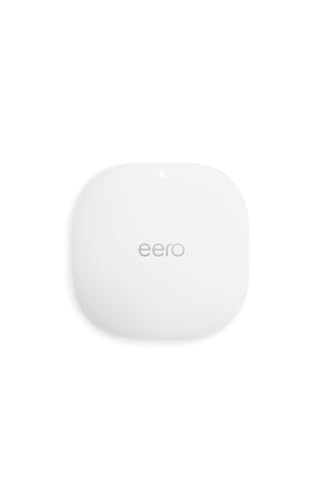
Amazon eero PoE 6 — The ecosystem plate
The eero PoE 6 is Amazon’s entry in the mounted-radio world: a ceiling/wall-mountable, dual-band Wi-Fi 6 access point, PoE powered, with the title’s plain note that the AC adapter is not included — a sentence that tells you the intended installation is a proper PoE run, not a shelf and a wall-wart. Inside the eero ecosystem the proposition is the brand’s usual one: the network manages itself through the app, units cooperate as a mesh, and the mounted radio extends that calm to a hallway, a rental or a small office that wants coverage without visible hardware. eero’s audience values the absence of decisions, and this unit is that philosophy screwed to a wall.
The caveats mirror the brand. An eero access point belongs to an eero network; it is not a general-purpose radio for a mixed fleet, and a building run on Omada or UniFi gains nothing by adopting one. Its dual-band Wi-Fi 6 class is a step behind the Wi-Fi 7 Ubiquiti in raw generation, which matters little in its target rooms. Buy it as an ecosystem citizen, priced as part of a whole eero plan.
- Form: Ceiling/wall-mountable access point, dual-band Wi-Fi 6
- Power per title: PoE powered; AC adapter not included
- Platform: eero ecosystem and app
- Mounting: Ceiling or wall, per title
Strengths
- eero’s self-managing mesh behaviour suits owners who want infrastructure to be invisible twice over.
- PoE power with mounting options covers the hallway-and-rental use cases cleanly.
- The title’s adapter note sets power expectations honestly before purchase.
Trade-offs
- It is an eero-network citizen only; mixed-platform buildings should look elsewhere.
- No power adapter in the box means the PoE infrastructure is a firm prerequisite.
- Wi-Fi 6 dual-band is a class behind the newest wall radios here.
Best for: an existing eero household or small property extending its mesh onto walls and ceilings.
Not suited for: a building standardised on Omada, UniFi or Festa management.
eero owners should add the PoE 6 through its Amazon listing as part of the whole-network plan, not as a lone experiment — the unit’s entire value is the calm of a system that already knows its name, its rooms and its habits.

Omada EAP650 — The flexible Omada radio
The EAP650 is the generalist of the Omada pair in this guide: an AX3000 wireless access point — a class above the wall plate’s AX1800 — whose title lists a DC adapter in the package alongside PoE power options, mesh, roaming and WPA3 support, Omada management and the family’s five-year warranty. That adapter matters more than it looks. It means the EAP650 can serve on a wall today, powered conventionally, in a room where the PoE run is next spring’s project — and move to full PoE duty when the cabling catches up. Mounted high on a wall it behaves like the ceiling radios in our companion guide; it is the pick for spaces where one strong radio covers an open area rather than a plate-per-room plan.
As ever with Omada, the platform is the premise: controller-managed, happiest in a fleet, over-specified for a one-room favour. Within a growing Omada building, though, its flexibility about both placement and power makes it the unit installers reach for when the room does not match the plan — the landing, the hall, the odd-shaped café floor where a plate has no box to sit in.
- Form: Wireless access point for wall or ceiling placement, Wi-Fi 6 AX3000
- Power per title: DC adapter included; PoE powered options named (PoE160S, PoE4824G)
- Platform / extras: Omada managed; mesh, roaming, WPA3; 5-year warranty stated
- Downlink ports: None claimed in the title — it is a radio, not a wall plate
Strengths
- AX3000 class gives open areas a stronger single radio than the wall plates offer.
- Adapter in the box plus PoE options lets installation precede the cabling project.
- Omada management and roaming integrate it with plates and gateways across a site.
Trade-offs
- No room-side wired ports; devices at the wall get wireless only.
- The Omada controller premise applies in full, as with its plate sibling.
- One strong radio still loses to per-room plates in cellular floor plans like hotels.
Best for: an Omada building needing a flexible, stronger radio for halls and open spaces.
Not suited for: a room-by-room deployment needing wired sockets at each wall — that is the EAP615-Wall’s design.
Omada sites with an awkward open space should price the EAP650 on Amazon as the fleet’s utility player.
How Do Roaming and Mesh Behave Across a Mounted Fleet?
Roaming is the feature guests feel without knowing its name. In a building of wall plates, a phone call started in the lobby should survive the walk to a third-floor room, handed from plate to plate as signal strengths shift. The titles of both Omada picks and the roaming language around the category promise support for this choreography, but the honest detail is that roaming is a duet: the access points can suggest, assist and prepare the handover, while the client device makes the final decision about when to let go of a weakening radio. Well-run fleets tune transmit power so that rooms overlap gently — enough that a handover target always exists, not so much that devices cling to a distant plate out of misplaced loyalty. This is where a single management platform earns its keep a second time: power, channels and handover settings are coordinated fleet-wide from the controller rather than negotiated radio by radio with a ladder and a laptop.
Mesh, in the mounted world, wears two meanings that shoppers should keep apart. In the Deco and eero sense, mesh is the product itself — units cooperating as one self-organising network, with the option of wireless links between them. In the Omada sense, mesh support in a title means the access point can join a wirelessly uplinked arrangement when a cable truly cannot reach, while preferring the cable whenever one exists. The professional instinct is consistent across both: wire every radio you can, mesh only the exceptions, because a wireless uplink spends the same airtime twice. A wall plate with a cable behind it is the fleet at its best; the mesh-capable plate at the end of a corridor with no run is the fleet being pragmatic, and both belong in a thoughtful building.
What Does the PoE Budget Actually Have to Cover?
PoE planning is arithmetic wearing a hard hat. Every access point draws power from the switch or injector feeding it, and the switch has a total budget across all its ports as well as a per-port ceiling. Add a building’s plates and radios together, add the downstream devices that plates like the EAP615-Wall can power through their passthrough, and the sum must sit comfortably inside the switch’s budget — comfortably meaning with headroom for the unit you will inevitably add next year. The passthrough detail deserves special respect: a plate powering a room’s phone or camera is spending the switch’s budget twice through one cable, which is exactly what it is designed to do and exactly what a careless budget forgets to count.
Cable quality is the budget’s silent partner. Long runs, tired copper and bargain cable all waste power as heat and shrink the margin between what the switch sends and what the radio receives; a plate at the end of the building’s longest, oldest run is the first to misbehave under load, and it will be blamed as a faulty unit by everyone who skips this paragraph. The practical sequence is unglamorous: survey the runs, count the watts, choose the switch for the finished building rather than the first phase, and label every port at both ends. Mounted networks fail in the spreadsheet and the ceiling void far more often than they fail in the radio, and the owners who do the arithmetic once are the ones whose walls simply work.
Three Buildings, Three Deployments
A twelve-room guesthouse is the wall plate’s ancestral home. The owner runs one cable to each room’s outlet box during a refurbishment, seats an EAP615-Wall in every room, and gains three things at once: a strong private signal per guest, wired ports for the television and the room phone, and a controller dashboard that shows the whole property’s health over morning coffee. A Festa fleet would serve the same building for an owner who refuses to host a controller; the choice between them is operational taste, not capability. Contrast a design studio in a converted warehouse: open floor, fourteen desks, one long room. Plates would be wasted there — two EAP650-class radios mounted high on the walls divide the space between them, and the staff roam a single open volume that never asks for per-room anything.
The third building is a Victorian house whose owners are forbidden by affection and budget from chasing cables through its walls. Their deployment is the Deco X50-PoE in stages: one unit as router in the hall, a second mounted in the extension when the kitchen project opens a wall anyway, PoE delivered by a small switch in the cupboard under the stairs. It is not the guesthouse’s fleet and does not pretend to be; it is the mounted idea adapted to a building that negotiates. Lay the three side by side and the guide’s argument stands up: the product choice follows the building’s structure and the owner’s appetite for platforms, and every pick above is the hero of one of these stories.
What Should the First Month of a Mounted Network Teach You?
The first week is for coverage truth. Walk the building with the device your household or guests actually use, stand in the corners where work happens — the desk, the bed, the till, the treatment chair — and note where the signal indicator and, more importantly, real tasks like a video call hold up. Mounted networks reward this audit because their remedy is so concrete: power levels to trim in the controller, a plate to add in the one room the plan misjudged, a bracket radio to nudge before the paint dries. The second week is for the wired promises: plug the television, the phone or the printer into the plates’ downlink ports and leave them there, because a port that works on installation day and is never used teaches you nothing about the day the streaming box updates itself at midnight.
By the end of the month, do the two pieces of paperwork that separate installations from systems. Export or photograph the controller’s configuration and the port labels at the switch, and file them where a successor — or you, in three years, at midnight — will find them. Then walk the building once more and simply look at the walls: plates seated flush, radios unobstructed by the furniture that drifted in front of them, nothing dangling from a passthrough port that was meant to be temporary. Mounted networks fail socially before they fail electrically, through small undocumented changes; the first month’s habits are the least expensive safeguard in this entire guide.
How Does a Mounted Fleet Age, and When Do You Upgrade It?
Gracefully, if the platform choice was sound — and that conditional is the argument for agonising over platforms at purchase time. Radios age at different speeds in different rooms: the lobby unit serving hundreds of devices a week lives a harder life than the spare-room plate, and a fleet’s great luxury is that units are interchangeable furniture. When a new Wi-Fi generation becomes worth having, the upgrade path is room by room and radio by radio, reusing every cable run and every wall box; the building’s bones, which were the expensive part, do not care which generation of plate is screwed over them. This is the deepest economic difference between mounted infrastructure and consumer routers: the router buyer replaces the whole product on each upgrade, while the fleet owner replaces endpoints inside an installation that persists.
The upgrade triggers worth respecting are equally concrete. Client devices are the first: when the household’s or the guests’ pockets fill with a newer Wi-Fi generation, the busiest rooms deserve radios that speak it — which is why the U7 Pro Wall exists in this guide beside perfectly serviceable Wi-Fi 6 plates. Capacity is the second: a room whose use changes, from bedroom to office to treatment room, may need a stronger radio class than the plate it inherited. The third is platform health itself — a management ecosystem that stops receiving updates is a reason to plan a migration while the network still works, not after. Owners who think in these triggers tend to run mounted networks for a decade on two generations of radios, and to describe the system, accurately, as part of the building.
How Should a Mounted Fleet Handle Guests and Strangers?
A wall plate in a guest room is a small act of trust with an Ethernet port in it, and fleets earn their keep by managing that trust deliberately. The wireless side is the familiar half: a separate guest network, advertised by every plate, whose clients can reach the internet and nothing else in the building — not the office printer, not the shared drive, not each other. The wired side is the half people forget. The downlink ports on a plate are network sockets in a stranger’s room, and a thoughtful installation decides what those ports may reach with the same care as the wireless rules; in the Omada and Festa worlds, such decisions live in the platform’s network settings, which is yet another reason the platform choice precedes the product choice in every honest plan.
WPA3, named in both Omada titles here, is the current standard for the encrypted link between device and radio, and a fleet being installed today should run it wherever client devices allow, with compatibility arrangements for the older gadgets that still populate buildings. Beyond the protocols sits a habit: review the fleet’s client list occasionally, the way a landlord walks a property. Unknown devices are usually a staff member’s new phone — and the day one is not, the review is the whole reason it gets noticed. Mounted networks are infrastructure, and infrastructure rewards the owners who inspect it on a schedule rather than after an incident.
A Wall’s-Eye Comparison of the Six
| Pick | Species | Mount / radio | Power story | Platform |
|---|---|---|---|---|
| Omada EAP615-Wall | Access point | Wall plate, AX1800 Wi-Fi 6 | PoE in, PoE out | Omada |
| Ubiquiti U7 Pro Wall | Access point | Wall mount, Wi-Fi 7 | Check datasheet | UniFi |
| TP-Link Festa F52-Wall | Access point | Wall plate, AC1200 Wi-Fi 5 | PoE passthrough | Festa cloud |
| TP-Link Deco X50-PoE | Mesh router / AP | Ceiling or wall, AX3000 Wi-Fi 6 | PoE powered | Deco app |
| Amazon eero PoE 6 | Access point | Ceiling or wall, Wi-Fi 6 | PoE; adapter not included | eero |
| Omada EAP650 | Access point | Wall or ceiling, AX3000 Wi-Fi 6 | DC adapter included; PoE options | Omada |
The species column decides the shopping list around the product; the platform column decides the decade. Choose both deliberately and the radio class becomes the easy part. If a row in this table surprises you — an access point where you expected a router, a platform border where you expected compatibility — that surprise is the guide working as intended, delivered here rather than at the checkout.
Where Exactly on the Wall Should a Radio Live?
Placement is the cheapest performance in networking, and the wall makes it a decision you drill once. Bracket-mounted radios generally serve a room best high on the wall, above the furniture line and the human clutter that absorbs signal, angled as the manufacturer intends rather than as the cable conveniently exits. Wall plates have no such freedom — they live where the outlet box is, at socket height, and their design accepts that compromise in exchange for the downlink ports; in the plate’s own room, at the range of a desk or a bed, the compromise costs little. What both forms share is a list of neighbours to avoid: the back of a metal cabinet, the inside of a decorative niche, the wall directly behind a large mirror or a fish tank, and any spot where a future bookshelf has already been promised the space. Walk the room before the cable is pulled and ask where the radio’s view of the room is clearest; that spot, and not the spot nearest the existing socket, is the installation. Installers charge for the visit either way — the difference between a thoughtful position and a convenient one is paid once, in signal, forever.
Which Installation Mistakes Haunt Wall-Mounted Networks?
The most expensive mistake is mixing platforms in one building — Festa plates beside Omada gateways, an eero radio adopted into a UniFi plan — because each fleet then manages itself in a separate silo and roaming between them degrades into guesswork; the F52-Wall’s title warns about exactly one such marriage, and the warning generalises. Second is starving the PoE budget: adding plates until the switch’s power budget quietly browns out the farthest units, a fault that masquerades as faulty radios. Third is mounting at socket height in a room full of furniture and bodies and expecting ceiling-grade coverage — wall plates serve their own room beautifully and the next room hardly at all, which is the design, not a defect. Fourth is forgetting the router: a trolley of access points and no gateway to adopt them is a sculpture. Fifth is decorating first and cabling second; every installer alive will tell you the cable run is the project, and the radios are the ribbon-cutting.
Final Recommendation
Standardise first, mount second. A building heading for Omada should deploy the EAP615-Wall room by room and keep the EAP650 for its open spaces; a small business that wants cloud simplicity without controller hardware should build the same plan on Festa plates and respect the border between the two. UniFi loyalists get their newest radio in the U7 Pro Wall. Households that want the installed look without a professional platform should choose the Deco X50-PoE and let it actually be the router, while eero homes extend what they already own with the PoE 6. A wall-mounted network, done once and done as a system, is the closest a building comes to forgetting Wi-Fi exists — and that forgetfulness, radio by quiet radio, is the real product being sold here. So do the unglamorous parts in the right order: walk the building, choose the platform, count the watts, pull the cable, and only then enjoy the small ceremony of screwing the first plate to the wall — because by that point the network has, in every way that matters, already been built.
Frequently Asked Questions
Can I use one of these access points on its own, with no other equipment?
Generally no, and the Deco X50-PoE is the exception that proves the rule — its title claims the router role, so a Deco unit can anchor a small network. The five true access points need a router to run the network, a PoE source to power them, and their platform’s controller or app to configure them. Budget and plan for the trio, and the installation becomes routine.
What is PoE, and why does every pick here care about it?
Power over Ethernet sends electricity down the same cable as the data, so a mounted radio needs one run and no nearby mains socket. It is what makes wall and ceiling placement practical at all. The power originates from a PoE switch or injector at the cable’s other end — equipment the access point’s price does not include unless a title says so, as the EAP650’s bundled DC adapter does for its alternative power path.
Will a wall plate in each room really beat one powerful router?
In cellular buildings — hotels, dormitories, houses with masonry internal walls — yes, decisively, because each radio serves its own room at close range instead of shouting through partitions. In a small open-plan flat the single router often wins on simplicity, since there are no partitions to defeat. The building’s floor plan, not the brochure, referees this question.
Can I mix the EAP615-Wall with the Festa F52-Wall in one building?
No. The Festa title states it does not work with Omada, and the EAP615-Wall is an Omada device; they would run as two separate fleets with separate management and no coordinated roaming. Pick one platform per building — that single discipline prevents most wall-network regrets.
Do these access points provide wired connections too?
The two wall plates do: both the EAP615-Wall and the F52-Wall list three downlink gigabit ports in their titles, and the Omada plate adds PoE out for a downstream device. The bracket-mounted radios are wireless-only in their titles, with the Deco X50-PoE’s two 2.5-gigabit ports serving its uplink and one wired connection.
How many wall units does a house need?
Start from rooms, not square metres: one plate per room that matters in a cellular floor plan, or one bracket radio per open zone. Add units where a test with a phone shows the signal collapsing — a stairwell, an extension, a garden office — rather than blanketing the plan in advance. Platforms make adding a unit later a ten-minute adoption, which is the practical argument for choosing the platform before the count.
Does a wall-mounted setup make sense in a rented home?
It can, with the bracket-mounted and less invasive end of this guide. Wall plates presuppose outlet boxes and cable runs that a tenant usually cannot add, but a Deco X50-PoE or an EAP650 on a bracket, fed by a cable run along skirting with a small PoE switch, delivers most of the benefit and leaves with you. The deeper installations — plates per room, in-wall runs — belong to owners and long leases, and the honest advice to a short-term renter is to buy the platform-light picks and keep the boxes they came in.
What happens when one unit in the fleet fails?
The rest of the building keeps working, which is the fleet idea in a single sentence. The failed room or zone loses its local radio until the unit is swapped, and because plates and radios are interchangeable furniture on standard mounts and cables, the swap is measured in minutes once the spare is in hand. Buildings that cannot tolerate even that gap keep one spare unit on the shelf — cheap insurance that only makes sense because the platform adopts a replacement without rebuilding the network around it.
Related Guides
Mounted networks are usually one project with two surfaces, so continue with the Best Ceiling-Mounted Routers and Access Points, the Best Bridgeable Wireless Routers and the Best Routers for Hotels and Guest Wi-Fi.


