What's inside
- Key Takeaways
- Quick Picks
- How Did We Decide Which Routers Belong in a VPN Server Guide?
- What Does a VPN Server on a Router Actually Do?
- Which Questions Should You Answer Before Choosing a VPN Server Router?
- How Do You Set Up a Router VPN Server Without Locking Yourself Out?
- How Much Tunnel Can Each Class of Hardware Honestly Carry?
- How Do You Keep a Home VPN Server Safe Year After Year?
- Side by Side: Ports, Protocols and Platforms
- What Plumbing Has to Be Right Before Any of This Works?
- What Are the Most Common VPN Server Mistakes?
- Three Homes, Three Different Right Answers
- Final Recommendation
- Frequently Asked Questions
- Related Guides
As an Amazon Associate I earn from qualifying purchases. This post may contain affiliate links at no extra cost to you.
widgetverdict.com is reader-supported. When you buy through links on our site, we may earn an affiliate commission.
Where to buy: every router in this guide is sold through Amazon, and each pick below links to the exact listing whose title we checked for VPN server support before writing a word about it. Networking gear also turns up at the manufacturers’ own stores, but the Amazon listings are the ones whose wording this guide is built on, so they are the ones we point you to.
Searching for the best routers for vpn server use runs into a vocabulary trap almost immediately. Most routers that advertise VPN support mean VPN client support: the router connects outward to a commercial VPN service so that everything in your house exits through that provider’s tunnel. A VPN server does the opposite job. It sits in your home, listens for an encrypted connection coming in from your phone or laptop out in the world, and lets that device reach your home network as if it were sitting on your couch. You use a server to open your own file shares, check a home camera without port-forwarding it to the open internet, manage other machines on the LAN, or simply route a coffee-shop connection back through your own broadband line. The six picks below were chosen because their listing titles say, in so many words, that the server side exists — and where a title only gestures at VPN in general, we say so rather than filling the gap with hope.
The six split into three camps. Two are mainstream TP-Link Wi-Fi routers, the Archer AX55 and the Wi-Fi 7 Archer BE700, that bolt a VPN server onto a normal family router. One, the pcWRT PW-AX1800, is an enthusiast box that lists three VPN protocols plus VLAN support in its title. Two are wired TP-Link business gateways, the ER605 and the Omada ER707-M2, which have no Wi-Fi radios worth discussing and exist to terminate tunnels and balance WAN links. The last is the tiny GL.iNet GL-AR300M16, a travel router whose OpenWrt firmware arrives with OpenVPN and WireGuard server modes ready. Which camp fits you depends on whether the tunnel or the Wi-Fi is the main event.
Key Takeaways
- A VPN server lets your own devices connect into your home network from outside; a VPN client connects your whole house out to a provider. They are different features, and a router can have one, both, or neither.
- Four of the six picks name server support directly in their listing titles; the two wired Omada gateways are sold as VPN routers for small-business networks.
- Your upload speed at home caps every remote session, because traffic coming back to you travels on your broadband line’s upstream side.
- WireGuard generally asks less of a router’s processor than OpenVPN, so protocol choice matters more on small hardware like the GL-AR300M16.
- The ER605 and ER707-M2 are wired gateways with no meaningful Wi-Fi role — pair them with separate access points if you need wireless.
- None of the listing titles publish VPN throughput figures, so treat any speed promise for these models with suspicion unless the manufacturer’s own documentation states it — and even then, compare the test conditions behind the figure with the broadband line and client devices you actually own, because a laboratory number measured on an empty network flatters every router ever made.
Quick Picks
| Pick | Badge | Why it earns its place |
|---|---|---|
| TP-Link AX3000 Wi-Fi 6 Router (VPN Server) | The mainstream answer | AX3000 Wi-Fi 6 with VPN clients and server both named in the title, plus EasyMesh and a USB 3.0 port. |
| TP-Link Archer BE700 WiFi 7 | The heavy-duty upgrade | Tri-band BE15000 Wi-Fi 7, a 10G port, VPN clients and server, and MLO for homes that push a tunnel hard. |
| pcWRT PW-AX1800 | The protocol completist | OpenVPN, WireGuard and IPsec in client and server roles, VLAN support, and ad blocking in one AX1800 box. |
| TP-Link ER605 VPN Router | The small-office gateway | Wired gigabit VPN router with up to three WAN ports, a USB WAN option, load balancing and an SPI firewall. |
| GL.iNet GL-AR300M16 | The pocket server | OpenWrt travel router with OpenVPN and WireGuard client and server modes ready out of the box. |
| Omada ER707-M2 | The multi-gig step up | Dual 2.5-gigabit WAN ports, high network capacity claims and Omada SDN management for bigger small networks. |
How Did We Decide Which Routers Belong in a VPN Server Guide?
The first filter was the listing title itself. A router earned a detailed slot only if its title named VPN server functionality, named both client and server roles, or — in the case of the two TP-Link business gateways — was sold explicitly as a VPN router for routed, multi-WAN networks where terminating tunnels is the product’s reason to exist. Routers whose titles mentioned only a VPN client were excluded, however good their Wi-Fi might be, because a client-only box cannot accept the inbound connection this entire guide is about. That single rule removed most of the consumer market, which tells you something about how the feature is marketed: client support is a selling point shouted on the box, server support is a line item you have to hunt for.
After that, we spread the six across genuinely different jobs. A family that wants to reach a home media library from a holiday rental does not need the same hardware as a small office running site-to-site tunnels between two buildings, and neither of them needs what a digital nomad needs from a pocket router plugged into a relative’s network. So the list deliberately mixes two full Wi-Fi routers, one enthusiast all-rounder, two wired gateways and one miniature OpenWrt device. Finally, we read each title for what it refuses to say. None of the six publishes a VPN throughput number in its title, so this guide compares protocols, ports and platform instead of inventing speed rankings we cannot support.
What Does a VPN Server on a Router Actually Do?
Picture your home network as a house with one door. Normally that door — your router’s firewall — only opens from the inside: your devices reach out to websites, and the replies are allowed back in because you asked for them. A VPN server installs a second, very particular lock on that door. When you are away, your phone or laptop presents a cryptographic key, the router verifies it, and an encrypted tunnel opens between your device and your home network. From that moment, your phone behaves as though it has a very long cable running back to your living room. It can see the printer, the file share, the home server and the camera system at their private local addresses, and its internet traffic can exit through your home connection if you configure the tunnel that way.
Three protocols dominate this space. OpenVPN is the veteran: widely supported, heavily audited, and available on almost everything, but computationally expensive per megabit because of how it processes traffic. WireGuard is the modern alternative — a much smaller codebase, fast connection setup, and noticeably lighter processor load, which is why small routers that would wheeze under OpenVPN can still serve WireGuard respectably. IPsec is the protocol of the business world, common in site-to-site links between offices and supported natively by many operating systems, though it is historically fussier to configure through NAT. The pcWRT below lists all three in server and client roles; the GL.iNet and both big TP-Links list OpenVPN and WireGuard or a server mode described more generally in the title.
Two practical limits shape every real-world experience. The first is your home broadband’s upload speed: when you pull a file from home while travelling, it leaves your house on the upstream side of your connection, which on cable and DSL plans is often a fraction of the advertised download figure. The second is addressing. Your home connection needs a reachable public address for inbound tunnels to find it; if your internet provider places you behind carrier-grade NAT, no router feature can conjure a public doorstep, and you will need a workaround such as a relay service or an outbound tunnel from a device inside the home. A dynamic DNS name, which most of these platforms support in one form or another, solves the simpler problem of a home address that changes occasionally. Neither limit is a flaw in any pick below — they are physics and provider policy, and knowing them upfront saves a frustrating weekend.
Which Questions Should You Answer Before Choosing a VPN Server Router?
Start with the direction of travel. If your real goal is to make your home’s outgoing traffic appear to come from another country, you want a VPN client router and this guide is the wrong shelf. If you want to reach inward — files, machines, cameras, a home lab — keep reading. Next, count the simultaneous remote users. One person tunnelling in from a laptop is a light load; a small office where six staff connect every morning is a different class of work, and it pushes you toward the wired gateways or the Wi-Fi 7 flagship rather than the pocket router. Then ask which protocol your connecting devices speak most happily. Modern phones and laptops handle WireGuard through a small app with minimal fuss, and its efficiency flatters modest hardware. IPsec earns its keep when the other end of the tunnel is another business router rather than a person.
Ports matter more than people expect. A VPN server behind a single gigabit WAN port is fine until the household is also streaming and backing up at the same time; the BE700’s 10-gigabit and 2.5-gigabit ports, and the ER707-M2’s dual 2.5-gigabit WAN ports, exist for homes and offices whose internet service or local transfers have outgrown one gigabit. Management style is the quieter divider. The two Omada gateways are built to be run through Omada SDN, TP-Link’s centralised controller platform, which is a blessing across several sites and an extra layer to learn for one house. The pcWRT and GL.iNet take the opposite philosophy — open, tweakable firmware cultures where you are expected to enjoy the settings page. Finally, if remote access to files is half the point, remember that a router doing double duty as a light file host is a real pattern: our companion guide to the Best Routers with NAS Storage Sharing covers what USB storage sharing on a router can and cannot do.
How Do You Set Up a Router VPN Server Without Locking Yourself Out?
Work wired, and work from inside the house, for the entire first configuration. Connect a laptop to the router by cable, sign in to the admin interface, and update the firmware before touching the VPN settings, because VPN features are exactly the kind of code that firmware updates patch. Change the default admin password if you have not already; a device that will shortly accept connections from the internet deserves a strong front door. Then enable the server in the VPN section of the settings, choose your protocol — WireGuard if every device you own supports it, OpenVPN if you need the broadest compatibility — and let the router generate its keys and configuration files rather than inventing your own.
Create one profile per device, not one shared login for everything you own. Per-device credentials mean a lost phone costs you one revoked profile instead of a full reset of every tunnel you use. Export the configuration to the phone or laptop, and test in two stages: first while still at home with the test device joined to a phone hotspot, so its traffic genuinely arrives from outside, then from a genuinely remote network the next time you are out. Testing from your own Wi-Fi proves nothing, because the device never crosses the firewall. Set up a dynamic DNS hostname if your address changes, and point your profiles at the name rather than the raw address. Write down which ports you forwarded or opened, keep the router’s own admin interface off the public internet — the tunnel is the way in, never the settings page — and schedule a recurring reminder to check for firmware updates. If the household will also hang access points off a wired gateway, plan the wireless layout at the same time; our guides to the Best Wall-Mounted Routers and Access Points and the Best Ceiling-Mounted Routers and Access Points explain what those PoE access points need from the router behind them.

TP-Link AX3000 Wi-Fi 6 Router (VPN Server) — The mainstream answer
The Archer AX55 is the pick for the household that wants a VPN server the way it wants everything else from its router: present, unremarkable, and configured in minutes from the same app that handles the guest network. TP-Link’s title is unusually explicit for a consumer box, naming “VPN Clients & Server” outright, so there is no guessing about whether the inbound side exists. Around that feature sits a complete AX3000 Wi-Fi 6 router — dual-band, OFDMA, MU-MIMO, EasyMesh support for adding mesh nodes later, HomeShield security features, and a USB 3.0 port that lets the router share storage on the local network. That last point pairs naturally with the server: tunnel in from a trip and the shared drive is simply there, on the LAN you have joined.
Honesty requires two caveats. The title publishes no VPN throughput figure, so nobody can promise you a tunnel speed from the listing alone; on a typical home upload connection, the broadband line will usually be the ceiling before the router is. And a consumer firmware train means you accept TP-Link’s pace and choices on protocol updates — the trade you make for the friendly interface. Within those limits, the AX55 is the least-effort way to own a home VPN endpoint.
- Class: Dual-band AX3000 Wi-Fi 6 home router
- VPN role per title: VPN clients and server both stated
- Extras in title: EasyMesh, HomeShield, OFDMA, MU-MIMO, USB 3.0 port
- VPN throughput: Not published in the listing title — check TP-Link’s own documentation before relying on a figure
Strengths
- Server support is stated in the title itself, not buried in a manual or a forum post.
- EasyMesh membership means the router can grow into a mesh system instead of being replaced.
- The USB 3.0 port turns the tunnel into a route back to shared files, not just to the LAN in the abstract.
Trade-offs
- No tunnel speed is published in the title, so heavy remote-transfer expectations go unverified at listing level.
- Consumer firmware gives you simplicity at the cost of the protocol-level control the pcWRT offers.
- HomeShield’s fuller features sit inside TP-Link’s service model rather than being simple local toggles.
Best for: a family home wanting inbound remote access added to a normal, modern Wi-Fi 6 router without learning a new platform.
Not suited for: an office needing site-to-site IPsec policies or multi-WAN failover — that is the ER605’s and ER707-M2’s territory.
Start with the AX55 if your household wants the tunnel plus everyday Wi-Fi in one box — check the Archer AX55 listing on Amazon to confirm the current hardware revision before ordering.

TP-Link Archer BE700 WiFi 7 — The heavy-duty upgrade
Where the AX55 adds a VPN server to a sensible router, the Archer BE700 starts from excess and adds the server almost as an afterthought — its title still names “VPN Clients & Server” explicitly, but the headline numbers are tri-band BE15000 Wi-Fi 7, eight streams, and a port layout of one 10-gigabit, one 2.5-gigabit and two gigabit sockets, fed by six internal antennas. This is the pick for a house whose internet service runs faster than a gigabit, whose local network moves large files between machines, and whose owner wants the tunnel endpoint to live on the strongest hardware in the cupboard. MLO — multi-link operation, the Wi-Fi 7 feature that lets a device use more than one band at once — and EasyMesh support round out a platform built to be the centre of a demanding home.
The case against it is equally clear. Wi-Fi 7 radios and a 10-gigabit port earn their keep only if the rest of your setup can feed them; behind a modest broadband line with a laptop from five years ago, the BE700’s advantages narrow to headroom you may never touch. The title, again, publishes no VPN throughput figure, so the honest claim is capacity and ports, not a promised tunnel speed. Buy it as a long-lived network centre that also hosts your server, not as a VPN appliance with Wi-Fi attached.
- Class: Tri-band BE15000 Wi-Fi 7 router, 8-stream
- Ports per title: 1× 10G, 1× 2.5G, 2× 1G, USB 3.0
- VPN role per title: VPN clients and server both stated
- Extras in title: EasyMesh, MLO, Private IoT network, 6 internal antennas
Strengths
- The 10-gigabit port removes the WAN/LAN bottleneck for multi-gig internet and fast local transfers alike.
- Tri-band Wi-Fi 7 with MLO gives the household side of the network years of headroom.
- Server support is named in the title alongside the flagship radio specs, not treated as a hidden extra.
Trade-offs
- Most of its capability is wasted behind a sub-gigabit connection with older client devices.
- No VPN throughput figure appears in the title, so tunnel performance claims stay unverified at listing level.
- Six internal antennas fix the coverage pattern; there are no adjustable external aerials to aim.
Best for: a multi-gig household or home-lab owner who wants one flagship box to host the tunnel and the fastest local network.
Not suited for: a renter on a basic broadband tier whose devices are all Wi-Fi 5 or early Wi-Fi 6 — the AX55 covers that life for less fuss.
If your internet plan already embarrasses gigabit ports, look at the Archer BE700 on Amazon as the server host that will not need replacing when the next upgrade lands.
pcWRT PW-AX1800 — The protocol completist
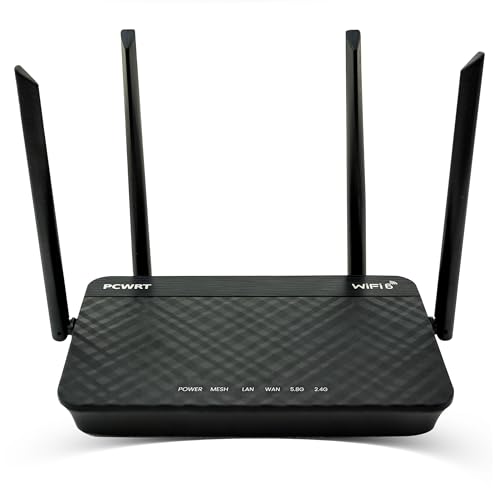
The pcWRT PW-AX1800 reads like a polite rebuttal to every router that hides its VPN page. Its title lists OpenVPN, WireGuard and IPsec, each in client and server roles, then adds VLAN support, parental controls and ad blocking, and even names compatibility with commercial services such as ExpressVPN and SurfShark for the client side. For the reader of this guide, the server trio is the story: IPsec in particular is the protocol the two TP-Link Wi-Fi routers do not advertise, and it is the one that matters when the far end of your tunnel is an office network or an operating system’s built-in client rather than an app you chose. VLAN support deepens the appeal for anyone who segments a home lab or an IoT corner away from the main LAN, because a tunnel that lands you on the wrong segment is only half a solution.
The AX1800 Wi-Fi 6 radios are modest next to the BE700, and that is the honest shape of this product: the networking brain is the attraction, the wireless is competent rather than spectacular. pcWRT is also a smaller name than TP-Link, so you are trading a giant vendor’s app polish for a firmware culture built around control. For the enthusiast who reads protocol lists for pleasure, that trade is the entire point.
- Class: Dual-band Wi-Fi 6 (AX1800) router, gigabit Ethernet
- VPN role per title: OpenVPN, WireGuard and IPsec, client and server
- Extras in title: VLAN support, parental controls, ad blocking, named compatibility with ExpressVPN and SurfShark on the client side
- VPN throughput: Absent from the listing title — consult pcWRT’s documentation for any figures
Strengths
- Three server protocols in one box, including the IPsec that business interoperability often demands.
- VLAN support lets tunnel users land on a deliberately chosen network segment.
- Built-in ad blocking and parental controls serve the whole LAN without extra devices.
Trade-offs
- AX1800 radios are a class below the big TP-Links for raw wireless headroom.
- A smaller vendor means a smaller community and fewer glossy setup wizards.
- The title states no tunnel speeds, so performance expectations must come from documentation, not the listing.
Best for: a technically confident home-lab owner who wants IPsec and WireGuard servers plus VLANs in a single router.
Not suited for: households expecting networking to disappear into an app — the Omada and consumer TP-Link picks ask far less of you.
Read the PW-AX1800’s Amazon listing closely if protocol breadth is your deciding factor; it is the only pick here whose title promises all three server protocols.

TP-Link ER605 VPN Router — The small-office gateway
The ER605 is where this guide stops talking about living rooms. It is a wired gigabit VPN router: no Wi-Fi radios are claimed in its title, and none should be expected. What the title does claim is a small business’s checklist — up to three WAN Ethernet ports plus a USB WAN option, an SPI firewall, load balancing across connections, lightning protection, and integration with Omada SDN, TP-Link’s central management platform. In plain terms, this is a box that sits between one or more internet connections and a network, terminates VPN tunnels for staff or links sites together, and keeps working when one broadband line sulks, because a second line can carry the load.
For a home reader, the ER605 makes sense in one specific architecture: you already have, or plan to add, separate access points for Wi-Fi, and you want the routing and tunnel work done by a dedicated appliance that never reboots because someone updated a gaming router. The Omada SDN integration cuts both ways — managed through a controller, several of these across sites become one dashboard; run standalone in a single house, the platform is one more concept to learn. Judge it as infrastructure, not as a gadget.
- Class: Wired gigabit VPN router (no Wi-Fi claimed in title)
- WAN per title: Up to 3 WAN Ethernet ports plus 1 USB WAN
- Extras in title: SPI firewall, Omada SDN integrated, load balance, lightning protection
- Wireless: None stated — pair with separate access points
Strengths
- Multiple WAN ports with load balancing give a small office a real answer to a flaky broadband line.
- Omada SDN integration lets one controller mind this gateway alongside Omada access points and switches.
- A dedicated wired box keeps tunnel duty away from the household’s Wi-Fi router entirely.
Trade-offs
- There is no Wi-Fi to fall back on; your budget must include access points if the site needs wireless.
- Gigabit ports cap each WAN link, which the ER707-M2’s 2.5-gigabit ports exist to relieve.
- The management model rewards planning; it is not a plug-it-in-and-forget consumer experience.
Best for: a small office or serious home network that wants multi-WAN resilience and central management from its tunnel endpoint.
Not suited for: anyone shopping for a single box that also blankets a flat in Wi-Fi — the ER605 deliberately does not do that job.
If your plan already separates routing from radios, the ER605 listing on Amazon is the entry point into the Omada gateway line worth pricing first.
GL.iNet GL-AR300M16 — The pocket server
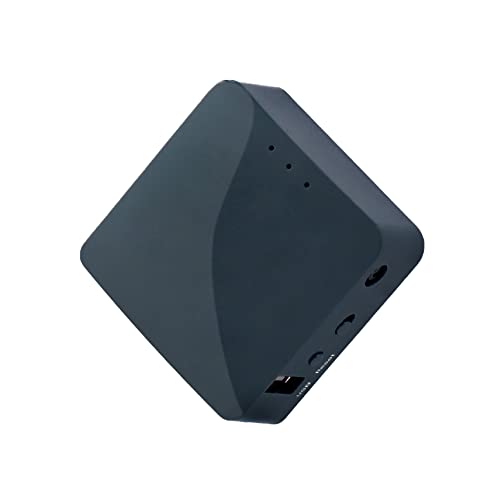
The GL-AR300M16 is a travel router the size of a matchbox that happens to run OpenWrt, and its title states that OpenVPN and WireGuard are “client and server ready.” That phrase unlocks use cases none of the bigger picks can touch. Leave it plugged in at home and it is a featherweight WireGuard endpoint for checking cameras or reaching a file share. Carry it and it becomes the little network you trust in a hotel room. Give one to a parent and you can tunnel into their network to fix the printer instead of conducting tech support by telephone. The title’s hardware figures are candid about scale — 128MB of RAM, 16MB of flash storage, two Ethernet ports, a USB 2.0 socket — and that candour should calibrate your expectations.
This is not the server for a household’s worth of simultaneous remote workers, and its wireless is a single modest radio from an earlier Wi-Fi generation rather than anything the title brags about. Its strength is the OpenWrt foundation: an open, documented, endlessly configurable platform in a device that sips power and costs little enough to buy as an experiment. Many home VPN projects should start here, learn what they actually use, and graduate to bigger hardware only if the logs prove the need.
- Class: Mini travel router, OpenWrt pre-installed
- VPN role per title: OpenVPN and WireGuard, client and server ready
- Hardware per title: 128MB RAM, 16MB NOR flash, 2 Ethernet ports, USB 2.0
- VPN throughput: No figure in the listing title — keep expectations matched to the stated memory and class
Strengths
- OpenWrt pre-installed means the server modes are a configuration task, not a firmware replacement project.
- The tiny size and modest power appetite suit always-on duty in a cupboard, a rental, or a relative’s house.
- Two Ethernet ports let it sit properly inline rather than dangling off a network as a pure radio.
Trade-offs
- 128MB of RAM and a small flash store set a low ceiling for concurrent tunnels and add-ons.
- Wireless performance belongs to an older, slower class than every other pick in this guide.
- OpenWrt’s freedom assumes an owner willing to read documentation when a setting is unclear.
Best for: a tinkerer, traveller or remote-family-IT person who wants a WireGuard endpoint that can live anywhere.
Not suited for: an office expecting several staff to tunnel in simultaneously all day — step up to the ER707-M2 or ER605.
For a first VPN server you can afford to experiment with, the GL-AR300M16’s Amazon listing is the lowest-stakes starting point in this guide.

Omada ER707-M2 — The multi-gig step up
The ER707-M2 is the ER605’s answer to networks that outgrew gigabit. Its title leads with dual 2.5-gigabit WAN ports and high network capacity, then repeats the family traits: SPI firewall, Omada SDN integration, load balancing and lightning protection. Like its smaller sibling it is a wired multi-gigabit VPN router — the listing styles it a “VPN Route,” and no Wi-Fi is claimed — intended to front a network of switches and access points for an office, a hospitality venue, or a home whose infrastructure has quietly become a small enterprise. The dual fast WAN ports matter in two directions: a single internet service faster than a gigabit can finally be used at full width, or two services can be balanced and failed over with genuine headroom on each.
Choosing between the two Omada gateways is mostly a question of port speed and scale. If every link in the building is gigabit and staying that way, the ER605 covers the job. If a 2.5-gigabit switch, NAS or internet tier is already in the plan, buying the gigabit gateway first is the false economy. Either way, budget for the wireless layer separately and expect to spend an evening with the Omada controller model rather than an afternoon with a phone app.
- Class: Wired multi-gigabit VPN router (no Wi-Fi claimed in title)
- WAN per title: Dual 2.5-gigabit WAN ports
- Extras in title: High network capacity, SPI firewall, Omada SDN integrated, load balance, lightning protection
- Wireless: None stated — a separate access-point layer is required
Strengths
- Dual 2.5-gigabit WAN ports serve both multi-gig internet tiers and serious two-line failover.
- Omada SDN management scales from one gateway to a whole managed site without changing platforms.
- Capacity headroom suits sites where tunnel traffic shares the gateway with a busy local network.
Trade-offs
- Still no radios: the total project cost includes the access points this gateway will feed.
- Its advantages evaporate on a network where every service and switch remains gigabit.
- Controller-based management is a learning investment a single small home may never recoup.
Best for: a growing office, venue or infrastructure-heavy home standardising on Omada with faster-than-gigabit links.
Not suited for: a first-time buyer wanting one box, one app and Wi-Fi tonight — that reader belongs with the Archer AX55.
Price the ER707-M2 on Amazon against the ER605 before deciding; the gap between them is the cost of the multi-gig headroom your network may or may not need.
How Much Tunnel Can Each Class of Hardware Honestly Carry?
Because none of the six titles publishes a VPN throughput figure, the useful way to think about capacity is by class rather than by invented numbers. At the bottom of the scale sits the pocket class, represented here by the GL-AR300M16 with its stated 128MB of memory. A device like that serves one or two WireGuard users doing ordinary remote tasks — opening documents, checking a camera still, administering a home server — with dignity. Ask it to move a large backup to three simultaneous users and you have mistaken a bicycle for a van; the hardware told you its size in the title, in megabytes, for anyone who read it. The consumer flagship class, the AX55 and especially the BE700, carries the general household load: a couple of remote workers, a traveller streaming from the home media library, headroom to spare on the local side. Their constraint is rarely the box; it is the home line’s upstream, which the router cannot enlarge.
The wired gateway class plays a different game. The ER605 and ER707-M2 are built for concurrency and continuity rather than for any single fast session: many staff tunnels held open all day, site-to-site links that must re-establish themselves after an outage, and a second WAN line waiting for the first to fail. Their titles talk about WAN counts, load balancing and network capacity because those are the currencies of that world. The pcWRT sits between the camps — consumer-sized radios wrapped around an unusually complete protocol stack — and its capacity story is about flexibility: whichever protocol the far end demands, the box can answer. When you read any VPN router listing, translate its claims into one of these four stories and ask whether the story matches your actual week. Most disappointment in this category comes from buying a concurrency appliance for a speed problem, or a speed flagship for a concurrency problem.
One more capacity factor hides in plain sight: encryption work competes with everything else the router does. On an all-in-one Wi-Fi router, the same processor that terminates your tunnel also runs the radios’ management, the firewall, the USB sharing and the parental controls. A household that tunnels in while the house itself is mid-backup, mid-stream and mid-game is stacking jobs on one chip. This is the quiet architectural argument for the wired gateways in homes that have become small offices: separating the tunnel endpoint from the Wi-Fi radios gives each job its own hardware. It is also the argument for WireGuard on shared hardware, since its lighter processing leaves more of the processor for the rest of the evening’s work.
How Do You Keep a Home VPN Server Safe Year After Year?
Setting up the server is a weekend; owning it safely is a habit. The first habit is firmware discipline. A VPN endpoint is deliberately reachable from the internet, which makes it part of your home’s attack surface, and router vendors patch VPN components precisely because researchers keep finding things to patch. Turn on automatic updates where the platform offers them, or put a quarterly reminder in whatever calendar actually runs your life. The second habit is credential hygiene: one profile per device, named for the device, revoked the week the device is sold, lost or replaced. When you review the profile list and cannot remember what “profile 3” belongs to, that is the system telling you the list has already rotted — clean it then, not after an incident.
The third habit is restraint about exposure. The tunnel should be the only inbound service your router offers the internet. Every additional forwarded port — a camera here, a game server there, the admin page “just for a minute” — is a separate door with its own lock quality, and most home compromises walk through the extra doors, not through the audited VPN protocol. If something inside the home needs reaching, reach it through the tunnel; that is what the tunnel is for. Fourth, keep the logs within your attention span. Every platform in this guide can show connection history in some form; a monthly glance that confirms only familiar devices, from familiar places, at plausible hours is worth more than any single setting. Fifth, rehearse the bad day: know how to disable the server from the LAN side, know where the exported profiles live, and know which family member’s phone is the test device when something changes. None of this requires expertise — it requires treating a small piece of internet-facing infrastructure like infrastructure, which is the entire mindset shift this category asks of a home.
Side by Side: Ports, Protocols and Platforms
| Pick | Form | VPN server evidence in title | Ports / radios headline |
|---|---|---|---|
| TP-Link Archer AX55 | Wi-Fi router | “VPN Clients & Server” stated | AX3000 Wi-Fi 6, USB 3.0 |
| TP-Link Archer BE700 | Wi-Fi router | “VPN Clients & Server” stated | BE15000 Wi-Fi 7, 10G + 2.5G + 2× 1G, USB 3.0 |
| pcWRT PW-AX1800 | Wi-Fi router | OpenVPN/WireGuard/IPsec client and server | AX1800 Wi-Fi 6, gigabit Ethernet |
| TP-Link ER605 | Wired gateway | Sold as a VPN router | Up to 3 WAN + USB WAN, gigabit |
| GL.iNet GL-AR300M16 | Travel router | OpenVPN and WireGuard server ready | 2 Ethernet, USB 2.0, 128MB RAM |
| Omada ER707-M2 | Wired gateway | Sold as a multi-gigabit VPN router | Dual 2.5G WAN |
Read the middle column as the guide’s conscience: it records only what each listing title actually promises. Where a title names protocols, you can plan around them; where it sells the product as a VPN router without a protocol list, the manufacturer’s documentation is the next stop before money moves.
What Plumbing Has to Be Right Before Any of This Works?
Three pieces of unglamorous plumbing decide whether a VPN server works at all, and none of them appear in any product title. The first is the double-NAT trap. Many homes unknowingly run two routers in series: the provider’s modem-router, and their own router plugged into it. An inbound tunnel then has to cross two firewalls, and the outer box — the one people forget exists — silently discards the connection. The cures are to put the provider’s unit into bridge mode, or to place your router’s address in the outer unit’s DMZ, or to run the server on the outermost device itself. This is also why the wired gateways reward a planned installation: an ER605 or ER707-M2 expects to be the real edge of the network, not a tenant behind another router.
The second piece is a name that follows your house. Most home connections change their public address from time to time, and a VPN profile written against yesterday’s address is a letter sent to a previous tenant. Dynamic DNS services exist precisely for this: the router reports its current address to a hostname you own, and your profiles point at the name. Set it up on day one, while everything works, rather than from a hotel room on the day it first breaks. The third piece is time. Certificate-based authentication quietly depends on the router’s clock being right; a box that boots with the wrong date after a long power cut can reject perfectly valid credentials for reasons that look, from the outside, like sorcery. Routers normally sync their clocks automatically once online — one more reason to let a new installation settle and update itself before you judge its VPN page. Get these three right and the protocol debates in the rest of this guide become the only debates left, which is exactly where a home network’s problems should live.
What Are the Most Common VPN Server Mistakes?
The champion mistake is buying a client-only router. The box says VPN in large letters, the buyer sets it up at home, and only then discovers the tunnel points the wrong way — the house can dial out to a provider, but nothing can dial in. Read for the word “server” before purchase, exactly as this guide’s pool was filtered. The runner-up is exposing the router’s admin page to the internet as a substitute for a tunnel, which trades a small convenience for a standing invitation to every scanner on the internet. Third comes the shared credential: one profile on every device means one lost phone compromises all of them, and revoking it locks out the owner too. Fourth, people test their new server from their own sofa Wi-Fi, declare victory, and discover at an airport that carrier-grade NAT or a double-router setup at home was silently blocking inbound traffic all along — always test from a genuinely external network. Finally, there is the forgotten update: a VPN server is internet-facing infrastructure, and leaving its firmware unpatched for years is the networking equivalent of leaving the tunnel door wedged open.
Three Homes, Three Different Right Answers
Consider the remote worker in a rented flat who keeps a small home server for documents and photographs. Her broadband is ordinary, her landlord owns the walls, and her employer forbids personal cloud drives for side projects. She needs exactly one tunnel, from one laptop, to one modest network. The AX55 replaces her ageing router, hosts the server, and the whole project is finished in an evening — the gateways would be ceremony without purpose, and the BE700’s ports would idle. Now consider her brother, who runs a six-person design studio from a converted barn with two broadband lines because the village connection drops in heavy rain. For him the ER707-M2 is not an extravagance but the load-bearing wall of the business: dual WAN, tunnels for every member of staff, Omada access points in the rafters, and a controller dashboard that shows him the whole site at a glance. The AX55 in that barn would be a toy asked to do a trade’s work.
The third household is a family scattered across three cities, where the technically inclined daughter maintains her parents’ network from four hundred miles away. Her fleet is a GL-AR300M16 behind her parents’ existing router — she never replaced their Wi-Fi at all — giving her a WireGuard doorway for maintenance visits, plus a second one in her own flat for reaching her media library from work trips. Her total hardware commitment is two matchbox routers, and the arrangement has survived two house moves because the little boxes simply travel and reappear. Lay the three stories side by side and the guide’s logic shows itself: the right VPN server is the one sized to the knock it must answer, and every pick above is the correct answer to one of these doors.
Final Recommendation
Most households should buy the Archer AX55: its title promises the server outright, its Wi-Fi 6 platform is modern without being extravagant, and its USB sharing makes the tunnel immediately useful for files. Graduate to the BE700 when multi-gig ports and Wi-Fi 7 are already on your roadmap, or to the pcWRT when IPsec and VLANs are non-negotiable. Treat the ER605 and ER707-M2 as the professional path — wired gateways for networks with separate access points and more than one WAN story — and keep the little GL.iNet in mind as the cheapest education in VPN servers money can buy. A home VPN server is, in the end, a promise you make to your future travelling self: that the network you built will answer when you knock from far away — choose the box whose title actually promises to listen. And once it answers, do the unglamorous maintenance that keeps the promise alive: updates applied, profiles pruned, a test connection made from outside the house every few months, so the first real knock never becomes the first failed one.
Frequently Asked Questions
Is a VPN server the same thing as the VPN subscription I keep seeing advertised?
No. A subscription buys you access to a provider’s servers so your traffic can exit elsewhere — that is the client direction. A VPN server on your router lets your own devices connect back into your home. Some households run both, on the same router in the AX55’s and BE700’s case, since their titles list client and server support side by side.
Will a VPN server slow down my home internet?
Only traffic that actually travels through the tunnel is affected, and its ceiling is your home connection’s upload speed, because everything you pull from home must be sent out by that line. Everyday browsing by people physically at home does not pass through the server at all. None of the six titles publishes a tunnel throughput figure, so the broadband line, not a spec sheet, is the honest planning number.
Can I reach my home network if my provider uses carrier-grade NAT?
Not directly, because your router has no public address for inbound connections to find. The router is not at fault and no setting inside it changes the provider’s architecture. Workarounds exist — a relay or mesh-style remote access service, or an outbound tunnel maintained by a device inside the home — but confirm your address type before blaming any pick in this guide for a failed connection.
Which protocol should I choose, WireGuard or OpenVPN?
Choose WireGuard when every device you own supports it: it connects quickly and asks little of the processor, which is why the tiny GL-AR300M16 can offer it credibly. Choose OpenVPN when compatibility with older devices or established guides matters more. Choose IPsec, via the pcWRT or the business gateways’ documented toolset, when the other end is an office network rather than your own laptop.
Do the ER605 and ER707-M2 provide Wi-Fi?
No. Both are wired gateways; their titles claim WAN ports, firewalls and Omada management, not radios. A network built on either needs separate access points for wireless. That separation is deliberate — it lets each layer be upgraded on its own schedule — but it must be in the budget from the start.
Is it safe to run a VPN server at home?
It is the safest widely used way to reach a home network remotely, provided you keep the firmware updated, use per-device credentials, and never expose the admin interface directly. The tunnel encrypts traffic and authenticates devices; the risks come from neglect — stale firmware, shared logins, and extra ports opened “temporarily” and forgotten.
Can I run a VPN server and still use a commercial VPN at the same time?
On the picks whose titles list both client and server support — the AX55, the BE700 and the pcWRT — the two roles can coexist, because they face opposite directions: the client side carries household traffic out through a provider, while the server side accepts your own devices coming in. The practical care points are address planning, so the provider’s tunnel and your home LAN do not claim the same private address range, and expectations, since a device that has tunnelled into your home and then exits through the home’s provider tunnel takes two encrypted journeys, not one. Test the combination from outside the house before a trip depends on it, and keep one device profile that reaches the LAN directly, so a provider outage abroad never locks you out of your own network.
Related Guides
Remote access pairs naturally with storage and with the access-point layer of a bigger network, so continue with the Best Routers with NAS Storage Sharing, the Best Wall-Mounted Routers and Access Points and the Best Ceiling-Mounted Routers and Access Points.


