What's inside
- Key Takeaways
- Quick Picks
- How We Chose These Picks
- Comparison
- How Large Is Large Enough for the Work You Actually Do?
- What Breaks First When Prints Get Big?
- How Do You Heat and Level a Bed the Size of a Tabletop?
- Single Piece or Sections: When Does Size Change the Design?
- What Does a Half-Metre Printer Demand From Its Room?
- How Do Multi-Toolhead Machines Change Large Printing?
- How Does Your Workflow Change When the Plate Stops Being the Limit?
- How Do You Move, Maintain, and Eventually Replace a Machine This Size?
- Common Mistakes
- Final Recommendation
- Frequently Asked Questions
- Related Guides
As an Amazon Associate I earn from qualifying purchases. This post may contain affiliate links at no extra cost to you.
widgetverdict.com is reader-supported. When you buy through links on our site, we may earn an affiliate commission.
Every machine in this roundup is sold through its Amazon listing — check price on Amazon and read the listing title twice, because at this size the difference between a printer-only box and a combo changes the purchase completely. The best large bed 3d printers exist to answer one frustration: the moment a project outgrows a standard plate and the slicer offers to cut it into pieces. Sometimes cutting is fine. Often it is where strength, accuracy, and patience go to be negotiated away, seam by glued seam. A large bed deletes the negotiation. The six machines here span the territory from a 350mm enclosed cube to a 420x420x500mm giant and a half-metre open-source frame, with a five-toolhead professional system standing apart from all of them.
Size, though, is not a free upgrade: it taxes heat-up time, desk space and first-layer patience on every single print. A big plate takes longer to heat, demands more of its levelling system with every added centimetre, and turns small errors into large, expensive, day-long failures. The engineering inside these listings is therefore mostly about scale management: beds with serious heating power, levelling grids with dozens of probe points, anti-skip safeguards, linear rails, eddy-current sensors, cameras watching for the failure that would otherwise announce itself at hour nineteen. Read the picks for their answers to scale’s problems, not merely for their dimensions — the dimensions are the easy part, and every maker here can print them on a box.
The six divide by intent. Anycubic fields two: an open giant sold as printer-only with colour as an add-on path, and an enclosed 350mm combo with colour native. Creality fields two combos — a 420mm colour machine in the Ender line’s mega form, and the K2 Plus with its dual cameras and CFS system at a 13.78-inch cube. Sovol scales its Voron-derived SV08 up to a 19.7-inch cube for the open-source faithful. Prusa’s XL stands alone as the multi-toolhead answer, a five-tool professional system that treats large-format printing as a materials problem as much as a size problem. Workshops, cosplayers, prototypers, and small manufacturers will each find their machine; the sections after the picks teach the arithmetic of choosing it. That arithmetic is mostly subtraction — of seams, of glue, of the phrase “it almost fits” — and it is the most satisfying arithmetic in the hobby when the plate finally says yes.
Key Takeaways
- Build volumes here run from 350mm cubes to 420 x 420 x 500mm and a 19.7-inch cube — large enough that the limiting factor becomes the room, the calendar, and the project list, not the plate.
- Scale is an engineering problem before it is a feature: probe grids, fast-heating beds, anti-skip systems, and cameras appear in these titles because big prints fail bigger and cost far more in filament, electricity, workshop space, and days when they do.
- Colour at scale splits two ways — single-nozzle systems that purge between colours, and Prusa’s five toolheads, which change tools instead and skip the purge tower entirely.
- Two picks are ecosystems with colour native in the box; one giant is sold printer-only with colour as an add-on, which suits single-material volume work better and keeps its purchase honest.
- Measure the workshop before the printer: at this size the machine, its spool system, its door or bed travel, and its service access claim a station, not a shelf — and the station, once claimed, reorganises the room around it.
Quick Picks
| Pick | Badge | Why it earns its place |
|---|---|---|
| Anycubic Kobra 3 Max V2 | The Volume Value | A 420 x 420 x 500mm print volume with auto-leveling and anti-skip, sold printer-only for pure size work. |
| Creality Ender-3 V3 Mega Combo | Colour at Full Scale | 420 x 420 x 420mm with 4-colour printing, automatic filament reload, and an 81-point levelling grid. |
| Sovol SV08 MAX | The Half-Metre Voron | The open-source Voron 2.4 architecture stretched to a 19.7-inch cube on full linear rails. |
| Original Prusa XL | Five Toolheads, No Purge Tower | A 5-toolhead multi-material CoreXY that changes tools instead of purging filament. |
| Anycubic Kobra S1 Max Combo | The Enclosed Middleweight | A 350mm enclosed CoreXY with native 4-colour printing through the ACE 2 Pro. |
| Creality K2 Plus Combo | The Supervised Big Box | CFS multicolour at a 13.78-inch cube, watched by dual AI cameras with full auto-leveling. |
How We Chose These Picks
Our first filter was honesty of scale: a machine had to offer a genuinely large working volume in its listing — 350mm or beyond in at least the dimensions that matter — rather than a marketing adjective. Our second filter was scale engineering. We looked for the systems that keep a big plate truthful: multi-point or sensor-based levelling, bed heating sized for the area, motion hardware — linear rails, rigid CoreXY frames — that does not flex its way across half a metre, and supervision, because the cost of an unwatched failure grows with the cube of the ambition. Machines that simply stretched a small design without answering those questions did not survive the cut, however impressive their dimensions read.
Every volume in this guide is quoted exactly as its listing title states it, in the maker’s own units, because large-bed buyers plan real objects against those numbers and deserve them untranslated. Where a title gives millimetres we print millimetres; where it gives inches we print inches; where it gives a height that dwarfs its footprint — the Kobra 3 Max V2’s 500mm — we call attention to the shape, because a tall volume and a wide volume are different tools that happen to share a unit. Speed figures, quoted at 600 to 700mm/s across these titles, were read as motion ceilings whose real value at this scale is keeping a day-long print from becoming a two-day print.
Finally, we diversified intent on purpose. A cosplayer printing a cuirass, an engineer printing a full-size prototype housing, and a print farm printing batches of medium parts in one plate-filling run are all “large bed” buyers whose correct machines barely resemble each other. The six below cover single-material volume, colour at volume, open-source volume, enclosed volume, supervised volume, and the multi-toolhead professional answer. If your project cannot find its shape somewhere in that spread, the honest conclusion is that it wants a service bureau or a second technology, not a seventh printer.

Anycubic Kobra 3 Max V2 — The Volume Value
Start with the shape, because the shape is the story: 420 x 420 x 500mm of print volume, per the listing title. That is not a cube but a tower — a footprint already larger than most printers’ entire volume, topped with half a metre of height. Tall volumes serve a specific project family that wide volumes cannot: vases and lampshades at full scale, cosplay staffs and helmets printed upright, architectural models, furniture prototypes, the long ducts and housings of workshop life. The title adds the working equipment of scale — a full-metal hotend, auto-leveling with anti-skip protection, support for multicolour through the ACE 2 Pro, and a maximum print speed of 600mm/s with smart vibration handling in the maker’s description.
The printer-only framing of this listing is a position, not an omission. Sold without its colour system, the Kobra 3 Max V2 addresses the buyer whose volume work is single-material: the cosplayer printing armour in one grey, the workshop printing jigs in one PETG, the prototyper iterating a housing where colour is paint’s job. Anti-skip protection matters more at this size than at any other in the guide — a skipped step at hour fifteen of a tall print misaligns everything above it — and auto-leveling across a 420mm plate is not a convenience but the difference between a usable surface and a landscape. Smart vibration compensation, meanwhile, is what lets a frame this size move quickly without printing its own shaking into the walls.
Respect the commitments. A half-metre-tall print is a day-scale event with a day-scale filament appetite, and the machine’s physical presence — frame, moving bed clearance, spool — claims a station with air around it. Tall prints also fail tall: a adhesion lapse at the base wastes height in a way small printers never teach. Buyers whose projects are wide rather than tall should compare the Mega Combo’s cube before deciding, and buyers who need colour in the box should note that here it rides in later as an accessory path. For pure, single-material volume per purchase, though, nothing else in this guide argues as directly as this tower does.
- Print volume: 420 x 420 x 500 mm — a tall format
- Hotend: full-metal construction
- Levelling: automatic, with anti-skip protection
- Colour route: multicolour supported via ACE 2 Pro
- Quoted maximum speed: 600mm/s
- Sold as: printer only, per the listing
Strengths
- Half a metre of height prints upright what other machines must section and glue.
- Anti-skip and auto-leveling address the two failures that scale makes expensive.
- Printer-only pricing keeps single-material volume buyers from funding a colour system.
Trade-offs
- Colour arrives by accessory, not in this box.
- Tall prints are day-long commitments with matching filament appetites.
- The station it needs — footprint plus bed travel — exceeds a casual corner.
Best for: tall single-piece work — armour, vessels, models, and housings printed upright.
Not suited for: wide, flat projects — the shape argument points the other way entirely.

Creality Ender-3 V3 Mega Combo — Colour at Full Scale
The Mega Combo takes the Ender name somewhere its ancestors would not recognise: a large-format multi-colour machine with a 420 x 420 x 420mm build volume, 4-colour printing, automatic filament reload, 81-point auto leveling, and a 1000W fast heating bed. Read the list as a set of answers to scale’s specific taxes. The 81-point grid is the first answer — a small plate forgives a four-point approximation of flatness, but across 420mm the bed is a terrain, and eighty-one probe points map that terrain finely enough for a first layer to hold from corner to corner. The 1000W bed is the second answer: heating a plate this size with a small heater is an exercise in patience and unevenness, and a kilowatt of heating makes the big bed behave like a small one — quick to temperature, even across its span.
Automatic filament reload is the third answer, and the most quietly important. Large prints eat spools; a full-plate job can consume more than a kilogram, and a machine that pauses dry at hour eleven wastes the ten hours beneath the pause. Reload — the system feeding the next spool as one ends — converts filament from a countdown into a supply. Add four colours at this scale and the Mega Combo’s intent clarifies: this is the machine for big, colourful, long work — signage, terrain, display pieces, batch runs of medium parts arranged across a plate that fits them all at once, printed in colour without an operator standing by to babysit spool changes.
The Ender lineage brings its usual breadth of ecosystem and settings, which at this scale means the owner should expect to learn the machine’s preferences for large work — big prints reward brims, draft discipline, and profile patience more than any tweak. Physically, a 420mm cube machine with a colour system is a workshop resident, not a desk guest. And single-nozzle colour at this volume spends purge filament in proportion to its ambition, a running cost to budget rather than discover. For the buyer whose projects are simultaneously large, colourful, and long, the Mega Combo is the most complete single answer in this guide — every one of its headline features exists because scale demanded it.
- Build volume: 420 x 420 x 420 mm
- Colour: 4-colour printing in combo form
- Levelling: 81-point auto leveling grid
- Bed heating: 1000W fast heating, per the title
- Filament handling: automatic reload across spools
- Lineage: the Ender-3 V3 family in mega format
Strengths
- An 81-point grid maps a 420mm bed finely enough for corner-to-corner first layers.
- Automatic reload deletes the dry-spool pause that ruins long large prints.
- A kilowatt of bed heating makes the big plate start like a small one.
Trade-offs
- Colour at this scale spends purge filament in proportion to its ambition.
- Large work rewards profile patience — brims, drafts, and discipline are the owner’s job.
- Its station is workshop furniture, full stop.
Best for: big, colourful, long prints — signage, terrain, display work, and plate-filling batches.
Not suited for: a studio flat with nowhere for a 420mm machine to live.
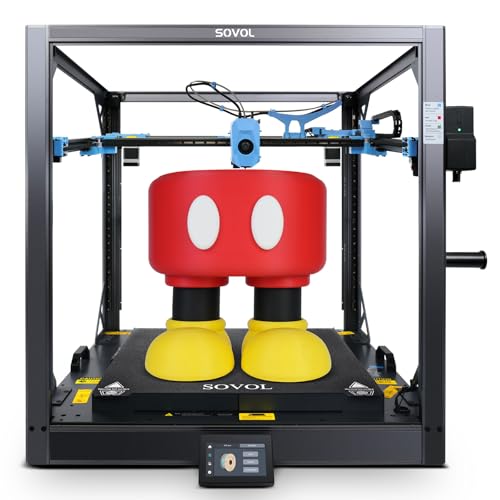
Sovol SV08 MAX — The Half-Metre Voron
The SV08 MAX stretches the guide’s most interesting lineage to its logical extreme. The listing title names the Voron 2.4 open-source design, a quoted 700mm/s pace, a larger build volume of 19.7 x 19.7 x 19.7 inches, eddy current sensor leveling, XYZ full linear rails, and a camera. Nineteen point seven inches is half a metre in every direction — a true cube at a scale where the machine stops being a desktop accessory and becomes workshop infrastructure. Full linear rails on all three axes are the specification that tells you Sovol understands the assignment: at half-metre spans, lesser motion hardware flexes, wears, and wanders, while rails keep the toolhead’s path honest from one corner of the cube to the other.
Eddy current leveling is the second scale answer, and a modern one. Rather than probing a grid of points mechanically, an eddy sensor reads the bed’s surface rapidly and without contact, mapping the terrain of a half-metre plate at a speed and density that point-by-point probing cannot match. For a machine whose first layers can be half a metre wide, that map is the foundation everything else stands on. The camera completes the supervision picture — at this size, prints run for days, and remote eyes are not a luxury. Underneath it all sits the Voron inheritance: an open architecture, community firmware culture, and a design whose documentation exists in public for owners who maintain their own equipment.
The MAX asks the most of its owner in this guide, and it is only fair to say so in the same breath as its achievements. An open-source half-metre machine offers open-source scope for configuration error, and its failures — when a day-two print lets go — are the most expensive in filament and time of any pick here. Its station needs are industrial by desktop standards, and its audience is correspondingly specific: the experienced owner, the small workshop, the prototyping corner of a business that has outgrown 300mm machines and wants community architecture at production size. For that audience, there is nothing else in this guide — a Voron at half a metre, factory-built, on rails, with sensing from this decade.
- Build volume: 19.7 x 19.7 x 19.7 inches — a half-metre cube
- Heritage: open-source Voron 2.4 architecture
- Quoted speed: 700mm/s
- Levelling: eddy current sensor, non-contact
- Motion: XYZ full linear rails
- Supervision: camera included in the listing
Strengths
- A true half-metre cube on full linear rails — scale without the flex.
- Eddy current sensing maps a huge bed quickly and without contact wear.
- Open architecture keeps a production-size machine owner-maintainable.
Trade-offs
- Day-scale failures at this size are the most expensive in this guide.
- Open-source freedom includes the freedom to misconfigure at scale.
- Its station is workshop infrastructure, not furniture.
Best for: an experienced workshop printing production-size parts in one piece.
Not suited for: a first large printer for an owner still learning first layers.

Original Prusa XL — Five Toolheads, No Purge Tower
The XL refuses the premise of every other machine in this guide. Where its rivals push one nozzle faster across a bigger plate, Prusa’s large-format CoreXY carries five independent toolheads, and its listing describes a 5-toolhead multi-material system for full-colour professional printing and industrial prototyping on an advanced multi-tool platform. The distinction is fundamental. A single-nozzle colour machine changes material by purging — melting out the old colour, wasting filament into a tower or a chute, and accepting the time and the risk that a purge goes wrong mid-print. The XL changes tools: one head parks, another docks, and printing continues with a different material entirely. No purge tower, no blended transitions, no compromise.
Multi-material, in this machine’s vocabulary, means more than multi-colour. Five toolheads can carry five genuinely different materials in one print — a rigid body with flexible hinges, a part with soluble supports that wash away to reveal geometry no single-material print could release, a prototype with hard and soft zones behaving like the manufactured article it predicts. That is why the listing speaks of industrial prototyping: the XL is a small factory for objects whose material map is part of their design. Its large-format CoreXY frame gives those objects room, and Prusa’s documentation culture gives their owner the knowledge to maintain a machine of this complexity — a non-trivial promise, kept by the maker with the longest record of keeping it.
The XL’s debits are proportionate to its ambition. It is the most complex machine in this guide by a wide margin, and its purchase only makes sense where multi-material work is a recurring need rather than a parlour trick — a household printing colourful toys should buy a combo below and keep the change. Its ecosystem of toolheads rewards owners who maintain, calibrate, and think in systems. But for the prototyping shop, the product designer, the engineer whose parts genuinely contain several materials, the XL is not the expensive option in this guide. It is the only option, standing in a category of one, doing at desktop scale what used to require an industrial machine and an industrial budget to match.
- Tool system: five independent toolheads
- Material strategy: true multi-material, not just multi-colour
- Colour changes: by tool swap — no purge tower
- Architecture: large-format CoreXY
- Maker’s stated work: full-colour printing, industrial prototyping
- Platform: advanced multi-tool, per the listing
Strengths
- Tool-changing deletes purge waste and enables genuinely different materials in one print.
- Soluble-support printing releases geometries single-material machines cannot produce.
- Prusa’s documentation supports a complex machine across a long working life.
Trade-offs
- Complexity is real; this is a system to be maintained, not an appliance to be ignored.
- Its premium only makes sense where multi-material work recurs weekly.
- Colour-toy households will pay for capability they never touch.
Best for: prototyping and product work where a part’s material map is part of its design.
Not suited for: printing colourful toys, where a combo does the job for far less.
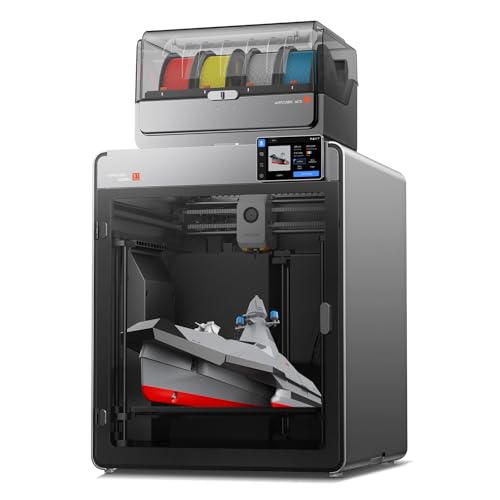
Anycubic Kobra S1 Max Combo — The Enclosed Middleweight
Between the starter cubes and the half-metre giants sits the size serious households and small studios actually use, and the Kobra S1 Max Combo is built precisely there: a large build size of 350 x 350 x 350mm, an enclosed CoreXY system, native four-colour printing with the ACE 2 Pro, and a quoted 600mm/s high speed, aimed by its maker at engineers and designers building functional parts. Three hundred and fifty millimetres is a considered number. It swallows the functional catalogue — full enclosures, helmets in fewer pieces, brackets and housings at real scale — while the machine remains a movable object that fits through doors and onto serious worktops, which the 420mm class pointedly does not promise.
Enclosure at this size earns its keep in a way it cannot at starter scale. Large prints run long, and long prints in demanding materials need a chamber that holds its temperature from the first layer to the four-hundredth; an enclosed 350mm CoreXY is the smallest format where that combination becomes genuinely useful for functional work. Native colour through the ACE 2 Pro — native being the operative word, the system designed for this machine rather than adapted to it — suits the engineer’s version of colour: labelled prototypes, colour-coded assemblies, functional parts whose markings are printed rather than stickered. The maker’s stated audience, engineers and designers building functional parts, is exactly who should be reading this section.
The middleweight’s compromises are the middle’s eternal ones. Projects at 400mm and beyond still need sectioning or a bigger sibling; the tower builders served by the Kobra 3 Max V2 will find this cube’s height ordinary. Colour through a single-nozzle system spends purge filament, as everywhere in this guide outside the Prusa. And a 350mm enclosed machine, while movable, is not portable — it will anchor the corner it is given. For the studio whose work is functional, colourful in the purposeful way, and sized like real products, the S1 Max Combo is the balanced answer: enough volume, proper enclosure, native colour, and no square metre of workshop surrendered to reach them.
- Build size: 350 x 350 x 350 mm
- Architecture: enclosed CoreXY system
- Colour: native 4-colour with ACE 2 Pro
- Quoted speed: 600mm/s high speed
- Maker’s stated audience: engineers and designers
- Maker’s stated work: functional parts
Strengths
- The 350mm cube covers functional work while the machine still fits through doors.
- Enclosure plus CoreXY pace suits long prints in demanding materials.
- Native colour serves labelled, colour-coded functional work properly.
Trade-offs
- Projects beyond 350mm still need sectioning or a larger sibling.
- Single-nozzle colour spends purge filament on every change.
- It anchors its corner; movable is not the same as portable.
Best for: engineers and designers printing functional parts at real product scale.
Not suited for: half-metre ambitions or tower-format cosplay builds.

Creality K2 Plus Combo — The Supervised Big Box
The K2 Plus Combo is Creality’s large machine for owners who intend to be elsewhere while it works. Its listing assembles the supervision generation’s full kit at scale: multi-colour printing with the new CFS system, a quoted 600mm/s high speed, full auto-leveling, dual AI cameras, a next-gen direct drive extruder, and a large build volume of 13.78 x 13.78 x 13.78 inches. Dual cameras is the phrase to interrogate, and it survives interrogation: at this size, a print is a day of unattended machine time, and two viewpoints — watching the work and the chamber from complementary angles — catch the detachment, the tangle, the creeping failure while intervention is still cheap. Supervision is not a gadget at 350mm scale; it is the insurance policy the whole format runs on.
The rest of the specification supports the same thesis of confident absence. Full auto-leveling establishes the first layer without the owner present at the machine; the CFS colour system manages multiple materials as a supply rather than a ritual; the next-gen direct drive extruder feeds the flexible and the everyday with the same short, controlled path. The 13.78-inch cube — 350mm in the maker’s other dialect — matches the S1 Max’s working territory, which makes these two the guide’s closest pair: the enclosed native-colour middleweight and the camera-watched CFS middleweight, divided less by capability than by ecosystem and by how each maker believes a big print should be overseen.
Choose between them on those grounds, honestly. Creality’s ecosystem is broad and lively, its settings surface generous, its community enormous; owners who like a machine with many doors will feel at home, and owners who want a narrow, curated path should look at the guide’s other ecosystems with clear eyes. The K2 Plus also shares the single-nozzle colour tax — purge filament on changes — and its full feature set is wasted on a workshop that prints one grey spool of brackets. For the owner whose large prints run while they are at work, at school events, asleep in another time zone of the house, the K2 Plus Combo is the big box that watches itself, and that is the feature the format most needs.
- Build volume: 13.78 x 13.78 x 13.78 inches
- Colour system: CFS multi-colour printing
- Supervision: dual AI cameras
- Levelling: full auto-leveling
- Extruder: next-generation direct drive
- Quoted speed: 600mm/s high speed
Strengths
- Dual cameras insure day-long prints while the owner is elsewhere.
- Full auto-leveling and CFS supply management minimise attended minutes per print.
- Direct drive keeps flexible materials on the menu at full size.
Trade-offs
- A broad ecosystem means a busier settings surface than curated rivals.
- Colour changes spend purge filament, as on every single-nozzle system here.
- Single-material bracket shops will never use its supervision or colour.
Best for: owners whose large prints run unattended while life happens elsewhere.
Not suited for: a minimalist workshop printing one material in one colour.
Comparison
| Machine | Volume as listed | Colour strategy | Scale signature |
|---|---|---|---|
| Anycubic Kobra 3 Max V2 | 420 x 420 x 500 mm | Accessory path via ACE 2 Pro | Anti-skip and auto-leveling on a tall format |
| Creality Ender-3 V3 Mega Combo | 420 x 420 x 420 mm | 4-colour in the box | 81-point grid and a 1000W bed |
| Sovol SV08 MAX | 19.7 x 19.7 x 19.7 in | Single material as listed | Eddy-current leveling on full linear rails |
| Original Prusa XL | Large-format CoreXY | Five toolheads, true multi-material | Tool-changing instead of purging |
| Anycubic Kobra S1 Max Combo | 350 x 350 x 350 mm | Native 4-colour via ACE 2 Pro | Enclosed CoreXY for functional parts |
| Creality K2 Plus Combo | 13.78 x 13.78 x 13.78 in | Multi-colour via CFS | Dual AI cameras over a full workday |
One further discipline separated the final six from the machines we cut: the maker’s own relationship with scale. Companies that sell a large machine as a stretched small one reveal themselves in their listings — no levelling story, no heating story, no supervision story, just a bigger number. Every pick here narrates its scale engineering in its own title, because the makers know their buyers will run day-long prints and judge the machine at hour twenty, not at unboxing. A large printer is a promise kept over time and distance; we chose the six whose makers appear to know exactly what they have promised.
How Large Is Large Enough for the Work You Actually Do?
The discipline of this category is a single exercise: list your real projects, measure the largest, and buy one size beyond it — not three. Buyers skip the exercise because imagining projects is more fun than measuring them, and the results fill workshops with half-metre machines printing phone stands. Run the numbers honestly and the tiers sort themselves. The functional catalogue of brackets, enclosures, and housings lives inside 350mm. Cosplay and display work splits by piece: most armour and props section gracefully at 350mm, while helmets, cuirasses, and tall vessels argue for the 420mm class. True single-piece work at half a metre — architectural models at scale, industrial prototypes, furniture — is a real but small country, and its citizens know their address without being told.
Remember also what size does to time. Print duration grows with volume, and a full-plate print on the largest machines here is a commitment measured in days and kilograms. Owners sometimes discover that their actual bottleneck was never the plate but the calendar: a 350mm machine that finishes tonight serves a project better than a 500mm machine that finishes Thursday. Buy the volume your largest named project needs, let the slicer section the rare exception, and spend the difference on the filament those projects will consume — at this scale, filament is a budget line with its own opinions.
What Breaks First When Prints Get Big?
Adhesion, and it is not close. A small print’s first layer is a patch; a large print’s first layer is a foundation slab, and any weakness in it — a cold corner, a fingerprint, a draught across one edge — propagates upward for a day before announcing itself as a warped base or a detached section. This is why the titles in this guide brag about levelling grids and bed wattage rather than about their dimensions: the 81-point map and the kilowatt heater are adhesion machines. Second in the failure order comes time itself. A twenty-hour print meets twenty hours of household reality — power flickers, curious pets, a spool that runs dry — which is why reload systems, anti-skip protection, and cameras recur across these listings like a refrain.
Third is the owner’s calibration of ambition. Large printers invite large first projects, and large first projects fail at large cost, teaching their owners to fear the machine they just bought. The veterans of this format share a habit that sounds like superstition and is actually statistics: they commission a new big printer with a medium print, then a large one, then the monster — letting each success certify the machine, the profile, and the room before the next scale of risk. A big bed does not change the hobby’s fundamentals. It raises the stakes on all of them simultaneously, which is precisely why its rewards — the single-piece object, the unsectioned surface — feel earned.
How Do You Heat and Level a Bed the Size of a Tabletop?
Slowly and densely, if the maker has done the work — and the listings here show the work being done. Heating a 420mm plate evenly is a power and distribution problem: too little wattage and the corners lag the centre by enough to warp a print’s edges upward over hours; uneven zones print their own map into the first layer. The Mega Combo’s 1000W fast-heating bed is the blunt, correct answer — power sized to the area, bringing the whole plate to temperature together. Leveling follows the same logic of density. A four-point approximation describes a small bed adequately and a large one fictionally; hence an 81-point probing grid on the Creality, eddy-current surface sensing on the Sovol, and full auto-leveling systems on the K2 Plus — three technologies with one purpose, which is knowing the bed’s true shape rather than its intended one.
Owners contribute the rest. A big bed should be allowed to heat-soak — to sit at temperature while its expansion settles — before the first layer is judged, because a plate still growing into its heat is a moving target. The first layer on a large machine should be inspected at the corners, not the centre; centres are easy, and corners are where large prints confess. And the surface itself wants the same cleanliness discipline as any printer’s, multiplied by area: a 420mm plate collects four times the fingerprints of a small one, usually in exactly the corner where the important print was placed.
Single Piece or Sections: When Does Size Change the Design?
Sectioning is not failure — some of the finest printed objects in the world are assemblies — but it is a design language with its own grammar, and a large bed lets a designer choose that language deliberately instead of having it imposed by a plate. Single-piece printing preserves strength along the whole object, keeps surfaces continuous, and removes the gluing, filling, and sanding hours that sections demand. It also concentrates risk into one long print and one large filament bill. Sectioned printing spreads risk across manageable jobs, lets each piece print in its strongest orientation, and produces objects larger than any bed in this guide — at the cost of seams that must be designed as joints rather than apologised for as scars.
The mature workflow uses both, and the machines here support the judgement. Print the load-bearing core in one piece on the big plate; section the cosmetic shell where a seam hides in a design line. Print the prototype whole to prove the geometry, then section the production version for speed. Keep a record of which objects you sectioned and why, because after a year that record is a map of your real volume needs — the evidence for whether the next machine should be bigger, or whether the current one’s plate was never the constraint at all. What a large bed really buys is not the abolition of sections but the promotion of sectioning from necessity to choice — and in design, as in the rest of this guide, the recurring luxury is always the same: deciding, rather than being decided for.
What Does a Half-Metre Printer Demand From Its Room?
Floor space first, honestly measured: the machine’s footprint, the clearance for any moving bed or opening door, the spool system’s territory, and a standing human with elbow room to load, unload, and service. At the SV08 MAX’s scale that arithmetic claims a station the size of a workbench bay, on a structure that does not flex — a half-metre CoreXY moving at speed will find every wobble in a light table and print it. Power comes next: big beds draw real wattage, the Mega Combo’s heater alone is a kilowatt, and the room’s circuit should be considered rather than assumed, especially in workshops already running heaters, compressors, or a second printer.
Air and temperature complete the room’s contract. Large prints run for days, and a room that swings from warm afternoons to cold nights will print those swings into warping and layer lines; the steadier the room, the steadier the slab. Ventilation matters in proportion to the materials and hours involved — a machine printing engineering filaments through a weekend deserves an exhaust path, not an apology. Finally, access: a big printer that must be dragged out to reach its own back panel will not be maintained, and unmaintained big printers fail big. Give the machine its station the way you would give a lathe or a kiln its station — permanently, accessibly, with light to work by — and it will repay the respect in finished cubic decimetres.
How Do Multi-Toolhead Machines Change Large Printing?
They change its economics and its imagination at once. The economics are arithmetic: a single-nozzle colour print at large scale purges at every change, and across a day-long, many-coloured print the purge pile becomes a meaningful fraction of the filament bill — material bought, melted, and discarded without ever being part of the object. A tool-changing machine like the Prusa XL spends nothing on transitions; each head carries its material ready, and the print’s colours and materials coexist without contaminating each other. The imagination expands further. Soluble supports dissolve away, releasing internal geometry no breakaway support could reach. A flexible material can live inside a rigid one in a single object. Colour becomes the least interesting thing five toolheads can do.
The trade is complexity, honestly carried. Five toolheads are five things to calibrate, dock, and maintain, and the XL asks its owner to think like a small production engineer rather than a hobbyist with a hot glue gun. That is why this guide places it as a professional answer rather than a bigger toy: where multi-material work is weekly and real — prototyping shops, product development, research benches — the toolhead machine is not an extravagance but the correct tool, and its cost should be compared against the service bureaus and industrial machines it replaces, not against the combo printers it shares a page with.
How Does Your Workflow Change When the Plate Stops Being the Limit?
Owners upgrading from standard machines expect the change to be about objects, and are surprised that it is mostly about scheduling. A large bed converts printing from a sequence of jobs into a layout problem: parts are arranged across the plate like a tailor’s pattern, batching a project’s components into one long run whose failure modes must be thought about as a portfolio — one detached piece can threaten its neighbours, and a plate-wide failure costs a plate-wide amount of filament. Slicing time grows teeth at this scale too; the profiles that were instant become considered, and the habit of slicing once and printing bravely gives way to previewing layers the way a pilot walks a route. None of this is burden for its own sake. It is the ordinary professionalism of scale, and owners who adopt it find the big machine calmer than the small one it replaced, because its work is planned rather than improvised.
Storage changes with it. Finished large parts need somewhere to be — a shelf that fits a cuirass, a bin that fits a housing — and raw material arrives in larger spools or larger quantities, wanting the dry storage discipline this batch of guides keeps recommending, now with more kilograms at stake. The workshop’s centre of gravity shifts: the printer becomes the room’s anchor tenant, and benches, lights, and tool storage arrange themselves around its station. Buyers who picture only the machine arriving should picture the ecosystem arriving with it, because at this size the printer is not an appliance added to a workshop. It is the workshop, reorganised around a half-metre idea.
How Do You Move, Maintain, and Eventually Replace a Machine This Size?
Logistics is the unglamorous section every large-bed guide owes its readers. A machine in this class arrives heavy, leaves its box heavier than a casual lift, and should travel between rooms — let alone homes — as a two-person job with its moving parts secured the way the maker directs. Keep the packaging longer than pride suggests; the box a 420mm machine shipped in is the box it will want if it ever moves house or goes for major service. Maintenance access shapes the station permanently: rails to clean, belts to reach, a bed to remove, panels to open. A large printer installed tight against three walls is a large printer whose maintenance will be postponed, and postponed maintenance at this scale compounds into the failures the cameras were bought to catch.
Replacement, when it eventually comes, follows the same scale logic in reverse. Large machines hold their usefulness stubbornly — a half-metre plate does not become obsolete the way a phone does — and the second-hand market for them is a workshop market, local and hands-on, where buyers arrive with vans and questions. Owners who documented their machine’s life, kept its spares together, and maintained it on the calendar will find that market appreciative. Plan the station, the service access, and the exit with the same honesty as the purchase, and a large printer becomes what it should be: infrastructure, bought once, used for years, and handed on without drama.
Common Mistakes
Commissioning a large printer with a monster print is the classic baptism of fire: every unproven variable — profile, adhesion, room, spool supply — is wagered at maximum scale simultaneously, and the resulting failure teaches nothing except expense. Second is under-powering the room, in both senses: a circuit shared with a space heater, and a table that flexes. Third is ignoring the heat-soak, judging a big bed’s first layer while the plate is still expanding into its temperature and chasing levelling ghosts that were only physics warming up. Fourth is forgetting that large prints eat spools whole — starting a two-kilogram print with one kilogram in the house and no reload path is a schedule written in hope.
Fifth, buyers of tall-format machines print wide work on them and wide-format owners print tall, each blaming the machine for a shape mismatch that the listing title described precisely. Sixth is neglecting the corners: inspecting a large first layer only at its centre, where every bed in the world behaves, while the corners quietly lift. Seventh is treating a large printer as a faster small one and filling its plate with batches before its profile is proven — batch failures multiply the tuition. The owners who thrive at this scale share a temperament: they commission slowly, measure the room before the machine, and let each size of success authorise the next.
Final Recommendation
Most large-bed buyers should land in the guide’s productive middle. The Kobra S1 Max Combo and the K2 Plus Combo — both at the 350mm class, one enclosed with native colour, one camera-watched with CFS — cover the functional and colour work that fills real project lists, in stations a real workshop can provide. Step up to the Mega Combo when colour and 420mm genuinely coincide in your work, and to the Kobra 3 Max V2 when the work is tall, single-material, and priced by volume. The SV08 MAX is the open-source production answer at half a metre, for owners whose experience matches its scale.
The Prusa XL stands apart, and our recommendation treats it so: buy it when multi-material printing is the work itself, and it will seem less like a purchase than like hiring capability. Whichever machine you choose, commission it like a workshop tool — a medium print, a large print, then the monster — and let it earn your trust at increasing scale. A large bed’s promise is a single-piece object that used to be five pieces and a tube of glue; kept honestly, that promise is worth every centimetre of the station it claims.
A last word on appetite: every owner of a large machine eventually meets the print that uses all of it — the one that starts on Friday and finishes on Sunday, that empties a spool and starts another, that comes off the plate as a single impossible object their old printer could never have attempted. Buyers should choose the machine they want standing in their workshop on that weekend, with that object’s name already written in the project book. The rest of this guide is arithmetic; that moment is the reason for it.
Frequently Asked Questions
How much filament does a large print actually use?
Far more than small-print intuition suggests. A full-plate, day-long print can consume one to several kilograms depending on infill and walls, which is why reload systems and honest spool inventory matter in this class. Budget filament per project, not per month, and keep a sealed spare for any print that will run past a spool’s end.
Can a large bed printer also print small objects well?
Yes — small objects print on a large plate exactly as they do on a small one, often in batches arranged across the surface. The costs are indirect: longer bed heat-up for a keyring, and more machine to maintain. Owners with mixed work usually find the flexibility worth it; owners with only small work should buy small.
Is a 420mm machine too big for a home workshop?
It is a workbench commitment, not a desk accessory. Measured honestly — footprint, clearance, spool system, service access — a 420mm machine claims roughly a bay of bench. Homes with that bay gain real capability; homes without it should take the 350mm class and section the rare oversize project.
What is the advantage of toolheads over a colour system?
Toolheads change materials without purging, so colour and multi-material prints waste almost nothing on transitions, and genuinely different materials — rigid, flexible, soluble — can share one print. Colour systems are simpler and cheaper, and for colour alone they serve most buyers; toolheads earn their premium when materials, not colours, multiply.
Do large printers need special power or ventilation?
They deserve a thought on both. A kilowatt-class bed heater plus the rest of a workshop can crowd a light circuit, so know what shares the line. Ventilation scales with materials and hours: everyday filaments in a lived-in room are undemanding, while long engineering-material prints deserve a real exhaust path.
Should I buy tall or wide if I can only choose one shape?
Match the shape to the objects, not the other way round. Vessels, helmets printed upright, lamps, and architectural pieces argue for height like the Kobra 3 Max V2’s 500mm; housings, terrain, signage, and batch layouts argue for a wide cube. Most mixed workshops get more from the wide cube, because tall objects can often be sectioned horizontally with hidden seams, while wide flat objects section badly in every direction.
How long does a full-plate print take?
Hours to days, depending on height and density — a tall, solid, full-volume print on the largest machines here is a multi-day event. That is normal for the format, and it is why supervision, reload, and anti-skip systems headline these listings: at this scale, reliability features are time features. It is also why experienced owners plan big prints around the week rather than inside it — starting the long job when the calendar has a clear run, the spools are stocked, and the room will stay undisturbed, instead of squeezing a two-day print into the gap between visitors.
Related Guides
Buyers who settle on the 350mm class often arrive there from our guide to the best direct drive 3D printers, since extruder design decides how the flexible filaments behave at any size. Those whose large work turns out to be mostly tall and single-material will find the technology compared in depth in the best high resolution 3D printers roundup a useful contrast in the other direction — detail instead of volume. And anyone equipping a Linux-controlled print station alongside the workshop should finish with the best 15 inch laptops for Kali Linux, our guide to the machines that run the rest of the bench.


