What's inside
- Key Takeaways
- Quick Picks
- How Did We Narrow a Crowded Shelf Down to Six?
- Why Does Wired USB Still Beat Wireless for So Many Desks?
- What Should You Check About Microphones Before Anything Else?
- What Does Each Headset Actually Offer, Examined One at a Time?
- Comparing the Six on the Facts Their Titles Actually State
- How Do You Set Up a Wired USB Headset So It Behaves All Week?
- Which Buying Mistakes Follow USB Headset Shoppers Home?
- Final Recommendation
- What Changes When One Headset Has to Serve a Whole Team Instead of One Desk?
- How Should You Judge Comfort When the Only Honest Test Is a Full Working Day?
- What Does the Cable Know That the Spec Sheet Does Not?
- Why Do So Many ‘Headset Problems’ Turn Out to Be Software Routing Problems?
- Frequently Asked Questions
- Related Guides
As an Amazon Associate I earn from qualifying purchases. This post may contain affiliate links at no extra cost to you.
widgetverdict.com is reader-supported. When you buy through links on our site, we may earn an affiliate commission.
Where to buy: Amazon carries the full shortlist, and the links in the Quick Picks table and in each full review point at the matching listing, so you can confirm connector type and variant before ordering. Anyone assembling a shortlist of the best business usb headsets is really shopping for one unglamorous virtue: a headset that disappears into the working day. A wired USB headset plugs into a laptop, identifies itself to the operating system as an audio device, and simply works — no pairing menu, no battery anxiety at 4 p.m., no base station occupying a power strip. That wired-USB identity matters, because it is a different product family from DECT headsets, which use a desk base station and a radio link to a phone system; nothing in this guide is a DECT product, and if your office runs a DECT desk-phone estate, this is the wrong shelf entirely. These six are for the computer-based working day: video meetings, softphone calls, dictation, training webinars, and the hybrid worker whose office is whichever laptop is open.
Within that family, the honest divisions are about microphones and endurance. Every pick here carries a noise-cancelling microphone claim in its listing title, because the modern meeting problem is rarely hearing the other side — it is being heard cleanly over a dog, a dishwasher, a colleague, or a café. The second division is wear: mono versus stereo wearing styles, weight, and whether the controls live on a cable pod where your fingers can find them without looking. The third division is certification and platform behaviour. Only one pick in this guide carries an explicit certification-adjacent claim in its title (the Lenovo’s “Work with Teams/Zoom” wording and the Jabra’s TCO Certified note), and this guide is careful to report exactly what each title says rather than upgrading any headset into a certified one by association. Read the titles as literally as we did, and the right choice for your desk usually names itself.
Key Takeaways
- All six picks are wired USB headsets for computers — none is a DECT base-station headset, and none is wireless.
- Every listing title claims a noise-cancelling microphone; the differences lie in wearing style, controls, and platform wording.
- The Lenovo pick is the specification-richest title here: AI noise cancelling via an app, 140 g weight, replaceable earcups, a double-sided boom, and inline mute.
- The Jabra Evolve 10 is the only pick whose title names TCO certification and inline call controls aimed at online meetings.
- The MAIRDI title uniquely name-checks dictation software, making it the pick to examine if speech recognition is your day job.
- USB-A dominates this group; check your laptop’s ports before falling for any single model.
Quick Picks
| Pick | Badge | Why it made the list |
|---|---|---|
| Jabra Evolve 10 | Meeting-first pick | USB-A simplicity, inline call and volume controls, and a lightweight design aimed at online meetings. |
| Logitech H390 | The safe standard | The long-running USB-A benchmark for video meetings, from the most familiar name in PC peripherals. |
| MAIRDI USB Headset | Dictation-friendly pick | A title that names Teams, Zoom, softphones — and Dragon dictation — in one breath. |
| awatrue EH05-U | Inline-control value | Lightweight wired USB with in-line controls and a dedicated mic mute in the title. |
| Wantek USB Headset | Call-center crossover | Positioned across PC, laptop, call center, and work-from-home duty in its title. |
| Lenovo USB-A Wired Stereo Headset | Feature-heavy pick | App-based AI noise cancelling, replaceable earcups, and a double-sided boom at a stated 140 g. |
How Did We Narrow a Crowded Shelf Down to Six?
The wired USB headset market is enormous and mostly undifferentiated, so the filter had to be argument-based: each pick needed a distinct reason to exist in the guide. Jabra brings meeting pedigree and certification language. Logitech brings incumbency — the H390 is the headset half the world’s spare-parts drawers already contain. MAIRDI brings the dictation angle that the big brands ignore. The awatrue and Wantek headsets represent the value tier that equips home workers and small call teams without a procurement department. Lenovo brings the most modern feature list, including app-mediated noise cancelling and replaceable earcups, which is a service-life feature disguised as a specification. Readers whose work is call-centre-shaped rather than meeting-shaped should continue into Best Call Center Headsets Under $150, where the same wired discipline is judged by shift-length standards instead.
Every specification below comes from the listing titles, read literally. Where a title does not state a wearing style, a cable length, or a certification, the spec box records the silence rather than borrowing a fact from a sibling product or a brand’s wider range. That restraint matters most with platform claims: a headset whose title says it is for Teams and Zoom meetings is describing intended use, and only wording like the Lenovo’s should be read as a platform statement at all. If your employer mandates certified devices for its softphone estate, treat the titles as a starting filter and confirm certification on the manufacturer’s own documentation before ordering in quantity.
Why Does Wired USB Still Beat Wireless for So Many Desks?
Latency, reliability, and administration — in that order, and then all three again. A wired connection has no pairing state to corrupt, no battery to die during the quarterly review call, and no radio environment to degrade when the office fills with laptops. For IT departments issuing headsets by the hundred, wired USB is the only category that behaves like furniture: plug it in, and it is a solved problem for years. The worker’s experience matches the administrator’s. There is no morning ritual of charging and connecting, no moment in a meeting where the headset silently routes your voice to the laptop’s built-in microphone because a Bluetooth link dropped — a failure every remote worker has lived exactly once and remembers forever.
The honest costs of wired are physical. A cable tethers you to the desk’s geography; you will not pace the room mid-call, and the cable will find every coffee mug edge and chair wheel in the office eventually. Cable management — a clip, a route behind the monitor, slack where your hands work — is the unglamorous skill that separates a wired headset that feels invisible from one that feels like a leash. The picks here are all cable-managed products in that sense: their inline control pods are designed to sit within reach on the desk or clipped to clothing, and the discipline of setting the cable up once, properly, pays out every day afterwards. Workers who split time between a desk and a studio should also glance at Best Headsets for Music Editing — the wired habit transfers, even though the products and their tuning goals could hardly differ more.
What Should You Check About Microphones Before Anything Else?
Your colleagues experience your headset almost entirely as a microphone. The speakers serve you; the microphone serves everyone who has to listen to you, and it is where these six titles concentrate their claims. Noise-cancelling microphones in this class work by favouring sound from the direction of your mouth and suppressing the room — they will not erase a barking dog, but they decide whether the dog is a background texture or the main event. Boom position is the user’s half of the bargain: an inch or two from the corner of the mouth, consistent every call. The Lenovo’s double-sided boom, stated in its title, adds a practical freedom — the headset can be worn with the boom on either side, which matters to workers who share a desk layout with a phone, a notebook, or a dominant-hand preference.
Mute deserves its own scrutiny, because mute is a trust feature. Two of these titles name a mic mute explicitly in the inline controls — the awatrue EH05-U and the Lenovo — and every worker who has coughed, answered a door, or managed a child mid-meeting knows the difference between a mute you can find by touch in half a second and a mute buried in a software window. Hardware mute on the cable, found by feel, pressed with certainty: that is the standard to hold all six picks against, and where a title does not mention mute, verify it on the listing rather than discovering its absence during your first delicate call. The third guide in this cluster, Best Earbud Headsets, explores the same microphone questions at the opposite extreme of size, for workers who want the meeting to leave almost no footprint on their desk at all.
What Does Each Headset Actually Offer, Examined One at a Time?

Jabra Evolve 10 — Meeting-first pick
Jabra’s Evolve line is the closest thing the meeting world has to a uniform, and the Evolve 10 is its wired entry point: a USB headset whose title promises a noise-cancelling microphone, easy USB-A setup for PC and laptop use, TCO certification, inline call and volume controls, and a lightweight design for online meetings. Read that title as a checklist of meeting-room anxieties, each answered in turn. Setup anxiety — answered by USB-A plug-and-play. Voice anxiety — answered by the noise-cancelling mic. Control anxiety — answered by the inline pod carrying call and volume controls where your hand already rests. And the certification note matters to employers with sustainability or procurement standards, a constituency most headset guides ignore entirely.
The Evolve 10 suits the professional whose day is a wall of scheduled calls and who wants the headset decision to be boring in the best way. Jabra’s enterprise ecosystem means IT familiarity, consistent behaviour across meeting platforms, and a product designed to be issued, not merely bought. What the title does not state — wearing style details, earcup material, cable length — should be checked on the listing if those are your deciding variables. But as the guide’s meeting-first recommendation, it is the headset against which the value picks must justify their savings: look over the Evolve 10 listing on Amazon and note how much of its title is about the meeting itself rather than about entertainment audio — that focus is the product.
A final consideration is fleet behaviour. A headset bought for one worker is a gadget; a headset bought for forty is infrastructure, and the Evolve 10’s title reads like it was written by people who understand the second purchase. Inline controls reduce training questions. USB-A reduces compatibility tickets. The lightweight brief reduces the end-of-day complaints that quietly drive return rates in issued equipment. None of that makes it the most exciting object in this guide, and all of it makes it the easiest to defend in a budget meeting.
- Connection: Wired USB-A, as titled
- Microphone: A noise-cancelling mic is named in the title
- Controls: Inline call and volume controls, per the title wording
- Certification note: TCO Certified, per the title
- Design brief: Lightweight, for online meetings, per the title
Strengths
- Meeting-specific design brief from the category’s most established enterprise brand.
- Inline call controls put answer, volume, and call handling under your fingers, not in a software menu.
- TCO certification gives procurement-minded employers a standards hook the value picks lack.
Trade-offs
- USB-A only, per the title — a USB-C-only laptop needs an adapter in the chain.
- The title does not describe wearing style or cushion materials, so comfort homework remains.
- Enterprise polish is the point; buyers wanting entertainment-first sound should look elsewhere in the guide.
Best for: professionals and teams standardising on a dependable wired headset for a meeting-heavy calendar.
Not suited for: workers whose laptop offers only USB-C ports and who refuse adapters on principle.

Logitech H390 — The safe standard
The H390 is less a product than a fixture — the wired USB-A headset that offices have issued, drawers have stored, and new starters have been handed for so long that its silhouette is the generic icon for “headset” in a thousand slide decks. Its title is correspondingly plain: wired USB-A headset with a noise cancelling microphone, wired headphones with mic for PC, for video meetings and music. That plainness is the selling point. There is no ecosystem to learn, no app to install, no ambiguity about what happens when you plug it into a work laptop, a home laptop, or the ageing desktop in the spare room: it becomes the microphone and the speakers, and the day proceeds.
Longevity of this kind creates its own evidence. A design that survives this long in a commodity category has passed the only review process that cannot be gamed — millions of ordinary working days. The H390’s role in this guide is the safe standard: the pick for the buyer who wants the decision finished, for the home worker equipping a first proper desk, and for the small business buying a handful of headsets that must all behave identically. Its title makes no certification claims and names no platform beyond PC use and video meetings generally, so regulated softphone estates should look at the wording of other picks — but for the great mainstream of Zoom-and-Teams-on-a-laptop work, the H390’s ordinariness is a feature that fancier spec sheets cannot replicate. See the H390 listing on Amazon if your priority is a headset your future self will never have to think about.
There is also a replacement-economics argument. Because the H390 is everywhere, replacing one is a same-week errand rather than a procurement cycle, and a worker whose headset fails on a Monday is back to full audio by Wednesday with an identical unit that requires no relearning. Standardisation at the level of the individual desk sounds trivial until you have lived the alternative — a drawer of orphaned, mutually incompatible headsets, each with its own control layout and its own small betrayals.
- Connection: Wired USB-A, per the listing title
- Microphone: The title specifies a noise cancelling microphone
- Stated uses: Video meetings and music on PC, per the title
- Colour: Black, per the title
- Certification: None is claimed in the title — do not assume platform certification
Strengths
- The category’s default choice: instantly familiar to users, IT departments, and spare-parts drawers.
- USB-A wired connection removes pairing, charging, and compatibility rituals entirely.
- A title honest about general-purpose duty — meetings and music — rather than overspecialised claims.
Trade-offs
- No platform certification is stated, which matters in estates that mandate certified devices.
- The title offers no weight or cushion detail for comfort-critical buyers.
- Its very ubiquity means no distinguishing feature for workers with a specific niche need.
Best for: home workers and small teams wanting the proven, zero-drama wired standard.
Not suited for: a buyer requiring formally certified softphone hardware for an employer-mandated estate.

MAIRDI USB Headset — Dictation-friendly pick
The MAIRDI title is the most breathless in this guide — USB headset with microphone for PC, noise cancelling, for laptop, Teams, Zoom, office work, call center, business softphone — and then, at the end, a phrase no other pick offers: dictation headset for Dragon Naturally Speaking (spelled “Naturelly” in the listing itself). That final clause is why the MAIRDI earns its slot. Speech recognition is the most demanding microphone task in office life: dictation software does not forgive a muddy signal the way a tolerant colleague does, and a headset positioned and tuned for dictation accuracy is a genuinely different tool from a meeting headset that merely sounds pleasant. If your working day is measured in transcribed words — medical, legal, academic, or accessibility-driven dictation — this is the title in the guide written for you.
Beyond dictation, the MAIRDI covers the standard wired-USB territory completely: computer headset for softphone and call-center work, noise cancelling microphone, the meeting platforms named outright. The breadth is both its appeal and its caution — a title that claims everything invites the buyer to verify the one thing they actually need, and for dictation users that means testing recognition accuracy with your own voice, your own software, and your own vocabulary in the return window. Microphone placement discipline matters doubly here: dictation rewards a boom that sits in exactly the same place every session, because the software learns your voice as delivered through a consistent signal. Check the MAIRDI listing on Amazon with your dictation workflow, not your meeting calendar, as the judging standard.
For meeting-only buyers, the MAIRDI remains a credible value-tier alternative to the bigger names, with the call-center positioning in its title suggesting a build brief aimed at long daily wear rather than occasional calls. But its distinctive competence is the dictation claim, and guides do readers no favours by flattening such distinctions. Buy it for the words you speak to software; judge the rest as a bonus.
- Connection: USB wired, for PC and laptop use
- Microphone: Noise cancelling, as the title states
- Named platforms: Teams, Zoom, office softphones, per the title
- Dictation: Positioned for Dragon speech recognition, per the title
- Controls and weight: The title does not state them — verify on the listing
Strengths
- The only pick whose title addresses dictation software directly — a real niche, properly served.
- Call-center and softphone positioning suits long daily wear and high call volumes.
- Platform names in the title match the mainstream meeting stack most offices actually run.
Trade-offs
- A title claiming many roles leaves the buyer to verify the one role that matters to them.
- No inline-control or mute specifics are stated, so call-handling details need listing homework.
- Dictation accuracy is personal — your voice and vocabulary are the only valid test.
Best for: dictation-heavy professionals and call-center workers wanting one wired headset across both jobs.
Not suited for: a buyer requiring stated, checkable control and certification details before purchasing.
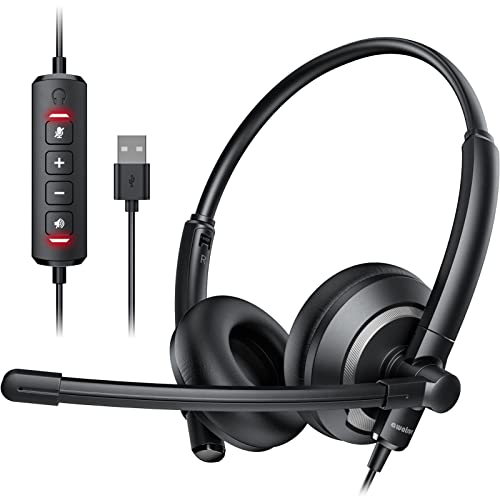
awatrue EH05-U — Inline-control value
The awatrue EH05-U’s title reads like a value-tier manifesto: wired USB headset with noise cancelling microphone for PC and laptop, headphones with in-line control, lightweight, enhanced sound, and MIC mute. The mute is the detail to circle. In the value tier, controls are where corners usually get cut, and a title that names the microphone mute explicitly is telling you the designer understood the actual emergencies of working life — the doorbell, the toddler, the coughing fit, the colleague who walks in mid-sentence. A mute you can find by touch on the cable is worth more in those seconds than any amount of audio polish, and the EH05-U puts it in the headline rather than the footnotes.
Lightweight is the second headline, and it is the right priority for the tier: a value headset worn eight hours must first of all be forgettable on the head, and weight is the specification that decides forgettability more than any other. The “enhanced sound” phrasing is marketing vapour — every title in this category claims some version of it — and buyers should weight it at zero and judge the headset on its stated, checkable facts: wired USB, noise cancelling mic, in-line control with mute, lightweight build. On those facts the EH05-U is a coherent answer for the home worker equipping a desk without an employer’s procurement budget behind them. Browse the EH05-U listing on Amazon if your checklist starts with a hardware mute and a headset you can wear until the last call ends.
Its natural comparison is the Wantek below — the two value picks divide the territory by emphasis. The awatrue leads with controls and lightness; the Wantek leads with environment, naming the call center and the gaming-adjacent PC world. Workers whose days are meeting-led will feel the awatrue’s priorities as their own; workers whose days are call-led may lean the other way. Either way, the existence of two distinguishable value picks is the guide doing its job: at this tier, the wrong reason to choose is habit, and the right reason is which daily friction you want engineered away.
- Connection: Wired USB, aimed at PC and laptop
- Microphone: Noise cancelling, per the listing
- Controls: In-line control with MIC mute, per the title
- Build brief: Lightweight, per the title
- Platform wording: General PC use — no platform is named in the title
Strengths
- A named hardware mic mute — the control that matters most in real working emergencies.
- Lightweight brief aimed squarely at all-day wear rather than occasional calls.
- Straightforward wired USB behaviour with no app or ecosystem to manage.
Trade-offs
- No meeting platform is named in the title, so certified-estate buyers must look elsewhere.
- Sound-quality language in the title is unverifiable marketing; judge by the checkable facts.
- Cushion and wearing-style details are unstated, leaving comfort verification to the listing.
Best for: home workers who want a hardware mute and a light headset at a value-tier commitment.
Not suited for: buyers needing named platform compatibility for a managed softphone estate.
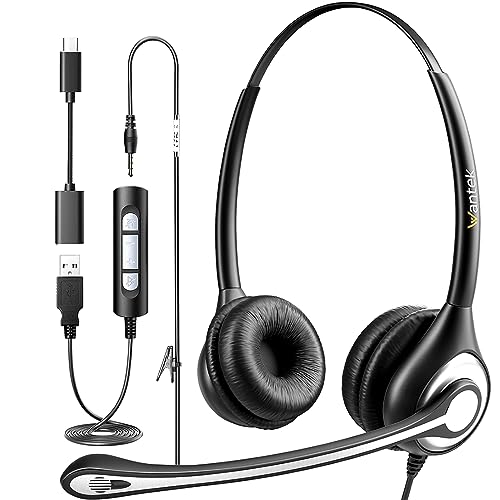
Wantek USB Headset — Call-center crossover
Wantek’s title positions its USB headset across the widest set of rooms in this guide: noise canceling microphone, black gaming headphones for PC and laptop, call center, work from home. The gaming phrase deserves a raised eyebrow and a fair hearing. It does not turn this into a gaming headset in the surround-sound, RGB sense; it signals that the headset’s tuning and wearing style borrow from the PC-gaming world, where long sessions and voice chat are the native habitat. For the hybrid worker whose evenings include games with voice chat and whose days include a call queue, that crossover is not a gimmick — it is one purchase retiring two headsets from the desk.
The call-center naming is the more serious claim. Call-center work is the endurance event of the headset world: hours of continuous wear, call after call, in rooms (or home offices) where the microphone must keep your voice forward of everything else. A value-tier headset that names that environment in its title is accepting judgement by shift-length standards, and buyers should hold it to exactly that — wear it for a full shift inside the return window and let hour six cast the vote. The title does not state inline controls, mute, or weight, so those checks belong on the listing page. Open the Wantek listing on Amazon if your desk serves a call queue by day and a game lobby by night, and you would rather own one wired headset that admits both lives.
Within this guide’s economy, the Wantek is the pick that tests whether the value tier can serve two masters. The risk of crossover products is dilution — a headset that is nobody’s first choice — but the counter-argument is written into modern working life itself, where the desk, the call queue, and the game share one chair. If that is your chair, the Wantek’s title is the only one here that describes it.
- Connection: USB wired, covering PC and laptop
- Microphone: Noise canceling, in the title’s words
- Named worlds: Call center, work from home, PC gaming, per the title
- Colour: Black, per the title
- Controls and weight: Not stated in the title — confirm on the listing before ordering
Strengths
- One wired headset honestly spanning call work and PC voice-chat gaming.
- Call-center naming accepts judgement by full-shift comfort standards.
- Work-from-home positioning matches the hybrid desk it will actually live on.
Trade-offs
- Crossover brief risks pleasing two audiences adequately rather than one completely.
- Control layout and mute behaviour are unstated in the title and need verification.
- Gaming phrasing may undersell it to procurement-minded buyers despite its call-center intent.
Best for: hybrid workers splitting a desk between call queues and PC gaming voice chat.
Not suited for: buyers wanting a single-purpose, meeting-certified headset with every control documented.

Lenovo USB-A Wired Stereo Headset — Feature-heavy pick
Lenovo’s title is a specification sheet compressed into a sentence: USB-A wired stereo headset for PC and laptop, AI noise canceling via an app, 140 g lightweight, replaceable earcups, a double-sided boom microphone, inline controls with mute for calls, and a closing “Work with Teams/Zoom.” Each clause opens a different door. The app-based AI noise cancelling is the modern one — noise suppression handled with software intelligence rather than only microphone geometry, which implies a companion app in your working life and the updates that come with it. The replaceable earcups are the longevity door: cushions are the first component to die on any headset, and a design that treats them as spares is a design that expects to be owned for years. The double-sided boom is the ergonomic door, letting the microphone live on whichever side your desk prefers.
The stated 140 g weight is the only hard number in this entire guide’s titles, and it is a genuinely light figure for a stereo over-ear-style business headset — the kind of number that predicts the headset will be forgotten by hour two of a call block. Stereo wearing, explicit in the title, also separates it from the mono tradition of call-center gear: this is a headset for the worker who wants both ears in the meeting and in the music between meetings. The platform wording — “Work with Teams/Zoom” — is a compatibility statement rather than the word “certified,” and this guide reports it exactly as written; estates requiring formal certification should confirm status in Lenovo’s documentation. For everyone else, the Lenovo listing on Amazon is the most feature-complete wired proposition in this guide, and the pick for buyers who read spec sheets for pleasure.
The app dependency is the honest counterweight. AI noise cancelling via an app means the feature’s full behaviour lives partly on your computer, subject to the app’s platform support and update cadence. Workers in locked-down corporate environments, where installing companion apps needs an IT ticket, should weigh that against the awatrue’s and Jabra’s no-software simplicity. Features are only features if your environment lets you switch them on.
- Connection: USB-A wired and stereo, per the title
- Noise cancelling: AI noise canceling via app, per the title
- Weight: 140 g, per the title — the only stated weight in this guide
- Boom: Double-sided boom mic; earcups replaceable, per the title
- Platform wording: “Work with Teams/Zoom,” per the title
Strengths
- The richest checkable feature list here: app AI cancelling, replaceable cups, two-sided boom.
- A stated 140 g weight that predicts genuine all-day forgettability.
- Inline controls with mute cover the call-handling essentials by touch.
Trade-offs
- The headline cancelling feature depends on a companion app your IT policy may not welcome.
- Platform wording stops short of the word certified; regulated estates must verify.
- Feature richness means more to configure before the first call than the plug-and-go picks.
Best for: spec-driven buyers wanting the lightest, most feature-complete wired stereo option here.
Not suited for: locked-down corporate laptops where companion apps cannot be installed.
Comparing the Six on the Facts Their Titles Actually State
| Headset | Connector | Controls named in title | Distinguishing title claim | Natural habitat |
|---|---|---|---|---|
| Jabra Evolve 10 | USB-A | Inline call and volume | TCO Certified | Scheduled meetings |
| Logitech H390 | USB-A | Not stated | Meetings and music, general PC | Any desk, issued at scale |
| MAIRDI USB Headset | USB | Not stated | Dictation software named | Dictation and softphone work |
| awatrue EH05-U | USB | In-line control, MIC mute | Lightweight with named mute | Home office all day |
| Wantek USB Headset | USB | Not stated | Call center plus gaming crossover | Call queue and game lobby |
| Lenovo USB-A Stereo | USB-A | In-line controls with mute | AI cancelling via app, 140 g | Feature-led hybrid work |
How Do You Set Up a Wired USB Headset So It Behaves All Week?
Plug it in before the meeting, not during it, and then do the three minutes of configuration that most workers skip and regret. In your meeting app’s settings, select the headset explicitly for microphone, speaker, and — where the app separates it — ringer, rather than trusting the “default device” to be the device you mean. In the operating system’s sound settings, set the headset as the default communication device so a stray system sound does not reroute your call audio. Then make a test call or a recording: speak at your normal volume from your normal chair, play it back, and adjust the boom until your voice is forward and the room is behind it. Route the cable once, deliberately — slack at the desk edge, the control pod where your hand falls, no path across the chair’s wheels — and clip it if the headset provides a clip. That single setup session is the entire maintenance burden of the wired category, and it is why these headsets suit workplaces that cannot afford per-desk troubleshooting.
Which Buying Mistakes Follow USB Headset Shoppers Home?
The first is confusing the category itself: ordering a wired USB headset for a desk phone that needs a DECT base or a QD lead, then blaming the headset for a mismatch that was in the brief. The second is buying on speaker sound for a job that is judged on microphone sound — your voice is the product your colleagues receive. The third is ignoring the port audit: falling for a USB-A pick while your laptop carries only USB-C, or the reverse, and discovering the adapter errand on the morning of the big call. The fourth is treating “works with” language as certification; this guide has flagged the distinction wherever a title raises it, and estates with compliance rules must verify formally. The fifth is skipping the full-shift test inside the return window — a headset is a garment as much as a gadget, and twenty comfortable minutes in the morning predict almost nothing about hour seven.
Final Recommendation
Decide by the shape of your day. A calendar of scheduled meetings points at the Jabra Evolve 10 or the ever-safe Logitech H390; a day of dictation points at the MAIRDI and nowhere else in this guide; a home desk on a personal budget points at the awatrue’s mute-and-lightness brief or the Wantek’s call-and-game crossover; and a buyer who wants every modern feature the wired category offers points at the Lenovo and its app-driven cancelling. What unites the six is the wired discipline itself — no charging, no pairing, no surprises — and in a working life already full of software behaving unexpectedly, there is a particular peace in a headset whose entire personality is a cable, a boom, and a voice arriving clearly on the other side of the call.
One last piece of advice, offered because it is the difference between buyers who stay satisfied and buyers who churn: give the chosen headset a full fortnight before judging it. The first days are apprenticeship — fingers learning the pod, ears learning the fit, software learning the device — and almost every wired headset feels slightly foreign inside that window. By the second week the apprenticeship ends, and what remains is the headset’s true character, which in this category is usually a long, quiet competence. Judge then, and you will mostly find you have nothing left to judge, which is precisely what a business headset is for.
What Changes When One Headset Has to Serve a Whole Team Instead of One Desk?
Issuing headsets at team scale rewrites the buying criteria in ways individual shoppers rarely anticipate. The first casualty is feature romance: a team lead does not need the most capable headset, they need the headset whose behaviour is identical in every box, whose controls can be taught in one sentence during onboarding, and whose failure mode is a same-model replacement rather than a research project. That is the deep reason incumbents like the H390 and meeting-focused designs like the Evolve 10 dominate issued fleets — their value is statistical. Across forty units and four hundred working weeks, predictability compounds into fewer tickets, fewer interrupted calls, and fewer workers quietly reverting to laptop speakers because their headset confused them once too often.
Hygiene becomes a line item at scale too. Shared and hot-desking environments turn earcups into communal property, which reframes the Lenovo’s replaceable earcups from a longevity nicety into an operational feature: a fresh set of cushions between occupants is cheaper than a fresh headset, and it signals to staff that the equipment is maintained rather than merely distributed. The same logic favours wired models generally in shared spaces — a cable announces its device, its port, and its owner-of-the-moment, while wireless units wander, pair with the wrong laptop, and generate the low-grade chaos that consumes IT mornings. Teams that have lived both regimes rarely argue about which one they prefer to administer.
There is finally a training argument for standardisation that mirrors the aviation world’s fleet logic. When every agent or analyst wears the same headset, call-quality coaching becomes transferable: the boom position demonstrated in training is the boom position on every desk, the mute is in the same place on every cable, and a supervisor troubleshooting a muffled caller can walk a mental model of the exact hardware instead of interrogating the worker about which of six models they happen to own. Guides like this one exist to differentiate products; operations exist to eliminate differentiation where it costs more than it earns. A wise buyer holds both truths at once — choosing the model with full knowledge of its individual character, then issuing it with the discipline of a standard.
How Should You Judge Comfort When the Only Honest Test Is a Full Working Day?
Comfort in a communication headset is a time-series, not a first impression. The variables that matter at minute five — softness of the cushion, lightness in the hand — are not the variables that matter at hour five, which are pressure distribution, heat build-up, and the micro-adjustments a design permits or forbids. A headset that cannot be adjusted without removing it will be adjusted by being removed, and a worker who removes their headset between calls is a worker whose microphone position, and therefore voice quality, resets with every re-wearing. This is why the titles’ scattered comfort clues deserve more weight than their brevity suggests: the Lenovo’s stated 140 g, the awatrue’s lightweight brief, the Evolve 10’s lightweight design language are all attempts to speak to the hour-five problem with the only vocabulary a title has.
Wearing style is the other comfort axis, and it is partly social. Stereo headsets enclose the worker in the call, which helps concentration in a busy room and isolates them from a doorbell they might actually need to hear. Mono headsets — more common in the call-center guide linked below than among these business picks — keep one ear in the room, which suits supervisors, parents working beside sleeping children, and workers whose job includes listening to two worlds at once. Neither is better; they are answers to different rooms. The practical advice is to identify your room honestly before ordering: the home office with a sleeping baby and the open-plan floor with forty colleagues are both “work from home” on a form, and they want different headsets.
Then there is the test itself, which buyers keep shortening and should lengthen. Wear the headset for one complete working day inside the return window — every call, every meeting, the music between — and keep a note of the first moment you became aware of it on your head. That moment, honestly recorded, is the comfort review that matters. A headset that stays unfelt until the final hour has passed the only examination this category cannot fake, and it will keep passing it on the two hundredth day, because the physics of your head and its cushions does not change its mind.
What Does the Cable Know That the Spec Sheet Does Not?
Every wired headset carries a biography in its cable, and experienced buyers read it. The cable is the component that flexes thousands of times, gets trapped in desk drawers, rolled over by chair castors, and yanked — once, memorably — by a standing-up worker who forgot they were wearing the headset. A category whose entire reliability argument rests on a wire should be judged partly on how that wire is treated by the design: strain relief where it meets the earcup and the plug, a control pod that acts as a sacrificial, grippable middle, and enough length to route behind a monitor without crossing the keyboard’s territory. The titles in this guide say almost nothing about cables, which is normal for the category and exactly why the return-window full-day test matters: an hour of real desk life teaches you more about a cable than a page of specifications, because you will discover its length, its memory, and its preferred route across your particular desk within the first morning.
The control pod deserves the same biographical reading. It is the part your fingers will know better than your eyes ever will, and its button layout becomes muscle memory within a week — which is another argument for standardising a model across a team, and for individuals, an argument for not switching models casually. The worker who changes headsets changes mute locations, and the first week with a new pod is the week of accidental hang-ups and unmuted asides. None of this appears in any title, and all of it decides satisfaction. Treat the first week with any of these six picks as an apprenticeship your fingers must serve, and judge the headset at the end of that week rather than the end of the first call.
Why Do So Many ‘Headset Problems’ Turn Out to Be Software Routing Problems?
Ask a veteran of supporting remote workers: the most common headset fault is not a fault. It is the meeting app using the laptop’s built-in microphone because a default changed after an update, or the operating system splitting the difference between two audio devices, or a browser-based meeting inheriting a different device map from the desktop app the worker tested in the morning. Wired USB headsets suffer fewer of these ghosts than wireless ones — there is no pairing table to corrupt — but they are not immune, and the fix is procedural rather than technical. Learn where your three layers keep their settings: the operating system’s sound panel, the meeting app’s device page, and the browser’s site permissions if your meetings run in a tab. A worker who can audit those three layers in ninety seconds will never again spend the first ten minutes of a call performing the international sign language for “you’re on mute and also we can’t hear you.”
The deeper point is that a business headset is a system, not an object: hardware, operating system, application, and habit, all of which must agree for your voice to arrive. The six picks in this guide were chosen partly for how little they ask of that system — direct USB identity, hardware controls that bypass software ambiguity, microphones whose behaviour does not depend on an app being open (with the Lenovo’s app-based cancelling as the deliberate, declared exception). When you evaluate any pick, evaluate the system it creates on your desk: how many settings pages stand between plugging in and being heard, and how many of them you trust to stay put across updates. The shortest path is the professional choice, because meetings do not wait for troubleshooting, and the headset that respects that fact is the one still on your head a year later.
A closing habit ties the system together: after any major operating-system or meeting-app update, spend sixty seconds re-checking the device selections before your first call of the day. Updates reshuffle defaults with cheerful indifference, and the worker who audits proactively is indistinguishable, to everyone else on the call, from a worker whose equipment simply never fails. Reliability, in this category, is mostly that audit performed on schedule.
Frequently Asked Questions
Are these headsets the same thing as DECT headsets?
No. DECT headsets connect through a base station to a desk phone system using a dedicated radio link. Every pick here is a wired USB headset that plugs directly into a computer and works with softphone and meeting apps. If your phone is a physical desk phone without a computer in the chain, you need a different category.
Will a USB-A headset work on a laptop with only USB-C ports?
Only through a USB-C to USB-A adapter or a dock, which is a small and reliable accessory but one more link to buy and to lose. Audit your ports before ordering; three of these six titles specify USB-A outright, and the adapter question is easier answered at purchase than at the start of a meeting. If your organisation is mid-migration between port standards, the dock on the desk — not the headset in the drawer — is where the adaptation belongs, because a headset that plugs straight into its dock’s USB-A port inherits the dock’s permanence and stops being part of the port problem altogether.
Does “noise cancelling” here mean the headset cancels noise for me or for my listeners?
In these titles it describes the microphone: the cancelling works on what your microphone sends, suppressing your room so your listeners hear your voice more cleanly. It is not the active noise cancelling of travel headphones, and it will not quiet your own environment for your own ears beyond the passive effect of wearing earcups.
How important is a hardware mute, really?
Important enough that two titles in this guide advertise it by name. A cable-pod mute is findable by touch, works regardless of which app has focus, and gives a physical certainty that software mute buttons — one stray click from betraying you — cannot match during the chaotic moments when mute matters most.
Which pick suits speech-recognition dictation?
The MAIRDI, whose title explicitly positions it for Dragon dictation software. Dictation is the most signal-sensitive microphone work in an office, so test accuracy with your own voice and vocabulary during the return window, and keep the boom position ruthlessly consistent between sessions so the software hears the same voice geometry every time.
Can I use one of these for music between calls?
Yes — the Logitech title names music outright and the Lenovo is a stereo headset, so both ears are served. Set expectations by category: these are communication headsets whose tuning serves voice first, and they will handle background music pleasantly without pretending to be the studio headphones covered in our music editing guide.
How long should a wired business headset last?
Years, if the cable is treated as the component it is — the flex point, the strain point, and the usual site of failure. Route it away from chair wheels and drawer edges, replace cushions when they flatten (trivial on the Lenovo, whose earcups are designed to be replaced), and a wired headset’s service life is measured in job changes rather than in months. There is no battery inside to age, which removes the expiry date that wireless headsets carry from birth. When a wired headset does eventually fail, it usually fails honestly and completely — a dead cable, a silent earpiece — rather than degrading into the intermittent, hard-to-diagnose flakiness that makes wireless troubleshooting such a drain on a working morning.
Related Guides
Keep comparing with Best Call Center Headsets Under $150, Best Headsets for Music Editing, and Best Earbud Headsets.


