What's inside
- Key Takeaways
- Quick Picks
- How Did We Build a Shortlist Inside a Fixed Budget Frame?
- Why Does the Connector Matter More Than the Brand on the Box?
- What Does a Full Shift Ask of a Headset That a Meeting Never Does?
- What Should You Examine in Each Candidate, One Headset at a Time?
- One Budget, Three Infrastructures: The Six at a Glance
- How Do You Roll a Headset Out Across a Floor Without Chaos?
- Where Do Budget Headset Programs Usually Waste Their Money?
- Final Recommendation
- How Does a Headset Budget Behave Across a Year of Real Floor Life?
- What Should Supervisors Listen for When They Audit Call Quality?
- Why Do Home-Based Agents Need a Different Conversation From Floor Agents?
- How Should a New Agent’s First Week With a Headset Be Structured?
- Frequently Asked Questions
- Related Guides
As an Amazon Associate I earn from qualifying purchases. This post may contain affiliate links at no extra cost to you.
widgetverdict.com is reader-supported. When you buy through links on our site, we may earn an affiliate commission.
Where to buy: each of the six headsets below is sold through Amazon, and the links in the Quick Picks table and in every full review lead to the matching listing, where you can confirm the connector and variant before ordering. Shopping for the best call center headsets under 150 dollars is an exercise in respecting a ceiling without surrendering to it, because a call-center headset is not judged the way other headsets are judged. It is worn for entire shifts, it carries hundreds of conversations a week, and its failures are measured in abandoned calls and agents rubbing their ears at hour six. The under $150 framing of this guide is the budget reality of equipping agents — often many agents — and everything below is evaluated inside that frame: no pick is priced individually in this article, and the frame itself, not any sticker, is what the six picks were chosen to honour. What the frame buys, it turns out, is a genuinely varied field: USB headsets for softphone floors, quick-disconnect headsets for desk-phone estates, and one venerable corded design for the humblest telephone hardware of all.
That variety is the first thing to understand, because “call center headset” names a job, not a connector. The NUBWO and the Yealink plug into computers and live in the softphone world of laptops and call software. The two TruVoice models speak QD — quick disconnect — the breakaway connector standard of desk-phone fleets, with compatibility lists in their titles that read like a directory of office phone systems. The Jabra Engage 50 Mono is a wired professional headset built around a three-microphone system for agent focus. And the AGPTEK is a monaural corded headset terminating in an RJ9 plug for a desk telephone, the simplest artefact in the guide. A buyer who sorts these six by connector first and by everything else second will make a good decision almost automatically; a buyer who sorts by headline features first may end up owning an excellent headset for a telephone system they do not have.
One more framing note before the picks. A call center is a system for converting conversations into outcomes, and the headset is the only part of that system that touches the human body for eight hours at a stretch. Every other component — the phone estate, the software, the scripts — can be upgraded from a desk chair. The headset’s upgrade path runs through an agent’s ears, jaw, and patience, which is why this guide treats comfort evidence, replacement logistics, and supervisor auditing as purchasing criteria equal in rank to microphones and connectors. The operations that get this category right are not the ones with the most sophisticated taste in audio; they are the ones that understand they are buying a garment, a tool, and a consumable at the same time, and budget for all three identities from the start.
Our Top Picks
 AGPTEK® Hands-free Call Center Noise Cancelling Corded HeadsetMonaural Headset0.4 poundsCheck on Amazon
Key Takeaways
- The budget frame is the keyword’s own — under $150 — and it is applied as a ceiling for the whole shortlist; no individual pick is priced in this article.
- Connector decides everything: two USB softphone headsets, two QD desk-phone headsets, one wired professional mono, and one RJ9 corded headset.
- The Yealink UH42 is the only pick whose title claims Teams and Zoom certification, and it adds a stated 7 ft cable and dual-ear wearing.
- The TruVoice pair differentiate by tier within one QD family, both naming the same broad desk-phone compatibility universe.
- The Jabra Engage 50 Mono’s three-microphone system is the most specialised voice claim in the guide.
- Mono versus dual-ear is a supervision and awareness decision as much as a comfort one — both philosophies are represented here.
Quick Picks
| Pick | Badge | Why it made the list |
|---|---|---|
| NUBWO HW02 USB | Softphone starter | USB with in-line control and an ultra-comfort brief for laptop-based agents. |
| TruVoice HD-100 QD | Entry point for QD fleets | Quick-disconnect wired headset with HD speakers and a long desk-phone compatibility list. |
| TruVoice HD-500 QD | The QD family’s upper tier | The higher-tier sibling in the same QD family, for floors standardising upward. |
| Jabra Engage 50 Mono | Agent-focus pick | A three-microphone system designed to keep background noise out of the agent’s call. |
| Yealink UH42 | Certified softphone pick | USB-C/A flexibility, certified platform wording, dual-ear design, and a stated 7 ft cable. |
| AGPTEK Corded Call Center Headset | RJ9 traditionalist | A monaural corded headset with a 4-pin RJ9 plug for desk telephones, full stop. |
How Did We Build a Shortlist Inside a Fixed Budget Frame?
By treating the frame as a filter and the connector map as the organising principle. Within the under-$150 ceiling, the guide needed to cover the three physical worlds a call center can inhabit: the all-softphone floor where agents live in a laptop, the traditional desk-phone estate where QD leads are the established infrastructure, and the mixed or legacy corner where a simple RJ9 telephone still earns its keep. Two picks serve the first world, three serve the second in different tiers, and one serves the third without apology. Readers arriving from the meeting world may want to compare notes with Best Headsets for Music Editing — not because the products overlap, but because the discipline of judging a headset by the session it must survive is identical, and the contrast sharpens what “shift-proof” really demands.
Specification honesty follows the same rule as the rest of this cluster: titles are the evidence. Where a title states a cable length, a microphone count, or a certification, the review uses it; where a title is silent, the spec box records the silence. That restraint bites hardest on comfort claims, which titles express in adjectives rather than data — “ultra comfort” is a promise the buyer must test across a real shift, and this guide says so at every opportunity rather than laundering adjectives into facts. The budget frame also imposes a discipline of its own: inside a ceiling, every feature must justify itself against endurance, because a headset replaced twice in a year is not a budget headset at any sticker.
Why Does the Connector Matter More Than the Brand on the Box?
Because the connector is the contract with your telephone system, and breaking it renders every other virtue theoretical. USB headsets like the NUBWO and Yealink speak to computers; they are the native citizens of softphone platforms, training software, and call-recording ecosystems, and they draw their power and identity from the USB port itself. QD headsets like the TruVoice pair speak to desk phones through a two-part system — the headset and its quick-disconnect lead — which exists for a profoundly practical reason: an agent can unclip at the QD point and walk away while the headset stays on their head, and a failed headset can be swapped in seconds without re-cabling a desk. The compatibility lists in the TruVoice titles, naming nine desk-phone makers from Mitel to Fanvil, are not decoration; they are the product’s passport, and checking your phone model against them is the purchase.
The AGPTEK’s RJ9 plug is the oldest contract in the guide — the four-pin modular connector of traditional desk telephones — and its simplicity is its whole argument: no software, no certification matrix, no drivers, a headset that a small office can deploy onto existing phones in an afternoon. The Jabra Engage 50 Mono sits in the professional wired tier, a telephone headset by its own title’s description, with its engineering budget visibly spent on the microphone system rather than on connectivity novelty. Floors that live partly in headsets and partly in hand-held devices will find the small-form end of the conversation in Best Earbud Headsets, while pilots reading out of curiosity can compare how a different industry entirely solves the same voice-in-noise problem in Best General Aviation Headsets.
What Does a Full Shift Ask of a Headset That a Meeting Never Does?
Duration changes the physics of judgement. A headset that charms for forty minutes can become an instrument of low-grade torture by hour six, because clamping force, heat, and weight are cumulative insults. Call-center design therefore obsesses over the unglamorous: on-ear versus over-ear pressure, how a headband distributes its load, whether a boom stays where it was placed at 9 a.m. or migrates by lunch. Mono wearing — represented here by the Jabra Engage 50 Mono and the AGPTEK — is a deliberate professional choice in this world, not a cost saving: one ear stays in the room, hearing supervisors, colleagues, and the floor’s ambient information, while the other ear carries the customer. Dual-ear wearing, the Yealink’s stated design, makes the opposite trade, enclosing the agent in the call and shutting the room out, which suits noisy floors and home agents competing with a household.
The microphone’s shift is longer than the wearer’s, in a sense — it must sound identical on the first call and the four-hundredth, through an agent’s tired voice, a dry mouth, and a room that gets louder as the day peaks. That is why the microphone claims in these titles carry unusual weight: Jabra’s three-microphone system exists to defend the agent’s voice against the floor itself, and the noise-cancelling claims on every other pick are the same defence at simpler tiers. When you test a candidate headset, test it at the end of a shift, in the loudest hour, with your most tired voice. A headset that passes that examination will pass any other you can devise.
What Should You Examine in Each Candidate, One Headset at a Time?
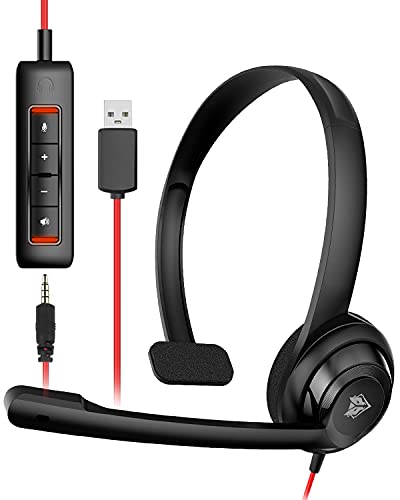
NUBWO HW02 USB — Softphone starter
The HW02 is the softphone floor’s straightforward answer: a USB headset whose title promises a noise cancelling microphone with in-line control, an ultra comfort design brief, and on-ear wired wearing for laptop and PC, aimed at office and call center work, Skype, and webinars. Every element of that title is about beginning well. USB means the agent’s laptop is the phone system, with no desk hardware between the headset and the call. In-line control means the essential call handling lives on the cable, findable by touch while the agent’s eyes stay on the customer record. On-ear wearing keeps the headset light and the agent partly in the room, a sensible default for supervised floors and for home agents who cannot seal themselves away from the household entirely.
Its role in this guide is the entry point of the softphone world, and it should be judged as fleet equipment: consistent, replaceable, and simple enough that a new starter’s first morning includes no headset lesson at all. The comfort adjective in the title — “ultra comfort” — is precisely the kind of claim this guide refuses to certify from a desk chair; put it on an agent for a full shift inside the return window and let the shift decide. What can be certified from the title is the architecture, and the architecture is right for its world. Inspect the NUBWO HW02 listing on Amazon if your floor runs on laptops and your priority is a headset an agent can be productive in by their second call.
There is a training-room argument for headsets like this that experienced operations managers will recognise: when the tool is simple, coaching can be about the conversation. Every control an agent must hunt for is attention stolen from a customer; every cable ritual is a small tax on every call. The HW02’s title describes a headset designed to levy almost no tax at all, and in a queue-driven day, that absence compounds into something measurable — calmer agents, cleaner calls, and supervisors coaching voices instead of troubleshooting hardware.
- Connection: USB wired for laptop and PC, per the title
- Microphone: Noise cancelling, with in-line control, per the title
- Wearing: On-ear wired, per the title
- Named uses: Office, call center, Skype, webinars, per the title
- Colour: Black, per the title
Strengths
- USB simplicity: the laptop is the phone system, and setup is a single plug.
- In-line control keeps call handling under the fingers during live customer work.
- On-ear lightness suits supervised floors where one ear stays socially present.
Trade-offs
- USB-only design cannot serve a desk-phone estate without a computer in the chain.
- Comfort is claimed in adjectives; only a full shift can verify it honestly.
- No platform certification is stated in the title for estates that require it.
Best for: softphone-based teams and home agents wanting a simple, light USB starter headset.
Not suited for: desk-phone floors built on QD infrastructure, where the TruVoice pair speak the native language.

TruVoice HD-100 QD — Desk-phone QD entry
The HD-100 introduces the guide’s second world. Its title describes an office and call center wired QD headset with a noise canceling microphone and HD speakers, compatible with a roll-call of desk-phone makers: Mitel, Nortel, Avaya, Poly, Polycom, Shoretel, Digium, ESI, and Fanvil. That compatibility list is the most important sentence in the review, because a QD headset is a system purchase — headset plus the correct quick-disconnect bottom lead for your phone — and the list is how you confirm your estate is spoken for. The QD mechanism itself is the daily delight: clip apart to stand, fetch a file, or consult a supervisor, with the headset still worn and the call path instantly restored on return, the lead staying cabled to the phone rather than travelling with the agent.
Position the HD-100 as the entry tier of that world — the headset a desk-phone floor standardises on when the estate is large, the budget frame is real, and the requirement is dependable voice through established hardware. HD speakers in the title signal that the receive side was not an afterthought, which matters on a floor where agents must catch names, numbers, and nuance through eight hours of calls. What the title does not state — wearing style, weight, the precise lead included — must be confirmed on the listing and against your phone model, because in the QD world the lead is destiny: the right headset with the wrong bottom cable is a paperweight with a headband. Review the HD-100 listing on Amazon with your desk-phone model written on a sticky note in front of you.
Floors sometimes ask why QD persists when USB exists, and the answer is installed reality. A desk-phone estate represents years of capital and training; its headsets are consumables within that system, replaced as they wear, and the QD standard is what makes replacement a thirty-second swap instead of an IT visit. The HD-100 is written for that reality without embarrassment, and floors living in it will recognise the priorities instantly.
- Connection: Wired QD (quick disconnect) for desk phones, per the title
- Microphone: Noise canceling microphone, per the title
- Speakers: HD speakers, per the title
- Compatibility named: Mitel, Nortel, Avaya, Poly, Polycom, Shoretel, Digium, ESI, Fanvil desk phones, per the title
- Bottom lead: The title does not specify which lead is included — verify before ordering
Strengths
- QD breakaway lets agents move and headsets swap without re-cabling a desk.
- A compatibility list that reads as a census of the desk-phone world.
- Entry tier of a family, so floors can standardise and step up selectively.
Trade-offs
- Useless to a softphone floor: it belongs to desk-phone infrastructure entirely.
- The correct bottom lead for your phone model is a separate fact to verify.
- No USB path means no direct laptop or meeting-app use.
Best for: desk-phone call centers standardising a QD fleet on a disciplined budget.
Not suited for: laptop-based agents whose phone system lives entirely in software.

TruVoice HD-500 QD — Desk-phone QD step-up
The HD-500 is the same argument at a higher tier: an office and call center wired QD headset with a noise canceling microphone and HD speakers, compatible with the same desk-phone universe as its sibling, maker for maker. A guide owes its readers an honest account of what a step-up tier inside one family usually means, because the titles here are near-identical and the difference lives below the headline. In QD families, the higher tier typically buys build and wear refinements — the components that decide whether a headset is still comfortable and intact in its second year of shifts — rather than a different function. The function is identical: connect agent to desk phone, defend the voice, survive the floor.
That framing tells you exactly who should buy which sibling. A floor equipping hundreds of seats against a hard budget frame will weight the HD-100’s entry position heavily. A floor whose agents are its product — retention-sensitive, experience-led, measured on call quality over years — will see the HD-500’s tier as the cheaper long-term decision, because headset replacement and agent discomfort are both recurring costs that a step-up build exists to reduce. Neither reading is wrong; they are different theories of the same budget. As with the HD-100, the title leaves the wearing details and included lead unspecified, so verification against your phone estate remains the buyer’s homework. Compare the HD-500 listing on Amazon directly against its sibling, and let your floor’s replacement history — not the badge — arbitrate the tier.
There is also a mixed-fleet strategy worth naming: many real floors run both, issuing the step-up tier to senior agents, team leaders, and the training room, and the entry tier as the general standard. The shared QD infrastructure makes that mixing painless, since leads, spares, and habits transfer across the family. A guide that forced a single winner inside one family would be tidier and less truthful; the two TruVoice picks are one decision with a dial on it, and the dial is set by how your floor values endurance against the ceiling.
- Connection: Wired QD for desk phones, per the title
- Microphone: Noise canceling microphone, per the title
- Speakers: HD speakers, per the title
- Compatibility named: The identical nine-maker desk-phone list as the HD-100, per the title
- Family position: Higher tier than the HD-100 within the same QD family
Strengths
- Step-up tier for floors that measure headset cost across years, not purchase days.
- Full QD infrastructure compatibility shared with its sibling — one ecosystem, two tiers.
- Suits mixed-fleet strategies where senior staff carry the higher tier.
Trade-offs
- Titles are near-identical to the HD-100’s, so the tier difference must be verified in the listing details.
- Equally desk-bound: no softphone or laptop role without the phone estate.
- The step-up only pays if your floor keeps headsets long enough for build quality to compound.
Best for: established desk-phone floors upgrading their QD standard for agent retention and longevity.
Not suited for: brand-new operations still deciding whether their future is desk phones or softphones.

Jabra Engage 50 Mono — Agent-focus pick
The Engage 50 Mono is the guide’s professional instrument. Its title describes a wired mono telephone headset with a three-microphone system that blocks out background noise for increased agent focus, with enhanced hearing protection among its call-center features. Begin with the microphones, because three is a statement. A multi-microphone system can compare what arrives at different points and separate the agent’s voice — close, consistent, predictable — from the floor’s chaos, which is spatially and statistically different. On a loud floor, that separation is the difference between a customer hearing an agent and a customer hearing an office. Jabra built its call-center reputation on exactly this problem, and the Engage 50’s title spends its words there rather than on wearing novelties.
The mono wearing is the second deliberate choice. One ear on the call, one ear on the room: supervisors remain audible, colleagues remain colleagues, and the agent never becomes a sealed unit shouting into a void. For many floors that awareness is a safety and coaching feature, not a compromise. The hearing-protection wording in the title refers to the headset’s designed safeguards against sudden loud sounds on the line — this guide reports it as the manufacturer’s feature claim, in the title’s own terms, and makes no medical promises beyond it. Buyers should note what the title does not state: the connector type is not named, so confirming how this wired headset meets your phone or computer is a listing-level check. Examine the Engage 50 Mono listing on Amazon if your floor’s loudest problem is the floor itself, and your agents’ voices are being taxed by it.
Within the budget frame of this guide, the Engage 50 is where the money visibly goes to the call rather than to the catalogue of features. No app, no crossover identity, no entertainment brief — a mono professional headset whose entire argument is that the customer’s ear deserves engineering. Floors that A/B test headsets on live calls will hear its case within one busy hour.
- Wearing: Mono (single-ear), per the title
- Microphone system: 3-microphone system, per the title
- Design aim: Blocks background noise for agent focus, per the title
- Protection feature: Enhanced hearing protection, as claimed in the title
- Connector: The title says wired but names no connector — verify on the listing
Strengths
- Three-microphone voice isolation aimed at the loudest real floors.
- Mono wearing keeps agents connected to supervisors and the room.
- Professional single-purpose design: every claim in the title serves the call.
Trade-offs
- Mono audio is wrong for agents who need full immersion against a noisy home environment.
- Connector type is unstated in the title, adding a verification step before fleet orders.
- Its focus-first brief offers nothing to buyers wanting stereo media between calls.
Best for: busy, loud floors where agent voice clarity against background noise is the metric.
Not suited for: home agents needing dual-ear isolation from household noise.

Yealink UH42 — Certified softphone pick
The UH42 is the most contemporary object in this guide, and its title reads like a checklist written by a modern IT department: wired USB-C/A headset, AI noise canceling mic, in-line control, Teams and Zoom certified, dual-ear computer headphones, plug and play for PC, laptop, and phone, call center and work-from-home duty, and a 7 ft cable. Start with the certification, because it is unique here — the only title in the guide that uses the word certified about meeting platforms, which matters to estates whose support policies begin and end with the certified list. The USB-C/A flexibility answers the port lottery of modern laptop fleets, where two agents side by side may have different connectors. And the stated cable length is a small mercy with daily consequences: seven feet is the difference between a headset that reaches around a real desk and one that quietly dictates where the agent must sit.
The AI noise cancelling microphone claim places the UH42 in the current generation of voice processing, where suppression is partly a software art — a claim this guide reports as titled, while noting that such features live or die by the implementation an agent actually hears on a bad line. Dual-ear wearing encloses the agent in the call, the right default for noisy floors and busier households. In-line control covers the handling essentials. Taken together, the UH42 is the pick for a softphone floor that wants its headset decision to satisfy IT, the agents, and the platform vendor simultaneously. View the UH42 listing on Amazon if your operation is certified-platform-first and your laptop fleet cannot agree on a port.
Its natural rival in this guide is the NUBWO — the other softphone pick — and the comparison is instructive. The HW02 argues simplicity and lightness of commitment; the UH42 argues completeness and credentials. A floor standardising for years will feel the pull of the certified, dual-connector, dual-ear package; a floor equipping quickly and cheaply within the frame will feel the pull of the simpler tool. Both instincts are professional. The budget ceiling contains both, which is precisely why this guide refused to pick a single softphone winner.
- Connection: Wired USB-C/A, per the title
- Certification: Teams and Zoom certified, per the title
- Microphone: AI noise canceling mic with in-line control, per the title
- Wearing: Dual-ear, per the title
- Cable: 7 ft cable, per the title
Strengths
- The guide’s only certified-platform title — the estate-friendly choice.
- USB-C and USB-A flexibility ends the port lottery across mixed laptop fleets.
- A stated 7 ft cable gives agents a real desk’s worth of freedom.
Trade-offs
- Dual-ear enclosure is wrong for floors where agents must hear the room.
- AI cancelling is a titled claim whose real behaviour must be tested on live calls.
- Feature completeness is wasted on a purely desk-phone estate.
Best for: softphone operations wanting certified platforms, dual-ear focus, and connector flexibility.
Not suited for: traditional desk-phone floors, which live in the QD and RJ9 sections of this guide.
AGPTEK Corded Call Center Headset — RJ9 traditionalist
The AGPTEK closes the guide at the foundation layer: a hands-free call center noise cancelling corded headset with a microphone, monaural, for desk telephone, with a 4-pin RJ9 crystal head — the listing’s own slightly antique phrasing for the standard modular handset-style plug. There is a philosophy in this object worth respecting. It assumes the telephone is a telephone, the headset is an accessory to it, and nothing in the transaction requires software, accounts, drivers, or a platform’s permission. For a small office, a reception desk, a warehouse phone, or a family business whose telephones predate the softphone era and will outlive several more, that assumption is not nostalgia; it is an accurate description of the infrastructure, and the AGPTEK is the headset that infrastructure asks for.
Monaural wearing suits the environments this headset will actually serve — desks where the wearer is also greeting visitors, answering a door, and hearing the room — and the noise cancelling microphone claim addresses the small-office reality that the “floor noise” here is a kettle, a radio, and a colleague’s conversation rather than forty agents. The buyer’s homework is compatibility in its simplest form: confirm your desk telephone accepts an RJ9 headset connection of this type, because the category predates universal standards and handset wiring varies. The title names the plug precisely so that check can be made. Look at the AGPTEK listing on Amazon if your telephone system is hardware you can touch and your headset budget philosophy is “buy the simple thing that fits it.”
It is also, within the frame of this guide, the purest expression of the budget idea: spend on the function, nothing on the ecosystem. Operations sometimes discover, after an expensive softphone migration stalls, that a drawer of headsets like this one would have kept the phones answered the whole time. The AGPTEK will never be the future of the call center, and it remains stubbornly useful in the present of a great many real desks — which is why it holds the sixth slot against competition with far longer titles.
- Connection: Corded, 4-pin RJ9 plug for desk telephone, per the title
- Wearing: Monaural (single-ear), per the title
- Microphone: Noise cancelling corded headset microphone, per the title
- Hands-free: Hands-free call center design, per the title
- Compatibility check: Confirm your desk phone’s RJ9 headset wiring before ordering
Strengths
- Absolute simplicity: no software, no drivers, no platform matrix.
- Monaural awareness suits reception-style desks where the room matters.
- The purest budget expression in the guide — function only, ecosystem zero.
Trade-offs
- RJ9 desk-phone only: no computer, softphone, or meeting-app role at all.
- Handset wiring varies between phone models, so compatibility homework is real.
- Single-ear audio cannot isolate an agent from a loud household or floor.
Best for: small offices and reception desks running traditional RJ9 desk telephones.
Not suited for: any operation whose calls run through a computer or softphone platform.
One Budget, Three Infrastructures: The Six at a Glance
| Headset | World | Connector | Wearing | Signature claim in title |
|---|---|---|---|---|
| NUBWO HW02 USB | Softphone | USB | On-ear | Ultra comfort brief, in-line control |
| TruVoice HD-100 QD | Desk phone | QD | Not stated | Broad desk-phone compatibility |
| TruVoice HD-500 QD | Desk phone | QD | Not stated | Step-up tier, same compatibility |
| Jabra Engage 50 Mono | Professional wired | Not stated | Mono | 3-microphone focus system |
| Yealink UH42 | Softphone | USB-C/A | Dual-ear | Teams and Zoom certified |
| AGPTEK Corded | Desk phone | RJ9 4-pin | Monaural | Hands-free simplicity |
How Do You Roll a Headset Out Across a Floor Without Chaos?
Standardise first, then issue. Pick the model per infrastructure — one for the softphone seats, one for the desk-phone seats — and resist the well-meant chaos of letting every agent choose individually, because mixed fleets multiply spares, training stories, and troubleshooting branches. Set each headset up once at a model desk: boom position marked by habit, volume centred, the QD or USB connection dressed so cables leave the work area by the same route on every desk. Brief supervisors on the two-minute audio audit — listen to the agent’s side of a live call, check boom placement, confirm the mute works — and make that audit part of floorwalking rather than a response to complaints. Keep a small pool of hot spares at the supervisor’s desk, because a headset failure mid-shift should cost an agent ninety seconds, not a ticket and a wait. Finally, schedule cushion and hygiene replacement as operations, not as requests: a floor that waits for agents to complain about flattened earcups has already paid for the discomfort in call quality.
Where Do Budget Headset Programs Usually Waste Their Money?
The first waste is buying the wrong infrastructure’s headset — USB units for a QD floor, QD units for a softphone migration — and it happens when purchasing is done from a catalogue instead of from the phone estate’s inventory. The second waste is under-buying spares: a floor with no hot spares converts every headset failure into agent downtime, and the downtime costs more in a week than the spares would have. The third waste is ignoring the lead and cable layer — in the QD world especially, the bottom lead is part of the headset budget, and discovering that after the headsets arrive is a classic own goal. The fourth waste is judging on day-one comfort and discovering shift-six reality after the return window closes. And the fifth is chasing the ceiling’s edge: spending the entire frame on features the floor will never use while the unglamorous budget lines — spares, cushions, leads — go unfunded. A budget frame rewards buyers who fund the system, not the showcase.
Final Recommendation
Let your telephone system vote first and your preferences vote second. Softphone floors should choose between the NUBWO’s simplicity and the Yealink’s certified completeness; desk-phone estates should standardise on the TruVoice family and set the HD-100/HD-500 dial by how long they keep equipment; loud professional floors should hear the Jabra Engage 50 Mono’s three microphones as the specialist answer; and the traditional desk telephone should be served, without condescension, by the AGPTEK. The ceiling in this guide’s title is not a limitation to apologise for — it is the discipline that keeps the money on endurance, spares, and fit, which is where call-center quality was always going to be decided anyway.
And when the boxes arrive, resist the urge to judge the program by the unboxing. Judge it at the end of the first month, by three numbers any floor can gather: how many headsets have been swapped, how many audio complaints supervisors have logged, and how many agents, asked anonymously, would keep their headset if offered a change. A purchasing decision that survives those three numbers was a good one, whatever the catalogue promised — and a floor that gathers them has already become the kind of operation whose next headset decision will be better than this one, because it will be made from evidence the floor itself produced.
How Does a Headset Budget Behave Across a Year of Real Floor Life?
A headset program’s true cost is a curve, not a price, and the frame in this guide’s title only governs the curve’s starting point. Month one is purchase. Month three is the first cushion replacements and the discovery of which desks destroy cables. Month six is the first honest failure statistics — which model, which failure, which agent habits — and the moment a competent operation starts adjusting its standard based on evidence rather than on the catalogue it bought from. The headsets that win this curve are rarely the ones with the longest feature lists; they are the ones whose failure modes are cheap, whose parts are replaceable, and whose behaviour never surprised anyone. That is the deeper reason this guide keeps returning to infrastructure and endurance: inside a fixed frame, the discipline that saves money is not buying lower, it is replacing less often and never idling an agent while a replacement travels.
There is a human line in the budget too, and experienced managers budget for it openly. Agents who are comfortable make fewer errors, stay longer, and sound like people a customer might trust; agents fighting a headset all shift spend their patience on the equipment and have less left for the difficult caller at 4 p.m. Retention arithmetic dwarfs headset arithmetic in every operation that has ever run both numbers — replacing an agent costs orders of magnitude more than the difference between any two headsets in this guide. Read the frame, then, as a floor rather than a target: it defines the territory, and within the territory, the headset that keeps an agent comfortable in month nine is the budget choice in the only sense that survives an annual review.
What Should Supervisors Listen for When They Audit Call Quality?
The supervisor’s side of the call is the headset’s real report card, and it can be read in a two-minute sample if you know the tells. Listen first for room bleed: if the neighbouring agent’s conversation is audible behind your agent’s voice, the microphone’s noise cancelling is losing to the floor, and boom position — an inch of drift — is the first suspect, before the headset itself. Listen for level consistency across the call; a voice that swells and fades usually means a boom migrating as the agent moves, which is a fit or habit issue that coaching fixes free of charge. Listen for the agent’s own fatigue in the final hour of a shift: flatter delivery, more fillers, shorter patience. Some of that is the job. Some of it is a headset that has been taxing its wearer since lunch, and the two causes require completely different responses from management.
Then listen to your own side as the agent hears it. Supervisors forget that the agent’s receive audio shapes their performance just as much: a customer who sounds distant or harsh through a poor speaker makes the agent raise their voice, lean in, and tire faster. The HD speakers claimed in the TruVoice titles and the dual-ear enclosure of the Yealink exist on this side of the equation. A floor that audits both directions — what the customer hears and what the agent hears — will fix most of its “headset problems” with placement, coaching, and cushion replacements, and will know with unusual clarity when a problem really is the hardware. That clarity is worth more than any single model in this guide, because it turns the next purchasing round into an evidence exercise instead of a fresh act of faith.
Why Do Home-Based Agents Need a Different Conversation From Floor Agents?
The migration of call work into spare bedrooms changed the headset problem in one decisive way: the noise moved. A floor’s noise is other agents — predictable, speech-shaped, and the exact enemy these microphones were designed against. A home’s noise is a doorbell, a dog announcing the mail, a washing machine’s spin cycle, and a child negotiating loudly in the next room — intermittent, varied, and often closer to the microphone than the agent’s own voice. That is why the dual-ear enclosure of the Yealink reads differently at home than on a floor: it is not about concentration in the abstract, it is about a physical barrier between the agent and a household unaware it has become a workplace. Conversely, the mono picks — the Jabra and the AGPTEK pattern — suit the home agent who is also the household’s adult on duty, for whom sealing both ears is not focus but negligence.
Home agents also inherit the IT department’s job. There is no floorwalker to notice a drifting boom, no spares drawer in the supervisor’s desk, and no colleague whose identical headset can be borrowed for a diagnostic swap. That reality argues for the softphone picks’ simplicity at home — USB devices that a laptop recognises without ceremony — and for keeping a personal spare, however humble, in the same drawer as the work laptop’s charger. The budget frame of this guide quietly helps here: inside the ceiling, an agent or an employer can hold a primary headset and a basic backup for less than the cost of one flagship, and in home working, the backup is not a luxury but the entire disaster-recovery plan for the voice channel.
Employers equipping home agents should also notice the supervision asymmetry. On a floor, a failing headset is visible; at home, it is a voice degrading on calls nobody samples until a customer complains. The audit habit described earlier — a supervisor listening to the agent’s side of live calls on a schedule — matters more, not less, when the floor is distributed across a hundred kitchens and spare rooms. The headset is the same object in both worlds; the management system around it has to work harder at home, and choosing simple, standardised, replaceable models is how a distributed operation keeps that system honest.
How Should a New Agent’s First Week With a Headset Be Structured?
Week one decides whether a headset becomes invisible equipment or a permanent low-grade complaint, and it deserves the same design attention as the purchase itself. Day one should include a fitting session, not a hand-off: boom positioned by a trainer who listens to a test call, volume centred, the mute and the QD break or in-line controls located by touch with eyes closed, because that is how they will be located in every real call afterwards. Agents should make their first live calls in the headset they will keep, on the desk they will keep, so that fit, cable route, and control habits form around the actual working geometry rather than a training room’s approximation of it. Supervisors should sample each new agent’s audio twice in the first week — once early, once at the end of a full shift — because the difference between those two samples is the fitting problem announcing itself while it is still cheap to fix.
The week should also teach the care rituals as professional skills rather than as housekeeping. How to coil a cable without kinking it. Where the headset lives when it is not worn — on a hook or a stand, never under paperwork. How to recognise a dying cushion and where the replacements are kept. How to report a fault in the vocabulary the support team needs: which side, which sound, since when. None of this is glamorous, and all of it is the difference between a fleet that ages gracefully and a fleet that is a drawer of mysteries by Christmas. An operation that trains its headsets properly discovers, within a quarter, that its replacement budget falls and its call-quality complaints fall with it — the two curves are the same curve, viewed from different offices.
Frequently Asked Questions
Does the under-$150 frame mean every headset here is a compromise?
It means every headset here was chosen inside a ceiling, which is the normal condition of equipping a floor. The frame excludes flagship wireless systems, but within it sit certified softphone headsets, professional microphone systems, and fleet-proven QD designs. The compromise to fear is not the ceiling; it is spending the frame on features instead of endurance. A floor that internalises that sentence will make this purchasing decision well not once but every cycle, because the sentence is really a theory of operations disguised as a theory of headsets.
What is a QD headset, in plain terms?
A headset with a quick-disconnect joint partway down its cable. The agent can unclip and move without removing the headset or disturbing the desk cabling, and a replacement headset clips onto the same bottom lead in seconds. The TruVoice pair in this guide are QD headsets for desk-phone systems, and the correct bottom lead for your phone model is part of the purchase.
Mono or dual-ear for a home-based agent?
It depends on the home. A quiet, dedicated room favours mono’s room-awareness and lighter wear; a busy household favours dual-ear enclosure like the Yealink’s, which shuts the domestic world out of the call. Judge by your loudest working hour, not your quietest. And judge again after the first month, because households have seasons — school holidays, building work, a partner’s own shift change — and the right answer in a quiet September may be the wrong answer in a loud July, which is an argument for floors that keep one headset of the opposite wearing style in the spares pool.
Can a USB call-center headset work with a desk phone?
Generally no — USB headsets are computer devices and expect a softphone application to be their telephone. Desk phones use QD leads or, on simpler hardware, an RJ9 headset connection like the AGPTEK’s. Matching the headset to the telephone system you actually run is the first and most consequential step in this entire category.
How many spare headsets should a floor keep?
Enough that a failure never waits for a delivery: a small pool at the supervisor’s desk, sized to your floor’s failure experience, plus cushions and leads in the same drawer. The exact count is an operations decision, but the principle is not negotiable — downtime costs more than spares, every single week it is tested. A useful starting discipline is to hold spares in proportion to seats rather than as a fixed handful, and to review the pool monthly against actual swap frequency, because the month the pool runs dry is always the month three headsets fail in the same week.
Is the Jabra’s hearing protection a medical feature?
The title describes enhanced hearing protection as a design feature of the headset — protection against sudden loud sounds on the line is the standard meaning of such claims in this category. This guide reports the manufacturer’s wording as a product feature and makes no medical claims or promises about any wearer’s hearing.
Should agents share headsets between shifts?
Operations do it, and the headsets in this guide are built to survive it, but sharing argues for two disciplines: cushions and microphone covers treated as hygiene items with a replacement rhythm, and a thirty-second refit ritual at shift change, because a boom positioned for another face is a microphone positioned for nobody. Where budgets allow one headset per agent, call quality and hygiene both improve; where they do not, the QD family’s swap-friendly design is precisely the infrastructure that makes sharing workable without re-cabling a single desk.
Related Guides
Continue with Best Headsets for Music Editing, Best Earbud Headsets, and Best General Aviation Headsets.