What's inside
- Key Takeaways
- Quick Picks
- How Did We Judge Failover Claims for This Guide?
- What Actually Happens Inside a Router During Failover?
- Why Is a SIM in the Router Better Than a Phone on a Cable?
- Which Backup Path Matches the Way Your Connection Actually Fails?
- How Should a Home Office Think About Failover Differently from a Business?
- What Should You Check Before Any Failover Router Goes Live?
- Which Failover Path Fits Your Outage Pattern?
- How Does a Router Decide That a Connection Has Died?
- How Do You Test Failover Before an Outage Tests It for You?
- What Does a Year of Failover Actually Cost — and What Does an Outage Cost?
- How Do Power Cuts Fit Into a Failover Plan?
- What Mistakes Do People Make When Setting Up Failover?
- What Other Backup Paths Can Feed These Gateways?
- Final Recommendation
- Frequently Asked Questions
- Related Guides
As an Amazon Associate I earn from qualifying purchases. This post may contain affiliate links at no extra cost to you.
widgetverdict.com is reader-supported. When you buy through links on our site, we may earn an affiliate commission.
Where to buy: each of the six products below links to its verified Amazon listing. Several are business and industrial models that also sell through specialist networking channels, so compare the listing’s seller and warranty terms with the same care you would give the hardware.
Honesty first, because this search phrase deserves it: if you typed best routers for tethered phone failover automatic expecting a shelf of home routers that notice a broadband outage and silently switch to a phone plugged in by USB, that shelf is nearly empty. Automatic failover onto a tethered phone is a rare feature, implemented unevenly, and supported phone models matter as much as the router. What genuinely exists — and what this guide covers — is the broader, working family of failover hardware: dual-WAN routers that switch between two wired connections, multi-WAN gateways that balance and fall back, and cellular routers whose backup connection lives on a SIM card inside the box rather than in your pocket.
That is not a bait-and-switch; it is how real networks stay online. A phone tether is a fine emergency bridge for one laptop. A network that must survive an outage — a shop’s card terminals, a home office mid-presentation, a site with cameras and alarms — needs the failover built into the routing layer, tested regularly, and independent of whether someone remembered to leave a handset plugged in. The six picks below were chosen because their listing titles describe a real failover mechanism: dual WAN ports, multi-WAN load balancing with failover, dual-SIM cellular with automatic switching, or some combination of those. Each review states plainly which mechanism that pick actually uses, and where a title does not claim phone tethering, we do not claim it either.
Two of the picks are industrial cellular routers from Teltonika, built for cabinets and vehicles rather than living rooms. One is a dual-SIM cellular router for businesses that cannot tolerate downtime. Two are wired multi-WAN gateways from TP-Link and Cudy that assume your backup is a second wired line. And one is a Cisco small-business router with dual WAN and a limited lifetime protection promise in its title. Between them they cover nearly every honest way a small network refuses to go offline.
Key Takeaways
- Automatic failover to a USB-tethered phone is genuinely rare; no pick here is sold on that promise, and each review names the failover mechanism its title actually describes.
- Dual-SIM cellular routers fail over inside the box — the Teltonika RUT950’s title even states automatic switch to an available backup connection.
- Dual-WAN and multi-WAN gateways fail over between wired lines, which suits a second broadband service or a fixed wireless feed.
- Load balancing and failover are different features; the Cudy R700 and TP-Link ER-605 titles mention balancing, so read how each pick treats an outage, not just traffic.
- Failover you never test is failover you do not have — schedule a pull-the-plug drill whichever pick you buy.
- Cellular failover consumes data; a backup SIM plan is part of the purchase, not an afterthought.
Quick Picks
| Pick | Badge | Why it earns its place |
|---|---|---|
| TP-Link ER-605 Dual WAN | Wired dual-WAN gateway | Dual WAN ports with load balancing and a full business VPN and firewall feature set. |
| Cudy R700 Multi-WAN | OpenWRT multi-WAN | Five gigabit ports, OpenWRT firmware and title-stated failover alongside balancing and VPN tunnels. |
| Teltonika RUTM50 5G | 5G dual-SIM industrial | Dual SIM failover on a 5G industrial router with WiFi 5 and gigabit Ethernet for cabinets and sites. |
| Teltonika RUT950 | Automatic backup switch | Its title states the promise outright: automatic switch to an available backup connection, on 4G for AT&T and T-Mobile. |
| MOFI6500-5GXeLTE | Dual-SIM business cellular | 4G LTE and 5G dual SIM cellular routing with auto failover and amplified Wi-Fi 6 for business premises. |
| Cisco RV340 | Small-business dual WAN | Dual WAN plus four gigabit ports from Cisco’s small-business line, with limited lifetime protection in the title. |
How Did We Judge Failover Claims for This Guide?
The first rule was vocabulary discipline. Failover means the network notices a dead connection and moves traffic to a living one without a human rebooting anything. Load balancing means traffic is spread across connections while they are alive. The two are often sold in the same breath, and a router can do both, but only the first one saves your Tuesday when the fibre is cut. Every pick below had to show a failover mechanism in its listing title — dual WAN, multi-WAN with failover, dual SIM, or an explicit automatic-switch statement.
The second rule was mechanism honesty about phones. USB tethering support depends on the router’s firmware recognising the handset, and none of these six listing titles claim phone tethering. Rather than imply it, each review describes the backup path the hardware genuinely offers: a second wired line for the gateways, a second SIM or carrier for the cellular units. If your plan specifically requires a phone as the backup, treat these picks as the more robust alternative architecture — the SIM in the router is the phone tether’s grown-up replacement, permanently installed and permanently charged. Networks planned this way often pair the failover core with the access layer discussed in Best Wi-Fi Routers and Access Points for Offices and Warehouses.
The third rule was title-bound specification. Speeds, port counts, VPN protocols and carrier names appear below only where a listing title states them. Failover timings, detection intervals and tethering compatibility lists are exactly the details titles omit, so the spec boxes mark them as points to verify in manufacturer documentation instead of inventing reassuring numbers.
What Actually Happens Inside a Router During Failover?
The router watches the primary connection. Depending on the platform, it pings a reliable address, watches the link state of the port, or tracks the modem’s registration. When the checks fail, the router rewrites its routing decisions so new traffic leaves through the backup path. Devices on the network usually notice nothing more than a pause; sessions that were open may drop and reconnect, which is why a video call can freeze for a few seconds even when failover works perfectly.
Failback is the overlooked second act. When the primary line recovers, should traffic return immediately? Flapping lines — up for a minute, down for five — can make an eager failback worse than the outage. Better platforms let you set delays or stickiness. None of the six titles here publish their failback behaviour, so if your primary connection is unreliable rather than simply mortal, put failback tuning on your verification list before ordering.
Cellular failover adds a registration step: the modem must be attached to the carrier before it can carry traffic. Dual-SIM designs keep a second carrier warm or switch SIMs when the first loses service, which is why the industrial picks emphasise SIM arrangements in their titles. The backup chain is only as strong as its slowest link, and a SIM that has never been activated in the router is a hope, not a backup.
Why Is a SIM in the Router Better Than a Phone on a Cable?
Permanence is the whole argument. The router’s SIM is installed once, tested, and forgotten; it does not go to the shops in someone’s pocket, run out of battery, install an update mid-outage or get replaced by a new handset the firmware does not recognise. Tethering also shares the phone’s connection on the phone’s terms — carrier tethering allowances, hotspot throttling and a battery draining at its fastest rate all apply at the worst possible moment.
There is a cost honesty to add: a dedicated backup SIM usually means a second plan or a data-only add-on, and failover traffic can be hungry if the outage lasts a weekend and the household streams through it unknowingly. Sensible setups restrict the backup path to essential traffic or set data alerts. The mechanism is automatic; the bill is not, unless you plan it.
None of this makes phone tethering useless. For a solo worker, a phone tether is a perfectly good manual bridge, and several travel routers elsewhere in this batch make it easy. The distinction is between a person rescuing their own afternoon and a network rescuing itself at 3 a.m. This guide is about the second problem. If your connection also needs a modem that your cable provider accepts, the modem-router combinations in Best Cable Modem Routers That Work with Spectrum are the natural starting point before adding failover in front of them.
Which Backup Path Matches the Way Your Connection Actually Fails?
Diagnose before you shop. If your broadband dies because the provider’s street cabinet fails, a second wired line from a different provider — or a cellular backup — genuinely helps. If it dies because your own router locks up, no WAN arrangement saves you; the router is the failure. If it dies because the whole street loses power, the backup router needs battery support too, and that is a different purchase again. The picks below assume the first case, which is the common one, and the reviews are organised so you can match mechanism to failure mode.

TP-Link ER-605 Dual WAN — Wired dual-WAN gateway
The ER-605 is the straightforward answer for a network with two wired internet feeds. Its title leads with the arrangement: a gigabit VPN router with load balancing, dual WAN ports, an SPI firewall, bandwidth management, and IPsec, PPTP and L2TP VPN support, aimed at business network security with cloud monitoring. The failover story here is wired-to-wired — when one line dies, the second WAN port’s line carries the network — and the title frames the unit around balancing traffic across those ports while both are healthy.
Be precise about what that means for the phone-tether dream: there is no phone in this design, and no cellular radio. The backup is a second service — a cheaper DSL or cable line kept warm, a fixed-wireless feed, a neighbourly arrangement in a small business park. For a shop or office that can order a modest second line, this is the cheapest reliable failover architecture that exists, and the ER-605’s business feature set (firewall, bandwidth management, VPN for remote access back into the site) matches that setting exactly.
The unit is a gateway, not a wireless router; your Wi-Fi comes from access points behind it. That separation suits premises that already have wireless sorted, and it means the failover brain can be upgraded without touching the wireless layer. Buyers should verify the failover configuration details and detection settings in TP-Link’s documentation, since the title promises the ports and the balancing rather than a specific switchover behaviour.
One operational habit suits this pick particularly well: give the two WAN lines genuinely different jobs on healthy days. Let the faster line carry the office’s cloud traffic while the second handles guest Wi-Fi and background sync, so both lines are exercised daily and a silently dead backup is discovered by a slow guest network rather than during a real outage. Failover hardware fails most often through neglect, and a line that carries daily traffic is a line whose death gets noticed.
- WAN arrangement: dual WAN ports, load balancing per the title
- Failover path: second wired line (cellular or phone backup is not claimed in the title — see TP-Link documentation)
- Security: SPI firewall, bandwidth management
- VPN: IPsec, PPTP and L2TP, per the title
- Management: cloud monitoring, per the title
- Failover switch time: no figure appears in the title — the maker’s manual is the place to check
Strengths
- Two wired WAN ports give genuine line-level redundancy for offices.
- Load balancing puts the second line to work on healthy days too.
- Business firewall and VPN set matches its intended premises role.
Trade-offs
- No cellular or phone path — the backup line is a separate purchase and subscription.
- No Wi-Fi radios; access points are required for wireless clients.
- Balancing-first framing means failover behaviour needs a documentation check.
Best for: a small office or shop that can keep a modest second broadband line as its insurance policy.
Not suited for: a rural site with only one wired provider — there is no second line for its second port to use.

Cudy R700 Multi-WAN — OpenWRT multi-WAN
The Cudy R700’s title is the most explicit in this guide about the feature everyone is shopping for: it names failover outright, in a list that also includes load balance, traffic balancing, VLAN and QoS, on a gigabit multi-WAN router with five gigabit Ethernet ports and OpenWRT at its core. VPN tunnels come in three flavours in the title — WireGuard, OpenVPN and IPsec — which makes the little gateway interesting beyond failover, as a site-to-site link box for small networks.
Five gigabit ports on a multi-WAN unit means flexibility in how many feeds and segments you wire: more than one WAN, a dedicated segment for card terminals, a separate run for the office. OpenWRT-ready firmware matters here because multi-WAN policy — which traffic prefers which line, what counts as a dead line, when to fall back — is exactly the kind of behaviour open firmware exposes to the owner rather than hiding behind a wizard. Confident networkers will feel at home; everyone else should budget an evening with the documentation.
Like the ER-605, the R700’s backup path is wired. Its failover claim covers lines, not handsets, and the title makes no cellular promise. Pair it with two different providers and it is a serious small-network core; pair it with one provider and it is merely a tidy router with spare ports. The mechanism rewards the installation it assumes.
The R700 also suits the growing pattern of the serious home office: one line for the employer’s VPN and calls, another for the household, with each able to rescue the other when the calendar demands it. OpenWRT’s policy routing is what makes such arrangements precise — this device for that line, that service for the other — and the five-port layout leaves room for a small switch and a dedicated run to the desk. It is a hobbyist’s gateway in the best sense: the ceiling is your own ingenuity.
- WAN arrangement: multi-WAN, five gigabit Ethernet ports in total
- Failover: stated in the title, alongside load and traffic balancing
- Firmware: OpenWRT-ready, per the title
- VPN: WireGuard, OpenVPN and IPsec
- Network tools: VLAN and QoS, per the title
- Switchover timing: the title is silent — Cudy’s documentation is where to confirm it
Strengths
- Failover is a headline feature in the title, not an implication.
- OpenWRT base gives owners real control over multi-WAN policy.
- Three VPN protocols cover most small-site tunnel requirements.
Trade-offs
- Wired backup only — no SIM slot is claimed in the title.
- OpenWRT flexibility asks for configuration effort in return.
- No wireless radios; it is a gateway for a network you build around it.
Best for: a technically confident owner wiring two providers into one small network with segmented traffic.
Not suited for: a household wanting a single box with Wi-Fi included — this gateway deliberately leaves radios to other hardware.

Teltonika RUTM50 5G — 5G dual-SIM industrial
The RUTM50 moves the backup inside the box and up a generation. It is a 5G industrial router with dual SIM failover, WiFi 5, gigabit Ethernet, VPN support and RMS support — Teltonika’s remote management system — per its title, with the full model code RUTM50000000 printed for documentation checks. Industrial here is a design brief: this unit is built for cabinets, kiosks, site offices and vehicles, where the network must recover from carrier trouble without a human visit.
Dual SIM failover on a 5G router answers the failure mode wired gateways cannot: the site itself has no dependable wired line, or the wired line and the risk must be separated entirely. Two SIMs can mean two carriers, so a single carrier’s outage does not take the site offline, and 5G gives the primary path real speed where coverage exists. The WiFi 5 radio is the honest compromise in the specification — adequate for the devices such sites serve, clearly not the reason to buy the unit.
Remote management through RMS is the feature that separates industrial gear from consumer gear in daily life. When a site three hours away misbehaves, you diagnose from your desk. Buyers should confirm which carriers and bands the unit supports for their region in Teltonika’s documentation — the title names the generation, not the band list — and confirm how the dual SIM logic is configured before the router goes into a sealed cabinet.
Installation details decide whether industrial routers shine. Antenna placement matters more than any menu setting: a cabinet in a basement with the antennas inside the metal box will underperform a thoughtfully mounted unit every time, and external antenna runs are a normal part of these deployments. Power matters too — sites that need continuity through power cuts pair units like this with battery backup, because the finest dual-SIM logic in the world cannot route around a dead power supply.
- Cellular: 5G, dual SIM failover per the title
- Wireless: WiFi 5, per the title
- Wired: gigabit Ethernet
- VPN: supported, per the title (protocols not itemised in the title — check Teltonika documentation)
- Management: RMS support, per the title
- Switchover timing: absent from the title — Teltonika’s documentation holds any published figure
Strengths
- Dual SIM design survives a single carrier’s outage.
- 5G primary path suits sites with weak wired options.
- Industrial build and remote management fit unmanned locations.
Trade-offs
- WiFi 5 radio is modest beside home-router standards.
- Two SIMs mean two plans to arrange and pay for.
- Band and carrier compatibility must be verified for your region.
Best for: kiosks, site cabins, vehicles and pop-up locations that need self-recovering connectivity with remote oversight.
Not suited for: a living-room network — its talents are industrial, and its Wi-Fi generation shows it.
Teltonika RUT950 — Automatic backup switch
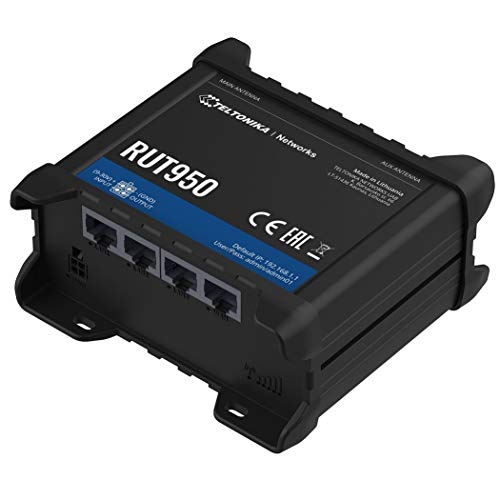
If one listing title in this guide could be framed, it is this one: the RUT950 is described as an LTE 4G router for AT&T and T-Mobile with, in the title’s own words, automatic switch to available backup connection, plus a wireless access point with hotspot functionality. That phrase is the exact promise behind the search that brought you here — delivered, characteristically, not by a phone accessory but by an industrial cellular router with a second path ready inside.
The RUT950 is the older, 4G generation of Teltonika’s line, and its appeal is maturity. Fleets and cabinets full of these units have been switching connections for years. The built-in access point means small installations — a site hut, a market stall, a temporary office — can serve local devices without extra hardware, and the hotspot functionality suits guest or voucher-style access in small public settings. Carrier naming in the title is a helpful honesty: AT&T and T-Mobile are stated, so buyers on other networks know to check band support rather than assume.
Set speed expectations by the generation. This is the continuity pick, not the performance pick; the RUTM50 above is the 5G answer when throughput matters. What the RUT950 sells is the switch itself — automatic, unattended, proven — and for card terminals, telemetry, alarms and a modest office’s essential traffic, continuity beats speed every working day of the year.
There is a fleet logic to the RUT950 worth naming. Because the model has been deployed for years in large numbers, accessories, mounting options, configuration guides and second-hand knowledge are everywhere. An installer who has never touched one can find a walkthrough for nearly any scenario in minutes. For organisations standardising on one box across many small sites, that ecosystem of familiarity is a feature as real as any radio specification.
- Cellular: LTE 4G, for AT&T and T-Mobile per the title
- Failover: automatic switch to available backup connection, stated in the title
- Wireless: access point with hotspot functionality
- Model: RUT950, unit code RUT950J02400 in the title
- VPN detail: not itemised in the title — look for it in Teltonika’s documentation
- Failover switch time: the title gives no figure — check the manufacturer’s documentation
Strengths
- The automatic backup switch is promised in the title itself.
- Built-in access point serves small sites without extra hardware.
- A long-serving industrial platform with a deep knowledge base.
Trade-offs
- 4G generation caps the primary path’s speed.
- Carrier fit is stated for two networks; others must verify bands.
- Industrial interface and setup assume a methodical installer.
Best for: small sites on AT&T or T-Mobile where unattended continuity matters more than headline speed.
Not suited for: a bandwidth-hungry office that would feel 4G as a ceiling within the first week.

MOFI6500-5GXeLTE — Dual-SIM business cellular
MoFi’s 6500 aims the cellular failover idea squarely at business premises that think in terms of carriers. The title describes a 4G LTE and 5G dual SIM cellular router with amplified Wi-Fi 6, auto failover and business-class performance, compatible with Verizon, AT&T, T-Mobile and more, and it doubles as a VPN router. Where the Teltonika units speak the language of cabinets and fleets, this one speaks the language of the shop floor and the branch office: bring your carrier relationship, plug in, and let the box mind the connection.
Dual SIM plus three named carriers is the flexibility story. A business can run its primary service on one carrier and keep a second carrier’s SIM as the understudy, choosing the pair by local coverage rather than by the router’s limitations. The amplified Wi-Fi 6 matters in this setting because the router is expected to be the wireless network too — premises-sized coverage rather than the cabinet radio of the industrial picks.
Auto failover is stated plainly in the title, which earns this pick its place, but the details a careful buyer wants — detection behaviour, data safeguards on the backup SIM, which bands on which carrier — live in MoFi’s documentation rather than the listing. Verify those before a rollout, especially the carrier plan rules: business failover works best on plans that expect router use, and the time to learn a plan’s terms is before the first outage, not during it.
Premises Wi-Fi deserves a moment in this review because the MOFI6500 is often the only router on site. Amplified Wi-Fi 6 in the title suggests a unit designed to cover a shop floor or office directly, and failover protects that whole wireless estate at once: when the primary carrier stumbles, the tills, tablets and staff phones keep their network names and simply continue. Staff notice nothing, customers notice nothing, and that invisibility is the entire business case.
- Cellular: 4G LTE and 5G, dual SIM, per the title
- Failover: auto failover, stated in the title
- Carriers named in title: Verizon, AT&T, T-Mobile and more
- Wireless: amplified Wi-Fi 6
- VPN: described as a VPN router in the title (protocols not itemised — see MoFi documentation)
- Failover switch time: not published in the title — verify with the manufacturer documentation
Strengths
- Three named carriers plus dual SIM give real backup pairing freedom.
- Wi-Fi 6 lets it serve as the premises network, not just the modem.
- Auto failover is a stated headline feature.
Trade-offs
- Carrier plan terms for router use need checking before deployment.
- Failover tuning details sit in documentation, not the title.
- Business-class positioning means business-class configuration effort.
Best for: shops and branch offices that want cellular continuity on their choice of major carriers.
Not suited for: a home user with cheap wired broadband and no outage history — the cellular apparatus would never earn its keep.
Cisco RV340 — Small-business dual WAN
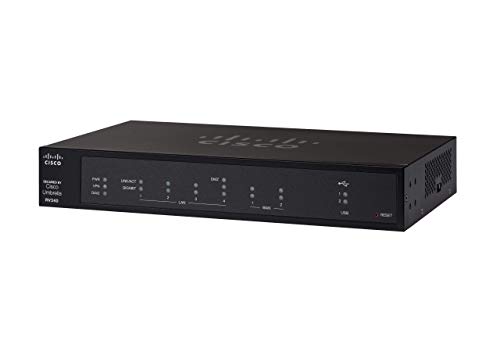
The Cisco RV340 closes the list with the establishment option: a VPN router with four gigabit Ethernet ports plus dual WAN, and limited lifetime protection named in the title. For a small business that buys networking the way it buys accounting software — brand first, surprises never — the RV340’s dual WAN arrangement offers the same wired-to-wired failover architecture as the ER-605, inside Cisco’s small-business ecosystem and support habits.
Four gigabit LAN ports plus the dual WAN pair make a tidy single-box core for a small office: servers, a printer, a couple of access points and two internet lines in one shelf-friendly unit. The VPN router designation in the title speaks to the branch-and-home-worker pattern — the office as the hub, staff tunnelling in — and dual WAN protects that hub role, because a VPN endpoint that vanishes with one line is a poor hub indeed.
As with the other wired gateways, there is no cellular or phone path in the title, and failover particulars belong to Cisco’s documentation. What the title does add is the limited lifetime protection line, which signals how Cisco expects this box to be owned: installed, configured, and left to work for years. Businesses that value that ownership style will find the RV340 the most natural fit in this guide; the home tinkerers have better toys elsewhere in the list — and homes whose main need is a smarter everyday network may prefer the direction taken by Best Wireless Routers for Smart Homes.
- WAN arrangement: dual WAN, per the title
- LAN ports: 4 × gigabit Ethernet
- Role: VPN router for small business
- Protection: limited lifetime protection, per the title
- Failover path: second wired line (no cellular path is claimed in the title — see Cisco documentation)
- Failover switch time: no figure in the title — consult the manufacturer’s documentation
Strengths
- Dual WAN plus four LAN ports make a complete small-office core.
- Cisco’s small-business support habits suit risk-averse buyers.
- Limited lifetime protection signals long-ownership intent.
Trade-offs
- Wired backup only — a second line subscription is part of the design.
- No built-in Wi-Fi; access points complete the network.
- Configuration depth is business-grade, not plug-and-play.
Best for: a small office that wants dual-WAN continuity inside a mainstream business brand’s ecosystem.
Not suited for: a site whose only possible backup is cellular — this gateway has no SIM path in its design.
How Should a Home Office Think About Failover Differently from a Business?
A business buys failover to protect revenue: card payments, bookings, alarms, the phones. A home office buys it to protect a reputation — the presentation that must not freeze, the interview that must not drop, the deadline that lives in the cloud. The stakes differ, and so does the sensible spend. A dual-SIM industrial router guarding one person’s desk is usually overkill; a modest second wired line into a dual-WAN gateway, or even a well-chosen cellular pick shared with the household, matches the risk more proportionately.
The home office also has a traffic problem businesses solved long ago: the household competes with the job. When the connection fails over to a metered backup, the home’s streaming and game downloads should yield instantly to the work traffic. That is a policy setting, and it is why the gateways in this guide with QoS and bandwidth management in their titles deserve attention from home workers too. Set the rules once, on a calm weekend, and the next outage becomes a non-event instead of a family negotiation conducted over a frozen video call.
Finally, home offices should think about who else depends on the line. A partner’s job, a child’s exam-week revision, the house alarm — the failover you install for work quietly protects all of it, which often justifies a better pick than the work budget alone would suggest. Buy for the household’s whole map of dependence, not just the desk.
What Should You Check Before Any Failover Router Goes Live?
Begin with the backup path’s paperwork. For cellular picks, activate both SIMs in the router itself — not in a phone — and confirm each registers on its carrier from the router’s final position, because signal at the window and signal in the comms cupboard are different countries. For wired picks, confirm the second line is genuinely independent: different provider where possible, and an honest answer about shared ducts and shared street cabinets.
Next, align the network’s expectations. Devices with fixed addresses, printers, cameras and payment terminals should be checked after the first test switch, because failover changes the path, not the addresses — anything that misbehaves is usually an ageing device clinging to a dead session, and it is far better discovered in a drill than at the till on a Saturday.
Then set the human layer: who receives the alert when the primary line dies, and who is allowed to declare the incident over? Even a one-person office benefits from the alert, because a silent failover to a metered SIM can run for days unnoticed, quietly converting a cheap backup into an expensive main line. Most platforms in this class can signal the switch somehow; find that setting before you need it.
Last, record the configuration. Export the router’s settings, photograph the cabling, and write one page describing what the backup is and how it was tested. Failover systems outlive the memory of their installers. The page you write on installation day is the difference between a five-minute fix and a forensic investigation two years later.
Which Failover Path Fits Your Outage Pattern?
| Pick | Primary path | Backup path | Wireless built in |
|---|---|---|---|
| TP-Link ER-605 | Wired line 1 | Wired line 2 | No |
| Cudy R700 | Wired line 1 | Additional wired WAN | No |
| Teltonika RUTM50 | 5G cellular | Second SIM / carrier | WiFi 5 |
| Teltonika RUT950 | 4G cellular | Backup connection, automatic switch | Access point |
| MOFI6500-5GXeLTE | 4G LTE / 5G | Second SIM, auto failover | Wi-Fi 6 |
| Cisco RV340 | Wired line 1 | Wired line 2 | No |
The table divides the guide in two. The wired gateways assume your building can be served by two lines and reward you with the cheapest, fastest failover money can buy. The cellular trio assume the opposite — that wires are the problem — and carry their backup in a SIM slot. Neither philosophy is superior; they answer different maps of risk, and choosing between them is the real decision this guide asks of you.
Notice, too, what no row contains: a handset. The phone-tether column would be empty across all six, which is the honest summary of the category. What the industry built instead is better suited to unattended recovery — and once you have watched a dual-SIM router rescue a site at midnight without waking anyone, the appeal of depending on a phone’s battery becomes hard to reconstruct.
How Does a Router Decide That a Connection Has Died?
Detection is the invisible half of failover, and the half that decides whether the switch feels instant or endless. The simplest method watches the physical link: cable out, line down. That catches unplugged equipment and dead modems, but it misses the cruellest failure of all — the line that stays electrically alive while the provider’s network beyond it has stopped passing traffic. Every experienced network owner has met that zombie state, usually mid-morning on a deadline day.
Serious platforms therefore probe. The router sends regular test traffic — pings to a chosen address, or similar health checks — through the primary path, and declares the path dead after a set number of failures. The tuning is a genuine trade: probe too eagerly and a congested evening triggers pointless switches to the backup; probe too lazily and the office sits offline for minutes before the router believes the evidence. Business gateways like the ones in this guide expose these knobs precisely because no factory default fits every line.
Cellular detection has its own texture. A modem can hold registration while data stalls, or lose a carrier in a way a SIM switch cures and a retry does not. Dual-SIM units earn their price in this layer — the logic that decides whether to wait, retry or change SIMs entirely. None of the six titles publish their detection logic, which is normal, but the manufacturer documentation for your shortlist will describe it, and it deserves a read before the hardware is bolted anywhere inaccessible.
The practical translation for buyers: when you run your first failover drill, you are not only testing whether the backup works — you are measuring your detection settings against reality. Time the gap between pulling the cable and the first successful page load on the backup path. If the gap embarrasses you, the answer is almost always tuning, not different hardware.
How Do You Test Failover Before an Outage Tests It for You?
Schedule the drill during a quiet hour and announce it to anyone using the network. Pull the primary line — physically disconnect it — and time what happens. Note which devices reconnect cleanly, which need a nudge, and how long the backup path takes to carry real traffic. Then restore the primary and watch the failback: a network that fails over beautifully and fails back chaotically has only half a solution.
Test the backup path under load, not just at idle. A cellular backup that browses happily may buckle when the office’s cloud backup job discovers it. Decide in advance which traffic is allowed on the backup — card terminals and email, yes; the media library sync, no — and configure those priorities while calm, because mid-outage is a poor moment to learn your router’s policy menus.
Write the results down. Detection took this long, the call dropped and reconnected, the terminal never noticed. That small document is what turns a product purchase into an operational capability, and it is what you will hand to the next person who administers the network. Repeat the drill after firmware updates and after any change of SIM or provider.
What Does a Year of Failover Actually Cost — and What Does an Outage Cost?
Run the honest arithmetic. The wired route costs a second line’s subscription, month after month, most of it buying capacity you rarely use — though load balancing means the line is not idle, which softens the waste. The cellular route costs a second SIM plan, sized for emergency traffic rather than everyday volume, plus the discipline of traffic rules so the emergency path never becomes the household’s streaming pipe. Either way, the subscription is the product; the router is a one-off frame around it.
Against that, price one outage properly. For a shop, an afternoon without card payments is lost sales plus the particular embarrassment of turning customers away at the till. For a consultancy, it is a blown presentation in front of the client the quarter depended on. For a monitored property, it can be an alarm system reporting nothing at the moment it mattered. Most readers who do this arithmetic honestly discover the backup pays for itself the first time it fires — which is precisely why the category exists, and why the equipment in it is built to be boring.
There is a middle path worth considering for homes: start with the gateway and one line, wire the second port, and add the backup subscription when the work pattern justifies it — a new job, a home business, a run of outages that proves the risk. The hardware in this guide tolerates that staging, because the ports and SIM slots wait patiently. What does not work is the reverse order: discovering during an outage that the router you bought has no second path at all.
How Do Power Cuts Fit Into a Failover Plan?
Connectivity failover assumes the router itself stays alive, and in many real incidents the power fails with the connection — storms take both. A failover installation that dies with the lights is a fair-weather friend. Small battery backup units sized for the router, the modem or ONT and, on cellular picks, nothing else, buy the network an hour or more of grace, which covers the majority of real cuts and lets cellular failover do its work while the street is dark.
Sequence matters when power returns, too. Modems and routers that boot in the wrong order can leave a network convinced its primary line is dead and camped on the backup for days. After any power event, glance at which path the network is using; after any long outage, run the drill again. Resilience is a habit of checking, not a feature you purchase once and possess forever.
What Mistakes Do People Make When Setting Up Failover?
The first mistake is buying the router and skipping the second path. A dual-WAN gateway with one line connected is a portrait of resilience, not the thing itself; the subscription for the backup — second line or second SIM — is the actual product, and the router is its frame. Budget them together or do not start.
The second mistake is choosing a backup that shares the primary’s fate. A second wired line from the same provider, entering the building through the same duct, fails in the same roadworks incident. Diversity is the point: different provider, different medium, different physical path, as far as your site allows. The cellular picks exist precisely because a radio path cannot be cut by the excavator that cuts cables.
A fourth mistake is installing the backup and never telling anyone it exists. Staff who do not know the network has a second path will power-cycle equipment during the switchover pause, unplug the “spare” line because it looks unused, or report the brief freeze as a fresh fault and escalate the wrong problem. Label the cables, label the second line at the socket, and put one sentence in the office’s shared notes explaining that a short pause followed by recovery is the system working as designed. Failover is partly a communications project, and the cheapest part of it is the labelling.
The third mistake is forgetting data economics on cellular backup. An outage over a long weekend, with the whole office streaming and syncing through a metered SIM, can produce a bill that dwarfs the router’s price. Traffic rules, data alerts and a backup plan sized for the job are part of the installation, not refinements to add later.
What Other Backup Paths Can Feed These Gateways?
The wired gateways in this guide are agnostic about what the second line is, and that opens useful combinations. A fixed-wireless service from a mobile carrier makes a fine second path into a dual-WAN port, arriving by radio and therefore immune to the cable faults that kill the primary. A satellite connection, where one exists, is the ultimate diversity play — different medium, different infrastructure, different failure modes entirely — and even a slow satellite path carries email, payments and alarms respectably during an outage.
Community and building networks offer another pattern: offices in shared premises sometimes keep a mutual arrangement, each feeding a line into the other’s gateway as the emergency path. The ER-605 and RV340 class of hardware handles such arrangements without complaint, because a WAN port does not care whose name is on the bill. What matters is the paperwork of permission and the honesty of the test drill.
The cellular picks invert the pattern for some sites: cellular as the primary, wired as the backup. A new premises waiting months for a fibre install can open on 5G through a RUTM50 or the MOFI6500, then demote cellular to backup duty when the wired line finally lands. That staging is one of the most practical uses of dual-path hardware, and it argues for buying the failover router at the start of a tenancy rather than after the first outage teaches the lesson.
Whichever pairing you choose, write the pairing down as a sentence: “If X dies, Y carries us, and Z is what we switch off to protect the bill.” If you cannot complete that sentence for your network, the installation is not finished, whatever the hardware says.
Final Recommendation
Start from your map of risk. Two wired providers available? The Cudy R700’s title-stated failover and OpenWRT control make it the enthusiast’s wired core, the ER-605 the managed business alternative, and the RV340 the brand-conservative choice. No trustworthy wires? The RUTM50 brings 5G and dual SIM to unmanned sites, the RUT950 offers the most plainly stated automatic switch in the guide on proven 4G hardware, and the MOFI6500 tailors the same idea to carrier-flexible business premises. The phone in your pocket was never going to guard the network at 3 a.m. — one of these six, properly tested, actually will.
Whichever you choose, keep the receipt of your first drill with the router’s paperwork: the date, the switchover time you measured, and the one device that misbehaved. That scrap of evidence is worth more than any specification in this guide, because it describes your network rather than a laboratory’s — and it is the baseline every future test, update and replacement gets compared against.
Frequently Asked Questions
Can any of these routers fail over to my phone’s USB tether automatically?
None of the six listing titles claim USB phone tethering, so this guide does not claim it for them. The working alternatives are stronger ones: a second wired line on the dual-WAN gateways, or a SIM-based backup inside the cellular routers, which is permanently installed and does not depend on a handset being present, charged and recognised.
What is the difference between load balancing and failover?
Load balancing spreads everyday traffic across two healthy connections. Failover moves traffic when one connection dies. Several picks here do both, but only failover protects you during an outage — check that the title or documentation names failover explicitly, as the Cudy R700’s title does.
Will my video calls survive a failover?
Expect a brief freeze while the router switches paths and the call reconnects; some calls recover in place, others need rejoining. Failover protects the network’s availability, not the immortality of individual sessions. For most offices that trade is gladly made.
Does failover need a static IP or special provider features?
For outbound continuity — staff reaching the internet, tills reaching the payment service — no. The backup path simply needs to work. Inbound services are the exception: if the outside world must reach a server inside your network, an address change during failover matters, and you should discuss that requirement with both providers before choosing hardware, because it shapes the design more than any router feature does.
Do I need two SIM cards for the cellular picks?
Dual SIM failover needs a second SIM to fail over to — two carriers is the resilient arrangement. A single SIM still gives you the cellular connection itself, but the automatic switch then has nowhere to switch. Plan the second SIM and its data allowance as part of the installation.
Can failover protect a home alarm or camera system?
Yes — this is one of the strongest use cases, because alarms and cameras need continuity, not speed. A cellular backup keeps a monitored system reporting when the wired line is cut, which is exactly the scenario such systems exist for. Keep the traffic rules permissive for those devices on the backup path, and include them in your drill: pull the primary line and confirm the camera still reaches its service before you call the installation finished.
How fast is the switch from primary to backup?
None of the six listing titles publish a switchover time, and this guide will not invent one. Detection settings are configurable on business platforms and materially change the answer. Check the manufacturer documentation for your shortlist, then measure the real figure during your own failover drill.
Related Guides
Continue with Best Wi-Fi Routers and Access Points for Offices and Warehouses, Best Cable Modem Routers That Work with Spectrum and Best Wireless Routers for Smart Homes.


