What's inside
- Where to Buy
- Key Takeaways
- Quick Picks
- How We Chose These Picks
- Comparison
- How to Choose a Canon Monochrome Laser Without Overbuying
- Is 19 PPM Too Slow for a Home Printer in Practice?
- What Does an Auto Document Feeder Change About Scanning?
- Why Do Two Canon Titles Print Their Warranty While Others Stay Silent?
- Canon Buying Errors That Titles Could Have Prevented
- Final Recommendation
- Frequently Asked Questions
- Related Guides
As an Amazon Associate I earn from qualifying purchases. This post may contain affiliate links at no extra cost to you.
[SITE_DOMAIN] is reader-supported. When you buy through links on our site, we may earn an affiliate commission.
Where to Buy
Canon sells this imageCLASS family through Amazon under each model full name, so the listings are easy to tell apart once you know the code you want. The veteran of the group is the Canon imageCLASS LBP6030w, a print-only box whose page states its warranty term in the title itself. Newer households usually start at the Canon imageCLASS MF273dw, which brings a scanner and an auto document feeder into the house. The Canon imageCLASS LBP172dw keeps single-function discipline with duplex, while the Canon imageCLASS MF465dw II aims at the busiest home offices here. Between them sit the Canon imageCLASS LBP122dw for compact two-sided printing and the Canon imageCLASS MF462dw II, whose three-year warranty wording deserves a slow read on its own listing.
The hunt for the best canon black white laser printers usually begins with a household that has outgrown an inkjet patience. Canon imageCLASS line answers with toner machines that print text crisply, idle gracefully and come back from a quiet month without a cleaning ritual. The six models below are all monochrome, all wireless, and they divide neatly into two tribes: three print-only boxes for people whose paper life is one-directional, and three multifunction machines that copy, scan and, in two cases, fax.
Unlike many printer families, this one publishes its pace. Five of the six titles state a pages-per-minute figure, running from a gentle 19 ppm on the oldest design to 42 ppm on the flagship multifunction, so speed can be compared honestly from title evidence alone. That transparency shapes the whole guide: where Canon prints a number, the review uses it; where a title stays quiet about a feature, the spec box records the silence in the standard sentence instead of borrowing a figure from a neighbouring model.
One member deserves a framing note before the reviews. The LBP6030w is an older design still on sale, with a one-year warranty and the slowest engine here. It is included because its simplicity and compact brief remain genuinely attractive for light duty, not because the guide pretends it is a current-generation machine. Read its review as the case for buying maturity cheaply and knowingly, and the newer models as the case for paying for pace, feeders and longer cover.
Placement, finally, is part of the specification in any real home. These Canons range from a white compact that can live on a bookshelf to multifunction machines that want a desk of their own with headroom for a feeder lid. Measure the intended home before ordering, including the space above the machine, and the family argument about which model fits will be settled by a tape measure rather than by taste.
Key Takeaways
- All six are Canon imageCLASS monochrome lasers; three print only (LBP6030w, LBP172dw, LBP122dw) and three print, copy and scan (MF273dw, MF465dw II, MF462dw II), with fax on the two MF46x models.
- Stated speeds run 19 ppm (LBP6030w), 30 ppm (MF273dw and LBP122dw), 35 ppm (LBP172dw), 37 ppm (MF462dw II) and 42 ppm (MF465dw II).
- Duplex is claimed in the titles of the LBP172dw, MF465dw II and LBP122dw, and in the MF462dw II wording as a duplex laser printer.
- Warranty terms are printed in several titles: one year on the LBP6030w, MF273dw and LBP172dw, and three years on the MF462dw II.
- Only the MF273dw title names an auto document feeder; only the MF465dw II title mentions expandable paper capacity.
Quick Picks
| Pick | Badge | Why it earns a place |
|---|---|---|
| Canon imageCLASS LBP6030w | Mature print-only compact | Single-function wireless printing at 19 ppm with a one-year warranty, in a white compact body. |
| Canon imageCLASS MF273dw | Feeder-equipped family scanner | Print, scan and copy at 30 ppm with an auto document feeder and one-year warranty. |
| Canon imageCLASS LBP172dw | Fast duplex single-function | Single-function printing at 35 ppm with duplex, mobile readiness and a white home-office body. |
| Canon imageCLASS MF465dw II | Flagship pace for home offices | Print, copy, scan and fax at 42 ppm with duplex and expandable paper capacity. |
| Canon imageCLASS LBP122dw | Compact duplex for homes | Print-only duplex at 30 ppm, mobile ready, sized and priced in spirit for home use. |
| Canon imageCLASS MF462dw II | Three-year warranty all-in-one | Scanner, copier and fax at 37 ppm with a three-year warranty and mobile readiness. |
How We Chose These Picks
The imageCLASS badge was the entry ticket, applied through listing titles rather than marketing memory. Every machine below calls itself imageCLASS in its own title and describes itself as a monochrome laser, which keeps the guide inside one coherent Canon family instead of drifting across the wider PIXMA inkjet world. A buyer cross-shopping the two Canon tribes should hold that line firmly: these are toner machines for text-first households.
Speed evidence was the second filter, and it doubled as a honesty test. Because five titles print a ppm figure, the guide can rank pace without inventing anything, and the one model whose generation is older announces itself through its own numbers. Reviewers resisted the temptation to normalise those figures into a single test claim; each speed below is quoted as its own title states it, beside the model it belongs to and no other.
Function spread came third. A guide containing six print-only boxes would fail scanners; a guide of six multifunction machines would fail the many households that never scan. The three-and-three split mirrors real homes more faithfully, and within the multifunction tribe the presence or absence of fax and of an auto document feeder creates the genuine internal argument the reviews then conduct.
Warranty wording closed the selection. Several Canon titles print their cover term, an unusual courtesy that lets buyers compare one year against three without opening a single PDF. That detail matters disproportionately in a home, where a printer is expected to serve quietly for years and where the difference between the terms can outlast every other specification on the page.

Canon imageCLASS LBP6030w — Mature print-only compact
The LBP6030w is the elder of this family and makes no effort to disguise it. Its title reads like a printer from a calmer era: monochrome, single-function, wireless, compact, 19 pages per minute, one-year limited warranty, white finish, print only. In a guide full of machines reaching for more, there is something restful about a specification that reaches for exactly one thing. A spare-room desk, a student room or a grandparent house that prints letters and labels will find the whole argument in that sentence.
Nineteen pages per minute sounds slow only until it is translated into home jobs. A five-page letter is done before the kettle clicks. A thirty-page document takes under two minutes of engine time. Home printing is measured in errands, not in press runs, and at errand scale this Canon pace is adequate for almost every household that is not printing manuscripts weekly. The buyers who should look elsewhere are those whose documents run long and frequent, and the guide gives them three faster print-only and multifunction alternatives below.
The one-year warranty deserves an honest reading. It is the shortest cover in this guide alongside two newer models, and it reflects the design age. Buyers choosing this model are trading cover and speed for compactness and simplicity, a trade that makes sense for light duty and little sense for a home office that invoices from the same desk. The white finish, unique here, also suits bright rooms where a black box would glare.
Simplicity compounds over years of ownership. A single-function machine has no scanner lid to loosen, no feeder rollers to feed wrongly, and a menu shallow enough that a visiting relative can print a boarding pass without a tutorial. Households buying for an older parent, or for a holiday home visited monthly, often value that shallowness above every modern feature, because the cost of a printer in those settings is measured in support phone calls, and this design generates very few.
Idleness is the other home test this Canon passes by birthright. Toner does not dry, clog or demand a warm-up ritual after a quiet month, so the machine that prints six times a year still prints the seventh time on demand. For a second home, a seasonal rental or a room used only at tax time, that tolerance is worth more than twenty extra pages per minute that would never once be missed.
Keep expectations aligned with the title and the relationship stays happy. This is a printer for letters, labels, forms and the occasional document, kept on a small shelf and asked for little. Ask it for a small business worth of daily volume and the mismatch will be felt in waiting time rather than in failures, which is the gentlest way a printer can say it was bought for the wrong house.
- Function: print only, single-function
- Output: monochrome
- Speed stated in title: 19 PPM
- Warranty stated in title: 1 year limited
- Connectivity: wireless
- Body colour: white
- Duplex printing: Not stated in the listing title — verify with the manufacturer documentation
Strengths
- Single-function simplicity keeps setup and menus shallow.
- Wireless printing in a compact white body suits bright, small rooms.
- The warranty term is printed in the title, no hunting required.
Trade-offs
- 19 ppm is the slowest pace in this guide.
- No copy or scan function exists on this model.
- One-year cover matches two newer models but trails the three-year MF462dw II.
Best for: light-duty rooms — a spare desk, a student shelf, a grandparents house — printing letters, labels and short forms. Not suited for: a manuscript-a-week workload, because a 19 ppm engine makes long documents a waiting exercise.
Give this Canon the easiest first week in the guide: connect it, print a letter from each computer in the house, and file the warranty wording somewhere findable. Because the design is mature, confirm the exact model code on the box matches the listing before setup begins. When you shop, open the LBP6030w page and check price on Amazon there, treating its veteran status as part of the bargain you are striking rather than a surprise to discover later.

Canon imageCLASS MF273dw — Feeder-equipped family scanner
The MF273dw is where this Canon family becomes a paperwork machine. Its title lists a scanner, a copier and an auto document feeder alongside 30 ppm printing, and that feeder is the detail that separates casual scanning from committed scanning. A household digitising a folder of bank statements or a term of school correspondence does not want to lift a lid thirty times; a feeder turns the chore into loading a stack and pressing a button, which is the difference between an archive that happens and one that stays theoretical.
Thirty pages per minute places the engine comfortably in the modern middle of this guide: twice nothing like the flagship pace, yet brisk enough that a forty-page document is a short errand rather than an event. For family volumes — homework packs, club newsletters, the occasional contract — the feeder and the scanner will be remembered long after the speed figure is forgotten, because they change what the household bothers to digitise at all.
Fax is absent from this title, and the warranty is one year, matching the veteran LBP6030w. Buyers who need fax should look at the two MF46x models below rather than assuming the MF prefix guarantees it across the range. Buyers who need neither fax nor flagship pace will find this the most balanced Canon in the guide: three functions, a feeder, a fair engine and a black finish that disappears into a home office corner.
The feeder also changes copying. Multi-page documents — a stapled agreement, a chapter of a manual — can be copied as a set instead of page by page, which is how home copiers earn their keep during a house move, a school application season or a benefits claim. Keep the original stack in order, run a two-page test first, and the machine will handle the tedious middle of the job while the household gets on with the interesting edges.
Scanning quality for documents is about legibility rather than beauty, and a monochrome laser multifunction is honest about that bargain. Text, signatures and stamps are its territory; family photographs are not, and households planning a photo archive should keep that project for a colour scanner. Judged on documents, the MF273dw covers the traffic that actually fills home filing cabinets, which is the standard this guide applies to every multifunction claim.
Placement advice for feeder machines is simple and often ignored: leave headroom above the unit. A feeder needs its lid opened and its stack loaded from above, so a shelf with a low ceiling turns a convenience into a wrestling match. Give it open air on a desk or a tall shelf and the design works as drawn; cramp it and owners will quietly stop scanning, which defeats the entire reason for choosing this model.
- Functions: print, scan, copy
- Output: monochrome
- Speed stated in title: 30 PPM
- Auto document feeder: named in the title
- Warranty stated in title: 1 year limited
- Connectivity: wireless
- Fax: absent from the title
Strengths
- The auto document feeder makes batch scanning realistic at home.
- 30 ppm is a comfortable modern pace for family documents.
- Three functions cover the print-sign-scan household loop.
Trade-offs
- No fax function is claimed in the title.
- One-year warranty is the shorter cover offered in this family.
- Monochrome scanning serves documents, not photo archives.
Best for: a family office digitising folders of statements, school letters and agreements in batches. Not suited for: scanning a box of family photographs for an archive, because this monochrome document machine is built for text legibility, not colour photo work.
Load the feeder with a mixed test stack in the first week — one thin page, one thick, one slightly creased — and learn how the machine treats your real paper before a deadline stack arrives. Set a scan folder the whole household can reach. For the money side, visit the MF273dw listing to check price on Amazon, and confirm the feeder wording is present in the title of the unit in your cart, since that feature is the reason to choose it.

Canon imageCLASS LBP172dw — Fast duplex single-function
The LBP172dw is the print-only idea executed with modern numbers. Its title stacks the claims in a telling order: monochrome duplex first, then wireless, single function, home office, mobile ready, and a speed of 35 ppm that embarrasses several multifunction machines elsewhere in this guide. A household that prints documents — real documents, with page counts — and never scans will find this the most focused Canon here, a printer that spent its entire budget on the one job.
Thirty-five pages per minute paired with duplex changes the texture of long jobs. A sixty-page report emerges two-sided in a couple of minutes, ready to hole-punch and file, and the paper stack is half the height of the single-sided equivalent. Mobile readiness extends the same efficiency to phones, so the document a colleague emailed at breakfast can be on the desk before the laptop bag is unpacked. Nothing about the model reaches toward scanning, and that restraint is the design integrity of the thing.
The one-year warranty and white finish mirror the veteran LBP6030w, which sets up the cleanest internal comparison in the guide. Between the two white print-only Canons, the choice is pace and duplex against maturity and simplicity. A light-duty shelf should still take the elder; a working desk that prints weekly documents should take this one and never think about the decision again.
Home offices benefit from printers that behave like appliances rather than projects, and a single-function wireless box is the purest form of that idea. There is no scanner to configure, no fax line to negotiate, no feeder to jam with a forgotten staple. The LBP172dw asks for paper, toner and a network, and returns documents. Workers whose scanning needs are genuinely zero — and many remote workers discover theirs are, once the employer portal accepts phone uploads — will feel the calm of that narrowness daily.
Duplex deserves a practical footnote: set it as the default and audit the exceptions. Forms printed for signing often read better single-sided, and legal documents occasionally demand it, so keep single-sided as a conscious per-job choice rather than the standing setting. Owners who make that one driver decision in the first week will halve their paper order for the year without ever thinking about it again, which is the highest compliment a default can earn.
The white body is not a trivial detail in a home office that doubles as a guest room. Black equipment reads as office infrastructure; a white printer on a light desk reads as furniture. Households negotiating shared rooms will understand why this model and the little LBP6030w wear white while the multifunction tribe wears black, and the choice of finish can be the difference between a machine tolerated and a machine welcomed.
- Function: print only, single function
- Output: monochrome
- Duplex: named at the head of the title
- Speed stated in title: 35 PPM
- Connectivity: wireless, mobile ready
- Warranty stated in title: 1 year limited
- Body colour: white
Strengths
- 35 ppm with duplex is the strongest print-only pairing here.
- Mobile readiness covers phone-born documents.
- Single-function focus keeps ownership simple.
Trade-offs
- No scanner for signed-form returns.
- One-year warranty is the shorter Canon cover.
- White finish shows dust sooner in a workshop-adjacent room.
Best for: a home office printing long two-sided documents weekly from laptops and phones. Not suited for: a desk that must scan signed contracts back to clients, because this single-function body has no scanner at all.
Make the duplex default your first act after setup, then print the longest document in your current workload as a rehearsal and check the margins on both sides of the sheet. Keep the mobile route tested from the phone you actually carry. When the figures are compared, the LBP172dw page is the place to check price on Amazon for this model specifically, since its two white print-only siblings invite cart mix-ups.
Canon imageCLASS MF465dw II — Flagship pace for home offices
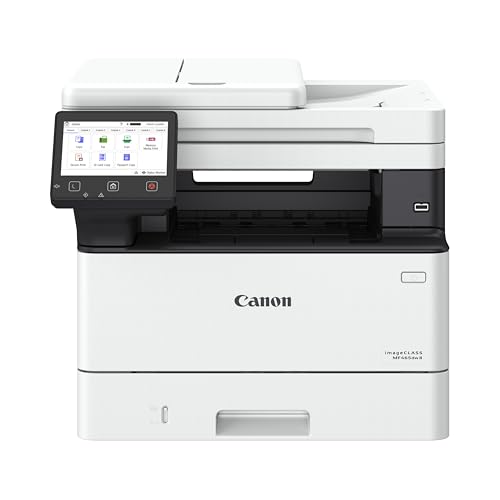
The MF465dw II carries the fastest engine in this guide and the broadest brief. Forty-two pages per minute, four functions including fax, duplex in the name of the thing itself, and expandable paper capacity — a phrase no other title here uses — aimed at the home office whose volume keeps growing into its printer. This is the Canon for the spare room that has quietly become a business address: invoices, statements, signed agreements and the occasional fax to an institution, all crossing one desk.
Expandable capacity is the grown-up detail. Home offices rarely stay the size they were planned; a side business adds a product line, a club role adds a mailing, and suddenly the tray empties mid-week every week. A machine whose paper supply can grow with the workload postpones the next purchase by years. The title does not state the expansion sizes, so buyers planning around a specific tray should confirm the configuration on the listing page rather than assuming a figure.
Fax completes the institutional toolkit. Like its Brother counterparts in the neighbouring guide, this Canon serves the clinics, insurers and offices that still route paper through fax numbers, and it does so at the top of the family pace. Households without that traffic should ask whether they need this flagship at all: the MF273dw covers three functions more modestly, and the money difference is better spent where a household actually lives. The flagship earns its place only when its pace and capacity will be used, but for the desk that will use them, nothing else here substitutes.
Speed at this level changes behaviour in a subtle way: printing stops being scheduled. At 19 ppm a long document is an errand planned around other tasks; at 42 ppm it is an afterthought executed between two sips of coffee. Home businesses feel that difference in the small hours before a dispatch deadline, when a hundred-page pack of invoices and labels either flows or becomes the story of the evening. The engine is the feature, and everything else in the title is arranged around feeding it.
The four-function layout also consolidates a desk physically. One machine on one shelf replaces the printer-plus-scanner sprawl that accumulates in growing home offices, freeing the surface for the work itself. Owners upgrading from separate devices should still keep the old scanner until the Canon scan workflow is proven with their real documents, then retire it with confidence rather than hope. A week of parallel running is cheap insurance for a business address.
A word on the II in the name: it marks a generation step within the MF465 line, and buyers comparing listings should match the full model name including that suffix, because specifications and bundles drift between generations wearing similar badges. The title printed in this guide is the one to compare against the cart, word for word, before any money moves on a machine at this level.
- Functions: print, copy, scan, fax
- Output: monochrome
- Duplex: in the model description in the title
- Speed stated in title: 42 PPM
- Paper capacity: expandable, per the title
- Connectivity: wireless
- Warranty term: Not stated in the listing title — verify with the manufacturer documentation
Strengths
- 42 ppm is the fastest stated pace in this guide.
- Four functions including fax cover institutional paperwork.
- Expandable paper capacity grows with a home business.
Trade-offs
- Capacity expansion sizes are not stated in the title.
- The flagship brief is wasted on light family printing.
- No warranty term is printed in this title.
Best for: a spare-room business address printing high volumes of invoices, agreements and faxes weekly. Not suited for: a quiet household printing a dozen pages a month, because a 42 ppm flagship engine would spend its life idling.
Plan the paper expansion before the first volume spike, not during it: decide which tray configuration the listing offers and whether your desk footprint accepts it. Register the fax number with the institutions that will use it, and test the full loop — print, sign, scan, fax — in the first week. To price the flagship honestly, check price on Amazon on the MF465dw II page itself, where the expandable capacity wording can be matched against the configuration on offer.

Canon imageCLASS LBP122dw — Compact duplex for homes
The LBP122dw states its audience in its own title: 30 ppm for home. That closing phrase does honest work, positioning a duplex, mobile-ready, print-only Canon between the veteran simplicity of the LBP6030w and the home-office intent of the LBP172dw. Families whose printing is documents rather than labels — homework essays, recipes worth keeping, travel itineraries, the monthly statement — will recognise their workload in this specification immediately.
Thirty pages per minute with two-sided output covers the family band of work without flagship theatre. A twenty-page school project prints while a parent finds the stapler. Mobile readiness matters here more than raw pace, because family documents are born on phones and tablets scattered around the house, and a printer that accepts jobs from the sofa removes the laptop pilgrimage that makes home printing feel like a chore.
Against its print-only siblings the argument is balance. It outruns the LBP6030w by eleven stated pages per minute and adds the duplex the elder title never claims, while asking less desk commitment than the 35 ppm LBP172dw aims at a working office. Households should choose among the three by workload honesty: labels and letters point down the range, weekly documents point here, and a business-grade desk points up it.
There is a family politics to a shared printer that specifications never mention. A machine that prints from any phone, quickly, on both sides, without a parent acting as print operator, quietly democratises the house paperwork. Teenagers print their own essays, grandparents print their own letters when visiting, and the printer becomes a utility rather than a favour. The LBP122dw specification reads like it was written by someone who understood that domestic reality, right down to the words for home at the end of its title.
Duplex at family scale also tames the paper archaeology of school life. Two-sided handouts file into slimmer folders, revision packs stop colonising the kitchen table, and the recycling box fills more slowly. None of this requires the household to care about printing as a topic; it requires only that the default be set once, on the day the machine arrives, by whoever unboxes it.
Keep this Canon away from the one job it was never promised for: scanning. A family that buys it should make peace with phone cameras for the rare form, or plan a multifunction machine instead. The peace is easy to keep when scanning is truly rare, and impossible when it is monthly, which is why the guide keeps returning to that single question — it is the fork in the road for this entire family of machines.
- Function: print only
- Output: monochrome
- Duplex: named in the title
- Speed stated in title: 30 PPM
- Connectivity: wireless, mobile ready
- Audience stated in title: for home
- Warranty term: Not stated in the listing title — verify with the manufacturer documentation
Strengths
- Duplex and 30 ppm fit family document workloads squarely.
- Mobile readiness serves phones and tablets around the house.
- Print-only focus keeps the machine compact and simple.
Trade-offs
- No scanner, so form returns rely on a phone camera.
- No warranty term is printed in the title.
- It cedes raw pace to the 35 ppm LBP172dw.
Best for: a family desk printing essays, statements and itineraries two-sided from phones and laptops. Not suited for: a home that must copy identity documents for applications, because a print-only body offers no copier glass.
Set the two-sided default at unboxing and test one print job from every phone in the house while the setup screens are still familiar. Families should also agree where printed schoolwork lives, because a fast printer creates paper faster than habits form. For the purchase itself, the LBP122dw listing is where to check price on Amazon, with the for-home wording in the title confirming you have the right sibling in the cart.
Canon imageCLASS MF462dw II — Three-year warranty all-in-one
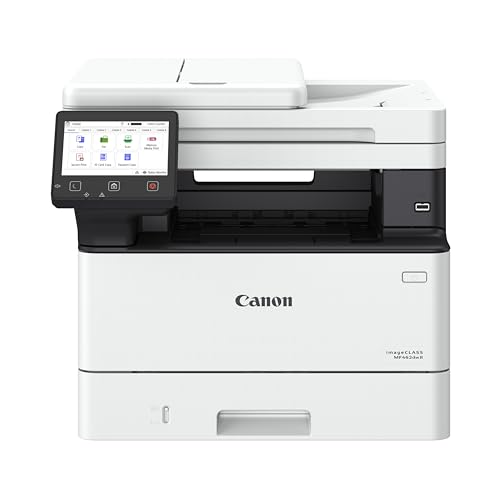
The MF462dw II makes its argument in one unusual phrase: a three-year limited warranty, printed in the title where buyers cannot miss it. In a family where the other multifunction Canon offers one year, that term triples the covered horizon and signals how Canon positions this generation. Paired with 37 ppm, fax, a scanner and copier, and mobile readiness, the specification describes the machine for buyers who intend to keep a printer a long time and would like the manufacturer to share that intention in writing.
Thirty-seven pages per minute sits just below the flagship MF465dw II, and the honest difference between the two is capacity ambition rather than pace. The flagship talks about expandable paper; this model talks about warranty years and addresses itself to home and office in the same breath. A buyer whose volume is steady rather than growing will likely value the cover more than the expansion path, and the guide regards that as a legitimate, even savvy, ordering of priorities.
Mobile readiness keeps the machine current with how documents actually arrive, and the all-in-one layout keeps the desk to one device. For a professional working from home — an accountant at filing season, a consultant with client paper — the combination of pace, fax and long cover is the complete domestic office argument, lacking only the flagship expansion story that most desks will never need.
Warranty length changes the emotional economics of a purchase. A machine covered for three years can be bought in a different spirit from a machine covered for one: minor worries are postponed, the purchase is amortised mentally across more seasons, and the household stops browsing replacements at the first odd noise. That calm has real value in a home office where the printer is load-bearing infrastructure for income, and it cannot be retrofitted later by wishing.
The generation suffix matters here as with its flagship sibling. The II marks the current iteration of the MF462 line, and the three-year term belongs to this listing title; buyers who find a similar name without the suffix should read that title on its own evidence rather than importing this one cover. Thirty seconds of title comparison protects the very benefit that makes this model distinctive.
Fax, often dismissed, keeps a particular professional clientele: practices, agencies and offices whose counterparties still run fax numbers as a matter of policy. For a home-based professional serving those counterparties, an all-in-one with fax built in removes a recurring errand to an outside service, and at 37 ppm the rest of the day documents move quickly enough that the machine never becomes the bottleneck of a small practice.
- Functions: print, scan, copy, fax (all-in-one)
- Output: monochrome
- Duplex: in the model description in the title
- Speed stated in title: 37 PPM
- Warranty stated in title: 3 year limited
- Connectivity: wireless, mobile ready
- Audience stated in title: for home and office
Strengths
- A three-year warranty is printed in the title, the longest cover here.
- 37 ppm with fax serves professional home offices.
- Mobile readiness plus all-in-one layout keeps one device on the desk.
Trade-offs
- It cedes the flagship expandable-capacity story to the MF465dw II.
- Five stated pages per minute slower than the flagship.
- The full function set is surplus for light family printing.
Best for: a home-based professional who keeps printers for years and wants the cover term in writing. Not suited for: a growing print business planning tray expansion, because expandable capacity is the flagship MF465dw II claim, not this title.
File the warranty term with the household documents on day one, and note the purchase date where a future claim would look for it. Test the fax loop and the mobile route in the first week, while the menus are new and patience is high. When you are ready, the MF462dw II page lets you check price on Amazon against the flagship, warranty wording visible in the title, so the comparison you are paying for is the one in your cart.
Comparison
| Pick | Functions | Stated speed | Warranty in title |
|---|---|---|---|
| Canon imageCLASS LBP6030w | Print only | 19 PPM | 1 year limited |
| Canon imageCLASS MF273dw | Print, scan, copy | 30 PPM | 1 year limited |
| Canon imageCLASS LBP172dw | Print only | 35 PPM | 1 year limited |
| Canon imageCLASS MF465dw II | Print, copy, scan, fax | 42 PPM | Not stated in the listing title |
| Canon imageCLASS LBP122dw | Print only | 30 PPM | Not stated in the listing title |
| Canon imageCLASS MF462dw II | Print, scan, copy, fax | 37 PPM | 3 year limited |
Speed is the rare column a comparison table can fill honestly in this category, because Canon prints the figures in its own titles. The spread from 19 to 42 ppm is real and wide, yet the table also shows why pace alone misleads: the two fastest machines are multifunction flagships, while the quickest print-only box, the LBP172dw at 35 ppm, outruns a multifunction model that many households would prefer for its feeder.
Warranty tells the second story. Three titles promise one year, one promises three, and two stay silent — and silence in a table cell is information too, directing the buyer to the listing page before money moves. Function count, speed and cover: a household that fixes its position on those three axes will find its Canon without reading a word of marketing.
How to Choose a Canon Monochrome Laser Without Overbuying
Start with the direction of paper travel. If documents only ever leave the house as prints, a print-only LBP model will serve for years and ask little. If paper also comes back — signed, scanned, emailed — the MF tribe is your territory, and the question narrows to feeder and fax. Households routinely overbuy the second direction out of prudence and underbuy it out of optimism; the cure is evidence, namely the last ten times you needed a scan, counted honestly.
Next, translate speed into your longest regular job. Pages per minute matters only across the documents you actually print: divide your typical long job by the stated pace and feel the difference between 19 and 42 ppm in minutes of your own evening. For a ten-page household, the gap is seconds and should be ignored. For a hundred-page business pack, the gap is the difference between printing during a phone call and printing instead of one.
Weigh the feeder and fax as institutional features. An auto document feeder, named only in the MF273dw title here, pays when scanning arrives in stacks. Fax pays when a specific institution in your life still demands it, and only then. Neither feature justifies itself as insurance; both justify themselves immediately when the matching workload exists. Buy the workload you can name, not the one you can imagine.
Give the warranty its own moment. A printed three-year term on the MF462dw II is a concrete asset, particularly for a machine bought to anchor a home business, while the one-year terms elsewhere are unremarkable rather than alarming. Buyers who keep machines for many years should treat cover length as a specification on the same level as speed, because it is the only number in these titles that describes the future instead of the present.
Close with the room. Two of these Canons wear white and suit bright domestic spaces; the multifunction machines wear black and read as office equipment. A printer that offends the room it lives in gets exiled to cupboards and garages, where wireless signals and human patience both go to die. Choose the machine the room will welcome and the network can reach, and the specification will take care of itself.
Network manners deserve a paragraph of their own. All six titles promise wireless, yet a home where the router lives two floors from the desk will test any printer honesty. Put the machine where a phone shows a strong signal, keep the router line of sight as clean as the room allows, and a wireless Canon will behave like a wired one for every job a household sends. Owners who skip that five-minute survey tend to blame engines for what walls have done.
Toner planning closes the purchase. Monochrome lasers sip rather than gulp, but a household entering a heavy season — a thesis, a filing deadline, a club yearbook — should start the season with a cartridge in reserve. The discipline costs one shelf slot and removes the only failure mode this class of machine really has, which is not mechanical at all but logistical: an empty printer on the one evening the paper cannot wait.
One last test separates a considered purchase from a hopeful one: name the three jobs the printer will do in its first month. If those jobs are a school project, a tax form and a set of labels, the compact end of this family will delight you. If they are a client pack, a fax to an insurer and a hundred-page report, the flagship end exists for you. A buyer who can name the three jobs already knows which Canon belongs in the house; the reviews above merely confirm the paperwork.
Is 19 PPM Too Slow for a Home Printer in Practice?
For the jobs most homes print, no — and the arithmetic is kinder than the headline suggests. Nineteen pages a minute means a boarding pass in seconds and a school essay before the author has found a stapler. Slowness becomes real only across long documents printed often, which is why this guide keeps steering manuscript households toward the 30 ppm and faster models while defending the veteran LBP6030w for the errands it was built to run.
There is also a patience asymmetry worth naming. A printer that is slow but instant to start beats a faster machine that must be woken, coaxed or reconnected, because home printing moments are short and impatient. The compact Canons wake on the network and print; that responsiveness, unmeasured by any title, is the speed a household actually experiences most days of the year.
Judge the question by your longest document, not your average one, and the answer usually settles itself. A household whose longest regular job is twelve pages will never meet the limit of the slowest engine here. A household whose longest job is a hundred pages meets that limit monthly, and for them the mid-range 30 ppm models are not a luxury but the correct sizing of the tool to the task.
Warm-up behaviour softens the comparison further. Laser engines reach working pace quickly, so the first page of a short job rarely waits long even on the gentlest model here. The household experience of speed is mostly first-page experience, and on that measure the whole family feels brisk; the stated ppm figures separate the models only when the page count climbs into territory most homes visit a few times a year.
What Does an Auto Document Feeder Change About Scanning?
It changes scanning from a craft into a chore of five minutes. Without a feeder, a thirty-page statement demands thirty lid lifts, thirty alignments and thirty chances to abandon the project. With the feeder named in the MF273dw title, the stack is loaded once and the machine works through it, which is why households with a feeder actually finish their archives while households without one keep a box labelled scanning beside the desk.
The feeder also disciplines the paper itself. Stacks must be de-stapled, flattened and ordered, a small ritual that produces cleaner scans and a filing system as a by-product. Owners who adopt the ritual during a quiet weekend, rather than during a claim deadline, will find the feature repays its modest premium in the first month of real use.
Feeder care is minimal but real. Dust on the rollers is the usual cause of the occasional double feed, and a monthly wipe during ordinary housekeeping keeps a home feeder honest for years. Owners who treat that wipe as part of the same routine as emptying the output tray will rarely meet the jam that gives feeders an undeserved reputation in households that never clean anything at all.
Why Do Two Canon Titles Print Their Warranty While Others Stay Silent?
Because warranty is a selling point only when it differentiates. The three-year term on the MF462dw II is long enough to headline; the one-year terms on three other models are stated plainly as part of a factual title; and two titles omit the subject entirely, which tells the buyer nothing bad and nothing good. The lesson generalises beyond Canon: a silent title is an instruction to check the listing page, never an invitation to assume the best or the worst.
For households, the practical move is to record the term at purchase time alongside the receipt, whichever model is chosen. Warranty claims fail on lost paperwork more often than on refused terms, and a printer bought for a decade of quiet service deserves ten minutes of filing on its first day in the house.
The same habit serves the whole purchase. Keep the receipt, the model code and the warranty wording together in one folder, digital or paper, and the machine first service conversation — should it ever happen — begins with facts instead of archaeology. Printers are bought to end paperwork problems; it is a poor bargain when the printer own paperwork becomes the problem.
Canon Buying Errors That Titles Could Have Prevented
Reading MF as a guarantee of fax. The MF273dw title lists scanner and copier but no fax, while the two MF46x titles name fax explicitly. The letters describe a family, not a feature list; the title of the specific model is the only contract that counts.
Comparing speed without comparing function. A 35 ppm print-only machine and a 30 ppm multifunction machine are not rivals on one axis. Households that rank by the single largest number end up with a fast printer and no scanner, or a feeder they bought accidentally.
Assuming white and black models share a generation. Finish is styling, not chronology: the white pair here spans the oldest design in the guide and a current home-office model. Read the speed and warranty in each title before letting colour imply age.
Ignoring the generation suffix at checkout. The II in the MF465dw II and MF462dw II names marks a specific iteration. A cart containing the earlier generation at a tempting figure is a different machine wearing a familiar badge.
Letting a silent warranty cell stay silent. Two titles here print no warranty term at all. That is a prompt to open the listing and read the cover before purchase, not a detail to discover in the box on the doorstep.
Final Recommendation
Most households should shortlist the MF273dw for its feeder-fed scanning, the LBP122dw for balanced family printing, or the LBP172dw when documents are long and scanning is genuinely absent from life. Professionals should weigh the MF462dw II three-year cover against the MF465dw II pace and expandable capacity, and light-duty rooms can still choose the LBP6030w with open eyes and a clear conscience.
Whichever imageCLASS takes the shelf, spend its first evening on the unglamorous setup — duplex defaults, scan folders, one test job from every device — and a Canon laser will repay that hour by vanishing into the household routine for years; the best compliment a family can pay this class of machine is that nobody in the house can remember when it arrived, only that the paper always comes out.
Buy it on a calm day, set it up on a calmer evening, and let the first real deadline find a machine that has already printed for every device in the house, from the study laptop to the phone in the kitchen drawer.
Frequently Asked Questions
Do any of these Canon printers print in colour?
No. Every model here is a monochrome laser producing black and white output, as the titles state. Canon colour printing lives in the PIXMA inkjet family, a different tribe covered by the neighbouring inkjet guides.
Which Canon here is fastest?
The MF465dw II, whose title states 42 ppm. The MF462dw II follows at 37 ppm and the print-only LBP172dw at 35 ppm, while the veteran LBP6030w states 19 ppm at the gentle end of the family.
Which models can fax?
The MF465dw II and MF462dw II name fax among their functions. The MF273dw offers print, scan and copy without fax in its title, and the three LBP models print only.
What does expandable paper capacity mean on the MF465dw II?
The title promises that the paper supply can be expanded beyond the standard configuration, suiting a growing home office. The title does not state tray sizes, so the listing page is the place to confirm the exact expansion options before planning around them.
Is the older LBP6030w still worth considering?
For light, print-only duty, yes: wireless, compact and simple, with its 19 ppm pace and one-year warranty stated plainly. Households printing long documents weekly will feel its age and should step up to the LBP122dw or LBP172dw instead.
Related Guides
Canon loyalties often run across a whole desk, and the neighbouring guides follow the rest of the family argument. Shoppers weighing the rival badge should compare Best Brother Black and White Laser Printers for Home Use before deciding. And households ready to leave monochrome behind will find the colour flagships in Best Xerox Color Laser Printers.


