What's inside
- Key Takeaways
- Quick Picks
- How Did We Build This Multipoint Shortlist?
- What Does Multipoint Actually Do All Day?
- Office Headset or Lifestyle Headphones: Which Multipoint Species Is Yours?
- The Six Multipoint Headsets, Examined
- The Six Multipoint Headsets on One Page
- Where Do Multipoint Buyers Most Often Stumble?
- How Should You Set Up Multipoint on the First Day?
- What Changes When Your Two Devices Are Both Computers?
- How Do You Keep Two Connections Healthy for Years?
- Final Recommendation
- Frequently Asked Questions
- Related Guides
As an Amazon Associate I earn from qualifying purchases. This post may contain affiliate links at no extra cost to you.
widgetverdict.com is reader-supported. When you buy through links on our site, we may earn an affiliate commission.
Multipoint is the least glamorous feature in wireless audio and the one its owners praise most, because it solves a problem that occurs twenty times a day: your headset is paired to the wrong device. The best multi pairing bluetooth headsets stay connected to two devices at once, typically your computer and your phone, and move between them as life demands — a meeting ends on the laptop, a call arrives on the phone, and the headset simply follows, without a settings menu, a forgotten pairing or a spoken apology while you fumble. This guide gathers six headsets whose titles claim multipoint or an equivalent everything-at-once connection story, from office instruments built for Teams and Zoom to a Sony on-ear that treats multipoint as a lifestyle feature, and it judges them on the unglamorous virtues the feature serves: call clarity, switching grace and the discipline of their batteries.
Where to buy: all six are sold through Amazon, and the linked names below lead to the listings whose titles supplied every claim in this guide. Multipoint is a word that listings occasionally stretch, so read the title of the exact variant in your cart. Where a title says multipoint, advanced multipoint or multipoint connectivity, we report it in those words; where a title tells the same story differently, as Poly’s does, we report its story in its own terms and let you judge the equivalence.
Key Takeaways
- Multipoint means two simultaneous connections with graceful switching, not merely a memory of past pairings; every pick’s title supports that reading.
- Office-first designs dominate: boom microphones, meeting-platform certifications and mute discipline shape most of this shelf.
- The Logitech Zone Vibe 100 anchors the guide, pairing advanced multipoint with a noise canceling microphone and explicit Teams, Meet and Zoom language.
- Battery claims diverge widely in kind: Lenovo separates 31-hour talk from 60-hour playback, while Sony claims up to 50 hours for its on-ear design.
- Two picks add a USB receiver path, which gives a computer a dedicated wireless link beyond ordinary Bluetooth pairing.
- The EPOS Impact 1061T is the open-office flagship, adding hybrid ANC and an AI-branded microphone to multipoint connectivity.
Quick Picks
| Pick | Badge | Why it is here |
|---|---|---|
| Logitech Zone Vibe 100 Wireless Headset | Best all-round multipoint | Advanced multipoint, a noise canceling microphone and meeting-platform fluency in a lightweight graphite frame. |
| JLab, Go Work Gen 2, Wireless Headset, Bluetooth, USB Dongle | Best dongle flexibility | Multipoint with both Bluetooth and a USB dongle path, plus a boom mic, in JLab’s work-first line. |
| Lenovo Wireless VoIP Headset Teams Certified | Best battery honesty | Teams Certified, Bluetooth 5.3 multipoint, a USB-A receiver and separate talk and playback endurance claims. |
| Sony WH-CH520 Wireless On-Ear Bluetooth Headphones with | Best lifestyle multipoint | Multipoint connection and clear calls in a light on-ear design claiming up to 50 hours. |
| Poly Voyager Focus 2 UC Office Wireless Headset, One Device | Best three-device story | One headset connecting deskphone, PC and smartphone, with meeting fluency and easy muting. |
| EPOS Impact 1061T – Enhanced Open Office Headset with Hybrid | Best open-office flagship | Hybrid ANC, an EPOS AI microphone and multipoint connectivity for demanding office floors. |
How Did We Build This Multipoint Shortlist?
Admission required the connection story to be stated in the title, because multipoint is precisely the kind of feature that product photographs cannot show and vague marketing loves to imply. Logitech says advanced multipoint. JLab and Lenovo say multipoint. Sony says multipoint connection. EPOS says multipoint connectivity. Poly tells the same truth in narrative form, one device connects everything including deskphone, PC and smartphone, and we include it on the strength of that sentence rather than on the keyword. Headsets that merely remember several pairings and switch manually were excluded; remembering is not multipoint, and the distinction is the entire subject of this guide.
Within the admitted six, we balanced two philosophies. The office philosophy, represented by Logitech, JLab, Lenovo, Poly and EPOS, treats the headset as meeting infrastructure: boom microphones for voice placement, certifications and platform language for Teams, Zoom and Meet, and muting you can perform by touch. The lifestyle philosophy, represented by Sony, treats multipoint as freedom between a phone and a laptop for a person whose day mixes calls, music and movement. Both philosophies are legitimate answers to the same two-device life, and the pick sections judge each product inside its own philosophy rather than forcing one ranking across them.
We also weighted receiver options. A USB dongle or receiver, offered by the JLab and the Lenovo, gives a work computer a dedicated, stable wireless path that sidesteps a laptop’s crowded Bluetooth stack, and for buyers whose employer manages their machine, that path can be the difference between a headset that IT tolerates and one it does not.
What Does Multipoint Actually Do All Day?
Picture the ordinary sequence. You are listening to music from your laptop while working. Your phone rings on the desk. A single-device headset forces a small ceremony: pause, disconnect or swap pairing, answer late, apologize. A multipoint headset interrupts the music, offers the call, and returns you to the laptop when the call ends, with the second connection held warm throughout. Multiply that grace by every meeting invitation that arrives on the other device, every two-factor prompt you answer by phone while presenting from the computer, every moment your work machine and your personal machine disagree about which one owns your ears, and the feature stops looking minor. It is a tax removed from every transition in a two-device day.
Understand its limits with equal clarity. Multipoint here means two active connections for the Bluetooth-native picks, managed with priority rules you should learn in the first week: which device wins when both make noise, how a call interrupts media, how to force a switch deliberately. It does not mean three simultaneous streams, and it does not mix audio from both devices into one feed. The Poly’s story reaches toward a third device class, the deskphone, which is why its title narrates rather than merely naming the feature. Everywhere else, two is the honest number, and two is exactly the number most modern workers carry.
Switching quality varies in ways titles cannot fully convey, which is why this guide’s advice ends, as it begins, with a first-week test: live one full working day on both connections before the return window closes, and count the frictions. A multipoint headset should make that count lower than your old headset did, visibly, by Thursday.
Office Headset or Lifestyle Headphones: Which Multipoint Species Is Yours?
The office species optimizes for your transmitted voice. Boom microphones place the capsule near your mouth, which is the single largest determinant of how you sound in a meeting, and certifications such as the Lenovo’s Teams Certified label signal that a platform’s expectations have been considered in the design. Mute controls become safety equipment: the Poly’s easy muting language and the boom-raise conventions of the category exist because an unmuted headset in the wrong moment is a professional incident, not a technical footnote. If your headset hours are mostly other people hearing you, buy this species and do not apologize for its purposeful looks.
The lifestyle species optimizes for your listening life. The Sony WH-CH520 is an on-ear headphone with a microphone, built light for movement, claiming up to 50 hours, swiveling flat for a bag, and treating multipoint as one convenience among several in a product meant to be worn around a life rather than installed at a desk. Its calls are described as clear, and for the volume of calls in a typical personal day, that standard suffices. What it does not carry is the boom, the certification story or the meeting-platform tailoring of the office five.
The honest chooser asks where their hours sit. A hybrid worker with four meeting hours daily is an office user wearing lifestyle clothes. A student with two calls a week is a lifestyle user with occasional meetings. Buy the species your hours describe, and multipoint will feel like it was designed for you, because within its philosophy, it was.
The Six Multipoint Headsets, Examined
Badges mark each pick’s strongest honest claim. The trade-offs, as ever in this category, are where the right choice hides.

Logitech Zone Vibe 100 Wireless Headset — Best all-round multipoint
The Zone Vibe 100 is the headset this category would design if it held a meeting about itself, which is fitting, because meetings are its native country. Its title names the essentials in order: lightweight over-ear construction in graphite, a noise canceling microphone, advanced multipoint Bluetooth, and explicit work with Teams, Google Meet and Zoom across Mac and PC. Advanced is the operative word in the multipoint claim, Logitech’s signal that the switching behavior has been considered rather than merely enabled, and in daily use that consideration is what separates a headset that follows your attention from one that occasionally kidnaps it.
The design philosophy deserves its own paragraph because it breaks with office-headset tradition. The Zone line wraps its technology in fabric and soft geometry rather than in the black plastic armor of the call-center era, betting that a headset worn through a hybrid workday should look at home in a kitchen-table office and a café, not only in a cubicle. Lightweight construction serves the same bet: a headset that hosts four hours of meetings must be forgettable on the head, and every gram of this design argues for forgettability. The microphone, when not in use, integrates into the silhouette rather than announcing itself across the room, a small courtesy to everyone who shares your space.
Voice is the professional core beneath the soft styling. A noise canceling microphone in an office headset addresses the defining acoustic problem of hybrid work, which is that your home is not a studio: it contains appliances, family, street noise and hard surfaces, and your colleagues hear all of it unless the microphone chain discriminates. Paired with the meeting-platform fluency the title claims, the Zone Vibe 100 is built to make a home worker sound like a person in a quiet office, which is a career-relevant illusion worth paying for.
Its boundaries are the boundaries of its brief. This is not a gaming headset, not a noise-canceling travel headphone for the wearer’s own ears, and not the pick for a buyer whose second device is a deskphone, where the Poly below speaks more directly. Within the laptop-and-phone, meeting-centered life it was designed for, it is the most complete answer in this guide, and the natural default recommendation from which deviations should justify themselves.
- Multipoint wording in the title: Advanced Multipoint Bluetooth Headset
- Microphone: noise canceling, per the title
- Platforms named in the title: Teams, Google Meet, Zoom, across Mac and PC
- Form: lightweight over-ear, graphite, per the title
- Receiver: the title describes a Bluetooth headset without naming a USB receiver, so treat the computer connection as native Bluetooth unless Logitech’s documentation for this listing says otherwise
Strengths
- Advanced multipoint plus meeting-platform fluency covers the hybrid workday in one product.
- Noise canceling microphone defends your transmitted voice against household acoustics.
- Soft, lightweight design survives four-meeting days without becoming the story of your head.
Trade-offs
- No deskphone story, so traditional office telephony households should look at the Poly.
- Native Bluetooth computer connection lacks the dedicated receiver path the JLab and Lenovo offer.
- Lifestyle-soft styling may read informal in conservative corporate environments.
Best for: a hybrid worker living between laptop meetings and phone calls all day, every day.
Not suited for: an office traditionalist requiring a deskphone connection as part of the same headset system.

JLab, Go Work Gen 2, Wireless Headset, Bluetooth, USB Dongle — Best dongle flexibility
JLab’s Go Work Gen 2 approaches multipoint with a pragmatist’s toolkit: Bluetooth for the phone, a USB dongle for the computer, a boom mic for the voice, and multipoint stated in the title to bind them. The dongle is the idea to linger on. A dedicated USB receiver gives the work computer a wireless relationship that does not depend on the laptop’s internal Bluetooth health, its driver moods or its pairing history with six other devices. You plug the dongle in, the headset treats that machine as home, and the phone rides the Bluetooth connection alongside. For workers whose laptops are employer-managed and occasionally hostile to personal peripherals, that architecture is not a detail; it is the product.
The boom microphone continues the work-first theme. Boom placement is the oldest voice technology in this guide and still the most reliable: capsule near the corner of the mouth, consistent distance, consistent level, meeting after meeting. JLab’s Go Work line is built for people whose headsets are tools of employment rather than objects of desire, and the Gen 2’s specification reads accordingly, with over-ear cushions for long wear and a feature list that stops where work stops. There is no lifestyle pretense to maintain and no gaming vocabulary to translate.
Set expectations in the same spirit. This is a headset bought to make a working week smoother, at a positioning in the market that treats headsets as replaceable professional equipment. Its multipoint implementation should be tested against your two specific devices in the first week, as with every pick here, because switching etiquette between a dongle connection and a Bluetooth connection is exactly the sort of behavior that varies by implementation. If it passes your Thursday test, it will likely be the least dramatic technology you own, which in work equipment is the highest praise available.
Buyers choosing between the JLab and the Logitech are choosing between architectures: dongle-anchored certainty versus platform-fluent elegance. Neither is wrong, and the decider is usually the computer. A cooperative personal laptop flatters the Logitech’s native approach. A locked-down work machine argues for the dongle, every time.
- Multipoint wording in the title: Multipoint, stated plainly
- Connections: Bluetooth plus USB dongle, both named in the title
- Microphone: boom mic, per the title
- Form: over-ear, black, per the title
- Generation: Gen 2 of JLab’s Go Work line, per the title
Strengths
- USB dongle gives employer-managed laptops a dedicated, drama-free wireless path.
- Boom microphone placement delivers consistent meeting voice without adjustment rituals.
- Work-only focus means every feature present serves the working day directly.
Trade-offs
- The dongle occupies a USB port and is one more small object to keep track of.
- No meeting-platform certification is claimed in the title, unlike the Lenovo and Logitech.
- Utilitarian design makes no attempt at the lifestyle polish of the Sony or Logitech.
Best for: a remote worker on a managed laptop who wants the computer connection guaranteed by hardware.
Not suited for: a style-conscious hybrid worker wanting one headset to look right in every social setting.

Lenovo Wireless VoIP Headset Teams Certified — Best battery honesty
Lenovo’s VoIP headset earns this guide’s respect in its title’s arithmetic. Where most wireless headsets print one optimistic battery number, Lenovo prints two and labels them: 31-hour talk and 60-hour playback. That separation is a small act of honesty with large implications, because talking is the expensive activity in a headset’s life, driving the microphone and the radio continuously, while playback coasts. A buyer can plan a working week against the talk figure and a media habit against the playback figure, and the headset that respects its buyer with two numbers deserves to have the courtesy noticed.
The rest of the title is equally businesslike: Teams Certified, a noise-canceling microphone, Bluetooth 5.3 multipoint, a USB-A receiver, a lightweight over-ear design and replaceable earcups. Teams Certified is the platform credential that matters in the corporate world this headset inhabits, signaling that the headset and Microsoft’s meeting platform have an examined relationship, from call controls to audio behavior. The USB-A receiver repeats the JLab’s dongle wisdom for the computer connection, and replaceable earcups extend the service life of the whole instrument, because cushions are where headsets visibly age first.
Bluetooth 5.3 is a current-generation radio for the phone side of its multipoint life, and the pairing of a modern Bluetooth with a dedicated receiver makes this the most connection-complete office pick in the guide alongside the Poly’s three-device story. Lenovo’s position in corporate computing also matters practically: this headset was designed to be bought by the same IT culture that buys the laptops, which shows in its vocabulary of receivers, certifications and replaceable parts.
Its limits are matters of taste and ecosystem. It is a Teams-first citizen, and while it will serve Zoom and Meet as a Bluetooth headset, its certification story is Microsoft’s. Its styling is corporate in the neutral sense, unlikely to delight anyone and unlikely to offend any meeting. For the worker whose calendar lives in Teams and whose week is measured in talk hours, those are not limits at all. They are a description of home.
- Multipoint wording in the title: Bluetooth 5.3 Multipoint
- Certification in the title: Teams Certified
- Battery as titled: 31-hour talk and 60-hour playback, stated separately
- Receiver: USB-A receiver included in the title’s specification
- Service detail: replaceable earcups, per the title
Strengths
- Separate talk and playback battery figures let a buyer plan a real working week.
- Teams Certified plus a USB-A receiver fits corporate IT reality precisely.
- Replaceable earcups give the headset a service life beyond its first cushions.
Trade-offs
- Certification story centers on Teams; other platforms are served generically.
- Corporate styling prioritizes neutrality over personal expression.
- Receiver and Bluetooth dual architecture means two connection behaviors to learn initially.
Best for: a Teams-centered professional whose week is measured in talk hours and managed laptops.
Not suited for: a Zoom-first freelancer wanting the certification story written for their own platform.
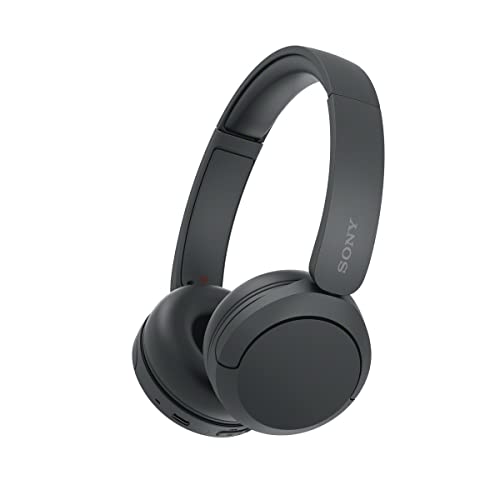
Sony WH-CH520 Wireless On-Ear Bluetooth Headphones with — Best lifestyle multipoint
The WH-CH520 is the pick for everyone who read the office sections above with respect and no recognition. Sony built it as an on-ear lifestyle headphone that happens to carry multipoint connection among its virtues, and its title’s claims follow that order of priorities: comfortable lightweight design, up to 50 hours of battery with quick charging, multipoint connection, clear calls, and a swivel design for packing flat. This is the headset for a person whose two devices are a phone and a personal laptop, whose calls are frequent but not professional theater, and whose headset spends as much time around their neck in transit as on their ears in meetings.
On-ear is a deliberate physical choice with consequences worth understanding. The cushions rest on the ears rather than around them, which keeps the whole product smaller, lighter and cooler in warm weather, and lets ambient sound remain partly present, a safety and social virtue for commuters and for parents who need one ear on the house. The same design seals less than the over-ear office picks, so a loud train will share itself with your music more readily, and long sessions press on the ear itself rather than around it. Sony’s lightweight claim is the mitigation, and for the listening pattern this headphone targets, sessions measured in commutes and study blocks rather than in meeting marathons, the trade is well judged.
Clear calls is the title’s voice promise, and it should be read at face value: the built-in microphone is designed to make you intelligible in ordinary environments, not to defeat a windy platform or a kitchen full of appliances the way a boom-equipped office headset attempts. Within its intended environments it is entirely sufficient, and multipoint means the call that arrives on the phone while the laptop plays music is answered in the same graceful motion the office picks perform, which is the feature this guide exists to celebrate, delivered here without a single piece of meeting-room vocabulary.
The 50-hour battery claim, the highest simple figure in this guide, suits the lifestyle pattern perfectly because charging a lifestyle headphone is an errand its owner will postpone. Quick charging covers the postponement’s consequences. If your two-device life is personal rather than professional, the CH520 is not the compromise pick in this guide. It is the correctly aimed one.
- Multipoint wording in the title: Multipoint Connection
- Battery as titled: up to 50 hours, with quick charging
- Form: on-ear, lightweight, swivel design, per the title
- Microphone: built-in, with clear calls as the title’s claim
- Boom and receiver: neither is part of this design as titled; connections are Bluetooth to your devices
Strengths
- 50-hour battery claim with quick charging suits a charge-it-rarely lifestyle.
- Light on-ear build and swivel-flat design travel better than any office pick here.
- Multipoint grace without any meeting-room styling or vocabulary.
Trade-offs
- Built-in microphone cannot match a boom’s placement in noisy call environments.
- On-ear fit seals less and presses the ear itself during very long sessions.
- No receiver or certification story for managed work computers.
Best for: a student or commuter whose phone and laptop share a personal, music-rich day.
Not suited for: a meeting professional whose transmitted voice must survive a noisy household daily.

Poly Voyager Focus 2 UC Office Wireless Headset, One Device — Best three-device story
Poly wrote its multipoint claim as a sentence rather than a keyword, and the sentence is ambitious: one device connects everything, including deskphone, PC and smartphone. That third device class is the Voyager Focus 2’s reason to exist in this guide. The deskphone has vanished from homes but persists in offices, call environments and regulated workplaces, and a headset that unifies it with the computer and the phone lets a worker wear one instrument across every conversation their job contains. The UC in its name signals unified communications intent, and the title’s meeting language names video Teams meetings and Zoom as its natural habitat.
Easy muting of phone calls, stated in the title, deserves the emphasis Poly gives it. In a deskphone-and-computer world, the costliest headset error is the unmuted aside, and a mute that can be found by touch, instantly, without looking at a screen, is a professional safeguard rather than a convenience. Poly’s heritage is precisely this world; the company built the headsets that call centers and executive offices standardized on, and the Voyager line carries that institutional knowledge into the hybrid era. The GTW cloth note in the title refers to its carry and storage provision, a small sign of a design that expects to be transported between office and home as hybrid schedules demand.
Understand what the Focus 2 asks in return. It is an office system component, with the setup and configuration expectations that implies, and its full three-device story typically involves its base and connection arrangement at the desk rather than a bare Bluetooth pairing. A home-only worker with no deskphone in their life is buying a third connection they will never use, and the Logitech or Lenovo will serve their two devices with less ceremony. An office worker whose desk genuinely holds a phone beside the PC monitor has exactly one pick in this guide that was designed for their desk, and this is it.
Judge its audio and microphone by Poly’s professional brief: voice first, meetings as the main event, music as a respectable secondary citizen. That ordering is written across the whole Voyager philosophy, and buyers who share it will find the Focus 2 the most institutionally serious product in this guide.
- Connection story in the title: one device connects deskphone, PC and smartphone
- Meeting platforms named in the title: video Teams meetings and Zoom
- Mute: easy muting of phone calls, stated as a headline behavior
- Lineage: Poly’s Voyager UC office family
- Multipoint keyword: the title narrates the capability rather than using the word multipoint, and this guide credits the narration
Strengths
- Only pick whose stated world includes the deskphone alongside PC and smartphone.
- Easy muting treats the professional’s costliest error as a design problem.
- Poly’s office heritage brings institutional call-handling knowledge to hybrid work.
Trade-offs
- Three-device architecture is surplus for a home worker with no deskphone.
- Office-system setup expects more configuration than a lifestyle Bluetooth pairing.
- Voice-first tuning makes it a meeting instrument rather than a music lover’s headphone.
Best for: an office professional whose desk holds a phone, a PC and a smartphone in daily rotation.
Not suited for: a home-only worker whose second device is a personal phone and who needs no deskphone path.

EPOS Impact 1061T – Enhanced Open Office Headset with Hybrid — Best open-office flagship
The EPOS Impact 1061T addresses the hardest acoustic workplace in this guide by name: the open office. Its title assembles a flagship response to that environment — hybrid ANC, an EPOS AI microphone, and multipoint connectivity — under the Impact line’s banner and a T designation that signals its Teams-oriented configuration. Hybrid active noise cancellation, which combines feedforward and feedback microphone strategies, attacks the open office’s defining noise, other people’s conversations, more completely than simpler cancellation schemes attempt, and it does so for the wearer’s own concentration rather than only for their callers.
The AI-branded microphone is the other half of the open-office equation. In a room where thirty conversations share one airspace, your transmitted voice needs a system that can distinguish you from the colleague two desks away, and EPOS positions its microphone intelligence at exactly that discrimination task. EPOS descends from the Sennheiser enterprise tradition, and its design language is institutional in the reassuring sense: this is equipment specified by facilities and IT departments for floors of workers, tested against a working season rather than a review week.
Multipoint connectivity in this context serves the open-office worker’s specific two devices, the desk computer and the personal or work phone that carries the calls the desk cannot. The flagship’s proposition is that none of the three systems, cancellation, microphone intelligence or dual connection, should be the weak link, because an open office punishes weak links hourly. Buyers in quiet home offices are paying for armor against an environment they do not inhabit, and the Logitech will serve them with less machinery. Buyers who genuinely work in the noise this headset names will recognize its specification as a description of their day, written by a company that has clearly sat in it.
Ownership expectations follow the flagship pattern: configuration time at the start, firmware and software as part of the relationship, and care appropriate to professional equipment. In return, the 1061T offers the guide’s most complete answer to the question of how a voice survives a crowded floor, which for its intended buyer is not a feature list but a livelihood.
- Multipoint wording in the title: Multipoint Connectivity
- Noise cancellation: hybrid ANC, for the wearer’s listening, per the title
- Microphone: EPOS AI microphone, as branded in the title
- Environment in the title: enhanced open office, its stated design target
- Configuration marker: the T designation in its model name, aligned with its Teams-oriented positioning
Strengths
- Hybrid ANC is the strongest wearer-side noise defense in this guide.
- AI-branded microphone targets the open office’s many-voices problem directly.
- Enterprise lineage suits floor-wide deployment and long service expectations.
Trade-offs
- Its armor is wasted on quiet home offices, where simpler picks suffice.
- Flagship configuration and software relationship demand setup patience.
- Open-office specialization makes it the least lifestyle-versatile pick here.
Best for: a professional working daily in a genuinely noisy open-plan office.
Not suited for: a quiet-home worker paying for cancellation against noise their rooms never produce.
The Six Multipoint Headsets on One Page
| Headset | Multipoint wording | Computer path | Microphone style | Battery claim in title |
|---|---|---|---|---|
| Logitech Zone Vibe 100 | Advanced multipoint | Bluetooth | Noise canceling, integrated | Not stated in title |
| JLab Go Work Gen 2 | Multipoint | USB dongle plus Bluetooth | Boom mic | Not stated in title |
| Lenovo Wireless VoIP | Bluetooth 5.3 multipoint | USB-A receiver | Noise-canceling | 31-hour talk, 60-hour playback |
| Sony WH-CH520 | Multipoint connection | Bluetooth | Built-in, clear calls | Up to 50 hours |
| Poly Voyager Focus 2 | Connects deskphone, PC, smartphone | Office system connection | Professional, easy muting | Not stated in title |
| EPOS Impact 1061T | Multipoint connectivity | Bluetooth | EPOS AI microphone | Not stated in title |
The battery column teaches a reading skill: several serious office headsets do not print endurance in their titles at all, because their buyers charge at a desk dock as a matter of routine and the manufacturers know it. Absence of a number is not absence of endurance. It is a signal about the intended ownership rhythm, daily charging as hygiene, and buyers who travel should weight the printed claims of the Lenovo and Sony accordingly.
Where Do Multipoint Buyers Most Often Stumble?
The first stumble is definitional: buying a headset that remembers multiple devices and discovering it cannot hold two connections at once. Memory is a pairing list; multipoint is a live second connection. This guide admitted only titles that support the live reading, and buyers shopping beyond it should demand the same textual evidence. The second stumble is priority surprise: the first time both devices make noise together, the headset’s switching rules reveal themselves, and an owner who has not learned them misses the call they bought the feature for. Spend the first evening deliberately provoking switches, music interrupted by a phone call, a meeting joined while a podcast plays, until the rules are reflexes.
The third stumble is the forgotten third place: the tablet, the work phone, the second laptop. Multipoint’s two-connection budget forces a choice about which two devices own your ears, and households with three active screens must assign the third device a wired or speaker life, or accept re-pairing as its toll. Choose the two by hours, not by novelty. The fourth stumble is microphone complacency, assuming multipoint convenience implies meeting-grade voice, when the Sony’s clear-calls standard and the EPOS’s AI microphone are different instruments for different rooms. Match the microphone to your noisiest regular environment, and let multipoint be the second criterion, never the only one.
Readers equipping a full home office around their headset may also want Best ANC Bluetooth Wireless Headsets for the cancellation-focused shelf, Best Bluetooth Headsets For Hard Of Hearing for accessibility-led choices, and Best Bone Conduction Bluetooth Headsets for the open-ear alternative philosophy.
How Should You Set Up Multipoint on the First Day?
Pair in a deliberate order and write it down. Connect the computer first, through its receiver if your pick provides one, because the computer is usually the less forgiving Bluetooth citizen. Connect the phone second, then test the triangle that defines your day: media on the computer, a call on the phone, return to the computer. Make the test call from another room’s worth of distance, with your household in its normal state, and listen to a recording or a trusted colleague’s report of your voice. Set the headset’s controls into muscle memory while the stakes are zero: mute by touch, volume by touch, the gesture or button that answers and ends. Charge fully before the first working day, and place the charger where the headset will live, because a multipoint headset’s only true failure mode is being dead or left paired to a device in another building.
Finally, name your two devices honestly and evict the others. A headset that keeps trying to adopt a tablet in the next room will interrupt your meetings with someone else’s video. Clear stale pairings, keep the chosen two, and let every other screen in the house fend for itself. Multipoint rewards this small governance with months of invisible competence, which is the feature’s whole promise: technology that removes a daily friction so completely that you stop believing it was ever there.
What Changes When Your Two Devices Are Both Computers?
Some readers’ two-device life contains no phone at all in the second slot: a work laptop and a personal laptop, or a desktop and a laptop, sharing one pair of ears across a day that alternates employment with everything else. Multipoint serves this life just as well, with one adjustment of expectations. Computers are chattier than phones, each with its own notifications, media keys and meeting applications, so the arbitration rules matter even more, and the first week’s deliberate switch-testing becomes essential rather than advisable. The receiver-based picks shine here in a specific way: put the USB receiver in the machine that must never lose the headset, the work computer, and let the personal machine ride Bluetooth, where an occasional re-pair is an inconvenience rather than an incident.
There is also a boundary worth drawing for your own sanity. A headset that follows you between work and personal machines will carry work’s interruptions into personal hours unless you govern it. The discipline is simple and entirely yours: at the end of the workday, the work connection can be closed with the laptop lid, and a multipoint headset respects that boundary exactly as faithfully as you do. Buyers who want the boundary enforced by hardware rather than by habit sometimes dedicate the lifestyle pick, the Sony, to personal hours and an office pick to the desk, which is a two-headset answer this guide mentions without embarrassment, because peace at 7 p.m. is a legitimate specification.
Students live a version of this pattern with a laptop and a phone rather than two computers, and for them the switching that matters most is the lecture-to-call and library-to-friend transitions of an ordinary day. The Sony’s light frame and long battery suit that rhythm, while a student working a support-desk job on campus may find the JLab’s dongle and boom a better match for the working half of the week. The category bends to fit the biography; insist on describing yours accurately before choosing.
How Do You Keep Two Connections Healthy for Years?
Wireless headsets age through their batteries, their cushions and their pairing tables, in that order. Batteries prefer rhythm to drama: regular partial charges where the headset lives, rather than heroic rescues from empty, and the office picks’ desk-bound lives make that rhythm nearly automatic. Cushions prefer cleanliness and, where the design allows it, replacement; the Lenovo’s replaceable earcups turn the most visible aging process into a maintenance event, and owners of the other picks should at least wipe cushions weekly and store the headset off its ears rather than compressed in a bag. A headset stored hanging by its headband keeps its clamp honest; a headset stored crushed under books slowly becomes a different, looser product.
Pairing tables are the invisible maintenance. Every phone and laptop you have ever connected leaves an entry somewhere, and stale entries are the source of the classic multipoint mystery, the headset that connects to a device in another room during your meeting. Audit the list seasonally: remove the old phone, the borrowed laptop, the tablet you paired once on holiday. Keep exactly your two chosen devices as first-class citizens. Firmware updates, where a maker offers them, belong in the same seasonal ritual, applied on a quiet afternoon rather than in the five minutes before a presentation.
Finally, protect the small hardware. Receivers and dongles are the easiest components in this guide to lose and among the hardest to replace gracefully, so give the receiver a permanent port or a labeled home in the headset’s case. The worker who treats these small disciplines as part of the purchase will still be enjoying invisible switching in year three, which is the entire point of buying multipoint in the first place: a feature so reliable it disappears.
Final Recommendation
Default to the Zone Vibe 100 if your life is laptop meetings and phone calls in a home you share with noise. Choose the Lenovo if Teams runs your calendar and you want battery figures that respect your intelligence, the JLab if a managed laptop makes a dongle the wisest money in the guide, and the Poly if a deskphone still stands on your desk. The EPOS is the open office’s flagship answer, and the Sony is the personal-life pick whose 50 hours and light frame make multipoint feel like leisure rather than infrastructure. Pair your two true devices, learn the switching rules in one evening, and the headset will repay you in the smallest valuable currency of modern work: transitions that no longer cost you anything.
Frequently Asked Questions
What is the difference between multipoint and regular Bluetooth pairing?
Regular pairing is a relationship the headset remembers and activates one device at a time; switching means disconnecting here and connecting there. Multipoint holds two connections simultaneously and arbitrates between them, so a call on the phone can interrupt media from the computer and hand you back afterward. The distinction is live versus remembered, and it is why this guide required titles to state multipoint or narrate an equivalent always-connected story rather than accepting a long pairing list as evidence.
Can I connect three devices at once?
For the Bluetooth-native picks here, two simultaneous connections is the honest design, whatever the pairing memory holds. The Poly Voyager Focus 2 tells a three-device story across deskphone, PC and smartphone through its office connection arrangement, which is a different architecture from three Bluetooth links. Most buyers should plan around two live devices, assign them by daily hours, and give any third screen a wired or occasional life rather than expecting the headset to be everywhere at once.
Does multipoint reduce battery life?
Holding a second connection costs some power, because the radio maintains two relationships instead of one, but the effect is modest beside the costs of calls, cancellation electronics and volume. The claims in this guide, Lenovo’s split talk and playback figures and Sony’s up to 50 hours, already describe multipoint products in normal use. The practical defense is rhythm rather than worry: charge where the headset lives, and a dual connection will never be the reason a meeting fails.
Which of these is best for Microsoft Teams?
The Lenovo states Teams Certified in its title, the EPOS carries a Teams-oriented designation, the Poly names Teams meetings in its own title, and the Logitech names Teams among its platforms. Any of the four is a defensible Teams choice, separated by environment: Lenovo for the managed-laptop professional, EPOS for the open office, Poly for the deskphone desk, Logitech for the hybrid home. The JLab and Sony will carry Teams audio as Bluetooth devices, but their titles make no Teams-specific commitment, and this guide reports that difference rather than smoothing it over.
Will multipoint work between a work laptop and a personal phone?
Yes, and that pairing is the feature’s most common real-world use. The headset does not care that the devices belong to different spheres of your life; it holds both connections and follows the active event. Two cautions apply in managed environments: an employer’s device policy may govern what can pair with the work machine, and the receiver-based picks, JLab and Lenovo, often fit such environments best because the computer connection runs through an approved-style USB path rather than a personal Bluetooth pairing.
What should I test during the return window?
One full ordinary working day, lived honestly on both connections. Count the switching frictions, record your voice from your real desk in your real room noise, wear the headset through your longest meeting, and confirm the battery rhythm your habits produce against the title’s claim. Multipoint quality is behavioral and reveals itself across a day, not in a five-minute pairing demo. A headset that lowers your friction count by the second day is the right one; a headset that merely pairs successfully has passed the easiest test it will ever face.
Can multipoint headsets switch automatically, or do I press something?
Both, depending on the event. Incoming calls are the designed interruption and generally take priority automatically, pausing the other device’s media and returning you when the call ends. Moving from one device’s media to the other’s usually requires pausing the first source, because two computers or a computer and a phone cannot each know you have lost interest. Learn your specific pick’s behavior with deliberate tests in the first week, particularly which device wins when both ring or notify together, and the automation will feel intelligent precisely where it was designed to be.
Is a USB receiver better than plain Bluetooth for the computer?
For a work computer, often yes. A receiver gives the headset a dedicated wireless path that survives the laptop’s Bluetooth quirks, crowded pairing lists and occasional driver moods, and it presents the headset to the operating system as a straightforward audio device, which managed IT environments tend to welcome. Plain Bluetooth, as on the Logitech, EPOS and Sony here, is entirely adequate on a cooperative personal machine and keeps a port free. The JLab and Lenovo include the receiver answer in their titles; choose it when the computer is not fully yours.
Do these headsets work for gaming as well as meetings?
They will carry game audio and voice chat competently, and the multipoint trick of a phone riding alongside a gaming PC is genuinely useful for streamers and social players. What they are not is gaming-tuned: none of these titles claims surround processing, low-latency gaming modes or game-specific drivers, and a dedicated gaming headset serves competitive play more completely. Judge this shelf as communication and listening equipment that can visit gaming, and it will never disappoint; judge it as gaming equipment that can visit meetings, and the priorities in every title will feel quietly reversed.
What if my phone and computer are from different ecosystems?
Multipoint does not care. The connections are Bluetooth relationships, not ecosystem memberships, and a Windows laptop beside an iPhone, or a Mac beside an Android phone, is an ordinary pairing in this category; several titles here span Mac and PC in a single breath. What can differ by ecosystem is where the settings live and which device tries to be helpful uninvited, so the first-week switch tests matter most exactly in mixed households. Once the arbitration rules are learned, the headset becomes the one neutral citizen in an otherwise partisan device collection.
Should I replace a working single-connection headset for multipoint alone?
Count your daily device transitions for one honest day. If the count is in single figures and painless, your current headset’s remaining virtues, fit, voice and familiarity, probably outweigh the upgrade. If the count runs into the dozens, or if even a few of those transitions carry professional embarrassment, a missed call while re-pairing, a meeting joined late and flustered, then multipoint is not a novelty but a repair to a daily defect, and this shelf is where the repair is sold. Features should be bought against counted problems, not against advertisements, and few features submit to counting as honestly as this one. Tally first, then shop, and the headset you choose will solve a problem you actually have rather than a problem a product page suggested to you.
Related Guides
- Best ANC Bluetooth Wireless Headsets
- Best Bluetooth Headsets For Hard Of Hearing
- Best Bone Conduction Bluetooth Headsets


