What's inside
- Key Takeaways
- Quick Picks
- How Did We Choose Acrylic Cases Without Confusing Them With Glass?
- Acrylic Versus Tempered Glass: What Actually Differs in Ownership?
- Who Should Choose Acrylic, and Who Should Honestly Choose Glass?
- Six Acrylic Designs, From Tower to Wall
- Panels, Weights and Intentions: Comparing the Acrylic Six
- What Mistakes Do Acrylic Owners Make in the First Year?
- How Do You Clean and Restore an Acrylic Panel?
- What Can You Make an Acrylic Panel Do That Glass Never Will?
- How Do You Transport and Store an Acrylic-Panel PC?
- How Do Heat, Flex and Thickness Behave in Real Acrylic Panels?
- Which Acrylic Case Fits Which Kind of Build?
- Final Recommendation
- Frequently Asked Questions
- Related Guides
As an Amazon Associate I earn from qualifying purchases. This post may contain affiliate links at no extra cost to you.
widgetverdict.com is reader-supported. When you buy through links on our site, we may earn an affiliate commission.
Where to buy: acrylic-panelled cases are frequently listed beside near-identical tempered-glass siblings, so order from the exact Amazon listings linked below — Zalman, Mars Gaming, ABK Design and ALSEYE among them — and check the panel wording in the title of the listing in your basket before paying.
Language first, because this entire category is confused by it. Acrylic is a clear plastic — sold under names like Plexiglass and Perspex — and it is not glass. It is lighter than glass, it does not shatter into dangerous shards, it can be cut and drilled by its owner, and it scratches more easily and flexes where glass stays rigid. The best pc cases with acrylic side panel are bought by people who understand that trade and want it: builders who move their machines, modders who intend to work on the panel itself, and value hunters who would rather spend the difference on components. When a listing in this guide says “acrylic glass” — one of them does, verbatim — read it as acrylic. The word “glass” in that phrase is marketing, not mineralogy.
Why does the distinction deserve a whole guide? Because acrylic and tempered glass fail differently, age differently and suit different lives. A tempered glass panel in a case that travels to LAN events is a risk carried in a padded bag; an acrylic panel in the same bag arrives with light scratches and no drama. A glass panel on a still, admired desk build will look factory-fresh in five years; an acrylic panel cleaned carelessly with a dry paper towel will carry a fine haze of micro-scratches by year two. Neither material is the premium choice in the abstract — each is the right choice for a specific owner, and this guide is written for the owners acrylic suits.
The half-dozen designs that follow span the acrylic idea from the conventional to the theatrical. Two Zalman towers offer the panel in clear and tinted forms on honest mid-tower chassis. A ZXFF mid-tower carries the “acrylic glass” naming puzzle in its title. Mars Gaming shrinks the concept into an ultra-compact pink Micro-ATX box. ABK Design abandons the box entirely for a wall-mounted open case in Plexiglass, and ALSEYE builds an acrylic open frame around dual 360mm radiator support and a space theme. Between them, they make the case for plastic, properly understood.
Key Takeaways
- Acrylic is plastic, not glass: lighter, shatter-resistant and workable with home tools, at the cost of easier scratching and some flex.
- Listings that say “acrylic glass” mean acrylic — the Zalman S3 and S4 state their panels plainly as acrylic, and this guide follows title wording exactly.
- Tinted acrylic, as on the Zalman S4, hides cable untidiness and softens internal lighting.
- Acrylic is the traveller’s and modder’s material: it survives transport that endangers glass and accepts drilling, cutting and etching that glass refuses.
- The ABK wall case (Plexiglass) and ALSEYE open frame show acrylic enabling shapes a glass panel cannot practically take.
- Clean acrylic only with microfibre and water or plastic-safe cleaner; dry paper and glass sprays are how panels acquire their haze.
Quick Picks
| Pick | Badge | Why it earns its place |
|---|---|---|
| Zalman S3 Compact ATX Mid-Tower Desktop PC Case, 3X 120mm Fans | The straightforward acrylic tower | Full acrylic side panel, three quiet 120mm fans fitted and 330mm of GPU support in a brushed-panel mid-tower. |
| Zalman S4 | The tinted acrylic tower | A full tinted acrylic panel with 240mm radiator support and 315mm GPU room in a compact ATX chassis. |
| ZXFF ATX Case Mid-Tower Gaming Case with 1 Acrylic Glass | The value window tower | An acrylic window, USB 3.0 front panel and 120/240 water cooling support in a budget-minded ATX case. |
| Mars Gaming MC-S1, Ultra-Compact Micro-ATX PC Case, ARGB Front | The tiny pink window box | Ultra-compact Micro-ATX, a full side window, 12-mode ARGB front lighting and support for 120mm liquid coolers — in pink. |
| ABK Design – Wall Computer Case – Wall Pc Case – ATX Pc Case – | The wall-mounted Plexiglass build | An ATX case designed to hang on the wall, in a black and Plexiglass construction that turns the PC into wall art. |
| ALSEYE ROBOBOX Gaming PC Case – Dual 360mm Radiator Support | The acrylic open frame | An acrylic open-frame design with dual 360mm radiator support and a space theme for Micro-ATX and ITX boards. |
How Did We Choose Acrylic Cases Without Confusing Them With Glass?
The selection rule was lexical before it was technical: the listing title had to name the panel material, and that material had to be acrylic or one of its trade names. The Zalman pair state “Full Acrylic Side Panel” and “Full Tinted Acrylic Side Panel” outright. The ABK wall case names Plexiglass, which is acrylic under its best-known brand. The ALSEYE ROBOBOX declares an “Acrylic Open Frame.” The ZXFF title’s “Acrylic Glass Window” is the category’s characteristic fudge — the material word is acrylic, and we take the listing at its first word. The Mars Gaming MC-S1 is the honest edge case: its title says “Full Side Window” without naming a material, and we flag that in its review below rather than inventing a specification; it sits in this guide as the compact windowed option whose listing language stays general.
Beyond wording, we judged the chassis as cases. Fan inclusions, radiator support and GPU clearances were taken from titles where stated — the S3’s three fitted fans and 330mm GPU support, the S4’s 240mm radiator and 315mm card room, the ROBOBOX’s dual 360mm support — and left as documentation homework where titles stayed silent. A panel material is a reason to shortlist a case, never a reason to excuse a bad one, so each pick also had to make sense as the only window into a build its owner would look at daily.
Finally, the list was balanced across acrylic’s real constituencies. Conventional towers for the value builder (Zalman, ZXFF), a compact for the small-desk gamer (Mars), and two open designs for the modder-display school (ABK, ALSEYE) that glass cannot serve at sensible weight or price. Readers whose tastes run to transparency generally may enjoy Best Crystal PC Cases as a companion, where glass designs dominate and the materials trade is argued from the other side.
Acrylic Versus Tempered Glass: What Actually Differs in Ownership?
Weight and failure mode come first. An acrylic panel weighs noticeably less than its glass equivalent, which matters in cases that travel and in wall-mounted designs like the ABK, where every gram hangs on fixings. When abused, acrylic bends, cracks locally or scratches; tempered glass holds its polish until it fails completely, in a shower of blunt cubes. For a machine carried to events, shipped to university or hung above a desk where people sit, acrylic’s failure manners are a genuine safety argument, not a budget excuse.
Clarity and ageing run the other way. New acrylic and new glass are comparably clear, but their fifth years differ: glass cleaned normally still looks new, while acrylic accumulates micro-scratches from dust wiped dry, from sleeves, from the panel leaning against a wall during builds. Those scratches are cosmetic, they scatter light rather than block the view, and plastic polishes can reduce them — but the discipline is real. Clean with a damp microfibre, never dry paper; avoid ammonia-based glass cleaners, which can craze acrylic’s surface; and store the panel flat on something soft whenever it is off the case.
Workability is acrylic’s trump card. A panel can be drilled for a pass-through fitting, cut for a side fan, etched with a design or replaced from sheet stock by any plastics supplier — modifications that are simply impossible in tempered glass, which cannot be cut after tempering at all. The open-frame and wall designs in this guide exist because acrylic permits shapes and fixings glass would make heavy, fragile or absurdly expensive. If your build plans include the words “I’ll mount it myself,” acrylic is not the cheap option; it is the only option.
Who Should Choose Acrylic, and Who Should Honestly Choose Glass?
Choose acrylic if the machine moves: students shipping PCs between home and term-time rooms, LAN regulars, technicians whose test rigs change weekly, and anyone mounting the computer on a wall or carrying it between sites. Choose acrylic if you mod: the panel as raw material is the entire point for that school of builder, and the ROBOBOX and ABK designs below assume an owner with that temperament. Choose acrylic if the budget is genuinely tight and the saving funds a better graphics card — the Zalman pair exist to make that trade respectable.
Choose glass if the machine is furniture: assembled once, placed once, admired for years in one spot, cleaned by someone who enjoys the ritual. There is no dishonour in either direction, but there is waste in mismatching them — glass in a travelling rig is anxiety purchased at a premium, and acrylic on a flagship static showcase is a saving spent where it will be noticed daily. The mid-tower mainstream, including the optical-drive layouts in Best Mid Tower PC Cases With Optical Drive Support, is overwhelmingly glass now; this guide’s six are the considered alternative, not the default.
Six Acrylic Designs, From Tower to Wall

Zalman S3 Compact ATX Mid-Tower Desktop PC Case, 3X 120mm Fans — The straightforward acrylic tower
The Zalman S3 is the acrylic idea in its most conventional and therefore most useful form: a compact ATX mid-tower with a premium brushed front panel design, three 120mm quiet fans pre-installed, a full acrylic side panel, USB 3.0 and support for graphics cards up to 330mm. Nothing in that specification is exotic, and that is the recommendation. This is the case for the builder who wants to see the build, wants the panel to survive being taken off and leaned against furniture a hundred times, and wants the fans already fitted when the box opens.
The 330mm GPU figure deserves its moment, because it quietly covers the great majority of graphics cards a value or mid-range build will ever contain, and it is stated in the title where a planner can use it. Three fans fitted is similarly practical: intake and exhaust exist from the first boot, and the build’s cooling conversation can be about curves rather than purchases. The brushed front panel gives the S3 a restraint that suits offices and shared rooms — the acrylic window shows the components, the front shows nothing but texture.
What the S3 does not claim is equally legible: no radiator support is stated in the title, so liquid cooling plans belong in Zalman’s documentation rather than in assumptions. As an air-cooled tower with a workable, forgiving panel, it is the guide’s baseline — the acrylic case against which the tinted, the tiny, the wall-hung and the open-framed are all variations. Most buyers in this category should start here and justify moving away, rather than start exotic and justify returning.
- Panel: full acrylic side panel, per the listing title
- Fans included: 3x 120mm quiet fans pre-installed
- GPU support: up to 330mm
- Front I/O: USB 3.0; brushed front panel design
- Radiator support: absent from the title’s wording — check Zalman’s documentation
Strengths
- A complete, honest tower: fans fitted, GPU room stated, panel unambiguous.
- The acrylic panel tolerates frequent removal and casual handling gracefully.
- Brushed front keeps the build presentable in offices and shared rooms.
Trade-offs
- Air-cooling focus; radiator plans need figures the title does not publish.
- The clear panel shows cable untidiness at full honesty.
- Acrylic’s scratch discipline applies from the first cleaning onward.
Best for: a mainstream air-cooled build that wants a visible interior and a forgiving panel.
Not suited for: a liquid-cooled build planned around radiator figures the listing never states.

Zalman S4 — The tinted acrylic tower
The S4 takes the S3’s formula and adds the tint. Its title describes a compact ATX mid-tower with two 120mm fans, a full tinted acrylic side panel, support for a 240mm radiator and graphics cards up to 315mm, and USB 3.0. The tint is not decoration; it is a functional choice that changes what the panel does. Tinted acrylic dims the interior’s visual noise — cable colours mute, plain components recede, and lighting glows through as colour rather than detail. Builders whose cable craft is honest but not exhibition-grade will find the tint quietly merciful.
The 240mm radiator support moves the S4 one step beyond its sibling: a standard AIO for the processor fits within the manufacturer’s own statement, which makes the S4 the natural pick in this guide for a first liquid-assisted build on an acrylic budget. The 315mm card figure is 15mm tighter than the S3’s, a small but real planning difference that long-card owners should note — measure the card, as always, rather than assuming siblings share clearances. Two fitted fans rather than three is the other sibling difference; an additional exhaust or intake fan is a likely early purchase.
Together the Zalman pair make a tidy decision: clear panel and three fans for air-cooled honesty in the S3, or tint and radiator support for a moodier, AIO-ready build in the S4. Neither is the better case; they are the same good tower answering two different briefs, and their titles state the differences plainly enough that the choice can be made from this page.
- Panel: full tinted acrylic side panel, per the listing title
- Fans included: 2x 120mm
- Radiator support: 240mm
- GPU support: up to 315mm
- Connectivity: USB 3.0 on the front panel
Strengths
- The tint flatters ordinary cable work and turns lighting into ambience.
- Stated 240mm radiator support covers the standard processor AIO.
- Compact ATX footprint suits smaller desks than full towers.
Trade-offs
- 315mm GPU room excludes the longest cards its sibling accepts.
- Two fans fitted leaves one fan position’s worth of homework.
- Tinted panels dim the component view some builders buy windows for.
Best for: a compact build with a 240mm AIO and lighting meant as glow rather than display.
Not suited for: an extra-long graphics card, or a builder who wants components shown in full daylight.

ZXFF ATX Case Mid-Tower Gaming Case with 1 Acrylic Glass — The value window tower
The ZXFF mid-tower is where this guide confronts the naming problem head-on, because its title literally reads “with 1 Acrylic Glass Window.” There is no such material as acrylic glass; there is acrylic, and there is glass, and this window is the former — a clear plastic panel on an ATX mid-tower gaming case. We labour the point because buyers deserve to know what will arrive: a light, workable, scratch-manageable acrylic window, not a sheet of mineral glass. Judged as acrylic, the ZXFF is a coherent value proposition; judged by anyone expecting glass, it would be a disappointment manufactured entirely by vocabulary.
The rest of the title is practical: an I/O panel with USB 3.0, USB 2.0 and audio ports, support for 120/240 water cooling, and a configuration listed as the 5-fan size. Front connectivity with both USB generations suits households whose peripherals span eras, and the stated water cooling support — modest sizes, honestly stated — covers a processor AIO without pretending at custom-loop grandeur. The 5-fan variant naming suggests sibling configurations exist, so confirm the exact variant at the listing before ordering; variant discipline is the tax on value cases everywhere.
Set expectations by tier and the ZXFF rewards them. Panel fit, steel gauge and cable room in budget towers are working-grade rather than luxurious, and the acrylic window will show the build plainly, so an hour spent routing cables is repaid daily. For a first gaming build, a spare-room machine or a teenager’s PC whose panel will be removed by curious hands, acrylic’s forgiveness at this price is not a compromise at all — it is the correct material, honestly if confusingly named.
- Panel: acrylic window (title wording “Acrylic Glass” — the material is acrylic)
- Front I/O: USB 3.0, USB 2.0 and audio ports
- Cooling support: 120/240 water cooling, per the listing title
- Configuration: listed as the 5-fan size — confirm variant at the listing
- GPU clearance: not stated in the listing title
Strengths
- Acrylic window and water cooling support at a value tier.
- Mixed USB 3.0 and 2.0 front ports suit older and newer peripherals alike.
- The panel’s lightness and forgiveness suit frequently handled machines.
Trade-offs
- The title’s “acrylic glass” wording invites a misunderstanding buyers must correct themselves.
- Variant naming means the exact configuration needs confirming at checkout.
- Clearance figures beyond cooling support are not published in the title.
Best for: a value gaming build, a first PC or a machine whose panel will be handled often.
Not suited for: a build brief that actually calls for mineral glass — read the title’s material word carefully.

Mars Gaming MC-S1, Ultra-Compact Micro-ATX PC Case, ARGB Front — The tiny pink window box
The Mars Gaming MC-S1 compresses the windowed case into an ultra-compact Micro-ATX form, in pink, with ARGB front lighting in twelve modes, an included FRGB fan, a full side window and support for liquid coolers up to 120mm. Every element of that specification is aimed at the small-desk gaming setup: the footprint is minimal, the colour is unapologetic, the lighting show lives on the front panel where a small case can actually display it, and the side window reveals the build inside a machine not much bigger than the motherboard it holds.
Honesty about the window is required by our own selection rule: the MC-S1’s title says “Full Side Window” and does not name the material, so we will not print “acrylic” as a verified specification for this pick. It belongs in this guide as the compact windowed option in the acrylic class of the market — lightweight windowed construction is the norm at this size and tier — but the verified facts are the ones in the title: window, pink, compact, lit, and able to take a 120mm liquid cooler. Buyers for whom the exact panel material is decisive should confirm it with Mars Gaming before ordering; buyers choosing on size, colour and lighting can proceed on the title alone.
The 120mm cooler support defines its performance envelope honestly: this is a case for efficient components, a modest graphics card and a processor under a small AIO or a low-profile air cooler. Within that envelope it is a delight — the sort of machine that makes a small desk feel designed rather than compromised. Ask it to house flagship heat and it will decline, audibly. Small cases are honest about physics when their titles are read properly, and this one’s title is a model of the genre.
- Panel: full side window (material not named in the listing title — confirm with Mars Gaming if decisive)
- Form factor: ultra-compact Micro-ATX
- Lighting: ARGB front lighting, 12 modes; FRGB fan included
- Cooling support: liquid coolers up to 120mm
- Finish: Pink, per the title
Strengths
- The smallest footprint in this guide, with the window and lighting intact.
- Pink finish and twelve lighting modes make it a designed desk object.
- 120mm liquid support gives its modest components a quiet option.
Trade-offs
- The performance envelope is small by design; hot components need not apply.
- Panel material is not stated in the title, an unusual gap for this guide.
- Expansion room is minimal, as ultra-compact cases intend.
Best for: a compact pink desk setup built from efficient components.
Not suited for: a flagship graphics card or any build expecting generous interior volume.
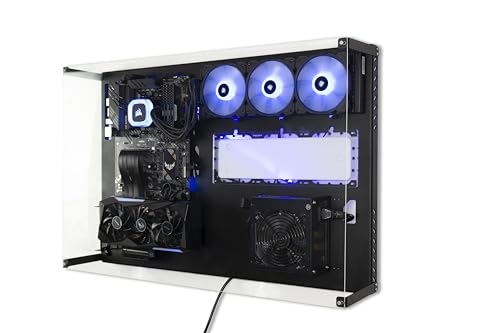
ABK Design – Wall Computer Case – Wall Pc Case – ATX Pc Case – — The wall-mounted Plexiglass build
ABK Design’s wall computer case takes the side panel idea and rotates it ninety degrees into architecture: an ATX case designed to mount on the wall, offered in a “Wall Computer + Plexiglass, Black” construction per its title, turning the entire PC into a framed display at eye level. Plexiglass — acrylic, under its famous trade name — is the enabling material here in the most literal sense. A glass front of this size would add serious weight to a wall fixing and serious consequences to a mounting failure; acrylic keeps the assembly light enough for sensible brackets and forgiving if the worst happens.
The practicalities deserve the same attention as the spectacle. A wall build lives or dies on its mounting: studs or proper anchors, a level line, and cable runs planned before the drill comes out, because power, display and network cables must climb the wall as gracefully as the case hangs on it. Heat rises along the wall rather than pooling under a desk, which open wall designs generally handle well, but the room’s dust also settles on upward-facing components in a way desk cases never experience. This is a case for an owner who has pictured all of that and still wants it — and for that owner, nothing else in this guide, or most others, is a substitute.
Note what the title does not provide: fan counts, radiator support and dimensions all live outside the listing title, so a wall project must be planned from ABK’s own documentation with the wall, the studs and the components all measured. Treat this pick as a design commitment with homework attached. The reward, delivered daily, is the most theatrical presentation of a PC in this entire batch of guides — the machine as a picture that happens to compute.
- Format: wall-mounted ATX case, per the listing title
- Construction: black with Plexiglass (acrylic) front
- Mounting: wall fixing required — plan anchors and cable runs in advance
- Fans, radiator support, dimensions: not stated in the listing title — plan from ABK Design’s documentation
- Audience: display-first custom builds
Strengths
- The wall format turns the PC into a permanent display piece.
- Acrylic’s lightness makes the wall mounting practical and safer.
- Desk space is returned entirely to the desk’s other jobs.
Trade-offs
- Installation is a DIY project involving fixings, levels and cable planning.
- Upward-facing components gather dust in a way desk cases avoid.
- Planning figures live outside the title and must be researched first.
Best for: a confident DIY builder who wants the PC displayed on the wall as a feature.
Not suited for: rented walls that cannot take fixings, or anyone wanting a case that simply sits down and works.

ALSEYE ROBOBOX Gaming PC Case – Dual 360mm Radiator Support — The acrylic open frame
The ROBOBOX closes the guide with acrylic used structurally: an acrylic open frame, per its title, with a space theme, dual 360mm radiator support, and room for Micro-ATX and ITX boards in a mid-tower footprint. Open frames invert the usual case logic — there is barely a box at all, and the components themselves become the exterior. Acrylic suits the format doubly: it can be formed into the frame’s themed shapes at sensible cost, and its lightness keeps a design with no steel shell from becoming a handling problem every time the build moves from bench to desk.
Dual 360mm radiator support is a specification from the serious end of liquid cooling, and in an open frame it means the ROBOBOX is aimed at builders whose loops are the point of the machine — two full radiators, displayed as architecture, with airflow that no panel will ever restrict because there are no panels to restrict it. Open-air cooling has a characteristic profile: components breathe perfectly, dust arrives unfiltered, and the room hears everything the fans do. Owners of open frames accept that triangle knowingly, and the ROBOBOX’s space theme suggests ALSEYE knows exactly which display-minded builder it is courting.
Choose the ROBOBOX if your build is a project and a exhibit at once, and if the maintenance rhythm of an open machine — frequent gentle dusting, no pets with access to spinning fans — fits your household. Households with curious toddlers or free-roaming cats should admire it from a distance; open frames and small fingers are a combination no guide will bless. As the acrylic idea pushed to its logical extreme, it earns its place: this is what the material makes possible when the box is optional.
- Construction: acrylic open frame, space theme, per the listing title
- Boards: Micro-ATX / ITX, mid-tower footprint
- Radiator support: dual 360mm
- Panels: open design — no enclosed side panel
- Household note: open components require a pet- and child-aware placement
Strengths
- Dual 360mm support serves serious custom loops in an open layout.
- Unrestricted airflow is the format’s permanent thermal advantage.
- The acrylic space-themed frame is unlike anything in a steel catalogue.
Trade-offs
- Dust reaches everything, always; cleaning is a rhythm, not an event.
- Fan and coil noise have no enclosure to soften them.
- Open components are incompatible with curious pets and small children.
Best for: a display custom-loop build, maintained by an owner who enjoys the ritual.
Not suited for: a dusty household, a quiet-room requirement or free-roaming pets.
Panels, Weights and Intentions: Comparing the Acrylic Six
| Case | Panel / construction | Format | Cooling headline | Defining trait |
|---|---|---|---|---|
| Zalman S3 | Full acrylic panel | Compact ATX tower | 3x 120mm fans fitted | 330mm GPU room |
| Zalman S4 | Full tinted acrylic panel | Compact ATX tower | 240mm radiator support | Tint softens the view |
| ZXFF Mid-Tower | Acrylic window | ATX tower | 120/240 water cooling | Value tier, mixed USB |
| Mars Gaming MC-S1 | Full side window | Ultra-compact Micro-ATX | 120mm liquid support | Pink, 12-mode ARGB front |
| ABK Wall Case | Plexiglass (acrylic) front | Wall-mounted ATX | Not stated in title | Hangs as wall display |
| ALSEYE ROBOBOX | Acrylic open frame | Micro-ATX / ITX | Dual 360mm radiators | Space theme, no enclosure |
The pattern across the table is that acrylic’s role changes with format. In the towers it is a panel — a window with a forgiving temperament. In the wall case it is a structural front that keeps a hanging PC light. In the open frame it is the chassis material itself. Buyers should therefore decide format before material loyalty: the acrylic question is really three questions, and the rows above are their answers. For a broader view of the colourful end of case design, including pink finishes like the little Mars box, Best RGB PC Cases covers the lighting-led field.
What Mistakes Do Acrylic Owners Make in the First Year?
Cleaning the panel like glass is the first and most expensive habit. Ammonia-based window sprays can craze acrylic, dry paper towels sand it microscopically, and the damage is cumulative — each careless wipe is invisible, the fiftieth is a haze. Water, a drop of mild soap when needed, and a clean microfibre, always. The second mistake is leaning the removed panel against a wall on a hard floor, where its bottom edge picks up grit that the next wipe drags across the surface. Lay it on a towel, every time; the ritual takes four seconds.
Third, over-tightening panel screws. Acrylic flexes and, around a screw hole driven by an enthusiastic hand, it can star-crack — a flaw glass never develops because its screws are usually captive in a frame. Finger-tight plus a quarter turn is the whole technique. Fourth, expecting the panel to behave like a structural part: acrylic windows are viewers, not handles, and lifting a case by its panel invites the flex to become a fracture. Finally, in the open designs, forgetting that dust is now a weekly character in the build’s story — the ROBOBOX and ABK reward owners who build the dusting into their routine from week one.
How Do You Clean and Restore an Acrylic Panel?
Start with air, not cloth: blow or brush loose dust off the surface so the wipe that follows is not dragging grit. Wash with lukewarm water and a trace of mild soap on a microfibre cloth, rinse with a second damp cloth, and dry with a third, patting rather than rubbing. Plastic-specific polishes, sold for motorcycle visors and aquarium panels, can lift the fine haze from an older panel in an afternoon of gentle circular work — test in a corner first, and expect improvement rather than resurrection. Deep scratches are permanent residents; prevention, as the previous section argued, is the entire game.
Static is acrylic’s other housekeeping quirk: a freshly wiped panel attracts dust electrically for a day. Anti-static plastic cleaners exist for exactly this and are worth their modest cost for the tower owners here. Store spare or removed panels flat, interleaved with soft cloth, away from sunlight — acrylic kept in a hot attic can warp just enough to make refitting a negotiation. Treated with this modest respect, an acrylic panel’s clarity holds for years, and the material’s reputation for hazing turns out to be a reputation for being cleaned wrongly.
What Can You Make an Acrylic Panel Do That Glass Never Will?
Customisation is where the material stops defending itself and starts boasting. An acrylic panel can be etched with a rotary tool or laser into a frosted design that catches the build’s lighting — logos, artwork, a child’s drawing turned into a permanent part of their first PC. It can be drilled for a reservoir fill port, slotted for a side intake fan, or cut to clear an unusually tall cooler that the case designer never anticipated. Vinyl applied to acrylic peels away cleanly when tastes change, and a panel ruined by an ambitious experiment can be re-cut from sheet stock for the price of a pizza, using the original as the template.
These possibilities explain the ROBOBOX and the ABK wall case better than their specifications do. Both designs assume an owner who regards the case as a starting point — a frame for a build that will be personalised, lit, rearranged and shown. Glass serves the opposite temperament beautifully: the finished object, untouched. Neither temperament is superior, but they are different hobbies sharing a components catalogue, and the panel material is often the first honest signal of which hobby a builder actually has. If the etching paragraph made you reach mentally for a rotary tool, you have your answer, and it is acrylic.
A practical starting project, for owners new to working the material: practise on an offcut first. Drill speeds, cutting pressure and polishing technique are all learnable in twenty minutes on scrap, and the panel you care about should be the second piece you touch, never the first. Mask both faces with tape before any tool approaches, mark holes from the case side rather than by eye, and let the tool do the work without forcing — acrylic rewards patience and records haste permanently.
How Do You Transport and Store an Acrylic-Panel PC?
Transport is where acrylic earns its keep, and a little method makes it earn more. Keep the protective film on a new panel until the build is finished and photographed — the film exists because the panel’s most scratch-vulnerable hours are its first ones, amid tools and bench grit. When the machine travels, pad the panel side with a towel or the case’s original foam, keep that side facing up or against something soft, and never slide the case across a surface on its panel; lifting is slower and cheaper than polishing. In a car, the case belongs on a seat or a flat boot floor, belted or wedged, not standing where a braking event can introduce it to gravity.
Storage follows the same logic. A panel removed for a long upgrade should be washed, dried, wrapped in a soft cloth and stored flat, away from sun and heat sources; a panel left leaning in a cupboard for a season will be found with a faint bow and a collection of edge scratches that no one remembers making. The open designs ask for more: the ROBOBOX travels best in its original packaging, and the ABK wall case, once mounted, should be treated as a fixture — its moves are house moves, planned like furniture, with the wall fixings renewed rather than reused. None of this is burdensome. It is the small tax acrylic charges for being light, and owners who pay it cheerfully keep panels that look new for years.
How Do Heat, Flex and Thickness Behave in Real Acrylic Panels?
Three physical behaviours surprise first-time acrylic owners, and all three are manageable once expected. The first is flex: a large acrylic panel pressed at its centre bows slightly where glass would not move. In a tower like the Zalman pair this is invisible in normal life — the panel is framed and screwed at its edges — but it explains why acrylic panels should be carried by their edges and never used as a lifting surface. The second is thermal: acrylic softens at temperatures far above anything a PC interior reaches, so heat damage is a non-issue, though a panel should not rest against a radiator exhaust during bench testing simply because warm plastic and dust make an unlovely combination.
The third is sound. A thin plastic panel can sympathetically buzz at certain fan frequencies where a heavier glass panel stays inert, a phenomenon owners describe as a faint hum that vanishes when a hand touches the panel. The cures are humble: ensure the panel screws are evenly snug, add the small foam or rubber washers many cases include, and adjust the offending fan’s speed a fraction. None of this belongs in a sales listing, which is why it belongs in a guide — these are the textures of ownership, and none of them outweigh the material’s advantages for the owners this guide addresses.
Thickness is the quiet variable behind all three behaviours. Panels vary, and thicker acrylic flexes less, buzzes less and feels closer to glass in the hand while staying far lighter. Where a listing publishes panel thickness, treat it as a quality signal; where it does not — and none of the six titles here do — judge by the case’s overall tier and the reviews of the specific model rather than assuming the thinnest possibility or the thickest.
Which Acrylic Case Fits Which Kind of Build?
Walk the line-up by intention and the choice simplifies. The mainstream gaming build — air-cooled, one good card, assembled once and upgraded yearly — belongs in the Zalman S3, whose fitted fans and 330mm card room cover the brief without surplus. The same build with a processor AIO and a taste for mood belongs in the S4, trading 15mm of card room for the tint and the stated 240mm support. The budget build, the spare-room build and the teenager’s first machine belong in the ZXFF, where the panel’s forgiveness will be exercised and appreciated.
The small-desk build belongs in the Mars MC-S1, provided its components respect the 120mm cooling envelope — an efficient card and processor will, and the pink windowed result has a charm out of proportion to its footprint. The statement build belongs on the wall in the ABK, where the homework is carpentry as much as computing. And the hobbyist loop — dual radiators, coolant as décor, maintenance as pleasure — belongs in the ROBOBOX’s open frame, the one design here where the case disappears and the build itself becomes the object.
Notice that none of these assignments turns on the panel alone. Acrylic is the shared premise; format, cooling support and the owner’s temperament do the selecting. That is the healthiest way to shop this category, because the panel material will be touched perhaps monthly, while the format is lived with daily. Choose the life first, and let acrylic be the property that makes that life lighter, safer and easier to modify.
Final Recommendation
For the majority of acrylic buyers, the Zalman S3 is the recommendation
: a complete tower, fans fitted, clearances stated, and a full acrylic panel that will forgive a decade of panel removals. Take the S4 instead if the build includes a 240mm AIO or your taste runs to tinted calm. The ZXFF serves value builds with eyes open about its name, the Mars MC-S1 owns the tiny pink desk, and the ABK and ROBOBOX serve the display builders for whom acrylic is not a panel material but a design medium. Buy acrylic for the life your machine will actually live — travelling, tinkering, hanging, glowing — and it will never feel like the cheap option. It will feel like the correct one, which is a different thing entirely. A final word on expectations, because this category suffers from a comparison it never asked for: an acrylic panel photographed beside a glass panel in a showroom will lose on perceived luxury every time, and that photograph is the worst possible way to choose. The right comparison happens a year later, in your own room, with your own machine — the glass panel either pristine in a build that never moves, or replaced after the accident nobody planned; the acrylic panel lightly marked by a life actually lived with it, still clear, still whole, still doing its job. Choose for the second photograph, not the first, and each design in this guide will make sense as what it is: honest designs in a material that knows its strengths and states them, in most of their titles, in plain words.
Frequently Asked Questions
Is acrylic the same as tempered glass?
No. Acrylic is a transparent plastic — the material sold as Plexiglass or Perspex — while tempered glass is heat-treated mineral glass. Acrylic is lighter, resists shattering, flexes slightly and can be drilled or cut by its owner; it also scratches more easily and can haze if cleaned with glass products. Listings that write “acrylic glass,” as the ZXFF title does, are describing acrylic. This guide follows the material word in each title, never the marketing word.
Will an acrylic side panel turn cloudy over time?
Only if it is cleaned like glass. Ammonia sprays can craze the surface and dry wiping grinds dust into micro-scratches that read as haze. With water, mild soap and microfibre — plus a plastic polish session if an older panel needs one — acrylic stays clear for years. The cloudiness in old acrylic cases is a maintenance record, not a material sentence.
Can I drill or modify an acrylic panel?
Yes, and this is acrylic’s decisive advantage. It can be drilled for pass-through fittings, cut for fan openings and etched with designs, using ordinary tools, patience and masking tape to protect the surface. Tempered glass cannot be cut or drilled at all after tempering. Modders choose acrylic for exactly this reason, and the open and wall designs in this guide assume that temperament.
Is acrylic safe for a case that travels to LAN events?
It is the safer of the two panel materials for travel. A knock that would end a glass panel’s life typically leaves acrylic scratched or, at worst, locally cracked — the machine still runs, the panel can even be replaced from sheet stock. Pad the case, keep the panel from rubbing against grit in transit, and acrylic will absorb the road’s insults for years.
Does a tinted acrylic panel affect temperatures?
Not meaningfully. The tint is a dye in the material, changing light transmission, not airflow; the S4’s cooling is governed by its fans and its stated 240mm radiator support, exactly as a clear panel’s would be. What the tint changes is perception — components recede, lighting glows — which is why builders choose it.
Why do the wall and open-frame cases use acrylic instead of glass?
Weight and workability. The ABK wall case hangs its front on wall fixings, where acrylic’s lightness is a safety margin, and the ROBOBOX’s themed open frame needs a material that can be formed into shapes and drilled for its structure at sensible cost. Glass in either role would be heavier, more fragile and far harder to fabricate — acrylic is not their compromise, it is their enabler.
Can a scratched acrylic panel be replaced?
Usually, yes — and more easily than a glass one. Manufacturers often sell replacement panels for popular towers like the Zalman pair, and because acrylic is a sheet material, a local plastics supplier can cut a replica from the original as a template, complete with drilled holes, for any case whose maker no longer stocks the part. That repairability is part of the material’s long-term economics: a damaged acrylic panel is an errand, while a shattered glass panel is a parts hunt.
Is an acrylic panel a good choice for a child’s or teenager’s first PC?
It is arguably the best choice. First PCs get opened often, carried to friends, upgraded in bursts of enthusiasm and cleaned by beginners — a biography written for acrylic’s strengths. The Zalman S3 or the ZXFF will absorb that life with scratches at worst, and the teenager who etches a design into the panel of their own machine has learned more about building than any specification sheet teaches.
Can I swap an acrylic panel for glass later, or the reverse?
Only where the case maker sells both variants of the same chassis with identical mounting — which happens, but cannot be assumed. Panel dimensions, hole positions and frame fittings are model-specific, and a panel from a sibling listing is a gamble measured in millimetres. If panel material might change your mind later, choose the chassis family that openly offers both, and confirm the spare panel’s availability before the first purchase rather than after the regret.
Do acrylic cases cost less than glass ones?
Generally the material itself is cheaper to produce and ship, and the towers in this guide sit at the value-conscious end of their formats — but the honest answer is that design tier matters more than panel material, and the open-frame ROBOBOX with its dual-radiator support is nobody’s budget afterthought. What acrylic reliably saves is not the purchase price but the replacement cost: a panel that survives travel, or can be re-cut locally when damaged, is cheaper across a machine’s life than a fragile panel replaced twice.
Are acrylic panels a fire or heat risk near hot components?
No, not in any scenario a functioning PC can produce. Acrylic’s softening point sits far above the temperatures inside a computer case, and the material is used industrially around warm equipment without concern. The realistic cautions are cosmetic — keep a panel from resting directly against a hot exhaust during open-bench testing — rather than safety-related. A component hot enough to trouble acrylic would have shut the machine down long before the panel noticed anything.
How thick are these panels, and does thickness matter?
The six listing titles here do not publish panel thickness, so we will not invent figures. Thickness matters at the margins: thicker panels flex less, resist buzzing and feel more substantial, while thinner ones keep weight and cost down. For the tower picks, whose panels are framed and edge-mounted, ordinary ownership will never reveal the difference. Judge these cases on their stated fans, clearances and format, and let thickness be a tiebreaker researched for a specific model rather than a headline criterion.
Does acrylic yellow with age like some plastics do?
Modern cast acrylic is notably resistant to yellowing; the amber drift associated with old plastics belongs mostly to other polymers and to acrylic kept in harsh ultraviolet for years. A panel on an indoor desk, out of sustained direct sun, holds its clarity and colour across a case’s normal life. The tinted S4’s colour is a deliberate dye, stable in the same conditions. Sun discipline, as with most materials in a home, is the whole secret.


