What's inside
- Where to Buy a 32-Inch 4K Monitor, and Why the Code Matters More at This Size
- Key Takeaways
- Quick Picks
- How We Chose These Picks
- Comparison Table
- How to Choose a 32-Inch 4K Monitor
- Work Panel, Hub or Gaming Flagship: Which Kind of 32-Inch Screen Is Yours?
- What Desk Depth and Distance Does a 32-Inch Screen Actually Need?
- OLED, IPS Black or Unnamed Glass: How Much Does Panel Technology Matter at 32 Inches?
- Common Mistakes
- Final Recommendation
- Frequently Asked Questions
- Related Guides
As an Amazon Associate I earn from qualifying purchases. This post may contain affiliate links at no extra cost to you.
[SITE_DOMAIN] is reader-supported. When you buy through links on our site, we may earn an affiliate commission.
Where to Buy a 32-Inch 4K Monitor, and Why the Code Matters More at This Size
Every review below links directly to that model’s Amazon listing, and at this size the listing visit carries extra weight: confirm the full model code from the review heading, check the physical dimensions the listing publishes against your desk’s depth, and only then check price on Amazon on that page. Thirty-two-inch monitors are the class where a wrong variant hurts most, because the same product family often spans a 60Hz office panel and a 320Hz gaming flagship under near-identical names, and the return freight on a screen this large is an experience nobody volunteers for twice.
Anyone comparing the best 32 4k monitors quickly discovers that the size has become the crossroads of the entire monitor market. At 32 inches, 3840×2160 lands at a pixel density most users can run unscaled, so the size serves the spreadsheet analyst and the film viewer with the same glass — and manufacturers have responded by building wildly different machines on it. This guide’s six picks prove the point: a 60Hz UltraFine for readers, a 70Hz Sceptre with twin-everything inputs, two OLED-and-flagship gaming panels at 240Hz and 320Hz, a Thunderbolt hub UltraSharp for professional desks, and a value-led Raywego. Same diagonal, same resolution, six different lives.
That spread is why this guide refuses to rank the six on one ladder. A 320Hz gaming panel is not a better office monitor than a 60Hz one in any sense that survives a working week, and a Thunderbolt hub is not a failed gaming screen. Each review therefore argues its pick’s case in its own terms — refresh where refresh is the product, hub architecture where the hub is the product, value where value is the product — and the comparison table keeps the stated figures separate so the reader can weigh categories rather than chase a single score.
Verification followed the house discipline: every specification comes from the model’s own listing title, checked through the site’s pool, and silences are recorded as silences. The discipline matters here because flagship gaming titles publish extravagantly while office titles publish modestly, and a guide that filled the modest titles’ gaps from reputation would quietly rig the comparison in favour of the loud. What follows is what the titles themselves can defend.
Key Takeaways
- All six picks are 32-inch-class 4K UHD panels at 3840×2160; everything else about them diverges.
- Refresh spans the full market range: 60Hz on the LG and Raywego, 70Hz on the Sceptre, 120Hz on the Dell hub, 240Hz on the ASUS OLED and 320Hz on the MSI.
- The ASUS ROG PG32UCDP is a 240Hz OLED gaming flagship with a dual mode reaching FHD 480Hz and USB-C at a stated 90W.
- Dell’s U3226QER is the professional pole: a Thunderbolt hub monitor with IPS Black, 100% sRGB and a 3000:1 contrast figure.
- The Sceptre U325W pairs its 70Hz panel with two DisplayPort and two HDMI inputs plus built-in speakers.
Quick Picks
| Pick | Badge | Why it earns a place |
|---|---|---|
| LG UltraFine 32U701B-B | The reader’s UltraFine | 4K at 60Hz with HDR10, sRGB 99%, Reader Mode and Flicker Safe for long text days. |
| Sceptre U325W-UPT | Ports and speakers in depth | 4K at 70Hz with two DisplayPort, two HDMI, 100% sRGB and built-in speakers. |
| ASUS ROG PG32UCDP | The OLED gaming flagship | 4K OLED at 240Hz, dual-mode FHD 480Hz, G-SYNC and USB-C 90W. |
| MSI MAG 321UPD E14 | The 320Hz ceiling | UHD at 320Hz with FreeSync Premium, dual mode and a 0.05ms response claim. |
| Dell UltraSharp U3226QER | The Thunderbolt hub | 4K at 120Hz with IPS Black, 100% sRGB and 3000:1 contrast for professional desks. |
| Raywego 32-inch 4K | The frameless value pick | 4K at 60Hz with 97% sRGB, HDR10, FreeSync and a frameless design. |
How We Chose These Picks
Size and resolution set the gates without negotiation: a 32-inch-class panel, a true 3840×2160 resolution, stated in the model’s own title. Within those gates the selection was deliberately built to span the size’s real market — office, value, hub-professional and gaming-flagship — because a 32-inch guide containing six variations of one idea would fail the readers arriving with the other three ideas in mind. Two picks serve work-first desks, two serve play-first desks at the market’s speed ceiling, and two serve the wide middle where budgets and mixed use live.
Title verification did the sorting. Each specification below is traceable to the pick’s listing title, and the titles in this category turned out to be unusually informative — the ASUS and MSI publish their dual-mode behaviour, the Dell publishes its panel technology and contrast, the Sceptre publishes its full port count. Where a title is thinner, notably the Raywego’s stand story and the LG’s sync story, the reviews mark the gap with the standard not-stated note rather than borrowing from the product’s wider reputation.
Refresh honesty governed the framing throughout. A 70Hz panel is described as a 70Hz panel, a virtue for its smoothness over 60Hz and a limit for gaming; the 240Hz and 320Hz flagships are described as gaming instruments whose speeds most content cannot feed; the 120Hz Dell is positioned as the professional motion standard. No pick is flattered by adjacency to a faster one, and none is damned by it either.
The final shaping force was desk reality. Thirty-two inches is a physical commitment — depth, stand footprint, viewing distance — so stands, mounts and hub behaviour were logged wherever titles state them, and the how-to-choose section treats the room as a specification. A guide that ignores the furniture ends with the right panel on the wrong desk, and this one declines to.

LG UltraFine 32U701B-B — The reading desk’s 4K
LG’s UltraFine line has always been the productivity wing of its monitor range, and the 32U701B-B states a calm, complete version of that brief: a 32-inch UltraFine 4K UHD panel at 60Hz with HDR10, sRGB 99% colour, LG Switch and Reader Mode software, Flicker Safe backlighting, HDMI and DisplayPort inputs, and a tilt stand. Nothing in that list reaches for a headline; everything in it serves the person who will read, write and calculate on this glass for most of its life, which is the majority use of 32-inch 4K screens in the real world.
Reader Mode and Flicker Safe are the pairing to notice, because they address the two halves of reading fatigue. Reader Mode tunes colour temperature and brightness toward paper; Flicker Safe addresses the backlight’s behaviour, removing the rapid pulsing that sensitive users register as strain across long sessions. At 32 inches unscaled, where a full document sits open at print size, those features operate on the exact task the panel was bought for. The sRGB 99% figure keeps the colour honest for the photographs and presentations that pass through a working week, and HDR10 covers video material without pretending to a certification tier the title does not claim.
LG Switch is the quiet utility in the list — LG’s software for managing sources and screen layout — and it suits the multi-input reality of a desk where a work laptop and a personal machine share one large panel. The tilt-only stand is the specification’s honest limit: height is not offered in the title, so buyers whose posture needs it should plan a riser or an arm, and should confirm mounting options on the listing since the title does not state a VESA pattern either.
There is a quieter virtue in this LG that long-tenure buyers will appreciate: restraint ages well. A panel without gaming modes to firmware-update, without a hub to fall out of compatibility, and with its comfort features implemented at the backlight level asks very little of its owner across a decade. Offices that standardised on calm UltraFine-class screens rarely revisit the decision, because the screen never becomes the loudest problem in the room. In a guide that also contains two of the most extroverted monitors on the market, the LG’s introversion is a genuine product quality, and for reading-led desks it may be the deciding one.
Judged as a gaming screen the UltraFine makes no case and asks for none:
60Hz, no stated sync technology, no response figure in the title. Judged as the centre of a reading and writing desk, it is the most coherent pick in this guide — the panel whose every published feature points the same direction. Buyers whose evenings are films rather than frame rates will find its HDR10 and its size entirely sufficient for the second shift as well.
- Size and resolution: 32-inch UltraFine 4K UHD, 3840×2160
- Refresh: 60Hz
- HDR: HDR10
- Colour: sRGB 99% (Typ.)
- Software: LG Switch, Reader Mode
- Eye feature: Flicker Safe
- Inputs: HDMI, DisplayPort
- Stand: tilt
- Sync technology: Not stated in the listing title — verify with the manufacturer documentation
- Response time: Not stated in the listing title — verify with the manufacturer documentation
Strengths
- Reader Mode plus Flicker Safe is a complete long-session comfort pairing.
- sRGB 99% and HDR10 cover work colour and video without overclaiming.
- LG Switch suits desks sharing the panel between two machines.
Trade-offs
- 60Hz and no stated sync make it a work screen, not a gaming one.
- Tilt-only stand, with mounting unstated in the title.
- No USB-C claimed for one-cable laptop desks.
Reading-first buyers can check price on Amazon for the 32U701B-B, whose full code separates it from LG’s many other UltraFine 32-inch variants.
Best for: writing, reading and analysis work seeking flicker-safe 4K area at 32 inches.
Not suited for: gaming beyond the casual, or a desk seeking height adjustment from the included stand.

Sceptre U325W-UPT — 70Hz, four video inputs, its own speakers
Sceptre’s U325W-UPT builds its case out of counts. Two DisplayPort inputs and two HDMI inputs — four video connections, the most stated in this guide — a 32-inch 4K UHD panel at 70Hz, 100% sRGB colour and built-in speakers, in the brand’s machine-black finish. That inventory describes a specific and common room: the household or small-studio desk where a PC, a console, a streaming box and a laptop all want the big screen, permanently, without a switch box or a cable ritual. The Sceptre simply wires them all in and gives the room sound.
The 70Hz refresh deserves a precise reading. It is not a gaming rate, and this review will not dress it as one; it is a ten-frame improvement over the 60Hz standard that makes desktop motion and video marginally smoother and costs the buyer nothing in complexity. Buyers whose play is casual — strategy, simulation, story titles at settings their hardware can hold — will find 70Hz at 4K a comfortable ceiling. Buyers whose play is competitive should be reading the ASUS and MSI reviews, and the guide’s structure exists to make that fork obvious rather than to blur it.
Full sRGB coverage at 100% is a quietly strong figure for the class, exceeding the 99% claims elsewhere here, and it suits the photo-and-video middle ground this panel will inhabit in a mixed household. The built-in speakers complete the self-contained proposition: like the ASUS business model in this site’s other guides, this is a screen that can serve a room alone. What the title leaves unstated — panel technology, stand behaviour, mounting, sync — forms the usual verification list, and it is longer here than on the LG, which is the honest price of the Sceptre’s value positioning.
There is a multi-generational household argument for this machine that spec tables miss. A screen with four inputs and its own speakers becomes the room’s display infrastructure: the teenager’s console, the parent’s work laptop, the evening’s streaming box, each on its own port, each a button-press away. Infrastructure purchases are judged on reliability and completeness rather than brilliance, and on those criteria the Sceptre’s stated specification is the most infrastructure-minded in this guide.
- Size and resolution: 32-inch 4K UHD, 3840×2160
- Refresh: 70Hz
- Colour: 100% sRGB
- Inputs: 2 x DisplayPort, 2 x HDMI
- Speakers: built in
- Series: U325W-UPT, Machine Black 2026
- Panel type: Not stated in the listing title — verify with the manufacturer documentation
- Sync technology: Not stated in the listing title — verify with the manufacturer documentation
- Stand adjustment: Not stated in the listing title — verify with the manufacturer documentation
Strengths
- Four video inputs end source-switching friction for multi-device rooms.
- 100% sRGB is the fullest stated gamut figure among the non-flagship picks.
- Built-in speakers make it a self-contained room display.
Trade-offs
- 70Hz is a desktop rate, not a gaming rate.
- Panel type, sync and stand all go unstated in the title.
- No USB-C for the one-cable laptop pattern.
Multi-device households can check price on Amazon for the U325W-UPT, confirming the port layout on the listing matches the four-input promise.
Best for: a shared room seeking one 4K screen wired permanently to PC, console and streaming sources, with its own sound.
Not suited for: competitive gaming, or a purchase requiring a stated panel type and stand specification.

ASUS ROG PG32UCDP — The 240Hz OLED flagship
The PG32UCDP is a gaming flagship that happens to share a diagonal with office monitors, and its title should be read as a declaration of that priority: a 32-inch 4K OLED panel at 240Hz, a dual mode that drops to Full HD for 480Hz, a custom heatsink, a 0.03ms response claim, G-SYNC compatibility, AI gaming features, USB-C with a stated 90W of power delivery, true 10-bit colour, and stated suitability for PS5 and Xbox. This is the monitor for the player who wants one screen to be both the cinematic 4K showcase and the competitive instrument, and is willing to let a dual-mode panel be two monitors in one chassis.
The dual mode is the idea to understand. At native 4K and 240Hz, the panel serves story games, flight and racing titles and any content where resolution and rate are both available from the GPU. Switched to its FHD mode at 480Hz, it serves the esports end of a library, where frame rate outranks pixel count absolutely. Owning both behaviours in one screen ends the two-monitor compromise that serious players used to accept — the big beautiful panel for spectacle, the small fast panel for ranked play — and replaces it with a menu setting.
OLED’s contribution is the image itself: per-pixel light, true blacks, and a 0.03ms response figure that removes pixel transition from the motion equation. The custom heatsink in the title addresses the technology’s thermal management, a flagship-grade detail that signals ASUS expects sustained high-brightness play. USB-C at a stated 90W — a wattage actually published, rare enough in this guide to deserve applause — lets the same screen dock a gaming laptop properly, and the console note acknowledges the room this panel will really live in.
Nothing about the workday disqualifies it — 4K is 4K, and text will render finely — but a documents-led desk is purchasing a Formula engine for the school run, and the price tier, the gaming features and the AI gaming tooling will all sit idle. The PG32UCDP is recommended here without reservation to its intended reader and without pretence to anyone else, which is what a flagship review owes both audiences.
- Size and resolution: 32-inch 4K
- Panel: OLED, custom heatsink
- Refresh: 240Hz at 4K; dual mode FHD at 480Hz
- Response: 0.03ms
- Sync: G-SYNC compatible
- Colour: true 10-bit
- USB-C: 90W power delivery stated
- Features: AI gaming, console suitability stated for PS5 and Xbox
- Stand adjustment: Not stated in the listing title — verify with the manufacturer documentation
Strengths
- Dual-mode design serves cinematic 4K and 480Hz esports play in one panel.
- OLED image quality with a 0.03ms response claim and G-SYNC.
- USB-C 90W is a stated wattage, enabling genuine laptop docking.
Trade-offs
- Its flagship gaming specification is wasted on document-led desks.
- Feeding 240Hz at 4K demands a powerful graphics card most systems lack.
- Stand details are unstated in the title despite the premium positioning.
Players building one screen for both kinds of gaming can check price on Amazon for the PG32UCDP, a model code distinctive enough to make the match unambiguous.
Best for: serious gaming seeking 4K OLED spectacle and 480Hz dual-mode esports speed from a single screen.
Not suited for: office-led desks, or systems without the graphics power to feed high 4K frame rates.
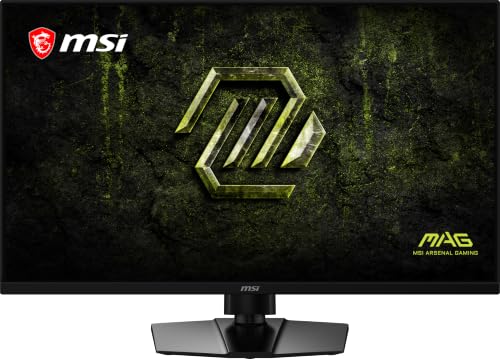
MSI MAG 321UPD E14 — 320Hz at UHD, the rate ceiling
If the ASUS marks the OLED pole of 32-inch gaming, the MSI MAG 321UPD E14 marks the refresh pole outright: a 32-inch UHD gaming panel at 320Hz, with AMD FreeSync Premium, a dual mode, HDMI and DisplayPort inputs, VESA mounting, tilt and height adjustment, a built-in speaker and a 0.05ms response claim. Three hundred and twenty hertz at 3840×2160 is a specification that would have read as satire not long ago, and its presence in a purchasable title tells you where the flagship race currently runs.
The dual mode is the mechanism that makes the headline usable, following the same logic as the ASUS: resolution and rate trade against each other, and the panel lets the player choose the exchange rate per game. Esports titles take the speed; spectacle titles take the pixels. FreeSync Premium governs the pacing on AMD systems and in the dips, and its presence matters more at these rates than anywhere else in the guide, because a panel refreshing 320 times a second exposes every irregularity in frame delivery that a slower screen would smear over.
Practical inclusions distinguish the MSI from a pure spec-sheet exercise. Height adjustment is stated — the only one of the two gaming flagships to publish stand travel — and VESA mounting is confirmed in the title, so the screen can be placed precisely in a rig. A built-in speaker covers the incidental audio of a gaming desk. What the title does not state is the panel technology behind the speed, and buyers for whom OLED-versus-alternatives is a deciding question should settle it on the listing; the guide records the silence rather than guessing at the flagship’s glass.
Console players should parse this MSI’s proposition carefully, because its strengths are PC-shaped. The dual mode and the 320Hz ceiling address graphics-card output; a console’s fixed output modes will use only a slice of the panel’s range, and the ASUS — whose title explicitly states PS5 and Xbox suitability — speaks that audience’s language more directly. None of this diminishes the MSI for its intended reader, but a household whose big screen is primarily a console display should let the ASUS’s stated console intent weigh heavily, while a PC-first rig with a console attached occasionally can safely prefer the MSI’s rate and stand.
The honest framing mirrors the ASUS review’s:
this is an instrument for players whose hardware and libraries can feed it, whose competitive titles will use the dual mode weekly, and whose desk is arranged around play. For that reader it is arguably the most future-proof gaming purchase in this guide, since its ceiling sits above what current graphics cards can saturate at 4K. For everyone else it is a magnificent answer to a question their desk never asks.
- Size and resolution: 32-inch, 3840×2160 UHD
- Refresh: 320Hz, dual mode
- Response: 0.05ms
- Sync: AMD FreeSync Premium
- Inputs: HDMI, DisplayPort
- Mount and stand: VESA, tilt and height adjustable
- Speaker: built in
- Panel type: Not stated in the listing title — verify with the manufacturer documentation
- G-Sync: Not stated in the listing title — verify with the manufacturer documentation
Strengths
- 320Hz at UHD is the highest stated rate in this guide.
- Height adjustment and VESA mounting are both published, unlike its OLED rival.
- FreeSync Premium steadies frame delivery at extreme rates.
Trade-offs
- Panel technology is unstated in the title and needs listing confirmation.
- No G-Sync named for NVIDIA-centred builds.
- Its speed ceiling exceeds what most content and hardware can supply.
Speed-led players can check price on Amazon for the MAG 321UPD E14, keeping the full code intact because MSI’s MAG line is densely populated.
Best for: competitive play seeking the highest UHD refresh rate available, with published stand adjustment.
Not suited for: work-led desks, or a buyer requiring a stated panel technology before ordering.

Dell UltraSharp U3226QER — The Thunderbolt hub at 120Hz
Dell’s U3226QER is the professional pole of this size, and its title is admirably specific about the things professionals specify: a 32-inch Thunderbolt hub monitor at 120Hz, 4K UHD, an IPS Black panel, 100% sRGB coverage, 1.07 billion colours, a 3000:1 contrast ratio, DisplayPort and USB connectivity, and Dell’s own positioning of the model as an ideal Mac companion. Read whole, that is a hub-first workstation screen whose panel credentials — IPS Black’s deeper contrast, a billion-colour depth, full sRGB — are published rather than assumed, which distinguishes it from the terser UltraSharp titles elsewhere on this site.
IPS Black is the panel detail worth understanding. It is Dell’s enhanced IPS tier, engineered for substantially deeper blacks than standard IPS delivers, and the stated 3000:1 contrast figure — triple the classic IPS ratio, matching the VA panel in this site’s Dell guide — is the measurable form of that claim. For professionals whose work includes photography, video or design review in ordinary office light, IPS Black offers a middle path: IPS viewing stability with contrast that no longer embarrasses the panel beside entertainment screens.
The Thunderbolt hub designation carries the architectural weight. This monitor is built to be the centre of a laptop workstation — the single connection point through which the machine meets the desk — and the explicit Mac companion positioning tells Apple-silicon buyers the hub was designed with their machines in the room. As with every hub in these guides, the title certifies the architecture without enumerating ports or wattage, so a desk plan with specific downstream requirements should be checked against the listing’s port diagram before the order is placed.
At 120Hz, the U3226QER also holds the professional motion standard: twice the old 60Hz rate, enough to make a large workspace feel fluid all day, without pretending to gaming ambitions it does not state — no sync brand is named in the title, and none is claimed here. Its buyer is the professional whose screen is infrastructure, and for that buyer this is the most completely argued pick in the guide.
- Size and resolution: 32-inch 4K UHD, 3840×2160
- Panel: IPS Black
- Refresh: 120Hz
- Brightness of colour: 100% sRGB, 1.07 billion colours
- Contrast: 3000:1
- Hub: Thunderbolt hub monitor
- Inputs: DisplayPort, USB (per title)
- Positioning: ideal Mac companion, per title
- Sync technology: Not stated in the listing title — verify with the manufacturer documentation
- Stand adjustment: Not stated in the listing title — verify with the manufacturer documentation
Strengths
- IPS Black with a stated 3000:1 contrast lifts professional image depth.
- Thunderbolt hub architecture centres a laptop workstation on one screen.
- 120Hz refresh brings modern motion to the hub class.
Trade-offs
- Port counts and power delivery need confirmation on the full listing.
- No gaming sync brand is stated, and none should be assumed.
- Stand travel goes unpublished in the title.
Professionals can check price on Amazon for the U3226QER, using the listing visit to map its hub ports against their desk’s inventory.
Best for: a laptop workstation, especially a Mac desk, seeking a Thunderbolt hub with IPS Black contrast at 32-inch 4K.
Not suited for: gaming-first setups, or a buyer requiring stated sync support and stand data.

Raywego 32-inch 4K Monitor — Frameless value for mixed duty
The Raywego closes the guide at the value end, and its title is more forthcoming than that position usually manages: a 32-inch 4K gaming-and-design monitor at UHD 3840×2160, a frameless design, 97% sRGB coverage, HDR10, FreeSync, a low-input-lag claim, billions of colours, a 60Hz refresh rate, HDMI and DisplayPort inputs, VESA mounting and eye-care features, aimed at gaming and graphic design. That is a complete mixed-duty proposition — one screen for the household whose work includes design-flavoured tasks and whose play is real but not competitive — stated with unusual candour for its tier.
The frameless design is the aesthetic headline and a functional one for multi-screen desks, where minimal bezels narrow the seam between panels. Ninety-seven percent sRGB sits a breath below the 99 and 100 percent figures elsewhere here, a difference that matters to colour professionals — who should be reading the Dell and LG reviews — and very little to the mixed household this monitor addresses. FreeSync at 60Hz keeps casual gaming smooth within the panel’s rate, and the low-input-lag claim speaks to the same audience: responsive enough for the games most people play, at the resolution that makes them look their best.
Eye-care features and VESA mounting round out a specification that keeps the upgrade paths open: the mount means an arm can supply the ergonomics the title does not describe, and the comfort features mean long sessions are planned for rather than endured. What remains unstated — panel technology, response figure, stand adjustment — is the standard value-tier homework, and it is shorter here than on several bigger-name rivals in this guide, which is a credit to the title’s honesty.
Households with school-age users should notice how completely this specification covers the shared-family brief without a single specialist feature. Homework documents sit at print size, streamed lessons carry their own clarity at 4K, eye-care features guard the longest sessions, and FreeSync keeps the weekend’s games smooth at the panel’s rate. A family screen is judged by the absence of complaints across very different users, and the Raywego’s title reads like it was assembled by someone who had listened to all of them. That is not a small achievement at the value end of any category, and it is why this pick closes the guide as a recommendation rather than as a footnote.
Placed against the LG UltraFine, its closest neighbour in spirit, the Raywego trades
the UltraFine’s published reader-and-flicker story and brand depth for FreeSync, a frameless design and the value tier’s pricing logic. A household choosing between them is choosing between a work-optimised panel and a mixed-duty one, and either choice is defensible — which is precisely the kind of fork a six-pick guide exists to expose.
- Size and resolution: 32-inch 4K UHD, 3840×2160
- Refresh: 60Hz
- Colour: 97% sRGB, billions of colours
- HDR: HDR10
- Sync: FreeSync
- Inputs: HDMI, DisplayPort
- Mount: VESA
- Design: frameless, eye-care features
- Panel type: Not stated in the listing title — verify with the manufacturer documentation
- Response time: Not stated in the listing title — verify with the manufacturer documentation
Strengths
- A complete mixed-duty specification — FreeSync, HDR10, VESA, eye care — at the value tier.
- Frameless design suits multi-screen desks and modern rooms.
- An unusually forthcoming title for its class, with rate and gamut both stated.
Trade-offs
- 60Hz caps gaming at the casual tier.
- 97% sRGB trails the colour-led picks for design-critical work.
- Panel type and stand details remain unstated.
Value-led households can check price on Amazon for the Raywego 32-inch, confirming its VESA pattern on the listing if an arm is part of the plan.
Best for: mixed work, design-flavoured tasks and casual gaming seeking frameless 4K value with FreeSync.
Not suited for: competitive play, or colour-critical production requiring a stated panel type and wider gamut.
Comparison Table
| Model | Refresh | Panel (per title) | Sync | Inputs (per title) | Distinguishing feature |
|---|---|---|---|---|---|
| LG UltraFine 32U701B-B | 60Hz | Not stated in the listing title | Not stated in the listing title | HDMI, DisplayPort | Reader Mode, Flicker Safe |
| Sceptre U325W-UPT | 70Hz | Not stated in the listing title | Not stated in the listing title | 2 x DisplayPort, 2 x HDMI | Built-in speakers, 100% sRGB |
| ASUS ROG PG32UCDP | 240Hz / FHD 480Hz | OLED | G-SYNC | USB-C 90W (plus console support) | Dual-mode flagship |
| MSI MAG 321UPD E14 | 320Hz | Not stated in the listing title | FreeSync Premium | HDMI, DisplayPort | Highest UHD rate, height stand |
| Dell UltraSharp U3226QER | 120Hz | IPS Black | Not stated in the listing title | DisplayPort, USB | Thunderbolt hub, 3000:1 contrast |
| Raywego 32-inch 4K | 60Hz | Not stated in the listing title | FreeSync | HDMI, DisplayPort | Frameless design, VESA |
How to Choose a 32-Inch 4K Monitor
Let the dominant use decide, and be ruthless about identifying it, because this size contains the widest spread of purposes in the monitor market. A desk whose hours are documents, analysis and reading belongs to the 60Hz work panels — the LG for its comfort pairing, the Raywego for mixed duty at value. A desk whose hours are games belongs to the flagships, split by panel philosophy and sync camp. A desk whose centre is a laptop and a peripheral ecosystem belongs to the Dell hub. The Sceptre serves the room rather than the desk: many sources, one screen, its own sound. Buyers who cannot name their dominant use in one sentence should default to the middle of the field — the Dell for professionals, the Raywego for households — rather than to either extreme.
Refresh rate should be bought the way processing power is bought: against measured need. Your graphics card’s actual frame rates at 4K in your actual games set the ceiling worth paying for, and for most systems that ceiling is far below 240Hz outside esports titles. The dual-mode flagships earn their premiums only when both modes will be used weekly; a player who will live permanently in one mode should buy the panel that does that mode best for less. Work buyers should treat the Dell’s 120Hz as the sweet spot — genuinely smoother days, no gaming tax — and 60Hz as entirely respectable where budgets are shared across a team.
Then measure the room. A 32-inch panel wants roughly seventy to ninety centimetres of viewing distance and a desk deep enough to provide it after the stand’s footprint takes its share. Height adjustment, stated on the MSI and absent from several titles here, or a VESA mount, stated on the MSI and Raywego, are the tools that tune a big screen to a body; where neither is published, the listing check becomes part of the purchase. Big glass amplifies ergonomic mistakes exactly as it amplifies workspace, so the tape measure deserves the same respect as the specification sheet.
Colour and connections close the decision. Colour-led work should follow the published figures — the Dell’s 100% sRGB with IPS Black contrast, the Sceptre’s 100% sRGB, the ASUS’s true 10-bit — and treat unstated gamuts as homework. Connection-led desks should count sources honestly: four inputs on the Sceptre for the many-device room, USB-C with a stated 90W on the ASUS for the gaming-laptop dock, Thunderbolt architecture on the Dell for the professional workstation. Every pick in this guide is the right answer to one of those sentences; the buyer’s task is finding which sentence is theirs.
Work Panel, Hub or Gaming Flagship: Which Kind of 32-Inch Screen Is Yours?
The three families in this guide differ less in quality than in where they spend, and a short tour of the spending makes the fork concrete. Work panels spend on comfort and colour honesty: flicker-safe backlights, reader modes, published sRGB figures. Hub panels spend on architecture: the Thunderbolt connection point, the panel technology that serves colour review, the refresh rate that makes a professional day fluid. Gaming flagships spend on speed and image drama: OLED or equivalent panels, dual-mode electronics, response figures in the hundredths of a millisecond, cooling to sustain it all.
Cross-family purchases are where regret breeds. A gaming flagship on a document desk spends its owner’s money on modes that will be opened twice a year; a 60Hz work panel under a competitive player is a daily frustration wearing a sensible price. The middle picks — the Dell for professionals who occasionally play, the Raywego and Sceptre for households that do everything moderately — exist for buyers whose lives genuinely straddle the families, and they should be chosen as straddles, proudly, rather than as compromises apologised for.
Budget sequencing helps the undecided. The panel is the longest-lived component on the desk, so within a family, buying the better-fitting model usually outranks saving toward peripherals that can be added later — arms, speakers and docks all retrofit; panel technology and hub architecture do not. Choose the family first, then the model, then the accessories, in that order, and the purchase will still look correct when the rest of the desk has been replaced around it.
What Desk Depth and Distance Does a 32-Inch Screen Actually Need?
More than most buyers budget for, and the shortfall is the most common reason big monitors get returned. A 32-inch 16:9 panel is roughly seventy centimetres wide; at a viewing distance under sixty centimetres its edges sit outside comfortable eye movement, and the user begins turning their head for interface elements that a smaller screen keeps in view. Between seventy and ninety centimetres the same panel becomes the sweet spot this whole category is built on — full field, no strain, unscaled text legible — and beyond a metre it begins to read as a small television, superb for media and presentations, oversized for text work.
Stand footprint consumes depth before the screen does. Large panels carry large feet, and a desk that measures eighty centimetres deep may deliver only sixty-five of viewing distance once the stand, a keyboard and a document rest are placed. Height-adjustable stands and VESA arms reclaim some of that depth by floating the panel, which is one more reason the mounting details in the spec boxes matter at this size. Buyers working with a shallow desk should measure honestly and consider whether the 27-inch guides linked below serve the room better, because a correctly distanced 27-inch screen beats a crowded 32-inch one at every task this guide covers.
OLED, IPS Black or Unnamed Glass: How Much Does Panel Technology Matter at 32 Inches?
At this size, panel technology stops being a footnote because the screen is large enough for its character to fill your peripheral vision. The two picks here that name their glass illustrate the poles. The ASUS’s OLED renders black as genuine darkness, pixel by pixel, so a night scene in a game or film has depth that backlit panels approximate; its 0.03ms response claim reflects pixels that switch almost as fast as the signal changes. The Dell’s IPS Black keeps the backlit architecture but pushes its contrast to a stated 3000:1, narrowing the darkness gap while retaining the viewing-angle stability and office-light composure that make IPS the professional default. A buyer choosing between them is choosing between the best dark-room image in the guide and the best all-day office image in the guide, and both descriptions are compliments.
The four titles that name no panel technology require a different kind of reading. Silence is not evidence of a poor panel — value and mid-range lines often use perfectly good glass their marketing chose not to headline — but it removes the buyer’s ability to predict viewing angles, contrast behaviour and colour stability from the specification. For a single-user desk viewed head-on, those unknowns matter less than almost any other figure in this guide. For a shared screen, a sofa-adjacent media panel or a colour-aware workflow, they matter a great deal, and the correct response is the one this guide keeps prescribing: settle the panel on the full listing before the money moves, and let the answer, not the assumption, join the comparison.
There is a longevity angle that flagship marketing rarely mentions and office buyers should. Panels are judged in year four by the consistency of their image — brightness evenness, colour stability, freedom from artefacts — and different technologies age by different rules, with different care habits attached. A buyer planning a decade of service should read the listing’s care and warranty information for any OLED model with the same attention given to its refresh rate, and should weigh the hub Dell’s professional positioning as the low-drama option it is designed to be. None of this argues against OLED, which this guide recommends enthusiastically to its gaming audience; it argues for buying any flagship technology with its ownership terms understood rather than discovered.
The practical summary is a matching exercise. Dark rooms and cinematic content reward OLED most; bright offices and shared viewing reward IPS-family panels most; head-on mixed use forgives almost any modern glass, which is why the value picks can leave theirs unnamed and still earn their places. Match the glass to the room’s light and the screen’s audience, and panel technology becomes the easiest decision in this entire guide — which is fortunate, because it is also the one that cannot be changed later with an accessory.
Common Mistakes
Buying a flagship for its slower mode. A dual-mode panel purchased by someone who will only ever run 4K story games has paid for a 480Hz instrument that will sit unused. Match the mode you will actually live in, and let the other mode be a bonus rather than the justification.
Feeding a 320Hz panel with a mid-range card and blaming the screen. At 4K, extreme refresh rates are a partnership between panel and GPU. The MSI’s ceiling is real, and so is the hardware bill for reaching it outside esports titles; audit your frame rates before auditing the monitor.
Assuming every 32-inch 4K panel shares a panel technology. This guide alone contains a stated OLED, a stated IPS Black, and four titles that name no panel technology at all. Viewing angles, contrast and colour behaviour follow the glass, so an unnamed panel is a listing question, not a detail.
Forgetting the room in the excitement of the diagonal. Desk depth, stand footprint and viewing distance decide whether 32 inches feels like a workspace or a billboard. Measure first; the largest correct screen is the one your room can hold at the right distance.
Treating a hub monitor as a plain monitor with extra ports. The Dell’s Thunderbolt architecture is a desk-design decision, gathering the workstation into the screen. Buyers who never dock anything pay for architecture they will not use, while buyers who dock daily and choose a plain panel pay for the omission every morning.
Overlooking the value picks’ homework. The Raywego and Sceptre leave panel and stand facts unstated in their titles. Their prices reward buyers who spend ten minutes on the listing confirming those facts — and quietly punish buyers who assume them.
Final Recommendation
For work-first desks, the LG UltraFine is the calm answer — flicker-safe, reader-tuned, honestly specified — while professionals whose screen must also be their workstation’s hub should take the Dell U3226QER and its IPS Black contrast without a backward glance. For play-first desks, the fork is philosophical: the ASUS PG32UCDP for the OLED image and the dual-mode spread, the MSI MAG for the outright refresh ceiling with a published stand. Both are flagships; choose by the games you actually play and the graphics camp you actually own.
The middle of the field is not a consolation prize. The Sceptre is the right screen for the many-source room, and the Raywego is the right screen for the mixed household that wants 4K, FreeSync and a frameless design without flagship arithmetic. More desks in the real world match those two descriptions than match either flagship’s, and this guide’s respect for them is deliberate.
A final note on sequencing for buyers furnishing a whole desk around one of these screens: buy the panel first and the accessories second, in separate decisions. The monitor’s family determines what the desk still needs — the hub Dell may retire a dock from the shopping list, the Sceptre’s speakers may retire a soundbar, the MSI’s stand may retire an arm — and accessories bought before the panel is chosen have a habit of duplicating features the panel already carries. Let the screen’s stated specification write the rest of the list, and the desk will cost less and clutter less than the alternative order ever manages.
Whichever family you choose, choose it by dominant use
, verify the model code and the room measurements, and the 32-inch screen will repay the care for the whole of its long life.
Frequently Asked Questions
Is 32 inches too big for a desk monitor?
It is too big for a shallow desk and ideal for a deep one. The panel needs roughly seventy to ninety centimetres of viewing distance to keep its edges in comfortable view and its unscaled text legible; desks that can offer that distance gain a genuine workspace advantage over 27 inches, and desks that cannot will serve their owners better with the smaller size. Measure the distance your chair actually sits at, stand footprint included, and let that number vote.
What is a dual-mode monitor, and who needs one?
A dual-mode panel offers two native behaviours: full 4K resolution at a high refresh rate, or a lower resolution — Full HD on both flagships here — at a much higher rate, up to 480Hz on the ASUS. It serves players whose libraries span both spectacle titles, where pixels matter, and competitive titles, where rate matters absolutely. Players committed to a single genre need only the mode that genre uses, and can usually buy it for less in a single-mode panel.
Can a 32-inch 4K monitor replace two smaller screens?
For many desks, yes: 3840×2160 holds four 1080p-sized work areas, and at 32 inches each quadrant is physically large enough to work in. Window management replaces the bezel as the organising tool, and the frameless Raywego or the wide Sceptre serve the style well. Dual-screen loyalists usually miss the physical separation of tasks and the ability to angle one screen away; everyone else discovers that one large surface with good window habits is simpler to cable, power and keep clean.
Does the Dell’s Thunderbolt hub suit a Windows workstation as well as a Mac?
The title positions the U3226QER as an ideal Mac companion, and Thunderbolt is a cross-platform standard, so a Windows workstation with Thunderbolt can build the same one-cable desk around it. What neither the title nor this guide can enumerate is the hub’s exact port layout and power delivery, and those details decide how completely any specific workstation can dock. Confirm them on the listing against your machine’s inventory, whichever logo is on its lid.
Why do the two gaming flagships cost so much more desk commitment than the work panels?
Because their defining features are expensive to build and demanding to feed. OLED panels with custom cooling, electronics that switch between 240Hz and 480Hz modes, and response times in the hundredths of a millisecond are flagship engineering, and the graphics hardware required to use them at 4K is a second flagship purchase. The work panels spend the same money differently — on comfort, colour and consistency across an eight-hour day. Neither spending pattern is the honest one in general; each is honest for its desk.
Will a 32-inch 4K screen make my existing computer feel slower?
The screen itself asks nothing of the computer beyond driving more pixels, and for desktop work, documents and video that load is trivial for any machine of the last several years. Gaming is where the question has teeth: rendering games at 3840×2160 is roughly four times the pixel work of 1080p, so a system that was comfortable at 1080p may need reduced settings at 4K, and the high-refresh flagships in this guide assume graphics hardware from the current top tier. Buyers with older gaming PCs should either budget the card upgrade into the same plan or choose a panel whose rate their system can feed, such as the 60Hz and 70Hz picks.
How should I cable four sources into one of these screens?
Give each source its own permanent cable and let the monitor’s input menu do the switching, which is precisely the arrangement the Sceptre’s four inputs invite. Label the cable ends, keep runs short where high refresh rates are involved — flagship modes are the most cable-sensitive — and reserve the panel’s best input for the source used most, since port capabilities can differ within one monitor. A desk wired this way changes sources in seconds and never disturbs the cable run behind the screen, which is where most connection faults are born.
Is 70Hz on the Sceptre a meaningful step over 60Hz?
Marginally, and it should be valued marginally. Desktop motion and video gain a small smoothness increment, and casual games at 4K gain a slightly higher ceiling, but no buyer should choose the Sceptre for its refresh rate. Its case rests on the four video inputs, the full sRGB coverage and the built-in speakers — the refresh figure is a pleasant detail inside that case, and the review presents it as exactly that.
Related Guides
Gamers who want the wider NVIDIA-sync field at this resolution should continue to our roundup of the best 4K monitors with G-Sync, where the flagships here meet their 27-inch rivals. Readers speccing the machine that will drive a 32-inch screen for accounts work can compare the options in our guide to the best laptops for QuickBooks business use, and those equipping a broader business desk will find the companion shortlist in our guide to the best laptops for business and banking.


