What's inside
- Key Takeaways
- Quick Picks
- How These Conference Picks Were Chosen
- Comparison Table
- How to Choose a Conference Room Projector Without Overbuying
- How Much Brightness Does a Lit Meeting Room Actually Need?
- Lamp, Laser or LED: Which Light Engine Suits a Business?
- What Should the IT Kit Around the Projector Include?
- Ceiling Mount, Credenza or Cart: Where Should the Machine Live?
- How Do You Keep a Shared Projector Ready for the Next Meeting?
- What Changes When Meetings Go Hybrid?
- How Do Screens and Room Surfaces Change the Result?
- What Does a Sensible Five-Year Cost Picture Look Like?
- Common Mistakes
- Final Recommendation
- Frequently Asked Questions
- Related Guides
As an Amazon Associate I earn from qualifying purchases. This post may contain affiliate links at no extra cost to you.
[SITE_DOMAIN] is reader-supported. When you buy through links on our site, we may earn an affiliate commission.
Buying route for this guide: each of the six conference machines below carries a live Amazon listing, and the model name in every review heading links straight to it. Open a listing to confirm the fittings, mount hardware and warranty wording that apply to your room before you commit, because conference projectors are usually bought once and then expected to serve for years.
Finding the best affordable conference room projectors starts with a blunt fact about meeting rooms: they are lit for people, not for pictures. Blinds stay half open, ceiling panels stay on, and the person at the far end of the table still has to read a spreadsheet cell without leaning forward. A projector that looks glorious in a darkened demo room can wash into grey mush under office lighting, so this guide ranks brightness, throw and connection sense ahead of cinematic romance.
Affordable also needs defining before any model earns praise. In this class it means the working tier below the big-venue installation machines: projectors an office manager can buy for a meeting room without a capital project, yet strong enough that nobody suggests replacing the screen with a television by the second quarter. Every pick below states its brightness in its own listing title, and those stated figures run from 4000 to 5500 lumens, which is the honest working band for rooms where lights stay partly on.
Three light engines appear across the six. Laser powers the ViewSonic LS740HD and the Epson Pro EX11000, LED powers the BenQ LH750, and the remaining three rely on conventional lamp-based designs implied by their SmartEco and meeting-room positioning. Light source matters to a facilities budget because it decides whether lamp purchases and mid-life brightness fade belong in your planning, or whether the projector simply turns on at full strength for meeting after meeting.
Resolution splits the field in a way slide decks will forgive and video calls will not. Four picks are Full HD 1080p machines, while the ViewSonic PS502W and the BenQ MW560C are WXGA models. For charts, agendas and shared documents, WXGA remains serviceable; for small text, dense dashboards and anything a remote guest reads over a camera feed, the 1080p machines hold a real edge. Each review below names its pick’s resolution plainly so that trade stays visible rather than buried.
Finally, a conference projector is shared infrastructure, and shared infrastructure fails socially before it fails technically. The best machine here is the one a visiting presenter can drive without a tutorial: two HDMI ports, a speaker that carries a voice across the table, casting that accepts a guest laptop, and keystone correction that forgives a hurried setup. Judge these six by how they behave on a wet Tuesday with a client waiting, not by how they behave in a brochure.
Key Takeaways
- Stated brightness runs from 4000 lumens on the PS502W and MW560C up to 5500 lumens on the laser LS740HD, and every figure in this guide comes from the pick’s own listing title.
- The LS740HD and the Epson Pro EX11000 use laser light, the BenQ LH750 uses LED light rated in its title at 30,000 hours, and the other three follow lamp-based designs.
- Four picks project native Full HD 1080p; the PS502W and MW560C are WXGA machines, a workable trade for slides and a weaker one for fine text.
- The PS502W is the short-throw specialist, with a stated 0.5 throw that suits small rooms where a standard projector would sit inside the presenter’s space.
- Wireless casting appears in the titles of the EX9270, EX11000 and LH750, which matters when guest laptops rotate through the room all week.
- Built-in speakers are stated on the EX9270, PS502W and EX11000, with the EX11000 quoting a 16W speaker in its title.
Quick Picks
| Pick | Badge | Why it earns its place |
|---|---|---|
| ViewSonic LS740HD 5500lm Laser Projector | Brightest stated figure, laser light | A 1080p laser machine quoting 5500 lumens, optical zoom, corner adjustment and 360-degree projection for large or awkward rooms. |
| Epson Pro EX9270 Wireless 1080p Projector | Casting-friendly 3LCD all-rounder | 4100 lumens of color and white brightness, AirPlay and Miracast streaming, two HDMI ports and a 1.6x zoom for flexible placement. |
| ViewSonic PS502W Short Throw Projector | Short-throw room saver | A WXGA machine with a stated 0.5 short throw and 4000 lumens, built for small rooms where the projector must sit close to the wall. |
| BenQ MW560C WXGA Business Projector | Warranty-backed meeting staple | 4000 lumens, a stated 20,000:1 contrast ratio, auto keystone, SmartEco power saving and a three-year warranty in the title. |
| Epson Pro EX11000 Wireless Laser Projector | Laser light with a serious speaker | A 1080p laser 3LCD quoting 4600 lumens, Miracast, USB power and a built-in 16W speaker for rooms without separate audio. |
| BenQ LH750 1080P LED Projector | LED colour for long service | 5000 lumens, a stated 98% Rec.709 colour gamut, Wi-Fi casting and LED light rated in the title at 30,000 hours. |
Ownership rhythm differs by light engine in ways a diary reveals. Lamp models ask for a spare lamp on the shelf before the old one fades, plus a note of the hour count at each service. Laser and LED models ask only for filter care and the occasional firmware attention. Neither rhythm is onerous, but mixing them up — treating a lamp machine like a fit-and-forget laser unit — is how rooms end up dim in front of an important visitor.
One more filter deserves naming: every candidate had to come from a maker with a real business-projector line behind it, the kind of catalogue that includes mounts, lamps and support channels a facilities team can actually use. Anonymous boxes quoting heroic brightness beside a conference-room label failed that test, because a shared projector is a five-year appliance whose fan, filter and light engine will eventually need a company still answering its email.
How These Conference Picks Were Chosen
Brightness came first, and only brightness a listing title actually prints. Conference rooms punish optimism, so a candidate needed a stated figure of at least 4000 lumens to enter this guide at all. Vendor lumen claims are not perfectly comparable across light engines, a caveat the how-to section returns to, but a title that commits to a number at least gives a buyer something concrete to hold the seller to.
Connection sense came second. Meetings fail at the cable more often than at the lens, so we credited titles naming two HDMI ports, legacy VGA for older laptops, USB power for a streaming stick, and wireless casting through AirPlay, Miracast or Wi-Fi screen casting. A projector that accepts whatever a guest carries through the door saves the first five minutes of every meeting, and those saved minutes compound across a year of bookings.
Placement flexibility came third. Optical zoom, corner adjustment, auto keystone and short-throw geometry each solve a different room problem: a ceiling mount that cannot move, a table that sits off-centre, a wall only a metre from the lens. We also weighed the light engine’s service story, because a projector bought for a business should state, or at least imply, how its brightness will be maintained across years of daily switching on and off.

ViewSonic LS740HD 5500lm Laser Projector — The brightness leader with laser stamina
The LS740HD carries the strongest brightness claim in this guide, 5500 lumens from a laser light source, and that pairing defines its role. Laser output does not sag through a lamp’s ageing curve, so a room calibrated around this machine in January behaves the same way in November. For a large meeting room, a training space or an auditorium-style layout where the back row sits far from the screen, that combination of output and stability is exactly what the purchase is for.
ViewSonic’s title also leans into placement freedom. Optical zoom lets the installer fine-tune image size from a fixed ceiling position, keystone and corner adjustment square the picture when the mount and the wall refuse to agree, and 360-degree projection opens mounting angles that ordinary projectors cannot use. The title even names golf simulation alongside classroom and auditorium use, a hint that this chassis was designed for permanent installation rather than life in a cupboard.
What the title does not offer is a wireless story. No casting protocol, Wi-Fi feature or streaming platform appears in the LS740HD’s listing title, so plan on wired sources: a room PC, a docked laptop, or a conferencing appliance feeding it by cable. In a fixed installation that is no hardship, since the cable run happens once and every presenter simply connects at the table. Rooms that depend on guests casting from their own machines should weigh the Epson models below more heavily.
Sound deserves the same planning honesty. No speaker figure appears in this title, so a room adopting the LS740HD should budget for audio separately, whether that means a soundbar under the screen or the ceiling speakers a proper installation usually includes. Treat this projector as the picture engine of a finished room and it rewards you; treat it as a self-contained meeting kit and its silences will annoy you weekly. If that installation-first profile matches your room, the LS740HD listing on Amazon is where to confirm the current price and the mount hardware included.
A last placement note belongs to the LS740HD’s corner adjustment, because it changes who can install the machine. Corner correction lets each corner of the image be pulled into line independently, which rescues mounts that sit slightly off-axis or walls that are not perfectly flat. Combined with the optical zoom, it means the installer solves geometry in the menu rather than with repeated trips up the ladder, and the room gets a squared picture on the first afternoon instead of the third.
- Resolution: Full HD 1080p, per listing title
- Brightness: 5500 lumens, per listing title
- Light source: laser
- Geometry tools: optical zoom, keystone, corner adjustment
- Mounting: ceiling mount and 360-degree projection named in title
- Speaker output, wireless casting and port list: Not stated in the listing title — verify with the manufacturer documentation
Strengths
- Highest stated brightness here at 5500 lumens
- Laser light holds output without lamp swaps
- Corner adjustment rescues imperfect installations
Trade-offs
- No casting feature named in its title
- No speaker figure quoted in its title
- Installation-grade design exceeds casual needs
Best for: a large fixed meeting room, training space or small auditorium with wired sources and separate audio.
Not suited for: impromptu huddle corners relying on guest laptops casting wirelessly.

Epson Pro EX9270 Wireless 1080p Projector — The casting-friendly 3LCD all-rounder
The EX9270 argues that a conference projector should welcome whatever walks through the door. Its title stacks wireless streaming from phone or laptop, AirPlay and Miracast support, and two HDMI ports into one machine, which covers the three ways presenters actually arrive: with a cable, with a casting habit, or with a phone and optimism. Epson’s 3-chip 3LCD design quotes 4100 lumens for both color and white brightness, a pairing that matters for slides heavy with charts, brand colours and photographs rather than plain black text.
That color-and-white wording deserves a pause, because it answers a real meeting-room problem. A projector can post a high white figure yet render a muted pie chart, and presenters discover the gap only when the finance deck looks washed out in front of the people who fund it. Epson stating both numbers at 4100 gives colour-critical decks a firmer footing, and the 1080p resolution keeps spreadsheet text crisp at sensible screen sizes.
Placement help comes from the stated 1.6x zoom, a generous range that lets one model serve rooms of differing depths without exotic mounts. A built-in speaker is named in the title as well, enough for voice and video-call audio in a modest room, though a large table will still want help. Altogether this is the pick that asks the fewest favours from IT: set it up once, and most guests can present without an adapter ritual or a support call.
The compromises are about ceiling rather than floor. At 4100 lumens the EX9270 sits below the two brightest machines here, so a sunlit room with weak blinds will push it harder than the LS740HD. Its light source is not described as laser or LED in the title, so long-term lamp planning belongs in the ownership conversation. For the broad middle of meeting rooms, though, the balance lands well, and Anyone weighing wireless ease against the brighter laser models will find the EX9270’s Amazon listing useful for a current price check before deciding.
- Resolution: 1080p, per listing title
- Brightness: 4100 lumens color and white brightness
- Display system: 3-chip 3LCD
- Wireless: stream from phone or laptop, AirPlay, Miracast
- Ports: 2 HDMI ports named in title
- Zoom: 1.6x zoom stated
- Light source type and speaker wattage: Not stated in the listing title — verify with the manufacturer documentation
Strengths
- AirPlay and Miracast cover most guest devices
- Equal color and white brightness figures
- 1.6x zoom eases room-to-room placement
Trade-offs
- 4100 lumens trails the brightest picks here
- Light source type goes unnamed in its title
- Speaker wattage is not quoted in its title
Best for: a shared meeting room hosting rotating guest presenters with mixed laptops and phones.
Not suited for: a glass-walled room with strong daylight and no blinds.

ViewSonic PS502W Short Throw Projector — The short-throw room saver
Some rooms defeat ordinary projectors before brightness ever matters. The table fills the floor, the wall sits a short distance away, and a standard throw would put the machine in the presenter’s lap or the image beyond the wall’s edges. The PS502W exists for that geometry: its title states a 0.5 short throw, meaning a big picture from roughly half the usual distance, with the projector parked close to the screen where nobody’s shadow crosses the slide.
ViewSonic pairs that geometry with 4000 lumens and a WXGA picture. WXGA is the honest compromise in this review: wide enough for slides, video calls and documents, softer than 1080p when a spreadsheet shrinks to small print. In the small rooms this projector targets, viewing distances are short and screen sizes moderate, which softens the resolution penalty considerably. A training room running walkthrough videos and annotated diagrams will rarely feel short-changed.
The connection list reads like a legacy-friendly checklist: dual HDMI for current machines, VGA for the veteran laptop that finance refuses to retire, RS232 for room control systems, USB, and a built-in speaker. Vertical keystone handles the tilt that close placement often introduces. That RS232 line is a quiet signal of intent — this projector expects to join a managed room, taking commands from the same control panel that dims the lights and drops the screen.
Choose the PS502W when the room’s shape is the problem and the Epson and BenQ standard-throw models simply cannot fit. Skip it when the room is large, because short throw optics are wasted across a long table and the WXGA picture will stretch thin on a big screen. Measure your wall distance first; if the geometry fits, look up the PS502W on Amazon to verify today’s price against your room budget.
- Resolution: WXGA, per listing title
- Brightness: 4000 lumens, per listing title
- Throw: 0.5 short throw stated
- Ports: dual HDMI, VGA, RS232, USB named in title
- Correction: vertical keystone stated
- Audio: built-in speaker named in title
- Wireless features and zoom range: Not stated in the listing title — verify with the manufacturer documentation
Strengths
- 0.5 throw fills a wall from close range
- RS232 suits centrally controlled rooms
- VGA keeps older laptops welcome
Trade-offs
- WXGA resolution softens fine spreadsheet text
- Short throw is wasted in long rooms
- No wireless casting named in its title
Best for: a compact meeting room, classroom corner or training pod with limited throw distance.
Not suited for: a long boardroom seating viewers far from a large screen.

BenQ MW560C WXGA Business Projector — The warranty-backed meeting staple
BenQ sells the MW560C with unusual directness: the title repeats its 4000 lumens, states a 20,000:1 contrast ratio, names HDMI and VGA, and closes with a three-year warranty. That last item is rare enough in this guide to deserve emphasis. A business projector is a shared asset that gets switched on by everyone and owned by no one, and a stated warranty term converts a vague hope of durability into a contractual promise a purchasing department can file.
The contrast figure earns its place for text work. Meeting content lives on edges — black characters on white slides, gridlines on charts, the thin rules of a Gantt chart — and contrast is what keeps those edges legible when room light competes with the image. Paired with auto keystone, which squares the picture when the projector sits at an angle on a credenza, the MW560C reads as a machine tuned for the unglamorous daily deck rather than the occasional film afternoon.
SmartEco technology appears in the title as BenQ’s power-saving system, which trims consumption and stretches lamp life by responding to content. For a room that hosts six meetings a day, that economy compounds into fewer lamp purchases across the projector’s service years. The resolution remains WXGA, the same compromise as the PS502W: entirely adequate for slides and shared documents, visibly softer when a designer shares detailed artwork or a spreadsheet zooms out to a full quarter.
Nothing in this title promises wireless casting or a speaker, so the MW560C expects the room to provide its own audio and its presenters to arrive with a cable. Within a managed office that is a reasonable expectation, and the warranty plus contrast story makes this the low-drama choice for standardising across several similar rooms. For a multi-room rollout, open the MW560C listing on Amazon, note its current price, and set that figure beside the value of three years of stated warranty cover.
- Resolution: WXGA, per listing title
- Brightness: 4000 lumens, per listing title
- Contrast: 20,000:1 stated in title
- Ports: HDMI and VGA named in title
- Correction: auto keystone stated
- Power saving: SmartEco technology named
- Warranty: 3 years stated in title
- Speaker and wireless features: Not stated in the listing title — verify with the manufacturer documentation
Strengths
- Three-year warranty stated outright
- Contrast figure supports text legibility
- SmartEco trims power and lamp wear
Trade-offs
- WXGA rather than Full HD resolution
- No casting feature named in its title
- No speaker mentioned in its title
Best for: an office standardising several similar meeting rooms on one dependable model.
Not suited for: presenters expecting to cast from a phone without room hardware.
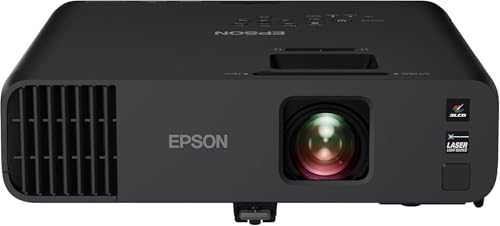
Epson Pro EX11000 Wireless Laser Projector — Laser light with a serious speaker
The EX11000 combines three traits that rarely share a title: laser light, 4600 lumens of color and white brightness, and a built-in 16W speaker. That speaker figure is the largest audio claim in this guide, and it changes what the projector can be. A room without installed sound can run video calls, training clips and town-hall streams through this machine alone, with voices carried by a speaker actually sized for a room rather than a laptop’s apologetic chirp.
Laser light supplies the other half of the proposition. Epson rates the brightness at 4600 lumens for both color and white, the 3LCD pattern that keeps charts saturated, and the laser source removes lamp replacement from the maintenance calendar. For a projector mounted on a ceiling in a room booked solid from nine to five, that absence of consumables is a genuine operational saving, not a marketing garnish.
Connectivity follows the modern pattern: Miracast for wireless screen sharing, two HDMI ports for wired sources, and USB power, which lets a streaming stick draw its electricity from the projector instead of hunting for a spare socket near the ceiling mount. A presenter can walk in with a laptop, a guest can mirror a phone, and the room’s own stick can handle the streaming services a training session needs, all without swapping cables at the projector itself.
Against the LS740HD, the EX11000 trades raw lumens for completeness: 4600 against 5500, but with casting, speaker and USB power included. Against its EX9270 sibling it adds laser endurance and the bigger speaker at a similar all-rounder shape. Rooms that want one purchase to finish the job, rather than a projector plus an audio project, will find this the most self-sufficient entry here, and the EX11000’s Amazon page is the place to test that completeness against this quarter’s budget with a current price check.
There is a subtler strength in the EX11000’s specification worth noticing: USB power at the projector changes where a streaming stick can live. Sticks normally dangle from a port and beg for a nearby socket, which ceiling installations rarely provide. Feeding the stick from the projector tidies the whole signal path into the mount itself, so the room’s streaming source becomes part of the fixture rather than an accessory balanced on top of it.
- Resolution: Full HD 1080p, per listing title
- Brightness: 4600 lumens color and white brightness
- Light source: laser
- Display system: 3-chip 3LCD
- Wireless: Miracast screen mirroring stated
- Ports: 2 HDMI ports and USB power named
- Audio: built-in 16W speaker stated
- Zoom range and throw ratio: Not stated in the listing title — verify with the manufacturer documentation
Strengths
- 16W speaker carries voice-led meetings alone
- Laser source removes lamp replacements
- USB power simplifies streaming stick installs
Trade-offs
- 4600 lumens trails the LS740HD’s figure
- Zoom details absent from its title
- Miracast only; no AirPlay named in title
Best for: a busy mid-size meeting room needing projector, casting and room-filling voice audio in one unit.
Not suited for: the very largest rooms where maximum stated brightness outranks convenience.

BenQ LH750 1080P LED Projector — LED colour for long service
The LH750 takes the third path on light: neither laser nor a conventional lamp headline, but an LED engine its title rates at 30,000 hours, paired with 5000 lumens and a stated 98% Rec.709 colour gamut. Rec.709 is the colour space of broadcast HD, and quoting coverage of it signals a machine aimed at rooms where brand colours, product photography and video content must look right rather than merely visible.
That colour emphasis pairs sensibly with the resolution. This is a Full HD 1080p projector, so marketing decks, design reviews and client-facing presentations get both the pixel count and the colour discipline they need. The title adds 4K HDR compatibility, which means the machine accepts and handles such signals; it does not convert the panel into a 4K projector, and buyers should hold that distinction firmly when comparing against true 4K machines in other guides.
Daily operation looks well considered. Wi-Fi and screen casting cover wireless guests, two HDMI ports cover wired ones, auto keystone corrects hurried placement, and SmartEco trims power draw. A three-year warranty is stated in the title, matching the MW560C’s cover and reinforcing the sense that BenQ expects this machine to live a long institutional life. The 30,000-hour LED rating supports that expectation: at eight hours of meetings a day, the light source’s rated span stretches across many working years.
The LH750’s argument is balance at a high level rather than a single headline victory. The LS740HD outshines it on stated lumens, the EX11000 counters with a bigger speaker, but neither matches its colour-gamut claim or its LED lifespan figure. Design-conscious rooms and client-facing spaces will feel the difference in every deck. Presenters whose decks carry their reputation should open the LH750 on Amazon, check its price today, and judge the colour story against that number.
- Resolution: 1080p Full HD, per listing title
- Brightness: 5000 lumens, per listing title
- Light source: LED, rated 30,000 hours in title
- Colour: 98% Rec.709 stated
- Signal handling: 4K HDR compatible, per title
- Wireless: Wi-Fi and screen casting named
- Ports: 2 HDMI named in title
- Warranty: 3 years stated in title
- Speaker wattage: Not stated in the listing title — verify with the manufacturer documentation
Strengths
- Stated 98% Rec.709 colour coverage
- LED light rated at 30,000 hours
- 5000 lumens with a three-year warranty
Trade-offs
- Speaker output goes unquoted in its title
- 4K HDR wording means signal compatibility only
- LS740HD still leads on stated brightness
Best for: a client-facing presentation room where brand colour accuracy carries weight.
Not suited for: a buyer chasing the single highest lumen figure regardless of colour.
Comparison Table
| Model | Resolution | Stated brightness | Light source | Standout trait |
|---|---|---|---|---|
| ViewSonic LS740HD | 1080p | 5500 lumens | Laser | Corner adjustment, 360-degree projection |
| Epson Pro EX9270 | 1080p | 4100 lumens color and white | Unstated in title | AirPlay and Miracast casting, 1.6x zoom, 2 HDMI ports |
| ViewSonic PS502W | WXGA | 4000 lumens | Unstated in title | 0.5 short throw, RS232 control |
| BenQ MW560C | WXGA | 4000 lumens | Unstated in title | 20,000:1 contrast, 3-year warranty |
| Epson Pro EX11000 | 1080p | 4600 lumens color and white | Laser | Miracast casting, built-in 16W speaker, USB power |
| BenQ LH750 | 1080p | 5000 lumens | LED, 30,000 hours | Wi-Fi screen casting, 98% Rec.709 colour, 3-year warranty |
How to Choose a Conference Room Projector Without Overbuying
Start with the room’s light, not the catalogue. Stand where the farthest viewer sits, at the brightest hour the room gets used, and ask whether a projected spreadsheet would survive. Modest rooms with working blinds live comfortably at the 4000-lumen level of the PS502W and MW560C. Rooms with one glass wall, or screens larger than about 120 inches, should step up to the 4600–5500 lumen band of the EX11000, LH750 and LS740HD, because brightness demand grows with screen area faster than intuition suggests.
Next, measure the throw before falling for a specification. The distance from lens to wall, divided by the image width you want, decides whether a standard projector fits at all. Short rooms, or rooms where the only mount point sits close to the screen, point straight at the PS502W and its stated 0.5 throw. Longer rooms can use anything here, but zoom range then decides how forgiving the installation is: the EX9270’s stated 1.6x zoom forgives the most measurement error.
Then count your presenters, not your ports. A room serving one fixed PC needs little beyond a single reliable HDMI run. A room hosting guests needs the opposite philosophy: spare HDMI, VGA for legacy machines, and casting through AirPlay, Miracast or Wi-Fi so that a visitor’s device finds a route in within a minute. Every minute spent pairing is a minute subtracted from the meeting the room was booked for, multiplied by everyone seated and waiting.
Finally, price the light source across five years. Lamp-based machines ask for replacement lamps on a cycle; laser and LED models fold that cost into the purchase and hold brightness steadier between services. Add the room’s audio answer honestly: the EX11000’s stated 16W speaker can close the question for voice-led rooms, while the LS740HD’s silence on speakers means a sound budget line belongs beside its price. Total cost, not sticker, is the comparison a finance team will respect.
Do not overlook the human test at the end of the process. Before the purchase order, hand the shortlist to the person who actually runs the room — the office manager, the teacher, the team assistant — and ask which machine they would choose to face on a difficult morning. Their answer weighs start-up simplicity and remote-control sanity more heavily than any specification table, and in a shared room those qualities decide whether the projector is loved or quietly circumvented with a television on a trolley.
How Much Brightness Does a Lit Meeting Room Actually Need?
The figures in these titles are vendor lumen figures, and they reward careful reading. Epson quotes color and white brightness as separate equal numbers, which describes output for coloured content as well as white slides. Other makers quote a single headline figure. Treat cross-brand comparisons as approximate, and treat the stated number as a floor of intent rather than a laboratory verdict: a 5500-lumen claim and a 4600-lumen claim from different makers are closer in a real room than the gap suggests.
Screen size quietly rewrites the requirement. The same projector lighting a 100-inch image concentrates its output; stretched to 150 inches, that output spreads across more than twice the area and the picture dims accordingly. Rooms planning the largest screens should buy brightness headroom rather than resolution bragging rights, because a slightly softer image that everyone can see beats a sharper one dissolving into the ambient light at the back of the table.
Content type adjusts the target again. Text and spreadsheets, being mostly bright backgrounds, tolerate ambient light better than video, whose darker scenes suffer first. A room used mainly for decks can live a lumen tier below a room used for video reviews and streamed town halls. Match the purchase to the darker of your regular uses and the brighter uses will take care of themselves.
Lamp, Laser or LED: Which Light Engine Suits a Business?
Lamp projectors remain the budget’s friend on day one. The PS502W, MW560C and EX9270 follow the conventional pattern their titles imply, with SmartEco on the BenQ explicitly managing power and lamp wear. The cost arrives later, in replacement lamps and in the gradual dimming that precedes them, which a busy room may experience as a slow decline nobody reports until a client visit exposes it.
Laser answers with consistency. The LS740HD and EX11000 switch on at full output, hold that output across years, and remove the lamp line from the maintenance budget entirely. For ceiling-mounted machines in rooms booked back to back, avoiding a lamp change also avoids the ladder, the downtime and the recalibration that follow it. The premium is paid once, at purchase, which many facilities teams prefer to a drip of smaller surprises.
LED, represented here by the LH750 and its stated 30,000-hour rating, splits the difference with a colour advantage. LED engines tend to render saturated colour confidently, which suits the LH750’s Rec.709 claim, and the lifespan figure in its title is the longest explicit light-source promise in this guide. A room choosing LED is choosing colour discipline plus longevity, accepting that the absolute brightness crown stays with the laser LS740HD.
What Should the IT Kit Around the Projector Include?
The projector is only the middle of the system. A room that works has a cable path a guest can find without crawling: an HDMI lead at the table, a USB-C adapter ring for modern laptops, and a VGA option if older machines still circulate. The PS502W and MW560C both name VGA in their titles, a small line that prevents a large embarrassment when a visitor arrives with a veteran laptop and a board-level presentation.
Audio deserves its own line in the kit. Where the projector’s title states a speaker, as the EX11000 does at 16W, test it with a video call before declaring the room finished; voices must reach the far chairs clearly, not merely audibly. Where no speaker is stated, plan a soundbar or conference speakerphone from the start, and position it near the screen so voices appear to come from the faces producing them.
Control finishes the job. The PS502W’s stated RS232 support lets it join a room control system, waking and sleeping with the panel on the wall. For rooms without such systems, a labelled remote, a spare set of batteries in the credenza and a one-page instruction card taped inside the cupboard door outperform any technology. Shared rooms fail on small mysteries; remove the mysteries and the projector’s specifications finally get their chance to matter.
Ceiling Mount, Credenza or Cart: Where Should the Machine Live?
Permanent ceiling mounting suits the laser pair and the LH750 best, because their light engines ask for so little attention once aligned. A mounted projector wakes with the room, presents a squared image every time, and keeps its lens safely beyond the reach of elbows and coffee cups. The cost is paid at installation: power at the mount, a cable path to the table, and one careful afternoon of alignment that nobody should rush.
Credenza and tabletop placement keep things flexible for the EX9270 and MW560C, whose zoom and auto keystone forgive casual positioning. The projector travels between two rooms, serves the occasional all-hands in a larger space, and returns to its shelf afterwards. The discipline required is procedural rather than technical: one labelled cable, one remote that always returns to the same drawer, and a house rule that whoever borrows the machine restores the setup they found.
The PS502W rewrites the question entirely, because its short throw wants a home near the screen, often on a low cabinet or a wall-mounted shelf just beneath the image. That closeness is its charm in small rooms, where a ceiling mount would waste the very geometry the projector was bought for. Whichever home you choose, decide it before ordering cables: the difference between a two-metre and a ten-metre HDMI run is the difference between an afternoon project and a facilities ticket.
How Do You Keep a Shared Projector Ready for the Next Meeting?
Readiness is a routine, not a feature. The rooms that never embarrass anyone share a small liturgy: the projector gets switched off properly rather than at the wall, the remote returns to its home, and the table cable is left coiled where the next presenter expects it. Laser and LED models reward this gentleness with instant, full-brightness starts; lamp models reward it with slower, kinder ageing of the bulb across thousands of cycles.
Dust is the quiet enemy in rooms that double as storage. Filters clog, fans work harder, and brightness fades in a way staff blame on age rather than housekeeping. A quarterly wipe-down and filter check, diarised like any other building maintenance, protects the stated brightness you paid for. Ceiling-mounted machines need that appointment kept by someone with a ladder and authority, which is an argument for scheduling it the day the projector is installed.
Labelling finishes the system. A small card naming the input for the room PC, the input for the table cable and the casting name for wireless models ends most support calls before they start. The EX9270 and EX11000 announce themselves to phones and laptops under their own device names; writing that name on the card, exactly as it appears on screen, saves guests the guessing game of three similar entries in a casting menu.
What Changes When Meetings Go Hybrid?
Hybrid meetings quietly raise the projector’s workload. The machine no longer serves only the people in the room; it displays remote faces, shared documents from three time zones, and a chat column that somebody must read aloud. Brightness headroom matters more here, because video faces render darker than slides and a washed-out gallery view makes remote colleagues feel even further away. The 4600 to 5500 lumen tier earns its keep in hybrid-heavy rooms for exactly this reason.
Audio direction reverses, too. In a presentation the room listens to the screen; in a hybrid call the room also speaks toward it, and the microphone question joins the speaker question. A projector with a stated speaker, like the EX11000 at 16W, solves the listening half elegantly, while a conference speakerphone at the table’s centre solves the speaking half. Buying both halves deliberately beats discovering each gap in successive embarrassing calls.
Screen sharing etiquette becomes a technical setting. When a guest casts wirelessly, notifications and private windows can follow them onto the wall, so rooms that host outsiders should keep the wired table cable as the default for visitors and reserve casting for staff who know their own settings. The technology in these titles supports either path; the room’s policy decides which path a stranger takes, and a written policy taped near the screen outperforms a verbal tradition every time.
Camera placement completes the hybrid picture, though no projector title here claims one. The camera belongs near the screen, at seated eye level, so remote guests meet the room’s eyes rather than the tops of its heads. Planning that position while the projector is being installed costs nothing; retrofitting it after the first awkward board call costs an afternoon and a little pride.
How Do Screens and Room Surfaces Change the Result?
A projector’s stated brightness assumes a reasonable screen, and many meeting rooms do not have one. Painted drywall absorbs light unevenly, tinted plaster shifts colours, and a glossy whiteboard fights the image with reflections of the ceiling lights. A matte screen, even a modest one, returns more of the lumens you paid for to the viewers’ eyes, and it gives WXGA machines like the MW560C and PS502W a smoother surface that hides their lower pixel count gracefully.
Screen gain is the specification nobody in the office asked about. A gain of around one reflects light evenly to a wide seating area, which suits a conference table where viewers sit at angles. Higher-gain surfaces concentrate brightness toward the centre seats and can rescue a marginal setup, but they narrow the comfortable viewing cone and may hotspot under a bright machine like the LS740HD. Match the surface to the seating plan rather than chasing the largest gain number on a supplier’s page.
Wall colour behind the screen matters more than the wall the image lands on. Dark trim around the picture raises perceived contrast, which is why a simple border of matte dark paint transforms a projected wall in a pale office. The BenQ MW560C’s stated contrast figure benefits most visibly from such treatment, because contrast is a relationship between the image and its surroundings, not a property the projector carries alone into the room.
Window treatment completes the triangle. Blinds that actually close, on the window the sun uses during meeting hours, are worth more than several hundred extra lumens, and they cost less than stepping up a brightness tier. Facilities teams sometimes fund a brighter projector to defeat a window that a modest blind would have defeated outright; measure the light problem at its source before paying to overpower it.
What Does a Sensible Five-Year Cost Picture Look Like?
Build the comparison on a single page: purchase, installation, one set of cables and adapters, the audio answer, and the light-source plan across five years. Lamp models show a lower first line and a visible maintenance line; laser and LED models show a higher first line and a nearly empty maintenance column. Neither shape is automatically cheaper, because a lightly used room may never buy a second lamp, while a room running ten hours daily will buy several.
Electricity rarely decides anything at this scale, though SmartEco on the two BenQ models trims it politely. The costs that surprise organisations are human: the support call when a guest cannot connect, the meeting that starts twelve minutes late, the lamp that fades during the quarter’s biggest review. Reliability features in these titles — warranty terms, RS232 control, generous zoom that survives a remount — are really purchases of calm, and calm is what a shared room is for.
Warranty deserves a final word because two titles here state it and four do not. A stated three-year term on the MW560C and LH750 is a fact you can plan around; silence elsewhere is not evidence of poor cover, only a reminder to read the listing’s warranty wording before the purchase order goes out. Put the answer in the asset register alongside the serial number, and future-you, mid-incident, will be grateful.
Common Mistakes
Judging brightness from a dark-room demo. Showrooms flatter every projector. A machine that glows in a blacked-out demo bay may fade badly under your ceiling lights, so weigh the stated lumen figure against your room’s worst lighting hour, and prefer headroom when the screen is large or the blinds are decorative rather than functional.
Forgetting the audio half of the meeting. Buyers compare resolutions while the room’s actual problem is that remote guests cannot be heard. Check whether the title states a speaker and at what strength; where it stays silent, budget sound separately instead of discovering the gap during the first hybrid meeting.
Measuring the room after ordering. Throw distance decides whether an image fits the wall, and it is fixed by architecture, not enthusiasm. Measure lens-to-screen distance first, then choose between standard-throw models and the short-throw PS502W, rather than returning a projector that geometry rejected.
Assuming wireless means universal. AirPlay serves Apple devices, Miracast serves many Windows and Android devices, and neither covers every guest. A wired HDMI lead at the table remains the universal fallback; rooms that skip it eventually host a presenter who cannot connect.
Final Recommendation
For most organisations, the Epson Pro EX11000 is the conference purchase that closes the most questions in one box: laser light at a stated 4600 lumens of color and white brightness, Miracast casting, two HDMI ports, USB power for a stick, and a 16W speaker that lets a room skip a separate audio project. It is the pick least likely to generate a follow-up purchase order.
Specific rooms should overrule that default. The largest or brightest rooms belong to the ViewSonic LS740HD and its 5500-lumen laser output, installed properly with planned audio. Small rooms belong to the PS502W, whose short throw solves the geometry nothing else here addresses. Colour-critical client spaces suit the BenQ LH750, standardised multi-room rollouts suit the warranty-backed MW560C, and guest-heavy rooms that prize casting ease will be happy with the EX9270.
Whichever machine you choose, buy it against your room’s measurements and your presenters’ habits rather than against a rival’s headline number. A conference projector succeeds invisibly, meeting after meeting, and the right choice here is the one nobody in your building ever has to think about again. Order the blinds, label the cables, write the instruction card, and let the room get on with its real work: the meeting itself, starting on time, with every slide legible to the last chair.
Frequently Asked Questions
Is 4000 lumens enough for a meeting room with the lights on?
For a modest room with blinds and a screen around 100 inches, the stated 4000 lumens of the PS502W or MW560C is a workable level for slides and documents. Larger screens, stronger daylight or video-heavy use argue for the 4600 to 5500 lumen machines in this guide.
Does WXGA resolution handle spreadsheets acceptably?
WXGA shows slides, agendas and ordinary documents clearly, and both WXGA picks here are honest work tools. Fine print, dense dashboards and design detail render more crisply on the 1080p models, so text-heavy teams should favour the Full HD picks.
Which of these projectors can guests cast to without a cable?
The EX9270 names AirPlay and Miracast, the EX11000 names Miracast, and the LH750 names Wi-Fi screen casting in their titles. The other three titles stay silent on casting, so plan on wired connections for them.
Why choose laser or LED over a lamp model for an office?
Laser and LED sources hold brightness steadier across years and remove replacement lamps from the maintenance budget. The LH750’s title rates its LED at 30,000 hours; lamp models cost less commitment up front but ask for lamp purchases later.
How long should a business projector last in daily use?
Light-source ratings give the outer frame: the LH750’s title states 30,000 hours for its LED engine, while lamp models depend on lamp cycles and care. Fans, filters and mounting stability decide the rest, so a maintained machine should serve for years of daily meetings.
Can a short-throw projector work in a normal-sized room?
It can, but its advantage disappears: the PS502W’s stated 0.5 throw exists to fill a wall from close range. In a longer room a standard-throw model gives more placement freedom and usually a sharper resolution class for the same role.
Related Guides
Conference rooms are only one corner of the projector shelf. Our round-up of affordable presentation projectors for clear slides on a budget covers the wider meeting-room class, the business presentation mini projectors with honest limits guide handles the pocketable end of presenting, and our look at compact projectors for small rooms explores what happens when the space itself shrinks.


