What's inside
As an Amazon Associate I earn from qualifying purchases. This post may contain affiliate links at no extra cost to you.
[SITE_DOMAIN] is reader-supported. When you buy through links on our site, we may earn an affiliate commission at no extra cost to you. Prices and availability change; check the Amazon listing for the current details.
Searching for the best bluetooth laser printers usually starts with a phone in one hand and a document that refuses to wait for a desk, a cable, or a free USB port. A boarding pass saved as a PDF, a shipping label generated inside an app, a contract page photographed and converted on the spot — these jobs arrive on mobile devices first, and the printer that handles them gracefully is the one already paired, already awake, and already trusted by the phone in your pocket. Laser technology suits that pattern well, because toner sits patiently for months without drying, and the first page emerges sharp whether the machine printed yesterday or last spring.
One honest complication shapes this entire guide. Most compact laser printers in this class lead with Wi-Fi and mobile printing in their listings, while Bluetooth — where it exists at all — tends to serve as a setup assistant and a short-range printing path rather than the main connection. Read the six listings below carefully and you will see the words Wireless and Mobile Printing again and again, while the word Bluetooth appears in none of the six titles. That silence matters. It means the buying decision here rests on how each machine handles phone-driven printing in practice: how painless the pairing and setup flow feels, how reliably the printer rejoins the network after sleep, and how the mobile printing path behaves when the router is down, the guest network is locked, or the printer lives in a room the Wi-Fi barely reaches.
Bluetooth and Wi-Fi also solve different problems, and confusing them leads to disappointed purchases. A Wi-Fi printer joins the household or office network once and then serves every device on that network from anywhere within range, which is why it remains the backbone connection for shared printing. A Bluetooth path, by contrast, is a direct conversation between one phone or laptop and the printer at close range — useful during first setup, useful in a dorm room or market stall where network access is restricted, and useful as a fallback when the router misbehaves. Neither replaces the other. The strongest setups use Bluetooth to get the printer onto Wi-Fi quickly, then print over the network day to day, falling back to the direct path only when circumstances demand it.
All six machines below are monochrome lasers, because the compact mobile-friendly end of the laser market prints in black and white almost exclusively. That focus is a strength for text: toner produces crisp, water-resistant pages that survive a coffee splash and a highlighter pass, and a single cartridge handles the whole consumables story. Colour photographs, glossy brochures and presentation handouts belong to a different category entirely, and the closing sections of this guide point toward the colour and inkjet alternatives worth considering for those jobs. Within the monochrome brief, though, these six cover a useful spread — two Brother compacts with a subscription trial in the box, two small HP LaserJets built around fast black-and-white output, an office-leaning HP Pro model, and a Canon holding the value end with a stated print speed.
Key Takeaways
- None of the six listing titles states Bluetooth, so treat Bluetooth as a feature to verify in manufacturer documentation rather than a promise carried by these listings.
- Wireless and mobile printing are the stated strengths across the set, and they carry the everyday phone-printing workload.
- The Brother HL-L2460DW and HP LaserJet M207dw add automatic two-sided printing, which halves paper handling on long documents.
- The Canon imageCLASS LBP6030w is the only pick whose title states a speed: 19 PPM.
- Two Brother models include a Refresh Subscription Trial, a detail worth understanding before the first cartridge runs low.
- Every machine here prints monochrome only; colour work needs a different shortlist.
Where to Buy
- Brother HL-L2405W — Check price on Amazon
- Brother HL-L2460DW — Check price on Amazon
- HP LaserJet M110w — Check price on Amazon
- HP LaserJet Pro 3001dw — Check price on Amazon
- Canon imageCLASS LBP6030w — Check price on Amazon
- HP LaserJet M207dw — Check price on Amazon
Quick Picks
| Pick | Best for | Output | Paper handling note | Check |
|---|---|---|---|---|
| Brother HL-L2405W | First laser for phone-first printing | Monochrome laser | Compact single-function body | Check price on Amazon |
| Brother HL-L2460DW | Two-sided documents from a small footprint | Monochrome laser with duplex | Automatic two-sided printing | Check price on Amazon |
| HP LaserJet M110w | Tight desks needing fast single pages | Monochrome laser | Print-only design | Check price on Amazon |
| HP LaserJet Pro 3001dw | Small-office black-and-white workload | Monochrome laser | Office-oriented Pro model | Check price on Amazon |
| Canon imageCLASS LBP6030w | Measured pace at the value end | Monochrome laser, 19 PPM stated | Print-only, compact | Check price on Amazon |
| HP LaserJet M207dw | Duplex printing with wireless flexibility | Monochrome laser with duplex | Automatic two-sided printing | Check price on Amazon |
How the Picks Were Chosen
Selection began with the connection language in each listing title, because a guide built around phone printing has to start from what manufacturers actually claim. Every machine admitted here states wireless capability, mobile printing, or both in its title. Models that printed only through a USB cable never entered the pool, and neither did colour machines, inkjets, or multifunction devices with scanners — the brief is a compact single-purpose laser that a phone can reach without ceremony.
The second filter was honesty about Bluetooth itself. Rather than repeating the assumption that every wireless printer carries a Bluetooth radio for printing, the spec box under each review separates stated facts from silence. Where a title says nothing about Bluetooth, the box says so in plain words and points to manufacturer documentation. That discipline produces a less breathless guide, but a more useful one: readers who truly need Bluetooth printing as a primary path can verify it model by model, and readers who mainly need painless mobile printing can see that strength stated directly.
Spread mattered as the final filter. The six split across three manufacturers, two duplex-equipped pairs, one office-positioned Pro model and one long-running value design, so the comparison reflects real choices — subscription trial or none, duplex or single-sided, compact or office-leaning — instead of six near-identical boxes ranked by trivia.
A note on what was left out, since exclusions explain a shortlist as much as inclusions. Colour lasers were excluded because the mobile-printing brief at this size and price class is overwhelmingly monochrome, and mixing one colour machine into a text-focused comparison distorts every running-cost judgement. Multifunction models with scanners were excluded for a parallel reason: the phone camera has absorbed most casual scanning, and readers who genuinely need a feeder scanner are shopping a different category. What remains — six focused, wireless, single-function lasers — is the honest shape of this market.

Brother HL-L2405W
Best for: a first laser printer in a home where documents start life on phones and tablets and need a wireless path to paper.
Not suited for: two-sided printing as a daily habit — this model leaves duplex work to manual page-flipping.
- Print technology: monochrome laser, black and white output
- Connectivity, per title: wireless, with mobile printing
- Bluetooth: Not stated in the listing title — verify with the manufacturer documentation
- Voice assistant: works with Alexa, per the listing title
- Consumables note: includes a Refresh Subscription Trial
- Form: compact, single-function
Brother built its reputation in this segment on machines that behave like appliances, and the HL-L2405W follows that pattern: a compact monochrome laser whose listing leads with wireless and mobile printing because that is how its owners will actually use it. The phone-first workflow is the whole point. A permission slip, a return label, a bank form downloaded inside a browser — each travels from handset to paper without a laptop intermediary, and the laser engine means the page that emerges is dry, sharp and indifferent to the odd raindrop on the walk back from the mailbox.
The Refresh Subscription Trial named in the title deserves a clear-eyed paragraph, because it changes how the first year of ownership feels. Subscription toner programmes trade a predictable delivery rhythm for a commitment, and they suit households whose printing arrives in steady monthly amounts. Irregular printers — heavy in September, silent until January — should read the trial terms carefully and decide whether automatic replenishment matches a spiky pattern. Either way, the decision belongs to the first weeks of ownership, not to the day the low-toner warning interrupts a deadline.
Alexa compatibility, also stated in the title, rounds out the hands-free angle. Voice-triggered printing will never be the main path for careful documents, yet it earns its keep for lists, simple reprints and the small jobs where walking to a computer feels disproportionate. Treat it as a convenience layer over the mobile printing core rather than a reason to buy on its own.
Strengths
- Wireless and mobile printing stated plainly in the title, matching the phone-first brief.
- Compact single-function body that fits shelves and side tables where larger machines cannot.
- Refresh Subscription Trial included, giving a structured route to the first replacement toner.
Trade-offs
- No duplex in the title, so two-sided output means manual re-feeding.
- Bluetooth goes unmentioned in the title and must be confirmed elsewhere before relying on it.
- Monochrome only, so colour pages need a second device or a print shop.
Ownership of a machine like this settles into a rhythm quickly. The first week brings the setup, the first toner questions and the discovery of where the printer sounds loudest in a quiet house — laser printers announce themselves briefly with fan and fuser, then fall silent, unlike inkjets that chatter through long colour jobs. By the second month the HL-L2405W either becomes invisible infrastructure, the way a good router does, or it becomes the device that needs coaxing. The difference is rarely the hardware; it is whether the network placement and sleep settings were sorted during that first week. Give it a strong signal and a fixed address, and this Brother’s whole design — compact, wireless, subscription-aware — points toward invisibility.
Listings shift between sellers, so confirm the trial terms on the page itself; the Brother HL-L2405W sits on Amazon at Check price on Amazon whenever you are ready to compare it against the duplex model below.

Brother HL-L2460DW
Best for: printing multi-page documents on both sides without standing over the tray, from a machine that still fits a small desk.
Not suited for: colour handouts or photo pages — the output is black and white by design.
- Print technology: monochrome laser, black and white output
- Duplex: automatic two-sided printing, claimed in the title
- Connectivity, per title: wireless, with mobile printing
- Bluetooth: Not stated in the listing title — verify with the manufacturer documentation
- Voice assistant: works with Alexa, per the listing title
- Consumables note: includes a Refresh Subscription Trial
Take the formula of the model above and add the single feature that changes daily life with long documents: automatic duplex. The HL-L2460DW prints both sides of the sheet in one pass through its mechanism, which transforms forty-page reports, study packs and draft manuscripts from a paper-handling chore into a job you start and walk away from. Paper consumption halves, finished stacks sit flatter in folders, and the mobile printing path stated in the title means those long jobs can be launched from the phone where the document usually lives.
Duplex also changes the economics of mistakes. A misprinted single-sided stack wastes one face of every sheet; a duplex stack at least confines the waste. For students printing readings, home workers printing contracts for signature review, and readers whose reference material lives in binders, the two-sided habit compounds quietly across a year of printing. The compact body matters here too — duplex mechanisms often arrive in bulkier office machines, and Brother keeps this one in the same small footprint family as its single-sided sibling.
The shared DNA with the HL-L2405W extends to the Refresh Subscription Trial and Alexa support, both stated in the title. Choose between the two Brothers on the duplex question alone: if your documents regularly exceed a handful of pages, the two-sided model repays its position every week; if your printing is labels, letters and one-page forms, the simpler machine covers the same ground.
Strengths
- Automatic duplex stated in the title, the strongest paper-handling feature in this pair of Brothers.
- Wireless mobile printing keeps the phone-to-paper path identical to its sibling model.
- Compact footprint despite the two-sided mechanism.
Trade-offs
- Bluetooth is absent from the title wording, so a Bluetooth-first setup needs documentation checks.
- The subscription trial will not suit printing patterns that swing between heavy and idle months.
- Still a monochrome device, with no scanning or copying to fall back on.
Consider the documents duplex serves best, because they explain why this model exists beside its cheaper sibling. Study readings arrive as forty-page PDFs. Tenancy agreements, insurance policies and school reports all run long and all read better double-sided, filed in folders that close properly. Even home bookkeeping benefits: bank statements printed two-sided occupy half the drawer. Against that list, the single-sided alternative saves a little money at purchase and spends small amounts of effort forever. The HL-L2460DW also inherits the family’s tolerance for idle weeks — toner does not dry, clog or demand a cleaning cycle before the next job — which suits households whose long documents arrive in clusters around terms, deadlines and renewals rather than in a daily stream.
Rather than trusting a summary, open the product page and weigh the duplex wording against your own document habits; the Brother HL-L2460DW listing lives at Check price on Amazon for that comparison.
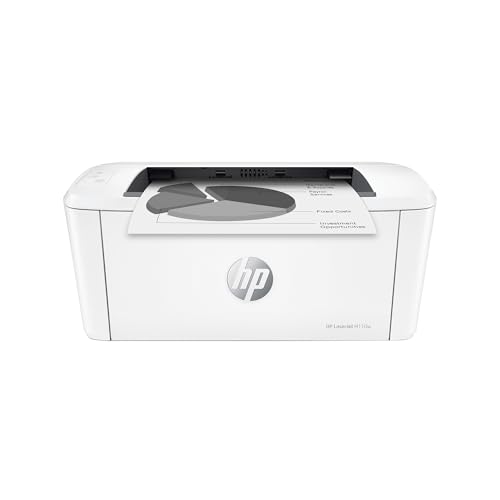
HP LaserJet M110w
Best for: very small desks and shelves where the printer must disappear between jobs yet wake up ready for a fast single page.
Not suited for: long two-sided documents — nothing in the title promises automatic duplex handling.
- Print technology: monochrome laser
- Emphasis, per title: fast black-and-white printing
- Connectivity, per title: wireless printing and mobile printing
- Bluetooth: Not stated in the listing title — verify with the manufacturer documentation
- Functions: print only
- Speed figure in pages per minute: Not stated in the listing title — verify with the manufacturer documentation
HP pitches the M110w around a single virtue repeated through its title: fast black-and-white printing in a wireless, mobile-friendly body. The repetition is marketing, but the underlying proposition suits a recognisable life — the printer as an occasional instrument. It sits in a bedroom corner, a hallway cupboard or a studio shelf, and its jobs arrive one or two pages at a time: a concert ticket, a form for the school office, a label for a parcel. For that rhythm, the qualities that matter are wake-from-sleep behaviour, a mobile path that does not demand a fresh setup ritual each month, and output that looks deliberate rather than smudged.
Notice what the title does not give: a numeric speed. Fast is a claim, not a measurement, and the spec box records the missing figure honestly. In practice, single-page jobs are governed less by pages-per-minute ratings than by the seconds between tapping print and the sheet landing in the tray, and a compact laser kept powered and connected usually wins that race against larger machines that sleep more deeply. Keep the M110w on the network and it plays its role; unplug it for weeks between uses and every brand of printer becomes a small setup project again.
The print-only scope deserves emphasis rather than apology. There is no scanner pretending to justify a larger lid, no copier glass collecting dust. Households that already scan with a phone camera — which now handles receipts and documents remarkably well — lose nothing, and gain a machine with fewer moving parts and a smaller silhouette.
Strengths
- Wireless and mobile printing both stated, covering the phone-driven brief directly.
- Compact print-only design aimed at small spaces.
- Laser output keeps occasional pages sharp despite long idle gaps between jobs.
Trade-offs
- No numeric speed in the title, so the fast claim cannot be compared on paper.
- Bluetooth is not named in the title and needs outside confirmation.
- No duplex in the title, limiting long-document convenience.
There is a particular kind of printing the M110w exists for, and naming it helps set expectations. Call it threshold printing: the page you need at the door, at the desk edge, at the moment of leaving. A returns label while the courier waits. A form a school demanded that morning. A ticket whose QR code must survive a pocket. Threshold printing values immediacy over everything, and it punishes printers that need waking rituals, driver hunts or warm-up theatre. A compact laser kept connected answers in seconds, and its output shrugs off rain and handling. Judged on that job description rather than on office throughput, the smallest HP in this guide makes a coherent case.
Small printers sell out and reappear under shifting bundles, so glance at the live page before deciding; the HP LaserJet M110w is listed at Check price on Amazon with its current configuration.

HP LaserJet Pro 3001dw
Best for: a small office corner where black-and-white documents flow steadily and the printer must behave like shared infrastructure.
Not suited for: occasional one-page home use — the Pro positioning aims at regular office throughput.
- Print technology: monochrome laser, black and white output
- Positioning, per title: best for office
- Connectivity, per title: wireless
- Bluetooth: Not stated in the listing title — verify with the manufacturer documentation
- Model identifier in the title: 3G65OF
- Mobile printing wording: Not stated in the listing title — verify with the manufacturer documentation
The word Pro in a printer name signals a change of audience, and the 3001dw’s title leans into it with an explicit best-for-office tag. Offices ask different questions from households. Instead of whether one label prints nicely, the questions become whether five people can share the machine without friction, whether it keeps pace through end-of-month paperwork, and whether its wireless connection stays put through a working week of laptops joining and leaving. A Pro-badged LaserJet is engineered and supported with that shared reality in mind.
Interesting honesty is required about the title’s limits, though. It states wireless plainly, yet says nothing about mobile printing and nothing about Bluetooth. Office buyers should therefore treat the phone path as a documentation question: the manufacturer materials will describe the supported mobile routes, and an office standardising on phone printing for warehouse labels or visitor paperwork should confirm those routes before ordering several units. What the title does promise — an office-tuned black-and-white LaserJet — is the core of the machine’s appeal.
Within this six, the 3001dw is the natural step up when a home has quietly become a workplace: a registered business at the kitchen table, a clinic’s back office, a letting agent’s desk. Its presence also disciplines the rest of the shortlist, because it marks the point where compact convenience ends and office expectations begin.
Strengths
- Office positioning stated in the title, signalling shared-use design priorities.
- Wireless connectivity covers the network printing an office depends on.
- LaserJet Pro lineage brings office-oriented support and driver expectations.
Trade-offs
- Mobile printing is not stated in the title, an unusual gap for a phone-led guide.
- Bluetooth likewise goes unmentioned in the title wording.
- Office focus is wasted on very light, occasional home printing.
Shared office printers live or die on unglamorous traits. Drivers must install without administrator drama across a mixed fleet of laptops. The wireless connection must survive the Monday-morning surge of devices rejoining the network. Toner replacement must be a thirty-second task a new starter can perform without a video tutorial. The Pro badge on the 3001dw is HP’s promise that these traits were design inputs rather than afterthoughts, and the office positioning in the title is the closest thing to a stated commitment this guide can quote. An office standardising on this model should still run one unit through a fortnight of real work before multiplying it — shared infrastructure earns trust by surviving ordinary Tuesdays, not by impressing on delivery day.
Offices comparing shared machines should read the full listing rather than the summary here; the HP LaserJet Pro 3001dw page sits at Check price on Amazon for a closer look at its office brief.

Canon imageCLASS LBP6030w
Best for: straightforward single-sided printing at a measured pace, in homes and small offices that value a long-running, understood design.
Not suited for: two-sided printing workflows — the title describes a print-only, single-function machine with no duplex claim.
- Print technology: monochrome laser, print only
- Speed, per title: 19 PPM
- Connectivity, per title: wireless
- Bluetooth: Not stated in the listing title — verify with the manufacturer documentation
- Warranty, per title: 1 year limited warranty
- Colour of unit: white
Longevity is the LBP6030w’s quiet argument. Printer models churn quickly, yet this Canon design has persisted because it answers a stable need: a compact wireless laser that prints black-and-white pages at a stated 19 PPM and asks for little attention in return. That stated speed is also a small act of transparency in a guide where several rivals offer adjectives instead of numbers. Nineteen pages per minute will not win a race against office machines, but it translates honestly into real jobs — a ten-page document in roughly half a minute of engine time once the first page lands.
The white finish, named in the title, sounds trivial until the printer has to live somewhere visible. Compact lasers increasingly sit in living rooms, hallways and bright home offices rather than under desks, and a white unit blends into light furniture in a way the usual dark grey box never manages. Combined with the compact single-function shape, this is the pick for spaces where the printer must be present without announcing itself.
The one-year limited warranty stated in the title completes the value picture. Nothing about this Canon pretends to be an office workhorse; it is a settled, known quantity for letters, forms, schoolwork and the steady drip of household paperwork, with wireless printing covering the laptop side and documentation checks required for any phone-specific route beyond that.
Strengths
- The only stated numeric speed in this guide’s Brother-and-Canon contingent: 19 PPM.
- Warranty length spelled out in the title itself.
- White compact body suits visible living-space placement.
Trade-offs
- Mobile printing is not claimed in the title, so phone workflows need verification.
- Bluetooth is silent in the title as well.
- No duplex claim, so two-sided jobs are manual.
Age in a printer model cuts both ways, and the LBP6030w shows the favourable side. A design that has been sold for years accumulates known behaviour: driver support across successive operating systems, toner cartridges stocked widely because the installed base is large, and a troubleshooting trail for every quirk the machine possesses. Newer models promise more and occasionally deliver surprises; this Canon delivers predictability. Its 19 PPM pace will feel unhurried beside office machines, yet household paperwork rarely arrives in hundred-page runs, and the gap between 19 and 25 pages per minute amounts to seconds on real jobs. Predictability, stocked consumables and a small white footprint — that is the whole argument, and for many desks it is enough.
Because this model has circulated for years under slightly varying bundles, read the current page closely; the Canon imageCLASS LBP6030w appears at Check price on Amazon with the present warranty wording.

HP LaserJet M207dw
Best for: households and small teams printing long black-and-white documents that should arrive two-sided without manual intervention.
Not suited for: colour projects of any kind — the engine is monochrome from first page to last.
- Print technology: monochrome laser
- Duplex: automatic two-sided printing, claimed in the title
- Emphasis, per title: fast black-and-white printing
- Connectivity, per title: wireless printing
- Bluetooth: Not stated in the listing title — verify with the manufacturer documentation
- Functions: print only
The M207dw gathers the threads running through the HP half of this guide and ties them together: fast black-and-white printing, wireless connectivity, and — the addition that changes its character — automatic two-sided printing stated twice in its own title. Where the M110w serves the occasional page, the M207dw is built for the document habit: statements, drafts, course materials, policy documents, the long PDFs that arrive by email and read better on paper. Duplex turns those from a tray-emptying exercise into a single unattended run.
Two-sided printing also improves the finished object. Reports bound or stapled from duplex sheets feel like documents rather than stacks, and paper storage shrinks accordingly. For a home office that prints reference material weekly, the cumulative saving in paper handling dwarfs most specification differences elsewhere on the page. The wireless path keeps the machine reachable from every laptop and desktop on the network, and the fast-printing emphasis in the title matches the long-job brief.
Set against the Brother HL-L2460DW, its natural rival here, the choice narrows to ecosystem preference and the mobile wording each title carries. The Brother states mobile printing explicitly; the HP title here emphasises speed and duplex. A phone-led household should weigh that wording difference seriously and check the HP documentation for the mobile routes it intends to use daily.
Strengths
- Automatic two-sided printing stated clearly, the key long-document feature.
- Fast black-and-white emphasis suits report-length jobs.
- Wireless printing covers shared household and small-team access.
Trade-offs
- Mobile printing is not spelled out in the title wording.
- Bluetooth is, once again, a documentation question rather than a title claim.
- Print-only scope means scanning still falls to a phone or a separate device.
Pair the M207dw mentally with the way long documents actually behave after printing. A duplex report can be hole-punched and filed immediately; a single-sided stack of the same report often lingers, too thick for the folder, waiting for a decision nobody makes. Duplex output also travels better — half the weight in a briefcase, half the thickness in an envelope of supporting papers. These are small mercies, but printing is a small-mercies technology, judged across hundreds of minor interactions. HP’s fast-printing emphasis in the title supports the same story: the machine is tuned for getting long black-and-white work finished and filed, not for decorative output or occasional novelty jobs.
Long-document households will find the duplex details spelled out on the product page; the HP LaserJet M207dw is waiting at Check price on Amazon for the full picture.
Comparison Table
| Pick | Duplex in title | Mobile printing in title | Stated speed | Distinctive title claim |
|---|---|---|---|---|
| Brother HL-L2405W | No | Yes | Title silent | Refresh Subscription Trial; works with Alexa |
| Brother HL-L2460DW | Yes | Yes | Title silent | Duplex plus Refresh Subscription Trial |
| HP LaserJet M110w | No | Yes | Title silent | Fast black-and-white emphasis |
| HP LaserJet Pro 3001dw | Title silent | Title silent | Title silent | Best-for-office positioning |
| Canon imageCLASS LBP6030w | No | Title silent | 19 PPM | 1 year limited warranty; white finish |
| HP LaserJet M207dw | Yes | Title silent | Title silent | Fast printing plus automatic two-sided output |
How to Choose
Is Bluetooth or Wi-Fi the right connection for your printing?
Start from where your documents live and how far the printer sits from them. Wi-Fi printing serves a whole network: every laptop, phone and tablet in the home can print from any room, and the printer can live wherever the signal is decent. Bluetooth printing, on machines that offer it, is a one-to-one link across a room — excellent for a single phone beside the printer, poor for a family sharing from three floors. Since none of the six titles above states Bluetooth, a reader whose requirement is genuinely Bluetooth-first should verify that radio in manufacturer documentation for the specific model, then treat the wireless mobile path as the everyday route regardless.
How much does duplex change the decision?
Count your long documents. If most jobs run under three pages, duplex is a nicety; if readings, reports or statements regularly exceed ten pages, automatic two-sided printing becomes the feature you feel weekly. It halves paper purchases, thins the recycling stack, and removes the re-feeding errors that plague manual duplexing — the upside-down second side, the out-of-order stack. Two of the six picks state it, the Brother HL-L2460DW and the HP LaserJet M207dw, and for document-heavy homes the shortlist should start there. Readers who also need to send jobs to a printer from outside the home network entirely may want to read about cloud-enabled laser printers and print-from-anywhere accounts before settling, since that is a different connection model from anything in this set.
Where will the printer actually live?
Placement sounds like a decorating question and behaves like a technical one. A compact laser needs a surface that tolerates its weight, ventilation space around its vents, and enough clearance above the output area for pages to land without curling into a wall. It also needs to sit inside good Wi-Fi coverage, which in many homes rules out the garage, the far spare room and the cupboard under the stairs — all popular printer hiding places. Measure the intended spot against the machine’s footprint plus hand room for loading paper, and walk a phone to that spot to check the signal bars before the box is opened. Five minutes of placement honesty prevents the slow drip of dropped jobs that owners otherwise blame on the printer for years.
One shared printer, or one per person?
Households with two home workers sometimes imagine a printer each, and the wireless nature of this whole category argues otherwise. One well-placed machine on the network serves every desk, and the money saved buys the duplex model or a spare cartridge instead of a second box competing for the same shelf. The exception is the genuinely separated workspace — a garden office beyond comfortable walking distance in bad weather, a studio flat across town — where a second compact unit earns its footprint. Decide by geography, not by impatience with a shared queue that, in a home, rarely exceeds one job.
Should a subscription trial influence the choice?
Only if your printing rhythm is steady. The two Brother models include a Refresh Subscription Trial, which converts toner replacement into a monitored, delivered service. Households printing a predictable amount each month often value never facing an empty cartridge mid-job. Households printing in bursts — exam season, tax season, then silence — may find a subscription rhythm mismatched to their reality. Read the trial terms on the listing, estimate your monthly pages honestly, and let arithmetic rather than novelty decide.
What about speed claims without numbers?
Treat adjectives as atmosphere and numbers as evidence. One pick in this guide states 19 PPM; others promise fast printing without a figure. For single pages, wake time dominates anyway. For long runs, a stated figure at least allows comparison, and manufacturer documentation usually carries the fuller speed story — worth one check before purchase if throughput genuinely matters to your work.
Setting Up Phone Printing Without the Usual Friction
The smoothest first hour with a wireless laser follows a simple order. Place the printer where the Wi-Fi signal is strong — the same room as the router for setup, even if it migrates later — and power it on before opening any app. Join the printer to the network first, using the vendor’s setup flow; Bluetooth, where a model supports it, most often serves exactly this onboarding moment, letting the phone hand the network credentials to the printer without typing passwords on a tiny printer screen. Once the printer sits on the network with a stable connection, add it to each phone and laptop, then print one unimportant page from every device. That small ritual exposes permission quirks and sleep settings while nothing urgent depends on them.
Two habits keep the arrangement healthy afterwards. First, let the printer keep its network address rather than letting it drift — most routers offer a reservation option, and a stable address ends the mysterious printer-offline episodes that follow address changes. Second, print something small every few weeks even in quiet periods; lasers tolerate idleness far better than inkjets, yet regular use keeps paper paths, rollers and your own familiarity with the machine in good order. When a phone refuses to see the printer, check the mundane causes in order: same network, printer awake, phone not stranded on a guest network or a mobile-data-only mode. Nine times in ten, the fix lives in that list.
Placement deserves one more thought. A printer beside the router in a hallway prints happily for the whole home; the same printer in a metal-lined cupboard or a far garage corner will drop jobs and generate folklore about unreliability. Signal first, convenience second — and where colour work enters the picture, remember that a separate shortlist of single-function colour laser printers covers machines that print colour without scanner bulk, an option worth weighing before compromising on a monochrome box.
Security deserves a short paragraph in any discussion of wireless printing, because a network printer is a network device. Keep its firmware updated through the vendor’s tools, leave unused connection features off, and treat the printer’s presence on the home network with the same mild attention given to a smart speaker or camera. Guest networks deserve special thought: a printer joined to the main network is invisible to phones parked on the guest network, a frequent source of confusion when visitors or teenagers cannot print. Decide deliberately which network the printer belongs to, document the choice on a note inside the paper tray if necessary, and future troubleshooting shrinks to checking that one fact.
Toner, Paper and the Everyday Running Picture
Laser ownership economics differ from inkjet economics in a way that suits phone-driven households. The cartridge a laser ships with and every cartridge after it contain toner for a large count of text pages, and — crucially — that toner does not evaporate, dry or clog during quiet months. A household printing report cards in June and holiday letters in December spends its consumables budget only when it prints. The Brother subscription trial in this guide exists because manufacturers know steady users value the opposite arrangement: predictable deliveries matched to predictable volume. Neither model is a trap; each matches a rhythm, and your rhythm is knowable from three months of honest recollection.
Paper choice quietly shapes results too. Lasers fuse toner with heat, so the stock must tolerate that heat — standard copier paper is ideal, and labels or transparencies must be laser-rated, since inkjet-rated media can soften or damage a fuser. Duplex models ask for paper heavy enough to travel the two-sided path without curling; very light sheets sometimes exit wavy on long runs. Keep a ream of decent everyday paper beside the printer and a small pack of laser-safe labels for the shipping jobs, and the machines in this guide will produce their best work without exotic supplies.
Finally, remember what monochrome discipline buys. A single black cartridge is the entire consumables inventory: no colour tanks expiring unused, no cleaning cycles burning ink to keep nozzles alive, no alignment rituals. For text-led households that is not a limitation but a simplification, and it is the deepest reason compact lasers dominate the phone-printing niche despite the inkjet world’s flashier specifications.
What Phone Printing Looks Like Across a Real Week
Monday begins with a school form that arrived by email on Sunday night; it is printed from the sofa before anyone finds shoes. Wednesday brings a returns label generated inside a shopping app, printed while the parcel is being taped. Friday’s job is the week’s largest: a twenty-page document for a Monday meeting, sent from a tablet and collected duplexed from the Brother or the HP. None of these jobs touches a desktop computer. That is the lived shape of mobile printing, and it explains the guide’s priorities — connection reliability and wake behaviour first, raw engine speed second, exotic features last.
The same week exposes the failure modes worth preventing. The printer that slept through Wednesday’s label had dropped its network address. The Friday document that emerged single-sided came from a model where duplex was assumed rather than stated. The form that printed as a tiny centred rectangle was a phone PDF rendered at the wrong paper size — a settings issue, not a printer fault, cured by checking the paper-size line in the print preview. Nearly every disappointment in this category is a setup or assumption failure, which is precisely why this guide keeps returning to stated facts and first-week rituals.
Common Mistakes
Assuming wireless means Bluetooth. The two radios solve different problems, and listings use wireless as the umbrella word. In this very guide, six wireless printers carry not one Bluetooth claim in their titles. Check the specific radio you need rather than trusting the umbrella.
Buying on a speed adjective. Fast in a title is a mood, not a measurement. Where throughput matters, find the stated pages-per-minute figure in documentation and compare like with like.
Ignoring the duplex question until the first long document. Retrofitting two-sided printing is impossible; the choice happens at purchase. Honestly estimating document length beforehand prevents years of manual page-flipping.
Setting up on a weak signal and blaming the printer. Most wireless printing complaints trace back to placement. A printer at the edge of coverage drops jobs that a printer two rooms closer handles without comment.
Letting a subscription trial decide itself. Trials convert quietly into ongoing arrangements. Diary the decision, review your actual page counts, and keep or cancel deliberately.
Expecting colour from a monochrome shortlist. Every machine here prints black and white. If colour pages are part of your real workload, solve that requirement openly instead of discovering it at the first school project.
Parking the printer on the guest network. It feels tidy and breaks phone printing for everyone on the main network. A shared printer belongs on the same network as the phones and laptops that use it.
Judging a laser by its first-week toner gauge. Starter cartridges and early estimates mislead in both directions. Judge consumption across a full cartridge cycle before forming a running-cost opinion or committing to a subscription rhythm.
Frequently Asked Questions
Can these printers print from a phone without Wi-Fi?
That depends on a direct-connection feature the titles here do not state. The listings promise wireless and, in three cases, mobile printing — both normally exercised over a home network. A phone-only path with no router involved is exactly the kind of capability to verify in manufacturer documentation for the specific model before buying.
Why do the spec boxes keep saying a feature is not stated?
Because the listing titles are the evidence base for this guide, and silence in a title is information. A feature might still exist on the machine, but it is not claimed in the title, so the guide records the gap rather than filling it with assumption. Manufacturer documentation settles each open point.
Which pick suits a student room best?
The compact models earn that role: the Brother HL-L2405W for its mobile printing and small footprint, or the HP LaserJet M110w where shelf space is genuinely tight. A student printing long readings weekly should stretch to the duplex Brother HL-L2460DW and save paper all year.
Is a laser better than an inkjet for phone printing?
For text documents, usually: toner pages are crisp, dry instantly and survive handling, and cartridges tolerate idle weeks between jobs. For photographs and colour graphics, inkjets hold the advantage — and readers leaning that way can compare fast inkjet printers for busy desks as the colour-capable alternative to this monochrome set.
What does a Refresh Subscription Trial actually change?
It changes toner from a purchase you remember into a service that monitors and ships. The two Brother listings include the trial; whether it suits you depends on how steady your monthly page count is, which is why the guide raises it beside each Brother review rather than burying it.
Will a laser cope with printing only a few pages a month?
Comfortably — this is the workload lasers handle best. Toner waits without degrading, there are no nozzles to clog, and the machine that printed nothing for six weeks produces a clean first page on the seventh. Very light users should still run one page occasionally to keep rollers supple and to confirm the network connection before an urgent job depends on it, but no maintenance ritual beyond that is required.
What should be checked on the listing before ordering?
Three things: the exact model suffix, because a single letter often separates the duplex variant from the single-sided one; the cartridge the box ships with, since starter yields differ from standard replacements; and the stated connection list, read literally rather than hopefully. Those three checks, applied to the page itself, prevent nearly every wrong-box disappointment this category produces.
How far can a phone be from the printer?
On a Wi-Fi path, distance means distance from the network, not from the printer: a phone upstairs prints to a printer downstairs as long as both reach the router. That is the practical advantage of the wireless route these listings describe, and the reason placement advice in this guide concerns router signal rather than phone proximity.
Do lasers handle shipping labels well?
Yes, with laser-rated label sheets. Toner bonds crisply, barcodes scan cleanly, and the output resists the moisture labels meet in transit. The one caution is media: only sheets explicitly rated for laser printers should pass through the fuser.
Does the printer need to stay switched on?
Keeping it powered and asleep rather than switched off at the wall preserves the network connection and shortens the wait for the first page, at a very small standby cost. A machine that must rejoin the network and re-announce itself after every cold start generates most of the cannot-find-the-printer complaints in home printing. Leave it sleeping; wake it by printing.
Final Recommendation
For most phone-led homes, the Brother HL-L2460DW is the complete answer in this set: wireless mobile printing, automatic duplex for the long documents, and a compact body that does not colonise the desk. The HL-L2405W covers the same ground for single-sided printing habits, the Canon LBP6030w remains the transparent value pick with its stated 19 PPM and warranty, and the HP M207dw stands as the duplex alternative from the other ecosystem, while the M110w and the Pro 3001dw serve the smallest spaces and the office corner respectively. Choose by document length and duplex need first, verify any Bluetooth requirement in the documentation second, and the machine you bring home will print from your phone as calmly as this category allows.


