What's inside
- Where to Buy These Projectors
- Key Takeaways
- Quick Picks at a Glance
- How the Picks Were Chosen
- The Six Projectors Without a Color Wheel in Detail
- Side-by-Side Comparison
- Which Wheel-Free Technology Fits Your Room: 3LCD, SXRD or D-ILA?
- How Three-Panel Imaging Actually Works
- Living With Sensitivity: a Practical Note
- Contrast, the Quality Wheel-Free Flagships Sell
- Where Wheel Projectors Still Make Sense
- Buying the Room Around a Wheel-Free Flagship
- Maintenance Differences Across the Three Architectures
- Common Mistakes to Avoid
- Frequently Asked Questions
- Final Recommendation
As an Amazon Associate I earn from qualifying purchases. This post may contain affiliate links at no extra cost to you.
[SITE_DOMAIN] is reader-supported. When you buy through links on our site, we may earn an affiliate commission at no extra cost to you. Prices and availability change; check the Amazon listing for the current details.
Where to Buy These Projectors
Epson EX3290 — View on Amazon
Epson EpiqVision Flex CO-W01 — See the listing
Epson Pro EX11000 4600lm — Open the product page
Sony VPL-XW5000ES — Check the Amazon page
JVC DLA-NP5 — View this model
JVC DLA-NZ500 — See it on Amazon
The best projectors without color wheel share one structural fact: they make color with three imaging panels at the same time instead of flashing red, green and blue in sequence through a spinning wheel. That architecture, found in 3LCD, LCoS, SXRD and D-ILA designs, removes the mechanism behind rainbow artifacts entirely, so viewers who see colored fringes trail bright objects on single-chip DLP screens can watch in peace. The six projectors below span that wheel-free world from a bright classroom Epson to a native 4K JVC flagship, and every one qualifies by design rather than by adjustment.
A short explanation of the enemy belongs at the start. A color wheel projector shows each color field for a fraction of a frame, and most brains blend the sequence invisibly. A minority, estimates vary and this guide will not invent one, perceive the separation as rainbow flashes, especially on high-contrast scenes and when moving their eyes. For those viewers the effect ranges from distracting to headache-inducing, and no setting on a wheel projector removes it, because it is the method itself. The only cure is a different method, which is what this entire comparison sells.
The technology split across the six is deliberate. Three Epson 3LCD models cover presentation, portable and professional territory. Sony SXRD covers native 4K laser theater. Two JVC D-ILA models cover lamp and laser expressions of the contrast-first philosophy. Read the group as a map of simultaneous-color imaging at every level of the market, and choose by room and purpose, secure in the knowledge that the wheel question is already answered on every line.
One expectation to set before the reviews: wheel-free does not mean identical. A WXGA classroom Epson and a native 4K JVC share an architecture philosophy and almost nothing else, and this guide compares them as citizens of one design family rather than as rivals. Choose the level your room and purpose demand, and the family resemblance, calm simultaneous color with no sequential tricks, will be present at every level you land on.
Key Takeaways
- Rainbow artifacts come from sequential color; three-panel designs never produce them.
- 3LCD, SXRD and D-ILA are the wheel-free architectures represented across these six.
- Brightness spans 1,900 lumens on the theater-focused NP5 to 4,600 on the professional EX11000.
- Native 4K appears at the top of the range in the Sony SXRD and JVC NZ500 models.
- The NZ500 publishes a 40,000:1 native contrast figure, the strongest panel claim in the guide.
Quick Picks at a Glance
| Projector | Headline Specification | Short Verdict |
|---|---|---|
| Epson EX3290 | 3LCD, WXGA, 4,000 lumens, 2 HDMI | The bright presentation entry to the wheel-free world |
| Epson EpiqVision Flex CO-W01 | 3LCD portable, 3,000 lumens, up to 300 inches | The portable wheel-free option for home and work |
| Epson Pro EX11000 4600lm | 3LCD laser, 1080p, 4,600 lumens, Miracast | The bright, wireless, lamp-free professional pick |
| Sony VPL-XW5000ES | Native 4K SXRD laser, black | The native 4K entry to the high-end wheel-free theater |
| JVC DLA-NP5 | D-ILA 4K HDR, 1,900 lumens, HDR10+ | The lamp-based JVC for film purists and gamers |
| JVC DLA-NZ500 | Native 4K laser, 2,000 lumens, 40K:1 native contrast | The laser D-ILA flagship statement of the group |
How the Picks Were Chosen
The first selection rule was architectural and absolute: the imaging design had to be incapable of the rainbow effect, not merely unlikely to show it. That admitted 3LCD, SXRD, D-ILA and other LCoS designs, and excluded every single-chip DLP regardless of quality, price or reputation. A guide answering this keyword with a well-regarded wheel projector in the list would be a guide that did not understand its own assignment.
Business brightness in the wheel-using world is covered separately in the guide to wUXGA Projectors With 4000 Lumens.
Within that boundary, the six were chosen to prove the breadth of the wheel-free world. Too many readers arrive believing that avoiding a wheel means accepting dim, compromised or exotic equipment, and the strongest refutation is a list that runs from a mainstream classroom Epson through a laser professional model to the two most respected theater names in projection. If a brief exists in projection, a simultaneous-color machine in this list addresses it.
Specifications were taken only from the listing titles, with gaps recorded as not stated, most notably brightness on the Sony. Theater readers in particular should note that discipline, because the high-end titles here are terse by consumer standards, and the documentation behind them, not a marketplace paragraph, is where installation-grade figures properly live.
A final selection note concerns the two JVC models, kept as a pair deliberately. Lamp and laser versions of a contrast-first philosophy let the theater reader decide their maintenance temperament without changing architecture, and that clean comparison, one variable at a time, is how projector ranges ought to be presented to serious readers, and so rarely are in practice anywhere in the modern marketplace today at any price point whatsoever in this category of equipment anywhere at all in the wider market today either, frankly.
The Six Projectors Without a Color Wheel in Detail

1. Epson EX3290
Widescreen WXGA business Epson with 4,000 lumens published
- Imaging technology: 3-Chip 3LCD
- Resolution: Widescreen WXGA
- Brightness: 4000 lumens of color and white brightness
- Inputs: 2x HDMI ports
- Audio: Built-in speaker
The EX3290 opens this guide as the working proof that avoiding a color wheel does not require a home theater budget or a theater at all. It is a widescreen WXGA presentation projector whose title publishes 4,000 lumens of both color and white brightness, two HDMI ports and a built-in speaker, all driven by a 3-chip 3LCD engine that produces color with three panels simultaneously. No wheel spins inside it, no sequential color reaches the screen, and the rainbow effect that motivates this entire search simply has no mechanism by which to occur.
That last point deserves precision, because it is the reason the model belongs here. Rainbow artifacts are not a tuning flaw in single-chip DLP; they are a consequence of showing colors one at a time and asking the eye to blend them, which some viewers brains decline to do invisibly. A 3LCD machine never asks. For a teacher, trainer or presenter whose audience includes strangers every week, that certainty has professional value: nobody in the room is quietly fighting fringes on the slide text while pretending to read it.
Brightness and resolution place the EX3290 squarely in the presentation world. Four thousand lumens is a serious working figure for lit classrooms and meeting rooms, and WXGA widescreen matches the laptops that feed it. Films are not its brief, and this guide will not pretend a business Epson becomes a cinema machine by wishing; but for the reader whose color-wheel concern arises at work, in front of slides and spreadsheets, this is the most direct answer in the comparison.
Two HDMI ports sound like a footnote and behave like a feature, because presentation rooms live on source-switching: the resident PC and the visitor laptop, the document camera and the streaming stick. A built-in speaker covers speech and incidental video without a sound system. The EX3290 is, in short, the complete conventional presentation package with the wheel removed, which is a more useful thing than it sounds in a market where most bright alternatives are exactly the DLP machines this reader is avoiding.
Ownership follows the business pattern: lamp-based light, filter care, and a design meant for carts and ceiling mounts in rooms that work daily. None of that is exotic, and support for a current Epson business line is a living ecosystem rather than an archive. For the wheel-sensitive professional, the EX3290 is where this guide starts because it is where the working week starts.
In a shared room, label the two HDMI inputs with the sources that actually live there. The EX3290 will be operated by colleagues who never read its manual, and a labeled remote and two labeled cables are the difference between a projector everyone uses and one everyone asks you to start.
Strengths
- 3LCD engine removes the rainbow mechanism entirely
- Published 4,000 lumens suits lit classrooms and meeting rooms
- Two HDMI ports and a speaker complete the presentation package
Trade-offs
- WXGA resolution targets documents, not film detail
- Business design carries no home-theater processing ambitions
- Lamp-based ownership includes routine filter and lamp care
Best for: a classroom or meeting room seeking bright wheel-free projection for slides, lessons and visiting laptops
Not suited for: a home cinema seeking 4K film performance, because this WXGA presentation design serves a different brief
Presenters leaving color wheels behind can check the EX3290 port layout and brightness figures on the listing, then Check price on Amazon.

2. Epson EpiqVision Flex CO-W01
Portable 3LCD with a 300-inch maximum display claim
- Brightness: 3000 lumens of color and white brightness
- Maximum display: 300-inches display as printed in the title
- Inputs: HDMI port
- Audio: Built-in speaker
- Use: Home theater and work, per the title
- Imaging technology: 3-Chip 3LCD technology
The CO-W01 is the portable face of wheel-free projection, an EpiqVision Flex model whose title promises 3,000 lumens of color and white brightness, a display up to 300 inches, an HDMI port and a built-in speaker in a machine meant to move between home theater and work. The 3LCD engine at its heart makes the same promise as its larger siblings: color produced simultaneously by three panels, with no wheel, no sequential flashing and no rainbow artifacts for the viewers who see them everywhere else.
Portability changes what wheel-free means in practice. A sensitive viewer can choose a theater projector carefully for home and still be ambushed by the DLP machine in a client office, a classroom or a holiday rental. A portable 3LCD unit that travels in a bag extends the protection to wherever its owner presents or watches, and the CO-W01 dual home-and-work framing in its own title shows Epson understood that roaming brief exactly.
Three thousand lumens is a useful figure for a portable, enough for a shaded room, an evening garden or a meeting space with the blinds drawn, and the 300-inch maximum display claim should be read as a focus-range ceiling rather than a brightness recommendation. Sensible sizes for the output are the moderate ones, where the picture stays punchy; the honest maximum for a film is set by your darkness, not by the lens. Within those terms the CO-W01 delivers big, calm, wheel-free images with almost no setup ceremony.
The single HDMI port defines its simplicity and its limit in one stroke. One source at a time, connected by cable, with streaming supplied by whatever stick or laptop you bring, keeps the machine light and the price of entry gentle, while households wanting multiple resident sources will add a switcher or choose a larger model. The built-in speaker handles speech and casual viewing, and a Bluetooth-free design means external audio also travels by cable, a small discipline portable users accept quickly.
As the second pick, the CO-W01 is the democratizer of this guide: the machine that makes no-rainbow viewing a portable, affordable, take-it-anywhere proposition rather than a theater luxury. Readers whose sensitivity has limited where they can watch will understand its value instantly, and readers without sensitivity get a versatile travel projector that happens to be kind to everyone in the audience.
Keep a short HDMI cable and a streaming stick permanently in the CO-W01 case. The machine charm is readiness, and readiness evaporates the first time the cable is in another bag across town. A dedicated kit, checked twice a year, is the whole secret of portable projection that actually happens.
Strengths
- Portable 3LCD design takes wheel-free viewing anywhere
- Published 3,000 lumens covers dim rooms and evening use
- Simple one-cable setup suits work and home equally
Trade-offs
- Single HDMI port limits resident source connections
- 300-inch claim is a focus ceiling, not a brightness promise
- No wireless streaming is stated in the listing title
Best for: a mobile presenter or viewer seeking portable wheel-free projection for rooms, gardens and client sites
Not suited for: a fixed multi-source installation seeking several HDMI inputs, because one port defines this design
Traveling viewers can confirm the CO-W01 weight, port and brightness details on the product page, then Check price on Amazon.
3. Epson Pro EX11000 4600lm
Wireless laser business flagship at 4,600 lumens
- Light source: Laser, wireless per the title
- Brightness: 4600 lumens color and white brightness
- Connectivity: Miracast, 2 HDMI ports, USB power
- Audio: Built-in 16W speaker
- Imaging technology: 3-Chip 3LCD
- Resolution: Full HD 1080p
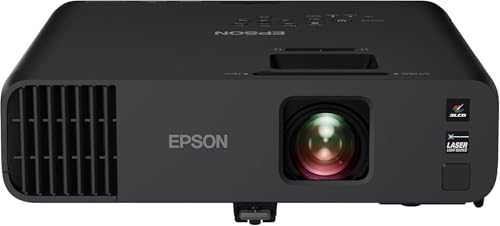
The Pro EX11000 is the business end of this guide operating at full seriousness: a 3-chip 3LCD laser projector with Full HD 1080p resolution, 4,600 lumens of color and white brightness, Miracast wireless, two HDMI ports, USB power and a 16W built-in speaker, per its title. Every element of that specification serves a professional room, and the wheel-free 3LCD engine serves the audience in it, including the members who would spend a DLP presentation watching rainbow fringes crawl across the charts instead of reading them.
Laser illumination transforms the business case as much as the picture. No lamp dimming across the school year, no lamp replacement budget line, no warm-up drift before the first lesson: the EX11000 turns on at full, consistent output and keeps doing so for years. For an institution running several rooms, that consistency is an operational feature, because every room looks the same in September as it did in June, and the caretaker lamp shelf quietly stops being a department.
Wireless presentation through Miracast addresses the other daily friction, the cable pass. A presenter walks in, connects from the laptop already in their hands and begins, while the two HDMI ports keep wired sources permanently resident for the room PC and a document camera. USB power even keeps a streaming stick alive without hunting for a socket. It is a specification written by people who watched meetings start late and itemized the reasons.
The 16W speaker is the strongest internal audio statement among the Epson business models here, and in a classroom or mid-size meeting room it genuinely covers speech, video calls and incidental media without a sound system. Combined with 1080p resolution, which keeps text crisp at presentation sizes and video honest, the EX11000 makes the most complete case in this guide for a single machine that a facility can install and then forget about for years.
Its position in a no-color-wheel guide is almost incidental, which is the point worth making. The best wheel-free choices are not specialty medical devices for sensitive viewers; they are simply excellent projectors whose imaging architecture never had a wheel. The EX11000 would earn a recommendation in a general business comparison, and it earns this one with the additional certainty that nobody in its audience will ever see a rainbow on its screen.
Standardize the wireless connection routine and print it on the room wall card. Miracast removes the cable, but a new presenter still needs the three steps in the right order, and a laminated card has started more meetings on time than any projector feature ever designed.
Strengths
- Laser 3LCD engine pairs wheel-free color with lamp-free ownership
- 4,600 published lumens and 1080p suit serious professional rooms
- Miracast, dual HDMI, USB power and 16W audio complete the package
Trade-offs
- Business feature set exceeds what a home room will use
- No home-theater HDR processing is claimed in the title
- Professional positioning carries a professional commitment level
Best for: an institution seeking a bright laser presentation projector whose audience never faces rainbow artifacts
Not suited for: a home theater seeking film-first processing, because this specification was written for professional rooms
Facilities planners can review the EX11000 wireless and laser specification in full on its listing, then Check price on Amazon.

4. Sony VPL-XW5000ES
Native 4K SXRD laser theater projector
- Product class: 4K HDR home theater projector
- Finish: Black
- Brightness: Not stated in the listing title – verify with the manufacturer documentation
- Imaging technology: Native 4K SXRD panel
- Resolution: Native 4K
- Light source: Laser
The Sony VPL-XW5000ES changes the altitude of this comparison. Its title states a 4K HDR laser home theater projector built around a native 4K SXRD panel, and SXRD is Sony reflective LCoS technology: three panels, light reflected rather than transmitted, color produced simultaneously, and no color wheel anywhere in the building. For the viewer whose rainbow sensitivity coincides with serious theater ambitions, this is the machine where the medical-sounding requirement and the enthusiast desire stop being different conversations.
Native 4K is the specification that separates the XW5000ES from every pixel-shifting design, however accomplished. Each frame is resolved by a full 4K panel per color, and the difference shows in the finest textures: film grain structure, distant faces in a crowd scene, the weave of a costume in a close-up. On a large screen in a dark room, with a good 4K source, the image has a density and calm that shifted images approach but do not duplicate, and theater owners who have seen both rarely argue about which they prefer.
Laser light serves that panel with consistency, holding brightness and color steady across years where a lamp would drift and dim. The title publishes no lumen figure, so this guide records brightness as not stated and directs output questions to the manufacturer documentation, where the figure lives. What can be said from the class is that the XW5000ES was designed for dedicated theaters with controlled light and quality screens, and it should be installed and judged in exactly that environment.
SXRD black performance is the other half of the reputation. Reflective panels with high native contrast produce the deep, structured shadows that make night scenes feel photographic rather than projected, and a wheel-free engine means those shadows arrive without any sequential-color distraction for sensitive viewers during bright highlights against dark backgrounds, historically the exact frame where rainbows announce themselves loudest.
The XW5000ES is therefore the confluence pick of this guide: the point where avoiding a color wheel stops being a constraint and becomes a characteristic of the finest home theater technology available at any brief. It asks for a real room, a real screen and a real installation, and in return it removes the rainbow question from a theater permanently, at native 4K, with laser consistency.
A native 4K panel deserves native 4K feeding. Audit your sources before the Sony arrives: the disc player, the streaming tier and the HDMI cable all need to be genuine 4K citizens, or the finest panel in this guide will spend its life upscaling compromises made elsewhere in the chain.
Strengths
- Native 4K SXRD panels deliver true per-color 4K resolution
- Laser light source holds output steady across years
- Reflective LCoS contrast suits dedicated dark theaters
Trade-offs
- No brightness figure is published in the listing title
- Dedicated-theater design assumes controlled light and a quality screen
- Flagship class positioning exceeds casual-room requirements entirely
Best for: a dedicated theater seeking native 4K wheel-free projection with laser consistency and deep SXRD contrast
Not suited for: a bright multipurpose room seeking a published lumen figure in the title, because this listing leaves brightness unstated
Theater builders can examine the XW5000ES panel and laser specification on the product page in detail, then Check price on Amazon.

5. JVC DLA-NP5
D-ILA theater projector with HDR10+ and a gaming mode
- Inputs: 2 HDMI/HDCP 2.3 inputs, 4K/120p compatible
- Lens: 65 mm all-glass lens
- Gaming: Low latency mode for gaming
- Imaging technology: D-ILA
- Resolution: 4K HDR
- Brightness: 1900 lumens
- HDR: HDR10+
The JVC DLA-NP5 represents the third great wheel-free architecture in this guide, D-ILA, JVC own reflective LCoS variant, in a 4K HDR home theater projector publishing 1,900 lumens, HDR10+ support, two HDMI inputs with HDCP 2.3 and 4K/120p compatibility, a low latency mode for gaming and a 65 mm all-glass lens. JVC theater reputation rests on native contrast that has led the industry conversation for years, and the NP5 is the lamp-based doorway into that reputation, with no color wheel in its light path at any point.
Contrast is the NP5 native language. D-ILA panels are celebrated for black levels that need no dynamic iris theatrics to impress, and in a dark theater the NP5 renders night scenes, space photography and moody cinematography with a depth that makes viewers recalibrate what projection can do. For the rainbow-sensitive film lover, the significance is simple: the most contrast-focused theater line in the business is wheel-free by architecture, so the sensitivity excludes nothing that matters.
HDR10+ support adds dynamic, scene-by-scene tone mapping for compatible content, and JVC frame-adaptive processing traditions make HDR a genuine strength rather than a badge. The 1,900-lumen figure is honest theater arithmetic: sized for controlled light and sensible screens, where the NP5 contrast can operate, rather than for bright rooms it was never designed to fight. Judge it in the dark it was built for and the specification reads as focus, not limitation.
The gaming provision surprises people who file JVC under cinema only. A low latency mode plus 4K/120p-compatible inputs means the NP5 can host modern consoles credibly on the nights the theater changes jobs, and a story-driven game rendered with D-ILA contrast is a genuinely different experience from the same title on a television. It will not out-spec a dedicated gaming projector on latency, and it does not claim to; it simply refuses to exclude the console from the best room in the house.
The all-glass 65 mm lens completes the purist specification, because optics are where theater projectors quietly separate. Glass holds focus and uniformity as the machine warms, where lesser elements can drift, and across a long film that stability is visible at the edges of the frame. The NP5 is a connoisseur machine in a guide that began with a classroom Epson, and the distance between them is the measure of how completely the wheel-free world covers every brief.
Calibrate the NP5 after its first hundred hours rather than on day one, because lamp output settles early in its life. A calibration performed on a settled lamp holds far longer, and a theater this capable deserves settings measured against its steady state, not its first bright weekend.
Strengths
- D-ILA native contrast leads the theater conversation
- HDR10+ with dynamic tone mapping serves serious film sources
- Low latency mode and 4K/120p inputs keep consoles welcome
Trade-offs
- 1,900 lumens assumes a dark, controlled theater
- Lamp-based design brings eventual replacement and care
- Purist specification is wasted in bright or casual rooms
Best for: a dark theater seeking D-ILA contrast, HDR10+ film handling and credible gaming in a wheel-free design
Not suited for: a lit living room seeking high brightness, because 1,900 lumens is a controlled-light specification
Film purists can study the NP5 lens, contrast and input specification closely on the listing before deciding, then Check price on Amazon.

6. JVC DLA-NZ500
Native 4K laser JVC with a published 40,000 to 1 native contrast
- Imaging technology: D-ILA (implied by the DLA model line; confirm in the listing)
- Resolution: Native 4K
- Light source: Laser
- Brightness: 2000lm as printed in the title
- Contrast: 40K:1 native contrast as printed in the title
The DLA-NZ500 closes the comparison as the laser evolution of the JVC idea: a native 4K laser projector publishing 2,000 lumens and, most significantly, a 40,000 to 1 native contrast figure in its title. Native is the operative word. Where dynamic contrast figures describe what a system can achieve by adjusting light scene by scene, a native figure describes the panel itself, and a native number at this level is the D-ILA signature written in specification form. No color wheel exists anywhere near it.
Laser power changes the JVC ownership rhythm fundamentally. The NP5 lamp asks for periodic replacement and recalibration as it ages; the NZ500 laser holds its output and color with the steadiness that makes a calibrated theater stay calibrated. For an owner who invests in professional setup, that stability protects the investment for years, and the picture on a random Tuesday resembles the picture the calibrator signed off, which is the entire point of a reference room.
Two thousand lumens with this contrast profile is a deliberate theater equation. The NZ500 is not chasing bright rooms; it is optimizing the dark one, where its native contrast can produce blacks that make the screen disappear into the room during a night scene. Screen size should be chosen to keep that equation balanced, favoring the moderate diagonal at reference quality over the huge diagonal at compromised quality, a discipline JVC owners tend to learn once and preach forever.
The title brevity deserves a note in the spirit of this guide. Beyond native 4K, laser, brightness and native contrast, the NZ500 title states little, so HDR formats, inputs and lens details belong to the listing and manufacturer documentation, and the spec box here records only what is printed. That restraint costs the machine nothing in this company: the four claims it does make are the four that define its class, stated with unusual precision for a category addicted to adjectives.
As the final pick, the NZ500 completes the guide argument. Avoiding a color wheel began, six projectors ago, as a sensitivity workaround; it ends as a tour of the finest imaging architectures projection offers, 3LCD, SXRD and D-ILA, each simultaneous-color, each wheel-free, each at the top of its own tradition. The reader who arrived with a constraint leaves with a choice among flagships, which is the happiest ending a technology guide can honestly offer.
Budget the NZ500 calibration as part of the purchase, not as an optional extra. A native-contrast flagship in an uncalibrated room is a sports car on guessed tire pressures: still fast, never quite itself. The laser stability means one careful calibration pays dividends for years.
Strengths
- Native 4K D-ILA panels with a published 40,000:1 native contrast
- Laser light source protects calibration across years
- Wheel-free architecture at the reference end of home theater
Trade-offs
- 2,000 lumens is calibrated for dark theaters, not bright rooms
- Title states few details beyond the headline four claims
- Reference-class positioning assumes a reference-class room
Best for: a reference theater seeking native 4K laser projection with published native contrast and zero color-wheel involvement
Not suited for: a multipurpose bright room seeking versatility, because every NZ500 specification is optimized for darkness
Reference-room planners can verify the NZ500 remaining specification details on the product page and documentation, then Check price on Amazon.
Side-by-Side Comparison
| Projector | Imaging and Resolution | Brightness From the Title | Defining Extra |
|---|---|---|---|
| Epson EX3290 | 3LCD, WXGA | 4000 lumens | Bright presentation all-rounder |
| Epson EpiqVision Flex CO-W01 | 3LCD, figure not stated | 3000 lumens | Portable, 300-inch claim |
| Epson Pro EX11000 4600lm | 3LCD, 1080p laser | 4600 lumens | Miracast and 16W speaker |
| Sony VPL-XW5000ES | SXRD, native 4K laser | Not stated in the title | Native 4K SXRD panel |
| JVC DLA-NP5 | D-ILA, 4K HDR | 1900 lumens | HDR10+, 65 mm glass lens |
| JVC DLA-NZ500 | D-ILA, native 4K laser | 2000lm | 40K:1 native contrast |
Which Wheel-Free Technology Fits Your Room: 3LCD, SXRD or D-ILA?
Start with the room purpose, because the technologies divide by habitat more than by quality. Presentation and multipurpose rooms belong to 3LCD, whose brightness, color volume and value dominate anywhere lights stay partly on. Dedicated theaters belong to the reflective technologies, SXRD and D-ILA, whose contrast and native resolution justify their commitment only when darkness lets them work. A JVC in a bright classroom and an Epson business unit in a blacked-out theater are both excellent machines in the wrong story.
Then consider the light source as an ownership rhythm. Lamp models in this list, the EX3290, CO-W01 and NP5, ask for periodic lamp changes and give lower entry commitment in exchange. Laser models, the EX11000, Sony and NZ500, hold output steady and ask almost nothing for years. Heavy daily use tilts the arithmetic hard toward laser; occasional weekend use can make the lamp the rational choice at every level, including the theater end.
The Epson home range, including its theater models, is compared in the guide to epson Home Projectors.
Resolution deserves a calmer discussion than marketing gives it. WXGA serves documents completely, 1080p serves presentation video and casual viewing, and native 4K serves the dedicated screen with quality sources. The jump that matters most is rarely the panel count; it is the contrast and light control of the room around the panel. Spend in that order and any technology here will look like the right one.
Finish by testing your own sensitivity honestly if you have never confirmed it. Some viewers discover rainbows only on certain content, and some never see them at all. This guide exists for those who do, and its six machines are excellent regardless, but a reader unsure of their own eyes should watch a high-contrast scene on a wheel projector before reorganizing a purchase around an effect they may not perceive.
There is also a resale and longevity angle unique to this category. Wheel-free flagships hold their audiences because the architecture ages slowly: a native 4K LCoS panel and a laser light source describe a machine that remains current for a long time, while business 3LCD models hold value through sheer institutional demand. A purchase in this guide is unusually likely to be the last projector its room needs for years, which quietly changes what a sensible budget looks like.
How Three-Panel Imaging Actually Works
A 3LCD projector splits white light into red, green and blue paths, sends each through its own LCD panel, then recombines the three modulated images through a prism into one picture. LCoS designs such as SXRD and D-ILA follow the same simultaneous philosophy with reflective panels, bouncing light off a silicon-backed surface instead of shining through it. In both families the three colors exist at the same instant, continuously, which is the entire mechanical basis of the rainbow-free claim.
Reflective panels earn their theater reputation through contrast. An LCoS pixel can block light more completely than a transmissive one, and the panel gap structure scatters less, so blacks deepen and the image acquires the smooth, filmlike surface that theater owners describe with unusual emotion. The cost is manufacturing complexity, which is why SXRD and D-ILA live at the top of the market while 3LCD, simpler to build well, covers everything from classrooms to serious home rooms.
Simultaneous color also equalizes brightness accounting. A wheel projector spends each moment showing one color, while a three-panel machine shows all three always, which is why Epson publishes equal color and white brightness for its 3LCD models and why saturated images from these six hold their richness as scenes brighten. The specification dialect differs, but the physics is plain: color is not taking turns.
Living With Sensitivity: a Practical Note
Viewers who see rainbows usually discovered the fact accidentally, in someone else home or office, and spent the screening distracted by an effect nobody else in the room could perceive. That social oddity is worth naming, because it explains why sensitivity is under-reported and why hosts who project for groups should care about the technology in their ceiling even when their own eyes are untroubled. A wheel-free projector is, among other things, a hospitality decision.
Sensitivity also varies with content and fatigue. High-contrast material, white subtitles on black scenes and end-of-day tiredness all make the effect more likely, which is why a viewer can survive one DLP film and suffer through the next. Three-panel viewing removes the variable entirely, and owners in this guide consistently describe the relief in the same terms: they stopped thinking about the projector, which is the highest compliment display technology can earn.
For households buying a first projector with a sensitive member, the practical advice is to involve that viewer in the decision early, with content they love, in a dark room, for a full evening. The six machines here pass that test by construction, but the test still matters, because it converts a specification search into a shared certainty, and shared certainty is what a family projector purchase actually needs.
Contrast, the Quality Wheel-Free Flagships Sell
It is not a coincidence that the contrast leaders of home projection are wheel-free. The reflective architectures that produce simultaneous color also produce the deepest native blacks, so the theater high end converged on LCoS for reasons that have nothing to do with rainbows and everything to do with night scenes. The NZ500 published native figure and the NP5 reputation are the current expressions of that convergence, and the Sony SXRD line arrived at the same summit from its own direction.
Native contrast deserves its distinction from dynamic figures, because the two describe different machinery. A dynamic system modulates light output scene by scene, helping bright and dark content in turn; a native figure is the panel own ratio at a fixed setting, the floor that every scene stands on. Dynamic systems are legitimate and useful, but the native number is the one that predicts how a starfield or a candlelit room will feel, and this guide prints the NZ500 figure with its native label intact for exactly that reason.
The Epson home range, including its theater models, is compared in the guide to epson Home Projectors.
Room discipline multiplies whatever contrast you buy. A flagship panel in a white-walled room watches its blacks lifted by its own reflected light, while a modest 3LCD in a dark, controlled room can look startlingly rich. The wheel-free technologies give you the ceiling; the room decides how close to it you live, and the choosing section of this guide exists to keep those two budgets in the right order.
Where Wheel Projectors Still Make Sense
Honesty about the alternative strengthens this guide rather than weakening it. Single-chip DLP offers genuine virtues: sharpness, compact optics, strong ANSI contrast in bright scenes and excellent value in portable and gaming designs. For the majority of viewers who never perceive rainbows, those virtues are real, and several guides in this series recommend wheel machines without hesitation for the rooms they suit.
The dividing line is the audience, not the technology ranking. A private gaming setup for a known, untroubled viewer and a classroom projector for thirty strangers are different purchases even at the same budget, and the second carries a responsibility the first does not. Wheel-free design is the conservative choice wherever the audience is unknown, mixed or includes one confirmed sensitive viewer whose evening matters as much as anyone else in the room.
That is the mature way to hold this entire topic: not as a war between architectures, but as a matching exercise between a known physiological quirk and the designs that sidestep it completely. The six projectors in this guide sidestep it at every price of commitment the market offers, which is why the category, properly understood, is not a niche at all.
Buying the Room Around a Wheel-Free Flagship
The theater models in this guide expose a truth the business models can survive ignoring: at flagship level, the room is a component. Screen material, wall color within the first metres, seating distance and light sealing decide whether an SXRD or D-ILA panel performs at its published character or at half of it. A buyer planning an NZ500 or XW5000ES should budget the room with the same seriousness as the projector, because the two purchases are really one system wearing two invoices.
Calibration belongs in that system budget too. Three-panel machines offer the alignment and color controls that make professional calibration meaningful, and a calibrated flagship in a treated room is the closest home projection comes to a reference monitor at cinema scale. The business Epsons need none of this ceremony, which is not a criticism of either tier; it is the difference between equipment and instrument, and knowing which you are buying prevents both disappointment and overspending.
Finally, plan the source chain to the panel standard. Native 4K panels fed by upscaled, bit-starved streams will display the stream limitations at merciless scale, while the same panels fed by disc or high-tier streaming justify every claim in their titles. The wheel-free question gets a viewer into this guide; the source question decides what they see when they arrive, and it deserves the same architectural honesty.
Maintenance Differences Across the Three Architectures
Three-panel machines share one maintenance idea the wheel world does not have: panel alignment. Convergence can drift microscopically with age and transport, showing as color fringing on text, and the better models provide electronic alignment tools that correct it in minutes. A five-minute convergence check with a test pattern, once a year, keeps a 3LCD, SXRD or D-ILA image at its factory crispness, and it is the closest thing this guide offers to a free picture upgrade.
Dust behaves differently by design as well. Sealed optical paths in the laser flagships resist the dust blobs that haunt older transmissive designs, while business 3LCD models rely on filters that reward the cleaning schedule described elsewhere in this series. None of the six asks for exotic care, but each rewards the specific small discipline its architecture prefers, and the manuals, unlike marketplace titles, describe those disciplines completely.
Light source remains the largest maintenance variable, larger than architecture. The three laser models here effectively retire the topic, while the three lamp models convert it into a predictable, budgetable event. A buyer choosing between the NP5 and NZ500 is, in large part, choosing between those two relationships with maintenance, and either can be the right answer for a different household temperament.
Common Mistakes to Avoid
The first mistake is assuming a projector avoids rainbows because it is expensive, new or well reviewed. The effect follows the architecture, not the price, and costly single-chip machines produce it exactly as faithfully as cheap ones. Check the imaging technology itself, in the title or the documentation, and let every other quality argue only after the architecture passes.
Second, do not confuse LED or laser light sources with wheel-free design. The light source and the color method are independent choices, and plenty of lamp-free projectors still sequence color through a wheel or its solid-state equivalent. The titles in this guide name the panel technology for a reason; insist on the same clarity in any listing you read elsewhere.
Third, avoid judging a theater flagship by a bright-room test. The NP5 and NZ500 publish modest lumens because their contrast needs darkness to exist, and a showroom at noon will misrepresent them as thoroughly as a cave would misrepresent the EX11000 brightness. Every machine in this list has a native light condition, and a fair judgment happens inside it.
Finally, remember the audience beyond yourself. A host, teacher or trainer who buys a wheel projector because their own eyes are untroubled has made a decision for every guest and student who follows. The wheel-free premium, where it exists at all, is frequently the cheapest hospitality a room can buy.
Do not overlook convergence when buying any three-panel machine, especially a portable one that travels. A quick test-pattern check during the return window confirms the panels agree, and electronic alignment tools in the better models correct small drifts in minutes. Judging a 3LCD or LCoS projector without that check is like judging a piano without playing a scale: the instrument may be perfect, but you have not actually tested the thing it does.
One more quiet error: assuming a sensitive viewer will simply get used to a wheel projector over time. Adaptation stories exist, but they are not a plan, and they ask the person with the least power in the purchase to absorb its cost nightly. The six machines above exist so that nobody has to adapt to anything, and choosing among them is a better use of the same money.
Frequently Asked Questions
What is a color wheel and why does it matter?
A color wheel is the spinning filter in single-chip DLP projectors that shows red, green and blue sequentially so the eye can blend them into a full-color image. Most viewers blend the sequence invisibly; a minority perceive rainbow fringes, especially on high-contrast content. Every projector in this guide uses three panels simultaneously instead, so the sequence and the effect never occur.
Are 3LCD and LCoS the same thing?
They share the simultaneous-color philosophy and differ in construction. 3LCD shines light through three transmissive panels; LCoS designs such as Sony SXRD and JVC D-ILA reflect light off three silicon-backed panels. The reflective designs generally achieve higher native contrast, which is why they dominate the theater flagship tier of this guide.
Can a laser projector still have a color wheel?
Yes. Light source and color method are separate design choices, and laser DLP models with wheels exist. That is why this guide selects by imaging technology rather than by light source, and why the spec boxes name the panel design on every pick.
Which of these is best for a home theater?
The Sony XW5000ES and the two JVC models are the theater tier, dividing by native 4K laser refinement, D-ILA contrast tradition and budget of commitment. The NP5 is the lamp-based entry to that tier, the Sony the SXRD expression and the NZ500 the laser D-ILA flagship with a published native contrast figure.
Is WXGA enough for presentations on the EX3290?
For documents, slides and lessons, yes: WXGA widescreen matches the laptops feeding it and keeps text legible at presentation sizes. It is not a film resolution, and the review says so plainly, but presentation quality is decided by brightness, legibility and reliability more than by pixel count.
Do these projectors work for gaming?
The NP5 explicitly includes a low latency mode and 4K/120p-compatible inputs, making it the gaming-aware theater pick. The business and portable models handle casual gaming comfortably, while dedicated competitive players should compare latency figures in the documentation for any specific model.
Why is the Sony brightness listed as not stated?
Because its listing title does not publish a lumen figure, and this guide reports title evidence rather than borrowing numbers from other sources. The figure exists in Sony documentation, which is the correct place to confirm it for your screen size and room.
Will a wheel-free projector help with eye strain generally?
It removes one specific, well-documented trigger: the sequential color separation that sensitive viewers perceive as rainbows. General eye strain has many causes, including excessive brightness contrast with the room, tiny text and marathon sessions, so this guide claims the specific benefit and no more. Viewers whose discomfort traces to rainbows, however, often describe the change as complete.
Are there any downsides to three-panel designs?
Two honest ones. Panel convergence can drift and needs an occasional check that single-chip designs never require, and the finest LCoS machines carry flagship pricing because their panels are genuinely difficult to manufacture. Neither downside touches the rainbow question, and both are manageable with the checks this guide describes.
Final Recommendation
A word for the reader who arrived here on behalf of someone else, a partner, a child, a classroom of students: you are shopping correctly. Sensitivity to sequential color is not a preference to be negotiated or a fussiness to be outgrown, and the machines above remove it without asking the sensitive viewer to compromise on quality, brightness or budget class. That combination, total accommodation with zero condescension, is rare in consumer technology and worth recognizing when a category offers it.
The recommendations divide cleanly by habitat. Working rooms belong to Epson: the EX3290 for bright presentation, the CO-W01 for portable duty and the EX11000 for laser-powered professional permanence. Theaters belong to the reflective flagships: Sony native 4K SXRD for the complete modern package, the NP5 for D-ILA contrast with a gaming conscience, and the NZ500 for laser stability behind a published native contrast figure. Every one of them answers the rainbow question identically and permanently, by architecture.
Choose the habitat first and the model chooses itself, which is the sign of a category in good health. The sensitive viewer who began this search expecting compromise should note what actually happened: the constraint eliminated one architecture and left the finest ones standing, at every level from classroom to reference theater.
A color wheel is only a method, and the six machines here prove that leaving it behind costs a viewer nothing at all, because the projectors that never had one include the best projectors there are.