What's inside
- Where to Buy
- Key Takeaways
- Quick Picks
- How the picks were chosen
- Comparison table
- How to choose the best peek 3d printers without fooling yourself?
- What PEEK actually demands: the physics behind the ceiling
- Printing at the edge: process discipline for the credible routes
- Common mistakes
- Frequently Asked Questions
- Final recommendation
As an Amazon Associate I earn from qualifying purchases. This post may contain affiliate links at no extra cost to you.
[SITE_DOMAIN] is reader-supported. When you buy through links on our site, we may earn an affiliate commission at no extra cost to you. Prices and availability change; check the Amazon listing for the current details.
Where to Buy
QIDI Max4 Combo (listing B0GF87BKPD) — Check price on Amazon
FLASHFORGE Creator 5 Pro — Check price on Amazon
Bambu Lab X1E Combo (listing B0FNL5YQP3) — Check price on Amazon
QIDI Plus5 Combo (listing B0H5BSHSP6) — Check price on Amazon
QIDI Q2 Combo (listing B0G399G3WB) — Check price on Amazon
This guide to the best peek 3d printers begins with the sentence the whole category prefers to bury: printing PEEK properly requires roughly 400-degree-class nozzle temperatures and a seriously hot chamber, and most machines sold to consumers cannot do it. PEEK — polyether ether ketone — is not a difficult filament in the casual sense; it is a high-performance polymer whose melting behaviour, crystallisation, and layer bonding all demand heat that ordinary hotends cannot reach and ordinary enclosures cannot hold. A machine that falls short does not print PEEK badly in some forgiving way. It produces parts with weak layer adhesion and uncontrolled crystallinity — objects that carry PEEK’s name and price of admission without carrying its strength, its chemical resistance, or its temperature tolerance. In this category, a failed print is not an ugly print; it is a false one.
So the six entries below are presented with their ceilings stated in plain sight. Three QIDI machines — the Max4 Combo, the Plus5 Combo, and the Q2 Combo — state 370-degree nozzles and 65-degree heated chambers in their titles. Those are the closest credible routes to PEEK available in this set, and the reviews describe them exactly that way: credible approaches to the material’s requirements, operating below the roughly 400-degree nozzle class that full PEEK processing asks for, with chambers far cooler than the material’s ideal. The FLASHFORGE Creator 5 Pro contributes a stated 65-degree chamber for engineering filaments without a nozzle figure in its title. The Bambu Lab X1E Combo contributes active chamber heating, also without a stated figure. And the Intamsys Funmat HT — a machine designed from the ground up for this polymer class — appears as a prose-only entry, because no machine listing for it was found, only covers and accessories, and this site does not link those as if they were printers.
Why publish a guide whose honest headline is that nothing in it is a certified PEEK production machine? Because readers shopping this keyword deserve the map as it actually is: where the credible desktop routes run, where their ceilings sit, and what the genuine article requires. Some readers will conclude that their application — a bracket that must survive heat and solvents, a prototype standing in for a machined PEEK part — can accept the compromise a 370-degree machine offers, printed slowly, in a warm chamber, with expectations set by physics. Others will conclude that only a purpose-built high-temperature machine will do, and the prose-only entry tells them where that road leads. Both conclusions are successes for a guide. The only failure would be the industry-standard one: a row of ordinary printers under a PEEK headline, with the temperature requirements quietly unmentioned.
Key Takeaways
- True PEEK printing needs nozzle heat in roughly the 400-degree class and a hot chamber; most consumer machines cannot reach either, and this guide says so before recommending anything.
- The three QIDI picks state 370-degree nozzles and 65-degree chambers in their titles — the closest credible PEEK routes in this set, presented as approaches with ceilings, not as certified PEEK machines.
- The Creator 5 Pro and X1E Combo state chamber heating without nozzle figures in their titles, so their PEEK relevance is partial and must be verified in documentation.
- No pick in this guide is a certified PEEK production machine, and none is described as one.
- The Intamsys Funmat HT is prose-only: it is a purpose-built high-temperature design, but no machine listing was found — only covers — so it carries no link and no image.
- Undershooting PEEK’s temperatures does not merely slow printing; it undermines layer adhesion and crystallisation, producing parts that fail the material’s purpose.
Quick Picks
| Pick | Badge | Why it earns its place |
|---|---|---|
| QIDI Max4 Combo | The Closest Credible Route, Large | 370-degree nozzle, 65-degree chamber, and a 390x390x340mm volume for sizeable engineering parts. |
| FLASHFORGE Creator 5 Pro | The Chambered Toolhead Route | Four toolheads over a stated 65-degree chamber for engineering filaments; nozzle figure unstated. |
| Bambu Lab X1E Combo | The Managed Heated Route | Active chamber heating and AI print detection inside a managed combo; figures unstated in title. |
| QIDI Plus5 Combo | The Closest Credible Route, Mid-Size | 370-degree nozzle and 65-degree chamber at a 320x320x300mm build volume. |
| QIDI Q2 Combo | The Closest Credible Route, Compact | The same 370-degree and 65-degree pairing in a 270x270x256mm machine that sets up in minutes. |
| Intamsys Funmat HT | The Purpose-Built Reference, Prose-Only | A high-temperature machine designed for this polymer class; no machine listing found. |
How the picks were chosen
Selection in this category ran backwards compared with most guides: instead of gathering capable machines and ranking them, the process began with PEEK’s stated requirements — roughly 400-degree-class nozzle heat, a chamber far hotter than room temperature, and the process control to hold both across a long print — and then asked which available listings came credibly close on stated figures. Credibly is the load-bearing word. A listing had to state a nozzle temperature, a chamber temperature, or both, in its title, because a PEEK guide built on vibes and enclosure photographs would betray its readers. That single rule produced the set’s shape: three QIDI machines whose titles state the pairing of 370 degrees at the nozzle and 65 degrees at the chamber, and two machines whose titles state chamber heating without figures, included for their engineering relevance and labelled with their evidential limits.
The reviews then grade each machine against the requirement rather than against each other, which is why the language of ceilings recurs. A 370-degree nozzle is genuinely high — it clears the entire everyday and engineering-leaning filament shelf below PEEK — and it is also, arithmetically, below the class PEEK processing asks for. Both facts belong in the review, in the same paragraph, every time. Similarly, a 65-degree chamber is a real engineering asset for warp-prone materials and a long way from the chamber temperatures at which PEEK crystallises most obediently. Readers deserve the numbers and the context welded together, because a number without its context is how a 370-degree machine gets sold as a PEEK machine without anyone technically lying.
The Funmat HT’s prose-only status follows the site’s linking discipline in its strictest application. The machine belongs in any honest map of this territory — it is one of the recognised purpose-built routes to high-temperature polymer printing at desktop scale — but the listings found under its name were covers and accessories, not the machine. Linking a cover as though it were a printer would be a small fraud with a buy button, so the entry stands unlinked, positioned qualitatively as the reference point the linked picks are measured against. Readers who determine that only a purpose-built machine serves their application should source it through the manufacturer’s own channels with the care a specialised purchase deserves.
One more exclusion deserves naming: the many enclosed, high-speed machines whose titles state no temperature figures at all. Some of them are excellent printers. None of them can be evaluated for PEEK from their listings, and a guide that admitted them on enclosure aesthetics would be manufacturing confidence it does not possess. The set is small and its caveats are long because the material is demanding and the evidence is thin; that proportion is not a flaw in the guide but the most accurate thing about it.
It is also worth stating what this guide counts as a successful outcome, because in this category success is not always a purchase. A reader who arrives intending to buy a desktop machine for PEEK brackets, performs the application audit honestly, and leaves to source a purpose-built instrument has been served better than a reader who buys the warmest combo and discovers the ceiling in service. Likewise, a reader who concludes that the true workload is polycarbonate and nylon, and buys a chambered engineering machine without PEEK pretensions, has used this guide exactly as intended. The picks are graded against the material’s requirements throughout, and that grading is the product — the machines are simply where the grading becomes visible. Categories with honest ceilings produce fewer regrets than categories with inflated ones, and PEEK, of all materials, punishes inflation in the field rather than in the comments section.
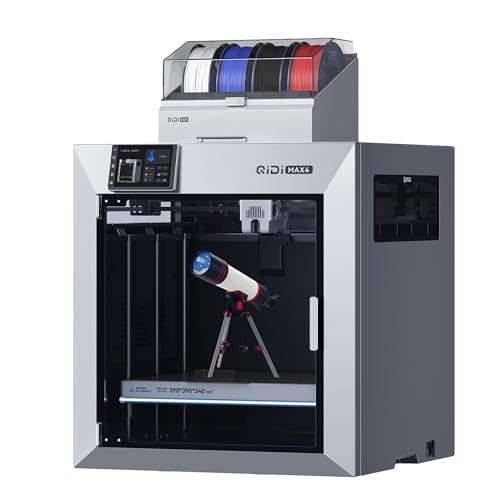
QIDI Max4 Combo — The Closest Credible Route, Large
Badge: The Closest Credible Route, Large — stated heat at a stated scale
- Nozzle: 370°C nozzle
- Chamber: 65°C heated chamber
- Build volume: 390x390x340mm
- Motion: dual Z lead screws, maximum 800mm/s high speed
- Calibration: auto-leveling
- Supervision: AI camera
- Extras: Polar Cooler optional, multi-materials, combo bundle
Against PEEK’s requirements, the Max4 Combo states the strongest hand in this guide, and the review’s duty is to play it without bluffing. The stated figures: a 370-degree nozzle, a 65-degree heated chamber, and a build volume of 390 by 390 by 340 millimetres. Set beside the requirement — roughly 400-degree-class nozzle heat for full PEEK processing — the nozzle figure is close enough to be serious and short enough to matter. A 370-degree hotend will melt PEEK; the material’s filament is formulated to flow at temperatures this machine can reach. What the shortfall governs is the margin: less thermal headroom for crystallisation control, less forgiveness in layer bonding at speed, and a process window that asks the operator for patience and tuning rather than offering the comfortable surplus a purpose-built machine provides. The chamber tells the same story at larger scale — 65 degrees is a genuinely warm, warp-fighting environment for engineering materials, and it is well below the chamber heat at which large PEEK parts behave best.
Within that honest frame, the machine’s other stated systems serve the attempt well. Size is not a vanity metric for engineering polymers: a 390-millimetre-class volume means brackets, housings, and fixtures print at working scale rather than as miniatures, and dual Z lead screws keep the tall gantry honest across the long, slow prints that high-temperature materials demand. Auto-leveling secures the first layer, the layer on which a multi-hour PEEK attempt most often lives or dies. The AI camera watches those long attempts, so a failure declares itself early. The combo’s multi-material capacity and the optional Polar Cooler suggest a platform still being developed around engineering work. None of this converts the Max4 into a certified PEEK production machine, and this review will not call it one. It is the largest of the closest credible routes — the machine a reader chooses when the application can live inside a 370-degree process window and the part sizes justify the platform.
The buyer for this route should arrive with eyes open about process, not just hardware. High-temperature printing at the edge of a machine’s envelope rewards dry filament, conservative speeds, and test coupons before committed parts — a discipline this guide’s closing sections detail. It also rewards verification: QIDI’s title states the headline figures, but duty cycles, sustained-temperature behaviour, and material-specific guidance live in the manufacturer’s documentation, which is required reading before PEEK filament — a costly material by any shelf’s standard — is committed to the chamber. Buy the Max4 as the most capable stated route in this set and it will not disappoint; buy it as a turnkey PEEK factory and the disappointment is pre-loaded by physics.
Strengths
- The stated 370-degree nozzle is the highest figure in this guide, paired with a stated heated chamber.
- The large build volume suits engineering parts at working scale.
- Dual Z lead screws and an AI camera support the long prints high-temperature work demands.
Trade-offs
- The nozzle sits below the roughly 400-degree class full PEEK processing asks for.
- The 65-degree chamber is warm, not PEEK-ideal, for large parts.
- Printing at the envelope’s edge demands process discipline and costly test material.
Best for: seeking the largest stated route toward PEEK-class work, with the ceiling understood before printing begins.
Not suited for: seeking a certified PEEK production machine with thermal headroom to spare.
The thermal figures are stated on the listing itself — Check price on Amazon — and should be read beside the maker’s documentation.

FLASHFORGE Creator 5 Pro — The Chambered Toolhead Route
Badge: The Chambered Toolhead Route — engineering chamber, multi-tool versatility
- Toolheads: 4-toolhead multi-color system
- Chamber: 65°C heated chamber for engineering filaments
- Enclosure: enclosed
- Waste positioning: near-zero purge waste
- Speed: CoreXY 600mm/s, 5X faster printing
- Filtration: HEPA 13 filtration
- Nozzle temperature: Not stated in the listing title – verify with the manufacturer documentation
The Creator 5 Pro enters this guide through its chamber. The title states a 65-degree heated chamber framed explicitly for engineering filaments, and pairs it with a four-toolhead system, near-zero purge waste, and HEPA 13 filtration. What the title does not state — and in a PEEK guide this omission is the review’s centre of gravity — is a nozzle temperature. Without that figure, the machine’s PEEK relevance cannot be established from its listing: a hot chamber serves PEEK’s crystallisation and warping behaviour, but the polymer must first be melted and bonded at nozzle temperatures this listing leaves unspoken. The honest placement is therefore precise. This is a chambered, multi-toolhead engineering machine whose chamber figure matches the QIDI picks’ stated chambers, and whose nozzle capability a PEEK-interested buyer must establish in the manufacturer’s documentation before treating it as a route to this polymer at all.
Judged on what it does state, the machine is a formidable engineering platform in its own right. Four toolheads mean materials wait in their own hardware — a structural filament, a support material, a flexible, a colour — with near-zero purge waste at every change, which is the multi-material family’s defining economy. The chamber’s stated purpose, engineering filaments, covers the shelf of warp-prone, temperature-sensitive materials below PEEK that dominate real functional printing, and the filtration suits the long occupied-room hours such work involves. A buyer whose material ambitions top out at that shelf — which is most engineering buyers, most of the time — will find this listing’s stated case complete and compelling, and will never need the PEEK question answered.
For the PEEK-specific reader, then, the review reduces to a verification errand with real stakes. Establish the nozzle’s maximum temperature and its sustained-duty behaviour from the manufacturer’s documentation; establish whether the maker supports or merely tolerates PEEK-class materials; and only then place this machine on the route map, where its chamber and toolheads would make it a versatile contender if the nozzle figure cooperates. Until that errand is run, the guide’s placement stands: a chambered engineering platform of the first rank, and an unproven PEEK route. That distinction — between a machine that is certainly excellent and a machine that is certainly excellent for PEEK — is the entire discipline of this category, and the Creator 5 Pro’s review is where the guide most owes its readers the difference stated without flinching.
Strengths
- The stated 65-degree chamber is framed for engineering filaments and matches the set’s best chamber figures.
- Four toolheads with near-zero purge waste give unmatched material versatility here.
- HEPA 13 filtration suits long engineering runs in occupied rooms.
Trade-offs
- No nozzle temperature is stated, so the PEEK route is unproven from the listing.
- PEEK relevance depends entirely on documentation the buyer must consult.
- The speed framing compares against purging single-nozzle baselines.
Best for: seeking a chambered, multi-toolhead engineering platform whose PEEK ceiling gets verified before commitment.
Not suited for: seeking a PEEK route whose nozzle temperature is confirmed inside the listing title.
The chamber claim is stated on the product page: Check price on Amazon, with the nozzle question reserved for the maker’s documentation.

Bambu Lab X1E Combo — The Managed Heated Route
Badge: The Managed Heated Route — active chamber heating under supervision
- Bundle: X1E printer with AMS
- Architecture: CoreXY high-speed
- Chamber: active chamber heating
- Supervision: AI print detection
- Positioning: ideal for professional and engineering work, per the title
- Nozzle temperature: Not stated in the listing title – verify with the manufacturer documentation
The X1E Combo’s place in a PEEK guide rests on one stated phrase — active chamber heating — and on the professional ecosystem wrapped around it. Active heating matters because it converts the chamber from a passive box that borrows heat into a controlled process variable, and process control is the language high-temperature materials speak. The title pairs that chamber with AI print detection, the supervision that long engineering prints need, and with the AMS combo’s multi-material path, all on a high-speed CoreXY frame positioned by its maker for professional and engineering work. As with the Creator 5 Pro above, though, the title states no nozzle temperature, and in this category that silence is decisive for classification: the X1E is a managed, chamber-heated engineering platform whose distance from PEEK’s roughly 400-degree nozzle requirement cannot be measured from its listing.
What can be said on stated evidence is still considerable. The managed ecosystem — curated profiles, a material system in the box, detection watching the work — compresses the operator’s burden in exactly the domain where high-temperature printing punishes improvisation. Engineering materials reward repeatable process, and repeatability is what managed platforms sell. A professional user printing the engineering shelf below PEEK, in a chamber held at temperature, with failures intercepted rather than discovered, owns a genuinely production-shaped tool. The PEEK question, if it arises, then has a specific address: the manufacturer’s documentation, where the nozzle’s ceiling and the maker’s material support statements will either open the route or close it, and where the answer will be worth more than any inference this guide could draw from an enclosure’s photograph.
The cautions mirror the previous review’s, with the ecosystem’s own added. A managed platform concentrates control with its maker, which professional users should weigh as vendor strategy, not merely as convenience. Active chamber heating raises the placement and ventilation questions that held temperatures always raise. And the PEEK-interested buyer must resist the gravitational pull of a polished listing: professional and engineering positioning, however sincere, is not a temperature figure. Buy the X1E for stated reasons — chamber control, supervision, managed workflow — and it stands on solid ground. Buy it as a PEEK machine on the strength of its posture, and the purchase repeats the category’s founding error in its most expensive costume.
Strengths
- Active chamber heating makes chamber temperature a controlled process variable.
- AI print detection protects the long runs engineering materials require.
- The managed combo workflow compresses setup for professional users.
Trade-offs
- No nozzle temperature is stated, leaving the PEEK gap unmeasurable from the listing.
- The managed ecosystem concentrates platform control with the maker.
- Engineering positioning is not a substitute for a verified temperature figure.
Best for: seeking actively heated, supervised engineering printing inside a managed ecosystem, with PEEK treated as a documentation question.
Not suited for: seeking a stated nozzle figure approaching the 400-degree class within the listing itself.
The active chamber claim sits on the listing — Check price on Amazon — while the decisive nozzle figure waits in the documentation.

QIDI Plus5 Combo — The Closest Credible Route, Mid-Size
Badge: The Closest Credible Route, Mid-Size — the same stated heat, a smaller stage
- Nozzle: 370°C nozzle
- Chamber: 65°C chamber heating
- Build volume: 320x320x300mm large build volume
- Speed: maximum 600mm/s high speed
- Calibration: auto-leveling
- Supervision: AI camera
- Extras: Polar Cooler optional, multi-materials, combo bundle
The Plus5 Combo repeats the family’s decisive pairing — a nozzle stated at 370 degrees and chamber heating stated at 65 degrees — at a 320 by 320 by 300 millimetre build volume, and the review of its PEEK relevance can be correspondingly direct. The thermal story is the Max4’s story at a smaller scale: a nozzle figure that melts PEEK and approaches its process window without the roughly 400-degree-class headroom the material prefers, and a chamber that fights warping honourably while sitting far below PEEK’s ideal ambient heat. What changes with size is the shape of the compromise. Smaller parts are kinder to marginal process windows — less accumulated warp stress across a compact footprint, shorter layer times for heat to manage — so a mid-size machine at these figures is arguably the most forgiving of the three QIDI routes for a reader determined to explore PEEK’s foothills with modest components: sensor housings, small brackets, clips, and fittings rather than sweeping structural panels.
The supporting systems mirror the flagship’s logic. Auto-leveling guards the critical first layer; the AI camera supervises the long, slow prints that high-temperature materials impose; the combo format and multi-material capacity keep support strategies available, which matters when an expensive engineering part’s overhangs are at stake; and the optional Polar Cooler again signals an accessory ecosystem oriented toward thermal work. The maximum 600mm/s figure should be read with the category’s usual translation — motion headroom, largely irrelevant to PEEK itself, which prints slowly on any machine that prints it honestly — but valuable for the machine’s second life printing the everyday engineering shelf at pace when no polymer royalty is on the bed.
The cautions are the family’s, undiluted by the smaller frame. The ceiling is the ceiling: 370 degrees at the nozzle and 65 at the chamber define a process window that PEEK tolerates rather than enjoys, and parts destined for genuinely demanding service — sustained heat, aggressive solvents, structural load — should be validated as printed, not assumed equivalent to parts from a purpose-built machine. Filament cost sharpens every experiment, so the test-coupon discipline in this guide’s closing sections is not optional garnish for this pick; it is the price of exploring responsibly. And the documentation pass remains obligatory, for sustained-temperature behaviour and maker guidance on the material. As the mid-size expression of the closest credible route, the Plus5 is the set’s balanced thermal proposition: stated heat, workable scale, and a ceiling described in daylight.
Strengths
- The stated 370-degree nozzle and 65-degree chamber match the flagship’s thermal pairing.
- The mid-size volume suits the modest components where marginal windows forgive most.
- AI camera supervision and auto-leveling support long, slow, high-temperature attempts.
Trade-offs
- The same sub-400-degree ceiling governs, whatever the frame size.
- Demanding-service parts must be validated as printed, not assumed equivalent.
- Costly filament makes undisciplined experimentation an expensive education.
Best for: seeking the stated QIDI thermal pairing at a mid-size volume for modest engineering components.
Not suited for: seeking PEEK parts for demanding service without validation of the printed result.
The mid-size route’s figures are printed on its listing, where careful readers can Check price on Amazon before planning a test programme.
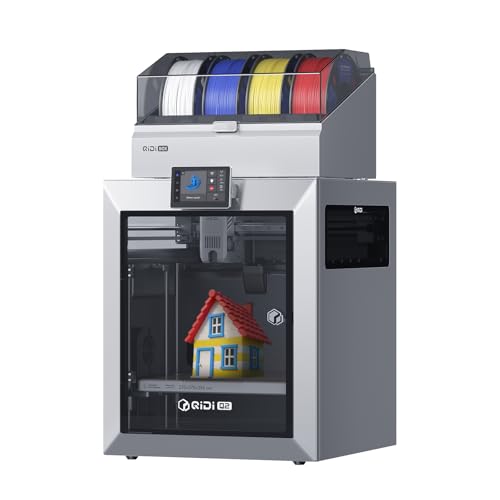
QIDI Q2 Combo — The Closest Credible Route, Compact
Badge: The Closest Credible Route, Compact — the pairing in its quickest-starting form
- Nozzle: 370°C nozzle
- Chamber: 65°C heated chamber
- Build volume: 270x270x256mm
- Speed: 600mm/s high speed
- Filtration: ultra air filtration
- Calibration: full auto leveling
- Setup: unbox to print in 10 minutes, per the title
- Supervision: AI camera
The Q2 Combo completes the family’s staircase: the same thermal pairing its siblings state — nozzle at 370 degrees, heated chamber at 65 — now in a 270 by 270 by 256 millimetre machine whose title promises unboxing to printing in ten minutes and adds ultra air filtration to the specification. The PEEK analysis is by now a refrain this guide makes no apology for repeating, because repetition is what honesty looks like in this category: the nozzle melts the polymer and approaches its window without the 400-degree-class surplus; the chamber helps and does not suffice for large work; the route is credible for modest parts approached with process discipline, and it is not a certification. What the compact form adds to that refrain is a genuinely different use case — the smallest, quickest-starting seat at the high-temperature table, suited to a bench where PEEK-class exploration happens in small components and short runs rather than in production panels.
Two stated features deserve particular weight at this scale. Ultra air filtration matters more, not less, in the compact machine’s likely habitats — offices, studios, small workshops — because high-temperature printing in occupied rooms is an air-management question, and a maker who filters is answering it in the specification. Full auto leveling serves the same small-machine logic: a compact route to extreme materials lives or dies by removing every other friction, so the operator’s whole attention budget can go to the material’s behaviour, which will spend it freely. The AI camera again supervises, and the ten-minute setup claim, while it describes ordinary printing rather than a PEEK campaign, signals the platform’s general intent: thermal capability without a specialist’s apprenticeship as the entry fee.
The limits are scale and ceiling, jointly. The build volume confines the PEEK exploration to compact parts — which, to be fair, describes a large share of real PEEK applications, since the material’s cost alone argues for small, high-value components. The ceiling is the family’s ceiling, stated for the third time because each listing earns its own warning: parts for demanding service need validation, process windows at 370 degrees are narrow, and the documentation pass is obligatory. Buyers who accept those terms get something genuinely scarce — a compact, filtered, quick-starting machine whose title states the highest nozzle figure in this guide. Buyers who needed the figure to be 400 will find their answer in the prose-only entry that follows, and this guide would rather send them there honestly than sell them a smaller number in a warmer font.
Strengths
- The stated 370-degree and 65-degree pairing arrives in a compact, quick-starting machine.
- Ultra air filtration suits high-temperature printing in occupied rooms.
- Full auto leveling frees the operator’s attention for the material itself.
Trade-offs
- The 270-millimetre-class volume confines work to compact parts.
- The sub-400-degree ceiling narrows the process window for every print.
- Small scale does not reduce the validation burden for demanding applications.
Best for: seeking a compact, filtered route into high-temperature materials for small, high-value components.
Not suited for: seeking large-format PEEK parts or a nozzle in the 400-degree class.
Compact-bench readers can confirm the stated pairing on the listing: Check price on Amazon.
Intamsys Funmat HT — The Purpose-Built Reference, Prose-Only
Badge: The Purpose-Built Reference, Prose-Only — what the genuine article looks like
- Positioning: purpose-built high-temperature machine for engineering polymers
- Listing status: no machine listing found — only covers and accessories; prose-only, no link, no image
- Positioning in this guide: qualitative tier only, per the rules for unlinked picks
Every honest map needs its reference point, and in this territory the reference is the class of machine the Funmat HT represents: a printer designed from the first sketch for high-temperature engineering polymers, rather than adapted upward from the everyday shelf. Machines of this class are built around the thermal problem — hotends specified for the 400-degree region and beyond, chambers engineered to hold genuinely high ambient temperatures, and motion and materials choices made for sustained heat rather than for headline speed. That is what printing PEEK as a production material actually looks like, and including the reference in this guide serves a calibration purpose: it shows readers the distance between a purpose-built instrument and the credible desktop routes above, so the word credible keeps its meaning.
The entry’s terms must be as plain as its purpose. No machine listing for the Funmat HT was found among the listings this guide draws from; the listings surfacing under its name were covers and similar accessories. Under this site’s rules, that means no purchase link, no image, and no ASIN — because linking an accessory as though it were the machine would misdirect a reader at the exact moment of highest intent, in the category where mistakes are most expensive. The Funmat HT therefore stands here as a described destination rather than a purchasable pick: the route a reader takes, through the manufacturer’s own channels and specialist suppliers, when the application audit concludes that only the genuine thermal article will serve.
That conclusion is more common than the desktop market’s marketing would suggest, and reaching it is not a defeat. PEEK earns its place in engineering by surviving environments that destroy lesser polymers; a part trusted with that duty should be printed by a machine trusted with the material, and the cost difference between a credible route and a purpose-built one is small beside the cost of a failed component in service. Readers whose audit points here should expect a specialist purchase — different channels, different support conversations, a different price universe than desktop combos — and should regard that difference as the material’s honest admission fee. The linked picks above remain the right answers for exploration, prototyping, and modest components inside their stated windows. The Funmat HT’s role is to mark where those windows end, and to be findable when a reader’s work walks up to the border and needs to cross it properly.
Strengths
- A purpose-built thermal design addresses PEEK’s requirements without a stated ceiling compromise.
- The machine class represents the production end of high-temperature polymer printing.
- Its presence calibrates every other pick’s claims against the genuine article.
Trade-offs
- No machine listing was found, so this entry offers no purchase route.
- Sourcing runs through specialist channels rather than a familiar marketplace listing.
- The class sits in a different commitment universe from the desktop combos above.
Best for: seeking the purpose-built high-temperature route after an application audit rules out desktop ceilings.
Not suited for: seeking a one-click marketplace purchase of a complete machine today.
No purchase link is provided for this pick, deliberately: readers pursuing this class should source it through the manufacturer’s own channels and verify the complete machine’s specification there.
Comparison table
| Machine | Nozzle as listed | Chamber as listed | Honest classification |
|---|---|---|---|
| QIDI Max4 Combo | 370°C | 65°C heated chamber | Closest credible route, large format |
| FLASHFORGE Creator 5 Pro | Not stated in title | 65°C heated chamber | Chambered engineering platform; PEEK unproven |
| Bambu Lab X1E Combo | Not stated in title | Active chamber heating, figure unstated | Managed engineering platform; PEEK unproven |
| QIDI Plus5 Combo | 370°C | 65°C chamber heating | Closest credible route, mid-size |
| QIDI Q2 Combo | 370°C | 65°C heated chamber | Closest credible route, compact |
| Intamsys Funmat HT | Purpose-built class | Purpose-built class | Reference machine; prose-only, no listing found |
How to choose the best peek 3d printers without fooling yourself?
Begin with the application audit, in writing. What must the part survive — what temperature in service, which solvents, what load, for how long — and what happens if it fails? That audit, honestly answered, sorts readers into the guide’s three honest destinations. If the part is a prototype, a fit-check, or a modest component whose service is forgiving, the QIDI routes at their stated 370-degree and 65-degree figures are credible instruments, sized by the part: Q2 for compact work, Plus5 for the middle, Max4 for scale. If the part’s service is genuinely demanding, the audit points past every desktop ceiling in this guide toward the purpose-built class the Funmat HT represents, sourced through its maker’s channels. And if the audit reveals that the workload is really the engineering shelf below PEEK — the nylons, polycarbonates, and their kin — then the chambered Creator 5 Pro and the X1E Combo re-enter as first-class answers rather than as PEEK also-rans.
Next, verify like an engineer rather than a shopper. For any machine being considered for PEEK, establish from the manufacturer’s documentation: the nozzle’s maximum and sustained temperatures, the chamber’s maximum and its uniformity, the maker’s stated position on PEEK-class materials, and the recommended process parameters. A maker who publishes PEEK guidance is telling the buyer something important; a maker whose documentation goes quiet at the material’s name is also telling the buyer something important. Then budget the learning curve in the material itself: PEEK filament is costly, test coupons are not waste but tuition, and a buyer unwilling to spend spools on calibration should not start this material on any machine at any ceiling.
Finally, place the purchase in the wider thermal landscape this site maps. The engineering shelf below PEEK is served by chambered machines judged on production terms in our professional roundup, where heated chambers and multi-extruder systems are treated as process control. The dimensional side of engineering printing — holding accuracy while materials shrink and stress — is treated in our guide to precise 3D Printers. The machines that print hot-adjacent materials as part of the general filament landscape appear in our guide to fFF 3D Printers, which is where readers whose audit ends at everyday engineering filaments may find the honest centre of their search. And because a high-temperature machine is a years-long commitment, the ownership disciplines in our guide to long-Term 3D Printers — parts, maintenance, and upgrade paths — belong in the same deliberation.
There is one more question the audit should ask, because it quietly decides between the routes more often than any specification does: how many PEEK parts, of what size, per month? A handful of small components monthly is a workload the compact Q2 route absorbs gracefully, with its ceiling negotiated a few times a month under full operator attention. A standing production obligation is a different animal — it wants thermal headroom, process automation, and a machine whose window is wide enough that Tuesday’s operator gets Monday’s results, which is the purpose-built class’s whole argument. Volume converts compromises into risks at a compounding rate, and the buyer who counts future parts as carefully as present temperatures will rarely regret either direction of the decision: the desktop route bought knowingly for exploration, or the specialist machine bought knowingly for duty. Regret in this category belongs almost exclusively to purchases made on a headline, in a hurry, with the numbers unread — the three habits this entire guide exists to break.
What PEEK actually demands: the physics behind the ceiling
PEEK’s demands are not marketing hurdles; they are the material’s chemistry expressing itself. The polymer melts at a temperature far above the everyday shelf, and it must be extruded hotter still to flow and bond — hence the roughly 400-degree nozzle class, which gives the melt enough energy to weld each layer into the last before it cools. Bonding is the crux: a layer laid too cool sits on its predecessor rather than fusing with it, and the resulting part fails along its layers under loads the material itself could have carried easily. The chamber’s role is the second half of the same physics. PEEK crystallises as it cools, and the rate and uniformity of that crystallisation decide whether the part emerges with its designed strength distributed evenly, or with internal stresses, warping, and regions of weaker, amorphous structure. A hot, steady chamber slows and evens the cooling; a cool chamber rushes it unevenly, most punishingly on large parts. This is why the guide keeps two numbers welded together — nozzle and chamber — and why a machine strong on one and silent on the other earns a qualified verdict: the material reads both numbers at once, and so must the buyer.
A third thermal actor deserves mention because buyers consistently underrate it: the build plate and the first layers. A part’s foundation experiences the steepest thermal gradient in the whole print, and adhesion at extreme temperatures is its own discipline — surfaces, adhesives, and plate materials that behave politely at everyday temperatures can surrender entirely in a hot chamber. This is one more reason the credible routes in this guide are described as routes rather than destinations: reaching the material’s neighbourhood with nozzle and chamber is necessary, and the remaining distance is travelled with process craft, plate preparation, and the patience to iterate on cheap geometry before committing expensive parts. Purpose-built machines narrow that remaining distance with engineering; desktop routes leave it to the operator. Either can arrive. Only one arrives by default.
Printing at the edge: process discipline for the credible routes
For readers who choose a 370-degree route, process discipline is the difference between exploring and gambling. Filament dryness is absolute: high-performance polymers punish moisture with voids and weak bonds, and a spool that has sat in room air arrives at the nozzle pre-compromised. Speeds go down — layer bonding at the edge of a thermal window needs time at temperature, and the pace figures in the QIDI titles are for other materials on other days. Test coupons precede real parts, always: a small standard geometry, printed, broken, and examined, tells the operator more about the process window than any profile downloaded in hope. Annealing and post-processing, where the maker’s documentation recommends them, belong in the plan rather than in the improvisation. And records matter — temperatures, speeds, chamber behaviour, outcomes — because a narrow process window found once and not written down is a window that will be searched for again at full material price. None of this is gatekeeping. It is the ordinary craft of a demanding material, and the credible routes reward it with parts that genuinely surprise people who assumed the ceiling made the attempt pointless.
One discipline deserves expansion because it is where edge-of-envelope printing is actually won: thermal patience at the start. A chamber stated at 65 degrees reaches that figure in its air long before the machine’s frame, plate, and the part’s own lower layers have soaked to equilibrium, and prints started against a cold-soaked frame spend their critical early layers in a chamber that is still travelling. Experienced high-temperature operators preheat and wait — letting the whole system arrive at temperature before the first layer lands — and that unglamorous interval is worth more than most profile adjustments. The same patience applies at the end: a part removed hot into cool room air is a part whose crystallisation story gets a rushed final chapter, and controlled, gradual cooling is cheap insurance bought with nothing but time. On a purpose-built machine much of this patience is automated into the process; on the credible desktop routes it lives in the operator’s habits, which is precisely why this guide treats operator discipline as part of each route’s real specification.
Common mistakes
The founding mistake of this category is believing a headline — buying an enclosed printer with no stated temperatures because the guide or the advertisement placed it under PEEK’s name. The second is the mirror error: reading that a 370-degree machine falls short of the ideal and concluding it is useless, when its stated window covers real prototyping and modest-component work honourably. Third is printing PEEK like PLA with a hotter nozzle — full speed, damp filament, no coupons — and blaming the machine or the material for a process failure. Fourth is ignoring the chamber half of the physics, chasing nozzle figures while the part cools unevenly in a lukewarm box. Fifth is skipping the validation of printed parts for demanding service, as though the filament’s datasheet transferred automatically to whatever geometry and process produced the object. The last mistake is sourcing carelessly at the top of the market: at purpose-built prices, listings demand more verification, not less, and an accessory wearing a machine’s name — the exact trap the prose-only entry above exists to expose — is the most expensive sentence a buyer can skim past.
Frequently Asked Questions
Can any consumer printer in this guide truly print PEEK?
Not to the material’s full specification. Full-specification PEEK processing asks for nozzle temperatures in roughly the 400-degree class and a hot chamber; the strongest stated figures here are the QIDI machines’ 370-degree nozzles with 65-degree chambers. Those machines will melt and print the polymer and are presented as the closest credible routes, with ceilings stated. No pick in this guide is described as a certified PEEK production machine, because none of the listings supports that description.
What happens if PEEK is printed below its ideal temperatures?
The part prints, and that is the danger — it emerges looking like PEEK while carrying compromised layer bonding and uneven crystallisation. Under load, heat, or solvent exposure, such a part can fail in ways the genuine material would have survived. For prototypes and fit-checks the compromise may be acceptable and even useful; for parts in demanding service it is a false economy measured in failures.
Why do the QIDI machines dominate this guide?
Because their titles state the figures this category runs on. Each of the three QIDI listings commits in public to a 370-degree nozzle and 65-degree chamber heating, which made them evaluable against PEEK’s requirements from their listings alone. Machines whose titles state no temperatures — however capable — could not be graded honestly for this material, and the two that appear without nozzle figures are included for their stated chamber systems with their evidential limits labelled.
Is a heated chamber or a hotter nozzle more important for PEEK?
The material requires both, for different halves of the same physics: the nozzle’s heat creates layer bonding, the chamber’s heat governs crystallisation and warping as the part cools. A buyer forced to weigh a shortfall should know that a nozzle below the material’s bonding range cannot be compensated by any chamber, while a modest chamber mainly punishes larger parts — which is why the guide presents the QIDI pairing, adequate on the nozzle side and helpful on the chamber side, as the credible pattern.
Why is the Intamsys Funmat HT not linked?
Because no machine listing for it was found — the listings under its name were covers and accessories. This site’s rule is that an accessory is never linked as though it were the machine, above all in a category where the machine is a specialised, high-commitment purchase. The entry stands prose-only as the map’s reference point, and readers pursuing that class should source it through the manufacturer’s own channels.
What should be checked in documentation before buying any machine for PEEK?
The nozzle’s maximum and sustained temperatures, the chamber’s maximum temperature and uniformity, the maker’s explicit position on PEEK-class materials, and any published process guidance for the polymer. A maker who documents PEEK support is making a claim a buyer can rely on and return to; silence in the documentation, where a title has also been silent, should be read as the answer it is.
Are there neighbouring materials that deliver part of PEEK’s performance more easily?
Yes, and the application audit often ends there happily. The engineering shelf below PEEK — high-temperature nylons, polycarbonate blends, and PEI-class materials at the shelf’s upper edge — covers many heat-and-chemical duties at process temperatures the chambered machines in this guide handle comfortably. Each step down that shelf trades some of PEEK’s extremes for a wider, more forgiving process window. Buyers who name the actual service conditions, rather than the most prestigious polymer, frequently discover that the right material was one shelf down and the right machine was already in this guide wearing no caveats at all.
Final recommendation
Let the application audit decide, and let it decide in writing. For exploration, prototyping, and modest components inside a stated window, take a QIDI route at the size the parts demand — the Q2 Combo for compact, filtered, quick-starting work, the Plus5 Combo for the middle scale, the Max4 Combo where the parts grow large — and print with the discipline this guide’s process section describes. For the wider engineering shelf, the chambered Creator 5 Pro and the managed X1E Combo are excellent machines whose PEEK relevance must be established in documentation rather than assumed from their posture. And for parts whose service is genuinely PEEK-shaped — sustained heat, aggressive chemistry, structural trust — follow the audit past the desktop ceiling to the purpose-built class the Funmat HT marks on the map, and source that machine through its maker’s own door. The worst purchase in this category is the one made in ignorance of the numbers; the second worst is the one made in defiance of them. A reader who finishes this guide knowing exactly which of those doors their work stands in front of — and why the other doors, however warmly lit, open onto the wrong room — has already received the most valuable thing a PEEK guide can sell, which is not a printer at all but a correctly drawn map of a demanding material’s country.
Keep the audit itself, once written, with the machine’s records. Months from now, when a new application knocks — a hotter bracket, a larger housing, a material one shelf up — that single page will say whether the machine in the room was bought for the work now arriving, or whether the work has honestly outgrown it. Few documents in a workshop earn their drawer space so completely, and none costs less to create while the evidence of the purchase decision is still fresh and fully legible.


