What's inside
- Key Takeaways
- Quick Picks
- How Did We Choose These 1080p Projectors?
- What Does 1080p Actually Look Like at 100 Inches?
- How Do the Six Projectors Compare?
- How Do You Work Out Throw Distance and Screen Size for Your Room?
- What Screen Should You Pair With a 1080p Projector?
- What Mistakes Do First-Time Projector Buyers Make?
- How Does Gaming on a 1080p Projector Actually Feel?
- How Do You Set Up a Projector Room Step by Step?
- What Does Ownership Cost After the Box Is Open?
- How Do Projectors Handle Sport Differently From Film?
- Ceiling Mount, Shelf or Coffee Table: Where Should the Projector Live?
- How Should You Think About Fan Noise and Heat?
- What About Portable and Outdoor Use?
- How Do You Judge a Projector in the First Evening?
- Which Projector Fits Which Viewer? A Pattern Guide
- What Should You Know About Rainbow Artefacts and Motion?
- How Does a Projector Compare With a Big Television, Honestly?
- What Should You Do in the First Month of Ownership?
- Final Recommendation
- Frequently Asked Questions
- Related Guides
As an Amazon Associate I earn from qualifying purchases. This post may contain affiliate links at no extra cost to you.
widgetverdict.com is reader-supported. When you buy through links on our site, we may earn an affiliate commission.
Where to buy: The projectors below are sold through Amazon, where each listing confirms the lamp or light-source type, the included remote and whether a streaming stick is bundled or merely welcomed. Check the throw-distance figures against your room before ordering — a projector is the one purchase in this guide that can be perfect and still not fit your wall.
Full HD remains the honest resolution of home projection. The best 1080p projectors throw an image measured in metres, not inches, from hardware that costs less than a mid-range television — and at seating distances real living rooms actually have, a well-fed 1080p image on a 100-inch screen satisfies in a way specifications say it should not. This guide sorts six of them by the things that genuinely differ: brightness honest enough for a lamp-lit room, input lag low enough for gaming, throw distances that suit small rooms or demand big ones, and the three-chip colour integrity of Epson’s 3LCD designs against the sharpness and contrast personality of the DLP machines from BenQ, Optoma and ViewSonic.
One deliberate exclusion deserves stating up front. Samsung’s Freestyle is a charming portable projector that readers often ask about in this category, but its commonly available listing is a renewed unit rather than a new one, so it is discussed only in prose in this guide and carries no recommendation link — buy it knowingly as renewed if its portability seduces you, and compare it against these six as the lifestyle option it is.
Key Takeaways
- Brightness decides where a projector can live: the 3,000-plus-lumen machines here tolerate ambient light; nothing in this class truly defeats daylight.
- 3LCD (Epson) offers equal colour and white brightness with no rainbow artefacts; DLP (BenQ, Optoma, ViewSonic) counters with sharpness, contrast and compact size.
- Gamers should read the input-lag figures in the BenQ sections first — they are the difference between playable and miserable.
- Throw distance is destiny: the short-throw BenQ TH671ST fills a wall from a coffee table, while standard-throw models need the room’s full depth.
- A screen, even an inexpensive one, transforms every projector here more than the next model up would.
Quick Picks
| Pick | Badge | Why it is here |
|---|---|---|
| Epson Home Cinema 1100 | Best Overall | Modern 3LCD brightness, wireless streaming built in and the friendliest setup in the class. |
| Epson Home Cinema 1080 | Best Value 3LCD | The same 3,400-lumen colour honesty as its sibling, at the friendlier price of an earlier generation. |
| BenQ TH575i | Best for Gaming and Streaming | Google TV on board, high brightness and game-ready low input lag in one DLP package. |
| BenQ TH671ST | Best Short Throw | A huge image from a metre and a half, with the low lag that made it a gaming-room legend. |
| Optoma HD146X | Best Budget Big Screen | The long-running entry point to real home cinema, with gaming-friendly response at a starter price. |
| ViewSonic PX701HD | Best for Sports and Bright Rooms | High brightness, lens shift convenience and a sports-friendly presentation at a keen price. |
How Did We Choose These 1080p Projectors?
We started with light, because light is the medium. Each candidate needed brightness sufficient for its claimed habitat — a projector marketed for living rooms that only performs in a cave is a bedroom projector wearing a costume — and we read brightness claims with the scepticism the category has earned, favouring manufacturers whose figures distinguish colour brightness from white, as Epson’s 3LCD specifications do. A projector that produces 3,400 lumens of white and a fraction of that in colour will wash every saturated scene; the honest number is the lower one, and the picks here are the machines whose colour light output survives scrutiny.
Second came the geometry of real rooms. Throw ratio, zoom range, lens shift and keystone behaviour decide whether a projector can produce a rectangular 100-inch image in your space at all, and those specifications were weighed as heavily as image quality — a marginally sharper projector that must sit where your sofa is loses to a flexible one every evening of the week. Gaming lag formed the third filter, because a projector bought for films in this decade will meet a console within the year, and the difference between the lag figures in this list is the difference between a controller that feels connected and one that feels drunk.
We also weighed the secondhand fog that surrounds this category, because projector listings attract renewed, refurbished and grey-market stock more than most. Every linked pick in this guide was verified against our pool as the manufacturer’s current, new product — a discipline whose absence is how buyers end up comparing a new Epson against a renewed portable as if they were equivalents, and concluding the portable is a bargain. They are different purchases wearing similar photographs, and this guide keeps them in separate columns on purpose.
Finally, we considered the ecosystem of ownership: lamp life and replacement cost for the lamp-based machines, the quality of built-in sound for rooms without a soundbar, and whether streaming arrives built in, bundled or as your problem to solve with a stick. The Freestyle’s prose-only status, explained in the introduction, is part of the same discipline — this guide links only to products verified as the genuine, current article.
What Does 1080p Actually Look Like at 100 Inches?
Better than the arithmetic of pixels suggests, for reasons rooted in how vision works. A 1080p image spread across 100 inches has a pixel structure that resolves at typical seating distances of three metres and beyond; move closer and the grid emerges, sit where people actually sit and the image coheres into cinema. What the eye registers at that scale is not pixel count but contrast, colour and motion handling — the deep blacks of a night scene, the saturation of a football pitch, the absence of judder in a camera pan. The DLP machines here render those pans with a native crispness that flatters sport and games; the 3LCD Epsons render colour-rich film scenes with a fullness that flatters cinema. Both statements are about character, not deficiency.
The honest limits deserve their sentences. Fine text — a spreadsheet, a desktop at small font sizes — is where 1080p at 100 inches shows its working: readable, not crisp, and nobody should buy from this list to project documents. Dark scenes in lamp-based DLP machines reveal the technology’s contrast ceiling as a very dark grey rather than true black, improved by a dark room and a grey screen but never abolished. And every projector here is transformed by darkness; the buyer planning a permanently lamp-lit viewing life should weight the brightest picks and manage expectations accordingly, because lumens obey physics rather than marketing.
Feed matters as much as the projector. A 1080p machine receiving a clean 1080p signal from a disc, a console or a good stream is operating at its design point; the same machine upscaling a battered low-resolution stream will faithfully enlarge every artefact. Owners consistently over-invest in the projector and under-invest in the source, the screen and the room — the three places where this category’s quality actually hides.

Epson Home Cinema 1100 — Best Overall
The Home Cinema 1100 is the current form of Epson’s living-room argument: a 3-chip 3LCD engine producing 3,400 lumens of colour brightness and 3,400 of white — equal figures, which is the 3LCD promise — wrapped in a machine that streams wirelessly via AirPlay and Miracast, sets up with minimal profanity and throws a big, colour-honest image in rooms that are not caves. For film nights in a normal living room with the lamps low rather than off, its balance of brightness, colour integrity and convenience is the most complete in this guide.
Its character suits the mainstream beautifully. There are no rainbow artefacts for sensitive viewers to catch in high-contrast scenes, the built-in speaker covers casual viewing honestly, and the lamp-based design keeps the purchase price in the realm of the reasonable while accepting lamp economics later. Gamers should note its lag is serviceable rather than class-leading — the BenQs below are the specialists — and its black levels, like all bright 3LCD machines, are good rather than inky. As the single projector for a household that watches films, sport and streamed series on a big wall, it asks the fewest compromises of any pick here.
- Technology: 3-chip 3LCD, lamp light source
- Brightness: 3,400 lumens colour and white
- Streaming: wireless with AirPlay and Miracast support
- Inputs: 2 HDMI
- Audio: built-in speaker
Strengths
- Equal colour and white brightness keeps saturated scenes rich in real rooms.
- No rainbow artefacts; comfortable for sensitive viewers.
- Built-in wireless streaming reduces the dongle clutter.
Trade-offs
- Input lag is fine for casual play, not for competitive gaming.
- Black levels trail the best DLP contrast in dark scenes.
- Lamp will eventually need replacing, unlike LED designs.
Best for: households wanting one bright, friendly projector for films, sport and streaming in a normal living room.
Not suited for: serious gamers or black-level perfectionists with a dedicated dark room.

Epson Home Cinema 1080 — Best Value 3LCD
The Home Cinema 1080 is the previous verse of the same song, and it remains in this guide because its fundamentals were right: the same 3,400-lumen colour-and-white honesty, the same 3LCD immunity to rainbow effects, the same talent for making a lamp-dimmed room feel like a cinema — at the price an earlier generation commands. For buyers whose streaming already lives in a stick or a console, the newer model’s wireless refinements may be features they would pay for and never use, and this machine pockets the difference.
What you concede is modernity at the margins: setup aids and connectivity that are a step behind its sibling, and a design that has been in service long enough for its habits to be thoroughly documented — which cuts both ways, since its lamp costs and real-world behaviour are known quantities rather than brochure promises. In a bedroom, a student room or a first home-cinema setup, it delivers the essential 3LCD experience — big, bright, colourful, unfussy — with the least money in this guide’s Epson wing, and “essential” is doing genuine work in that sentence.
- Technology: 3-chip 3LCD, lamp light source
- Brightness: 3,400 lumens colour and white
- Inputs: 2 HDMI
- Audio: built-in speaker
- Character: proven design, thoroughly documented ownership
Strengths
- Full 3LCD colour brightness at an earlier-generation price.
- Known lamp costs and predictable long-term behaviour.
- Equally at home in living rooms and bedrooms.
Trade-offs
- Fewer modern setup and streaming conveniences than the 1100.
- Same casual-gaming lag profile as its sibling.
- Design and menus feel their generation’s age.
Best for: first-time projector buyers wanting genuine 3LCD quality on a disciplined budget.
Not suited for: buyers wanting the latest wireless streaming built in.

BenQ TH575i — Best for Gaming and Streaming
BenQ builds projectors the way gaming-monitor companies build monitors — around the player — and the TH575i wraps that instinct in a streaming box. Its DLP engine throws 3,800 lumens, its input lag at 1080p is quoted in the high teens of milliseconds where games remain responsive, and a licensed Google TV dongle lives in a hidden compartment, so the machine streams the major services natively with one remote on the coffee table. For a room that splits its evenings between matches and movies, that integration is not a garnish; it is the product.
The DLP character comes with it: crisp single-chip sharpness, strong contrast for the class, and the possibility of rainbow artefacts for the minority of viewers sensitive to them — a real consideration for a household purchase, best resolved by knowing your own eyes from any previous DLP encounter. Its auto vertical keystone helps the coffee-table setup, though the guide’s standing advice is to align the projector properly and let keystone rest. As a bright, game-ready, self-streaming centrepiece, the TH575i is the most current-feeling machine in this list.
- Technology: DLP, lamp light source
- Brightness: 3,800 lumens
- Streaming: licensed Google TV dongle included
- Gaming: low input lag around the high-teens milliseconds at 1080p/60
- Correction: auto vertical keystone
Strengths
- Genuinely low lag makes console gaming feel connected.
- Google TV built in — one remote, no extra hardware.
- High brightness suits living rooms and sport.
Trade-offs
- DLP rainbow artefacts affect a minority of viewers.
- Limited lens shift; placement needs more care.
- Fan noise is audible in quiet film scenes.
Best for: gamers and streamers wanting one bright box that does both without accessories.
Not suited for: rainbow-sensitive viewers or silent-room cinema purists.

BenQ TH671ST — Best Short Throw
The TH671ST solves the geometry problem that defeats most small rooms: its short-throw lens produces a 100-inch image from roughly a metre and a half away, so the projector sits on the coffee table in front of you rather than on a shelf behind the sofa or a mount on the ceiling. Shadows from passing people vanish as a category of problem, cables stay short, and a rented room — where ceiling mounts are forbidden and shelf space is theoretical — becomes a cinema by placement rather than construction. Its low input lag made it a gaming-room standard, and its 3,000 lumens keep the image honest in dimmed rooms.
Short throw imposes its own disciplines. The lens is exquisitely sensitive to alignment — a nudge moves the image, a tilt bends it — and it demands a genuinely flat screen surface, because every wave in a cheap pull-down screen is magnified into visible distortion at this throw. It is also an established model whose streaming is your responsibility to supply. None of that dents its central magic for the space-constrained: no other pick here turns so little room into so much picture, and for gaming dens and small flats it remains the geometry champion of the class.
- Technology: DLP, short-throw lens
- Throw: roughly 100 inches from about 1.5 metres
- Brightness: 3,000 lumens
- Gaming: low input lag, gaming-room favourite
- Inputs: dual HDMI
Strengths
- Huge image in rooms where standard throw cannot work.
- Low lag plus short throw equals the classic gaming-den setup.
- No ceiling mount or long cable runs required.
Trade-offs
- Alignment-sensitive; demands a flat screen surface.
- No built-in streaming — bring your own source.
- Image softens if the projector is nudged out of square.
Best for: small rooms, renters and gaming dens where the projector must live close to the screen.
Not suited for: wavy pull-down screens or rooms with ample throw distance and a mount.

Optoma HD146X — Best Budget Big Screen
The HD146X has been the doorway into home cinema for so many owners that its formula deserves reciting with respect: a bright DLP image, a gaming mode with response times that respect the player, a single HDMI life of exemplary simplicity, and a price that leaves budget for the screen and the soundbar the experience actually needs. Its contrast in a darkened room gives films a depth that surprises people meeting projection for the first time, and its compact body ceiling-mounts, shelf-mounts or cupboard-stores without ceremony.
Its economies are visible where economies usually live: one HDMI port makes a switcher or an AV receiver a practical necessity for multi-source homes, built-in audio is a courtesy rather than a feature, and there is no streaming intelligence aboard. It is also, by design, a machine for darkened rooms — its brightness figure flatters it in ambient light more than the Epsons’ honest colour lumens do. As the projector you buy to discover whether projection is your life — and for many households, the permanent answer rather than the starter — it remains the budget benchmark of the category.
- Technology: DLP, lamp light source
- Brightness: 3,600 lumens (white-focused figure)
- Gaming: enhanced gaming mode with fast response
- Inputs: 1 HDMI
- Character: compact, mount-friendly, simple
Strengths
- The proven budget route to a genuinely big, cinematic image.
- Strong dark-room contrast and gaming response.
- Compact and easy to mount or store.
Trade-offs
- A single HDMI port limits multi-source setups.
- Built-in sound is minimal; plan external audio.
- Colour brightness in lit rooms trails the 3LCD picks.
Best for: first-time cinema rooms on a budget, especially darkened rooms and gamers.
Not suited for: bright living rooms or multi-device setups without a receiver.
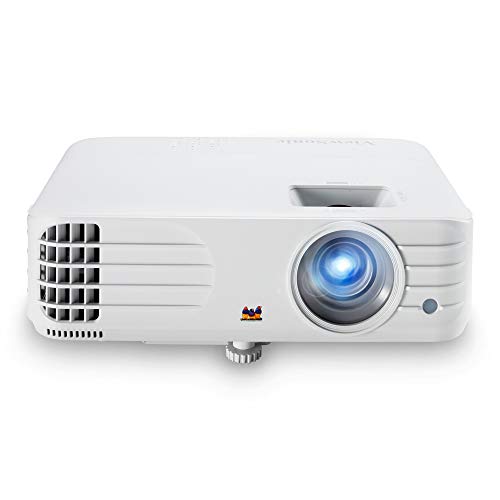
ViewSonic PX701HD — Best for Sports and Bright Rooms
ViewSonic’s PX701HD is the pragmatist’s projector: 3,500 lumens of DLP brightness, a vertical lens shift that lets you fine-tune the image’s height without tilting the machine and invoking keystone, dual HDMI for the console and the streamer to coexist, and a presentation tuned by a company that sells as many projectors to schools and offices as to cinemas — which shows, in the best way, when the content is a daytime match with the curtains open. Sport is its home genre: bright, punchy, motion-friendly, with colour that survives a lit room better than most of the class.
Its compromises are the familiar DLP ones, plus a fan character that reminds you a bright lamp is working, and black levels that serve sport and series better than brooding cinema. The lens shift, though modest, deserves emphasis because it is rare at this price and because it represents the correct way to solve placement problems — optically, not digitally. For the household whose projector life is weekend sport, family viewing and the occasional film, with light in the room and people in the chairs, the PX701HD is the quietly correct answer in this guide.
- Technology: DLP, lamp light source
- Brightness: 3,500 lumens
- Optics: vertical lens shift, a rarity at this level
- Inputs: dual HDMI
- Character: bright-room and sports specialist
Strengths
- Lens shift solves placement without keystone distortion.
- Brightness and punch suit sport in lit rooms.
- Dual HDMI covers the standard two-source household.
Trade-offs
- Fan audible during quiet passages.
- Black levels serve sport better than dark cinema.
- No built-in smart streaming platform.
Best for: sports households and bright-room viewing with flexible placement needs.
Not suited for: dedicated dark-room film purists.
How Do the Six Projectors Compare?
| Model | Technology | Brightness | Throw | Character |
|---|---|---|---|---|
| Epson Home Cinema 1100 | 3LCD | 3,400 colour/white | Standard | Complete living-room package |
| Epson Home Cinema 1080 | 3LCD | 3,400 colour/white | Standard | Value 3LCD |
| BenQ TH575i | DLP | 3,800 | Standard | Gaming plus Google TV |
| BenQ TH671ST | DLP | 3,000 | Short | Small-room geometry winner |
| Optoma HD146X | DLP | 3,600 | Standard | Budget cinema doorway |
| ViewSonic PX701HD | DLP | 3,500 | Standard + lens shift | Sport and bright rooms |
How Do You Work Out Throw Distance and Screen Size for Your Room?
Measure before you fall in love. Every projector here publishes a throw ratio — the relationship between distance and image width — and the arithmetic is unforgiving: choose your screen size, multiply by the ratio, and the result is where the projector must live. Then check that location against your furniture’s reality. Standard-throw models in this guide want the room’s depth, typically landing on a rear shelf or ceiling mount; the TH671ST wants a coffee table; and a projector whose only possible home is inside a bookshelf will cook itself politely until it declines. Zoom ranges give a margin of adjustment, not a rescue, so buy the projector whose geometry centres on your room rather than one whose zoom extremes barely reach it.
Screen size follows seating distance more than wall size. The immersive sweet spot for 1080p puts viewers roughly one and a half screen-widths away; closer, and the pixel structure and the image’s sheer scale fatigue the eye during camera movement. Most living rooms land happily between 92 and 120 inches. Bigger is not automatically better at this resolution — it is merely bigger, with brightness spread thinner across every additional square foot, which is why the brightest picks pair naturally with the largest screens in this guide.
What Screen Should You Pair With a 1080p Projector?
A wall works, and a screen works better, and the difference is not snobbery: screen materials are engineered for uniform reflectance and a defined gain, while wall paint varies in colour, texture and sheen in ways the projector must then perform through. A matte white fixed-frame or quality pull-down screen is the correct default, transforming contrast and colour consistency for less than the price difference between the models in this guide. Grey screens trade a little brightness for deeper perceived blacks and better ambient-light behaviour — the natural partner for the DLP picks in rooms that never fully darken.
For short-throw owners, flatness outranks everything: the TH671ST’s geometry magnifies waves that a standard-throw image forgives, so a fixed-frame or tensioned screen is close to mandatory. Portable and tripod screens serve renters and garden-cinema romantics honestly, accepting wrinkles as the price of a cinema that packs away. Whichever you choose, buy the screen before finalising the projector’s mount position, because screen height and projector height are a single geometry problem wearing two hats.
What Mistakes Do First-Time Projector Buyers Make?
Buying lumens from the headline and discovering colour brightness in the living room. Mounting the projector before the screen arrives and painting themselves into a geometry corner. Running the image through heavy keystone correction — which discards resolution and softens the picture — instead of aligning the machine squarely in the first place. Feeding a 100-inch image from a battered stream and blaming the projector for the artefacts. Forgetting audio until the first film night reveals a built-in speaker doing its honest best. And buying a standard-throw projector for a room whose depth was never measured: the most expensive sentence in this category is “it almost fits.”
How Does Gaming on a 1080p Projector Actually Feel?
It feels enormous, which is the point and the trap. A racing game or an open-world adventure at 100 inches occupies your peripheral vision in a way no monitor can imitate, and modern projectors have closed the input-lag gap that once made the experience feel like steering through treacle. The BenQ pair in this guide post lag figures in the teens of milliseconds at 1080p and 60 frames per second — territory where all but the most competitive players stop perceiving delay entirely — while the Epsons and the ViewSonic sit a step behind, perfectly playable for adventure and sports titles, less ideal for fighting games and ranked shooters where frames are arguments. Match the machine to your library: the household that plays cinematic adventures can buy any pick here; the household with a fighting-game local scene should buy a BenQ and not apologise for it.
Two setup disciplines decide the experience more than the spec sheet. First, feed the projector a direct signal: game modes and low-lag paths are defeated by routing through equipment that processes the image, so the console should meet the projector’s gaming input as directly as your setup allows, with the projector’s own game mode engaged and its image enhancements — noise reduction, frame interpolation, heavy keystone — switched off, because each is a small delay wearing a feature’s clothing. Second, respect the screen size in competitive play: a 100-inch image asks your eyes to travel, and some players deliberately project smaller for ranked sessions, a heresy that wins matches. The projector does not care; flexibility about size is one of projection’s quiet advantages over a fixed television.
Sound completes the immersion and exposes the built-in speakers’ limits fastest — games mix effects across a soundstage that a small mono speaker flattens into commentary. A soundbar is the minimum credible partner, and the players who build a modest surround setup around a projector rarely return to televisions for their gaming at all. The big screen was the invitation; the lag figures made it legitimate; the audio makes it home.
How Do You Set Up a Projector Room Step by Step?
Begin in the dark, with the screen. Fix the screen’s position first — centred on the seating, at a height that puts the image’s centre near seated eye level — because every subsequent decision hangs from it. Then place the projector to fill it squarely: lens centred on the screen’s horizontal middle, at the distance its throw ratio demands, level in both axes. A rectangular image produced by geometry needs no correction; an image produced by keystone has already spent some of its resolution buying its shape. Use lens shift where your machine offers it — the ViewSonic’s, notably — to fine-tune, and treat digital correction as the last resort it is.
Route cables before you mount anything permanently, and route one more HDMI than you currently need, because the source you add next year will not enjoy a ceiling excavation. Power the projector from a surge-protected outlet — lamp-based machines dislike losing power mid-cool-down, when their fans are protecting the lamp from its own heat — and let the machine complete its fan cycle after every session rather than cutting it at the wall. Then calibrate with humility: the cinema or game picture modes are honest starting points, eco lamp mode for films in dark rooms buys quiet as well as lamp life, and a test scene you know well — a dark sequence, a skin-tone close-up, a panning shot — tells you more in four minutes than an afternoon of settings tourism.
Finally, live with it for a week before the finishing touches. Projector rooms evolve: the seat that needs moving, the lamp that reflects in the screen’s corner, the blackout blind the window by the door turns out to need. The owners who finish their rooms slowly finish them once; the owners who declare them complete on installation day renovate them forever, one small annoyance at a time.
What Does Ownership Cost After the Box Is Open?
The lamp is the honest recurring cost of this entire list: every pick here is lamp-based, and a lamp is a consumable with a lifespan measured in thousands of hours — longer in eco mode, shorter at full brightness in dusty rooms. Budget for one replacement across a long ownership and the economics stay gentle; the lamp is also, not coincidentally, why these machines cost what they do, since LED and laser light sources move the money into the purchase price instead. Check the replacement lamp’s price for your finalist before buying, because the spread between models is real, and a cheap projector with a dear lamp is a subscription wearing a bargain’s coat.
The supporting cast costs less and matters more than expected. A ceiling mount or a decent shelf, the screen this guide keeps recommending, an HDMI cable long enough to reach without strain, and the soundbar that film nights will eventually demand — together these routinely approach the price of the budget projectors themselves, and a buyer who budgets for the system rather than the projector alone ends up with the better room for the same total. Filters need occasional cleaning, lenses need a soft cloth and restraint, and a projector used outdoors for a summer cinema series needs to come back inside before the dew, because optics and moisture are enemies with a long history.
How Do Projectors Handle Sport Differently From Film?
Sport is bright, fast and watched socially, and it reverses several of film’s priorities. Brightness outranks black level — a daytime match in a lit room with friends is the PX701HD’s and TH575i’s natural habitat — and motion handling outranks cinematic texture, because a ball crossing a pitch exposes judder and processing artefacts that a slow film pan forgives. Most owners end up with two picture presets: a film mode, dimmer and warmer, and a sport mode, brighter and cooler, and the thirty seconds spent switching between them is the cheapest quality upgrade in this guide.
The social geometry matters too. A projector image tolerates a room full of people better than a television does — viewing angles on a matte screen are generous, and nobody’s head blocks a 100-inch picture the way it blocks a 55-inch one — which is why projector households become the default venue for finals and title fights among their friends. Accept the role gracefully: buy the bright machine, keep the eco mode for films, and let the room earn its reputation.
Ceiling Mount, Shelf or Coffee Table: Where Should the Projector Live?
The ceiling mount is the cinema answer: the projector disappears, the geometry is fixed forever, nobody’s head crosses the beam and nobody’s elbow nudges the alignment during a gathering. Its costs are installation — a mount, cable runs, sometimes an electrician — and permanence, which is a genuine consideration in rented homes and in rooms whose furniture migrates seasonally. Owners who mount should do the geometry homework twice, because a mounted projector aimed two degrees off its screen advertises the error at architectural scale, and correcting it means ladders rather than nudges.
The rear shelf is the pragmatist’s mount: nearly the same fixed geometry, reachable for filter cleaning and lamp changes, forgiving of adjustment, at the price of the beam passing over the seating — heads and raised arms become silhouettes during trips to the kitchen, a small theatre tax most households pay without noticing by the second week. The coffee table is the short-throw machine’s kingdom and the standard-throw machine’s compromise: total flexibility, instant storage, and a setup ritual before every session that the household must honestly be willing to perform, because a projector that takes ten minutes to deploy gets deployed rarely. Choose by your room’s permanence and your household’s patience, in that order; the image does not care where its source sits, but your habits will decide how often it exists.
How Should You Think About Fan Noise and Heat?
A lamp projector is a small furnace with a fan’s opinion about it, and in a quiet room during a quiet scene, that opinion is audible from every machine in this guide. Eco lamp modes reduce brightness, heat and noise together, which is why film viewers in dark rooms — who need the least brightness — get the quietest machines as a by-product. Placement helps as much as settings: a projector mounted above and slightly behind the seating puts its noise where ears are least sensitive to it, while a coffee-table machine at knee height performs its cooling directly into the audience. None of these machines is loud by the standards of their class, but the buyer whose cinema is a silent, dedicated room should weight this honestly, because it is the one characteristic no firmware update will ever revise.
Heat is the room’s problem rather than the machine’s: a long film at full brightness warms a small room perceptibly, and a projector sealed into an unventilated cabinet will protect itself by dimming or shutting down at the worst possible moment of the third act. Give the vents their clearance, clean the filters on schedule, and the machine’s thermal life becomes as boring as it should be.
What About Portable and Outdoor Use?
Every machine here can visit the garden; none of them lives there. A summer cinema night — projector on a table, screen or a white sheet tensioned against its wrinkles, a speaker doing its best under the sky — is one of projection’s great pleasures, and the brighter picks, the TH575i and PX701HD especially, have the lumens to begin at dusk rather than waiting for full dark. The disciplines are weather and power: dew settles on optics as the evening cools, cables across a lawn are a trip hazard with a voltage, and a projector that sleeps outside by accident may not wake as the same machine. Treat outdoor use as an expedition the equipment returns from, and it will serve for years of expeditions.
True portability — the projector that travels between homes, classrooms and holiday rentals — argues for the compact DLP machines and a acceptance that setup becomes a per-venue ritual of alignment and keystone. This is also the honest home of the prose-only Freestyle mentioned in our introduction: a lifestyle portable whose convenience is its entire proposition, currently reaching most buyers as a renewed unit. Judge it as luggage, not as a cinema, and its compromises read as design rather than deficiency.
How Do You Judge a Projector in the First Evening?
Resist judging it on the brightest content you own. Run three tests instead: a dark scene with shadow detail, where black level and contrast announce themselves; a face in close-up, where colour honesty and skin tones cannot hide; and a fast pan or a match, where motion handling shows its character. Watch each at your real seating distance, in the room’s real evening light, with the lamp in the mode you will actually use. A projector that passes those three tests in your room will please you for years, whatever it does on a specification sheet; a projector that fails one will fail it every night, in the same scene, at the same moment, because projectors are nothing if not consistent.
Check the geometry in the same evening: corners square, focus uniform from centre to edge when you walk up to the screen, no keystone correction engaged that alignment could have prevented. And listen — sit in the quietest scene and decide whether the fan is a companion you can live with at that distance and lamp mode. These are fifteen minutes of attention that convert a return-window gamble into a decision, and they are the closest thing home cinema has to a test drive.
Which Projector Fits Which Viewer? A Pattern Guide
The film household — discs and prestige streaming, lights low, one big title a night — belongs to the Epsons, whose colour integrity and freedom from rainbow artefacts flatter cinema, with the 1100 as the current machine and the 1080 as the same argument at yesterday’s price. The mixed household, where the projector is a television substitute for series, sport and the news at breakfast-adjacent hours, should weight brightness and convenience: the TH575i with its built-in Google TV, or the PX701HD if the room is bright and the content is sport. The gaming household has its own shortlist, already written in lag figures: TH575i for a standard room, TH671ST for a small one, and no regrets either way.
The renter and the student deserve their own sentence, because their constraints are geometric and financial rather than cinematic: short throw, no mount, a machine that packs away — the TH671ST again, with the HD146X as the budget alternative when a rear shelf exists. And the dedicated-room builder, the one with blackout blinds and a fixed screen, should know that within this 1080p class their room flatters the Optoma’s contrast and the Epsons’ colour equally, and that their next upgrade argument will be about resolution rather than anything this guide can sell them today. Buy for the viewer you are this year; projectors hold their value and their owners upgrade by appetite, not by failure.
What Should You Know About Rainbow Artefacts and Motion?
Single-chip DLP projectors create colour sequentially, flashing red, green and blue faster than the eye should notice — and for most viewers, it does not notice. A minority, watching high-contrast content with their eyes moving across the screen, catch brief rainbow fringes at the edges of bright objects. Sensitivity is personal, stable and impossible to argue with: if you have seen the effect on a DLP projector before, you will see it on the four DLP machines here, and the 3LCD Epsons — which produce all colours simultaneously — are your correct shortlist regardless of any other specification. If you have never noticed it across years of cinema and office projectors, you are almost certainly immune, and the DLP picks’ sharpness and contrast are yours to enjoy. Households buying for a family should consider that sensitivity varies between members; the Epsons are the diplomatic purchase when the audience is mixed and unknown.
Motion has its own vocabulary. Projectors in this class handle 24-frame film content with varying grace, and the frame-interpolation features some offer — creating intermediate frames for smoothness — divide viewers absolutely: sport gains a fluidity many love, while film acquires the hyper-real sheen its detractors call the soap-opera effect. Our advice is empirical and brief: watch your test pan with interpolation on and off, keep the setting your eyes prefer, and ignore anyone who tells you one of the choices is objectively correct. It is your wall.
How Does a Projector Compare With a Big Television, Honestly?
The television wins the daylight, the setup simplicity and the per-inch sharpness, and it is not close: a modern TV is a finished appliance that asks nothing of its room. The projector wins the only contest it enters — scale per unit of money and the peculiar magic of light thrown across a room onto a surface that disappears when the machine sleeps. A 100-inch television is a wall’s permanent occupation and a serious purchase; a 100-inch projection is a room that returns to being a room every morning. Households choosing between them should decide which life they want, because the technologies have stopped competing on image quality at this level and started competing on lifestyle.
The households that thrive with projection share a trait: they watch deliberately. Films, matches, game nights — events with a beginning — suit a machine that warms up and a room that darkens, while the always-on background television of a busy kitchen suits a panel. Many homes end with both, the TV for the day’s noise and the projector for the evening’s intention, and this guide regards that division as the mature end-state of the category rather than an extravagance.
What Should You Do in the First Month of Ownership?
Keep a small log, because projector rooms are tuned by iteration. Note the lamp mode and picture settings you settle on for film, for sport and for games as three separate lines, and note the seating change, the blind, the screen adjustment that each week of living with the image suggests. By the end of the month the room will have taught you its own requirements — the reflection from the kitchen doorway, the seat where the fan is loudest, the hour when the sun finds the screen’s edge — and a log turns those lessons into fixes rather than recurring surprises. Clean the filter at the month’s end even if it looks innocent, to set the habit’s rhythm, and check the mount or shelf fixings once, because new installations settle.
Resist, in that same month, the upgrade itch in its cheapest form: the endless picture-mode pilgrimage. Settle on settings that pass the three tests from the first-evening section, write them down, and watch films instead of menus for a season. The projector you bought was chosen well; the first month’s job is to let the room prove it.
Final Recommendation
Most households should start with the Epson Home Cinema 1100: bright, colour-honest, stream-ready and forgiving of real rooms, with the Home Cinema 1080 as its value shadow. Gamers should take the BenQ TH575i for its lag and Google TV, or the TH671ST when the room is small and the table is close. The Optoma HD146X remains the budget doorway into dark-room cinema, and the ViewSonic PX701HD owns the bright, sport-lit end of the category. Measure your throw, budget for a screen, dim the lamps — and a hundred inches of cinema turns out to have been the reasonable purchase all along. That is the discovery waiting inside every pick on this page: the technology has matured past novelty, the prices have settled into honesty, and what remains is simply a room, a wall, a measured throw distance and an evening — the oldest recipe in entertainment, served at a scale your living room has been quietly ready for since the day it was built, and one your household will measure every future television against, usually out loud, usually during somebody else’s film night, in the tone of people who have seen the larger light and cannot entirely keep it to themselves, however gracious their intentions were when the evening began, and however firmly they promised themselves they would simply enjoy the film.
Frequently Asked Questions
Is 1080p enough, or should I save for 4K?
At typical seating distances on screens up to about 120 inches, a good 1080p image satisfies most viewers completely, and the money saved buys the screen, sound and darkness that improve the picture more than pixels would. Sit very close, project very large, or feed the machine a steady diet of 4K sources you refuse to downscale, and the 4K conversation becomes legitimate.
What is the difference between 3LCD and DLP?
3LCD splits light through three colour panels, giving equal colour and white brightness and no rainbow artefacts. Single-chip DLP uses a spinning colour sequence, achieving compact size, sharpness and strong contrast, with rainbow flashes visible to a minority of viewers. Neither is superior in the abstract; your eyes, room and content choose between them.
Can I use a projector in a bright room?
You can use the brightest picks here — the BenQ TH575i, the ViewSonic and the Epsons — in a lamp-lit room with the curtains drawn against direct sun, and sport and series will look genuinely good. Direct daylight on the screen defeats every projector in this class; control the light first, then ask lumens to finish the job.
How long do projector lamps last?
Modern lamps in these machines are rated in the thousands of hours, longer in eco modes, and replacement lamps are a normal, budgetable cost of ownership rather than a failure. Eco mode also quiets the fan — many owners run films in eco and save full brightness for sport and daytime.
Why is the Samsung Freestyle only mentioned in prose?
Because the commonly available listing for it is a renewed unit, not new stock, and this guide links only to verified new products. As a portable lifestyle projector it has real charm; buy it knowingly as renewed, with the expectations that word implies, rather than as a like-for-like alternative to the six new machines above.
Do I need a soundbar?
For films, eventually, yes. The built-in speakers here cover dialogue-driven television and casual viewing honestly, but a 100-inch image with television-sized sound feels unbalanced within one film. Even a modest soundbar restores the proportion, and every pick here can feed one.
Can I project onto a wall instead of a screen?
Yes, and many owners start there — a smooth, matte, light-coloured wall gives a perfectly watchable image and costs nothing. The screen earns its money later, in uniform brightness, truer colour and a defined border that makes the image feel intentional rather than projected onto architecture. Treat the wall as the audition and the screen as the commitment, and paint texture is the wall’s main disqualification: heavy stipple breaks up fine detail at this resolution in a way no projector setting can repair.
What does eco mode actually change?
It dims the lamp, which extends lamp life substantially, reduces fan noise and heat, and costs brightness you may not miss in a dark room. For films after dark, eco is most owners’ default once discovered; for sport in a lit room, full power earns its noise. Switching between the two by content, rather than setting one forever, is the mark of a projector room that has finished its first month properly.
Related Guides
Complete the room with best A4 printers for the paperwork behind the entertainment, best projectors for the wider field including portable and 4K classes, and best streaming devices to feed the projectors that arrive without smart platforms.


