Our Top Picks


What's inside
- Why a Laptop Headphone Jack Struggles Into a PA
- What a DI Box Actually Does
- USB DI Box, Standard DI Box, or Audio Interface?
- How to Choose the Right DI Box for Your Laptop
- Radial USB-Pro 2-Channel Active Instrument Direct Box
- StudioMan MOB-2 Active USB Audio DI Box
- Bolanle USB-PRO Active DI Box
- On-Stage DB2150 Passive Stereo USB DI Box
- ART USBDI USB to XLR Analog Converter
- Mackie MDB Series USB Signal Direct Box, MDB-USB
- Whirlwind PcUSB 2-Channel Active USB Direct Box
- Bolanle J22 Direct Active Stereo DI Box
- Step by Step: Connecting a Laptop Through a USB DI Box
- When Hum Remains: A Troubleshooting Order That Works
- Frequently Asked Questions
- Conclusion: Buy the Signal Path, Not Just the Box
- Check prices on Amazon
- Disclosure
As an Amazon Associate I earn from qualifying purchases. This post may contain affiliate links at no extra cost to you.
Plug a laptop straight into a PA system with a small headphone cable and the sound often tells on itself within seconds. Music may play, slides may advance, and a video may roll, but underneath it all there is a low hum, a faint buzz that rises when the power supply is connected, or a crackle that appears whenever the screen brightness changes. The problem is rarely the laptop itself. It is the way an unbalanced consumer output is being asked to do a professional job over a long cable run, in a room full of power cables, lighting, and other equipment sharing the same electrical ground.
A USB DI box solves that mismatch at the source. Instead of taking an analogue signal from a headphone jack, it takes digital audio over USB, converts it inside a purpose-built stage box, and sends it onward as balanced XLR audio that a mixer or powered speaker expects. Along the way it can isolate the laptop from the PA, break a ground loop, sum stereo to mono when needed, and give the person running sound a level control that behaves predictably. For presenters, DJs, worship teams, conference technicians, and musicians who play tracks from a computer, that difference is the difference between hoping the room stays quiet and knowing the signal path is built correctly.
This guide focuses specifically on DI boxes for laptops. That distinction matters. A conventional DI box for guitar or bass accepts an instrument-level analogue input and prepares it for a microphone input. A USB DI box starts earlier in the chain. It functions, in whole or in part, as a USB audio device recognised by the computer, so there is no fragile mini-jack connection, no dependence on a headphone amplifier designed for earbuds, and no unbalanced cable acting as an aerial for interference. The eight models covered here approach that job in different ways, from established stage designs to compact active and passive options with volume controls, mono switches, and flexible powering.
Why a Laptop Headphone Jack Struggles Into a PA
A headphone output is designed for a short cable and a low-impedance load sitting close by. It is unbalanced, which means each channel carries its signal on a single conductor referenced to a shared ground. Over a metre or two that arrangement is usually fine. Over ten metres, run across a stage floor alongside mains cables and lighting dimmers, the cable becomes vulnerable. Interference that balanced lines reject can be induced into an unbalanced line and amplified along with the music or speech.
Ground loops add a second, more familiar problem. When a laptop, its charger, a projector, and a mixer are plugged into different sockets, small differences in ground potential can circulate through the audio cable shield. The result is often a mains-frequency hum or a buzz rich in harmonics. Unplugging the laptop charger sometimes makes it disappear because the loop is broken, but running a long presentation or a full set on battery alone is not a reliable sound strategy. A DI box with transformer isolation or a ground lift switch gives the operator a proper tool for that moment instead of a workaround.
Level and impedance create quieter frustrations too. Headphone outputs vary widely between laptop models. One machine may be loud and clean, the next may distort if its volume is pushed to reach a comfortable level at the desk, and another may add its own system sounds or aggressive output processing. Operating systems may also reroute audio after sleep, updates, or a change of display. A dedicated USB device presents a consistent destination. Once selected as the output, it tends to stay the chosen path, at a level the sound operator can plan around.
What a DI Box Actually Does
DI stands for direct injection, sometimes expanded as direct input. The core job is to convert a source into a signal suitable for direct connection to a mixing console. For laptops, that means taking playback audio and delivering it as a balanced, low-impedance output, usually on XLR connectors. Balanced audio uses two signal conductors carrying opposite polarity versions of the same signal plus a shield. Interference picked up equally by both conductors is largely cancelled at the receiving input, a principle called common-mode rejection.
Isolation is the second job. Some designs use transformers to pass audio while electrically separating the input and output grounds. Others use active circuitry with ground lift switching to interrupt an unwanted ground path. The practical goal is the same: stop the buzz that appears when two mains-powered devices meet through an audio cable, without resorting to unsafe practices such as removing earth pins from power plugs. Never defeat a safety earth to cure hum. Use isolation in the audio path and proper mains distribution instead.
Many laptop DI boxes add facilities that are not part of a bare-bones DI at all. Stereo to mono summing lets a playback track feed a single mixer channel or a mono PA without losing information that exists only on one side, though it should be used thoughtfully because summing can change the feel of wide stereo material. Volume controls let the operator trim the laptop feed at the box rather than reaching for the computer. Headphone or auxiliary monitoring, where fitted, can help check that playback is present before it reaches the house. Pads, filters, and polarity options appear on some stage DIs more broadly, but for laptop use the essentials remain balanced outputs, isolation, sensible level, and dependable channel separation.
USB DI Box, Standard DI Box, or Audio Interface?
A standard passive or active DI box for guitar expects an analogue input on a jack socket. You can feed one from a laptop with the right cable, and many musicians do in a pinch, but you still start with the unbalanced headphone output and its limitations. A USB DI removes that first weak link. The computer sends a digital stream, and conversion to analogue happens inside the box, close to the balanced outputs.
A general-purpose USB audio interface is a broader tool. It typically offers microphone preamps, instrument inputs, monitor outputs, MIDI, and recording software integration. If you need to record vocals, track guitar, or run a small studio, an interface is the correct category. If you only need to get playback out of a laptop and into a PA, an interface can be more than you need, with small unbalanced monitor outputs, bus-powered behaviour that varies, and controls aimed at recording rather than quick live deployment. Some interfaces do have balanced outputs and work well, but they are not automatically DI boxes, and they may lack ground lift or transformer isolation.
Think of the USB DI as the live-sound specialist between those two. It borrows the computer connection from an interface and the balanced, isolated output philosophy from a stage DI. Models like a dual-function unit that also presents itself as an interface blur the line usefully for small performers, but the buying question stays simple: is the primary job reliable playback into a mixer, in rooms you do not control, with cables you did not install? If yes, a USB DI belongs on the shortlist.
best pci sound cards for recording
How to Choose the Right DI Box for Your Laptop
Start with active versus passive. Passive DI boxes use transformers and need no power. They are simple, robust, and often excellent with a strong source signal such as a laptop output, but their performance depends on the transformer quality and they offer fewer active gain options. Active DI boxes use electronics and need phantom power, a battery, USB power, or a combination. They can provide consistent buffering, additional controls, and in the USB category they handle the digital conversion itself. For a pure USB playback box, active circuitry is the norm because the device must power its converter and output stage.
Decide whether you truly need stereo. A film clip, DJ set, or backing track with backing vocals panned across the image benefits from two channels reaching two mixer inputs or a stereo channel. A speech presentation with occasional video sound may be perfectly happy summed to mono, and mono can actually be safer in wide rooms where much of the audience hears only one side of a stereo system clearly. A box with a mono or stereo switch gives you both options without repatching. If the box is fixed stereo, the mixer can still sum, but that decision moves to the desk.
Look closely at controls you will use under time pressure. A large, clearly marked volume knob at the box helps a presenter mute a video quickly or helps a technician set a starting level before the desk operator takes over. A ground lift switch should be easy to find but not easy to knock. Power indicators prevent the classic silent-room problem where nobody knows whether the box is on. If a model offers multiple power sources, that flexibility matters in venues where phantom power may not be available on the intended input or where a spare battery is easier than another cable.
Conversion specifications deserve a calm reading. Higher sample rates and bit depths, where a manufacturer publishes them, indicate the ceiling of the digital path, but for PA playback the audible priorities are low noise, adequate headroom, stable drivers or class compliance, and clean output at real-world levels. A well-implemented device at standard rates will serve a conference better than a poorly isolated device with impressive numbers. Published specifications and product documentation are the right basis for comparison, alongside the physical design and the reputation of the maker for support.
Radial USB-Pro 2-Channel Active Instrument Direct Box
The Radial USB-Pro occupies the reference position in this category for a reason that has little to do with novelty. Radial Engineering built its name on stage DI boxes that sound engineers specify without debate, and the USB-Pro applies that same thinking to a laptop source. It is a 2-channel active design intended to take USB audio from a computer and deliver balanced outputs suitable for a professional PA, making it a natural first consideration for touring playback, corporate audio, and houses of worship that want a dependable standard.
Its appeal is restraint. Rather than loading the panel with features aimed at home recording, the concept centres on clean conversion, isolation for ground loop problems, and balanced XLR delivery to the desk. For a technician handing a connection to a guest presenter, that focus is valuable. There is less to misconfigure, and the signal path communicates itself: USB in from the laptop, balanced audio out to the mixer.
Stereo handling suits track playback and video work where left and right information should arrive intact. In a larger rig, a pair of channels also allows the desk operator to shape or route each side as the system requires. In a smaller rig, the same two outputs can feed a stereo input and stay out of the way. The active design means powering is part of the setup conversation, so confirm how the unit will be powered in your chain and keep the required cable with it.
Choose the USB-Pro if budget is secondary to confidence and if the box will be used by different operators in demanding rooms. It is the option for buyers who think in terms of a house standard: buy a recognised tool, label it, keep it in the playback case, and expect any visiting engineer to understand it on sight. For a single occasional presentation a simpler model may suffice, but for repeated live work the Radial rationale is easy to grasp.
StudioMan MOB-2 Active USB Audio DI Box
The StudioMan MOB-2 presents itself as a 2-in-1 device, combining a direct injection box with a USB audio interface role, and that dual identity shapes who should consider it. Its published description highlights a volume control and a mono and stereo switch, two controls that map directly onto everyday playback problems. A solo performer moving between guitar, bass, keyboard, and laptop material, or a small venue technician who wants one compact box for several jobs, will see the logic immediately.
The volume control is more than convenience. It lets the person nearest the laptop tame a loud video or lift a quiet track before the signal reaches the desk, without opening system settings mid-performance. Used sensibly, the laptop output can be set to a stable level and final tweaks made on the MOB-2, which keeps the workflow tactile. The mono and stereo switch serves a similar purpose. Send full stereo when the PA and programme material justify it, or sum to mono for a single-channel speech system without hunting for that setting in software.
Because the product positions itself for live performance and recording, it may appeal to creators whose laptop work crosses both worlds: playing tracks in a room on one day and capturing ideas on another. That breadth comes with a responsibility to read the product documentation carefully for input and output arrangement, powering, and computer setup, since a multi-role device asks the user to understand which mode is in play. Clear labelling in your own kit, such as a small note in the case, helps occasional operators.
Consider the MOB-2 if flexibility ranks above the minimalist stage-only approach. It suits small gigs, rehearsal rooms, community events, and mobile presenters who value hands-on level and summing controls in one unit. Buyers who only ever need fixed stereo playback into a house desk might prefer a narrower tool, but those who juggle sources will appreciate a box designed around switching and control rather than pure pass-through.
Bolanle USB-PRO Active DI Box
The Bolanle USB-PRO states its mission in unusually direct terms: it is an active DI box and USB audio interface with ground loop isolation, published conversion of 24-bit at 192 kHz, and a specific promise to eliminate hum and buzz noise when sending sound from a PC to a PA system, with plug-and-play operation. For buyers whose search began because of exactly that buzz, the clarity is welcome. This is a laptop-to-PA problem solver first and foremost.
Ground loop isolation sits at the centre of the design pitch. In practice, isolation is what allows a mains-powered laptop to coexist with a mains-powered mixer without their ground relationship becoming part of the programme. If your current setup is quiet on battery and noisy on charge, a box built around that isolation task belongs near the top of your list. Keep expectations grounded, though: isolation addresses loop-related noise, not every possible buzz from faulty cables, dimmers, or a damaged input elsewhere in the system.
The published high-resolution conversion figure will interest users who play high-resolution files and want the hardware ceiling to match their library. For typical conference, worship, and DJ playback, the more important point is that the digital path is purpose-specified and the device aims for simple recognition by the computer. Plug-and-play matters when a guest laptop appears minutes before doors open and there is no appetite for driver installation.
Pick the Bolanle USB-PRO if hum removal and straightforward PC-to-PA connection are the brief, and if you prefer a model that names that job explicitly. It is a sensible candidate for mobile presenters, small churches, schools, and function DJs who need a compact box to keep in the cable bag. As with any active unit, confirm the powering arrangement from the documentation and rehearse the full chain once at home, so the first use in a hall is routine rather than experimental.
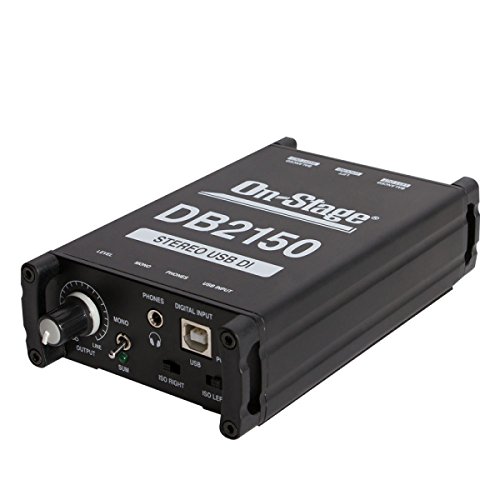
On-Stage DB2150 Passive Stereo USB DI Box
The On-Stage DB2150 takes the passive route to stereo USB DI duty, and that single word, passive, defines its character. A passive design appeals to users who like the idea of a box that does its conversion and balancing job without depending on phantom power or a battery routine. On-Stage is widely known for practical live accessories, and the DB2150 fits that ethos: a working tool for getting a computer into a stereo PA path.
Stereo is the headline facility. Presentations with video, keyboard rigs, and DJ playback often carry information across both channels, and a dedicated stereo box avoids the compromises of splitting a headphone lead into improvised adaptors. Two balanced outputs preserve the channel relationship into the mixer, where the operator can pan, process, or sum deliberately rather than inheriting whatever a cable happened to do.
The DB2150 is a strong fit for schools, community halls, rehearsal spaces, and presenters who want stereo playback without building a recording interface into the chain. It also suits a house kit that may sit unused for weeks and then need to work immediately. If you require an onboard volume knob or a hardware mono sum at the box itself, compare those controls carefully against the other models here, because the passive stereo brief is intentionally narrower.
ART USBDI USB to XLR Analog Converter
The ART USBDI describes itself plainly as a USB to XLR analogue converter, and that plain language is its strength. ART has a long history of useful, affordable problem-solver boxes for studios and stages, and this model applies that tradition to the laptop output question. Instead of asking the user to think in instrument DI terms, it frames the task as conversion: digital audio in over USB, analogue audio out on XLR, ready for the mixer.
That framing suits technicians who build signal chains by function. A conference room installer, for example, may need a defined point where the presentation computer ends and the house audio system begins. A converter with XLR output creates that boundary cleanly. Visiting presenters connect a laptop, select the USB device, and the house side remains balanced and familiar to anyone who works with microphones and mixers.
The compact problem-solver format also travels well. Keep one in a laptop bag for hotel ballrooms, training rooms, and pop-up events where the installed system may be nothing more than a small mixer and a pair of powered speakers. In those spaces, success is measured by speed and silence between cues: no hum when the charger is connected, no scramble for adaptors, and no unbalanced lead stretched across the floor.
Choose the USBDI if you value a clear, single-purpose conversion path from a maker known for utility audio hardware. Before buying, read the current product documentation for channel arrangement, powering, and computer requirements so the unit matches your mixer inputs and laptop ports. It is particularly easy to recommend in principle to buyers who already keep ART utility boxes in their kit and prefer equipment that does one job with minimal ceremony.
best sound cards for recording guitar
Mackie MDB Series USB Signal Direct Box, MDB-USB
Mackie brings mixer thinking to this category with the MDB-USB, part of its MDB Series of direct boxes. That lineage matters because Mackie systems are common in the small and mid-sized venues where laptop playback is most frequent: rehearsal rooms, schools, churches, clubs, and mobile DJ rigs. A DI box from a company whose mixers the operator may already be using tends to speak the right language in its layout and intent.
The MDB-USB is positioned as a USB signal direct box, which is the exact job description for stereo laptop playback into a PA. Rather than adapting a guitar DI with extra cables, it starts with the computer connection and ends with the balanced output a Mackie or any other mixer wants to see. For a venue standardising its media corner, that coherence simplifies training for volunteers. Show them one cable from the laptop, the DI box, and XLR onward, and the routine can be written on a single laminated card.
It is a particularly natural shortlist entry for existing Mackie users and for mobile operators who service varied small rooms. Pair it with clearly labelled XLR cables and a known USB lead, set the mixer gain once for your typical laptop level, and note those settings in the venue file. That kind of standardisation, more than any single feature, is what turns laptop playback from a recurring risk into a routine.
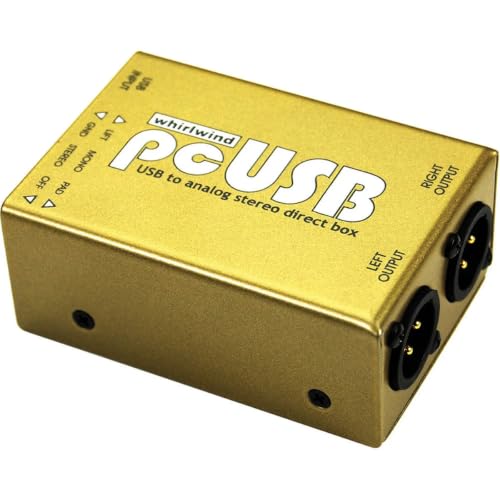
Whirlwind PcUSB 2-Channel Active USB Direct Box
Whirlwind is a name associated with snakes, splitters, and the unglamorous infrastructure that keeps live audio working, so its PcUSB arrives with a particular kind of credibility. This is a 2-channel active USB direct box, aimed at users who see the laptop connection as part of the house system rather than as a consumer accessory. Installers, rental companies, and venue technicians should pay it close attention.
Two channels suit the standard playback pattern: left and right from the computer into two balanced lines that can run a real distance to the console. In an installed setting, that means the PcUSB can live at a lectern, media desk, or DJ position while the long journey happens on XLR, exactly as professional practice prefers. Active circuitry supports a controlled output stage for that role, and the setup should be documented once so any operator can repeat it.
Shortlist the PcUSB if you are equipping a fixed position or a rental inventory and want a two-channel active box from an infrastructure-focused maker. Confirm powering, connector details, and computer compatibility in the official documentation before installation, and leave a printed signal-flow note at the position. For organisations, that documentation habit multiplies the value of a dependable box because knowledge stays in the room even when staff change.
Bolanle J22 Direct Active Stereo DI Box
The Bolanle J22 needs a careful description because it is related to this guide without being identical to the full USB audio models above. It is a direct active stereo DI box, dual channel, with three power options: 48V phantom power from a mixer, a 9V battery, or 5V USB power. That last point is powering by USB, which is not the same claim as acting as a USB audio interface. Read it as a flexible active stereo DI that can draw power from a USB source, and judge it on that basis.
That flexibility is genuinely useful. Phantom power from the mixer is the cleanest routine in a fixed rig because the box wakes up with the desk and there is no battery to monitor. A battery option helps when phantom is unavailable or when the input you must use cannot supply it. USB power can suit a desk-based setup near a computer or a powered hub. Having three routes reduces the chance that a small powering detail cancels an otherwise workable connection.
As a stereo active DI, the J22 belongs in conversations about keyboards, media players, and other line-level stereo sources as much as laptops specifically. If your laptop plan involves taking an analogue output from the computer or from another playback device and converting that stereo signal for balanced mixer inputs, its role makes sense. If your priority is a digital USB connection that bypasses the laptop headphone stage entirely, choose one of the dedicated USB audio DI models above instead. That distinction is the most important buying guidance in this section.
Consider the J22 as a versatile house spare or as the main DI for a mixed-source rig where powering options change by venue. It could serve a keyboard player one night and a playback device the next, provided the operator understands the input path. Label its case with a short note describing its power choices and its analogue DI role, so nobody mistakes USB power for USB audio in the hurry before a show.
Step by Step: Connecting a Laptop Through a USB DI Box
Begin with the mixer inputs muted or the channel faders down. Place the DI box close to the laptop on a stable surface where its connectors will not be strained. Connect the laptop to the DI box with the correct short USB cable, using an adapter only if your computer requires one, and keep that adapter attached to the cable so it does not go missing. Then run XLR cables from the DI box outputs to the mixer. For stereo, connect left to one channel and right to another, or use a clearly marked stereo channel if the desk provides one.
Power the system in a calm order. Start the laptop, open the playback application, and load the actual files or stream you will use. Turn on the mixer and speakers as your venue procedure dictates, then select the DI box as the computer audio output in the operating system sound settings and, if the application has its own output choice, there as well. Disable system alert sounds or route them away from the presentation output if your platform allows it, because a notification chime through a PA is memorable for the wrong reason.
Set levels from the source outward. Put the media player at a sensible fixed level, set the laptop output to your documented starting point, and adjust any volume control on the DI box to a moderate position. At the mixer, set input gain so normal programme material sits comfortably with peaks in reserve, then bring the fader up slowly. Play the loudest part of the material, not just a quiet introduction, and confirm that nothing clips. If the desk offers metering, leave headroom rather than chasing the top of the scale.
Check stereo and mono deliberately. Play a track or test file with distinct left and right content and confirm each side reaches the correct speaker path. If the event will run in mono, switch the box or desk to mono and listen for missing elements or odd phasing in the summed result. Walk the room if you can. A balance that seems obvious at the desk may be irrelevant at the side seats, and a mono-safe mix often serves a spoken event better.
Finish with a failure drill. Pause playback, reconnect the laptop charger, and listen for hum. Try the ground lift or isolation control if noise appears, changing one thing at a time. Note the final switch positions and mixer settings on a card kept with the box. When the event ends, mute first, then disconnect XLR before USB, and coil the short USB lead with the unit. That small routine protects connectors and makes the next setup faster.
When Hum Remains: A Troubleshooting Order That Works
Do not change five things at once. Start by identifying whether the noise is present with playback paused. Hum that exists in silence points to grounding, interference, or a faulty connection. Noise that only appears with music may be distortion, a damaged file, or a level problem. Note whether the sound is a smooth low hum, a harsh buzz, intermittent crackle, or digital chirping that follows mouse movement or screen activity, because each description points to a different part of the chain.
Next, test the charger relationship. If the noise changes when the laptop power supply is connected, suspect a ground loop between the computer side and the PA. Engage the DI box ground lift or rely on its isolation as designed, and ensure all audio equipment is powered from a sensible shared distribution where venue practice allows. Keep audio cables away from power supplies and avoid coiling XLR tightly around a laptop brick. If the noise persists, try a different mains outlet for the laptop as a diagnostic, while keeping safety rules intact.
Then simplify the chain. Remove adapters, hubs, and extension leads one at a time. Swap the USB cable for a short known-good one, because a marginal digital cable can cause dropouts that masquerade as audio faults. Swap each XLR cable in turn. Connect the DI box to a different mixer input to rule out a damaged channel. If a spare laptop or phone playback source is available through an appropriate path, use it only to isolate whether the fault follows the computer or stays with the room system.
Frequently Asked Questions
Do you need a DI box if your mixer already has USB? Not always. If the mixer USB input is reliable, recognised by your laptop, and quiet with the charger connected, it may serve well for a fixed setup. A separate USB DI earns its place when you work with different mixers, need balanced XLR runs over distance, want isolation at the laptop position, or need a standard box that travels between rooms.
Should presenters choose mono or stereo? Choose mono for speech-led events in wide or single-cluster PA systems, especially when video clips must be heard clearly everywhere. Choose stereo for music-led playback, DJ work, and rooms with a properly configured stereo system where most listeners sit within its coverage. A hardware mono switch makes that decision reversible in seconds.
What cables should live in the case? Pack the correct short USB cable for the box and your laptop, any USB-C adapter you depend on, two balanced XLR cables of useful length, and a spare USB lead. Add tape and a marker for labelling channels. The long cable run belongs on the XLR side, so do not plan around a lengthy USB extension.
Is phantom power dangerous for a laptop through these boxes? A properly designed DI presents phantom power only to its own electronics or output stage as intended by the manufacturer, and the computer connects on the USB side of that design. Follow the product documentation for the exact model, use intact cables, and never improvise adapters that route mixer power into a computer port. If a model offers battery or USB power and you are unsure about a venue input, use the documented alternative.
Conclusion: Buy the Signal Path, Not Just the Box
The best DI box for a laptop is the one that makes playback boring in the best possible way. You connect USB, you run balanced XLR, you set a level, and the room hears only the programme. On that measure, the Radial USB-Pro stands as the reference choice for professional confidence, the Whirlwind PcUSB suits fixed and rental systems that value infrastructure thinking, and the Mackie MDB-USB offers a natural home in small-venue Mackie ecosystems. The On-Stage DB2150 keeps stereo passive simplicity in view, while the ART USBDI frames the job as clean conversion.
Whichever model you choose, complete the system properly. Keep the USB lead short, invest in sound XLR cables, document your levels, and rehearse the charger-connected case before an audience arrives. A DI box is a small purchase compared with the cost of a disrupted wedding speech, a silent training video, or a worship service that begins with buzz. Buy the whole signal path, practise it once, and laptop playback becomes a solved problem.
Check prices on Amazon
Live listings for the shortlist in this guide are pulled from Amazon below, so prices and availability are always current at the moment you look.

Radial USB-Pro 2-Channel Active Instrument Direct Box
OnStage On-Stage DB2150 Passive Stereo USB DI Box

ART USBDI USB to XLR Analog Converter

Mackie MDB Series, USB Signal Direct Box (MDB-USB)
Whirlwind PcUSB 2-Channel Active USB Pieces Direct Box

Disclosure
As an Amazon Associate we earn from qualifying purchases. The recommendations in this guide are based on published manufacturer specifications and research into product documentation for each model, together with established principles of live audio signal flow, and they are not based on personal use of these specific boxes. Product details and availability can change, so confirm the current documentation for the exact model before buying.