What's inside
- Key Takeaways
- Quick Picks
- How Did We Choose Projectors for Players?
- What Do Lag Numbers Actually Feel Like?
- How Do the Six Compare in the Modes That Matter?
- Which Refresh Rate Should You Actually Play At?
- How Do You Set Up a Gaming Projector Properly?
- What Mistakes Do Gaming-Projector Buyers Keep Making?
- Lag, Refresh and Response — How Do the Three Numbers Differ?
- Which Pick Suits Your Genre?
- Why Does the Audio Path Deserve Its Own Paragraph?
- What Changes When the Screen Is a Hundred Inches?
- How Do These Machines Handle 120Hz Console Titles?
- Split-Screen, Party Games and the Social Den
- How Can You Sanity-Check Lag Without Instruments?
- What About Cloud Gaming on a Projector?
- Final Recommendation
- Frequently Asked Questions
- Related Guides
As an Amazon Associate I earn from qualifying purchases. This post may contain affiliate links at no extra cost to you.
widgetverdict.com is reader-supported. When you buy through links on our site, we may earn an affiliate commission.
Where to buy: The six gaming projectors below are current models sold new through Amazon. Before ordering, confirm your console or PC can output the refresh rate you are buying for — a 240Hz gaming mode only exists if the source can feed it, and the cable between them is rated for the bandwidth.
Input lag is the invisible specification that decides whether a projector feels like a display or like a suggestion. It is the delay between your controller moving and the image answering, measured in milliseconds, and on a 100-inch screen its effects are magnified by scale: a sluggish projector does not just feel late, it feels enormous and late. The best 4k projectors with low input lag solve this with a trick worth understanding — they are two machines in one. At 4K and 60Hz, the rate films and most console games use, the best of them answer in roughly a frame, around 16 milliseconds. Drop the signal to 1080p at 240Hz and the same machines answer in about 4 milliseconds, a figure that belongs to esports monitors, projected onto a wall. This guide compares six projectors built around that dual personality, using only the lag figures their manufacturers publish — because in this category, invented precision is worse than none.
A word on honesty before the picks. Lag figures are quoted at specific resolutions and refresh rates, with specific processing switched off, and a headline “4ms” always describes the fastest mode, never the 4K mode. We state the conditions beside every figure. We also distinguish response from refresh: a 240Hz mode is only as good as the lag that accompanies it, and a low lag figure at a resolution your console cannot output is a brochure fact, not a gaming one. Judge these six by the mode you will actually play in.
Key Takeaways
- Every pick here plays 4K60 games at roughly one frame of lag (the 16ms class) and drops to the 4ms class at 1080p/240Hz — choose by which mode your games actually use.
- The 4ms-class figures are manufacturer-published for the high-refresh Full HD modes; no projector in this guide — or any guide — does 4ms at 4K.
- BenQ dominates this shortlist for a reason: its X-series machines were designed game-first, with genre picture modes, eARC and crosshair tools built in.
- Short-throw models (X2-4K, X500i, TK710STi) suit gaming dens where the projector sits in front of the players, eliminating shadows and long cable runs.
- Low-lag modes switch off keystone and most image processing — align the projector physically, or the sharpness and speed you paid for are spent by the correction.
Quick Picks
| Pick | Badge | Why it is here |
|---|---|---|
| BenQ X3100i | Best Overall Gaming Projector | 4.2ms published response, 240Hz, 100% DCI-P3 colour and genre-tuned modes in a flagship 4LED design. |
| BenQ TK700 | Best for 4K Console Play | 16ms at 4K60 with 3,200 lumens — the straightforward big-screen console machine. |
| Optoma UHD35 | Best for High-Refresh PC Play | Enhanced Gaming mode with a published 4.2ms at 1080p and 240Hz, plus 3,600 lumens of brightness. |
| ViewSonic X2-4K | Best Short Throw for Xbox | Designed-for-Xbox short throw with a published 4.2ms response and 240Hz support. |
| BenQ X500i | Best Short-Throw All-Rounder | 4ms-class published response, 4LED colour and eARC in a coffee-table gaming design. |
| BenQ TK710STi | Best Laser Gaming Pick | Laser light, short throw and a published 4ms input lag, with Android TV for the hours between matches. |
How Did We Choose Projectors for Players?
Lag came first, and it was read sceptically. A candidate needed a manufacturer-published low-lag mode with the conditions stated — resolution, refresh rate, processing state — because an unconditioned lag claim is marketing, not engineering. The six survivors all publish figures in the same two honest bands: the 16ms class at 4K60, which is one frame and feels connected for the overwhelming majority of games, and the 4ms class at 1080p240, which is competitive territory. Any machine whose 4K lag wandered into the 30-to-50ms range that ordinary home projectors tolerate was excluded, however good its films looked.
Second came the gaming ecosystem around the panel: whether the machine carries the inputs current consoles need, whether its game mode preserves a watchable picture rather than a washed emergency mode, whether audio can leave by eARC to a soundbar without adding delay of its own, and whether the maker’s gaming features — genre picture presets, crosshair overlays, dedicated low-lag HDMI ports — reflect design intent or a sticker. BenQ’s dominance of this list is the market’s verdict on that question, not this guide’s favouritism: it is the brand that builds projectors game-first, and the others are chasing it.
Third, the film test. A gaming projector that cannot host a movie night is a monitor with delusions, so every pick had to remain a credible 4K home projector — real brightness, real colour, HDR support — for the household’s other evenings. The six below pass at different levels, and their sections say where each one’s cinema manners sit relative to its gaming ones.
A final selection note concerns what we left out and why. The wider market is full of projectors advertising a single low millisecond figure beside a photograph of a racing game, where the figure turns out to belong to a 720p mode, a response-time measurement, or a mode that disables the 4K the buyer is paying for. Those machines were excluded not for their speed but for their labelling. The six here publish their conditions — resolution, refresh and mode — in their own product titles, which is the minimum standard of honesty a gaming buyer should accept, and the standard to apply to any machine considered after reading this guide.
What Do Lag Numbers Actually Feel Like?
Translate milliseconds into genres. At 50ms and above — the territory of ordinary projectors with processing engaged — every game feels like it is being played through a cushion: platformers mis-time jumps, rhythm games become unplayable in the literal sense, and shooters feel drunk. At the 16ms class, one frame at 60Hz, the connection closes for nearly everyone: story games, racers, sports titles and most shooters feel direct, and the remaining delay is smaller than the television many players upgraded from. At the 4ms class with 240Hz refresh, the display stops being a factor at all for all but professional-level play — the image answers inside the same instant as the input, and motion clarity improves alongside, because the frame itself is on screen for a quarter of the time.
Two caveats keep the numbers honest. Refresh rate and lag are partners: a low lag figure at 60Hz still shows each frame for 16.7ms, so the 240Hz modes feel faster than their lag alone explains. And the chain adds up — controller, console processing, cable, display — so the projector’s figure is a floor for the system, not the total. The good news is that modern consoles and wireless controllers contribute modestly; the projector was historically the weak link, and the six machines here are the ones that fixed it.
There is also a processing bargain to understand. Low-lag modes achieve their speed by switching off the projector’s cleverness — keystone correction, frame interpolation, noise reduction, some colour processing. The picture in game mode is therefore the honest, unassisted picture, which is why this guide keeps insisting on physical alignment: a projector squared to its screen by position loses nothing in game mode, while a projector squared by keystone loses both sharpness and the speed it was bought for, since engaging correction usually exits the low-lag path entirely.
Frame interpolation deserves its own warning, because it is the processing feature most likely to ambush a new owner. Marketed as motion smoothing, it invents intermediate frames to make films look fluid — and it can only invent them by waiting, which is to say by adding delay measured in tens of milliseconds. On the film input it is a matter of taste; on the game input it is sabotage, and several of these machines engage it by default outside game mode. The first setting to verify on any gaming projector, before a single match, is that the console’s input is in its low-lag mode with interpolation off. Owners who do this once understand their machine; owners who never do sometimes return a fast projector for feeling slow.

BenQ X3100i — Best Overall Gaming Projector
The X3100i is what a gaming projector looks like when a company designs it from the game outward. Its 4LED light source produces 3,300 ANSI lumens with colour covering the full DCI-P3 cinema gamut — specifications a film projector would boast about — and its published response reaches 4.2ms in the 1080p/240Hz mode, with 4K60 play in the one-frame 16ms class. Around those numbers BenQ wraps the most considered gaming toolkit in the category: picture modes tuned separately for first-person shooters, role-playing games and sports titles, each adjusting shadow detail and colour for its genre’s visibility needs, plus the crosshair and audio tools players actually use.
The genre modes deserve their sentence, because they are the difference between a low-lag projector and a gaming projector. Shooter mode lifts shadow detail so opponents stop hiding in the projector’s black crush; the RPG mode protects colour richness for worlds built to be looked at; and the machine remembers which mode belongs to which input, so the console and the PC each wake it in their own personality. Android TV handles the streaming hours, treVolo speakers give it a voice of its own, and eARC passes full-quality audio to a sound system without a second thought about delay.
Its compromises are size and seriousness of price relative to simpler picks — it is a flagship, physically and financially, and its standard-throw lens wants a proper mounting position rather than a coffee table. For the player who wants one machine that treats a tournament and a film festival with equal respect, it is the complete answer in this guide.
- Technology: DLP with 4LED light source, pixel-shifted 4K
- Brightness: 3,300 ANSI lumens
- Lag: published 4.2ms response in 1080p/240Hz mode; 16ms class at 4K60
- Colour: 100% DCI-P3 coverage
- Extras: FPS/RPG/SPG genre modes, Android TV, eARC, treVolo speakers
Strengths
- The most complete gaming toolkit in home projection.
- Film-grade colour alongside esports-grade response.
- Per-input memory makes multi-source setups effortless.
Trade-offs
- Flagship size and pricing among gaming projectors.
- Standard throw needs a deliberate mounting position.
- 4K play is 16ms class — the 4.2ms figure is a Full HD mode.
Best for: serious players who also watch films seriously, on one machine.
Not suited for: coffee-table setups or casual-only gamers.

BenQ TK700 — Best for 4K Console Play
The TK700 is the honest workhorse of 4K gaming projection, and its published figures define the class this guide is built on: 16ms input lag at 4K60 — one frame, the number that matters for the current console generation — with a 4.2ms response available in its high-refresh Full HD mode for the games and the PC that can use it. At 3,200 lumens it is bright enough for the living room it will probably live in, and its picture tuning pays unusual attention to dark-scene detail, because BenQ understands that a game’s shadows are gameplay information, not atmosphere.
What makes it the console pick is its lack of theatre. It is a conventional, mountable, lamp-based projector with dual HDMI, an audio system that covers casual play, and a setup process measured in minutes — the machine a household buys when the brief is “the biggest screen the console has ever had” rather than a dedicated gaming room. Films and sport ride along happily at this brightness and sharpness; it is an all-rounder whose gaming credentials happen to be published and real.
The lamp is its long-term ledger entry, and its smart features are modest next to the Android-carrying picks — a console or stick supplies the streaming, as consoles do anyway. Players chasing the absolute fastest Full HD modes have quicker-feeling options below; players whose gaming life is 4K60 console titles have, in the TK700, the straightest line between the sofa and a hundred responsive inches.
- Technology: DLP, lamp light source, pixel-shifted 4K
- Brightness: 3,200 lumens
- Lag: published 16ms at 4K60; 4.2ms in high-refresh Full HD mode
- Detail: tuned black detail for game shadows
- Inputs: dual HDMI, suited to console plus PC
Strengths
- One-frame 4K60 lag is exactly what current consoles need.
- Brightness serves living rooms, not just gaming dens.
- Straightforward, mountable, unpretentious design.
Trade-offs
- Lamp replacements are part of ownership.
- Streaming smarts are minimal; bring a source.
- Standard throw only — no coffee-table tricks.
Best for: console households wanting a big, responsive 4K screen simply.
Not suited for: short-throw rooms or lamp-free seekers.
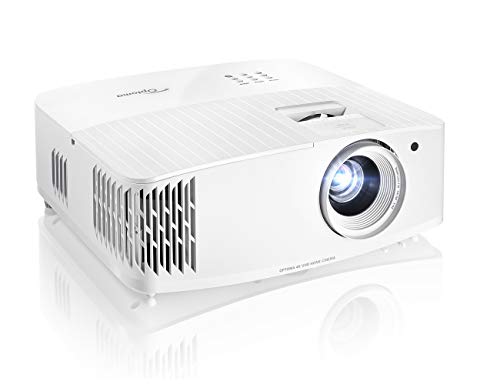
Optoma UHD35 — Best for High-Refresh PC Play
Optoma built the UHD35 around a mode with a name that tells the truth: Enhanced Gaming. In it, the published response is 4.2ms at 1080p with refresh support up to 240Hz — figures that made this machine a default recommendation for PC players who wanted a wall instead of a monitor — while its 4K60 presentation sits in the high-teens millisecond class that console play requires. At 3,600 lumens it is also the brightest pick in this guide, which matters for PC desks-turned-gaming-rooms that are rarely caves.
Its personality is the traditional projector’s, sharpened for play. The DLP image is crisp in the way that flatters both a film’s detail and a game’s fine geometry, HDR10 and HLG cover the content bases, and the lens gives enough flexibility for a ceiling or shelf in a room that doubles as an office. For the player whose gaming life is a PC with a graphics card that can genuinely feed 240 frames per second, the UHD35 remains the most direct route to playing those frames at a hundred inches.
The traditional format brings its homework: streaming arrives by stick or by the PC itself, the built-in speaker is a courtesy, and the lamp joins the budget as a future replacement. None of that argues against its brief. It is the high-refresh specialist for players whose source can keep up — and a warning label in projector form for those whose cannot, since its finest mode is invisible to a 60Hz source.
- Technology: DLP, lamp powered, 4K via pixel shifting
- Brightness: 3,600 lumens of output
- Lag: published 4.2ms at 1080p in Enhanced Gaming mode, 240Hz support
- HDR: HDR10 and HLG
- Character: traditional format, gaming-tuned
Strengths
- 240Hz Enhanced Gaming is a genuine PC-player feature.
- Highest brightness in this guide.
- Crisp DLP detail for games and films alike.
Trade-offs
- Fastest mode needs a source that outputs 1080p/240Hz.
- Lamp consumable; minimal built-in streaming.
- Courtesy speaker only.
Best for: PC gamers with high-refresh hardware and a wall to fill.
Not suited for: console-only households or streaming-first buyers.

ViewSonic X2-4K — Best Short Throw for Xbox
The X2-4K carries a designation no other pick here can claim: it was designed for Xbox, certified in collaboration with Microsoft’s programme, which in practice means its low-lag behaviour, refresh support and console handshake were validated against the machine it will most often serve. Its published response is 4.2ms with refresh up to 240Hz at Full HD, its 4K60 play sits in the responsive class console gaming needs, and its short-throw lens puts a big image on the wall from a low cabinet or table in front of the players — the geometry gaming dens actually have, where a rear projector would throw over the players’ heads and through their celebrations.
Its LED light source is the ownership gift: no lamp to fade or replace, instant brightness, and colour that covers the cinematic range with the calm uniformity LEDs do well. The design is compact and furniture-tolerant, the speakers are honest for its size, and the whole package treats the gaming room as a room — somewhere the projector lives visibly and behaves instantly — rather than as a theatre that tolerates games.
Brightness is its honest limit: LED output in this class suits dimmed rooms and moderate screen sizes rather than daylight or 150-inch ambitions, and film-first buyers will find deeper cinema further up this list. For an Xbox-centred den at a hundred inches with the lights low, it is the most purpose-built machine here — the pick whose design brief and your room’s brief are the same sentence.
- Technology: DLP with LED light source, short-throw lens
- Lag: published 4.2ms response, up to 240Hz at Full HD
- Certification: designed for Xbox
- Zoom: 1.2x optical
- HDR: HDR and HLG support
Strengths
- Xbox-validated low-lag behaviour and handshake.
- Short throw suits dens and front-of-room placement.
- LED source: no lamp, instant on, stable colour.
Trade-offs
- Brightness suits dim rooms and moderate sizes.
- Film contrast is gaming-room grade.
- Short throw demands a flat, well-aligned surface.
Best for: Xbox households building a dedicated gaming corner.
Not suited for: bright rooms or very large screens.

BenQ X500i — Best Short-Throw All-Rounder
If the X3100i is BenQ’s flagship statement, the X500i is its most livable one: the same game-first design language — published response in the 4ms class, genre-aware picture thinking, an Auto Game Mode that detects a console and configures itself — compressed into a short-throw 4LED machine that sits on a coffee table or low unit and fills the wall from half a metre to a metre away. At 2,200 ANSI lumens its LED engine is calibrated for the dimmed gaming room rather than the bright lounge, and within that habitat its colour — wide-gamut, LED-stable — is genuinely beautiful.
The all-rounder brief shows in the connections and the sound. eARC lets a soundbar take full-quality audio while the projector handles the picture, the built-in treVolo speakers are a cut above the courtesy class for rooms that skip the bar, and Android TV covers streaming without a stick. It is the pick for the household whose gaming happens in the living room’s front half, on a screen that appears when the table is cleared — big-screen play without a permanent installation’s commitment.
Its limits are the short-throw LED class’s limits: brightness that asks for dimmed light and sensible screen sizes, and a placement discipline — flat surface, physical alignment — that game mode’s processing-off honesty demands. Buyers with a bright room or a 140-inch dream should look at the TK700 or X3100i. Buyers with a coffee table and a console have found their machine.
- Technology: DLP with 4LED light source, short-throw lens
- Brightness: 2,200 ANSI lumens
- Lag: published response reaching the 4ms class in its fastest Full HD mode
- Audio: eARC plus built-in treVolo speakers
- Platform: Android TV with Auto Game Mode
Strengths
- Flagship gaming brain in a coffee-table body.
- 4LED colour is wide, stable and lamp-free.
- eARC and real speakers complete the living-room setup.
Trade-offs
- Brightness needs dimmed light and moderate sizes.
- Short throw punishes wavy screens and casual alignment.
- 4K60 play is the 16ms class, as everywhere here.
Best for: living-room gamers wanting big play without installation.
Not suited for: bright rooms or very large screens.

BenQ TK710STi — Best Laser Gaming Pick
The TK710STi answers the question this guide’s other picks raise: what if the fast projector also had a laser? Its published input lag sits in the 4ms class at high-refresh Full HD, its laser source delivers 3,200 lumens that will not fade across the machine’s life, and its short-throw lens builds a hundred-inch arena from roughly a metre — a combination, laser plus short throw plus published speed, that no other pick here assembles in one cabinet. For a gaming den meant to last, it is the endurance athlete of the six.
BenQ’s gaming habits surround the numbers: low-lag modes that respect the picture, HDR10 and HLG for the film hours, and Android TV with licensed Netflix so the den’s second life as a streaming room needs no extra hardware. The laser’s instant-on suits gaming’s spontaneity — the machine is ready before the console has finished booting — and its brightness gives it a second career in rooms too bright for the LED short-throws, at screen sizes they cannot feed.
Its film contrast is living-room grade rather than X3100i grade, and its speakers cover play and casual viewing rather than cinema. Those are the honest costs of its versatility. As the one pick that is simultaneously laser-lit, short-throw, bright and published-fast, it is the gaming projector for buyers who refuse to choose between the virtues.
- Technology: DLP with laser light source, short-throw lens
- Brightness: 3,200 lumens
- Lag: manufacturer-published 4ms-class input lag in the 240Hz gaming mode
- Streaming: Android TV with Netflix built in
- HDR: HDR10 and HLG
Strengths
- Laser permanence with gaming speed and short throw.
- Brightness serves rooms the LED picks cannot.
- Complete streaming for the den’s second life.
Trade-offs
- Film contrast trails the X3100i flagship.
- Speakers are casual-grade.
- Tabletop placement needs alignment discipline.
Best for: gaming dens wanting laser life, speed and flexibility together.
Not suited for: film-first theatres chasing ultimate contrast.
How Do the Six Compare in the Modes That Matter?
| Pick | 4K60 lag class | Fastest published mode | Light source | Throw |
|---|---|---|---|---|
| BenQ X3100i | 16ms class | 4.2ms at 1080p/240Hz | 4LED | Standard |
| BenQ TK700 | 16ms (published) | 4.2ms high-refresh Full HD | Lamp | Standard |
| Optoma UHD35 | High-teens class | 4.2ms at 1080p, 240Hz Enhanced Gaming | Lamp | Standard |
| ViewSonic X2-4K | Responsive class | 4.2ms published, up to 240Hz | LED | Short |
| BenQ X500i | 16ms class | 4ms class at high-refresh Full HD | 4LED | Short |
| BenQ TK710STi | 16ms class | 4ms published, 240Hz gaming | Laser | Short |
Read the table by your source, not by your hopes. A console-only household lives in the middle column’s left neighbour — the 4K60 class, where all six are effectively tied and the choice should be made on brightness, throw and film manners. A PC household with a high-refresh card lives in the fastest-mode column, where the differences are real and the Optoma and BenQs earn their specialisation. Everyone should note what the table does not contain: a 4K/240Hz mode, which does not exist in this class at any price.
Which Refresh Rate Should You Actually Play At?
Match the mode to the game, because the trade is resolution against responsiveness and different genres spend it differently. Competitive shooters, fighting games and rhythm titles should take the 1080p/240Hz modes without hesitation: at a hundred inches the motion clarity and the 4ms-class response are worth more than pixels the action never lets you inspect, and these are precisely the genres where a frame of delay is a lost round. Cinematic single-player games, racers and sports titles should usually stay at 4K60 in the 16ms class — their worlds reward detail, their inputs forgive a frame, and the picture is the point of playing them on a wall.
Hardware honesty applies. A console that outputs 4K120 for supported titles sits between the modes, and these projectors handle such signals in the low-lag spirit of their design — check your specific title’s output against the machine’s accepted signals before assuming. A PC should be set to output exactly the mode you intend, rather than letting the projector scale a mismatched signal, because scaling is processing and processing is the thing game mode exists to bypass. The fastest setup is a deliberate one: source, cable and projector all agreeing on the same resolution and refresh before the match begins.
How Do You Set Up a Gaming Projector Properly?
Alignment first, because game mode will not rescue geometry. Position the projector square to the screen — lens centred, cabinet level, image sized by zoom and distance — and confirm with keystone at zero that the rectangle is true. Only then enable the low-lag or game mode on the input your console uses, and verify in the console’s own display settings that the output resolution and refresh are the ones you intend. Many “this projector feels laggy” stories are a console quietly outputting a mode the owner never selected.
Audio deserves the same deliberateness, because sound has lag too. Route audio by eARC to a soundbar or receiver with its own game or low-latency mode engaged, or use the projector’s speakers for zero-chain delay in casual play; avoid Bluetooth for competitive sessions, since wireless audio adds a delay the picture cannot wait for. If your receiver processes video, pass the console through the projector’s low-lag input instead and let eARC carry sound alone — the architecture most of these machines were designed around.
Finally, dedicate the input. Consoles on the game-mode HDMI, streaming on another, settings stored per input where the machine allows — the X3100i’s per-input memory is the luxury version of a discipline every owner here can imitate manually. A gaming projector correctly set up once stays correctly set up; the genre punishes reconfiguration, and rewards the household that treats the first evening’s care as part of the purchase.
What Mistakes Do Gaming-Projector Buyers Keep Making?
The headline mistake is reading “4ms” as a 4K figure. It never is, in this guide or any other: the fast modes are Full HD modes, and the buyer who expects esports response at 4K has been misled by typography, not by engineering. The second mistake is feeding the fast mode a slow source — a 60Hz console cannot use a 240Hz mode, and a bargain cable can quietly cap the refresh the PC is trying to send. The third is keystone: squaring the picture digitally, then wondering why game mode feels off and the image looks soft, when the correction itself has exited the low-lag path.
Fourth, buyers judge lag with processing left on — motion smoothing and noise reduction engaged by a film preset — and condemn a fast machine for its previous owner’s settings. Fifth, they ignore audio delay and blame the picture for a lip-sync gap their soundbar introduced. And sixth, they buy brightness last: a gaming den with blackout ambitions is a luxury, but most play happens in real rooms, and the pick that holds its image with a lamp on will be played on more than the pick that demands a cave.
Lag, Refresh and Response — How Do the Three Numbers Differ?
Three specifications are routinely confused in listings, and separating them will make every figure in this guide read clearly. Input lag is a delay: the time between the signal arriving and the corresponding image appearing, and it is the number this guide is organised around. Refresh rate is a cadence: how many frames per second the display can show, which caps how new the image can ever be — a 60Hz display can be at most one frame current, whatever its lag. Pixel response is a transition: how quickly a pixel changes once told, which governs motion smear rather than delay, and which DLP technology — all six picks — handles inherently well because its mirrors switch in microseconds.
The confusions are commercially convenient, which is why they persist. A listing that headlines “response time” may be quoting pixel response, a number that sounds like lag and is not; a listing that headlines a refresh rate may be silent about the lag that accompanies it. The discipline this guide applies — and the one to carry to any product page — is to ask three questions of every speed claim: at what resolution, at what refresh, and with what processing disabled? The six picks survive those questions with their manufacturers’ published answers; most of the field’s marketing does not.
There is a fourth, unlisted number worth knowing: your own perception threshold, which varies by person and genre. Players who have spent years on high-refresh monitors can feel differences that casual players cannot detect in blind comparisons, and both are telling the truth about their own experience. The practical reading of this guide’s figures is therefore a floor of honesty rather than a promise of sensation: at the 16ms class nobody is held back by the projector in ordinary play, and at the 4ms class nobody is held back at all.
Which Pick Suits Your Genre?
Walk the shelf by what you play. Fighting-game and ranked-shooter players live and die inside a frame: their shortlist is the fastest published modes — the X3100i and UHD35 from standard throw, the X500i and TK710STi from the coffee table — played at 1080p high-refresh with the discipline of a dedicated input. Racing players split by subgenre: arcade racers forgive everything here, while simulation players on wheels and pedals should weight the 240Hz modes, because a wheel’s constant small corrections expose delay as a wobble in the car’s manners.
Sports-game and story-game players are the liberated class: every pick serves them at 4K60 in the 16ms class, so their choice should be made on the room — the TK700’s brightness for a living room, the X2-4K’s Xbox brief for a den, the X3100i’s colour for worlds worth looking at. Rhythm-game players have the strictest requirement of all and the simplest one: the lowest published lag, a wired or low-latency audio path, and the game’s own calibration routine run honestly, because their genre measures your setup in milliseconds and publishes the results as your score.
Households, as always, contain multitudes: a parent on story games, a teenager on ranked shooters, a family Mario Kart night where lag is the least of anyone’s problems. The all-rounders — TK700 for the mounted room, TK710STi for the laser-lit den, X500i for the coffee table — exist for those houses, and their 16ms-class 4K with a genuine fast mode in reserve is the correct compromise: nobody’s genre is exiled, and the specialist’s mode is one menu away when the teenager’s tournament matters.
Why Does the Audio Path Deserve Its Own Paragraph?
Because a perfectly responsive picture with lagging sound feels broken in a way players describe as lag and blame on the projector. The delay chain for audio runs through soundbars, receivers and wireless links, each adding its own processing time, and Bluetooth — the path of least resistance in many living rooms — is the worst offender by a wide margin. In a rhythm game the error is measurable; in a shooter it is the footstep that arrives after its owner; in a film it is the dialogue that trails the lips by enough to notice once and never un-notice.
The fixes are architectural and cheap. Prefer eARC from the projector to a soundbar or receiver with a game or direct mode, keep the video out of the receiver’s processing path where possible, and treat the projector’s own speakers — several here are genuinely decent — as the zero-delay reference when diagnosing a setup: if the game feels right through the built-in speakers and wrong through the bar, the bar’s chain is the culprit and its settings, not the projector, need the evening’s attention. Every pick in this guide supports the eARC architecture; use it as designed and the sound will arrive with the picture it belongs to.
What Changes When the Screen Is a Hundred Inches?
Scale rewires gaming in ways that have nothing to do with specifications. Aiming becomes a physical act performed with the eyes as much as the thumbs — targets are found by looking, the way you would look across a real space — and players consistently report that the first week at a hundred inches feels slower than it is, because the eye has farther to travel. It is not lag, and it passes; what remains after it passes is the reason players endure projector setup at all, which is presence. A racing game’s horizon, a boss fight’s arena, a football pitch’s width — at wall scale these stop being pictures of places and become places, and the 16ms class is quite fast enough to keep the illusion unbroken.
Scale also argues for the short-throw picks in one specific scenario: the shared room. A standard-throw projector behind the players turns every celebration, every trip to the kitchen, into a shadow puppet across the match’s decisive moment. The front-placed machines — X2-4K, X500i, TK710STi — put the light source where the television would be, and the room’s traffic flows behind the image instead of through it. In a household den, that geometry is a gaming feature as real as any millisecond in this guide.
Finally, scale forgives the fast modes their resolution. A 1080p image at 240Hz spread across a hundred inches is softer than its 4K sibling in stillness and sharper in motion, because motion resolution — the detail that survives movement — is governed by frame rate and response, not by pixel count. Players who try the trade in a fast game rarely go back for that game; players who try it in a scenic one usually do. The machines here let you make that choice per title, which is the entire point of their dual personality.
How Do These Machines Handle 120Hz Console Titles?
The current console generation lives between this guide’s two headline modes: a growing library of titles offers 120Hz performance modes at resolutions below native 4K, and players reasonably ask where those signals land. The answer is in the machines’ favour. A 120Hz signal halves the frame interval of 60Hz play, and the low-lag designs here treat such signals as first-class citizens — the delay shrinks with the frame, the motion clarity improves, and the experience sits noticeably closer to the 240Hz modes than to 60Hz in feel, while keeping more resolution than the Full HD fast modes carry.
The practical advice is to let each title choose. Performance modes in competitive games deserve to be on; fidelity modes in cinematic games deserve their 4K60 frame; and the projector’s job is to accept both without a settings expedition, which the per-input memories and auto game modes in this list increasingly automate. Check the console’s video output screen after connecting any of these machines — it reports exactly which resolutions and refresh rates the chain supports, and it is the most honest page in the entire setup process.
Split-Screen, Party Games and the Social Den
The gaming room’s other life is social, and it stresses different virtues. Split-screen play divides the wall into quadrants, which means each player’s view is a fifty-inch screen — still larger than most households’ televisions — and the limiting factor becomes brightness shared across a big image in a room nobody wants to darken for a party. The brighter picks, the TK700 and TK710STi, earn their keep here; the LED short-throws, calibrated for a solo player in a dim den, feel their output ceiling when the room is lit and full of people.
Party genres are lag-forgiving but setup-critical. Nobody’s kart race was lost to a frame of delay, but everybody’s evening has been lost to a projector that needed twenty minutes of menus before the first race. Instant-on light sources, auto game modes that wake with the console, and a machine that lives where the people are — the short-throw trio again — are the social specifications, and they argue that the best gaming projector for a household is often the one that starts fastest, not the one that answers fastest. The six here were chosen to satisfy both definitions of fast, in different proportions; the social den should weight the proportions toward the coffee-table machines.
How Can You Sanity-Check Lag Without Instruments?
You cannot measure milliseconds with a sofa, but you can expose a bad setup reliably. Start with the rhythm test: any music game with a calibration routine will report your chain’s delay as a number you can compare across settings — run it with processing on and off and watch the figure move, which teaches your hands what the modes are worth. The camera test is the classic second opinion: film the controller and the screen together in slow motion on a phone, press a button, and count the frames between the press and the on-screen response; crude, but quite accurate enough to distinguish 16ms from 50ms, which is the distinction that matters.
The third check is the comparison you already own. Play a familiar fast game on the projector, then immediately on the television or monitor you know best, in its game mode. If the projector feels a half-step behind in a way the numbers say it should not, the setup — not the machine — is the first suspect: a film preset still engaged, a console outputting an unexpected mode, a receiver processing the video, a soundbar making the whole system feel late. Work the chain from source to screen, one setting at a time, and the published figures will usually arrive. They were measured by the manufacturers under the conditions this guide keeps repeating; reproduce the conditions and you reproduce the numbers.
What About Cloud Gaming on a Projector?
Cloud gaming rearranges the lag budget in a way worth understanding before blaming any projector. The chain now includes a network journey to a server and back, which contributes a delay larger than everything in your room combined — so the projector’s contribution shrinks in proportion, and even the 16ms class becomes a minor term in the total. That sounds like an argument that any projector will do, and for casual cloud play it nearly is; but it cuts the other way for the household total. Precisely because the network’s share cannot be improved, the local shares you can control — display lag, audio path, a wired network connection for the streaming device — deserve more discipline, not less. Shaving the projector’s frame and the soundbar’s processing is how a cloud setup stays inside the threshold where games feel responsive.
Practically: connect the streaming device or console by Ethernet if the room allows, use the projector’s game mode even for cloud titles, and prefer the services’ performance settings over their fidelity ones at projector scale. The picks with strong native platforms — the X3100i, X500i and TK710STi with Android TV — host the cloud apps without extra hardware, which removes one more device from the delay chain and one more remote from the sofa.
Final Recommendation
For the player who wants the complete instrument, the BenQ X3100i is this guide’s answer — published 4.2ms speed, genre intelligence and film-grade colour in one flagship. Console households wanting the straightest path to a responsive 4K wall should take the TK700; PC players with high-refresh hardware, the Optoma UHD35; Xbox dens, the ViewSonic X2-4K; coffee-table living rooms, the X500i; and anyone who wants laser permanence wrapped around gaming speed, the TK710STi. Whichever you choose, remember the guide’s one law: play in the mode whose numbers you actually read, align the machine with your hands rather than its menus, and the wall will answer your controller like it was always a display.
Set the dedicated input up on the first evening, run one calibration in your most timing-critical game, and then stop thinking about milliseconds entirely. That is the destination this category exists to reach: a hundred inches of screen that disappears into the game, leaving only the playing of it.
Invite the household’s most sceptical player to the first session. Projectors still carry a reputation among gamers earned by a decade of laggy living-room machines, and the fastest way to retire that reputation is a fighting game on a wall, answering in the 4ms class, in front of the person who arrived ready to mock it.
Frequently Asked Questions
Is 16ms lag at 4K60 actually good enough?
Yes — it is one frame at 60Hz, the same responsiveness as a good gaming television in its game mode, and it feels direct for the overwhelming majority of games and players. The genres that can spend less — competitive shooters, fighting and rhythm games — are served by these machines’ 1080p high-refresh modes instead.
Why is the 4ms figure always at 1080p, not 4K?
Because the fast modes trade resolution for refresh: at 240Hz the projector processes a Full HD frame in a quarter of the time, and the published 4ms-class lag belongs to that mode. No home projector in this class offers 4ms at 4K; any listing implying otherwise is describing its fastest mode without its conditions.
Do I need an HDMI 2.1 cable for these projectors?
You need a cable rated for the signal you intend to send — high-refresh Full HD and 4K60 both punish bargain cables with dropouts and silent renegotiation to slower modes. Buy a certified cable of the right length from the start; it is the cheapest component in the chain and the most common cause of “the mode won’t engage” mysteries.
Does low-lag mode hurt picture quality?
It removes processing — motion smoothing, noise reduction, keystone — rather than degrading the panel’s native picture. What remains is the honest image: sharp, direct and unassisted. Owners who align physically lose nothing they miss; owners who relied on digital correction lose the correction, which is why setup discipline matters in this category.
Can I use one of these as my only projector for films too?
Yes — that dual life is the point of the shortlist. The X3100i is a genuinely fine film machine, the TK700 and TK710STi are capable all-rounders, and even the specialists host a movie night creditably. Only buyers building a dedicated dark theatre should look beyond this list to contrast-first machines and accept their slower responses.
Short throw or standard throw for a gaming room?
Short throw, if the room is a den: the projector sits in front of the players, nobody shadows the image mid-match, and cables stay short. Standard throw suits a fixed installation in a larger room where the machine can live behind or above the seating permanently. Lag does not care about throw; rooms do.
Should I turn off HDR for competitive play?
Only if your specific machine’s HDR path adds processing you can feel — on the picks here, the low-lag modes are designed to coexist with HDR signals, and the correct procedure is to test your most timing-critical game both ways during the first week and keep the configuration that the calibration routine scores better. What must be off is motion interpolation and its relatives; HDR itself is a colour and tone decision, not inherently a delay.
What is the single most common reason a fast projector feels slow?
A setting, not the hardware: the console connected to an input that is not in game mode, or a film preset’s processing left engaged. The second most common is a receiver or soundbar quietly processing the video or audio chain. Work the signal path from the console outward, one device at a time, before concluding anything about the projector — in our experience the machine is innocent far more often than it is guilty.
Will these projectors work with a Nintendo Switch?
Beautifully — the Switch’s 1080p output lands in these machines’ happiest territory, its games are largely in the lag-forgiving genres, and the short-throw picks in particular make a dock-and-play living-room setup that feels designed for it. The X500i’s published gaming brief explicitly includes Switch-class play, and family multiplayer at a hundred inches is one of the strongest arguments for this entire category.
Does a bigger image make lag feel worse?
The delay itself is identical, but scale makes its effects more visible — a character’s late response moves farther across your vision on a wall than on a monitor. That is an argument for choosing the honest low-lag classes in this guide rather than accepting an ordinary projector’s figures, and it is also why the first week at a hundred inches can feel slower than the same setup measures. Your eyes adapt; the milliseconds do not change.
Related Guides
The Hisense PX3-PRO’s gaming take on the laser-TV format is covered in our guide to 4K laser projectors with short throw. For the wider field, see our roundup of the best 4K home projectors, and if your gaming room doubles as a daylight living room, our bright-room 4K projector guide picks the machines that fight light as well as lag.



[…] your bright room is also a console setup, our guide to 4K laser projectors with short throw covers the UST field in depth. For the general field beyond the brightness brief, see our roundup […]