What's inside
- Key Takeaways
- Quick Picks
- How We Chose These Picks
- What Does AC1750 Actually Mean on the Box?
- Is AC1750 Still Enough for a Modern Home?
- The Picks in Detail
- How Do the Six Picks Compare Side by Side?
- What Mistakes Do AC1750 Buyers Keep Making?
- How Should You Set Up an AC1750 Router for the Best Result?
- How Does an AC1750 Router Handle Streaming, Calls and Games at Once?
- How Long Will an AC1750 Router Stay Secure and Supported?
- What Can You Do When One Room Still Gets Weak Wi-Fi?
- When Should You Step Up Beyond AC1750 Instead?
- What Should You Know About Buying These Models Today?
- How Do the Brands’ Apps and Interfaces Compare in Daily Life?
- Final Recommendation
- Frequently Asked Questions
- A Short Word on Antennas and What They Cannot Do
- Related Guides
As an Amazon Associate I earn from qualifying purchases. This post may contain affiliate links at no extra cost to you.
widgetverdict.com is reader-supported. When you buy through links on our site, we may earn an affiliate commission.
Where to buy: all six routers below carry verified Amazon links from our pool, so each name in the Quick Picks table and each detailed heading takes you to the exact model discussed, with no renewed or substitute listings standing in for the real thing.
There is a reason the search for the best ac1750 routers still fills pages years after Wi-Fi 6 arrived: AC1750 was the sweet spot of the Wi-Fi 5 era, the tier where dual-band routers stopped feeling like a compromise. The recipe is consistent across brands — up to 450 megabits on the crowded 2.4 GHz band and up to 1300 on the clearer 5 GHz band, three streams on the faster band, gigabit Ethernet underneath — and it matches what most homes actually own: a mix of older devices that only speak 2.4 GHz and modern phones, laptops and televisions that prefer 5 GHz.
Buying AC1750 today is a deliberate value decision, and this guide treats it that way rather than as a failure to buy newer technology. If your internet plan sits in the few-hundred-megabit range, your devices are mostly Wi-Fi 5 or earlier, and your home is an apartment or a modest house, a good AC1750 router covers the whole job for a fraction of a flagship’s cost. The six picks below are the models that earned their reputations in this class and kept them: two TP-Link twins with different software philosophies, two Netgear siblings separated by one feature that matters, and two ASUS designs at opposite ends of the class’s age range.
What separates them is not the headline tier, which is identical, but everything around it: firmware quality, USB ports and what they can do, how the router behaves in an apartment building full of competing networks, whether it can join a mesh or serve as an access point later, and how gracefully each brand has maintained its software since launch. Those are the differences this guide spends its words on, because the radios themselves are a known quantity.
Key Takeaways
- AC1750 means 450 on 2.4 GHz plus 1300 on 5 GHz — a tier label, and a genuinely comfortable one for most homes.
- All six picks are gigabit-wired dual-band routers; they differ in firmware, USB and long-term roles, not headline speed.
- The Archer C7 and A7 are hardware cousins; the A7 adds Alexa-style voice control and a friendlier app story.
- Netgear’s R6700 adds a front USB 3.0 port and stronger storage sharing over the plainer R6400.
- AC1750 suits plans in the few-hundred-megabit range; gigabit fibre households should shop a class up.
- Every pick here can live a second life as an access point or bridge after a future router upgrade.
Quick Picks
| Pick | Badge | Why it earns its place |
|---|---|---|
| TP-Link Archer C7 | The class benchmark | The router that defined AC1750 value, with three external antennas and a huge knowledge base behind it. |
| TP-Link Archer A7 | Friendlier twin | Archer C7 hardware ideas with a smoother app, OneMesh support and voice-assistant integration. |
| Netgear R6400 | Steady Netgear value | AC1750 with gigabit ports and USB sharing in Netgear’s calmer, non-gaming clothes. |
| Netgear Nighthawk R6700 | Storage-friendly favourite | A front USB 3.0 port, beamforming and strong radios made this the enthusiast’s AC1750. |
| ASUS RT-AC66U B1 | Firmware lover’s pick | AC1750 hardware under ASUS’s AiMesh-capable firmware, with a dual-core processor upgrade. |
| ASUS RT-AC65 | Quiet modern option | A later, calmer ASUS take on the class with MU-MIMO and a simpler ownership story. |
How We Chose These Picks
We began by refusing to pad the list with forgotten AC1750 boxes that sold briefly and vanished. This class rewards longevity: the models worth buying now are the ones with long production runs, deep troubleshooting knowledge in the wild, and firmware that received years of attention. Every pick below passes that test, which is why the list reads like a hall of fame rather than a catalogue page. In a mature class, the crowd’s accumulated experience is a specification in its own right.
Next we checked the fundamentals that marketing blurs. All six are true dual-band designs with gigabit WAN and LAN ports — a surprising number of cheap routers in this era shipped with 100-megabit ports that silently capped fast internet plans, and none of those belong here. We confirmed three-stream 5 GHz radios, WPA security that has kept pace with updates, and guest network support, because a router bought today will host visitors, smart bulbs and work laptops side by side.
Differentiation came third. We mapped what each model does beyond routing: USB ports and whether they run at USB 2.0 or 3.0 speeds, storage and printer sharing, mesh or extender ecosystems, access point and bridge modes for a second career, and the quality of each brand’s phone app and web interface. Two routers with identical radios can be entirely different purchases once those layers are counted, and the detailed reviews below are organised around exactly those layers.
Finally, we weighed ownership cost in the broad sense: how often each platform needs attention, how intelligible its settings are to a non-specialist, and how much community knowledge exists when something odd happens at an inconvenient hour. A router is infrastructure. The best one in a value class is the one you forget is there, and our ranking quietly favours forgettability over feature-list fireworks.
What Does AC1750 Actually Mean on the Box?
The number is an addition sum wearing a uniform. Add the maximum theoretical rate of the 2.4 GHz band, 450 megabits with three streams, to the maximum of the 5 GHz band, 1300 megabits with three streams of the wider Wi-Fi 5 channels, and the box prints 1750. No single device ever sees that total, because a phone or laptop connects to one band at a time, and real-world throughput lands well below theoretical peaks once walls, distance and neighbouring networks take their share. Read AC1750 as a tier name meaning three-stream dual-band Wi-Fi 5, and it becomes useful rather than misleading.
The two bands do different jobs. The 2.4 GHz band travels further through walls and floors, and it carries the long tail of smart-home devices, older laptops and printers that know no other language. The 5 GHz band is shorter-ranged but far roomier, with more channels and less interference, and it is where televisions, consoles and modern laptops belong. A good AC1750 router manages both personalities well: steady reach on the slow band, clean speed on the fast one, and sensible band steering or clearly named separate networks so you can place devices deliberately.
Three streams matter mostly at the margins of range and crowding. Most phones use two streams, so the third stream rarely doubles anything; its value shows when several devices talk at once and when beamforming focuses energy towards a distant laptop. MU-MIMO, present on some picks here, lets the router speak to multiple compatible devices simultaneously on the downlink, which smooths busy evenings. None of this turns AC1750 into Wi-Fi 6, whose OFDMA handles dense device fleets more elegantly — but for the device counts of an ordinary home, the older class remains entirely respectable.
One more translation matters before the picks: gigabit Ethernet underneath Wi-Fi 5 is not a contradiction. Wired ports carry the internet connection in, feed switches, televisions and desktop machines at full line rate, and connect access points or mesh nodes without wireless loss. Several households will use these routers wired-first, with Wi-Fi serving the portable fleet. Judged that way, the AC1750 class is a gigabit networking platform with good radios attached, which is precisely why it refuses to become obsolete.
Is AC1750 Still Enough for a Modern Home?
For the internet plans most households actually buy, yes, comfortably. A connection in the low hundreds of megabits is saturated by the 5 GHz band at close and medium range, and the wired ports pass the full plan to anything plugged in. Streaming in high definition needs only a small slice of that capacity per screen; video calls need less still, though they care about consistency; and the smart-home fleet sips rather than drinks. The households that outgrow AC1750 are specific: gigabit fibre subscribers, competitive players chasing the lowest wireless latency, and homes dense with Wi-Fi 6 devices that could exploit a newer router’s scheduling.
Coverage is the more common limit, and it is a property of houses rather than classes. A single AC1750 router placed centrally covers most apartments and smaller houses; long, brick or multi-storey homes defeat any single box regardless of generation. The honest upgrade for those homes is a mesh system or a wired access point, and notably, several picks below can become that access point later, which softens the cost of starting here. Buy the class for the home you have, and let its second-life options insure you against the home you might move to.
Device count deserves a calm word. Wi-Fi 5 routers handle a few dozen active devices without distress; the strain appears with very large smart-home fleets all chattering at once, where Wi-Fi 6 scheduling genuinely helps. Count your bulbs, plugs and sensors honestly. A home with fifteen connected things lives happily on AC1750. A home approaching a hundred should shop newer, not because this class is weak, but because that household is no longer the audience the class was designed for.
The Picks in Detail
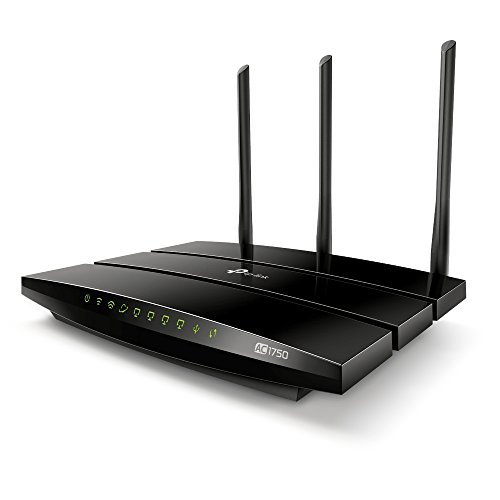
TP-Link Archer C7 — The class benchmark
Every class has a reference product, and for AC1750 it is the Archer C7. Three external antennas, a clean dual-band implementation and years of production made it the default recommendation of its era, the router technicians asked about by name. Its virtues are unfashionable ones: it routes, it covers an apartment properly, its interface explains itself, and when something goes wrong, the answer exists somewhere in an enormous body of owner experience. In a value class, that depth of shared knowledge is worth as much as any feature printed on packaging.
The C7’s hardware tells its age in small ways. Its USB port is the slower 2.0 generation, fine for a printer or occasional file sharing but not a foundation for a home media server. There is no mesh ecosystem and no MU-MIMO; the radios do their three-stream work plainly. Firmware development has slowed to the maintenance tempo of a mature product. None of this disqualifies it — it defines it. The C7 is the finished form of a simpler router era, sold at a mature price, and for a household that wants set-and-forget networking it remains the yardstick the other five picks are measured against.
- Wireless: AC1750 dual-band, three external antennas
- Ethernet: one gigabit internet port feeding a quartet of gigabit sockets for wired gear
- USB: one USB 2.0 port for storage or printer sharing
- Modes: router, access point and bridge flexibility
Strengths
- The deepest owner knowledge base of any router in this class.
- Dependable dual-band coverage for apartments and smaller houses.
- Straightforward interface that non-specialists can actually operate.
Trade-offs
- USB 2.0 limits storage sharing to light duties.
- No mesh ecosystem or MU-MIMO on this older platform.
- Firmware now evolves at maintenance pace rather than adding features.
Best for: value-focused homes wanting the proven reference design of the class.
Not suited for: buyers planning mesh expansion or heavy USB storage sharing.

TP-Link Archer A7 — Friendlier twin
Think of the Archer A7 as the C7 re-thought for the app era. The wireless recipe is the same AC1750 formula, and the family resemblance in coverage and wired hardware is unmistakable, but the ownership experience moves to TP-Link’s Tether app, adds compatibility with the brand’s OneMesh extenders, and folds in voice-assistant integration for households that run their homes that way. For a buyer choosing between the twins, the question is not speed — it is whether you want your router managed from a tidy phone app with an ecosystem path, or from a classic web page with a decade of forum posts behind it.
In daily use the A7 feels a touch more polished: setup flows are guided, parental controls and quality-of-service present themselves in friendlier language, and firmware arrives through a calmer process. The trade-offs mirror the C7’s generation — USB remains modest, the radios remain Wi-Fi 5, and OneMesh works only with compatible extenders rather than forming a true multi-node mesh of identical routers. As the household-facing twin, though, it is the one we would give to family members who will actually open the app, and that practical difference decides real purchases more often than specifications do.
- Wireless: AC1750 dual-band with beamforming
- Wired side: gigabit throughout, with four LAN sockets for desks and consoles
- Ecosystem: OneMesh extender support, Tether app management
- Extras: voice-assistant integration, parental controls
Strengths
- The friendliest setup and day-to-day management in this line-up.
- OneMesh support gives crowded homes an official expansion path.
- Same dependable coverage formula as its famous sibling.
Trade-offs
- USB sharing remains a light-duty feature, not a server platform.
- OneMesh needs specific extenders; it is not full mesh freedom.
- Wi-Fi 5 radios, so Wi-Fi 6 device fleets gain nothing extra.
Best for: households that will manage the router from a phone app and may add an extender.
Not suited for: purists who prefer classic web interfaces and forum-era tinkering.

Netgear R6400 — Steady Netgear value
The R6400 is Netgear’s AC1750 idea expressed without gaming costume: a dual-band gigabit router in a plain shell, with high-power amplifiers and external antennas aimed at coverage rather than spectacle. It earned its place in countless homes as the calm upgrade from a provider box, and its character shows in the details — a USB 3.0 port for sharing storage at respectable speeds, support for printer sharing, and an interface that exposes genuinely useful settings like traffic metering and access scheduling without burying beginners.
Where the R6400 asks for compromise is ecosystem and sparkle. It predates Netgear’s mesh ambitions, so expansion means access points or extenders rather than a native family of nodes, and its app experience is serviceable rather than delightful. Its wireless performance sits squarely in class: strong at range for a Wi-Fi 5 design, unremarkable at showing off in a speed test beside the router. Buy it as infrastructure, not entertainment, and it rewards you the way infrastructure should — by disappearing into the background of a household that simply stays connected.
- Wireless: AC1750 dual-band, external antennas with amplification
- Ports: a gigabit WAN inlet plus four full-speed wired connections
- USB: USB 3.0 storage sharing plus printer support
- Tools: traffic meter, access control and scheduling
Strengths
- Coverage-minded radio design that suits spread-out rooms.
- USB 3.0 makes shared storage genuinely usable for media libraries.
- Useful management tools presented without gaming theatrics.
Trade-offs
- No native mesh ecosystem for whole-home expansion.
- App experience is functional rather than polished.
- Design and interface feel plainly of their generation.
Best for: Netgear households wanting steady coverage and real USB sharing on a budget tier.
Not suited for: buyers who want a mesh family or a showcase app.

Netgear Nighthawk R6700 — Storage-friendly favourite
The R6700 took the AC1750 recipe and aimed it at enthusiasts. Its headline extras are physical and practical: a USB 3.0 port on the front, where you will actually use it, beamforming across both bands, and a dual-core processor that kept its interface and storage services responsive when rivals stalled. In its prime it was the router recommended to people who asked for the good one without a flagship budget, and its longevity in the market reflects how well that formula landed. Homes that share a drive of films, photos and backups across the network will feel its advantages weekly.
Age trims its edges in predictable places. The Nighthawk line’s styling and gaming-adjacent marketing promise a competitive edge its Wi-Fi 5 radios cannot deliver against modern low-latency platforms, and its firmware story is one of maintenance rather than new capability. It also runs warm and wants shelf space and airflow, a small but real consideration in cramped media cabinets. None of that erases its central appeal: of the six picks here, it is the one whose storage sharing and processing headroom most change what a household can conveniently do, and that earns it the enthusiast slot in a class otherwise defined by sameness.
- Wireless: AC1750 dual-band with beamforming on both bands
- Processor: dual-core, for responsive storage and interface
- USB: front USB 3.0 port for drives and media sharing
- Connections: gigabit wired networking across one WAN and four LAN sockets
Strengths
- Front USB 3.0 and processing power make network storage practical.
- Strong, beamformed coverage across both bands for busy homes.
- A long, well-documented life that makes troubleshooting easy.
Trade-offs
- Runs warm and needs breathing room on the shelf.
- Gaming styling oversells what Wi-Fi 5 latency can do.
- Firmware is maintained, not developed; no mesh future here.
Best for: households sharing storage and media across many devices at home.
Not suited for: cramped cabinets, mesh planners or latency-obsessed players.

ASUS RT-AC66U B1 — Firmware lover’s pick
Do not confuse this router with the elderly original that shares most of its name: the B1 revision rebuilt the RT-AC66U around a dual-core processor and brought it into ASUS’s modern firmware world, including AiMesh, so several ASUS routers can form a mesh family. That single fact transforms its value. An AC1750 router that can later become a mesh node, an access point or the heart of a growing ASUS household is playing a longer game than its classmates, and buyers who enjoy settings — traffic analysis, adaptive quality of service, detailed client lists — will find the richest interface in this line-up waiting for them.
The richness cuts both ways. ASUS’s firmware rewards curiosity and punishes haste; screens offer more toggles than a beginner needs, and updates deserve a careful read of what changed. The hardware remains Wi-Fi 5 with AC1750 ceilings, and the design is a low, antenna-fringed slab that wants a shelf rather than a cupboard. For the right owner, though, this is the thinking person’s pick of the six: the one that teaches you your own network, expands into mesh when the house demands it, and still routes at gigabit pace underneath it all.
- Wireless: AC1750 dual-band, three external antennas
- Processor: dual-core B1 revision platform
- Firmware: AiMesh support, adaptive QoS, traffic analyser
- USB: USB 3.0 and USB 2.0 ports for sharing duties
Strengths
- AiMesh membership gives it a genuine second and third career.
- The deepest, most informative firmware of any pick here.
- Dual USB ports cover storage and printer sharing together.
Trade-offs
- Interface depth can overwhelm set-and-forget owners.
- Name confusion with the older original demands care when reading advice.
- Still Wi-Fi 5 ceilings beneath the sophisticated software.
Best for: curious owners who may grow into an ASUS mesh and enjoy real controls.
Not suited for: buyers who want the simplest possible ten-minute setup.

ASUS RT-AC65 — Quiet modern option
The RT-AC65 arrived later than its classmates and feels it: a calmer design, MU-MIMO on its spec sheet, and an ownership story aimed at people who buy a router the way they buy a kettle — expecting competence without ceremony. It covers the AC1750 brief with dual-band three-stream radios and gigabit ports, folds in ASUS’s app-based setup, and supports the modes a modern household eventually asks for, including access point duty when a newer router takes over the front door. Where the B1 is a hobbyist’s instrument, the AC65 is an appliance, and appliances have their own kind of excellence.
Its compromises are about depth rather than competence. The firmware, while clear, does not offer the full analytical playground of its B1 sibling, and its mesh story is less central to its identity. Storage sharing is present but unexceptional. What you receive instead is the most contemporary interpretation of this class on the list — the pick for a buyer who wants AC1750 economics with the fewest echoes of the era when these routers were designed. In a guide full of famous names, it is the quiet one, and quiet is sometimes exactly the recommendation.
- Wireless: AC1750 dual-band with MU-MIMO
- Ethernet: full gigabit routing with four ports for cabled devices
- Setup: app-guided with web interface behind it
- Modes: router and access point flexibility for later roles
Strengths
- The most modern feel and setup flow of the six picks.
- MU-MIMO helps busy evenings with several active devices.
- Calm design and operation for non-technical households.
Trade-offs
- Less firmware depth than the AiMesh-focused B1 sibling.
- Storage and sharing features are competent, not class-leading.
- A smaller owner community than the famous names above.
Best for: buyers wanting AC1750 value with a contemporary, low-fuss ownership feel.
Not suited for: tinkerers who measure a router by its advanced settings pages.
How Do the Six Picks Compare Side by Side?
| Pick | Wireless | USB | Defining trait |
|---|---|---|---|
| TP-Link Archer C7 | AC1750 | USB 2.0 | The benchmark; deepest knowledge base |
| TP-Link Archer A7 | AC1750 | USB 2.0 | App polish and OneMesh extender path |
| Netgear R6400 | AC1750 | USB 3.0 | Coverage-minded, calm Netgear value |
| Netgear R6700 | AC1750 | Front USB 3.0 | Storage sharing and processing headroom |
| ASUS RT-AC66U B1 | AC1750 | USB 3.0 + 2.0 | AiMesh and the richest firmware |
| ASUS RT-AC65 | AC1750 | USB 3.0 | Modern, quiet, appliance-like ownership |
The table’s lesson is that this class is won and lost off the spec sheet. Radios tie; ownership differs. Choose the C7 for proven simplicity, the A7 for app and extender life, the R6400 for calm coverage, the R6700 for storage, the B1 for firmware and mesh growth, and the AC65 for modern quiet. Any of the six will route a typical home well; the right one is the one whose extra layer matches the way your household actually lives with its network.
What Mistakes Do AC1750 Buyers Keep Making?
The first mistake is reading the class number as a speed promise and then feeling cheated by reality. Your fastest single device will see a portion of the 5 GHz figure, less through walls, and your internet plan caps everything anyway. Buyers who understand AC1750 as a tier are happy for years; buyers who expect the box number on a speed test return good routers for no reason. Set the expectation correctly and this class is the easiest in networking to be satisfied with.
Second, people hide the router. A cabinet, a tangle behind the television, the floor behind a sofa — each placement quietly taxes the coverage the buyer paid for. These routers radiate best in open air, roughly central, at shelf height. Ten minutes of placement experimentation routinely outperforms a model upgrade, and it is free, which makes the closed cupboard the most expensive mistake in the category.
Third, households leave the default administrator password and an ancient firmware in place because the internet works. A router is a security device as much as a convenience; update it during setup, set a proper admin password distinct from the Wi-Fi password, and turn on automatic updates where the platform offers them. The picks above all support sane security hygiene — the failure mode is never the hardware, it is the skipped ten minutes.
Fourth, buyers plug a gigabit plan into a router and then connect everything through an old 100-megabit switch or a tired powerline link, and blame the router for the ceiling they built downstream. Audit the whole chain: modem, cable, router, switch, and the device itself. AC1750 routers are gigabit platforms; keep the rest of the path at gigabit and the class delivers everything it promises.
Finally, some buyers purchase this class for a three-storey stone house and discover coverage physics. No single router of any generation fills such a home from one socket. If your rooms are many and your walls are serious, plan mesh or wired access points from the start — and note that the AiMesh and OneMesh picks above were included partly to give this class an honourable expansion path.
How Should You Set Up an AC1750 Router for the Best Result?
Placement first, passwords second, updates third, and only then the fine-tuning. Put the router in the open near the middle of the home, ideally at the height of the people using it rather than at ankle or ceiling level. Raise it above large metal objects and away from thick masonry where you can. In apartments, even moving it from one end of a room to the other can change which band a bedroom receives, so test before drilling anything or declaring the router inadequate.
During setup, update the firmware before personalising anything, then set your wireless names deliberately. Many households do best with the router’s combined smart-connect naming, letting it steer devices between bands; households with stubborn smart-home gear often prefer separate names so the bulbs can be pinned to 2.4 GHz by hand. Neither answer is wrong — the wrong answer is leaving whichever default you were given untested against your actual devices. Walk the home with a phone afterwards and note the weak rooms while the setup is still fresh in your mind.
Then spend five minutes on the settings that protect evenings: enable the guest network for visitors and questionable gadgets, schedule automatic reboots only if your model seems to need them, and turn on quality of service only when you have a real contention problem, since a misconfigured priority system can demote the traffic you care about. Finally, write the admin password and Wi-Fi details somewhere the household can find them. The best-configured router in this guide is still a failure if nobody can log in to it when the one person who set it up is travelling.
How Does an AC1750 Router Handle Streaming, Calls and Games at Once?
Picture the ordinary stress test of a family evening: a television streaming a film in the living room, a teenager on a video call upstairs, a console downloading in the background, and two phones drifting between apps. An AC1750 router in decent placement handles that evening without breaking stride, because each of those jobs asks for a modest, steady slice rather than a flood. The television’s stream is a few percent of the 5 GHz band’s capacity at living-room range. The call needs consistency more than volume. The console download is the only true glutton, and it is also the job that least minds waiting its turn.
Where evenings wobble, the cause is usually contention at the edges: a device clinging to a weak 5 GHz signal from a far bedroom, retransmitting and slowing its own conversation, or a single-band gadget forcing the whole 2.4 GHz neighbourhood to speak slowly. The remedies are placement, band discipline and, on the picks that offer it, quality-of-service rules that quietly prioritise calls and streams over bulk downloads. Notice what is absent from that remedy list: a higher class number. Moving from AC1750 to a faster tier does not repair a bedroom at the edge of coverage, and it does not teach a download manners.
Gaming deserves its usual honest paragraph. Wired, any of these six routers gives a console or PC a clean, low-delay path, and the router will not be the reason a match feels unfair. Wireless gaming from the same room is perfectly playable on the 5 GHz band. Wireless gaming through two walls is a lottery on any Wi-Fi generation, and players who care should budget for a cable run or a wired access point near the desk before they budget for a flagship router. This class, honestly deployed, serves players well; dishonestly deployed behind a sofa, nothing serves them at all.
The workload that genuinely stretches Wi-Fi 5 is local bulk transfer: backing up laptops to a network drive while the house streams. Here the R6700 and the ASUS pair, with their storage-friendly ports and processing headroom, pull ahead of the field, and wired backup remains the professional answer. For the internet-facing life of a normal home, though, AC1750’s ceiling sits comfortably above the plan speeds most streets deliver, which is the entire reason this supposedly dated class keeps selling to satisfied households.
How Long Will an AC1750 Router Stay Secure and Supported?
A router’s working life has two clocks. The hardware clock runs long: these are fanless, low-power boxes that commonly route for many years without complaint. The software clock runs shorter, because security support ends when the maker stops issuing firmware for the model. For a device that stands at the boundary of your home, the second clock is the one that matters, and it should be checked the way you would check a smoke alarm’s date — deliberately, and before it becomes urgent.
The six picks here were chosen partly because their makers supported them for unusually long runs. Long production and large installed bases tend to attract extended maintenance, since a widely owned router is both a reputational asset and a security responsibility. Even so, support for Wi-Fi 5 platforms is now in its later chapters everywhere. The practical routine is simple: enable automatic updates where offered, check the support page a couple of times a year, and begin planning a replacement when updates have clearly ceased and the model has disappeared from the maker’s current pages.
Good hygiene stretches the safe years considerably. A unique administrator password, a Wi-Fi password that is not shared beyond need, the guest network used for visitors and gadgets of uncertain provenance, remote administration switched off, and unused services like universal plug-and-play disabled unless something you own truly needs them — that short list closes most of the doors that opportunistic attacks actually try. None of it requires expertise beyond the willingness to spend fifteen minutes in the settings once, guided by the manual.
When the software clock does run out, demotion is smarter than disposal. A retired AC1750 router makes an excellent access point in a part of the home away from the internet boundary, a workshop router, or a travel spare, roles where its radios still earn their keep while a newer, supported device guards the front door. Several owners in this class’s long history have run exactly that relay for a decade: flagship at the modem, veteran in the attic rooms, nothing wasted.
What Can You Do When One Room Still Gets Weak Wi-Fi?
Start with the free experiments, because they solve a surprising share of weak-room complaints. Raise the router onto furniture rather than the floor. Turn it so its antennas stand vertical and slightly fanned. Move it a metre away from large metal objects, mirrors and the aquarium. Then retest the problem room at the times of day when it usually fails, since evening congestion from neighbouring networks can masquerade as a coverage fault in apartment buildings, and the cure for congestion — a cleaner channel or the other band — differs entirely from the cure for distance.
If the room is simply far, give the signal help rather than volume. A wired access point is the gold standard: run a cable once, or use an existing one, and let a second radio serve that end of the home at full strength. Two of the ecosystems represented here make a softer version of the same trick — the A7 with its compatible extenders, the ASUS B1 within a mesh family — trading a little peak speed for a setup that needs no cable. Powerline adapters carrying the link to a small access point occupy the middle ground for homes where running cable is genuinely impractical.
Resist the two seductive non-solutions. The first is the bargain repeater placed in the weak room itself, where it can only repeat a signal that is already poor; extenders belong halfway to the problem, where the signal they receive is still strong. The second is stacking the router upgrade: replacing an AC1750 with a pricier single box and expecting walls to surrender. Radio power is regulated and broadly similar across classes, so a flagship in the same cupboard reaches roughly the same rooms. Spend on a second vantage point, not a louder single voice, and the weak room stops being a topic of household conversation.
Finally, check whether the room’s problem is one device rather than the network. An ageing laptop with a tired wireless card, a television whose antenna sits behind a metal-backed panel, a console in a closed cabinet — each can suffer alone while phones beside them report happiness. Testing with a second device takes a minute and can save a purchase. Diagnosis before shopping is this guide’s recurring sermon because, in home networking, it is so reliably the cheaper sacrament.
When Should You Step Up Beyond AC1750 Instead?
Honesty about a class includes naming its exits. Step up when your internet plan crosses into gigabit territory and you expect wireless devices, not just wired ones, to use a large share of it; Wi-Fi 5 radios will leave part of such a plan unclaimed at range. Step up when your home is filling with Wi-Fi 6 phones, laptops and tablets whose newer scheduling features need a matching router to exist at all. Step up when your smart-home fleet grows from a shelf of gadgets into a genuine crowd, where the newer standard’s ability to choreograph many small conversations stops being a brochure phrase and becomes your evening’s stability.
Step up, too, when latency over wireless is a competitive rather than casual concern, or when you are building a mesh from scratch and would rather buy nodes of the current generation once than assemble yesterday’s ecosystem at a discount that evaporates across three units. And step up when security support for a specific beloved model has ended: the correct replacement for an unsupported router is a supported one, whatever class it wears.
Stay with AC1750 when the opposite facts hold: a mid-tier plan, a fleet of Wi-Fi 5 devices, an apartment or modest house, and a budget that would rather also afford the access point, the cables and the small switch that make a network genuinely good. Money in networking obeys diminishing returns with unusual strictness. The first sensible router transforms a home; the flagship mostly decorates a benchmark. These six picks sit at the point where the transformation is complete and the decoration has not yet begun charging rent.
Whichever direction you choose, choose the whole system once: router class, placement, wired backbone for the heavy devices, and an expansion path you understand. Households that plan that quartet on paper buy once and stay happy for years. Households that buy a box to silence a single bad evening tend to meet guides like this one again next winter, holding the same weak room and a newer receipt.
What Should You Know About Buying These Models Today?
Because this class is mature, its marketplace has textures a new launch never develops. Production revisions exist under identical names — the ASUS B1 in this guide is the famous example — so read listings carefully and favour sellers whose descriptions specify the revision you intend to buy. Packaging, port layouts and processor details in a listing are not pedantry; they are how you confirm that the router arriving at your door is the router the reviews, including this one, actually describe.
Check the basics on arrival with the calm of a person who expects success: firmware updated before configuration, all four LAN ports alive, both bands broadcasting, the USB port recognising a drive if you plan to use it. Mature models occasionally sit in warehouses for long periods, and a five-minute commissioning check is the simplest safeguard in the whole purchase. Keep the receipt and the box until the router has survived a fortnight of your household’s real evenings, which is the only benchmark that has ever mattered in this category.
A word, too, on expectations for support. Community knowledge for these six models is vast and searchable, and it will solve most problems faster than any help desk. Manufacturer support for Wi-Fi 5 hardware is increasingly oriented to documentation rather than conversation, which is another reason the famous names dominate this list: when official answers slow down, owner communities become the support department, and you want to own the router that a million other households can help you with.
How Do the Brands’ Apps and Interfaces Compare in Daily Life?
Specifications brought you to this class; software is what you will actually live with. The three brands here represent three philosophies. TP-Link splits its own vote: the C7 belongs to the classic web-interface tradition, where every setting lives on pages you navigate from a computer, while the A7 speaks Tether, an app designed around the handful of jobs households actually perform — checking who is online, pausing a child’s device, rebooting without crawling behind furniture. Neither is objectively better. They suit different temperaments, and choosing the twin whose management style matches the person who will administer the network prevents more frustration than any radio specification on the box.
Netgear’s pair occupies a middle register. Its app handles setup and the common controls adequately, while the web interface underneath remains the place where the interesting tools live: traffic metering for capped connections, access schedules, attached-device lists with real detail. Owners who enjoy understanding their network will find the R6400 and R6700 informative without being demanding, and the front-facing storage features on the R6700 integrate into that same practical spirit — the software treats shared drives as a household utility, not a headline feature demanding applause.
ASUS offers the deepest well. Its interface and app expose client-level detail, traffic analysis over time, quality-of-service that can be tuned per device and activity, and — on the B1 — the mesh management that treats several routers as one system. The depth is genuinely useful to owners who will explore it, and genuinely skippable for those who will not; the router routes just as well if the analyser pages are never opened. The AC65 trims that depth towards appliance calm, which is why the two ASUS picks, sharing a badge and a class, can be recommended to almost opposite personalities with a straight face.
One practical test cuts through philosophy: the password-recovery moment. A guest asks for Wi-Fi while you are cooking; a new phone needs the network at midnight; the internet stalls and someone must decide whether the line or the router is at fault. In those moments, the best interface is the one its owner can operate half-distracted, and the worst is a masterpiece nobody opens. When you choose among these six near-equal radios, choose the software you can picture yourself using on an ordinary tired evening. That picture is the most reliable review either of us can offer.
Final Recommendation
If a single name must leave this page with you, make it the Archer C7 for pure proven value, or its A7 twin if your household lives through apps and might add an extender. Choose the R6700 when a shared drive will work for its living, the RT-AC66U B1 when firmware depth and an AiMesh future appeal, the R6400 for calm Netgear coverage, and the RT-AC65 when you want this class wearing its most modern, quiet clothes. AC1750 endures because it matches real homes at an honest tier — and of all its survivors, the C7 remains the one we would unbox for a friend without a moment’s hesitation.
Frequently Asked Questions
Is AC1750 fast enough for a 300-megabit internet plan?
Yes. Wired devices receive the full plan through the gigabit ports, and devices near the router on the 5 GHz band can use the whole connection as well. At longer range the wireless rate falls, as it does on every class, so place demanding devices thoughtfully or wire them. The plan, not the router tier, is the ceiling here.
What is the difference between the Archer C7 and the Archer A7?
They share the AC1750 recipe and similar hardware ideas. The A7 is the later, app-centred interpretation with OneMesh extender support and voice-assistant integration, while the C7 is the classic web-interface benchmark with the larger body of owner knowledge. Performance in a typical home is far closer than the marketing suggests; choose by management style.
Can these routers work with a mesh system later?
Some can join their own ecosystems: the A7 works with OneMesh extenders and the RT-AC66U B1 participates in AiMesh. All six can also serve as access points behind a future mesh router, wired back to it, which is the most reliable second career of all. Check the mode list in the firmware before assuming, but none of these need become waste after an upgrade.
Why does my 5 GHz network disappear in the back rooms?
Because 5 GHz waves are absorbed more readily by walls and floors than 2.4 GHz waves. The network has not failed; physics has voted. Devices in distant rooms are meant to use the longer-reaching band, which is slower but steadier there. If a back room needs real speed, the cures are a wired access point, an extender or a mesh node, not a stronger single router.
Should I buy AC1750 or save for Wi-Fi 6?
Match the router to your devices and plan. A home of Wi-Fi 5 devices on a mid-tier plan gains little from Wi-Fi 6 today, and AC1750 money saved can fund an access point that improves life more. A home full of Wi-Fi 6 phones and laptops on a gigabit plan should skip this class. The honest answer depends on your fleet, not on the calendar.
How many devices can an AC1750 router handle?
A few dozen active devices is comfortable territory for the picks above, which covers most homes including a sensible smart-home collection. Strain appears with very large fleets of constantly chattering gadgets, where newer scheduling technology helps. If your device list fits on one page, this class will not be your bottleneck.
A Short Word on Antennas and What They Cannot Do
Shoppers in this class often count antennas as if they were horsepower, so a brief correction belongs in the record. The three external antennas on these routers serve the three spatial streams of the design and the shaping of coverage; they are not a ladder where each extra rod adds range in a straight line. Antenna quality, placement inside the case and the radio design behind them matter more than the silhouette. A router with its antennas upright, unobstructed and sensibly fanned will outperform an identical unit with its rods folded behind a television, which is why this guide keeps returning to placement: in the AC1750 class, the hardware differences are small, the deployment differences are large, and the most affordable performance available is the kind you arrange with your hands rather than your wallet.
One closing observation from years of owner reports in this class: satisfaction correlates less with the model chosen than with the evening it was installed. Households that updated firmware, placed the box thoughtfully, named their networks deliberately and wrote the passwords down tend to describe whichever of these six they bought as flawless. Households that swapped hardware in a hurry during an outage tend to blame the router for the wiring, the placement and the line. The picks above are all capable of the first story. Give the one you choose a proper installation evening, and it will very likely disappear into the walls of your home’s routine, which is the highest praise networking equipment can earn.
Related Guides
Continue with our companion pieces: how to place a router for whole-home coverage, mesh systems explained for ordinary houses, and turning an old router into an access point.
Related guide: Best Open Source Routers
Related guide: Best D-Link Routers


