What's inside
- Key Takeaways
- Quick Picks
- How We Chose These Picks
- How Do the Six Compare as i7 Machines?
- What Do the Letters After an Intel Processor’s Name Actually Mean?
- How Much Does the Rest of the Machine Matter Beside the Chip?
- How Do You Keep an i7 Laptop Fast in Its Fourth Year?
- What Are the Common Mistakes When Shopping by Processor?
- Final Recommendation
- Frequently Asked Questions
- Related Guides
As an Amazon Associate I earn from qualifying purchases. This post may contain affiliate links at no extra cost to you.
widgetverdict.com is reader-supported. When you buy through links on our site, we may earn an affiliate commission.
Linked picks below resolve to the exact listings whose titles name the processor in full, because in this category the chip’s complete name — suffix and generation included — is the whole argument. One pick is included under a clearly flagged exception, explained in its own section and in the method note that follows the introduction.
Buyers searching for the best 17 i7 processor laptops usually believe they have already made the hard decision: big screen, Intel’s i7 tier, done. The market disagrees. The i7 badge now spans such a wide range of silicon — from frugal U-series chips tuned for quiet office machines to hulking HX processors built for workstations — that two laptops can both be honestly sold as “17-inch i7” while differing more from each other than either differs from an i5. This guide treats the badge as the beginning of the inquiry, not the end of it.
So the six picks below are organised around what the i7 in each machine actually is. Two linked listings carry the i7-1355U, Intel’s efficiency-class i7, in very different bodies and configurations — a natural experiment in how much the surrounding machine matters. A third linked machine is flagged in its badge and throughout its section: it carries an i9, not an i7, and it is included because the workstation shelf it sits on is where 17.3-inch i7 shoppers so often end up, and because pretending the step above does not exist would make this guide less honest, not more. Three prose picks cover the gaming and previous-generation i7 territory where listings scatter too widely to pin.
Consider, as a calibration exercise, the two emotions this category produces in shops. The first is the glow of the badge — i7 has carried prestige for so long that the letters themselves feel like a specification. The second is the confusion of the comparison table, where near-identical badges sit atop wildly different machines at wildly different prices. Both emotions are manufactured by the same naming system, and both dissolve the moment the full processor name is read aloud. This guide is, in the end, an extended demonstration of that single act of reading.
The method note, stated once and plainly: this guide claims an i7 only where a verified listing title prints one. Where a pick’s processor is anything else — a higher tier, an older generation, a configuration that varies — the text says so in the open. If you read nothing else, read the suffixes: in modern Intel naming, the letters after the numbers are the difference between a sprinter and a marathoner wearing the same team shirt.
Key Takeaways
- The i7 badge covers a wide range: the two linked i7 picks here use the efficiency-class i7-1355U, tuned for cool, quiet work rather than maximum speed.
- HP’s 17 pairs that chip with 32GB of memory and a terabyte of storage; ASUS’s Vivobook 17 pairs it with 16GB and a terabyte — the surrounding configuration changes the machine as much as the chip does.
- The Dell Precision 7780 is included as a flagged exception: its listing specifies an i9-13950HX, the tier above i7, in the same 17.3-inch workstation class.
- Gaming i7 machines at this size — MSI’s Katana 17 and ASUS’s TUF Gaming F17 among them — use performance-class chips and are covered in prose because their configurations scatter across listings.
- Suffix literacy is the buyer’s core skill: U means efficiency, H and HX mean performance, and the generation digits decide the rest.
Quick Picks
| Pick | Badge | Why it is here |
|---|---|---|
| HP 17 (Core i7-1355U, 1TB) | The Deep Configuration | The efficiency i7 surrounded by 32GB of memory and a terabyte of storage for long business service. |
| ASUS Vivobook 17 (Core i7-1355U) | The Mainstream i7 | The same chip in ASUS’s family big-screen, with 16GB of memory, a terabyte of storage and Iris Xe graphics. |
| Dell Precision 7780 | Flagged: i9, Not i7 | A 17.3-inch mobile workstation whose listing specifies an i9-13950HX and RTX ADA 4000 graphics — the tier above this guide’s brief. |
| MSI Katana 17 | Gaming i7 Territory | MSI’s value gaming line at 17.3 inches, where i7 performance-class chips pair with discrete graphics. |
| ASUS TUF Gaming F17 | The Durable Gamer | ASUS’s toughness-first gaming line, sold in i7 configurations across several generations. |
| Lenovo Legion 5 17 (previous generation) | The Retired Contender | An earlier big-screen gaming favourite whose i7 builds now circulate at used-market prices. |
How We Chose These Picks
Choosing for a processor-led keyword inverts the usual method. Screen-first guides start from the panel and accept whatever chip arrives; this guide started from the badge and interrogated it. Every linked pick had to satisfy one rule absolutely: the listing title prints the full processor name, so the analysis could discuss a specific piece of silicon — its class, its generation, its intent — rather than a marketing tier. Picks that could not meet that rule, however good the machines, went to prose or went home.
The second filter was honesty about class. An i7 guide that quietly mixed efficiency chips and workstation chips as if they were interchangeable would betray its readers at the exact point of purchase, so each pick’s section names its chip’s class before praising anything else. The Precision’s inclusion was debated on precisely this ground and resolved in favour of disclosure: it carries its i9 disclosure in the badge, the heading discussion and the specification list, and it is here because the 17.3-inch workstation conversation is incomplete without the machine that defines its ceiling.
We also weighed what an i7 guide owes readers who will not buy any of these six. Processor knowledge compounds: the suffix literacy taught here transfers to every laptop listing the reader will ever open, at every size, from every brand. That transfer value shaped the guide’s structure — the comparison table states every chip in full, the buying sections teach the naming system outright — because a guide that merely ranked six machines would expire with their stock, while a guide that teaches the naming system stays useful for a decade of shopping.
Prose picks cover the territory where i7 shopping actually sprawls: gaming lines sold across generations and configurations, and a retired favourite whose value now lives in the used market. For those, the guide teaches the identification skill — how to read a listing’s full chip name and know what class of machine you are really looking at — because no single link could do that teaching for them.

HP 17 (Core i7-1355U, 1TB) — The Deep Configuration
Begin with the chip, since the chip is the assignment. The Intel Core i7-1355U named in this listing’s title belongs to Intel’s U series: the efficiency class, engineered to deliver strong everyday speed inside a modest power envelope so that a large laptop stays cool, quiet and civilised. Its i7 designation places it at the top of that efficiency range — the fastest mannerly chip, rather than a barely restrained performance one. Buyers who understand that sentence will be delighted by this machine; buyers who expected workstation muscle from the badge alone have misread the suffix, and this guide exists partly to prevent that exact disappointment.
Around the chip, the configuration is the deepest in this guide: 32GB of memory, a 1TB solid-state drive supplemented by a bundled 512GB SD card, Windows 11 Pro, Wi-Fi 6 and a Copilot key, in a silver 17.3-inch full HD thin-and-light business chassis. The pairing is more intelligent than it might appear. An efficiency processor’s weakness is not speed in ordinary tasks — it is entirely quick there — but the configuration around it decides whether the machine feels generous or strained across years of accumulating tabs, files and software. Thirty-two gigabytes removes the strain. The terabyte removes the other one. What remains is a big, quiet business laptop whose specification has no obvious expiry date.
The workload this serves is the broad middle of professional life, played at volume: accounting and office suites, browser-based business platforms by the dozen, video meetings, document archives, light photo work. In that territory the 1355U’s efficiency is a feature with daily dividends — fans that rarely announce themselves, a chassis that stays cool on a desk, battery behaviour as good as this size allows. Step outside that territory into sustained rendering, compiling at scale or 3D work, and the U suffix collects its debt; the Precision below exists for those readers.
A word about the Copilot key in the title, because it dates the machine usefully. That dedicated key marks this as a current-era build, aligned with the present Windows generation and its on-device AI features — features the efficiency i7 handles in their mainstream form. It is a small detail with a real implication: the machine’s software support horizon starts from the current platform rather than a retiring one, which, combined with the deep configuration, is the substance of this pick’s long-service claim.
Two checks accompany this pick, carried over from hard experience with generously configured listings of this kind. Confirm the warranty arrangements with the seller before purchase, since configurations of this depth commonly arrive through HP’s partner channel. Then, on delivery, verify in the system settings that the machine reports the full memory and storage the title promises. Do those two things and this is, for its intended work, the most completely specified 17-inch i7 in the guide.
There is a resale and inheritance dimension to this configuration that business buyers quietly understand. A machine with an i7 badge, deep memory and a terabyte of storage remains assignable — to a junior colleague, a second site, a family member — years after thinner configurations have been retired, because the next user’s ordinary work will still fit inside its headroom. Specifications are usually discussed as if one owner will consume them all; in practice a well-configured laptop has several careers, and this one is specified for exactly that relay.
- Display: 17.3-inch full HD
- Processor: Intel Core i7-1355U — U series, the efficiency class of i7
- Memory: 32GB RAM
- Storage: 1TB SSD, plus a bundled 512GB SD card
- System: Windows 11 Pro, Wi-Fi 6, Copilot key
- Positioning: thin-and-light business build in silver
Strengths
- The deepest memory and storage pairing in this guide, future-proofing the machine for years.
- An efficiency-class i7 keeps a large chassis quiet and cool through professional workloads.
- Windows 11 Pro suits the business role the configuration was assembled for.
Trade-offs
- The U-series chip is not built for sustained rendering, compiling or 3D loads.
- The panel is full HD; the generosity is in configuration, not resolution.
- Partner-configured listings require the warranty and delivery checks described above.
Best for: professionals whose heavy lifting is volume — many programs, many files, many years.
Not suited for: engineers and creators whose software feeds on sustained processor power.
ASUS Vivobook 17 (Core i7-1355U) — The Mainstream i7
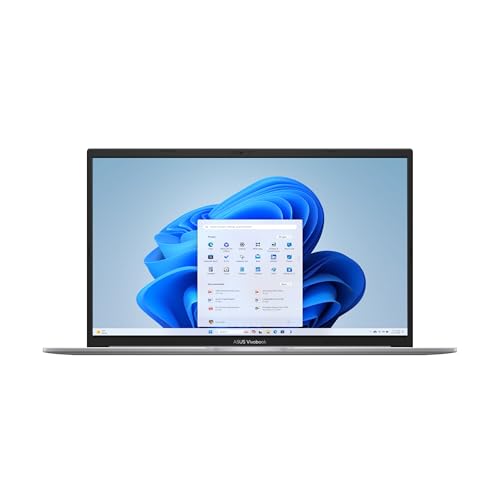
The same i7-1355U appears here in a different philosophy. This Vivobook 17 — model F1704VA-ES76 in Cool Silver — pairs the chip with 16GB of memory, a terabyte of storage, Intel Iris Xe integrated graphics and a 17.3-inch full HD display running at a standard 60Hz, under Windows 11 Home. Where the HP above is a business configuration assembled for depth, the ASUS is the mainstream retail expression of a 17-inch i7: the machine a family or a home office buys when they decide, sensibly, to get the good processor and be done.
The comparison between the two linked picks is the most instructive in this guide, because the chip is held constant and everything else varies. Sixteen gigabytes against thirty-two is the headline difference, and its meaning is specific: the ASUS will feel identical to the HP in every ordinary task and most heavy ones, and will only fall behind in the extreme multitasking sessions — dozens of tabs beside large files beside a call — that the HP’s extra memory was bought to absorb. The terabyte of storage, notably, is present in both, which tells you where ASUS chose to spend: on the specification whose absence owners feel soonest.
Iris Xe graphics deserve their sentence. As integrated graphics go, the Iris Xe generation is the capable end — entirely adequate for photo editing, video playback, casual and older games, and the acceleration duties modern software quietly assigns to the GPU. It is not a gaming or 3D-rendering solution, and at 60Hz the panel makes no pretence of being one either. The Vivobook’s honesty about its lane is part of its appeal: this is a big-screen productivity machine with a strong processor, and every specification in the title agrees with that description.
Cool Silver, the finish in the title, is more than a colour note on a machine this size: a 17-inch lid is the largest single surface in most rooms it enters, and ASUS’s restrained silver keeps the Vivobook socially invisible in the way family and office machines should be. It also hides the micro-scratches of a travelling life better than dark gloss finishes do. None of this will appear in a benchmark, and all of it will be perceived daily — the correct order of priorities for a mainstream machine.
For the buyer choosing between the two 1355U machines, the deciding questions are refreshingly concrete. Do you need Windows 11 Pro, or is Home sufficient? Will your multitasking genuinely exceed what 16GB swallows? Do you prefer ASUS’s design and keyboard feel, or HP’s? Answer those and the choice makes itself — which is a compliment to both machines, and a demonstration of this guide’s thesis that at the i7 tier, the badge is the least interesting part of the decision.
Students in technical subjects deserve a specific note on this machine, because it sits at a fork in their road. For coursework built on documents, data and browser-based tools, the Vivobook’s i7 is generously sufficient and its terabyte swallows a degree’s worth of files without negotiation. For coursework that compiles large projects, renders scenes or trains models, the U suffix is the boundary — and a student who knows that boundary in the first term, rather than discovering it in the third year, can plan lab time and budgets around the truth. The machine is honest; let the purchase be equally so.
- Display: 17.3-inch full HD, 60Hz
- Processor: Intel Core i7-1355U — the same efficiency-class i7 as the HP above
- Graphics: Intel Iris Xe integrated
- Memory: 16GB RAM
- Storage: 1TB
- Identity: Windows 11 Home, Cool Silver, model F1704VA-ES76
Strengths
- A terabyte of storage at the mainstream level removes the commonest upgrade pressure.
- The i7-1355U and Iris Xe pairing handles productivity and media with quiet ease.
- A coherent, honestly specified retail build from a major brand.
Trade-offs
- 16GB of memory, half the HP’s fit, caps the heaviest multitasking.
- The 60Hz full HD panel is for work, not for play or colour-critical editing.
- Windows 11 Home rather than Pro may matter to business buyers.
Best for: families and home offices after the strong processor without the business premium.
Not suited for: gamers, or multitaskers whose sessions regularly swallow 16GB.

Dell Precision 7780 — Flagged: i9, Not i7
The disclosure comes first, in the largest type this section has: this machine’s listing specifies an Intel Core i9-13950HX. It is not an i7. It sits a full tier above this guide’s brief, and it is included — labelled in its badge, its heading and here — because buyers shopping 17.3-inch i7 laptops for serious work keep arriving at the workstation shelf, and the Precision 7780 is the machine that shelf is organised around. Excluding it would not make this guide purer; it would make it useless at the exact moment the reader’s needs outgrow the efficiency class.
Read its title as the definition of the other end of the Intel range. The 13950HX is an HX-series processor: the performance extreme, built to sustain heavy computation indefinitely inside a chassis with serious cooling. Around it, this configuration fits 32GB of memory, a 512GB NVMe SSD and — the specification that truly separates a workstation from a laptop with ambitions — an NVIDIA RTX ADA 4000 graphics card with 12GB of its own memory, a professional GPU certified for engineering and content-creation software. Windows 11 Pro, a 17.3-inch full HD panel and Dell’s mobile workstation build complete the picture.
Notice, too, what the Precision’s presence does to the rest of the table: it recalibrates the word “powerful.” Beside an HX workstation, the efficiency i7 machines are not lesser laptops — they are differently purposed ones, the way a courier van is not a lesser lorry. Readers who feel their ambitions deflate beside the Precision should check whether their workload ever leaves the courier van’s route. For most professional weeks, it does not, and the honest machine is the one sized to the route actually driven.
Who is this actually for? The engineer running CAD assemblies that make ordinary laptops weep. The video professional whose timelines carry effects that integrated graphics cannot preview. The data worker whose models compile or train for hours. For those readers, the honest advice of an i7 guide is that the i7 was never their chip — the HX class, in either its i7 or i9 forms, is where their work lives, and this listing is the fully realised version of that machine. For everyone else, the Precision is a magnificent irrelevance: heavy, expensive in spirit even where discounted, and engineered for loads they will never apply.
Weight and noise complete the honest portrait. A 17.3-inch HX workstation is a machine that travels between desks rather than through airports, and under full load its cooling announces the work being done. Its owners accept both as the physics of the class — the same physics that lets it hold speeds the efficiency machines cannot reach for ten consecutive minutes. Judge it as infrastructure, not as a laptop with extras, and its place in a professional budget explains itself.
A note on the storage figure, since workstation buyers plan around it: 512GB is the fitted drive in this configuration, modest against the terabyte machines above, because workstation storage so often lives on network and external arrays. If your workflow is local, budget the upgrade or the external drive into the purchase from the start. Precision machines are built to be opened and serviced, which makes that a plan rather than a problem — one more way this class differs from the sealed mainstream.
Dell’s Precision line carries one more property that its buyers treat as the actual product: certification. Workstation software vendors test and certify their applications on machines of this class, and for a firm whose contracts, support agreements or insurers care about that certification, the Precision is not a faster laptop but a compliant one. That is the final reason it belongs in this guide’s field of view — the i7 shopper whose work is professional enough may discover that the question was never speed at all, but standing.
- Display: 17.3-inch full HD
- Processor: Intel Core i9-13950HX — one tier ABOVE i7, stated openly
- Graphics: NVIDIA RTX ADA 4000, 12GB — professional, certified workstation GPU
- Memory: 32GB RAM
- Storage: 512GB NVMe SSD
- System: Windows 11 Pro, mobile workstation chassis in grey
Strengths
- Sustained performance in a different league from every efficiency chip in this guide.
- A certified professional GPU for CAD, engineering and serious content creation.
- A serviceable workstation chassis built for a long, upgradeable life.
Trade-offs
- It is an i9 machine in an i7 guide — included for context, not as an i7 pick.
- Size, weight and cost of ownership belong to the workstation class, not the mainstream.
- 512GB of fitted storage assumes the workstation habit of external and network storage.
Best for: engineers and creators whose workloads have outgrown the entire i7 efficiency class.
Not suited for: ordinary office and family use, where its power is pure overhead.
MSI Katana 17 — Gaming i7 Territory
Cross into gaming and the i7 badge changes its meaning. MSI’s Katana line is the company’s value gaming range, and its 17.3-inch member has been sold across generations with performance-class Intel i7 processors — the H-series silicon that trades the U chips’ manners for sustained speed — paired with NVIDIA discrete graphics. That combination is why it belongs in this guide, and the scatter of its listings across generations and graphics configurations is why it sits here in prose: the Katana 17 you should buy depends entirely on which generation’s listing is in front of you.
The reading skill this pick teaches is generational. A Katana’s value lives in the pairing of its chip generation with its graphics card, and those two must be judged together: a newer i7 with a modest GPU and an older i7 with a strong GPU are different machines for different games, at prices that often cross. Establish both from any listing before comparing money. Also establish the panel’s refresh rate, because gaming lines fit different screens to the same shell, and the display is half the experience you are paying for.
Budgeting around a Katana rewards one extra line item: the second drive or the larger replacement drive that gaming libraries eventually demand. The big chassis generally accommodates storage ambitions more gracefully than slim machines do, and a buyer who plans the library’s growth at purchase — rather than at the first refused install — will get the full value of the performance silicon they paid for. A fast processor waiting on a full drive is this guide’s imbalance mistake wearing a gaming headset.
Judged fairly, the Katana’s proposition is the gamer’s version of this guide’s thesis: the badge gets you into the right shop, and the specification decides. A well-matched Katana 17 — current-enough i7, a graphics card with headroom for your titles, a fast panel — is among the most cost-effective ways to play on a big screen. A mismatched one is a lesson in reading titles, learned at retail price.
A word on noise, because gaming i7 machines are bought by people who often share rooms. Performance chips under a game’s load ask their fans for everything, and the Katana class answers audibly. Headphones are the standard settlement, and most players reach it happily — but a buyer planning to game in a shared office or a quiet house should treat the fan curve as a specification too, reading the specific generation’s behaviour before the purchase rather than apologising for it after.
- Display: 17.3-inch gaming panel; refresh rate differs between the line’s generations — confirm the figure on the listing you choose
- Processor: performance-class Intel i7 (H series) across the line’s generations
- Graphics: NVIDIA discrete graphics, tier varies by configuration
- Memory and storage: configuration-dependent; judge the pairing, not the badge
- Buying rule: chip generation and graphics card must be assessed together
Strengths
- Performance-class i7 power and discrete graphics at value gaming prices.
- The big chassis gives its components room to sustain performance.
- A wide listing pool means a well-matched build exists for most budgets.
Trade-offs
- Configurations scatter widely; careless buying pairs the wrong chip with the wrong GPU.
- Gaming hardware means gaming weight, noise under load and charger dependence.
- No single verified listing, so the comparison work is yours.
Best for: gamers who will read two specifications before spending on either.
Not suited for: quiet offices, or anyone after one fixed configuration to order blindly.
ASUS TUF Gaming F17 — The Durable Gamer
ASUS’s TUF line sells durability as its headline — the name promises toughness, and the machines are built and tested to a more rugged brief than their gaming siblings — and the F17 carries that brief at 17.3 inches, in i7 configurations across several generations. Like the Katana, it is a prose pick because its listings span those generations with different graphics pairings; unlike the Katana, its distinguishing argument is not value alone but survivability, which makes it the gaming i7 for a particular kind of owner.
That owner is the one whose laptop travels to its gaming: the student whose machine crosses campus daily, the worker whose gaming happens in site accommodation, the player whose desk is wherever the deployment, the semester or the job currently is. For them, the F17’s reinforced brief is not marketing garnish but the specification most likely to decide whether the machine is still playing in year three. The i7 performance chips inside do the same work as in any gaming line; the chassis around them is the differentiator.
Price behaviour in this line follows a pattern worth exploiting. Because TUF spans generations in the channel simultaneously, last generation’s F17 is routinely discounted beside the current one, and the performance gap between adjacent gaming generations is often smaller than the price gap suggests. A buyer armed with the pairing discipline — chip generation against graphics generation — can sometimes buy the older machine and a larger game library for the current machine’s money, and lose nothing they would have perceived.
The checks mirror the Katana’s with one addition. Establish the chip generation and the graphics card as a pair, confirm the panel’s refresh rate — and then read the specific generation’s reviews for its cooling behaviour, because TUF designs have varied in how well they let their processors sustain speed. A durable shell around a throttled chip is a safe housing for a slow machine; the right F17 generation is both tough and quick, and it is findable by readers who check.
The F17 also illustrates how a gaming line ages in the market. Because TUF machines were bought by institutions and travellers as well as players, the used pool contains unusually honest examples — machines whose histories are working lives rather than overclocked hobbies. A buyer reading listings with this guide’s pairing discipline can find in the F17’s pool the rare combination of performance silicon and a chassis that was never abused, which is the used gaming market’s version of a find.
- Display: 17.3-inch gaming panel; confirm refresh rate on the specific build
- Processor: Intel i7 performance-class chips across several generations of the line
- Graphics: NVIDIA discrete graphics, varying by configuration
- Build: the TUF line’s durability-first brief is the reason for its inclusion
- Buying rule: verify the generation’s cooling behaviour alongside its specifications
Strengths
- A ruggedness brief that suits gaming machines which genuinely travel.
- Performance-class i7 power with discrete graphics in a big chassis.
- Several generations in circulation give buyers at many budgets an entry point.
Trade-offs
- Generation scatter demands the same careful pairing checks as any gaming line.
- Cooling quality has varied between generations; research the specific one.
- Weight and styling are unapologetically gaming.
Best for: players whose laptops travel as hard as they play.
Not suited for: buyers seeking a fixed, current, order-it-now configuration.
Lenovo Legion 5 17 (previous generation) — The Retired Contender
Lenovo’s Legion 5 in its 17.3-inch form was, in its day, the sensible gamer’s default: performance-class i7 processors, strong cooling, a keyboard and screen that respected the player, at prices that undercut the exotic brands. The size has since been retired from the line’s front rank, which moves its i7 builds into the remaining-stock and used channels — and into this guide, because a previous-generation Legion at a used price is one of the most rational gaming purchases a specification-literate buyer can make.
There is a timing art to buying retired flagships that rewards mention. The pool is richest just after a successor generation launches, when upgraders release well-kept machines simultaneously and prices soften under the sudden supply. A buyer who can wait for that window — and who has already decided the exact chip-and-graphics pairing they will accept — buys into a buyer’s market with a specification in hand. The Legion’s pool, deep and documented, is the friendliest in this guide to that strategy.
The rationality has conditions. A used gaming laptop’s two ageing components are its battery — largely irrelevant in a class that lives plugged in — and its cooling system, which is not: fans and thermal paste age, and a Legion that runs hot and loud may simply need cleaning and repasting, a service any competent shop performs. Ask about temperatures and fan behaviour, and price a service into the deal. The graphics card generation, as ever in this guide, must be read beside the chip’s; the Legion badge spanned pairings of both strong and modest cards.
What the prepared buyer gets is the Legion formula — cooling that lets an i7 perform like one, a chassis that can be opened and maintained, a screen sized for the games that reward width — at a fraction of its original price. In a guide devoted to the proposition that the badge is only the beginning, the retired Legion is the closing argument: yesterday’s correct specification, read carefully, beats today’s careless one.
One more Legion virtue survives retirement: its community. Popular machines accumulate years of owner knowledge — which settings tame its fans, which memory upgrades it accepts, which BIOS versions behave — all of it searchable in a way that an obscure model’s silence never is. Buying a well-documented used machine is partly buying its library. For the owner who maintains their own hardware, that library can be worth more across five years than a marginal difference in the original specification ever was.
- Display: 17.3-inch gaming panel from the line’s production years
- Processor: performance-class Intel i7 builds are the ones to seek
- Graphics: NVIDIA discrete graphics; read the card’s generation beside the chip’s
- Service: cooling maintenance is the used purchase’s key budget item
- Status: retired from the line’s front rank; remaining stock and used channels
Strengths
- Cooling and build that let its i7 chips perform at their specification.
- Used pricing converts a former flagship formula into a value purchase.
- Maintainable design suits owners who service their machines.
Trade-offs
- Cooling systems age; a service belongs in the purchase budget.
- Battery life was never the class’s strength and age will not improve it.
- Warranty depends on the channel and the individual unit.
Best for: gamers comfortable buying previous-generation hardware on its specification.
Not suited for: warranty-first buyers set on a brand-new machine.
How Do the Six Compare as i7 Machines?
| Pick | Processor, stated exactly | Chip class | Around the chip | Read it as |
|---|---|---|---|---|
| HP 17 | Intel Core i7-1355U | Efficiency (U) | 32GB, 1TB SSD + SD card, Win 11 Pro | The long-service business configuration |
| ASUS Vivobook 17 | Intel Core i7-1355U | Efficiency (U) | 16GB, 1TB, Iris Xe graphics | The mainstream retail i7 |
| Dell Precision 7780 | Intel Core i9-13950HX — not an i7 | Performance extreme (HX) | 32GB, RTX ADA 4000 12GB | The workstation ceiling, flagged openly |
| MSI Katana 17 | i7 H-series — name the generation from the listing before valuing it | Performance (H) | Discrete graphics, tier varies | The value gamer, if the pairing is right |
| ASUS TUF Gaming F17 | i7 H-series across several TUF generations — the printed chip name decides | Performance (H) | Discrete graphics, rugged build | The travelling gamer |
| Lenovo Legion 5 17 (older) | i7, previous-generation builds | Performance (H) | Discrete graphics, strong cooling | The used-market rational buy |
What Do the Letters After an Intel Processor’s Name Actually Mean?
Everything. Intel’s suffixes are the class system of its range, and at 17 inches — where chassis accept every class — they matter more than anywhere else. U denotes the efficiency line: chips designed to sip power, run cool and stay quiet, delivering excellent speed in the bursty rhythm of office work. H denotes the performance line, built to sustain heavy computation with more power and more cooling. HX sits at the extreme: desktop-class ambition in a mobile package, fitted to workstations and flagship gaming machines, demanding serious cooling and a serious charger. The same i7 label appears across all three, which is why this guide treats the suffix as the specification and the i7 as the surname.
Generation is the second half of the name. The opening digits of the model number mark the chip’s generation, and each generation brings efficiency and speed gains that routinely let a newer i5 outrun an older i7 in real work. This is the trap inside every used listing in this guide: an elderly i7 wears a proud badge over silicon that a current mid-range chip embarrasses. Read the full name — tier, generation, suffix — or read nothing, because the partial name is worse than none: it feels like knowledge while functioning as advertising.
AMD’s parallel naming deserves a footnote for cross-shoppers, because many 17-inch listings offer Ryzen equivalents of everything discussed here. The lesson transfers without translation: AMD’s tiers and suffixes likewise encode class and generation, and a buyer who has learned to demand the full Intel name should demand the full AMD one with the same suspicion. Brand loyalty is a preference; specification literacy is a method, and the method does not care whose logo is on the lid.
There is a practical shortcut for the hurried. If the work is documents, browsing, calls and media, any recent U-series i7 is more than sufficient and its efficiency is a daily pleasure. If the work is gaming, rendering, compiling or engineering, the suffix must be H or HX and the cooling must match. Decide which sentence describes your week, and the shortlist writes itself from the table above.
How Much Does the Rest of the Machine Matter Beside the Chip?
More than the chip, on most days. The two linked 1355U machines in this guide are the standing proof: identical processors, meaningfully different laptops, because memory, storage, panel and build shape every session. Sixteen gigabytes of memory is the current line between comfort and constraint for heavy multitasking; below it, even a fine processor spends its life waiting on a paging drive. Storage speed matters similarly — a fast SSD makes a modest chip feel alert, while a slow drive makes a strong chip feel elderly.
Cooling is the silent partner in every performance claim. A processor’s rated speed is a promise its chassis must keep thermally, and big laptops vary enormously in how long they can hold full pace before heat calls the loan. This is why the gaming and workstation picks in this guide emphasise their cooling designs, and why a slim machine with a proud chip can be outrun over a long render by a chunkier machine with a humbler one. Judge sustained work by sustained engineering, not by the badge on the lid.
Displays close the argument, because a processor’s work is ultimately judged on a screen. Both linked i7 machines here carry full HD panels — appropriate partners for their class — and a buyer tempted by a sharper panel should know that resolution is also a workload: more pixels tax graphics and battery on every frame. The workstation’s certified GPU exists partly to carry exactly that tax at professional scale. Specification balance is not a compromise position; it is the engineering itself, and the listings in this guide that read coherently — chip, memory, graphics, panel in agreement — are the ones that will feel coherent in the hand.
The buyer’s rule that survives all of it: specify the machine from your heaviest weekly hour outward. Name the largest file, the busiest multitasking session, the most demanding program in your ordinary week, and buy the configuration — chip class, memory, graphics — that handles that hour without strain. Every specification beyond it is comfort; every one short of it is a recurring appointment with frustration.
How Do You Keep an i7 Laptop Fast in Its Fourth Year?
The unglamorous truth about processor longevity is that chips rarely slow down; the world around them speeds up. Software grows heavier, browser tabs multiply, file sizes swell — and the machine that felt instant begins to feel patient. The defences are bought at purchase and maintained by habit. At purchase, memory is the defence that matters most, which is why this guide’s linked picks carry 16GB and 32GB rather than the minimum the badge is sometimes sold with: memory headroom is the fourth year’s speed, bought in the first year at the cheapest price it will ever be offered.
Memory pressure deserves a diagnostic habit of its own. When a machine begins to feel slow, open the system’s resource monitor during your heaviest ordinary session and look at what is actually exhausted. Owners routinely blame the processor for what is, in truth, memory paging or a full drive — problems with cheap, specific remedies. The i7 in a well-kept machine is very rarely the bottleneck its owner imagines, and proving that to yourself once will save you a premature replacement more reliably than any review can.
Habits cover the rest. Keep the storage below roughly three-quarters full so the drive retains its pace. Keep the cooling path clean — a big laptop’s fans ingest its environment faithfully, and a machine that breathes freely sustains its processor’s speed instead of rationing it. Let the operating system and drivers update on schedule, because modern efficiency gains arrive as software as often as silicon. And audit the startup folder twice a year; the accumulated launchers and updaters of a dozen programs tax an i7 exactly as they tax any chip, silently, at every boot.
There is a final, psychological discipline: compare the machine to your work, not to this year’s catalogue. A four-year-old i7 that still opens your heaviest file without complaint has not become slow in any sense that should cost you money. The upgrade cycle is a marketing rhythm before it is a technical one, and the reader who has learned to read full processor names in this guide is exactly the reader equipped to ignore it until their own workload — not a launch event — says otherwise.
What Are the Common Mistakes When Shopping by Processor?
Buying the badge and skipping the suffix is the foundational error, and this guide has spent its length on it because the market profits from it daily. Its close cousin is generation blindness: paying current money for an elderly i7 whose name sounds identical to a modern one. The antidote to both is free and takes ten seconds — read the full processor name in the listing title and, if the title will not print it, treat that refusal as the answer.
There is also the refurbished-market variant of the badge error: workstations and gaming machines described by tier alone, their generations left as an exercise for the buyer. In that channel the full name is not merely informative but financial — the difference between two adjacent generations of H-series i7 can be the difference between a bargain and a donation. Any seller unwilling to state the complete processor name of a used machine is asking to be paid for your ignorance, and the correct response is to keep scrolling.
The third mistake is imbalance: an i7 paired with too little memory, a strong chip behind a dim screen, performance silicon in a chassis that cannot cool it. Laptops fail as systems, not as components, and the cheapest place to discover an imbalance is in the listing, not in the third month of ownership. Finally, buyers overbuy in the HX direction as readily as they underbuy in the U: a workstation chip in a family laptop buys heat, weight and charger-dependence in exchange for power that will never be requested. Match the class to the work, and let both errors starve.
Final Recommendation
If a single sentence from this guide survives your shopping, let it be the habit rather than any verdict: never let a listing sell you a surname. Reading all three parts of the name takes seconds and decides years of satisfaction, and every pick above, from the quiet efficiency of the 1355U machines to the flagged excess of the Precision, was chosen to demonstrate that the seconds are the best-spent in the entire purchase.
Let the suffix decide, then let the configuration confirm. For professional volume work — the wide middle of business life — the HP 17’s i7-1355U wrapped in its 32GB memory fit and terabyte drive is the most complete answer here, with the warranty check performed and the delivery verified. For the same chip in a mainstream retail build, the Vivobook 17’s 16GB and terabyte serve families and home offices without a wasted specification. For gaming, read the Katana and TUF listings as pairings of chip and graphics card, or take the retired Legion’s formula at a used price with a service budgeted. And if your work genuinely lives beyond the i7’s ceiling, this guide has shown you the Precision with its i9 labelled in plain sight — buy it as what it is, not as what the keyword promised. Check price on Amazon against the full processor name in the listing title, every time, because in this category the name is the machine.
Frequently Asked Questions
Is an i7 always faster than an i5 in a 17-inch laptop?
No, and the exceptions are common enough that the badge alone should never close a sale. Class and generation routinely overturn the tier order: a current i5 from the performance line will outrun an older efficiency-class i7 in sustained work, and a newer i5 can match an elderly i7 almost everywhere. The badge orders chips within a class and generation; across them, only the complete designation, read in full, tells the truth.
What is the difference between the i7-1355U and an H-series i7?
Intent, expressed in watts and in the size of the cooling system each chip demands from its chassis. The U chip is engineered for efficiency: strong everyday speed, cool and quiet running, good battery behaviour in a big chassis. H-series chips are engineered for sustained performance — gaming, rendering, compiling — at the cost of more power draw, more heat and more cooling. Neither is better; they are answers to different questions, and the two linked picks in this guide chose the U answer deliberately.
Why does this guide include a laptop with an i9 processor?
Because buyers researching 17.3-inch i7 machines for heavy professional work reliably end up considering the workstation class sooner or later, and the Precision 7780 defines that class. It is labelled as an i9 in its badge, its specification list and its section text, and it is not counted as an i7 pick. Its role is to show the ceiling honestly rather than let readers discover it through a misleading listing elsewhere.
How much memory should accompany an i7 at this size?
Sixteen gigabytes is the sensible floor for a machine bought to multitask for years, and 32GB is the figure that removes memory from the list of things that will age the laptop. The same arithmetic applies to storage: a terabyte is the capacity at which most owners simply stop thinking about space, and that peace of mind is a performance feature in its own right. Both linked i7 picks in this guide meet or exceed the floor; be wary of any big i7 laptop sold with less, because the processor will spend its life waiting on an overworked drive.
Are older i7 gaming laptops still worth buying?
The right ones are, emphatically, and the used market’s pricing of them is one of the few genuine inefficiencies left in laptop shopping. A previous-generation performance i7 paired with a capable graphics card — the retired Legion 5 17 formula — still plays and works impressively, especially at used prices. The conditions are the ones this guide repeats: read the chip and graphics generations as a pair, ask about cooling condition, and budget a service for any machine that has gamed for years.
Does an i7 improve battery life or shorten it?
It depends on the class, which is the guide’s whole argument. The same logic extends to heat and noise: efficiency-class chips let a big chassis stay silent through a working day, while performance-class chips spend their power audibly whenever the work is heavy. Buyers who share quiet rooms should weigh the suffix for its acoustic consequences as seriously as for its speed. An efficiency-class i7 like the 1355U is designed to sip and can anchor a big laptop’s longest days. A performance-class i7 shortens unplugged time by design, spending power on sustained speed. Judge battery expectations from the suffix, never from the tier number alone.
Related Guides
For the same processors in their home brand’s full catalogue, our guide to 17-inch Hewlett Packard laptops sorts HP’s badges and tiers. Budget shoppers will want the neighbouring shortlist of 17-inch ASUS laptops for tight budgets, where the i7 gives way to value engineering. And for readers whose work is visual first, the roundup of 17-inch laptops for graphics work starts from the GPU and reasons back to the chip.

[…] see how HP’s offerings fare against every brand at this size, our general roundup of the best 17.3 laptops puts them head to head with LG, ASUS and Acer. If the i7 configuration caught your eye, the […]