What's inside
- Key Takeaways
- Quick Picks
- How We Chose These Picks
- What Does Bluetooth Actually Change in a 2.1 Desk System?
- What Do Bluetooth Versions and Codecs Mean at a Desk?
- How Does a Shared Household Change the Right Answer?
- How Do the Six Systems Compare on Wireless Life?
- How Do You Judge a Bluetooth Connection Before You Buy?
- How Do Satellites and Subwoofer Divide the Work in a 2.1 System?
- Where Should the Subwoofer Live, and How Do You Tame It?
- How Do You Set Up a Wireless 2.1 System on the First Evening?
- What Should Gamers and Call-Heavy Workers Take From a Bluetooth Guide?
- Which Rooms Flatter a Wireless 2.1 System, and Which Fight It?
- What Mistakes Do Buyers Make With Wireless Desk Systems?
- How Does Bluetooth Change the Way a Desk System Ages?
- How Do Music, Film and Games Divide on a Wireless System?
- Final Recommendation
- What Do You Do When the Wireless Side Misbehaves?
- What Does the Wiring That Remains Actually Look Like?
- Frequently Asked Questions
- Related Guides
As an Amazon Associate I earn from qualifying purchases. This post may contain affiliate links at no extra cost to you.
widgetverdict.com is reader-supported. When you buy through links on our site, we may earn an affiliate commission.
Where to buy: three of the systems below carry checked Amazon listings and are linked at their names; the remaining three are discussed in prose because we could not confirm a clean listing for them at the time of writing, and they are included because a guide to this category that ignored them would be lying by omission. Maker stores are the fallback for anything showing a long delivery wait.
The best 2 1 bluetooth computer speakers solve a problem that has nothing to do with bass. The problem is the cable census of a modern desk: a work laptop that arrives and leaves daily, a phone that carries half your music, a personal machine that shares the same chair after hours. A wired 2.1 system serves exactly one of those devices — the one it is plugged into — and treats the others as intruders. Bluetooth changes the constitution of the setup. The subwoofer and satellites stay put, wired to each other and to the wall, while the sources rotate wirelessly through the day.
That rotation is the axis of this guide. Raw sound quality still matters — a 2.1 system exists to give a desk the low end a stereo pair cannot — but here we judge the six systems first on how gracefully they handle wireless life: how they pair, how they reconnect, how many devices they remember, what the latency does to video, and whether the controls free you from the desk or chain you to it. One pick in particular, the Logitech Z407, was designed around exactly that question, and its wireless control dial is the idea the rest of this category will be copying for years.
Key Takeaways
- In a Bluetooth 2.1 system the subwoofer and satellites stay wired to each other; only the source connection goes wireless.
- The Logitech Z407’s separate wireless control dial is the standout convenience idea in this class — volume and playback control from anywhere in the room.
- Bluetooth latency is fine for video and casual listening; competitive gaming still belongs on the wired input every pick here also provides.
- Pairing behaviour differs more than sound does: some systems remember several devices and reconnect instantly, others make you re-pair and forget it.
- THX-certified systems such as the Klipsch ProMedia 2.1 and the wireless Razer Nommo V2 show the class now spans workhorse and premium ends.
- Three picks below are prose-only because their listings could not be verified cleanly — they are still worth knowing about before you buy.
Quick Picks
| Pick | Badge | Why it earns its place |
|---|---|---|
| Logitech Z407 | Best wireless control | A dial you can carry around the room, plus USB and analogue wired fallbacks. |
| Klipsch ProMedia 2.1 | Best sound pedigree | The THX-certified benchmark of desktop 2.1, now in its Bluetooth generation. |
| Razer Nommo V2 | Best premium wireless set | THX spatial audio, a down-firing subwoofer and a wireless control pod. |
| Harman Kardon SoundSticks 4 | Best looking (prose-only) | A design icon with Bluetooth streaming and room-filling manners. |
| Edifier S350DB | Best bookshelf-style set (prose-only) | Wooden satellites, a proper subwoofer and Bluetooth alongside optical and analogue inputs. |
| Klipsch ProMedia Heritage 2.1 | Best retro-styled set (prose-only) | Heritage looks, Bluetooth and a subwoofer, voiced for music first. |
How We Chose These Picks
We filtered first on the keyword’s two hard requirements: a genuine 2.1 layout — two satellites and a dedicated subwoofer — and Bluetooth as a real, primary input rather than a dongle afterthought. That already thins the field considerably, because many famous desktop systems remain stubbornly wired, and many Bluetooth speakers are portable singles rather than desk systems. What survived split into three temperaments: convenience-led designs built around wireless control, pedigree designs from hi-fi names adding Bluetooth to a proven formula, and style-led designs where the object itself is part of the purchase.
Then we weighted the wireless experience itself. Pairing should be a one-time event, not a daily negotiation; reconnection after sleep should happen before you have finished sitting down; and the system should remember at least the two or three devices a real desk rotates through. We also checked the wired safety net — every pick here can still take a cable from the computer, because Bluetooth, for all its freedom, is the wrong tool for a latency-sensitive game or a workstation that must never drop a call’s audio. Finally, we kept the prose-only discipline honest: three systems below are discussed without links because their listings could not be verified to our standard, and pretending otherwise would serve nobody.
What Does Bluetooth Actually Change in a 2.1 Desk System?
Less than the marketing suggests, and more than the purists admit. The acoustic chain — satellites, subwoofer, amplifiers — is identical to a wired system’s; the subwoofer still sits on the floor wired to the satellites, and the bass still arrives by physics rather than by radio. What changes is the last metre of the signal path and everything that follows from it. The computer no longer needs to be the machine physically present at the desk. A laptop closed in a bag can finish a playlist. A phone becomes a first-class source rather than a guest begging for the cable. A partner’s tablet can take over for a film without a re-plugging ceremony.
The costs are equally specific. Compression is the smallest of them — modern Bluetooth codecs handle music far better than their reputation from a decade ago, and at desk distances, through desktop speakers, the difference from a wired feed is subtle enough that most listeners never identify it blind. Latency is the real tax: a delay of a fraction of a second that films forgive, video calls mostly forgive, and fast games do not. Dropouts are the third cost, usually caused not by the speakers but by a crowded radio environment — a desk surrounded by wireless mice, earbuds and routers is a busy neighbourhood, and the systems below differ in how politely they cope.
Our standing advice, applied throughout this guide: treat Bluetooth as the default for music, video and casual listening, and keep the wired input connected for the moments that cannot tolerate delay. The best systems make that switch a button press rather than a cable hunt, and that small grace is worth more in daily life than a decibel of extra output.
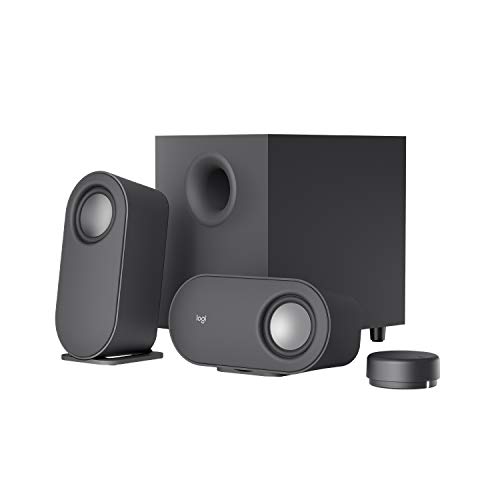
Logitech Z407 — Best wireless control
Every Bluetooth speaker system answers the question “how do I connect?” The Z407 is the one that also answers “and then how do I control it from the sofa?” Its puck-shaped wireless dial detaches the volume control from the speaker entirely: turn it to change volume, press it to play or pause, keep it on the desk, the arm of the chair or the kitchen counter while a podcast follows you around the room. It sounds like a gimmick for exactly one day, after which reaching for a speaker-mounted knob feels like writing a letter by hand.
The system behind the dial is a well-judged desk 2.1: two compact satellites with a clean, modern finish, a ported subwoofer sized for a floor beside a desk rather than a cinema, and three ways in — Bluetooth for the rotating cast of devices, USB audio for the computer that lives there, and analogue for everything else. Sound is balanced and friendly, with the subwoofer adding body to music and streaming video without the one-note thump that plagues cheap sets; the satellites keep voices forward, which flatters the podcasts and calls this system will spend its life playing. Bluetooth behaviour is the grown-up kind: pairing is quick, reconnection after sleep is prompt, and switching between the wired computer and a phone does not require a settings expedition.
The compromises are honest ones. This is not the loudest system in the guide, nor the one with the deepest sub-bass; Klipsch and Razer below both out-muscle it. The dial, for all its charm, is one more small object a household can misplace, and its battery will eventually need attention. But as a complete answer to the question this keyword asks — a 2.1 system built around wireless convenience — nothing else here is as thoughtfully assembled.
- Layout: two satellites plus ported subwoofer
- Inputs: Bluetooth, USB audio, 3.5mm analogue
- Control: separate wireless dial for volume and playback, works across the room
- Voicing: balanced, voice-forward satellites with a restrained subwoofer
Strengths
- The wireless dial genuinely changes daily habits — control leaves the desk.
- Three input types cover laptop, phone and legacy gear without adapters.
- Reconnects after sleep quickly and without drama.
Trade-offs
- Subwoofer depth and maximum volume trail the Klipsch and Razer below.
- The dial is losable, and it needs its battery looked after.
- No optical input for a television-first setup.
Best for: mixed-device households and anyone whose listening wanders around the room. Not suited for: buyers chasing maximum bass weight, or desks where small loose objects vanish.
Live with the dial for a month and subtler virtues appear. Because it is not attached to anything, it ends the tyranny of the master volume buried in whichever application is playing; a knock at the door, a sleeping child, a sudden advertisement — all are answered by the same reach-and-turn reflex, without hunting for a window or a phone. Logitech also kept the satellites’ own controls minimal in its honour, which keeps the desk visually quiet. The dial is, in the end, an argument that the best interface for a wireless system is a physical object that can wander — and it is the single feature in this guide we expect every rival to imitate within a product cycle or two.

Klipsch ProMedia 2.1 — Best sound pedigree
The ProMedia 2.1 has been the answer to “what should I plug into my computer?” for so long that its Bluetooth generation arrives with something to prove: that the famous formula survived the addition of wireless. It has. The satellites keep their horn-loaded tweeters — the Klipsch signature, borrowed from the company’s loudspeaker heritage — which give the system its lively, projected top end and its ability to make dialogue and acoustic detail feel present rather than polite. The subwoofer, a side-firing design with a front port, supplies the low end with an authority none of the convenience-led rivals match.
Bluetooth here is an addition to a wired-first system rather than the system’s reason to exist, and the character follows from that. Pairing is straightforward, the connection is stable at desk range, and a phone streams to it happily — but there is no control pod, no app ecosystem, no multi-device theatre. The controls live on the satellite in the traditional way, and the system’s party trick remains what it always was: sounding bigger, cleaner and more confident than its size and class suggest, with THX certification backing the claim that movies and games were part of the design brief from the start.
Choose it when the wireless requirement is real but secondary — you want the phone to connect without a cable, and you want the best-regarded sound in the class when it does. Its satellites are also the most placement-sensitive here; give the horns a clear line to your ears and the system rewards you, bury one behind a monitor and it will tell you about it.
- Layout: two horn-loaded satellites plus side-firing ported subwoofer
- Certification: THX-certified desktop system
- Inputs: Bluetooth plus wired analogue
- Controls: on-satellite volume and level controls, traditional layout
Strengths
- The most authoritative sound in this guide, especially for film and games.
- Horn-loaded satellites project detail and dialogue with unusual clarity.
- Two decades of production behind the design; a known quantity.
Trade-offs
- Bluetooth is functional rather than feature-rich — no remote or app control.
- Satellites need a clear line to the listener to give their best.
- Subwoofer is the largest here; small floors should measure.
Best for: listeners who want wireless as an option but sound as the priority. Not suited for: buyers who want room-wide remote control or a minimalist control scheme.
It is worth stating plainly who should not buy the ProMedia for this keyword: the household that will use Bluetooth as the main connection every day and wants the switching to be invisible. That household is the Z407’s, and forcing the Klipsch into the role breeds small daily frictions — reaching for the satellite controls, re-establishing which device owns the connection — that have nothing to do with its sound. Judged on the days when the cable or the pairing feeds it a film, a game or a record, the ProMedia remains the system the others are measured against; judged as a wireless appliance, it is a classic with a modern port, and the guide’s badges reflect that distinction honestly.

Razer Nommo V2 — Best premium wireless set
The Nommo V2 is what happens when a gaming company designs a Bluetooth 2.1 system without a budget committee in the room. The satellites carry full-range three-inch drivers in rear-projection housings that throw their Chroma lighting onto the wall behind the desk; the subwoofer fires downward through a five-and-a-half-inch driver, using the floor itself as part of the acoustic design; and control arrives through a wireless pod that handles volume and source duties from wherever your hand prefers to be. THX spatial audio processing widens the soundstage for games and film beyond what two small cabinets should manage.
Wireless is woven through the whole product rather than bolted on: Bluetooth connects the phone or a handheld, the pod removes the need to touch the speakers, and the wired USB path remains for the PC where latency matters. The sound is bold — deep, present bass, a wide stage, and an excitement to effects and scores that flatters entertainment first and neutral accuracy second. It is also, unavoidably, a statement object: the lighting, the shapes and the sheer presence of the subwoofer announce a gaming desk, and in a sober home office that announcement may not be welcome.
Buyers should also understand the ecosystem gravity. The lighting and spatial features are at their best inside Razer’s software world, which PC players already inhabit and Mac households may not. Within that world, this is the most complete premium answer to the keyword; outside it, the Z407’s simpler virtues compete hard for less money and less desk.
- Layout: two full-range satellites plus down-firing subwoofer
- Audio features: THX spatial audio, rear-projection Chroma lighting
- Inputs: USB for PC, Bluetooth for mobile and handhelds
- Control: wireless pod for volume and source selection
Strengths
- The widest, most cinematic soundstage in this guide.
- Wireless control pod keeps adjustment off the speaker cabinets.
- Down-firing subwoofer delivers real low-end presence for film and play.
Trade-offs
- Premium pricing and a gaming aesthetic that dominates a desk.
- Best features assume life inside the maker’s software ecosystem.
- Subwoofer footprint and output are overkill for small shared rooms at night.
Best for: gaming desks that also stream everything else, and buyers who want the flagship version of this idea. Not suited for: minimalists, sober offices, or strict budgets.
The Nommo V2 also makes the strongest case here for the subwoofer as an experience rather than a specification. Down-firing designs load the floor, so the bass is felt through the chair and the desk as much as heard, and in games and film that physicality is the difference between watching an explosion and being present at one. The discipline required is neighbourly: the same coupling that thrills at eight in the evening travels through a floor at midnight, and owners in flats learn the subwoofer’s level control the way drivers learn a clutch. Razer gives you the power; the judgement, as ever, is outsourced to the buyer.
Harman Kardon SoundSticks 4 — Best looking (prose-only)
Some objects are bought with the eyes and justified with the ears, and the SoundSticks have been that object in computer audio for a generation. The transparent satellites and the domed subwoofer — a design exhibited in museums — turn a desk system into a piece of industrial art, and the current generation adds Bluetooth so the sculpture can stream from a phone without a cable spoiling the line. Sound is warm, spacious and more room-oriented than desk-oriented; this system has always behaved like a small living-room hi-fi that happens to accept a computer.
We discuss it in prose because we could not verify a clean listing for it at the standard this site requires, and we flag the practical cautions ownership brings: the controls are minimal touch surfaces on the satellite, the cable dressing matters because everything is visible, and the subwoofer’s dome is a dust magnet that rewards a housekeeping habit. None of that dents its appeal for the buyer it suits — someone furnishing a beautiful room who wants wireless streaming and refuses a black box. It earns its place in this guide as the reminder that in this category, appearance is a legitimate specification.
- Layout: two transparent satellites plus domed subwoofer
- Inputs: Bluetooth streaming plus wired connection
- Controls: minimalist touch controls on the satellite
- Character: warm, room-filling, design-led
Strengths
- An iconic design no rival in this guide approaches.
- Bluetooth keeps cables from spoiling the sculpture.
- Sound fills a room more gracefully than most desk systems.
Trade-offs
- Minimal controls; no remote or control pod.
- Transparent cabinets show dust and cables alike.
- Voiced for ambience rather than nearfield precision.
Best for: design-led rooms and buyers furnishing a space, not just a desk. Not suited for: control freaks, or anyone who hates dusting.
Edifier S350DB — Best bookshelf-style set (prose-only)
The S350DB is the hi-fi traditionalist’s entry in a wireless guide: wooden bookshelf satellites with proper tweeters, a substantial eight-inch subwoofer, and an input panel that reads like a small amplifier’s — Bluetooth for the phone, optical for a television, coaxial and analogue for the rest. Where the Z407 thinks about how you control a system, the Edifier thinks about what a system connects to, and for a desk that doubles as a media corner it is a compelling answer.
Sound follows the hardware: fuller and more composed than the compact sets, with satellites that behave like real speakers because they are real speakers, and a subwoofer that can be tamed with its own level control rather than endured. The remote handles the daily duties, though Bluetooth source-switching is a more deliberate affair than on the Z407 — this system expects a primary source and occasional guests, not a constant rotation. We list it in prose for the same verification reason as the SoundSticks above; buyers who find a clean listing from a reputable seller will find the most conventionally hi-fi system in this guide waiting for them.
- Layout: two wooden bookshelf satellites plus 8-inch subwoofer
- Inputs: Bluetooth, optical, coaxial and analogue
- Controls: remote control plus subwoofer level adjustment
- Character: composed, full, hi-fi leaning
Strengths
- The broadest input panel here — a television joins without adapters.
- Real bookshelf satellites give the most speaker-like midrange in the guide.
- Subwoofer level is independently adjustable.
Trade-offs
- Largest total footprint; a media corner rather than a laptop desk.
- Source switching is deliberate, not instant, between Bluetooth devices.
- No wireless control accessory in the Z407’s league.
Best for: desk-and-TV hybrid setups that want one system for everything. Not suited for: small desks, or households rotating three phones through one speaker daily.
The S350DB’s subwoofer deserves its own sentence of respect: an eight-inch driver in a proper enclosure is a different instrument from the compact cubes that ship with convenience-led sets, capable of the low, unforced bass that film scores and organ music ask for. The corollary is placement discipline — a subwoofer this capable in a small room needs its level set with restraint, or it will rearrange the mix in its own favour. Owners who do that work get the closest thing in this guide to a small hi-fi with a wireless door, which is precisely the buyer Edifier designed it for.
Klipsch ProMedia Heritage 2.1 — Best retro-styled set (prose-only)
Klipsch sells two ProMedia systems, and confusing them is the easiest mistake in this category. The Heritage edition wraps the 2.1 idea in the company’s classic styling — wood-veneer satellites with woven grilles that would look at home beside a seventies receiver — and tunes the result toward music, with Bluetooth as the modern concession that lets a phone feed it. Think of it as the ProMedia’s tailored sibling: same family confidence, dressed for a listening room rather than a battlestation.
In practice it suits the reader whose desk is really a music corner: vinyl through the wired input by day, a phone’s streaming library by night, the subwoofer adding the foundation that small wooden satellites cannot. It lacks the THX certification and the gaming posture of its sibling, and its controls are as traditional as its clothes. We include it in prose, unverified listing and all, because buyers drawn to the standard ProMedia’s sound but repelled by its gaming-adjacent looks deserve to know the alternative exists — and because its existence proves how far the Bluetooth 2.1 idea has travelled, from gaming desks to furniture that predates them by half a century in spirit.
- Layout: two wood-veneer satellites plus subwoofer
- Inputs: Bluetooth plus wired analogue
- Styling: heritage wood finish with woven grilles
- Character: music-first tuning, traditional controls
Strengths
- Furniture-grade looks that suit listening rooms and studies.
- Bluetooth modernises a deliberately classic design.
- Music tuning flatters records and streaming alike.
Trade-offs
- No THX certification or gaming features, unlike its sibling.
- Traditional controls only — no pod, no app.
- Premium positioning for what is, acoustically, a lifestyle variant.
Best for: music-first desks in rooms with a vintage or wooden aesthetic. Not suited for: gamers, or buyers who want the standard ProMedia’s certification and edge.
A practical footnote for SoundSticks admirers: because the design is the product, placement is a decorating decision as much as an acoustic one. The satellites want to be seen, which means on the desk rather than hidden behind a monitor, and the subwoofer’s dome reads best on the floor in open view rather than buried in a corner tangle of cables. Rooms that can offer that stage get a system guests ask about; rooms that cannot will find the magic considerably reduced, and those buyers are better served by the S350DB’s honest wooden boxes or the Z407’s discretion.
What Do Bluetooth Versions and Codecs Mean at a Desk?
Buyers meet two pieces of jargon in this category and deserve plain translations. The version number — Bluetooth 5.0 and its successors — mostly governs range, power draw and how gracefully a connection coexists with a crowded radio environment. At desk distances the practical difference between recent versions is small; through walls and across rooms, the newer versions hold a connection with noticeably better manners. Every linked pick in this guide uses a current-generation radio, and none should be bought or rejected on the version digit alone.
Codecs decide how the music itself is packaged for the journey. The baseline codec every device speaks is serviceable; the better ones, supported by the premium picks and by most modern phones, preserve more detail and, in the low-latency variants, shrink the delay that matters for video. The honest summary is that codec support is a tiebreaker, not a headline: it refines a good system rather than rescuing a poor one, and the subwoofer under your desk contributes more to your evening than the difference between two competent codecs ever will. What you should verify is simpler — that your phone and the speaker share at least one good codec, which in practice they almost always do.
How Does a Shared Household Change the Right Answer?
A desk in a shared home is a small parliament of devices, and the best system is the one whose politics are peaceful. Consider the daily pattern: a work laptop owns the desk until evening, a phone drifts in and out with its owner, a partner’s tablet appears for a film, and a child’s handheld wants the speakers on weekends. Systems with generous device memory and sane switching — the Z407 above all — absorb that pattern without negotiation. Wired-first systems with Bluetooth as a guest feature, like the ProMedia pair, serve it adequately provided the household accepts a small pairing ritual when the guest changes.
There is also a volume politics to shared homes. A subwoofer that charms at seven in the evening can be a diplomatic incident at midnight, and the systems that age best in flats and family houses are those with an easily reached subwoofer level or a night-friendly balance — another quiet point for the Z407’s dial, which lets a listener trim the whole system from the sofa without a phone, an app or a walk. Buy for the household you actually live in, at the hours you actually listen, and the system will feel designed for you even when it was not.
One honest limitation follows the Heritage home: it is a two-source system in spirit — the turntable or computer on the wire, the phone on the radio — and households wanting a genuine rotation of devices will feel the same deliberate switching as on its sibling. What it returns for that simplicity is calm. Nothing about it glows, chimes, updates or asks for an account; it sits in a room like furniture that happens to sing, and for a certain kind of buyer that temperament is not a compromise but the entire point of the purchase.
How Do the Six Systems Compare on Wireless Life?
| System | Wireless control | Wired fallbacks | Temperament | Listing |
|---|---|---|---|---|
| Logitech Z407 | Separate wireless dial | USB, analogue | Convenience-led | Linked |
| Klipsch ProMedia 2.1 | On-satellite controls | Analogue | Sound-led | Linked |
| Razer Nommo V2 | Wireless pod | USB | Premium gaming | Linked |
| Harman Kardon SoundSticks 4 | Touch controls | Analogue | Design-led | Prose-only |
| Edifier S350DB | Remote control | Optical, coaxial, analogue | Hi-fi led | Prose-only |
| Klipsch ProMedia Heritage 2.1 | On-satellite controls | Analogue | Retro music | Prose-only |
The table’s lesson is that “Bluetooth” is one word covering three different products: a control revolution (Z407, Nommo V2), a cable-removal feature on a classic system (both Klipsch models), and one input among many on a hi-fi hub (S350DB). Decide which of those you are actually buying before comparing prices, because they are not substitutes for one another.
How Do You Judge a Bluetooth Connection Before You Buy?
Four behaviours separate a good wireless desk system from a frustrating one, and none of them appears in a specification headline. The first is memory: how many devices the system remembers, and whether returning to a remembered device is automatic. A household desk rotates a work laptop, a personal phone and perhaps a tablet; a system that remembers only the last pairing turns every rotation into a settings visit. The second is reconnection speed after sleep — the difference between music resuming as you sit down and a thirty-second ritual you perform twice a day until you stop using the feature.
The third is switching discipline. When two remembered devices are in range, who wins? The civilised systems take the most recent active source and hold it; the uncivilised ones let a partner’s phone hijack a film because it received a message alert. The fourth is range honesty: Bluetooth through a human body, a monitor and a desk full of metal is a shorter distance than the open-air figure on the box, and a system that stutters at three metres through furniture will stutter in your home whatever the packaging promises. Reviews and return windows are your instruments here — buy from a seller whose returns let you test these behaviours in your own radio environment, because no laboratory figure substitutes for your walls.
How Do Satellites and Subwoofer Divide the Work in a 2.1 System?
A 2.1 system is a partnership with a negotiated border. The subwoofer handles the low frequencies the small satellites cannot move enough air to produce; the satellites handle everything directional — voices, instruments, the cues that tell you where a sound lives. The crossover is the border crossing where the two hand over, and its quality decides whether the partnership sounds like one instrument or like two boxes arguing politely. The better systems here — the Klipsch pair and the S350DB especially — cross over low enough and cleanly enough that the subwoofer disappears as a location; you hear bass, not a box producing bass near your left foot.
That invisibility is the test to apply in the first week. Play speech: if a male narrator’s voice seems to come partly from the floor, the subwoofer is working too high or too loud, and a small level reduction restores the illusion. Play a piano recording: the left hand should sound like the same instrument as the right, not like a relative visiting from under the desk. When both tests pass, the system has achieved what the format promises — the scale of a bigger speaker with the footprint of a small one — and the wireless layer on top becomes pure profit.
Where Should the Subwoofer Live, and How Do You Tame It?
Every system in this guide ships its bass in a separate box, and that box’s address decides how the whole system sounds. Under the desk, roughly centred and a little away from the wall, is the default for a reason: the floor and the desk cavity reinforce the low end evenly, and your feet learn its position within a day. Corners multiply bass — sometimes pleasingly, often into boom — so a corner placement should be paired with turning the subwoofer’s level down, where the model provides a control, or with the source’s equaliser where it does not.
Taming is a two-minute ritual worth doing once. Play a familiar track with a steady bassline, start with the subwoofer level at its middle, and adjust until the bass sounds like part of the music rather than a separate event happening near your shins. Then play a dialogue-heavy clip and confirm voices have not thickened; if they have, the crossover region is overlapping and a small reduction fixes it. Wireless buyers get one bonus here: because the source is not tethered, you can perform this adjustment from your chair with the phone in your hand, which is the first time in the history of subwoofer setup that the listener has been in the listening position while adjusting. Use the luxury.
How Do You Set Up a Wireless 2.1 System on the First Evening?
Begin wired, counterintuitive as that sounds. Connect the computer by cable first and confirm the system works, the satellites are on the correct sides and the subwoofer level sits in a sane place; a known-good wired baseline makes every later wireless question answerable. Then pair the phone, play something familiar, and walk the room with it — into the kitchen doorway, behind the sofa — learning where your walls let the connection live. That five-minute survey teaches you more about your own radio environment than any specification, and it tells you whether the system can serve the whole room or only the desk’s neighbourhood.
Finish with the custody rules. Decide which two or three devices are citizens and pair only those; set the computer’s wired input as the default for calls; and place the control — dial, pod or remote — where the listening actually happens rather than where the speakers happen to be. Owners who do this once, on the first evening, describe their systems as effortless for years. Owners who skip it describe the same hardware as temperamental, which tells you where the temperament usually lives.
What Should Gamers and Call-Heavy Workers Take From a Bluetooth Guide?
Permission to split the difference. Nothing in this guide asks you to choose a single connection for everything: the winning pattern for a working, playing desk is a wired feed for the machine that hosts meetings and matches, and Bluetooth for everything the phone and the room contribute. Latency-critical audio never touches the radio; music and video enjoy the freedom. The Z407 and Nommo V2 are built around exactly that duality, and even the wired-first Klipsch models accommodate it — the cable for the computer, the pairing for the phone, and no daily re-plugging for anyone.
One specific warning for call-heavy workers: a Bluetooth speaker is an output, not a meeting solution. Your voice still travels through whatever microphone your setup provides, and a speaker playing a meeting into the room will feed that microphone unless the software’s echo handling is good. Many workers therefore keep calls on the wired input at modest volume or on a headset, and let the 2.1 system handle everything else. That is not a failure of the category; it is the category knowing its job.
Which Rooms Flatter a Wireless 2.1 System, and Which Fight It?
The format’s natural home is the open, multi-use room: the living room with a desk in the corner, the studio flat, the family kitchen-diner where one good set of speakers can serve work, cooking and film without belonging to any single chair. In those rooms the wireless source rotation is used hourly and the subwoofer’s presence justifies its floor space every evening. Small, soft-furnished rooms flatter the sound too, because the bass stays contained and the satellites’ job is easy.
The rooms that fight it are the extremes. A tiny bedroom shared with a sleeping partner turns the subwoofer into a negotiation, and a stereo pair or headphones serve better there. A large, hard-surfaced hall asks more output than desk satellites own, and exposes Bluetooth’s range limits at the far corners. And a dedicated single-machine office, where the computer never leaves and nobody streams from a phone, gains the least from the wireless layer — the wired sibling guides on this site will serve that reader better, and we would rather say so than sell the wrong tool.
What Mistakes Do Buyers Make With Wireless Desk Systems?
The commonest is expecting Bluetooth to be the only connection they will ever need, then discovering latency in a game or a video call with lip-sync drift. Every pick here keeps a wired path for a reason; use it for the machine that hosts calls and games. The second mistake is judging the subwoofer at shop volume — bass that thrills in a demo overwhelms a bedroom at midnight, and the systems with independent subwoofer control age better in real homes. Third, buyers pair every device they own on day one and then blame the speaker for the ensuing custody battle between a laptop and a phone; pair the two or three devices that genuinely rotate, and leave the rest uninvited. Fourth, shoppers overlook the control question entirely, then spend years walking to a desk to adjust a system that was bought, supposedly, for convenience.
How Does Bluetooth Change the Way a Desk System Ages?
Wired speakers age at the speed of acoustics, which is barely at all; wireless systems also age at the speed of radios and software, which is faster, and buyers deserve to hear the difference stated plainly. A Bluetooth system bought today will still pair with phones for many years — the standard is admirably backward-compatible — but its conveniences live closer to the moving frontier: pairing behaviours, codec support and control accessories evolve, and a control dial or pod is a small electronic object with a battery’s lifespan rather than a driver’s.
The practical conclusion is not to avoid wireless — this entire guide argues the opposite — but to buy wireless systems whose wired paths are complete in their own right. Every linked pick here remains a fully capable desk system if its radio were ignored entirely, and that is the correct insurance policy: the Bluetooth is the bonus that transforms daily life now, the cables are the foundation that guarantees the system still earns its desk in a decade. Systems that are wireless-only, with no honest wired fallback, ask you to bet the whole purchase on the frontier; none of the six in this guide makes that demand, and the prose-only three are no exception.
There is a gentler side to the same coin. Because the source is no longer tethered, a Bluetooth 2.1 system tends to be used more — by more people, for more kinds of listening, in more corners of the home — than the wired system it replaces. Hours of use are the truest measure of value in audio, and on that measure the wireless premium, where it exists, usually pays for itself in the first year.
How Do Music, Film and Games Divide on a Wireless System?
Music is Bluetooth’s home ground. It tolerates the small latency completely — a song does not care when it starts — and the freedom to carry the source around the room turns a desk system into a home system for the hours when nobody is sitting at the desk. This is where the format earns its keep most quietly: cooking with a podcast from the good speakers, cleaning with a playlist at honest volume, a phone on the counter and the sound still anchored to the best drivers in the flat.
Film sits one step stricter. A fraction of delay between lips and words is the threshold, and modern systems with current codecs usually stay on the right side of it when the source is a phone or a recent laptop; an older television’s Bluetooth output is the least predictable partner and the one most likely to need the wired or optical route instead. Games are the strictest judge of all and the verdict is consistent across this guide: story-driven and casual play forgives wireless, competitive play does not, and every system here was designed by people who knew that — which is why the cable never left the box.
Final Recommendation
Buy the Logitech Z407 if the wireless life is the point — and for this keyword, it usually is. Its dial is the rare feature that changes behaviour rather than decorating a box, and the system behind it is balanced, friendly and honest about its limits. Step up to the Klipsch ProMedia 2.1 when sound pedigree outranks control cleverness, and to the Razer Nommo V2 when the desk is a gaming desk and the budget allows the flagship. Whichever you choose, keep the cable connected for games and calls, and let Bluetooth do what it is genuinely brilliant at: making the speakers belong to the whole room instead of to one machine.
What Do You Do When the Wireless Side Misbehaves?
Nearly every wireless fault at a desk has a mundane cause, and a short ritual resolves most of them. If a remembered device will not reconnect, toggle its Bluetooth off and on before touching the speaker; the phone’s radio, not the speaker, is the usual amnesiac. If two devices keep stealing the connection from each other, unpair the one that should be a guest rather than a citizen — custody battles are a pairing-list problem, not a hardware fault. If the sound stutters, move the source out of the metal shadow of the desk or off the far side of your own body; a metre of repositioning outperforms any setting.
Interference deserves one specific mention in this category: the 2.4 GHz neighbourhood a Bluetooth system lives in is shared with wireless mice, older Wi-Fi and microwave ovens, and a stutter that appears at lunchtime and vanishes after is a kitchen appliance introducing itself. Finally, if a control dial or pod stops responding while the speakers themselves play on, suspect its battery before suspecting the system — the accessory ages on a battery’s schedule, not a speaker’s. None of the six systems here is known for chronic wireless faults; the ritual above is the difference between a five-minute fix and an unnecessary return.
What Does the Wiring That Remains Actually Look Like?
Wireless in this category is a reduction of cables, not their abolition, and buyers deserve a truthful inventory before the box arrives. The subwoofer still needs mains power and still connects to the satellites with speaker cables; the satellites still need a home either side of the screen. What disappears is the tether between the system and the source — which happens to be the cable that crossed the desk, dictated where the laptop could sit, and got unplugged every time anything moved. The cables that remain live behind and below the desk, installed once and forgotten.
Plan that installation as a one-time act of tidiness. Route the satellite leads together, leave the subwoofer enough slack to be pulled out for cleaning, and keep its power lead off the same strip position as the computer’s charger if you want to eliminate any chance of hum. Households that spend twenty minutes on this on day one never think about it again; the wireless layer then does the daily work, and the remaining copper becomes what it should have been all along — infrastructure, invisible and unthanked.
Frequently Asked Questions
Does Bluetooth sound worse than a wired connection on these systems?
Slightly different, rarely worse in practice. Modern codecs carry music well at desk distances, and most listeners cannot reliably separate the two in casual listening. The wired path still wins for critical listening and for anything where timing matters.
Can I leave the wired input and Bluetooth connected at the same time?
Yes — that is the recommended arrangement on every pick here. The computer stays wired for calls and games, the phone pairs wirelessly for music, and you switch sources rather than cables.
How far from the speakers can the Z407’s dial work?
It is a Bluetooth control, so it works across a typical room rather than merely across a desk. Walls and metal furniture shorten any wireless range, but within one room it behaves as advertised.
Will a Bluetooth 2.1 system work with a television?
If the television offers Bluetooth audio output, yes, though lip-sync varies by set. The Edifier S350DB’s optical input is the more dependable route for a TV-first setup, which is one reason it appears in this guide.
Do I need to unplug the cable when I use Bluetooth?
No. Leaving the wired connection in place is the arrangement this guide recommends: the system simply plays whichever source you select, and the cable waits silently for the moments — games, calls, critical listening — when it is the better tool. Unplugging and replugging daily would defeat the convenience the format exists to provide.
Why are three picks prose-only?
Because we could not verify clean, current listings for them at the standard this site requires, and we do not attach purchase links we cannot stand behind. They are included because they are real contenders; buy them through the makers’ own stores or a seller you trust.
Related Guides
For neighbouring questions, see our guides to stereo desktop speakers without subwoofers, gaming speakers built for play, wired 2.1 systems judged on value and 5.1 systems for PC surround.


