What's inside
- Key Takeaways
- Quick Picks
- How Did We Choose the Best Acer Laptops for Home Use?
- What Should a Family Look for in a Home Laptop?
- Which Ports and Extras Actually Matter Around the House?
- Our Six Acer Picks for Home Use, Reviewed in Detail
- How Do the Six Picks Compare Side by Side?
- How Should You Set Up a New Home Laptop on Day One?
- What Mistakes Do Families Make When Buying a Home Laptop?
- How Much Performance Does Each Person in the House Need?
- What About Wi-Fi, Sound and the Rest of the Home Setup?
- How Do You Keep a Shared Family Laptop Safe and Tidy?
- When Is Something Else the Better Home Buy?
- How Does a Home Laptop Fit Each Room in the House?
- What Should You Check in the First Week of Ownership?
- How Do Acer’s Model Names Decode for Home Buyers?
- Should a Household Buy During a Sale or Consider Refurbished?
- How Should You Handle the Old Laptop the New One Replaces?
- Final Recommendation
- Frequently Asked Questions
- Related Guides
As an Amazon Associate I earn from qualifying purchases. This post may contain affiliate links at no extra cost to you.
widgetverdict.com is reader-supported. When you buy through links on our site, we may earn an affiliate commission.
A home laptop lives a harder life than most office machines. It handles the morning email check, a child’s homework project at the kitchen table, the household budget spreadsheet, a video call with grandparents, and a film streamed on the sofa after dinner — often all in the same day, passed between three different people. The best Acer laptops for home use are the ones that survive that rotation gracefully: a screen big enough for side-by-side documents, a keyboard nobody complains about, enough memory that twelve browser tabs do not slow the machine to a crawl, and a price that leaves room in the family budget for everything else. Acer’s Aspire line was practically built for this brief, and this guide works through six models that cover the main household roles, from the cheapest sensible second machine to a gaming-capable laptop that doubles as the family entertainment hub.
Where to buy: every pick below links to a checked Amazon listing, so you can confirm the exact configuration before ordering. Acer sells several near-identical variants of each model with different memory and storage, and the listing page is where you verify the one in your cart matches the one reviewed here. Prices shift with seasonal sales, so use the check-price link at the moment you are ready to buy rather than trusting any figure quoted elsewhere.
Key Takeaways
- The Acer Aspire 5 A515-56 is the safest single recommendation for most households: a 15.6-inch Full HD screen, sensible ports and a price tier that rarely causes regret.
- Memory matters more than processor badges for home use — 16GB keeps a shared family machine feeling quick for years, while 8GB is fine only for light, single-user duty.
- The Aspire 3 A315-24P covers homework, browsing and streaming at the lowest cost in this roundup, provided you accept a dimmer screen and slower charging.
- Households that game or edit video should skip straight to the Nitro V models; integrated graphics in the Aspire range handle casual titles only.
- A 14-inch Aspire 5 suits a dedicated home-office desk better than the bigger models, thanks to its sharper WUXGA panel and smaller footprint.
- Buy storage generously at purchase time, because most thin Acer models make later upgrades awkward or impossible.
Quick Picks
| Pick | Badge | Why it earns its place |
|---|---|---|
| Acer Aspire 5 A515-56 (Core i3) | Best for most homes | A roomy 15.6-inch IPS screen and a calm, capable spec sheet make it the default family laptop. |
| Acer Aspire 5 14 (Core i7-1355U) | Best home-office pick | A sharp 16:10 display and a strong processor suit long document days at a proper desk. |
| Acer Aspire 3 A315-24P (Ryzen 3) | Best budget pick | It trims the extras and keeps the essentials, which is exactly what a homework-and-browsing machine needs. |
| Acer Aspire Go 15 | Best simple second laptop | An uncomplicated, affordable machine for the spare room, the kitchen counter or a relative who wants no fuss. |
| Acer Nitro V (Core i5, RTX 4050) | Best for family gaming | Real graphics hardware turns the home laptop into a credible evening gaming rig. |
| Acer Nitro V 16 (RTX 5050) | Best big-screen option | A 16-inch panel and newer graphics give creators and gamers the most headroom in this list. |
How Did We Choose the Best Acer Laptops for Home Use?
We started from the jobs a home laptop actually gets given, not from benchmark charts. The first filter was screen quality, because a household machine spends its life showing homework documents, recipe videos, photo libraries and streamed films; every pick here has at least a Full HD IPS-class panel, since dim, washed-out screens are the complaint families voice most often a year after buying cheap. The second filter was memory and storage headroom. Shared machines accumulate accounts, school platforms, photo backups and games, so we favoured configurations that will not feel full or sluggish by the second year.
Ports earned real weight in the scoring. Home laptops get plugged into televisions, printers, external drives, webcams and the family router far more often than ultraportables do, so a full-size HDMI port and several USB sockets counted for more than a few millimetres of thinness. We also weighed keyboard comfort and webcam quality, because homework essays and family video calls are daily events, and we checked that each model’s cooling stays quiet enough for a living room. Finally, we spread the six picks across price tiers deliberately: a household replacing a dead laptop this week needs a different answer from one planning a five-year purchase, and a guide that only recommends the expensive option helps neither.
What Should a Family Look for in a Home Laptop?
Start with the screen, since it is the part everyone stares at for hours. A 15.6-inch Full HD panel is the sweet spot for a machine that mostly lives at home: text stays readable without squinting, two windows sit side by side comfortably, and films look properly cinematic on a coffee table. Resolution beyond Full HD helps photo editors and spreadsheet devotees, but for general family duty it mainly costs money and battery. Brightness matters more than most buyers realise — a panel that looks fine in a shop can struggle in a sunlit kitchen, so an IPS panel with decent brightness is worth prioritising over a slightly faster processor.
Next, think about memory as the machine’s patience. With 8GB, a laptop handles browsing, documents and streaming perfectly well, right up until a video call, a dozen tabs and a cloud backup all collide; then the pauses begin. With 16GB, those collisions mostly disappear, and the laptop keeps feeling responsive years longer. Storage follows the same logic: photos and school projects pile up quietly, and a cramped drive produces the weekly frustration of deleting things to make room. A 512GB solid-state drive is the comfortable home standard; 256GB works only if your household genuinely lives in cloud storage.
Processor choice can stay refreshingly simple. For browsing, office apps, homework platforms and streaming, any current Core i3, Core i5 or Ryzen 3/5 class chip is plenty, and the difference between them will rarely be felt. Step up in processor only when someone in the house edits video, works with large spreadsheets, or plays games — and for games, the graphics chip matters far more than the processor badge, which is why the Nitro models appear in this guide despite their gaming branding. Battery life, interestingly, ranks lower for home use than for travel machines: most family laptops migrate between two or three sockets in the house, so a solid six to eight hours matters more as insurance during a power cut or a garden working session than as a daily requirement.
One more screen consideration separates happy households from quietly annoyed ones: how the display behaves for the person doing the household’s paperwork late in the evening. A keyboard deck that stays cool, a screen that tilts far enough back for someone working from the sofa arm, and a trackpad large enough for spreadsheet selections without a mouse all sound trivial in a shop. Across hundreds of evenings they compound into either contentment or a low-grade irritation that nobody can quite name. If you can, picture the actual posture of the person who will use the machine most — slumped at the kitchen island, upright at a desk, propped in bed finishing a report — and let that image arbitrate between the 14-inch and 15.6-inch picks more than any benchmark does.
Which Ports and Extras Actually Matter Around the House?
HDMI is the unsung hero of the home laptop. It turns the machine into a film player on the television, a presentation box for school projects, and a second-screen workstation when a spare monitor is available. USB-C is catching up — it simplifies docking and charging — but a home laptop still earns its keep with ordinary USB-A sockets for the printer, the mouse dongle and the drawer full of flash drives nobody wants to adapt. An Ethernet port, rare on thin models, quietly solves the mystery of the one room where Wi-Fi always drops during calls.
Webcam and microphone quality deserve a test in your mind before buying, because they are nearly impossible to upgrade gracefully. A 1080p webcam flatters everyone on family calls; the 720p cameras still fitted to budget models look soft and struggle in lamplight. If the laptop will host work-from-home days, a fingerprint reader saves genuine daily friction, and a backlit keyboard earns its cost the first evening someone types in a dim living room. Speakers are the last consideration: every laptop here sounds acceptable for calls and casual video, but film nights deserve a Bluetooth speaker or headphones regardless of model.
Our Six Acer Picks for Home Use, Reviewed in Detail
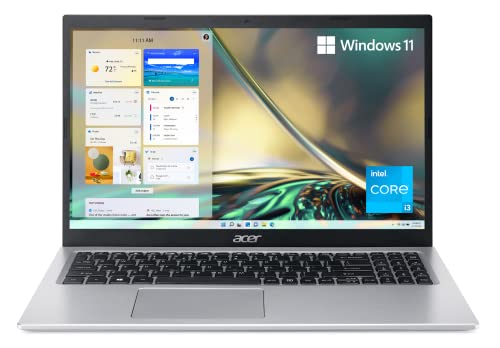
Acer Aspire 5 A515-56 (Core i3) — Best for Most Homes
The Aspire 5 A515-56 is the laptop we would hand to a relative who asked for one recommendation and no homework. Its 15.6-inch Full HD IPS display is the centrepiece: colours stay honest when three people crowd around it to look at holiday photos, and the matte finish keeps ceiling lights from glaring across the screen during evening homework sessions. The Core i3-1115G4 inside is an older, modest processor on paper, yet for the actual workload of a family machine — browser tabs, Word documents, a homework platform, Spotify in the background — it responds promptly and never makes the machine feel like a compromise.
What lifts this Aspire above cheaper siblings is the completeness of the package. The keyboard has a proper numeric pad, which anyone entering household expenses or helping with maths homework will appreciate within a week. The port selection reads like a checklist written by someone who has actually owned a home laptop: HDMI for the television, Ethernet for the router cupboard, several USB ports in both shapes, and a charging setup that does not demand dongles. The aluminium-topped lid gives it a sturdier feel than its price tier suggests, and the whole machine stays quiet enough that its fan never intrudes on a film.
Its limits are honest ones. The i3 chip and integrated graphics will not edit 4K video happily or run demanding modern games; this is a machine for the everyday, and it knows it. Battery life is adequate for moving between rooms rather than working a full day untethered. But as the household’s default laptop — the one that simply works every time someone opens the lid — the A515-56 remains the easiest recommendation in this guide.
- Display: 15.6-inch Full HD IPS, matte finish
- Processor: Intel Core i3-1115G4
- Graphics: Intel UHD integrated graphics
- Ports: HDMI, Ethernet, USB-C, multiple USB-A
- Keyboard: full-size with numeric pad
Strengths
- Big, pleasant IPS screen for shared viewing
- Port selection covers television, printer and router
- Quiet cooling suits living-room use
Trade-offs
- Integrated graphics limit gaming ambitions
- Battery suits room-to-room use, not full days out
- Older processor generation than newer Aspire models
Best for: families wanting one dependable all-purpose laptop for homework, browsing, documents and streaming.
Not suited for: keen gamers or anyone editing long 4K video projects.

Acer Aspire 5 14 (Core i7-1355U) — Best Home-Office Pick
Some home laptops moonlight as the household’s income earner, and the 14-inch Aspire 5 is built for that double life. The headline difference is the display: a WUXGA panel at 1920×1200 in a 16:10 shape, which shows noticeably more of a document or spreadsheet than a standard Full HD screen before you need to scroll. Across a working day of contracts, budgets and long reports, that extra vertical space is the upgrade you feel most. The Core i7-1355U underneath is the strongest processor among the Aspire picks here, and it chews through heavy spreadsheets, big photo libraries and crowded video calls without the hesitations that plague lesser home machines.
The smaller 14-inch chassis suits a proper desk setup. It leaves room for a notebook, a mug and an external mouse, it slides into a drawer when the workday ends and the dining table must become a dining table again, and it travels to a relative’s house or a café without the shoulder ache of the bigger models. Connectivity is modern — expect to dock it through USB-C to a monitor and peripherals with a single cable, which is exactly how a tidy home office should work.
Choose it with clear eyes about what it is not. The screen, while sharp, is smaller for shared viewing, so family film nights belong on the television via HDMI rather than gathered around this panel. Integrated graphics again cap gaming at casual and older titles. And the i7 configuration costs meaningfully more than the 15-inch i3 model, a premium that only pays back if the laptop genuinely works for a living. For the household’s designated work machine, though, this is the Aspire to buy.
- Display: 14-inch WUXGA IPS, 16:10 aspect ratio
- Processor: Intel Core i7-1355U
- Graphics: Intel Iris Xe integrated graphics
- Form factor: compact 14-inch chassis for desk work
- Connectivity: USB-C docking friendly
Strengths
- Taller, sharper screen shows more of every document
- Strongest processor among the Aspire picks
- Compact body keeps a small desk uncluttered
Trade-offs
- Smaller panel for films and shared viewing
- Premium over the 15-inch Aspire 5 models
- Still integrated graphics, not a gaming machine
Best for: home workers who live in documents and spreadsheets and want one tidy desk machine.
Not suited for: families whose laptop doubles as the main film screen.

Acer Aspire 3 A315-24P (Ryzen 3) — Best Budget Pick
The Aspire 3 exists for a familiar moment: the old family laptop dies on a Sunday, the budget is spoken for, and something competent must arrive by the weekend. Its Ryzen 3 7320U processor is a modern, efficient chip that handles the genuine home workload — web, email, school platforms, video streaming, light document work — without the sluggishness that gave budget laptops their bad reputation a decade ago. Everything opens promptly, films stream smoothly, and the machine stays cool and quiet on a lap.
Acer saves money in the places a careful buyer can live with. The 15.6-inch Full HD screen is large and clear enough for homework and films, though it is less bright and less colour-rich than the Aspire 5’s IPS panel, so a sun-drenched conservatory is not its favourite room. The chassis is plastic rather than metal-topped, the keyboard lacks a backlight, and the webcam is a basic unit that does its job on family calls without flattering anyone. These are trim choices, not defects, and naming them plainly is how a budget laptop should be sold.
The configuration discipline matters more here than anywhere: pick a version with enough storage for your household’s photos and school files, because filling a small drive is the fastest route to hating a cheap laptop. Treated as what it is — an honest, modern machine for everyday tasks — the Aspire 3 is the pick that respects a tight budget without punishing the people who use it every day.
- Display: 15.6-inch Full HD
- Processor: AMD Ryzen 3 7320U
- Graphics: AMD Radeon integrated graphics
- Chassis: lightweight plastic body
- Role: everyday browsing, homework and streaming
Strengths
- Lowest cost of entry in this roundup
- Modern Ryzen chip keeps everyday tasks snappy
- Large screen despite the budget positioning
Trade-offs
- Screen brightness trails the Aspire 5 models
- No keyboard backlight for dim rooms
- Basic webcam quality on evening calls
Best for: households replacing a dead laptop quickly, or buying a dedicated homework machine.
Not suited for: photo editors or anyone bothered by a dimmer display.

Acer Aspire Go 15 — Best Simple Second Laptop
Not every household laptop needs to be the main event. The Aspire Go 15 is Acer’s straightforward, affordable 15-inch machine, and its natural habitats are the spare room, the kitchen counter and the home of a relative who wants to read email, check the news and join family video calls without a machine that intimidates them. Its Intel Core 3 N355 processor is an efficiency-first chip: nobody will edit films on it, but it wakes quickly, browses smoothly and sips power, which suits a laptop that spends much of its life asleep between small jobs.
The Go’s appeal is its lack of theatre. A big, clear screen for ageing eyes, a keyboard with room to breathe, and a setup process that does not demand a teenager’s supervision. For a household, it also makes an excellent dedicated machine for one recurring job: the recipe-and-video station in the kitchen, the homework-overflow laptop during exam season, or the device that stays signed into the family accounts so the main laptop does not have to. Buying a modest second machine is often smarter than stretching one expensive laptop across every demand in the house.
Set expectations before ordering. Performance headroom is limited, so heavy multitasking — a video call layered over twenty tabs and a big spreadsheet — will reveal the budget chip’s ceiling. Storage and memory on base configurations are sized for light duty. None of that matters for the roles described above, and for those roles the Aspire Go 15 delivers exactly the calm, inexpensive competence it promises.
- Display: 15-inch class Full HD screen
- Processor: Intel Core 3 N355
- Graphics: Intel integrated graphics
- Design aim: simple, affordable everyday computing
- Role: second laptop and light single-purpose duty
Strengths
- Approachable price for a second household machine
- Efficient chip wakes fast and runs cool
- Generous screen size for reading and calls
Trade-offs
- Limited headroom for heavy multitasking
- Base storage fills quickly with photos
- Not built for games beyond the casual kind
Best for: grandparents, spare rooms and households wanting a calm dedicated machine for light jobs.
Not suited for: anyone planning to make it a primary work laptop.

Acer Nitro V (Core i5, RTX 4050) — Best for Family Gaming
Every family with a teenager eventually faces the gaming question, and the Nitro V is Acer’s sensible answer. Its Core i5-13420H processor is a step above the Aspire chips in sustained power, and the RTX 4050 graphics card is the real story: it runs current games at respectable settings on the laptop’s own screen, handles the back catalogue beautifully, and gives the household a machine that can also edit the holiday video without turning the task into an overnight render. On school nights it is a homework laptop; on Friday evenings it becomes the entertainment centre. That double identity is precisely what a home purchase should deliver.
The Nitro’s gaming heritage brings practical gifts beyond frame rates. Cooling is more serious than on the thin Aspire models, so long sessions do not cook the keyboard deck, and the chassis makes room for a fuller set of ports plus easier access for anyone comfortable adding storage later. The display is tuned for speed rather than colour accuracy, which gamers prefer and film watchers will not mind.
The compromises are the classic gaming-laptop ones. It is heavier and thicker than the Aspire range, its battery drains quickly away from the socket when the graphics card is working, and the styling announces its intentions more loudly than a minimalist might choose. None of these matter much for a machine that lives at home moving between a desk and the sofa — which is why, for gaming households, the Nitro V earns its place over a prettier ultraportable that cannot play anything.
- Processor: Intel Core i5-13420H
- Graphics: NVIDIA GeForce RTX 4050
- Display: 15.6-inch class, speed-focused panel
- Cooling: dual-fan gaming cooling system
- Role: homework by day, gaming by night
Strengths
- Real graphics card runs current games properly
- Strong cooling for long evening sessions
- Doubles as a capable video-editing machine
Trade-offs
- Heavier and bulkier than the Aspire models
- Short battery life when gaming unplugged
- Styling is bolder than office tastes
Best for: families with a gamer in the house who still need one shared all-rounder.
Not suited for: commuters or anyone prioritising all-day battery.

Acer Nitro V 16 (RTX 5050) — Best Big-Screen Option
The Nitro V 16 is the largest canvas in this guide, and screen size changes how a home laptop gets used. A 16-inch display makes split-screen work genuinely comfortable — research on one side, writing on the other — and it turns strategy games, films and photo editing into a more immersive sit-down experience. This configuration pairs that panel with a Core 5 210H processor and RTX 5050 graphics, the newest generation in the roundup, so it carries the most performance headroom of any pick here for families whose needs will grow into video editing, 3D hobbies or heavier games over the next few years.
Think of it as the household’s desktop replacement. It will spend most of its life on a desk or the dining table, plugged in, possibly feeding an external monitor for the biggest workdays, and its size and weight simply matter less in that role than they would to a traveller. The larger chassis also breathes well, keeping the newer graphics hardware composed during long renders and game sessions alike.
It is, predictably, the most expensive route in this guide and the least portable. Buying it for a laptop that only ever browses and streams would be wasted money — the Aspire 5 does that job for far less. But for the home that wants one machine to anchor serious hobbies and serious work for years, the Nitro V 16 is the Acer with the longest runway.
- Display: 16-inch panel for split-screen comfort
- Processor: Intel Core 5 210H
- Graphics: NVIDIA GeForce RTX 5050
- Role: desktop replacement for the home desk
- Cooling: full-size chassis with room to breathe
Strengths
- Largest, most immersive screen in the guide
- Newest graphics generation with real headroom
- Excellent as a stay-at-home desktop replacement
Trade-offs
- Highest cost among these six picks
- Size and weight discourage daily carrying
- Overkill for browsing-and-streaming households
Best for: creators, gamers and power users anchoring a home desk for the long term.
Not suited for: light users, who should save money with the Aspire range.
How Do the Six Picks Compare Side by Side?
| Model | Screen | Processor | Graphics | Best role |
|---|---|---|---|---|
| Aspire 5 A515-56 | 15.6″ FHD IPS | Core i3-1115G4 | Integrated | All-round family laptop |
| Aspire 5 14 | 14″ WUXGA IPS | Core i7-1355U | Integrated | Home-office desk work |
| Aspire 3 A315-24P | 15.6″ FHD | Ryzen 3 7320U | Integrated | Budget homework machine |
| Aspire Go 15 | 15″ class FHD | Core 3 N355 | Integrated | Simple second laptop |
| Nitro V | 15.6″ class | Core i5-13420H | RTX 4050 | Family gaming |
| Nitro V 16 | 16″ | Core 5 210H | RTX 5050 | Desktop replacement |
How Should You Set Up a New Home Laptop on Day One?
Give the first hour to accounts and updates, and the machine will repay you for years. Run Windows Update until it stops offering anything, because a laptop that sat in a warehouse may be months behind on security fixes. Create a separate account for each regular user — children included — so documents, desktops and browser profiles stay apart, and set the primary adult account as the only administrator. Turn on automatic backups to an external drive or cloud service before the first family photos land on the machine, not after the first scare.
Then do the small things people skip. Uninstall the trial software you will never open, pin the browser and office apps the household actually uses, and test the laptop in its real locations: the kitchen for Wi-Fi strength, the sofa for screen glare, the desk for port reach. Set the machine to sleep rather than shut down for daily use, and show every user where the charging cable lives. While you are at it, label the charger with a strip of tape bearing the laptop’s name, because households accumulate lookalike power bricks and the wrong one always surfaces during a deadline. A home laptop fails socially long before it fails mechanically, and an hour of setup prevents most of the friction.
What Mistakes Do Families Make When Buying a Home Laptop?
The most common mistake is buying for the processor badge and starving everything else. A faster chip cannot rescue a dim screen, a cramped drive or 8GB of memory shared by four accounts; balanced configurations age gracefully, lopsided ones annoy daily. The second mistake is choosing the smallest storage to save a little money, then spending years deleting photos and school projects in rotation. Storage regret arrives faster than any other kind.
Third, families often buy a gaming laptop for a child who plays two casual titles, paying in weight, noise and battery for power that never gets used — or the reverse, expecting an integrated-graphics Aspire to run the newest releases and disappointing a teenager at Christmas. Match the graphics to the games honestly. Finally, many households skip the backup and account setup in the excitement of a new machine; the first spilled drink then becomes a data-loss story instead of an inconvenience.
How Much Performance Does Each Person in the House Need?
Households rarely contain one kind of user, so it helps to walk through the cast. The parent working from home two days a week needs a machine that holds a video call, a spreadsheet and a browser full of research tabs at once — that is a memory requirement first and a processor requirement second, and it is why the Aspire 5 14 with its stronger chip earns the desk role. The teenager writing essays and attending online classes needs reliability and a decent webcam more than raw speed; any Aspire here qualifies, and money saved on the processor buys the larger storage their coursework and media will consume.
The younger child needs durability and supervision tools more than performance. A modest Aspire 3 or Aspire Go, set up with a standard (non-administrator) account and the family’s parental controls, is a safer learning machine than a powerful laptop with open access. The grandparent video-calling from the spare room needs a big legible screen, loud-enough speakers and a keyboard that does not cramp — screen size and simplicity beat every benchmark. And the household hobbyist — the one editing the family video archive, managing a small business’s accounts or learning design software — is the only member whose ambitions genuinely justify stepping up to the Nitro tier’s graphics and cooling.
Laying the cast out this way usually reveals that one well-chosen Aspire 5 covers three of the five roles, which is why it anchors this guide. It also reveals the opposite trap: buying for the most demanding person in the house when that person uses the machine twice a month. Buy for the daily centre of gravity, and let the occasional heavy job run a little slower.
What About Wi-Fi, Sound and the Rest of the Home Setup?
A laptop is only as pleasant as the network and furniture around it. Every pick here carries modern Wi-Fi that will comfortably exceed what most home broadband delivers, so if calls stutter or films buffer, the culprit is almost always router placement rather than the laptop. A machine used in a garden office or a converted loft may benefit more from a mesh Wi-Fi node than from any upgrade to the laptop itself — a truth worth testing before spending on hardware.
Sound follows the same pattern. Built-in laptop speakers are tuned for voices, and they do that job well on every model here: calls are clear, podcasts are intelligible while cooking, and homework videos need nothing more. The moment the laptop becomes the film or music centre, external audio transforms the experience for modest money — a Bluetooth speaker on the shelf or a pair of headphones for the teenager’s late session. Budget for that accessory before budgeting for a premium laptop tier; the improvement per pound or dollar is far larger.
Finally, consider the humble accessories that make a home laptop feel complete: a wireless mouse for desk days, a laptop stand that lifts the screen to eye level at the kitchen table, and a spare charger that lives where the laptop spends its evenings. None of these appear in specification tables, yet together they shape daily satisfaction more than a small processor step ever will.
How Do You Keep a Shared Family Laptop Safe and Tidy?
Shared machines decay socially before they decay technically: downloads pile up, everyone’s files land on the desktop, and nobody knows which account holds the good copy of the insurance documents. The fix is a light-touch system agreed on day one. Each person keeps their own account and their own folders; the desktop stays empty by house rule; and a single shared folder — local or in the cloud — holds the documents everyone genuinely needs, from the school calendar to the appliance manuals.
Security on a home laptop is mostly about updates and restraint. Leave automatic updates switched on for the operating system and the browser, since those two carry nearly all of the real-world risk. Give administrator rights to one adult account only, so installing anything new requires a deliberate decision rather than a child’s hopeful click. Turn on the built-in device encryption and a PIN or fingerprint sign-in, which protects the machine’s contents if it is ever lost on a trip. And keep the backup boring and automatic: a drive that plugs in weekly, or a cloud service that quietly mirrors the documents and photos folders, is the difference between a hardware failure being an errand and being a bereavement.
Physical care is simpler than people expect. Keep drinks on the other side of the table from the keyboard, blow dust from the vents a few times a year, and avoid running the machine on a bed where blankets smother its cooling — a habit that quietly shortens the life of the harder-working Nitro models in particular. Close the lid when it travels between houses, and carry it in a padded sleeve rather than loose in a shopping bag. These are small disciplines, but they are why some family laptops reach year six looking tired and others reach it looking nearly new.
When Is Something Else the Better Home Buy?
Honesty requires naming the cases where none of these six is the right purchase. If the machine will never leave one desk, never run on battery and mostly serves one person, a small desktop PC delivers more power and easier repairs for similar money — the laptop’s premium buys portability you would never use. If the household’s real need is a couch companion for reading, recipes and video, a tablet with a keyboard cover may serve better and cost less than any laptop here.
Chromebooks deserve a mention too: for a child whose school lives entirely in a browser, they are cheap, tough and simple to administer. The reason this guide stays with Windows Acer machines is breadth — family life eventually produces a task, a program or a peripheral that a full Windows laptop handles and a browser-only machine cannot, from the printer’s scanning software to the exam platform that demands a specific application. If your household’s needs are genuinely browser-shaped, though, the cheaper route is a legitimate one.
The reverse case matters as well: a household running a small business from the kitchen table, editing client video or managing design files, should not talk itself into a budget Aspire out of thrift. Underbuying costs more in lost hours than the Nitro’s premium. The right question is never “what is the cheapest laptop” but “what is the cheapest laptop that does our actual jobs without daily friction” — and for most homes, that answer sits in the middle of this list.
How Does a Home Laptop Fit Each Room in the House?
It sounds whimsical, but walking a laptop mentally through your rooms exposes requirements that specification sheets hide. In the kitchen, the machine sits near steam, flour and splashes, usually propped at an angle for a recipe video; a screen that stays readable under bright ceiling lights and a keyboard you can wipe matter more than thinness, and this is where the Aspire Go 15’s simple, inexpensive nature is a virtue — nobody panics when a modest machine lives beside the hob. Keep any laptop’s vents clear of the counter clutter, and resist the urge to balance it on a tea towel.
In the living room, the laptop becomes a shared screen and a quiet guest. Fan noise that would pass unnoticed in an office becomes the soundtrack of a film’s quiet scenes, which is why the Aspire models’ gentle cooling earns them the sofa role while the Nitro machines, for all their power, announce themselves during demanding games. The living room is also where the laptop meets the television, and a full-size HDMI port — present across most of this range — turns a 15-inch screen into a 50-inch one for photo slideshows and streamed sport without adapters or casting delays.
At the desk or dining table, ergonomics take over. A laptop screen sits lower than a monitor should, so a household that works long hours at home owes itself a stand and a separate keyboard, or at least a stack of books and the discipline to sit upright. The Aspire 5 14’s sharper, taller display rewards this setup most, because docking it through one cable in the morning and unplugging it at dinner keeps the workspace tidy enough to give the table back. Bedrooms, finally, ask for restraint: a backlit keyboard for the night owl, a screen that dims low enough not to light the room, and a house rule that the charger lives there permanently rather than migrating and vanishing.
None of these room-by-room observations appear in a benchmark table, yet they decide whether a family loves its laptop in month twelve. When you compare the six picks, picture each one in the room where it will spend its evenings — the right choice usually becomes obvious from the furniture, not the processor list.
What Should You Check in the First Week of Ownership?
The first week is your quality-control window, and a few deliberate tests protect you while returns are still painless. On day one, run the machine on battery from full to empty during normal use and note how long it lasts; a new laptop that dies in half its expected time has a problem worth raising immediately, not a quirk to live with. Play a film at full screen and listen: rattling speakers, buzzing fans and uneven backlight patches are all easiest to spot — and to exchange — in week one.
Test every port with something real. Plug in the television, the printer, an external drive and headphones, because a dead socket discovered in month three becomes a warranty errand instead of a simple swap. Join a video call from the room with the weakest Wi-Fi and check that your voice sounds clear and the picture holds together; this is the exact scenario the laptop will face weekly. Type a full page of text to learn whether the keyboard suits your hands, and open the household’s heaviest real file — the giant spreadsheet, the photo library — to confirm the configuration you bought handles it gracefully.
Also confirm the unglamorous paperwork: register the warranty if the maker asks for it, photograph the serial number, and keep the box until the return window closes. Set up the backup you promised yourself during setup, and verify it by restoring one file — an untested backup is a hope, not a backup. Households that run this small gauntlet in week one almost never have laptop regrets in year two, because every problem surfaced while it was still the retailer’s problem rather than theirs.
How Do Acer’s Model Names Decode for Home Buyers?
Acer’s naming looks like alphabet soup until you learn the pattern, and learning it saves real money because retailers list dozens of near-identical variants. Aspire is the mainstream family line, and within it the number signals the tier: Aspire 3 is the budget entry, Aspire 5 the balanced mainstream, and the Aspire Go the simplified, value-first spin-off. The letters and digits after the name describe the generation and screen size — a 15 in the model string points to a 15.6-inch machine, a 14 to the compact body — while the suffix letters distinguish processor families and regional variants that you can safely ignore once the core specification matches what you intended to buy.
Nitro is Acer’s gaming line, and its presence in a home guide is deliberate rather than accidental: it is the point in the catalogue where dedicated graphics cards appear, and dedicated graphics are the single feature that most changes what a home laptop can do for games and creative work. Predator sits above Nitro as the enthusiast tier — none is recommended here, because its extra power and cost serve competitive players rather than households. Swift, Acer’s thin-and-light line, is likewise absent on purpose: it is lovely for travellers, but home buyers pay its premium for thinness they do not need and lose ports they do.
The practical lesson is to shop by configuration, not by name. Two laptops both called Aspire 5 can differ in memory, storage, screen and processor, and the cheaper listing is usually cheaper for a reason hidden in those details. Before ordering any pick in this guide, read the listing’s specification line against the mini-spec box in its review above; a match on processor, screen and storage means you have found the machine we reviewed, and a mismatch means you are looking at a different trade-off wearing the same name.
Should a Household Buy During a Sale or Consider Refurbished?
Laptop pricing breathes with the retail calendar, and home buyers with any flexibility should let it work for them. The deepest discounts on mainstream Acer models reliably cluster around the major sale seasons and the back-to-school period, when last generation’s Aspire configurations are cleared to make room for new stock. Because home use changes slowly — the homework, browsing and streaming of this year resemble last year’s — a previous-generation Aspire 5 at a cleared price is often the smartest purchase in this entire guide, provided its memory and storage match the configuration you had already chosen. The discipline is to decide the specification first and then hunt for it on sale, rather than letting a discount talk you into a smaller drive or a dimmer screen you will regret monthly.
Refurbished machines deserve a balanced word. A manufacturer-refurbished Aspire with a proper warranty can be excellent value for a second household laptop, and the Aspire Go’s role — spare room, kitchen, grandparents — is exactly where a refurbished unit’s small risks matter least. The cautions are battery health, which degrades invisibly, and warranty length, which shrinks quietly in the small print. For the family’s main machine, the one everyone depends on daily, we lean new: the price gap rarely compensates for a battery already two years into its life. Whichever route you take, buy from a seller whose returns process you have actually read, because the first-week checks described above are only useful if acting on them is easy.
How Should You Handle the Old Laptop the New One Replaces?
A new arrival creates a retiring machine, and households handle that moment better with a small plan. First, migrate deliberately: copy documents, photos and browser bookmarks to the new laptop, then live on the new machine for a fortnight before wiping anything, because the file you forgot always announces itself in week two. Sign out of every account on the old machine, remove it from your streaming and banking device lists, and only then perform a full factory reset that erases the drive.
After the reset, the old laptop has three honourable futures. It can become the household’s second machine — the very role the Aspire Go fills when bought new — serving the kitchen or the spare room for light jobs. It can pass to a relative or a school donation programme, where a wiped, working laptop does real good. Or it can go to electronics recycling, ideally through a retailer or council scheme that handles batteries responsibly. What it should not do is sit in a drawer still signed into your email: an unmanaged old laptop is the one genuine security risk in the whole replacement process, and ten minutes of sign-outs closes it completely.
Final Recommendation
For most households the decision is pleasantly short: buy the Aspire 5 A515-56, in the most generous memory and storage configuration you can comfortably afford, and stop shopping. It is the balanced centre of this guide. Choose the Aspire 5 14 instead if the laptop earns its living at a desk, the Aspire 3 or Aspire Go 15 if the budget is firm or the job is simple, and a Nitro V if games or video editing are genuinely on the family agenda. A home laptop should disappear into daily life and simply be there, charged and ready, whenever someone in the house needs it — and each of these six, matched to the right household, does exactly that.
Frequently Asked Questions
How much memory does a family laptop really need?
Sixteen gigabytes is the comfortable target for a shared machine, because several accounts, browsers and cloud services all draw from the same pool. Eight gigabytes remains workable for a single light user — browsing, documents, streaming — but it is the first specification that will feel old. If a configuration choice forces you to pick between a faster processor and more memory, take the memory every time for home use.
Is a 14-inch or 15.6-inch screen better at home?
The 15.6-inch screen suits shared and stationary use: films, homework spread across the table, and side-by-side windows for whoever is doing the household admin. The 14-inch size wins when the laptop works at a small desk, moves between rooms daily, or travels to relatives. Neither is wrong; the deciding question is whether the machine mostly stays put or mostly moves.
Can an Aspire laptop handle games?
Casual and older games, plus browser and indie titles, run fine on the Aspire range’s integrated graphics. Current demanding releases need the dedicated graphics in the Nitro models. If gaming is a stated reason for the purchase, be honest about it at buying time, because graphics hardware cannot be added to a thin laptop later.
How long should a home laptop last?
Plan on four to six years of useful life from the Aspire 5 tier, with the battery usually the first component to fade. You extend that span by buying memory and storage generously at the start, keeping the vents dust-free, and avoiding the cheapest configurations whose limits arrive early. Budget models serve three to four years of light duty comfortably.
Do we need a touchscreen on a home laptop?
It is a preference, not a necessity. Younger children tap instinctively and some adults love scrolling recipes by hand, but a keyboard and trackpad cover every home task, and touch adds cost and screen glare. Spend the money on memory or storage first; add touch only if someone in the house specifically wants it.
Should the family laptop live on one shared account?
No. Separate accounts keep schoolwork, work documents and personal files apart, let each person keep their own browser sign-ins, and make parental controls actually function. Setup takes ten minutes on day one and prevents the classic household argument about closed tabs and missing files for the entire life of the machine.
What size drive do family photos and school files need?
Photos and phone videos dominate household storage, and they grow faster than anyone predicts — a single year of family phone footage can consume what a school career of documents does not. A 512GB drive gives most households comfortable headroom, especially paired with a cloud or external backup that holds the archive. Choose 256GB only when the household already stores media in the cloud by habit, and treat a nearly full drive warning as a prompt to archive, not to delete memories in a panic.
Is it worth paying for a metal body on a home laptop?
A metal lid or chassis feels sturdier, resists the flex of daily handling and usually survives the journey between houses with fewer scuffs. It is a quality-of-life upgrade rather than a functional one — the Aspire 3’s plastic body performs identically at homework — so rank it below memory, storage and screen in your spending order, and enjoy it when the configuration you want happens to include it.
Related Guides
Still deciding? Read our guide to the best laptops for a home office desk setup, compare options in best budget laptops for everyday family use, or see how to set up a shared family computer safely.
Related guides
- Best 3D Mechanical Engineering Laptops: Certified Workstations for CAD and Simulation
- Best Tattoo Printers: Thermal Stencil Machines for Clean, Lasting Transfers
- Best 14-Inch High-End Laptops: Flagships From Apple, Lenovo, ASUS and LG
- Best 15 Laptops Under $1000: Six 15-Inch Machines That Spend the Budget Honestly


