What's inside
- Key Takeaways
- Quick Picks
- How We Chose These Picks
- Comparison
- Where in a House Does a Printer Actually Belong?
- How Loud Is Too Loud When a Printer Shares a Home?
- What Does an Enclosure Really Buy a Household?
- How Should a Household Handle Filament Smell and Air?
- What Does a Home Printer Need From Its Corner of the Room?
- How Do Households Share One Printer Without Queue Wars?
- How Do You Make a Printing Corner Safe Around Children and Pets?
- What Does a Year of Owning a Home Printer Actually Involve?
- What Running Costs Should a Household Budget Beyond the Printer?
- Common Mistakes
- Final Recommendation
- Frequently Asked Questions
- Related Guides
As an Amazon Associate I earn from qualifying purchases. This post may contain affiliate links at no extra cost to you.
widgetverdict.com is reader-supported. When you buy through links on our site, we may earn an affiliate commission.
Each of the six machines below is sold through its Amazon listing — check price on Amazon and read the listing title closely before ordering, since combo bundles change what arrives. The best home 3d printers are chosen by a different court than the best printers generally. A workshop forgives noise, smell, and sprawl; a home does not. At home, a printer negotiates for its existence every single day — with the person trying to sleep one wall away, with the nose that notices warm plastic during dinner, with the shelf it shares with books and board games. The machines that survive in houses are the ones that win that negotiation quietly, and this guide is organised around the negotiation rather than around raw capability.
Three themes run through the six picks. Enclosure is the first: four of these machines close around their print volume, and a closed box changes everything domestic — it holds warmth in, keeps fingers and pet paws out, muffles the motion system, and contains most of what a melting filament gives off. The second theme is automation, because a home printer is used in stolen moments between other obligations, and a machine that levels itself and loads its own profiles respects a parent’s eleven free minutes in a way a calibration ritual never will. The third theme is footprint honesty. A home printer’s true size includes its door swing, its spool, its finished prints waiting to be collected, and the human who must walk past it daily. We have sized these picks against real rooms, not against spec-sheet rectangles.
Two Bambu Lab machines open the list, an enclosed printer and its colour-equipped combo twin. Prusa’s assembled MK4S represents the open-frame counterargument — a machine so well-mannered and repairable that many households forgive it a frame. Flashforge’s Adventurer 5M Pro brings classroom-bred enclosure and speed to a spare room. Elegoo’s Centauri Carbon 2 Combo pairs a large enclosed volume with multicolour printing through the maker’s own hub. Creality’s K2 Combo closes the six with a camera-watched, mostly pre-assembled machine built for multicolour work at a 260mm scale. Different houses will crown different winners; the sections below are written so yours can.
Key Takeaways
- Enclosure is the defining home feature: it moderates noise, contains filament odour, keeps the chamber steadily warm, and puts a latched door between the print and household life.
- Four of the six picks are enclosed CoreXY machines; the two open designs earn their places through refinement and repairability rather than raw domestic manners.
- Multicolour printing at home no longer means an open accessory sprawl — both combo picks here keep their colour systems inside the machine’s own footprint and workflow.
- A camera, where a listing names one, is a domestic feature as much as a technical one: it lets a print run in another room without the owner hovering.
- Measure the corner, not the printer: door swing, spool position, collection space, and the chair someone pulls up to watch the first layer routinely add a third to the space a spec sheet suggests.
Quick Picks
| Pick | Badge | Why it earns its place |
|---|---|---|
| Bambu Lab P1S | The Enclosed All-Rounder | An enclosed CoreXY that arrives ready to use and behaves like furniture-grade equipment. |
| Bambu Lab P1S Combo | Colour Behind a Closed Door | The P1S with the AMS colour system bundled, so multicolour printing stays tidy and enclosed. |
| Original Prusa MK4S Assembled | The Decade-Long Machine | Factory-assembled, open-source, and upgradeable — bought once and maintained for years. |
| Flashforge Adventurer 5M Pro | The Spare-Room Sprinter | Enclosed all-metal CoreXY pace with a quick-detach nozzle and one-click printing routines. |
| Elegoo Centauri Carbon 2 Combo | Big Enclosed Volume, Colour Included | A 256mm enclosed cube with multicolour printing and a 350°C nozzle for growing ambitions. |
| Creality K2 Combo | The Watched Workshop Corner | CFS multicolour printing, an AI camera, and 95% pre-assembly aimed at busy households. |
How We Chose These Picks
We judged these machines as housemates first and as printers second. Every candidate was asked the questions a household asks: Can it run while someone sleeps nearby? Does it ask for a workbench or will a sturdy shelf do? What does the room smell like after a three-hour print? How much of the owner’s evening does setup consume, and how much of the family’s patience does troubleshooting consume? Enclosed machines scored naturally on most of those questions, which is why they dominate the list — but we refused to make enclosure an absolute rule, because one open-frame machine here has a decade-long record of quiet, repairable, undramatic service in homes, and domestic virtue is measured in years, not in door hinges.
Listing titles were our evidence base, read literally. Where a title says enclosed CoreXY, we say enclosed CoreXY. Where a title names a camera, a colour system, a nozzle temperature, or a pre-assembly percentage, those specifics appear in the relevant pick’s section and nowhere else — we do not lend one machine’s features to another for narrative convenience. Speed figures in the titles run from a quoted 500 to 600 millimetres per second on the CoreXY picks; in a home context we read those numbers as headroom that shortens the hours a printer occupies a shared room, which is their real domestic value. A print that finishes before bedtime does not have to be negotiated with anyone’s sleep.
Finally, we kept the list to machines a household can buy once and live with. That bias favoured ecosystems — model libraries and hubs named in the titles — because a home printer’s content pipeline matters as much as its motion system when its users are a parent printing a school project at midnight and a teenager printing gifts at weekends. It also favoured assembled or nearly assembled machines: a home has enough flat-pack furniture already, and the one kit-built philosophy in this list, Prusa’s, is represented by its factory-assembled model precisely so the household starts printing instead of building.

Bambu Lab P1S — The Enclosed All-Rounder
The P1S is the machine that taught a generation of buyers what a home printer should feel like: a closed box, a fast CoreXY heart, and a setup measured in minutes. Its listing title is economical — ready-to-use FDM printer, enclosed CoreXY, high speed and precision, the MakerWorld library behind it — and the economy is honest, because the P1S’s virtues are experiential rather than list-shaped. The enclosure is the headline for a household. It steadies the chamber temperature so prints behave the same in January as in July, it keeps dust and pet hair off the work, and it puts a physical and psychological door between a hot nozzle and a curious household.
Domestically, the enclosure’s second job is diplomatic. A closed printer looks like an appliance; an open gantry looks like a project, and projects get asked to move to the garage. The P1S sits on a shelf or a sideboard without visually arguing with the room, and its ready-to-use positioning means the shelf is earning prints the same evening it is cleared. MakerWorld’s library does for this machine what it does for its A1 siblings in our beginner guide — supplies models with profiles attached — but at home the value compounds, because the whole household can browse and queue rather than only the one person who learned the slicer.
The compromises are the platform’s familiar ones. This base model prints in one colour as sold; the household that falls for multicolour work must step to the Combo below or add the system later. The enclosed design that makes it mannerly also makes casual tinkering less inviting than an open frame — owners who enjoy modifying hardware should read the Prusa section with care. And like every fast CoreXY, it rewards a solid home: place it on a wobbling hollow table and the table becomes part of the motion system. On a firm surface, in a real room, the P1S remains the reference point against which home printers are judged, and this guide treats it that way.
- Architecture: enclosed CoreXY, per the listing title
- Setup state: ready to use
- Model source: MakerWorld library
- Maker’s claims: high speed and precision printing
- Colour: single colour in this base configuration
- Ecosystem: the maker’s beginner-friendly platform
Strengths
- The enclosure wins the domestic negotiation — warmth held in, fingers and dust kept out, appearance appliance-like.
- Ready-to-use setup respects the stolen-moments schedule of household printing.
- MakerWorld profiles let the whole family print without anyone mastering a slicer first.
Trade-offs
- Colour requires the Combo or a later addition; this box prints monochrome as sold.
- A closed design invites less tinkering than an open frame does.
- It exposes a flimsy table immediately, so its home needs one genuinely solid surface.
Best for: the household’s main printer, living in shared space and printing for everyone.
Not suited for: a workshop bench where open access to the mechanics is the whole point.

Bambu Lab P1S Combo — Colour Behind a Closed Door
The Combo is the P1S with its most requested future already installed: the AMS, Bambu Lab’s automatic material system, bundled in the same purchase. The listing title repeats the base machine’s credentials — enclosed CoreXY, high speed and precision, MakerWorld — and adds multi-color 3D printing plus auto bed leveling in the same breath. For a home, the bundle’s value is tidiness as much as colour. An AMS keeps several spools loaded, dry-ish, and organised inside one unit instead of colonising a shelf with open filament, and colour changes happen inside the closed machine while the household gets on with its evening.
Colour changes what a home printer is for. Monochrome printing serves the person who owns the machine; colour printing serves everyone who can describe what they want — the labelled storage box with white lettering, the team-coloured game pieces, the gift with a name in a second colour. Because the system is integrated rather than improvised, the learning curve stays at the P1S’s level: choose a multi-colour model from the library, assign colours, print. Auto bed leveling named in the title keeps the setup side of that equation equally undemanding, which matters when the printer’s users include people who will never read a manual and should not have to.
The honest costs of colour are filament and time. Every colour change purges material, and a household printing colourfully several nights a week will watch spools shrink faster than monochrome arithmetic predicts; long multi-colour prints also run long, full stop. The Combo also asks for a little more room than the base machine, since the AMS needs its place in the arrangement. Neither cost is hidden, and neither surprises anyone who has read this far. Households choosing between this and the base P1S should ask one question: will anyone here print in colour monthly? If yes, buy the colour in the box, neatly, now — retrofitting enthusiasm later is always more expensive than bundling it.
- Bundle: P1S printer with AMS colour system
- Colour: multi-colour printing, integrated
- Levelling: auto bed leveling, per the title
- Architecture: enclosed CoreXY
- Model source: MakerWorld library
- Maker’s claims: high speed and precision
Strengths
- Colour arrives integrated and enclosed, keeping spools organised instead of sprawled.
- The whole household can use it, since library profiles carry the technical load.
- Auto bed leveling keeps the colour machine as undemanding as the base model.
Trade-offs
- Colour changes consume purge filament, so colourful households burn spools faster.
- Multi-colour jobs run long; the machine will occupy its corner for full evenings.
- The AMS needs its own space in the arrangement, enlarging the true footprint.
Best for: a family certain to print in colour every month, wanting it tidy from day one.
Not suited for: a strictly functional workshop corner printing brackets in one grey spool forever.

Original Prusa MK4S Assembled — The Decade-Long Machine
Prusa sells time in a way its rivals do not. The MK4S listing title emphasises a fully assembled high-speed FDM printer with input shaping, professional print quality, and an open-source upgradeable design for makers and pros — and every phrase points at longevity. Input shaping is the technology that lets a bedslinger print quickly without ringing artefacts, by compensating for the frame’s own vibrations in software; it is why this open machine can sit in a speed conversation with CoreXY rivals. The open-source upgradeable design is the deeper promise: Prusa’s machines are documented, repairable, and improved by their own maker over years, so the printer a household buys is the printer that keeps getting better rather than the printer that gets replaced.
At home, that philosophy has a specific texture. The MK4S is the pick for the household with a designated technical adult — the person who enjoys understanding the machine, who would rather replace a part than a printer, who reads a well-documented design as a feature. Factory assembly matters here: this household’s tinkerer wants to tinker by choice on Saturday, not by obligation on unboxing night, and the assembled model respects that distinction. Professional print quality in the title is the platform’s long-standing reputation compressed into two words; Prusa’s following among engineers and print farms was earned on output consistency, and the MK4S carries it into the home unchanged.
The domestic debits are visible in the photograph: there is no door. An open frame asks the household to manage what an enclosure manages automatically — chamber warmth for demanding filaments, odour drifting into the room, dust settling on the work, small hands and paws kept away by supervision rather than by a panel. Many homes solve all four with placement and habit, and Prusa owners have done so for years. But a guide about homes must score the machine on the room it lands in, and in a nursery-adjacent, pet-roaming, open-plan house, the MK4S asks more diplomacy of its owner than the enclosed picks do. Buy it for the decade, place it with thought, and it will out-serve everything else in this guide.
- Assembly state: fully assembled, per the title
- Motion refinement: input shaping for high-speed quality
- Design philosophy: open-source and upgradeable
- Maker’s stated audience: makers and professionals
- Frame: open, with full access to the mechanics
- Maker’s claim: professional print quality
Strengths
- Upgradeable, documented design stretches the purchase across years instead of product cycles.
- Input shaping gives an open bedslinger a legitimate seat in the speed conversation.
- Factory assembly means the household prints immediately and tinkers only by choice.
Trade-offs
- No enclosure, so warmth, odour, dust, and access are managed by placement and habit.
- It rewards a technically engaged owner more than a purely casual one.
- Single-colour as sold; colour is not this platform’s household pitch.
Best for: a home with a resident tinkerer planning to own one printer for a very long time.
Not suited for: an open-plan flat where a toddler and a cat both roam unsupervised.

Flashforge Adventurer 5M Pro — The Spare-Room Sprinter
The Adventurer 5M Pro carries a school corridor in its ancestry and a spare room in its future. Flashforge’s title for it lists a one-click auto printing system, 600mm/s high-speed printing, a quick detachable 280°C nozzle, an all-metal Core XY structure, and a 220x220x220mm build volume described as multi-functional. Read that list through domestic eyes and a portrait forms: a machine built to be started by whoever walks past it, to finish before the evening ends, and to be maintained without a toolkit ceremony when a nozzle finally wears or clogs. The Pro version of the Adventurer closes the frame its standard sibling leaves open, and in a home that closure is the whole argument — the printer can live in a guest room, a study, or a teenager’s bedroom without exporting its warmth, noise, and smell into the household’s air.
The quick-detach nozzle deserves its domestic framing. Home printers fail at domestic moments: Sunday night, a school project half-printed, a parent whose mechanical confidence is theoretical. A nozzle that detaches quickly, without the heated wrench ritual older machines demanded, converts that moment from a repair into a swap, and one-click printing routines shorten the path back to a running job. The 220mm cube is the starter-standard volume — smaller than the Elegoo and Creality picks below — and in a spare room that smaller envelope is often the right trade: the machine fits the shelf that exists rather than demanding furniture of its own.
Flashforge’s ecosystem is the quieter side of this pick. The machine does not lean on a vast consumer model library in its title the way Bambu Lab’s entries do, so the household’s slicer confidence matters slightly more here; a family already comfortable preparing their own models will feel no gap at all. What the 5M Pro offers instead is institutional toughness — the all-metal structure and enclosed calm of a machine designed for rooms full of impatient users. For the home whose printer will be started by three different people with three different skill levels, that toughness is a form of kindness.
- Workflow: one-click auto printing system
- Quoted speed: 600mm/s high-speed printing
- Nozzle: quick detachable, rated to 280°C
- Structure: all-metal Core XY, enclosed Pro design
- Build volume: 220 x 220 x 220 mm
- Character: classroom-bred, spare-room ready
Strengths
- Enclosure plus institutional build suits rooms shared with guests, kids, and sleep.
- A quick-detach nozzle turns the classic Sunday-night clog into a brief swap.
- One-click routines let every household member start jobs with confidence.
Trade-offs
- The 220mm cube is the joint-smallest volume in this guide.
- Its title leans on hardware rather than a model library, so slicer confidence helps.
- Single colour as sold; colour households should look at the two combos.
Best for: a spare room or study shared by several users of mixed confidence.
Not suited for: printing oversized single-piece projects that need a 250mm-plus plate.
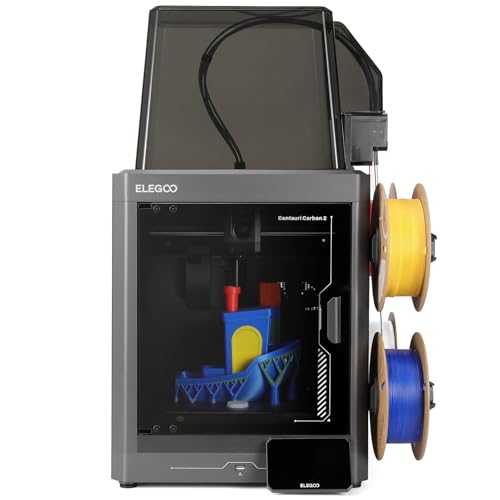
Elegoo Centauri Carbon 2 Combo — Big Enclosed Volume, Colour Included
Elegoo’s Centauri Carbon 2 Combo is the maximalist entry in this guide: an enclosed CoreXY machine with multicolour printing, a quoted 500mm/s pace, one-click auto leveling, a 350°C nozzle, the maker’s Nexprint model hub, and a 256x256x256mm build volume. Stack those claims and the household portrait is a specific one — a family or a serious hobbyist whose projects have outgrown the starter cube and whose material ambitions are heading toward the engineering shelf, but who still wants the machine to level itself and the models to arrive through a hub rather than a research project. The Combo suffix means colour is part of the purchase, not a promise to spend again later.
The 350°C nozzle is the specification to interpret carefully at home. It does not change Tuesday’s PLA toy. It changes what the machine permits next year, when a household member wants a part that lives in a hot car, a garden, or a engine-adjacent bracket and the material for the job needs real heat. Enclosure and nozzle temperature work as a pair in that future: the closed chamber holds the warmth demanding filaments want, and the hotend reaches the temperatures they need. Most home printers in this price conversation ask their owners to choose between size, colour, and temperature headroom; the Centauri Carbon 2 Combo’s title declines to choose, and that refusal is its identity.
Size is the counterweight, in every sense. A 256mm enclosed CoreXY with a colour system is furniture, and it will not perch on a bookshelf or share a student’s desk; it claims a corner, a stand, or a section of worktop, permanently. Households should also expect the learning surface of a maximalist machine to be larger — more capability means more settings that exist, even when one-click levelling handles the daily ones gracefully. For the home with the corner to spare and the ambition to fill it, this is the pick that postpones the second-printer conversation the longest. For the home measuring its spare space in centimetres, it is a wonderful machine to admire in someone else’s house.
- Colour: multicolour printing in Combo form
- Architecture: enclosed CoreXY, quoted 500mm/s
- Levelling: one-click auto leveling
- Nozzle ceiling: 350°C, the highest in this guide
- Build volume: 256 x 256 x 256 mm
- Model source: the maker’s Nexprint hub
Strengths
- Size, colour, and a 350°C nozzle arrive together — no second purchase is implied.
- The enclosed chamber supports the demanding filaments its nozzle can reach.
- One-click levelling keeps a big machine’s daily routine small.
Trade-offs
- It is furniture-sized; tight homes will feel its footprint every day.
- Maximalist capability means more settings exist for the curious to misuse.
- Households printing only small PLA objects will never touch most of its range.
Best for: a growing household of makers with a dedicated corner and rising ambitions.
Not suited for: a small flat where the printer must share a desk with a laptop and a lamp.

Creality K2 Combo — The Watched Workshop Corner
Creality’s K2 Combo is the Ender philosophy after a decade of listening: keep the ambition, remove the assembly weekend. The listing title states the case plainly — multicolor printing with CFS, 600mm/s printing speed, 95% pre-assembled, a smart AI camera with auto leveling, a next-gen direct drive extruder, and a build volume of 260x260x260mm. Ninety-five percent pre-assembled is the phrase a busy household should circle. The remaining five percent is an evening’s pleasant familiarisation, not a construction project, and the machine that results is Creality’s enclosed multicolour flagship format rather than an open gantry.
The camera is this pick’s domestic signature. A watched printer is a printer that can live in a different room from its owner — the garage corner, the utility room, the far end of a studio — while the owner checks the print from the sofa and catches the rare failure early instead of discovering a filament sculpture at midnight. Paired with auto leveling and the CFS colour system, the K2 Combo’s whole design argues that a home printer should ask little attention per print: load the colours, send the job, glance occasionally. The 260mm cube matches the largest plates in this guide, so the attention it saves is not bought with size.
Creality’s breadth is the consideration to weigh. The company serves every tier of the hobby, and its flagship machines carry more settings, more modes, and a livelier software surface than Bambu Lab’s tighter ecosystem; a household that loves options will call that freedom, while a household that fears options should honestly prefer the P1S Combo’s narrower path. The next-gen direct drive extruder quietly underwrites the flexible-filament future, feeding TPU and its cousins without the drama of a long filament path. Choose the K2 Combo when the home wants Creality’s scale and colour with the supervision handled by a camera — it is the most feature-dense route in this guide, offered to the household confident enough to enjoy density.
- Colour system: CFS multicolour printing
- Assembly state: 95% pre-assembled, per the title
- Monitoring: smart AI camera
- Levelling: automatic
- Extruder: next-generation direct drive
- Build volume: 260 x 260 x 260 mm; quoted speed 600mm/s
Strengths
- The camera untethers the printer from its owner, suiting utility rooms and garage corners.
- Near-total pre-assembly deletes the construction weekend Creality was once known for.
- A 260mm enclosed multicolour format matches the guide’s largest plates.
Trade-offs
- Feature density means a busier software surface than the tightest ecosystems.
- Colour printing through any such system spends purge filament on changes.
- Its full capability is surplus for a household printing the occasional single-colour fix.
Best for: a busy household printing colourfully at scale from a corner it cannot watch in person.
Not suited for: minimalist setups where every extra setting is friction between idea and object.
Comparison
| Machine | Enclosed? | Colour as sold | Household character |
|---|---|---|---|
| Bambu Lab P1S | Yes — enclosed CoreXY | Single colour | The appliance-like all-rounder for shared rooms |
| Bambu Lab P1S Combo | Yes — enclosed CoreXY | Multi-colour via AMS | Family colour without shelf sprawl |
| Original Prusa MK4S Assembled | No — open frame | Single colour | The repairable long-termer for a technical household |
| Flashforge Adventurer 5M Pro | Yes — enclosed Pro design | Single colour | Institutional toughness in a 220mm envelope |
| Elegoo Centauri Carbon 2 Combo | Yes — enclosed CoreXY | Multi-colour, Combo form | The maximalist: size, colour, and 350°C headroom |
| Creality K2 Combo | Yes — enclosed combo format | Multi-colour via CFS | Camera-watched multicolour at a 260mm scale |
One more domestic consideration shaped the final six: serviceability by the household itself. A home printer that needs a courier and a service centre for a worn nozzle or a tired belt will spend its life in transit queues; a home printer whose wear parts swap at the kitchen table stays in service. Every pick here treats its consumables as owner-serviceable, and the two most extreme philosophies — Prusa’s documented openness and Flashforge’s quick-detach nozzle — are really the same promise wearing different clothes: the household can fix the small things itself, tonight, with the light on and the kettle going.
Where in a House Does a Printer Actually Belong?
Walk the average home with a printer’s needs in mind and the rooms rank themselves. A printer wants a solid surface, stable temperature, tolerable ventilation, and an owner passing by often enough to collect prints and notice trouble. The study or home office wins on nearly every count: a door for noise and smell, a desk or stand that does not wobble, warmth that stays civilised overnight. The spare bedroom runs second, with the same virtues minus daily traffic — prints finish uncollected there, which is fine, and failures sit undiscovered slightly longer, which the K2 Combo’s camera exists to forgive. Living rooms suit only the quietest, most appliance-like machines, and even then the household should rehearse the reality of a six-hour print humming through film night before committing the shelf.
Kitchens tempt with their worktops and betray with their humidity and flour-dusted air; bathrooms are simply disqualified. Garages and utility rooms are the honest compromise for enclosed machines — out of the living air, tolerant of noise — provided the household respects the cold: a printer in an unheated garage in winter will print like it is annoyed, because its materials are. Basements split the difference, stable in temperature but prone to damp, which filament hates more than cold. The pattern under all of this is that the room chooses the machine as much as the machine chooses the room: an enclosed pick widens the map, an open frame narrows it to the house’s technical room, and a camera widens it again by remote supervision.
How Loud Is Too Loud When a Printer Shares a Home?
Printer noise is two noises wearing one coat. The first is the motion system — steppers, fans, and the rhythmic travel of the toolhead — which modern machines have genuinely tamed; a closed door and one wall reduce a contemporary CoreXY to a murmur that reads as weather. The second noise is vibration donated to the building: a printer on a resonant hollow desk or a thin shelf broadcasts its work through the furniture, and neighbours below hear a printer that its owner upstairs considers quiet. The fix is embarrassingly physical — mass and decoupling. A heavy, rigid stand, a dense mat under the machine, and distance from party walls do more for domestic peace than any setting in any menu.
Time matters as much as volume. A printer that is merely noticeable at 7 p.m. is a household incident at 2 a.m., which is why the speed headroom in these titles has a domestic meaning beyond impatience: jobs that finish before the house sleeps do not need to be quiet at all. Households should plan their printing calendar the way they plan the washing machine’s — long, loud cycles in the day, short quiet ones in the evening, nothing controversial overnight unless the machine sits behind two doors. Judged that way, all six picks can live in a home; judged by a decibel figure alone, none of the buying questions that matter would get asked.
What Does an Enclosure Really Buy a Household?
An enclosure buys four things, and only one of them is the temperature stability that spec sheets celebrate. Yes, a closed chamber holds warmth, which demanding filaments reward with less warping and stronger layers. But the household purchases are the other three: containment, separation, and appearance. Containment keeps the faint smell of warm plastic and the dust of the process inside a box that can sit in a ventilated room rather than perfuming the whole floor. Separation puts a latched door between a 200-plus-degree nozzle and the fingers, paws, and sleeves of a busy home — the difference between a printer that needs a rule and a printer that is the rule. Appearance decides whether the machine is welcomed as equipment or tolerated as clutter, and tolerated clutter migrates to cupboards, where printers go to be forgotten.
The enclosure’s costs are equally concrete. A closed machine is a bigger, heavier object than its build volume suggests, and its door needs swing room the spec sheet forgets. Access for maintenance is slightly more deliberate — panels and doors stand between the owner and the mechanics that an open frame like the MK4S simply presents. And enclosure can breed complacency about ventilation: a closed box reduces what escapes, it does not sanctify printing ABS in a sealed nursery. The household rule is simple — enclosure for comfort and safety, ventilation for air, and never let the first excuse the absence of the second.
How Should a Household Handle Filament Smell and Air?
Start with the material, because the material is most of the answer. PLA, the default filament of home printing, gives off a mild, slightly sweet warmth that most households stop noticing within a week; it is the filament these machines will burn ninety percent of the time, and it asks only for a room that is not sealed. PETG is similarly undemanding in ordinary use. The filaments that earn their reputations — ABS and ASA chief among them — belong in enclosed machines in rooms with real ventilation, ideally vented outward, and a household that plans to print them regularly should choose its printer’s room with that exhaust path in mind before choosing anything else.
Habits cover the rest. Keep the printer’s door closed during prints, open the room’s window or run its extraction for the long jobs, and store filament in closed boxes — which the household is doing anyway to keep it dry. Family members with sensitivities are the household’s canaries and should be believed early: if a particular material bothers someone, the answer is a different material or a different room, not a debate. The enclosed picks in this guide were chosen partly because they make these habits easy; a closed, camera-watched machine in a ventilated spare room is the end state most serious home printers arrive at, and buying toward it now saves the migration later.
What Does a Home Printer Need From Its Corner of the Room?
A printer’s corner has a specification of its own, and meeting it costs less than any upgrade. The surface must be boring: rigid, level, and heavy enough not to join in when the toolhead changes direction at speed. Power should be a real socket, not a daisy-chain of adapters shared with a kettle. The corner needs a landing zone — a tray or a stretch of surface where finished prints, removed supports, and the next spool wait — because a printer without a landing zone exports its mess across the room one object at a time. Light matters more than expected: owners inspect first layers and hunt hairline cracks, and a corner too dim to see the work in will hide problems until they become failures.
Leave air around the machine. Enclosed printers vent heat, power supplies breathe, and doors swing; a printer shoved flush into an alcove runs hotter and gets maintained less, because maintaining it means moving it. A small shelf or box beside the corner for the household kit — cutters, spare nozzle, plate cleaner, the notebook of settings — completes the arrangement. None of this requires a dedicated room. It requires treating the corner as a tiny workshop rather than a parking spot, and the households that do so consistently report the same discovery: the printer did not get better, but everything around the printing did.
How Do Households Share One Printer Without Queue Wars?
Shared printers fail socially in predictable ways, and the fixes are administrative rather than technical. The first failure is the ambush print: one member starts a nine-hour job the morning another needed a forty-minute part. A shared calendar or a simple household rule — long jobs start after dinner or on weekends — dissolves most ambushes before they form. The second failure is filament ambiguity: nobody knows whose spool is whose, or whether the good colour is reserved. Label spools with names or purposes, keep one household spool of the everyday material that anyone may use, and the arguments evaporate. The third failure is the orphaned print, finished at noon and still occupying the plate at six; a landing tray and a norm of clearing the plate when you pass solves it.
The colour machines add one more negotiation, which is purge cost: a four-colour novelty print spends noticeably more filament than its monochrome twin, and households that print colourfully as a family should simply budget a colour spool allowance the way they budget streaming subscriptions — as the price of a shared pleasure. Underneath all of these arrangements sits the same principle that governs the machine choices in this guide: a home printer is a household appliance, and appliances survive on manners, agreements, and a corner of their own. Set those three things in place and even a house with four competing hobbyists will find one printer enough — most of the time.
How Do You Make a Printing Corner Safe Around Children and Pets?
The hazards of a home printer are modest but real, and they concentrate in three places: the hot nozzle, the moving gantry, and the small parts a printer produces and consumes. Enclosed machines answer the first two by design, which is one reason they dominate this guide — a latched door turns supervision from a constant duty into a sensible habit. Open-frame owners should place the machine where small hands need permission to reach: a hobby room, a high stand, a corner behind a gate for the toddler years. Cats deserve a specific mention, because cats investigate warm moving objects with a dedication toddlers rarely match; an enclosed printer or a closed room is the only reliable feline policy, and loose filament strands should never be left dangling where a pet can chew or swallow them.
The produced objects need the same thought as the machine. Printed toys for small children should be chunky, single-piece, and printed in the household’s ordinary PLA, with any part small enough to be a swallowing hazard kept out of the under-three environment entirely — a rule that applies to shop-bought toys too, but which home printing makes easy to forget because the factory is in the spare room. Supports and trimmed waste go straight into a bin with a lid; the offcuts are sharp, stringy, and fascinating to exactly the household members who should not have them. None of this is onerous. It is the ordinary safety tidiness of any home workshop, applied to a workshop that happens to fit on a shelf.
What Does a Year of Owning a Home Printer Actually Involve?
Prospective owners imagine the purchase; experienced owners could describe the rhythm. A year with a home printer settles into seasons. The first month is abundance — the library explored, the house filling with small useful objects, filament ordered with optimism. Months two and three bring the first maintenance realities: a nozzle that has printed its miles and wants replacing, a build plate whose surface is tired in the middle, a spool that sat open too long and now pops and strings. Households that treat these as scheduled wear, like vacuum bags or water filters, glide through them; households that treat them as betrayals start browsing for a different printer to repeat the cycle with.
The middle of the year is where the machine’s role clarifies. For most homes it becomes infrastructure — the thing that produces the replacement clip, the school model, the gift, the bracket — used weekly rather than daily, and valued in problems removed rather than objects counted. This is also when the colour question answers itself: families either discover that multicolour printing is their household’s favourite feature or that one good spool of a neutral colour does nearly everything, and the combo owners and the base-model owners are both vindicated in different houses. By year’s end the wise household owns a small stock of spares, a dry box of filament, and a printer whose quirks are known and named. That familiarity, more than any specification in this guide, is what a home printer is actually for.
What Running Costs Should a Household Budget Beyond the Printer?
Filament is the famous running cost and, for most homes, roughly the whole story — but the supporting cast deserves a budget line so none of it arrives as a surprise. Nozzles are wear parts and cheap ones at that; a household printing weekly should expect to swap them on a rhythm measured in spools, and to keep a spare in the drawer from the start. Build surfaces tire too, losing their grip in the high-traffic centre after months of service. Desiccant for the filament box needs occasional refreshing or replacing, cleaning supplies for plates are kitchen-cupboard items, and electricity for a home printer is genuinely minor — these machines sip compared with an oven or a tumble dryer, and even a long print rarely registers on a household bill as anything but a rounding error.
The subtler cost is the accessory slope, and it is worth naming so households can choose it deliberately rather than slide down it. A second plate for a different finish, a hardened nozzle for an abrasive filament someone fell for, the storage boxes, the little tools — each is small, most are worth it, and together they typically add a modest fraction of the machine’s price across the first year. Colour printing has its own arithmetic, already covered: purge waste is a real percentage of colourful output, and households should think of a colour spool as partly a consumable of the effect itself. Budget a sensible annual allowance for the whole supporting cast, keep the spares stocked, and the printer’s economics stay as calm as its domestic manners — which, in a guide about homes, is precisely the point.
Common Mistakes
Buying an open-frame machine for an open-plan home tops the domestic error list; the printer is blameless, the room was never consulted, and the machine ends up exiled to a garage where cold and dust finish the discouragement. Second is the alcove installation — an enclosed printer wedged into a space with no air around it and no room for its door, running hot and maintained never. Third is printing demanding, strong-smelling filaments in living space because the machine is enclosed, as if a door were an exhaust system; enclosure reduces spread, it does not replace ventilation, and households learn the distinction through their noses.
Fourth comes the overnight habit formed too early: long prints left running through the night in sleeping rooms before the household knows the machine’s manners, turning one rare failure into a household referendum on the hobby. Fifth is filament stored openly on a shelf beside the printer because it looks abundant; within weeks the spools have drunk the room’s humidity and print quality slides for reasons blamed on the machine. Sixth is the single-user trap — one person learns everything, becomes the household’s unpaid print bureau, and quietly resents the appliance. The colour combos in this guide exist partly to break that trap: when anyone can browse a library and start a job, the printer becomes the family’s, and families maintain what they share.
Final Recommendation
The Bambu Lab P1S is this guide’s answer for the typical home: enclosed, ready to use, fast enough to finish inside waking hours, and backed by a library that lets the whole household print. Households certain about colour should skip the deliberation and take the P1S Combo, because bundling the AMS now is tidier and simpler than every retrofit path. The Adventurer 5M Pro serves the spare room shared by mixed-confidence users, and the Centauri Carbon 2 Combo serves the ambitious corner — the home that already knows its second year of projects and wants volume, colour, and a 350°C ceiling waiting for them.
Prusa’s MK4S Assembled is the deliberate exception we would defend in any room: buy it when the household includes someone who values a documented, upgradeable machine they can maintain for a decade, and give it the technical corner it deserves. Creality’s K2 Combo is the feature-rich alternative for the home that wants colour at 260mm with a camera standing watch. Whichever of the six lands in your house, spend the first week on placement, surface, and storage before spending anything on upgrades — a home printer’s happiness is mostly geography, and geography is free to fix on day one. Give the machine a month of ordinary household work before judging it against any rival, because domestic printing reveals itself slowly: in the school project rescued at midnight, the replacement part that did not need ordering, the gift nobody could have bought in a shop. That slow accumulation of small rescues is the real specification, and it never appears on a box.
Frequently Asked Questions
Is an enclosed printer necessary for home use?
Not strictly — the Prusa in this guide has served homes openly for years — but enclosure makes nearly every domestic issue easier: warmth, odour, noise, dust, and curious fingers. Households with toddlers, pets, or open-plan living should weight it heavily; a household with a dedicated hobby room can happily choose the open machine.
Can I run a home printer overnight?
You can once you know the machine, and the enclosed, camera-equipped picks make it more reasonable — but build the habit gradually. Run long jobs while the house is awake first, keep early overnight prints in rooms behind doors, and let the printer earn trust the way any appliance does: through an uneventful record.
Which pick is best for a small apartment?
The Adventurer 5M Pro’s 220mm enclosed format is the easiest fit, with the P1S close behind; both behave like appliances rather than projects. The Centauri Carbon 2 Combo and K2 Combo are wonderful machines that belong in homes with a corner to surrender permanently.
Does multicolour printing make sense for a household?
For households that print gifts, labels, games, and school projects, colour is the feature that recruits the whole family into the hobby. Budget for purge filament as part of the cost, and prefer the bundled combos here over accessory sprawl — the tidiness is half the point at home.
What surface should a home printer sit on?
The most boring surface in the house: rigid, level, and heavy. A solid stand or a thick worktop beats a stylish hollow desk every time, because furniture that resonates becomes part of the printer’s motion. A dense mat underneath helps decouple what vibration remains.
Do home printers use much electricity?
Very little by household standards. A desktop printer draws a modest load while heating and a smaller one while printing, so even frequent use registers as a minor line in a home’s consumption — far below a dryer, an oven, or a gaming PC running the same hours. Long prints cost time and filament long before they cost noticeable electricity.
How do I keep filament from going stale in a home environment?
Store spools in closed boxes or bags with desiccant, away from kitchens and bathrooms, and treat an opened spool as a perishable. Damp filament is the leading impersonator of printer faults in homes; dry storage makes the machine you bought look considerably more reliable.
Related Guides
Households still at the very first step should start with our guide to the best FDM 3D printers, which explains the underlying technology the enclosed machines in this roundup are built on. When the family’s projects outgrow a 260mm plate, the best large bed 3D printers guide covers the machines that take over from there. And for readers whose prints keep failing at the flexible parts, the best direct drive 3D printers roundup explains why extruder design decides how those materials behave.


