What's inside
- Key Takeaways
- Quick Picks
- How did we verify 240Hz claims in a market fluent in exaggeration?
- How do the six 240Hz contenders compare on panel, power and purpose?
- How can you tell a true 240Hz panel from a 165Hz one in disguise?
- Which games actually reach 240 frames per second — and which never will?
- Why do resolution and refresh rate have to be bought as a pair?
- What settings discipline turns a 240Hz ceiling into 240 real frames?
- How long does a 240Hz flagship stay a flagship?
- What does a 240Hz laptop need from your desk, network and ears?
- How does 240Hz change everyday use outside games?
- Which misjudgements do high-refresh shoppers keep repeating?
- Final Recommendation
- Frequently Asked Questions
- Related Guides
As an Amazon Associate I earn from qualifying purchases. This post may contain affiliate links at no extra cost to you.
widgetverdict.com is reader-supported. When you buy through links on our site, we may earn an affiliate commission.
The best 240hz laptops begin with a number that is easy to print and hard to earn. A 240Hz display refreshes 240 times per second, which means it can show 240 distinct frames — but only if the game, the graphics card and the settings actually produce them. This guide is built around that chain of custody: four linked picks whose listings state a genuine 240Hz panel in their own titles, each paired with the graphics hardware to feed it, and two prose-only entries for the flagship lines that complete the class. Every 240Hz claim in the linked picks is quoted from a verified listing title, because in this corner of the market the difference between 240Hz, 165Hz and a marketing adjective is the entire purchase.
The four linked machines divide the class by intent. Two MSI Stealth models pair 240Hz QHD+ panels — one OLED at 16 inches, one at 18 inches — with a slim flagship brief; Alienware’s 16X brings a WQXGA OLED 240Hz screen and an RTX 5060 at a step below the flagship cards; and MSI’s Raider A16 HX answers with the heaviest hardware combination here, an RTX 5080 behind a Ryzen 9 HX processor. Between them they cover the esports desk, the creator-gamer hybrid and the desktop-replacement brief.
The guide sections after the picks teach the literacy the keyword demands: how to tell a true 240Hz panel from a 165Hz one wearing confidence, which games and settings actually reach 240 frames, why resolution and refresh must be bought as a pair, and what a 240Hz laptop asks of its desk. Players who finish this guide will know not only which machine to buy, but whether their library can use it.
One boundary deserves stating before the table: no pick in this guide is a battery machine or a commuter, and none pretends to be. High-refresh flagships are desk instruments with mains appetites and fan voices, and the guide judges them at the desk — where their panels, cards and cooling can actually deliver the number on the box.
Key Takeaways
- All four linked picks state 240Hz in their verified listing titles — three at QHD+/WQXGA-class resolution, and every one pairs the panel with an RTX 50-series graphics card.
- The MSI Stealth 16 AI+ is the OLED expression: a 16-inch 240Hz QHD+ OLED panel, an Ultra 9 386H processor, an RTX 5070 Ti and 32GB of memory.
- Alienware’s 16X is the value step: a WQXGA OLED 240Hz display with an RTX 5060, 16GB of memory and even a wired Ethernet port for competitive stability.
- MSI’s Stealth A18 scales the formula to 18 inches with an RTX 5080, while the Raider A16 HX pairs the same card with a Ryzen 9-8940HX and the class’s most desktop-like brief.
- 240Hz is a ceiling, not a frame rate: esports titles reach it, cinematic titles do not, and the guide’s settings sections show how to close the gap honestly.
- The prose-only Razer Blade 16 and ROG Strix Scar 16 classes are the alternatives to audition — verified listing by listing, since their panels and cards vary by configuration.
- Verify the number twice — in the listing before purchase and in the display settings on arrival — because this entire category is one figure, and the figure is checkable.
Quick Picks
| Pick | Badge | Why it earns its place |
|---|---|---|
| MSI Stealth 16 AI+ (240Hz OLED) | The OLED flagship at 16 inches | A 16-inch 240Hz QHD+ OLED panel driven by an Intel Core Ultra 9 386H and an RTX 5070 Ti, with 32GB of DDR5 memory, a 1TB NVMe drive and Wi-Fi 7 in a Charcoal Black Stealth chassis. |
| Alienware 16X (RTX 5060) | The esports value step | A WQXGA OLED 240Hz display with an RTX 5060, an Intel Ultra 7 Plus processor, 16GB of DDR5 memory, a 1TB drive — and a wired Ethernet port for ranked stability. |
| MSI Stealth A18 AI+ (240Hz) | The big-screen 240Hz flagship | The 240Hz formula at 18 inches: a QHD+ 240Hz panel, an AMD Ryzen AI 9 365, an RTX 5080, 32GB of memory, a 2TB NVMe drive and Windows 11 Pro. |
| MSI Raider A16 HX | The heavy artillery | MSI’s Raider pairs a 16-inch 240Hz QHD+ panel with a Ryzen 9-8940HX processor and an RTX 5080, 32GB of memory and a 2TB NVMe drive — the desktop-replacement brief at 16 inches. |
| Razer Blade 16 (240Hz OLED class) | The minimalist flagship — prose-only | Razer’s Blade 16 line offers 240Hz OLED configurations in the class’s slimmest flagship chassis — auditioned prose-only because its configurations and panels vary by listing. |
| ASUS ROG Strix Scar 16 (240Hz class) | The tournament-bred alternative — prose-only | ASUS’s Scar 16 class brings ROG’s esports flagship engineering to 240Hz-class panels — covered prose-only, with its mini-LED and OLED configurations to be verified per listing. |
How did we verify 240Hz claims in a market fluent in exaggeration?
One rule governed inclusion among the linked picks: the listing title itself had to state 240Hz. Not the product page’s hero banner, not a review of a sibling configuration, not the line’s general reputation — the title of the exact listing a reader would buy. Four machines passed that test with their panels, graphics cards, memory and storage stated in the same breath, and those four are the guide. Lines whose 240Hz configurations exist but whose listings would not hold the figure still — Razer’s Blade 16 and ASUS’s Scar 16 among them — are covered prose-only with the verification errand named.
The second filter was the pairing. A 240Hz panel behind weak graphics is a screen waiting for frames that never arrive, so every linked pick had to carry current RTX 50-series hardware with the memory to sustain high-refresh play: 32GB in three of the four, 16GB in the Alienware, whose RTX 5060 brief is calibrated to esports settings rather than cinematic ones. The guide treats panel and card as one purchase because the experience is one experience.
We also insisted on resolution honesty. All four linked panels sit in the QHD+/WQXGA class — the resolution at which 240Hz is both visible and feedable — and the sections below explain why that class, rather than FHD or 4K, is where 240Hz laptops make sense. A buyer who understands that pairing understands the whole category; a buyer who does not will be sold a number.
Finally, the guide was written from the player’s chair rather than the spec sheet: response habits, network stability for ranked play, the desk and cooling a high-refresh flagship needs, and the settings discipline that turns a 240Hz ceiling into 240 displayed frames. The picks are the answer for four kinds of player; the sections are the answer for everyone.

MSI Stealth 16 AI+ (240Hz OLED) — The OLED flagship at 16 inches
The Stealth 16 AI+ leads this guide because it assembles the 240Hz idea in its most complete modern form. Its verified listing states each element plainly: a 16-inch 240Hz QHD+ OLED display, an Intel Core Ultra 9 386H processor, an NVIDIA GeForce RTX 5070 Ti graphics card, 32GB of DDR5 memory and a 1TB NVMe SSD, with Wi-Fi 7 and Windows 11 Home, finished in Charcoal Black. Panel, card and memory all sit at the level the others must be measured against — this is the pick that asks the fewest apologies.
The OLED panel changes what 240Hz feels like, and the reason is response time. OLED pixels switch almost instantly compared with LCD pixels, so at 240Hz the frames arrive not only frequently but cleanly — motion stays legible in fast pans, targets separate from backgrounds in the split second a flick shot allows, and the ghosting trails that soften LCD high-refresh play are largely absent. Competitive players chase refresh numbers for exactly this clarity; OLED is where the number pays its full dividend.
The RTX 5070 Ti is the right card for the panel’s resolution. At QHD+, esports titles run far beyond 240 frames with room for high settings, and demanding cinematic games can be tuned — with the settings discipline the later sections teach — into the panel’s upper reaches rather than stranded at half its rate. The Ultra 9 platform and 32GB of memory keep the rest of the machine from bottlenecking the card: streaming, recording and a browser of strategy guides alongside the game are this machine’s normal evening, not its stress test.
The Stealth brief adds the dimension the Raider below declines: this flagship is designed to be carried and to sit in rooms that are not gaming dens. Sixteen inches of OLED flagship in a restrained chassis is a machine a creator can open in a studio and a player can open at a tournament desk without a costume change in either place. Windows 11 Home rather than Pro is the small print for work buyers to note.
Its honest limits are the OLED class’s own: static-element care over long years, and a 1TB drive that a large game library will fill — plan the external or secondary storage conversation early. Neither touches the central proposition. As a single expression of what a 240Hz laptop should be in 2026, the Stealth 16 AI+ is this guide’s benchmark.
Buy it first if your library mixes competitive and cinematic play and your desk mixes work and gaming. It is the pick with the broadest competence at the class’s defining specification.
A word on the Stealth’s AI+ platform, since the badge invites scepticism: the neural processor’s present value is modest for gaming, but its ownership value is real — background effects on calls, local AI features in creative applications and the operating system’s growing assumptions all draw on it, and a flagship bought for four years should not lack the silicon its software will ask for in year three.
- Display: 16-inch 240Hz QHD+ OLED panel, per listing title
- Graphics: NVIDIA GeForce RTX 5070 Ti
- Processor: Intel Core Ultra 9 386H
- Memory and storage: 32GB DDR5, 1TB NVMe SSD
- Wireless and system: Wi-Fi 7, Windows 11 Home
- Finish: Charcoal Black, Stealth line chassis
Strengths
- OLED response times let the 240Hz panel deliver its full motion clarity
- RTX 5070 Ti is correctly matched to QHD+ high-refresh play
- 32GB of memory supports gaming, streaming and creation together
Trade-offs
- OLED panels reward care with static interface elements
- 1TB fills quickly under a modern game library
- Windows Home rather than Pro for work buyers
Best for: players who mix esports and cinematic titles and want OLED clarity at a true 240Hz
Not suited for: static-dashboard users wary of OLED care, or buyers needing 2TB from the factory

Alienware 16X (RTX 5060) — The esports value step
The Alienware 16X makes the guide’s most interesting argument: that the smart 240Hz purchase for a pure esports player is not the biggest graphics card, but the right one. Its verified listing pairs a WQXGA OLED 240Hz display with an NVIDIA GeForce RTX 5060, an Intel Ultra 7 Plus processor, 16GB of DDR5 memory and a 1TB SSD, with Wi-Fi 7, Bluetooth and — the detail that reveals the brief — a wired Ethernet port, in a blue chassis running Windows 11 Home.
Follow the logic. Esports titles — the shooters, battle royales and arena games whose players actually live at 240 frames — are engineered to run fast on modest hardware, because their makers want millions of players inside them. At esports settings, an RTX 5060 feeds a 240Hz WQXGA panel in exactly those games, and the money not spent on a 5080 buys the OLED screen whose response times matter more to a flick shot than a surplus of frames the panel cannot show. This is specification as marksmanship: every figure aimed at the target the player actually shoots at.
The Ethernet port deserves its paragraph, because ranked play is a network sport disguised as a graphics sport. A wired connection removes the jitter and interference lottery of Wi-Fi from competitive matches, and its presence on a slim gaming laptop is a statement that Dell understood the assignment. Wi-Fi 7 is present for everywhere else; the wire is for when the match counts.
The compromises are the mirror of the argument. Sixteen gigabytes of memory is adequate for gaming-plus-Discord, not for gaming-plus-streaming-plus-editing; the RTX 5060 will ask cinematic titles to lower settings or accept frame rates well under the panel’s ceiling; and buyers whose library leans single-player should read the Stealth picks first. The 16X is a specialist that knows its specialism, priced by that knowledge.
Alienware’s design and support infrastructure complete the case for the player who wants the esports brief without flagship money. In a class where every other linked pick carries 32GB and a higher card, the 16X is the discipline pick — proof that 240Hz done right is a system, not a splurge.
Choose it if your hours are overwhelmingly competitive and your settings are already esports-tuned. It will feel less like a compromise than like a machine that read your library before you bought it.
There is a team-house argument for the 16X that solo buyers overlook: standardising a squad or a household’s competitive rigs on one esports-calibrated model makes settings, peripherals and troubleshooting shared knowledge, and Alienware’s support channel scales that knowledge formally. The cheapest path to five identical, correct 240Hz desks in this guide runs through this pick.
- Display: WQXGA OLED 240Hz display, per listing title
- Graphics: NVIDIA GeForce RTX 5060
- Processor: Intel Core Ultra 7 Plus
- Memory and storage: 16GB DDR5 RAM, 1TB SSD
- Networking: Wi-Fi 7, Bluetooth and wired Ethernet
- Operating system: Windows 11 Home, blue chassis
Strengths
- OLED 240Hz clarity aimed precisely at esports frame rates
- Wired Ethernet removes the network lottery from ranked play
- The most disciplined spend in the linked set
Trade-offs
- 16GB of memory limits streaming and creation multitasking
- RTX 5060 asks cinematic titles for lower settings
- A specialist’s brief — all-rounders should read the Stealth picks first
Best for: ranked and competitive players whose settings are already esports-tuned
Not suited for: cinematic single-player devotees, or streamer-creators needing memory headroom

MSI Stealth A18 AI+ (240Hz) — The big-screen 240Hz flagship
Everything the 240Hz class promises grows more itself at 18 inches. The Stealth A18’s verified listing states an 18-inch 240Hz QHD+ display, an AMD Ryzen AI 9 365 processor, an NVIDIA GeForce RTX 5080, 32GB of DDR5 memory and a 2TB NVMe SSD, with Wi-Fi 7 and Windows 11 Pro in a Midnight Black chassis. The panel’s size turns high refresh from a specification into an environment: at 18 inches, the motion clarity of 240Hz fills peripheral vision, and tracking a moving target becomes a whole-field skill rather than a foveal one.
The RTX 5080 is the correct engine for the canvas. QHD+ at 18 inches asks the same pixel count as at 16 — resolution, not diagonal, sets the rendering load — and the 5080 holds esports titles at the panel’s ceiling while giving cinematic games the headroom to run high settings at high rates. The 2TB drive answers the class’s storage problem at the factory, and 32GB of memory matches the flagship brief. This is the most completely specified linked pick in the guide; only the smaller Stealth’s OLED panel out-flanks its screen.
That panel technology is the honest trade inside the pick: the A18’s screen is a fast LCD-class QHD+ panel rather than the 16-inch Stealth’s OLED, so its pixel response, while excellent for its class, does not match OLED’s near-instant switching, and its blacks are LCD blacks. In exchange you receive three more inches of canvas and the 5080’s muscle. Players choose between these Stealths by what their eyes value — response purity or field of view — and the guide refuses to pretend one answer serves both.
Windows 11 Pro and the Stealth line’s restrained design keep the machine presentable beyond the gaming desk, and the Ryzen AI platform brings the current generation’s neural processing for the AI features accumulating in games and creative tools alike. The desk demands are the 18-inch class’s own: mains power, ventilation room and a carry that happens between desks rather than daily. Within that brief, the A18 is the big-screen expression of 240Hz done completely.
It is also, quietly, the creator’s pick of the four: the large high-refresh canvas suits timeline work and 3D viewports, the 5080 accelerates rendering, and 2TB holds project libraries that the 1TB machines would exile to external drives. Gamers who create — the class’s growing majority — should weigh that completeness heavily.
Buy the A18 when the screen must be the room’s main event and the library must never negotiate with the settings menu. It is 240Hz at full scale, with the hardware to honour it.
The A18 also reframes the external-monitor question that haunts big laptops: at 18 inches with this refresh rate, the built-in panel is good enough that the monitor becomes an option for posture rather than a necessity for play. Owners who do dock gain a superb second screen instead of replacing a weak first one — a small inversion that changes the desk’s whole economics.
- Display: 18-inch 240Hz QHD+ panel, per listing title
- Graphics: NVIDIA GeForce RTX 5080
- Processor: AMD Ryzen AI 9 365
- Memory and storage: 32GB DDR5, 2TB NVMe SSD
- Operating system: Windows 11 Pro
- Wireless and finish: Wi-Fi 7, Midnight Black
Strengths
- 240Hz at 18 inches fills peripheral vision for tracking and immersion
- RTX 5080 and 2TB storage complete the flagship specification
- Windows 11 Pro and a restrained design travel beyond the gaming desk
Trade-offs
- LCD-class panel response trails the OLED pick’s switching speed
- 18-inch desk and power demands apply in full
- Summit positioning within the linked set
Best for: big-screen players and creator-gamers who want 240Hz at full scale
Not suited for: daily carriers, or OLED purists who prize response above canvas
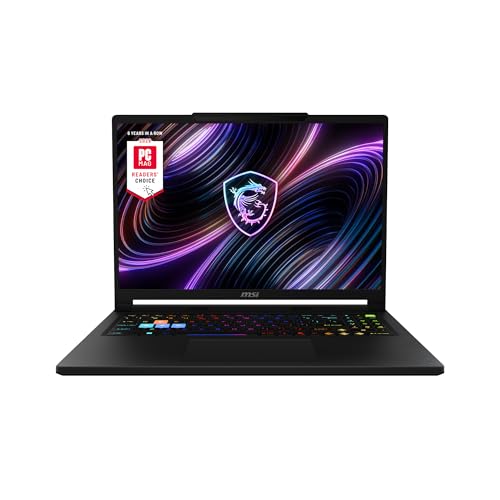
MSI Raider A16 HX — The heavy artillery
The Raider A16 HX is the guide’s argument that cooling and processor class still matter at 240Hz. Its verified listing specifies a 16-inch 240Hz QHD+ display, an AMD Ryzen 9-8940HX processor, an NVIDIA GeForce RTX 5080, 32GB of DDR5 memory and a 2TB NVMe SSD, with Type-C connectivity, Wi-Fi 7 and Windows 11 Home in Core Black. The HX suffix is the tell: this is a desktop-class processor line transplanted into a laptop, in a Raider chassis whose design brief is sustained performance rather than slimness.
Why does the processor matter to a refresh-rate guide? Because at 240 frames per second, the CPU must prepare a frame every four milliseconds, and in simulation-heavy, physics-rich and poorly-threaded games the processor — not the graphics card — becomes the ceiling. The 8940HX exists for exactly those titles, and players of strategy, simulation and MMO games, whose frame rates are CPU-bound at high refresh, will find the Raider sustaining rates that efficiency-processor flagships cannot. This is the connoisseur’s pick inside the class, aimed at a bottleneck most buyers never learn to name.
The RTX 5080 completes the symmetry: GPU-bound games get the class’s top linked card alongside the Stealth A18, and the pair of them — HX processor, 5080 graphics — makes the Raider the guide’s choice for sustained, hours-long high-refresh sessions where lesser cooling designs gradually surrender their clock speeds. The Raider’s thicker brief is not nostalgia; it is thermal policy, and marathon players feel it in hour three.
The costs are the brief’s costs: weight and presence that assume a desk, fan enthusiasm under full load, and Windows 11 Home where the A18 offers Pro. The panel is a fast LCD-class QHD+ screen rather than OLED, repeating the A18’s trade in smaller form. None of this diminishes the pick for its intended player; all of it should steer the OLED-first and travel-first readers to their Stealths.
Read the Raider as the class’s workhorse flagship: less theatre than the Alienware, less restraint than the Stealths, and the strongest claim here for players whose games punish processors. In a guide about feeding a 240Hz panel, the machine that feeds it from both sides — CPU and GPU at full class strength — earns its place on engineering rather than elegance.
It is also the natural home for the player who keeps a machine for many years: flagship figures in every line, a chassis built for sustained work, and a specification with no obvious upgrade errand waiting in year one.
Raider ownership has a maintenance honesty worth stating: a chassis built for sustained performance is also built to be opened, cleaned and kept at pace, and the marathon player who blows out the fans twice a year will hold hour-three frame rates that sealed slim machines gradually surrender. The Raider rewards the owner who treats cooling as a consumable — which, at 240Hz, it is.
- Display: 16-inch 240Hz QHD+ panel, per listing title
- Graphics: NVIDIA GeForce RTX 5080
- Processor: AMD Ryzen 9-8940HX — desktop-class HX silicon
- Memory and storage: 32GB DDR5, 2TB NVMe SSD
- Connectivity: Type-C ports, Wi-Fi 7, per listing title
- Operating system and finish: Windows 11 Home, Core Black
Strengths
- HX processor sustains CPU-bound games at high refresh where rivals fade
- RTX 5080 and 2TB storage match the class’s top figures
- Cooling brief built for marathon sessions at full pace
Trade-offs
- The heaviest brief among the 16-inch linked picks
- LCD-class panel rather than the OLED Stealth’s screen
- Fans make themselves known under sustained load
Best for: simulation, strategy and marathon players whose frame rates are CPU-bound
Not suited for: travellers, quiet-room players, or OLED-first buyers
Razer Blade 16 (240Hz OLED class) — The minimalist flagship — prose-only
The Blade 16 is the machine many readers arrived expecting to see linked, and its prose-only status deserves a direct explanation. Razer’s 16-inch flagship offers OLED panels at 240Hz in its current generations — a specification squarely in this guide’s territory — inside the slimmest, most minimal chassis the flagship class produces. It is a genuine co-flagship of the 240Hz world, and in the right configuration it rivals the Stealth 16 AI+ line for line.
The obstacle is configuration spread. Blade 16 listings span graphics tiers, panel options and generations whose titles do not always state the refresh figure this guide requires, and our rule — the linked picks must carry 240Hz in the listing’s own words — could not be met by a listing we could hold steady. Rather than relax the rule for a famous name, the guide keeps the name and drops the link, which is the rule working as intended.
What can be said at class level remains valuable: the Blade formula pairs its panels with top-tier mobile graphics and a design discipline that makes it the flagship most at home outside gaming rooms. Buyers cross-shopping it against the Stealth 16 should compare the verified panel line, the exact graphics card and the memory figure in the specific listing, because in this class the configuration in front of you is the product being sold.
Audition the Blade 16 if minimalism is your deciding virtue and you are willing to do the verification the guide models. Verified, it is a first-rank 240Hz OLED machine; bought on its silhouette, it is an expensive way to discover which panel you actually received.
The Blade’s minimalism carries one competitive virtue nobody benchmarks: it is the flagship least likely to be questioned in a professional room between matches. Players whose lives straddle a studio and a tournament circuit carry one machine for both, and Razer’s design language is the only one in this class that needs no explanation in either room.
- Line: Razer Blade 16 — flagship minimalist gaming line
- Panels: 240Hz OLED configurations exist in current generations — verify per listing
- Graphics: top-tier GeForce RTX options by configuration
- Design brief: the slimmest flagship chassis in the class
- Memory and storage: configuration-dependent — verify per listing
- Status in this guide: prose-only; no listing held the required figures steady
Strengths
- 240Hz OLED in the class’s most restrained design
- Flagship graphics tiers across its configurations
- At home in studios and offices as well as gaming desks
Trade-offs
- Configuration spread makes per-listing verification essential
- Slim flagship pricing rarely wins spec-for-spec comparisons
- No verified link in this guide
Best for: design-led flagship buyers who will verify the exact configuration
Not suited for: shoppers hoping to skip the spec table and buy on the silhouette alone
ASUS ROG Strix Scar 16 (240Hz class) — The tournament-bred alternative — prose-only
The Scar 16 completes the class map with the esports lineage. ASUS builds the Strix Scar line as its tournament flagship — the machines ROG develops with competitive play as the brief — and its 16-inch generations have carried high-refresh panels in the 240Hz class, including mini-LED and OLED variants with the brightness and response characteristics ranked players demand. Cooling, keyboards and software in the Scar line are all tuned by that single brief.
It stands prose-only beside the Blade for the same structural reason: Scar configurations multiply across graphics tiers, panel technologies and seasons, and the listings available would not hold one 240Hz specification steady enough to print beside a buy link. The guide’s discipline is that fame does not substitute for a verified figure — particularly in a category whose entire subject is a figure.
At class level, the Scar’s argument is sustained pace and control feel: ROG’s investment in key switches, per-key lighting and its Armoury software ecosystem serves players who bind their game to the deck, and its cooling assemblies are sized for tournament-length sessions. Against the Raider’s HX muscle, the Scar counters with esports-specific refinement; against the Stealth’s OLED, it counters with panel options that can include mini-LED brightness no OLED matches.
Shortlist the Scar 16 if competitive play dominates your hours and the linked picks leave you undecided. Then perform the flagship ritual this guide has modelled throughout: pin the listing’s panel technology, its refresh figure, its graphics card and its memory in writing, and let the verified configuration — not the ROG badge — close the sale.
Scar buyers should also audition the keyboard deck in person where the class allows it, because ROG’s switch feel and layout are the most opinionated in this guide and the most touched specification of all. A tournament player binds hundreds of hours to that deck; its feel is not a preference to be discovered after the return window closes.
- Line: ASUS ROG Strix Scar — esports flagship tier
- Panels: 240Hz-class mini-LED and OLED variants by generation — verify per listing
- Graphics: flagship GeForce RTX options by configuration
- Design brief: cooling and control feel tuned for competitive play
- Memory and storage: configuration-dependent — verify per listing
- Status in this guide: prose-only; configurations vary by season
Strengths
- Tournament-bred engineering with deep gaming software
- Panel options including mini-LED brightness OLED cannot match
- Sustained-pace cooling for competition-length sessions
Trade-offs
- The class’s widest configuration spread — verification is mandatory
- Bulky, unapologetic gaming design
- No verified link in this guide
Best for: ranked players prepared to verify a configuration and prize ROG’s control ecosystem
Not suited for: buyers seeking a quiet design or a link they can trust unread
How do the six 240Hz contenders compare on panel, power and purpose?
Linked rows quote their verified listings; prose-only rows describe each class’s established position, with configuration-dependent lines flagged for the buyer’s own verification.
| Pick | Display | Processor and graphics | Memory and storage | Character |
|---|---|---|---|---|
| MSI Stealth 16 AI+ (240Hz OLED) | 16-inch QHD+ OLED at 240Hz | Intel Ultra 9 386H, RTX 5070 Ti | 32GB DDR5, 1TB NVMe SSD | The OLED flagship |
| Alienware 16X (RTX 5060) | WQXGA OLED at 240Hz | Intel Ultra 7 Plus, RTX 5060 | 16GB DDR5, 1TB SSD | The esports value step |
| MSI Stealth A18 AI+ (240Hz) | 18-inch QHD+ at 240Hz | AMD Ryzen AI 9 365, RTX 5080 | 32GB DDR5, 2TB NVMe SSD | The big-screen flagship |
| MSI Raider A16 HX | 16-inch QHD+ at 240Hz | AMD Ryzen 9-8940HX, RTX 5080 | 32GB DDR5, 2TB NVMe SSD | The heavy artillery |
| Razer Blade 16 (240Hz OLED class) | 240Hz OLED configurations by generation | Flagship RTX options by configuration | Configuration-dependent — verify per listing | The minimalist flagship |
| ASUS ROG Strix Scar 16 (240Hz class) | 240Hz-class mini-LED or OLED by generation | Flagship RTX options by configuration | Configuration-dependent — verify per listing | The tournament-bred alternative |
How can you tell a true 240Hz panel from a 165Hz one in disguise?
Read the figure where it cannot hide: in the listing’s own specification, attached to the exact configuration you are buying. A true 240Hz panel states 240Hz beside its resolution — as all four linked titles in this guide do. The disguises to watch for are the line-level claim (‘up to 240Hz in the range’) attached to a listing whose actual panel is 165Hz, the overclocking footnote that reaches a headline figure only in a special mode, and the sibling-configuration photograph that shows a better screen than the one in the box.
Know the neighbouring numbers so the fog has nowhere to live. The class below is 165Hz — a genuinely good esports rate, and the commonest substitute. Above sit 300Hz and 360Hz panels in smaller esports machines, and the dual-mode designs from the 18-inch guide that trade resolution for 440Hz at FHD. Each is a legitimate product; none is interchangeable with 240Hz at QHD+, and a listing that blurs which one it is selling has told you something about the seller.
The in-machine check closes the loop on arrival: the operating system’s display settings report the panel’s actual refresh options, and a mismatch with the listing is a return-window conversation, not a disappointment to live with. In a category defined by one number, verifying that number is not pedantry — it is the purchase.
Which games actually reach 240 frames per second — and which never will?
The esports canon reaches it by design. Competitive shooters, battle royales, MOBAs, racing titles and fighting games are engineered for enormous player bases on varied hardware, and at esports settings the linked picks’ cards drive them at or beyond 240 frames at QHD+ — the Alienware’s RTX 5060 included, which is the entire basis of its pick. For these libraries, 240Hz is not a ceiling but a working rate, and its clarity is a competitive instrument.
Cinematic games live elsewhere. Ray-traced open worlds and showcase single-player titles are built to spend hardware on beauty, and even the RTX 5080 picks will run them at a fraction of 240 frames at native QHD+ with everything lit. That is not a failure of the panel: those games gain from 240Hz headroom in smoothness and input latency at whatever rate they achieve, and frame-generation technologies can lift displayed rates substantially — with the honest caveat that generated frames smooth motion without reducing input latency the way rendered frames do.
The practical method is a library audit before purchase. List your five most-played games, check their high-refresh behaviour at QHD+ on hardware near your shortlist’s, and buy the card that feeds your actual list. The guide’s four linked picks are calibrated so that each library type has a correct answer; the error is buying the cinematic answer for an esports library, or the reverse.
Why do resolution and refresh rate have to be bought as a pair?
Because they multiply. A 240Hz FHD panel is easy to feed and wastes the rate on a soft picture at 16 inches; a 240Hz 4K panel is a beautiful ceiling that current mobile graphics can reach only in the lightest games. QHD+ — the class all four linked picks occupy, with the Alienware’s WQXGA its close sibling — is the resolution where 240Hz is simultaneously visible and achievable: sharp enough that motion clarity has detail to clarify, light enough that real cards sustain real frames.
Panel technology is the pair’s third member. OLED’s near-instant pixel response means a 240Hz OLED shows 240 clean frames; a slower LCD at the same rate can smear transitions between them, which is why the Stealth 16’s OLED and the Alienware’s OLED punch at the top of this guide’s esteem and why the LCD flagships counter with size, brightness and sustained muscle. Refresh is the headline; response decides how much of it you see.
Buy the trio consciously — resolution, refresh, response — and the category becomes simple. Buy the headline number alone and you will meet one of its disguises: the unfeedable 4K, the underwhelming FHD, or the 240Hz panel whose pixels cannot keep up with its own clock.
What settings discipline turns a 240Hz ceiling into 240 real frames?
Start where competitive players start: resolution native, effects chosen by their frame cost rather than their screenshot beauty. Shadows, reflections and volumetric effects are the expensive trio in most engines, and lowering them one tier each typically buys more frames than any other single change while costing the least visibility in motion. Esports titles publish their own competitive presets; use them as the floor and add beauty back until the frame counter kisses the ceiling.
Use the upscaling and frame-generation tools with clear eyes. Modern upscaling renders internally at a lower resolution and reconstructs — a genuine frame-rate multiplier at QHD+ with modest image cost, and the standard route by which cinematic titles climb toward high-refresh territory. Frame generation inserts interpolated frames for smoothness; it flatters motion and the frame counter alike, but competitive players should remember that generated frames do not carry fresher input, and ranked purists often disable it for exactly that reason.
Mind the unglamorous bottlenecks: a CPU-bound title will not care about your graphics settings, which is the Raider’s HX argument; a thermal-throttled laptop surrenders frames in hour two, which is the cooling argument; and a frame rate capped by the game’s own engine or a background recording tool is a settings errand, not a hardware verdict. The 240Hz experience is a system — panel, card, processor, cooling, settings — and this guide’s picks were chosen as systems.
How long does a 240Hz flagship stay a flagship?
Longer than the release calendar suggests, because the class’s requirements grow slowly. Esports titles protect their player bases by keeping hardware demands modest, so a machine that feeds 240Hz today in the canon will feed it in the same canon for years; the RTX 5070 Ti and 5080 picks add cinematic headroom that ages at the pace of console generations rather than of marketing cycles. The realistic expiry is not frame rate but features — a future rendering technology the cards lack — and that horizon sits comfortably beyond a normal ownership term.
The wear items are physical and manageable: fans and thermal paste age under the sustained loads this class invites, batteries lose capacity as all gaming batteries do, and the OLED picks ask their owners for the static-content habits described earlier. A flagship maintained with an annual cleaning and honest battery expectations serves its full term at pace; a neglected one becomes a loud machine with a short memory, which is an owner outcome rather than a product verdict.
Resale follows the same logic: verified flagship configurations with their panels and cards documented hold value in a market full of ambiguous listings. Keep the listing record and the box, and the machine you verified on the way in can be verified by its next owner on the way out — the class’s discipline, paying its final dividend.
What does a 240Hz laptop need from your desk, network and ears?
Power first: these are mains machines at full pace, with substantial adapters that deserve a permanent home and ventilation that deserves clearance. A stand that lifts the rear intake is a performance accessory here, and a desk that traps exhaust against a wall will tax every pick in this guide by hour two. Treat the desk as part of the cooling system, because it is.
Network second, for the ranked half of the audience: the Alienware’s wired Ethernet is the guide’s standing reminder that competitive stability is a cable, not a hope. Where a wire is impossible, Wi-Fi 7 — present across the linked picks — is the current best wireless answer, but the player whose rank matters should route a cable before routing a complaint. Headphones complete the kit: flagship fans under load are audible by design honesty, and the player wearing a headset owns the room’s quiet as well as the game’s audio.
Finally, the chair-side truth: a 240Hz laptop is a desk instrument that travels between desks. Buyers who game in one room forever should cost the desktop alternative honestly; buyers whose play moves — tournaments, friends, second homes — are this class’s reason to exist.
How does 240Hz change everyday use outside games?
The honest answer begins with ‘less than the marketing hopes’ and ends with ‘more than sceptics expect’. The desktop itself — cursor motion, window dragging, scrolling — gains a fluidity at 240Hz that the eye registers as quality without naming it, and creative work benefits concretely: timeline scrubbing, animation previews and 3D viewport orbiting all present more intermediate positions, which makes fine adjustments less guessy. Video, by contrast, gains nothing: films are 24-frame artefacts and will remain so on any panel.
Battery and heat are the everyday taxes. A 240Hz panel and the hardware behind it draw more than office machinery even at idle discipline, and these machines are mains instruments by design; the player who needs a library laptop between matches should keep a second, humbler machine for the library. High refresh is a desk commitment wearing a laptop’s clothes, and this guide has priced that commitment into every pick.
The balanced verdict: buy 240Hz for the games, enjoy the desktop fluidity as a dividend, and do not let the dividend justify the purchase alone. A buyer whose week contains no high-frame games owns a superb screen showing ordinary rates — pleasant, and pointless in the specific way this guide exists to prevent.
Which misjudgements do high-refresh shoppers keep repeating?
Buying the panel number without the card to feed it is the category’s founding mistake. A 240Hz screen behind graphics that sustain 90 frames in your library is a 90Hz experience wearing a 240Hz receipt. The linked picks were filtered as pairs for exactly this reason — hold any outside candidate to the same audit: name the games, name the settings, name the expected rate, and let the panel be the last figure you check rather than the first.
Confusing 165Hz with 240Hz under marketing fog runs second, and it is expensive because the machines look identical in photographs. The figure must appear in the exact listing’s specification — as it does in every linked title here — and the arrival check in the display settings takes thirty seconds. A category defined by one number rewards the buyer who verifies that number twice.
Ignoring the processor in CPU-bound libraries is the connoisseur’s error. Strategy, simulation and MMO players can hold an RTX 5080 hostage to an efficiency processor at high refresh; the Raider A16 HX exists in this guide precisely to name that bottleneck. Know whether your games are GPU-bound or CPU-bound before choosing which flagship’s strength to buy.
Expecting cinematic games to fill the panel completes the set. A 240Hz laptop improves every game’s smoothness and latency; it does not repeal the rendering cost of a ray-traced open world, and buyers who expect 240 frames from showcase titles will misjudge excellent machines as failures. Buy the ceiling for the library that reaches it, and enjoy the headroom in the library that does not.
A fifth error hides in the network settings: playing ranked matches over congested Wi-Fi while blaming the panel for stutter that arrives by air. High-refresh play exposes every jitter in the chain, and the fix is the Alienware’s lesson — a cable where rank matters, a Wi-Fi 7 router where it cannot reach, and a ping test before a hardware complaint.
Final Recommendation
The MSI Stealth 16 AI+ takes this guide’s first recommendation for the broadest high-refresh case: a true 240Hz QHD+ OLED panel, the RTX 5070 Ti correctly matched to it, 32GB of memory and a chassis that can sit in any room. For the player whose library mixes the competitive and the cinematic, it is the class expressed completely in one machine.
The Alienware 16X is the recommendation for the ranked specialist — OLED clarity, an esports-calibrated card and a wired Ethernet port, at the most disciplined spend here — while the Stealth A18 serves the player who wants the same idea at full 18-inch scale with an RTX 5080 and 2TB of storage. The Raider A16 HX answers the CPU-bound and marathon cases with the class’s heaviest hardware pairing.
The two prose-only flagships stay in the audition under the guide’s own rule: the Blade 16 and the Scar 16 are first-rank machines whose listings must state their figures before they earn a link or a purchase. Verified, either can win its buyer outright; unverified, each is a lesson in why this guide reads titles before badges.
Two hundred and forty hertz is a promise a system keeps or breaks together — panel, card, processor, cooling, settings and network in one chain. Buy the chain, verify the number, and the fastest screens in laptops will show you frames you have been owed for years.
A last check before any of these machines is ordered: open your library, count the titles that will live above 200 frames, and if the count is zero, close this guide with our blessing and buy the screen your games actually need. The class respects that honesty — it is built for the players who can feed it.
And file the verification with the warranty: the listing you checked, the settings screenshot from arrival day, the cable you routed. A 240Hz machine documented that carefully stays provable — to its owner, to support, and eventually to its next player.
Frequently Asked Questions
Is 240Hz noticeably better than 165Hz?
Yes, for players whose games sustain the frames — motion clarity and target tracking improve measurably, and the difference is most visible in fast pans and flick movements in competitive titles. The gain is smaller than the jump from 60Hz to 165Hz, and it vanishes entirely in games that cannot feed it. Judge it as an esports refinement rather than a transformation, and audition it in your own library’s titles if a store allows.
Do I need an RTX 5080 to use a 240Hz display?
No — you need the card your library requires. Esports titles at competitive settings run at 240 frames on the Alienware’s RTX 5060, which is why that pick exists. The RTX 5080 machines earn their premium in demanding games at QHD+, in high-settings headroom and in creator workloads. The error is not choosing either card; it is choosing one without auditing the games it must feed.
What is the difference between QHD+ and WQXGA on these panels?
Both sit in the same class — roughly 2560-pixel-wide resolutions in taller-than-16:9 formats suited to 16-inch laptops. The Alienware’s listing states WQXGA and the MSI listings state QHD+; for the buyer the practical meaning is identical: a sharp, high-refresh canvas that current graphics cards can feed at 240Hz in esports titles. Neither should be confused with 4K, which carries far more pixels and a far heavier rendering cost.
Does frame generation count toward 240Hz?
It counts toward smoothness, with an asterisk competitive players should understand. Frame generation inserts interpolated frames between rendered ones, raising the displayed rate and motion fluidity, but those frames do not carry newer player input, so input latency improves less than the counter suggests. For cinematic titles it is a genuine gift; for ranked play, many players prefer purely rendered frames — which is why this guide calibrates its picks to rendered rates first.
Can a 240Hz laptop also be a good creator machine?
The flagship picks here make the case: high-refresh QHD+ panels suit timeline scrubbing and 3D viewports, the RTX 5070 Ti and 5080 cards accelerate rendering and encoding, and 32GB of memory with 1–2TB of storage covers project work. The Stealth A18 adds Windows 11 Pro and the largest canvas. Colour-critical buyers should check a specific panel’s colour specifications per listing, since this guide asserts only the figures its titles state.
Why are the Razer Blade 16 and ROG Scar 16 not linked?
Because this guide links only listings whose own titles state the figures we print, and both lines sell in configurations whose listings would not hold a single 240Hz specification steady enough to stand behind. They are covered prose-only as genuine class members with the verification steps named. A buyer who finds a listing stating 240Hz, the exact graphics card and the memory figure in its title has found the configuration this guide would have linked.
Related Guides
The neighbouring guides cover adjacent shelves — the photo-editing convertibles, the next 2-in-1 budget tier and the $200–300 laptop floor: Best 2-1 laptops for high definition photo editor Best 2 and 1 laptops under 750 Best 200 300 dollar laptops
Related guides
- Best Gaming Keyboard: Six Boards From Rapid-Trigger Esports Picks to Macro Flagships
- Best Time Machine Compatible Hard Drives: Mac-Ready and Reformatted Picks
- Best 3.0 Qualcomm Quick Chargers: QC 3.0 Adapters That Still Earn Their Outlet
- Best 3D Mechanical Engineering Laptops: Certified Workstations for CAD and Simulation


