What's inside
- Where to Buy
- Key Takeaways
- Quick Picks
- How We Chose These Picks
- Comparison Table
- How to Choose Your First Vlogging Camera
- Does a Beginner Really Need 4K for Vlogging?
- How Much Does Stabilisation Matter When You Are Starting Out?
- Should Your First Vlogging Camera Double as Your Streaming and Webcam Setup?
- Common Mistakes New Vloggers Make When Choosing
- Final Recommendation
- Frequently Asked Questions
- Related Guides
As an Amazon Associate I earn from qualifying purchases. This post may contain affiliate links at no extra cost to you.
[SITE_DOMAIN] is reader-supported. When you buy through links on our site, we may earn an affiliate commission.
Where to Buy
Six cameras are reviewed below, and each one is sold through its own Amazon listing, which is where its current cost and bundle contents should be confirmed before you commit. The DJI Osmo Pocket 3 is the gimbal camera in this set, so its listing page is the place to verify which creator accessories, if any, are bundled with the unit you are looking at. The Sony ZV-1 has been on sale long enough that its listing sometimes carries kit variations, and reading the configuration line carefully matters more than the headline. Canon’s PowerShot V10 is a single fixed configuration in black, which makes its page a simpler check. The Sony ZV-1F here is explicitly a bundle listing with a case, spare battery, filters and photo software, so the page is where you confirm every one of those extras is still included. Two budget pocket cameras close the set: the Lmzour 4K pocket camera, which lists a memory card, mini tripod and carrying bag in its title, and the Duluvulu 4K camera, whose title promises a card and two batteries. For those two especially, the listing page is the only specification sheet that exists, and it deserves a slow read.
Finding the best beginner vlogging cameras is less about chasing the largest resolution number and more about removing the small frictions that make new creators quit. A first vlogging camera gets carried on walks it was not planned for, balanced on café tables, handed to friends who have never held it, and asked to record clear speech in rooms with hard floors and worse echoes. The camera that survives that apprenticeship is the one whose screen flips toward you, whose focus behaves without supervision, and whose footage looks steady even when your walking pace is not. Every pick below was judged against that daily reality first and against its specification sheet second.
One honesty note belongs at the top, because it shapes how the budget half of this guide should be read. Four of these six cameras come from DJI, Sony and Canon, brands that publish verifiable hardware. The other two, from Lmzour and Duluvulu, are unbranded pocket cameras whose headline figures — 4K recording, 48 megapixels — are claims made by their own listings rather than numbers confirmed by any independent standard. This guide repeats those figures only as listing claims, in the listings’ own terms, and weighs the two cameras on what a beginner can actually verify: the accessories in the box, the screen that flips, the card that is included. If you understand that split before you start, the price ladder in this guide will make sense instead of looking like a printing error.
A shape question hides inside this category too. Two of these cameras are gimbal or pocket designs built around a rotating lens or a stabilised head, three are conventional compacts with flip screens, and one is a fixed-lens pocket camera with a screen that turns a full half circle. Beginners often imagine they want the camera that looks most like a camera, then discover that the device they actually reach for is the one that fits a jacket pocket and starts recording before the moment passes. Keep your own habits in view while reading: where you will film, who will hold the camera, and whether anyone will ever watch the footage on anything larger than a phone.
Key Takeaways
- The DJI Osmo Pocket 3 is the only pick with a mechanically stabilised 3-axis gimbal named in its title, and the only one stating 4K at 120fps.
- Two picks state a 1-inch-class CMOS sensor in their titles: the DJI Osmo Pocket 3 and the Canon PowerShot V10.
- The Sony ZV-1F listing is a bundle: case, extra battery, filters and photo software are named in its title, which changes how its value should be judged.
- The Lmzour and Duluvulu cameras carry unbranded listing claims for resolution and megapixels; both include a memory card in the box according to their titles.
- Every pick here can frame its shooter with a screen that rotates or flips toward the lens side, which is the single feature beginners use most.
Quick Picks
| Pick | Badge | Why it earns a place |
|---|---|---|
| DJI Osmo Pocket 3 | Steadiest footage | 1-inch-class CMOS, 4K/120fps and a 3-axis gimbal in a pocket body. |
| Sony ZV-1 | Creator all-rounder | Flip screen, built-in microphone, 4K HDR video and webcam duty in one compact. |
| Canon PowerShot V10 | Pocket Canon | 1-inch CMOS, built-in wide-angle zoom lens, flip LCD and stereo microphone. |
| Sony ZV-1F | Bundle value | 4K and 20.1MP with a case, spare battery, filters and software in the listing. |
| Lmzour 4K Pocket Vlogging Camera | Rotating-lens budget pick | Listing claims 4K with a 330-degree rotating lens, card, tripod and bag included. |
| Duluvulu 4K Vlogging Camera | Two-battery starter kit | Listing claims 48MP with a flip screen, card and two batteries in the box. |
How We Chose These Picks
The first pass asked a blunt question of every candidate: can a person who has never vlogged frame themselves, alone, without a tripod-mounted rehearsal? That meant a screen that turns toward the subject, because a beginner shooting blind will produce a week of chin-level footage and conclude they are bad at this. All six survivors answer that question with hardware — a rotatable touchscreen on the DJI, flip screens on the Sony and Canon compacts, a rotating lens on the Lmzour, and a 180-degree flip screen on the Duluvulu. Cameras that required a phone app just to see yourself were left out, because a first channel should not depend on a Bluetooth pairing ritual.
Stabilisation came second, and it was read strictly from listing titles. The DJI names a 3-axis gimbal, which is mechanical stabilisation and belongs in a different league from electronic correction. The Canon V10 names image stabilization in its title. The remaining titles are silent on the subject, and the reviews below record that silence rather than filling it with assumptions, because a walking vlog shot on an unstabilised pocket camera looks very different from one shot on a gimbal, and a beginner deserves to know which experience they are buying.
Audio formed the third filter, again by title. The Sony ZV-1 names a built-in microphone, the Canon V10 names a stereo mic, and the other four titles say nothing about microphones at all. That does not make the silent four unusable — it makes their audio an unknown that a buyer should price into the decision, perhaps by planning a separate recorder later. What the filter refused to do was invent microphone arrays for cameras whose listings never mention them.
The final pass balanced trust against budget. A guide for beginners that listed only flagship compacts would fail the readers who need a cheap camera to learn on, while a guide of only unbranded pocket cameras would fail readers ready to invest once. So the set holds both: four cameras from established makers whose titles can be checked against manufacturer documentation, and two unbranded cameras whose claims are labelled as claims throughout. The reviews give the branded cameras the deeper treatment their documentation supports, and give the unbranded pair a fair, evidence-limited hearing.

DJI Osmo Pocket 3 — Steadiest footage
The Osmo Pocket 3 solves the beginner’s hardest problem — shaky walking footage — with hardware instead of hope. Its title names a 3-axis stabilization system, the mechanical gimbal that has defined this product line, and that single feature changes what a first-month vlogger can shoot. Corridor walks, market wanderings, the walk-and-talk openings that beginners love and usually ruin: the gimbal absorbs the bob and sway that electronic stabilisation can only crop away. A new creator can think about what they are saying instead of how they are stepping, and that mental freedom shows up in the footage as confidence.
The imaging claims in the title are equally concrete. DJI states a 1-inch-class CMOS sensor — printed as 1” CMOS in the listing — and 4K recording at up to 120fps. The larger sensor class matters at the hours beginners actually film, which are evenings, kitchens and cafés rather than bright noon streets. The 120fps ceiling is a creative tool rather than a daily setting: slowed-down B-roll of coffee pouring, doors opening, a dog shaking off rain. Used sparingly, that slow motion makes a novice channel look edited by someone with far more gear than a device that fits in a coat pocket.
Two tracking features in the title deserve a beginner’s attention. Fast Focusing and Spotlight Follow describe a camera that works to keep its subject framed and sharp, and for a solo creator that is the difference between filming alone and feeling alone. Set the Pocket 3 on a table, step back, and the follow behaviour keeps you in the composition while you demonstrate a recipe or unbox a parcel. The 2-inch rotatable touchscreen handles the framing check: turn it and the camera wakes ready to record, with the screen large enough to judge focus and exposure at arm’s length.
Who it suits is the beginner who walks. Travel diarists, campus tour guides, market reviewers, anyone whose vlog moves through the world rather than sitting at a desk. Its constraints are just as specific: the lens is fixed to the gimbal head, so there is no optical zoom range to lean on — you zoom with your feet — and the title says nothing about a built-in microphone arrangement or about battery capacity, so audio hardware and endurance belong on your listing-page checklist before ordering. Readers who film walking footage more than any other kind will find the Pocket 3’s current figure easiest to justify on its Amazon page, where the exact configuration on offer is spelled out.
- Sensor: 1-inch-class CMOS (printed as 1” CMOS in the listing title)
- Video: 4K at up to 120fps
- Stabilization: 3-axis mechanical gimbal
- Focus features: Fast Focusing, Spotlight Follow
- Screen: 2-inch rotatable touchscreen
- Microphone arrangement: Not stated in the listing title — verify with the manufacturer documentation
- Battery capacity: Not stated in the listing title — verify with the manufacturer documentation
Strengths
- Mechanical 3-axis stabilisation produces walk-and-talk footage no electronic system in this guide can match.
- The 1-inch-class sensor and 4K/120fps ceiling give evening footage and slow motion real headroom.
- Spotlight Follow lets a solo creator step back from the camera and stay framed.
Trade-offs
- No optical zoom is named in the title; framing is done by moving closer or farther away.
- The title is silent on microphone hardware, so audio quality cannot be judged from the listing alone.
- The gimbal head is a moving mechanism that asks for a case and a moment of care in a crowded bag.
Best for: beginners whose vlogs happen on foot, where the gimbal earns its keep in every clip. Not suited for: creators who need an optical zoom range to film subjects across a room, because the title names no zoom lens at all.
Living with the Pocket 3 teaches a beginner useful discipline. The gimbal wants a second to settle when the camera wakes, the touchscreen wants a deliberate swipe rather than a jab, and the whole device rewards a small carrying case more than any accessory. None of that is friction worth resenting; it is the handling character of a precision instrument, and it takes about a week to become invisible. What remains after that week is a camera that disappears into a pocket and reappears the moment something worth filming happens, which is precisely the habit a new channel is built on.
Sony ZV-1 — Creator all-rounder
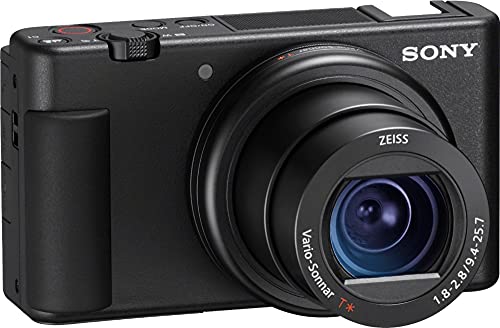
The ZV-1 was designed from a blank page for exactly the person reading this guide, and its title reads like a checklist of beginner anxieties answered in order. Flip screen: you can see yourself. Built-in microphone: your voice is the priority, not an accessory. 4K HDR video: the footage holds up on a television, not just a phone. Touchscreen display: settings change at a tap instead of a menu dive. Live video streaming and webcam: the same camera that records your vlog on Saturday can carry your livestream on Sunday and your video calls on Monday. Few products in this category state their purpose so completely in their own listing.
That completeness makes the ZV-1 the natural desk camera of this set. A beginner whose channel is built around products, tutorials or commentary will spend most filming hours seated, with the camera on a small tripod at arm’s length, and in that setting the flip screen and the built-in microphone do more work than any resolution figure. The webcam function deserves emphasis for new creators with day jobs: one device covering the work call and the evening recording session is a genuine budget argument, because it deletes a second purchase from the list entirely.
The title leaves two things unsaid, and honesty requires naming them. It does not state the sensor size, and it does not name a stabilisation system. Sony publishes full documentation for this camera, so both answers exist — but they live in the manufacturer’s documents rather than in this listing title, and the spec box below records them as unstated rather than borrowing figures from other Sony models. What the title does support is the use case: this is a content creator’s camera, named as such, with the streaming and webcam credentials printed in plain language.
Who it suits is the seated creator: the reviewer, the tutor, the commentator, the crafter filming hands over a worktop. The flip screen frames you, the touchscreen keeps settings reachable, and the streaming support means your audience can meet you live without a second device. Its limits are the flip side of that desk focus — the title promises no gimbal and no weather resistance, so the walking vlogger should read the DJI review again — and the lens information in the title is limited to the camera being a digital compact, with no focal range printed. For a creator whose channel lives at a desk, the ZV-1’s listing is worth opening for its current configuration details before you compare it with anything newer.
- Video: 4K HDR
- Screen: flip screen, touchscreen display
- Audio: built-in microphone
- Streaming: live video streaming and webcam use named in the title
- Sensor size: Not stated in the listing title — verify with the manufacturer documentation
- Stabilization system: Not stated in the listing title — verify with the manufacturer documentation
- Lens focal range: Not stated in the listing title — verify with the manufacturer documentation
Strengths
- The title names the full beginner workflow: flip screen, built-in microphone, streaming and webcam duty.
- 4K HDR recording gives seated footage a longer useful life on larger screens.
- Touchscreen control lowers the learning curve for camera settings.
Trade-offs
- No stabilisation system is named in the title, so walking footage is not its stated strength.
- Sensor size and lens range are absent from the title and must be confirmed in Sony documentation.
- Its design centres on a tripod or desk rather than one-handed pocket shooting.
Best for: desk-based beginners who will stream and take video calls with the same camera they vlog on. Not suited for: vloggers who film long walking segments and need stabilisation named in the specification, because this title names none.
A practical word about growing with this camera. Because it was built for creators, the ZV-1 sits at the centre of a wide accessory ecosystem — grips, windscreens, cases — and a beginner can add pieces one at a time as the channel’s needs clarify. Start with nothing but the camera and a small tripod. Add only what your first twenty videos prove you need. That restraint is easier with a camera whose built-in microphone and screen already cover the basics, and it is how a modest first purchase turns into a kit that lasts years rather than a drawer of abandoned experiments.

Canon PowerShot V10 — Pocket Canon
The PowerShot V10 takes a different design bet from the Sony compacts: instead of a conventional camera shape with a flip screen added, Canon built a small vertical pocket device around a built-in wide-angle zoom lens and a flip LCD, and aimed the whole thing at people who film themselves at arm’s length. Its title states a 1-inch CMOS sensor and 4K video streaming, which puts its imaging claims in the same sensor class as the DJI at the top of this guide — company the V10 keeps while wearing a very different body.
The audio line in the title is the one beginners should underline: a stereo mic is built in. Of the six cameras here, only the ZV-1 and the V10 name their microphone arrangements at all, and for a first channel, voice clarity is the quality viewers judge most harshly and forgive least. A stereo microphone also captures a sense of place — the room, the street, the market — that a single capsule flattens. Combined with the flip LCD for framing and the image stabilization the title names, the V10’s listing describes a self-contained filming tool: nothing to attach, nothing to pair, nothing to charge separately.
The wide-angle part of that built-in lens matters more than the zoom part for this audience. Vlogging at arm’s length needs width — your face, your shoulders, and enough of the scene behind you to tell viewers where you are. A built-in lens also means a beginner cannot make a beginner’s classic mistake: there is no lens to leave at home, no mount system to research, no second purchase hiding behind the first. The camera is the kit. Its black finish and compact designation in the title complete a picture of a device meant to be carried daily rather than admired on a shelf.
Who it suits is the beginner who wants a recognised brand, a real sensor and a stereo microphone in the smallest possible commitment. It is the camera for someone who films in short bursts through the day — a thought on a walk, a find in a shop, a reaction on a train platform. The honest limits: the title gives no frame-rate figure beyond the 4K streaming claim, names no streaming-as-webcam function, and says nothing about battery endurance, so heavy livestreamers should compare the ZV-1’s title claims carefully before choosing. Canon’s own page for the V10 is the place to settle those documentation questions; the listing itself rewards a look for today’s configuration.
- Sensor: 1-inch CMOS
- Video: 4K, with video streaming named in the title
- Lens: built-in wide-angle zoom lens
- Screen: flip LCD
- Audio: built-in stereo microphone
- Stabilization: image stabilization named in the title
- Frame rates beyond 4K: Not stated in the listing title — verify with the manufacturer documentation
- Battery endurance: Not stated in the listing title — verify with the manufacturer documentation
Strengths
- A 1-inch CMOS sensor and a built-in stereo mic are both stated in the title — rare candour at this size.
- The built-in wide-angle lens suits arm’s-length framing without any accessory.
- Image stabilization is named in the title, which the two budget picks below cannot say.
Trade-offs
- No frame-rate options are printed in the title, so slow-motion plans need documentation first.
- The fixed built-in lens ends the upgrade path — there is no lens mount to grow into.
- Webcam use is not claimed in the title, unlike the Sony ZV-1.
Best for: beginners who want Canon’s sensor and stereo microphone in a carry-everywhere body with nothing to attach. Not suited for: creators planning high-frame-rate slow motion as a signature style, because the title states no frame rate beyond its 4K claim.
There is a temperament match worth recognising here. The V10 rewards the creator who films many short pieces and edits them into a whole — the diary style, the day-in-the-life style — because it is always present and always ready. It rewards that style with good sound and a wide view. Creators who film long, single-take sessions in one room will use less of what makes it special and should weigh the desk-oriented Sony models more heavily. Neither answer is a verdict on the camera; it is a reminder that the best beginner camera is the one matched to the videos you actually intend to make.

Sony ZV-1F — Bundle value
This ZV-1F listing needs to be read as what it declares itself to be: a bundle. The title names the camera — a vlog camera with 4K video and a 20.1MP sensor figure, in black, described as an official Sony USA partner model — and then names the extras packed with it: a Deco Gear case, an extra battery, filters and photo software. Judging this listing by the camera alone misses its argument, which is that a beginner’s first month needs the case and the spare battery as surely as it needs the camera, and here they arrive in the same box.
The extra battery deserves more respect than bundle filler usually gets. New vloggers underestimate how filming devours batteries: the screen stays on, the focus hunts, the takes multiply. A second battery converts a dead camera at the good part of the day into a thirty-second swap. The case matters for the same unglamorous reason — a camera that travels protected travels more often. Filters and photo software are the softer parts of the bundle, useful for stills experimentation, but the case and battery are the items a beginner would otherwise buy within a fortnight, at separate cost and with separate postage.
About the camera itself, the title supports a focused claim: 4K video and 20.1MP stills from a camera Sony built for vloggers and content creators. It does not state a sensor size, a lens range or a microphone arrangement in this bundle listing, and the spec box records those silences plainly. Sony’s documentation answers them, and a careful buyer will read it — but the discipline of this guide is that a listing earns credit only for what it prints, and what this listing prints is a capable camera wrapped in a genuinely practical kit.
Who it suits is the beginner who wants one purchase to end the shopping phase. If your instinct is to spend three evenings comparing cases and spare batteries, this bundle collapses those evenings into a single decision, and the official partner model wording offers reassurance about what exactly is in the box. Its limits follow from the same bundle logic: you take the case and filters the bundle chose, not the ones you might have picked, and creators who already own accessories are paying for duplicates. If a one-box start sounds like relief rather than restriction, open the ZV-1F bundle page and confirm each named extra is still part of the offer.
- Video: 4K
- Stills: 20.1MP
- Bundle contents: Deco Gear case, extra battery, filters, photo software
- Model note: Official Sony USA Partner Model, black finish (ZV-1F/B)
- Sensor size: Not stated in the listing title — verify with the manufacturer documentation
- Lens range: Not stated in the listing title — verify with the manufacturer documentation
- Microphone arrangement: Not stated in the listing title — verify with the manufacturer documentation
Strengths
- The spare battery and case solve the two most common first-month problems inside the original purchase.
- 4K video and a 20.1MP stills figure cover vlogging and thumbnail photography in one device.
- The official partner model wording makes the bundle’s provenance explicit.
Trade-offs
- Bundle extras are chosen for you; owners of existing cases or filters pay for duplicates.
- Sensor, lens and microphone details are absent from this listing title.
- Photo software value depends entirely on whether you will actually open it.
Best for: beginners who want the camera, its case and its spare battery settled in a single order. Not suited for: a kit already containing a case and spare batteries, because the bundle’s core value would sit duplicated in a drawer.
One more consideration separates this listing from its plainer sibling versions. Bundles change composition over time — a case model swaps, a software title rotates — so the listing page on the day you buy is the contract, not a review written months earlier. Read the contents list at purchase time, screenshot it if you are cautious, and judge the offer as printed that day. Judged that way, on its printed contents, this remains the most administratively painless way into Sony’s vlogging line that this guide found.

Lmzour 4K Pocket Vlogging Camera — Rotating-lens budget pick
The Lmzour approaches self-filming from the lens side: instead of a screen that flips, its title describes a lens that rotates through 330 degrees, so the optics turn to face the vlogger while the body and screen stay put. It is a legitimate design answer to the framing problem, and for quick selfie segments it can be faster than unfolding a screen. The listing claims 4K recording, auto subject framing and WiFi sharing aimed at YouTube, TikTok and travel, and it includes a 16GB card, a mini tripod and a carrying bag — a complete, if modest, starter kit in one box.
Now the discipline this guide promised at the start. Lmzour is not a camera brand with published engineering documentation, and the 4K figure in this title is a claim by the listing, not a specification verified against a standard. Unbranded pocket cameras have a long history of headline numbers that describe the recording container rather than the detail actually captured. The fair way to buy this camera is to price it as a learning tool whose verified contents are physical — a rotating lens, a card, a tripod, a bag — and whose resolution claim is a hope to be tested in your first evening of filming, inside the return window.
Read that way, the camera has a real job to do. Auto subject framing, if it behaves as the title describes, helps a solo beginner stay composed without a screen check every ten seconds. WiFi sharing moves clips to a phone for the quick edits that TikTok and Shorts reward. The mini tripod covers the static shots — the desk piece, the hotel-room recap — that rotating lenses cannot. A teenager testing whether vlogging is fun, or a traveller who would rather risk a cheap camera than a flagship, gets a coherent kit here for the price of a modest dinner out.
Who it suits is the cautious experimenter: someone who wants to learn framing, speaking to a lens and publishing cadence before spending serious money, and who understands the resolution claim is unverified. It does not suit a creator whose channel is already monetised and whose audience watches on televisions, nor anyone who needs documented sensor behaviour in low light — the title names no sensor at all. If you buy it as tuition rather than as equipment, the Lmzour’s page is worth a careful read for exactly what the current kit includes.
- Video: the listing claims 4K recording
- Lens: 330-degree rotating lens
- Framing: auto subject framing claimed in the title
- Sharing: WiFi sharing for YouTube, TikTok and travel
- Included: 16GB card, mini tripod, carrying bag
- Sensor: Not stated in the listing title — verify with the manufacturer documentation
- Stabilization: Not stated in the listing title — verify with the manufacturer documentation
Strengths
- The rotating lens answers the self-framing problem without unfolding anything.
- Card, tripod and bag are included, so the first filming session needs no further purchases.
- WiFi sharing fits a phone-first publishing workflow for short-form platforms.
Trade-offs
- The 4K claim is a listing claim from an unbranded maker, unverified by any published standard.
- No sensor information appears in the title, so low-light behaviour is a complete unknown.
- No stabilisation is named, so walking footage should be expected to move with your steps.
Best for: first-time experimenters who want a complete cheap kit to learn the vlogging habit on. Not suited for: creators who need a verified sensor specification for low-light work, because the title publishes no sensor information whatsoever.
Treat the first week with this camera as an audition. Film the same short piece at noon, at dusk and under kitchen lights. Walk with it, sit with it, hand it to a friend. Then watch the results on the largest screen you own, not the phone it was shared to. If the footage pleases you at that size, the camera has earned its place and the listing’s claims matter less than your own evidence. If it disappoints, you have learned the lesson inside the return window, at the lowest tuition this category offers — which is, in the end, exactly what a camera at this level is for.

Duluvulu 4K Vlogging Camera — Two-battery starter kit
The Duluvulu makes its pitch on completeness and screen size. Its title describes a digital camera with autofocus, a 3-inch screen that flips a full 180 degrees, two batteries, an SD card in the box and a 16X zoom figure, aimed at teens and travel. The listing claims 48MP stills and 4K video, and — like the Lmzour above — those numbers come from an unbranded listing and should be read as claims. What can be read as fact is the shape of the offer: a flip-screen compact that arrives with its power and storage already sorted, which removes the two accessory errands that stall most first purchases.
The 180-degree flip screen is the feature a beginner will touch most. Fully flipped, the screen faces the same way as the lens, so framing a piece to camera becomes a glance rather than a guess. At 3 inches it is also the largest screen named in any title in this guide, which helps when the camera is propped at arm’s length and the vlogger is checking whether a product label is legible or a friend’s head is in frame. Screens are unglamorous specification lines, but for solo creators the screen is the viewfinder, the monitor and the confidence check in one piece of glass.
Autofocus is the other title claim with daily consequences, and it should be tested rather than trusted. A beginner filming alone cannot ride a focus ring; the camera either holds a face or it does not, and unbranded autofocus systems vary enormously in how gracefully they hunt. The 16X zoom figure, meanwhile, should be read with the guide’s standing caution: the title does not call it optical, and zoom figures on cameras of this class are digital, which means cropping — usable for framing a distant sign, destructive if leaned on for quality. None of this disqualifies the camera. It defines the tests to run in the first days.
Who it suits is the young or budget-bound beginner who values the flip screen and the two-battery kit, films mostly in daylight, and publishes to platforms watched on phones. It does not suit low-light work — no sensor is named in the title — nor anyone who will be troubled when the zoom softens at its far end. Bought with those expectations set honestly, it is a friendly first camera; its listing page carries the current kit contents, which deserve a confirming glance before checkout.
- Video and stills: the listing claims 4K video and 48MP stills
- Screen: 3-inch, flips 180 degrees
- Focus: autofocus named in the title
- Zoom: 16X figure stated in the title, type not specified there
- Included: SD card and 2 batteries
- Sensor: Not stated in the listing title — verify with the manufacturer documentation
- Microphone arrangement: Not stated in the listing title — verify with the manufacturer documentation
Strengths
- The 3-inch fully flipping screen is the most beginner-friendly framing tool in the budget half of this guide.
- Two batteries and a card in the box remove the usual first-week accessory purchases.
- Autofocus is at least named in the title, which not every camera at this level manages.
Trade-offs
- The 48MP and 4K figures are unbranded listing claims, not documented specifications.
- The 16X zoom’s type is unstated in the title, so it should be assumed digital until proven otherwise.
- No sensor or microphone information is published in the title at all.
Best for: teens and first-time vloggers filming in daylight who want the flip screen and spare battery from day one. Not suited for: evening and indoor filming as a primary use, because the title names no sensor whose low-light behaviour could be assessed.
A final note on expectations, because this camera will be bought by many people as a gift. A gifted first camera succeeds if it gets used weekly, not if it wins a specification argument. The Duluvulu’s flip screen, ready batteries and included card all push toward use: open the box, charge both batteries, film something today. If the recipient catches the vlogging habit on it, a later upgrade will be chosen with the wisdom of fifty published videos. If the habit does not catch, little has been spent. Either outcome is a reasonable return on a camera at this level.
Comparison Table
| Camera | Sensor (per title) | Video claim | Self-framing method | Stabilization (per title) |
|---|---|---|---|---|
| DJI Osmo Pocket 3 | 1-inch-class CMOS | 4K/120fps | 2-inch rotatable touchscreen | 3-axis gimbal |
| Sony ZV-1 | Not stated in the listing title | 4K HDR | Flip screen | Not stated in the listing title |
| Canon PowerShot V10 | 1-inch CMOS | 4K streaming | Flip LCD | Image stabilization |
| Sony ZV-1F (bundle) | Not stated in the listing title | 4K, 20.1MP stills | Not stated in the listing title | Not stated in the listing title |
| Lmzour Pocket Camera | Not stated in the listing title | Listing claims 4K | 330-degree rotating lens | Not stated in the listing title |
| Duluvulu Camera | Not stated in the listing title | Listing claims 4K, 48MP stills | 3-inch 180-degree flip screen | Not stated in the listing title |
How to Choose Your First Vlogging Camera
Begin with your dominant shot, because it eliminates half the table immediately. If most of your planned videos move — walks, tours, travel days — the DJI Pocket 3’s gimbal is not a luxury but the core of the purchase, and no other pick here substitutes for it. If most of your videos sit still — reviews, tutorials, commentary — stabilisation fades in importance and the Sony ZV-1’s microphone, streaming and webcam claims take over the argument. The Canon V10 sits between those poles: stabilised and pocketable, but built around short bursts rather than long sessions.
Next, decide how much unverified specification you can tolerate. The two unbranded cameras ask you to accept headline numbers on trust and to verify performance yourself during the return window. Some beginners are happy with that bargain — the tuition is cheap and the lessons are real. Others would rather pay more for documentation: sensor sizes printed by the manufacturer, support pages, firmware updates. Neither temperament is wrong, but buying against your own temperament produces the drawer camera — the one that is never quite trusted and therefore never carried.
Then count the whole purchase, not the camera. A spare battery, a card, a case and a small tripod are not optional extras for a working vlogger; they are the second half of the kit. The ZV-1F bundle and the two budget cameras fold most of that into the box, while the DJI, ZV-1 and V10 may need pieces added. A cheaper camera plus three accessories can quietly cost more than a bundle that looked expensive in the headline. Price the kit you will actually carry, and the table above will sort itself more honestly.
Finally, plan the second month, not the first day. Your first videos will be bad in ways no camera can fix — pacing, framing instincts, speaking to a lens — and every pick here is good enough to learn those lessons on. The right question is which camera still serves you once the lessons land: the one with headroom in its sensor, its frame rates or its streaming support. Buy for the creator you will be at video fifty, within the budget of the creator you are at video one.
Does a Beginner Really Need 4K for Vlogging?
For publishing today, not strictly — most vlogs are watched on phones, at sizes where a clean 1080p image looks excellent. But 4K earns its place in a beginner’s camera for two practical reasons that have nothing to do with showing off. The first is cropping: a 4K frame lets you punch in during editing to fix framing mistakes, remove a distraction at the edge, or fake a second camera angle in an interview, and still deliver a sharp 1080p result. The second is longevity: footage shot at 4K today remains usable in projects years from now, when a 1080p archive starts to feel thin.
The caveat belongs to the budget end of this guide. A 4K claim from an unbranded listing is a claim, and a verified 1080p image from a documented camera will beat an unverified badge every time. So read the badge differently at different levels: on the DJI, Sony and Canon picks it is a specification; on the Lmzour and Duluvulu it is a hypothesis your first evening of test footage should examine. Either way, do not let the badge outrank the screen, the microphone and the stabilisation, because viewers forgive resolution long before they forgive muffled speech or seasick footage.
How Much Does Stabilisation Matter When You Are Starting Out?
More than any other single feature, because beginners move. Established creators have learned to walk smoothly, to hold a camera at a practised distance, to plan routes around their shots. Beginners have learned none of that, and their footage shows it: the horizon tilts, the frame bobs with each step, doorways swing past. Stabilisation is the technology that forgives inexperience while inexperience is being outgrown, which is why the DJI’s mechanical gimbal anchors this guide and why the Canon V10’s named image stabilization matters in its class.
There is a hierarchy worth understanding. A 3-axis gimbal physically motors the camera level, and handles walking best. Electronic image stabilisation corrects in software, usually by cropping the frame, and handles small hand tremor well but walking only partially. No stabilisation at all — the unstated position of several titles here — means the beginner’s technique is the only correction available, and technique is precisely what a beginner has not built yet. None of this makes an unstabilised camera useless: on a tripod, on a table, in a seated setup, stabilisation is irrelevant. It simply means the walking vlogger and the desk vlogger should read the same table with different eyes.
Should Your First Vlogging Camera Double as Your Streaming and Webcam Setup?
For many beginners the answer is quietly yes, and it changes the arithmetic of the whole purchase. A new creator often has a job, a course or a community that already puts them on video calls every week, filmed by a laptop camera that flatters nobody. A vlogging camera that also works as a webcam upgrades those calls, the livestreams that grow out of the channel, and the recorded videos, all from one device on one tripod. The Sony ZV-1 states that double duty outright in its title — live video streaming and webcam are printed claims — and the Canon PowerShot V10 states 4K video streaming, which points the same direction for creators whose live work runs through the camera itself.
The other four titles make no such claim, and the correct response is neither to assume the function exists nor to assume it does not. It is to check the manufacturer documentation for the exact model, because webcam support is a firmware and connection question that listing titles often omit even when the answer is yes. What you should not do is buy a camera whose silent title you have upgraded in your head into a promise, then discover the gap during your first scheduled stream. Decide whether streaming matters to your channel this year; if it does, let the printed claims lead, and if it does not, let the vlogging features lead and treat any streaming support you later find as a windfall.
Common Mistakes New Vloggers Make When Choosing
Spending the whole budget on the camera body. The card, the spare battery and the tripod are part of the camera for practical purposes. A flagship compact that stays home for want of a charged battery loses to a modest camera that is always ready.
Believing every number on a budget listing. Megapixels and resolution badges on unbranded cameras are claims. Test them in your first week, on your biggest screen, while returns are still simple.
Ignoring the microphone until the first upload. Viewers tolerate soft video and abandon muffled audio. Two titles here name their microphones; for the others, plan a test recording of your own voice before the return window closes.
Buying for the channel in your imagination. A travel vlogger’s camera and a desk reviewer’s camera are different tools. Buy for the videos scheduled this month, not the series you daydream about.
Skipping the framing check. If you cannot see yourself while filming, your first month of footage will be badly framed. Every pick here offers a flip, rotation or follow solution — use it from the first day.
Final Recommendation
Most beginners should choose between two cameras. The DJI Osmo Pocket 3 is the pick for anyone whose vlog moves through the world: its gimbal, its 1-inch-class sensor and its subject-following make walking footage look practised before you are. The Sony ZV-1 is the pick for anyone whose vlog lives at a desk: microphone, flip screen, streaming and webcam support cover the seated creator’s whole workflow in one purchase. Between them, the Canon PowerShot V10 offers brand-name imaging and a stereo microphone in the most pocketable body here, and the ZV-1F bundle offers the least shopping. The Lmzour and Duluvulu are tuition cameras — bought knowingly, tested promptly, they teach the habit cheaply.
Whichever you choose, film something unimportant with it on the day it arrives, because the best beginner vlogging camera is not the one with the finest specification — it is the one that turns an ordinary Tuesday into your channel’s first published video.
Frequently Asked Questions
Which of these cameras is easiest for a complete beginner?
The Canon PowerShot V10 asks the least of its owner: the lens is built in, the microphone is built in, the screen flips, and there is nothing to mount or pair. The DJI Osmo Pocket 3 runs it close, with the gimbal forgiving unsteady hands automatically.
Can I livestream with these cameras?
The Sony ZV-1 names live video streaming and webcam use in its title, and the Canon PowerShot V10 names 4K video streaming. The other titles do not make streaming claims, so treat streaming as unconfirmed for them until the manufacturer documentation or listing page says otherwise.
Are the 4K claims on the budget cameras trustworthy?
They are listing claims from unbranded makers, not verified specifications. Buy those cameras for their verified physical contents — screen, lens movement, included accessories — and test the footage on a large screen during the return window.
Do I need a separate microphone to start?
Not with the Sony ZV-1 or Canon PowerShot V10, whose titles name built-in microphones. For the other four, record a voice test in your actual filming room during the first days; if your voice sounds thin or echoing, a small external recorder is the first upgrade to plan.
How important is a flip screen, really?
For solo filming it is close to essential. It is the difference between framing yourself and hoping you are framed. Every pick in this guide answers the problem somehow — flip screens, a rotatable touchscreen, a rotating lens or subject-following — because the guide treated it as a requirement.
Related Guides
Once the first camera is chosen, the neighbouring questions arrive quickly. Readers watching their budget across the whole setup should continue to our guide to affordable cameras for YouTube, where value across a full channel kit is the theme. Those who fell for the pocketable end of this table will find a deeper bench in our roundup of compact cameras to vlog with, built around carry-everywhere shooting. And creators planning beauty and skincare content, where close-up framing and colour matter most, should finish with our selection of cameras for beauty vloggers and their particular lighting demands.


