What's inside
- Key Takeaways
- Quick Picks
- How did we choose desks whose trays are genuinely built in?
- Why does a few inches of tray drop change a whole working day?
- The six tray desks at a glance
- What about adding a clamp-on tray to a desk you already own?
- How do you set up a tray desk so the tray helps instead of hindering?
- Which tray mistakes do buyers discover too late?
- How does a tray change the way the rest of the desk gets used?
- What should tall and short users check before trusting a tray?
- How do tray desks serve writers, coders and other keyboard professionals differently?
- What happens to a tray desk when the household’s needs change?
- How should you judge a tray during the first week, while returns are still simple?
- Why do trays keep returning to desk design after every attempt to abolish them?
- How do you keep cables out of the tray’s runners?
- Final Recommendation
- Frequently Asked Questions
- Related Guides
As an Amazon Associate I earn from qualifying purchases. This post may contain affiliate links at no extra cost to you.
widgetverdict.com is reader-supported. When you buy through links on our site, we may earn an affiliate commission.
There is a particular shoulder ache that belongs to desks without a keyboard tray, and anyone searching for the best desks with keyboard and mouse drawer has usually met it: the keyboard sits on the main top, the top sits at elbow height or higher, and by mid-afternoon your shoulders have crept upward to meet your ears. A built-in tray drops the keyboard and mouse to their own level, a few inches below the work surface, where your forearms can rest closer to horizontal and the desktop above stays free for monitors, documents and the mug that must live somewhere. Every pick heading below links to that desk’s Amazon listing. Note the rule that governs this whole category: every pick here is a complete desk with a tray designed into it, not an accessory clamped on afterwards.
That rule matters because the internet will happily sell you a clamp-on tray and call the problem solved. Retrofit trays have their place — we discuss them honestly later in this guide — but they hang from a desktop edge, they limit where you can sit, and they are only as strong as the desk edge they grip. A tray engineered into the desk’s frame travels with the furniture, shares its structure, and arrives with its geometry already decided by someone who measured the kneehole. The six desks below range from a 30 inch compact study desk to two 55 inch electric standing desks, and each one puts the keyboard where your body wants it.
Key Takeaways
- Every pick is a full desk with a built-in keyboard tray named in its listing title; clamp-on trays are covered separately as a retrofit, not as picks.
- Two of the six are electric standing desks — the AODK and the HUANUO — so tray comfort and height adjustment can coexist.
- The HUANUO states its tray width outright at 24.4 inches, the most explicit tray measurement in the group.
- The Yaheetech is the traditional fixed-height option, pairing its pull-out tray with a drawer and an adjustable open shelf.
- At 30 inches, the ALISENED serves the smallest rooms, while the rolling Topeakmart adds wheels, a printer shelf and a charging station.
- Tray width decides whether the mouse shares the keyboard’s level; a tray that fits the keyboard alone merely relocates the problem.
Quick Picks
| Model | Badge | The case for it |
|---|---|---|
| Yaheetech Computer Desk with Keyboard Tray, Drawers, and Shelves | Classic tray desk | A pull-out keyboard tray with a drawer and an adjustable shelf, in a straightforward black home office desk. |
| AODK 55 Inch Standing Desk with Drawers & Keyboard Tray | Electric lift with tray | A height-adjustable desk with three memory heights that keeps its keyboard tray through the whole range of travel. |
| HUANUO 55″ x 26″ Electric Standing Desk with 2 Drawers & 24.4″ Large Keyboard Tray | Widest stated tray | Two drawers and a 24.4 inch tray on a 55 by 26 inch electric desk with four height presets. |
| Bestier 48” Computer Desk with Drawers | Mid-size organiser | A 48 inch industrial desk with a file drawer, a keyboard tray and two hooks for the everyday carry. |
| ALISENED 30 Inch Computer Desk, with Keyboard Tray & Monitor Stand | Compact space saver | Thirty inches of desk with a tray, a raised monitor platform and shelving for the tightest corners. |
| Topeakmart Rolling Computer Desk with Charging Station | Rolling tray desk | Wheels, a keyboard tray, a printer shelf and USB charging for small flexible spaces. |
How did we choose desks whose trays are genuinely built in?
We required the listing title to name a keyboard tray as part of the desk itself, and we rejected the many desks whose trays appear only in a bundle photograph or an accessory suggestion. Beyond that threshold, we weighed tray generosity — width where stated, and the plausibility of mouse room where it is not — alongside the desk’s other duties: drawers for the desk economy, shelves for books, monitor stands for screen height, and in two cases full electric height adjustment. The result deliberately spans fixed and standing desks, because the tray question and the standing question are independent; a worker can want either, or, as the AODK and HUANUO demonstrate, both at once. Readers furnishing very small rooms will find allies in Best Small Computer Desks, where several compact layouts solve the same space problem from a different angle.
Why does a few inches of tray drop change a whole working day?
Typing posture is a chain of small angles. When the keyboard rests on a standard desktop, your elbows must bend sharply or your shoulders must lift to bring your hands to the keys, and the mouse, usually a few inches further right and at the same height, asks your right shoulder to hold a mild shrug for hours. A tray breaks the chain at its first link: hands drop to a level where forearms float roughly parallel to the floor, shoulders settle, and the mouse, if the tray is wide enough to host it, joins the keyboard at that kinder height. The desktop above, meanwhile, reverts to its proper jobs — holding screens at eye level and documents at reading distance — instead of doubling as a typing shelf at the wrong altitude for both tasks.
Consider also what a tray does for the mouse specifically, since the mouse is half of this article’s title and the more neglected half of most setups. A mouse stranded on the desktop while the keyboard drops to a tray forces your right arm to work at two heights, swapping levels dozens of times an hour as you alternate between typing and pointing. That small repeated climb is exactly the sort of friction that never appears in a product photograph and dominates the third hour of a working day. It is why our pick analyses return so insistently to tray width: a tray that hosts both devices is a workstation, while a tray that hosts only the keyboard is a shelf with good intentions.
The tray also disciplines the desk’s geography. Keyboards that live on tops wander; keyboards that live on trays have a home position, and sliding the tray away at the end of the day clears the visual field in a way that makes small rooms feel larger and shared desks easier to hand over. None of this requires medical claims or dramatic promises. It is furniture geometry, repeated ten thousand keystrokes a day, and it is why this category of desk survives every fashion cycle in office furniture.

Yaheetech Computer Desk with Keyboard Tray, Drawers, and Shelves — Classic tray desk
The Yaheetech is the desk your instincts picture when this category is mentioned: a black home office desk whose pull-out keyboard tray slides from beneath the top, accompanied by a drawer and an adjustable open shelf for books, files and supplies. The listing title is unusually descriptive, spelling out the tray, the drawer and the shelf’s adjustability in plain terms, and that plainness suits the product. This is not a desk with ambitions beyond its station. It is a competent, traditional workstation for a bedroom, study or first home office, where the tray does the ergonomic work and the storage keeps the top from drowning.
The adjustable shelf is the detail that lifts the design above a basic tray desk. Shelves fixed at the wrong height waste exactly the space they claim to save, forcing books to lie flat or towers to squeeze; an adjustable shelf lets the vertical storage conform to what you actually keep, whether that is a row of textbooks, a games console or the household printer’s paper supply. Combined with the drawer for the small economy of pens and drives, the Yaheetech covers the standard storage curriculum without pedestals or cabinets, keeping the kneehole — and the tray’s travel — unobstructed.
Fixed height is the honest limitation. Your chair must do all the adapting, and taller or shorter users should verify the tray height against their seated elbow height using the manufacturer’s documentation, since the headline listing does not publish the figure. Within that constraint, the Yaheetech represents the category’s baseline done properly: a tray that is part of the desk, storage that respects the kneehole, and a price of admission measured in assembly time rather than complexity. If your needs are a single monitor, a real keyboard and a tidy top, this is the straightforward answer against which the fancier picks below must justify themselves.
- Tray: pull-out keyboard tray built into the desk, per the listing title
- Storage: one drawer plus an adjustable open shelf
- Finish: black
- Intended contents named in the title: books, files and home office supplies on the shelf
- Tray width and desk dimensions: the headline omits both figures, so confirm them in the manufacturer’s documentation
- Height adjustment: none described; this is a fixed-height desk
Strengths
- A true built-in tray with storage that leaves the kneehole clear.
- Adjustable shelf adapts to books, consoles or paper supplies.
- Simple, traditional layout that suits bedrooms and studies alike.
Trade-offs
- Fixed height places all ergonomic adjustment on your chair.
- Headline dimensions are absent, so measuring from documentation is essential.
- Single drawer will not satisfy heavy filers.
Best for: a traditional single-monitor home office wanting a proper tray, a drawer and flexible shelving in one desk.
Not suited for: workers who need height adjustment for alternating sitting and standing through the day.

AODK 55 Inch Standing Desk with Drawers & Keyboard Tray — Electric lift with tray
The AODK answers a question standing-desk shoppers ask constantly: must I give up my keyboard tray to gain electric height adjustment? Its title says no. Across a 55 inch rustic brown top, this desk combines drawers and a keyboard tray with a powered lift offering three memory heights, so the tray’s ergonomic drop is preserved at sitting height, standing height and the in-between perch you will inevitably adopt. Memory presets matter more than they sound; a desk that returns to your exact heights at a button press gets adjusted often, while a desk that must be nursed to height by eye gets adjusted rarely, and the tray-plus-lift combination only pays off if the lift is actually used.
The supporting features in the title read like a checklist of modern desk expectations: a power outlet for the desk’s own devices, LED lights, a monitor stand to raise the screen independently of the top, and a cable management tray to keep the wiring corralled as the desk travels. That last item is not decoration. A tray desk that rises and falls drags its cables through the full range daily, and unmanaged leads will find the keyboard tray’s runners eventually. AODK’s inclusion of a dedicated cable tray suggests the designers understood the machine they were building: several moving systems — lift, keyboard tray, drawers — sharing one frame, each needing its own clearance.
Drawers on a standing desk deserve a moment’s thought. They add weight the lift must carry and they occupy the under-top space where the frame’s crossbar also lives, yet they answer the storage question that leaves many standing desks surrounded by separate cabinets. AODK’s bet is that buyers want the complete workstation in one footprint, tray included. If your workflow is keyboard-centric — long writing, coding, data entry — and you want to stand for part of it without surrendering the tray your shoulders prefer, this is the most direct expression of that brief in the group.
- Top width: 55 inches, rustic brown finish
- Height adjustment: electric, with three memory heights named in the title
- Tray: an integrated keyboard tray forms part of the desk
- Storage: drawers included; count and configuration are detailed in the manufacturer’s documentation
- Extras named in the title: power outlet, LED lights, monitor stand, cable management tray
- Tray width: absent from the headline; verify the figure in the manufacturer’s documentation
Strengths
- Keeps a built-in tray while adding full electric height adjustment.
- Three memory heights encourage frequent, precise posture changes.
- Cable management tray protects the moving systems from stray leads.
Trade-offs
- Drawers, lift and tray together make this a heavy, committed piece of furniture.
- LED lighting will not suit every room’s temperament.
- Tray dimensions require a documentation check before ordering.
Best for: keyboard-heavy workers who want to alternate sitting and standing without giving up a tray at either height.
Not suited for: minimalists who want a standing desk reduced to a top and two legs with nothing else attached.

HUANUO 55″ x 26″ Electric Standing Desk with 2 Drawers & 24.4″ Large Keyboard Tray — Widest stated tray
HUANUO does something refreshingly rare in this category: it publishes the tray’s size in the title. At 24.4 inches, the keyboard tray is described as large, and the number lets you do the arithmetic that decides this purchase — a full-size keyboard occupies roughly eighteen inches, leaving genuine room beside it for a mouse travelling on the same level, which is the entire point of a keyboard and mouse drawer. Desks that hide their tray dimensions ask you to gamble on the single measurement that matters most; HUANUO puts it in the headline, and the desk earns its shortlist place on that honesty alone.
The rest of the specification is equally forthcoming. The top measures 55 by 26 inches, a depth that gives monitors proper setback from the tray’s edge. Two drawers handle storage. Four height presets — one more than the AODK offers — store the positions of a shared desk or a varied routine. The title also notes C-clamp mount compatibility, meaning monitor arms and accessories designed to clamp to a desktop edge can be fitted, which matters because tray desks sometimes obstruct clamp positions with their under-top hardware; HUANUO signals that its frame leaves room.
The light walnut finish distinguishes it visually from the rustic brown and black competition, suiting brighter rooms and Scandinavian-leaning interiors where a dark desk would sit heavily. Taken together, this is the most specification-transparent desk in the roundup: tray width, top dimensions, drawer count and preset count all stated before you click. Buyers who have been burned by vague listings will recognise the value immediately. The remaining checks are the usual ones — tray load, lift range and speed live in the manufacturer’s documentation — but the questions HUANUO answers up front are the questions this category most often dodges.
- Top size: 55 by 26 inches, light walnut finish
- Tray width: 24.4 inches, described as a large keyboard tray in the title
- Height adjustment: electric, with four height presets
- Storage: two drawers
- Compatibility named in the title: C-clamp mounts can be fitted
- Lift range and tray load: not stated in the headline listing — consult the manufacturer’s documentation
Strengths
- Tray width is published, so mouse room can be verified before buying.
- Four presets serve shared desks and varied routines well.
- Generous 26 inch top depth gives screens proper distance from the tray.
Trade-offs
- The 55 inch footprint needs a room that can spare it.
- Two drawers is moderate storage for a desk of this size.
- Light walnut will clash with dark, traditional office furniture.
Best for: mouse-intensive workers who want a verifiably wide tray on a full-size electric standing desk.
Not suited for: small rooms, or buyers needing extensive drawer storage alongside the tray.

Bestier 48” Computer Desk with Drawers — Mid-size organiser
Bestier’s 48 inch desk occupies the sensible middle of this category: large enough for a proper workstation, small enough for a spare room, and organised with an industrial wood character in grey. The title assembles a practical inventory — storage drawers including a file drawer, a keyboard tray, and two hooks. The hooks sound like a footnote until you live with them; headsets, bags and charging cables all need a home that is not the desktop, and a hook on the desk’s flank absorbs that clutter at zero cost to the kneehole or the tray.
The file drawer distinguishes the Bestier from purely keyboard-focused rivals. Most tray desks treat storage as an afterthought of one shallow drawer, but a desk that can also file gives the keyboard worker a complete station: tray below for input, top for screen and current documents, file drawer for the archive those documents join when finished. For home office and studio use — the spaces named in the title — that completeness matters, because the alternative is a separate filing cabinet consuming the floor space the 48 inch footprint was chosen to save.
Bestier’s industrial styling, with its grey-toned wood, suits rooms that find rustic brown too warm and black too stark. The trade-offs are the category’s usual ones: the headline listing leaves tray width unpublished, so mouse room must be confirmed in the manufacturer’s documentation, and the fixed height means your chair carries the ergonomic adjustment. Within those limits, this is the balanced choice of the six — no single headline feature, but no missing one either, and a file drawer that most tray desks never think to include.
- Top width: 48 inches, gray industrial wood finish
- Tray: the desk carries its own built-in keyboard tray
- Storage: a set of drawers that includes one sized for files, per the listing title
- Extras named in the title: two hooks for hanging items
- Intended spaces: the title names the home office and the studio
- Tray width: shoppers should confirm the figure in the manufacturer’s documentation, as the headline omits it
Strengths
- File drawer adds real archiving to a mid-size tray desk.
- Hooks absorb headsets and bags that otherwise clutter the top.
- Forty-eight inches fits spare rooms that cannot host the 55 inch models.
Trade-offs
- Tray width is unpublished in the headline listing.
- Fixed height; no standing option.
- Industrial grey finish will not flatter traditional rooms.
Best for: home office and studio workers wanting a tray, filing and tidy details in a mid-size fixed desk.
Not suited for: shoppers needing a wide, mouse-friendly tray verified from the listing alone before ordering.

ALISENED 30 Inch Computer Desk, with Keyboard Tray & Monitor Stand — Compact space saver
Thirty inches is the smallest desk in this roundup by a wide margin, and the ALISENED’s design reads like an essay in making those inches count. The title promises a keyboard tray, a monitor stand and storage shelves in one compact frame aimed at space-saving study and work. Each element earns its footprint: the tray removes the keyboard from the top, the monitor stand lifts the screen to a saner height while creating a pocket of storage beneath it, and the shelves take the books and supplies that a 30 inch top could never host alongside a screen.
Honesty about scale is essential here. This is a one-person, one-screen desk for a bedroom corner, a dorm room, a hallway nook or the end of a living room — the places where computing actually happens in small homes. A laptop fits; a laptop plus a modest monitor fits with discipline; anything beyond that belongs to a larger desk and a larger room. The tray at this scale will be snug, and the headline listing does not publish its width, so compact-keyboard users will fare better than owners of full-size boards with number pads. Judge the ALISENED by the standard of the spaces it serves: in a room where the alternative is the kitchen table, a dedicated 30 inches with a tray and a raised screen is a transformation, not a compromise.
The study positioning in the title is well judged. Students, whose work alternates between laptop, textbook and notebook, benefit from the shelves and the monitor stand’s storage pocket, and the tray keeps the writing surface clear for the notebook when the keyboard slides away. That slide-away moment is the compact desk’s party trick: work mode and study mode in the same 30 inches, separated by a push of the tray.
- Top width: 30 inches
- Tray: a keyboard tray is integrated into the frame
- Extras named in the title: a monitor stand and storage shelves
- Positioning: compact, space-saving study desk for writing, gaming and working
- Tray width: the manufacturer’s documentation carries the figure, since the headline leaves it out
- Height adjustment: none described; this is a fixed-height desk
Strengths
- Brings a real tray and raised screen to rooms with almost no spare space.
- Shelves and the stand’s underside pocket multiply storage beyond the top.
- Sliding the tray away converts the desk to a clear writing surface instantly.
Trade-offs
- One screen and a compact keyboard are the realistic ceiling.
- Tray snugness is likely; full-size keyboards may crowd the mouse.
- No drawers are named, so storage depends on the shelves.
Best for: students and small-space workers who need a dedicated tray desk in a corner that measures in inches.
Not suited for: dual-monitor setups or full-size keyboards with number pads that demand generous tray width.
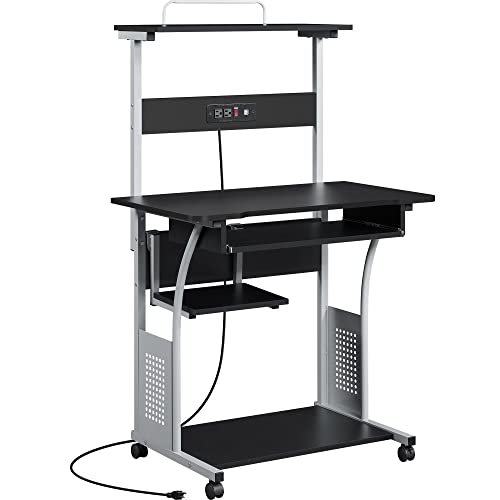
Topeakmart Rolling Computer Desk with Charging Station and 2 USB Ports — Rolling tray desk
The Topeakmart adds motion of a different kind: wheels. This compact black desk rolls, which in a small flat means the office can migrate — to the window for morning light, to the wall when guests arrive, to the bedroom when the living room is claimed. Its keyboard tray keeps the category’s promise, and the title adds a charging station with two USB ports, plus a shelf sized for a printer, acknowledging that a small-space desk must also be the home of the devices that larger offices exile to a side table.
The printer shelf is a thoughtful inclusion. Printers are the barnacles of small desks, too big for the top, too heavy for most shelves, and usually resident on the floor trailing cables. Giving the printer a designed shelf within the desk’s footprint tidies the whole arrangement and keeps the paper path near the person using it. The charging station performs similar diplomacy for phones and tablets, which otherwise colonise the worktop with their cables; two USB ports at the desk means those devices charge at the desk’s edge rather than across its centre.
Wheels demand respect in one specific way: a rolling desk must be stationary while you work, so check the manufacturer’s documentation for locking casters or plan the desk’s position against a wall that braces it. Typing on a desk that creeps is a special frustration, and tray typing amplifies any movement because your hands rest on a sliding surface of their own. Positioned and secured properly, though, the Topeakmart offers something none of the other five can — a tray desk that follows the worker around a small home, rather than assigning the worker a permanent corner.
- Mobility: rolling design on wheels, per the listing title
- Tray: the keyboard tray is part of the desk itself
- Extras named in the title: charging station with two USB ports, and a printer shelf
- Finish: black
- Positioning: compact study and writing desk for small spaces and home offices
- Desk dimensions and tray width: neither figure appears in the headline, so confirm both in the manufacturer’s documentation
Strengths
- Wheels let a small home relocate its office as the day demands.
- Printer shelf and charging station absorb devices that clutter small desks.
- Tray keeps keyboard posture sound in a genuinely compact footprint.
Trade-offs
- Must be braced or locked before typing, or the desk will wander.
- Dimensions are unpublished in the headline listing.
- Compact scale caps the setup at one screen and modest gear.
Best for: small flats and flexible rooms where the desk must roll between positions and carry its printer and chargers with it.
Not suited for: heavy multi-monitor rigs, or floors so uneven that a wheeled desk will not settle.
The six tray desks at a glance
| Model | Size | Height style | Tray note | Storage |
|---|---|---|---|---|
| Yaheetech | Confirm in documentation | Fixed | Pull-out tray | Drawer plus adjustable shelf |
| AODK | 55″ | Electric, 3 memory heights | Integrated tray | Drawers |
| HUANUO | 55″ x 26″ | Electric, 4 presets | 24.4″ tray, stated in title | 2 drawers |
| Bestier | 48″ | Fixed | Integrated tray | Drawers including file drawer |
| ALISENED | 30″ | Fixed | Integrated tray | Shelves, with a stand for the monitor |
| Topeakmart | Confirm in documentation | Fixed, on wheels | Integrated tray | Printer shelf |
Two philosophies divide the table. The fixed desks — Yaheetech, Bestier, ALISENED, Topeakmart — spend their budgets on storage and footprint variety. The electric pair spend theirs on movement, carrying the tray through a range of heights. Neither philosophy is superior; they answer different questions, and the shopper’s first task is deciding which question is theirs. Homes short on space but long on hours at the keyboard may also want to browse Best Computer Desks With Hutch, where storage climbs upward instead of outward.
What about adding a clamp-on tray to a desk you already own?
Here is the retrofit discussion this guide promised, kept firmly in its place: a clamp-on tray is an accessory, not a pick, because it is not a desk. It grips the front edge of an existing desktop with clamps, hanging a keyboard surface below the top. For renters forbidden from replacing furniture, or workers issued a desk by an employer, a clamp-on tray can be a legitimate experiment — cheap to try, removable without trace, and honest about its limits. Those limits are real: the clamps need a desktop edge of suitable thickness without a deep apron or crossbar in the way, the tray’s capacity is modest, and the whole assembly is only as rigid as the edge it bites. Wobble that a built-in tray would never permit is common, and large keyboards plus vigorous mouse work test the clamps daily.
Our advice is to treat the clamp-on route as a diagnostic. If a borrowed or inexpensive retrofit tray transforms your comfort, you have learned that tray geometry matters to your body, and a desk with the tray built in — any of the six above — is the durable version of that discovery. If the retrofit changes nothing, you have saved the cost of a desk. What we would not do is present a clamp-on tray as equivalent to the desks in this guide; the picks here were chosen precisely because their trays are structural, warranted as part of the furniture, and sized by the desk’s own designer.
How do you set up a tray desk so the tray helps instead of hindering?
One preliminary deserves emphasis before any adjustment begins: assemble the desk completely, load it with your real equipment, and only then judge the tray. An empty tray on an unloaded desk slides beautifully and tells you nothing about the friction, flex or cable behaviour you will live with. Your monitor’s weight, the drawers’ contents and your own forearms are all part of the machine you are evaluating.
Begin with the chair, because the tray’s height is fixed relative to the desk and your chair is the adjustable element in a fixed-desk setup. Raise or lower the seat until your forearms rest on the tray with shoulders relaxed and elbows near a right angle, then set the monitor height from that posture, using the desk’s stand or books if needed. If your feet leave the floor at the correct seat height, a footrest is not optional decoration; dangling feet pull your posture forward and undo the tray’s work within the hour.
Position the keyboard on the tray so the letter keys, not the number pad, centre on your body — the classic error is centring the whole board, which pushes the mouse into another postcode. Keep the mouse on the tray if width allows, at the same height and close enough that your elbow stays near your ribs. Finally, manage the cables with the tray’s travel in mind: keyboard and mouse leads must survive the tray sliding in and out a dozen times a day, so route them with slack and keep them clear of the runners, a discipline the AODK’s cable tray exists to encourage. For wider routing strategy, see Best Home Office Desks with Cable Management.
Which tray mistakes do buyers discover too late?
The commonest is measuring the desk and never the tray, then discovering the mouse has no home at keyboard level. The second is forgetting the kneehole’s other tenant: your knees. A tray mounted too low, or a chair set too high, turns the tray’s underside into a thigh hazard every time you roll forward. Third, buyers load trays with objects that do not belong there — phones, notebooks, coffee — until the tray becomes a second, worse desktop at shin height. Fourth, on the standing models, owners forget that drawers and trays add weight and clutter to the lift’s path, and drape cables across moving parts. Each mistake is a five-minute check skipped before or just after delivery; none survives a careful first week.
How does a tray change the way the rest of the desk gets used?
Removing the keyboard from the desktop rearranges everything else, usually for the better. The top becomes a reading and viewing surface: documents can lie flat where the keyboard used to sprawl, a notebook can stay open during a call, and the monitor can retreat to a healthier distance because the front edge of the desk is no longer reserved for typing. Writers notice the change first — drafting on paper, annotating printouts and working through a marked-up manuscript all become possible at the same desk where the typing happens, with the tray mediating between the two modes in a single push.
There is a housekeeping dividend too. Desks accumulate objects at their front edge, where hands deposit them; a tray gives the most-used objects, the keyboard and mouse, a parking place below that edge, and the top’s front strip stays clear almost by itself. In shared households the effect compounds: the next person to use the desk finds a clean surface rather than the previous worker’s keyboard angle, mouse position and personal debris field. Several of the desks here amplify the effect with hooks, shelves and drawers, but the tray alone does most of the work, quietly, every time it slides home.
The one habit a tray demands in return is the slide itself. Owners who leave the tray permanently extended lose the clear-top benefit and gain a shin hazard; owners who slide it away as part of shutting down gain a small daily ceremony that marks the end of work. In homes where the office is also the living room, that ceremony is worth more than it sounds — the desk visibly closes, even though it has no doors.
What should tall and short users check before trusting a tray?
Tray comfort is a three-body problem involving the desk, the tray and the chair, and body size moves every variable. Tall users should check the clearance between the tray’s underside and their thighs at their natural chair height, because a tray that grazes your legs will be pushed in and forgotten within a week. They should also confirm the kneehole depth lets their longer legs settle without the tray’s runners meeting their knees. The manufacturer’s documentation carries the tray height and kneehole figures for each model here; compare them against your seated measurements rather than against hope.
Shorter users face the opposite geometry: at the chair height that places their hands correctly on the tray, their feet may leave the floor, and the resulting perch quietly strains the back the tray was meant to protect. A footrest solves it completely, but it must be planned as part of the purchase, not discovered as an afterthought. Shorter users should also check the tray’s reach — the distance from the desk’s front edge to the keyboard’s home row when the tray is extended — since a deep tray on a deep desk can leave the keys at arm’s length, trading a shoulder shrug for a shoulder reach.
Both groups share one verification: the monitor. Tray typing drops the hands, which drops the natural gaze slightly, and screens that were correct at desktop-keyboard height may sit a touch high once the tray is in use. Monitor stands, like those on the AODK and ALISENED, exist partly to make that final adjustment easy. Treat desk, tray, chair and screen as one system during the first week, adjusting each in turn, and the geometry settles into something your body stops noticing — which is the entire goal.
How do tray desks serve writers, coders and other keyboard professionals differently?
Writers live on the tray. Their screens show a single document, their hands rarely leave the home row, and the clear top above holds the notebook, the style guide and the printed draft being revised. For them the Yaheetech’s plain arrangement — tray, drawer, shelf — is nearly perfect, and the standing models matter only if their working day includes calls or reading they prefer to do upright.
Coders add a mouse-light, shortcut-heavy pattern and often a second screen. They benefit most from the wider, verifiable trays and from the electric models, because coding days alternate between intense seated typing and standing review, and the four presets of the HUANUO map neatly onto that rhythm. Data-entry and finance workers, who combine keyboard volume with a number pad, should measure the tray against a full-size board before anything else; the published 24.4 inch figure exists for exactly their arithmetic. Gamers, finally, stress trays hardest and should weight frame rigidity above storage, choosing the desk whose tray feels like part of the furniture rather than a drawer that happens to hold a keyboard.
Across all four professions the pattern is the same: the tray is not an accessory to the work, it is the work’s foundation, and the desk should be chosen tray-first, with the top, the storage and the styling arranged around that decision. That inversion — tray as the headline, desk as the supporting act — is the mindset this category rewards, and it is why our analyses above lead with tray facts even when a model offers lights, outlets or wheels competing for attention.
What happens to a tray desk when the household’s needs change?
Desks outlive the setups they were bought for, and tray desks adapt to change better than most because the tray itself is a flexible territory. The child who inherits the ALISENED for homework uses the tray for a laptop and the shelves for schoolbooks. The worker who moves from desktop to laptop docking finds the tray still earns its place, holding the external keyboard that every dock setup needs while the laptop sits closed on the top. The retiree who converts the office into a correspondence corner discovers the tray makes an excellent pull-out writing surface at exactly lap-friendly height, a second career the designers never advertised.
The standing models adapt differently: their presets can be reassigned as households change, so a desk bought for one worker’s sit-stand routine can serve a partner’s different heights without any modification, and the drawers absorb whatever the new arrangement requires. Even the rolling Topeakmart’s talent is adaptability itself. The lesson for buyers is to value the desk whose tray and storage are generously general — wide tray, honest drawers, no over-specialised features — because generality is what survives a decade of changed jobs, changed rooms and changed bodies.
How should you judge a tray during the first week, while returns are still simple?
Run four tests. First, the typing test: an hour of real work at your normal speed, noting whether the tray flexes, rattles or creeps under your hands. Second, the mouse test: a session of precise pointer work — a spreadsheet, a photo edit — checking that the mouse stays on the tray’s level without your wrist dropping to the desk edge. Third, the knee test: a full seated day, confirming your legs and the tray’s underside ignore each other completely. Fourth, the shutdown test: slide the tray home, clear the top, and look at the desk as furniture; if the sight pleases you, the desk will be kept tidy, and if it does not, no ergonomic argument will save it. A desk that passes all four has earned its place; a desk that fails one has told you so while the remedy is still a return label rather than a regret.
Why do trays keep returning to desk design after every attempt to abolish them?
Every few years, desk design declares the keyboard tray obsolete — laptops are thin, minimalism is fashionable, and the clean slab desk photographs beautifully. Then the slab’s owners spend a year typing at counter height, and the tray returns, because the geometry that created it never changed: a surface high enough to read from is too high to type on, and a surface low enough to type on buries the screen. The tray is the compromise that lets one piece of furniture serve both heights, and compromises that solve real geometry do not stay abolished for long.
The modern tray desks in this roundup show the idea absorbing each era’s demands rather than resisting them. Trays now coexist with electric lifts, with monitor stands, with charging stations and cable trays, and even with wheels. The tray survived not by being traditional but by being compatible — a simple sliding level that any other feature can be built around. When you choose among the six here, you are not buying a nostalgic accessory; you are buying the current state of a long negotiation between furniture and the human arm, and the negotiation is still producing better desks.
How do you keep cables out of the tray’s runners?
Cable discipline around a sliding tray is a small craft of its own. Give the keyboard’s lead a gentle loop of slack that hangs behind the tray rather than across its runners, and anchor that loop to the desk’s underside so gravity cannot walk it into the mechanism over weeks of sliding. Wireless keyboards and mice sidestep the problem entirely, which is one reason tray desks and wireless peripherals are such natural partners; if you stay wired, route the mouse lead on the same side as the tray’s rear gap and check the arrangement monthly. The moment a tray begins to resist its travel, stop and look for the cable before applying force — runners bent by a trapped lead are the commonest self-inflicted injury in this entire category of furniture.
Final Recommendation
Decide first whether your desk must move. If it must rise and fall, the HUANUO is the transparent choice — its published 24.4 inch tray removes the category’s biggest gamble — while the AODK suits those who prefer its three memory heights and fuller accessory list. If a fixed desk serves, the Yaheetech is the classic tray desk done plainly, the Bestier adds filing and tidier details at 48 inches, the ALISENED performs its small miracle at 30 inches, and the Topeakmart rolls the whole idea around a small home. Measure your keyboard, check the tray figures in the documentation for any model whose headline stays silent, and give the winner a full first week of honest testing. Whichever you choose, your keyboard will finally sit where your shoulders have always wanted it — a few inches down, on a tray that was built for the job, with the mouse riding beside it at the same forgiving height.
Frequently Asked Questions
Is a built-in tray sturdier than a clamp-on tray?
Generally yes, because the built-in tray’s runners mount to the desk’s frame and were engineered for its dimensions, while a clamp-on tray depends on the grip and edge strength of a desk it was never designed for. A well-made clamp-on on a thick, suitable desktop can feel solid, but the built-in designs in this guide remove the guesswork, which is why they are the picks and the retrofit is a footnote.
Will a keyboard tray fit a keyboard and a mouse side by side?
That depends entirely on tray width against your keyboard’s width. The HUANUO publishes 24.4 inches, which accommodates a full-size keyboard and a mouse with room to spare. For the other models, compare the tray figure in the manufacturer’s documentation against your keyboard plus the mouse travel you actually use; compact keyboards dramatically widen your options on narrower trays.
Can I remove the tray if I stop using it?
On most built-in designs the tray can be unbolted or its runners detached, but the desk’s apron and frame were laid out assuming its presence, and removal sometimes leaves fixings exposed or the kneehole looking unfinished. If you think you may abandon tray typing, the honest experiment is a clamp-on tray first; buy the built-in desk when you are sure the geometry suits you.
Do tray desks work for gaming?
They can, with caveats. Gaming keyboards are often wide, gaming mice need travel, and long sessions test tray rigidity. The wider trays and the sturdier frames suit gaming better, and the ALISENED and Bestier both name gaming among their intended uses. Players who strike keys hard should favour the electric models’ heavier frames or the Yaheetech’s traditional build, and test tray flex during the return window.
How do I keep the tray sliding smoothly for years?
Keep the runners clean — crumbs and dust are the usual cause of gritty travel — and resist overloading the tray with objects beyond keyboard and mouse. A tray that begins to stick is usually asking for a wipe of its runners and a check that no cable has wandered into its path, not for force. Treat the tray as a precision surface rather than a shelf and it will glide for the life of the desk.
What if I type on a laptop’s own keyboard most of the time?
A tray still helps, because the laptop can sit on the top at screen-friendly height while a slim external keyboard lives on the tray — the arrangement docking stations are built around. If you truly never use an external keyboard, the tray becomes a pull-out surface for notebooks and tablets instead, which several owners quietly prefer. Either way the level earns its keep; it simply changes jobs.
Are trays suitable for children doing homework?
Often better than the desktop, because the tray’s lower level suits smaller arms at a standard desk, and sliding it away signals the end of homework as clearly as closing a book. Supervise the runners as you would any moving part, choose a desk whose tray travels smoothly without force, and the ALISENED’s study positioning makes it the natural candidate in this group for a child’s room.
How much weight can a keyboard tray carry?
The headline listings here do not publish tray load figures, so the manufacturer’s documentation is the authority. As a working rule, a tray is designed for a keyboard, a mouse and your forearms’ resting weight — not for monitors, towers or a stack of textbooks. If a tray flexes visibly under your normal typing load during the first week, that is a finding to act on while returning the desk is still straightforward.
Related Guides
- Best Computer Desks With Hutch
- Best Small Computer Desks
- Best Home Office Desks with Cable Management


