What's inside
- Where to Buy
- Key Takeaways
- Quick Picks
- How We Chose These Picks
- Comparison
- How to Choose a Dorm TV
- How Big Is Too Big for a Dorm Room?
- What Is the Most Roommate-Friendly Feature a Dorm TV Can Have?
- Should a Dorm TV Double as a Study Monitor?
- How Do You Set Up a Dorm TV on Shared Wi-Fi Without the Usual Misery?
- Common Mistakes When Buying a Dorm TV
- Final Recommendation
- Frequently Asked Questions
- Related Guides
As an Amazon Associate I earn from qualifying purchases. This post may contain affiliate links at no extra cost to you.
[SITE_DOMAIN] is reader-supported. When you buy through links on our site, we may earn an affiliate commission.
Where to Buy
The six sets below are all sold through Amazon, and each name in this guide links to that model’s own listing, where the current figure and the delivery options to a campus address can be checked. Most students start with the INSIGNIA 32-inch F20 Fire TV as the baseline, then cross-check it against the Roku 32-inch Select Series for the Full HD alternative. The Hisense 32-inch QD4 Roku TV and the Samsung 32-inch F6000 cover the panel-quality and brand-name angles, the Amazon Ember 32-inch 2-Series represents Amazon’s own Fire TV hardware, and the Roku 40-inch Select Series sits on its listing for the shared-suite crowd. Dorm-room purchases are often timed to term starts, when stock moves quickly, so the listing page is the place to confirm both price and availability on the day.
Shopping for the best dorm tvs means shopping for a room you share, a budget you guard, a tenancy with rules, and a wall you are probably not allowed to drill into. The six sets in this guide run from 32 to 40 inches — the sizes that sit on a desk, a crate stack, or a dresser in a typical dorm room — and they spread across four platforms: Fire TV, Roku, Samsung’s One UI Tizen, and Amazon’s Ember line running Fire TV. Each platform is labelled carefully in the reviews, because in a shared room the interface is a daily negotiation, not a private preference.
Dorm viewing has its own physics. The audience is two to six people arranged on beds, desk chairs, and floor cushions, at distances between four and ten feet, watching a mixture of sport, series, and games consoles borrowed from down the hall. Sound matters as much as picture, and it cuts both ways: loud enough for a group during a match, quiet enough through headphones when a roommate is revising. Two of the Roku picks state Bluetooth headphone mode in their titles, and in a dorm that single feature can be the difference between a television everyone tolerates and one that starts arguments.
Then comes the room’s second life to consider. A dorm TV gets carried home at summer, stored, lent, and eventually sold or handed down. Sets from the major platforms hold their usefulness through that cycle because the software keeps receiving apps and the remotes are replaceable. The guide weights that longevity alongside the fresher-year concerns of price tier, footprint, and how quickly the set can be running from a cold start on move-in day.
One clarification on sizes before the reviews: although dorm guides often span the low twenties, every verified pick available for this round sits at 32 inches, with the single 40-inch exception noted above. That concentration is honest rather than limiting — 32 inches is where the current market puts its best dorm-shaped combination of panel quality, platform support, and furniture-friendly dimensions, and the reviews below differentiate the six sets on the features that actually separate them rather than on inches alone.
Key Takeaways
- All six picks are 32 inches except the 40-inch Roku Select, which suits shared suites and common-room corners rather than a standard single dorm room.
- Four platforms appear — Fire TV (twice, including Amazon’s own Ember set), Roku (three times), and Samsung’s One UI Tizen — so match the set to the accounts your household or friendship group already uses.
- Bluetooth headphone mode is stated in both Roku Select titles, making them the considerate picks when a roommate studies or sleeps nearby.
- Full HD appears on the Roku 32, the Samsung F6000, and the Roku 40; the Fire TV and Ember picks are HD class per their titles.
- The Hisense QD4 is the picture-quality outlier, with a Hi-QLED panel, Full Array LED backlighting, and Dolby Audio stated in its title.
Quick Picks
| Pick | Badge | Why it is here |
|---|---|---|
| INSIGNIA 32-inch F20 Fire TV | The straightforward starter | An HD Fire TV set with an Alexa voice remote and free live TV for a first room of your own. |
| Roku 32-inch Select Series | Full HD with headphone mode | A 1080p Roku TV whose Bluetooth headphone mode keeps the peace during revision season. |
| Hisense 32-inch QD4 Roku TV | The panel upgrade | Hi-QLED colour, Full Array LED backlighting, Dolby Audio, and a slim bezel on a Roku platform. |
| Samsung 32-inch F6000 | The brand-name set | Full HD with HDR, Object Tracking Sound Lite, Knox Security, and One UI Tizen from Samsung’s 2025 line. |
| Amazon Ember 32-inch 2-Series | Amazon’s own Fire TV | An HD Fire TV set with an Alexa remote, Dolby Audio, and the Ambient Experience for idle hours. |
| Roku 40-inch Select Series | The shared-suite screen | A 40-inch Full HD Roku TV with headphone mode for suites and common rooms with a bigger audience. |
How We Chose These Picks
Size discipline came first. Dorm rooms punish both extremes: a screen under 32 inches leaves a group squinting from the far bed, while a screen far above 40 inches consumes the only free wall and complicates every room inspection and move-out. The five 32-inch sets form the core of the guide because that size sits on standard dorm furniture without argument, and the single 40-inch pick is included deliberately as the edge case for suites and shared houses, labelled as such rather than slipped in as a default.
Platform spread came second, because a dorm television is usually bought once and used by a rotating cast. Fire TV, Roku, and Tizen each appear, and Roku appears three times because its neutral interface and headphone mode map unusually well onto shared rooms. No platform is declared the winner in the abstract; the reviews judge each set on how its platform behaves in a room with more than one stakeholder.
Private listening was weighted as a headline feature, not a footnote. In halls of residence, the hours when television is most wanted — late evening, revision week, a roommate’s early night before an exam — are exactly the hours when speaker volume becomes antisocial. A set whose title states Bluetooth headphone mode solves that structurally, and those picks receive credit for it in plain terms.
Finally, every factual claim in the reviews traces to the listing titles, verified through this site’s product data. Panel technologies, audio systems, and security platforms are reported only where a title names them, and silences — port counts, tuner details — are recorded in the spec boxes as silences. Dorm buyers working to a budget deserve evidence they can re-check on the listing in seconds, not brochure language they have to take on faith.
Gaming earned a quiet vote in the selection as well. Dorm screens host consoles constantly, and while none of these titles publishes gaming-specific figures, the practical gaming qualities — a panel that stays sharp at close seating distances, an interface that switches inputs without a ceremony, audio that keeps dialogue and effects separated at low volume — are the same qualities the reviews assess for viewing. Students whose primary screen use is a console should weight the Full HD picks and confirm input details for their shortlisted model in the manufacturer documentation.

INSIGNIA 32-inch F20 Fire TV — The no-drama first television
The F20 is the set a student buys when the goal is a television that works on day one and asks nothing afterwards. Its listing title describes a 32-inch class LED HD smart Fire TV with a voice remote carrying Alexa and access to free and live TV. Unbox it, join the campus or house Wi-Fi, sign into the accounts you already have, and the room has a television — that short path from box to viewing is this pick’s whole philosophy.
Fire TV’s relevance in a dorm is practical rather than glamorous. The platform carries the mainstream streaming apps students actually subscribe to, the voice remote turns a search for a series into a spoken sentence instead of a thumb workout, and free live TV gives the set something to show during the long stretches between subscriptions — news in the morning, background channels while coursework happens. A room’s shared screen gets used for ambient viewing as much as appointment viewing, and a set that always has something on earns its furniture space.
HD resolution at 32 inches is the specification to weigh with open eyes. From a bed four to six feet away, HD handles series, sport, and casual gaming comfortably. From a desk chair two feet away, with the set moonlighting as a monitor, the same panel shows its pixel structure in text. Students whose rooms double as their study — which is to say, most students — should think honestly about which distance dominates before dismissing or accepting the HD class.
Longevity favours this pick in quieter ways. Fire TV is a heavily supported platform, the Alexa ecosystem means the remote’s voice features tie into routines many students already run from their phones, and a 32-inch set is light enough for one person to carry down three flights of stairs at move-out without recruiting help. Dorm purchases are rarely forever purchases, but they should survive the degree, and nothing in this set’s specification suggests it will not.
There is a fairness point in the F20’s favour as well: it is the set a group of flatmates can split without anyone feeling they subsidised someone else’s hobby. Its talents are the shared ones — live TV for the room, voice search anyone can use, a platform every visitor already understands. In the political economy of a student house, the television nobody resents is worth more than the television one person loves.
- Screen: 32-inch class LED panel
- Resolution: HD, per the listing title
- Platform: Fire TV smart system
- Remote: voice remote with Alexa
- Broadcast-style viewing: free and live TV named in the title
- Bluetooth features: Not stated in the listing title — verify with the manufacturer documentation
- Port count: Not stated in the listing title — verify with the manufacturer documentation
Strengths
- Fire TV, Alexa voice search, and free live TV cover a student’s viewing without extra hardware
- The 32-inch size sits on standard dorm desks and dressers without rearranging the room
- A widely supported platform keeps apps current across a whole degree
Trade-offs
- HD resolution shows its limits when the set doubles as a close-range study monitor
- No headphone listening feature is claimed in the title
- The Fire TV interface leans toward Amazon’s ecosystem and sign-in
Best for: a first-year single room needing a television running within an hour of move-in day.
Not suited for: a study-heavy setup reading documents on screen at desk distance — the title states HD resolution.
Students settling on the simple route can confirm the Fire TV specification on the product page and check the current price on Amazon before term starts.
Roku 32-inch Select Series — Full HD, and quiet when it counts
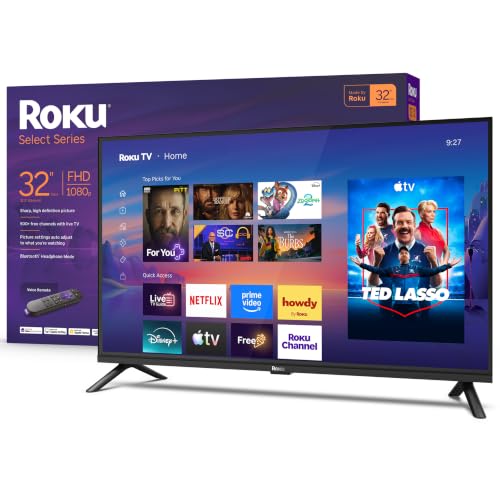
Roku’s 32-inch Select Series is the pick this guide would hand to anyone sharing a room with a light sleeper or a serious reviser. The title states a 2026 Select Series smart TV at 1080p Full HD on a flat-screen LED panel, running RokuTV, with a voice remote, Wi-Fi, and Bluetooth headphone mode, streaming live local news, sports, and movies. Two of those details do heavy dorm work: the Full HD panel, and the headphone mode that lets one person watch a film at midnight while the other sleeps three metres away.
Headphone mode deserves expansion because it changes the social contract of the room. Without it, late viewing is negotiated viewing — volume low enough to strain dialogue, subtitles carrying the load, the constant awareness of the sleeping roommate. With Bluetooth audio routed to your own earbuds, the television becomes a private screen at exactly the hours dorm life makes viewing possible. Roommate relationships have survived on thinner foundations than that.
The Full HD panel separates this set from the HD-class Fire TV picks when the room’s layout puts viewers at mixed distances. Group viewing from the far bed, a console session from floor cushions, a laptop mirrored for a presentation rehearsal — the sharper panel holds up across all of it. Roku’s interface contributes its own calm: a plain app grid, no storefront steering, and a home screen a visiting friend can navigate without a tutorial.
Live local news, sports, and movies are named in the title, pointing at the platform’s free streaming channels. In a dorm, free content is not a minor perk; subscription budgets are shared, lapsed, and argued over, and a set that can always surface something watchable keeps it useful in the gaps. Taken together — sharp panel, private listening, neutral interface, free channels — this is the most completely dorm-shaped specification in the guide.
Consider, too, the rotating cast that will operate this set across a year. Owners change shifts: the roommate’s friends visit, a partner stays over, the set gets borrowed for a society’s screening in a common room. Roku’s grid is the interface least likely to strand any of those temporary operators, and the voice remote forgives the rest. A dorm television is semi-public equipment wearing a private purchase’s clothing, and this pick’s specification seems to understand that from the panel to the remote.
- Screen: 32-inch flat-screen LED panel
- Resolution: 1080p Full HD, per the listing title
- Platform: RokuTV
- Remote: voice remote included per the title
- Private listening: Bluetooth headphone mode named in the title
- Connectivity: Wi-Fi stated in the title
- Model line: Select Series 2026, per the title
- Tuner details: Not stated in the listing title — verify with the manufacturer documentation
Strengths
- Bluetooth headphone mode is the single most roommate-friendly feature in this guide
- Full HD panel stays sharp from both bed distance and desk distance
- Roku’s neutral grid suits a set operated by a rotating cast of friends
Trade-offs
- Private listening requires owning Bluetooth headphones or earbuds
- No panel technology beyond LED is claimed in the title
- Casting ecosystems for phone-first viewers are not named in the title
Best for: a shared twin room with clashing sleep and study schedules.
Not suited for: a viewer relying on wired headphones only — the title states Bluetooth headphone mode, with no wired audio detail.
Roommates can verify the headphone mode wording on the listing itself, then see today’s price on Amazon for the 32-inch Select.
Hisense 32-inch QD4 Roku TV — The picture-quality splurge
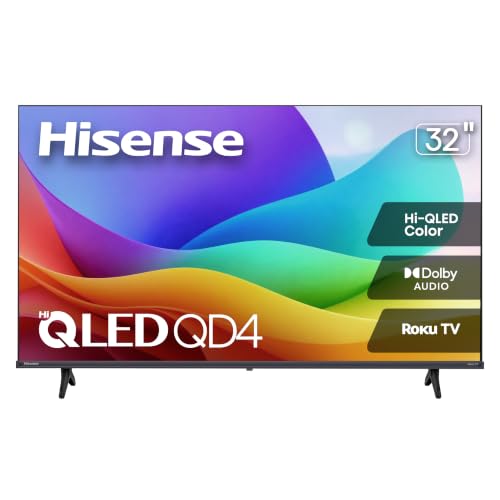
Hisense builds the QD4 for the student who cares how the picture actually looks. Its title describes a 32-inch QD4 Series Hi-QLED HD smart AI Roku TV — model 32QD4HSR, billed as a 2026 new release — with Dolby Audio, Alexa compatibility, Full Array LED backlighting, and a slim bezel design. Read as a group, those are picture-and-sound upgrades: a QLED-class panel for colour, full-array backlighting for more even illumination, and named audio processing, all on the Roku platform.
Full Array LED is the detail to understand. Rather than lighting the panel from its edges, a full-array design distributes backlighting across the panel’s rear, which generally produces more uniform brightness — the quality that decides whether a dark film scene looks murky at the corners or consistent across the screen. Dorm rooms are watched in the dark more than most rooms, with curtains drawn against corridor light, so backlight evenness is not an abstract virtue here.
The Hi-QLED panel addresses colour rather than brightness. QLED-class panels are chosen for richer, more saturated colour, which flatters the content dorm screens actually show: animated series, football kits under floodlights, games with stylised art direction. The slim bezel, also in the title, is the cosmetic counterpart — on a desk in a small room, a set that is nearly all screen looks tidier and leaves the furniture feeling less crowded.
Roku underneath keeps the daily experience identical to the Select Series above — same grid, same search — while Dolby Audio aims at the dialogue clarity that small speakers usually sacrifice. Alexa compatibility, stated in the title, lets the set take commands from an Alexa setup rather than requiring one in the box. For the student who watches films seriously and treats the dorm screen as a small cinema, this is the pick that respects that priority.
One honest boundary: the QD4’s upgrades are picture upgrades, and picture upgrades only pay under the right conditions. In a bright room at midday with the set playing background streams, its advantages over the plainer Roku are muted. In the evening, curtains drawn, with a film the room actually cares about, the full-array backlight and QLED colour separate it from everything else at this size in the guide. Buy it for those evenings if they are your evenings; otherwise its premium is solving a problem your room does not have.
- Screen: 32-inch panel with slim bezel design
- Panel: Hi-QLED, per the listing title
- Resolution class: HD, per the title
- Backlight: Full Array LED stated in the title
- Audio: Dolby Audio named in the title
- Platform: Roku smart TV with AI features, per the title
- Assistant: compatible with Alexa, stated in the title
- Model: 32QD4HSR, 2026 new release per the title
- Bluetooth headphone mode: Not stated in the listing title — verify with the manufacturer documentation
Strengths
- Hi-QLED panel and Full Array LED backlighting are genuine picture upgrades at this size
- Dolby Audio targets dialogue clarity from compact speakers
- Slim bezel keeps a desk footprint visually tidy in a small room
Trade-offs
- HD resolution class despite the upgraded panel, so text at desk distance stays soft
- No Bluetooth headphone mode is claimed in the title, unlike the Roku Select sets
- Picture quality is wasted on rooms where the set mostly plays background content
Best for: a film-loving student in a single room, watching in the dark from a bed or armchair.
Not suited for: a shared room needing silent late-night viewing — the title names no headphone listening feature.
Picture-first buyers can read the QD4 panel wording on the product page and check the current Amazon price in the same trip.

Samsung 32-inch F6000 — The set that matches the family home
Samsung’s F6000 speaks to the student whose family home already runs Samsung screens. The title identifies a 32-inch class Full HD F6000 smart TV from the 2025 model line, with HDR, Object Tracking Sound Lite, Knox Security, and One UI Tizen. The practical meaning: the same interface, the same account logic, and the same remote philosophy as the television in the family living room, transplanted to a dorm desk at a size the room can hold.
Full HD with HDR gives this set the strongest paper picture among the non-QLED picks. The panel resolves text and interface detail at study distance better than the HD-class sets, while HDR support improves how highlights and shadow are handled in film content. For a student splitting the screen’s life between coursework-adjacent uses — mirrored laptop, presentation practice — and evening viewing, that sharpness is used daily rather than admired occasionally.
Object Tracking Sound Lite, named in the title, is Samsung’s sound-positioning system, tying audio to on-screen movement. In a small room at moderate volume, positioned sound reads as clarity: dialogue anchored to faces, effects placed where they happen. Dorm viewing happens at neighbour-conscious levels, and a set that stays intelligible without volume creep is a set that stays popular with the room next door.
Knox Security completes a specification aimed at a long service life. A student television connects to shared networks, gets signed into multiple services, and often passes to a sibling or a buyer after graduation. A named security platform from the manufacturer signals maintained software — the unglamorous quality that decides whether a four-year-old set still runs current apps in its final year of a degree.
Against the Hisense QD4, the Samsung’s argument is balance rather than brilliance in one department. The Hisense spends on panel and backlight; the Samsung spreads its quality across resolution, HDR handling, sound positioning, platform polish, and software maintenance. Students who watch a bit of everything — lectures mirrored at noon, sport at seven, a film at ten — tend to feel the balanced set’s virtues more often than the specialist’s peak, and that breadth is the F6000’s real claim on a dorm desk.
- Screen: 32-inch class panel
- Resolution: Full HD, per the listing title
- Picture: HDR stated in the title
- Audio: Object Tracking Sound Lite named in the title
- Platform: One UI Tizen
- Security: Knox Security stated in the title
- Model year: 2025 model, per the title
- Headphone listening feature: Not stated in the listing title — verify with the manufacturer documentation
Strengths
- Full HD plus HDR is the strongest conventional picture specification in this guide
- One UI Tizen matches the interface of Samsung sets at the family home
- Knox Security signals a maintained platform across a degree-length ownership
Trade-offs
- No private-listening feature is stated in the title for shared-room nights
- Households standardised on Fire TV or Roku gain nothing from the platform switch
- The title does not confirm a voice remote in the box
Best for: a Samsung household sending a student out with a familiar interface and a sharp panel.
Not suited for: a twin room depending on built-in headphone listening — the title states no such feature.
Brand-loyal families can confirm the 2025 model wording on the listing and view the current price on Amazon before ordering.

Amazon Ember 32-inch 2-Series — Fire TV from the source
The Ember 2-Series is Amazon building its own television rather than licensing Fire TV to another maker. The title describes a 32-inch HD smart TV with Fire TV as the newest model in its line, supplied with an Alexa remote, promising fast streaming, carrying Dolby Audio, and offering the Ambient Experience alongside free and live TV, with show-finding through Alexa+. For a dorm room, that reads as a set designed around speed of access and idle-hour usefulness.
Fast streaming, the title’s own phrase, matters in the dorm context more than in a house. Dorm viewing is fragmented — twenty minutes between lectures, an episode over lunch, a match half watched before a society meeting. A set that reaches content quickly gets used; a set that buffers through menus gets abandoned for a laptop. Amazon’s own hardware running its own platform is the combination most likely to deliver that responsiveness, and the title makes the claim directly.
The Ambient Experience is the feature aimed at the other twenty hours of the day. A dorm television sits in the room’s sightline constantly, and a set that can present something useful or decorative while idle — rather than a black rectangle — integrates into a small room more gracefully. Combined with free and live TV for background viewing, the Ember is designed to be glanced at as much as watched, which matches how dorm screens actually live.
Dolby Audio addresses the dialogue side, and the Alexa remote with Alexa+ show-finding addresses discovery: describing a mood or a half-remembered title to the remote is a genuinely dorm-shaped interaction, usually performed from a bed, in company, with no patience for menus. Students deep in Amazon’s ecosystem — Prime accounts, Alexa routines, Fire devices elsewhere — will find this the most native expression of that world in a 32-inch set.
The Ember also invites a comparison with its Fire TV sibling, the INSIGNIA F20, that clarifies both. The F20 is the licensed, straightforward route to the same platform; the Ember is Amazon’s own hardware interpretation, with the Ambient Experience and Dolby Audio distinguishing its brief. A buyer indifferent between them should let those two features decide: a room that wants its screen alive during idle hours takes the Ember, while a room that simply wants Fire TV running takes the F20 and stops deliberating.
- Screen: 32-inch panel
- Resolution: HD, per the listing title
- Platform: Fire TV, on Amazon’s own Ember hardware
- Remote: Alexa remote, with show-finding through Alexa+ per the title
- Audio: Dolby Audio named in the title
- Idle display: Ambient Experience stated in the title
- Broadcast-style viewing: free and live TV named in the title
- Bluetooth headphone mode: Not stated in the listing title — verify with the manufacturer documentation
Strengths
- Amazon’s own hardware and platform pairing is built around fast access to content
- Ambient Experience gives the screen a role during the hours nobody is watching
- Dolby Audio and Alexa+ show-finding suit bed-based, voice-first browsing
Trade-offs
- HD resolution, softer than the Full HD picks for desk-distance use
- No headphone mode is claimed in the title for quiet-hours viewing
- The experience is most rewarding inside Amazon’s account ecosystem
Best for: a Prime-carrying student in a single room, browsing by voice from the bed.
Not suited for: a shared room needing silent viewing after a roommate’s bedtime — the title states no headphone feature.
Amazon-ecosystem students can read the Ambient Experience wording on the product page, then look at the current price on Amazon.

Roku 40-inch Select Series — The suite and common-room edge case
Every dorm guide needs one pick that admits some living arrangements are bigger than a single room, and this is it. The Roku 40-inch Select Series states a 2026 smart TV at 1080p Full HD on a flat-screen LED panel, with RokuTV, a voice remote, Wi-Fi, and Bluetooth headphone mode. The specification mirrors the 32-inch Select almost exactly — the difference is eight inches of screen, and everything that size changes about where the set can live.
In a shared suite or a student house, those eight inches transform the viewing geometry. A 40-inch screen reads comfortably from a sofa six to ten feet away, seats a whole friendship group for a match without anyone squinting from the back, and turns a common room into the floor’s cinema on film nights. The Full HD panel keeps that larger image composed at group distances, and the flat-screen LED design keeps the set furniture-friendly for the stands and units student houses actually own.
Bluetooth headphone mode, carried over from the smaller Select, scales in an unexpected direction: in a house, it lets one person watch late sport in the shared room without filling the house with commentary, preserving the common room as shared territory at all hours. The voice remote and Roku’s plain grid keep operation democratic — any housemate can drive the set without learning a new interface, which in shared housing is a peacekeeping feature.
The caveats belong to scale. A 40-inch set needs a wall or stand a standard dorm single may not have, it is a two-person carry at move-out, and residence rules about wall fixings bite harder as screens grow. Buy it for the space that genuinely fits it — the suite, the house, the common room — and it is the most sociable pick in this guide. Force it into a single room and it becomes the room’s dominant piece of furniture, which is a different purchase than the one intended.
Cost-sharing suits this pick naturally. Split among four housemates, a suite television is the cheapest per-person screen in the guide while being the largest — one of the few occasions where the communal option beats the personal one on both axes. The agreement worth drafting at purchase is not about money but about custody: whose room it winters in, who insures it, and who takes it at the end of the tenancy. Houses that settle those questions in September keep both the television and the friendships.
- Screen: 40-inch flat-screen LED panel
- Resolution: 1080p Full HD, per the listing title
- Platform: RokuTV
- Remote: voice remote included per the title
- Private listening: Bluetooth headphone mode named in the title
- Connectivity: Wi-Fi stated in the title
- Model line: Select Series 2026, per the title
- Mounting pattern: Not stated in the listing title — verify with the manufacturer documentation
Strengths
- Group viewing from sofa distance is this set’s home territory
- Headphone mode keeps a shared common room usable at late hours
- Roku’s interface is operable by every housemate without instruction
Trade-offs
- Too large for a standard single dorm room’s furniture and walls
- A two-person job to move at the end of each tenancy
- Wall-mounting details are absent from the title for planning fixings
Best for: a shared suite or student house with a common room and a regular film-night audience.
Not suited for: a standard single dorm room — the title states a 40-inch screen, beyond typical dorm furniture.
Housemates can confirm the dimensions against their common room on the listing and confirm the current Amazon price together.
Comparison
| Pick | Size | Resolution per title | Platform | Title-stated standout |
|---|---|---|---|---|
| INSIGNIA F20 | 32-inch class | HD | Fire TV | Alexa voice remote; free and live TV |
| Roku Select 32 | 32-inch | 1080p Full HD | RokuTV | Bluetooth headphone mode; voice remote |
| Hisense QD4 | 32-inch | HD | Roku | Hi-QLED panel; Full Array LED; Dolby Audio |
| Samsung F6000 | 32-inch class | Full HD with HDR | One UI Tizen | Object Tracking Sound Lite; Knox Security |
| Amazon Ember 2-Series | 32-inch | HD | Fire TV | Ambient Experience; Dolby Audio; Alexa+ |
| Roku Select 40 | 40-inch | 1080p Full HD | RokuTV | Bluetooth headphone mode; group-size screen |
How to Choose a Dorm TV
Start with the room, measured rather than imagined. A standard single or twin dorm room takes a 32-inch set on a desk or dresser comfortably; anything larger needs a suite, a house, or a common room to justify it. Check the furniture the set will actually sit on, confirm the surface depth, and remember that residence rules often restrict wall fixings — a stand-based plan is the safer default for a first year.
Then settle the sharing question, because it decides the feature list. A set watched alone can optimise for picture quality, which points toward the Hisense QD4 or the Samsung. A set watched around other people’s sleep and study schedules needs private listening, which points toward the Roku Select models and their stated Bluetooth headphone mode. Misjudging this — buying the cinema set for a room with a revising roommate — is the most common dorm television regret.
Platform comes third, and the honest shortcut is to match what the room’s occupants already use. Roku’s neutrality suits mixed groups; Fire TV suits Amazon households; Tizen suits Samsung families. A shared set also benefits from a simple interface, because every additional menu layer is friction for the housemate who just wants the football on.
Do not skip the sound conversation while choosing. Dorm walls transmit everything, and a set that needs volume to make dialogue intelligible will spend its life being turned down by other people. The titles here offer three different answers — Dolby Audio on the Hisense and the Ember, Object Tracking Sound Lite on the Samsung, and headphone mode on the Roku Selects — and the right answer depends on whether your room’s problem is clarity at low volume or silence altogether. Name the problem first; the feature that solves it usually selects itself.
Resolution should be judged against the room’s second use. If the television will double as a study monitor or a presentation screen, Full HD earns its place and the HD sets should be viewed sceptically. If it is purely an evening screen watched from a bed, HD remains serviceable and the money is better directed at panel quality or headphone capability.
Finally, think past graduation day in miniature: the set will be carried, stored, possibly sold, possibly inherited by a sibling. Mainstream platforms, replaceable remotes, and standard sizes all hold their value through that cycle better than exotic specifications. A dorm television is a three-to-four-year companion, and the picks above were chosen with that full term in mind.
Budget thinking deserves a dorm-specific note. The purchase price is only the visible part; the running costs are subscriptions shared or duplicated, a streaming stick that turns out to be unnecessary because the set is already smart, and the replacement remote that every shared set eventually needs. The picks here all carry their platforms internally, which removes the stick from the equation, and the mainstream platforms keep replacement remotes easy to source in later years when the original has vanished into a sofa.
Insurance and security are the unglamorous tail of the decision. Dorm rooms are high-traffic spaces, and a television is the most portable valuable object in most of them. A set light enough to carry is also a set light enough to be carried off, so note the serial number, photograph the setup for your records, and check whether your contents cover includes the room. None of that changes which pick to buy — it changes how peacefully you own it.
How Big Is Too Big for a Dorm Room?
For a standard single or twin room, 32 inches is the size that stops being a negotiation. It fits the furniture the institution provides, leaves the walls alone, and reads clearly from both beds. The 40-inch Roku in this guide is included for the arrangements that break the standard mould — suites with a shared lounge, student houses, common rooms — where the audience sits further back and the screen serves a group rather than a person.
The test is not the room’s floor area but its viewing geometry and its furniture map. If the only placement puts a 40-inch screen four feet from the pillows, the picture will feel like weather — everywhere and slightly oppressive. If the room offers a sofa’s distance and a stand that can carry the set, the bigger screen becomes the house’s social centre. Measure the distance, then choose; the tape measure is a better counsellor than the showroom.
There is a middle path worth naming for the standard room: keep the 32-inch set, and spend the difference on the things that make it feel bigger — a stand that angles it toward the beds, seating arranged so nobody watches from the side, curtains that let it show its picture in daylight. Perceived size is a product of distance and arrangement as much as diagonal inches, and in a dorm the arrangement is free while the inches are not.
What Is the Most Roommate-Friendly Feature a Dorm TV Can Have?
Private listening, and it is not close. Bluetooth headphone mode — stated in both Roku Select titles in this guide — removes the central conflict of shared-room viewing: one person’s evening against another person’s sleep or study. With audio in earbuds, the screen can run at midnight during revision week without a negotiation, a volume compromise, or subtitles doing the heavy lifting.
Voice control runs second. Searching from the bed by voice keeps the room dark and quiet, and a simple interface — Roku’s grid is the clearest example here — means a roommate can operate the set without waking its owner for help. The considerate dorm television is the one that asks the least of the people not watching it, and those two features ask the least of all.
Should a Dorm TV Double as a Study Monitor?
It can, and for many students it should, because dorm furniture rarely has room for two screens. The condition is resolution: a Full HD set — the Roku 32, the Samsung F6000, the Roku 40 — renders documents and code readably at desk distance, while an HD set will show its pixel structure in text and tire eyes over a long session. Students planning the dual role should shortlist from the Full HD picks first.
The second condition is connections, and here the titles in this category are mostly silent, so the manufacturer documentation for your shortlisted model becomes required reading before purchase. Confirm the inputs match your laptop and any console you plan to attach. A television that handles both the essay and the evening is the hardest-working object in a dorm room; it is worth the ten minutes of paperwork to choose it well.
How Do You Set Up a Dorm TV on Shared Wi-Fi Without the Usual Misery?
Institutional networks are where dorm televisions go to struggle. Many campus networks require a browser sign-in that a television cannot complete, or isolate devices so a phone cannot see the set for casting. The practical routes are well worn: register the set’s network address through the university’s device portal if one exists, use the wired connection if the room provides one and the set accepts it, or run the television on a personal hotspot or a small travel router where housing rules allow. Checking which of these your residence supports is worth an email to the housing office before the set is ordered, because the answer can change which pick makes sense.
Streaming sticks are the traditional escape hatch, but notice that every pick in this guide is already a smart television — the platforms are built in, so the network question is about joining the set itself rather than adding hardware. Voice remotes and simple grids help here too: the fewer sign-in screens between a cold start and a programme, the fewer opportunities a shared network has to interrupt the process. Set the television up on the first afternoon, not the first evening, and update its software while the network is quiet; the whole floor does the opposite, and the evening of move-in day is when campus Wi-Fi is at its most fragile.
Sound etiquette completes the setup. Agree the house rules early — headphone hours during revision week, a volume ceiling after midnight — while everyone is still being polite. The sets with headphone mode make those rules easy to keep, but even without it, a shared understanding reached in September prevents the passive-aggressive notes of November.
Common Mistakes When Buying a Dorm TV
Buying the biggest screen the budget stretches to. In a dorm, screen size is constrained by furniture and viewing distance, not by ambition. An oversized set dominates a small room, complicates move-out, and may breach residence rules on fixings. The 32-inch class exists as the guide’s core for a reason; step up to 40 inches only when the living arrangement genuinely has the wall and the audience.
Forgetting the roommate in the specification. A set chosen for solo viewing — no headphone mode, loud at low quality — becomes a source of friction by the second week of term. Shared rooms need private listening and considerate volume behaviour. Buy for the room’s social reality, not for the viewing you would do in a flat of your own.
Paying for panel quality the usage cannot reveal. A QLED panel is a pleasure for film nights and a waste on a set that mostly plays background streams while coursework happens. Match the picture spend to the watching you will actually do. The reverse error exists too — buying the cheapest HD set for a room where the television is the group’s cinema — and the guide’s spread exists so neither mistake is necessary.
Ignoring move-in and move-out logistics. The set must travel: up stairs, into storage, home for summer, back again. Weight, stand design, and the availability of a replacement remote all matter across four years of that cycle. A television that survives the degree is one that was bought with the carrying in mind, not just the watching.
Setting up on the busiest night of the year. Move-in evening combines the year’s worst network congestion with the year’s least patient audience. Students who unbox, register the set on the network, and run its updates on the first afternoon — or even before term, at home — start their first evening with a working television while the rest of the floor is still in a support queue. Timing is a feature no listing can sell you, and it costs nothing.
Final Recommendation
For most dorm rooms, the Roku 32-inch Select Series is the complete answer: a Full HD panel, Roku’s neutral interface, and Bluetooth headphone mode for the hours when the room belongs to someone else’s sleep. Picture devotees in single rooms should step sideways to the Hisense QD4 for its QLED panel and full-array backlight, while Samsung households will feel immediately at home with the F6000. The INSIGNIA F20 and the Amazon Ember cover Fire TV loyalties at two different temperaments — straightforward and ambient — and the Roku 40 waits for the suite that can seat its audience. A dorm television succeeds when the whole room can live with it, and on that measure the Roku 32 asks the least of everyone while giving its owner the most.
Buy before term if you can, set the television up on a quiet afternoon, and write the house rules for late-night volume while everyone is still friends. The right set, installed calmly, disappears into the room’s life — shared for matches, private for midnight films, and silent when the room needs silence — which is the highest compliment a dorm television can earn.
Frequently Asked Questions
What size TV is right for a dorm room?
Thirty-two inches suits the standard single or twin room: it fits institutional furniture, reads clearly from either bed, and moves easily at term’s end. The 40-inch Roku Select in this guide is aimed at suites, shared houses, and common rooms where viewers sit further back in a group.
Which of these TVs lets me watch without waking my roommate?
The two Roku Select models — 32-inch and 40-inch — state Bluetooth headphone mode in their listing titles, routing audio to your own headphones while the screen plays. The other titles do not claim a private-listening feature, so for those sets the manufacturer documentation would need checking for any audio-out options.
Is HD enough for a dorm TV, or should I get Full HD?
For evening viewing from a bed, HD is serviceable, and two picks here add panel or audio upgrades on top of it. If the set will double as a study monitor or sit close to a desk chair, Full HD is worth prioritising — the Roku 32, Samsung F6000, and Roku 40 carry it per their titles.
Which platform is best for a shared room?
Roku has the strongest shared-room case in this guide: a plain app grid any housemate can navigate, voice remotes, and headphone mode on the Select models. Fire TV suits rooms already invested in Amazon accounts, and Samsung’s Tizen suits students arriving from Samsung households. The best platform is the one the room’s occupants already know.
What is the Amazon Ember’s Ambient Experience?
Per its listing title, the Ember 2-Series offers an Ambient Experience alongside its Fire TV platform — a mode for the hours the set is not actively streaming, so the screen can present something other than a blank black panel in the room. The title also names Dolby Audio, free and live TV, and show-finding through Alexa+ on the Alexa remote.
Can I mount a dorm TV on the wall?
Many residences restrict or forbid wall fixings, so check your housing rules before planning a mount, and default to a stand on existing furniture where rules are unclear. Mounting patterns are not stated in these listing titles; if your housing does allow mounting, confirm the pattern for your chosen model in the manufacturer documentation.
Will a smart TV work on campus Wi-Fi?
Usually, with one wrinkle: networks that demand a browser sign-in can block a television until its network address is registered through the institution’s device portal. All six picks here are smart sets with built-in platforms, so no stick is needed once the set itself is on the network. Check your residence’s device-registration process before move-in day, when support desks and networks are both at their busiest. If your building offers a wired socket in the room, ask the housing office whether televisions may use it, since a cable sidesteps most shared-network friction entirely.
Related Guides
Screen-shopping for other rooms follows the same evidence rules: our garage TV guide covers bigger indoor sets for workspace viewing, the solar-friendly TV roundup handles battery-powered setups for off-grid summers, and the Android TV guide is the next stop if Google’s platform is the one your household runs.