What's inside
- Key Takeaways
- Quick Picks
- How Did We Compare Pads That Live Under Desks?
- What Speeds Does Desk Walking Actually Use?
- How Does the Desk Half of the Pairing Work?
- How Do You Start Walking at a Desk Without Hating It?
- Which Rooms Can Actually Host a Treadmill Desk?
- How Should You Choose Between Flat, Manual and Automatic Incline?
- Which Walking Pad Fits Which Desk Setup? A Side-by-Side Look
- What Happens to Your Work Across the First Month of Walking?
- What Mistakes Do People Make When Setting Up a Treadmill Desk?
- Final Recommendation
- Frequently Asked Questions
- Related Guides
As an Amazon Associate I earn from qualifying purchases. This post may contain affiliate links at no extra cost to you.
widgetverdict.com is reader-supported. When you buy through links on our site, we may earn an affiliate commission.
Where to buy: Amazon is where all six machines in this roundup are sold, but first, an honest correction to the search that brought you here. There is effectively no such product as a small treadmill desk sold as one unit — no single box arrives containing a compact desk with a compact treadmill folded inside it. What the market actually sells, and what this guide compares, is the under-desk walking pad: a low, flat, desk-height-friendly treadmill that slides beneath a standing desk you already own or buy separately. The best small treadmill desks are therefore pairs — a pad below, a desk above — and the pad is the half that decides whether the pairing works.
That correction matters because it changes what you are shopping for. You are not buying furniture; you are buying a belt that must fit under a desk’s crossbar, run quietly enough to type over, move slowly enough to walk on while reading, and store somewhere when the working day ends. Every pick below is judged as a component in that system: its speed range at the walking end, its incline behaviour, its stated capacity, its noise claims where the listing makes them, and its size and storage manners in a small room. The desk half gets its own discussion further down, because a pad under the wrong desk is a trip hazard with a motor.
One more piece of honesty before the picks. Walking while working is a skill with a learning curve measured in days, not minutes, and the first sessions feel like patting your head while rubbing your stomach. Speeds that look absurdly slow on a specification sheet — one mile per hour, even less — turn out to be the speeds at which typing, reading and video calls actually happen. The runners and joggers in some of these listings’ titles are real capabilities, but they belong to the pad’s second life as exercise equipment after hours, not to its working day under your desk.
Key Takeaways
- A “treadmill desk” is a pairing: an under-desk walking pad plus a standing desk. All six picks here are pads; the desk is a separate decision.
- Working speeds are slow speeds — the Superun’s stated range — a 0.6 floor and a 3.8 ceiling in MPH — brackets the whole typing-while-walking band.
- Incline is the feature dividing this roundup: fixed and manual inclines on the Abonow, 12 percent on the UREVO Strol 2E Pro, 14 percent automatic on the UREVO CyberPad.
- Stated capacities run from 265 lbs (Abonow) to 300 lbs (Superun and the 3.0HP pad) where titles publish them.
- Only the Superun’s title states a noise figure — below 45 decibels — so quiet claims elsewhere are wording, not measurements.
Quick Picks
| Pick | Badge | Why it earns its place |
|---|---|---|
| UREVO Strol 2E Pro Walking Pad | The handled all-rounder | A smart pad with app control, 12 percent incline and a safety handle for the hours it works as a plain treadmill. |
| Superun 6% Incline Under-Desk Treadmill | The quiet, specified one | 2.5HP, 0.6–3.8 MPH, 300 lb capacity and a stated noise figure below 45 decibels for typing over. |
| Under Desk Treadmill 3.0HP Walking Pad | The strong simple pad | A 3.0HP motor and 300 lb capacity with remote control and LED display, without an app in the middle. |
| Sweetcrispy Compact Walking Pad | The small-flat specialist | An armless, slim, portable pad pitched squarely at small spaces and apartments. |
| Abonow Walking Pad with 8% Manual Incline | The manual-incline value | 8 percent incline set by hand, 2.5HP, remote and LED display, 265 lb capacity, black and orange. |
| UREVO CyberPad Smart Walking Pad | The auto-incline flagship | 14 percent automatic incline, a brushless motor, speed lights and an AI-powered app on a spacious belt. |
How Did We Compare Pads That Live Under Desks?
By the working day first and the workout second. A walking pad under a desk spends its life between roughly half a mile per hour and two miles per hour, carrying a person whose attention is on a screen, so the criteria that matter are the ones that govern those hours: how low the speed range starts, how smoothly the belt behaves at a crawl, whether the incline — if any — can be set and then forgotten, and what the machine does to the room’s sound while a call is running. Top speeds and running features were noted where titles claim them, but no pick earned its place on the strength of an after-hours jog.
Second, we read the titles the way a careful buyer should: as the only verified specification sheet available. Where a title states a number — the Superun’s speed range, capacity and noise figure; the Abonow’s 265 lbs; the two UREVO inclines — the review uses that number and says where it came from. Where a title offers adjectives instead — quiet, slim, spacious — the review treats them as the manufacturer’s framing and flags the missing figure, because a pad’s deck height, belt width and weight are exactly the numbers that decide whether it fits under your desk and into your cupboard, and guessing at them helps no one.
Third, we weighed the control scheme, because under a desk your hands are supposed to be on a keyboard. A remote you can thumb without looking, an app that remembers settings, a display you can actually read from standing height — these decide whether speed changes are a thought or an interruption. And we kept one eye on the desk above throughout: a pad is half a product, and its review kept asking what it demands of the other half — clearance, stability, a frame that will not walk sideways under vibration. That last demand is why our Best Non-Wobbly Standing Desks guide exists, and why it is the natural companion read to this one.
What Speeds Does Desk Walking Actually Use?
Far slower than gym instinct suggests. Reading and typing while walking settle, for most people, somewhere between 0.8 and 1.8 miles per hour; video calls, where your face must stay framed and your breathing unremarkable, sit at the bottom of that band or below it. The Superun’s stated floor of 0.6 MPH is therefore not a token gesture — it is the speed at which a person can walk through a meeting without the meeting knowing. Pads whose ranges start higher force a choice between standing still and walking faster than your typing can follow, which is why the bottom of the range deserves more attention than the top.
At the other end, the stated ceilings here — 3.8 MPH on the Superun — describe a brisk walk verging on a jog, useful for the pad’s second shift as exercise equipment and mostly irrelevant under a desk. Nobody drafts a report at 3.8 miles per hour. What the ceiling does tell you is something about the motor’s headroom: a machine loafing at a third of its range at your working speed is under less strain than one running near its limit, and strain, over months, is what becomes noise, heat and belt wear.
Incline rewrites the arithmetic. Walking at 1.5 MPH on a 6 or 8 percent grade is a meaningfully harder effort than the same speed on the flat, which is the entire appeal for users who want the working day to cost more energy without costing more speed or attention. The roundup’s incline ladder runs from manual (Abonow) through the Strol 2E Pro’s 12 percent to the CyberPad’s 14 percent automatic adjustment, and the buying-guide section below treats incline as the feature most likely to be loved or ignored depending on the buyer — there is little middle ground.
A note on counting, since buyers inevitably ask what a walking day adds up to. At the working band’s middle — say a mile and a half per hour across three genuinely walked hours — the day accumulates something in the region of four to five miles of walking that would otherwise have been chair time. Treat any such figure as arithmetic, not prophecy: your walked hours will be the shallow hours, your speed will wander with the task, and the pad’s own display counts belt time, not virtue. The honest measure after a month is simpler and harder to game — whether the afternoon slump still runs your schedule, and whether your back still files its evening complaint. Machines that change those two things have earned their floor space; step totals are just the receipt.
How Does the Desk Half of the Pairing Work?
The pad slides under a standing desk, and three fits decide whether the marriage is happy. The first is vertical: the pad’s deck height adds to your stature, so the desk must rise several inches higher than your usual standing setting to keep the screen and keyboard where your body expects them. Desks with modest maximum heights can run out of travel once a pad is underneath, which is why this pairing favours desks with generous ranges. The second fit is depth: the belt’s usable length must sit under the desk without the desk’s rear legs or crossbar crowding your stride, and the third is width — your natural gait is wider than a specification sheet’s walking area suggests when you are reading and drifting slightly sideways.
Stability is the desk-side quality the pad taxes hardest. A walking body sways, leans and occasionally grabs the desk’s edge; a frame that rocks on carpet at standing height will rock more with a walker aboard. Fixed four-leg frames and double-beam designs shrug this off; light single-column carts feel every step. It is not an accident that desks marketed for walking pads emphasise planted frames — the physics of the pairing rewards mass and footprint, and punishes the charming little rolling cart.
Room layout completes the picture. The pad needs a home when it is not under the desk — upright against a wall, flat under a sofa, rolled into a cupboard — and the small-space picks here are designed around that second address. Fixed, long work surfaces are a legitimate alternative architecture for a dedicated walking office: a pad parked permanently under a long desk never needs storing at all, and our Best Industrial Desks roundup covers the heavy wood-and-steel tables that suit a permanent installation, even though they do not adjust.
How Do You Start Walking at a Desk Without Hating It?
Ramp like a beginner, because you are one. Day one is ten minutes at the bottom of the speed range, belt flat, doing the easiest work you own — reading, not writing. The skill being trained is not fitness; it is the separation of your walking rhythm from your attention, and it consolidates over about a week of short sessions. Most people who abandon treadmill desks abandoned them on day two, after an hour at a heroic speed that left them seasick at their own keyboard. The pad is patient; be patient back.
Footwear is the unglamorous variable that decides comfort. Walk in the shoes you would walk to the shops in, not in socks — socked feet slide subtly on a moving belt and your calves pay for the correction work — and not in the heels or boots the day’s outfit suggested. A pair of trainers living beside the pad removes the daily negotiation. Standing breaks still count, too: the goal is movement variety across the day, alternating walking, standing and sitting, not an eight-hour march that trades one strain for another.
Calls deserve a protocol. Drop the speed before you unmute, or step off and let the belt run empty for a second while you settle; the slight sway of a walking speaker is visible on camera long before it is audible, and at the lowest speeds it all but disappears. Keep the remote in the same place — a pocket, a desk caddy — because hunting for it mid-call at walking speed is the one genuinely graceless moment this lifestyle offers. And keep water within reach on the desk, not on the floor: everything on the floor near a moving belt eventually meets the belt.
Which Rooms Can Actually Host a Treadmill Desk?
Fewer than the advertisements imply, and the honest audit takes five minutes. The room needs a desk position with the pad’s full length behind your chair’s usual territory, because the pad lives under the desk even when you are sitting — sitting with your feet resting on a switched-off belt is normal, and the chair’s casters must clear the deck when you roll back. Rooms where the desk floats in the middle of the floor work beautifully; rooms where the desk is wedged between a bed and a wardrobe leave the pad nowhere to slide out for its exercise shift or its weekly belt check, and a pad that cannot be reached cannot be maintained.
Flooring casts the second vote. Hard floors transmit step noise downward and sideways, which the mat in the mistakes section exists to absorb; low-pile carpet insulates sound but can starve a pad’s motor of cooling air if the deck sits deep in the pile; heated floors and treadmills are strangers whose introduction should be made via the manual, not by experiment. The third vote belongs to the ceiling of your schedule: a treadmill desk in a bedroom shared with a night-shift partner, or a nursery-adjacent office, will spend its loudest hours exiled regardless of its decibel claims, because a sleeping household outranks a walking one.
Power is the fourth vote, and the only one the desk half never casts. The pad needs a socket within its cable’s reach of the desk position, and the cable must cross the room without crossing your stride — a lead trailing behind the belt is a trip line you installed yourself. Route it along the desk’s leg, tape or channel it where it meets the floor, and never let it share the belt’s under-desk territory, where a wandering cable and a moving belt will eventually hold the meeting you were trying to avoid.
Finally, the room needs a storage answer for the pad’s off hours if it will not live under the desk permanently: a sofa it slides beneath, a wall it leans on, a cupboard whose door actually closes with the pad inside. Measure that address before ordering, with the pad’s real dimensions from the maker’s documentation, because “it will fit somewhere” is the epitaph of more home fitness equipment than any motor failure.
How Should You Choose Between Flat, Manual and Automatic Incline?
Start from what incline is for at a desk: it raises the cost of slow walking without raising its speed, which matters to exactly two kinds of buyer. The first is the worker whose step count is the point — they want the working day itself to be the exercise, and grade is how a one-mile-per-hour habit becomes training rather than pottering. The second is the worker rehabilitating or conditioning on a schedule, for whom graded walking is prescribed work that happens to fit under a desk. If you are neither, incline is a feature you will set once, photograph, and never touch again, and the flat pads’ simplicity is worth more than the grade you are not using.
Between manual and automatic, the question is how often the grade changes. Manual incline — the Abonow’s hand-set 8 percent — is a seasonal decision: set it for the term, walk it daily, forget the mechanism exists. That rhythm suits desk work, where the grade is background. Automatic incline — the CyberPad’s motorised 14 percent, the Strol 2E Pro’s 12 percent — is a session decision, changed between calls and tasks from an app, and it suits workers who deliberately alternate flat concentration hours with climbing hours. Paying for automatic adjustment to make a seasonal decision is buying a motor to do a hand’s annual work.
There is also a fit consequence nobody mentions: an inclined pad raises its rear or front, which changes the clearance geometry under the desk and the feel of stepping on and off sideways — the way desk users actually mount, since the desk blocks the front. A strongly inclined belt under a desk can feel like boarding a small hill in a corridor. Try your working speed on grade in short doses first, whatever mechanism you buy, and let your ankles rather than your ambitions set the term’s default.
One last choosing instrument, and it is embarrassingly low-tech: the chair test. Before ordering any pad, stand at your desk in your work shoes for the length of one meeting, on the bare floor, doing meeting things. If your feet and back are content, a walking pad will feel like an upgrade the moment it starts moving beneath you. If standing still for forty minutes already negotiates with your knees, the pad is not disqualified — slow walking is often kinder than static standing, because the load keeps moving — but your ramp should be gentler and your seated hours more frequent, and a pad with a low speed floor matters more to you than to anyone. The machine amplifies the routine you bring to it; it does not replace the routine, and the buyers who understand that before the box arrives are the ones still walking when the season changes.

UREVO Strol 2E Pro Walking Pad — The handled all-rounder
The Strol 2E Pro is the pick that refuses to choose between its two jobs. As a desk pad it brings the modern kit — app control, an LED display, plug-and-play setup — and as a standalone treadmill it adds the two things pads usually lack: a safety handle to hold, and a stated 12 percent incline to climb. That handle is the tell. UREVO expects this machine to be walked and run on in the open room, not only shuffled under furniture, and the design serves the double life honestly rather than pretending the after-hours workout is an afterthought.
Under the desk, the app matters more than the handle. Speed changes from a phone already on the desk keep your hands near the keyboard, and a pad that remembers your working pace removes the daily ritual of dialling in 1.2 MPH by remote-press increments. The 12 percent incline, meanwhile, is a desk feature only in short doses — a ten-minute climb between calls — because sustained incline walking demands more attention than report-writing leaves spare. Owners should expect to live flat at work and inclined after it, which is a sensible division of the same machine.
The caveats are the missing numbers. The title publishes no capacity, no speed range and no noise figure, so buyers comparing working-speed floors or weight limits must confirm those in the maker’s own documentation rather than assume parity with the specified rivals below. The handle, too, is furniture: folded or otherwise, it is one more thing to store in a small room. What the Strol 2E Pro offers in exchange is the roundup’s most complete double life — the pad for a household that wants one machine to be both the desk’s engine and the evening’s treadmill.
- Incline: 12 percent, as stated in the listing title
- Controls: app control, LED display, plug and play
- Extras: safety handle fitted
- Capacity: the title omits it — the maker’s documentation is where to verify
- Stated roles: walking and running, home office
Strengths
- A safety handle makes its out-from-under-the-desk life genuinely usable.
- App control suits desk work, where the phone is already within reach.
- 12 percent incline is a real training feature, not a token tilt.
Trade-offs
- Capacity, speed range and noise are not published in the title.
- The handle adds storage bulk in a small room.
- Incline at working hours is a short-dose feature, not an all-day setting.
Best for: a household wanting one machine that walks under the desk by day and trains properly after hours.
Not suited for: a minimalist flat where a handle’s worth of extra bulk has nowhere to live.
Check the UREVO Strol 2E Pro on Amazon if the pad you want has a second career as a real treadmill with something to hold.
Superun 6% Incline Under-Desk Treadmill — The quiet, specified one
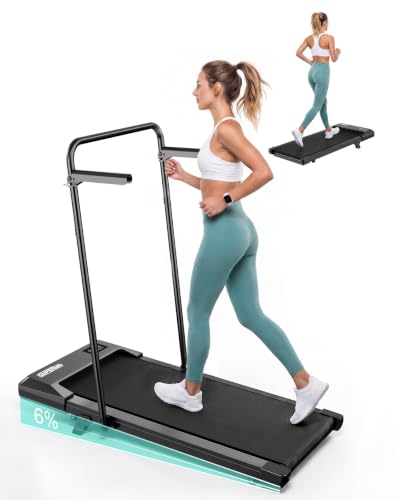
Superun’s pad is the specification sheet the rest of the roundup should be embarrassed by. The title states the motor (2.5HP), the full speed range (0.6 to 3.8 MPH), the capacity (300 lbs), the incline (6 percent) and a noise figure — below 45 decibels — aimed explicitly at quiet typing in a home office. Every one of those numbers answers a question a desk-walker actually asks, and together they make this the easiest pick here to buy with confidence, because so little of the purchase rests on adjectives.
The two figures that matter most are the ends of the speed range and the noise claim. A 0.6 MPH floor is meeting speed — slow enough to walk through a video call without swaying out of frame — and a stated noise ceiling speaks directly to the fear every apartment buyer has: that the pad will be audible through the floor, the wall, or the microphone. A manufacturer’s decibel figure is measured in the manufacturer’s conditions, not your room, and should be read as a commitment to a quiet class of machine rather than a promise about your floorboards. Even read that way, it is more than any rival here puts in writing.
The 6 percent incline sits at the sensible end of the incline idea: enough grade to make a slow walk cost noticeably more, not so much that desk work turns into hill training with a keyboard. The 300 lb capacity matches the strongest in the roundup. What the title does not give is the pad’s own dimensions and weight, the figures that govern storage, so the cupboard question needs the maker’s documentation. On the evidence a buyer can actually verify, though, this is the roundup’s most completely argued case.
- Motor: 2.5HP (title figure)
- Speed range: 0.6 to 3.8 MPH
- Capacity: 300 lbs
- Incline: 6 percent
- Noise: stated below 45 decibels in the title
Strengths
- The fullest stated specification in the roundup — speed, capacity, incline, noise.
- A 0.6 MPH floor built for walking through calls.
- 300 lb capacity ties the best figure here.
Trade-offs
- Pad dimensions and weight are not in the title; storage fit needs confirming.
- Decibel figures are measured in the maker’s conditions, not your room.
- 6 percent incline is a fixed character trait, not a range to explore.
Best for: an apartment worker whose purchase decision runs on verified numbers and quiet operation.
Not suited for: a purchase that must be settled on folded dimensions confirmed up front.
See the Superun under-desk treadmill on Amazon if you would rather buy the machine whose title answers your questions in numbers.

Under Desk Treadmill 3.0HP Walking Pad — The strong simple pad
This unbranded pad makes the opposite pitch from the UREVO pair: no app, no smart features, no ecosystem — a 3.0HP motor, a 300 lb capacity, a remote control and an LED display, in black. There is a real constituency for exactly this. A walking pad is a belt, a motor and a deck; everything beyond that is software that can be abandoned by its maker, accounts that must be created, and updates that arrive mid-workday. The remote-and-display interface on this machine will work the same way in five years, and for a tool whose whole job is to disappear under a desk, that stubbornness is a feature.
The 3.0HP motor is the headline hardware. Horsepower figures in this category are marketing-adjacent — peak and continuous ratings are different animals, and the title does not say which it is quoting — but a larger stated motor paired with a 300 lb capacity at least signals a machine built to loaf at desk speeds rather than strain at them. Loafing is what you want: the pad that cruises at a crawl without labouring is the pad that stays quiet and cool through a working day.
What you give up is information and incline. The title states no speed range, so the all-important floor — how slow it will walk you through a call — is a figure for the maker’s documentation, and there is no incline at all: the belt is flat, permanently. Flat is not a failure; most desk walking happens flat, and a fixed deck is one less mechanism. But buyers who know they want grade in their day should look at the Abonow or the UREVOs. This pad is for the buyer who wants muscle and simplicity, and distrusts an app standing between them and a walk.
- Motor: 3.0 HP per the title
- Capacity: 300 lb
- Controls: remote control, LED display
- Incline: none stated in the title — a flat deck
- Speed range: the title omits it — the maker’s documentation is where to verify
Strengths
- The strongest stated motor here, paired with a 300 lb capacity.
- Remote and display only — no app, account or updates involved.
- A flat, simple deck with fewer mechanisms to go wrong.
Trade-offs
- No incline, for buyers who wanted grade in the working day.
- Speed range unpublished in the title; the walking floor needs confirming.
- Unbranded support is a longer-term question than a named maker’s.
Best for: a sceptic who wants a strong, dumb belt and no software between them and the walk.
Not suited for: an incline devotee whose training plan needs grade under the desk.
Look at the 3.0HP walking pad on Amazon if motor muscle and a plain remote sound like the whole requirement list.

Sweetcrispy Compact Walking Pad — The small-flat specialist
Sweetcrispy’s pad is designed backwards from the storage problem. It is armless — no handle, no console post, nothing standing up from the deck — slim and portable by its title’s own description, and pitched at small spaces and apartments rather than at athletes. In a studio flat, the walking pad’s hardest specification is not its motor; it is where the machine sleeps. A pad that slides under the sofa, stands behind a door or disappears under the bed it shares the room with is a pad that stays in your life. One that needs its own floor territory becomes, within a month, an expensive shelf.
The armless design also suits the desk half of its life. Nothing rises from the deck to foul the desk’s crossbar or crowd your knees’ swing, and the machine’s whole silhouette is belt-height. The title calls it quiet, and small-space buyers should note what that word is and is not: it is the maker’s framing, with no decibel figure published in the title to set against the Superun’s stated number. Apartment buyers for whom neighbour-noise is the deciding fear should treat that difference seriously — verified quiet beats asserted quiet when a floor is shared.
Everything else about this pad is homework the title declines to do: no capacity, no speed range, no motor figure is published in it. That does not make the machine bad — it makes it a purchase to complete in the maker’s documentation, particularly the capacity and the low end of the speed range, the two numbers desk work cannot compromise on. What the title does establish is a clear design intent, and for the buyer whose binding constraint is square metres rather than specification sheets, intent this focused is the point. This is the pad that treats your floor plan as the first specification.
- Design: armless, slim, portable
- Stated setting: small spaces, apartments, home office
- Noise: described as quiet in the title; no decibel figure published
- Capacity: not given in the listing title; confirm it in the maker’s own documentation
- Speed range: likewise unpublished in the title
Strengths
- Armless, slim shape stores where handled pads cannot go.
- Nothing rises from the deck to clash with the desk above.
- Designed for apartments first, which is where storage decides ownership.
Trade-offs
- No capacity, speed or motor figures in the title at all.
- Quiet is claimed in words, not in a stated decibel number.
- No handle means no support rail for its out-of-desk exercise life.
Best for: a studio-flat dweller whose pad must vanish under the sofa between sessions.
Not suited for: a numbers-first buyer who wants capacity and speed confirmed on the listing itself.
View the Sweetcrispy compact pad on Amazon if the winning specification is the cupboard it fits into.

Abonow Walking Pad with 8% Manual Incline — The manual-incline value
The Abonow’s defining word is manual. Its 8 percent incline is set by hand — a physical adjustment you make before you step on, rather than a motorised tilt you command from a remote — and that one word rearranges the machine’s character. Manual incline is set-and-forget: you choose a grade for the session, or for the season, and the pad holds it without motors, noise or a control you can fiddle with mid-thought. For desk work, where the incline’s job is to make an hour of slow walking cost more, a grade you set on Monday and ignore all week is arguably the right interface.
The supporting numbers are stated plainly: a 2.5HP motor, a 265 lb capacity, a remote control and an LED display, in a black-and-orange finish that at least declines to pretend the machine is invisible. The capacity is the roundup’s lowest stated figure, which is not a criticism — it is a boundary, and buyers near it should respect it with margin, because a walker’s load on a belt is dynamic, not static. Everyone comfortably inside it gets a machine whose specification, incline aside, matches the category’s mainstream.
The manual mechanism’s cost is flexibility. Changing grade means stopping, stepping off and adjusting — there is no interval training from the keyboard, and the UREVO CyberPad’s automatic incline exists precisely for people who want grade changes woven into a session. Under a desk, though, ask how often that weaving would honestly happen during working hours. For the buyer whose answer is “rarely, and I would rather pay less for the grade itself,” the Abonow is the roundup’s most direct route to incline walking: eight percent, set by hand, done.
- Incline: 8 percent, manual adjustment
- Motor: 2.5HP (title figure)
- Capacity: 265 lbs
- Controls: remote control, LED display
- Finish: black and orange
Strengths
- Real incline without paying for a motorised tilt mechanism.
- Set-and-forget grade suits desk hours better than constant adjustment.
- Motor, capacity and controls are all stated in the title.
Trade-offs
- Grade changes require stopping and stepping off.
- 265 lbs is the lowest stated capacity here — respect it with margin.
- Speed range is not published in the title.
Best for: a walker who wants one honest grade under the desk, set once and left alone.
Not suited for: an interval trainer who changes incline mid-session from an app or remote.
Check the Abonow walking pad on Amazon if a hand-set eight percent sounds like incline without the theatre.
UREVO CyberPad Smart Walking Pad — The auto-incline flagship
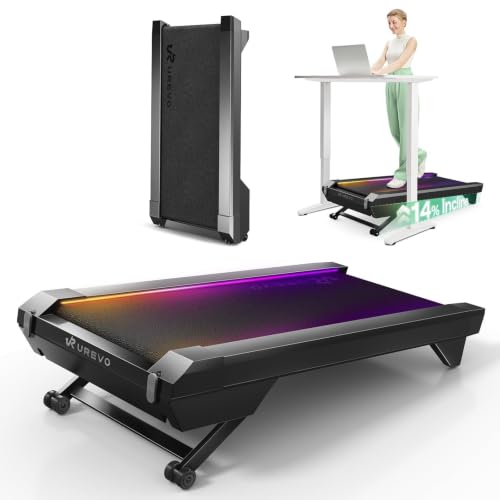
The CyberPad is what happens when a walking pad stops apologising for being technology. Its 14 percent incline adjusts automatically — the steepest grade in this roundup, delivered by motor rather than by hand — its motor is brushless, its belt is described as spacious, its frame carries speed lights that change with your pace, and an AI-powered app supervises the whole arrangement. Every one of those phrases is aimed at a buyer who wants the pad to be a smart training device that also visits the desk, rather than a dumb belt that also trains.
Under the desk, the automatic incline is the feature with real working-day consequences. Grade changes from the app mean a walking meeting can stay flat while a solo working hour climbs, without stepping off — the session-shaping the Abonow’s manual mechanism cannot offer. The brushless motor matters in the same hours: brushless designs are the industry’s standard route to quieter, cooler running, though the title publishes no decibel figure, so the claim remains a design argument rather than a measurement. The speed lights, by contrast, are pure theatre — delightful theatre, but theatre.
The flagship’s costs are the usual ones, plus one specific to this category. Complexity is a storage and reliability wager: more motors, more software, more to update. The title states neither capacity nor speed range, which on the roundup’s most expensive-feeling machine is a genuine omission — the two numbers desk work depends on must come from the maker’s documentation. And the app-centric control assumes a phone-centric worker; households rationing screen time may find a pad that wants an app philosophically noisy even when it is mechanically quiet. For the buyer who wants the ceiling of what a pad can do, though, this is the ceiling.
- Incline: 14 percent, automatic adjustment
- Motor: brushless, per the title
- Controls: AI-powered app
- Extras: speed lights, spacious belt surface per the title
- Capacity: not given in the listing title; confirm it in the maker’s own documentation
Strengths
- The steepest grade here, adjusted automatically mid-session.
- Brushless motor is the quiet-running design route.
- App control shapes flat and climbing hours without stepping off.
Trade-offs
- Capacity and speed range are absent from the title.
- The most complex machine here — more motors, more software.
- App-first control will not suit a phone-minimal household.
Best for: a training-minded walker who wants grade changes woven through the working day.
Not suited for: a set-it-flat worker who would be paying for machinery their routine never calls on.
See the UREVO CyberPad on Amazon if your walking pad should climb fourteen percent without you leaving the keyboard.
Which Walking Pad Fits Which Desk Setup? A Side-by-Side Look
| Pick | Incline | Stated capacity | Controls | Defining trait |
|---|---|---|---|---|
| UREVO Strol 2E Pro | 12% | Not stated in title | App, LED display | Safety handle for open-room training |
| Superun | 6% | 300 lbs | 0.6–3.8 MPH stated range | Fully specified, stated under 45 dB |
| 3.0HP Walking Pad | None stated | 300 lb | Remote, LED display | Strong motor, no app |
| Sweetcrispy Compact | None stated | Not stated in title | Armless deck | Slim storage for small flats |
| Abonow | 8%, manual | 265 lbs | Remote, LED display | Hand-set grade |
| UREVO CyberPad | 14%, automatic | Not stated in title | AI-powered app | Flagship smart features |
The table sorts the roundup into three temperaments. The specified minimalists — Superun and the 3.0HP pad — publish their working numbers and ask little of your phone. The incline machines — Abonow by hand, the two UREVOs by motor and app — sell grade as the point of the purchase. And the Sweetcrispy sells the room itself: the pad as a piece of small-flat logistics. Choose the temperament first; the models inside it are closer to each other than the marketing suggests. Shared spaces add one more consideration — a pad in a school or office training room lives a harder, more public life, and the desks compared in our Best Classroom Computer Desks guide show the furniture standards that world expects.
What Happens to Your Work Across the First Month of Walking?
Week one is novelty and mild comedy. Your typing carries a faint seasick wobble, your mouse overshoots small targets, and you will catch yourself gripping the desk’s edge during calls like a passenger on a boat. Output dips slightly on precision tasks and not at all on reading, reviewing and calls. This is the week the speed discipline in the setup section earns its keep: nearly everyone who quits, quits here, at speeds their pride chose.
Week two is where the separation arrives. Walking sinks below attention — your legs take over the rhythm the way they do on a familiar pavement — and the screen reclaims your mind. Most users find their sustainable speeds now, task by task: slowest for calls, a touch faster for reading and email, fastest for the walking-only stretches between tasks where the pad becomes pure exercise with a view of the inbox. The desk’s height landmarks get learned in the same week; you stop measuring and start knowing.
Weeks three and four reveal the honest division of the working day. Deep writing and fine spreadsheet work migrate back to the chair for most people, not from failure but from preference — some thought is seated thought. Walking colonises the day’s shallows instead: the meetings, the inbox hours, the reading, the admin, the long calls. That colonisation is the actual prize. Nobody’s health was ever changed by the two hours they already spent at the gym’s mercy; it is changed by the five shallow hours that used to be spent motionless and now are not.
The month also settles the equipment questions that specifications could not. You learn whether your room’s floor forgives the pad at 7 a.m., whether the belt’s note sits under your voice on calls, whether the storage address you measured is one you actually use at 6 p.m. when you are tired. Pads that survive month one on those terms tend to survive for years, because the habit and the machine have negotiated their treaty. Pads that fail, fail socially — wrong room, wrong hour, wrong floor — far more often than they fail mechanically, which is why this guide has spent as many words on your flat as on the motors.
What Mistakes Do People Make When Setting Up a Treadmill Desk?
The founding mistake is shopping for a combo that does not exist and then improvising the pairing badly — a pad bought by price alone, slid under a desk whose maximum height was calculated for floor-standing, leaving the screen at chin height and the keyboard at ribs. The pad raises you; the desk must have the travel to raise with you. Measure the desk’s range with the pad’s deck height added to your own before either purchase is final.
The second mistake is speed vanity: starting at two or three miles per hour because one mile per hour feels like a confession. It is not; it is the working speed of nearly everyone who keeps this habit past the first month. Begin embarrassingly slowly, let typing accuracy set the pace, and treat any speed at which your mouse work degrades as above your current ceiling regardless of what your legs think of it.
The third is neglecting the belt’s housekeeping. Walking pads track, tension and lubricate like any treadmill, only smaller; a belt that wanders sideways or squeaks is usually asking for the two-minute adjustment in its manual, not for a replacement machine. Owners who build the tiny ritual — check the belt’s centring weekly, keep the deck’s edges clear of the cables and rug fringe that belts love to eat — are the ones whose pads are still silent in year two.
The fourth is forgetting the floor’s vote. A pad concentrates a walking adult’s weight on four small feet, through which hard floors hear every step and downstairs neighbours hear a muffled version. A mat under the pad is not an accessory; in flats it is the difference between a habit and a complaint. Carpet, meanwhile, starves the motor’s ventilation — pads on deep pile run hot, and the manual’s floor guidance deserves reading before the first session, not after the first smell of warm electronics.
Final Recommendation
Buy the Superun if your decision runs on evidence: it is the only pad here whose title states its speed range, its capacity and a noise figure together, and its 0.6 MPH floor is built for the meetings that dominate real working days. Buy the UREVO CyberPad if incline is the point and you want it adjusted without stepping off; buy the Abonow if you want grade at a simpler mechanism’s price in complexity. The 3.0HP pad suits the app-sceptic with a strong motor and a plain remote, the Strol 2E Pro suits the household that will also train on its pad in the open room, and the Sweetcrispy suits the flat where storage is the binding constraint. Whichever belt you choose, remember what you are really assembling: not a product but a pairing, pad below and desk above, and the pairing only succeeds when both halves were chosen with the other in mind — so pick the pad for your slowest meeting, your smallest room and your honest habits, and it will still be moving under your desk long after faster resolutions have been rolled into the cupboard for good. The belt is the easy half to buy and the easy half to blame; the pairing, patiently assembled, is what actually changes the working day.
Frequently Asked Questions
Can I buy a treadmill and desk as one product?
Effectively no — the market sells the halves separately. What is sold as a treadmill desk is a walking pad designed to live under a standing desk, plus the desk itself, bought as a pairing. Budget and measure for both halves: the pad’s deck raises your standing height, so the desk needs the extra travel to compensate.
How fast should I walk while typing?
Most people settle between roughly 0.8 and 1.8 miles per hour for typing and reading, and slower still for video calls. Let accuracy set the pace: if your mouse work or typing degrades, you are above your working speed whatever your fitness says. Start at the bottom of the pad’s range and earn speed over a week.
Does incline matter under a desk?
It is the lever that makes slow walking cost more energy without demanding more speed or attention. A fixed or manual grade suits set-and-forget workers; automatic incline suits people who shape sessions — flat for calls, climbing for solo hours. If you will walk flat regardless, a pad without incline is one less mechanism to pay for and maintain.
How loud is a walking pad in an apartment?
It varies by machine, floor and footwear. One pick here states a figure in its title — below 45 decibels — while others describe quietness without a number; treat stated figures as the maker’s measurement in the maker’s conditions. A mat under the pad, trainers rather than hard soles, and speeds kept in the working band do more for neighbour relations than any specification.
Will a walking pad fit under my existing desk?
Check three fits: the desk’s maximum height minus the pad’s deck height must still put the keyboard at your standing elbow height; the desk’s legs and crossbar must clear the belt’s length; and your stride must fit the belt’s width without your feet finding its edges. A fixed-height desk usually fails the first test, which is why these pads are paired with height-adjustable desks.
Can I run on an under-desk pad after hours?
Some of these titles claim walking and running duty, and the handled UREVO Strol 2E Pro is designed for open-room use. Treat running as the pad’s second job, check the stated speed ceiling and capacity against your weight and pace in the maker’s documentation, and remember that a deck sized for under-desk storage is shorter than a gym treadmill’s — stride length is the limit most runners meet first.
Related Guides
If the pairing is still coming together in your head, the companion guides below cover the desk half from three directions: fixed heavy tables for a permanent installation, training-room furniture for shared spaces, and the stability-first standing desks that walking puts to the test.
Keep reading: Best Industrial Desks · Best Classroom Computer Desks · Best Non-Wobbly Standing Desks


