What's inside
- Where to Buy
- Key Takeaways
- Quick Picks
- How We Chose These Picks
- Comparison
- How to Choose a TV Projector
- Does a Laser TV Need a Special Screen?
- How Big Should a Laser TV Picture Be?
- What Does Living With a Laser TV Change About the Room?
- How Long Will a Triple-Laser Engine Serve as the Family Television?
- Common Mistakes When Buying a TV Projector
- Final Recommendation
- Frequently Asked Questions
- Related Guides
As an Amazon Associate I earn from qualifying purchases. This post may contain affiliate links at no extra cost to you.
[SITE_DOMAIN] is reader-supported. When you buy through links on our site, we may earn an affiliate commission.
Where to Buy
Laser televisions are the largest purchases in this guide’s family, so their listings deserve the slowest reading of all. Start with the AWOL Vision LTV-3000 Pro, whose page carries the full account of its triple-laser design, and confirm the current figure there before weighing it against any rival. The Hisense PX3-PRO follows, and its listing is worth opening beside the AWOL’s because the two compete for the same wall. A second Hisense, the Hisense PT1, steps the same idea down a tier, so read its page with that relationship in mind. The AWOL Vision Aetherion Pro is the newer name in its line and its listing repays attention to the gaming claims printed there. The XGIMI Horizon 20 breaks the ultra-short-throw pattern entirely, so give its page a separate visit rather than a comparative skim. Finally, the Hisense L9QPRO closes the set at the brightness summit, and its listing is where that claim should be verified.
Shopping for the best tv projectors for home theater means entering the laser TV class, and the class should be defined before any model is praised. Five of these six machines are ultra-short-throw projectors: cabinets that sit on a low unit inches from the wall and throw an 80-to-150-inch image upward onto a screen, replacing a television panel with a projected one. They share a recipe — triple laser light, 4K UHD resolution, Dolby Vision and Atmos ambitions, a smart television platform — and they compete on brightness, contrast language, gaming speed and the size range they will fill. The sixth machine, the XGIMI Horizon 20, is a conventional-throw projector included because its title makes the same television-replacement argument from a different position in the room.
One warning belongs at the front of every laser TV guide, and this one is no exception: a screen is not included unless a title says so, and none of these six titles says so. The projector is half of a laser television; the ambient-light-rejecting screen it fires at is the other half, and it belongs in the budget from the first evening of planning. Households that price only the cabinet are comparing half-products, and the comparison sections below assume a screen will join whichever machine is chosen.
Brightness language in this class mixes measurement vocabularies — lumens, ANSI lumens and ISO lumens all appear across these titles — and this guide reports each figure in its own stated units without converting or crowning a cross-vocabulary winner. Contrast claims vary just as widely in kind, from a 3000:1 figure to a 6000:1 figure with an iris. Read those numbers as each manufacturer’s account of its own machine, useful for sorting within a brand and suggestive across brands, rather than as laboratory results gathered on one bench.
Key Takeaways
- Five picks are ultra-short-throw triple-laser cabinets; the XGIMI Horizon 20 is a standard-throw exception with optical zoom and lens shift.
- The Hisense L9QPRO states the largest figures: 5500 ANSI lumens and an 80-to-200-inch projection range.
- Dolby Vision appears in five titles; IMAX Enhanced in three; Google TV in four.
- Gaming claims peak at 240Hz-class refresh and 1ms lag language on the AWOL Aetherion Pro and XGIMI Horizon 20 titles.
- No title includes a screen, so an ALR screen belongs in every budget drawn from this guide.
Quick Picks
| Pick | Badge | Why it earns a place |
|---|---|---|
| AWOL Vision LTV-3000 Pro | Established laser TV | Triple laser, Dolby Vision and Atmos, HDR10+ and a 150-inch UST ceiling. |
| Hisense PX3-PRO | Gaming-leaning UST | 3000 lumens, 240 high refresh rate, IMAX Enhanced, designed for Xbox. |
| Hisense PT1 | Step-down sibling | 2500 lumens with the same Dolby and IMAX vocabulary at a lower tier. |
| AWOL Vision Aetherion Pro | Contrast and speed | 6000:1 contrast with iris, 2600 ISO lumens, 1ms lag claim. |
| XGIMI Horizon 20 | Long-throw alternative | 3200 ISO lumens, optical zoom and lens shift, up to a 300-inch display. |
| Hisense L9QPRO | Brightness flagship | 5500 ANSI lumens, TriChroma RGB laser, 80-to-200-inch range. |
How We Chose These Picks
The class definition came first: a pick had to argue, in its own title, that it replaces a television — through an ultra-short-throw laser TV design or, in the XGIMI’s case, through a home projector specification aimed at the same living-room throne. That rule gathered the two AWOL cabinets, the three Hisense models that bracket the brand’s range, and the one standard-throw challenger, and it excluded the long tail of portable and classroom machines that borrow television language without the throw, the brightness or the platform to honor it.
Brand balance was deliberate. Hisense effectively created the laser TV shelf name, AWOL built its identity challenging for that shelf, and XGIMI brings a projector-native perspective to the same wall. A guide with six models from one maker would read like a catalog; this set reads like the argument the market is actually having, with each brand’s dialect — TriChroma, triple laser, RGB triple laser — preserved in its own wording rather than translated into a false common tongue.
Gaming and cinema claims were weighed as the class’s two poles. At one pole sit Dolby Vision, IMAX Enhanced and contrast figures; at the other, 240Hz-class refresh language and millisecond lag claims. Most households live between the poles, watching films on Friday and playing on Saturday, so the set was checked to ensure both poles had documented champions rather than a single compromise candidate pretending to be both.
Finally, size ranges were mapped, because a laser TV is bought for a specific wall. The titles here span 80-to-150 inches at the mainstream, 80-to-200 at the flagship and a 300-inch claim from the long-throw exception. A buyer whose wall wants 100 inches and a buyer whose wall wants 180 are shopping in the same guide for different machines, and the reviews keep that distinction in front of every other virtue.
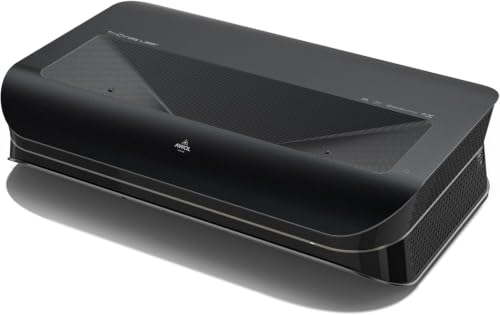
AWOL Vision LTV-3000 Pro — Established laser TV
The LTV-3000 Pro is the machine that taught many buyers the shape of this category, and its title remains the class’s clearest one-sentence definition: a 4K 3D ultra-short-throw triple laser projector with Dolby Vision and Atmos, HDR10+, and a 150-inch ceiling, sold as a UST laser TV home theater projector. Notice what the title does not print — no brightness figure, no contrast ratio, no platform name — because AWOL’s pitch here is architectural rather than numerical: three lasers, the full Dolby pairing, and a screen size that turns a wall into a venue.
Triple laser light is the foundation, and its meaning is worth stating plainly. Separate red, green and blue laser sources give a projector a wide, stable color palette that does not depend on a color wheel or a white segment, and in a living room that watches everything from nature documentaries to football, that palette is the difference between a big television and a merely big picture. The title does not quantify the gamut, so this review will not assign it a percentage; the architecture itself, named outright, is the documented fact, and it is the same foundation the newer Aetherion below builds its contrast story upon.
Dolby Vision and Atmos together mark the LTV-3000 Pro as a cinema-first cabinet. Vision governs the picture’s dynamic range scene by scene, Atmos governs the sound field its audio path can carry, and a title that names both is promising that streamed and disc-based Dolby content will be honored end to end rather than converted down at the last step. The 3D claim, easy to skim past, serves the small but devoted audience that still maintains a 3D library — a constituency most television makers abandoned and the UST class continues to court.
Who it suits is the household that wants the category’s founding formula without chasing its newest numbers: a 100-to-150-inch screen, Dolby content as the staple diet, and a cabinet from the brand that has iterated this exact design longest. The silences in its title — brightness above all — mean the listing page must confirm the figure against the room’s light before ordering, and gamers should note that no refresh or lag claim appears here, where two rivals below print theirs proudly. The LTV-3000 Pro’s case is maturity, and maturity in a young category is a genuine feature.
- Resolution: 4K
- Throw: Ultra short throw
- Light source: Triple laser
- Maximum image: 150 inches
- HDR: Dolby Vision, HDR10+
- Audio: Dolby Atmos
- 3D: 3D stated in the title
- Brightness: Not stated in the listing title — verify with the manufacturer documentation
- Platform: Not stated in the listing title — verify with the manufacturer documentation
Strengths
- Triple laser architecture is named outright.
- Dolby Vision and Atmos cover picture and sound.
- A 150-inch ceiling serves genuinely large walls.
Trade-offs
- No brightness figure appears in the listing title.
- No gaming refresh or lag claim is printed.
- The smart platform is not named in the title.
Best for: a cinema-led living room building a 100-to-150-inch laser TV around Dolby Vision discs and streaming, where triple-laser color is the foundation of the purchase. Not suited for: a bright room whose screen size is already fixed, because this title gives no brightness figure to check that pairing against before ordering.
Ownership of an LTV-3000 Pro begins, as every UST ownership does, with the screen and the stand. Fix the screen first — flat, tensioned, ambient-light-rejecting — then set the cabinet’s distance by measurement rather than by eye, and only then explore the Dolby settings with a film that mixes darkness and spectacle. Households that reverse that order spend weeks adjusting a picture whose geometry was never settled. Given a settled geometry, this AWOL’s virtues are the quiet kind: a palette that makes ordinary television look composed, and a cabinet that disappears into the furniture it sits on.

Hisense PX3-PRO — Gaming-leaning UST
Hisense built the laser TV shelf, and the PX3-PRO is its argument that the shelf now belongs to gamers as much as to film viewers. The title is dense with both dialects: an ultra-short-throw triple laser projector in 4K UHD, spanning 80 to 150 inches, with 3000 lumens, a 3000:1 contrast figure, Dolby Vision and Atmos, IMAX Enhanced, a 240 high refresh rate, Google TV, and a designed-for-Xbox closing note. No other title in this guide tries to hold cinema certification and console credentials in the same breath, and the PX3-PRO’s identity is precisely that double citizenship.
The 240 refresh figure deserves the careful reading this guide applies to all gaming numbers. In UST practice, headline refresh rates of this kind belong to lower-resolution gaming modes rather than to full 4K play, and the title does not specify the pairing, so the honest summary is that Hisense documents high-refresh intent and an Xbox design partnership while leaving the mode details to the listing page. Even read conservatively, that intent separates the PX3-PRO from the cinema-only cabinets: this is the laser TV for the household whose console lives permanently in the media unit rather than visiting for holidays.
On the cinema side, IMAX Enhanced joins Dolby Vision — a pairing that covers the two premium formats a streaming household is likeliest to meet — and the 3000-lumen figure with a stated contrast ratio gives the picture claims a numerical spine the AWOL above declines to print. Google TV supplies the platform, which matters for a machine that must serve as the household’s actual television: the interface is the remote’s home, the apps are the evening’s raw material, and a laser TV that fumbles either will be bypassed by a stick within the month.
Who it suits is the mixed household in its purest form — films with IMAX and Dolby badges on Friday, a console glowing beneath the screen on Saturday, ordinary television in between — at screen sizes from a manageable 80 inches to a room-commanding 150. Buyers who never game should weigh whether the PX3-PRO’s gaming engineering earns its place in their budget against the PT1’s simpler pitch below; buyers who never watch prestige television might ask the reverse. For the household that does both without apology, this Hisense is the guide’s most complete single answer.
- Resolution: 4K UHD
- Throw: Ultra short throw, 80 to 150 inches
- Light source: Triple laser
- Brightness: 3000 lumens
- Contrast: 3000:1
- HDR: Dolby Vision and Atmos, IMAX Enhanced
- Refresh: 240 high refresh rate stated
- Platform: Google TV
- Gaming: Designed for Xbox
Strengths
- Dolby Vision and IMAX Enhanced cover both premium formats.
- A 240 high refresh claim and Xbox design serve gamers.
- Brightness and contrast are both stated numerically.
Trade-offs
- The refresh figure’s resolution pairing is not specified.
- 3000 lumens trails the L9QPRO’s stated 5500 ANSI.
- Its breadth means specialists pay for unused talents.
Best for: a mixed film-and-console household at 80 to 150 inches, where the same screen must honor IMAX Enhanced streams and an Xbox that never leaves the media unit. Not suited for: a 180-inch wall, because this title’s stated range ends at 150 inches and the flagship below owns the larger territory.
Setting up the PX3-PRO well means configuring its two citizenships separately. Establish the cinema path first — screen, geometry, Dolby settings with a dark film — then build the gaming path: the console on the input the documentation favors, the refresh mode verified in the console’s own display settings, and a fast game used to confirm the pairing the title advertises. Households that blend the two setups into one compromise end up with a picture that is almost right for everything; households that treat them as two saved configurations get a machine that is right twice.

Hisense PT1 — Step-down sibling
The PT1 is the PX3-PRO’s quieter sibling, and its title shows exactly which words a step down removes. It remains an ultra-short-throw triple laser projector in 4K UHD on Google TV, spanning the same 80-to-150-inch range, with IMAX Enhanced, Dolby Vision and Atmos, 3D, and a 240 high refresh rate — but brightness steps to 2500 lumens, and the contrast figure holds at 3000:1. The designed-for-Xbox line is gone, and with it the suggestion that gaming led the design meeting; what remains is the family’s cinema-and-television core at a gentler specification.
That gentler specification deserves respect rather than pity, because 2500 lumens in the laser TV class is a figure aimed at the rooms these machines actually inhabit: living rooms with curtains, lamps that can be dimmed, and evenings as the main viewing shift. The PX3-PRO’s extra 500 lumens buys insurance for brighter rooms and larger diagonals within the shared range; a household projecting at 100 inches in a controllable room may never spend that insurance, and the PT1 exists for exactly that calculation. Step-down models are where a mature category proves it understands its own audience, and Hisense’s ladder here is legible enough to trust.
The retention of 3D is a small, telling generosity. A step-down model usually sheds the niche features first, yet the PT1 keeps the 3D claim its sibling’s title does not even print, alongside the full Dolby and IMAX vocabulary. A household with a 3D disc shelf and a moderate room could therefore find the PT1 not merely cheaper in spirit but actually better matched than the flagship-leaning PX3-PRO — a reminder that model ladders are not moral hierarchies, and that the right rung is the one whose specification intersects your room, your library and your light.
Who it suits is the considered buyer: a first laser TV purchase in a dimmable living room, a screen at the lower half of the shared size range, a library heavy on Dolby and IMAX streaming and light on competitive gaming. It does not suit the bright-room buyer, for whom the 500-lumen gap is the whole argument, nor the largest-diagonal buyer, who should be reading the L9QPRO’s 200-inch claim instead. The PT1’s honesty is that it knows its room — and asks the buyer to know it too.
- Resolution: 4K UHD
- Throw: Ultra short throw, 80 to 150 inches
- Light source: Triple laser
- Brightness: 2500 lumens
- Contrast: 3000:1
- HDR: Dolby Vision and Atmos, IMAX Enhanced
- Platform: Google TV
- Refresh: 240 high refresh rate stated
- 3D: 3D stated in the title
Strengths
- The full Dolby and IMAX vocabulary survives the step down.
- 3D is retained where the sibling’s title omits it.
- The same 80-to-150-inch range as the PX3-PRO.
Trade-offs
- 2500 lumens is 500 below the PX3-PRO’s figure.
- No designed-for-Xbox claim appears in the title.
- Bright rooms will expose its lower brightness first.
Best for: a first laser TV in a dimmable living room at 80 to 120 inches, where the Dolby, IMAX and 3D claims will all be used and the room’s light is under the household’s control. Not suited for: a sunlit open-plan space at 150 inches, because 2500 stated lumens is the figure in this family least able to win that argument.
The PT1 rewards the same installation discipline as its sibling — screen first, geometry by tape measure, platform signed in once — with one addition: manage the room’s light as part of the setup rather than as an afterthought. A blackout blind on the one offending window will do more for this projector’s picture than any setting buried in its menus, and it will keep doing it every evening for free. Mid-tier machines are often judged against flagship photographs taken in flagship rooms; judge the PT1 in its intended conditions and it explains itself completely.
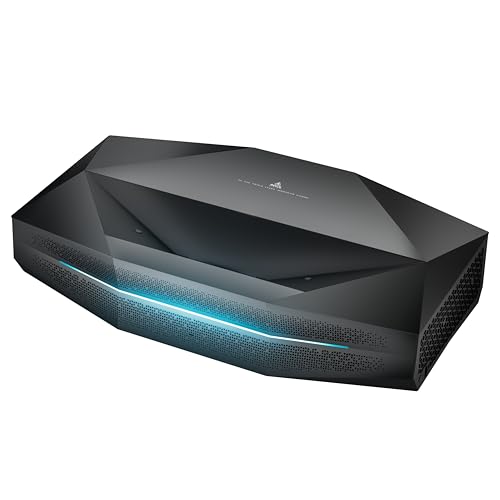
AWOL Vision Aetherion Pro — Contrast and speed
The Aetherion Pro is AWOL’s newer voice, and its title speaks in measurements where its older sibling spoke in architecture. The claims: a 4K ultra-short-throw laser home theater projector on Google TV with an RGB triple laser, Dolby Vision, a feature named PixelLock, a 6000:1 contrast figure with an iris, 2600 ISO lumens, 1080p gaming at 240Hz, and a 1ms lag claim. That is the most gaming-literate title in this guide — the first to pair a refresh rate with the resolution it belongs to — and the most contrast-forward, with the iris named as the mechanism behind its number.
PixelLock and the iris deserve the attention their placement earns. A named alignment system speaks to UST ownership’s fussy reality, in which a cabinet nudged by a centimeter during cleaning returns a picture whose edges no longer agree with the screen; anything that helps the image lock and stay locked addresses the class’s most common daily irritation. The iris, meanwhile, is a physical light-control mechanism, and a contrast claim that names its mechanism is a sturdier claim than a bare ratio — it tells the reader how the machine deepens its blacks, by governing the light itself rather than only by processing the signal.
The gaming specification is the title’s second education. By printing 1080p and 240Hz together, AWOL states plainly what the Hisense titles leave the reader to infer: high-refresh play lives at FHD, while 4K play lives at the standard console rates. That candor should be rewarded by gamers reading across this guide, because it lets them compare like with like — the Aetherion’s documented 1080p240 mode and 1ms lag claim against rivals’ unspecified 240 language — and it signals a manufacturer willing to be checked. A 1ms lag claim, read as the manufacturer’s own figure, completes the most complete gaming sentence any UST title here assembles.
Brightness is where the Aetherion trades blows honestly: 2600 ISO lumens is a mid-pack figure, stated in ISO units that are not interchangeable with the ANSI figure of the L9QPRO or the plain lumens of the Hisense pair. Its natural room is therefore the controlled living room rather than the glass-walled showpiece, and its natural buyer is the viewer who ranks contrast behavior and gaming response above raw light output — the film watcher who notices black levels in a night scene, and the player who notices input response in a fast one, sharing a single household budget.
- Resolution: 4K
- Throw: Ultra short throw
- Light source: RGB triple laser
- Brightness: 2600 ISO lumens
- Contrast: 6000:1 with IRIS
- HDR: Dolby Vision
- Platform: Google TV
- Gaming: 1080p 240Hz, 1ms lag stated
- Alignment: PixelLock
Strengths
- 6000:1 contrast with a named iris mechanism.
- 1080p 240Hz and 1ms lag are stated together, honestly.
- PixelLock addresses UST alignment drift directly.
Trade-offs
- 2600 ISO lumens is a mid-pack brightness figure.
- No IMAX Enhanced claim appears in the title.
- Dolby Atmos is not named in this listing title.
Best for: a contrast-led household that games seriously, where the iris-driven black levels and the documented 1080p 240Hz mode serve films and fast play in the same week. Not suited for: the brightest rooms in this guide’s audience, because 2600 ISO lumens concedes the daylight argument to the L9QPRO’s far larger stated figure.
To hear the Aetherion’s argument properly, audition it on a night scene and a fast game back to back — the two examinations its title invites. Set the iris behavior deliberately rather than leaving it wherever the first menu left it, verify the gaming mode from the console’s side as well as the projector’s, and use PixelLock after any cabinet movement instead of nudging the unit by hand and hoping. Machines that name their mechanisms reward owners who use those mechanisms by name, and this AWOL’s title is practically a checklist for its own setup evening.

XGIMI Horizon 20 — Long-throw alternative
The Horizon 20 is the dissenting voice in this guide, included to test the UST consensus. XGIMI’s title describes a 4K RGB triple laser home projector with 3200 ISO lumens, Google TV with licensed Netflix, optical zoom and lens shift, IMAX Enhanced, Dolby Vision, a 300-inch maximum display, 240Hz and a 1ms input lag claim. Strip the UST assumption away and the same laser TV ambitions remain — triple laser light, premium formats, television platform, gaming speed — delivered from a projector that sits across the room or on a shelf rather than beneath the screen.
Optical zoom and lens shift are the features that justify its presence, because they are the two things UST cabinets structurally cannot offer. A standard-throw projector with zoom can adapt to rooms of different depths and screens of different sizes across a household’s moves and rearrangements, and lens shift lets it live off-center — on a bookshelf, beside a sofa — without keystone correction spending its resolution. A buyer whose furniture cannot host a credenza at the wall, or whose rental forbids the fixed geometry UST demands, will find in this title the only machine in the guide that negotiates.
The 300-inch display claim should be read as a ceiling of possibility rather than a recommendation, and the 240Hz claim with the same resolution caution applied elsewhere in this guide, since the title does not pair the rate with a resolution as the Aetherion’s does. At living-room sizes — the 100-to-150-inch territory where this guide’s audience actually lives — the Horizon 20’s 3200 ISO lumens and triple-laser palette make its real case: a television-sized picture with projector placement freedom, on the platform, Google TV with licensed Netflix named outright, that the streaming household already uses.
Who it suits is the placement-constrained buyer and the mover: the household that rearranges, rents, or simply refuses to devote its wall’s baseboard to a cabinet. It also suits the viewer who prefers the projector behind the audience on principle, in the cinema’s traditional geometry. It does not suit the buyer whose dream is specifically the laser TV object — the invisible source, the picture that seems to emanate from the wall itself — because that magic is UST’s alone, and no specification on this title can reproduce it from across the room.
- Resolution: 4K
- Throw: Standard throw (home projector)
- Light source: RGB triple laser
- Brightness: 3200 ISO lumens
- Maximum display: 300 inches
- Optics: Optical zoom and lens shift
- HDR: Dolby Vision, IMAX Enhanced
- Platform: Google TV with licensed Netflix
- Gaming: 240Hz, 1ms input lag stated
Strengths
- Optical zoom and lens shift free its placement.
- 3200 ISO lumens is strong for a standard-throw design.
- Licensed Netflix is named within Google TV.
Trade-offs
- It cannot reproduce the UST cabinet’s wall magic.
- The 240Hz claim is not paired with a resolution.
- A 300-inch ceiling invites sizes its brightness cannot serve.
Best for: a renter or rearranger whose projector must live on a shelf across the room, where optical zoom and lens shift turn placement from a geometry exam into a choice. Not suited for: a buyer set on the invisible-source laser TV effect, because a projector across the room announces itself in a way a UST cabinet never does.
Installing the Horizon 20 well means spending its two signature features deliberately. Use the optical zoom to size the image from the shelf the room prefers rather than moving furniture to serve a fixed throw, and use lens shift — not keystone — to center the picture, checking the corners for the focus uniformity that separates a careful setup from a casual one. Then let the licensed Netflix and Google TV make it the room’s television in software as well as in size. The UST machines ask the room to organize around them; this XGIMI is the one entry here that organizes around the room.

Hisense L9QPRO — Brightness flagship
The L9QPRO closes the guide at the top of Hisense’s ladder, and its title is a summit claim: a TriChroma laser TV in 4K UHD, ultra-short-throw, with 5500 ANSI lumens, a triple RGB laser, Dolby Vision and Atmos, IMAX Enhanced, Google TV, and a projection range from 80 to 200 inches. Every figure in that sentence leads or matches the class — the brightness by a wide margin, the size range outright — and the L9QPRO’s role in this guide is to define what the laser TV idea becomes when brightness stops being the constraint the rest of the category manages.
5500 ANSI lumens changes the rooms a laser TV can claim. The other cabinets in this guide are evening machines with varying tolerance for lamps; a figure of this size, in the ANSI vocabulary the industry uses for its more conservative claims, speaks to rooms that stay genuinely lit — open-plan spaces, walls of glass with blinds rather than blackout, households that watch the afternoon match with the room awake. It also buys size: brightness spread across 200 inches thins quickly, and the L9QPRO is the only title here whose stated output and stated range are scaled for each other at that extreme.
TriChroma is Hisense’s name for its triple RGB laser architecture, and its placement at the head of the title signals that the flagship’s identity is the light engine itself — separate lasers for the three primaries, the widest palette the brand offers, feeding both the Dolby Vision and IMAX Enhanced formats the title also names. Google TV completes the television claim, because a flagship laser TV is judged as a television by its household: remote in hand, apps in a row, no projector rituals admitted. The L9QPRO’s title, read whole, is less a specification than a refusal to concede any category — brightness, size, color, format, platform — to a panel television of any size a wall can hold.
Who it suits is the household building the largest, brightest laser TV its room can host and intending to keep it there for years: the open-plan family space, the sports wall, the home that hosts. It does not suit the small, dim room, where its output would be spent against a 100-inch screen like a floodlight in a closet, nor the buyer whose budget must also stretch to the large ALR screen this machine’s sizes demand — the screen for a 150-to-200-inch image is a serious purchase in its own right, and the L9QPRO’s true cost is the pair together.
- Resolution: 4K UHD
- Throw: Ultra short throw, 80 to 200 inches
- Light source: TriChroma triple RGB laser
- Brightness: 5500 ANSI lumens
- HDR: Dolby Vision, Dolby Atmos, IMAX Enhanced
- Platform: Google TV
- Contrast: Not stated in the listing title — verify with the manufacturer documentation
- Gaming refresh: Not stated in the listing title — verify with the manufacturer documentation
- Maximum image: 200 inches
Strengths
- 5500 ANSI lumens leads this guide by a wide margin.
- An 80-to-200-inch range covers the largest walls.
- TriChroma RGB laser anchors the color claim.
Trade-offs
- No contrast figure is printed in the listing title.
- No gaming refresh claim appears in the title.
- Its largest sizes demand a correspondingly serious screen.
Best for: a large, genuinely lit family space building an 150-to-200-inch laser TV, where 5500 ANSI lumens is the only figure in this guide scaled for both the room and the diagonal. Not suited for: a small dark room at 100 inches, because that output would overwhelm the space the PT1 and PX3-PRO were sized for.
Flagship ownership is mostly restraint. Resist the largest diagonal for its own sake and choose the size the seating distance flatters, because even 5500 lumens reads as composure rather than spectacle when the picture fits the room. Commission the screen with the same seriousness as the projector — at these sizes its flatness and gain decide what the TriChroma engine is allowed to say — and set the cabinet’s position once, precisely, with the understanding that a machine of this ambition should be disturbed as rarely as the television it replaces. Bought and installed that way, the L9QPRO stops being a projector purchase and becomes the room’s permanent north wall.
Comparison
| Pick | Throw / size | Brightness (title) | Formats | Gaming from title |
|---|---|---|---|---|
| AWOL Vision LTV-3000 Pro | UST, up to 150″ | Not stated in the listing title | Dolby Vision and Atmos, HDR10+ | Not stated in the listing title |
| Hisense PX3-PRO | UST, 80–150″ | 3000 lumens | Dolby Vision and Atmos, IMAX Enhanced | 240 high refresh, designed for Xbox |
| Hisense PT1 | UST, 80–150″ | 2500 lumens | Dolby Vision and Atmos, IMAX Enhanced, 3D | 240 high refresh |
| AWOL Vision Aetherion Pro | UST | 2600 ISO lumens | Dolby Vision | 1080p 240Hz, 1ms lag |
| XGIMI Horizon 20 | Standard throw, up to 300″ | 3200 ISO lumens | Dolby Vision, IMAX Enhanced | 240Hz, 1ms input lag |
| Hisense L9QPRO | UST, 80–200″ | 5500 ANSI lumens | Dolby Vision and Atmos, IMAX Enhanced | Not stated in the listing title |
The brightness column must be read with its units attached: plain lumens, ISO lumens and ANSI lumens are neighboring dialects rather than one currency, and the table preserves each title’s own term instead of laundering them into a ranking. What can be said across the dialects is directional — the L9QPRO’s figure is in another league by any reading, the PT1’s is the set’s most modest, and the LTV-3000 Pro declines to play the game at all.
The gaming column shows a category mid-education. One title pairs its refresh rate with a resolution, two print a bare 240, one names a console partnership, and two say nothing. A gaming household should treat that column as the start of a listing-page investigation rather than its conclusion, while a film household can read the formats column and be nearly done: Dolby Vision is close to universal here, and IMAX Enhanced is the badge that separates four of the six.
How to Choose a TV Projector
Start with the wall and the light that falls on it, because a laser TV is a room decision wearing a product’s clothes. Measure the diagonal the seating distance flatters — closer seats want less size than enthusiasm suggests — and observe the room at the hours the screen will actually glow. A controlled room opens the whole table; a bright, open room narrows it toward the high-brightness end, and no platform feature or format badge compensates for a picture the room’s light washes away.
Budget the screen in the same breath as the projector. An ambient-light-rejecting screen sized for a UST cabinet is a substantial purchase, and at the largest diagonals it rivals the price distance between models in this guide. A household that steps down one projector tier to afford the correct screen will end with the better picture nearly every time, because the screen is where the projector’s light either becomes a television or becomes a suggestion of one.
Sort the gaming claims with a pencil. Note which titles pair refresh with resolution, which print a bare number, and which name a console partnership, then verify the mode you actually intend to use — 4K at console rates, or FHD at high refresh — on the listing page of your finalist. The Aetherion Pro’s title is the model of how such claims should read; hold the others to its standard of specificity before letting a gaming figure influence the decision.
Sound geography deserves its own line in the plan, because the UST cabinet occupies the exact shelf where a center speaker or soundbar expects to live. Decide before ordering whether the projector’s own audio path — Atmos is named in several titles here, though speaker details are not — will carry the room, or whether a soundbar must share the unit, and measure the unit’s depth for both machines together. A laser TV installation that discovers its audio conflict on delivery day will solve it badly, with a speaker shadowing the beam or a cabinet pushed off its measured line.
Finish with the platform and the household’s patience. Google TV appears across most of this guide, which simplifies the choice, but the television that results will be operated by everyone in the house, including whoever currently loses fights with the receiver remote. A laser TV succeeds when it is used like a television — casually, constantly, by all — so weigh the daily interface and the cabinet’s physical discretion as heavily as the flagship numbers. The best TV projector is the one the household stops calling a projector.
Does a Laser TV Need a Special Screen?
For the ultra-short-throw five, the practical answer is yes, and the reason is geometry. A UST cabinet throws its image upward at a steep angle from inches below the screen, so the surface must be flat enough not to warp that geometry and is best served by an ambient-light-rejecting design that accepts light arriving from below while refusing light arriving from the ceiling and windows. A painted wall can host a casual picture, but it taxes exactly the brightness and contrast these machines were bought for, and at diagonals beyond 120 inches its imperfections scale with the image.
The screen decision also fixes the size decision, which is healthy. A household that must choose a screen diagonal before ordering will measure its wall, its seating and its sightlines with a seriousness that projector-only shopping rarely inspires. Fresnel and lenticular ALR designs differ in viewing angle and light behavior, so the screen deserves the same title-reading discipline as the projector: match its stated gain, angle and size to the cabinet’s stated range rather than to a showroom’s largest demo.
The XGIMI Horizon 20 is the partial exception, since a standard-throw projector can work with a wider family of screens, including matte white surfaces in controlled rooms. Even there, a proper screen outperforms a wall by a margin no setting can reproduce. Across all six machines, the rule holds in spirit: the surface is half the television, and it should be bought like one.
How Big Should a Laser TV Picture Be?
Smaller than the wall allows and larger than the television it replaces — that is the honest band, and the titles here stake its borders at 80 and 200 inches. Within the band, seating distance is the governing measurement: a sofa eight feet from the wall lives happily at the range’s lower half, while a deep room with seating twelve feet back can spend the flagship sizes without the picture overwhelming the viewers’ peripheral comfort. Size is a relationship between wall and chairs, not a property of the projector alone.
Brightness thins as size grows, which is why the L9QPRO’s outsized figure and outsized range arrive in the same title. A household dreaming of 180 inches should read brightness and range as one claim, and should be suspicious of any pairing — in this guide or beyond it — that promises the largest sizes from a modest light engine. Conversely, a 100-inch ambition does not need flagship output, and the money saved by stepping down the ladder buys the better screen that will flatter a mid-tier machine into looking like a flagship.
Guests have a vote too, though they rarely cast it politely: a screen that swallows the room impresses visitors for an evening and exhausts the household for a year, while a screen fitted to the seating disappears into the films it shows. Choose for the fifty ordinary evenings, not the one spectacular one, and let the spectacular evening take care of itself — at these sizes, it will.
Content has a vote as well. Sport and broadcast television reward scale almost without limit, prestige film rewards the size at which faces hold their detail, and games reward the size at which the whole scene remains readable at a glance. Let the household’s dominant content cast the deciding vote, and let the first month rather than the first evening confirm it — laser TV owners consistently report that the right size is the one they stopped noticing, in either direction, by the second week.
What Does Living With a Laser TV Change About the Room?
Furniture changes first. A panel television asks for a stand or a mount and then holds still for a decade; a laser TV asks for a low, deep, stable unit at a measured distance from a wall that must stay bare and flat above it. Artwork migrates, the television’s old perch becomes a shelf, and the room’s focal point shifts from an object to a surface. Households that embrace that rearrangement describe the result as calmer — a wall that is art or nothing by day and a cinema by night — while households that fight it spend years apologizing for a cabinet that never quite sits where the room wanted it.
Light discipline changes next, in the opposite direction from a dedicated theater. A laser TV household does not black out its room; it negotiates with it. Blinds gain a daily routine, lamps move a few feet so their light falls beside rather than on the screen, and the ALR surface does the rest. The negotiation becomes invisible within a month, which is the category’s quiet triumph: the big screen stops being an event with preparations and becomes the room’s ordinary way of watching, at sizes no panel in the house could offer.
Sound changes last and most personally. The television these machines replace had its speakers built in and pointed at the audience; a UST cabinet’s own audio, where a title even claims it, fires from beneath the picture, and many households will route film sound to a soundbar or system that must now share the cabinet’s crowded neighborhood. Plan that geography early — center channel, cabinet, console, ventilation — because the low unit under a laser TV screen is the most contested shelf in the modern living room, and the machine that wins it by measurement rather than by shoving is the one that stays aligned.
How Long Will a Triple-Laser Engine Serve as the Family Television?
The honest answer begins with the observation that none of these six titles prints a rated light-source life, so no hour figure appears anywhere in this guide. What the architecture itself promises, by its nature, is a light source without a lamp’s replacement cycle — the ownership model that makes a television-like duty cycle reasonable. A panel television is expected to serve for the better part of a decade of daily use, and the laser TV class asks to be judged by the same expectation rather than by the lamp-era projector’s calendar of consumables.
The parts that age fastest in a laser TV household are rarely the lasers. Platforms age as services change their apps; fans and filters age with dust; the screen ages with sunlight and children. A buyer choosing among these six should therefore weigh the platform’s publisher and the cabinet’s serviceability alongside the light engine, because the machine most likely to be retired early is the one whose software feels abandoned, not the one whose lasers dim. Google TV’s presence across most of this guide is, in that light, a longevity feature disguised as a convenience.
Placement protects lifespan more than any specification. A cabinet with clear ventilation, a stable surface and a screen it never has to be moved to meet will outserve an identical machine slid around weekly on a wobbling unit. The laser TV’s promise is a decade of evenings; the household’s contribution to that promise is a shelf, a tape measure and the discipline to leave a working geometry alone.
Common Mistakes When Buying a TV Projector
Budgeting for the cabinet and forgetting the screen. No title in this guide includes one, and a UST projector without its ALR partner is half a television at full price.
Comparing lumens across unit systems. ANSI, ISO and plain lumens are different dialects; a figure is only meaningful with its unit attached and its room considered.
Reading a bare 240Hz as 4K gaming. Only one title here pairs its high-refresh claim with 1080p in writing; assume the pairing must be verified wherever it is not printed.
Chasing the maximum diagonal. A 200-inch range is a capability, not an instruction, and seating distance plus brightness decide the size a room can honor.
Installing the cabinet by eye. UST geometry punishes approximation in centimeters; measure the stand-off, level the unit, and let the screen — not the wall’s paint line — define straight.
Final Recommendation
For most households, the Hisense PX3-PRO is the laser TV to beat: it pairs Dolby Vision and IMAX Enhanced with the guide’s most console-literate pitch, at sizes that fit real walls and a brightness figure that fits real rooms. Step down to the PT1 when the room is dimmable and the library leans on Dolby, IMAX and 3D more than on gaming, and step up to the L9QPRO when the room is bright, the wall is vast and the budget includes the screen such a machine deserves. The AWOL pair divides by temperament — the LTV-3000 Pro for the founding formula and its 150-inch Dolby canvas, the Aetherion Pro for contrast and the most honestly stated gaming specification here — while the XGIMI Horizon 20 stands ready for the household whose room simply will not accept a cabinet at the wall.
Whichever name ends up beneath your screen, judge the result on an ordinary Tuesday — the news at breakfast light, a series after dinner, a match with friends — because a laser TV has succeeded only when the household forgets the technology entirely and argues, as families always have, about what to watch on the big television.
Frequently Asked Questions
Is a screen included with a laser TV projector?
Not in any title in this guide. Plan to buy an ambient-light-rejecting screen separately for the ultra-short-throw models, and size it to the projector’s stated range and your seating distance.
What is the difference between ANSI, ISO and plain lumens?
They are different measurement conventions, so figures are comparable within a convention and only directional across them. This guide reports each title’s figure in its own stated units rather than converting.
Can a laser TV replace a television for gaming?
The gaming-led titles suggest yes, with care: the Aetherion Pro states 1080p at 240Hz with a 1ms lag claim, and the PX3-PRO adds a designed-for-Xbox line. Verify the exact mode pairing on the listing page of any model you shortlist.
How far from the wall does a UST projector sit?
Inches rather than feet, with the exact stand-off set by the target diagonal. Measure from the manufacturer’s throw table for your screen size before choosing furniture, because small distances change large pictures.
Which pick suits the brightest room?
On stated figures, the Hisense L9QPRO, at 5500 ANSI lumens with an 80-to-200-inch range. Even it benefits from blinds at the worst hour; no projector outshines direct sun on the screen.
Related Guides
For the LCD branch of the short-throw family, continue to the best short-throw LCD projectors for home theater, where Epson’s 3LCD cabinets are compared in depth. And readers whose rooms suit a dedicated cinema build should visit our guide to the best cinema projectors before deciding that the living room is the only theater they need.


