What's inside
- Where to Buy
- Key Takeaways
- Quick Picks
- How We Chose These Picks
- Comparison
- How to Choose a High-Resolution Home Theater Projector
- Does Pixel Shifting Count as Real 4K?
- How Bright Does a Dedicated Theater Room Really Need to Be?
- What Should Gamers Sharing the Theater Room Look For?
- Common Mistakes When Buying a 4K Home Theater Projector
- Final Recommendation
- Frequently Asked Questions
- Related Guides
As an Amazon Associate I earn from qualifying purchases. This post may contain affiliate links at no extra cost to you.
[SITE_DOMAIN] is reader-supported. When you buy through links on our site, we may earn an affiliate commission.
Where to Buy
Six 4K-class machines are gathered below, and each one is bought through its own Amazon listing rather than through any bundle or marketplace shortcut. Readers who want a laser engine in a conventional long-throw cabinet can open the Optoma UHZ36 page and confirm today’s figure there before comparing it with anything else in this guide. The BenQ HT4550i earns a separate visit because its listing carries the streaming platform details in full, and the BenQ W4100i deserves the same patience since its calibration claims repay a careful read. On the Epson side, the Epson Home Cinema 5050UB and the Epson Home Cinema LS11000 sit in different generations of the same idea, so compare their listings side by side rather than assuming the newer name settles every question. The Epson Home Cinema 3800 closes the set, and its page is the place to verify availability for a model that has been in catalogs for several seasons.
Searching for the best home theater projectors high resolution can deliver quickly turns into a fog of resolution language, and this guide begins by clearing that fog rather than selling through it. Every pick below carries 4K or 4K PRO-UHD in its own listing title, yet those phrases do not all describe the same optical path. Some engines are native 4K, some reach the screen count through pixel shifting, and several titles here simply do not say which route they take. Where a title stays silent on that point, the review below says so plainly and the spec box records the silence, because a buyer spending home theater money deserves to know which facts are documented and which are merely assumed by the wider internet.
Brightness language needs the same discipline. Two Epson titles state lumens as both color and white brightness, a BenQ title states a single lumens figure, and the Optoma title states no brightness number at all. Those are not interchangeable measurements presented in different fonts; they are different levels of disclosure, and this guide reports each one in the form its own title gives it. A dark, dedicated room forgives a modest figure, while a family room with lamps and windows punishes one, so read the brightness lines against your own room rather than against an abstract ranking.
The third sorting idea is the light source. Laser, LED and lamp engines age differently, ask different things of a household, and shape the ownership story long after the first film night. Two picks here name laser in the title, one names LED, and others leave the light source unstated in the title wording we were given. That spread is useful rather than awkward: it lets the guide compare not just picture claims but the practical texture of owning each machine across years of evenings.
Key Takeaways
- All six titles state 4K, 4K UHD or 4K PRO-UHD, but only some explain how that resolution is produced; the rest are recorded as silent on native versus shifted output.
- The BenQ HT4550i is the brightness leader on paper with 3200 lumens stated in its title, while the Optoma UHZ36 title states no brightness figure at all.
- Two picks name a laser light source in the title: the Optoma UHZ36 and the Epson LS11000.
- The Epson 5050UB and 3800 both use 3-chip 3LCD engines, and the LS11000 adds a 120Hz claim and motorized lens shift and focus.
- Smart streaming appears unevenly: both BenQ models name Android TV with Netflix, while the Epson and Optoma titles make no streaming platform claim.
Quick Picks
| Pick | Badge | Why it earns a place |
|---|---|---|
| Optoma UHZ36 | Laser minimalism | 4K UHD laser HDR in a title that keeps its claims short and its engine clear. |
| BenQ HT4550i | Bright LED streamer | 3200 lumens, LED light, Android TV with Netflix and HDR10+ support. |
| BenQ W4100i | Calibrated color pick | 3200 lumens, full DCI-P3 claim, factory calibration and four-way lens shift. |
| Epson Home Cinema 5050UB | Established 3LCD choice | 3-chip 3LCD, 2600 lumens of color and white brightness, advanced pixel-shift processing. |
| Epson Home Cinema LS11000 | Laser flagship of the Epsons | Laser light, HDR10+, 120Hz and motorized lens shift and focus. |
| Epson Home Cinema 3800 | Accessible 3LCD route | 4K PRO-UHD 3LCD with HDR in the most concise title of the Epson trio. |
How We Chose These Picks
The entry rule was resolution language in the title itself. A projector could not join this set on the strength of a retailer category or a review elsewhere; its own listing title had to say 4K, 4K UHD or 4K PRO-UHD. That rule kept the guide honest about its subject and produced a set in which the interesting argument is not whether these machines belong in a high-resolution conversation, but how differently they approach the same headline claim.
Brand spread came next, deliberately. Three Epson models, two BenQ models and one Optoma give readers the three dominant philosophies in this class: 3LCD with pixel shifting, DLP-family smart home theater design, and a laser machine whose title refuses ornament. A guide with six near-identical models from one maker would be easier to write and far less useful to read, because the real decision most households face is between philosophies first and model numbers second.
HDR language was catalogued rather than harmonized. HDR, HDR10, HDR10+, HLG and Dolby Digital Plus audio all appear somewhere in these titles, and each review repeats only what its own title prints. A model that names HDR10+ is not quietly promoted to match a rival, and a model whose title says only HDR is not demoted in prose for a silence that might reflect copywriting rather than hardware. The spec boxes exist precisely to hold those distinctions still.
Finally, the set was checked for room spread. Some of these machines are clearly aimed at a dedicated dark room, others carry streaming platforms and built-in speakers that suit a living room pulling double duty. A home theater means a blacked-out basement to one reader and the wall above a sofa to another, and a useful guide has to serve both households without pretending their priorities match.
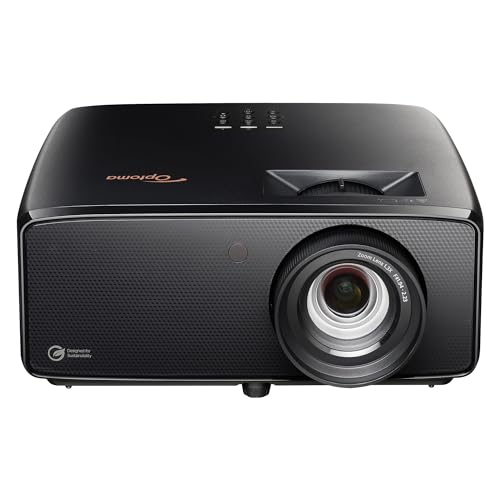
Optoma UHZ36 — Laser minimalism
The UHZ36 has the shortest title in this guide, and there is something refreshing about reading it after the paragraph-length titles below. Optoma states four things: this is a 4K UHD projector, its light source is laser, it supports HDR, and it is black. Everything else a buyer might want — brightness, throw distance, inputs, speaker arrangements — is absent from the title, and this review will not smuggle those details in from general knowledge of the brand. What can be discussed honestly is the shape of the proposition: a laser-driven 4K UHD home theater machine presented without streaming badges or smart platform promises.
Laser light changes the ownership rhythm in ways that matter more than most first-time buyers expect. A laser engine typically holds its output steadily across a long service life and removes the lamp-replacement errand that older projector owners planned their calendars around. The title does not print a rated life figure, so no hour count appears in the spec box, but the laser designation alone tells a household that the maintenance conversation will be about filters, vents and placement rather than about a consumable bulb dimming toward a replacement date.
Who it suits is the dedicated-room viewer who already owns a streaming source, a receiver and speakers, and who wants the projector to do one job: put a large 4K UHD HDR picture on a screen. In that kind of room, a projector without a built-in platform is not missing a feature; it is avoiding a second, competing interface. The UHZ36 also suits the buyer who distrusts headline brightness numbers gathered under different measurement habits, since Optoma’s silence here forces the conversation onto the listing page and the manufacturer’s own documentation, where the full figures live.
The counterweight is research burden. Every rival below hands the reader at least one brightness figure in its title, and the BenQ pair add streaming and color claims on top. A UHZ36 shopper must do more homework before ordering than any other reader of this guide, confirming throw distance against room depth, brightness against screen size, and input count against the sources in the rack. That homework is not a flaw in the machine; it is a property of its listing, and it should be priced into the decision.
- Resolution: 4K UHD
- Light source: Laser
- HDR: HDR stated in the title
- Color: Black
- Brightness: Not stated in the listing title — verify with the manufacturer documentation
- Native versus pixel-shift path: Not stated in the listing title — verify with the manufacturer documentation
- Streaming platform: Not stated in the listing title — verify with the manufacturer documentation
- Throw ratio: Not stated in the listing title — verify with the manufacturer documentation
Strengths
- Laser light source is stated outright, anchoring the ownership story.
- 4K UHD and HDR are both claimed in the title without qualification.
- The absence of a built-in platform suits receiver-based dedicated rooms.
Trade-offs
- No brightness figure appears in the listing title.
- Throw and input details must be confirmed from manufacturer documentation.
- No smart streaming is claimed, so an external source is required.
Best for: a dark, equipment-rich theater room where a separate streamer and receiver already handle everything except the picture. Not suited for: a 120-inch screen in a lamp-lit family room, because this title gives no brightness figure to judge that pairing against.
If the UHZ36 is your direction, spend the saved reading time on placement mathematics. Measure the exact distance from the intended lens position to the screen, then check that distance against the throw data in Optoma’s documentation for your target image size, leaving margin at both ends rather than landing on a boundary. Confirm the ceiling mount position before drilling anything, because laser convenience does not forgive a projector installed a foot from where its zoom range needed it to be. Readers who do that unglamorous arithmetic first tend to describe laser projectors as effortless afterward, and the order of those two experiences is not a coincidence.

BenQ HT4550i — Bright LED streamer
BenQ’s HT4550i arrives with the most talkative title among the six, and nearly every clause in it answers a question a living-room buyer actually asks. It is a 4K HDR projector with an LED light source, rated at 3200 lumens in the title, carrying Android TV with Netflix, Dolby Digital Plus, built-in Chromecast and a built-in speaker, with support listed for HDR10+, HDR10 and HLG. Read as a whole, that is not a dedicated-room instrument; it is a machine designed to be the entertainment center of a room that also hosts homework, video calls and Sunday afternoon sports.
The LED designation deserves a moment, because it separates this BenQ from both the laser pair and from traditional lamp models. LED engines share the laser family’s freedom from lamp swaps while producing their light in a different way, and for a household that streams nightly and projects films on weekends, that always-ready character changes how casually the big screen gets used. A projector that asks for no warm-up ritual and no bulb budget becomes the default screen rather than the special-occasion screen, which is quietly the strongest argument in this entire guide.
Brightness is the other headline. At 3200 lumens as printed, the HT4550i carries the highest figure in this set, and that number speaks directly to rooms that cannot or will not go fully dark. No lumens figure guarantees a satisfying picture on an oversized screen in daylight, and this review will not pretend otherwise, but a buyer choosing between this title and the 2500-to-2600-lumen Epsons for a bright family room is looking at a real, documented difference in the only brightness language the titles provide.
The streaming stack completes the portrait. Android TV with Netflix named outright, Chromecast built in and Dolby Digital Plus support mean the HT4550i can run an evening without waking a single other device, and its built-in speaker covers casual viewing even though film lovers will still route sound outward. Who it suits, then, is the household whose theater is also its television: bright room, mixed content, several viewers with different patience levels for equipment rituals. Dedicated-room purists may find the smart layer unnecessary, but unnecessary and unwelcome are different words, and nothing in this title suggests the streaming side compromises the projection side.
- Resolution: 4K HDR, described as Ultra 4K in the title
- Light source: LED
- Brightness: 3200 lumens
- HDR support: HDR10+, HDR10, HLG
- Platform: Android TV with Netflix, built-in Chromecast
- Audio: Dolby Digital Plus, built-in speaker
- Native versus pixel-shift path: Not stated in the listing title — verify with the manufacturer documentation
- Lens shift: Not stated in the listing title — verify with the manufacturer documentation
Strengths
- 3200 lumens is the highest brightness figure stated in this guide.
- Android TV with Netflix and Chromecast are named in the title.
- LED light removes lamp replacement from the ownership plan.
Trade-offs
- Lens shift is not mentioned in the listing title.
- The built-in speaker will not replace a sound system for films.
- Its resolution path is not described in the listing title.
Best for: a bright living room that streams nightly and projects films on the same wall, where 3200 stated lumens and a built-in Netflix platform remove daily friction. Not suited for: a shelf placement well off the screen’s centerline, because this title names no lens shift to rescue an off-axis installation.
Getting the best from the HT4550i is mostly about resisting duplication. Let its Android TV be the streamer rather than adding a stick that mirrors the same apps through a second remote, and the evening routine simplifies to one interface for everyone in the house. Place it as close to the screen’s vertical center as furniture allows, since the title offers no lens shift promise, and treat keystone correction as a last resort rather than a placement strategy. Then spend one session on the HDR settings with a film you know well, because a bright LED machine in a real living room rewards owners who calibrate for their room instead of accepting a showroom preset tuned for a store floor.

BenQ W4100i — Calibrated color pick
The W4100i speaks to a different BenQ buyer than its sibling above. Its title leads with the same 4K HDR and 3200 lumens, then turns toward color and installation: REC 709, 100% DCI-P3, HDR10+, factory calibration, Netflix on Android TV, four-way lens shift, a three-year warranty and 3D support. That is the vocabulary of a viewer who notices when a director’s palette drifts, and who expects the projector to arrive with its color homework already done rather than as a weekend project.
Factory calibration is the claim to linger on. A projector can carry excellent hardware and still present a picture skewed by unit-to-unit variation or a careless default mode; a title that prints factory calibrated is promising that someone measured this class of machine before it entered a box. Viewers who will never own a colorimeter — most viewers — benefit disproportionately from that promise, because their alternative is trusting presets named Cinema or Vivid with no measurement behind the labels. The DCI-P3 figure printed beside it gives the calibration a gamut to be accurate within, and together the two claims form the strongest color argument in this guide.
Four-way lens shift answers the installation question the HT4550i leaves open. Shifting the image vertically and horizontally by lens movement, rather than by tilting the machine and correcting digitally, preserves the resolution the buyer paid for and lets the projector live where the room allows instead of only where geometry demands. Ceiling mounts that land slightly off, shelves that sit left of center, media cabinets of fixed height — lens shift absorbs all of these ordinary imperfections, and four-way movement absorbs more of them than the vertical-only arrangements common in this class.
The three-year warranty and 3D support round out a title aimed at keepers rather than flippers. Who it suits is the film-first household building a room around the projector for years: color-critical, placement-constrained, and willing to value calibration and coverage as features rather than footnotes. A casual streamer will use a fraction of this specification, and for that reader the HT4550i’s simpler pitch may honestly serve better. The W4100i is for the viewer who reads a color gamut figure the way other people read a brightness figure — as the first line, not the fine print.
- Resolution: 4K HDR
- Brightness: 3200 lumens
- Color: REC 709, 100% DCI-P3
- HDR support: HDR10+
- Calibration: Factory calibrated
- Platform: Netflix Android TV
- Lens shift: 4-way lens shift
- Warranty: 3-year warranty stated in the title
- 3D: 3D support stated
- Light source: Not stated in the listing title — verify with the manufacturer documentation
Strengths
- 100% DCI-P3 with factory calibration is the guide’s strongest color claim.
- Four-way lens shift forgives imperfect projector placement.
- A three-year warranty is stated in the title itself.
Trade-offs
- The light source is not named in the listing title.
- Only HDR10+ is listed among HDR formats in the title.
- Its calibration focus is wasted on purely casual viewing.
Best for: a film-first room where the mount cannot sit dead center, since the four-way lens shift and factory-calibrated DCI-P3 color address placement and palette at once. Not suited for: a purchase contract that requires the light source named in writing, because this title never states whether the engine is LED, laser or lamp.
Ownership advice for the W4100i begins with protecting what the factory did. Resist the urge to explore every picture mode during the first week; settle on the calibrated path the title promises, live with it through several films of different eras and lighting styles, and only then adjust with a specific complaint in mind. Use the lens shift before reaching for digital keystone, and mark the mount position once the image is square so a bumped projector can be restored in minutes. Owners of color-led projectors get their reward slowly, in the accumulation of scenes that simply look right, and patience during setup is how that reward is earned.
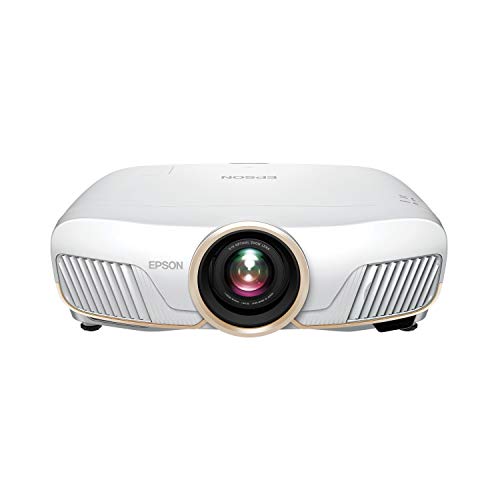
Epson Home Cinema 5050UB — Established 3LCD choice
The 5050UB is the veteran of this guide, a 3-chip 3LCD projector whose title describes 4K PRO-UHD output produced with advanced pixel-shift processing, HDR support, and 2600 lumens stated as both color and white brightness. That last phrasing is an Epson signature worth understanding: by printing the same figure for color and white brightness, the title tells the reader that colorful scenes are not quietly dimmer than white ones, a distinction that single-figure brightness claims leave unexamined. For film viewing, where most frames are color rather than white, that dual statement carries practical weight.
Pixel shifting deserves an honest paragraph rather than a dismissive one. The 5050UB’s title openly names its method — advanced pixel-shift processing — which is more candor than the titles that simply print 4K and move on. Shifting presents a full 4K-class image to the eye by rapid, precise movement, and at normal seating distances on real film content, the debate between shifted and native output matters less than contrast, color and motion handling. Buyers who want native 4K as a matter of principle should note that this title does not claim it, and buyers who judge by the screen rather than the schematic will find the 5050UB’s long tenure in home theater conversations easy to explain.
The 3LCD architecture brings its own character. Three-chip designs devote a chip to each primary color, a structure associated in home theater circles with strong color performance, and the title’s 3-chip 3LCD wording confirms that architecture directly. Combined with the dual brightness statement, the picture that emerges from the title alone is of a machine built for dark-room film work where color integrity outranks raw specification drama. Nothing in the title mentions streaming, speakers or smart features, and in a dedicated room fed by a receiver, that silence describes a division of labor rather than a deficiency.
Who it suits is the traditionalist: a dark room, a fixed screen, a rack of sources, and a preference for a model with years of owner history behind it. Newer machines in this guide promise lasers, calibration and platforms, yet the 5050UB’s appeal is that its approach is proven and its title claims are measurable in the vocabulary film viewers actually use. A household buying its first projector for a bright room should probably look at the BenQ pair first; a household building its second theater, or replacing an older Epson, will read this title like a letter from a familiar correspondent.
- Resolution: 4K PRO-UHD with advanced pixel-shift processing
- Engine: 3-chip 3LCD
- Brightness: 2600 lumens color and white brightness
- HDR: HDR stated in the title
- Light source: Not stated in the listing title — verify with the manufacturer documentation
- Streaming platform: Not stated in the listing title — verify with the manufacturer documentation
- Lens shift: Not stated in the listing title — verify with the manufacturer documentation
- Refresh rate: Not stated in the listing title — verify with the manufacturer documentation
Strengths
- Color and white brightness are both stated at 2600 lumens.
- The pixel-shift method is disclosed in the title itself.
- 3-chip 3LCD architecture is confirmed in the title.
Trade-offs
- 2600 lumens trails the BenQ pair’s stated 3200.
- No streaming platform or speaker is claimed in the title.
- The light source is not named in the listing title.
Best for: a dark dedicated room with a fixed screen and external sources, where matched color and white brightness at 2600 lumens serves film nights better than a smart platform would. Not suited for: a projector-only setup with no separate streamer, because this title claims no built-in apps or casting.
Living with the 5050UB rewards the habits of the lamp-era theater even though its title leaves the light source unstated: verify that detail in Epson’s documentation before purchase so the maintenance plan matches the machine you actually receive. Give the room’s darkness priority over screen gain experiments, since a 2600-lumen projector with honest color brightness looks its best when the room stops competing with it. And calibrate HDR with patience, using scenes with faces in shadow rather than demo reels, because this projector’s reputation rests on exactly those difficult frames and it deserves to be set up by them.

Epson Home Cinema LS11000 — Laser flagship of the Epsons
The LS11000 reads as Epson’s answer to the question of what its home cinema line becomes when laser light and modern refresh rates join the 3LCD tradition. Its title stacks the claims: 4K PRO-UHD, laser light, HDR10+, a 3-chip 3LCD engine, 2500 lumens of color and white brightness, a dynamic contrast figure of 1.2 million to one, motorized lens shift and focus, and 120Hz. Each element addresses a different member of the audience — the laser for the owner, the motorization for the installer, the 120Hz for the gamer who shares the room — and together they describe the most complete Epson proposition in this guide.
Motorized lens shift and focus change the daily relationship with a ceiling-mounted projector more than any picture specification can. Adjustments that require a ladder and a helper on a manual machine become remote-control operations from the seat, which means focus gets checked after the projector warms, zoom gets tuned when a new screen arrives, and the image stays correct across seasons instead of drifting into an approximation nobody bothers to fix. For a projector mounted high in a finished room, that convenience is not luxury; it is the difference between a maintained image and a neglected one.
The 120Hz figure opens the gaming door that the other Epsons in this guide leave unmentioned in their titles. A 4K PRO-UHD laser projector that also accepts high-refresh play serves the increasingly common room where films and games share one large screen, and where buying two displays would be absurd. The dynamic contrast figure, printed as 1.2 million to one, should be read as the manufacturer’s own measurement language rather than a cross-brand currency, but within the Epson family it signals where this model sits: above the 5050UB in ambition, aimed at viewers who want the laser generation’s benefits without leaving the 3LCD house.
Brightness is the honest counterpoint. At 2500 stated lumens, the LS11000 prints the lowest figure among the picks that state one, and its natural home is therefore the controlled room rather than the sunlit lounge. That is a positioning choice, not an apology: laser stability, motorization and contrast are the purchases here, and they pay their dividends in the dark. Who it suits is the upgrader — the owner whose room is already treated, whose mount is already placed, and who wants the next decade of evenings to run on laser light with adjustments made from the sofa.
- Resolution: 4K PRO-UHD
- Light source: Laser
- Engine: 3-chip 3LCD
- Brightness: 2500 lumens color and white brightness
- HDR: HDR10+
- Contrast: 1.2 million to one dynamic contrast
- Lens: Motorized lens shift and focus
- Refresh rate: 120Hz
Strengths
- Laser light and 3LCD color are combined in one title.
- Motorized shift and focus allow adjustments from the seat.
- 120Hz and HDR10+ broaden it beyond film-only duty.
Trade-offs
- 2500 lumens is the lowest stated figure in this guide.
- No streaming platform is named in the listing title.
- Its strengths assume a light-controlled room.
Best for: a treated, dark theater room with a ceiling mount, where motorized lens control and laser light serve a screen used for both films and 120Hz gaming. Not suited for: a white-walled room with uncovered windows, because 2500 stated lumens is the figure least able to overpower ambient light in this set.
Setup counsel for the LS11000 is to exploit the motorization fully rather than treating it as a novelty. Save lens memories if the documentation describes them for different aspect ratios or screen positions, refocus after the first long session once the machine is thoroughly warm, and revisit focus at the change of seasons when a house expands and contracts around its mount. Pair it with a screen sized for its brightness rather than the largest screen the wall accepts, and the laser’s steady output will hold that pairing consistent for years. This is a projector bought for the long middle of its life, not for its first weekend, and it should be installed with that horizon in mind.

Epson Home Cinema 3800 — Accessible 3LCD route
The 3800 carries the most repetitive title in the guide — it literally says its own name and description twice — and beneath that copywriting accident sits a straightforward proposition: 4K PRO-UHD from a 3-chip 3LCD engine with HDR technology. No brightness figure, no light source, no refresh rate and no streaming claim appear in the title. Rather than treating that brevity as emptiness, read it as the outline of the most accessible Epson route into this class, a machine whose case rests on the two claims it does make: the 3LCD architecture and the PRO-UHD resolution family shared with the 5050UB above.
Sharing that resolution language with the 5050UB matters. A buyer who has decided on Epson’s approach — 3LCD color, pixel-shifted PRO-UHD — but whose budget or room does not call for the flagship tier will look at the 3800 as the entry point to the same philosophy. The title does not describe the processing generation or brightness that separate the two models, so this guide will not invent a ladder between them; what can be said is that the 3800’s title claims the same headline technologies with fewer supporting numbers, and the listing page is where the precise distance between the siblings must be measured.
HDR technology, stated without a version suffix, should be read with similar care. The 5050UB prints HDR, the LS11000 prints HDR10+, and the 3800 prints HDR technology — three neighboring phrases that are not three spellings of one fact. A buyer whose library leans on HDR10+ content should register that this title does not make that claim and should confirm format support in Epson’s documentation. Honesty about suffixes sounds pedantic until the first film night reveals a format mismatch, at which point it sounds like the cheapest advice in the world.
Who it suits is the first-time Epson buyer with a reasonably dark room and external sources already in hand — a streaming stick, a disc player, a receiver — who wants the brand’s color approach at the gentlest entry the current catalog titles describe. It also suits the pragmatic upgrader from an older 1080p Epson whose mount, screen and habits already fit the family. What it does not suit is specification-led shopping: nearly every number a comparison shopper wants must be fetched from documentation, and readers who enjoy that homework least should weigh the BenQ titles, which print their figures up front.
- Resolution: 4K PRO-UHD
- Engine: 3-chip 3LCD
- HDR: HDR technology stated in the title
- Brightness: Not stated in the listing title — verify with the manufacturer documentation
- Light source: Not stated in the listing title — verify with the manufacturer documentation
- Refresh rate: Not stated in the listing title — verify with the manufacturer documentation
- Streaming platform: Not stated in the listing title — verify with the manufacturer documentation
- Lens shift: Not stated in the listing title — verify with the manufacturer documentation
Strengths
- 3-chip 3LCD and 4K PRO-UHD anchor it in the Epson film tradition.
- HDR technology is claimed in the title.
- It is the most accessible Epson entry described in this guide.
Trade-offs
- No brightness figure appears in the listing title.
- HDR is stated without a version suffix.
- Key specifications require a documentation check before ordering.
Best for: a first Epson theater in a dim room with sources already owned, where the 3LCD and PRO-UHD claims matter more than a printed specification sheet. Not suited for: a buyer building a one-box living-room system, because this title claims no streaming apps, casting or built-in speaker to run such a setup.
Because the 3800’s title withholds so much, the pre-purchase checklist carries unusual weight: confirm brightness against your screen size, confirm the HDR formats your discs and services use, and confirm throw distance against your mount position, all from Epson’s own documentation. Once installed, its virtues are the family virtues — give it darkness, feed it good sources, and let the 3LCD color approach make its case over a month of varied films rather than a single spectacular demo. Projectors in this tier are often judged too quickly against brighter rivals in bright rooms, a contest their design never entered; judged in their intended conditions, they explain why the line has kept its audience.
Comparison
| Pick | Resolution (title) | Engine / light | Brightness (title) | Notable from title |
|---|---|---|---|---|
| Optoma UHZ36 | 4K UHD | Laser | Not stated in the listing title | HDR, black finish |
| BenQ HT4550i | 4K HDR | LED | 3200 lumens | Android TV, Netflix, Chromecast, HDR10+ |
| BenQ W4100i | 4K HDR | Not stated in the listing title | 3200 lumens | 100% DCI-P3, factory calibrated, 4-way lens shift |
| Epson Home Cinema 5050UB | 4K PRO-UHD | 3-chip 3LCD | 2600 lumens color and white | Advanced pixel-shift processing, HDR |
| Epson Home Cinema LS11000 | 4K PRO-UHD | 3-chip 3LCD, laser | 2500 lumens color and white | HDR10+, 120Hz, motorized lens |
| Epson Home Cinema 3800 | 4K PRO-UHD | 3-chip 3LCD | Not stated in the listing title | HDR technology |
Read down the brightness column and the guide’s central honesty problem becomes visible: two cells carry no figure at all, and the four figures that exist were not all measured in the same vocabulary. The table therefore sorts households rather than crowning a winner. Bright rooms lean toward the 3200-lumen BenQ pair, dark rooms can afford the Epson figures, and the two silent titles demand a documentation visit before they can be sorted at all.
The light source column tells the ownership story. Laser appears twice, LED once, and three titles stay silent, which means half of this guide’s maintenance future cannot be read from titles alone. A buyer who cares deeply about lamp changes — and anyone who has priced a replacement lamp at midnight before a big match does — should treat that column as the first filter and the picture claims as the second.
How to Choose a High-Resolution Home Theater Projector
Start with the room’s darkness, measured honestly at the hour you actually watch. A room that reaches true dark rewards contrast, color accuracy and motorized refinement; a room that stays grey rewards brightness and forgives almost everything else. Most disappointing projector purchases are room mismatches wearing the costume of product failures, so stand in your theater space at viewing time, note where light leaks in, and let that observation rank the brightness figures in this guide before any other specification gets a vote.
Next, decide how the picture will be fed. A receiver-based room with a disc player and a separate streamer can happily choose a projector with no platform at all, while a minimal living-room setup benefits enormously from Android TV and casting inside the machine. Count the remotes your household tolerates, because that number, unglamorous as it is, predicts whether a smart projector’s convenience will be used nightly or bypassed by a familiar stick within a month.
Placement geometry comes third. Measure the throw distance your room allows, the screen size your wall allows, and the offset between the projector’s possible positions and the screen’s center. Lens shift — especially the W4100i’s four-way movement or the LS11000’s motorized version — converts placement problems into adjustments, while a projector without stated shift must be positioned with carpenter precision. Confirm throw figures in manufacturer documentation for any model whose title omits them, and never let a mount be installed before that confirmation exists.
Finally, think in years. Laser and LED titles promise a steadier, lower-maintenance decade; factory calibration promises color that starts right; a stated three-year warranty prices the manufacturer’s own confidence. The cheapest evening in home theater is the one that never involves a ladder, a lamp order or a service call, so weigh the ownership claims in these titles as heavily as the opening-night picture claims. A projector is one of the few electronics purchases still expected to serve for a decade, and it should be chosen like furniture, not like a phone.
Does Pixel Shifting Count as Real 4K?
The question divides home theater forums, and this guide’s titles illustrate why a single answer fits nobody. The 5050UB openly describes advanced pixel-shift processing behind its 4K PRO-UHD label, the LS11000 and 3800 use the same PRO-UHD family language, and the BenQ and Optoma titles print 4K without describing a mechanism at all. A purist who defines 4K as a native chip resolution will sort these machines one way; a viewer who defines it as the image resolved on the screen at seating distance will sort them another, and both definitions are coherent.
What matters practically is viewing distance and content. At typical theater seating, on film material with natural grain and motion, shifted and native images are far closer than specification arguments suggest, while test patterns and desktop text separate them quickly. Since a home theater projector shows films rather than spreadsheets, most households should spend their anxiety budget on brightness, contrast and color, where differences announce themselves in every scene, rather than on a resolution mechanism whose differences appear mainly in patterns designed to expose them.
The shopping habit to keep is disclosure-based: prefer titles and documentation that name the mechanism, as the 5050UB does, and treat silence as a question to ask rather than a fault to punish. A manufacturer that prints its method trusts the buyer to judge it; a buyer who reads the method can judge with evidence instead of folklore.
How Bright Does a Dedicated Theater Room Really Need to Be?
Less than marketing implies, and the figures in this guide show the working range. In a genuinely dark room, the 2500 to 2600 lumens stated by the Epson models will fill a typical home screen with headroom to spare, because no ambient light competes with the image and the eye adapts to the room rather than to a window. Brightness anxiety mostly belongs to rooms that are not dedicated: family rooms, open-plan spaces and anywhere a lamp stays on for the person reading beside the viewer.
Screen size mediates everything. The same lumens spread across a 100-inch image and a 150-inch image produce two different pictures, so a brightness figure is meaningless until it is paired with a diagonal. Buyers tempted by the largest possible screen should notice that the 3200-lumen BenQ models buy roughly one screen size of freedom over the Epson figures in a compromised room, while in a dark room that freedom matters far less than color and contrast behavior.
The practical method is to choose the screen for the room and the projector for the screen, in that order, and to distrust any recommendation that begins with a lumens number and never asks about either. Your room is the one specification no manufacturer can print in a title, which is why this guide keeps returning to it.
There is also a seasonal truth hidden in brightness planning: the room that feels dark in December may be washed with evening light in June, and a projector chosen at the winter solstice can spend its summers underperforming through no fault of its engine. If your viewing leans toward long summer evenings, judge the brightness figures against that harsher season, and consider blackout treatment for the one window that strikes the screen as a purchase equal in importance to the projector itself. Owners who solve the room once stop renegotiating with the sun every night, and that peace is worth more than a few hundred extra lumens bought to fight a curtain problem with wattage.
What Should Gamers Sharing the Theater Room Look For?
Many home theaters now serve two masters, and the titles in this guide speak to the gaming master unevenly. Only the LS11000 prints a refresh figure — 120Hz — which makes it the one machine here whose high-refresh intent is documented rather than rumored. A 120Hz path matters for the current generation of consoles and gaming computers because it halves the interval between frames compared with a 60Hz ceiling, and on a screen measured in feet rather than inches that smoothness reads as a calmer, more connected picture during fast camera movement.
Input lag, the other gaming number that matters, appears in none of these six titles, and this guide will not estimate it from brand reputation. A household where competitive play shares the projector should therefore treat documentation research as part of the purchase for every model except where the LS11000’s refresh claim already answers half the question. Casual and cinematic gaming — adventures, racers played for spectacle, cooperative story titles — asks far less of a projector than ranked play does, and every machine here can serve that lighter duty on the evidence of its resolution and HDR claims alone.
Sound routing deserves a gamer’s attention too. The HT4550i names Dolby Digital Plus and a built-in speaker, which covers voice chat evenings and casual sessions without waking the receiver, while the receiver-based machines assume the household’s audio system is already the room’s voice. Decide which evenings dominate — headsets at midnight, speakers at seven, or a mixture — and let that pattern confirm whether a projector’s own audio claims deserve weight in your decision or are simply along for the ride.
Screen choice interacts with gaming more than first-time buyers expect, and seating distance multiplies the effect, since a competitive player who sits close reads motion differently from a film viewer reclined at the room’s back wall. A high-gain screen that flatters a dim projector in a bright room can narrow the viewing cone for a second player on the sofa’s end, and a very large image magnifies the camera sway of first-person titles into genuine discomfort for some viewers. The projector is only half of the gaming display; the wall it lands on is the other half, and both halves should be chosen with the same games in mind.
Common Mistakes When Buying a 4K Home Theater Projector
Ranking by the single largest number on the box. A brightness figure without a room and a screen size is a number in search of a meaning, and several titles here wisely refuse to be ranked that way at all.
Treating every 4K label as the same mechanism. One title in this guide discloses pixel shifting outright and others stay silent; assuming they all describe identical hardware builds a comparison on sand.
Mounting before measuring. Throw distance errors are discovered with a drill in hand more often than any owner admits, and the two titles that omit throw data make documentation checks compulsory, not optional.
Double-buying the streaming platform. A smart projector plus a streaming stick plus a smart television’s apps gives a household three interfaces for one habit; pick one home for the apps and let the other devices be sources, not rivals.
Calibrating to a demo reel. Bright, saturated showroom loops flatter every machine and resemble no film in your library; set up with the dimmest, most familiar disc you own instead.
Final Recommendation
For most households, the BenQ HT4550i is the easiest machine in this guide to live with: its stated 3200 lumens forgive real rooms, its LED light removes lamp errands, and its Android TV platform lets the projector run the evening alone. Film-first readers with placement problems should move one step sideways to the W4100i, whose factory-calibrated DCI-P3 color and four-way lens shift solve the two problems the HT4550i leaves open. In a properly dark room, the Epson LS11000 is the connoisseur’s route — laser light, motorized adjustments and 120Hz in the 3LCD tradition — while the 5050UB remains the measured, proven choice for traditionalists and the 3800 the family’s gentlest entry. The Optoma UHZ36 stands apart as the minimalist’s laser, ideal where a receiver already runs the room and the projector is asked only to project, superbly and quietly, for years.
Whichever machine you bring home, let the second month judge it rather than the second evening, because a theater projector reveals itself across weather, content and company — and the right one is the machine your household stops discussing and simply gathers around, in a room that has gone dark for a story rather than for a specification.
Frequently Asked Questions
Is 4K PRO-UHD the same as 4K UHD?
Both labels describe 4K-class output, but the Epson titles pair PRO-UHD with pixel-shift language while the Optoma title prints 4K UHD without a mechanism. Treat them as family names for high-resolution output and check manufacturer documentation when the exact path matters to you.
Which of these projectors is brightest?
On title figures alone, the two BenQ models lead at 3200 lumens. The Epson 5050UB states 2600 and the LS11000 states 2500, each as both color and white brightness, while the Optoma UHZ36 and Epson 3800 titles state no figure.
Do I need a separate streaming device with these projectors?
Both BenQ titles name Android TV with Netflix, so they can stream unaided. The Epson and Optoma titles make no platform claim, so plan on a stick, a disc player or a receiver-fed source for those machines.
Laser, LED or lamp — which light source should I prefer?
Laser and LED engines remove lamp replacement from ownership and hold output steadily; the titles here name laser for the Optoma UHZ36 and Epson LS11000 and LED for the BenQ HT4550i. Where a title is silent, confirm the source in documentation before assuming a maintenance plan.
Can these projectors handle gaming as well as films?
The LS11000’s title states 120Hz, the clearest gaming signal in this set. The other titles do not print refresh or input-lag figures, so gamers should check manufacturer documentation for those models rather than inferring performance from resolution.
Related Guides
Readers weighing the wider projector landscape will find the neighboring guides useful. The dedicated cinema roundup continues in our guide to the best cinema projectors, where native 4K flagships take over. For a broader household view, see the best projectors for home theater use across every budget shape. And if your room cannot fit a long throw at all, the best short-throw LCD projectors for home theater covers the Epson-led ultra-short-throw family.


